Omnisend AI


 OFFER
OFFER










SMS integrations connect your ecommerce apps to your SMS tool, sharing data so that customer actions feed into your marketing. Your apps are no longer silos, plus you can cover more moments with automated texts.
An ecommerce integration for the likes of Shopify or WooCommerce is your first one. That pulls customer profiles and activity into your SMS tool, necessary for the abandoned cart, confirmation, cross-sell, follow-up, and anniversary texts that maximize retention and revenue.
From there, you can integrate your loyalty, subscription, shipping, and other apps that can trigger helpful text messages for customers.
This article is a complete guide to SMS integrations, including what they are, why and when to use them, and the ones to prioritize for ROI.
Quick sign up | No credit card required
What is SMS integration?
SMS integration syncs your text messaging tool with other software in your stack, such as Shopify, and additional apps like Joy for loyalty rewards. They then share data and information, letting your SMS tool trigger flows and segment customers.
Without integrations, your SMS marketing tool is a silo for broadcast messages. You can create campaigns for however many contacts you have, but no data flows into your SMS tool from your ecommerce platform or all the additional apps you use.
Integrating your SMS tool with other apps makes sense to:
- Connect behavior, purchases, and engagement to your SMS platform and enable advanced segmentation and flows across your customer journey
- Personalize text messages with contextual information, such as abandoned cart links and product recommendations
- Maximize ROI from your SMS marketing and access campaign and flow-level reports that correctly attribute revenue
Why SMS integrations matter for ecommerce brands
Integrations link your tools together. Even just connecting your SMS tool to Shopify or whichever other platform you use is worthwhile, with automated text messages generating an average of $0.74 per send in 2025 versus $0.15 for campaigns.
Here’s why your ecommerce brand should use SMS integrations:
- Personalization opportunities. Customer names, preferences, browse behavior, and purchase history feed from your ecommerce store into your SMS tool and update segments. You can then add tags to your messages to reference that information.
- Automated revenue recovery. Cart abandoners can receive reminder texts with a link to their cart. Your store will feed the contact to your SMS flow, which then triggers the marketing automation with a delay that you set, such as one hour.
- Unified customer profiles. SMS engagement metrics complement your email and web push notification efforts, providing more insights into how customers interact with your content and what, if any, retention tactics are necessary.
- Consolidate your tools. Some of your tools will have you hopping between them to complete tasks. Integrations can automate tasks and communication, such as Gorgias turning SMS replies into support tickets when integrated with Omnisend.
- Measure ROI more effectively. Sales and revenue attribution track following integration with your store, provided your SMS tool supports it. Omnisend has last-touch attribution with customizable windows for SMS, email, and push.
SMS automation is an opportunity you don’t want to miss. The statistics 👇
- SMS volume grew 40% in 2025 (after 31% growth in 2024), with Omnisend customers sending 21 million SMS messages
- The global click-to-conversion rate for SMS was 0.97% in 2025
- There was a 5x difference in revenue between automated and campaign SMS in 2025
10 types of SMS integrations for ecommerce
You have an ecommerce store that runs on software, apps that run on it, and then marketing tools that can bring it all together to reach your customers. The 10 integrations below will help you maximize revenue from your SMS marketing:
1. Ecommerce platform integrations
If you do one integration, it needs to be to your ecommerce store so that your contacts, purchases, and customer behavioral data feed into your SMS tool.
The alternative is exporting lists from your store, importing them into your SMS software, and doing nothing but send and schedule campaigns. You’ll leave money on the table, with SMS campaigns generating 5x less revenue than automations in 2025.
The data flow between your store and SMS tool is what enables form signups, opt-in records, segmentation, and automations for retention and revenue to work together.
Your SMS tool can then trigger text messages for high-intent moments based on customer and store activity, such as:
- Welcomes
- Abandoned carts
- Browse abandonment
- Back-in-stock alerts
- Win-backs
- Anniversaries
- Feedback requests
- Confirmations and notices
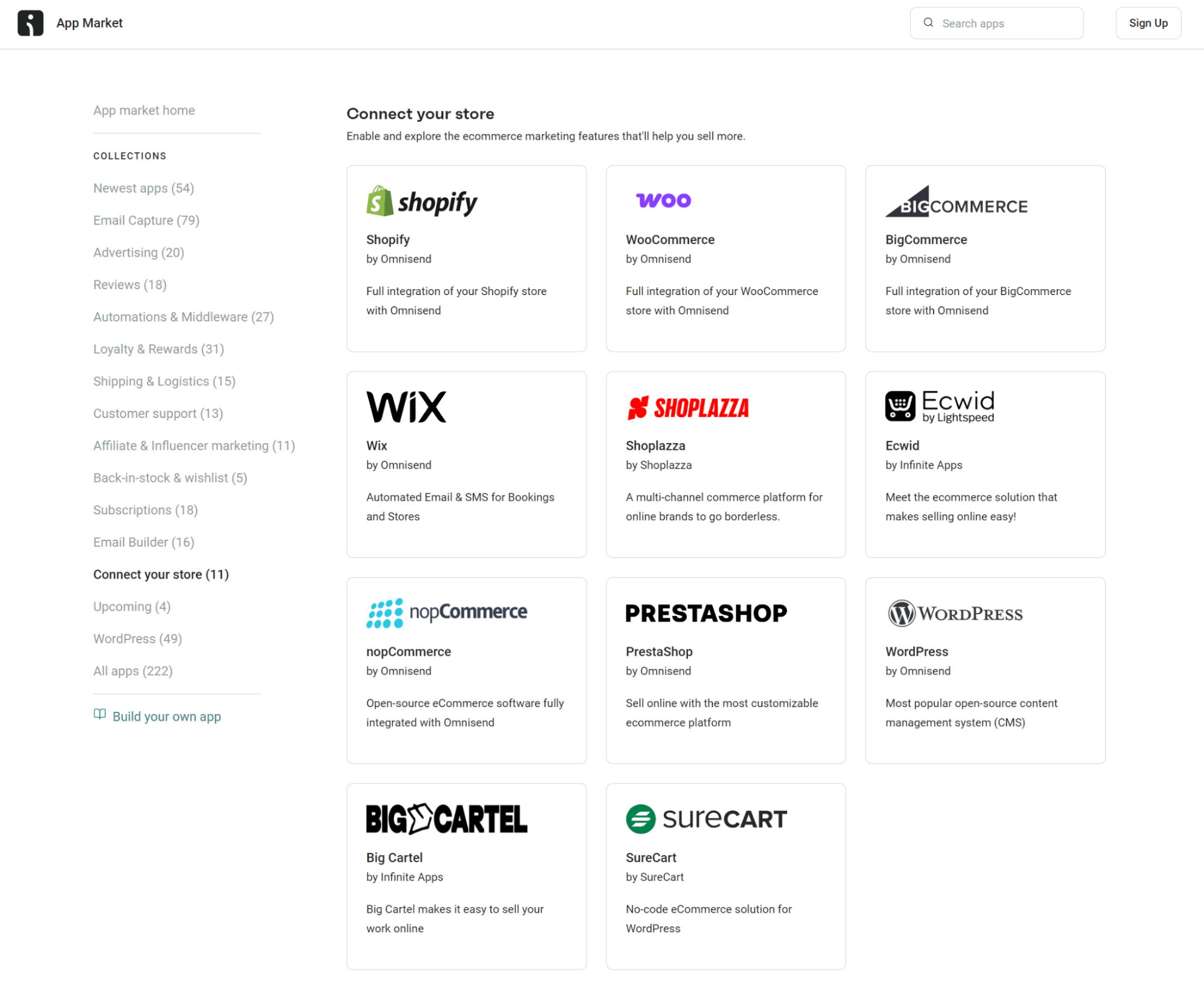
Omnisend has 11 native store integrations, including Shopify, WooCommerce, Wix, BigCommerce, Ecwid, and Shoplazza:
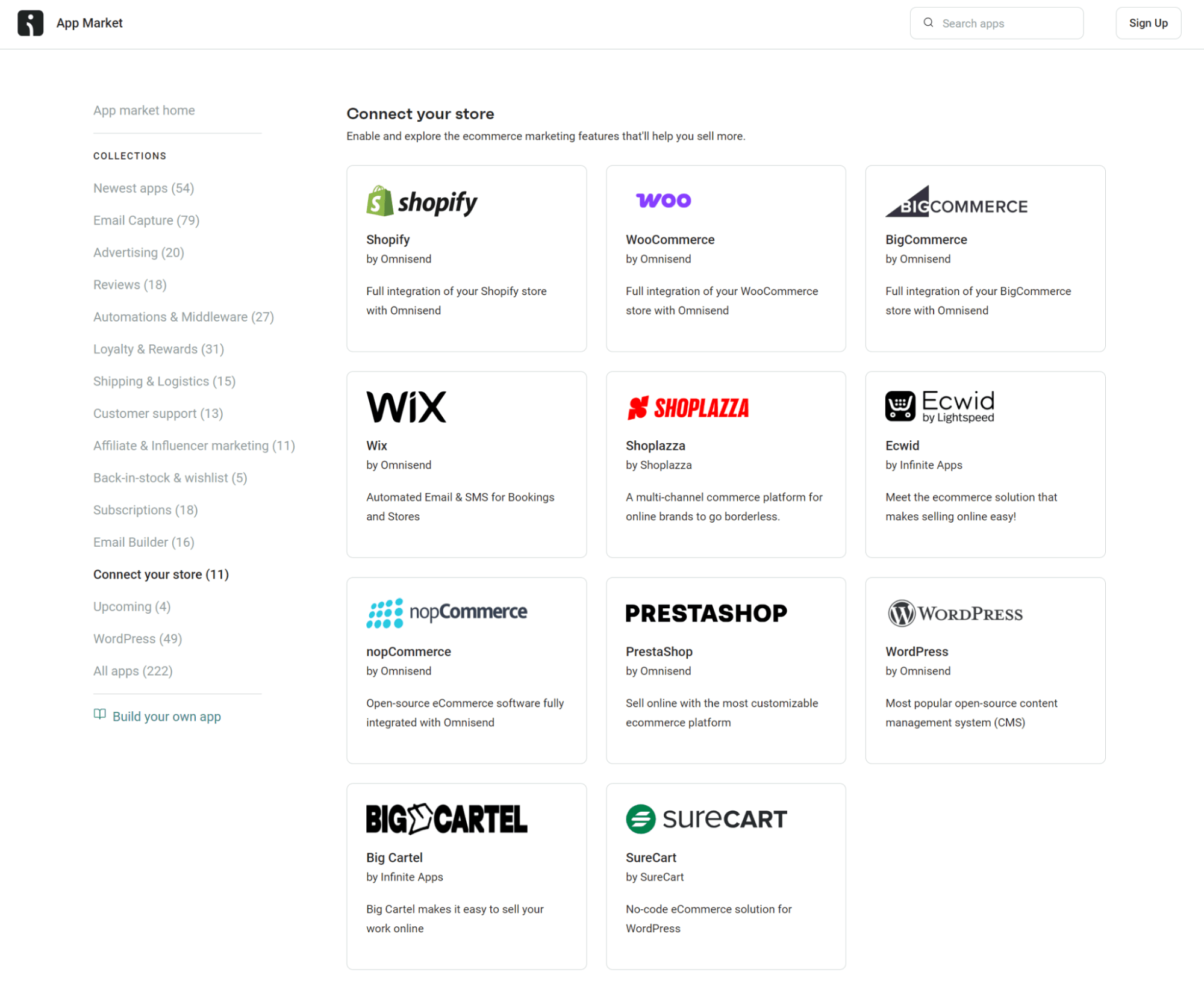
These one-click integrations require no code, and all your historical customer information and products will sync over automatically.
Should you have a custom ecommerce build, Omnisend provides a tracking snippet for the frontend and an API for the backend to match your setup and team. It requires more effort via the backend, but in return, you can use all automations.
Your store likely uses one of the 11 ecommerce platforms with native apps. If you’re not already a customer, you can create an Omnisend account and then install the app on your store, or install the Omnisend app first and then create an account.
2. Email marketing integrations
SMS is extremely effective for generating revenue with short, time-sensitive messages, but it’s even more effective when paired with email.
A multichannel marketing tool can cover email and SMS in one app, providing better value and reducing complexity across your customer communications.
Omnisend is one such tool. All plans include multichannel features for email, SMS, and web push notifications. Your email automations can have text messages in them, and you can create standalone campaigns for both channels, too.
For example, your multichannel automations could:
- Trigger an abandoned cart SMS after one hour and then an email after three hours
- Send a review request email two days after delivery and a follow-up text three days later to those who didn’t open or respond
Silver Street Jewellers uses SMS in flows to notify customers about email campaigns and encourage open rates in inboxes. Its multichannel approach generated $100K in revenue in three months and 100% month-over-month growth.
If you’re using a standalone SMS tool and don’t want to use a multichannel platform, then it at least needs to integrate with whichever email marketing tool you’re using. They can then share data, and your revenue attribution will be more accurate.
3. CRM and customer data platform (CDP) integrations
Your CRM or CDP has all your customer information, including what they’ve bought, where they are in their lifecycle, and how they’ve interacted with you.
Integrating your CRM with your SMS tool ensures that any new data generated by your marketing feeds into your CRM. Some integrations also let you update the contact profiles in your SMS tool with additional information held in your CRM.
The data flow from your CDP provides additional SMS marketing opportunities, such as:
- Welcome flows based on lead source
- SMS messages tied to deal or pipeline stage updates
- Segment-level offers drawn from account tags like wholesale or VIP
Omnisend covers much of what your ecommerce brand needs from a CRM for marketing purposes without being one. For instance:
- Customer profiles update automatically from your store data, and you can see purchase history and engagement in one place
- Lifecycle stages, such as first-time buyer, repeat customer, and at-risk, are built in
It then integrates with CRM and CDP platforms, such as Salesforce, HubSpot, and Blotout EdgeTag, to keep your customer data synced across platforms.
4. Personalization integrations
Omnisend lets you add customer names to your texts and reference locations, birthdays, the current date, and other elements using tags in message content. Your ecommerce integration also allows links to carts to encourage shopping:
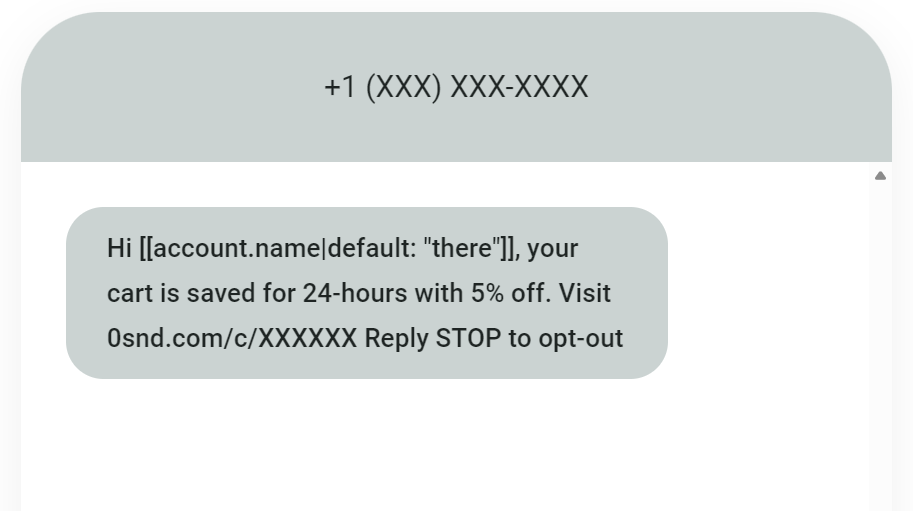
However, some SMS integrations can help you personalize your marketing further and provide more contextual messages:
- Prehook sends quiz answers into Omnisend as custom properties, so welcome texts can reference what each new subscriber told you at signup
- Nosto’s personalized product widgets work inside Omnisend emails, you can then encourage customers to open emails in SMS messages
- Yotpo Loyalty & Referrals syncs properties like points balance, VIP tier, and referral link in real time, plus custom events from points earned to tier lost
- Joy Loyalty syncs points balance, tier level, birthdays, and 16+ events like tier achieved, points expiring, and referrals completed
Each additional personalization integration feeds new data into your SMS tool that you can use somewhere in your marketing, be it within automated text messages or in emails.
If you have a multichannel marketing tool, such as Omnisend, you can use these integrations to populate your emails with personalized content and offers. Texts have only 160 characters, so native text-based personalization (names) is best.
5. Help desk and customer support integrations
Any customer service you manage via apps needs to sync with your SMS tool for automated messages. Integration lets you trigger appropriate texts across your customer journey and close the gap between support and these automations:
- Confirmations, e.g., successful signups
- Reminders, for the likes of upcoming appointments
- Alerts for account changes, such as password updates
- Follow-ups and review requests, after support resolution
Customers who contact support are higher-intent than average. Their activity can connect to your SMS marketing tool for retention marketing, with your messages reaching them in time to reduce churn risk and improve satisfaction.
Popular SMS integrations include Gorgias, Zendesk, and Help Scout. Omnisend integrates with Gorgias, so any US customer who replies to your SMS gets a ticket in Gorgias. Your support team can then reply from Gorgias, and survey scores and tags sync with Omnisend.
6. Loyalty and rewards program integrations
Some loyalty and rewards apps have built-in confirmation emails, but few are multichannel marketing tools that connect your loyalty and retention efforts across email and SMS.
It’s best practice to integrate these apps with your SMS tool rather than rely on their built-in messages to send automated texts based on customer activity and engagement. You can then cover these high-intent moments:
- Welcomes
- Referrals
- Earned points
- Points spent
- Rewards
- Expiration reminders
- Special offers
- VIP tier notifications
For instance, your loyalty program integrations tag a customer as a VIP, with that tag feeding into Omnisend, which then triggers a welcome series.
Of course, the extent of what you can automate via your SMS and loyalty app integration depends on the platform. Omnisend supports several loyalty apps, including Yotpo and Smile.
In Yotpo’s case, the integration is deep, syncing 40+ properties and 17 custom events to Omnisend, including points earned, tier changes, and referral completions. Smile syncs points balance, VIP tier, referral URL, customer state, and birthday, all available in segments and flows.
7. Subscription management integrations
Subscription apps often cover confirmation and reminder emails, but they have limited SMS and multichannel capabilities to cover all high-intent moments.
Additionally, the data is siloed in subscription apps, so your customer communications don’t connect with the rest of your marketing efforts.
An SMS integration is crucial here because the immediacy of texts prevents involuntary churn from expiring subscriptions, failed payments, and lapsed renewals.
SMS integrations bring data from your subscription tools into your marketing stack. Segment activity can trigger flows, as can behavior, for these messages:
- Reminders for renewals and upcoming payments
- Upsells to higher subscription tiers
- Cancellation-saving flows, offering last-chance discounts
- Reactivation offers for any lapsed and inactive customers
Recharge, Recurly, and Chargebee are popular SMS integrations with Omnisend. Chargebee covers 12 events for transactions, invoices, and trials.
The Recharge integration lets you trigger flows when subscriptions start, update, cancel, or reactivate. Recurly is another integration, allowing flows based on payment events to cover most confirmations, alerts, and reminders.
8. Shipping and logistics integrations
Your shipping and logistics app has all the information your customers need to know about their order while it’s being prepared and in transit. Yet it won’t allow marketing in text messages and connect revenue to notifications. That’s the remit of your SMS tool.
Integrating your SMS tool with your shipping and logistics app lets you provide timely transactional texts, delay and problem alerts, out-for-delivery notifications, and cross-sells inside of appropriate texts with related products.
Here’s an example flow:
- Your customer places an order
- Your shipping app receives the order
- The shipping app passes the status to your SMS tool
- Your SMS tool triggers the first shipping notification text
SMS integrations here reduce ‘where is my order?’ (WISMO) requests. You also get additional brand touchpoints to nurture and retain customers.
Omnisend’s shipping integrations include AfterShip, Wonderment, and ShipStation, among other popular logistics apps available on Shopify and WooCommerce.
Each of these integrations passes shipment events into your contact profiles in Omnisend. The AfterShip and Wonderment integrations are more advanced than the ShipStation one, covering the complete shipping lifecycle from confirmation through delivery.
9. Reviews and UGC integrations
Integrating your reviews and UGC apps with your SMS tool is one of the best opportunities to increase response rates and improve follow-up experiences.
With the right SMS integration, you can automate review requests in your marketing tool and feed responses and engagement data back into your contact profiles.
Yotpo, Okendo, Judge.me, Loox, Stamped, Reviews.io, and Junip are enormously popular apps, so much so that Omnisend integrates with each of them. You can then:
- Trigger post-purchase review request text messages
- Send reminder texts to customers who don’t respond
- Provide confirmation and thank-you messages
- Target responders with follow-up offers, such as loyalty bonuses
The responses your social proof apps collect can then feed into your future marketing. For instance, customers who respond to review requests can enter your ‘most active’ segment and receive timely special offers at high intent moments.
10. Returns management integrations
You might have self-serve return and exchange apps that let your customers handle their post-purchase options, or an app that only lets you initiate and confirm returns. Either app type benefits from SMS integration.
Integrating your SMS tool with returns apps lets you automate text message confirmations, offers, and status updates. Return updates via SMS are particularly beneficial to your customer experience and have the double bonus of reducing support requests.
Other use cases for this SMS integration include:
- Sending product recommendations to turn refunds into exchanges and sales
- Reminding customers about return windows
- Asking customers to leave a review, or rate their experience, following returns
Most returns management apps lack SMS capabilities, and some also lack email, so you’ll need a multichannel tool such as Omnisend to connect them.
A popular app is Loop. Loop integrates with Omnisend and syncs 12 custom events, including return creation, updates, labels, and refund transactions. It can then trigger flows to deliver text messages your customers expect and appreciate.
How to prioritize your SMS integrations
Apps and tools that contribute most to your customer experience, revenue, and retention deserve to be integrated into your SMS tool first.
Here’s how you can prioritize them for the best results:
- Pick a multichannel marketing tool to consolidate your stack by default. Omnisend customers achieved a $79 ROI for every $1 spent across SMS, email, and web push notification marketing in 2025.
- Integrate your ecommerce store. Connect your SMS tool to sync all your products and contacts. Omnisend has native Shopify and WooCommerce apps. All your customer details, purchase histories, and browsing behavior originate from your store. You need that integration to feed your tool with real-time data for segments and flows, including:
- Abandoned cart, browse, and checkout recovery
- Post-purchase thank-yous and cross-sells
- Back-in-stock alerts
- Order, shipping, and delivery confirmations
- Evaluate your SMS tool’s native features before adding more integrations. Some SMS integrations become unnecessary because the tool has features that can reduce your reliance on other apps, such as forms, popups, and CRM integration. Your costs could go down, and you’ll certainly remove complexity from managing multiple tools.
- Move on to the integrations closest to customer behavior next. These are likely loyalty programs, review tools such as Judge.me, subscription managers, and order trackers. Check your tool’s SMS integrations for connections via apps or API.
- Audit your integrations for ongoing management and upkeep. Some integrations feed into your SMS software without a hiccup or continuing work; others are less reliable and require regular checks. You’ll not know the full picture until after integrating. Be ruthless and replace integrations that don’t work well with ones that do.
The table below shows different integration types, their revenue impact, and the data they bring to your SMS tool when connected:
| Integration type | Revenue impact | Data available |
|---|---|---|
| Ecommerce platform (Shopify, WooCommerce) | High | Orders, carts, browse behavior, product catalog |
| Email channel | High | Opens, clicks, engagement, unified contact lists |
| Help desk (Gorgias, Zendesk) | Medium | Tickets, survey scores, support tags |
| Loyalty program (Yotpo, Smile.io, LoyaltyLion) | High for repeat-purchase brands | Points, tier changes, reward redemptions |
| Reviews and UGC (Okendo, Judge.me, Loox) | Medium | Ratings, review submissions |
| Subscription manager (Recharge, Recurly, Chargebee) | High for subscription brands | Renewals, billing events, payment failures |
| Shipping and tracking (AfterShip, Packlink PRO) | Low to medium | Shipment status, delivery updates, delays |
| Returns management (Loop, ParcelWILL) | Medium for return-heavy brands | Return requests, exchange data, refund status |
| CRM or CDP (Salesforce, HubSpot) | High for multichannel brands | Customer profiles, lifecycle stage, interaction history |
How Omnisend connects your entire ecommerce stack
Omnisend has 245+ native integrations, including 11 store platforms to pull in your data and sync engagement in real-time. Shopify, WooCommerce, Wix, and other popular platforms have apps, requiring no code to connect:
All Omnisend integrations are thoroughly tested and updated over time for stable, reliable connections. In fact, if you visit your ecommerce platform’s integrations page, you’ll find that the Omnisend app is a top-rated one. Some examples:
- Shopify, 4.8/5 based on 2,940+ reviews
- WooCommerce, 4.9/5 based on 165+ reviews
- BigCommerce, 4.47/5 based on 220+ reviews
Once you’ve connected your store to Omnisend, you can start with your loyalty, reviews, customer support, advertising, and other ecommerce integrations. Popular ones include Okendo, Gorgias, Judge.me, Yotpo, and Chargebee.
Any apps that aren’t natively supported are connectible using Zapier, Make, or Integrately, which are middleware tools offering thousands of connections.
Consolidating your marketing tools
Another advantage of Omnisend’s SMS marketing features is that it treats SMS, email, and web push notifications as primary channels.
You can consolidate your apps and reduce your costs and integration complexity versus running standalone SMS, back-in-stock, form, and email tools.
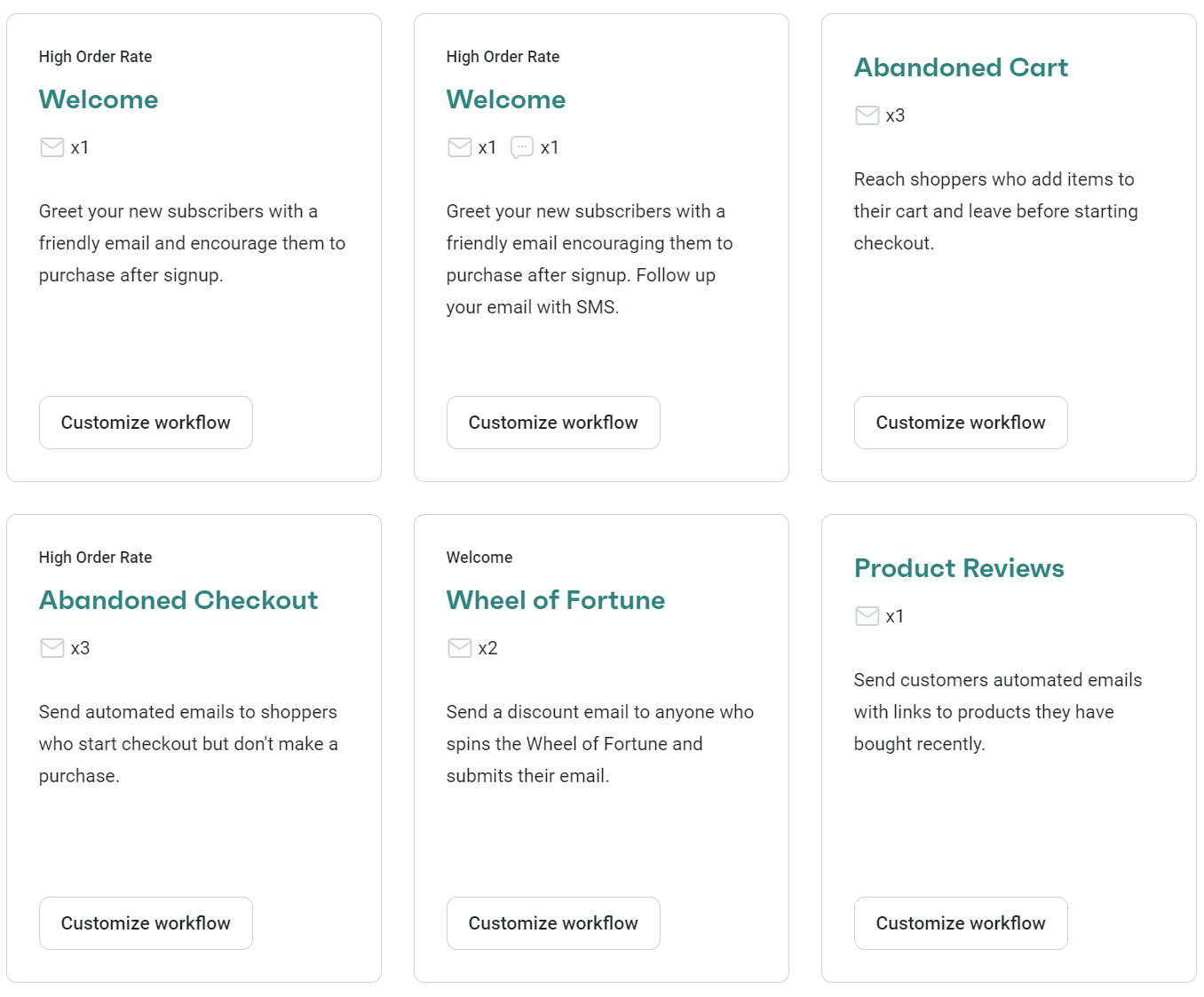
There are pre-built flows for welcome series, abandoned carts, stock alerts, review requests, cross-sells, and more, each letting you add SMS:
Omnisend’s positioning as an ecommerce tool is very different from the likes of Mailchimp, Brevo, and other tools that do both SMS and email. Its features help you maximize your revenue and retention without the learning curve of enterprise software.
The results speak for themselves, with Omnisend customers achieving a $79 ROI for every $1 spent in 2025 across all channels.
There’s also fantastic value in the Pro plan, which includes bonus SMS credits equal to the price of your monthly plan (e.g., $59 in credits when you spend $59).
All plans also include:
- Multichannel flows
- Global SMS coverage
- 24/7 live chat and email support
- Customer lifecycle stages
- Forms, popups, and landing pages
- AI features, including an AI segment builder and generative content
Conclusion
Many of the apps and tools your store uses have data points for SMS integration, letting you trigger flows that confirm, notify, and market to customers by text.
A multichannel marketing tool, such as Omnisend, brings your SMS and email marketing together in one app. Your customers can receive contextual messages, triggered via other apps, across email, SMS, and web push notifications.
The first integration to make to your SMS tool is to your ecommerce store so that your orders and products sync over. Move on to your revenue-generating and retention apps next, such as all the loyalty, reviews, and help desk apps you run.
If you haven’t chosen an SMS tool yet and have multiple apps, review their integration ecosystems first. Omnisend has 245+ native integrations and also connects with Zapier.
Quick sign up | No credit card required
FAQs
What is SMS integration?
SMS integration connects your other apps to your SMS tool. Your other apps then share information with your SMS tool and enable marketing automations, such as a thank-you SMS following delivery, or a confirmation SMS after your customer subscribes for rewards.
Which SMS integrations should I set up first?
Most important is integrating your ecommerce store first so that contact profiles feed into your SMS tool along with purchases and behavioral data. Then, move on to apps that generate revenue and are central to your customer experience, such as reviews apps.
Can I use integrations without coding?
Provided your SMS tool has native integrations or middleware apps such as Zapier, then yes, integrations don’t usually require coding. Apps that aren’t supported natively might require code and API access, but it depends on the app.
Do SMS integrations work internationally?
Your apps might have geolocation restrictions in some cases, but the main consideration is whether your SMS tool has global coverage for sends. Omnisend lets you send texts worldwide, but not all tools do, so verify coverage before signing up.