Omnisend AI


 OFFER
OFFER










The right ChatGPT prompts for Shopify can save you hours a week, once you know what to ask for. The more you tell ChatGPT about your product and audience, the less you fix afterward.
You can point ChatGPT at nearly every generative job that eats your time, from product descriptions and email campaigns to SEO and ad copy. The 25 prompts below let you swap in your own details and reuse them across tasks.
Getting your copy right matters more now than a year ago. When a shopper asks ChatGPT for a recommendation, your product data is part of what it draws on, so your words affect whether you surface at all. Shopify saw AI traffic to its stores grow eightfold year over year in early 2026.
Quick sign up | No credit card required
Did you know?
Shopify and OpenAI partnered up in 2025 for agentic commerce, letting ChatGPT recommend products from Shopify stores and send shoppers through to buy. Shopify’s move ties in with our research into Gen AI, finding that half of online shoppers now use it.
Read more: Half of online shoppers now use Gen AI
What are ChatGPT prompts for Shopify?
ChatGPT prompts for Shopify are the instructions you give ChatGPT to complete an ecommerce task, like writing a product description, improving page SEO, drafting an email, generating ad copy, or working through a customer support issue.
Context is what changes the output, and the more you feed ChatGPT, the better you can expect the outputs to be.
Here’s what our Shopify prompts contain for ChatGPT:
- The niche and products sold
- Product details: color, sizes, materials, warranty periods, and so on
- The audience, such as thrill-seekers or millennials
- A tone, be it playful, premium, plain-spoken, or corporate
- The goal, from a first sale to a recovered cart
What can ChatGPT do for Shopify stores?
ChatGPT is your on-demand writer for drafting product pages, email campaigns, SEO content, support replies, and more. It’s also an excellent analyzer. Here’s where it fits:
- Product descriptions and collection copy. ChatGPT can take your specifications and produce page copy for one product or a catalog.
- Email and SMS campaigns. Tell ChatGPT your topic, and it’ll provide a subject line, heading, prose, features, and CTA text for your marketing.
- Ad copy and social captions. Concise content that grabs your audience’s attention.
- SEO content. From FAQs and prose additions to complete product descriptions.
- Customer support replies. Draft answers to tickets in your policy language.
- Review analysis. Paste in customer reviews and have ChatGPT detail the complaints and requests that come up most.
- Bundles and offers. Ask ChatGPT to come up with sales and offer ideas that can increase your average order value.
- Promotion planning. Create a schedule for your promotions that runs through different marketing activities by date.
- AI shopping visibility. Produce content and metadata that AI chatbots can see and include in their results.
What ChatGPT can’t do is a human editorial pass on your prompts or its own outputs. It’s up to you to verify before using them in your business.
ChatGPT prompts for Shopify you can copy
Copy and paste the prompts below into your text editor or directly in ChatGPT and replace the default content and placeholders with your details.
We’ve grouped the Shopify prompts into tasks from product pages to customer support. Each includes context, tone, goal, and an output format to provide ChatGPT with what it needs. These jump links will take you to the tasks that interest you:
- Product page prompts
- Prompts for Shopify email and SMS marketing
- Prompts for Shopify SEO and AI
- Ad copy and social media prompts
- Prompts for Shopify customer support
ChatGPT product page prompts
Your product pages should show shoppers that your item solves their problem and make them eager to buy now. A basic description won’t do that. The best Shopify AI prompts take your product information and create professional sales copy.
ChatGPT can produce content that moves your customer to purchase with a prompt detailing product type, audience, tone, output format, and customer pain points.
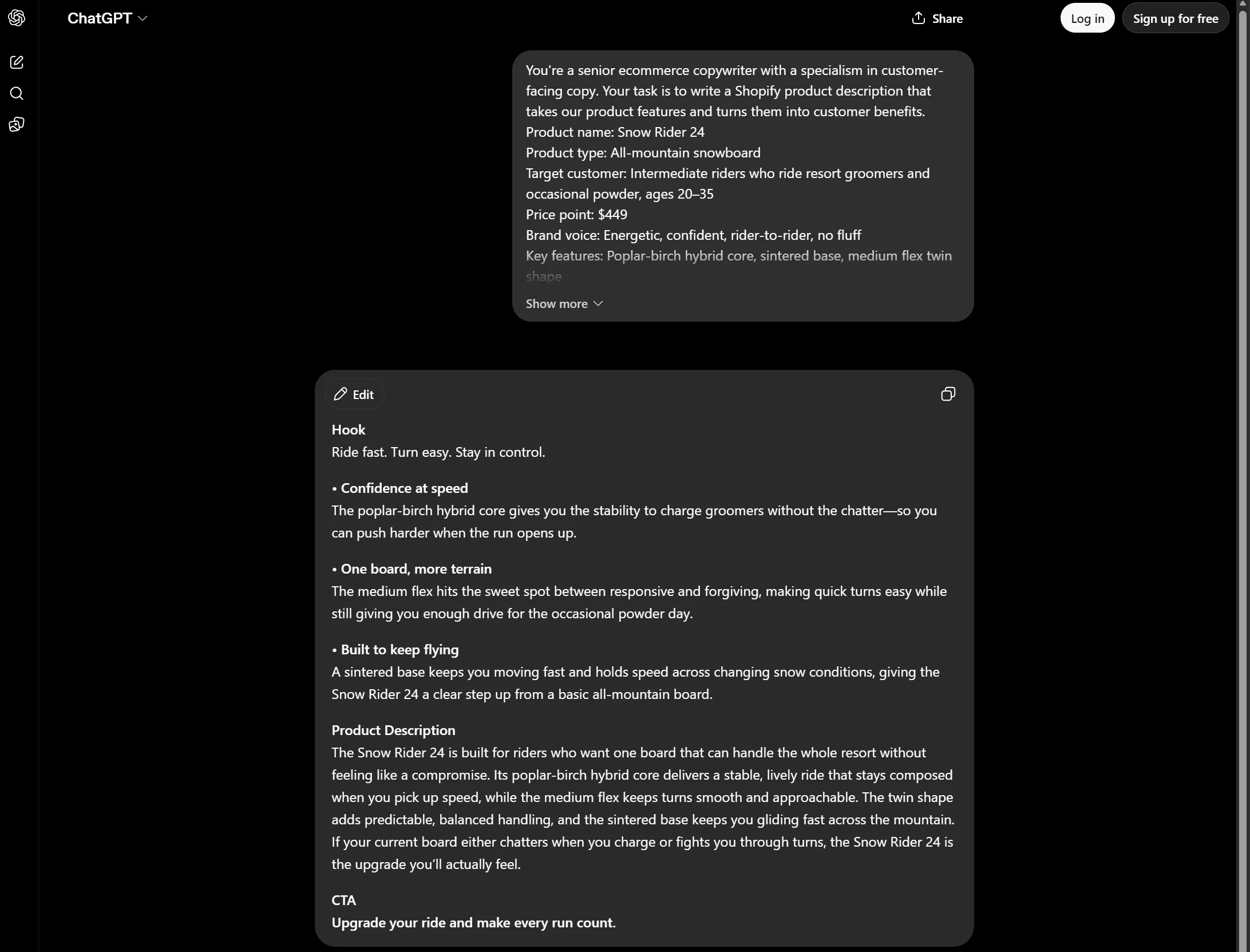
1. Feature-to-benefit product description
Use this prompt to turn features into benefits people can relate to. It fixes a common mistake in product copy: saying what your product is instead of what it does for your customer.
You’re a senior ecommerce copywriter with a specialism in customer-facing copy. Your task is to write a Shopify product description that takes our product features and turns them into customer benefits.
Product name: [PRODUCT_NAME]
Product type: [PRODUCT_TYPE]
Target customer: [TARGET_CUSTOMER]
Price point: [PRICE_POINT]
Brand voice: [BRAND_VOICE]
Key features: [FEATURE_1], [FEATURE_2], [FEATURE_3]
Main customer pain point: [PAIN_POINT]
Main customer objection: [OBJECTION]
Output format:
– One hook
– Three benefit-focused bullet points
– One 80–100 word product description
– A one-line CTA
Keep the copy on-brand, natural, and focused on why the customer should buy this product.
2. Positioning against competitor products
Use this prompt to make your product copy more persuasive than competitors. Your customers will know why your product is the better fit for them.
You’re a senior ecommerce copywriter for this task and should follow the instructions below perfectly.
Write a Shopify product page copy that positions [PRODUCT_NAME] against [COMPETING_PRODUCT_OR_ALTERNATIVE].
Product type: [PRODUCT_TYPE]
Target customer: [TARGET_CUSTOMER]
Main comparison point: [COMPARISON_POINT]
Key benefits of our product: [BENEFIT_1], [BENEFIT_2], [BENEFIT_3]
Main reason customers compare these products: [REASON]
Brand voice: [BRAND_VOICE]
Output format:
– One opening hook
– Three comparison-based benefit bullets
– One 80–100 word product description
– One CTA no longer than [WORD_COUNT] words
Make the copy persuasive but fair. Avoid attacking the competing product directly.
3. Rewriting product copy for a different audience
Use this prompt to take the product copy you already have and reposition it for another customer group without losing your brand voice.
Act as an ecommerce copywriter.
Rewrite this Shopify product description for a different target audience.
Original product description: [PASTE_CURRENT_DESCRIPTION]
Product name: [PRODUCT_NAME]
Product type: [PRODUCT_TYPE]
Current audience: [CURRENT_AUDIENCE]
New target audience: [NEW_TARGET_AUDIENCE]
Features to keep: [FEATURE_1], [FEATURE_2], [FEATURE_3]
New angle or pain point: [NEW_ANGLE]
Brand voice: [BRAND_VOICE]
Output format:
– One revised hook
– Three benefit bullets for the new audience
– One rewritten product description
– One CTA
Keep the product details accurate, but adjust the messaging so it feels relevant to the new audience.
4. Explaining technical features in simple language
Use this prompt to turn complex product details into understandable ones. It’ll give your product pages sufficient explainers for your audience.
Act as a Shopify product copywriter who explains technical features in simple language.
Rewrite the technical details for this product so customers understand why they matter.
Product name: [PRODUCT_NAME]
Product type: [PRODUCT_TYPE]
Technical feature: [TECHNICAL_FEATURE]
Target customer: [TARGET_CUSTOMER]
Customer knowledge level: [BEGINNER / INTERMEDIATE / ADVANCED]
Main benefit of the feature: [MAIN_BENEFIT]
Brand voice: [BRAND_VOICE]
Output format:
– One simple explanation of the feature
– Three customer benefits
– One product page paragraph
– One FAQ-style answer
5. Creating urgency for seasonal or limited-edition products
Use this prompt for temporary product copy that needs to raise the stakes and convert more customers during a limited window.
Today you’re an ecommerce copywriter tasked with writing a product description that feels urgent.
Write a Shopify product description for a seasonal or limited-edition product.
Product name: [PRODUCT_NAME]
Product type: [PRODUCT_TYPE]
Season or occasion: [SEASON_OR_OCCASION]
Target customer: [TARGET_CUSTOMER]
Key product details: [DETAIL_1], [DETAIL_2], [DETAIL_3]
Reason to buy now: [URGENCY_REASON]
Brand voice: [BRAND_VOICE]
Output format:
– One seasonal product hook
– Three benefit-focused bullet points
– One 80–100 word product description
– One urgency-focused CTA
Create urgency without sounding pushy or using exaggerated scarcity claims.
ChatGPT prompts for Shopify email and SMS marketing
ChatGPT’s first drafts for email marketing and SMS copy give you a starting point, and they’re particularly helpful when writing for multiple segments.
Your email and SMS prompts should include the campaign type, segment, product details, tone, offers, and character limits. Be careful to review these outputs for accuracy, because once you send them, you can’t recall them.
6. Cart abandonment without discounts
Use this prompt to produce copy for an abandoned cart email that doesn’t cut your margin on sales you might have won anyway.
Act as an ecommerce email copywriter.
Write an abandoned cart email for a Shopify store.
Store type: [STORE_TYPE]
Product category left in cart: [PRODUCT_CATEGORY]
Target customer: [TARGET_CUSTOMER]
Time since cart abandonment: [TIME_SINCE_ABANDONMENT]
Main reason customers hesitate: [OBJECTION]
Offer or incentive, if any: [OFFER_OR_INCENTIVE]
Brand voice: [BRAND_VOICE]
Output format:
– Subject line
– Preview text
– Email body
– CTA button text
Keep the tone helpful, not pushy.
7. Post-purchase email with upsell
Use this prompt for email copy that keeps the conversation alive with customers and moves them towards purchasing another product.
Act as an ecommerce retention marketer.
Write a post-purchase email for a Shopify customer.
Store type: [STORE_TYPE]
Product purchased: [PRODUCT_PURCHASED]
Related product or upsell: [RELATED_PRODUCT]
Time after delivery: [TIME_AFTER_DELIVERY]
Customer type: [FIRST_TIME_CUSTOMER / REPEAT_CUSTOMER]
Main goal: [GOAL]
Brand voice: [BRAND_VOICE]
Output format:
– Subject line
– Preview text
– Thank-you message
– Upsell section
– CTA button text
8. Personalized re-engagement email
Use this prompt for win-back emails to customers who have gone quiet. Your copy and timing could be enough to restart the relationship.
Act as an ecommerce email strategist.
Write a re-engagement email for inactive Shopify customers.
Store type: [STORE_TYPE]
Customer segment: [CUSTOMER_SEGMENT]
Time since last purchase: [TIME_SINCE_LAST_PURCHASE]
Last purchased category: [LAST_PURCHASED_CATEGORY]
New products or offer to mention: [PRODUCTS_OR_OFFER]
Brand voice: [BRAND_VOICE]
Output format:
– Subject line
– Preview text
– Email body
– Personalized product recommendation section
– CTA button text
9. VIP early access campaign
Use this prompt to write emails for customers who don’t need discounts to purchase but still need occasional offers to keep them engaged.
You’re an ecommerce lifecycle marketer.
Write an email and SMS campaign for VIP customers.
Store type: [STORE_TYPE]
Campaign or launch: [CAMPAIGN_OR_LAUNCH]
VIP criteria: [VIP_CRITERIA]
Early access timing: [EARLY_ACCESS_TIMING]
Offer or benefit: [OFFER_OR_BENEFIT]
Brand voice: [BRAND_VOICE]
Output format:
– Email subject line
– Email preview text
– Email body
– SMS message under [CHARACTER_LIMIT] characters
– CTA text
Make VIP customers feel appreciated, not just targeted with another promotion.
10. Welcome email and SMS series
Use this prompt for your first email and SMS sequence for new subscribers to introduce your brand and recommend products.
Act as an ecommerce lifecycle marketer.
Create a welcome email and SMS series for a Shopify store.
Store type: [STORE_TYPE]
Product category: [PRODUCT_CATEGORY]
New subscriber type: [EMAIL_SUBSCRIBER / SMS_SUBSCRIBER / FIRST_TIME_CUSTOMER]
Target customer: [TARGET_CUSTOMER]
Brand voice: [BRAND_VOICE]
Main offer or incentive: [OFFER]
Main goal: [GOAL]
Output format:
– Email 1 subject line, preview text, body, and CTA
– Email 2 subject line, preview text, body, and CTA
– Email 3 subject line, preview text, body, and CTA
– One SMS message under [CHARACTER_LIMIT] characters
– An explanation of the goal of each message within [WORD_COUNT] words
Make the series helpful, brand-focused, and sales-aware without overwhelming new subscribers.
Once you’ve drafted your email and SMS copy, you can paste it into Omnisend’s templates for campaigns and automated messages. The email builder lets you modify text even further with AI and suggests multiple optional edits.
Quick sign up | No credit card required
ChatGPT prompts for Shopify SEO and AI
ChatGPT can help you optimize your Shopify store for search and AI with page titles and metadata, plus copy for products, collection pages, blog posts, images, and more. Google and ChatGPT can then better understand your store and surface it to people.
What ChatGPT isn’t is an SEO expert or specialist tool. Check its outputs, such as meta description length and keyword usage, with SEO tools and edit for accuracy before publication.
11. Product title and meta description optimization
Use this prompt to properly describe your products to search engines, and also encourage people to click through when they see your listing.
Act as an ecommerce SEO specialist.
Rewrite the Shopify product title and meta description for this product.
Product name: [PRODUCT_NAME]
Product type: [PRODUCT_TYPE]
Primary keyword: [PRIMARY_KEYWORD]
Secondary keywords: [SECONDARY_KEYWORDS]
Target customer: [TARGET_CUSTOMER]
Current product title: [CURRENT_TITLE]
Current meta description: [CURRENT_META_DESCRIPTION]
Main product benefit: [MAIN_BENEFIT]
Brand voice: [BRAND_VOICE]
Output format:
– Three optimized product title options under 60 characters
– Three meta description options under 155 characters
– One recommendation explaining which version to use
Keep the copy clear, accurate, and click-worthy without keyword stuffing.
12. Shopify blog topic ideas from keyword research
Use this prompt to take your store’s categories and the questions customers ask, and return blog topics that target searches before they buy.
Act as an ecommerce SEO content strategist.
Create blog topic ideas for a Shopify store based on customer search intent.
Store type: [STORE_TYPE]
Product categories: [PRODUCT_CATEGORIES]
Target customer: [TARGET_CUSTOMER]
Primary keyword theme: [KEYWORD_THEME]
Customer questions or pain points: [CUSTOMER_QUESTIONS]
Products to support: [PRODUCTS_TO_SUPPORT]
Brand voice: [BRAND_VOICE]
Output format:
– Five blog topic ideas
– Suggested target keyword for each topic
– Search intent for each topic
– Product or collection page to internally link to
– A one-line explanation of why each topic could support sales
Focus on useful topics customers search before buying.
13. Product page SEO rewrite
Use this prompt to redo your product pages with considered keyword placement and search intent positioning.
Rewrite this product page copy to improve clarity, search relevance, and conversion potential.
Product name: [PRODUCT_NAME]
Product type: [PRODUCT_TYPE]
Primary keyword: [PRIMARY_KEYWORD]
Secondary keywords: [SECONDARY_KEYWORDS]
Target customer: [TARGET_CUSTOMER]
Current product copy: [PASTE_CURRENT_COPY]
Key product details: [DETAIL_1], [DETAIL_2], [DETAIL_3]
Main customer objection: [OBJECTION]
Brand voice: [BRAND_VOICE]
Output format:
– One revised product description
– Three benefit bullets
– One FAQ section with three questions
– Suggested internal link anchor text
Use the keywords naturally and avoid repetitive or generic wording.
14. Product FAQ for AI search and shoppers
Use this prompt to add a structured Q&A layer to your product pages that AI assistants can use to present answers to your customers.
Act as an ecommerce SEO and customer experience specialist.
Create a product FAQ section for this Shopify product.
Product name: [PRODUCT_NAME]
Product type: [PRODUCT_TYPE]
Target customer: [TARGET_CUSTOMER]
Primary keyword: [PRIMARY_KEYWORD]
Key product details: [MATERIALS / SIZE / USE_CASE / COMPATIBILITY / CARE_INSTRUCTIONS]
Common customer questions: [CUSTOMER_QUESTIONS]
Shipping or return details to mention: [POLICY_DETAILS]
Brand voice: [BRAND_VOICE]
Output format:
– Five customer-focused FAQ questions
– A brief answer for each question
– One suggested FAQ to feature near the add-to-cart button
– One suggested FAQ for AI search/product discovery
Keep answers accurate and helpful. Do not invent product details.
15. Image alt text for Shopify products
Use this prompt for descriptions of your images that screen readers can see and search engines can read to understand the image’s context.
Act as an ecommerce SEO specialist with accessibility knowledge.
Write image alt text for Shopify product images.
Product name: [PRODUCT_NAME]
Product type: [PRODUCT_TYPE]
Primary keyword, if relevant: [PRIMARY_KEYWORD]
Image details: [DESCRIBE_EACH_IMAGE]
Important product attributes: [COLOR / MATERIAL / PATTERN / SIZE / STYLE]
Brand voice: [BRAND_VOICE]
Output format:
– Alt text for each image
– Keep each alt text under 125 characters
– Mention visible product details only
– Include keywords naturally where appropriate
Do not keyword-stuff or describe anything that is not visible in the image.
ChatGPT ad copy and social media prompts
Your interruption-based marketing efforts across paid and organic social channels will benefit from ChatGPT’s outputs. Your Shopify AI prompts should include the platform, product, audience, tone, and your campaign goal for a good first output.
Review outputs before publishing to ensure there are no ad claim, character limit, and platform rules violations that need fixing.
16. Facebook ad variations
Use this prompt to receive multiple ad copy versions to test. You’ll receive ad copy with different angles from price to social proof.
Act as a paid social copywriter for ecommerce brands.
Write Facebook ad copy variations for a Shopify product.
Store type: [STORE_TYPE]
Product name: [PRODUCT_NAME]
Product type: [PRODUCT_TYPE]
Target customer: [TARGET_CUSTOMER]
Campaign goal: [AWARENESS / TRAFFIC / CONVERSIONS / RETARGETING]
Offer: [OFFER]
Main product benefit: [MAIN_BENEFIT]
Customer objection: [OBJECTION]
Brand voice: [BRAND_VOICE]
Output format:
– Three primary text options
– Three headline options
– Three CTA suggestions
– An explanation of each variation’s angle within [WORD_COUNT] words
Make each version test a different angle, such as savings, product benefits, social proof, urgency, or problem-solving.
17. Instagram carousel content
Use this prompt to receive multiple smaller pieces of copy for your Instagram carousel, each written to move people through your post.
Act as a social media strategist for a Shopify brand.
Create an Instagram carousel for this product or campaign.
Store type: [STORE_TYPE]
Product name or category: [PRODUCT_OR_CATEGORY]
Target customer: [TARGET_CUSTOMER]
Carousel goal: [EDUCATE / PROMOTE / LAUNCH / BUILD TRUST]
Main message: [MAIN_MESSAGE]
Product benefits: [BENEFIT_1], [BENEFIT_2], [BENEFIT_3]
Brand voice: [BRAND_VOICE]
Output format:
– Carousel title
– Slide-by-slide outline for [NUMBER_OF_SLIDES] slides
– Captions
– CTA
– Hashtag suggestions
Make each slide clear, visual, and easy to understand quickly.
18. TikTok video concept
Use this prompt to produce multiple video ideas around customer pain points and product benefits.
Act as a TikTok content strategist for ecommerce brands.
Create TikTok video ideas for a Shopify product.
Store type: [STORE_TYPE]
Product name: [PRODUCT_NAME]
Product type: [PRODUCT_TYPE]
Target customer: [TARGET_CUSTOMER]
Main customer pain point: [PAIN_POINT]
Product benefit: [BENEFIT]
Campaign goal: [GOAL]
Brand voice: [BRAND_VOICE]
Output format:
– Five TikTok video ideas
– Hook for each video
– Brief scene-by-scene outline
– Suggested on-screen text
– CTA
Focus on simple, realistic video ideas that can be created without a large production budget.
19. Customer review social posts
Use this prompt to adapt customer reviews into posts for your social media and then surface them on additional channels to your Shopify store.
Act as an ecommerce social media copywriter.
Turn these customer reviews into social media posts for a Shopify brand.
Store type: [STORE_TYPE]
Product name or category: [PRODUCT_OR_CATEGORY]
Target customer: [TARGET_CUSTOMER]
Customer reviews: [PASTE_REVIEWS]
Main product benefit to highlight: [BENEFIT]
Platforms: [INSTAGRAM / FACEBOOK / TIKTOK / LINKEDIN]
Brand voice: [BRAND_VOICE]
Output format:
– Three Instagram caption options
– Three Facebook post options
– Three quick TikTok hook ideas
– One CTA for each platform
Keep the posts natural and customer-led. Do not exaggerate or change the meaning of the reviews.
20. Seasonal campaign angles
Use this prompt for fresh ideas around Black Friday and other occasions. It’ll help you avoid stale, overdone ideas and stand out.
Act as an ecommerce campaign strategist.
Create seasonal ad and social media angles for a Shopify campaign.
Store type: [STORE_TYPE]
Product category: [PRODUCT_CATEGORY]
Season, holiday, or occasion: [SEASON_OR_OCCASION]
Target customer: [TARGET_CUSTOMER]
Offer: [OFFER]
Campaign goal: [GOAL]
Brand voice: [BRAND_VOICE]
Angles to avoid: [ANGLES_TO_AVOID]
Output format:
– Five campaign angles
– One ad hook for each angle
– One social media caption for each angle
– Suggested CTA
– One explanation for how each angle could work
Avoid overused seasonal clichés and make each angle unique to the product and audience.
ChatGPT prompts for Shopify customer support
Your first human response might not be the most empathetic or helpful one. ChatGPT can draft replies and follow-ups that your customers appreciate, and that reduce demand on your support for damaged products, lost packages, delays, returns, and so on.
Prompts should include your customer issue, order context, store policy, customer tone, and desired resolution. Review all outputs for accuracy before sending them.
21. Damaged product response
Use this prompt to create a response that moves fast and provides the next step, without over-promising or contradicting your Shopify store policy.
Act as an ecommerce customer support specialist.
Write a customer support reply for a Shopify customer whose product arrived damaged.
Store type: [STORE_TYPE]
Product ordered: [PRODUCT_NAME]
Customer issue: [CUSTOMER_ISSUE]
Order context: [ORDER_DETAILS]
Store policy: [STORE_POLICY]
Resolution offered: [REPLACEMENT / REFUND / STORE_CREDIT / OTHER]
Customer tone: [CALM / FRUSTRATED / ANGRY]
Brand voice: [BRAND_VOICE]
Output format:
– Apologize in the first [WORD_COUNT] words
– Clear explanation of the next step
– Resolution details
– Any information the customer needs to provide
– Friendly closing line
Keep the response empathetic, clear, and policy-aligned. Do not blame the customer or shipping partner.
22. Lost package reply
Use this prompt to de-escalate and acknowledge your customer’s lost package. It’ll explain how you can help rather than directing them straight to the courier.
Act as an ecommerce customer support specialist.
Write a reply to a Shopify customer whose package appears to be lost.
Store type: [STORE_TYPE]
Product or order type: [PRODUCT_OR_ORDER_TYPE]
Shipping status: [SHIPPING_STATUS]
Time since order date: [TIME_SINCE_ORDER]
What has already been checked: [TRACKING / CARRIER / ADDRESS / OTHER]
Store policy: [STORE_POLICY]
Resolution options: [RESOLUTION_OPTIONS]
Customer tone: [CUSTOMER_TONE]
Brand voice: [BRAND_VOICE]
Output format:
– Acknowledgment of the issue
– Explanation of what is being checked
– Two possible next steps
– Expected timeline
– Support closing line
Take responsibility for helping the customer, but do not make claims you cannot confirm.
23. Shipping delay follow-up
Use this prompt when you need to proactively email your customer about a delay, such as due to adverse weather or late stock delivery.
Act as an ecommerce customer communication specialist.
Write a shipping delay follow-up email for Shopify customers.
Store type: [STORE_TYPE]
Product or order category: [PRODUCT_OR_ORDER_CATEGORY]
Reason for delay: [DELAY_REASON]
Original delivery estimate: [ORIGINAL_DELIVERY_DATE]
New estimated delivery date: [NEW_DELIVERY_DATE]
What the customer can do next: [NEXT_STEP]
Compensation, if any: [COMPENSATION]
Brand voice: [BRAND_VOICE]
Output format:
– Subject line
– Preview text
– Email body within [WORD_COUNT] words
– Optional SMS version under [CHARACTER_LIMIT] characters
– CTA or support link text
Be honest and helpful. Explain the delay clearly without over-apologizing, overpromising, or blaming the carrier.
24. Return request for a final sale item
Use this prompt to respond politely to final sale return requests and provide a resolution if you offer one.
Act as an ecommerce customer support manager.
Write a response to a Shopify customer requesting a return for a final sale item.
Store type: [STORE_TYPE]
Product ordered: [PRODUCT_NAME]
Customer request: [CUSTOMER_REQUEST]
Reason for the request: [CUSTOMER_REASON]
Store return policy: [RETURN_POLICY]
Reason the item was final sale: [REASON]
Alternative resolution, if any: [STORE_CREDIT / EXCHANGE / DISCOUNT / NONE]
Customer tone: [CUSTOMER_TONE]
Brand voice: [BRAND_VOICE]
Output format:
– Empathetic opening
– Clear explanation of the policy
– Alternative solution, if available
– Next step for the customer
– Friendly closing
Hold the policy clearly, but keep the tone respectful and customer-focused.
25. Negative review response
Use this prompt to create a professional response to poor reviews without making the age-old mistake of sending an automated one that frustrates customers further.
Act as an ecommerce customer support and reputation management specialist.
Write a public response to a negative review for a Shopify store.
Store type: [STORE_TYPE]
Product reviewed: [PRODUCT_NAME]
Review summary: [REVIEW_SUMMARY]
Customer complaint: [CUSTOMER_COMPLAINT]
What the store can offer: [RESOLUTION_OR_NEXT_STEP]
Store policy, if relevant: [STORE_POLICY]
Brand voice: [BRAND_VOICE]
Output format:
– A public response within [WORD_COUNT] words
– Empathetic opening
– Acknowledgment of the issue
– Suggested next step
– Calm closing line
Keep the response professional and helpful. Do not argue with the customer, reveal private order details, or make claims that cannot be verified.
How to write better ChatGPT prompts for Shopify
Detail and structure provide ChatGPT with what it needs to give you high-quality outputs the first time around. These tips will help you keep revisions down to a minimum:
- The task. Say whether you’re after a product description or a cart-recovery email. Don’t let ChatGPT guess at what you’re doing.
- Store and product context. Add your niche and product positioning as core insights to your prompt.
- Intended audience. Gift buyers weigh presentation; hobbyists weigh the technical side. The audience you name changes which benefits ChatGPT leads with.
- Brand voice. Give it two or three brands you sound like or paste a paragraph of your own copy. You could also feed ChatGPT banned words and phrases.
- Product details. Provide features and specifications, and tell ChatGPT which of those are important topics to cover.
- Output format. Ask for “50 words in two paragraphs,” and you can paste it in. Ask for “a description,” and you’ll get a much longer piece of content that requires more reformatting.
- Multiple variants. Ask for three to five variations of any email, ad, or product line, then A/B test the winners.
- Your edit. Nothing publishes until you’ve checked the facts and prices against your store and the words sound like you.
Conclusion
ChatGPT prompts for Shopify provide you with workable first drafts for generative content tasks and save you significant time in the process.
Your product pages, email and SMS campaigns, SEO, ads and social media, and customer service can all benefit from ChatGPT.
The trick is to prompt ChatGPT with your product details, audience, brand voice, goals, and the output format that you want from it, and you’ll get usable drafts back.
A thorough human review of all outputs remains necessary before publication because ChatGPT can make mistakes. Always proofread the content and check the facts and figures.
Quick sign up | No credit card required
FAQ
Can I use these prompts with any AI tool?
Yes, you can use our Shopify AI prompts for other tools such as Claude and Perplexity. The outputs will be different, but the substance will be there.
What makes an AI prompt good?
Detail makes an AI prompt good, especially when you’re asking ChatGPT to produce content for your store. Hand it your niche, product, audience data, tone of voice, and an output format, and your content will be far more usable than a one-line prompt gives you.
Can I integrate ChatGPT directly with Shopify?
Yes, you can call the OpenAI API in your own Shopify apps or backend, and install third-party apps that use ChatGPT. ChatGPT is already a Shopify sales channel for agentic commerce, where it recommends your products and can send customers to purchase in your store. There isn’t an official ChatGPT app.
What tasks can ChatGPT automate in my Shopify store?
ChatGPT can automate content creation, and it’s helpful for behind-the-scenes work, such as analyzing reviews and building your brand voice. Apps with MCP integration can also get ChatGPT to do work for you. Omnisend is one example, letting you build campaigns and segments in your account from the chat.