Omnisend AI
 OFFER



The best discount emails put the savings amount in the subject line or preheader, include an end date in the copy, and add a button to claim the discount.
A discount email is one whose main message is a percentage or dollar off, free shipping, or a gift, sent as a code, a QR code, or an auto-apply link.
Seven of the 12 ask for a typed code, only one shows the end date up front, and ten put the discount in the subject line or preheader. Here are 12 emails, what to copy from each, and 18 subject lines.
Quick sign up | No credit card required
12 discount email examples
The 12 discount emails below cover welcome, abandoned cart, seasonal, and member offers, and each one shows a tactic you can copy. Each example was chosen because it went out in the last 18 months, shows the offer and how to redeem it, and teaches something the others don’t.
They run in the order a shopper encounters them, from the welcome email to member perks, and the best email marketing campaigns roundup has more ideas.
| Brand | Industry | Differentiator |
|---|---|---|
| 1. Bed Bath & Beyond | Home goods | A code with a window |
| 2. Joy Supply | Cookies | A code you’ll remember |
| 3. TN Nursery | Plants and garden | A last call that stacks |
| 4. Cold Freak | Frozen desserts | The worry first, then 5% |
| 5. Different Dog | Fresh dog food | A bigger offer, then samples |
| 6. Bloom Nutrition | Supplements | Add-ons under the item |
| 7. Seed | Probiotics | A joke, then 40% |
| 8. People’s Beauty | Skincare | Code or one tap |
| 9. Primal Kitchen | Pantry and collagen | A Halloween BOGO |
| 10. FOUND | Fashion | A 72-hour head start |
| 11. Hydro Flask | Drinkware | Points next to the deal |
| 12. IKEA | Home furnishing | A member card inside |
1. Bed Bath & Beyond: A code with a window
Subject line: You’re home! 🏠
Preheader: Here’s 15% off, just for you
Type: Welcome
Trigger: Welcome automation after email sign-up
Sent: In the welcome flow after sign-up (October 13, 2026)
Why this email works
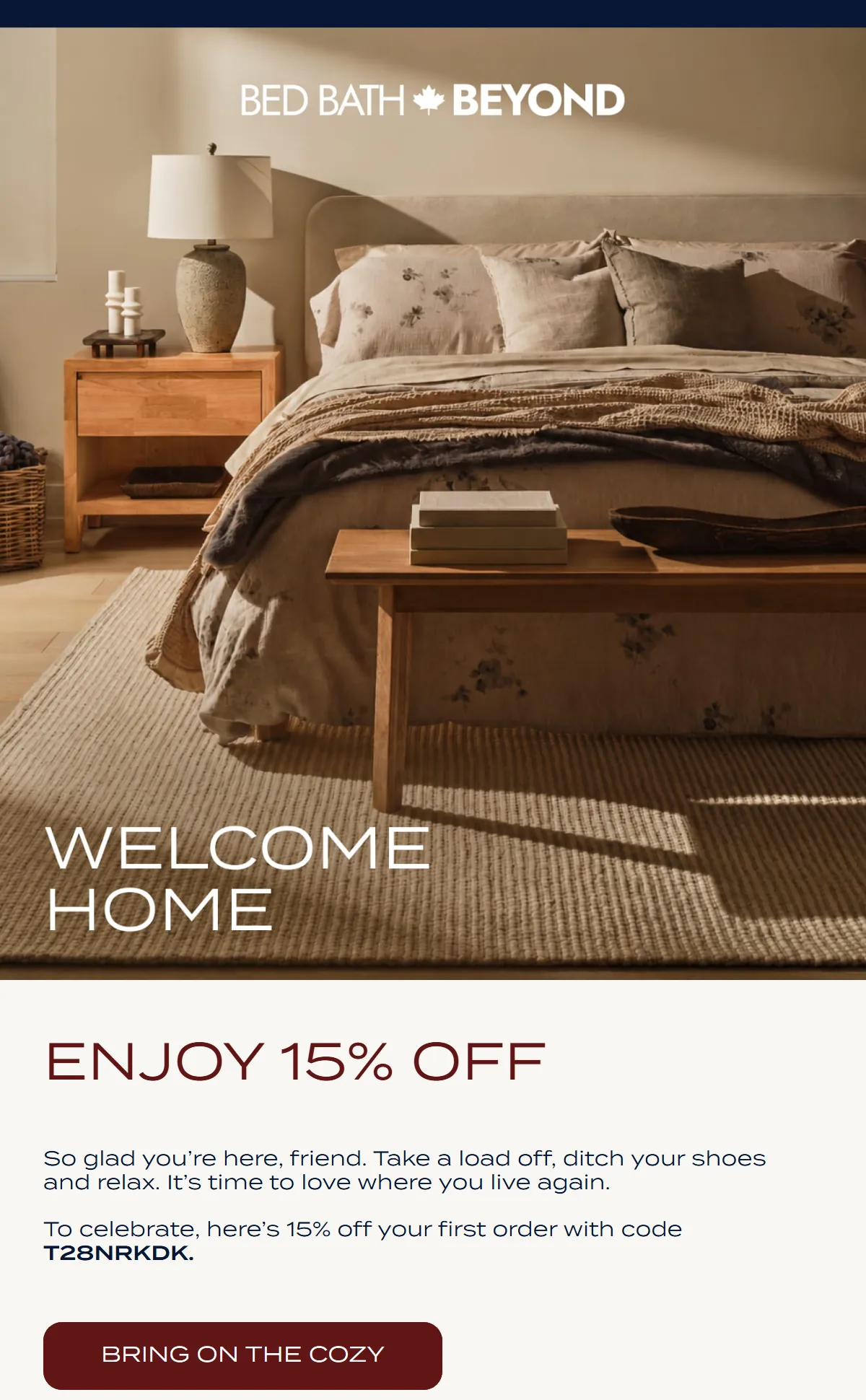
Bed Bath & Beyond Canada uses the subject line as a greeting and puts the 15% in the preheader.
The welcome email reads as a friendly greeting, but the offer still lands in the same glance because the preheader is so close and the number is placed right at the start.
The home pun fits a store that sells bedding and décor, while the preheader’s “just for you” makes the discount feel more personal.
Because the code is a random string marked “One-time use only,” it reads as the subscriber’s own, and it takes up a single line of copy: “To celebrate, here’s 15% off your first order with code.”
The deadline appears in the fine print as “Offer expires 30 days after email sign-up,” and the home theme runs through to the one button, which reads “BRING ON THE COZY.”
What you can learn from it
Issue a single-use code to each new subscriber, and state the window in the copy, such as 30 days, so the offer reads as theirs and still carries a deadline.
2. Joy Supply: A code you’ll remember
Subject line: You have good taste. 🍪
Preheader: 20% off your first box of cookies!
Type: Welcome
Trigger: Welcome automation after sign-up
Sent: In the welcome flow after sign-up (July 20, 2026)
Why this email works
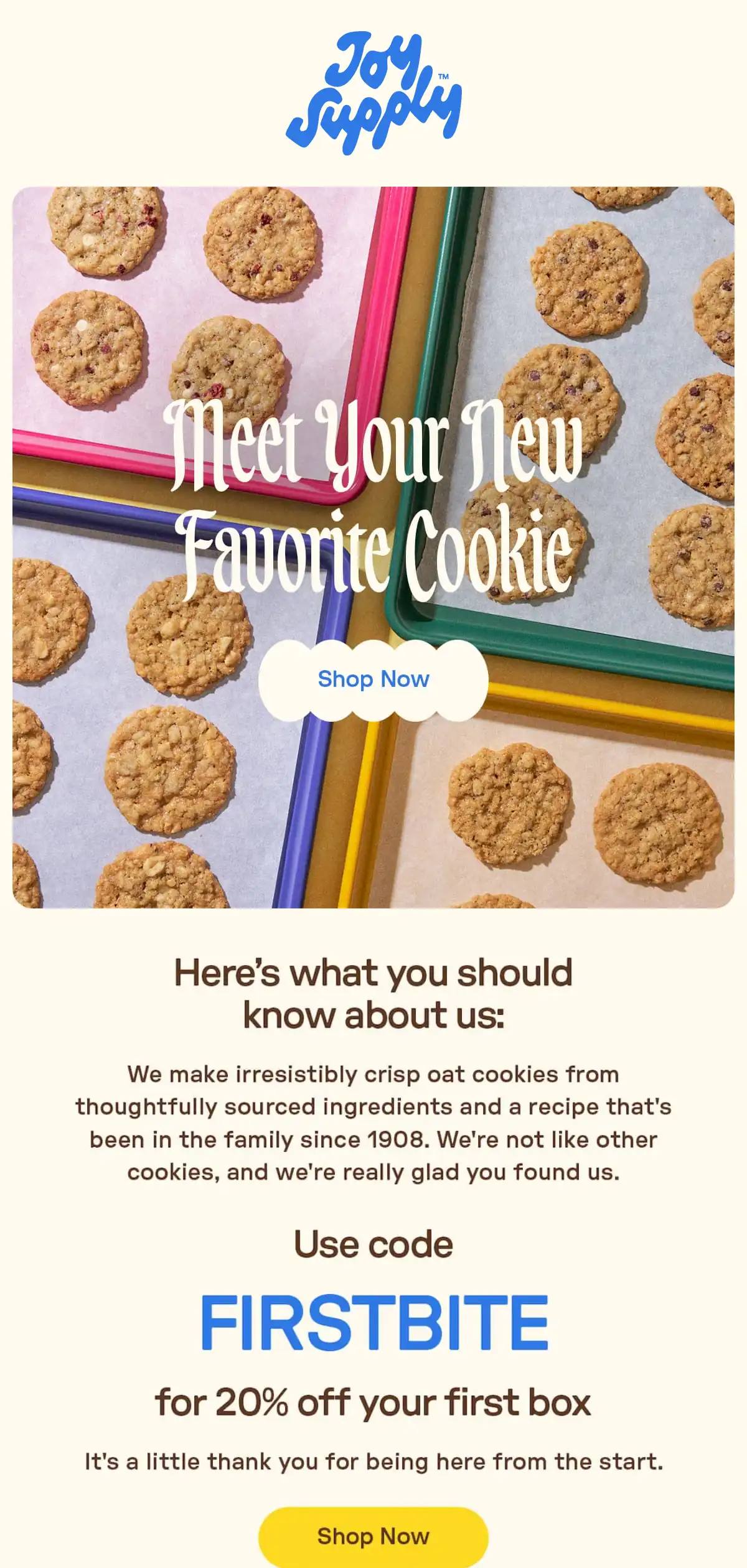
A new subscriber can recall FIRSTBITE at checkout without going back to the email, because Joy Supply, an oat cookie brand, named its welcome code after the moment it’s for.
The subject line carries a compliment instead of a number, and the preheader carries the offer: 20% off the first box.
The body starts with a short brand story, crisp oat cookies from “a recipe that’s been in the family since 1908” (the brand’s words), before it gets to “Use code FIRSTBITE for 20% off your first box.”
There’s no expiry, so only the two “Shop Now” buttons nudge the first order.
What you can learn from it
Name a shared welcome code after the first order or the product, so people can type it at checkout without opening the email again.
3. TN Nursery: A last call that stacks
Subject line: Last call to save 15% on your first order
Preheader: Stack your 15% welcome offer with the value built into package deals.
Type: Welcome (series reminder)
Trigger: Welcome series reminder (a last call on the welcome code)
Sent: A later step in the welcome series (July 20, 2026)
Why this email works
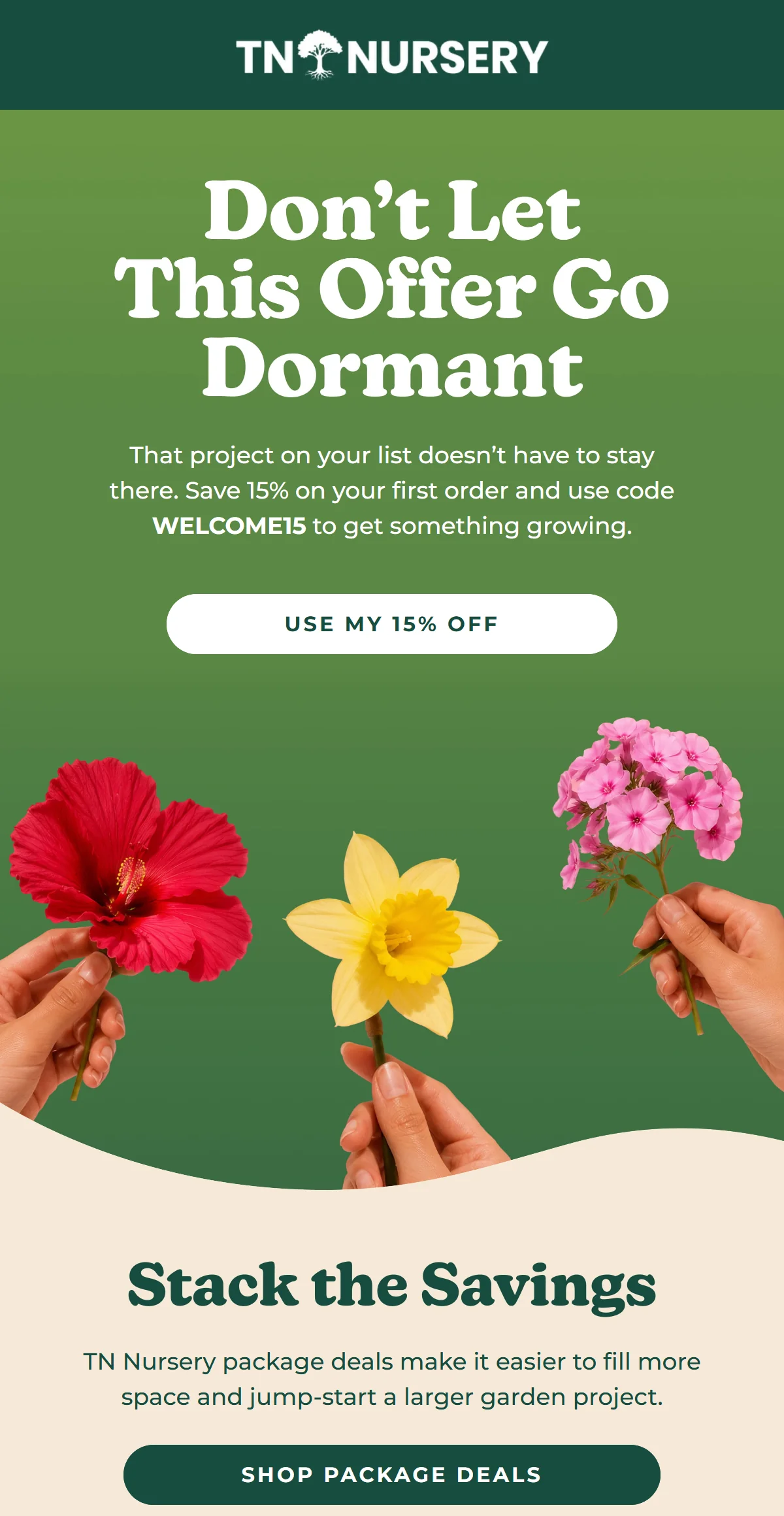
TN Nursery, a plants and garden store, pairs an unused WELCOME15 code with package deals it stacks with, so a subscriber who passed on 15% off now sees a bigger saving on a bigger first order.
The subject line names the 15%, the first order, and the last call, and the preheader adds the stacking idea.
The hero, “Don’t Let This Offer Go Dormant,” puns on the unused code, and the line “That project on your list doesn’t have to stay there” ties the offer to a plan the reader already has. The “USE MY 15% OFF” button repeats the amount where the reader taps.
What you can learn from it
Follow an unused welcome code with a last call that adds a second reason to order now, such as bundles the code stacks with.
Try it with Omnisend: build a welcome series with a last-call step in Omnisend’s automation workflows. Add an exit condition for placed orders, so the reminder only reaches people who haven’t bought.
4. Cold Freak: The worry first, then 5%
Subject line: You were this close to ice cream with macros.
Preheader: We’ll cover 5% of your curiosity tax.
Type: Abandoned cart
Trigger: Cart abandonment automation
Sent: After a shopper paused at the cart (June 11, 2026)
Why this email works
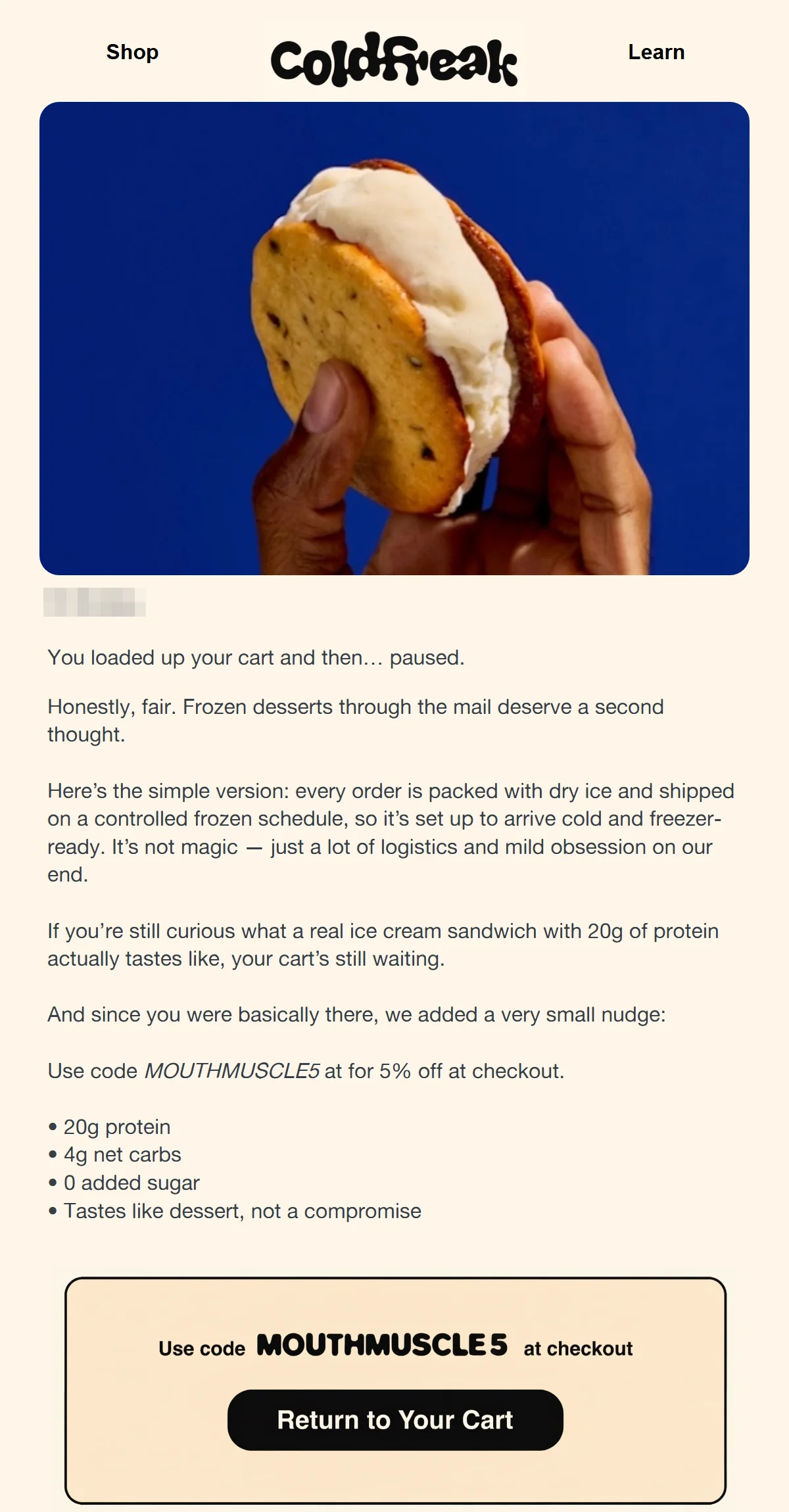
Cold Freak, which ships protein ice cream sandwiches frozen, answers the doubt fitness-focused readers have about mailed ice cream. The email says every order is packed with dry ice and shipped on a controlled frozen schedule, then points to the 20g of protein. So when the 5% code appears, there’s little left to hesitate over.
The subject line of the abandoned cart email tells readers they were this close to buying, and the preheader calls the 5% their “curiosity tax.”
Only then comes “a very small nudge,” the code MOUTHMUSCLE5, boxed above the “Return to Your Cart” button. The closing line, “No rush. We’ll keep it on ice for a bit longer,” repeats the ice-cream idea and lets the reader decide later.
What you can learn from it
Answer the reason people hesitate before any offer goes out, and when the doubt is about shipping or quality, keep the discount small.
5. Different Dog: A bigger offer, then samples
Subject line: We’ve increased your discount [First name] 🎉
Preheader: OR… why not try us for free?
Type: Abandoned cart (unfinished plan)
Trigger: Follow-up to an unfinished dog plan
Sent: The reminder after a 30%-off email (August 6, 2026)
Why this email works
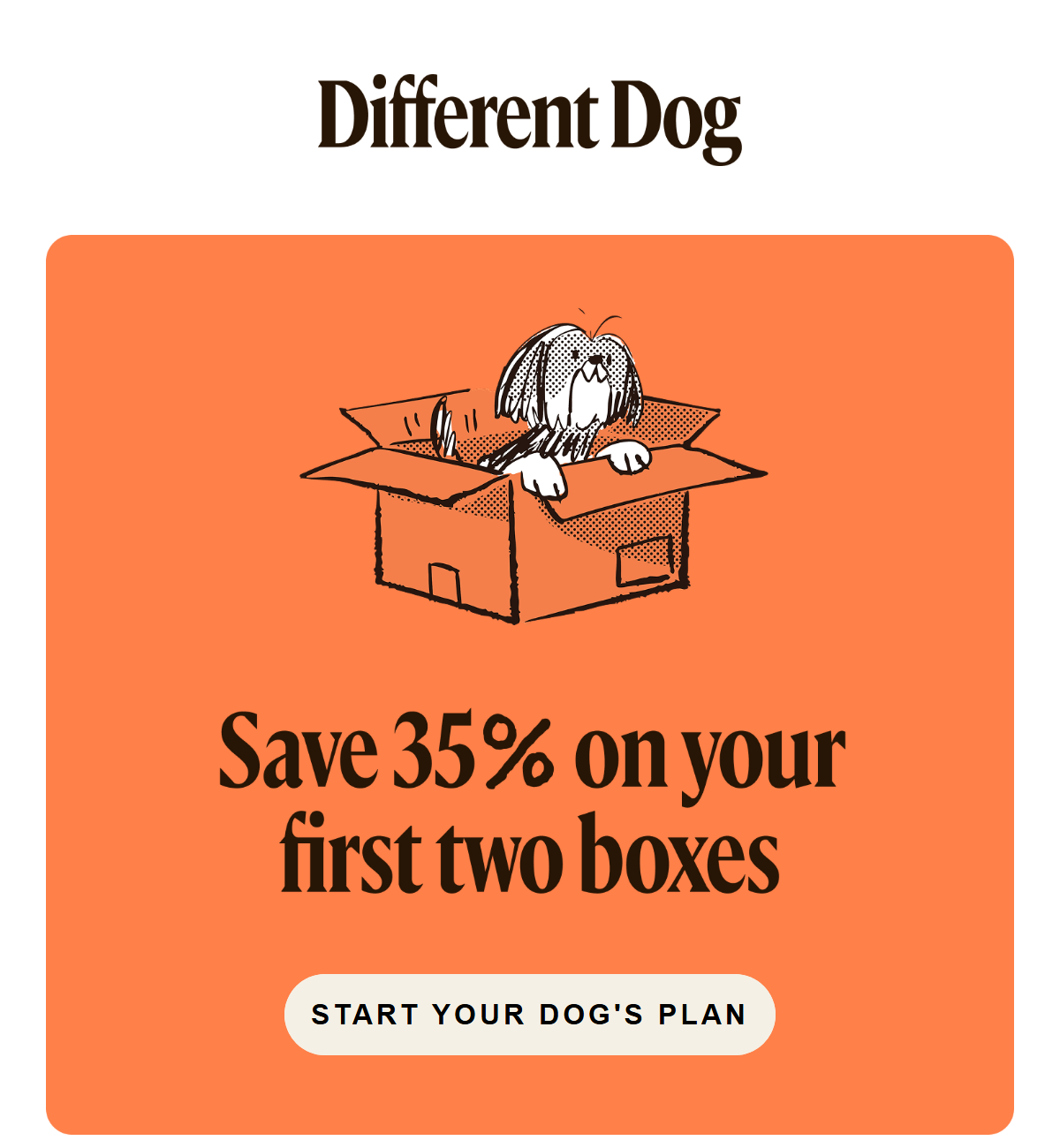
Different Dog, a UK fresh dog food subscription, raises its welcome offer in the follow-up, from 30% off one box to 35% off two, so the reminder has something new to say.
The subject line announces the raise with the reader’s first name, and the preheader, “OR… why not try us for free?” opens a second door before the email is even read.
Alison, who signs as the brand’s in-house vet, delivers the raise herself: “I’ve increased your welcome offer to 35% off your first two boxes,” so the bigger discount has a person behind it.
With no code to type, the “START YOUR DOG’S PLAN” button is the next step, and a “CLAIM FREE SAMPLES” button catches readers the 35% didn’t move.
What you can learn from it
Raise the offer in the next reminder and add a no-cost way in, like free samples, for people a discount didn’t move.
6. Bloom Nutrition: Add-ons under the item
Subject line: 15% off Inside
Preheader: Because we really want you to bloom.
Type: Browse abandonment
Trigger: Browse abandonment automation
Sent: After a shopper viewed a product and left (June 23, 2026)
Why this email works
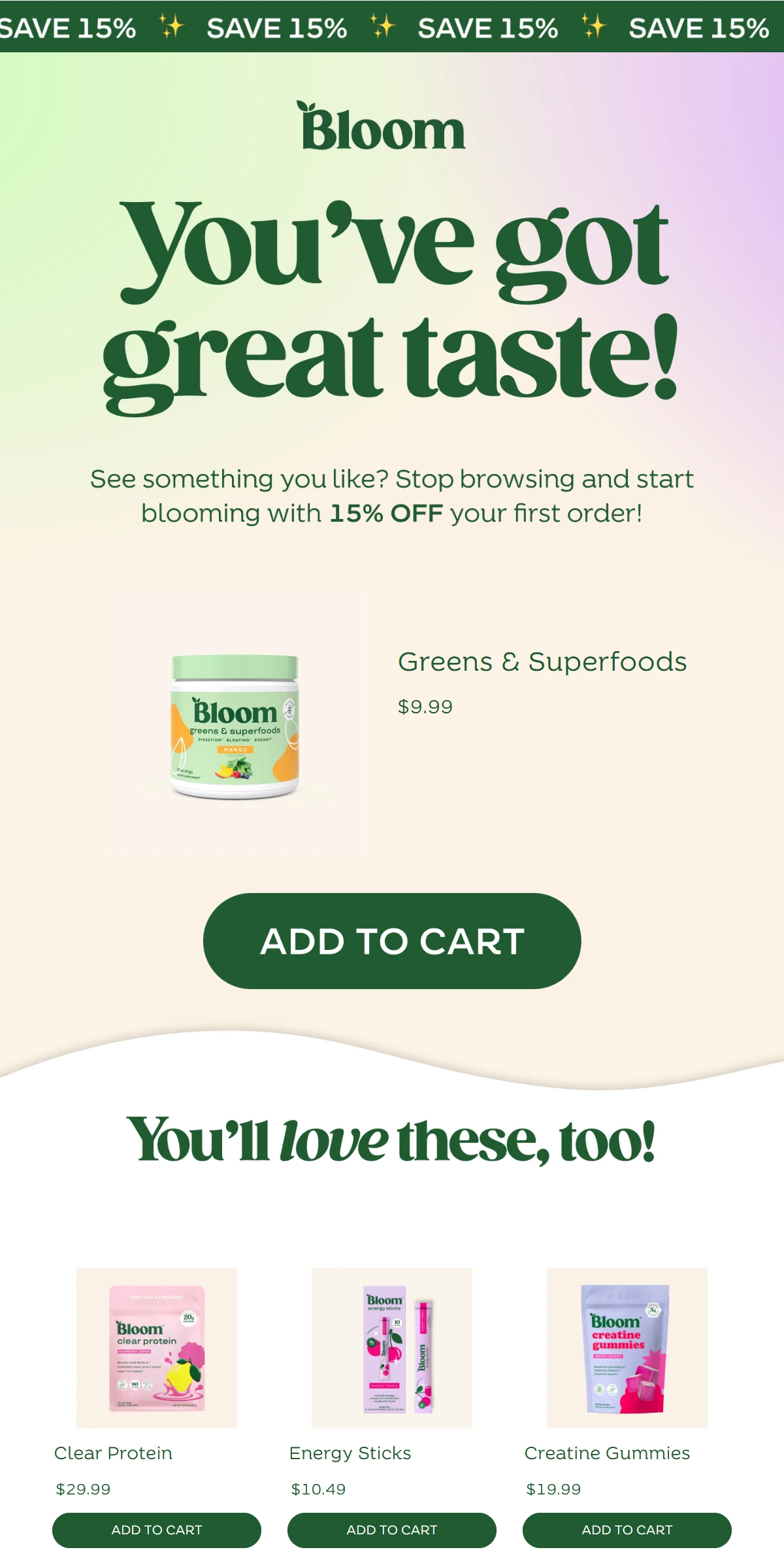
Bloom Nutrition, a supplements and drink mix brand, brings a shopper back to the $9.99 item they viewed and lines up three pricier products under it, so the 15% first-order offer comes with three ways to grow the basket.
The subject line, “15% off Inside,” leads with the number, and the preheader puns on the brand name.
One line explains why the email arrived and what’s on offer: “Stop browsing and start blooming with 15% OFF your first order,” which marks it as a browse abandonment email.
The three add-ons ($29.99, $10.49, and $19.99) each get an “ADD TO CART” button, which makes the cross-sell a one-tap job.
What you can learn from it
Show two or three related products under the viewed item, each with its own add-to-cart button, so the first-order offer comes with a one-tap way to build a bigger basket.
7. Seed: A joke, then 40%
Subject line: Holiday weekends aren’t regular.
Preheader: But your poops can be. Save 40% for the 4th.
Type: Flash/seasonal (4th of July)
Trigger: 4th of July campaign
Sent: July 5, 2026, the Sunday of the holiday weekend
Why this email works
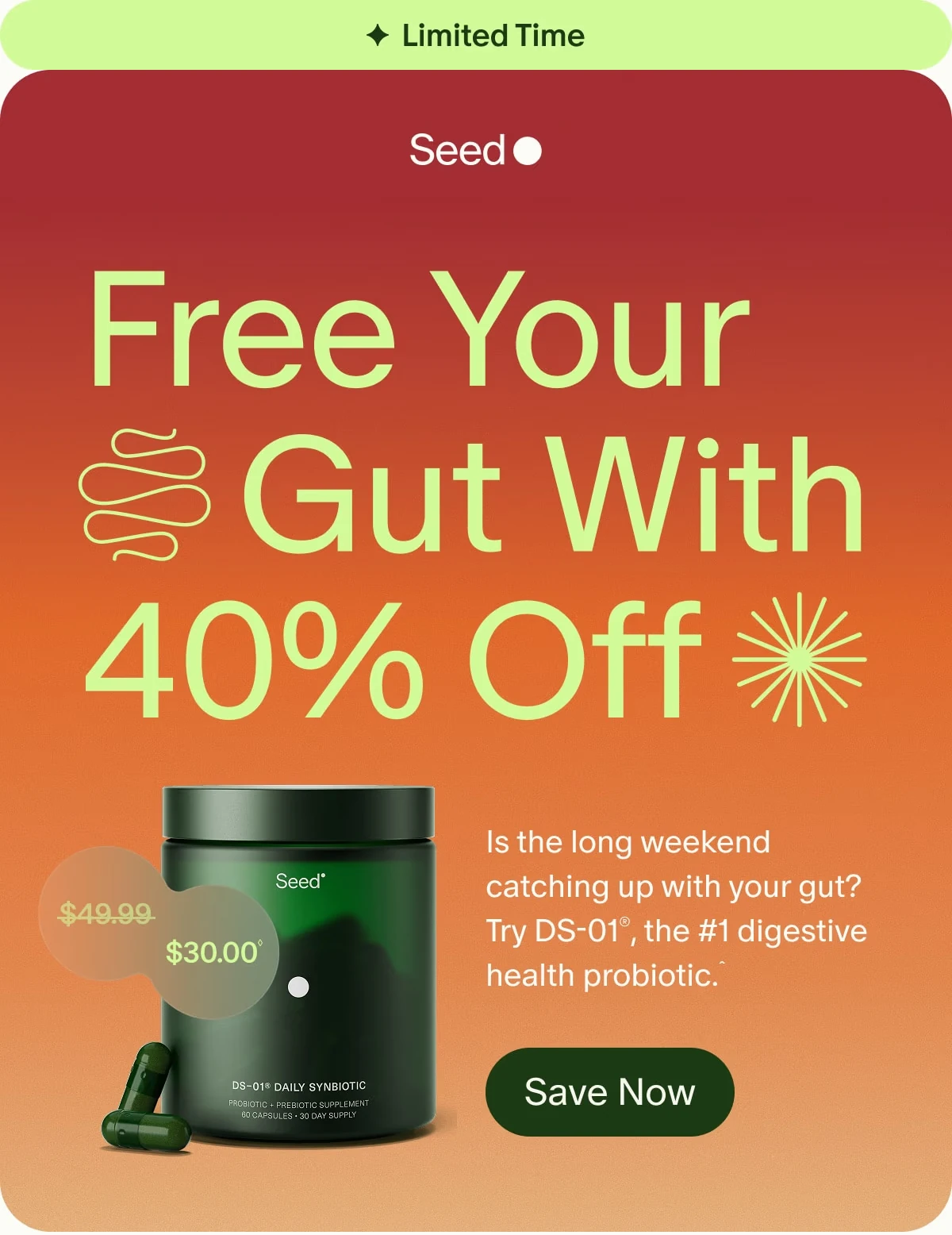
Seed, the probiotics brand, splits its holiday offer across the two inbox lines, a joke in the subject line and the 40% in the preheader, so the 4th of July subject line gets the attention and the number still arrives before the open.
The preheader finishes the joke before it names the offer, “Save 40% for the 4th.”
Opening the email confirms the offer at once, with “Free Your Gut With 40% Off” up top and $49.99 crossed out beside $30.00, and with no code to type, the “Save Now” button is the whole next step.
What the fine print holds is the deadline, “Offer expires on 7/10/2026 at 11:59 p.m. PT,” so above the fold the only urgency is a “Limited Time” pill.
What you can learn from it
Split a holiday offer across the inbox lines, with the hook in the subject line and the percentage in the preheader, then lead the email with the old and new price.
Try it with Omnisend: start from one of Omnisend’s email templates and add a Discount item under the hero for a holiday offer like this one.
8. People’s Beauty: Code or one tap
Subject line: Back To School! Enjoy 25% Off
Type: Flash/seasonal (back to school)
Trigger: Back-to-school campaign
Sent: By March 18, 2026, for an offer that opened September 2, 2025
Why this email works
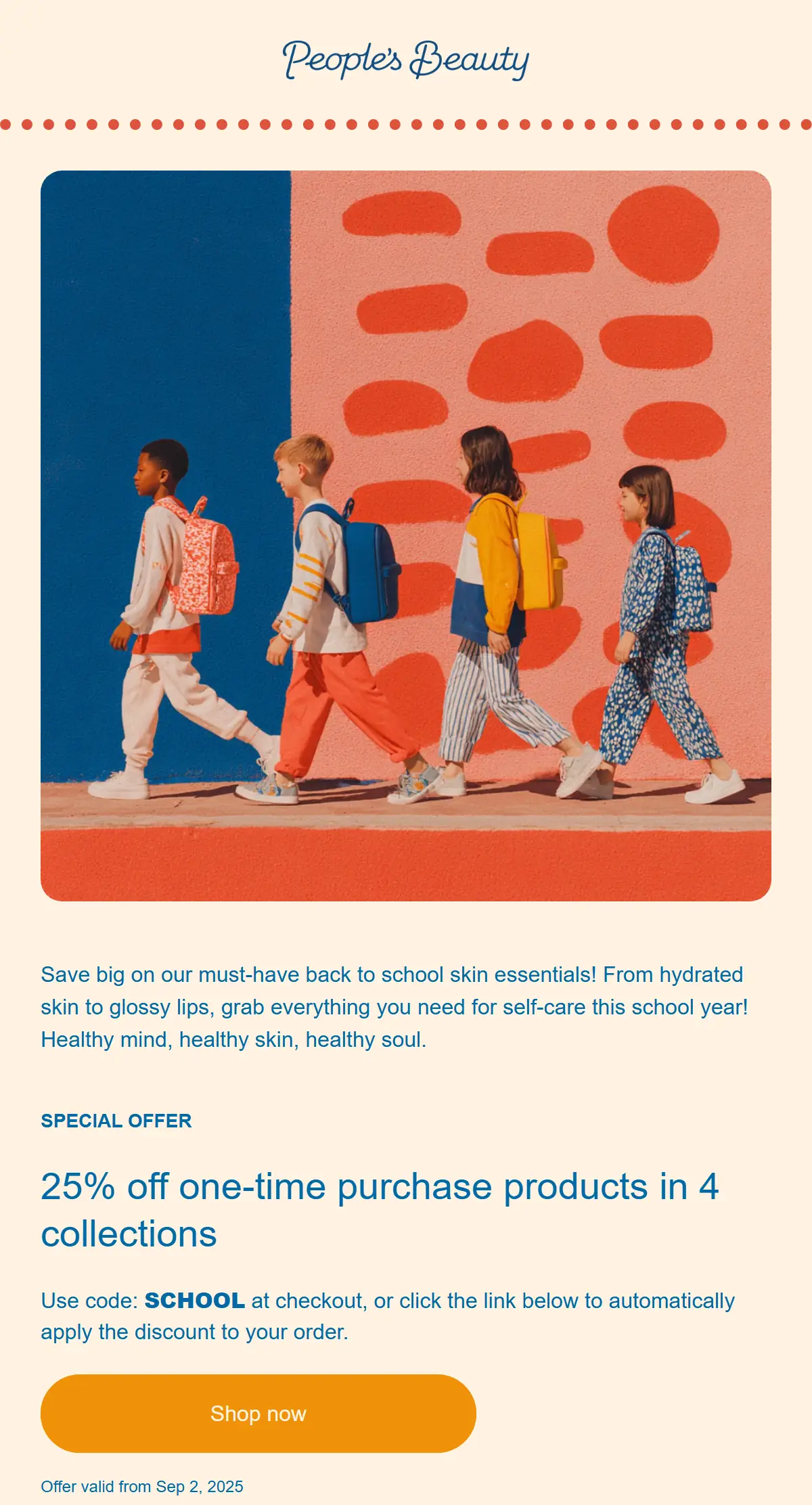
People’s Beauty, a Brooklyn skincare brand, offers two ways to redeem in one sentence: a typed code and a link that applies it, so the 25% works however a shopper likes to check out.
The subject line of this skincare email pairs the occasion with the 25%, and with no preheader set, it does the inbox work alone.
Because the code is one word tied to the occasion, shoppers can type SCHOOL at checkout without reopening the email, and the “SPECIAL OFFER” block reads, “Use code: SCHOOL at checkout, or click the link below to automatically apply the discount to your order.”
One “Shop now” button follows, so whichever way a shopper redeems, there’s a single place to tap.
What you can learn from it
Offer the code and a link that applies it, so shoppers who copy codes and shoppers who tap buttons both get the discount.
9. Primal Kitchen: A Halloween BOGO
Subject line: A Halloween Treat: BOGO Collagen 👻
Preheader: No Tricks. Just Free Collagen.
Type: Flash/seasonal (Halloween)
Trigger: Halloween campaign
Sent: October 29, 2026, two days before Halloween
Why this email works
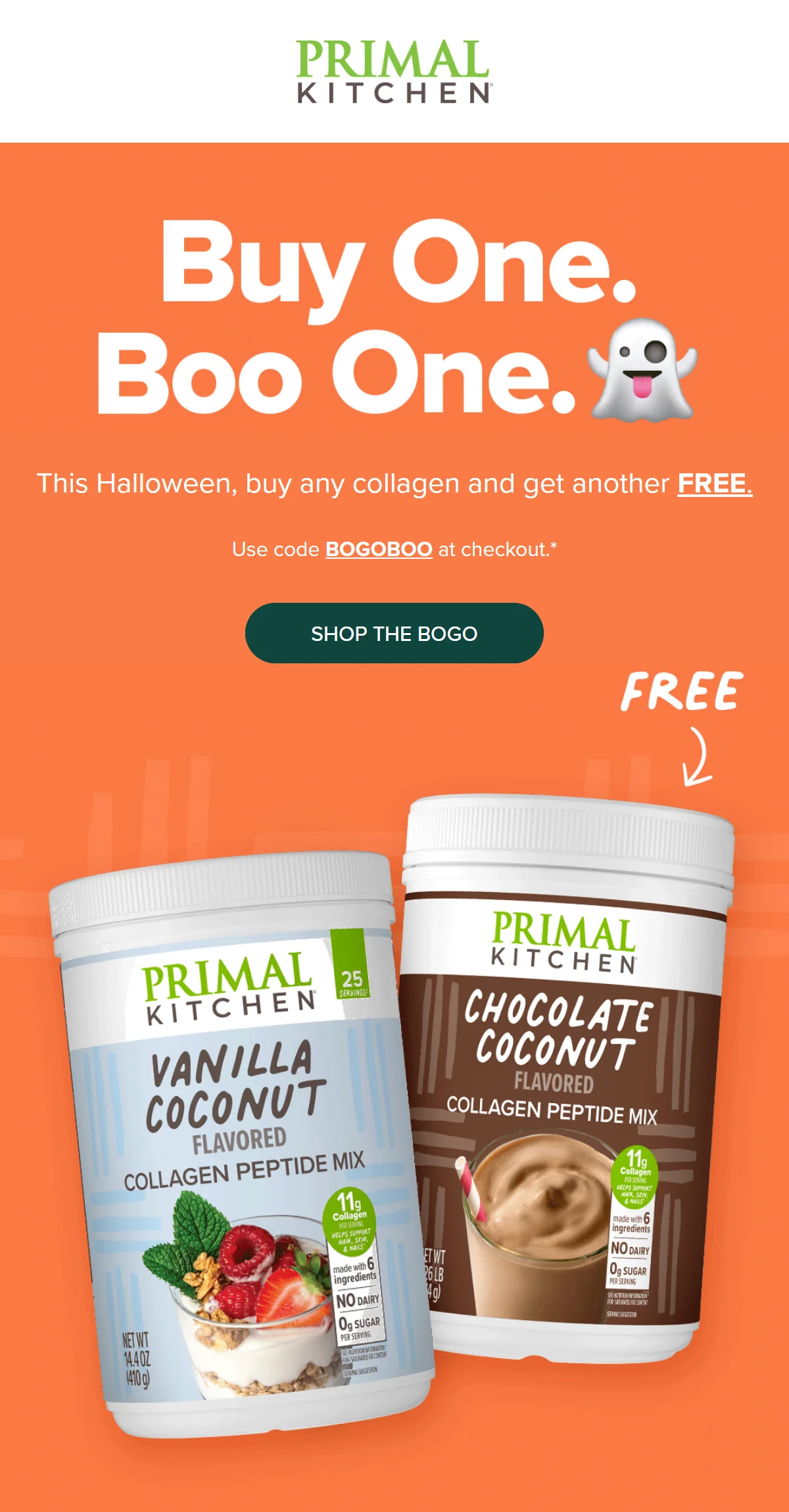
A buy-one-get-one in place of the usual percentage, named in both inbox lines, means readers know the second collagen is free before they open this holiday email from Primal Kitchen, a pantry and collagen brand from Oxnard, California.
The holiday and the offer share the subject line, and the preheader, “No Tricks. Just Free Collagen,” says there’s no catch. BOGOBOO is easy to remember: it names the offer (BOGO) and the holiday (Boo).
The “SHOP THE BOGO” button sits right under the code line, and the three-day window adds no urgency, since the end date, “Offer expires 11/1/26 at 11:59 pm PST,” is only in the fine print.
What you can learn from it
Trade the usual percentage for a free product once in a while, and put the offer in both the subject line and the preheader so it’s clear before the open.
10. FOUND: A 72-hour head start
Subject line: You’re first: 40% off starts now
Preheader: Our Black Friday sale is open to you, 72 hours before everyone else. Your code: FOUNDVIP26.
Type: VIP/loyalty (Black Friday early access)
Trigger: Black Friday early access for the email list
Sent: November 1, 2026, 72 hours before the sale opens to everyone
Why this email works
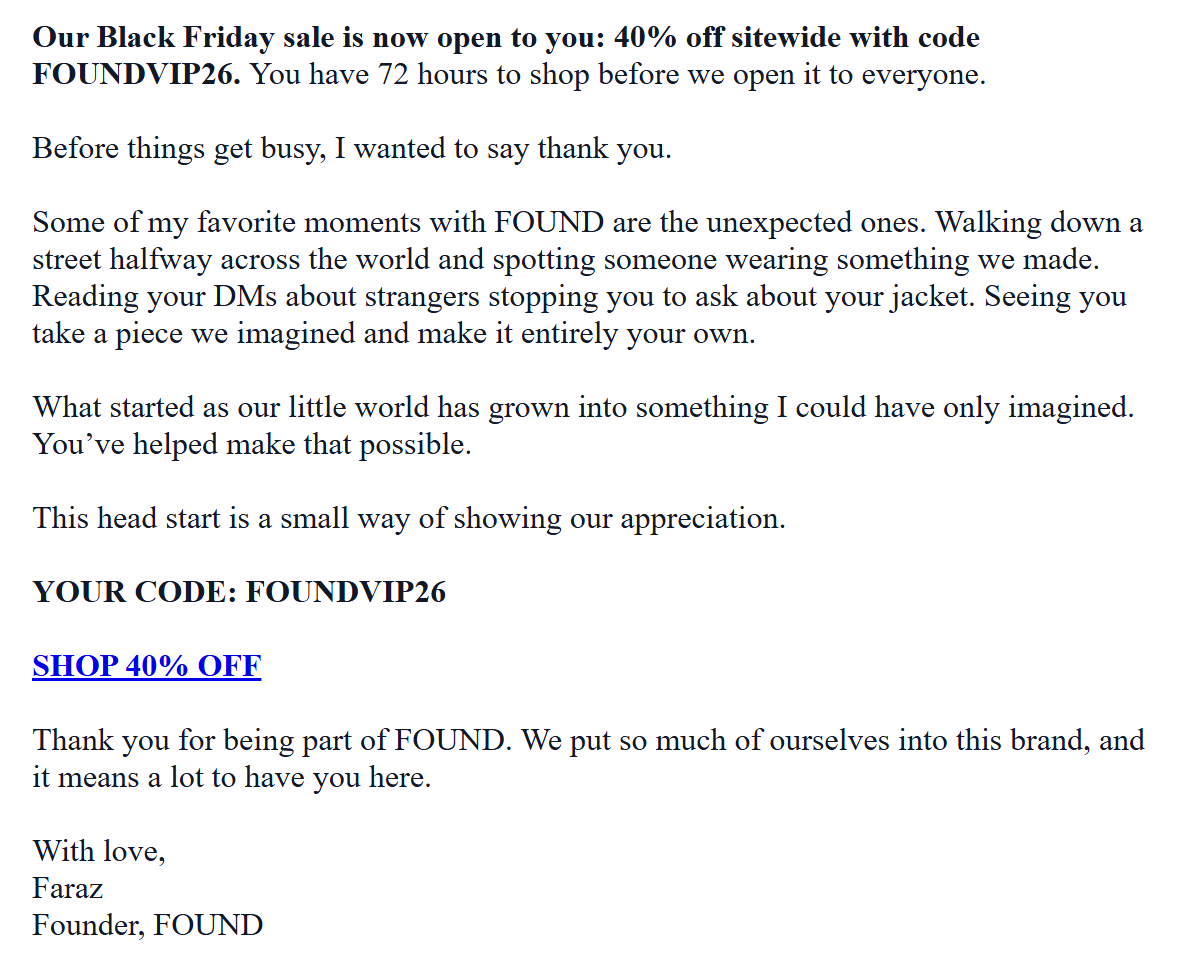
FOUND, a luxury fashion label, opens its Black Friday sale to its email list 72 hours early, so the perk is time and the 40% reads as a founder’s thank-you.
The subject line, “You’re first: 40% off starts now,” puts the perk before the number, and the preheader adds the 72 hours and the code, so the preview alone is enough to shop from.
The deal is in the open from line one of the founder’s thank-you email. Its bold first line holds the offer and the code, and the 72-hour head start follows.
The thank-you lines fit a clothing brand, down to strangers stopping you to ask about your jacket. FOUNDVIP26 repeats above the one link, “SHOP 40% OFF,” so a skim still gives you the code.
What you can learn from it
Open a public sale to your email list a few days early, with a shared code named for them, and let the founder sign the email as a thank-you.
11. Hydro Flask: Points next to the deal
Subject line: Final hours for 2x + extra 15% ⏳
Preheader: Your member perks end tonight.
Type: VIP/loyalty
Trigger: Loyalty campaign on the last day of Members Week
Sent: April 7, 2026, the last day of Members Week
Why this email works
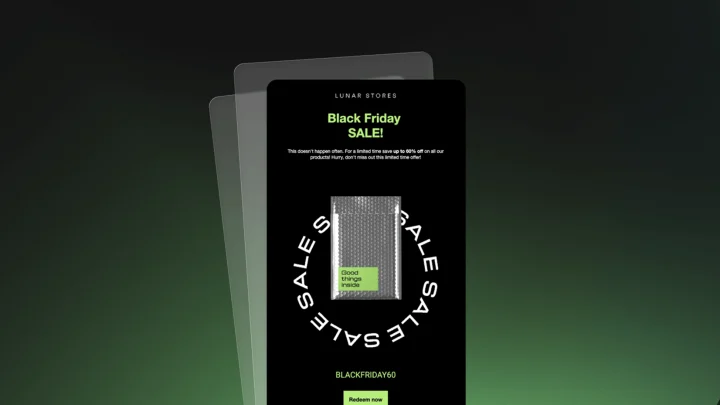
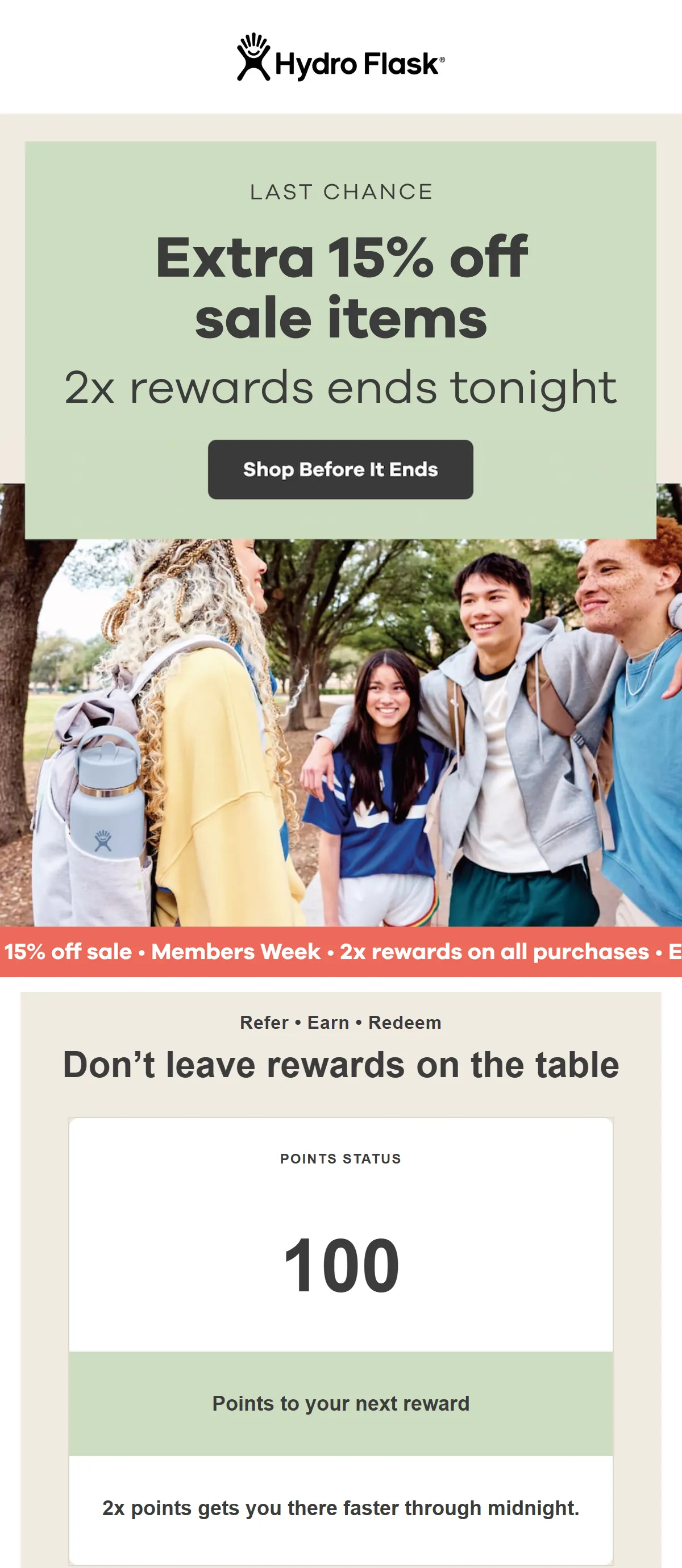
Members who don’t need the discount still have 2x points to miss, because Hydro Flask, the insulated bottle brand, gives them two reasons to order before midnight: an extra 15% off sale items on top of double points.
Both perks and the time limit are in the subject line, and the preheader, “Your member perks end tonight,” says who the email is for.
Readers look at the banner and the button first, and that is where the deadline sits. The banner says “LAST CHANCE” and the button “Shop Before It Ends.”
Then the points card shows the gap of 100 Points to the next reward and adds that 2x points through midnight get the reader there faster. The double points are the way to close that gap, and the card says so.
What you can learn from it
Set the points a member still needs for the next reward alongside the deal, so one deadline covers the discount and the reward.
12. IKEA: A member card inside
Subject line: [First name], here are your member discounts!
Preheader: Save on new favorites at IKEA Family prices – online and in-store.
Type: VIP/loyalty
Trigger: IKEA Family member email
Sent: July 3, 2026
Why this email works
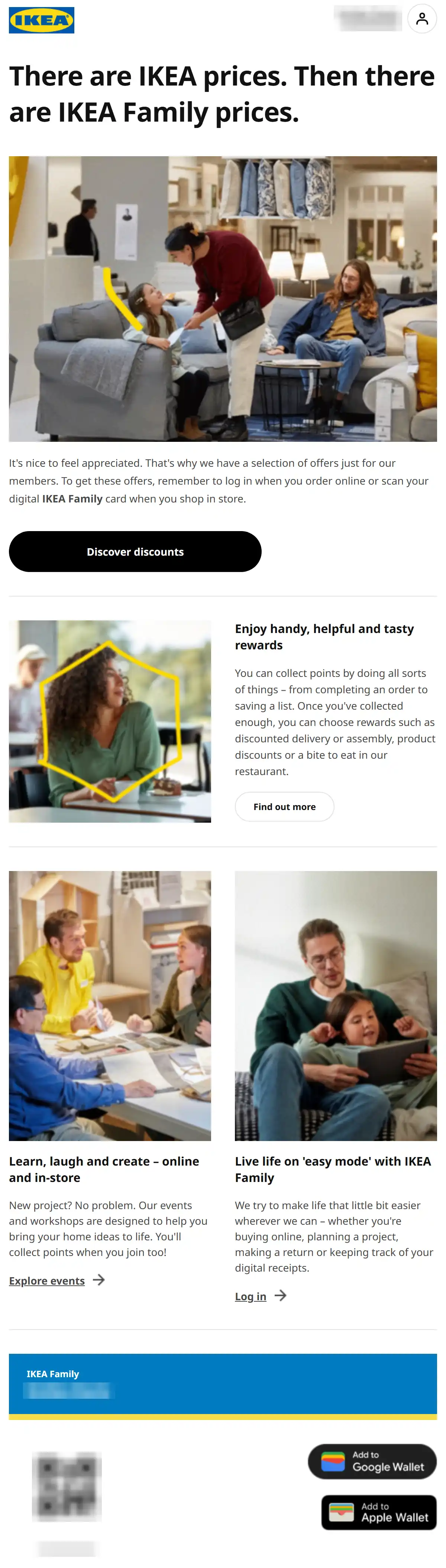
IKEA, the home furnishing giant, puts the member card in the email: a scannable QR code with wallet buttons, so a member can claim IKEA Family prices in store from the email they’re reading.
The subject line greets the member by first name, and the preheader says the Family prices apply online and in-store, which sets up the card.
Both routes to the member price sit in one email: the body tells members to log in when they order online or scan their digital IKEA Family card in store, and the “Discover discounts” button takes them to the offers.
No amount or expiry is shown, which is why the email works as a standing member pass and not as a one-off sale.
What you can learn from it
Put a scannable member card in the email, with a wallet pass, so members can redeem in store.
What makes a great discount email
A great discount email tells readers how much they save, how to claim the discount, and when it ends. The four tips below come from what the 12 did, gaps included, since only one puts the end date up front.
Put the number where the inbox shows it
Put the discount amount in the subject line or the preheader, so readers see what they get before they open.
In the examples, Different Dog and IKEA are the only two that put no amount in either line. Ten of the twelve put the discount in the subject line or the preheader, and only TN Nursery and Primal Kitchen name it in both. Four of those ten use the subject line as a hook and the preheader for the number, as Seed does with “Save 40% for the 4th.”
Make redeeming the discount one step
Make the discount one step to claim, with a short code or one button. Seven of the 12 ask for a typed code, and only People’s Beauty also offers a link that applies it.
In a discount code email, a short code like SCHOOL or BOGOBOO sticks in the memory, while Bed Bath & Beyond’s random single-use string makes the code the subscriber’s own. Four of the 12 rely on a button alone.
Give the offer an end date readers can see
Give limited-time shopping deals an end date readers can see, in the headline or next to the button, so the deadline does its job.
Four of the 12 examples state an end date. Only Hydro Flask puts it up front, in its banner. Bed Bath & Beyond, Seed, and Primal Kitchen keep their end date in the fine print, and the other eight name no end date.
Size the offer to the moment
Match the discount to the moment it’s for: in these examples, welcome codes sit at 15–20%, Cold Freak’s cart reminder offers 5%, and the seasonal and Black Friday sends go to 25–40% or a free second product.
Use email segmentation to send each offer only to the people in that moment, such as new subscribers, cart abandoners, or members.
Discount email subject lines
The best discount email subject lines say what readers get and why now, and do it in under 50 characters.
When the subject line is a hook, as it is in four of the 12 examples, the number goes in the preheader. Grouped by approach, the 18 lines below work as written once the [brackets] are filled in.
| Approach | Subject line examples |
|---|---|
| Curiosity | Open this one before you check out A small thank-you is waiting inside We don’t do this often Guess which bestseller is [X]% off |
| Urgency | Your [X]% off code expires [day] Last day for [X]% off [category] [X]% off ends [day] at [time] [Number] hours left to use [CODE] Only [number] left at [X]% off |
| Benefit-led | [X]% off your first order, on us Free shipping on everything through [day] Spend $[Y], take $[X] off Two [products] for the price of one [X]% off [product] for [holiday] |
| Personal | [First name], your welcome code is here[ First name], your cart is now [X]% off [First name], you’ve earned [X]% off Happy birthday, [First name]: a gift inside |
For more options, try Omnisend’s free AI subject line generator: give it at least five keywords and a short idea of what the email is about.
Discount email templates you can use
Each discount email template below covers one of the four moments in the examples (welcome, abandoned cart, seasonal sale, members) and follows what worked there. Swap in your details for the [brackets]; each has a subject line, a preheader, the body, and a call to action.
Welcome discount email template
Send this welcome discount email from your welcome automation right after sign-up, with a reminder a few days before the code expires.
Abandoned cart discount email template
Send this abandoned cart discount email as the second or third cart reminder, once a plain reminder hasn’t brought the shopper back.
Flash or seasonal sale email template
Send this sale email when a holiday or short sale starts, like an end-of-season sale, and again on its last day.
VIP or loyalty discount email template
Send this loyalty discount email to members before a public sale opens, or during a members-only week.
How to create discount emails with Omnisend
To create a discount email in Omnisend, add a Discount item to an automation or a campaign email. An automation gives each recipient a unique discount code on Shopify, BigCommerce, and WooCommerce, where Omnisend generates the codes, while a campaign gives everyone in the send the same one.
For an automation, go to Automation > Create workflow, pick the Welcome or Abandoned Cart workflow, and click Customize workflow. The welcome workflow starts on Subscribed to Marketing; the cart one on Added products to cart.
The item is under Library > Add Elements > Items > Discount, after Edit content on the open email.
Choose a Value type (Percentage or Fixed amount) and enter the Discount value. Under Expiry, turn on Set discount expiry and enter the number of days the code stays valid. On Shopify, the Apply Shopify discount link under Button applies the code on click.
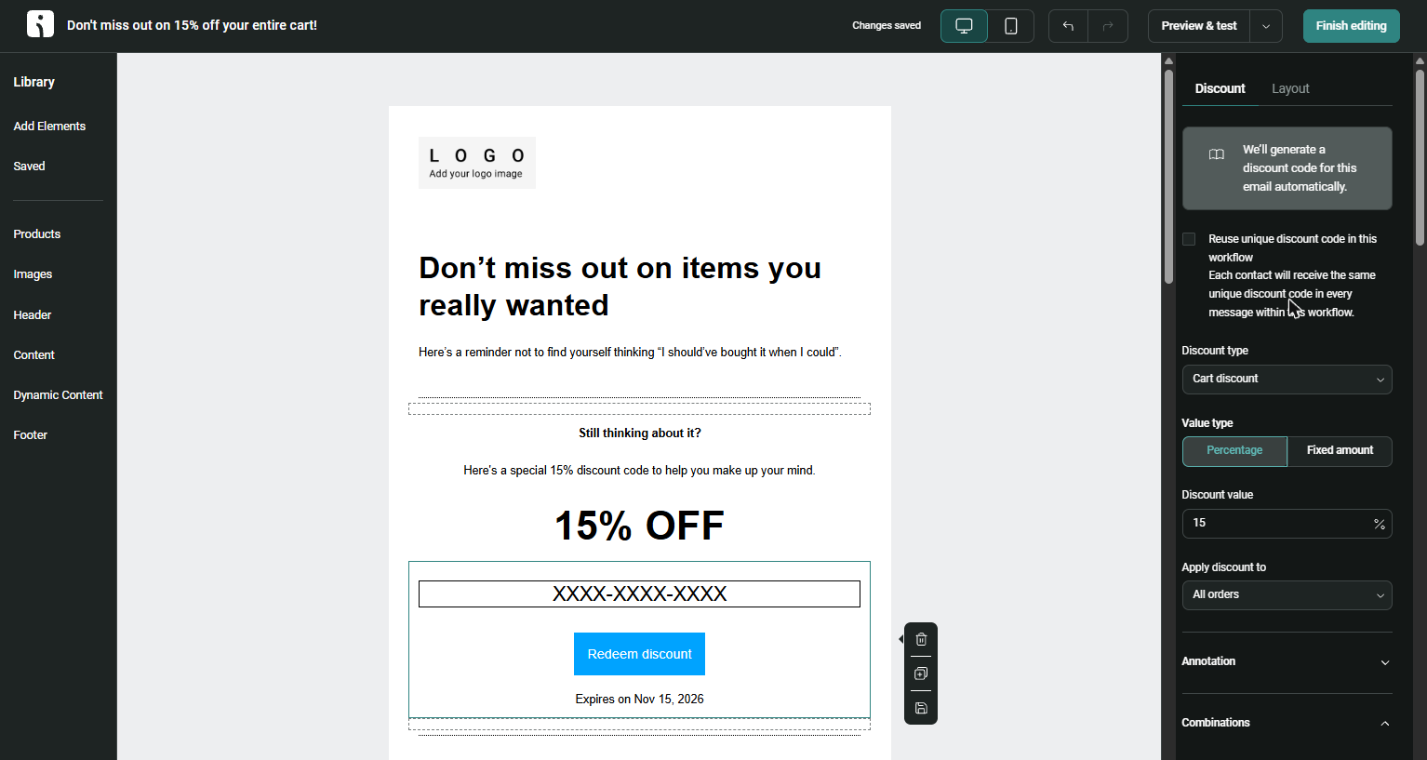
A seasonal or VIP campaign goes to the segment that fits the offer, such as members or past buyers, and everyone in that send shares one code.
Quick sign up | No credit card required
Wrap-up
A discount email works when readers can see the amount, the way to redeem it, and the end date without hunting for any of them. Pick the example closest to your next email, copy its one tactic, and start from the matching template.
Discount email FAQs
What is a discount email?
How do you write a discount offer email to customers?
What should a discount email include?
It can also include the end date, but it must have any minimum spend requirement and one CTA. Across the 12 examples, only four state an end date, and three keep it in the fine print.
What’s the difference between a discount email and a promotional email?
Can you automate discount emails?
In Omnisend, a Discount item in an automation email gives each recipient a unique code on Shopify, BigCommerce, and WooCommerce; in a campaign, everyone gets the same one.