Omnisend AI


 OFFER
OFFER









Finding the right order confirmation email template is one of the best ways to capture attention right after a purchase. Buyers want to verify their order, which is why an order confirmation email typically sees open rates three to eight times higher than standard campaigns, according to Omnisend’s 2026 ecommerce marketing report.
That kind of engagement makes this message a prime opportunity to build trust with your customers and to answer shipping questions before they’re asked. To help you get more out of this message, this guide provides five ready-to-use order confirmation email templates you can copy today.
We’ll also analyze real brand examples and share the best practices so you can build the best order confirmation email for your brand.
Key takeaways:
- This article delivers copy-ready templates, real-world examples, and best practices
- Order confirmation emails help you turn transactional emails into repeat revenue
- For a complete guide to automating this workflow end-to-end, see our guide to order confirmation email automation
Quick sign up | No credit card required
Order confirmation email templates (5 ready-to-use)
This section provides five copy-ready templates that cover the most common post-purchase scenarios. You can copy these directly into your marketing platform and adjust the merge tags (like {{first_name}}) to match your system’s formatting rules.
Standard ecommerce order confirmation email template
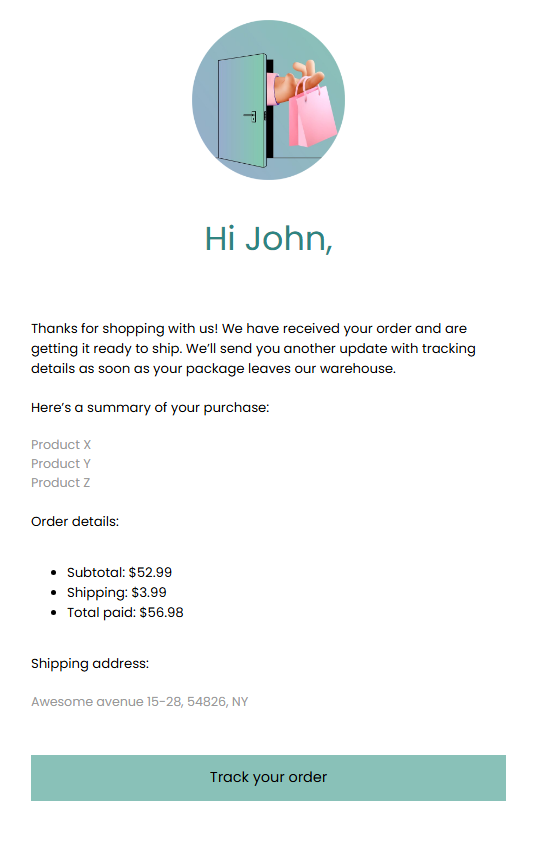
The standard ecommerce order confirmation email template is the workhorse for most Shopify and WooCommerce brands. It maintains a friendly but professional tone and focuses primarily on delivering essential order details. It also provides a clear CTA button or link that lets customers track their shipments.
Subject line: We have your order, {{first_name}}
Preview text: Your order {{order_number}} is confirmed and being processed.
Hi {{first_name}},
Thanks for shopping with us! We have received your order and are preparing it for shipment. We’ll send you another update with tracking details as soon as your package leaves our warehouse.
Here’s a summary of your purchase:
{{line_items}}
Order details:
- Subtotal: {{subtotal_price}}
- Shipping: {{shipping_price}}
- Total paid: {{total_price}}
Shipping address:
{{shipping_address}}
[Button: Track your order]
Design callout:
The template keeps the focus entirely on the information the customer wants right now: reassurance that the purchase was successful and clear details on what they bought. The single call to action button directs them straight to their order status page.
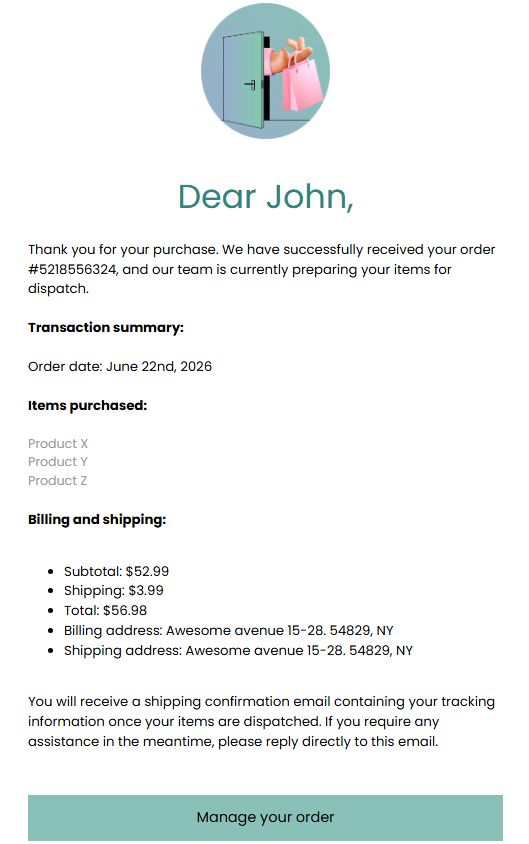
Professional order confirmation email template
Premium and luxury brands often need an elevated, yet minimal tone. A professional order confirmation email template uses fewer design elements, embraces white space, relies on formal language, and conveys trust and high-end service.
Subject line: Order Confirmation: {{order_number}}
Preview text: Details regarding your recent transaction.
Dear {{first_name}},
Thank you for your purchase. We have successfully received your order {{order_number}}, and our team is currently preparing your items for dispatch.
Transaction summary:
Order date: {{order_date}}
Items purchased:
{{line_items}}
Billing and shipping:
- Subtotal: {{subtotal_price}}
- Shipping: {{shipping_price}}
- Total: {{total_price}}
- Billing address: {{billing address}}
- Shipping address: {{shipping_address}}
You will receive a shipping confirmation email containing your tracking information once your items are dispatched. If you require any assistance in the meantime, please reply directly to this email.
[Button: Manage your order]
Design callout:
A professional order confirmation email template relies on generous white space and a clean structure to convey a premium brand image. Skip the extra marketing messages to keep the tone elevated while the formal language builds trust with luxury buyers.
Ecommerce order confirmation email template with cross-sell
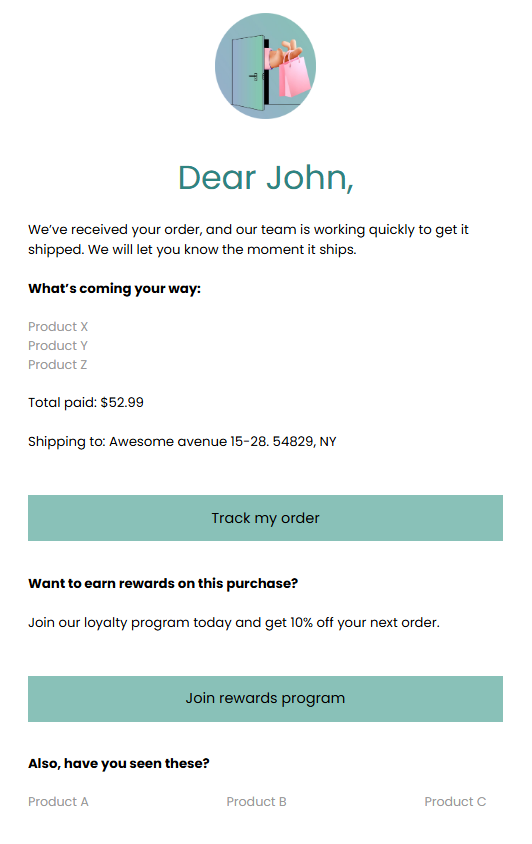
You can optimize your message to drive additional revenue by using an ecommerce order confirmation email template that includes a cross-sell. It includes a product recommendation block and a nudge to join a loyalty program so you can catch your customers while they’re still highly engaged.
Subject line: Order {{order_number}} is confirmed
Preview text: See how you can earn points on this purchase.
Hi {{first_name}},
We’ve received your order, and our team is working quickly to ship it. We will let you know the moment it ships.
What’s coming your way:
{{line_items}}
Total paid: {{total_price}}
Shipping to: {{shipping_address}}
[Button: Track my order]
Want to earn rewards on this purchase?
Join our loyalty program today and get 10% off your next order.
[Button: Join rewards program]
Also, have you seen these?
{{product_recommendations}}
Design callout:
This ecommerce order confirmation email template turns a standard receipt into a transactional email that also drives revenue, but not in an invasive way. After-purchase is a great time to suggest that your customer join a referral or loyalty program.
Purchase order confirmation email template (B2B)
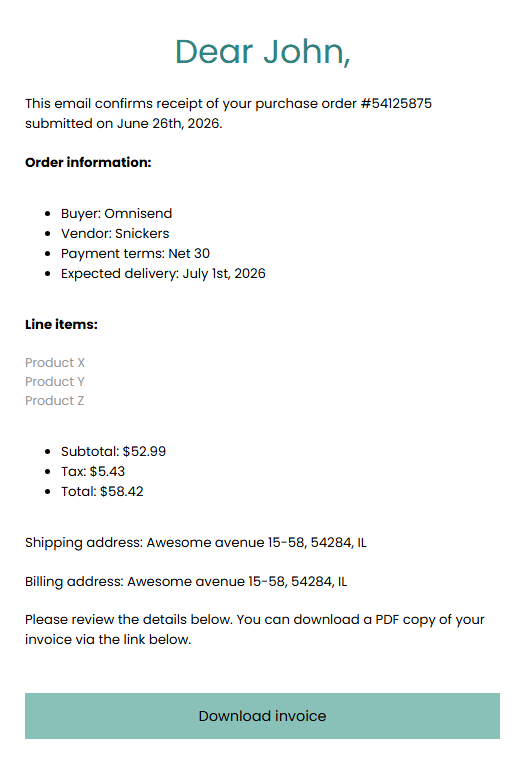
B2B transactions are slightly different and require more details than regular retail receipts. A business order confirmation email template requires formal language and includes specific commercial details such as purchase order numbers, payment terms, vendor details, delivery timelines, and more.
Subject line: Purchase order received: PO {{po_number}}
Preview text: Confirmation of your order and expected delivery timeline.
Hello {{first_name}},
This email confirms receipt of your purchase order {{po_number}} submitted on {{order_date}}.
Order information:
- Buyer: {{company_name}}
- Vendor: {{your_company_name}}
- Payment terms: Net 30
- Expected delivery: {{delivery_date}}
Line items:
{{line_items}}
- Subtotal: {{subtotal_price}}
- Tax: {{tax_amount}}
- Total: {{total_price}}
Shipping address: {{shipping_address}}
Billing address: {{billing_address}}
Please review the details below. You can download a PDF copy of your invoice via the link below.
[Button: Download invoice]
Design callout:
A dedicated business order confirmation email template provides B2B buyers with the documentation their accounting departments need. This purchase order confirmation email highlights payment terms and delivery timelines, which helps prevent (or anticipate) delays and reduces back-and-forth communications.
Values-driven / DTC brand order confirmation email template
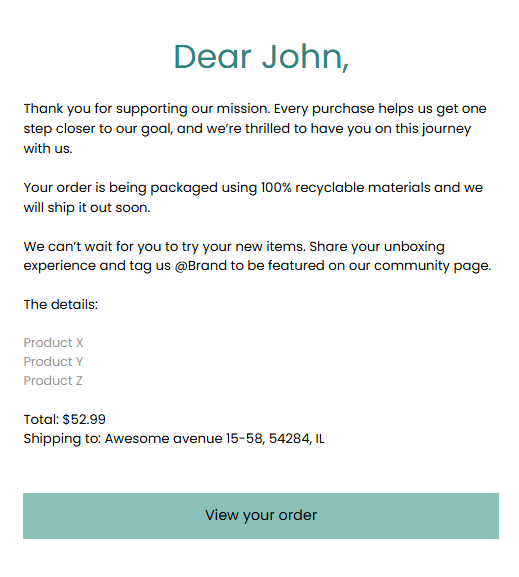
Mission-driven DTC brands are all about building tight communities. This template weaves your brand story, sustainability messaging, or community language into the confirmation message. We’ll maintain a warm and human tone here, while encouraging social proof at the same time.
Subject line: Welcome to the family! (Order {{order_number}})
Preview text: We’re so glad to have you here. See what happens next.
Hi {{first_name}},
Thank you for supporting our mission. Every purchase helps us get one step closer to our goal, and we’re thrilled to have you on this journey with us.
Your order is being packaged using 100% recyclable materials, and we will ship it out soon.
We can’t wait for you to try your new items. Share your unboxing experience and tag us @Brand to be featured on our community page.
The details:
{{line_items}}
Total: {{total_price}}
Shipping to: {{shipping_address}}
[Button: View your order]
Design callout:
DTC brands win on personality, and this template replaces standard transactional copy with warm and community-focused language. The social proof nudge encourages user-generated content without feeling overly pushy, allowing you to craft a transactional message that supports brand-building.
Order confirmation email examples (real brands)
To see how top ecommerce brands put theory into practice, it’s useful to look at real-world examples. Instead of just showing you standard designs, we’ll analyze the strategy behind each email so you can replicate them for your own campaigns.
Here are 10 order confirmation email examples organized by the specific goal they achieve.
Best for reducing post-purchase anxiety
Post-purchase anxiety happens when a customer is left wondering if their payment went through or when their items will arrive. These examples show how clear design and copy choices reduce that uncertainty.
Eero
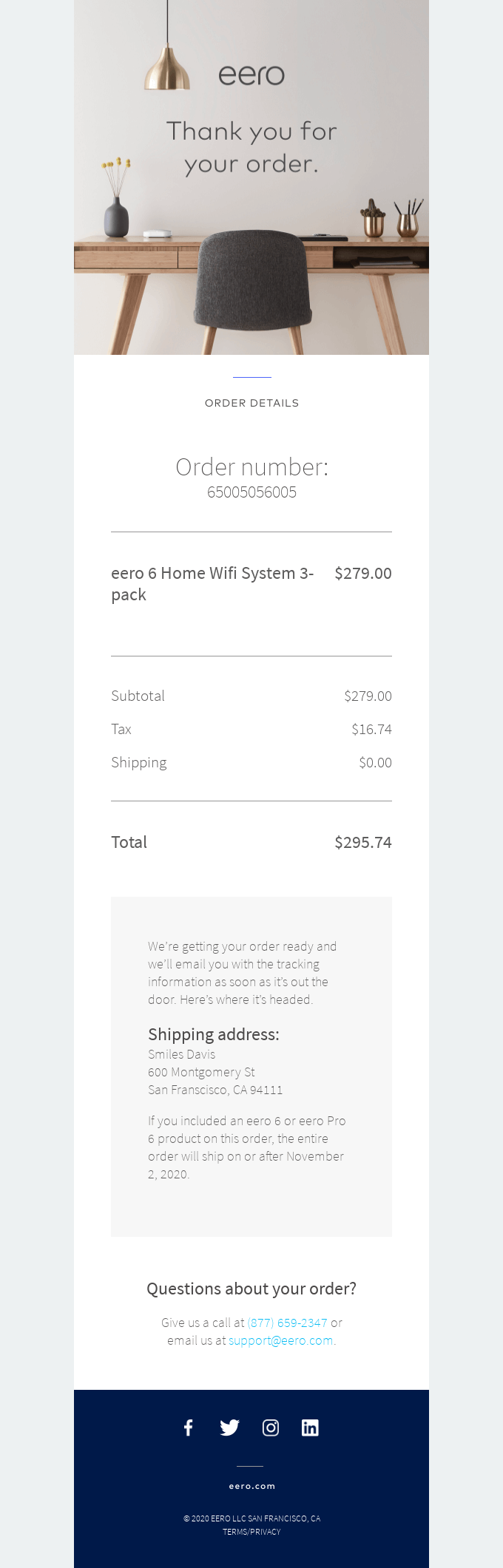
Eero’s confirmation email confirms the purchase, verifies the shipping address, states that they’ll receive the tracking link once the order ships, and provides contact information for customers with questions about their order. It works because it provides all the necessary details in one place without overwhelming customers with excessive information.
Tens
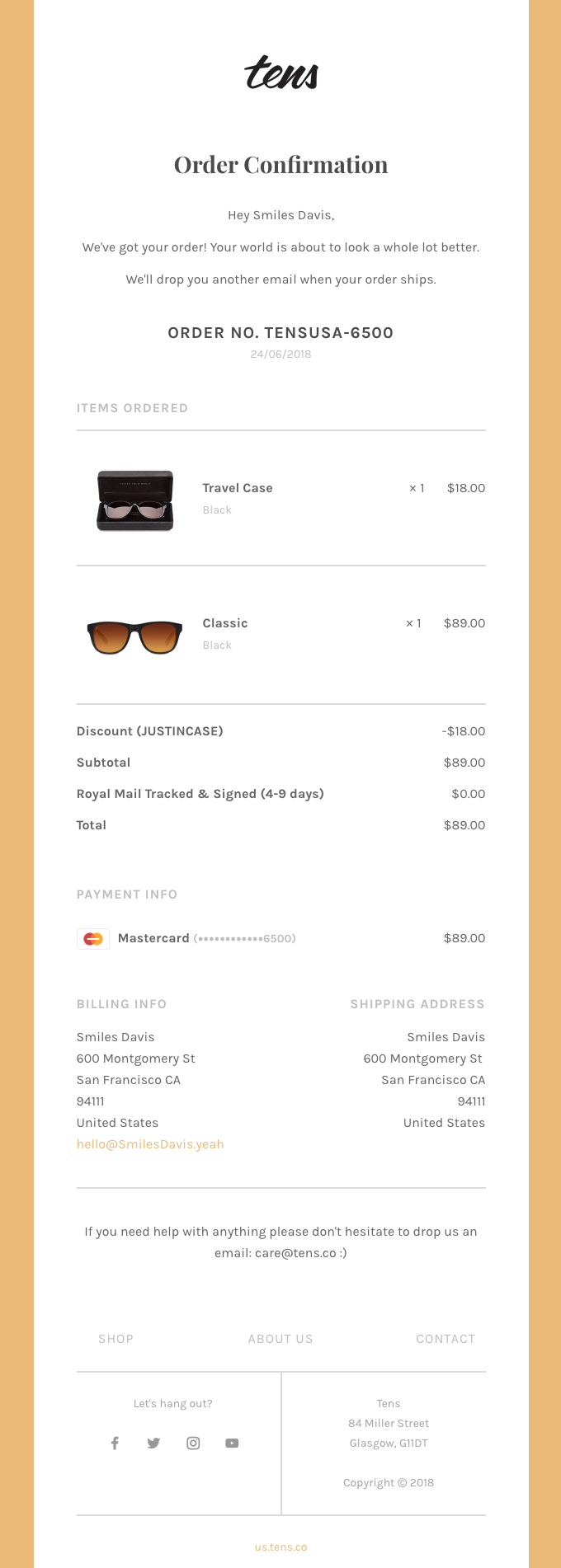
Tens comes with another great example of what an order confirmation email should look like. It’s highly minimalistic, with only the essential details covered. They also open with a positive message (your world is about to look a whole lot better), which both fits their product and reassures the customer. There’s also an email for those who need help.
Fitbit
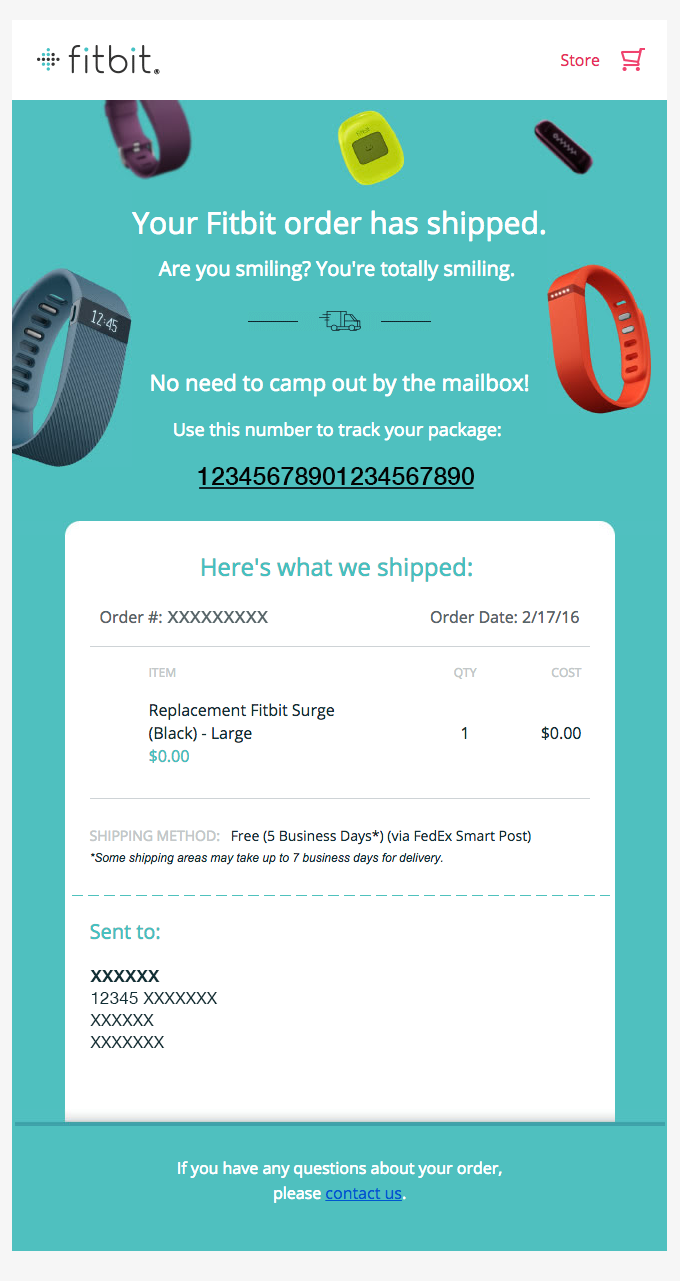
Fitbit does an amazing job of reassuring customers that everything is fine and that there’s no need to worry about whether the order went through. The headline says everything it needs to say, and the following text (you’re totally smiling) is a great example of emotional reassurance. They also provide a tracking number you can use and a clear order summary with the necessary details.
Best for cross-selling and upselling
Since order confirmations have high open rates, they are prime real estate for additional revenue. These examples show how to place product recommendations and referral program nudges effectively.
Beardbrand
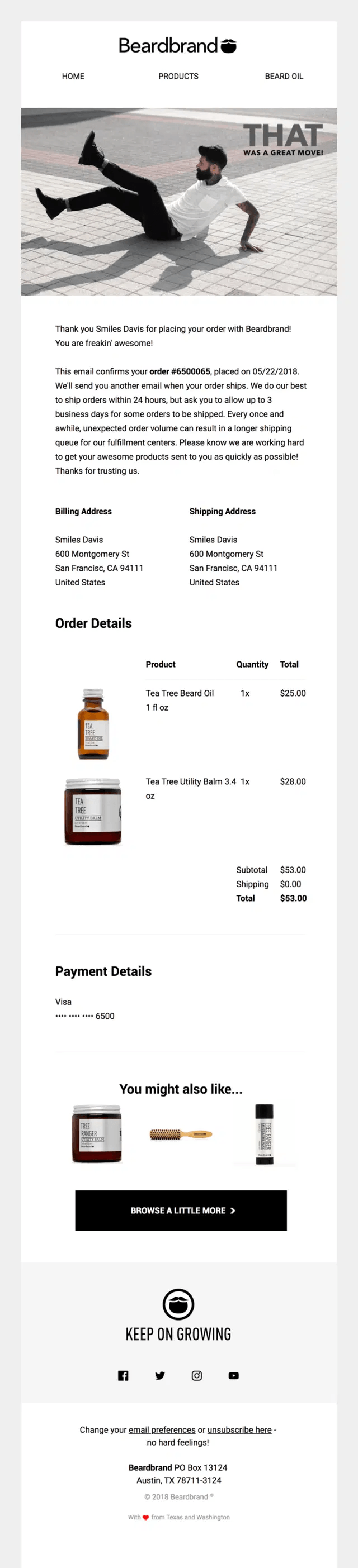
Beardbrand puts all the most important information related to the purchase up top, and then places a non-intrusive cross-sell block as the last element of the order confirmation email. There are no descriptions, prices, or anything else that may make this email too crowded. It’s only a few images and a CTA button that invites the customer to browse a little more.
Cometeer
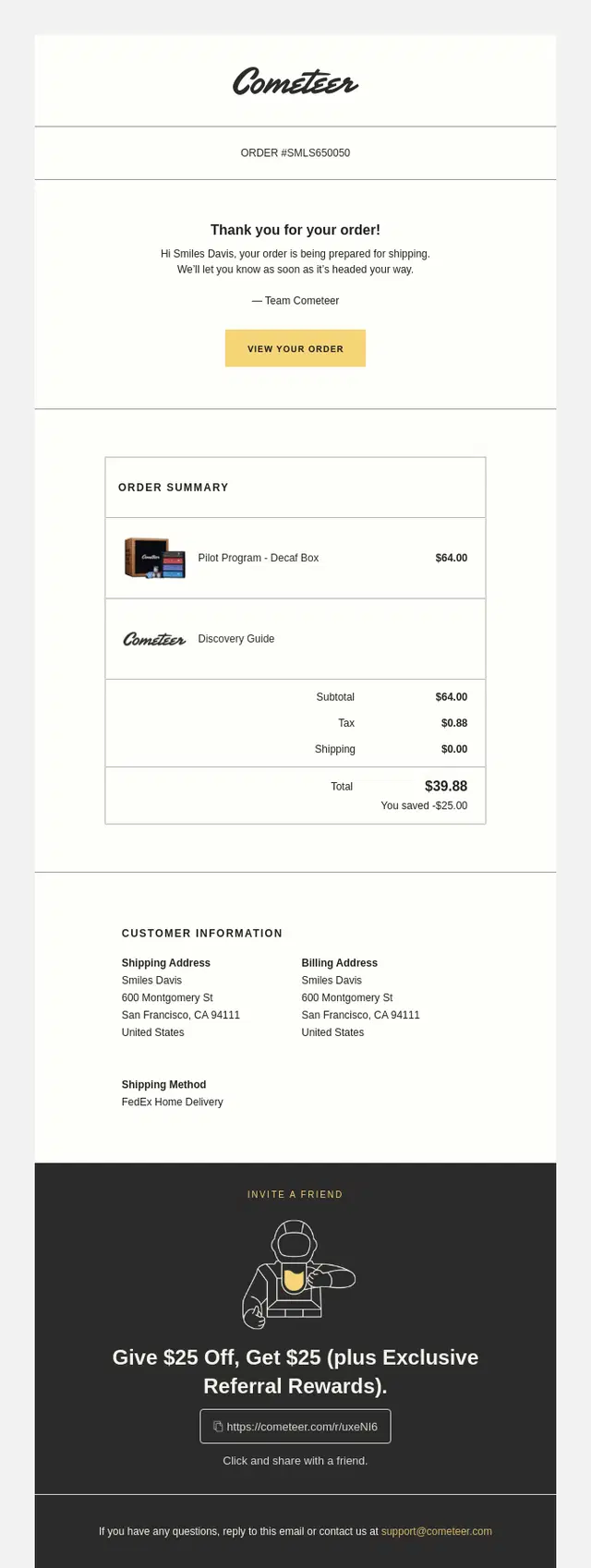
Cometeer makes a short intro that confirms the order status, and then takes a turn by advertising their referral program. It’s a well-designed part of the email that doesn’t come off as pushy, but does capture attention. The headline and instructions are easy to understand and follow.
By clicking the box below, you can share the link with your friend to give them a $25 discount and get $25 for yourself.
Instacart
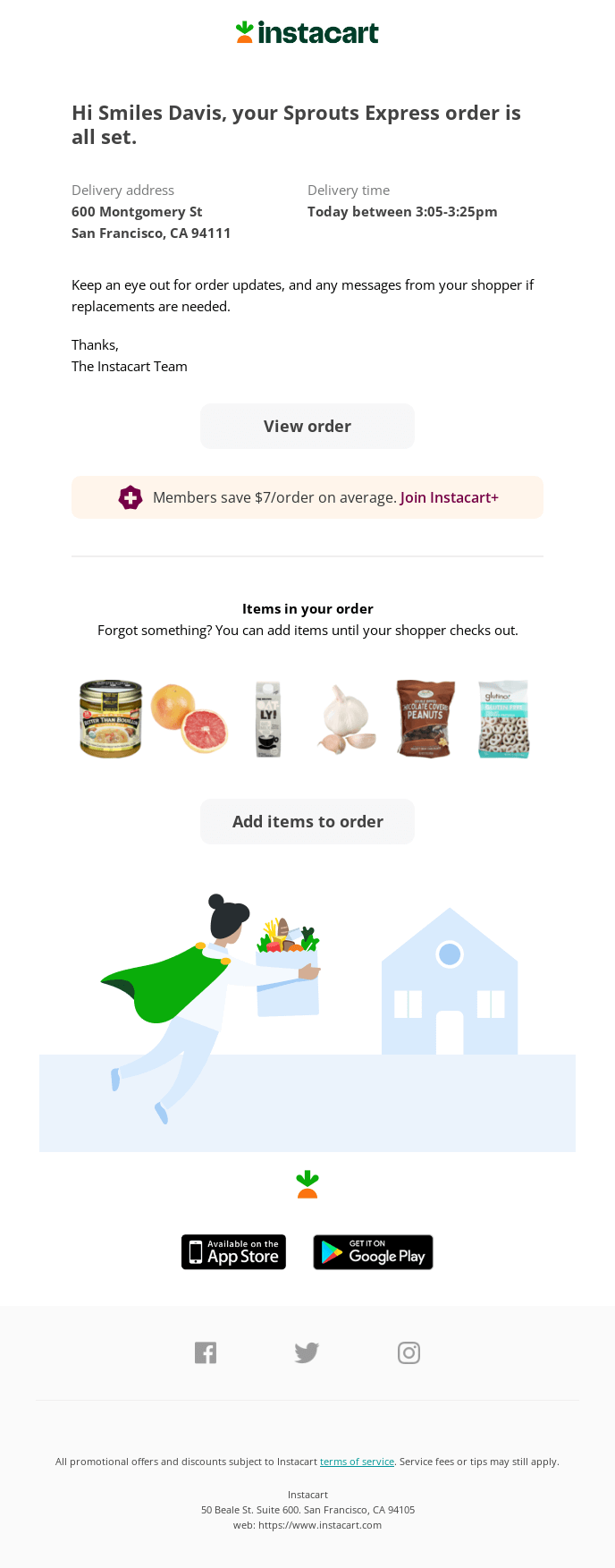
Instacart opts for a more distinctive approach to cross-selling. Instead of encouraging the shopper to buy again, join a loyalty program, or refer a friend, they offer the option to add more items to their cart while there’s still time. They show what you’ve already bought and encourage you to add more items.
While this method is more aggressive than others, as it puts you under time pressure after you’ve already made the purchase, it could be beneficial if you accidentally forgot to get something.
Best for brand storytelling
A transactional email doesn’t necessarily have to be purely technical and boring. These examples reinforce brand identity through visual design, mission-related messaging, tone of voice, and community language, building long-term loyalty.
Explorer
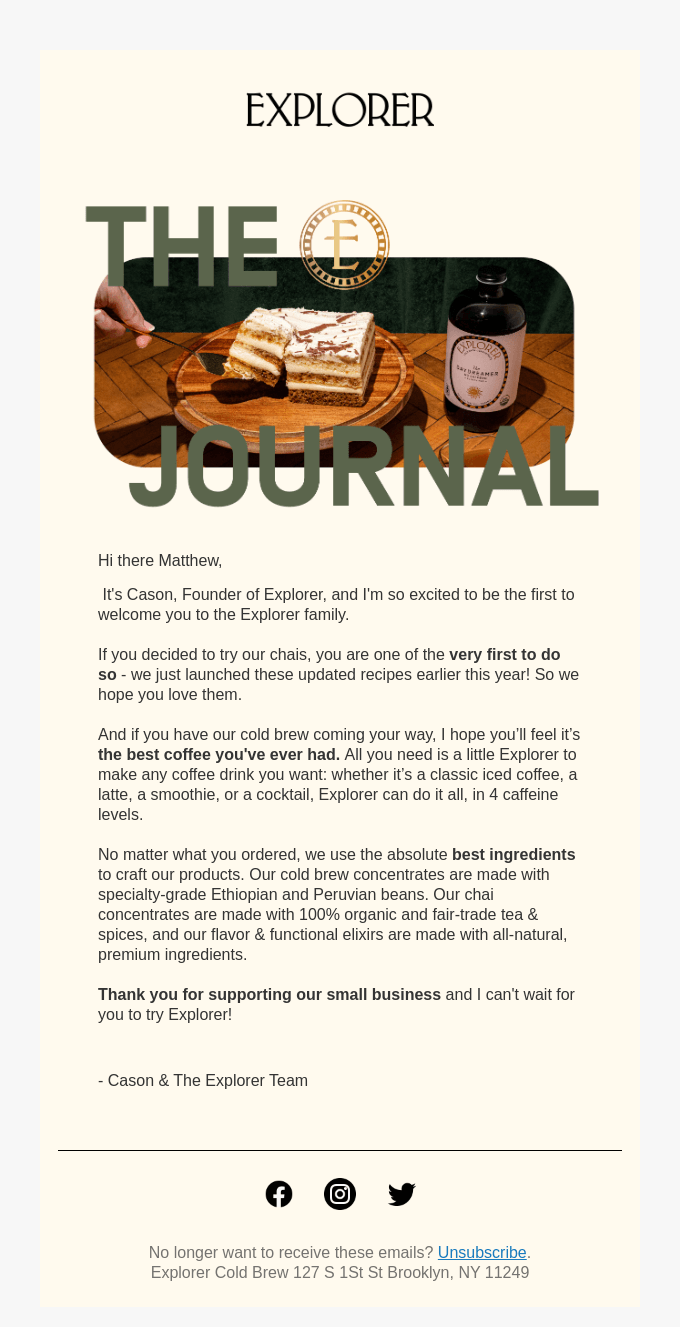
Explorer is a great example of a genuine order confirmation email without all the numbers and technical details. Although it could be viewed as unprofessional, the message itself makes up for it by explaining what their product does, how much it means to them, and that regardless of what you’ve ordered, you can rest assured everything was made with the best ingredients available.
It makes it easy for customers to connect with the brand and come back to them time and time again. Establishing an emotional connection goes a long way, after all.
Hims
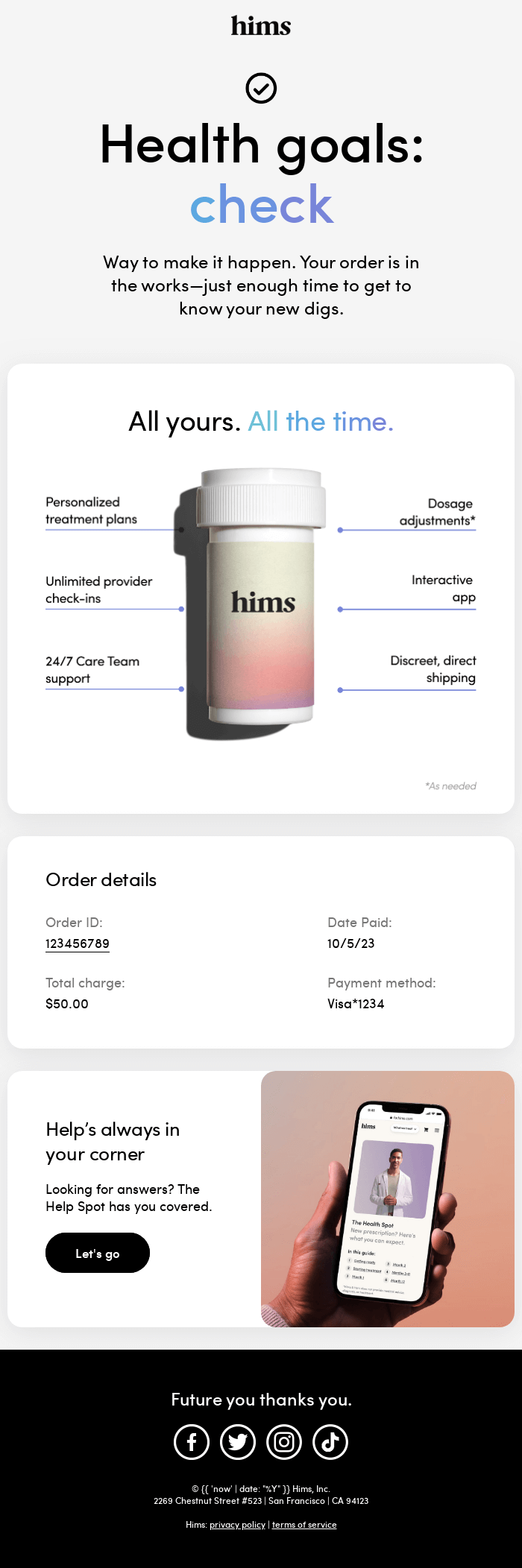
While not exactly a storytelling example, this email also deserves a place here. There’s no story in the most basic sense, but the headings and design convey that the brand cares about you and makes the effort to ensure you have the most convenient experience possible. That means you can create a story to appeal to the customer emotionally, even if you don’t want to write walls of text.
Best for B2B purchase orders
B2B confirmations require professional formatting and formal language, which is what makes them different from most other order confirmation emails.
Delamer
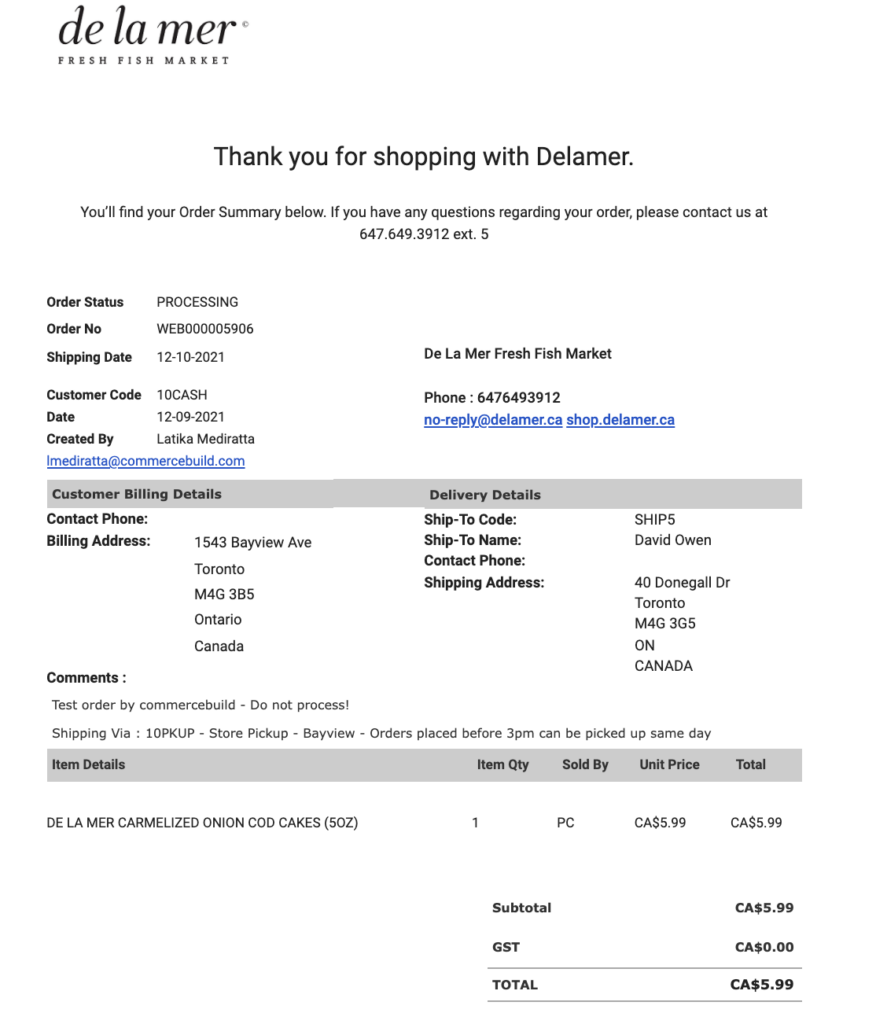
As you can see, there are significantly more details than in standard B2C order confirmation emails. Even the formatting is entirely different from what you usually see in standard confirmations. While you could build a simpler version of this (without the table-style formatting), you’ll need to maintain a similar list of information, give or take some data points.
What to include in every order confirmation email
While designs vary, every effective order confirmation email relies on a core set of elements to reassure buyers and prevent support tickets:
- Order number: It’s the most important part of the message. Without it, customers won’t be able to easily reference their purchase when they contact the support team, which will drag out the entire process.
- Itemized purchase summary: List all the items that the customer bought, ideally with product images and variants (if applicable). Missing item details may lead to cancellation requests, so make sure that part is set up perfectly.
- Cost breakdown: Clearly show the subtotal, applied discounts, taxes, shipping fees, and the final total amount paid. If you don’t, you may notice an increase in payment disputes or even long-term reputational damage if those disputes keep up.
- Shipping and billing addresses: Verify where you’re sending the items so the customer knows they haven’t accidentally misspelled their address or used an old one. That way, the customer can quickly remedy the situation before the order is sent to the wrong location.
- Estimated delivery timeline: Set shipping and processing expectations right from the start. Otherwise, your support team may be flooded with messages about delivery estimates.
- Tracking or status link: Give buyers a clear button to check their order status. As with the delivery timeline, it will help take the excessive workload off your support team’s shoulders.
- Customer support contact details: Provide an email address or a phone number that the customer can use if any questions arise. If you make the support contacts hard to find, you may lose your customers’ trust.
- Return policy link: Show buyers their post-purchase options upfront. It’s unlikely they will use the return policy, but hiding it might make customers feel trapped, which isn’t good for your brand’s reputation in the long run.
- Payment method confirmation: Include a brief note showing how they paid, such as the last four digits of their credit card. It’s a nice addition that doesn’t take up much space and could be useful to the customer.
Order confirmation email subject lines (12 examples)
Your subject line is the first thing a customer sees when they get your email. Make sure your subject line is clear and engaging; otherwise, the recipient is less likely to click on it. The best way to find the best subject line for your brand is to use A/B testing until you land on the one that delivers the desired results.
Informational/functional:
- “Order confirmation: #12345.” (Immediately tells the customer that the email contains important transaction details.)
- “We’ve received your order #12345.” (Provides reassurance that the purchase was processed correctly.)
- “Order update: Your items are being prepared.” (Uses a status-based approach to keep customers informed about the fulfillment stage.)
Excitement-building:
- “Great choice! Your order is confirmed.” (Validates the customer’s purchase decision and builds positive anticipation.)
- “Something special is on its way to you.” (Focuses on the benefit of the product rather than the transaction itself.)
- “You’re going to love these.” (Uses hype-inducing language to create a connection between the buyer and the product.)
Personalized:
- “{{first_name}}, thanks for your order!” (Uses the customer’s name to create a human connection.)
- “A quick update on your order, {{first_name}}.” (Feels like a personal notification instead of an automated receipt.)
- “{{first_name}}, we’ve received your order.” (Adds a human touch next to the personalization instead of using passive language)
Urgency/action-oriented:
- “Action required: Please confirm your shipping address.” (Prompts the customer to double-check their details to prevent shipping delays.)
- “Quick check: Is your shipping address correct?” (Encourages the customer to ensure the shipping address is correct without sounding the panic alarms.)
- “Please check if your phone number is correct.” (Mitigates any issues with getting a hold of the recipient once the delivery arrives.)
Design principles for high-converting order confirmation emails
A great order confirmation email directs the customer’s attention to essential details instead of just looking nice. Once you understand the strategy behind layout and visual choices, you can make this transactional email into a revenue-driving additional touchpoint.
Before you can do that, you need to know some key elements of what makes a good order confirmation email. Here are some guidelines for you to follow:
- Visual hierarchy: Place the most important information, like the order number, total cost, delivery rate, and status button, at the top of the email or make it highly distinguishable.
- Mobile-first layout: In 2026, more than 60% of emails are opened on mobile devices, so your email must use a single-column layout, legible fonts, adequate spacing between clickable elements, and backgrounds compatible with dark mode, among other things.
- Color psychology: Use your brand colors strategically to direct focus, not just for visual decoration. Neutral backgrounds make the receipt details much easier to read, while high-contrast brand colors draw the eye to your primary CTAs.
- Dark mode compatibility: Many people set their phones to dark mode nowadays, which can mess up your email colors, disrupt logos, or make text barely visible. Always use transparent-background images and test your templates to ensure the text remains readable under all circumstances.
- CTA button design: Limit your confirmation email to one primary call to action, like checking the order status. Make this button large and use a high-contrast color so it stands out.
How smart brands personalize order confirmation emails in 2026
In 2026, sending a generic receipt is no longer enough to maximize your post-purchase revenue. As a matter of fact, a generic receipt can’t do that altogether, because there needs to be a cross-sell opportunity, a brand story that boosts retention rates, a loyalty program, or anything else that your brand can give.
Smart ecommerce brands now use AI-driven personalization to tailor confirmation emails, and recent 2026 statistics show that personalized post-purchase campaigns drive conversion lifts of over 25%.
As a result, you need to treat this message as a core part of your strategy rather than just using it to provide the customer with a receipt for their purchase.
- Dynamic product recommendations: Instead of showing a static list of store-wide bestsellers, use AI to suggest relevant add-on items based on the customer’s purchase and past browsing history.
- Buyer-specific copy variations: Segment by the buyer’s status to send a welcome message tailored to, for example, first-time and third-time shoppers. Also, you can do the same with customers who have been with you for one year and two years.
- Loyalty tier-based messaging: Encourage repeat purchases by displaying the shopper’s current point balance and calculating how many points they need to get to their next reward.
- AI-predicted delivery windows: Improve customer satisfaction by using machine learning and behavioral segmentation to provide predictive shipping timelines based on the buyer’s location.
- Cross-channel coordination: Extend the personalized experience by following up your email receipt with an order confirmation SMS to keep your customers updated.
Omnisend handles advanced personalization natively. The intuitive interface gives you the tools you need to split automation paths based on customer behavior, automatically insert dynamic content blocks, segment the audience by loyalty level, and use SMS/push notifications within the same workflows.
That way, you can focus on building strong relationships and driving better ROI without dealing with daily technical hurdles.
How to set up your order confirmation email in Shopify and WooCommerce
By default, Shopify and WooCommerce send basic receipts that offer very little room for improvement. While these native platform notifications serve their purpose, they’re quite difficult to customize unless you’re comfortable with code.
Once you connect your store to Omnisend, however, you can customize to your heart’s content. Omnisend provides intuitive customization and dynamic personalization so you can build complete sequences of automated order confirmation emails and beyond.
Crucial setup warning: Avoid duplicate emails
Before you activate an order confirmation email workflow on Omnisend, you must disable the native order confirmation emails inside your ecommerce platform. If you leave the default settings active, your customers will receive duplicate confirmation emails for the same order, which can add to unnecessary confusion.
This is one of the most common merchant setup errors, and proactively solving this pain point here adds immense practical value.
Shopify:
- Log in to your Shopify admin dashboard, go to the Settings menu, and click on Notifications.
- Find the order confirmation setting and disable the automated message to prevent duplicate sending.
- Open your Omnisend dashboard and go to the Automation tab.
- Select the pre-built Order Confirmation workflow, which automatically pulls in your Shopify store data.
- Customize the template using the drag-and-drop builder, then start the workflow once you’re ready.
WooCommerce:
- Inside your WordPress admin panel, go to WooCommerce, select Settings, and click on the Emails tab.
- Disable the default processing and completed order notifications to clear the path for your new automation.
- Go to your Omnisend account and find the Automations section to choose your starting template.
- Customize the design, add any personalized product recommendations, and activate the workflow.
Omnisend natively integrates with both Shopify and WooCommerce, so you can be sure that customer purchase data syncs seamlessly without any manual exports or complex technical workarounds.
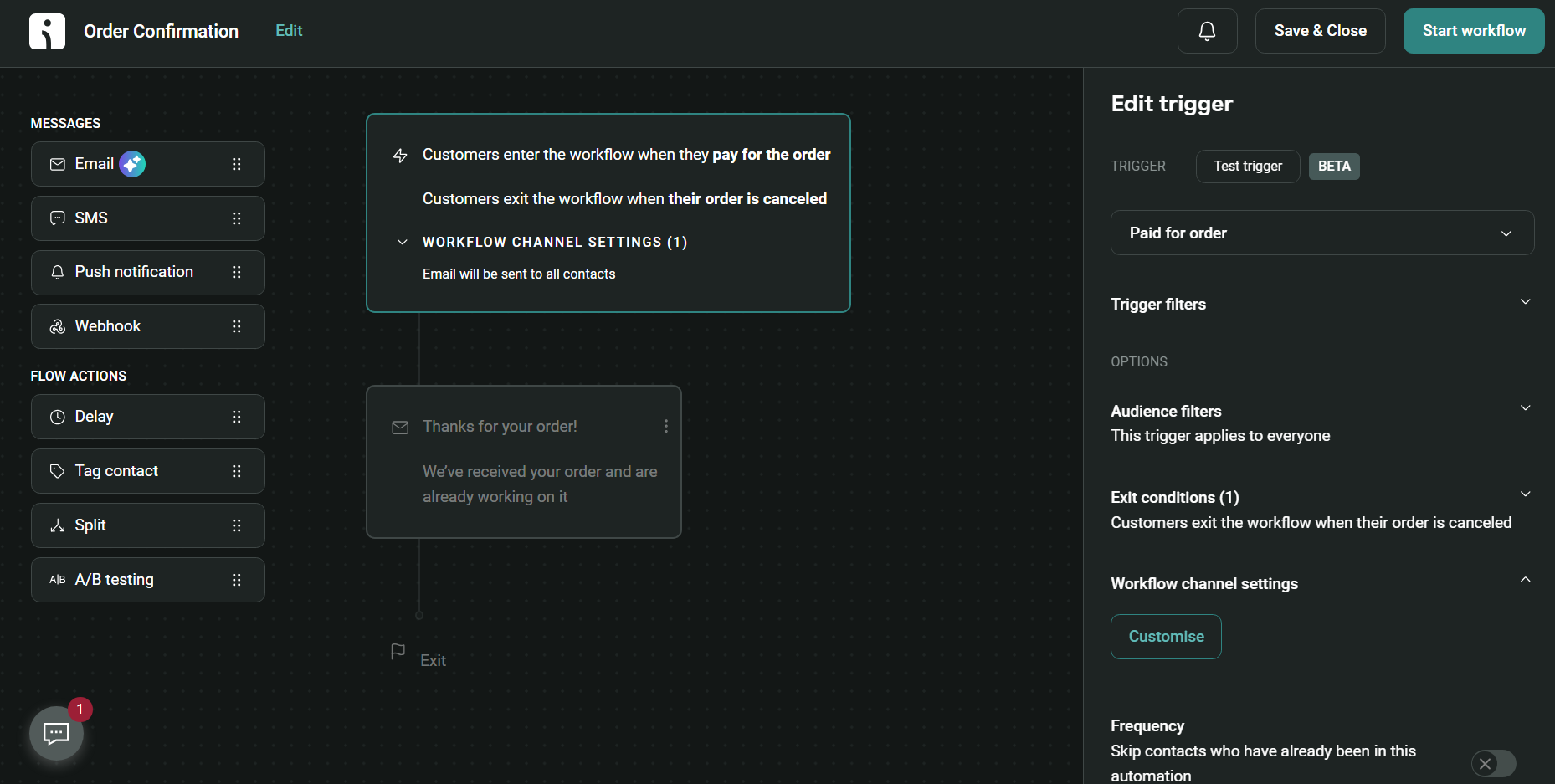
Here’s how the automation builder interface looks on Omnisend:
Rachel Riley’s success story
Luxury children’s fashion brand Rachel Riley realized they needed more value from their transactional messages. They migrated their order confirmation emails from Shopify’s default notifications to Omnisend, enabling them to implement advanced personalization features and track post-purchase revenue with greater precision.
As Jacqueline, Rachel Riley’s representative, noted about the switch:
“Our order confirmation automation alone has become a powerful revenue driver, showing us that even post-purchase messages can contribute to sales. But also, we see that overall automations not only drive sales but help us understand what our customers need as well,” Jacqueline noted. “This builds loyalty and retention, which are vital for a brand like ours.”
Read the full case study
Conclusion
You now have everything you need to upgrade your post-purchase communication: five ready-to-use templates, real brand examples, best practices, subject line recommendations, and more.
Choose the order confirmation email template that best fits your brand, and make adjustments to ensure it aligns with your tone of voice and design. Then, you’ll be ready to start generating additional revenue from the post-purchase sequences.
If you want to connect these templates to a broader strategy, you can refer to our guide on order confirmation emails, which covers dos and don’ts, metric benchmarks, automation recommendations, additional templates and designs, and more.
As we move further into 2026 and beyond, you’ll need to combine order confirmation emails with AI-driven personalization and other novelties to become an ecommerce brand that adjusts to the times instead of being one that’s stuck in the past.
Quick sign up | No credit card required
FAQ
What should be included in an order confirmation email?
An effective order confirmation email must include the order number, an itemized purchase summary, a complete cost breakdown, shipping and billing addresses, an estimated delivery timeline, a tracking link, and clear customer support contact details.
How do I create a free order confirmation email template?
You can build a free order confirmation email template using Omnisend’s free plan. It provides access to a drag-and-drop builder and pre-built ecommerce workflows you can customize to match your brand without coding or paying.
What is the best subject line for an order confirmation email?
The best subject line is clear and direct. Use phrases like “Order confirmation: #12345” or personalize it with “Thanks for your order, {{first_name}}.” Always A/B test your subject lines to see what best engages your audience.
How is a B2B purchase order confirmation email different from a standard order confirmation?
A B2B purchase order confirmation relies on formal language and prioritizes corporate accounting needs. It displays the purchase order number, exact payment terms, vendor details, and detailed product specifications for easy internal processing.
How do I set up an order confirmation email in Shopify or WooCommerce?
First, disable the native order confirmation emails in your Shopify or WooCommerce settings to prevent duplicate emails. Then, connect an automation platform like Omnisend to build, customize, and launch your new post-purchase workflow.
How can I personalize order confirmation emails to increase repeat purchases?
Increase repeat purchases by using AI to insert dynamic product recommendations based on browsing history. You can also tailor copy for first-time buyers, display loyalty points, and calculate points needed for the next reward.