Omnisend AI
 OFFER



The best testimonial emails focus on highlighting the strongest reviews and adding customer names. The purpose of any good testimonial email is to either share customer reviews with an existing list or ask past customers to share their reviews and give them a reason to do so.
We’ve selected 10 customer testimonial email examples and analyzed how each one presents testimonials to their advantage, what subject line they use, and how they design email layouts.
Quick sign up | No credit card required
10 testimonial email examples
We chose every testimonial email example because it includes a customer review, a quote, or a rating from a recognized platform. All 10 emails show a specific testimonial advertising tactic and were sent between late 2025 and 2026 by different brands.
| Brand name | Industry | Differentiator |
|---|---|---|
| 1. Soft Services | Skincare | Quotes with the reviewer’s age |
| 2. YCODE | Men’s skincare | Skeptics as the proof |
| 3. Purple | Mattresses | One customer, one story |
| 4. Milk Bar | Bakery | A review as the gift argument |
| 5. Athletic Brewing | Non-alcoholic beer | Reviews under a seasonal release |
| 6. ALSO | E-bikes | Quotes from test rides |
| 7. Postable | Greeting cards | A press quote in the cart reminder |
| 8. Hardman Design | Furniture | A Google review in browse abandonment |
| 9. Box Genie | Custom packaging | Proof for business buyers |
| 10. Heist | Coffee | An expert score instead of a quote |
1. Soft Services: Quotes with the reviewer’s age
Subject line: Care for the hands you love
Preheader: Overnight results for all
Testimonial format: Review roundup, seven quotes signed with first names, six with ages
Trigger: Gift set campaign
Sent: June 2026

Why this email works
Soft Services sells its Theraplush hand treatment as a gift set by letting customers aged 48 to 79 vouch for it. The hero section leads with a series of visuals showing older hands holding the jar, while the copy explains that because customers buy the product for loved ones, Soft Services created a giftable version.
The email body includes seven quotes: six are signed with a first name and age, and one with a first name only. Two reviewers say they gave the product to family members, a husband and a sister.
What you can learn from it
Add the reviewer’s age to each quote when you’re promoting a product to a specific age group.
2. YCODE: Skeptics as the proof
Subject line: The results after 60 surprised us
Preheader: Dad will thank you a week later.
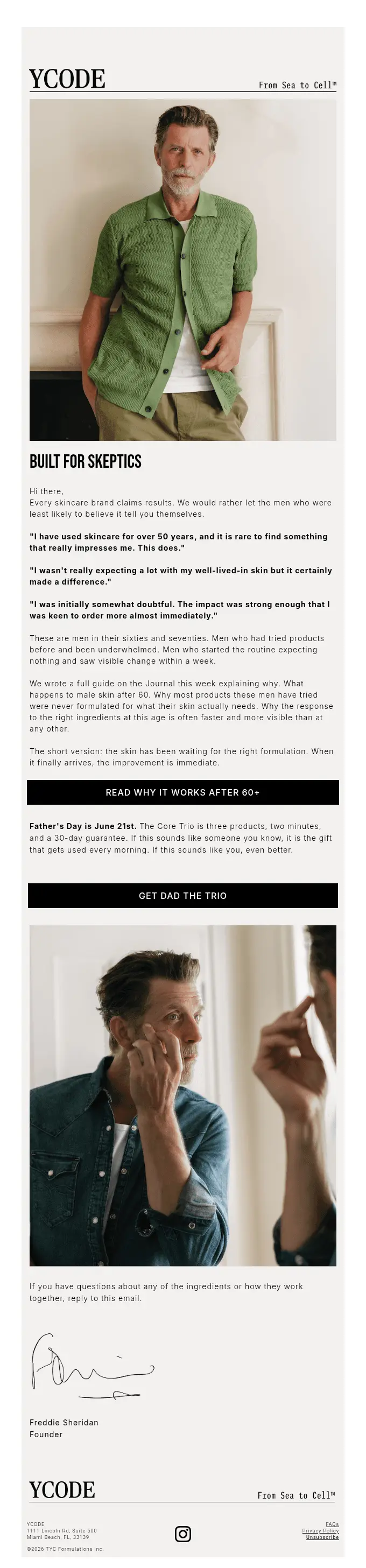
Testimonial format: Three unsigned customer quotes, followed by a description of who wrote them
Trigger: Father’s Day campaign
Sent: June 2026, before Father’s Day
Why this email works
YCODE, a men’s skincare brand, wins over doubtful men over 60 by letting former skeptics speak first. The email starts with a bold “Built for skeptics” statement that addresses possible concerns and answers them with customer reviews.
The copy then explains why its skincare works on skin over 60, and only then adds its first button, which leads to a guide rather than a sale: “Read why it works after 60+.” The “Get Dad the Trio” button comes second.
What you can learn from it
Quote customers who started out skeptical about your product. Doubtful readers see their own hesitation answered by someone who shared it.
3. Purple: One customer, one story
Subject line: ‘My mattress is making me late.’ — Tia
Preheader: She called it life-changing. We think she’s right.
Testimonial format: Single customer quote with a link to a video story
Trigger: Promotional campaign during a mattress sale
Sent: June 2026

Why this email works
With a customer quote in its subject line and her first name, Purple’s inbox preview already looks like a review. The line is amusing: Tia says her mattress makes her late.
Under “Real people. Real sleep.” and five stars, Tia’s full quote says the mattress left her feeling “restful, not restless.” Tia’s quote leads into a “Listen to her story” button and video thumbnail, then the mattress lineup and the sale (queen mattresses from $999), so the offer reads like the next step.
What you can learn from it
Include a short quote from one of your customers, and add a link to a longer video for those who are interested.
4. Milk Bar: A review as the gift argument
Subject line: “Best cookies I’ve ever had.”
Preheader: Get the gift everyone’s gifting
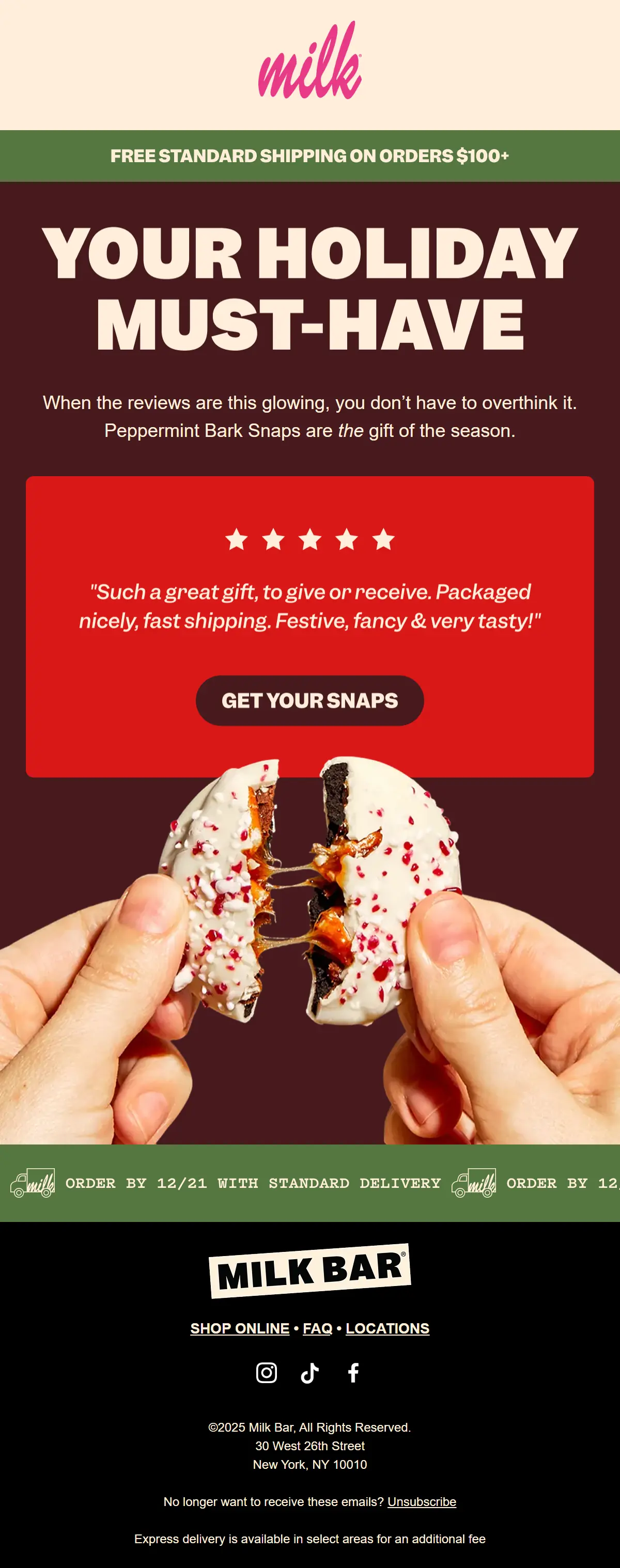
Testimonial format: Five unsigned five-star quotes, rotating in an animated GIF
Trigger: Holiday gift campaign
Sent: December 2025
Why this email works
New York bakery Milk Bar uses a customer quote as its subject line, which stands out among holiday promotions. The copy states: “Your holiday must-have,” plus a line saying you shouldn’t overthink your gift.
The first of five rotating reviews in a red block addresses three concerns when giving food as a gift: packaging, fast shipping, and taste. The subject line quotes the fourth. In the same block, the “Get your snaps” button invites readers to start browsing.
What you can learn from it
Put the CTA button directly below the quote for gift campaigns that mention packaging, delivery, and the product.
5. Athletic Brewing: Reviews under a seasonal release
Subject line: Your Valentine: Raspberry Espresso ☕❤️
Preheader: Fall in loOooOove.
Testimonial format: Three five-star reviews signed with first names and last initials
Trigger: Seasonal product campaign
Sent: February 2026, before Valentine’s Day

Why this email works
Athletic Brewing lets three customers sell Raspberry Espresso, a seasonal flavor of its non-alcoholic beer, so the flavor feels proven before anyone buys. In the email, the flavor is described in two sentences, followed by a “Shop Raspberry Espresso” button. Three five-star reviews appear below, each offering a different take on the brew.
One reviewer calls it dessert-style beer and wants to stock up before it’s gone. Another calls it a brew to savor, and the third explains how the raspberry flavor balances the sweetness. The “Try it Yourself” button after the reviews gives readers another chance to click.
What you can learn from it
Pick reviews that add different details, such as the occasion or flavor, and repeat your call to action for readers who scroll past the first button.
6. ALSO: Quotes from test rides
Subject line: Word is in from the Test Spin circuit 👀
Preheader: Spoiler: We’re hearing good things.
Testimonial format: Four short quotes signed with first names and last initials
Trigger: Product launch campaign promoting free test rides
Sent: October 2026
Why this email works
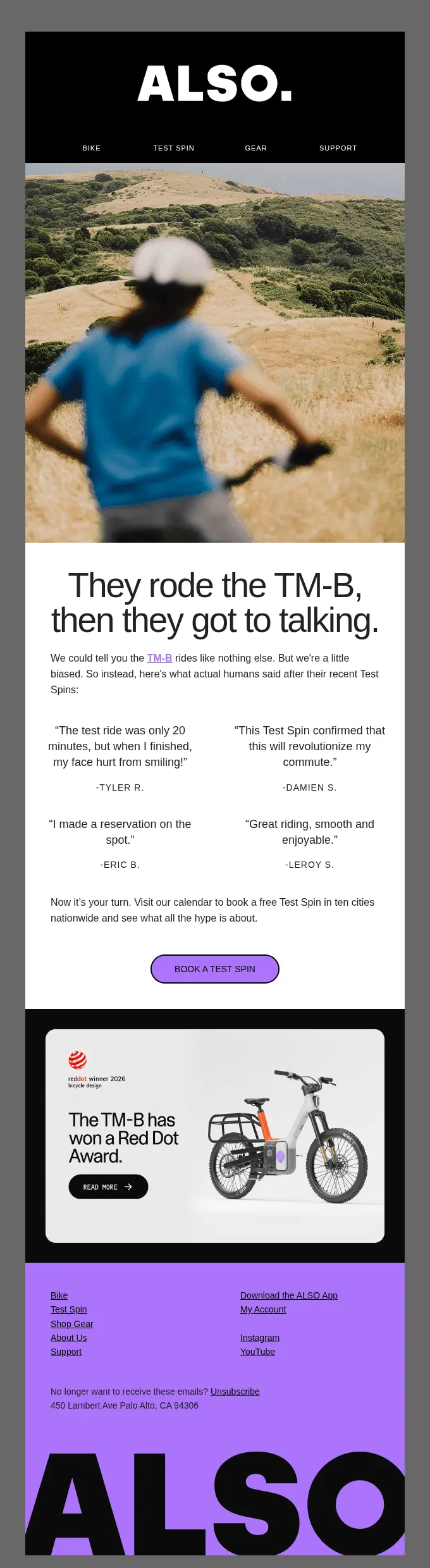
ALSO lets riders who already tried its new TM-B e-bicycle make the case for it, so the test-ride invitation comes with proof the ride is worth it. ALSO adds a line saying it would rather let riders do the talking than sound biased.
At the center of the email, four reviews are followed by a name to add credibility. Rather than a buy button, ALSO’s CTA asks readers to book a free Test Spin and see whether they like the bicycle.
What you can learn from it
Collect quotes right after a trial or demo, and use that test as your email’s call to action.
7. Postable: A press quote in the cart reminder
Subject line: You’re just a few clicks away… 💌
Preheader: Let’s get this card signed, sealed, and delivered!
Testimonial format: Single press quote (The New York Times)
Trigger: Abandoned cart automation
Sent: December 2025
Why this email works
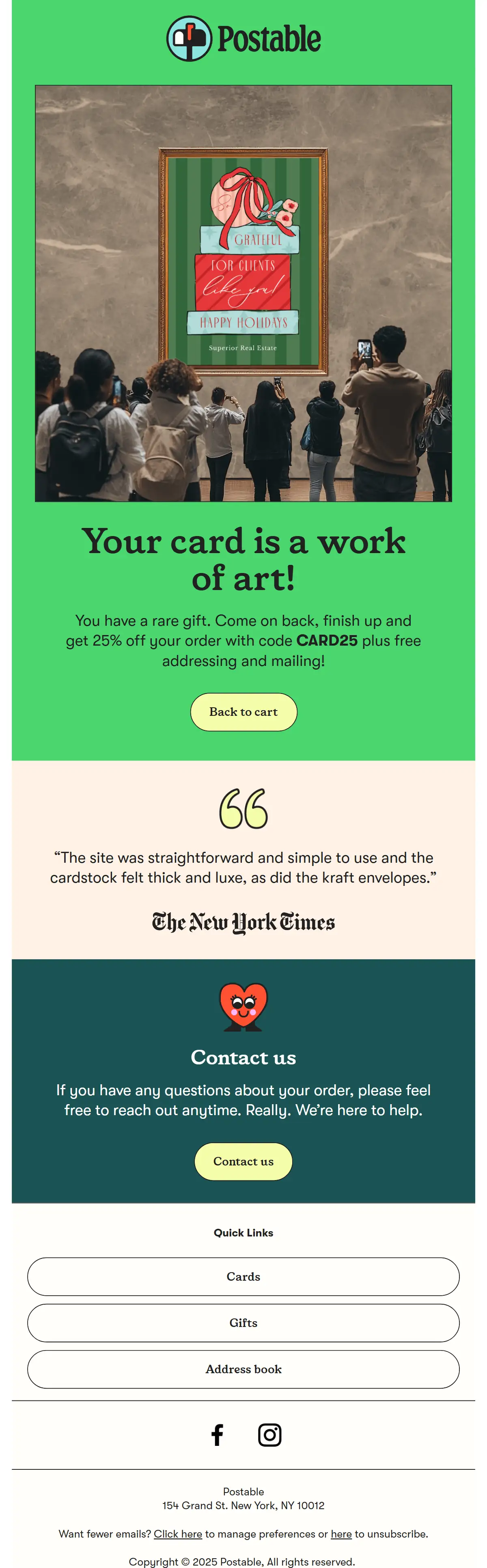
With Postable, shoppers design cards online and mail them out, and its cart email uses one press quote to answer the doubts that stall an order. The email starts with “Your card is a work of art!” and offers 25% off with code CARD25. The email doesn’t contain a product grid or second offer, only a contact block for order questions.
The New York Times quote covers two doubts a shopper might still have: whether finishing the order is a hassle and whether a printed card will feel flimsy.
What you can learn from it
In cart reminders, put one quote under the button that takes shoppers back to their cart, and pick one that answers the most common reason they hesitate.
8. Hardman Design: A Google review in browse abandonment
Subject line: Solid Hardwood. Built to Order.
Preheader: Responsibly sourced oak and walnut, selected for durability and character.
Testimonial format: Single five-star Google review, signed with the reviewer’s full name
Trigger: Browse abandonment automation
Sent: March 2026
Why this email works
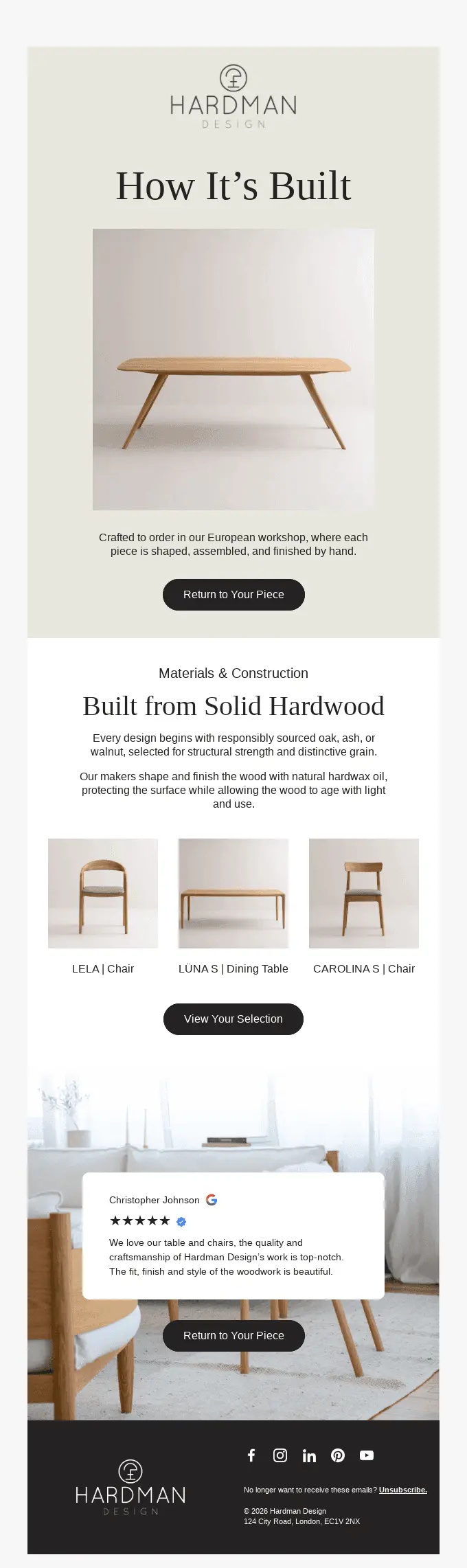
Hardman Design features a verified 5-star Google review to confirm the craftsmanship its email describes. The brand builds solid hardwood furniture to order, so the email uses lines like “Return to Your Piece” and “View Your Selection” instead of “Shop Now” buttons. The email continues to explain how the furniture is made and what materials it uses.
The email places the review after the materials and construction copy to confirm the claims. One review from Christopher Johnson praises the quality and craftsmanship of the table and chairs he bought, and the Google logo and verified badge beside it signal credibility.
What you can learn from it
Show where the review was posted and explain how high-priced products are made first. Then add a review that confirms the same quality claim.
Try it with Omnisend: Add a customer quote under the main button in your cart and browse abandonment emails, so every reminder carries one piece of proof.
9. Box Genie: Proof for business buyers
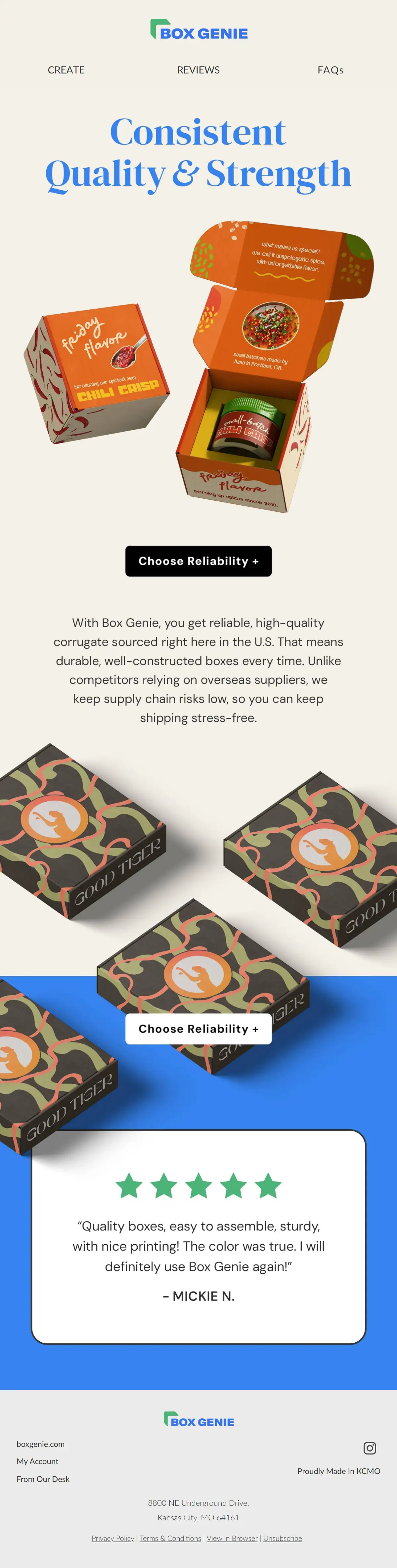
Subject line: Crafted with Care: Boxes proudly made in Kansas City
Preheader: Did you know that your boxes are made here in the United States?
Testimonial format: Single five-star quote signed with a first name and last initial
Trigger: Brand story campaign
Sent: April 2026
Why this email works
Box Genie makes custom printed shipping boxes for small businesses, so it closes on a review that answers their practical questions. In the email, the brand explains why U.S.-made boxes are important. The email argues that its boxes are sourced in the United States and carry less supply chain risk than competitors that use overseas suppliers.
The copy speaks to the practical concerns a business has when it picks a custom packaging provider. Signed by Mickie N., the review sits right under the “Choose Reliability +” button and praises boxes that are sturdy, easy to assemble, and true to color.
What you can learn from it
Choose reviews that mention practical results like durability, assembly, and color accuracy, not general praise, when you sell to other businesses.
10. Heist: An expert score instead of a quote
Subject line: The Highest Score Decaf Has Ever Gotten 👀
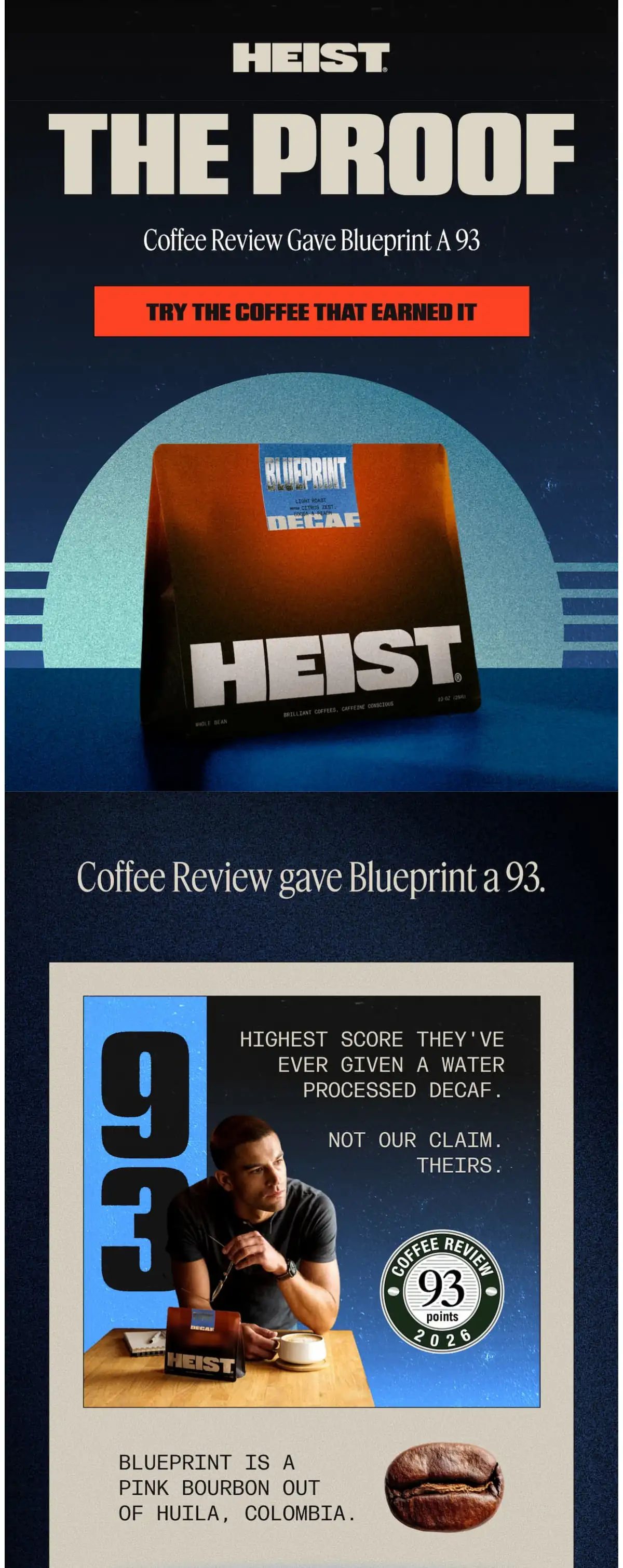
Preheader: Blueprint scored 93 by Coffee Review. Not our number. theirs.
Testimonial format: Third-party rating (Coffee Review, 93 points)
Trigger: Product promotion campaign
Sent: September 2026
Why this email works
Heist’s email lets an independent judge make its boldest claim: Coffee Review rated its Blueprint decaf 93 points. The hero reads “The proof,” with a “Try the coffee that earned it” button, and the score appears again as a large “93” graphic.
Both the preheader and the body of the email emphasize that the score is the reviewer’s, not Heist’s: “Not our number” and “Not our claim. Theirs.” Repeating the source lets Heist make a big claim without sounding like it’s bragging.
What you can learn from it
Lead with the score of an independent reviewer, cite the source more than once, and name the category the score applies to, as the body does with “water processed decaf.”
What makes a great testimonial email
A great testimonial email uses customer reviews that support a specific brand claim or product feature rather than just adding different testimonials. The 10 testimonial emails share four patterns.
Name reviewers
Put a name on every quote, as six of the 10 emails do: Soft Services, Purple, Athletic Brewing, ALSO, Hardman Design, and Box Genie. Soft Services also adds age, Hardman Design shows the Google logo next to its review, and Postable and Heist name the publication behind the praise.
Put the proof next to the button
Place each review right above or below the button it supports, as eight of the 10 testimonial email examples do. For example, Milk Bar positions its review and the CTA button in the same block, Postable places its quote under its CTA, and Athletic Brewing puts its reviews between two shop buttons.
Connect shopper doubts with real reviews
Pick testimonials that answer a doubt your shoppers already have, as five of the 10 emails do. YCODE quotes a former skeptic and uses the word “skeptic” to speak directly to readers who doubt skincare works over 60. Another example is Milk Bar, whose first review covers packaging, shipping, and taste.
Preview the proof in the subject line
Put the proof in the subject line when a quote or score can stand on its own. Three of the 10 subject lines show it before readers even open the email. Purple and Milk Bar quote a customer directly, while Heist points to the score a third-party coffee reviewer gave its decaf.
Testimonial email subject lines
The most effective subject lines for testimonial emails mention credible review details like names of past shoppers or any publications or independent review platforms. Some brands include the actual quote and give more background with the preview.
Here are 20 subject line examples, all grouped by approach, for sharing reviews and for asking for them:
| Approach | Subject lines |
|---|---|
| Customer quote (sharing) | "Better than I expected," says [First name] "I've already ordered a second one" [Customer name] said it first "I'm never going back" |
| Rating (sharing) | [X] stars from [X] customers Why [product] has [X] five-star reviews The reviews are in for [product] Rated [X]/5 by people who use it daily |
| Result (sharing) | [Customer name] fixed [problem] in [X] weeks What happened after [X] days with [product] How [customer name] saves [X] hours a week What [X] customers noticed after a month |
| Quick favor (asking) | [First name], got 30 seconds? How's your [product] so far? One quick question about your order Would you recommend us to a friend? |
| Pre-drafted quote (asking) | Can we quote you on this? We drafted your review. Is it right? [First name], mind if we share your words? Approve your quote in one click |
Testing subject lines, including whether to quote a review, shows which version earns more opens. Try out Omnisend’s free AI subject line generator to get multiple subject line variations and focus more on testing.
Testimonial email templates you can use
These four templates cover both kinds of testimonial email: three are testimonial request email templates, and one shares reviews with your list.
We’ve created four templates you can choose from and either paste them as-is into the Omnisend email builder after choosing an email template, or customize them to fit your branding better.
Short testimonial request after delivery
Request with a pre-drafted quote
Asking to quote a kind reply or review
Reviews email to your subscriber list
How to create testimonial emails with Omnisend
To create testimonial and customer review emails with Omnisend, start with the Product Reviews automation, which asks customers for a review once an order is fulfilled. It works with the review app your store uses, such as Judge.me, Loox, or Yotpo.
The default delay is two weeks after fulfillment. Omnisend suggests 7 days for domestic or fast shipping and 21 or more for international orders.
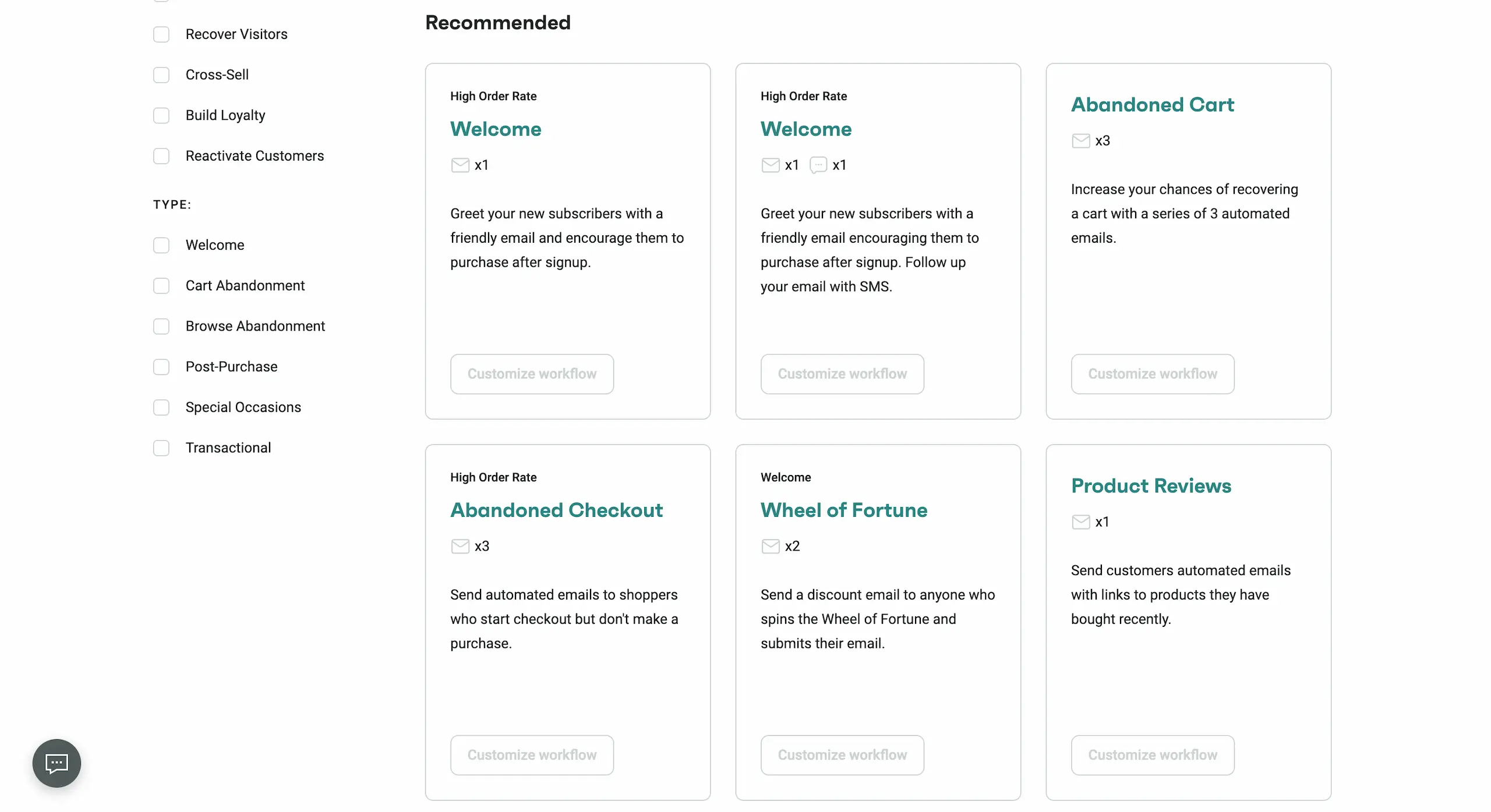
Once your automation is set up and testimonials start to roll in, categorize them according to customer questions or concerns. Then add the best quotes to your welcome series for new subscribers and to your abandoned cart email, so each message carries one piece of proof.
Wrap-up
Testimonial email campaigns work best when the reviews answer real customer questions or concerns. But to make the reviews stand out, add customer names and other relevant details if possible, especially when targeting a specific group or segment.
Use the 10 testimonial examples and check out our best email marketing campaigns guide to write testimonial emails that your readers will trust.
Quick sign up | No credit card required