Omnisend AI


 OFFER
OFFER










An order confirmation SMS is an automated message sent immediately after a customer makes a purchase on your site. It includes key details such as the order number, brand name, and tracking link. It can also include items purchased and customer support information.
There are different types of order confirmation messages, such as standard, first-time buyer, personalized, upsell or cross-sell, rush delivery, high-value, and subscription confirmations. These variations exist because customers need different information depending on the purchase scenario.
Most ecommerce brands send a basic order confirmation and stop there. Tailoring that message to the specific purchase — first-time buyer, high-value order, subscription — builds trust faster and drives repeat purchases.
In this article, we’ll break down what an order confirmation SMS is, show you real scenario-based examples, and explain why they work. You’ll also get copy-ready order confirmation SMS templates and learn how to create high-performing messages.
Quick sign up | No credit card required
What is an order confirmation SMS?
An order confirmation SMS is a transactional text message sent immediately after a customer makes a purchase. It confirms that the purchase was successful. It typically includes the order number, brand name, payment confirmation, and estimated delivery time.
Unlike promotional SMS that focuses on flash sale announcements or product launches to drive sales, an order confirmation message provides order-tracking links and reassures customers that their order is on its way. Order confirmations also help reduce WISMO (Where is my order?) support tickets.
Order confirmations have high open rates because customers expect them. According to Omnisend, automated SMS triggered by customer actions generated an average of $0.74 per send. This is compared to $0.15 for standard SMS campaigns. To achieve similar results, you should use an email and SMS marketing automation tool like Omnisend.
In fact, Omnisend is making SMS marketing more accessible for ecommerce and Shopify store owners who already have an email marketing strategy and send order confirmation emails. For example, Omnisend’s new SMS price drop means that you can start sending messages at just $0.007 per text if you subscribe to the Pro plan after May 4, 2026.
If you’re on the legacy Pro plan, meaning you subscribed before May 4, 2026, then you keep the original SMS plan, which includes free SMS credits equal to your plan. For example, $59/month = $59 free SMS credits.
Order confirmation SMS examples (by scenario)
Order confirmation text message examples include standard, first-time buyer, and personalized confirmations. They also include upsell and cross-sell, rush delivery, high-value, and subscription order confirmations.
Standard order confirmation SMS
This type of order confirmation includes a brand name, order number, a thank-you message, and a link to track the order. You can also pair these messages with thank-you emails. Take a look at this example from Local Electic:
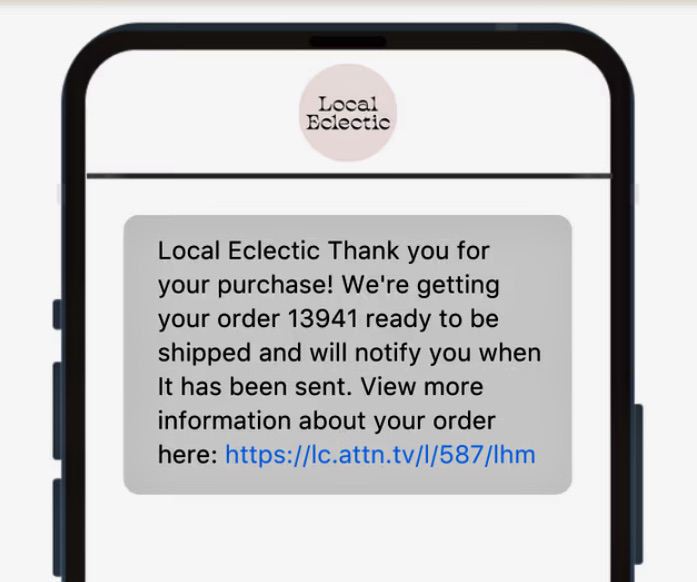
This confirms the purchase, reassuring customers that their order was received. With the tracking link, customers can check the order status themselves instead of contacting support.
First-time buyer confirmation SMS
This type of SMS confirms a purchase and includes a welcome message. The goal is to acknowledge that this is a customer’s first purchase with your brand. You can also include a small incentive like a discount on their next order, loyalty points, and an invitation to join a reward program. See this Gameday Couture example:
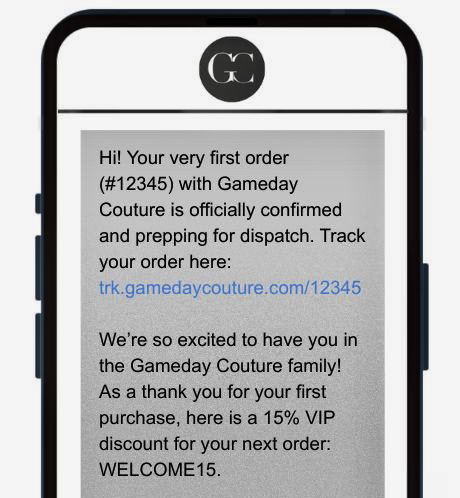
This type of SMS works because it confirms the order while also making the customer feel valued as a first-time buyer. The incentive encourages repeat purchases.
Personalized order confirmation SMS
These messages include customer names when confirming orders. However, you should go beyond name personalization and include dynamic fields. These are placeholders, like [Product name] in an SMS template. For example, Culprit mentions the product name and size in the message:
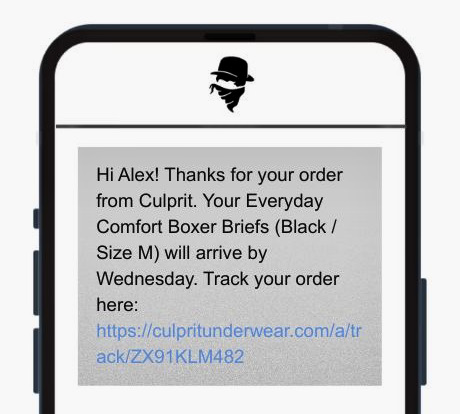
This way, customers immediately see the exact product they bought. A personalized order confirmation SMS also helps reduce customer support questions, such as “Did I order the blue shirt in small or medium?”
Upsell/cross-sell order confirmation SMS
Upselling suggests upgrading to a more premium version of a product. Cross-selling encourages customers to add complementary items to their order. However, for an upsell or cross-sell order confirmation SMS, the main purpose should still be the order confirmation. Meaning, the order tracking link should come first. Then, you can offer discounts on related products:
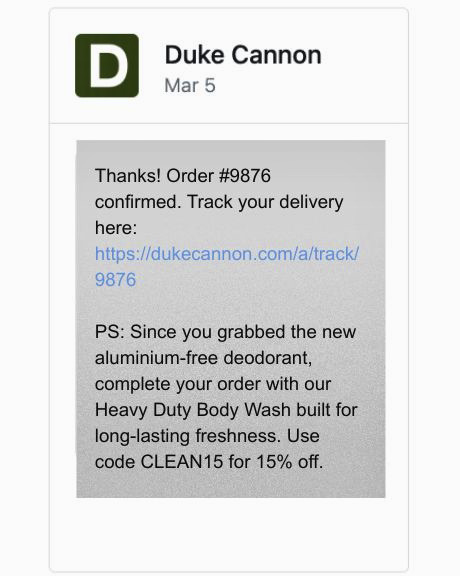
It works because customers are engaged right after buying. This increases average order value (AOV). This is the average amount a customer spends per transaction. Higher AOV increases revenue per customer.
Express or rush delivery order confirmation SMS
This SMS confirms that a “faster shipping option” was added to a customer’s order. It should include the order number and a clear, expected delivery time or tracking link. You can take inspiration from this Three Ships order confirmation text message sample:
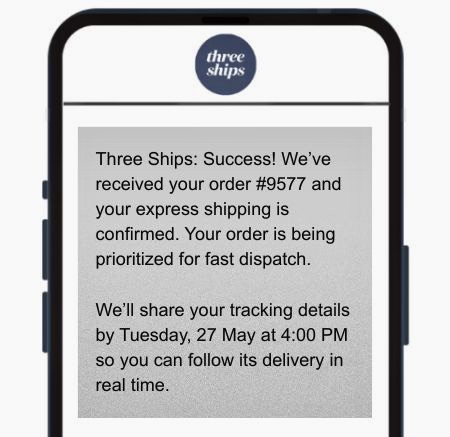
This SMS helps reduce WISMO requests. This is because it reassures customers that their order is being prioritized and provides a specific timeline. Words like “prioritized” make customers feel valued. This increases brand trust.
High-value order confirmation SMS
A high-value order confirmation SMS is sent after a customer purchases an expensive product. It usually confirms the order first. Then reassures the customer that the order is being carefully handled and provides direct support contact details. See this example from Aurate:
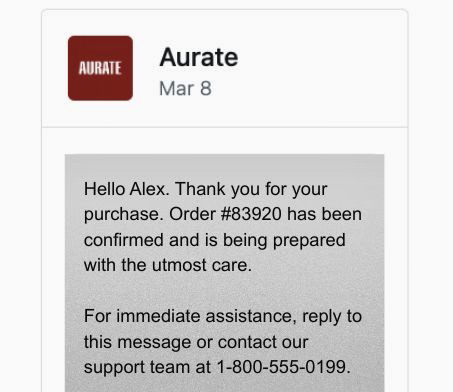
This works because it uses white-glove language. This is attentive messaging that reassures customers that their expensive order is handled with care. This reduces anxiety.
Subscription order confirmation SMS
A subscription order confirmation SMS is sent when a customer signs up for a recurring service. It confirms the billing cycle, payment details, and provides a link to manage or cancel the subscription:
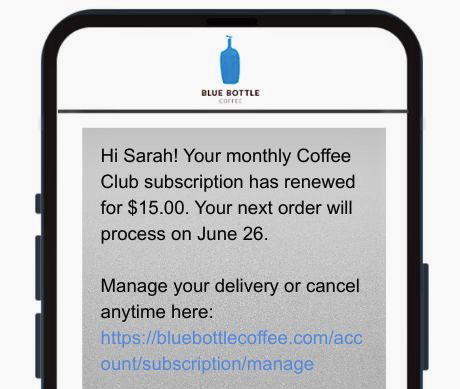
This clearly states the subscription status as well as the billing information. The direct link to manage or cancel subscriptions helps reduce support queries.
Order confirmation SMS templates (copy-ready)
An order confirmation SMS template is a ready-to-use message with placeholders. Take a look at these six copy-ready order confirmation SMS sample messages. You can simply copy the text and adapt it for your order confirmation SMS messages:
1. Standard confirmation
Hi [First Name], your order #[Order #] with [Brand Name] has been confirmed. We’ll notify you once it ships. Track your order here: [Tracking Link]
2. With discount code
Thanks for your order, [First Name]! Order #[Order Number] is confirmed. As a thank you for choosing [Brand Name], enjoy [Discount %] off your next purchase. Use code [Discount Code] at checkout.
3. Subscription confirmation
Hi [First Name], your [Brand Name] subscription has started. Your first billing cycle begins on [Start Date]. Manage your subscription or cancel anytime here: [Account Link].
4. Order delay notification
Hi [First Name], there’s a slight delay with your order #[Order Number] from [Brand Name]. We’re working to resolve it and will update you with a new delivery time shortly.
5. Refund or cancellation confirmation
Hi [First Name], your refund for order #[Order Number] from [Brand Name] has been processed successfully. The amount will be returned to your original payment method within [Timeframe].
6. Issue resolution confirmation
Hi [First Name], your support request regarding order #[Order Number] has been resolved. If you still need help, reply to this message or contact our support team here: [Support Link]
What makes a high-performing order confirmation SMS?
Creating a high-performing order confirmation SMS depends on five things. The message should be concise so customers can read it instantly. It should also include personalization, such as customer names or their specific purchase.
You also need to send order confirmations immediately after a purchase, and ensure the SMS copy matches your brand type. You must also include a CTA (call to action) to drive actions such as tracking or managing orders.
Message length and character limits
You can write up to 160 characters in a standard SMS. If you exceed this limit, it will lead to message concatenation. Mobile carriers such as AT&T or Verizon split the text into smaller segments. For example:
- 161 – 320 chars = 2 SMS
- 321 – 480 chars = 3 SMS
Even though the SMS appears as a single message on customers’ phones, your SMS costs increase because each segment is billed separately. Additionally, special characters like emojis reduce the SMS character limit to 70.
You can also use MMS in confirmation messages. MMS (Multimedia Messaging Service) allows you to send text messages with rich media, such as images, GIFs, videos, and PDFs. It supports up to 1,600 characters, but it can cost up to 3 times more than regular SMS for order confirmation. Use MMS if you want to showcase product items or provide a PDF of a detailed receipt.
Pro tip: Add the most important order details first – order number, brand name, and order status or tracking links. You should always check the length of your SMS before sending it to avoid unexpected costs. Use tools like Omnisend’s SMS calculator to see character count and estimated SMS costs before sending.
Personalization beyond the first name
Include specific product names, order totals, or billing information. This provides assurance to customers and helps build trust, which helps increase your ecommerce store revenue.
In fact, modern email and SMS marketing tools like Omnisend help you automate personalization in SMS. For example, you can choose an automation workflow in Omnisend and add an SMS block. When editing this SMS block, click on the Personalization tag icon:
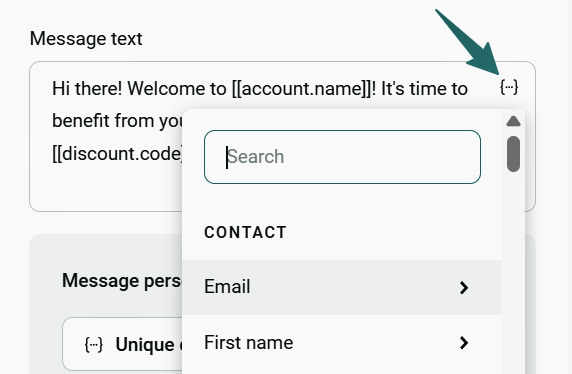
Then you can add personalization tags (variables) such as first name, contact, products, or dates. These are placeholders that Omnisend automatically fills with real customer data. In fact, Omnisend integrates with platforms like Shopify to sync your store and customer data.
In practice, with Omnisend personalization tags, you create one template with variables, and the tool itself fills them before sending order confirmations. Here’s what these placeholders look like:
- Greetings with first name: Hi [[contact.first_name | append: “,”]] we have some exciting news for you!
Output: Hi James, we have some exciting news for you!
- Displaying birthday date: Hope your day on [[contact.birthday|date:”%B %d”]] is amazing!
Output: Hope your day on May 07 is amazing!
Timing: When to send
Order confirmation SMS should be triggered immediately after purchase, ideally within 60 seconds. You should use an automation tool like Omnisend to send order confirmations immediately after customer actions, such as “placed orders.”
Such prompt messages provide reassurance to the customer. Any delays can create uncertainty about whether the order was successful, reducing trust.
Tone by brand type
Tone matters because it shapes how the customer feels about your brand as they read the message. Since regular SMS usually doesn’t have a design, the words are the only signal of brand identity. The tone directly affects how professional, premium, or trustworthy the message feels, for example:
- Formal for luxury: “LV Brand: Your esteemed #1052 is confirmed. We are carefully preparing your selection. View details: [link]”
- Celebratory for lifestyle/DTC: “BrandCo: Order confirmed! 🎉 You’re officially in. We’re prepping your goodies. Track them here: [link]”
- Functional for replenishment: Hi [First Name], your order #[Order Number] is confirmed. Your next delivery is scheduled for [Date]. You can manage your subscription here: [Link].
CTA best practices
Each order confirmation SMS should include one clear call to action so customers know exactly what to do next. Including multiple actions, such as a tracking link and a discount offer link, can create confusion, leading to a reduction in click-through rates.
Keep the following points in mind when adding CTAs to an order confirmation SMS:
- Match the CTA to the customer’s immediate need, for example, order confirmations should include order tracking links. Discount codes can appear in an order confirmation SMS for first-time buyers. However, only after the main order details and tracking information are provided.
- Use a URL shortener to keep links concise. URLs can take up 50+ characters, which reduces message space. You should use automation tools like Omnisend that help you shorten links before sending an order confirmation SMS.
Conclusion
Order confirmation SMS is a transactional message sent immediately to customers after they make a purchase in your store. It confirms payment and order processing. This reduces customer anxiety and builds brand trust.
When connected to a post-purchase automation flow, order confirmations help drive revenue. This means order confirmations should not be standalone messages. They should also be the first step in a sequence of automated updates, such as shipping confirmations, delivery notifications, or upsells. This keeps customers engaged and encourages repeat purchases.
The difference between basic and high-performing order confirmations comes down to personalization, timing, tone, and automation.
You can set up order confirmation SMS to trigger automatically after a customer places an order, using tools like Omnisend. This tool also lets you add personalization, like names or product types, to messages without manual work. You can also send follow-up messages, such as shipping updates or review requests, in minutes.
Tools like Omnisend are made for small and growing ecommerce brands and Shopify store owners. In fact, Omnisend users see an average ROI of $79 for every $1 spent.
Quick sign up | No credit card required
FAQ
What is an SMS confirmation?
An SMS confirmation is an automated text message sent to a customer’s mobile phone. It verifies a phone number, identity, or confirms an action. For example, an order confirmation SMS can be sent to customers to help them track their order after purchase.
What is an example of an order confirmation?
An order confirmation is a transactional message sent to a customer immediately after they buy a product from your brand. A standard order confirmation message sample includes your brand name, order number, and order tracking link. It looks like this — “Hi, your order #[Order Number] has been received and is being processed. Track your order here: [Link].”
Does SMS confirm delivery?
Yes. A delivery confirmation SMS can be sent right after the delivery service marks a package as successfully handed over to the customer.
What should be included in an order confirmation SMS?
A high-performing order confirmation SMS should include a brand name, order number, and tracking link. It should also clearly state that the order has been placed successfully. It can also include specific items purchased by the customers and an expected delivery time.
How long should an order confirmation text message be?
An order confirmation SMS should be 160 characters, as this is the per-SMS limit. If you exceed this limit, your SMS costs increase. If you use MMS, then the character limit per message is 1,600. However, MMS costs more to send than standard SMS.