
 Omnisend AI


 OFFER
OFFER








Drive sales on autopilot with ecommerce-focused features
See FeaturesKey takeaways 
SendGrid is ideal for developers needing reliable transactional email delivery, while Mailchimp caters to small businesses with user-friendly marketing tools.
Pricing structures differ significantly: SendGrid charges based on email volume, whereas Mailchimp's pricing is based on the size of your contact list.
Neither SendGrid nor Mailchimp offers comprehensive ecommerce features, making dedicated platforms like Omnisend a better choice for online retailers needing integrated email and SMS marketing.
Mailchimp excels in marketing automation and user-friendly design capabilities, while SendGrid focuses on deliverability and technical control for high-volume email senders.
Reveal key takeaways
Choosing between SendGrid vs. Mailchimp comes down to what you need from your email platform.
SendGrid excels at transactional emails and offers developer-friendly tools. On the other hand, Mailchimp provides user-friendly marketing features for small businesses.
Both are popular options, but they serve different purposes. If you run an online store, you’ll want automation workflows, product recommendations, and integrated SMS marketing. These features matter specifically for ecommerce businesses.
This comparison breaks down pricing, features, and real-world use cases for SendGrid vs. Mailchimp. We’ll also show you what ecommerce businesses should look for in an email platform.
SendGrid vs. Mailchimp — key takeaways
- SendGrid specializes in transactional email: It’s built for developers who need reliable delivery of order confirmations, password resets, and shipping notifications
- Mailchimp focuses on marketing campaigns: It offers drag-and-drop tools, email templates, and automation features for small business marketers
- Pricing models differ significantly: SendGrid charges based on email volume, while Mailchimp charges based on contact list size
- Neither platform was designed for ecommerce: Neither platform offers native product recommendations or fully integrated email and SMS workflows
- Limitations for online businesses: Both Mailchimp and SendGrid have limitations for businesses that need both email and SMS integration
- Ecommerce businesses need purpose-built solutions: Platforms like Omnisend offer email and SMS in one place with pre-built automation for online stores
SendGrid vs. Mailchimp: Overview
The SendGrid vs. Mailchimp comparison is interesting because the two email marketing platforms serve different primary functions.
SendGrid overview
Owned by Twilio, SendGrid was built for developers needing reliable transactional email. It’s designed to handle transactional emails at scale. Think order confirmations, password resets, and shipping notifications. Developers love it for its robust API and deliverability focus.
The platform processes over 75 billion emails during peak periods like Cyber Week. SendGrid’s primary users are technical teams who need reliable email delivery and detailed analytics.
Mailchimp overview
Mailchimp, owned by Intuit, began as a marketing tool for small businesses. It’s positioned as an all-in-one marketing platform. You get email campaigns, landing pages, social media tools, and basic CRM features.
The interface is intuitive, and you don’t need technical knowledge to get started. Mailchimp targets marketing beginners and small business owners who want everything in one place.
Here’s a SendGrid vs. Mailchimp comparison snapshot across key criteria:
| Feature | SendGrid | Mailchimp |
|---|---|---|
| Best for | Developers, transactional email (order/shipping notifications) | Small business marketers, automation campaigns |
| Ease of use | Requires technical knowledge⭐⭐ | Beginner-friendly interface⭐⭐⭐⭐ |
| Free tier | Free trial: Up to 100 emails/day for 60 days | Free plan: Up to 250 contacts, 500 email sends/month |
| Email design tools | Design editor, code editor | Drag-and-drop builder, 250+ templates |
| Automation capabilities | Basic triggers⭐⭐ | Customer Journey Builder⭐⭐⭐⭐ |
| Transactional email | Excellent⭐⭐⭐⭐⭐ | The Mailchimp Transactional Email (formerly Mandrill) add-on is available⭐⭐⭐⭐ |
| SMS capabilities | Not available | Limited add-on⭐⭐ |
| Delivery infrastructure | Advanced monitoring⭐⭐⭐⭐⭐ | Basic tools⭐⭐ |
| Integrations | 130+ | 300+ integrations |
| Ecommerce features | Basic⭐ | Moderate⭐⭐⭐ |
SendGrid is the go-to for email marketing software that prioritizes delivery infrastructure. But Mailchimp works better as a general marketing platform with broader features.
If you run an online store, platforms designed with ecommerce in mind may serve you better. In that case, consider how ecommerce-focused platforms like Omnisend compare against Mailchimp and SendGrid.
SendGrid vs. Mailchimp: Plans and pricing
Understanding the pricing difference in the SendGrid vs. Mailchimp comparison matters because they charge you in completely different ways.
SendGrid uses volume-based pricing. You pay for how many emails you send, regardless of your contact list size. Mailchimp uses contact-based pricing. You pay based on the number of contacts you have, with monthly send limits.
Here’s a SendGrid vs. Mailchimp pricing comparison snapshot:
| Plan tier | SendGrid | Mailchimp |
|---|---|---|
| Free plan | Up to 100 emails/day for 60 days | Up to 250 contacts, 500 emails/month |
| Entry paid tier | $19.95/month (100,000 emails) | $13/month (500 contacts) |
| Mid-range to growing business | $89.95/month (2.5M emails) | $20/month (500 contacts) |
| Established brand | Custom pricing | $350/month (10,000 contacts) |
Here’s what this looks like at different scales:
| Your Situation | SendGrid Cost | Mailchimp Cost |
|---|---|---|
| 10,000 emails/month | $19.95/month | $13.25/month |
| 50,000 emails/month | $19.95/month | $37.50/month |
| 100,000 emails/month | $19.95/month | $55/month |
| 250,000 emails/month | $89.95/month | $135/month |
SendGrid becomes significantly cheaper at higher email send volumes. But there are hidden costs to consider.
SendGrid pricing
SendGrid offers multiple product lines with separate pricing structures.
The first is Email API, which handles transactional emails:
- Free Trial: 100 emails/day for 60 days
- Essentials: $19.95/month for up to 100,000 emails
- Pro: $89.95/month for up to 2.5 million emails
- Premier: Custom quote
Next is Marketing Campaigns:
- Free Trial: 100 emails/day for 60 days
- Basic: $15/month for up to 300,000 emails
- Advanced: $60/month for up to one million emails
- Custom: Custom quote
Add-ons:
- Additional IP addresses
- Expert Insights
Mailchimp pricing
Mailchimp runs a more straightforward pricing model:
- Free: Forever free for up to 250 contacts and 500 monthly sends
- Essentials: From $13/month
- Standard: From $20/month
- Premium: From $350/month
Add-ons:
- SMS marketing
- Transactional Emails
Pricing verdict
SendGrid wins on cost if you send high email volumes. Your list size doesn’t affect the price. Mailchimp makes more sense for smaller lists where you value all-in-one marketing features, including A/B testing.
However, consider how many features actually matter to your business. For ecommerce brands, neither platform offers integrated email and SMS marketing. You’re either paying for features you won’t use or missing features you actually need.
Integrated platforms like Omnisend take a different approach. Omnisend’s free plan includes all ecommerce features, like abandoned cart workflows and product recommendations. Paid plans start at $16/month and include bonus SMS credits. With an average ROI of $79 for every $1 spent, it delivers revenue while remaining affordable.
Consider comparing the tools through the Omnisend pricing comparison tool against what you’d pay elsewhere.
SendGrid vs. Mailchimp: Features
Let’s break down how SendGrid vs. Mailchimp compare on the features that matter most for your business.
Ease of use
SendGrid
SendGrid presents a mixed experience depending on your technical background. Developers appreciate the straightforward API integration and comprehensive documentation.
However, non-technical users often struggle with the interface. You’ll need to spend time exploring menus to understand where everything is located.
The setup process requires technical steps, such as creating sender identities and configuring DNS settings, before you can send your first campaign.
Mailchimp
Mailchimp takes the opposite approach, prioritizing accessibility. The dashboard guides you through each step with clear instructions and helpful prompts. You can create and send your first campaign in minutes without any prior experience.
The drag-and-drop editor requires zero coding knowledge to produce professional-looking emails. Built-in tutorials help you learn as you go, explaining features in plain language.
Most small business owners can navigate Mailchimp without needing technical support or training.
Verdict: Mailchimp wins for non-technical users who want to start sending immediately.
Email builder and templates
SendGrid
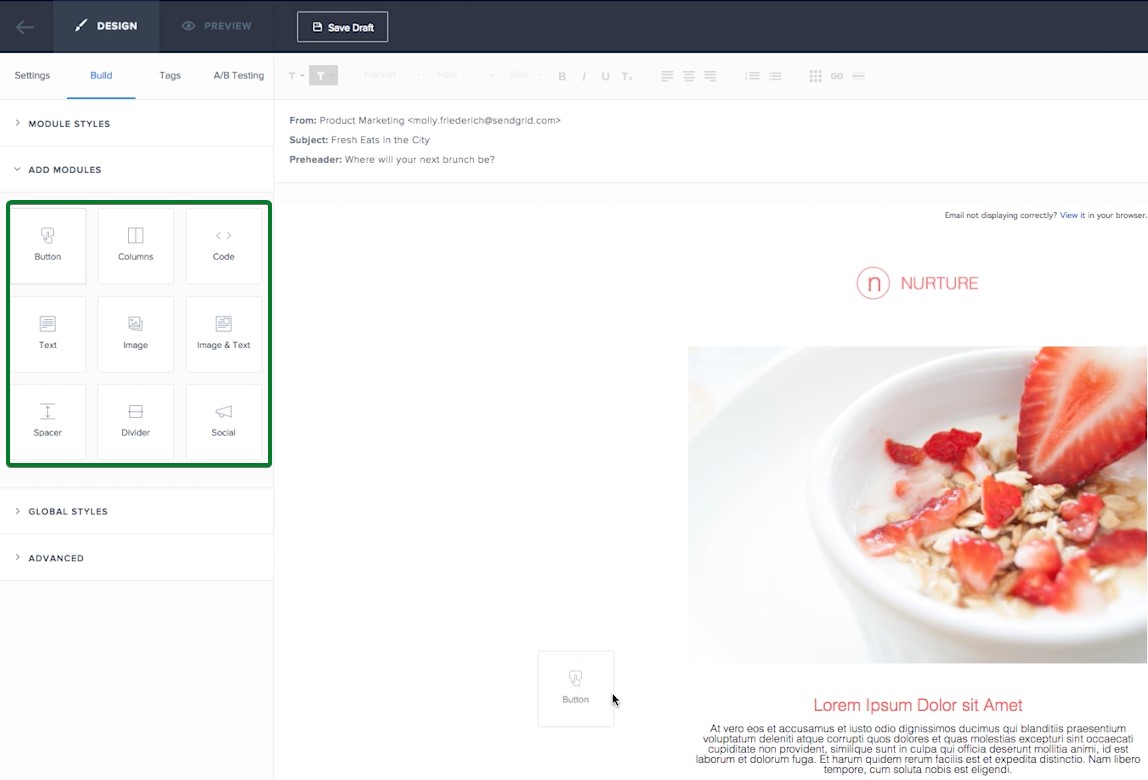
SendGrid allows you to create up to 300 different transactional templates. It offers two distinct editing experiences to support different workflows:
- The Design Editor: This provides a what-you-see-is-what-you-get (WYSIWYG) editing with a library of content blocks you can drag into your emails
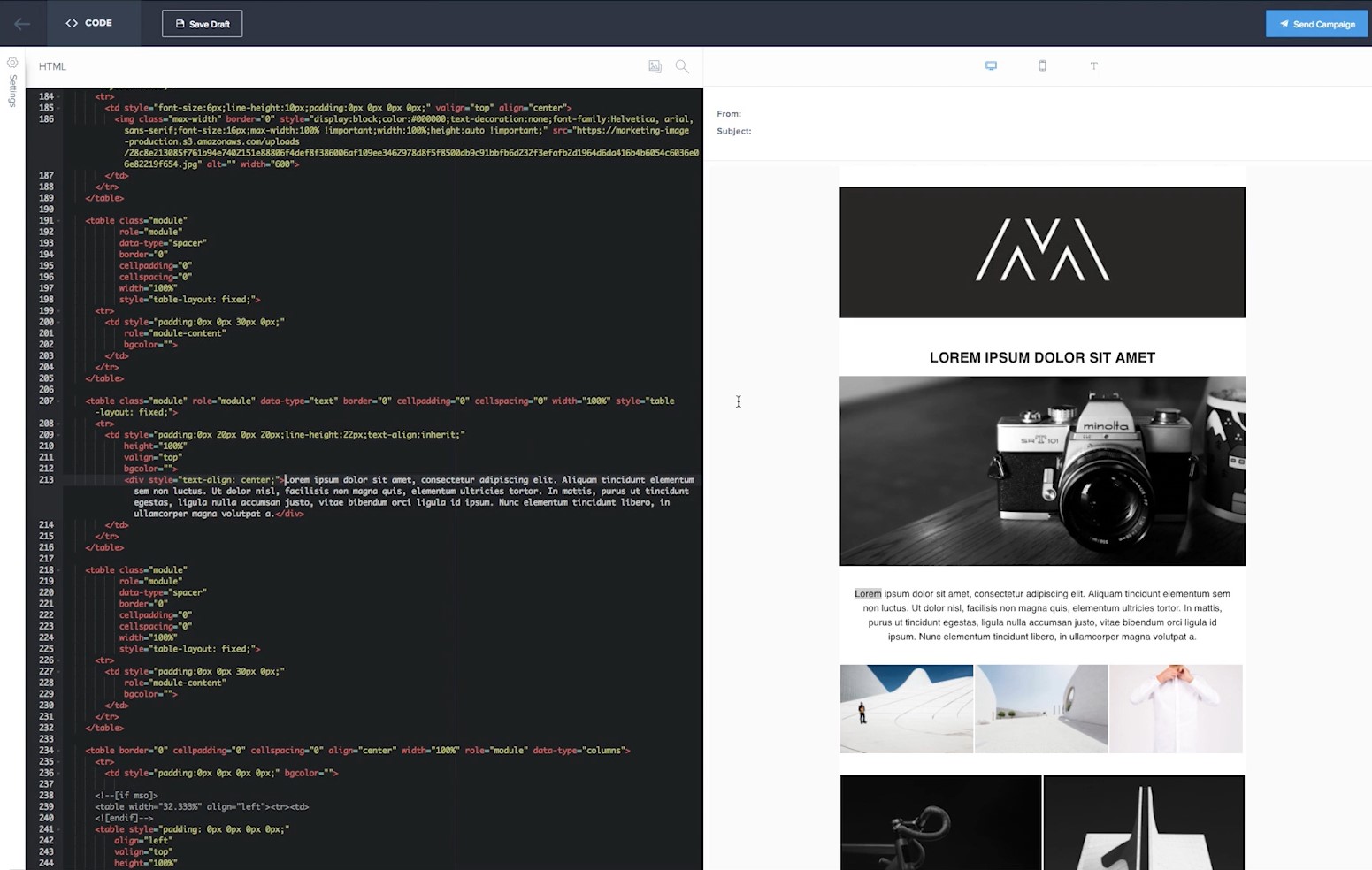
- The Code Editor: This is built for users who prefer working directly with HTML, offering features like split-screen preview, syntax highlighting, and scroll-syncing
The platform provides a template gallery you can browse, though the exact number isn’t publicly stated.
Mailchimp
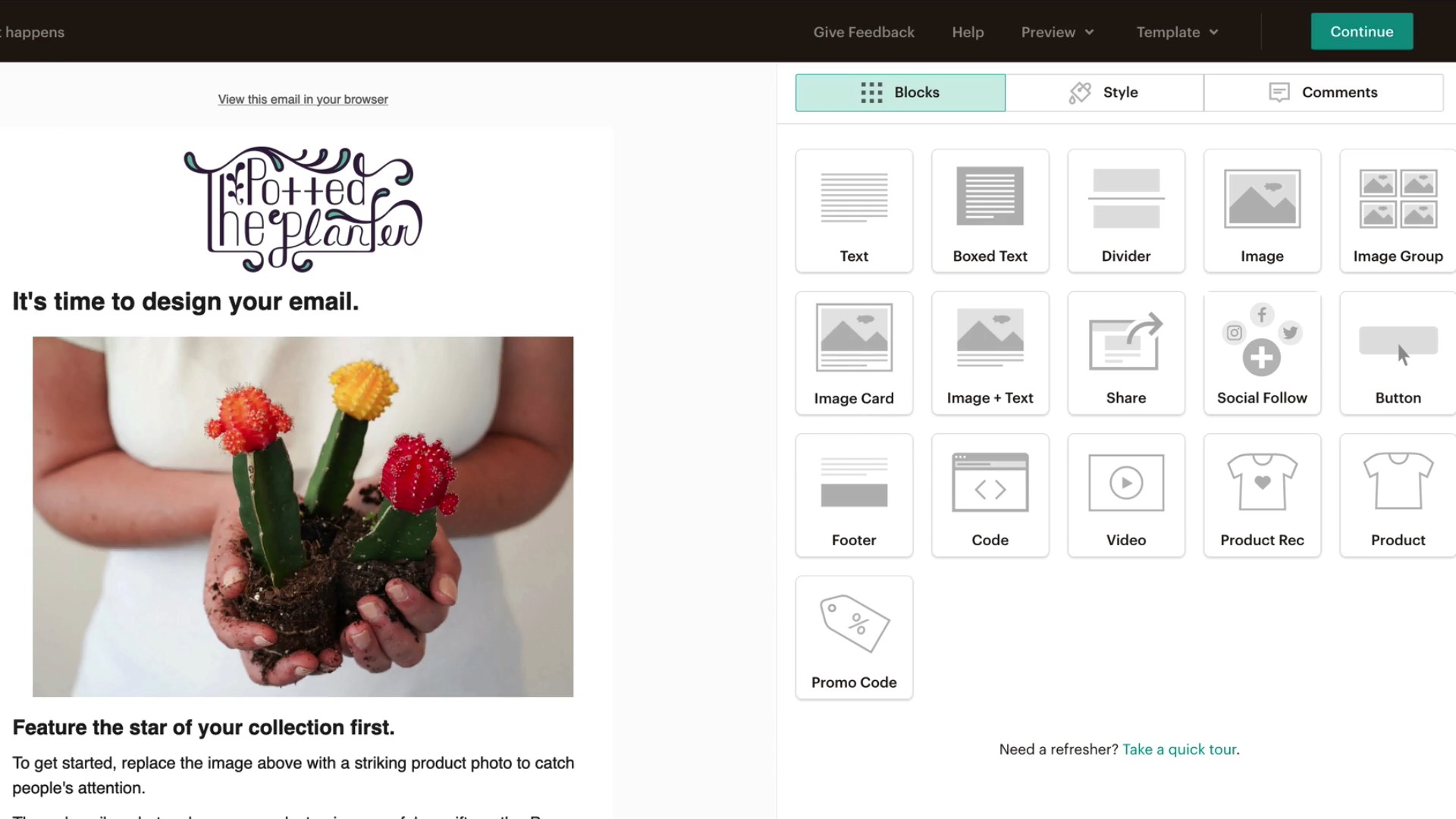
Mailchimp’s email builder stands out as one of the platform’s strongest features. The drag-and-drop interface lets you add elements like images, buttons, and text blocks with a single click:
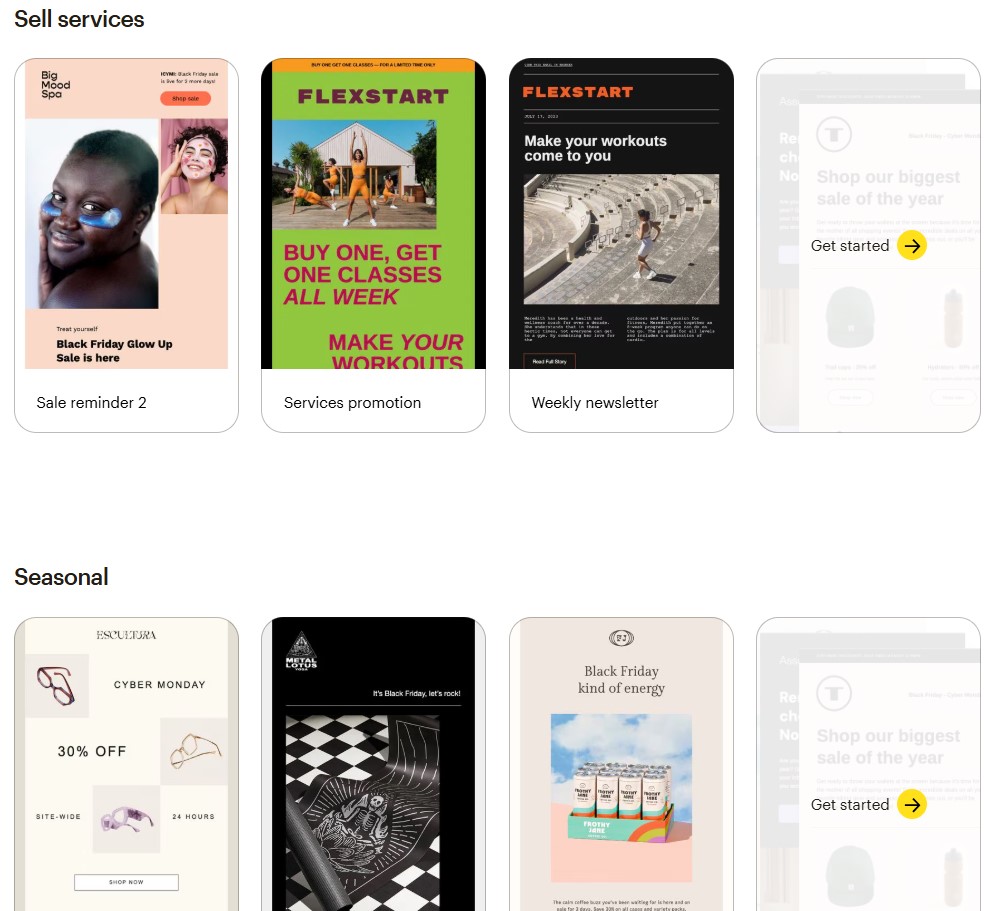
You get access to 250+ professionally designed email templates across different categories, including newsletters, promotions, and event invitations:
Mailchimp’s AI-powered design tool, Creative Assistant, automatically generates suggestions based on your brand colors and logo. The platform also includes Content Optimizer, a feature that analyzes your copy and suggests improvements for better engagement rates.
For ecommerce businesses specifically, both platforms have limitations for product-focused content. You can’t easily add product recommendations or dynamic content that pulls from your store catalog.
Omnisend addresses this gap with 250+ templates designed specifically for online stores. These include built-in product pickers and dynamic discount codes. You can browse related templates in its library to see ecommerce-specific designs.
Verdict: Mailchimp delivers superior design tools and template variety for marketing campaigns.
Marketing automation
SendGrid
SendGrid’s automation capabilities are centered on transactional triggers rather than full-scale marketing workflows. While functional, the visual interface has weak color contrast, which makes it difficult to understand workflow structure at a glance.
The platform also lacks conditional logic, branching paths, or behavioral triggers beyond list membership. Marketing automation is only available on the Advanced plan, starting at $60/month.
Mailchimp
Mailchimp’s Customer Journey Builder enables non-technical users to create visual workflows independently. You can map out multi-step campaigns with branching logic based on customer behavior and engagement:
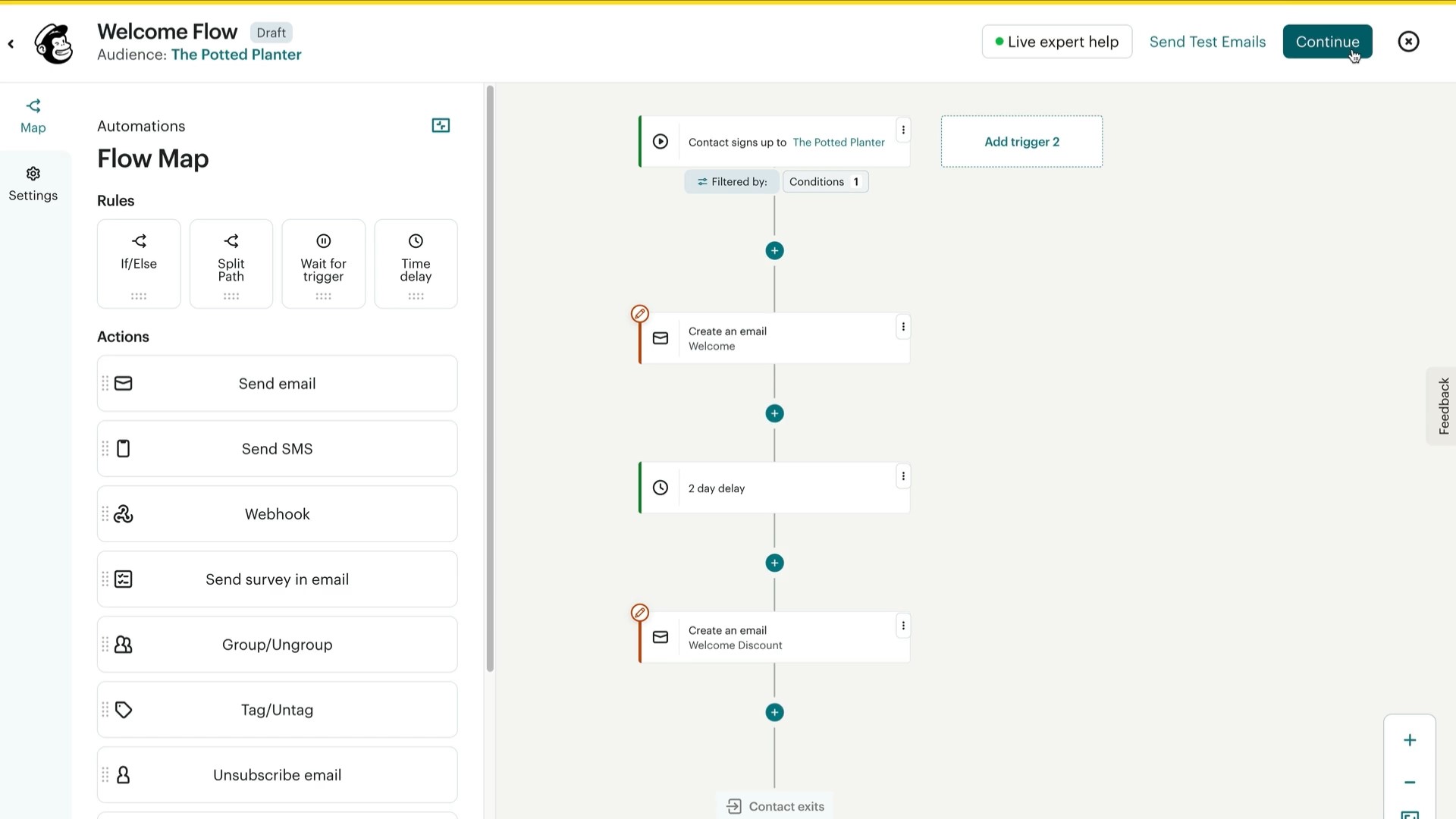
The platform includes 100+ prebuilt automation templates for common scenarios such as welcome series, re-engagement campaigns, and birthday messages. You can trigger emails based on signup date, purchase behavior, website activity, and more.
For online stores, both platforms show significant limitations in ecommerce-specific workflows. Neither offers workflows for browse abandonment, back-in-stock alerts, or post-purchase cross-sells.
Here’s a SendGrid vs. Mailchimp automation comparison snapshot:
| Automation type | SendGrid | Mailchimp |
|---|---|---|
| Welcome series | Time-based drip series | Pre-built template |
| Abandoned cart | Not available | Basic |
| Browse abandonment | Not available | Not available |
| Post-purchase | Custom build | Custom build |
| Winback campaigns | Custom build | Pre-built template |
| Visual workflow builder | Basic interface | Yes |
Omnisend was built with ecommerce automation as a core focus from the beginning. Pre-built workflows include welcome series, abandoned cart recovery, browse abandonment, post-purchase follow-ups, and customer winback campaigns.
These workflows automatically combine email and SMS into unified sequences.
Understanding marketing automation strategies helps you improve conversion rates. Also, implementing effective email automation tactics can streamline campaign management.
Verdict: Mailchimp offers significantly stronger automation features for marketing campaigns with visual workflows and conditional logic.
Segmentation and targeting
SendGrid
SendGrid provides audience segmentation based on demographic and behavioral data you’ve collected. You can create up to 200 segments per user based on criteria such as location, age, and custom fields.
Here’s what the segmentation interface looks like:
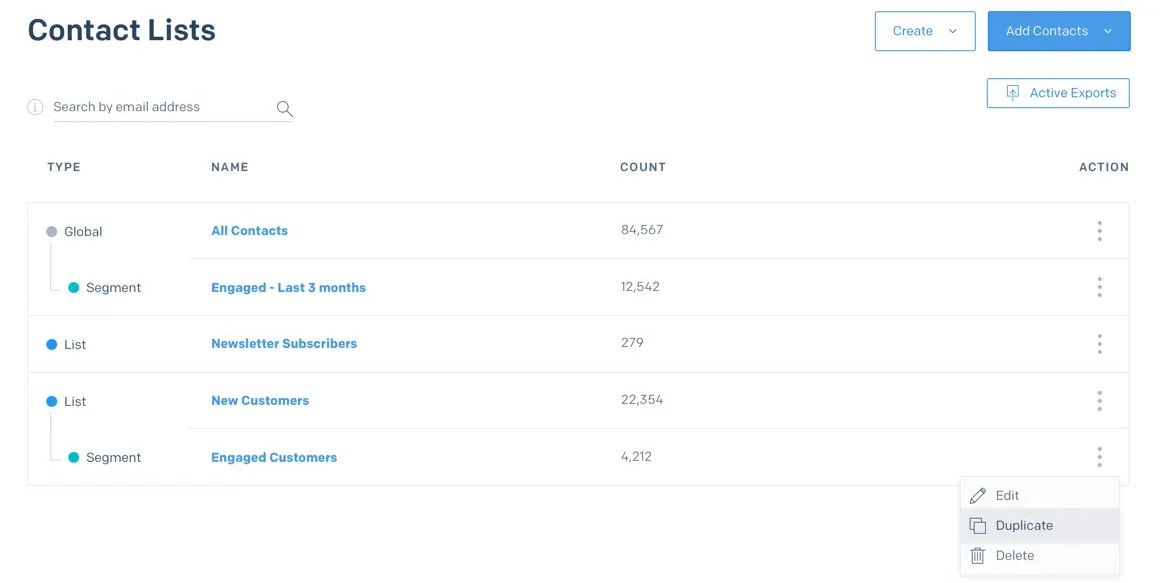
While flexible, the segmentation interface requires a moderate level of technical familiarity to use effectively. Likewise, advanced segments need configuration through custom fields.
Mailchimp
Mailchimp’s segmentation tools offer greater depth and flexibility without requiring technical expertise. You can build segments using nested conditions on the Standard plan and above, combining multiple data points with “and/or” logic.
Here’s a look at the segment builder interface on Mailchimp:
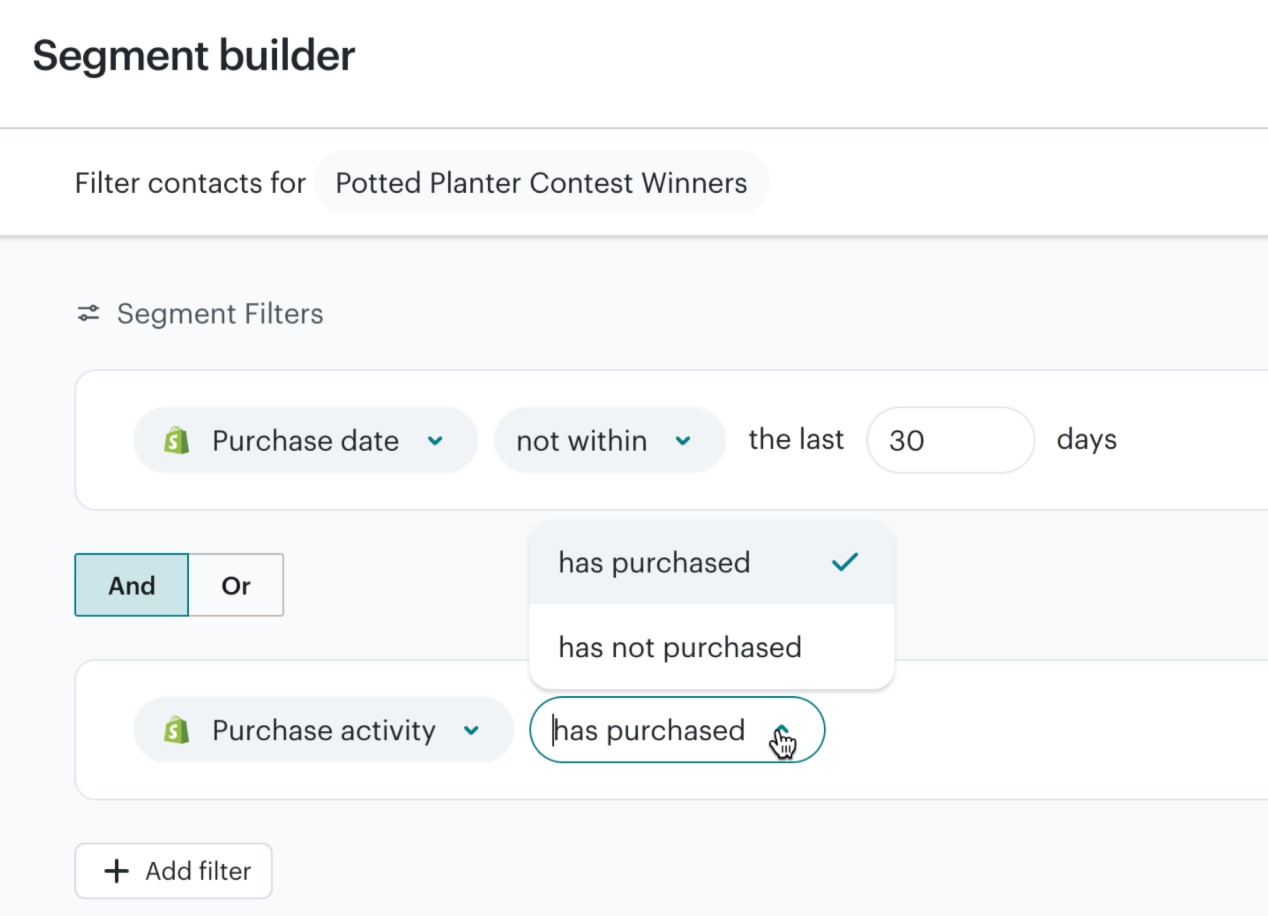
Pre-built segment templates help you get started quickly with common criteria like engagement level or purchase behavior. Segments update in real time as contacts meet or no longer meet your criteria, automatically.
That said, both platforms have limitations for ecommerce data without significant custom work. Also, customer lifecycle stages, such as first-time buyers versus loyal repeat customers, require manual setup.
Omnisend offers unlimited segments built from 500+ data points specific to ecommerce businesses. You can segment by customer lifetime value, product categories purchased, and predicted next purchase date.
The platform includes pre-built ecommerce segments for different lifecycle stages. Effective email segmentation techniques can significantly improve campaign performance for online stores.
Verdict: Mailchimp provides more sophisticated segmentation options out of the box with nested conditions and predictive capabilities.
Email deliverability
SendGrid
SendGrid built its entire reputation on deliverability, infrastructure, and reliability at scale. The platform processes more than 148 billion emails each month and maintains 99.99% uptime.
You get dedicated IP addresses with automated warm-up schedules on the Pro plan and above. Sender reputation monitoring provides actionable insights when issues arise in your campaigns.
The Expert Insights add-on provides deliverability consulting from specialists who understand ISP requirements.
Mailchimp
Mailchimp provides standard deliverability features that work well for most businesses without technical complexity. You can set up authentication protocols with guided instructions that walk you through each step.
The platform monitors your sender reputation and alerts you to potential issues, such as high bounce rates or spam complaints. However, its deliverability tools are less granular than SendGrid’s offerings for technical users.
Understanding the factors that affect your inbox placement helps you make better decisions. Omnisend maintains high deliverability standards through built-in authentication and compliance features, all handled automatically.
The platform manages technical setup while giving you access to performance data that matters. Learning about email deliverability best practices helps maintain strong inbox placement rates.
Verdict: SendGrid wins for deliverability tools and technical control that bulk email senders need.
Related reading
Klaviyo vs. Mailchimp — which is better for email in 2025?
Reporting and analytics
SendGrid
SendGrid excels at real-time analytics focused on delivery metrics that technical teams care about most. You can track bounces, opens, clicks, and unsubscribes in detail. Here’s what the dashboard interface looks like:
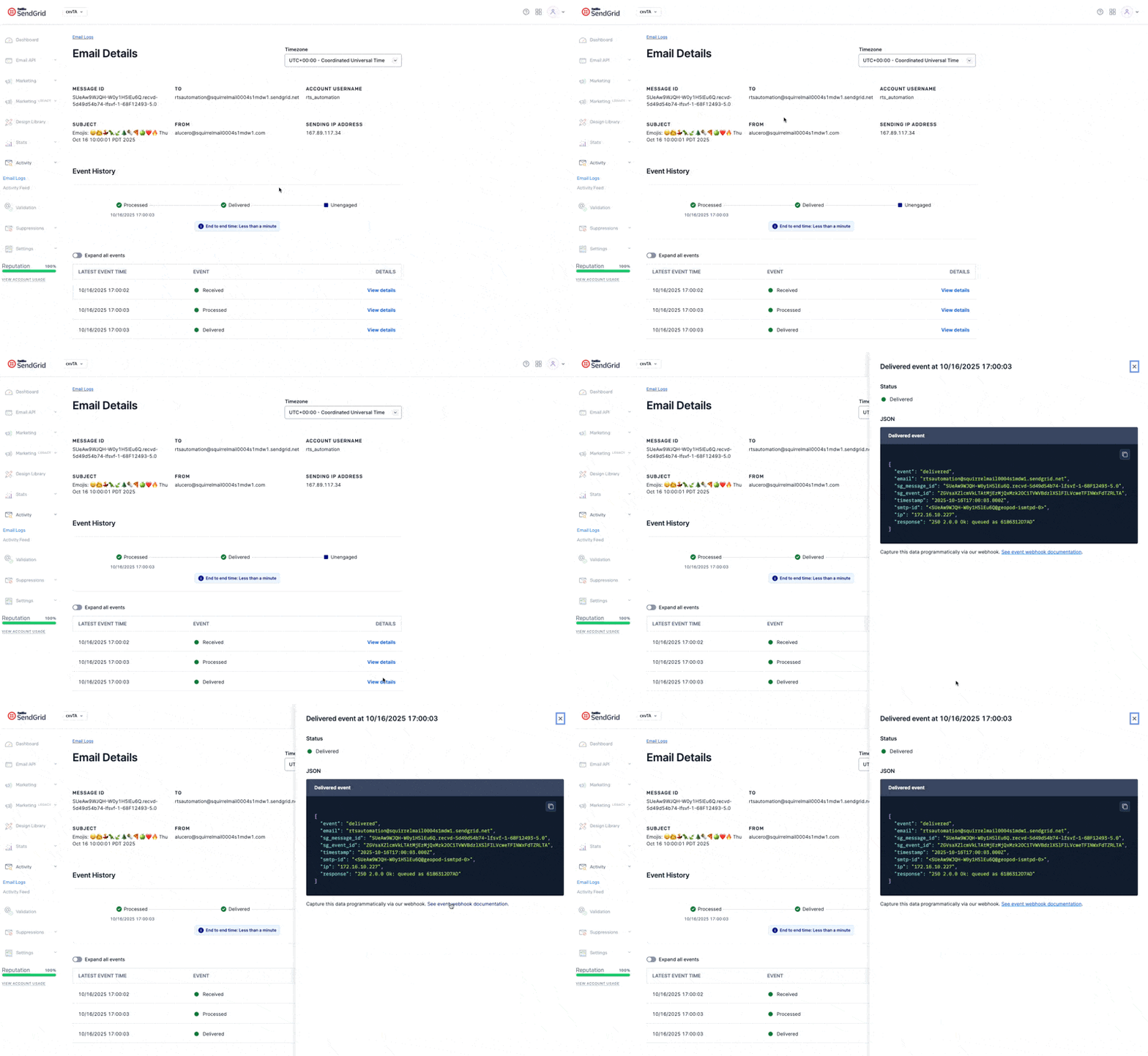
The platform provides deliverability-specific reports like spam complaints, engagement over time, and ISP-level performance breakdowns. Expert Insights, available as a paid add-on, offers deeper analysis and personalized recommendations.
Mailchimp
Mailchimp’s email analytics dashboard emphasizes marketing insights over technical delivery metrics throughout the platform. You get campaign performance summaries with visual charts.
Revenue attribution connects email campaigns to actual sales when you’ve integrated your ecommerce platform properly. Comparative reports show how current campaigns perform against past efforts, helping you identify trends.
On the Standard plan and above, custom reports let you prioritize metrics aligned with your specific business goals.
The dashboard also includes audience analytics covering contact growth, subscription status, and engagement behavior, all presented in a clean, intuitive interface:
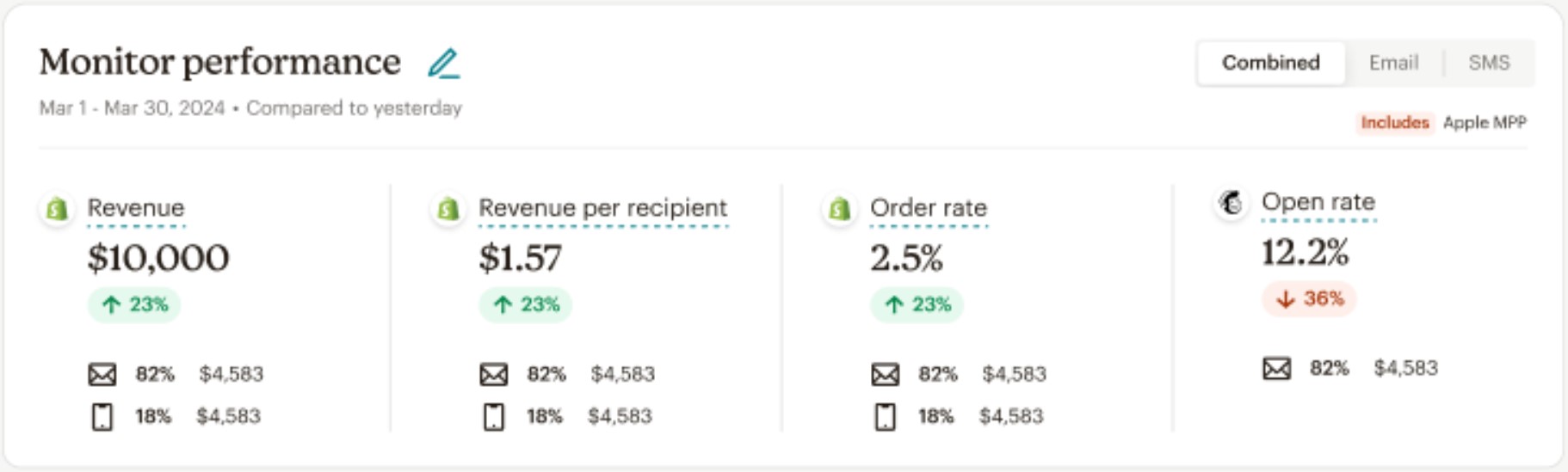
Verdict: Mailchimp delivers better marketing insights and revenue attribution for campaign performance analysis. However, SendGrid provides superior deliverability analytics for technical teams.
Integrations
SendGrid
SendGrid takes a fundamentally different approach to integrations compared to traditional marketing platforms. It offers one officially supported native integration with Segment, a customer data platform.
However, SendGrid’s strength lies in its extensive API and webhook capabilities. You can connect SendGrid to external systems through email sending APIs, event webhooks, contact management APIs, template APIs, and more.
Mailchimp
Mailchimp offers 300+ prebuilt integrations across a broad range of categories to meet diverse business needs. You’ll find connections for ecommerce platforms, social media networks, CRM systems, accounting software, and productivity tools.
Integration setup typically requires no coding knowledge. The broader ecosystem makes Mailchimp more accessible for non-technical users building a marketing stack.
Ecommerce platform integrations include Shopify, WooCommerce, and BigCommerce. While these connections cover common use cases, they’re more limited in depth compared to platforms built specifically for ecommerce automation.
Omnisend provides 160+ prebuilt integrations, with particularly deep connections to ecommerce platforms, for online retailers. Native Shopify, WooCommerce, BigCommerce, and Wix integrations sync product data automatically in real time.
You can insert product recommendations, use purchase behavior triggers, and access customer lifecycle data without writing code or involving developers.
Verdict: Mailchimp wins on pre-built integration breadth and accessibility of pre-built integrations for non-technical users who want quick connections. But SendGrid offers superior API flexibility and immense integration potential.
Customer support
SendGrid
SendGrid provides ticket-based support as the standard support channel for all paid plans. Chat and phone support become available only on higher tiers, specifically the Pro and Premier plans.
Its knowledge base is extensive but clearly geared toward technical users familiar with APIs, SMTP setups, and infrastructure-level email delivery. Community forums connect you with other developers who have solved similar problems before.
Response times vary significantly by plan level, with higher tiers receiving priority treatment.
Mailchimp
Mailchimp offers 24/7 email and chat support on all paid plans for troubleshooting and questions. Phone support is limited exclusively to Premium subscribers.
Free users receive 30 days of email support after signing up, after which assistance is limited to self-service options like help articles and video tutorials. The help center provides documentation for common tasks and frequently asked questions.
Here’s a SendGrid vs. Mailchimp support comparison snapshot across plans:
| Support channel | SendGrid | Mailchimp |
|---|---|---|
| Email support | All paid plans | All paid plans (30 days free) |
| Chat support | Pro and Premier only | All paid plans |
| Phone support | Premier only | Premium only |
| Response time | Varies by plan tier | Varies by plan tier |
| Free plan support | Community and docs only | 30 days email |
| 24/7 availability | Pro and Premier tiers | Paid plans |
Both platforms limit support access based on your subscription tier.
Omnisend takes a different approach by providing award-winning 24/7 customer support on all plans with no restrictions tied to your spend level. You get access to email and chat support regardless of your monthly payment amount.
Response times typically stay under two hours, even for free plan users. The support team is well-versed in ecommerce-specific challenges, such as setting up abandoned-cart workflows or troubleshooting product recommendation blocks.
Verdict: Both SendGrid and Mailchimp rely heavily on tier-based support models that limit access for lower-tier users. Omnisend stands out by providing unrestricted 24/7 support to all customers.
SendGrid vs. Mailchimp: User reviews
User reviews for SendGrid vs. Mailchimp across G2, Capterra, and Trustpilot offer insight into how each platform performs in day-to-day use.
What users say about SendGrid
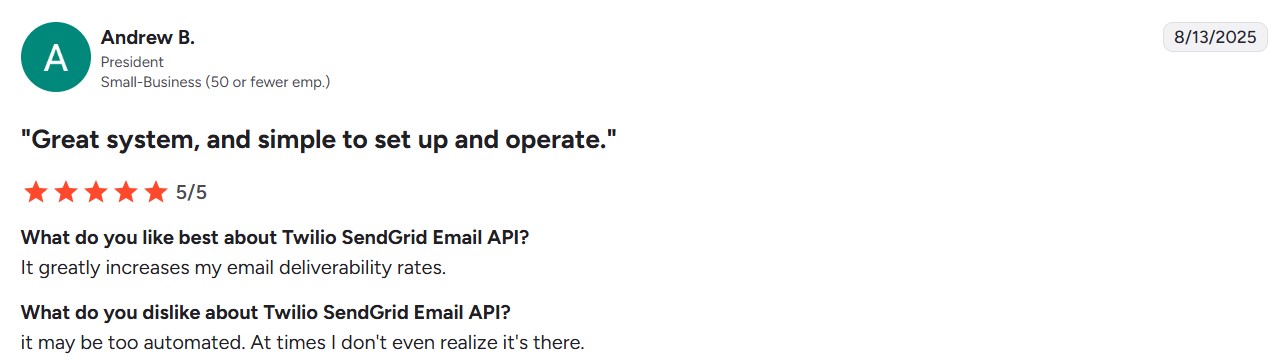
Users praise SendGrid’s excellent deliverability infrastructure and well-documented API for developers. A president at a small business on G2 noted that it “greatly increases email deliverability rates.”
Developers appreciate the straightforward integration process with comprehensive documentation.
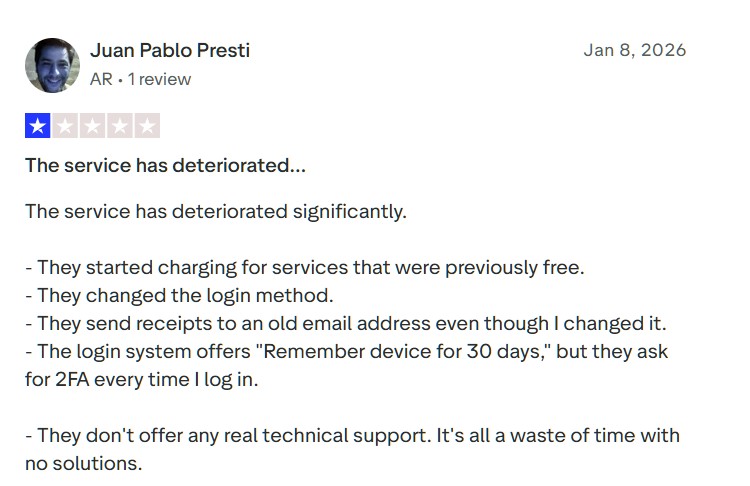
However, support quality emerges as a frequent complaint. Multiple users report slow ticket response times, with some waiting days for critical issues. A Trustpilot user complained that the service has deteriorated significantly, stating support doesn’t offer any “real technical” solutions.
Additionally, account suspension policies frustrate customers when they receive sudden blocks without warning. Some paid users experienced spam issues on shared IPs.
What users say about Mailchimp
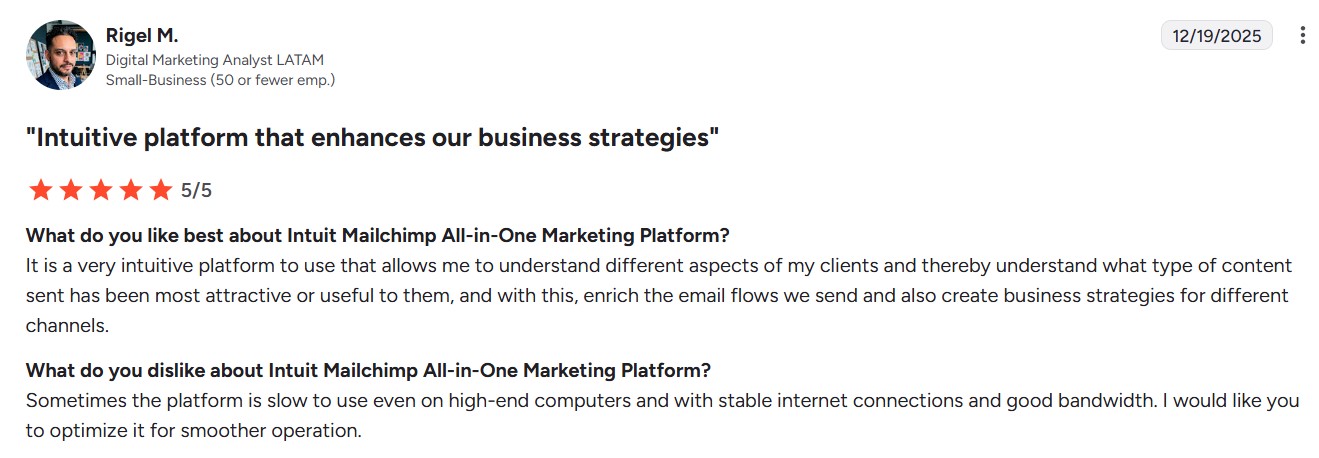
Users praise Mailchimp’s intuitive interface and drag-and-drop builder. A G2 analyst described it as an intuitive platform that helps users understand different customer segments to enrich email flows and support broader business strategies.
The automation features also receive strong marks for time-saving workflows.
Pricing becomes a pain point as lists grow. Multiple users complain that costs escalate quickly, making Mailchimp expensive for growing businesses.
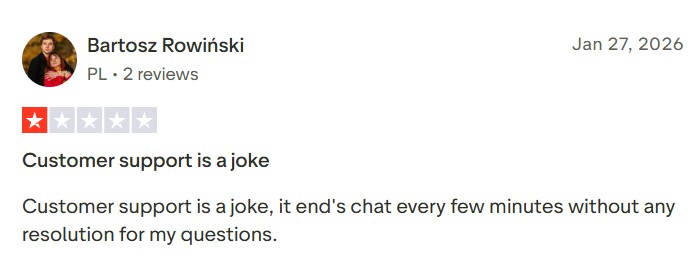
Also, template flexibility frustrates users who find designs too rigid for unique customization needs. Not only that, a Trustpilot user stated that “Customer support is a joke” because “it ends chat every few minutes without any resolution.”
Who should choose SendGrid
Choose SendGrid if you:
- Need reliable transactional email infrastructure: If you’re sending order confirmations, password resets, or shipping notifications, SendGrid’s API-first approach delivers messages consistently. The platform handles high-volume transactional sending with strong reliability and uptime guarantees.
- Have developer resources and technical expertise: SendGrid’s documentation and API integration let you embed email functionality directly into your application. SaaS companies and engineering teams that require programmatic control over email workflows will find this approach well aligned with their technical needs.
- Send high volumes and need deliverability control: If you’re sending hundreds of thousands or millions of emails monthly, SendGrid provides dedicated IPs and advanced monitoring tools. The platform gives you granular analytics on delivery performance and detailed sender reputation management.
- Don’t run an ecommerce business: SendGrid isn’t built for online retailers who need marketing automation, product recommendations, abandoned-cart workflows, or integrated SMS campaigns. Ecommerce businesses typically need platforms designed specifically for customer journey requirements.
Who should choose Mailchimp
Choose Mailchimp if you:
- Want user-friendly marketing tools: Mailchimp’s intuitive drag-and-drop builder and pre-designed templates let you create professional campaigns without coding knowledge or design skills. Small businesses and marketing beginners can launch email campaigns quickly without a steep learning curve.
- Need an all-in-one marketing platform: Mailchimp offers landing pages, social media management, basic CRM functionality, and website building tools in one dashboard. This consolidated approach works well for small teams managing multiple marketing channels without switching between different platforms.
- Run newsletters or content-focused campaigns: Content creators, bloggers, and publishers benefit from Mailchimp’s template variety and scheduling features for regular newsletter distribution. The platform effectively manages audiences and tracks performance for content-driven email strategies.
- Don’t operate an ecommerce store: Mailchimp works for general marketing but lacks ecommerce-specific features like product recommendation blocks, browse abandonment triggers, and native shopping cart integration. Online retailers need platforms built specifically for product-based customer journeys.
A better alternative for ecommerce: Omnisend
Neither SendGrid nor Mailchimp was built with ecommerce businesses in mind. SendGrid focuses on transactional email infrastructure for developers, while Mailchimp serves general small business marketing needs.
If you run an online store, you need a platform designed specifically for ecommerce customer journeys.
Omnisend provides everything ecommerce businesses need on a single platform. The platform combines email and SMS marketing with automation workflows built specifically for online retailers.
Ecommerce-specific features that matter
Omnisend integrates natively with Shopify, WooCommerce, BigCommerce, and Wix, automatically syncing your product catalog, customer data, and order history. You can add product recommendations, scratch cards, and discount codes directly into emails using the product picker.
Pre-built automation workflows handle abandoned cart recovery, browse abandonment, welcome series, post-purchase follow-ups, and winback campaigns right out of the box. You’re not building these workflows from scratch or adapting general marketing automation for ecommerce use cases.
The platform combines email and SMS into unified workflows, enabling you to reach customers on both channels from a single automation. Mailchimp requires a separate SMS add-on with limited capabilities, while SendGrid doesn’t offer SMS at all.
Value without the premium price tag
Omnisend customers see an average ROI of $79 for every dollar spent, one of the highest returns in ecommerce email marketing. The free plan includes all ecommerce features without artificial limitations.
You get 24/7 customer support on every plan, including the free tier. This contrasts with SendGrid’s ticket-only support and Mailchimp’s tier-based restrictions.
Here’s how Omnisend stacks up for ecommerce needs:
| Feature | SendGrid | Mailchimp | Omnisend |
|---|---|---|---|
| Built for ecommerce | ❌ | ❌ | ✅ |
| Pre-built cart recovery | ❌ | Limited | ✅ |
| Product picker in emails | ❌ | ❌ | ✅ |
| Email plus SMS combined | ❌ | Add-on | ✅ |
| Free plan with all features | ❌ | Limited | ✅ |
| 24/7 support on all plans | ❌ | Limited | ✅ |
The platform is powerful without being clunky. You don’t need developer resources to create sophisticated ecommerce campaigns. Moving from Mailchimp or SendGrid is straightforward with migration support.
You can explore Mailchimp alternatives or check out the best email marketing apps for Shopify to see how platforms compare for ecommerce.
Migrate seamlessly from SendGrid or Mailchimp to Omnisend for better ecommerce focusing
Quick sign up | No credit card required
Our methodology
We conducted hands-on testing of both SendGrid and Mailchimp to evaluate their features, usability, and performance for different business needs. Our comparison process included creating accounts, building email campaigns, testing automation workflows, and analyzing deliverability across both platforms.
We evaluated pricing structures across multiple tiers, from free tiers to enterprise, to understand the true cost of each platform as businesses grow. This included examining hidden fees, tier-based feature restrictions, and add-on costs.
To complement our hands-on testing, we analyzed verified user feedback from G2, Capterra, and Trustpilot to capture real-world experiences beyond controlled test scenarios.
We considered feedback from developers, marketers, small businesses, and enterprise users to capture diverse perspectives on strengths and weaknesses.
We assessed each platform for different use cases, including transactional email, marketing campaigns, ecommerce automation, and general business communication.
For more details on how we evaluate email marketing platforms, see the process.
SendGrid vs. Mailchimp: Final verdict
The SendGrid vs. Mailchimp debate comes down to your specific business needs and technical capabilities.
Choose SendGrid for reliable transactional email infrastructure with API integration. SaaS companies and technical teams building email functionality into applications will find SendGrid matches their requirements.
Choose Mailchimp if you want a user-friendly email marketing tool without technical complexity. The intuitive interface and all-in-one marketing features work well for small businesses and marketing beginners.
Choose Omnisend if you run an ecommerce business. The platform offers pre-built workflows for abandoned carts, product recommendations, and customer journeys that SendGrid and Mailchimp can’t match.
With all ecommerce features on the free plan and 24/7 support, Omnisend delivers better value for online retailers.
Start free with Omnisend’s powerful automation and integrated SMS for your ecommerce store
Quick sign up | No credit card required
FAQs
Is SendGrid better than Mailchimp?
Neither platform is universally better. SendGrid works best for developers who need transactional email infrastructure with API control. Mailchimp serves marketers who want intuitive campaign builders without technical setup. Your choice depends on whether you prioritize technical control or ease of marketing.
Can I use SendGrid for marketing emails?
Yes. SendGrid includes marketing capabilities through its Marketing Campaigns product, but they’re less developed than its transactional features. You’ll find basic email builders and list management, though automation capabilities are limited compared to dedicated marketing platforms.
Is Mailchimp good for transactional emails?
Yes, Mailchimp offers transactional email through Mailchimp Transactional Email (formerly Mandrill), available as a paid add-on to Standard and Premium plans. This requires purchasing email blocks in addition to your Mailchimp subscription.
Why do people use SendGrid?
Developers choose SendGrid for its reliable email delivery infrastructure and API-first approach. The platform handles millions of automated messages, such as login codes and purchase receipts, without requiring manual oversight.
What is the best alternative for ecommerce?
Omnisend specializes in online retail with features both platforms lack, including product blocks, cart abandonment sequences, and combined email-SMS workflows. The platform connects directly with store platforms and includes ecommerce tools on every pricing tier.

TABLE OF CONTENTS
TABLE OF CONTENTS


Subscribe and don’t miss any updates!
No fluff, no spam, no corporate filler. Just a friendly letter, twice a month.