
 Omnisend AI


 OFFER
OFFER








Drive sales on autopilot with ecommerce-focused features
See Features
Shopify marketing automation streamlines your customer interactions, saving time and enhancing consistency across channels.
Prioritize setting up welcome series, abandoned cart recovery, and post-purchase follow-ups to maximize engagement and conversions.
Combining email and SMS in your marketing flows significantly boosts revenue, with automated SMS earning substantially more per send than traditional campaigns.
Personalization and A/B testing are crucial for optimizing your marketing efforts, ensuring that your content resonates with customers and drives higher open rates.
Shopify marketing automation saves you time and helps you deliver consistent experiences across multiple channels to keep customers coming back.
Your order and shipping confirmations, even your store credit issued notifications, are automated by Shopify by default. Notice, though, how these are post-transaction? The journey up to that point, and after, is yours to optimize.
Quick-wins include a welcome series (has the highest click-to-conversion rate of any email), abandoned cart emails, and win-backs. If you only did those, you’d still be ahead of most stores.
Below, you’ll find a complete guide to Shopify marketing automation. It starts with what it is, then its benefits, flow examples, and best practices for success.
Quick sign up | No credit card required
New to Shopify? We’ve got a great guide for that
How to start a Shopify store: A complete guide
What is Shopify marketing automation?
Marketing automations are workflows that trigger at points in your customer journey via apps and systems that you configure either within Shopify or third-party dashboards.
Here are some examples:
- Abandoned cart emails, which trigger when your customer enters an email address, adds items to their cart, and leaves without buying
- Product cross-sells and bundles on product pages, appearing contextually (or based on products you define) whilst customers shop
- BFCM prep, such as creating email templates for different segments and assigning them to email sequences covering the whole event
Once you start refining your customer experience and growing your Shopify store, you’ll realize that marketing automation helps achieve what you want faster. That could be saving time, reducing churn, increasing sales, or cutting your acquisition costs.
Why automate your Shopify marketing?
The best Shopify stores automate their marketing to:
- Save time, because it’s far easier to install an app or add some Liquid code that automates tasks (such as bulk editing photos) than manually making store changes
- Reduce churn, email and SMS apps can catch customers who haven’t purchased in 30, 60, or 90 days and bring them back
- Increase sales with automated and scheduled campaigns, especially around seasonal events such as Black Friday
- Maximize return on ad spend (ROAS), with AI apps that produce creatives and locate opportunities without the busywork
- Be available 24/7, via live chat and customer support agents
- Test and automate sending practices, with A/B testing tools with auto-send features, such as those provided by Omnisend
- Create better customer experiences, such as with appropriate SMS delays, interactive review emails, and gamified forms
How Gamehide uses email automations
Gamehide uses Omnisend’s welcome and cart abandonment flows. The welcome flow goes out to customers who subscribe via forms, and the cart abandoned email triggers for those who add their email address during the cart process, but leave.
The welcome series has a 7.7% conversion rate and 42% open rate, and cart abandoners open 49% of emails, with 4% converting.
Read the case study.
Key marketing automations to set up in Shopify
Your automated Shopify store will recover most revenue and win most sales from only a handful of flows. These are the ones you should prioritize for marketing automation for Shopify:
Welcome automation
Your email automation tool will send a single email or a series that welcomes new subscribers following their subscription. It triggers following form submission, either immediately or via a delay you set, such as 10 minutes.
The ROI impact is enormous, with Omnisend’s 2026 Ecommerce Marketing Report finding that welcome messages and abandoned carts drove 76% of all automation orders in 2025.
Dukier, a dog accessories retailer, uses a welcome series to tell its story and offer a discount to new customers. Its email template is unique, built in Omnisend:

During its testing, Dukier found that behavior-based emails, such as its welcome series, had far greater engagement than generic blasts, outperforming them for both average order value (AOV) and conversion rates.
Additional reading:
Best email marketing apps for Shopify: Top 16 tools for 2026
Abandoned cart recovery
A portion of your customers will add products to their cart and leave. If they provided an email address at any stage, you can retarget them with an abandoned cart flow.
Cart abandonment flows can trigger immediately, although distractions mean that your customers might not see them. It could be why they abandoned it in the first place. A 30-minute delay is a good compromise without being pushy.
In 2025, abandoned cart emails had a 39.46% conversion rate, behind only welcome emails, so they are well worth adding to your Shopify marketing automations.
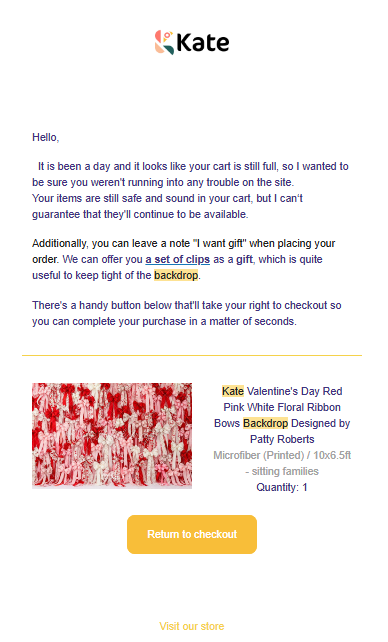
Photography backdrop retailer Kate Backrop achieved a 1:3000 ROI using omnichannel marketing, with cart recovery being a core factor in its success.
Its email uses scarcity language, such as “I can’t guarantee that they’ll continue to be available,” to encourage purchases:
Post-purchase automation
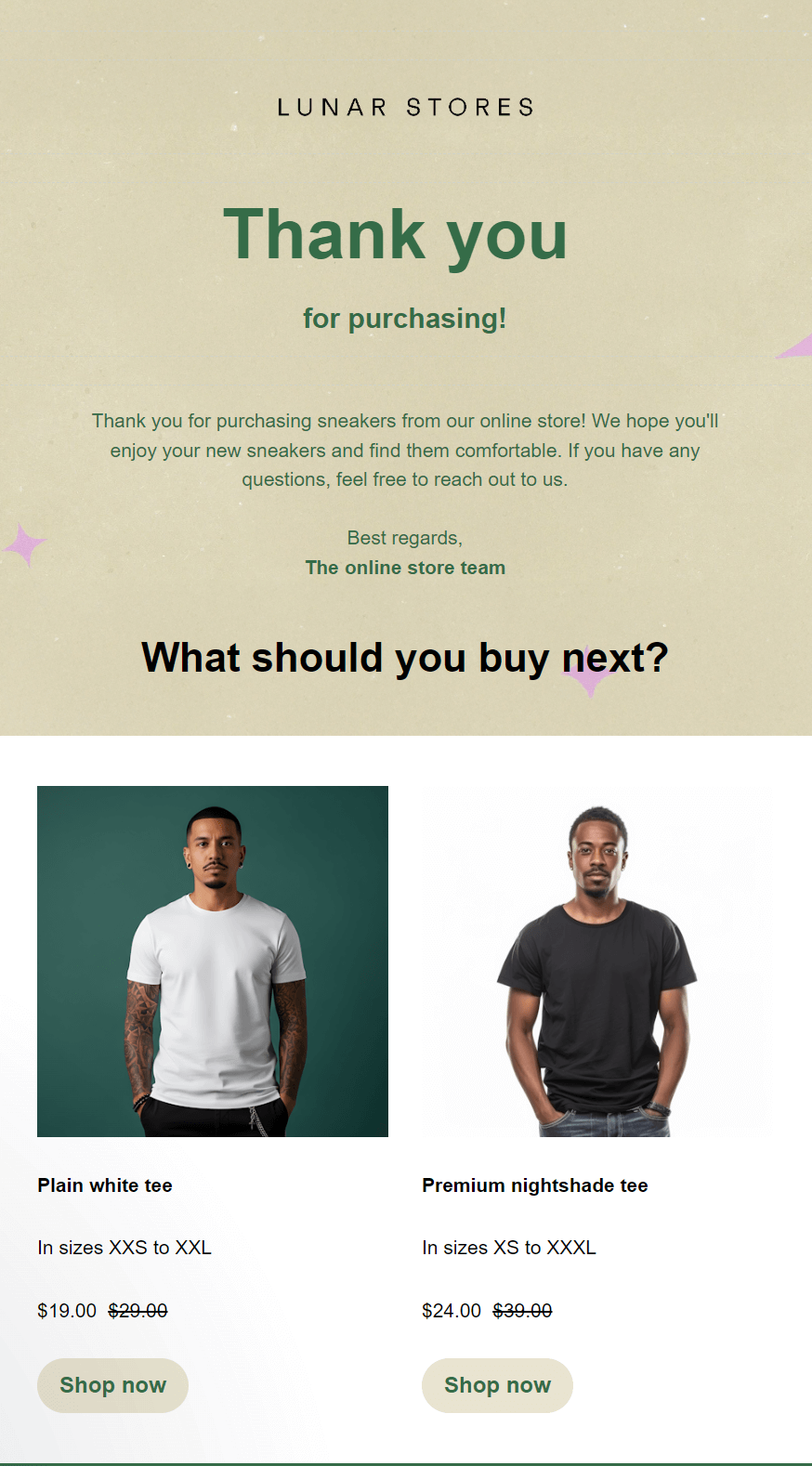
Post-purchase flows include transactional updates, such as shipping notifications, and personalized messages that encourage additional brand engagement and actions. For instance, you could request a review.
Because post-purchase flows arrive following a high-intent moment, they have high open rates, and that provides you with opportunities for additional revenue.
The email below, created in Omnisend, turns a thank-you message into a cross-sell. Customers can click through to products and start shopping again:
Win-back flows
Win-back flows reengage customers who haven’t purchased recently, typically within 30, 60, or 90 days. Customers who fit into these segments benefit from retention emails to remind them about previous experiences with your brand.
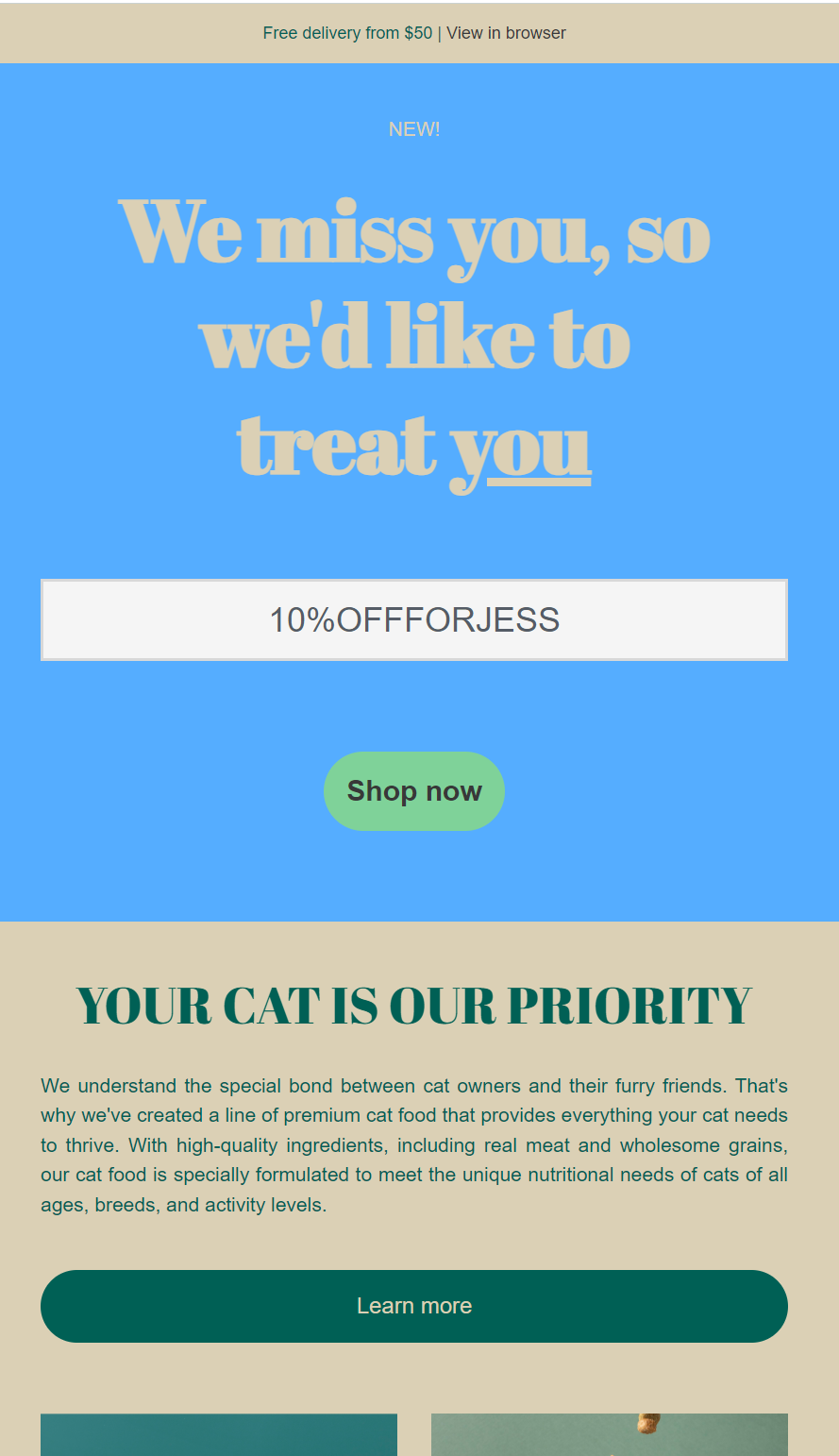
The email below, created in Omnisend for a pet store, frames inactivity with an emotional hook and uses personalization, including the customer’s name in the coupon code, and referencing that they have a cat, to encourage engagement:
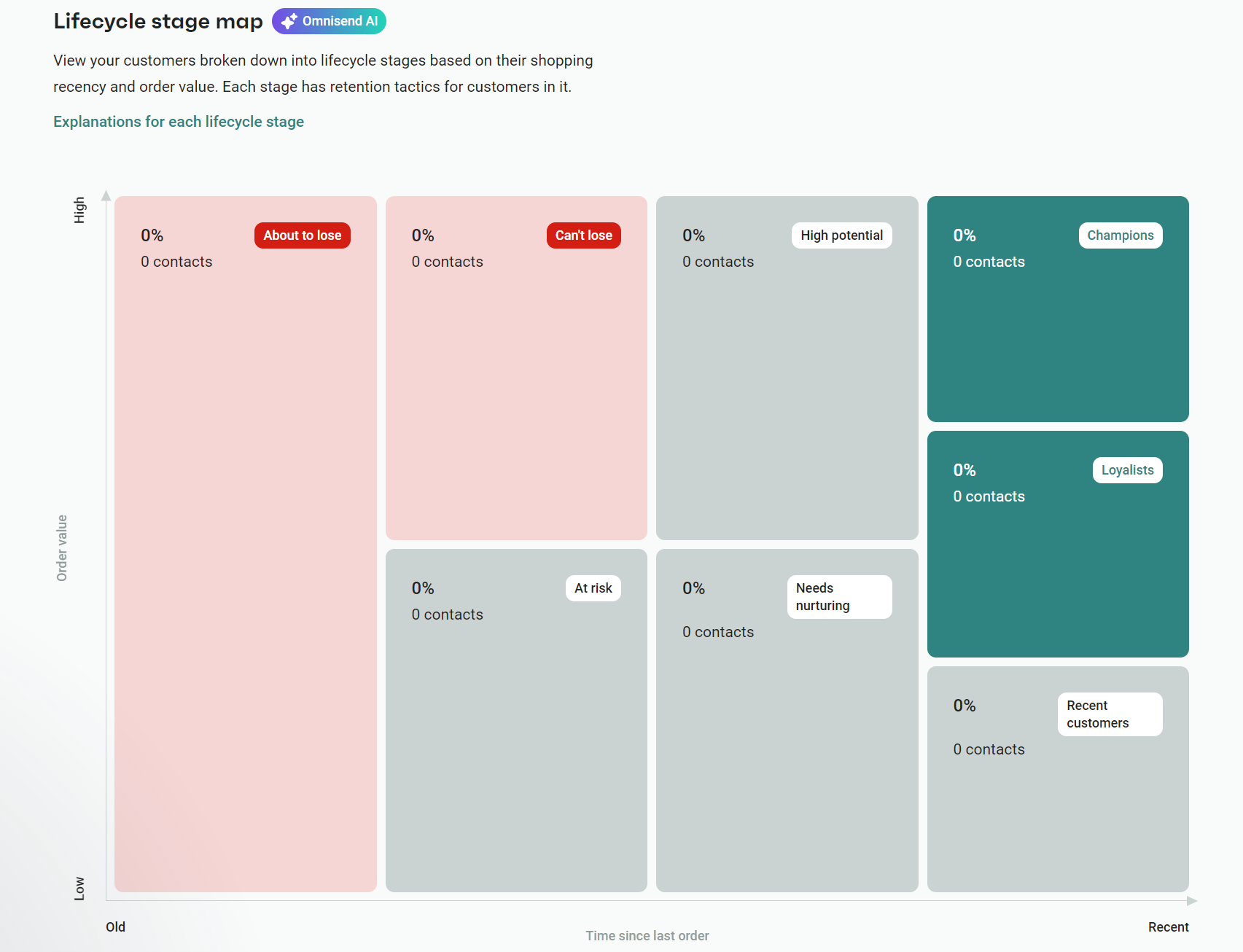
A neat feature in Omnisend is customer breakdown, which provides lifecycle stage maps with the percentage of customers who are at risk, those who need nurturing, and those you’re about to lose. You can then target them with effective messages:
Birthday/anniversary flows
Birthday and anniversary flows can go three ways:
- Reference your customer’s birthday
- Reference your customer’s signup date
- Reference your customer’s purchase date
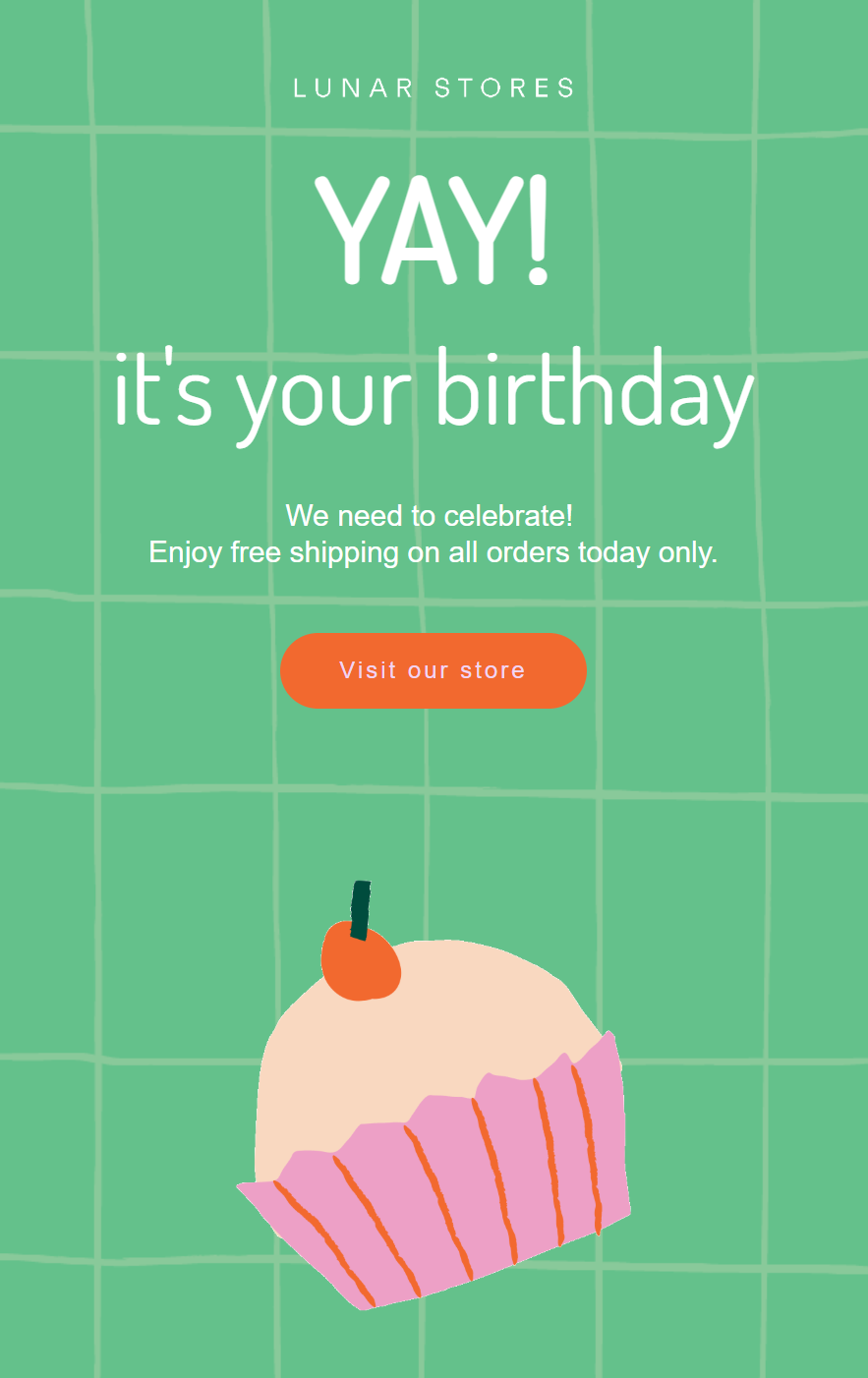
All of these create a personal touch to your Shopify marketing automation. In 2025, birthday emails alone had a 16.02% conversion rate and a whopping $744 AOV, higher than any other email flow by a significant margin.
The birthday email template below uses a GIF that cycles through candles, a bun, a present, and a party hat. It sets an exciting tone and offers free shipping as an incentive:
SMS + Email combos
SMS + email flows make the most of your customers’ preferences. If they have opted into receiving text messages, you can send them exclusive offers, discounts, and product access.
Omnisend lets you add an SMS to any flow, such as back-in-stock alerts. The flow below triggers an email and an SMS at the same time:
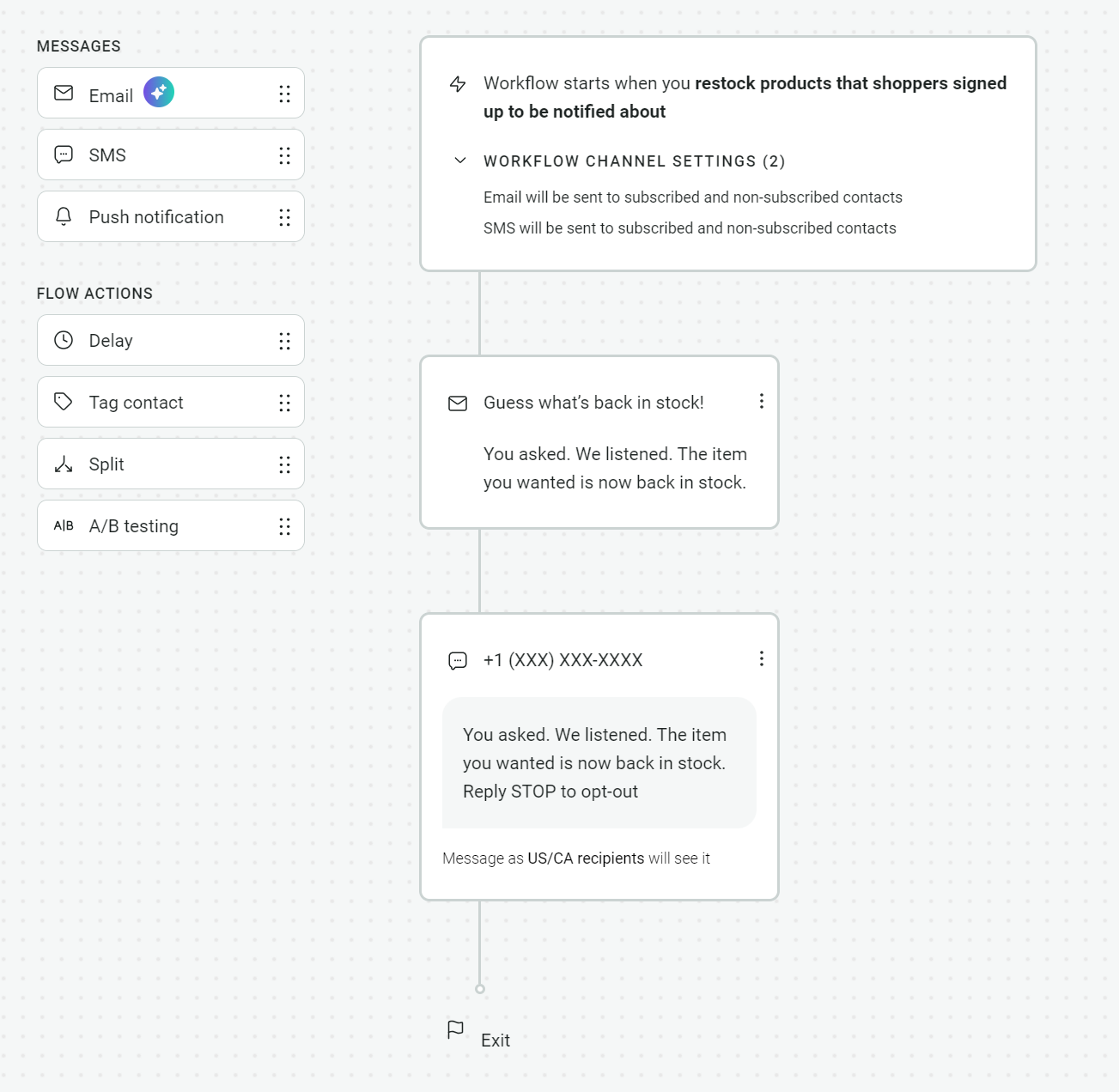
Adding SMS to your Shopify marketing automation is worth it, with Omnisend customers seeing 3x revenue per message with combined email + SMS.
Additionally, automated SMS earned an average of $0.74 per send in 2025, compared to $0.15 for campaigns (scheduled and one-time sends).
Best practices for Shopify marketing automation
Follow these best practices when learning how to automate a Shopify store:
- Start with three core flows: Welcome series, abandoned cart, and post-purchase follow-up (review request or thank-you email). They’ll prime you on your email tool’s flow builder and start you off with the best-converting automations.
- Personalize your content: Add your customer’s first name to the subject line if the word count allows, as well as the first heading or as the first words in your email body. Doing so creates an instant connection with your customer, encouraging their engagement.
- Test subject lines: Always twist into new subject line formats because you never know what’s going to work. Omnisend has a free subject line generator for ideas, and lets you A/B test them even in its Free Forever plan to see which achieves the highest open rates.
- Use email + SMS: Some of your customers will prefer SMS over email for transactional and some promotional flows. Catering to those preferences provides the top-tier experience they expect and helps you improve your ROI.
- Let customers unsubscribe: Omnisend and most other email tools include unsubscribe links at the bottom of emails. It’s a similar story for SMS, although these are called opt-outs rather than unsubscribes.
- Don’t overautomate: Operate a customer service email address that has personal replies, and do the same if you have a chat widget to reduce fatigue.
Ready to automate your Shopify store?
Automating moments in your customer journey, from their initial welcome to a win-back email after a month or so, is the best thing you can do to:
- Increase revenue
- Improve retention
- Increase average order values
- Reduce your customer acquisition costs
Omnisend has 28 pre-built flows, 250+ pre-built email templates, and 32 pre-built segments to help you start with Shopify marketing automation. The app has a 4.7/5 rating on the Shopify App Store based on 2,920+ reviews.
Quick sign up | No credit card required
FAQs
You can automate a Shopify store natively using Shopify Forms, Flows, and Messages. Additional apps add more automations, such as Judge.me for automatic review collection, and Omnisend for email + SMS flows.
Omnisend is the best tool for email and SMS automation because it lets you combine them in flows and reach customers according to their preferences. Zapier is well worth connecting for Google Sheets, Slack, and other tools you use.
Provided they support Shopify’s app embed feature, then yes. Configure the app in Shopify > enable the app embed in your online store editor > add the app block to your theme where you want it, and select the app from your list.
Email marketing can cost nothing. Omnisend has a Free Forever plan, good for 250 contacts and 500 emails/month, and Shopify Messages is free. SMS will always cost money because you need credits.

TABLE OF CONTENTS
TABLE OF CONTENTS


No fluff, no spam, no corporate filler. Just a friendly letter, twice a month.