
 Omnisend AI


 OFFER
OFFER








Drive sales on autopilot with ecommerce-focused features
See FeaturesKey takeaways 
Abandoned cart emails can significantly boost revenue, accounting for 76% of automation-generated sales in 2025, making them a must-send for e-commerce businesses.
Personalizing content, using engaging subject lines, and optimizing send timings are essential strategies for maximizing the effectiveness of abandoned cart emails.
Incorporating storytelling and trust signals can enhance the appeal of your emails, especially for high-consideration products, before introducing discounts as incentives.
Testing different email elements, such as subject lines and timing, is crucial for continuous improvement and higher conversion rates in your abandoned cart recovery efforts.
Reveal key takeaways
A high cart abandonment rate means lost revenue, yet it’s a recoverable situation in your customer’s inbox. You can bring hesitant, distracted customers back with an abandoned cart email and win sales you’d otherwise lose to the void.
Our research shows that abandoned cart emails, alongside welcome series, generated a whopping 76% of automation revenue in 2025. It literally pays to send these emails and make them as contextual and timely as possible.
The doubly good news is that you can create an abandoned cart email sequence and set it up without any learning curve in Omnisend.
This article provides a complete guide to abandoned cart emails, including:
- Examples from real brands for inspiration
- Cart abandonment email best practices
- Free abandoned cart templates and subject lines you can copy
- Send time and delay recommendations
- How to set up your abandoned cart flows in Omnisend
- Measuring everything, plus testing for continual improvements
Automate your abandoned cart emails with Omnisend and achieve maximum ROI
Quick sign up | No credit card required
The state of abandoned cart recovery in 2026: Omnisend report
Cart abandonment hasn’t gone away. Globally, around 70.22% of shopping carts are left before checkout. That number hasn’t changed much over the years.
What has changed is how brands respond.
Our data shows that abandoned cart recovery is now one of the most reliable revenue streams in email marketing. And it’s not because carts are abandoned less often, but because follow-up has become more effective.
Automation’s role in conversion
General email campaigns still play an important role in driving traffic and awareness. But when it comes to converting intent, automation is doing a lot of the heavy lifting.
Automated emails account for just 2% of total sends, yet generate 30% of all email-attributed revenue. The difference here is timing. Automated messages are triggered by behavior, often reaching shoppers minutes or hours after they’ve shown clear intent.
That timing shows up in performance. On average, automated emails earn $2.87 per send, compared to $0.18 for scheduled campaigns — roughly 16 times more revenue per message. Behavior-based emails consistently outperform scheduled blasts because they respond to what the shopper just did.
Where abandoned cart fits in the automation mix
Not all automations are created equal, and some contribute more to revenue than others. Abandoned cart recovery sits near the top. Alongside welcome series, it accounts for 76% of all automated orders. That concentration shows that while many workflows matter, a few (especially those tied to high intent) drive the majority of results.
When someone leaves a cart behind, they’re much closer to buying than a general subscriber on a newsletter list. The abandoned cart email doesn’t create interest so much as remind someone of the interest they already showed.
Abandoned cart benchmarks
Looking specifically at abandoned cart performance, here’s how it looked for Omnisend users in 2025:
- Open rate: 35.75%
- Click-to-sent rate: 3.84%
- Conversion rate: 1.51%
- Click-to-conversion rate: 39.46%
- Revenue per email: $2.54
The most telling metric is what happens after the click. Nearly 4 in 10 shoppers who click an abandoned cart email complete their purchase. That level of follow-through is what makes this workflow so consistent.
Recovered carts also carry meaningful value. The average order value sits at $168, which is a substantial transaction recovery.
Abandoned cart email examples that actually recover sales
The abandoned cart email examples below include verified open and click rate metrics via Omnisend. All were received in January 2026 following cart abandonment. Check them out:
1. To’ak Chocolate, trust signals over discounts
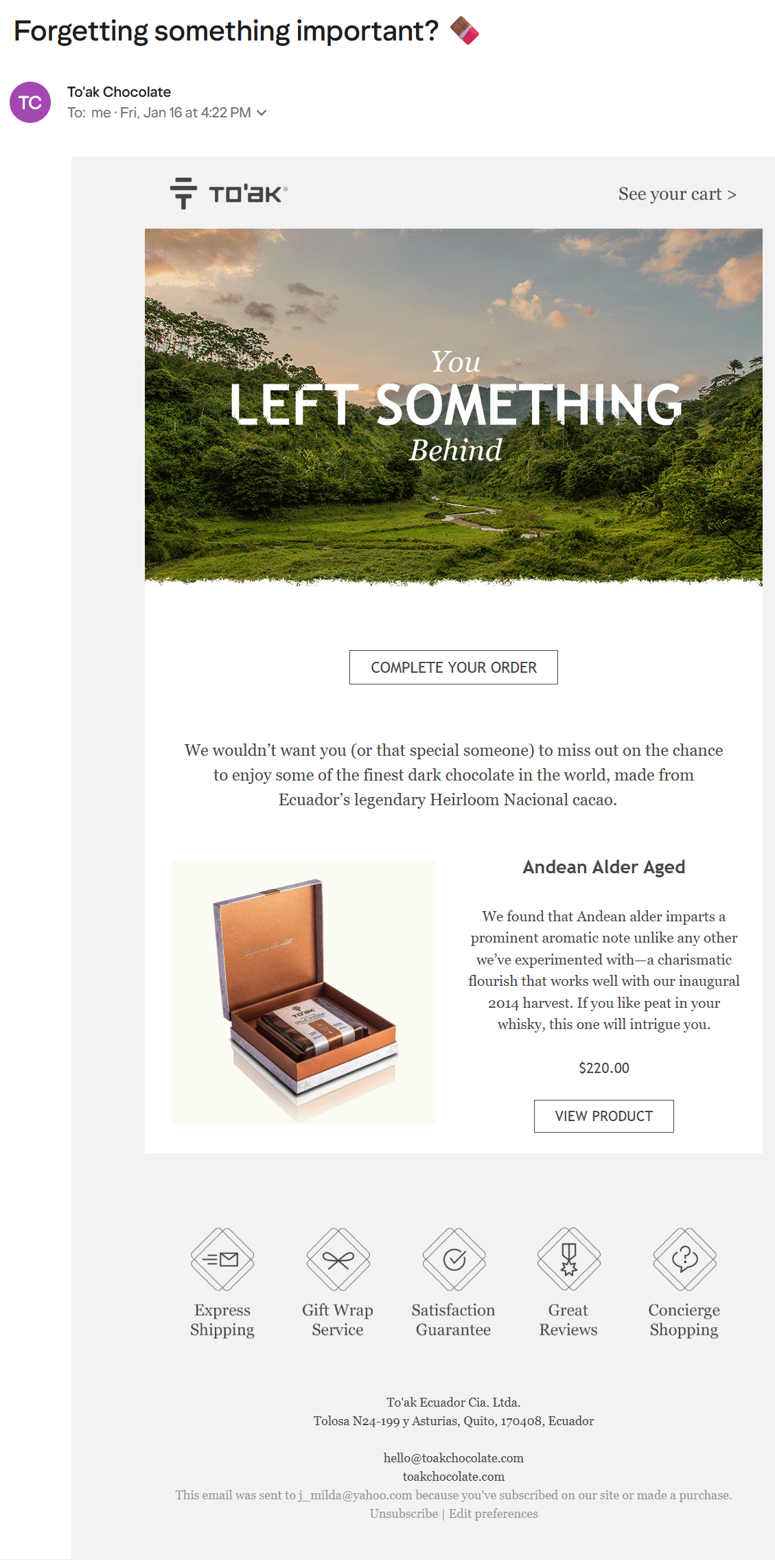
Subject line: “Forgetting something important?” 🍫
Metrics
- Open rate: 56.2%
- Click rate: 6.2%
The brand
To’ak Chocolate is a luxury, single-origin chocolate retailer. Its abandoned cart email example skips discounts and urgency tactics in favor of brand storytelling and trust.
Who it’s for
- Customers who showed purchasing intent for high-consideration products but abandoned their cart
Best used when
- You want the first email in the series to sell your brand before discounts
Standout elements
- Subject line with an emoji
- Origin storytelling
- Two CTA buttons, linking back to the customer’s cart and product page
- Five trust signals in place of a discount
Key takeaways
- Storytelling and trust signals can replace discounts when your product justifies its price
- Use this approach in the first email of your series before introducing any incentive
2. Mopani, discounts over X value
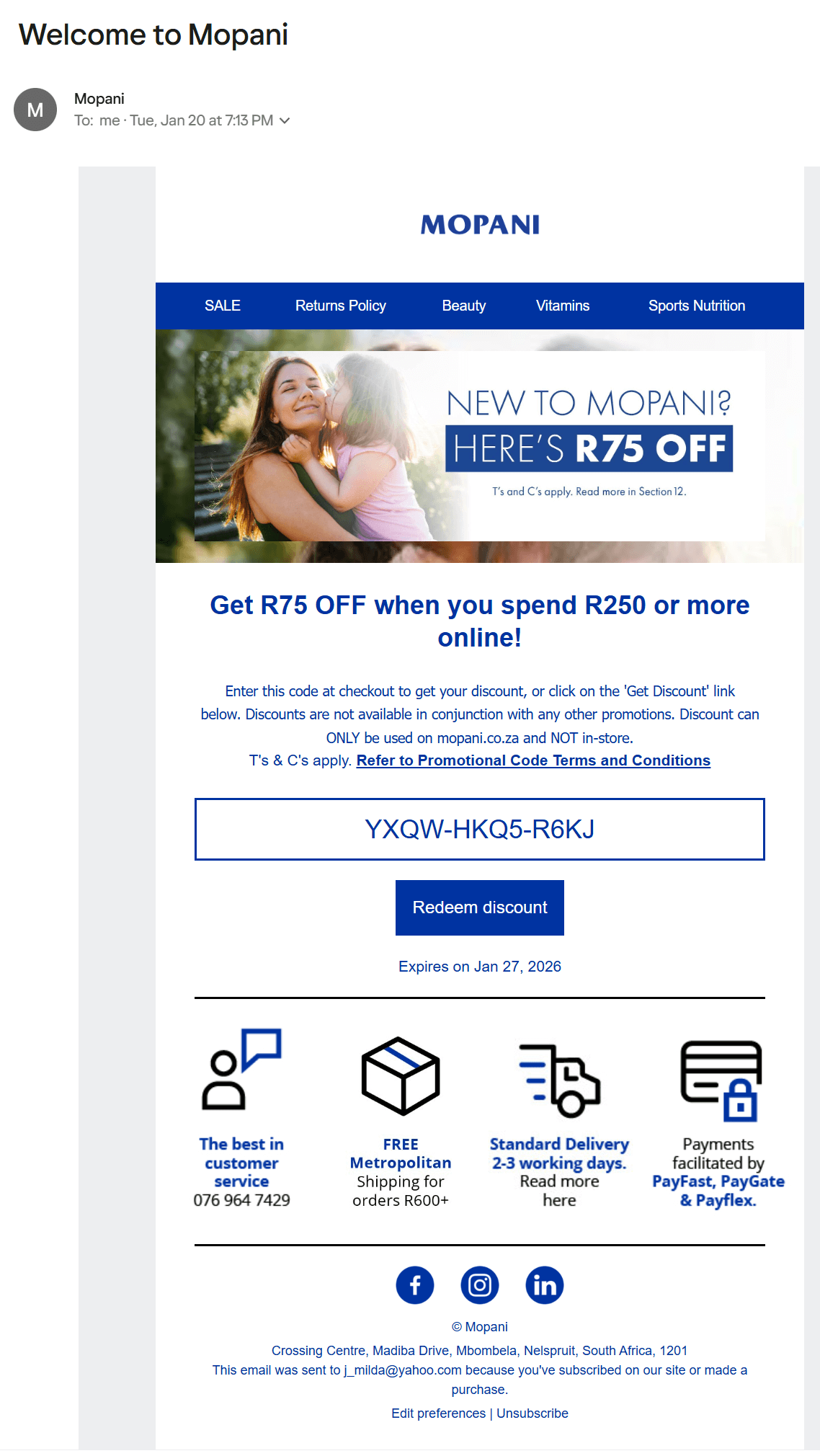
Subject line: “Welcome to Mopani”
Metrics
- Open rate: 46.5%
- Click rate: 9.42%
The brand
Mopani is a South African online pharmacy and health store. Its retail strategy targets families and health-conscious consumers, with fast shipping and transparent costs building early trust in its abandoned cart email examples.
Who it’s for
- New customers who abandoned before their first purchase and haven’t received a welcome series before
Best used when
- First-time visitors need more than a reminder to convert
Standout elements
- Minimum spend requirement that encourages larger orders
- Navigation bar linking to product categories
- Customer service, shipping, delivery, and payment trust signals
- “Redeem discount” CTA linking back to the cart
Key takeaways
- Combining a welcome offer with cart recovery gets two jobs done in one email
- Setting a minimum spend protects margins while pushing order values up
3. Vagari Bags, category cross-sells
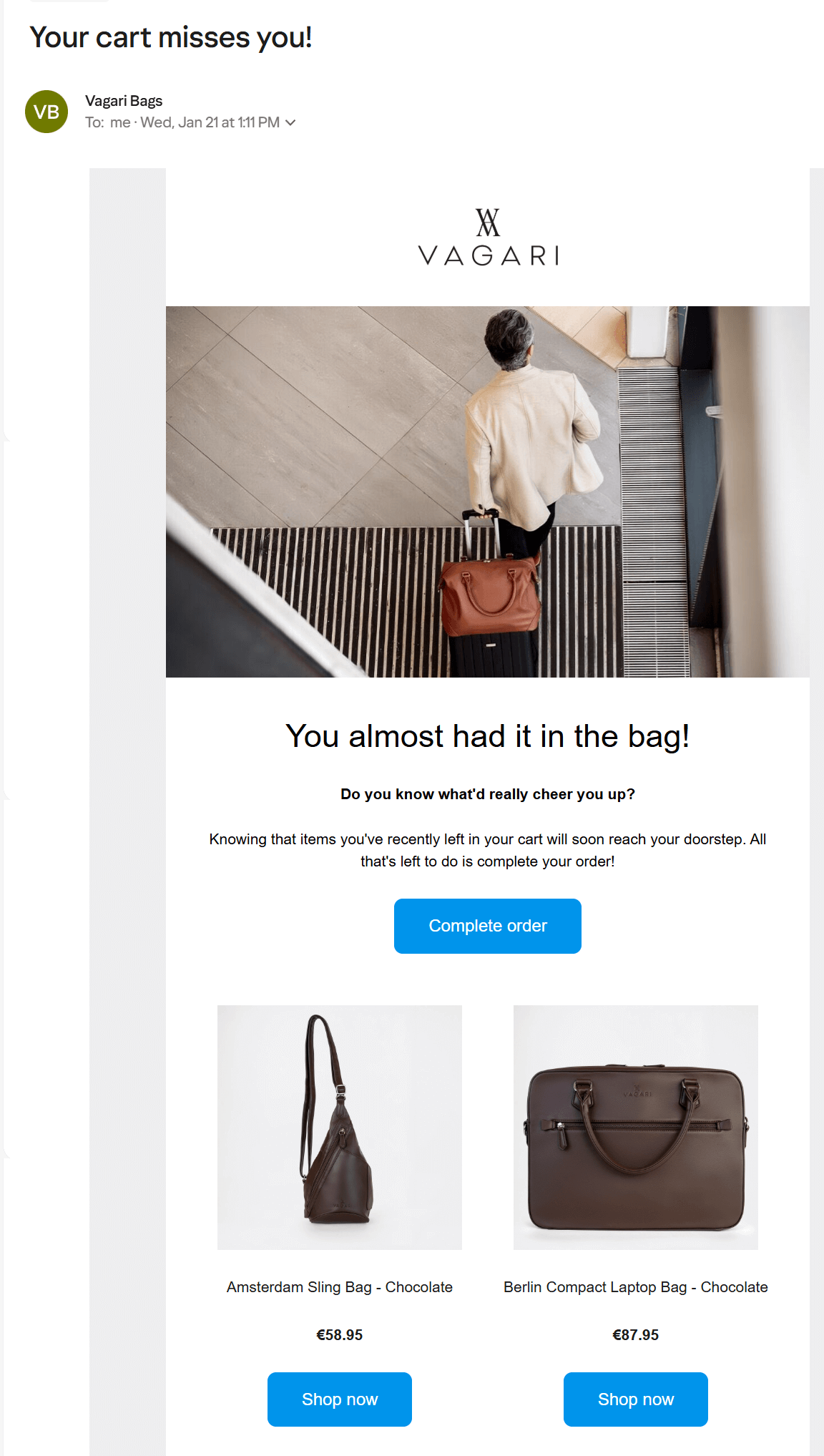
Subject line: “Your cart misses you!”
Metrics
- Open rate: 51.6%
- Click rate: 6.99%
The brand
Vagari Bags designs travel and city bags for men. Its abandoned cart email uses a play on words to show personality and provides a clean grid of products with actionable CTA buttons.
Who it’s for
- Customers browsing across multiple product categories who may not have settled on what they want
Best used when
- You sell a range of products and want to recover the cart while cross-selling alternatives
Standout elements
- On-brand pun in the headline (“You almost had it in the bag!”)
- Abandoned products shown with images, names, prices, and individual CTAs
- Below the abandoned product section, there are four category blocks to introduce customers to additional products
Key takeaways
- A portion of your customers will be indecisive, even when they have shown intent, requiring additional category recommendations
- Adding multiple CTA buttons pointing to the customer’s cart and products makes it as easy as possible for customers to act
4. Creality Store, small discount incentive
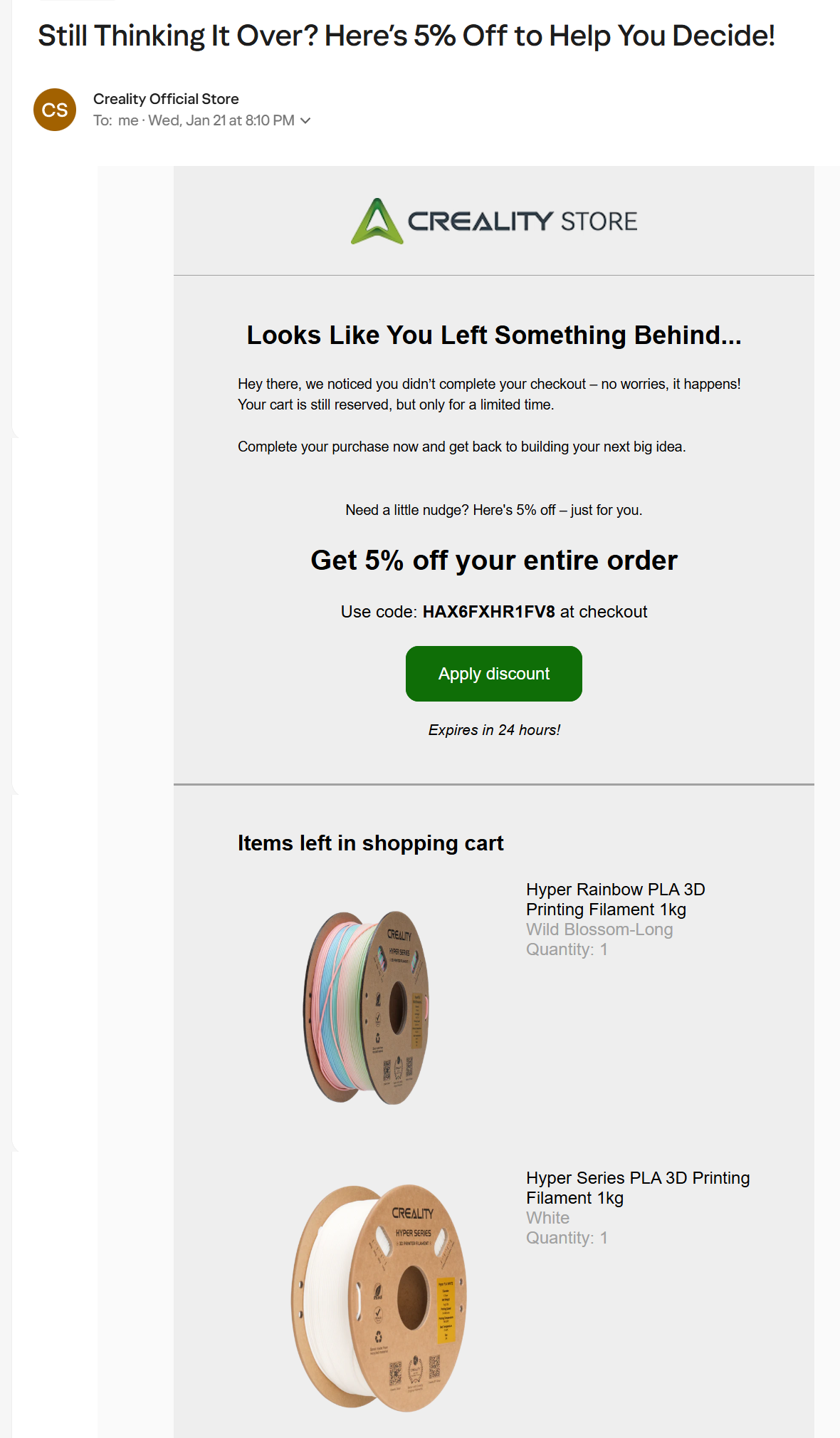
Subject line: “Still Thinking It Over? Here’s 5% Off to Help You Decide!”
Metrics
- Open rate: 54%
- Click rate: 8.25%
The brand
Creality sells 3D printing consumables and accessories. Its abandoned cart strategy uses progressive discounts to recover orders from new and existing customers.
Who it’s for
- Customers with price objections, perhaps looking to save a small amount on multiple products
Best used when
- You want to nudge undecided customers with a small discount in the second or third email of your series
Standout elements
- 5% discount code with a 24-hour expiration
- “Apply discount” CTA that takes customers straight to checkout
- It shows multiple abandoned products with decent images, their names, variants, and quantities
Key takeaways
- Small discounts work for lower-priced consumables where 5% is enough to tip the decision
- A 24-hour expiration creates urgency without feeling aggressive
- Showing product variants and quantities reminds customers of what they configured
5. Rachel Riley, abandonment meets sales events
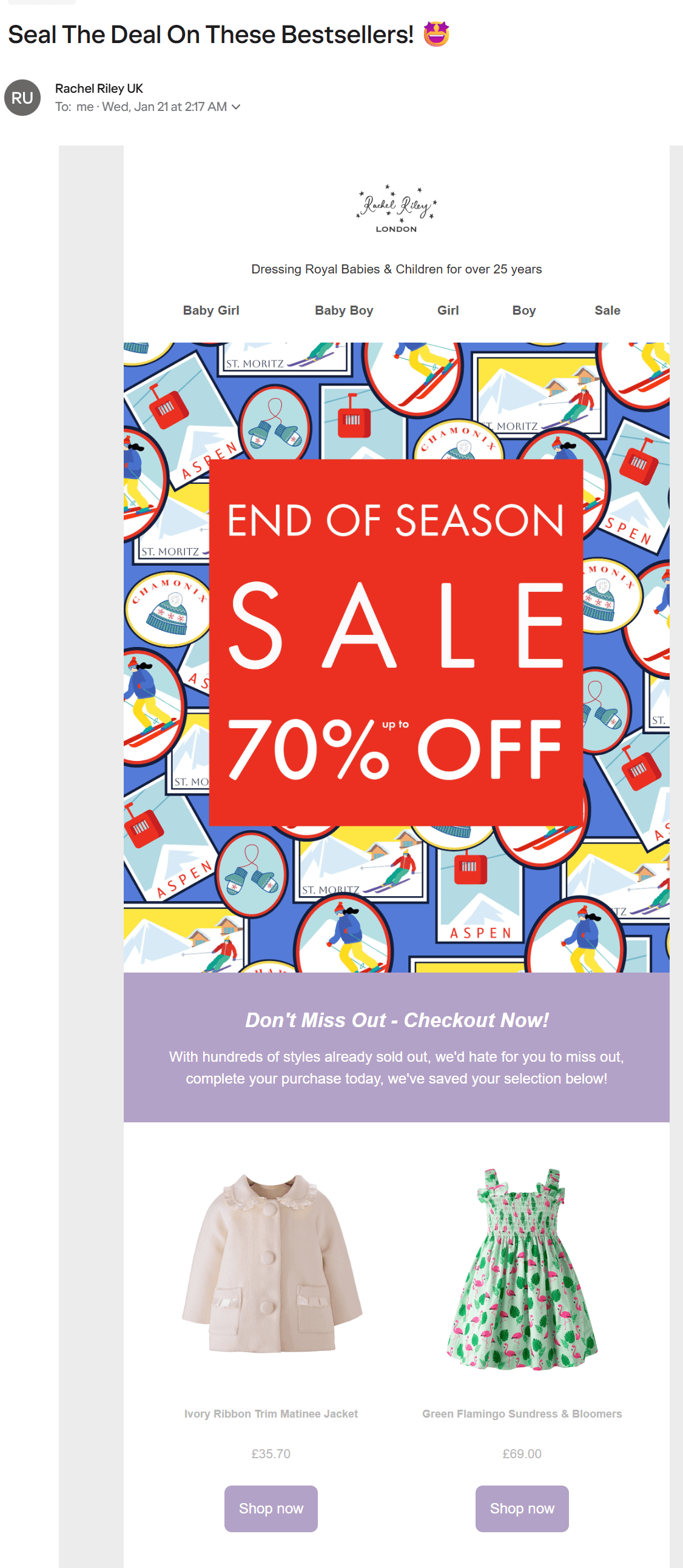
Subject line: “Seal The Deal On These Bestsellers! “
Metrics
- Open rate: 52%
- Click rate: 7.31%
The brand
Rachel Riley is a London-based children’s clothing brand. Its cart abandonment emails include events when appropriate, such as end-of-season sales, giving the illusion of discounts without offering savings on initial carts.
Who it’s for
- Customers who abandoned during a sale period
Best used when
- You want to combine cart recovery with a seasonal promotion already running on your site
Standout elements
- Hero image announcing up to 70% off end-of-season sale
- Scarcity copy (“hundreds of styles already sold out”)
- Navigation bar with product categories (Baby Girl, Baby Boy, Girl, Boy, Sale)
- Abandoned products with images, names, prices, and individual CTAs
Key takeaways
- Piggybacking your cart recovery efforts onto an existing sale gives customers a reason to act now
- Stock scarcity messaging works when the sale is genuine, and inventory is visibly shrinking
6. The Quirky Cup Collective, brand voice as cart recovery
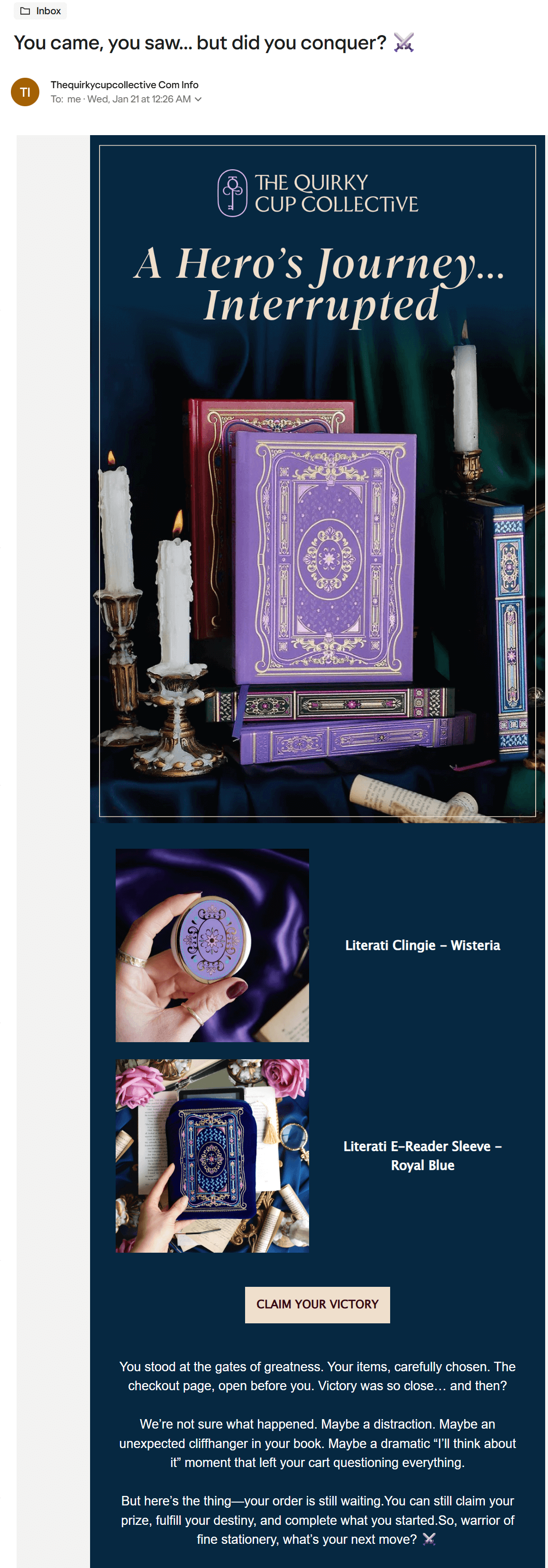
Subject line: “You came, you saw… but did you conquer? ⚔️”
Metrics
- Open rate: 55.2%
- Click rate: 4.8%
The brand
The Quirky Cup Collective sells unique stationery and e-reader accessories themed for book lovers and adventurers. Its abandoned cart email is written in character, framing the moment as a fantasy question the customer can complete.
Who it’s for
- Niche audiences with a community identity
Best used when
- Your brand voice is distinctive enough to carry an abandoned cart email without discounts or urgency tactics
Standout elements
- Hero image styled like a fantasy book cover with candles and velvet
- Abandoned products shown with themed product photography
- Body copy written as a narrative (“You stood at the gates of greatness…”)
- CTA matches the theme rather than defaulting to “Complete your order”
Key takeaways
- Customers who identify with a niche community want an email that talks like they do
- A themed CTA can outperform a generic one when your audience gets the reference
Abandoned cart email best practices 2026
Your abandoned cart emails will recover maximum sales when you optimize send timing and improve on the default email templates provided by Shopify and other ecommerce platforms.
The abandoned cart email timing best practices and additional tips below will help you create effective messages:
- Build an email sequence with optimal delays and send times
- Create and test unique abandoned cart email subject lines
- Show the products they left behind
- Use on-brand copy
- Make CTA buttons stand out
- Incentivize purchases when appropriate
- Personalize the content
- Optimize for mobile
1. Build an email sequence with optimal delays and send times
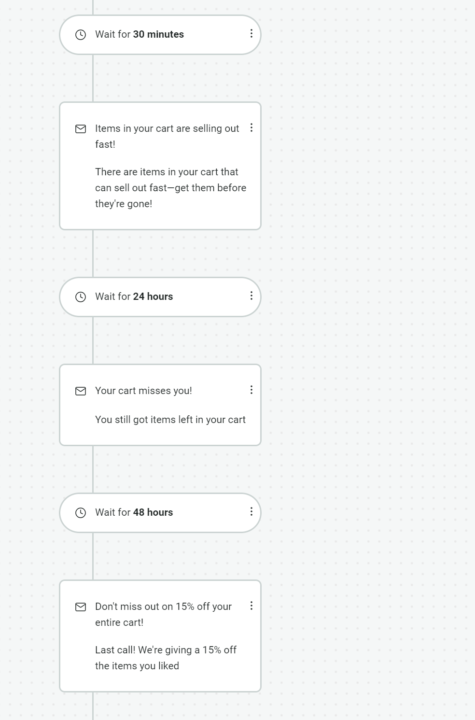
A 30, 45, or 60-minute delay is best for your first cart abandonment email. It gives your customer a chance to return by themselves, and if they buy, your abandonment email won’t trigger, so there’s no inbox placement necessary.
Emails two and three will be necessary for those who don’t convert from the first. A three-email sequence is standard practice for cart abandonment flows, with your customer dropping out of the flow when they purchase or the sequence runs its course.
The flow below shows a sequence with three cart abandonment emails:
Another point to consider is when abandonment times override your first email delay, such as when customers close their cart at 11 PM. In this instance, sending an email 30 minutes later could see it get buried underneath other people’s junk mail by the time they wake up.
As a general rule, set up your abandoned cart email timing so that it operates between 6 AM and 9 PM for maximum engagement, with open rates peaking around 8 PM.
2. Create and test unique abandoned cart email subject lines
“We saved your cart” and “Oops! You left something behind” are classics, but they’re also much too common. Most ecommerce stores use them. You can stand out with a twist on those classics or with unique subject lines.
A few examples:
- “Your cart, saved just for you,” feels more personal because it doesn’t mention “we” as the retailer
- “Come back to your cart anytime,” no pressure, encourages flexible shopping
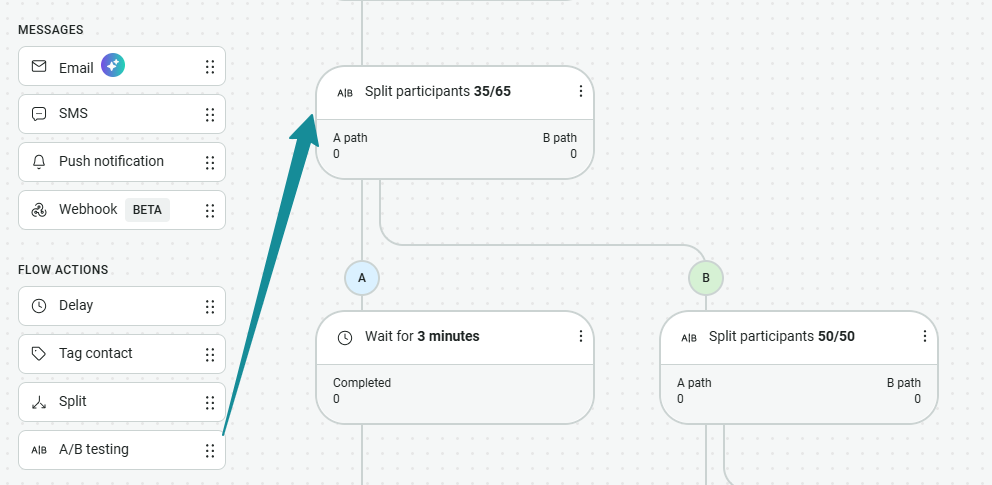
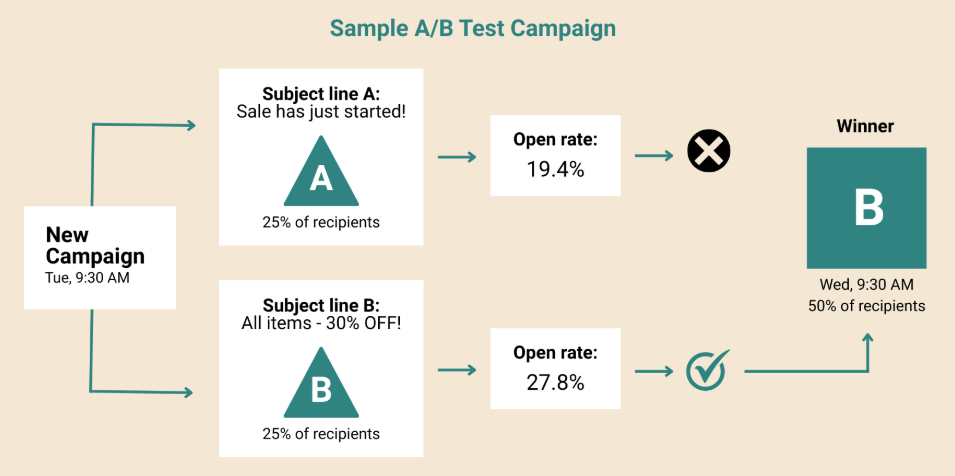
Omnisend’s free subject line tester will help you get the perfect length. You should also A/B test multiple subject lines and use your winners, something you can do across all Omnisend plans by dragging the A/B testing flow action into your sequence:
3. Show the products they left behind
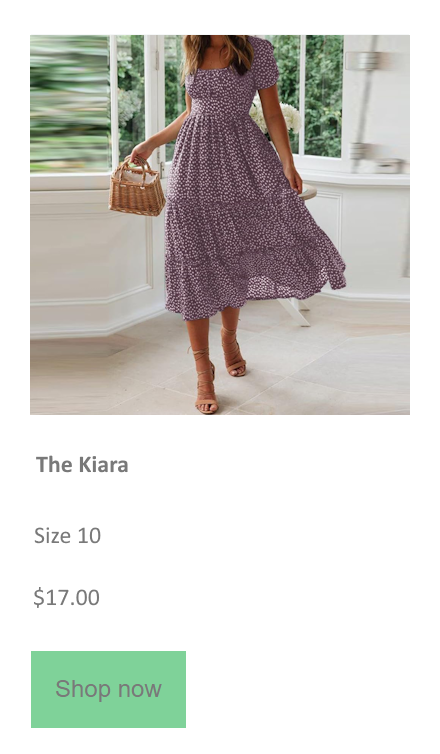
Always include the items your customers abandoned to remind them about what they were shopping for. A grid listing is the standard format, and you can either add just the images and names or additional pricing and quantities.
The image below shows a minimalist abandoned products listing. Its image and information have a clean appearance with a green CTA button:
Pro tip
Omnisend’s Abandoned product element lets you select the number of products to show, columns, layout type, and exclude products manually. Options to select and deselect image, price, old price, button, title, and description give you complete control over how your product listings appear in abandoned cart emails.
4. Use on-brand copy
Existing customers aside, most abandoned cart emails are the first email-based interaction people have with you. You can make your first impression a good one with writing that matches the language in product pages and uses appropriate brand phrases.
The email example below, built in Omnisend for a partywear retailer, uses the phrase “A deal to dance for” to inject personality into what could otherwise feel like a generic reminder:
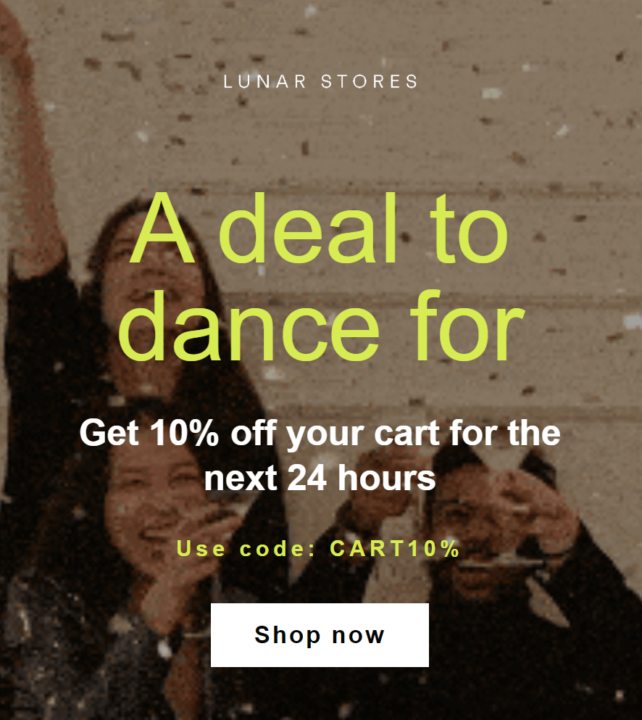
Notice also how the email puts a time limitation on its discount (24 hours)? That urgency tactic is something you can replicate to encourage action.
5. Make CTA buttons stand out
Contrasting colors, sizing, and descriptive text all count towards getting customers to notice and click your CTA buttons. A few pointers:
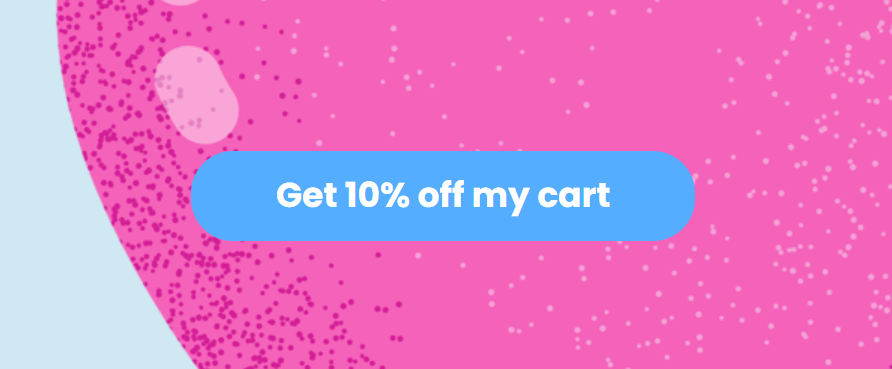
- Colors, make these contrasting, such as lime green against black or blue against pink
- Sizing, large enough to be seen without scanning
- Text, action-oriented, and confirmational if providing an incentive
The image below shows a CTA button that meets all these cart abandonment email best practices:
6. Incentivize purchases when appropriate
Discounts and offers, such as free premium shipping, can tip the balance in your cart abandonment emails and get your most hesitant customers to purchase.
However, they also reduce your margins and set customer expectations for deals, so the best approach is a sequence that staggers your offers.
Your sequence could look like this:
- Email one, a basic reminder sent after 30 minutes
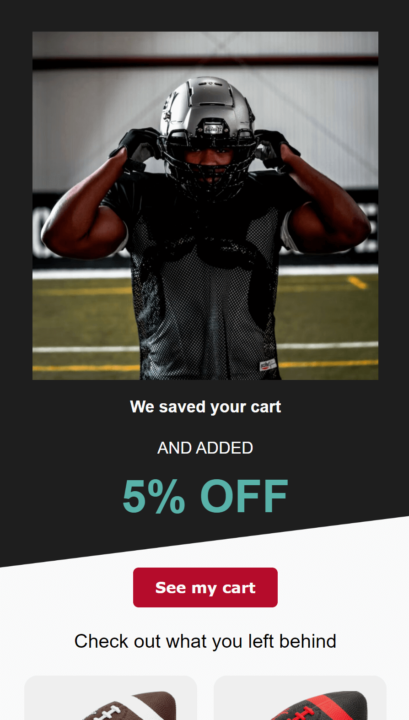
- 24 hours later, email two provides a 5% discount
- After 24-hours, your last recovery email offers 10% off
The image below shows an abandoned cart email with a 5% discount:
Another approach is using segments to trigger contextual incentives. Your cart abandonment emails will be different for existing and new customers, those who purchased over $500 before, those who only buy during sales events, and more.
7. Personalize the content
Your customer’s first name is the best personalization trick. Adding it will be possible if your customer shared their name via a form, cart, or checkout process.
Layering personalization is another good approach, for instance, mentioning their name and then their activity, such as the category they were looking at.
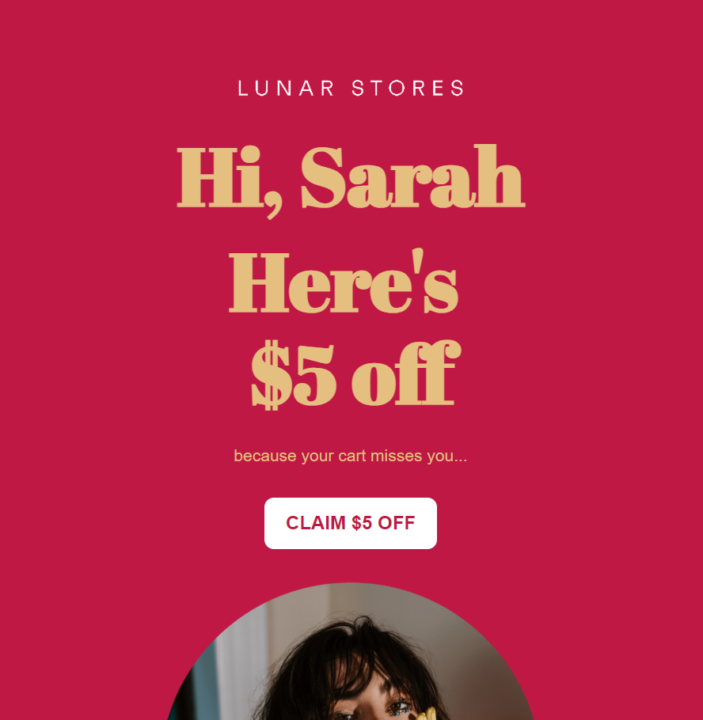
The abandoned cart email example below uses the customer’s first name in its first heading with a unique, branded font:
8. Optimize for mobile
Your email tool will probably have responsive abandoned cart email templates, but that doesn’t necessarily mean they will look amazing on mobile without some editing on your part.
Use your email tool’s preview tool to see how your abandoned cart emails look on desktop and mobile, and adjust these elements to suit:
- Heading sizes
- Images
- Colors
- Body text
- CTA buttons
- Spacing throughout
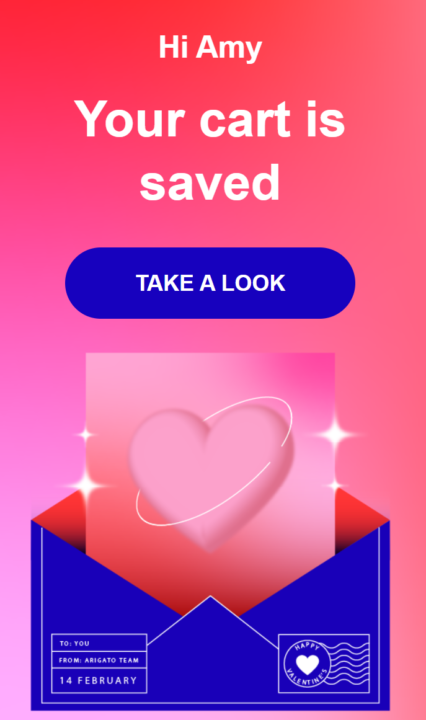
For example, this email, built in Omnisend, looks fantastic on mobile:
Additional reading
Reduce shopping cart abandonment: Reasons and tips
Effective abandoned cart email subject lines
Making it clear that you’re giving customers an abandoned cart reminder is always the best approach in your subject line. You can then dress it up with personality and personalization. The ideas below will get you going.
Urgency and scarcity
These subject lines push customers to act before they miss out:
- Your cart expires tonight
- Only a few are left in stock
- Your items are selling fast
- Last chance to grab your cart
- Going, going, almost gone
- Your cart is about to disappear
- Final call for your saved items
- These won’t be around much longer
Abandoned cart and welcome emails generated 76% of all automation-generated orders in 2025 because they reach customers at high-intent moments. Your abandoned cart subject lines should reinforce that with urgency.
Curiosity and benefit
These subject lines tease value without giving everything away:
- Something in your cart just got better
- You left this behind
- Still thinking it over?
- A little nudge about your cart
- We noticed you looking
- Your cart misses you
- Forgetting something?
- Take another look
- Good choice, by the way
Personalized
Adding names, product titles, or categories makes subject lines feel less automated:
- Sarah, your cart is waiting
- Still interested in the blue wool coat?
- Your skincare routine is incomplete
- James, come back for your running shoes
- The items you loved are still available
- Ready to finish your order, Alex?
- Your [product name] is selling fast
- Back for the [category] you were browsing?
Learn more about the psychology behind the sales emails and subject lines in this Omnisend webinar:
Additional subject line tips
- Use unique subject lines across all messages when you’re learning how to implement a cart abandonment email series
- Most email apps, such as Gmail, cut off your subject lines over 50 characters, so put your important stuff upfront.
- Create contextual preview text that builds on your subject line.
- If sending SMS as part of your cart abandonment flows, consider using your email subject line as the lead for familiarity.
- Omnisend’s A/B testing lets you pit subject lines against each other within automation flows, then automatically send the winner:
Free abandoned cart email templates
Omnisend has multiple abandoned cart email templates, including designer and plain text templates you can edit to match your brand.
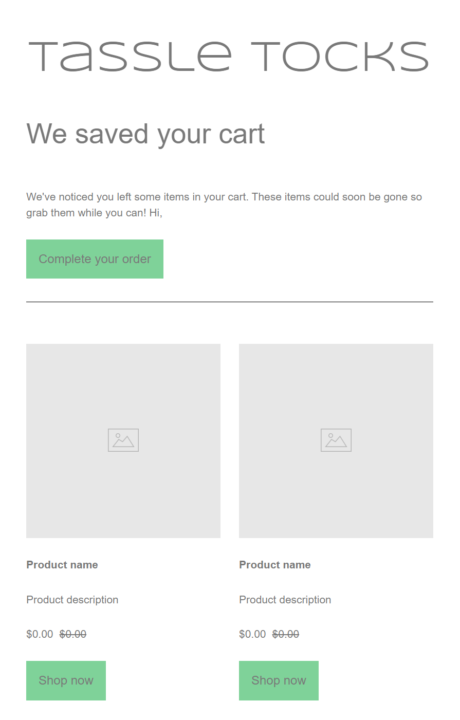
The plain text email replaces the default emails in Shopify, WooCommerce, and other platforms with a minimal reminder that’s more customizable:
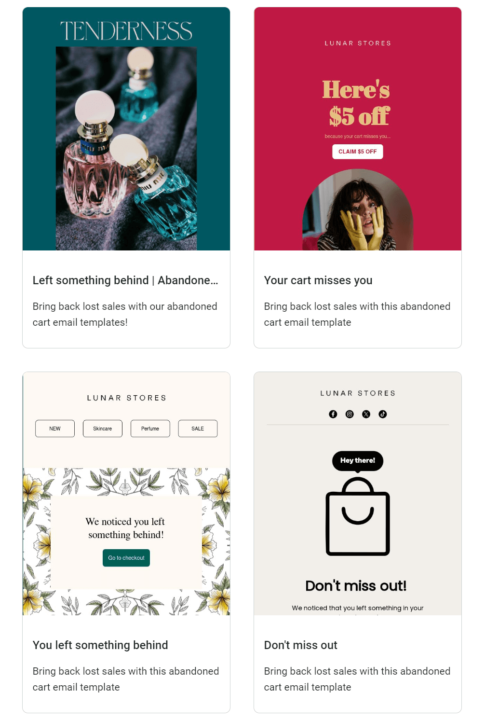
If that’s too basic for your brand, you can use one of the more advanced templates:
The email editor uses drag-and-drop and provides elements for text, buttons, images, videos, product recommendations, HTML code, and more. You can fully customize these elements, such as the menu at the very top of this email example:
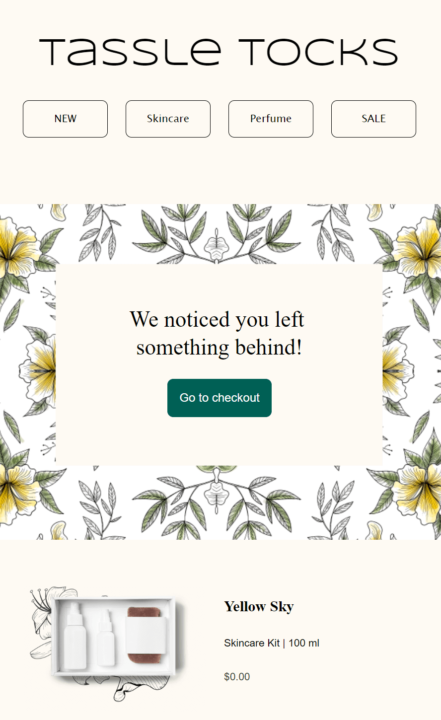
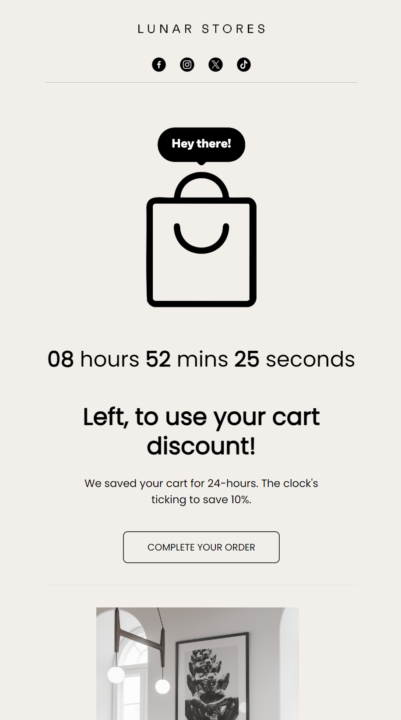
The template above is perfect for a stylish product showcase. Some templates make your offers and urgency tactics stand out. The example below uses a countdown timer, encouraging customers to use their discount:
All these templates are mobile-responsive with optimal text sizing, spacing, and CTA button designs. You can use them immediately with any Omnisend plan and add your brand assets, so that all the new templates you make have your logo, fonts, and colors.
When to send abandoned cart emails
Delay your first email by 30 to 60 minutes. Sending within this window has been shown to maximize recovery among Omnisend customers.
Anything faster than five minutes feels aggressive and may catch customers before they have truly abandoned. Waiting days sees diminishing returns as purchase intent fades.
For those who do not convert from the first email, a second at 24 hours and a third at 72 hours completes the sequence. Most tools, such as Omnisend, automatically remove customers from the flow when they purchase, so you will not be emailing people who already bought.
Optimal cart abandonment email timing benchmarks
Late-night abandonment throws a wrench into your delay logic. A cart closed at 11 PM plus a 30-minute delay equals an email at 11:30 PM, buried by morning. Restricting your flow to 6 AM and 9 PM solves this, and open rates peak around 8 PM anyway.
Your product and audience will determine whether these timings hold. A two-hour or four-hour delay might outperform one hour for considered purchases. The only way to know is to test intervals and compare conversion rates.
Additional reading
The best time to send an email (2026 research)
How to set up abandoned cart emails in Omnisend (and other tools)
If you’re wondering how to set up a cart abandonment email, you need to sync an email automation app with your store and build the flow.
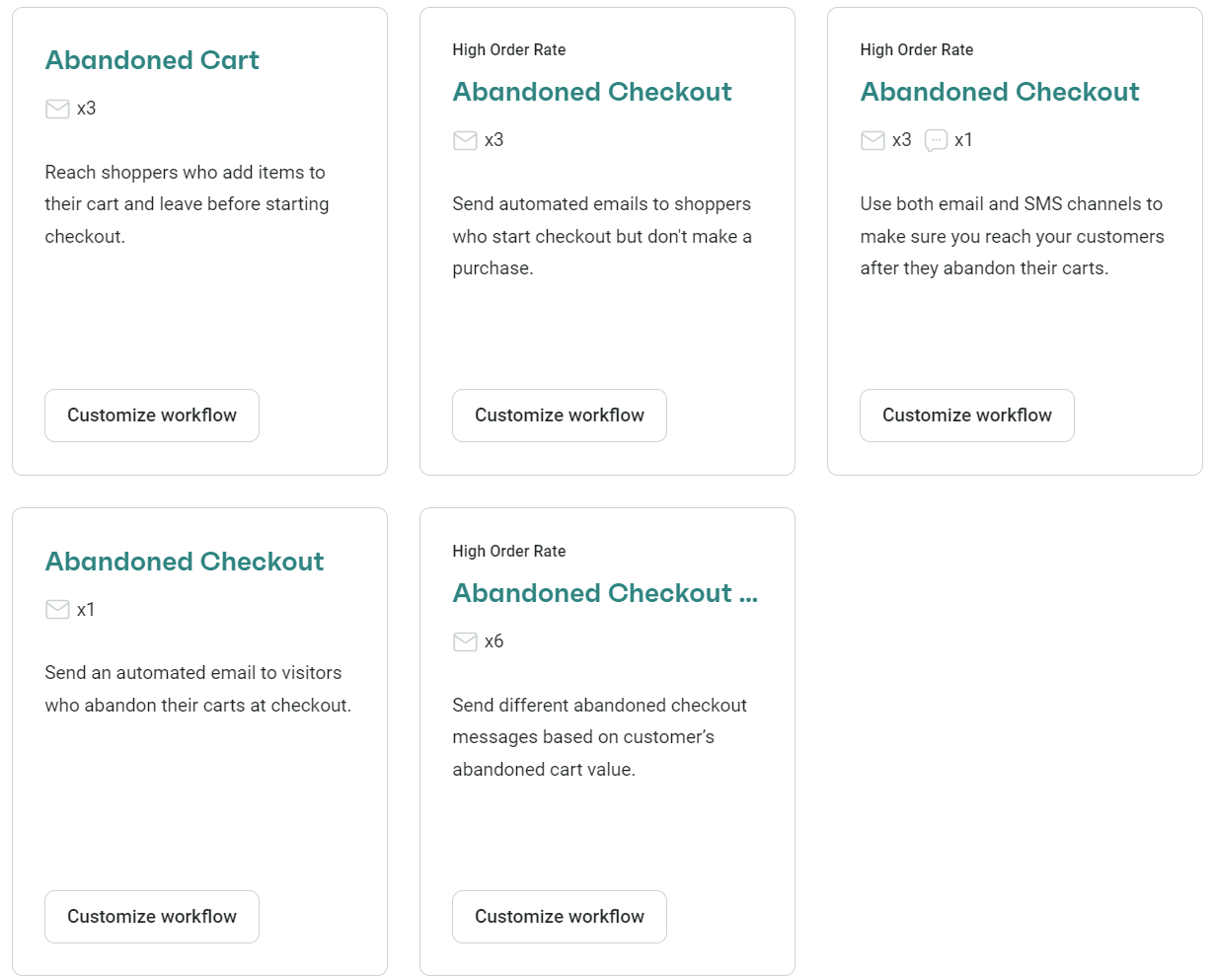
Omnisend is a good place to start. It’s a top-rated app with a 4.8/5 star rating on Shopify and the same score on WooCommerce. It has pre-built email templates and flows for abandoned carts, plus it lets you build multichannel sequences with email and SMS:
Step-by-step setup instructions
Follow these steps covering how to setup a cart abandonment email in Omnisend:
1. Log in to Omnisend
2. Click Automation in the sidebar
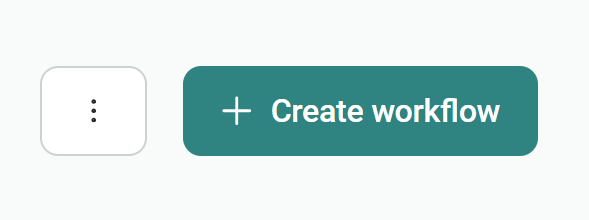
3. Click + Create workflow on the Automate page:
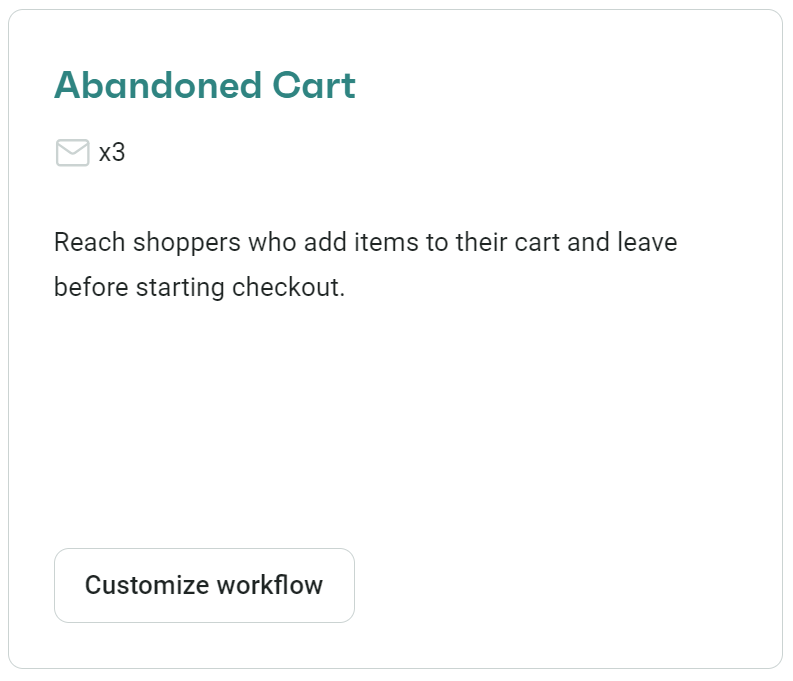
4. Locate the Abandoned Cart flow and click Customize workflow:
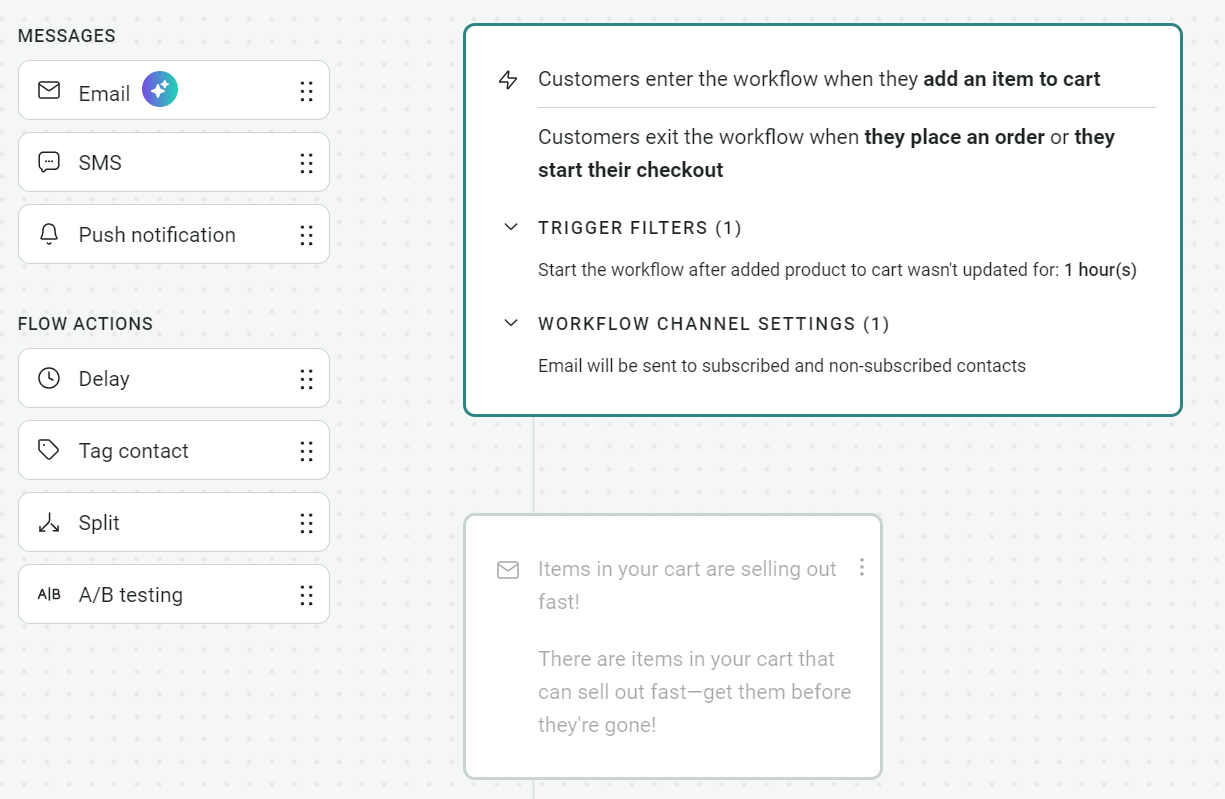
5. Omnisend’s flow builder has messages and flow actions on the left. You can drag-and-drop these into your flow:
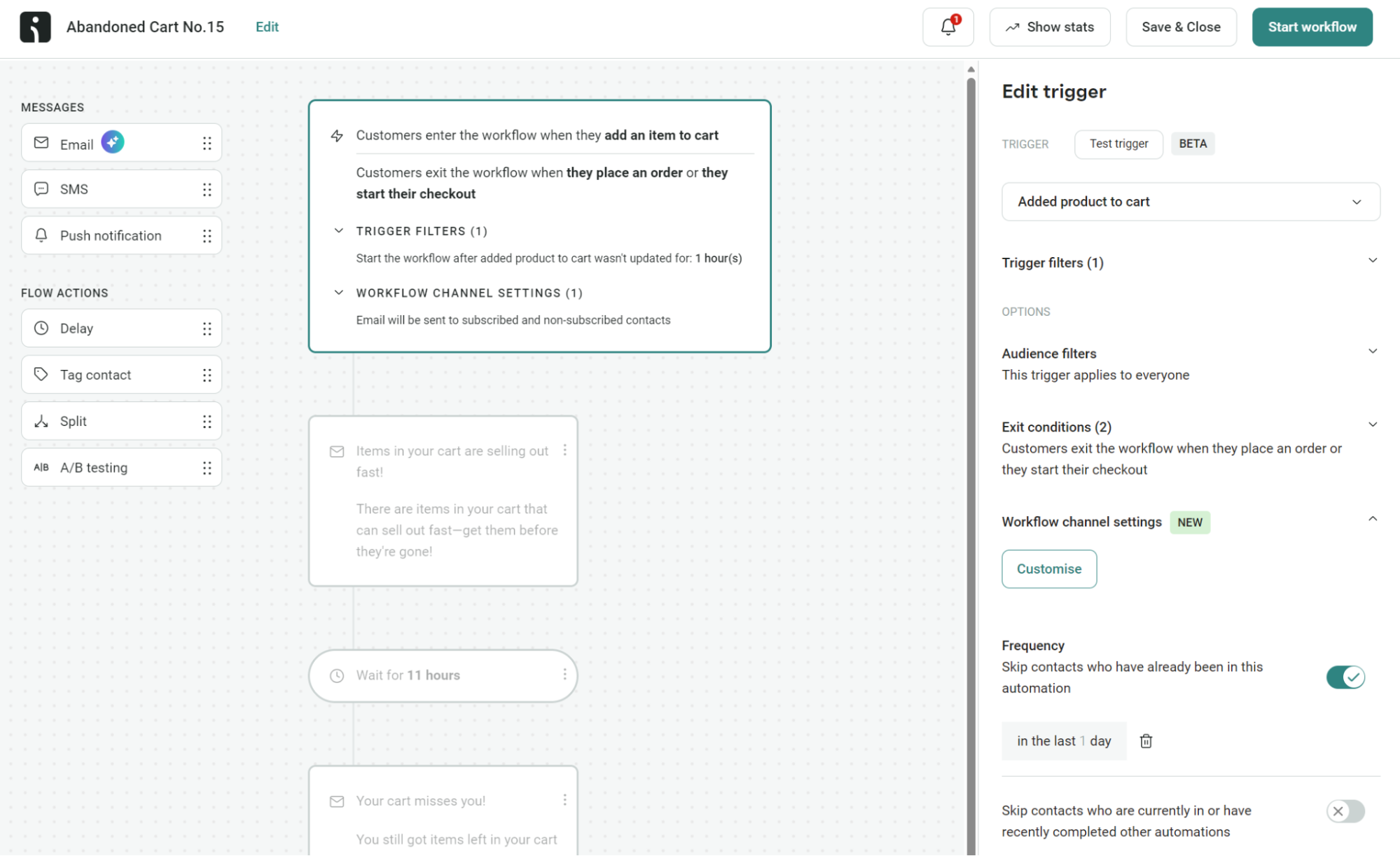
6. Review the default settings. You can see in the image below that there are preconfigured trigger filters and flow settings. Adding a segment can be done under Audience filters > Segment. Edit via the right-hand sidebar. Click Update once you’ve made changes:
7. Next, click on the email in your flow to load the subject line, preheader, and other settings. The sidebar will also show your email content. You can click Edit content to amend the design and pick a template you created earlier:
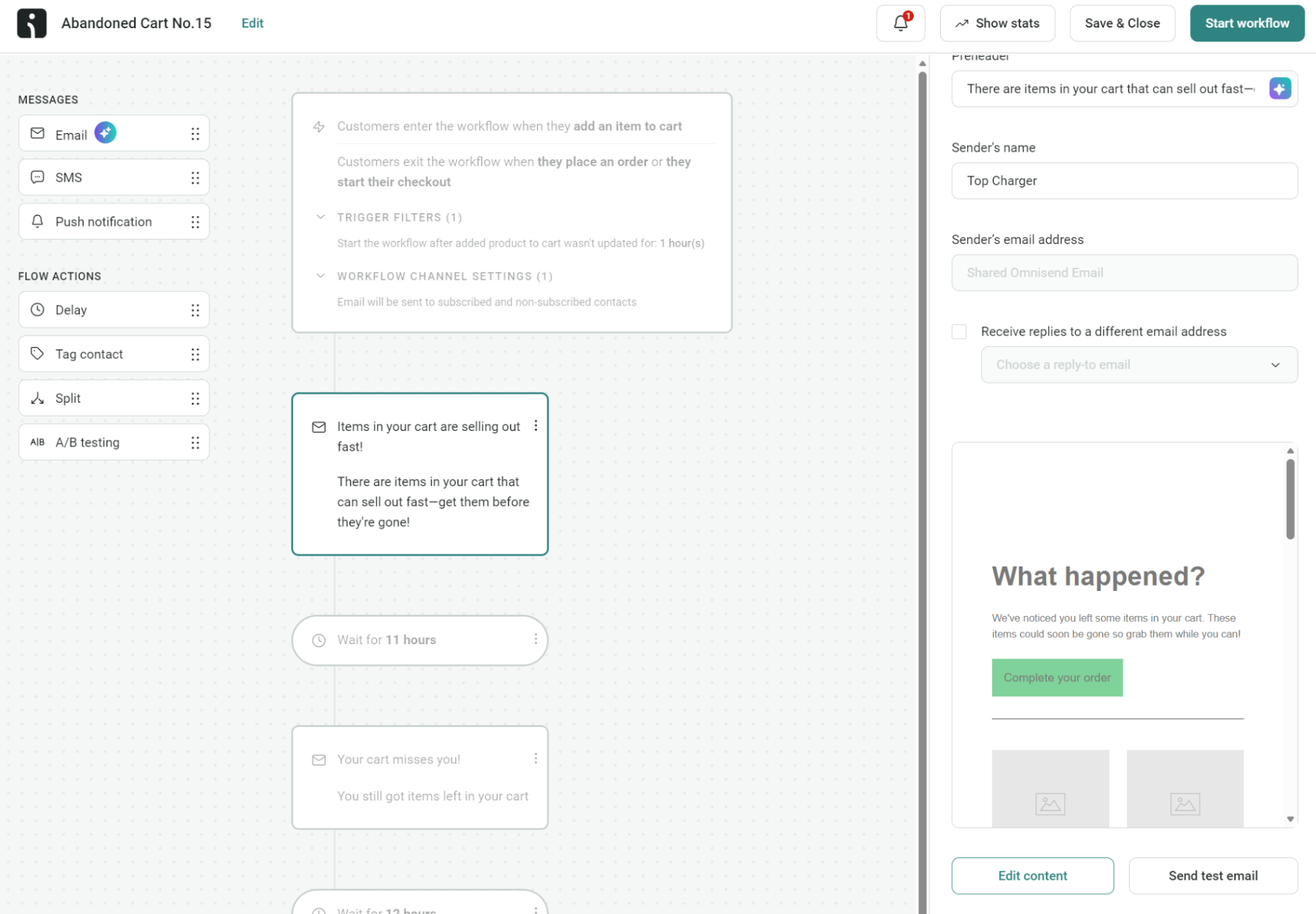
8. Once you’re happy with your abandoned cart email design and sequence, send a test email, and click Start workflow to enable it. You’ll then get redirected to the Automation page. The status of your automation will show as Enabled:

That’s it! Your abandoned cart flow is ready.
Pro tip
If you’re wondering how long to wait to send an abandoned cart email, test delays of 30, 45, and 60 minutes to see which gets the best open and click rates.
Using other email apps
Sender, Brevo PushOwl, and Shopify Messaging are well-regarded email automation tools that handle abandoned carts. The setup experience takes more getting used to than Omnisend’s, but they also offer reliable deliverability and pre-built templates.
Compared to other email apps, Omnisend is more intuitive and gets you started with cart recovery as quickly as possible. Its free plan includes all standard features, including 24/7 live chat and email support should you need any help.
Additional reading
Complete guide to recovering abandoned carts in WooCommerce
Measuring and optimizing abandoned cart email performance
You need to know your open rates and click-through rates as a bare minimum. Revenue attribution and unsubscribe rates are crucial for a complete overview of your performance.
Omnisend’s automation reports break down performance by individual email, showing where customers convert and where they lose interest.
Key metrics
- Open rate: Whether your subject lines are working
- Click rate: Whether your content and CTAs are compelling enough to drive action
- Placed order rate: The percentage of emails that result in a purchase
- Revenue per message sent: Useful for comparing sequences against each other
- Unsubscribe and spam rates: Signs you are sending too often or missing the mark on relevance
A/B testing ideas
Some of your abandoned cart emails will convert better than others. You can find out why, and optimize them, with A/B tests. Omnisend’s A/B split block divides your flow and sends the winning variant automatically.
Consider testing these elements:
- Subject lines: Pit urgency against curiosity
- Timing: Compare a one-hour delay to four hours for your first email
- Incentives: Test whether a discount in email two increases conversions or cuts into margins
- Sequence length: Try two emails against three to see if that final message pulls its weight
Pro tip
Use Omnisend’s A/B testing calculator to check the statistical significance of your results to make informed decisions later on.
Attribution
Tag your links with UTM parameters. Otherwise, purchases from your abandoned cart emails may show up as direct traffic in Google Analytics, and you will undercount your results.
Omnisend has its own attribution model that credits sales to emails within an adjustable time window. You can cross-reference it with Google Analytics for a complete view of performance.
Amundsen Sports’ abandoned cart email achieves a 57% conversion rate and generates 10.8% of Omnisend revenue from just 0.9% of sends.
Read the case study.
Conclusion
Abandoned cart emails give you a second and third chance at making sales you would otherwise lose. Yes, your customer abandoned their cart. It’s harsh, but that isn’t to say they’re gone for good. A reminder could be all they need.
Now you know the perfect setup for creating sales-winning emails, getting the timing right, mastering subject lines, and monitoring your cart abandonment recovery results. Your next step is building your first abandoned cart email in Omnisend.
Test multiple versions and pick your best efforts to keep your sales on the uptick. The payoff in recovered revenue will be well worth it.
Join Omnisend to automate abandoned cart emails, test multiple versions, and optimize revenue recovery
Quick sign up | No credit card required
FAQ
What is an abandoned cart email?
It’s a customer reminder to revisit your store and continue shopping after they have interacted with your store and added products to their cart.
Are abandoned cart emails legal?
Completely legal, provided you follow the opt-in consent requirements applicable to your audience. These differ between regions, such as GDPR in Europe and CAN-SPAM in the US. It’s good practice to collect opt-ins for marketing emails before triggering abandoned cart emails.
How to send abandoned cart emails?
Via an email automation app, such as Omnisend or Shopify Messages. These sync with your store, its audience, and trigger the flows you build.
Can abandoned cart emails be considered spam?
They’re 100% spam if they arrive for customers who never added products to their cart or shopped with you. Cold emails like this will trigger spam complaints. Additionally, sending to segments that did not abandon a cart is also spammy. Your audience here is those who add products to their cart and then leave, and that’s it.

TABLE OF CONTENTS
TABLE OF CONTENTS


Subscribe and don’t miss any updates!
No fluff, no spam, no corporate filler. Just a friendly letter, twice a month.