Omnisend AI


 OFFER
OFFER










Brevo is best for multichannel marketing at a low price and for storing large lists with customer relationship management (CRM) capabilities. Constant Contact is best for marketers with small- to mid-size lists sending frequent newsletters and campaigns.
Each has tiered features per plan and advantages over one another, such as Constant Contact’s 1:1 onboarding in all plans and Brevo’s transactional email and SMS in all plans.
A thorough Brevo vs. Constant Contact comparison can help you decide which platform is best for your business. Our guide provides just that, comparing their pricing, ease of use, automation, email features, CRM, SMS, reporting, integrations, and support.
Quick verdict: Brevo is the winner
The winner: Brevo
Brevo’s multichannel automations suit ecommerce, and it supports transactional email and SMS in all plans. That means it can cover more of your customer journey. Its native CRM also bridges the gap for selling products and services.
What Brevo features are better than Constant Contact?
| Brevo | Constant Contact |
|---|---|
| ✔ Free plan | ✘ No free plan |
| ✔ A CRM with pipelines and deal stages in all plans | ✘ No CRM |
| ✔ Predictive analytics on Professional plans | ✘ No predictive analytics |
| ✔ Transactional email in all plans | ✘ No transactional email, second tool required |
| ✔ Unlimited automation builds in all plans | ● Unlimited automation builds in Premium only |
| ✔ Prepaid SMS credits that don't expire, available as an add-on | ● SMS credits as a rolling monthly cost, available as an add-on |
Accurate as of September 2026.
What Constant Contact features are better than Brevo?
| Constant Contact | Brevo |
|---|---|
| ✔ 1:1 onboarding in all plans | ● Professional plans only |
| ✔ Live phone support in all plans | ● Professional plans only |
| ✔ Event hosting and selling in all plans | ✘ No event features |
| ✔ Polls and surveys in all plans | ✘ No polls or surveys |
| ✔ Social marketing features in all plans | ✘ No social marketing features |
| ✔ Text-to-join for SMS, included with SMS | ✘ Not available |
Accurate as of September 2026.
Brevo and Constant Contact quick comparison
Brevo is best for ecommerce, andConstant Contact for small marketing teams and businesses. There’s some ecommerce overlap between them, so if you’re an online store, their channels and features are the deciding factor alongside price.
| Brevo | Constant Contact | |
|---|---|---|
| Best for | Storing lots of contacts, marketing and transactional email and SMS with ecommerce integrations. | Small- to mid-size lists with frequent sends, small businesses, and event organizers with basic ecommerce needs. |
| G2 rating | 4.5/5 (2,600+ reviews) | 4.1/5 (7,400+ reviews) |
| Capterra rating | 4.6/5 (3,500+ reviews) | 4.3/5 (2,900+ reviews) |
| Channels | Email, SMS, MMS, web push*, mobile push*, WhatsApp* | Email, SMS* |
| Priced on | Monthly email volume | Contacts |
| Free plan | Yes, for 100,000 contacts | No |
| Email sends | From 5,000–10,000,000+, plan-dependent | 10–24x contacts |
| SMS | Prepaid credits, available to purchase in all plans | Monthly rolling credits, available to purchase in all plans |
| Support | Email only up to Professional; Professional plans also receive phone support | Email, live chat, and phone support in all plans |
| SMS coverage | 180+ countries | United States and Australia |
| Email templates | 50+ | 200+ |
| CRM | Yes, sales and marketing | No |
| Monetization features | No | Yes, for events; sell products and services |
| AI features | Aura AI, with four agents for marketing, sales, data management, and conversations; plus a chatbot and a Model Context Protocol (MCP) connector | AI content generator, campaign builder, and assistant |
Accurate as of September 2026. * denotes plan-dependent.
Want more in-depth reviews?
Brevo review
Constant Contact review
Constant Contact vs. Brevo: plans and pricing
Brevo is cheaper for large lists, and its plans start at a lower price. Constant Contact charges by your list size with a monthly send multiplier based on your plan. Brevo charges by monthly email volume and applies a contact storage cap per plan. The Brevo model suits a large list and infrequent sends, whereas Constant Contact’s model suits small lists with lots of sends per contact.
Unlike Brevo, Constant Contact doesn’t have a permanent free plan. The cheapest paid plan is Lite at $12/month.
Brevo’s free plan stores 100,000 contacts with a 300 email/day send limit. The first paid tier, Starter, has an entry price of $9/month.
We’ve compared Brevo’s Starter and Standard plans with Constant Contact’s Lite and Standard plans below at 1,000, 2,500, 10,000, and 20,000 contact tiers.
| Contacts | Brevo Starter | Brevo Standard | Brevo sends/month | Constant Contact Lite | Constant Contact Standard |
|---|---|---|---|---|---|
| 1,000 | $17 | $35 | 10,000 | $30 | $55 |
| 2,500 | $25 | $49 | 15,000 | $50 | $75 |
| 10,000 | $32 | $69 | 20,000 | $120 | $160 |
| 20,000 | $32 | $69 | 20,000 | $230 | $260 |
Accurate as of September 2026.
Prices are based on monthly billing without discounts. Brevo has 10% off annual plans, and Constant Contact has 15% off.
The Starter tier in Brevo at 20,000 sends has storage for 500,000 contacts. Both 10,000 and 20,000 contacts are inside that cap, so the price and send allowance don’t change.
Brevo’s plans get more expensive the more sends you add. That makes it potentially more expensive for email marketing at large send volumes.
| Platform | Plan level | Entry price | What's included? |
|---|---|---|---|
| Brevo | Starter | $9/month | 500 contacts and 5,000 monthly emails |
| Brevo | Standard | $18/month | 500 contacts and 5,000 monthly emails |
| Brevo | Professional | $499/month | 2,000,000 contacts and 150,000 monthly emails |
| Constant Contact | Lite | $12/month | 500 contacts and 10x emails per contact |
| Constant Contact | Standard | $35/month | 500 contacts and 12x emails per contact |
| Constant Contact | Premium | $80/month | 500 contacts and 24x emails per contact |
Accurate as of September 2026.
Additional reading: learn more about email marketing costs.
What about SMS pricing?
It’s cheaper to send low SMS volumes with Brevo because bundles are available in smaller quantities.
SMS is available in all Brevo plans. Credits are sold in bundles of 100, starting at $1.09. Prices depend on country and volume. For 1:1 SMS, you’ll need the Sales Advanced add-on from $65/month per seat.
Constant Contact’s SMS is available in Lite plans and above; SMS bundles then start from $10/month for 500 credits. The Premium plan includes 500 SMS messages/month. You can buy additional credits on top.
Credits in Brevo are prepaid and nonrefundable but also never expire. That’s a better deal than Constant Contact’s SMS credits, which don’t roll over to the next month; you’re charged the monthly rate even if you don’t use the credits.
Brevo vs. Constant Contact ease of use
Brevo takes less time to master. Constant Contact takes longer to master because there are more menu and dashboard items to click and review.
Brevo took four minutes and 11 seconds to onboard with; Constant Contact took four minutes and 58 seconds. Once in, we found Brevo’s navigation more logical, but Constant Contact provides a guided dashboard setup ideal for beginners.
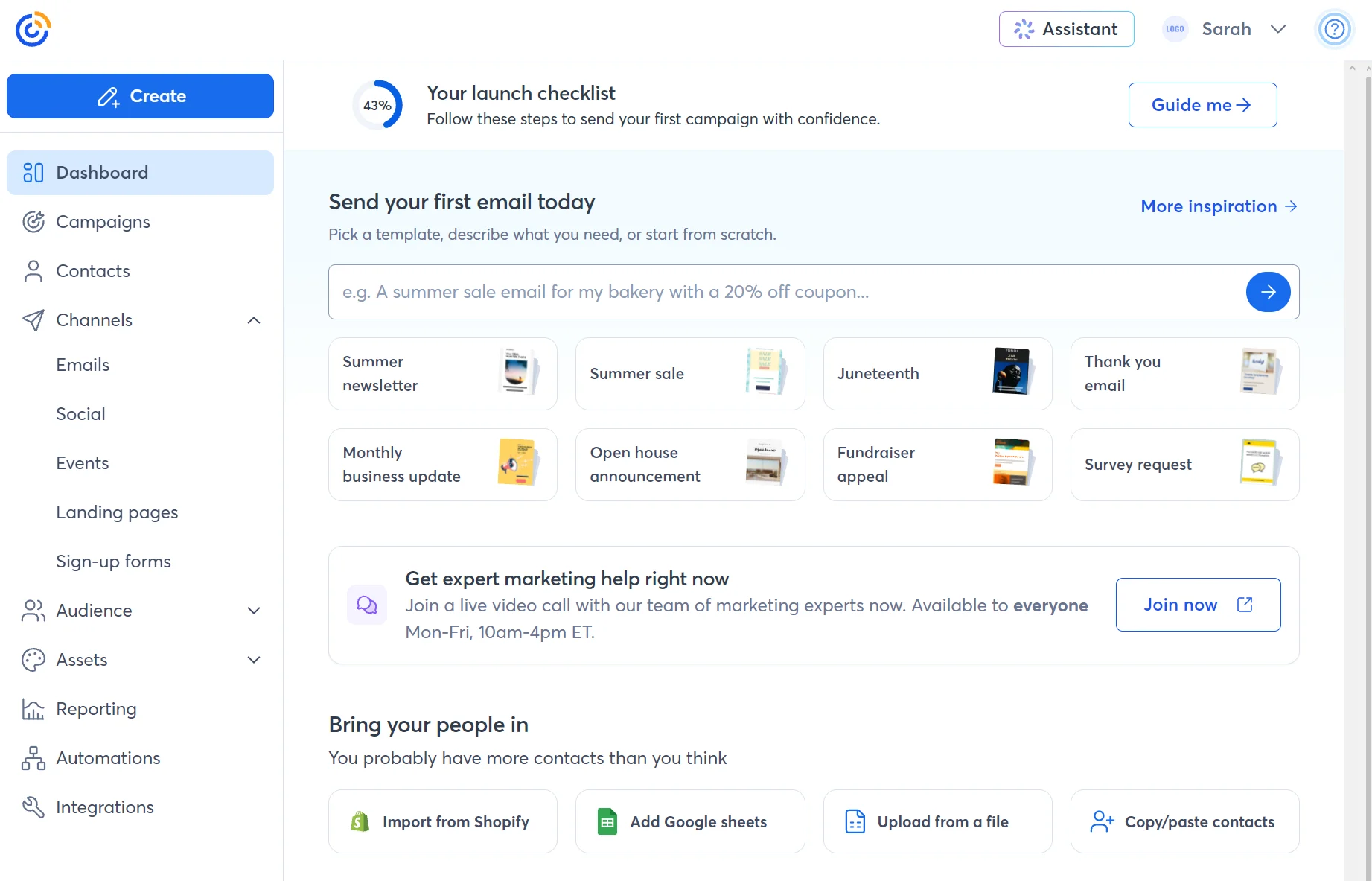
Elements we like in Constant Contact’s dashboard include the “your first wins” and “set it and forget it” items. These provide a quick route to sending an email and SMS, as well as building a welcome series and sign-up form.
Brevo’s dashboard provides an overview of contacts and plan usage, and we like being able to customize the page with more widgets, such as conversion revenue.
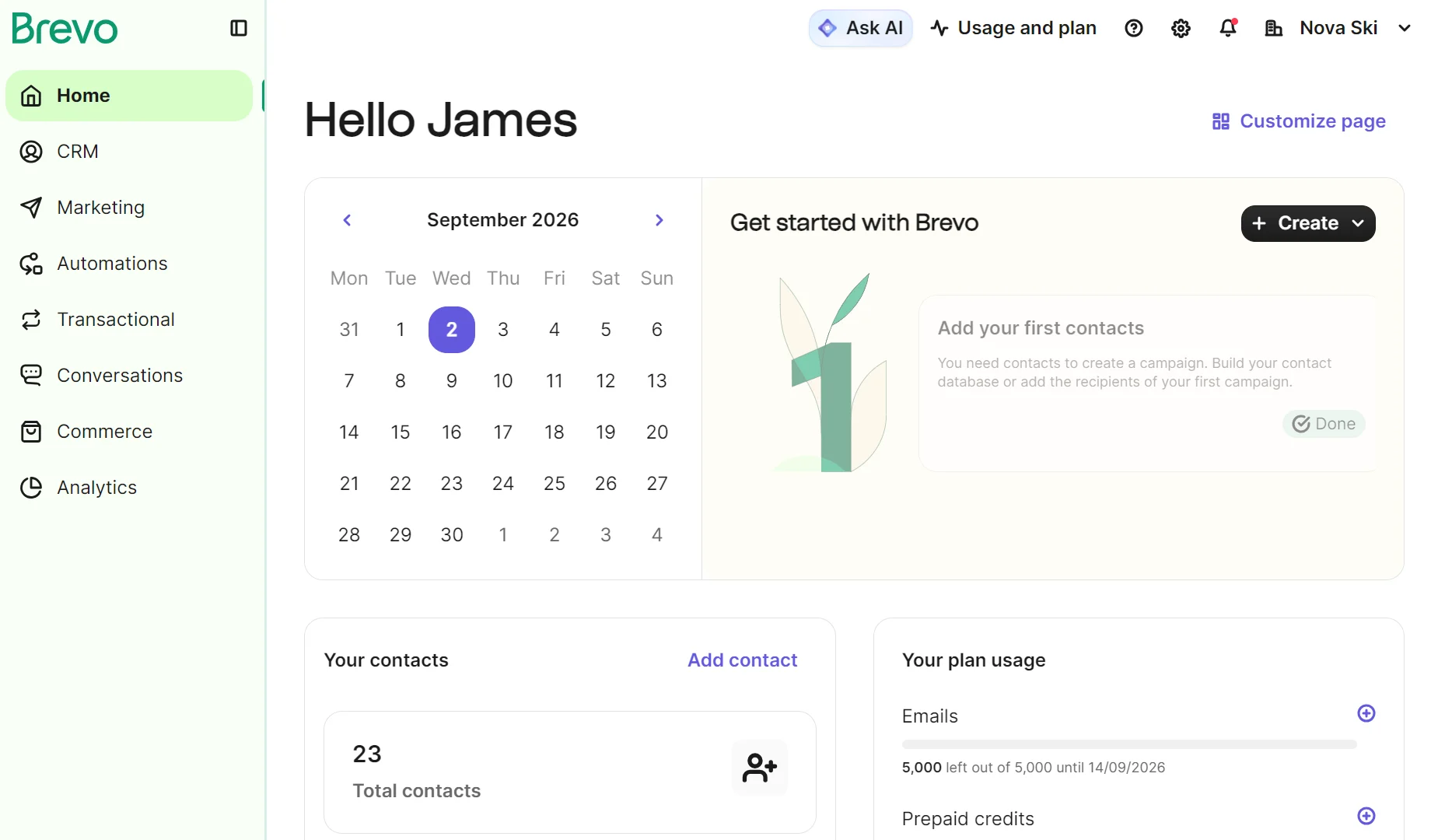
Something we noticed during testing is that Brevo’s pages load faster. We loaded them in the same web browser with the same internet connection. That’s not to say Constant Contact is a slouch, though. It’s perfectly quick enough for daily tasks.
Which platform offers better email automation, Brevo or Constant Contact?
Brevo has better ecommerce automation, with flows that support multiple entry points. Constant Contact is suited to autoresponders and basic email sequences.
Constant Contact covers common email sequences with 14 pre-built automation templates, including a welcome email, welcome series, anniversary email, and messaging new list members.
It also has ecommerce email automations for Shopify, WooCommerce, and Wix. These include a win-back series, a review request, a thank-you series, and three abandoned cart flows based on location, value, and a standard path (someone abandoned their cart).
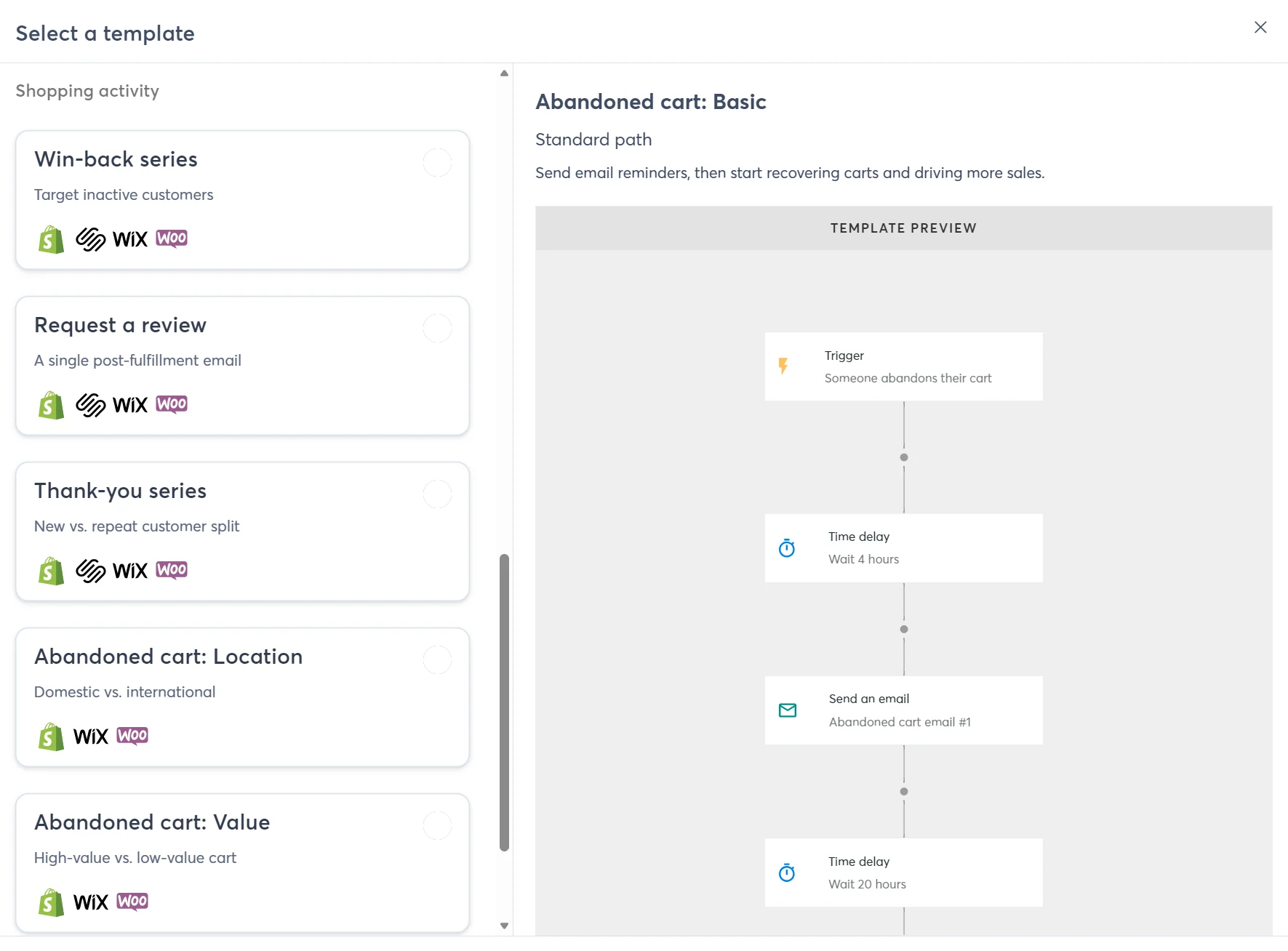
The template builder has a path builder menu with rules, send actions, contact actions, and shopping actions. It’s drag-and-drop, with the canvas providing a clean view of the automation.
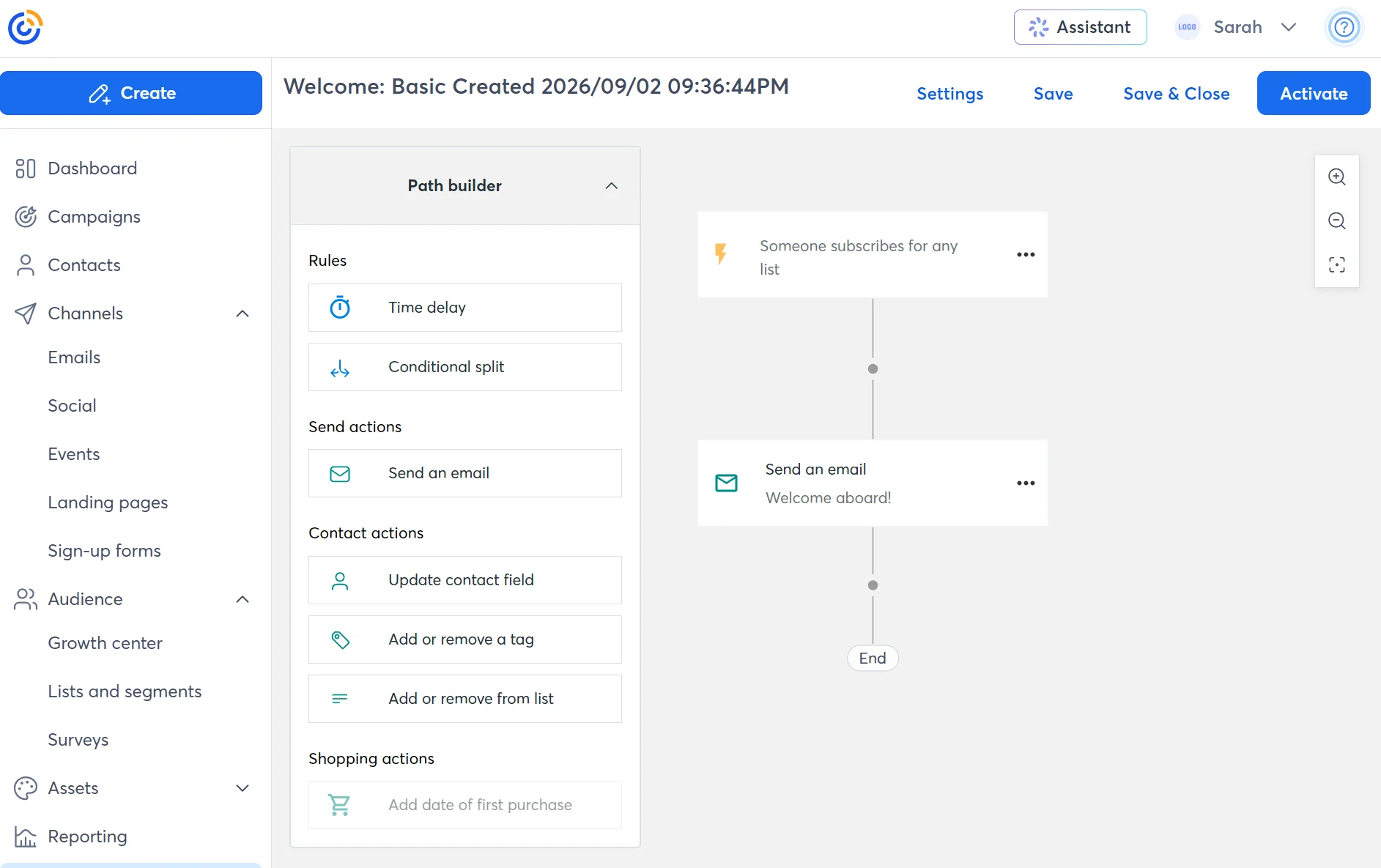
Basic triggers include added to segment, submits a form, new order placed, and abandons their cart, among others. These cover most ecommerce scenarios.
One limitation we found: the Automation Path Builder takes one trigger per path, whereas Brevo supports multiple entry points. That makes Brevo the better option when the same message should reach people who qualify in different ways.
Brevo offers 19 pre-built automation templates, including welcome, abandoned cart, abandoned checkout, order placed, and transactional activity. Note that transactional activity is unique to Brevo; Constant Contact doesn’t support it.
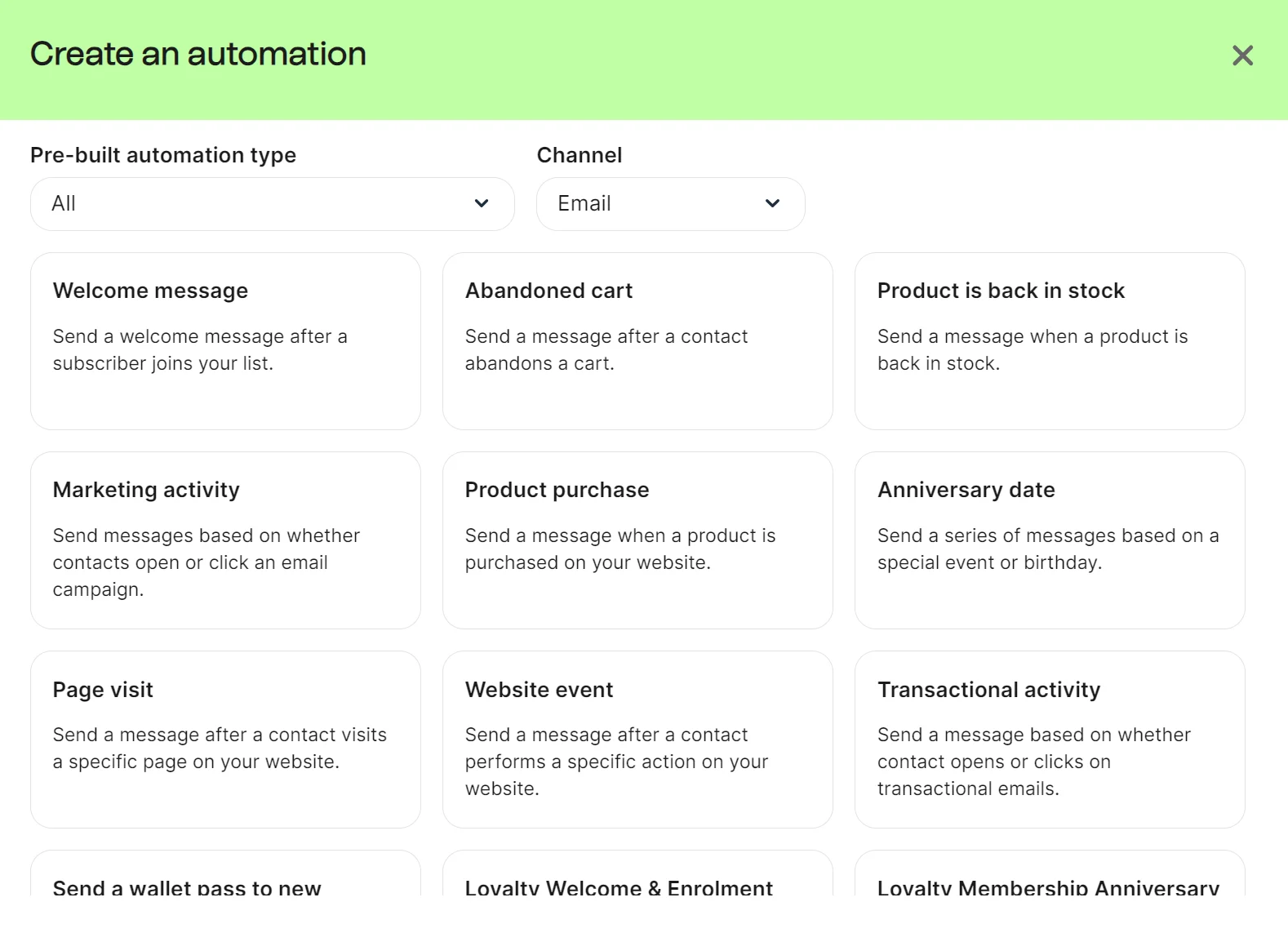
The automation builder in Brevo has a three-step guided setup that walks you through setting a trigger, time delay, and customizing the email template. It then provides access to 25+ triggers, compared to Constant Contact’s 15 in standard templates.
Brevo vs. Constant Contact CRM and segmentation
Only Brevo has a sales CRM with pipelines and deals. Constant Contact focuses on audience management features instead.
If it’s a CRM you need, then it’s Brevo for you. But for general email marketing, such as contact activity tracking and segmentation, there’s little to choose between them.
Brevo’s CRM is available in all plans as part of the Sales Free package. Two additional plans are available: Sales Essentials is $31/month per seat, and Sales Advanced is $65/month per seat, with unlimited open deals, stage rules, and automation capabilities.
The CRM has a contacts dashboard that lists all contacts and lets you load a list or segment to change the list view. There’s also a lists and a segments dashboard.
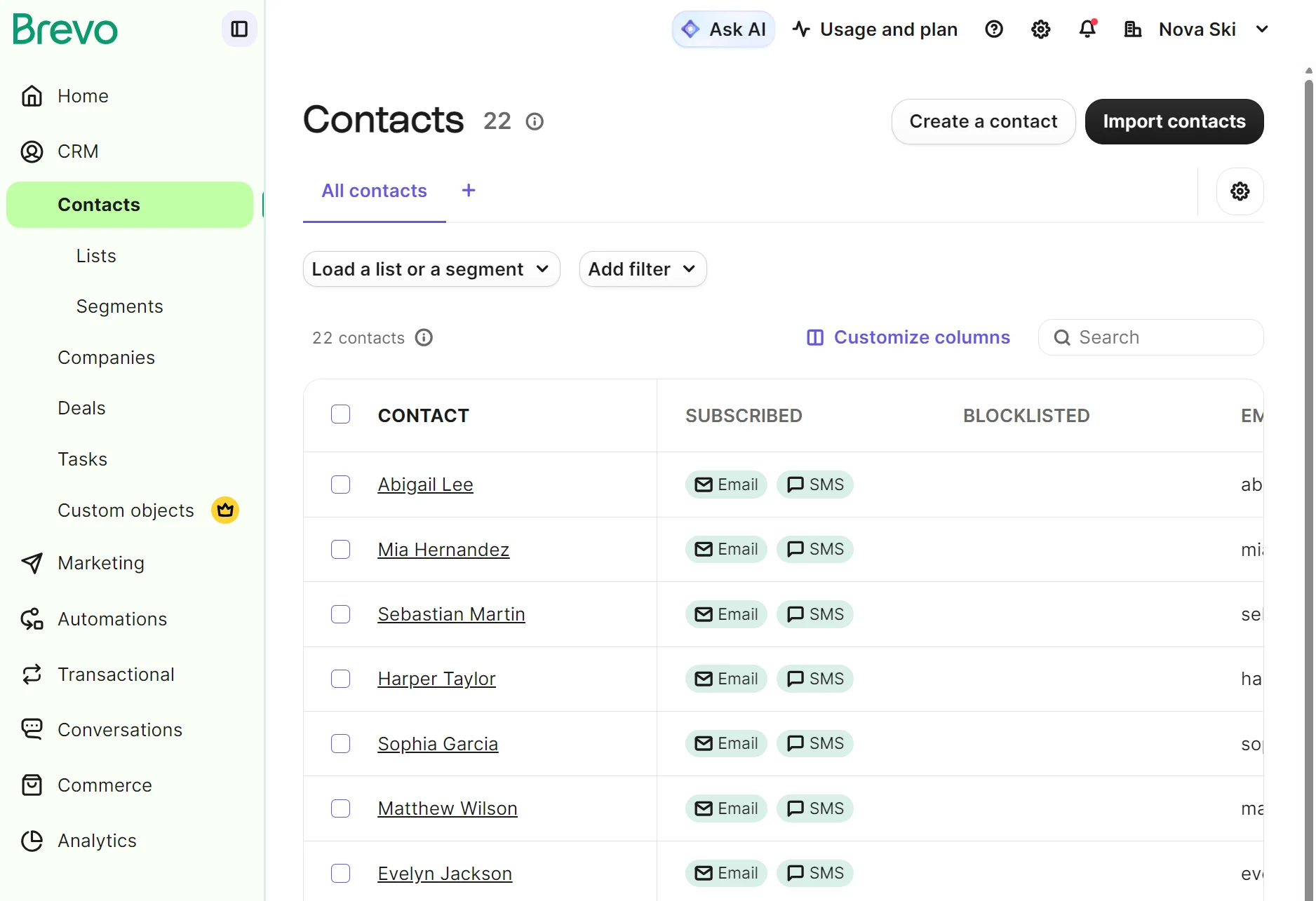
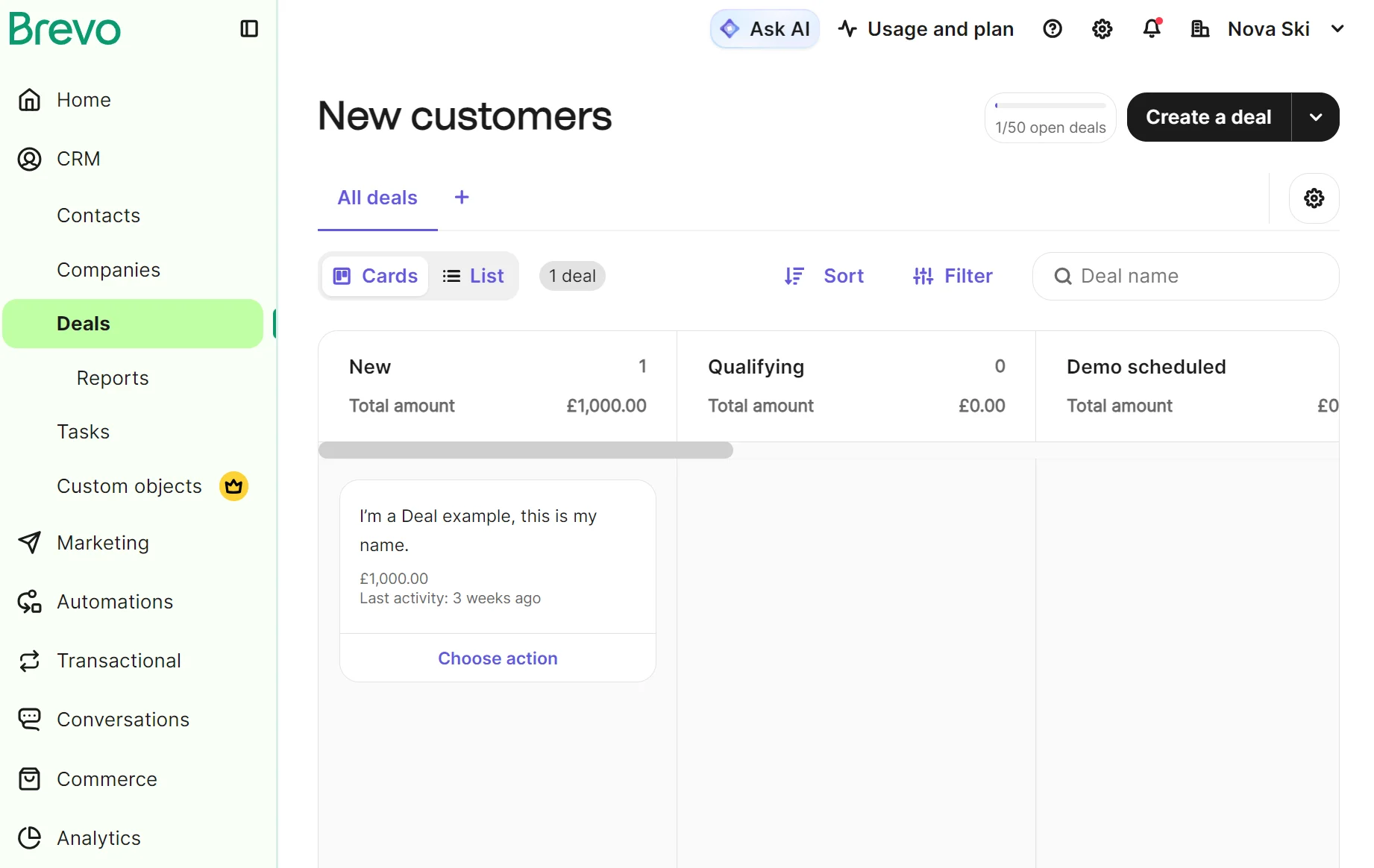
The CRM has additional dashboards for companies and deals. The deals screen is where you can track new and qualifying leads, demo schedules, negotiations, won, lost, and other deal stages, most useful if you sell services or digital products.
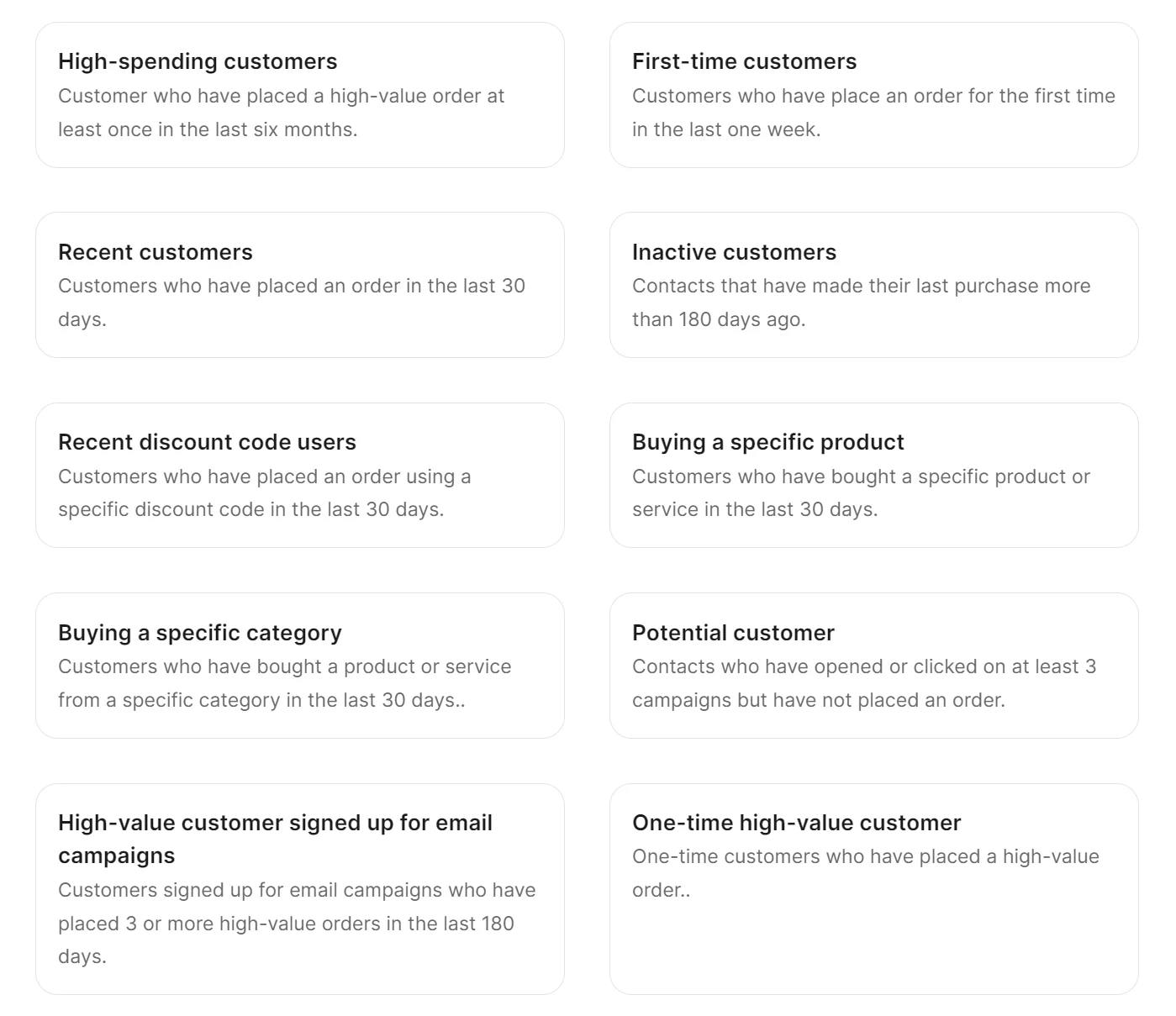
Segmenting contacts in Brevo is faster in most cases thanks to its pre-built templates for email and SMS marketing, ecommerce, demographics, and sales. We counted 22 during testing, including 11 for ecommerce.
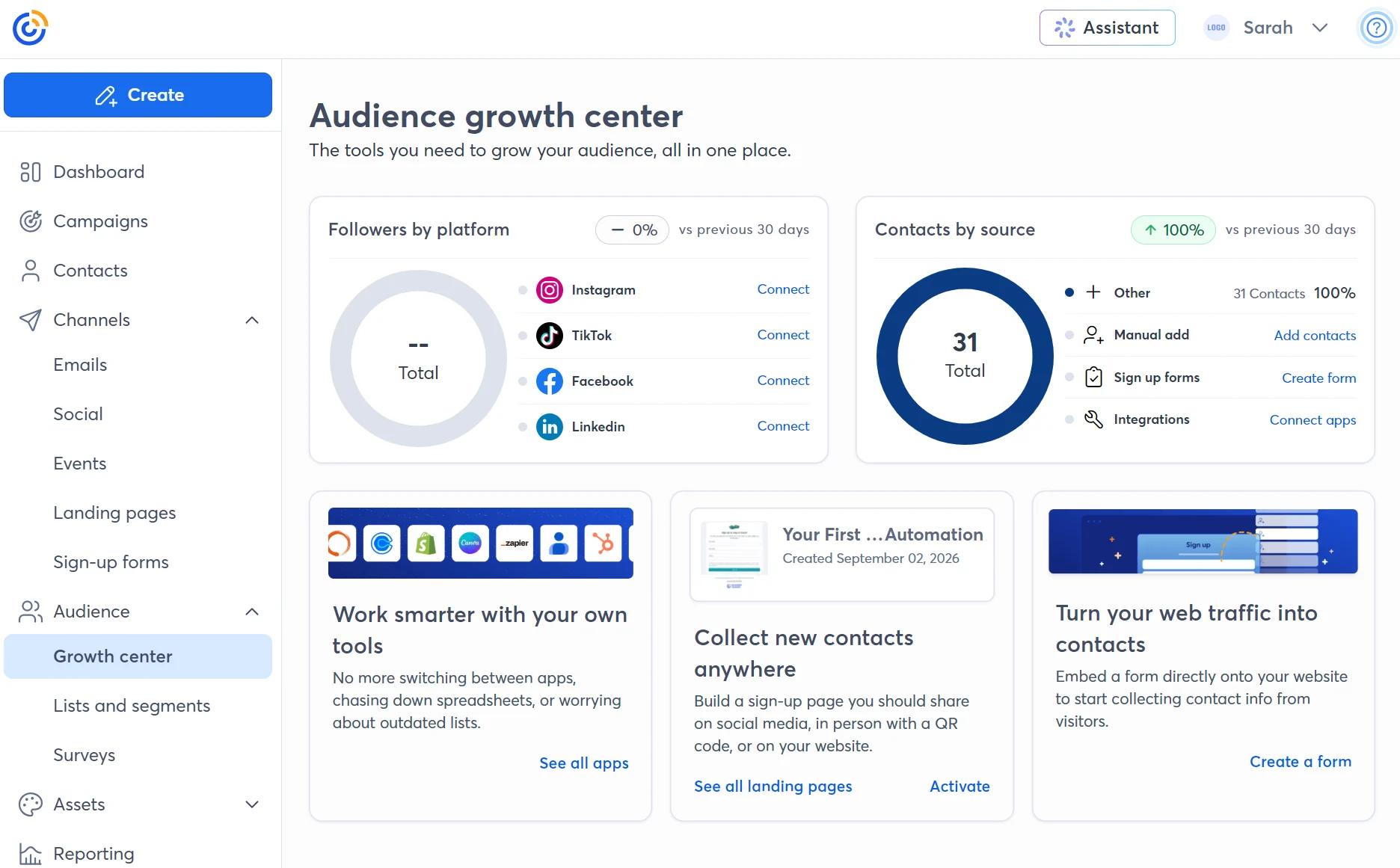
Constant Contact’s audience features include a growth center with followers by platform and contacts by source. There’s also a contacts dashboard, which lists subscribers, lets you search them, and provides links to their contact profiles.
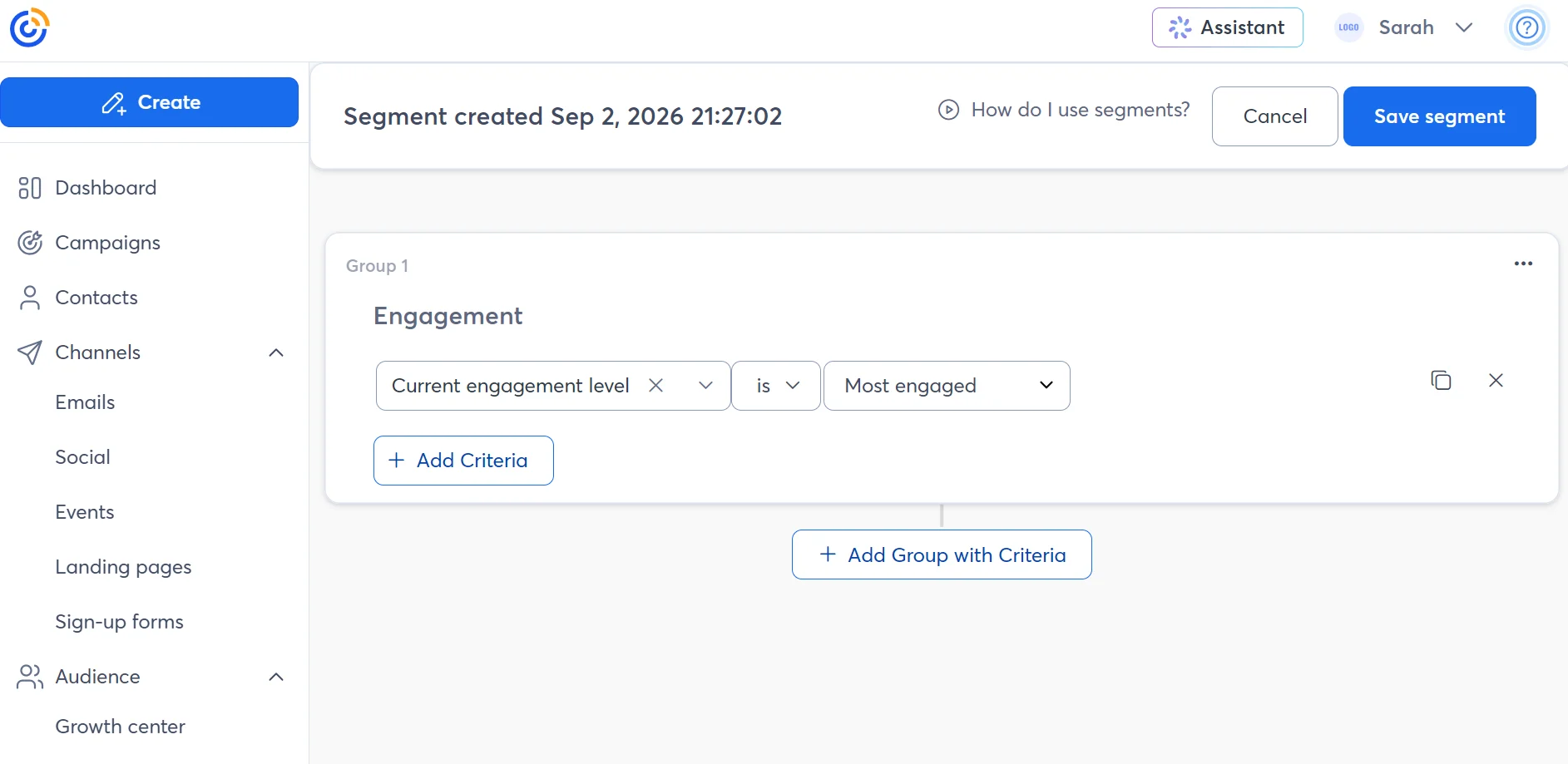
Building a segment in Constant Contact requires adding lists and tags inside the Segments Builder, or you can use three predefined engagement segments (Most, Somewhat, Least engaged) in the send screen of the campaign builder. There are no pre-built segment templates.
Constant Contact doesn’t have a CRM, so you’ll need a second tool for that. It integrates with Salesforce and Zoho, among others.
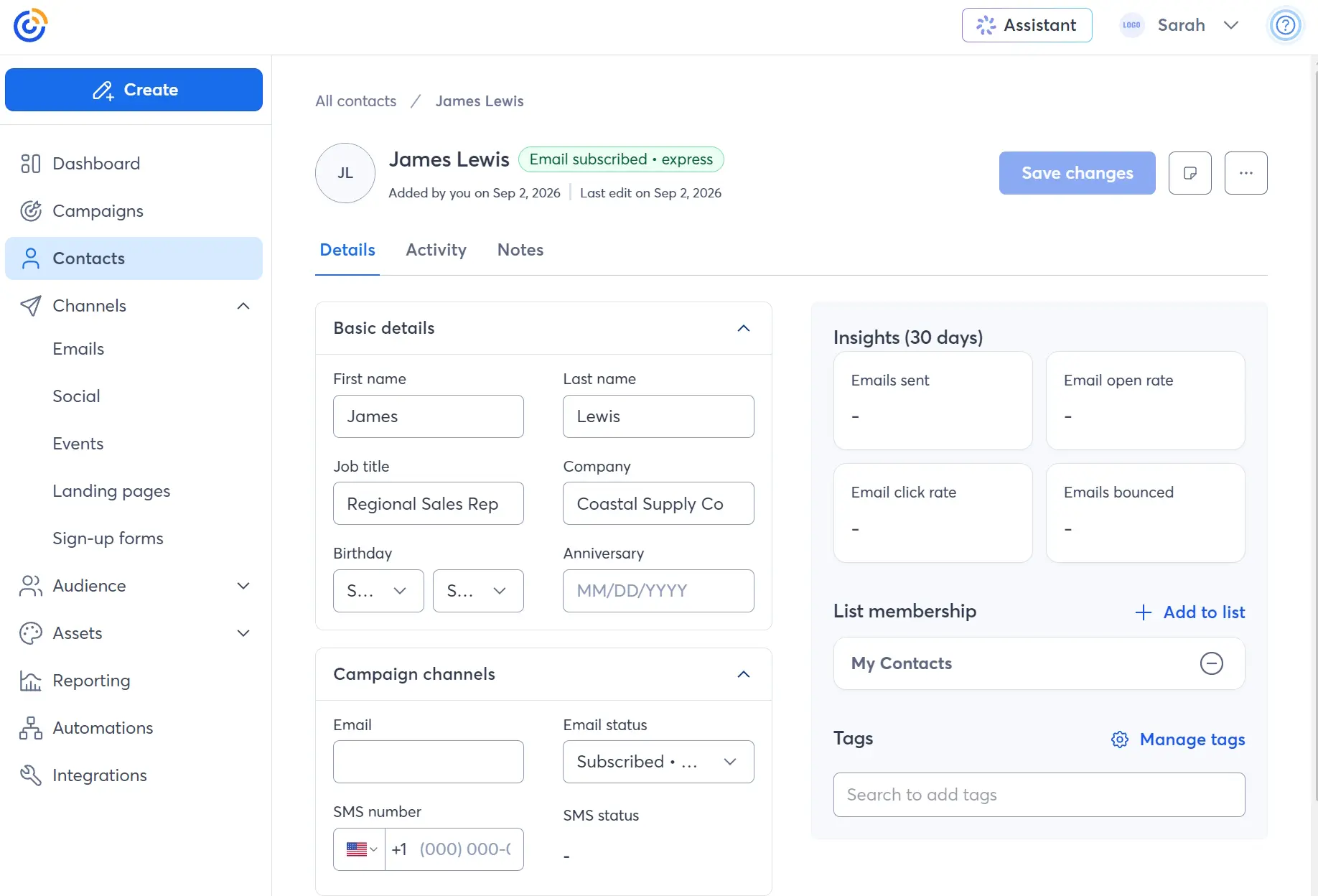
The contact profiles in Constant Contact include 30-day insights such as emails sent, open rate, click rate, and emails bounced, plus all contact information.
Contact management features in Constant Contact are highly suited to marketing, but not sales, whereas Brevo’s are suited to both.
Brevo vs. Constant Contact: which offers better SMS marketing?
Brevo has better SMS spanning marketing and transactional messages. Both support SMS campaigns and multichannel automations.
Constant Contact’s SMS marketing tools are available to U.S. customers (excluding Puerto Rico and the U.S. Virgin Islands) and Australian customers. It doesn’t support MMS. Brevo supports SMS to 180+ countries, and MMS is only available in the United States.
Brevo is the only tool that supports transactional SMS, so if you want to send automated confirmations and alerts by text, it’s your best pick.
Standalone campaigns in Constant Contact and Brevo support immediate and scheduled sends to segments and lists. SMS automations can combine email and SMS for multichannel reach in welcome sequences and other flows.
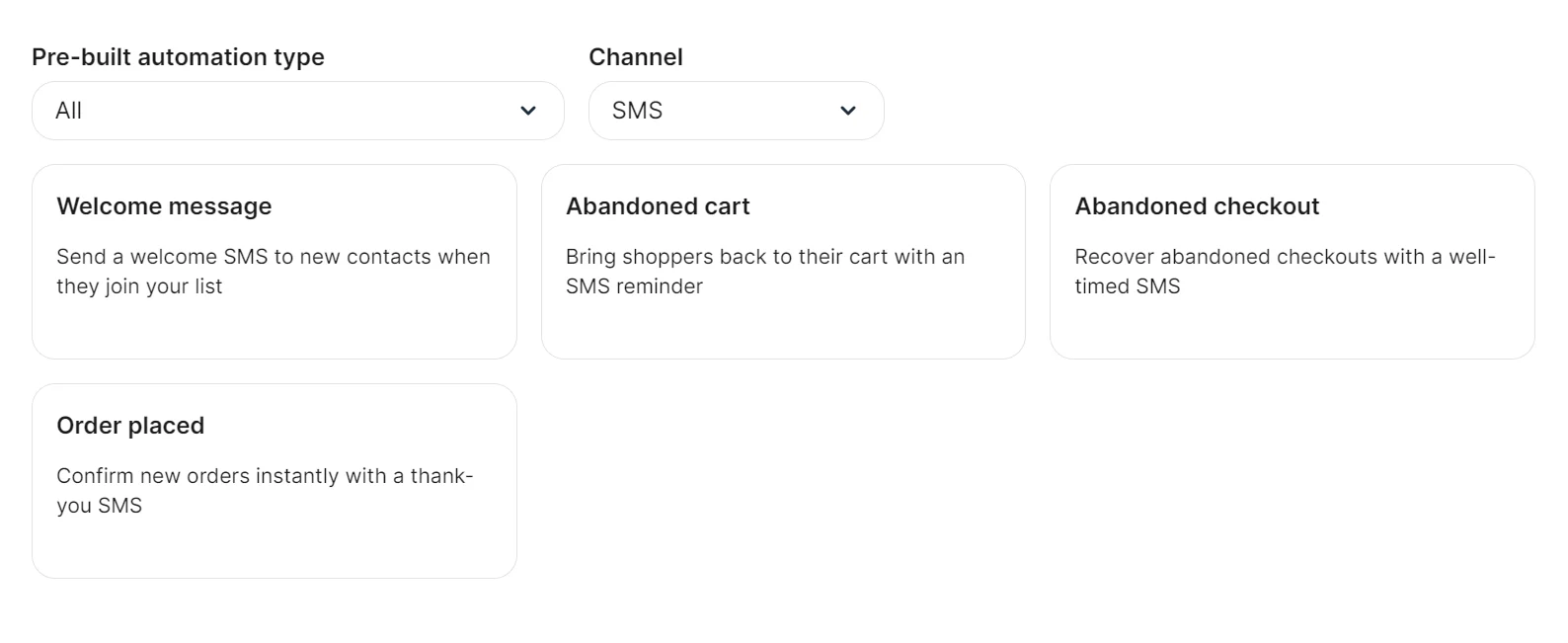
We appreciated Brevo’s four pre-built dedicated SMS automations for a welcome message, abandoned cart, abandoned checkout, and order placed.
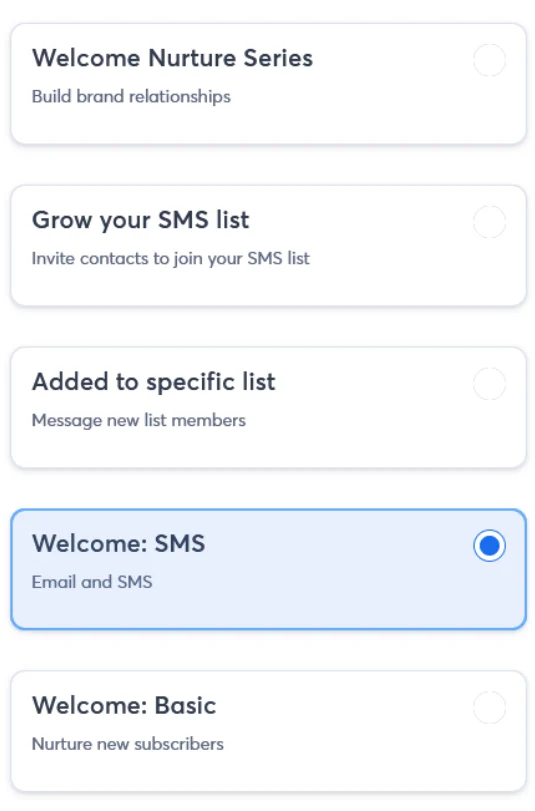
Constant Contact also has pre-built automation templates for SMS. The welcome template combines an email and an SMS, and there’s a handy “Grow your SMS list” template, which sends an email to customers opted into marketing.
Learn more about email and SMS marketing
SMS marketing vs. email marketing: why the best ecommerce brands use both
Brevo vs. Constant Contact transactional emails
Brevo is the only tool that handles transactional emails; Constant Contact can only send marketing emails, such as newsletters.
Constant Contact is purely a marketing email tool without transactional capabilities, so it requires an additional transactional provider.
All Brevo plans support transactional emails, with a claimed 99% delivery rate with the transactional Application Programming Interface (API). A Simple Mail Transfer Protocol (SMTP) relay is also available.
Order confirmations and other transactional messages count toward your monthly email volume; that’s worth considering if you have a high-volume store and plan to send customers purchase-based notifications with Brevo.
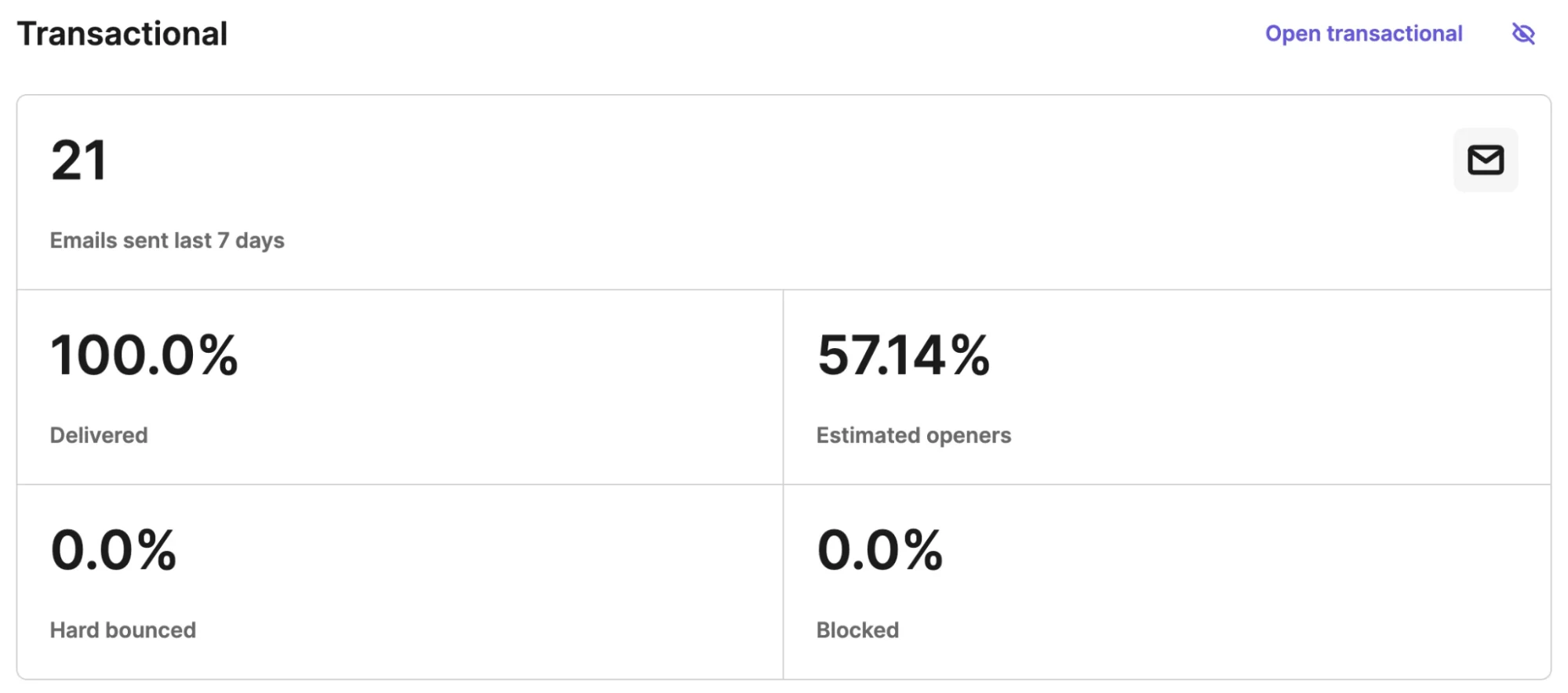
The transactional dashboard shows email deliveries, opens, clicks, and bounces. Brevo’s home page can also show statistics by adding the section.
Constant Contact vs. Brevo: which has better AI features?
Brevo has better AI features than Constant Contact, although both have capable AI assistants to chat with and generative AI.
Brevo’s AI is called Aura. It’s available in all plans and includes four agents, one of which (sales agent) is included in the Sales Essentials add-on.
| Agent | What it does |
|---|---|
| Marketing agent | Generates content and automations, and sets send times |
| Sales agent (requires the Sales Essentials add-on) | Creates sales sequences, updates contact profiles, and drafts emails |
| Data management agent | Answers plain-language data questions |
| Conversations agent | Summarizes live chats, edits replies for tone |
The AI automation builder is particularly helpful for a head start with triggers and actions. There’s also an AI campaign generator, which builds complete email templates. The design it created for a 30% flash sale promo was professional.
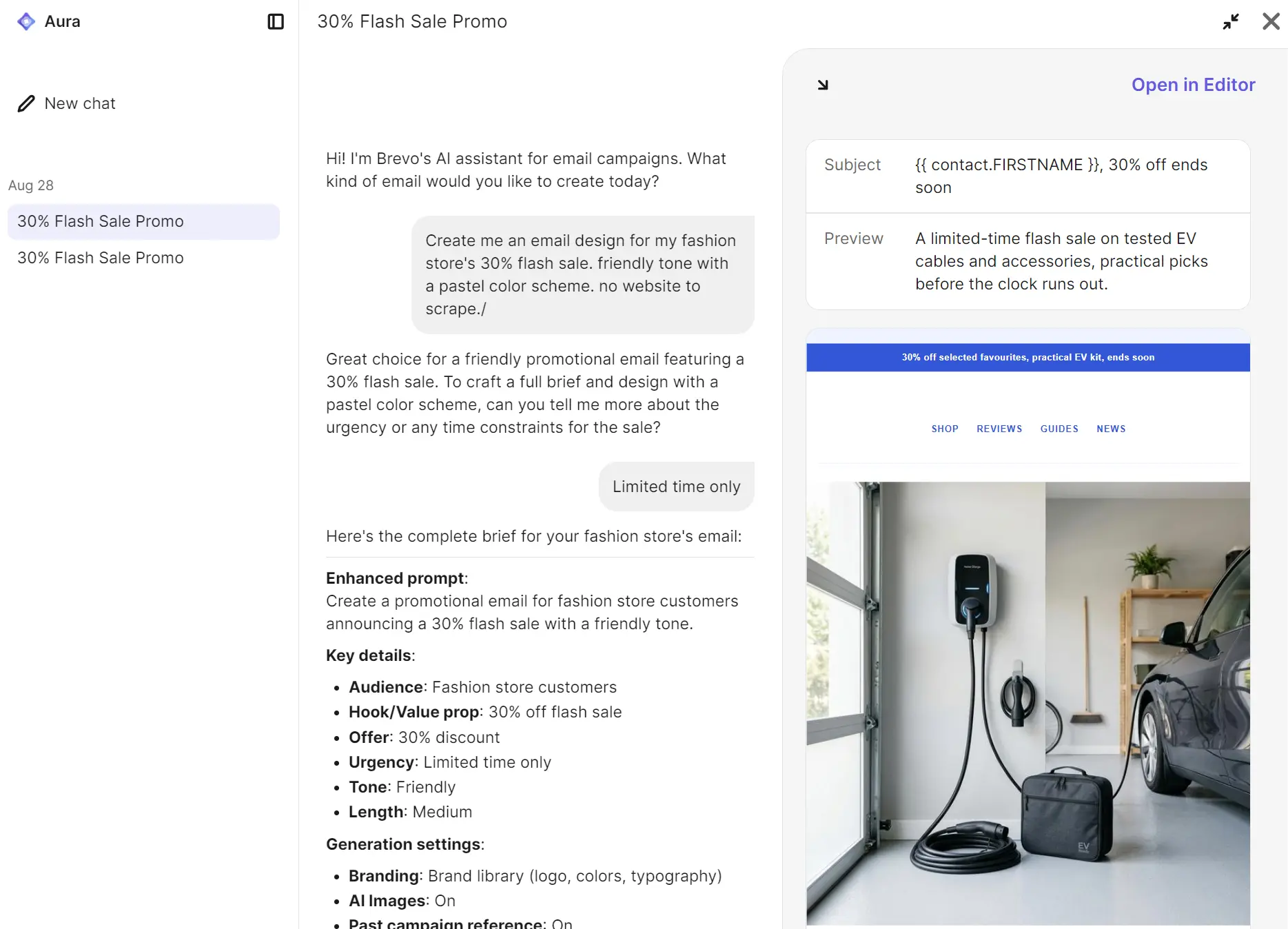
Chatting with the Aura AI assistant proved to be the fastest way to get information and step-by-step instructions. It can’t build automations or segments inside a chat; these require using the built-in tools for those features.
Constant Contact’s AI assistant (in beta) can build campaign emails inside chats and generate additional ideas on request, but it can’t create automations or segments.
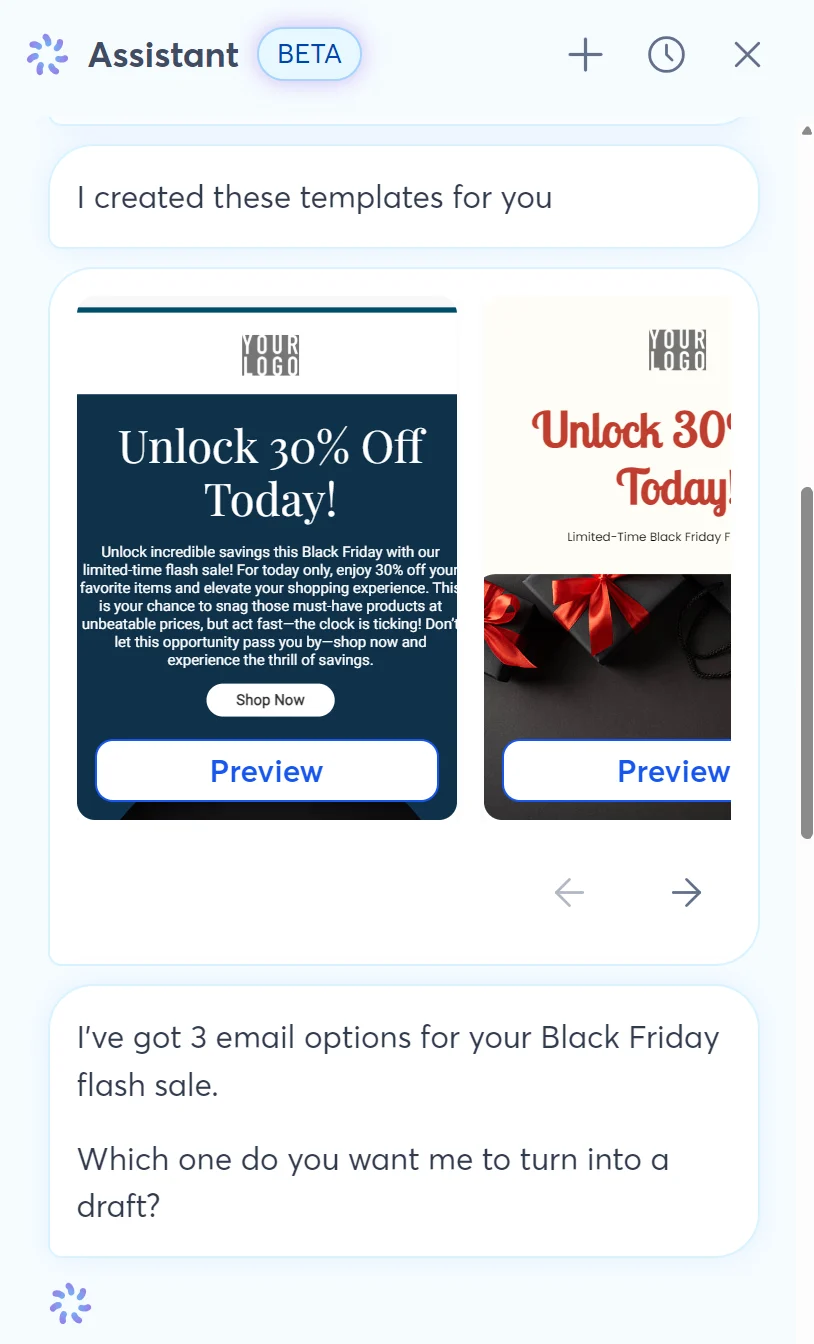
There’s also an AI content generator for emails, social posts, and landing pages, and writing recommendations. Brevo matches this with a content generator of its own.
Overall, Constant Contact’s AI features lean toward generation, whereas Brevo’s are more collaborative and broader across automations, sales, conversations, and data, due to its agents.
Brevo vs. Constant Contact analytics and reporting
Constant Contact has better campaign analytics with a cohesive location for reports spread across emails, revenue, and contacts. Brevo spreads reports across different menus and doesn’t have pre-built reports below Professional.
Constant Contact’s reporting features include pre-built email, contact, and revenue dashboards with performance overviews. There’s also a Report Builder for creating custom and filtered reports from scratch.
Lite plans have basic reach and engagement reporting such as clicks and opens. Standard plans add drill-down reporting for seeing what links are clicked and who’s engaging. The Premium plan has email engagement heatmaps.
We like the email marketing dashboard’s funnel element, which shows percentages for sent, delivered, opened, and clicked.
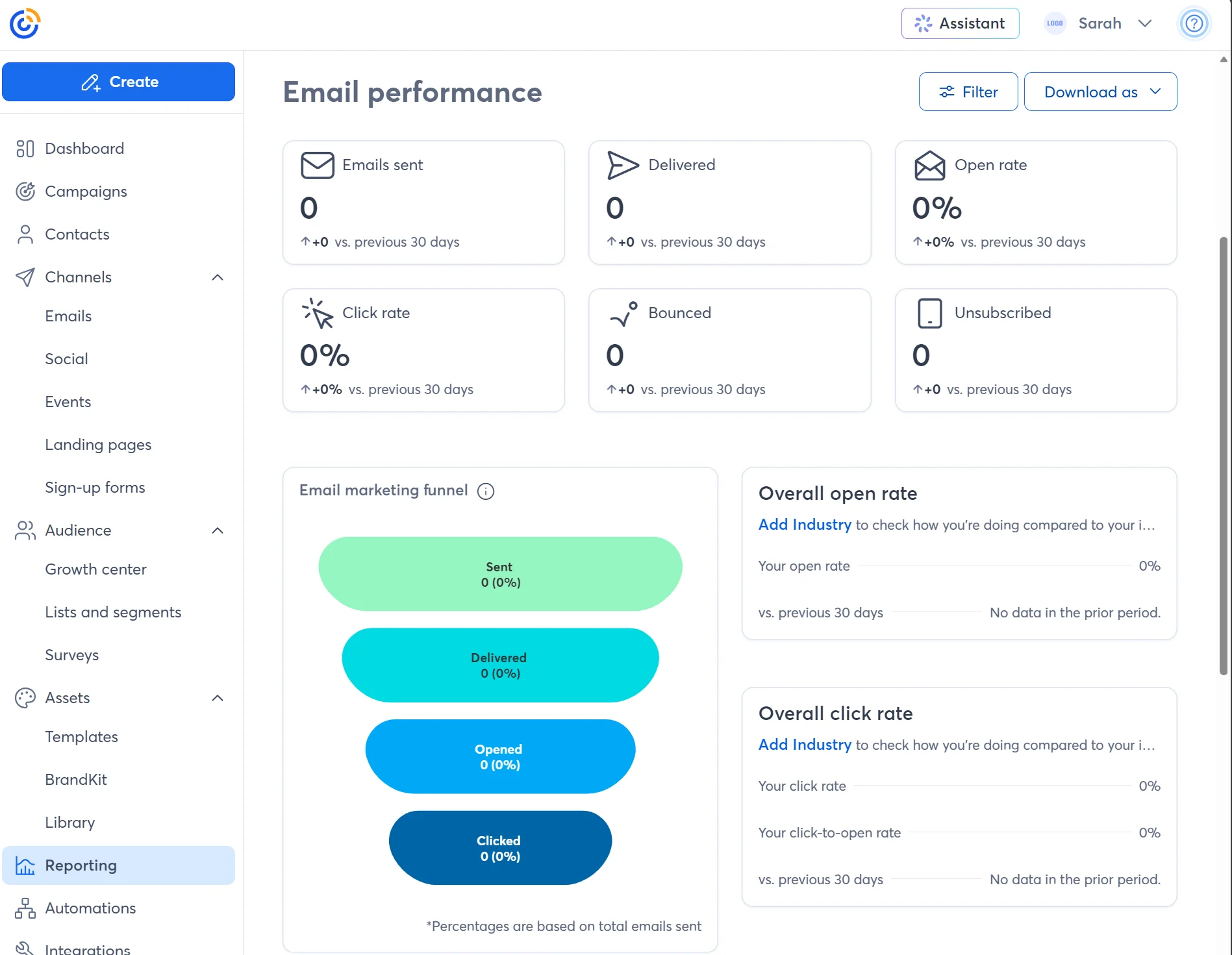
The reporting depth in Brevo depends on your plan tier. All plans have statistics pages under marketing and transactional for sent, recipients, opens, soft and hard bounces, replies, and other basic metrics in one dashboard.
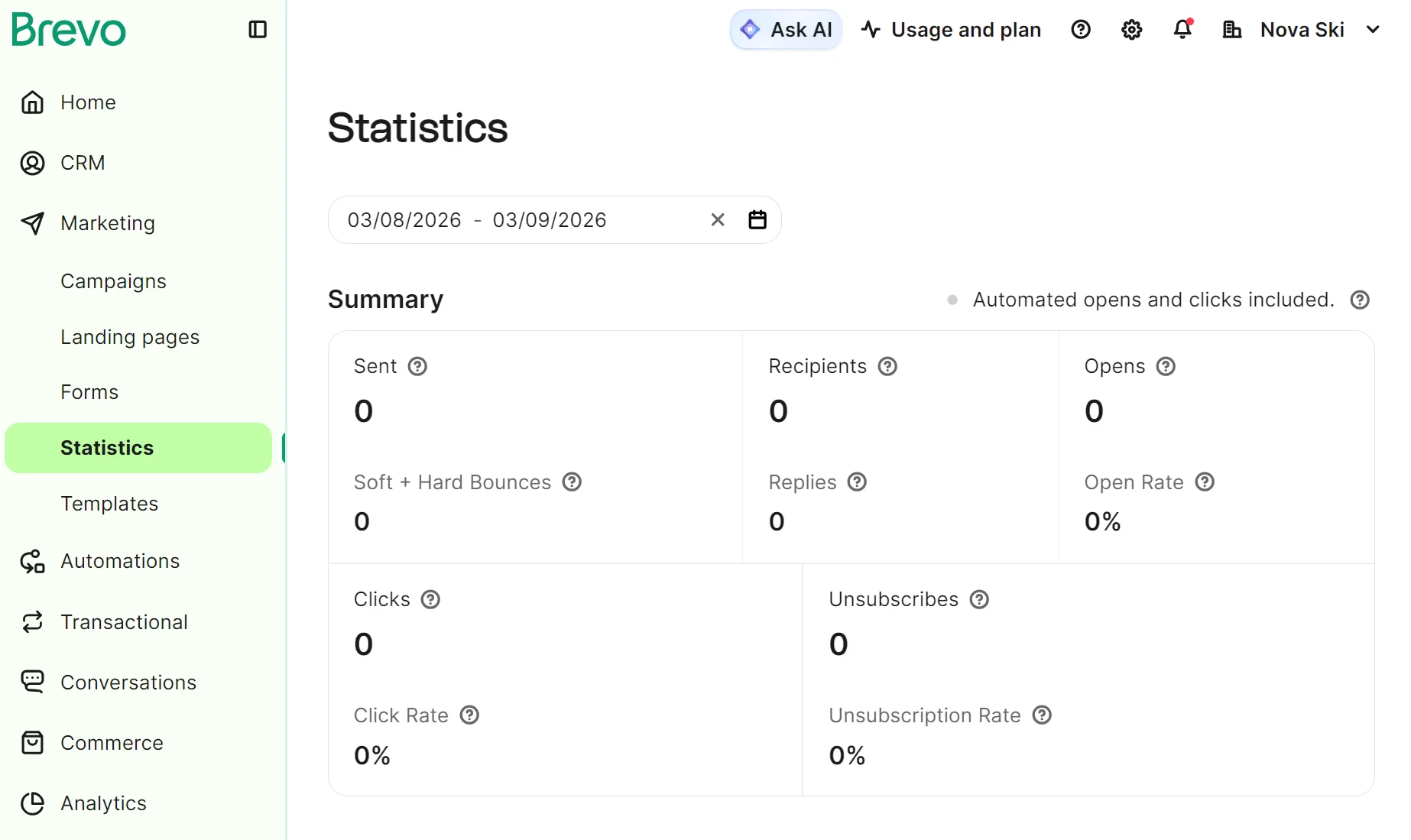
Standard plans include click heatmaps and geography and device reports. Only Brevo’s Professional plan has pre-built dashboards and custom reports, and it costs at least $499/month.
A connected ecommerce store also feeds data into an ecommerce report with revenue and retention reports, including all-time revenue and customer lifetime value (CLV).
Brevo vs. Constant Contact email templates and editor
Constant Contact has more pre-built templates, 200+ compared with Brevo’s 50+, but Brevo’s email editor suits beginners better.
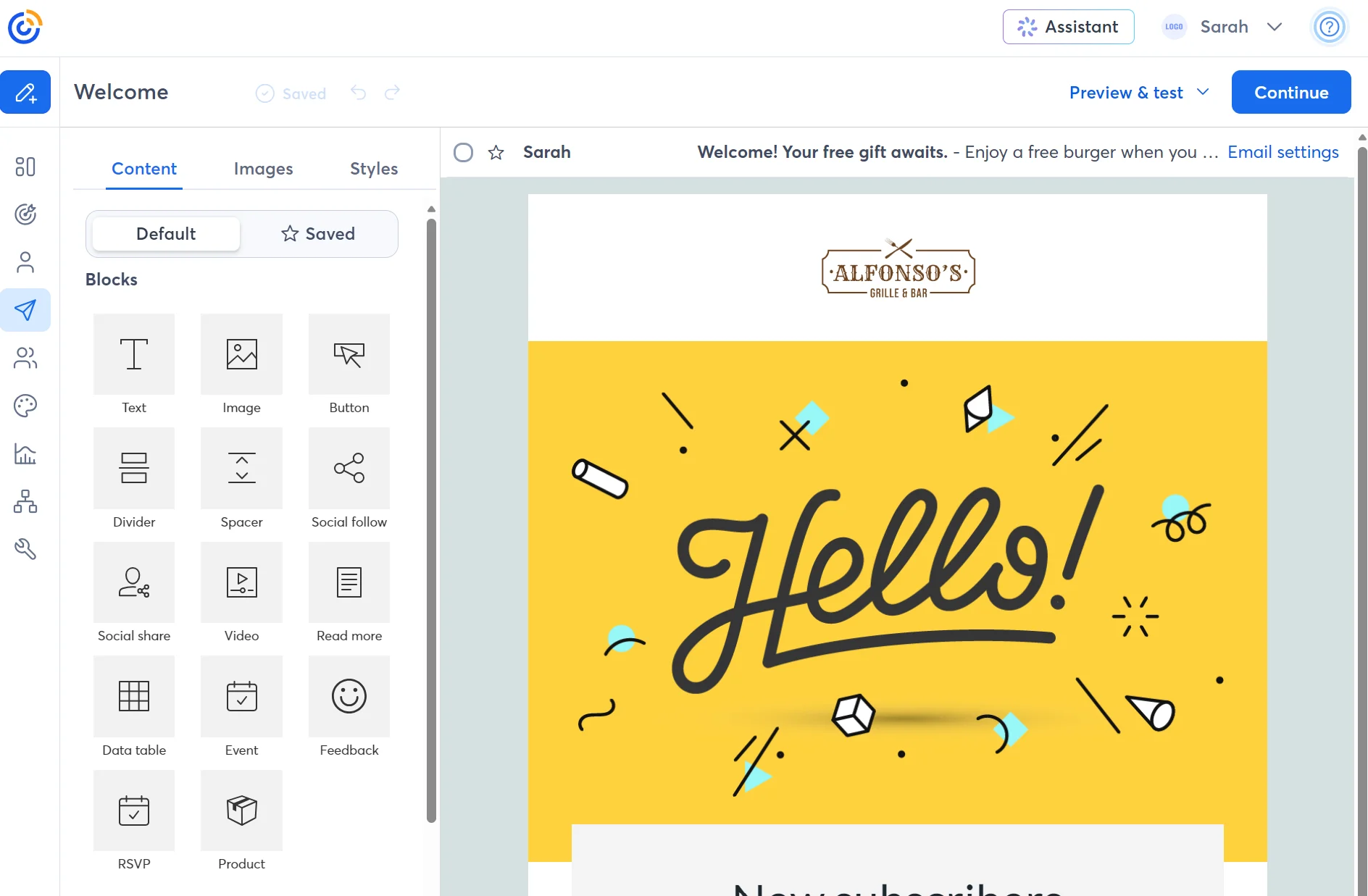
The email template library in Constant Contact includes seasonal designs, such as back-to-school and new arrivals. It also provides a search bar and options to start from blank, paste HTML code, and import from PDF.
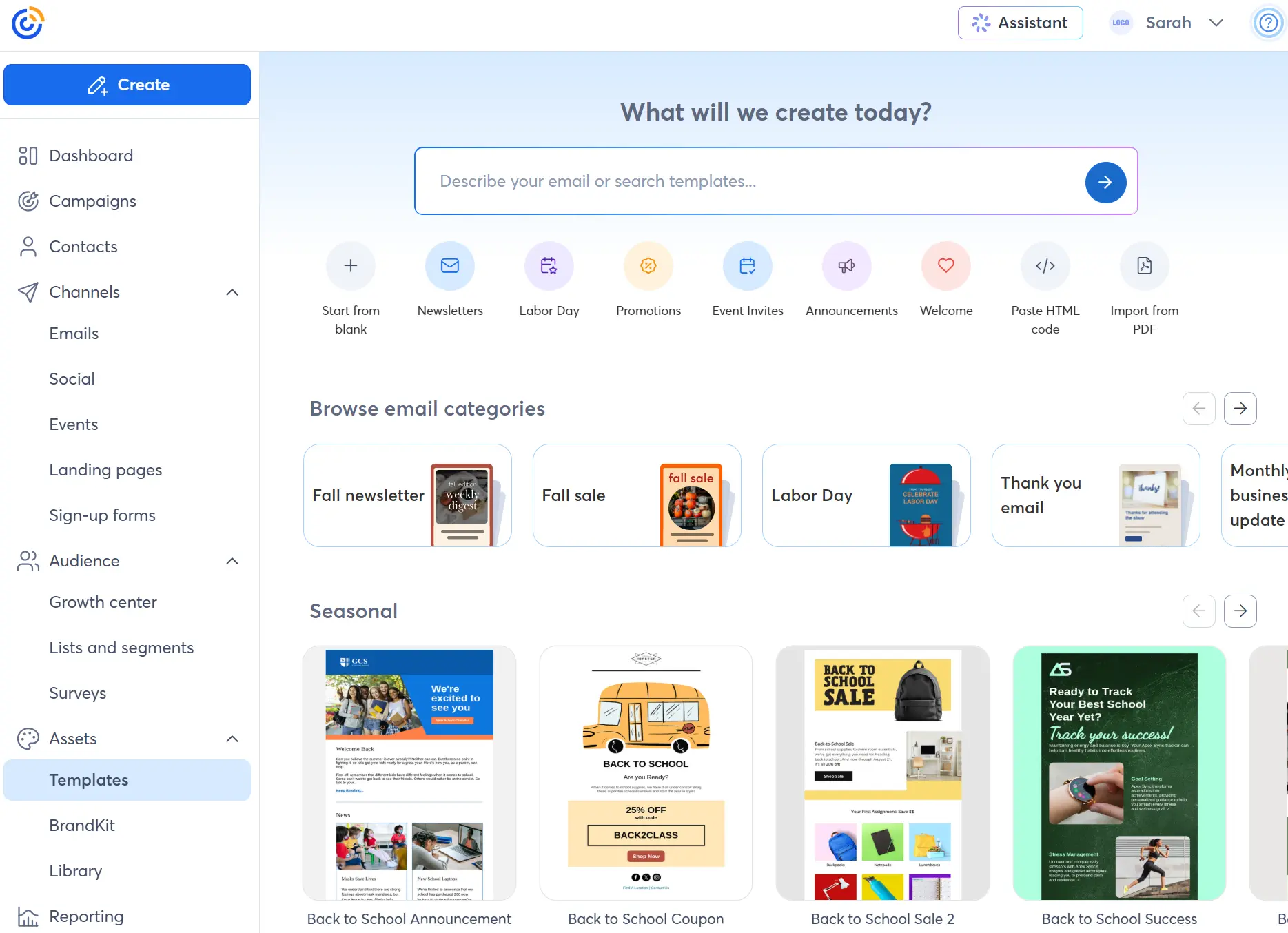
Selecting a template opens the editor. The editor has 14 blocks, including feedback, event, product, and RSVP blocks, plus 19 selectable layouts for headings and columns. We like the images tab for uploading assets or connecting to Canva inside the editor.
Brevo’s template library doesn’t organize designs by season or theme, and only provides a category dropdown to narrow down selections. There isn’t a search feature.
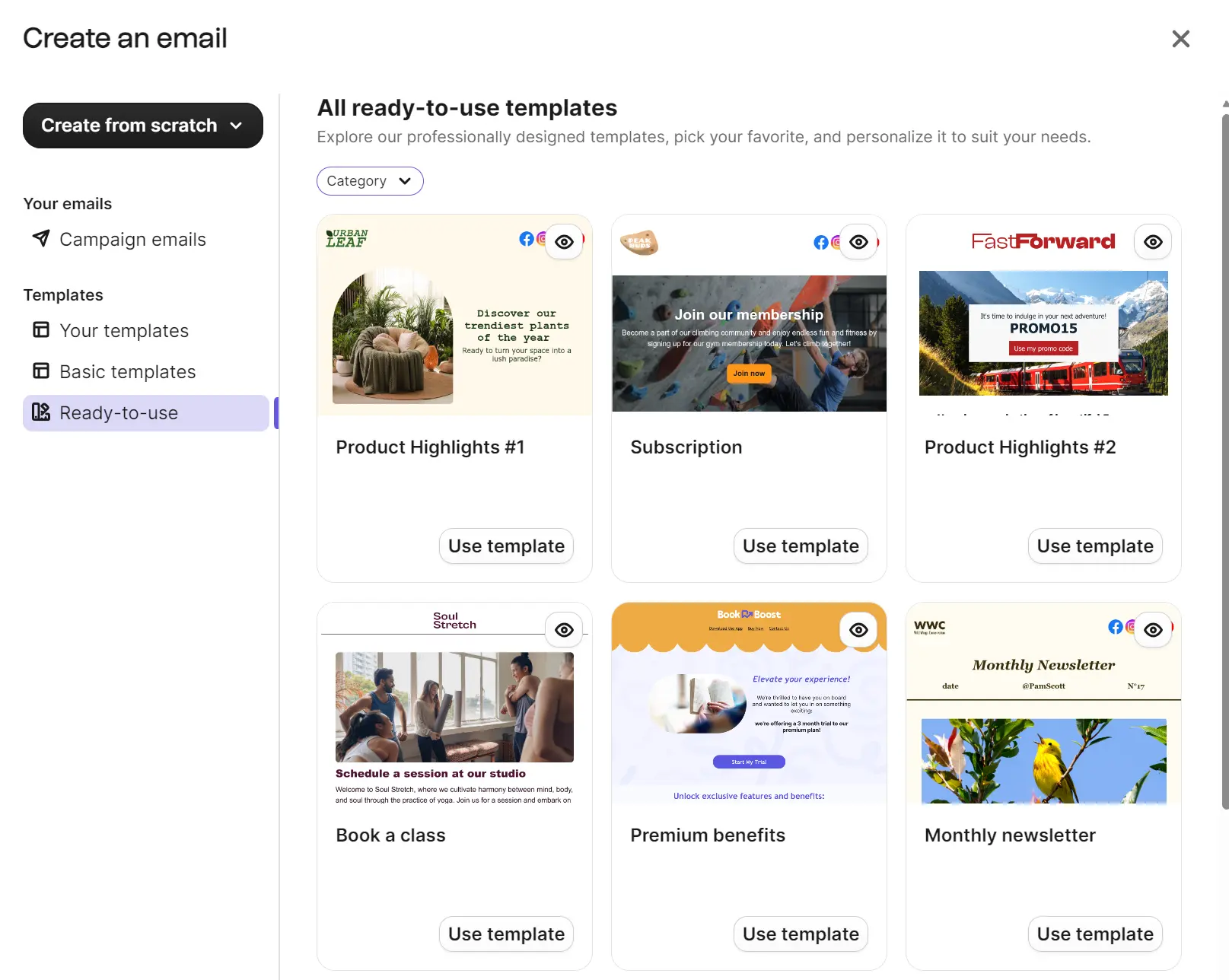
We counted 50+ templates, five of which are basic and require more design time. The quality of the ready-to-use templates is not as high as Constant Contact’s in general; they have more of a templated feel and fewer unique options.
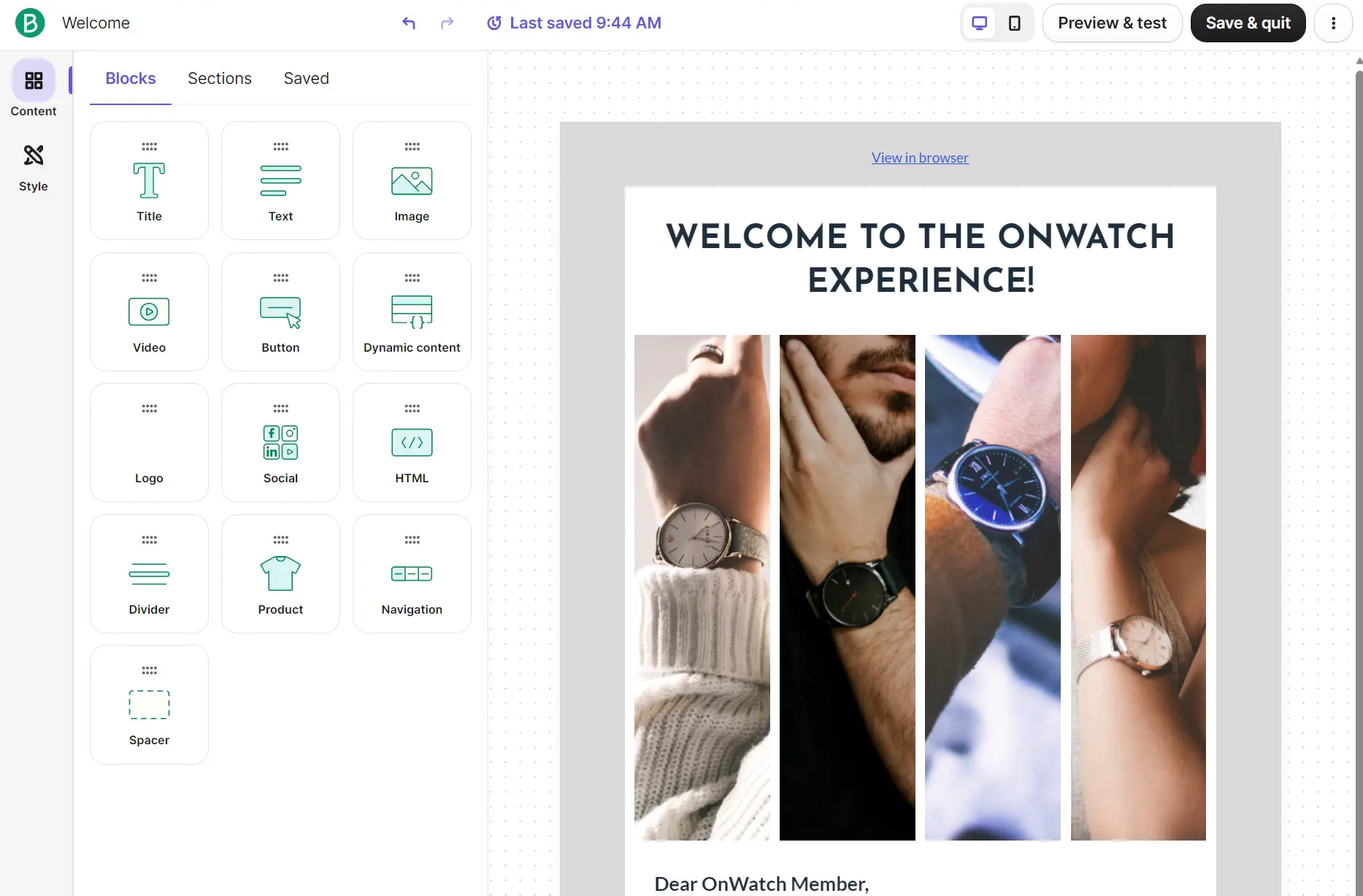
The email editor has 13 blocks. The product block, social, and dynamic content blocks are included in all plans. Sections live inside a separate tab with 25+ options.
Both provide a head start in designing emails and customizing them. Constant Contact does it with more templates. Brevo’s editor has a guided setup for configurable elements such as dynamic content.
Do Brevo or Constant Contact have better integrations?
Neither has better integrations; it depends on your stack. Constant Contact has 300+ apps and Brevo has 140+ with different coverage. Brevo’s specialty is ecommerce and CRM integrations, whereas Constant Contact has more integrations for small business tools.
Our testing found that Brevo has AI and customer data platform (CDP) categories that hold more apps than Constant Contact’s, or that Constant Contact doesn’t offer at all. But then Constant Contact has a Xero app and an eBay app to place listings in emails.
| Integration factor | Brevo | Constant Contact |
|---|---|---|
| Number of integrations | 140+ | 300+ |
| Ecommerce | Shopify, WooCommerce, BigCommerce, PrestaShop | Shopify, WooCommerce, BigCommerce, Wix |
| Accounting | QuickBooks | Xero |
| CDP/CRM | HubSpot, Pipedrive, Zoho | HubSpot, Microsoft Dynamics 365 Sales |
| Analytics | Google Analytics, Datadog, Snowflake | Glances |
| Helpdesk | Gorgias, Intercom, Instagram | Not available |
| Social media | Facebook Messenger | Facebook, Instagram, TikTok |
| Marketing/ads | Facebook Lead Ads, Google Ads | Facebook Lead Ads, Google Ads, TikTok Ads |
| API | Available | Available |
Accurate as of September 2026.
Brevo vs. Constant Contact: which offers better customer support?
Constant Contact has more support channels than Brevo, including live chat, which Brevo doesn’t have in any plan.
We tested Constant Contact’s live chat in the Charlie AI Agent, which handed us over to a live agent for an SMS billing question. The chat lasted eight minutes, and the agent emailed us a detailed follow-up two hours later.
Brevo’s email support was also responsive. We created a ticket in the backend about MMS availability and received an automated AI response within one minute. A human agent replied three hours later with a detailed response.
| Support channel | Brevo | Constant Contact |
|---|---|---|
| All plans | All plans | |
| Live chat | Not available | All plans |
| Phone | Professional | All plans |
| Help center | All plans | All plans |
| Onboarding | Professional, one hour with an expert | All plans, live 1:1 with experts |
Accurate as of September 2026.
How did other customers fare with support? A G2 reviewer for Constant Contact said that they had issues with backgrounds in pages, but that support was “so helpful and quick to respond that I’ve no doubt we’ll get it sorted out in short order.”
As for Brevo, a G2 reviewer rates support highly, saying that “the support is actually great, which is what matters most—systems generally work, but what really counts is how things are handled when they don’t.”
Brevo vs. Constant Contact: which platform should you choose?
Brevo is the pick for cost-effective large list storage. It also works best when your send volumes fluctuate, and you want to be able to scale your plan up and down. A high send-to-contact ratio and a focus on campaign and email design suit Constant Contact.
Here’s how Brevo and Constant Contact stack up based on our testing:
| Category | The better pick |
|---|---|
| Pricing and free plan | 🏆 Brevo |
| Ease of use | 🏆 Brevo |
| Automation | 🏆 Brevo |
| CRM and segmentation | 🏆 Brevo |
| Transactional emails | 🏆 Brevo |
| SMS marketing | 🏆 Brevo |
| AI features | 🏆 Brevo |
| Analytics and reporting | 🏆 Constant Contact |
| Templates and editor | 🤝 Tie: Constant Contact for templates; Brevo for editing |
| Integrations | 🤝 Tie: depends on stack |
| Customer support | 🏆 Constant Contact |
Accurate as of September 2026.
Looking for a Brevo or Constant Contact alternative?
Omnisend is an ecommerce-first Constant Contact and Brevo alternative with core email marketing features included in paid plans. The Pro plan includes unlimited monthly emails and stores 2,500 contacts for $59/month.
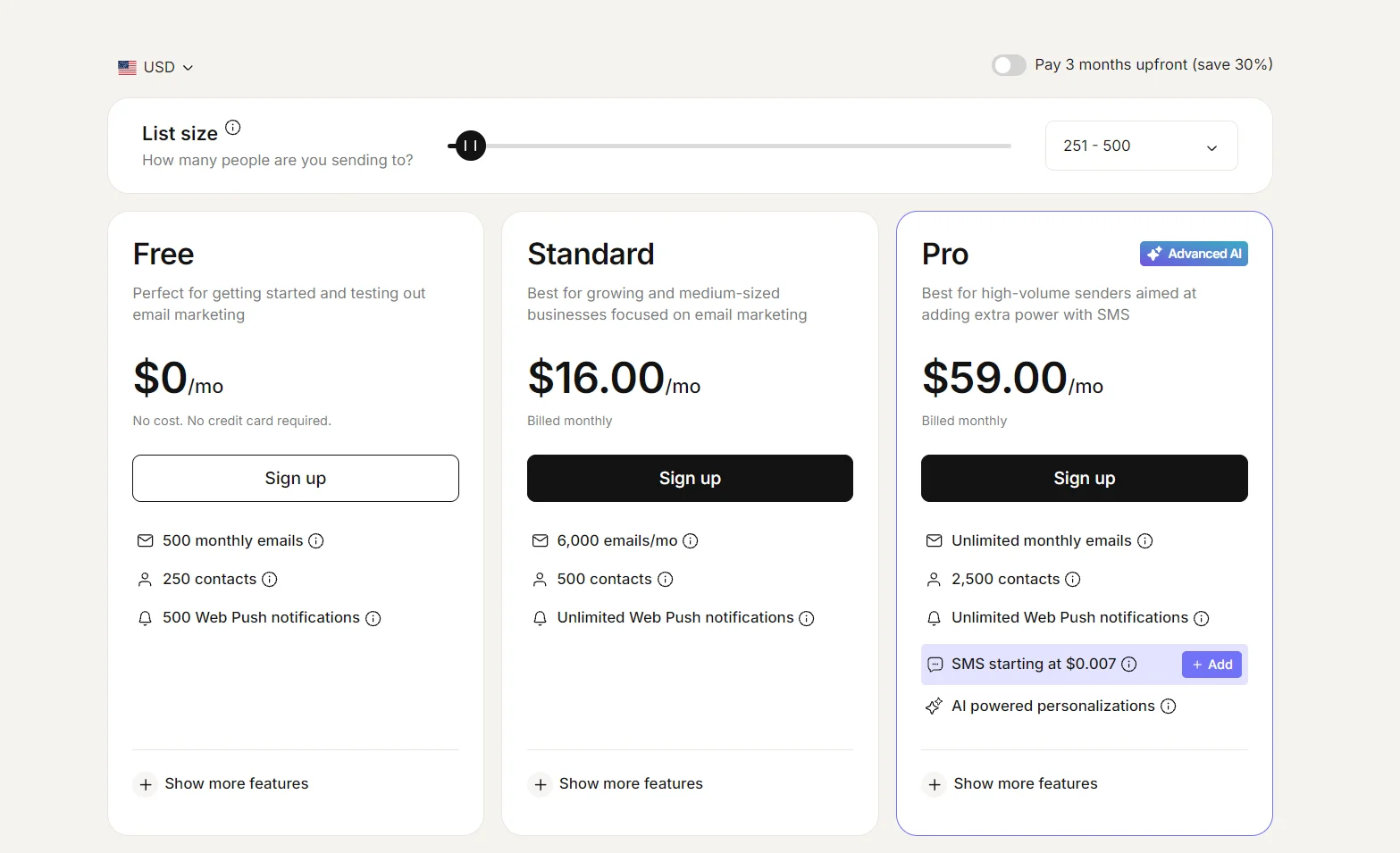
There are 28+ automation templates and 30+ segmentation templates in Omnisend, plus 250+ email templates. Omnisend is worth considering because you get more ecommerce features for your money based on plan type.
| Omnisend | Brevo | Constant Contact | |
|---|---|---|---|
| Billed on | Contacts | Email volume | Contacts |
| Starting price | $16/month | $9/month | $12/month |
| A/B testing | All plans | Standard | All plans, subject lines only |
| Coupons | All plans | Professional | All plans |
| Pop-ups | All plans | Professional | All plans |
| Landing pages | All plans | Standard | All plans |
| Customer lifecycle stage maps | All plans | Not available | Not available |
| CRM | Not available | All plans | Not available |
| AI content generator | All plans | All plans | All plans |
| AI segmentation | All plans | Professional | Not available |
| SMS | Pro | All plans | All plans |
Accurate as of September 2026.
Quick sign up | No credit card required