Omnisend AI


 OFFER
OFFER










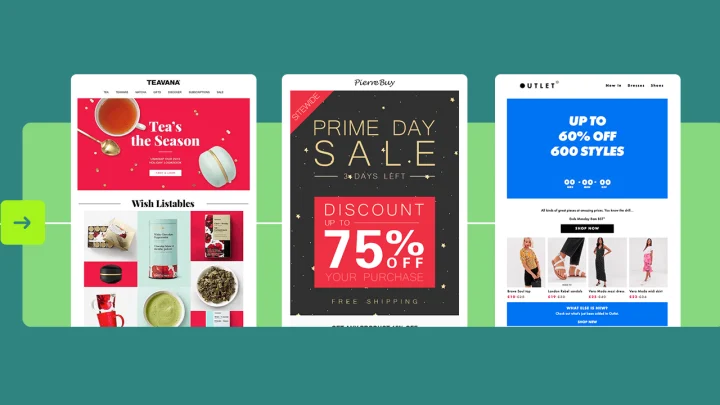
Some of the best email automation examples include welcome series, abandoned cart recovery, post-purchase follow-ups, and re-engagement campaigns. Other high-performing automations include browse abandonment flows, loyalty automations, and seasonal triggers.
These email automations drive high ecommerce revenue because they reach customers when interest already exists. For example, they can be sent right after someone signs up. They can also be sent when a shopper either completes a purchase or doesn’t make one.
According to Omnisend’s 2026 ecommerce marketing report, email automations made up only 2% of emails sent. Yet, they drove 30% of revenue. They also earned 16 times more per send than one-off email campaigns. This shows that sending the right emails can drive more revenue than sending more emails.
In this article, we’ll break down the best email automation examples and explain how they work. We’ll also share real results from top ecommerce brands, so you can start setting up your email automations and increase revenue.
Quick sign up | No credit card required
Welcome email automation examples
Welcome automations are emails sent automatically when someone signs up to your email list or creates an account on your website.
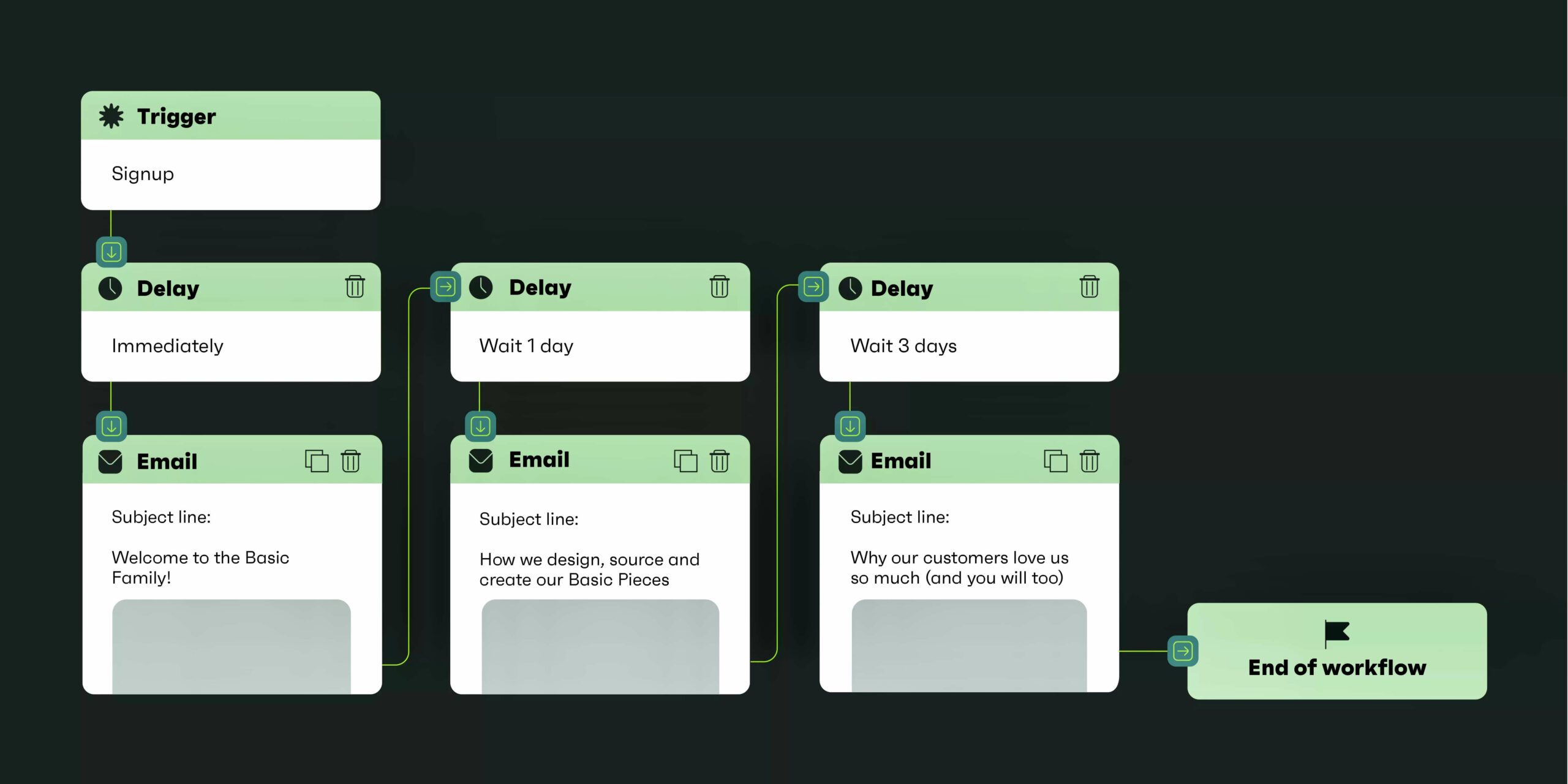
For example, after sign up, subscribers usually enter a short email sequence sent over a few days:
- Email one: Sent immediately. It welcomes the user and may include a discount
- Email two: Sent after 24 hours. It introduces the brand and shows products
- Email three: Sent after two days. It includes reviews, social proof, or a reminder offer
The goal is to move users from interest to their first purchase. Here’s an example workflow:
Timing is important. Right after signing up, interest is high. Users are more likely to open emails and make purchases.
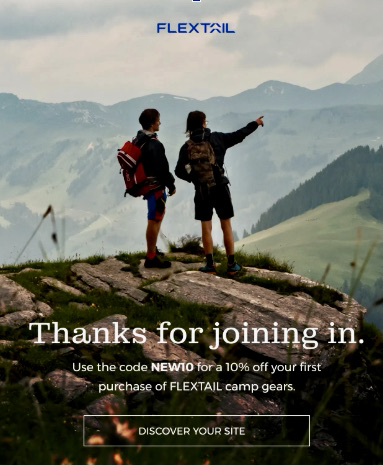
For example, Flextail generated $235K in sales from its welcome automation. It also achieved 60% open rates, $75+ revenue per order, and $0.52 per email sent.
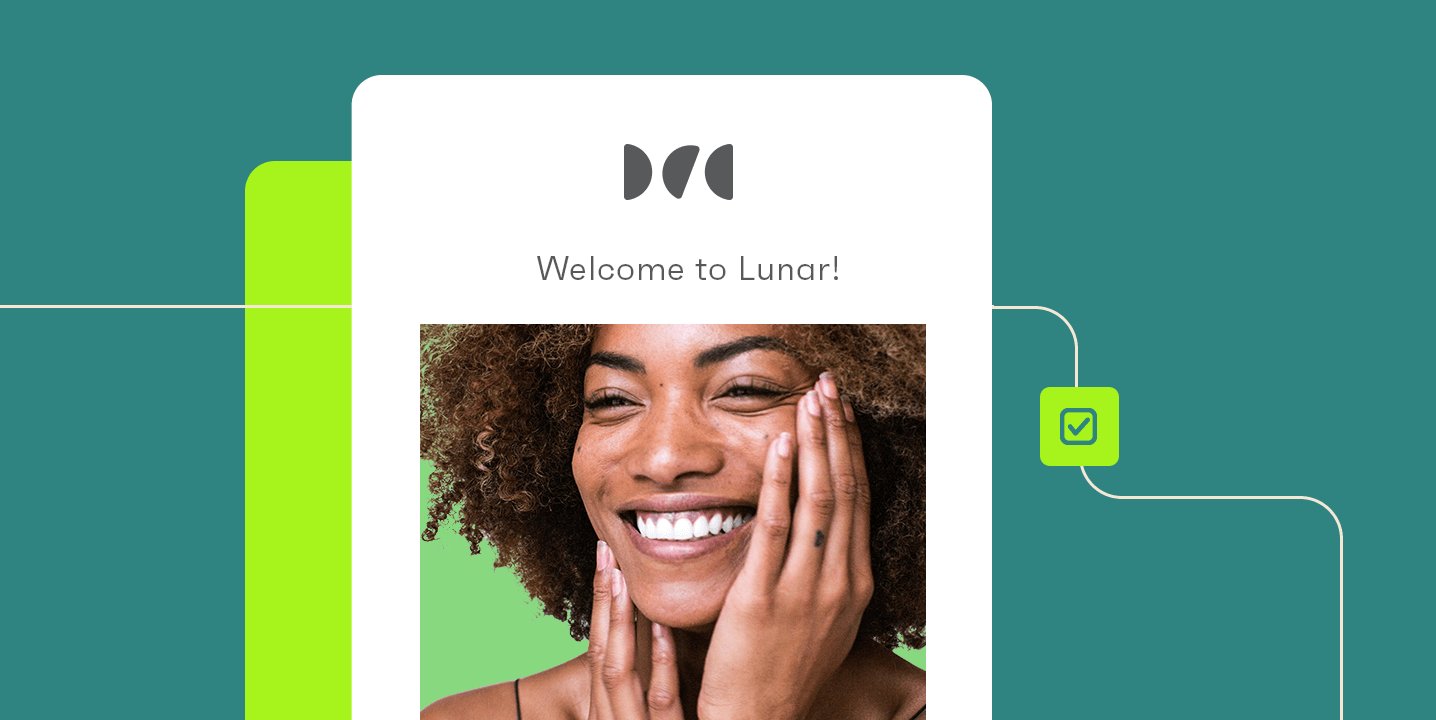
One of Flextail’s welcome emails is one of the best email automation examples. It offers a 10% discount, thanks the reader, and uses a single clear CTA.
A single CTA increases conversions by removing confusion and guiding users toward one action:
Flextail continues to generate revenue from its welcome emails. These automations are built and managed using tools like Omnisend.
In fact, Flextail’s Growth Manager Joy says, “Omnisend has a clear data pipeline and a clean UI. It’s logical to operate, and it doesn’t force you into endless micro-decisions just to build workflows that work.”
CLVmaxers also saw outstanding results from its welcome automation, including:
- 52% open rate
- 7.5% conversion rate
- Over 1,000 first-time orders in 12 months
Several factors contribute to a high-performing welcome flow:
- Sending emails at the right time, like right after someone signs up to your list
- Personalization, such as names in subject lines and in emails
- One clear CTA like “Get your discount” so they know exactly what to do next
Abandoned cart email automation examples
Abandoned cart automations are triggered when someone adds items to their cart but leaves without completing their purchase. This means the shopper has already shown buying intent. Abandoned cart emails can help bring them back to complete that purchase.
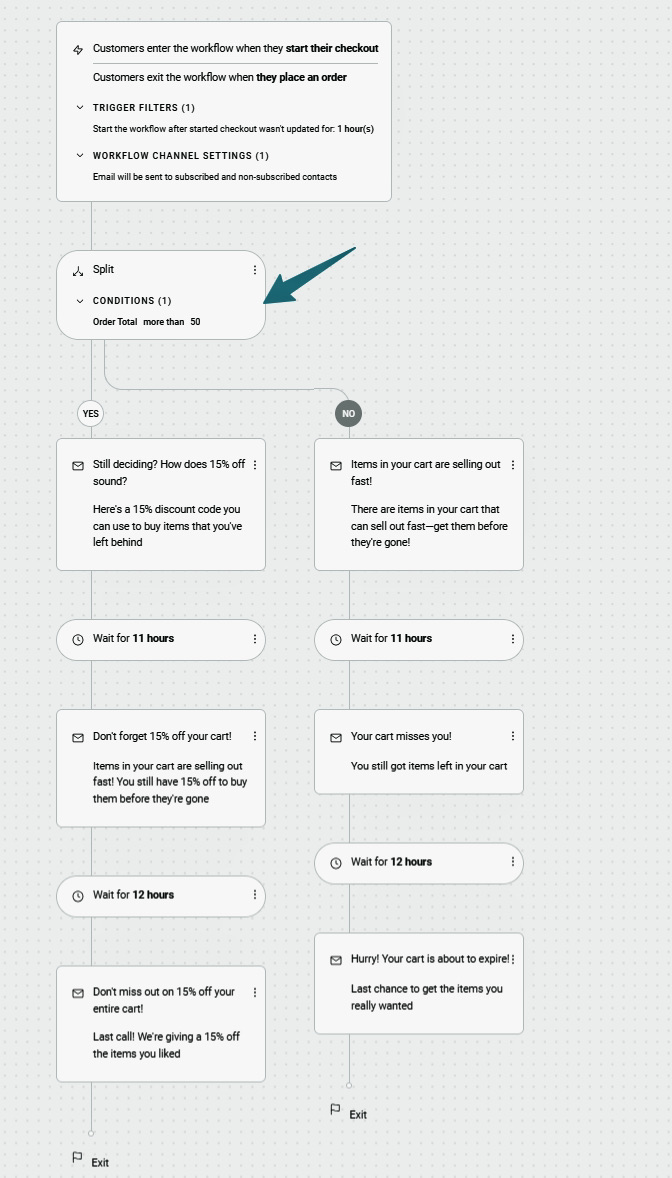
You can send two to three emails a few hours after abandonment. You can also segment customers by order value. For higher-value carts (above $50), offer discounts. For lower-value carts, urgency-based messaging like “Your items may sell out fast” often works well. This helps increase conversions because shoppers experience FOMO (fear of missing out).
Here’s an example of an abandoned cart workflow:
For example, Bowy Made’s abandoned cart automation generated 70% of total revenue. Email campaigns contributed less than 30%.
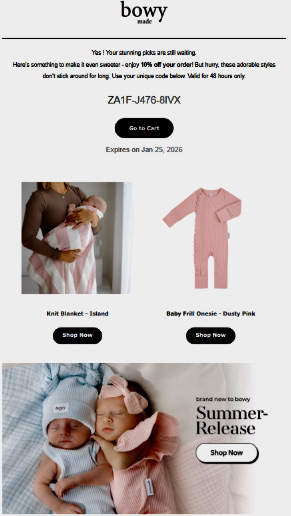
The brand also has one of the best email automation examples. Bowy Made’s abandoned cart email included a 10% discount and urgency messaging like “hurry” and “valid for 48 hours only.” It also had product images with clear CTAs:
Bowy Made moved from Mailchimp to Omnisend for stronger automation. After switching, the brand focused on key flows like abandoned carts, welcome emails, and review requests.
“Those early automations were our first step into building customer relationships at scale,” says Dallas, co-founder of Bowy Made. “And they worked. They still surprise me with how effective they are.”
Verpakgigant also saw impactful results. Its abandoned cart automations drove a 46.6% open rate and €25K in revenue from 147 recovered orders.
Abandoned cart automation should be one of the first flows you set up. In fact, many ecommerce agencies launch these within eight days of onboarding, according to Omnisend data.
Post-purchase email automation examples
These are pre-scheduled emails sent after a customer completes a purchase. They often include:
- Order confirmation: Confirms the purchase
- Shipping updates: Sent to customers to track delivery progress
- Review requests: Asks for feedback
- Upsells: Suggests related products to increase order value
- Replenishment reminders: Encourage repeat purchases by suggesting products customers have already bought before
These emails are usually sent one to seven days after purchase. For example:
- Day one to two: Thank the customer for ordering
- Day three to five: Request feedback on products they bought
- Day seven+: Offer discounts for their next purchase or encourage them to view new products in your store
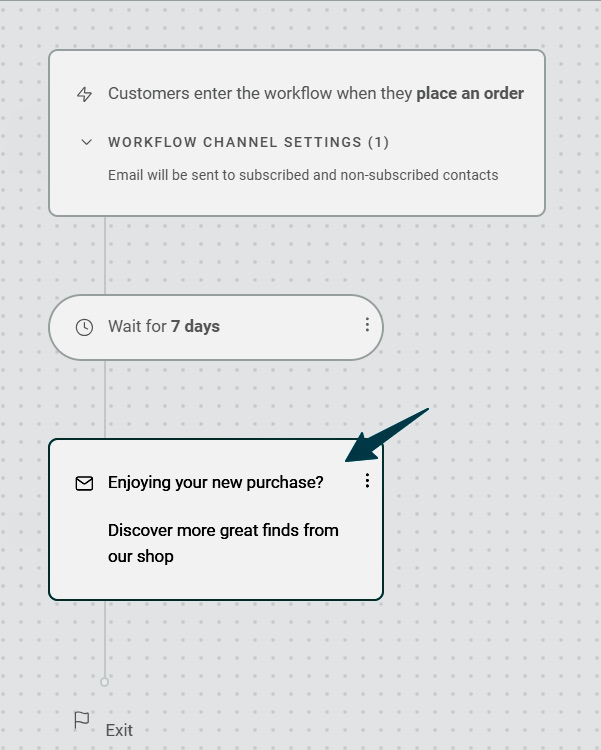
Post-purchase emails help increase average order value (AOV). This is how much a customer spends per order. It can increase when you recommend related products, upgrades, or bundles.
In fact, according to Omnisend data, ecommerce brands working with top agencies see an average order value of $44 from post-purchase strategies.
Post-purchase emails also help build customer loyalty. For example, Kate Backdrop achieved an 87% open rate on post-purchase emails and a 1:300 ROI.
“The ROI we’ve achieved is partly due to our customer loyalty,” says Shan from Kate Backdrop. “Our returning customers made up a significant portion of our revenue.”
Another brand, Naked & Famous Denim, used post-purchase automation to collect feedback. This generated:
- Nearly $7,000 in sales
- 20% conversion rate
- 3,190% lift in revenue per email
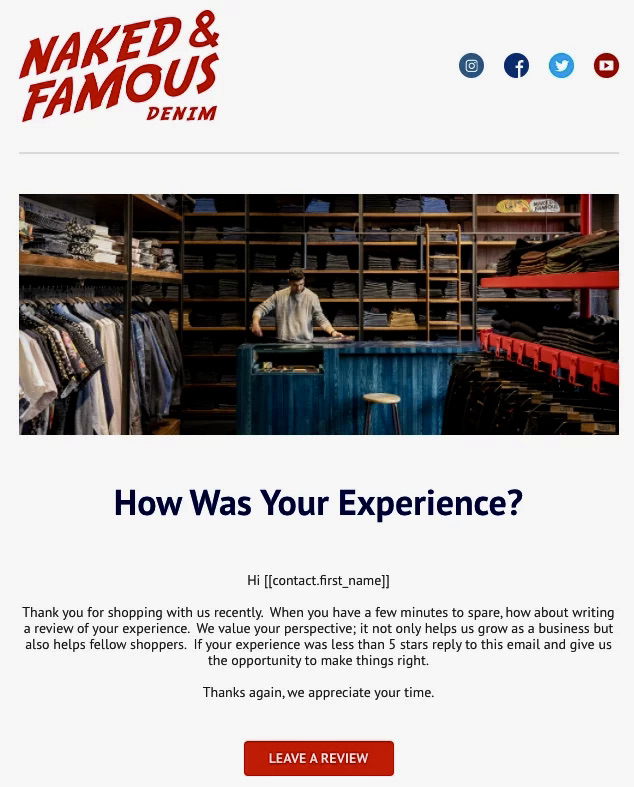
One of the best email automation examples for feedback is Naked & Famous Denim’s review request email. It uses the customer’s name, which adds personalization. It then thanks customers and gently asks for a review:
Re-engagement and winback email automation examples
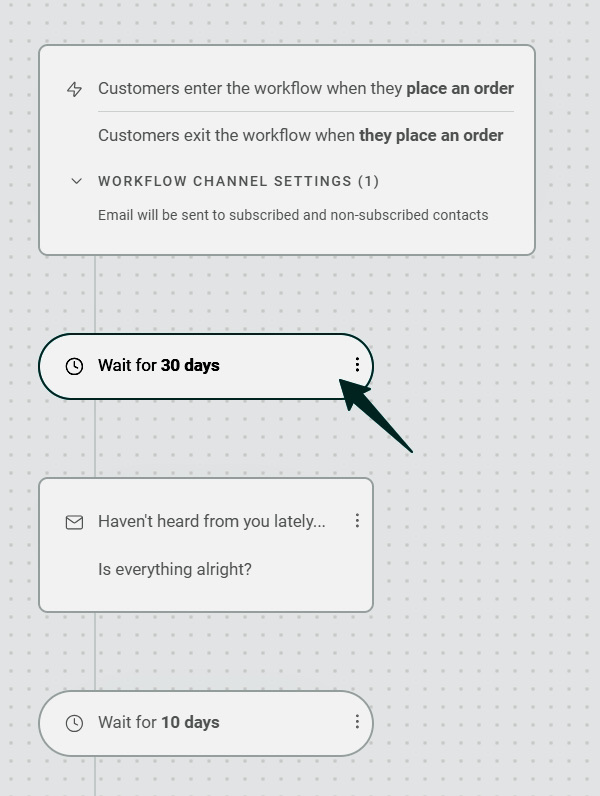
Re-engagement and winback emails target subscribers who stop opening emails, clicking links, or making purchases. These emails are usually triggered after 30 to 90 days of inactivity.
You shouldn’t send them too early or too late:
- Too early: Around seven days will feel too pushy. Customers likely need time to use your product before they decide to buy again.
- Too late: After six months, it can be too late. Customers may have already forgotten your brand or switched to a competitor.
Instead, start by sending re-engagement emails after 30 days of inactivity. If your open rates are still low, then extend the time:
You should also have a sunset policy. It’s a rule that automatically removes subscribers who haven’t engaged with your emails, even after sending re-engagement emails. This ensures you maintain a clean email list and improve email deliverability.
One of the best email automation ideas for re-engagement is from MDigital. The brand used Omnisend to connect its online store and physical store data in one system. This allowed it to:
- Track when customers last purchased
- Group inactive customers automatically
- Send re-engagement emails without manual work
As a result, its re-engagement workflow brought back 422 inactive subscribers. The upsell automation also generated €1,202 in 14 days.
Another brand with one of the best email automation examples is SM Global Shop. The brand tested when to send winback emails.
At first, emails were sent 30 days after inactivity. After testing, it started sending winback emails sooner. Customers responded better. This included more opens, clicks, and conversions.
SM Global Shop also tested small changes like emojis in subject lines. This increased click-through rates by 1%. Digital marketing director at SM Global Shop, David Sung, says, “I believe A/B testing is very crucial.”
The winback flow is now one of its top-performing automations, converting at 51.78%.
Browse and product abandonment email automation examples
Browse abandonment and product abandonment emails are sent when a shopper views a product but doesn’t add it to their cart.
Unlike cart abandonment emails, these are sent earlier in the buying journey. They target people who are still exploring products but aren’t ready to buy.
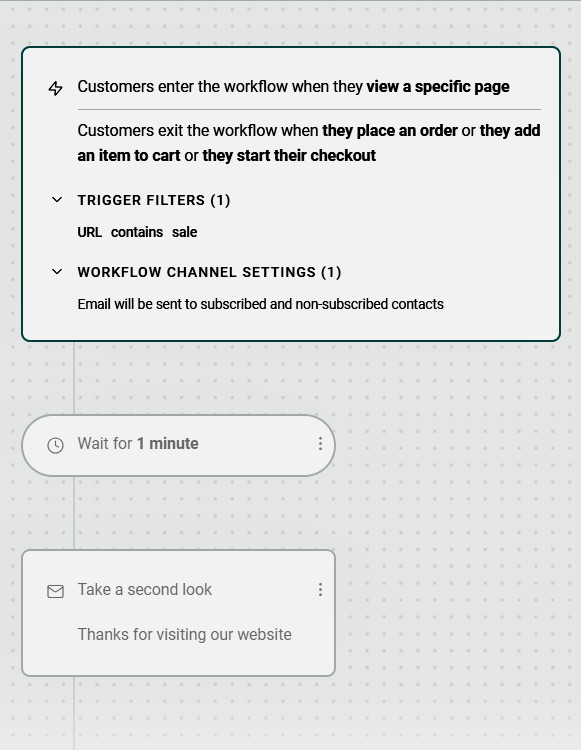
Shoppers immediately enter this workflow when they visit a product page and leave. You can send a follow-up email shortly after, encouraging them to take a second look:
Browse and product abandonment emails use softer messaging. They remind customers of what they viewed and highlight product benefits. They may also include reviews.
They often include simple copy like “still thinking about this?” or “take another look.” These emails work because they use personalized reminders based on what customers viewed.
Brands like Okovo’s product abandonment emails generated 60% of email marketing revenue. After using automation tools like Omnisend, the brand saw a 3.5x increase in messages sent and 1.9x revenue growth within one year.
Senior automation manager at Okovo, Mindaugas says, “Cart abandonment and product abandonment automations have been game-changers.”
Another standout example of the best email automation workflows is from Belle Fever. The brand sent personalized emails to users who viewed products but did not add them to their cart. These emails offered product support, recommendations, and incentives. They achieved:
- 52% open rate
- 25% reply rate
- 40% higher conversion rate than email campaigns
- Increased customer satisfaction
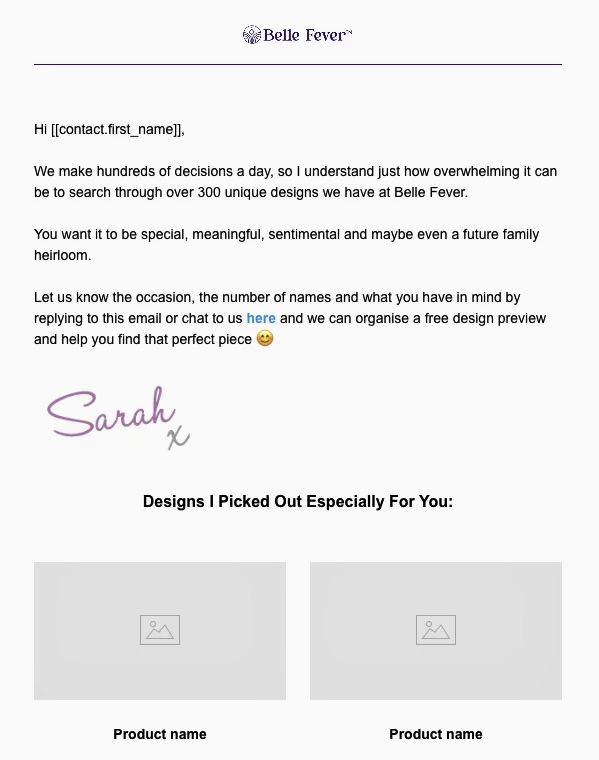
One high-performing email used the customer’s name. It also offered a free design preview and showcased selected products:
Loyalty and lifecycle email automation examples
These emails keep customers engaged after their first purchase. They build long-term relationships. Some loyalty and lifecycle email automation examples include:
- Loyalty point reminders: Reminds customers to redeem points and unlock rewards
- Milestone emails: Triggered when a customer reaches an important point in their relationship with a brand, such as a 5th order or anniversary
- Lifecycle stage transitions: Sent when a customer moves from one step in their journey (first-time buyer) to another (repeat customer)
For example, Enflow Digital’s loyalty points automation generated $28,317+ in sales. It increased open rates by 70% and click rates by 12.23%.
The brand connected Smile.io (its loyalty program) to Omnisend to track loyalty points and automate emails. It then built a workflow based on customer behavior:
- Customers with 10 – 499 points who stopped engaging were added to a segment
- After 45 days of inactivity, they entered an email flow
- Emails displayed their points and available rewards
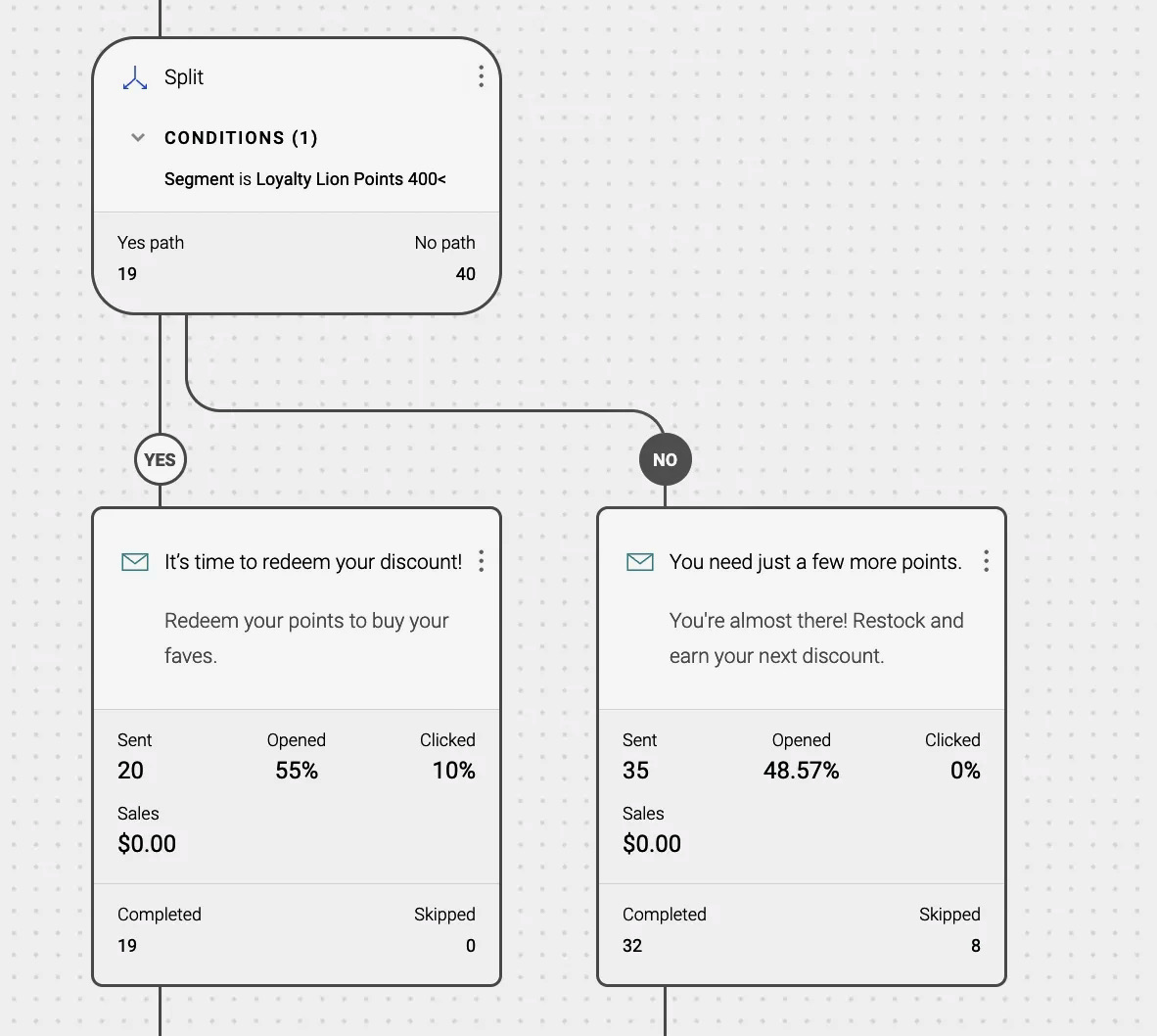
Enflow Digital also used conditional splits to personalize emails:
- If a customer didn’t have enough points to redeem, they received an email encouraging them to keep shopping
- If a customer already had enough points, they were told they could redeem rewards
Another successful brand with the best email automation examples is Dukier. The brand used Omnisend to run lifecycle emails across the customer journey. This included welcome emails and abandoned cart reminders. It also sent emails in five languages.
As a result, Dukier achieved 525% revenue growth over three years. Email automation drove 55% of total revenue.
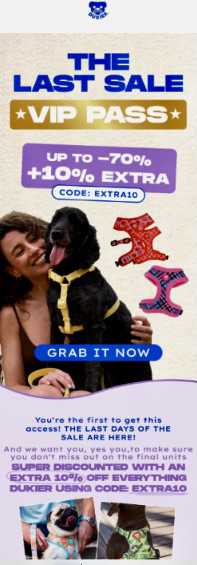
Dukier also used a VIP email to drive conversions. It included bold text like “VIP pass” and “last sale,” along with discounts of up to 70% off and an extra 10% discount code. This helped increase clicks and sales:
Seasonal and campaign-based email automation examples
These emails are sent around key events like Black Friday, Cyber Monday, and product launches.
They are different from evergreen automations. Evergreen emails run all year. They’re triggered by actions like sign-ups or cart abandonment.
Seasonal campaigns run for a short time. This creates urgency and encourages faster purchases before promotions end.
Most campaigns follow a simple flow — teaser emails before the event, reminders during the sale, and last-chance emails toward the end.
For example, La Machine Cycle Club used seasonal automations for several types of campaigns, including:
- Race campaigns timed around events like the Tour de France
- Seasonal emails for winter prep and spring races
- Product launch sequences with teaser, launch, and follow-up emails
- Black Friday campaigns with discounts
The brand also gave loyal customers early access to offers. This led to a 64% open rate and 7% click rate.
Another brand with standout email campaign automation examples is LEVEL8. It used seasonal emails to run a four-stage Black Friday Cyber Monday (BFCM) campaign:
- Stage 1: Early access offers sent to loyal customers
- Stage 2: More products were introduced, along with “gift with purchase” offers
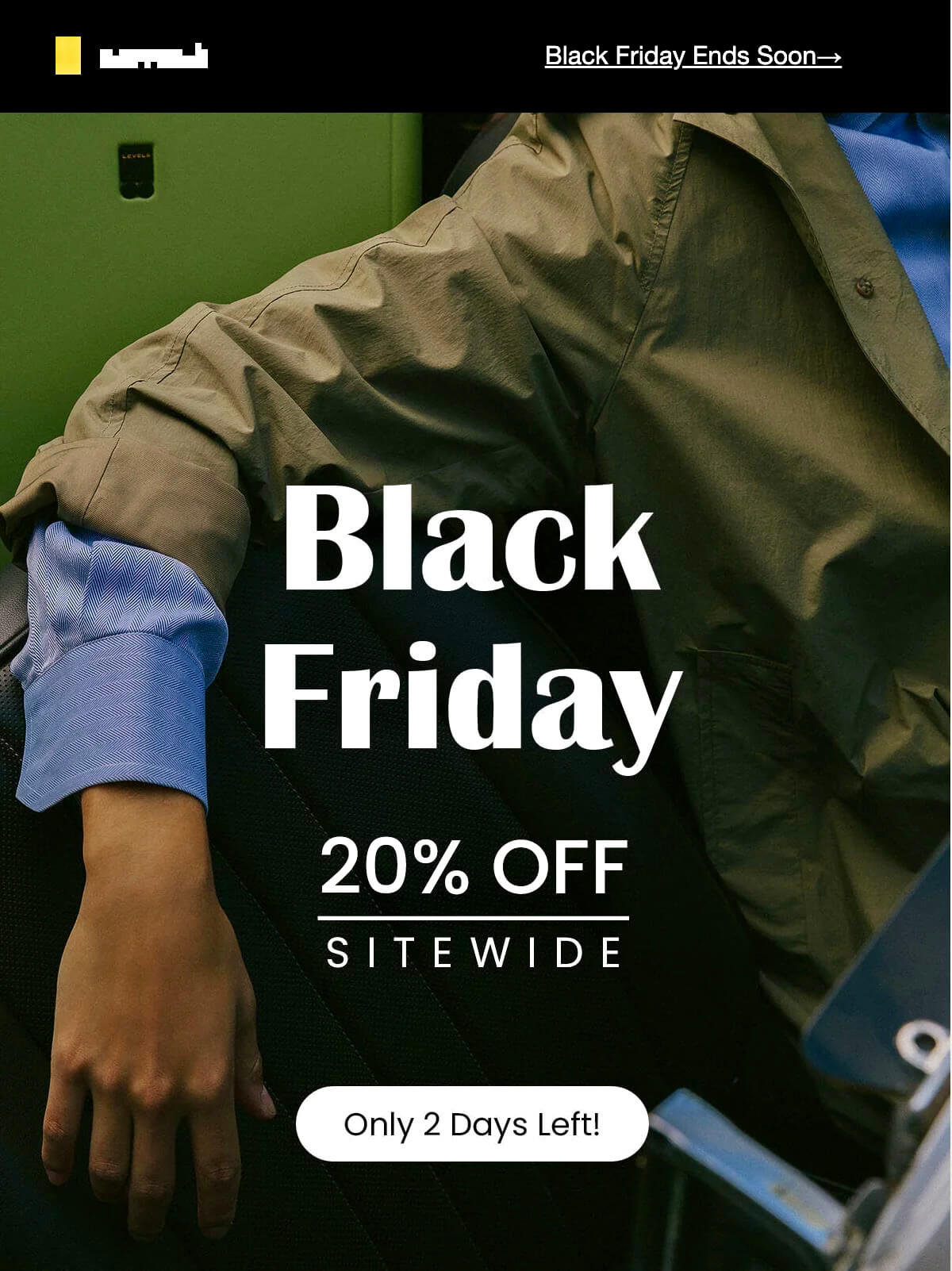
- Stage 3: Discounts were expanded across most products. For example, this email included a 20% discount for all products. The CTA “Only two days left” increased urgency and encouraged more clicks:
- Stage 4: Last-chance emails used countdown timers and offers
LEVEL8 generated over $266K in revenue with a 223x ROI. This shows how effective seasonal campaigns can be.
What the best email automation examples have in common
Here’s what the best email automation examples have in common:
- Emails are sent at the right time, such as after signup or cart abandonment. Customers are still interested, so they are more likely to respond.
- Most brands use a short email series rather than a single message. For example, welcome or abandoned cart emails are sent over a few days to guide them toward a purchase.
- Emails are also personalized. This includes using customer names or showing products they viewed or bought. Grouping customers by behavior makes emails more relevant and can increase revenue by up to 8%.
- Successful brands also test and improve emails over time. A/B testing helps them see what works. According to Omnisend, it can increase revenue by up to 192%.
- Strong emails use one clear CTA. This tells customers exactly what to do next and improves clicks.
Overall, email automation drives higher revenue than email campaigns. In fact, agencies generate 45% of email revenue from automation. And, automated emails earn 9x more per message than campaigns ($5.96 vs $0.67).
“What separates top agencies isn’t one big decision, but a compounding effect of small ones. Adding a channel, running tests, improving workflows, and focusing on speed — over time, those add up to much stronger results.”
— Marty Bauer, Director of Agency Partnerships and Ecommerce Expert at Omnisend
Start building your own automated email campaigns
Now that you’ve seen the best email automation examples, you can start building your own using email automation tools.
With Omnisend, you don’t need to start from scratch. It offers pre-built ecommerce workflows such as welcome emails, abandoned cart reminders, and post-purchase follow-ups.
To begin, go to the Automation tab. Click Create workflow and choose a ready-made template. You can also build one from scratch:
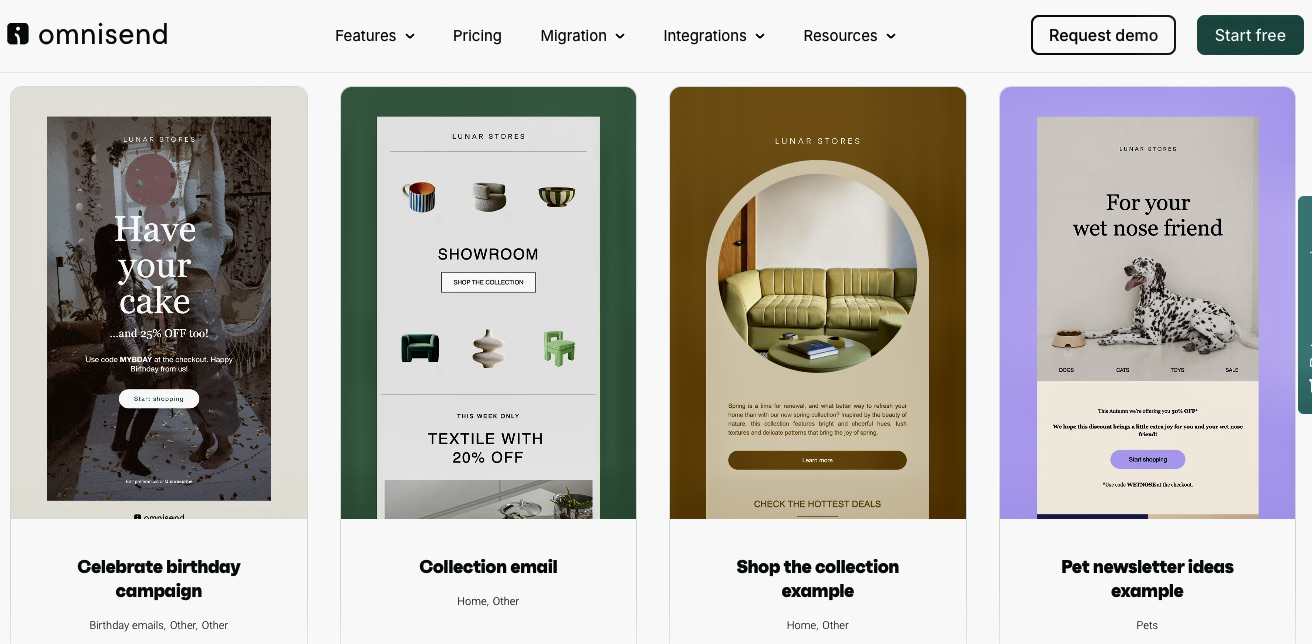
Omnisend templates are already built for ecommerce emails like promotions and abandoned carts:
You can also customize emails using the drag-and-drop editor. This lets you change text, images, and buttons without design skills.
Omnisend also supports dynamic content. This means emails change based on customer behavior. For example, one customer may see products they recently viewed, while another sees recommendations related to previous purchases.
Omnisend also integrates with platforms like Shopify, WooCommerce, Wix, and BigCommerce. Once your store data is synced, you can segment your audience based on real behavior. If you need extra assistance with integration, Omnisend offers 24/7 support even on the Free plan.
Once automations are live, you can track performance using Omnisend reports. This shows sales, engagement, and channel results. Omnisend users report a $79 ROI for every $1 spent.
Quick sign up | No credit card required
Email automation examples FAQs
What are the most effective email automation examples for ecommerce?
The most effective automated email examples include welcome emails, abandoned cart reminders, post-purchase emails, re-engagement emails, and browse abandonment flows. They’re sent after customer actions such as signups, cart abandonments, purchases, inactivity, or product views. They help recover lost sales and increase repeat purchases.
How many automated emails should I have running?
Start with three to five email automations triggered by user actions like signing up, making a purchase, or abandoning a cart. This helps increase open rates and conversions because they reach subscribers when interest is high. For example, you can send two to three welcome emails, two to three abandoned cart emails, and three to five post-purchase emails.
What’s the difference between automated emails and regular email campaigns?
Automated emails are sent when a customer takes action, like signing up, viewing a product, or buying. They run continuously through email automation tools like Omnisend. These tools track customer behavior and trigger personalized messages, such as viewed products or items left in carts. Regular email campaigns (manual) are sent once, often to a full subscriber list at a chosen time, such as promotions or newsletters.
How do I know if my email automation is working?
One of the easiest ways is to test your email marketing automation examples yourself. Sign up for your email list, browse products, or leave items in your cart. Then check if you get the expected emails. In tools like Omnisend, you can also track who entered, is still in, or completed each workflow.