Omnisend AI


 OFFER
OFFER










Building automations from scratch is slow, even when you know what you’re doing. Email automation templates from your marketing tool are faster because you’re editing a working flow rather than building from a blank one.
Omnisend’s 2026 Ecommerce Marketing Report found that automated emails generated 30% of email revenue from 2% of sends in 2025. But automating for the sake of it isn’t the answer. It’s the quality of your flows and how well they cover your customer journey that matters.
This article maps out 13 automation templates that do the work for you, from welcoming a new subscriber to following up after a purchase. Set them up once, then let them run.
Quick sign up | No credit card required
What is an email automation template?
An email automation template is a pre-built workflow your email tool provides to send messages to customers based on their behavior or activity.
The workflow comes with the trigger itself, the timing, the conditions, and the email sequence configured. Those setup decisions would ordinarily slow you down. A template provides a head start, then you adjust it from there.
Automations are also sometimes called flows or workflows. In any case, they are different from email templates, which are the designs your customers see when a message arrives. The automation is the workflow that places them in inboxes.
13 email automation templates you can use today
There are 13 email workflow templates you can use to cover your customer journey. We’ve provided descriptions and explainers for each below.
1. Welcome email automation template
Every new subscriber expects something from you after they sign up. The welcome template reaches them at that moment, before their interest fades.
The idea is simple. You build forms and popups to capture email addresses, and then your flow triggers a welcome email as soon as someone signs up.
Here’s how the workflow looks in Omnisend:
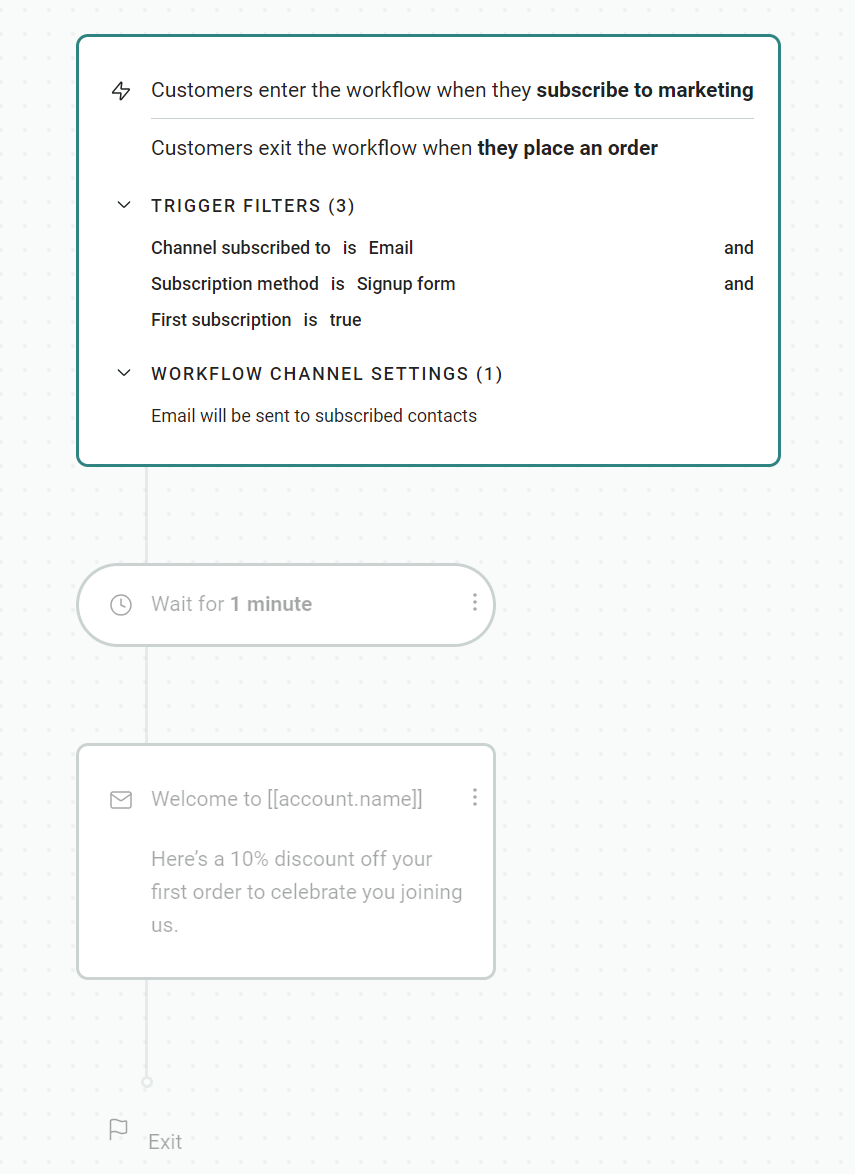
First-time purchasers can also receive your welcome email, although it should come after their order confirmation, and only if they opted into marketing.
Welcome emails achieved a 52.98% click-to-conversion rate in 2025, as per Omnisend’s 2026 Ecommerce Marketing Report, the highest of any other email automation.
2. Abandoned cart email automation template
Cart abandoners have shown purchase intent, but might need reminding about their session, or a nudge towards purchase with an incentive. These emails had the second-highest click-to-conversion rate in 2025 at 39.46%.
Your potential customers will abandon your site for all sorts of reasons. It could be the price, that they’re a window shopper, or because your checkout was slow.
That second chance comes from your abandoned cart reminder. It’ll include a link back to their cart. Omnisend’s abandoned cart email template contains a three-message series by default:
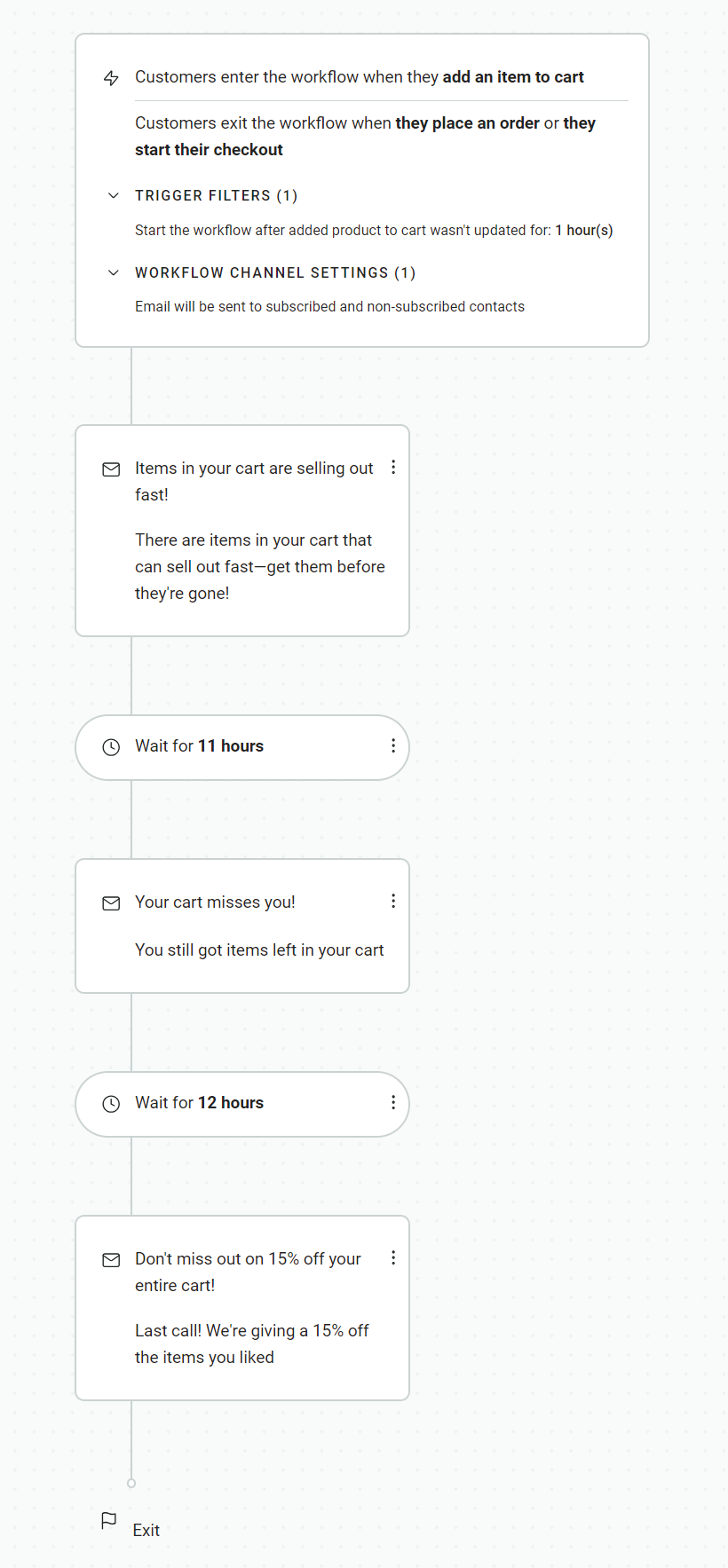
The first email goes out immediately, and then there are delays of 11 hours and 12 hours. All these elements are customizable.
3. Browse abandonment email automation template
Plenty of shoppers will land on your site, look around, and leave without adding anything to the cart. The browse abandonment template reaches them at this high-intent moment. In 2025, they achieved a 10.68% click-to-conversion rate.
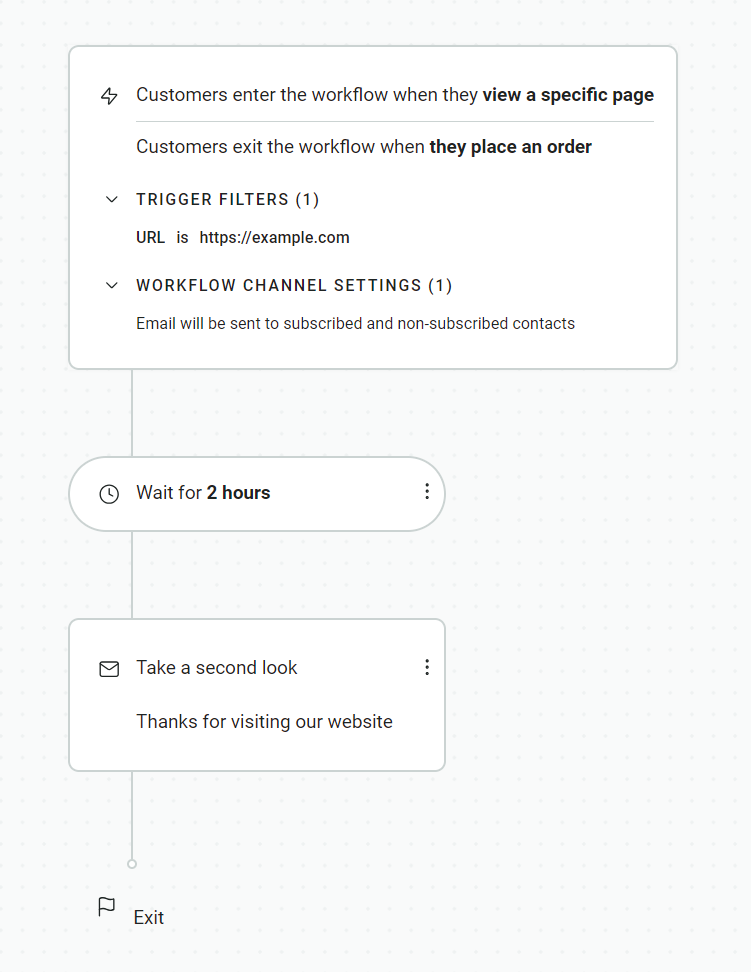
You need to have collected their email address previously to trigger this flow. They’ll be a pre-existing customer or a marketing subscriber, and enter the flow when they view a page. The automation in Omnisend lets you specify the URL:
4. Product abandonment email automation template
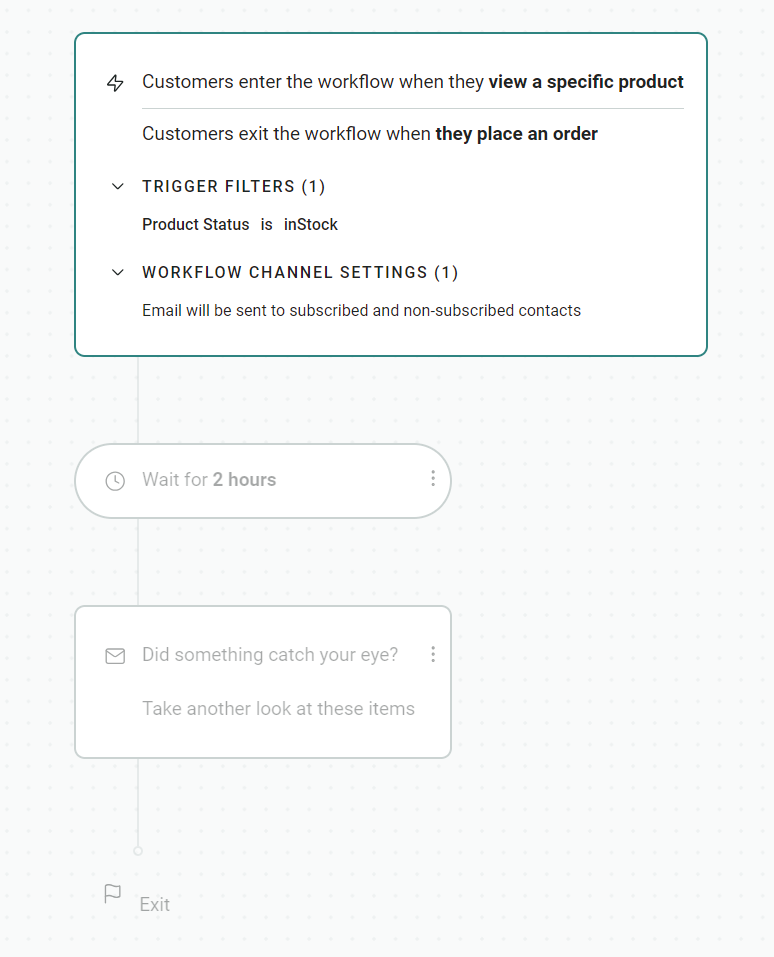
Product abandonment means your customer viewed a product, left, and your ecommerce store tracked it. Your product abandonment automation then triggers your email with a personalized product recommendation.
The flow activates for customers who view a product, provided the product is in stock. The automation template in Omnisend uses a two-hour delay:
5. Order confirmation email automation template
Every single order requires a confirmation email. These emails are always automated, usually by your ecommerce tool, but you can also create them in Omnisend.
We classify order confirmations as transactional emails. Not every email tool supports them. The workflow in Omnisend triggers when customers pay for the order:
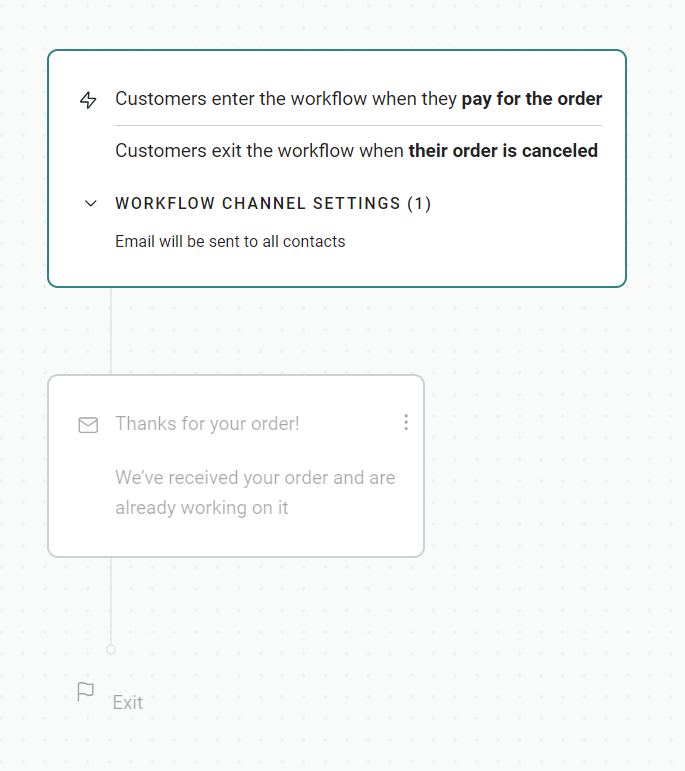
The advantage of Omnisend’s order confirmation email automation is that you have complete control over email design and can include personalized product recommendations when they are appropriate.
6. Shipping confirmation email automation template
You can do better than the default shipping confirmations your ecommerce store sends with branded, useful, and on-message flows.
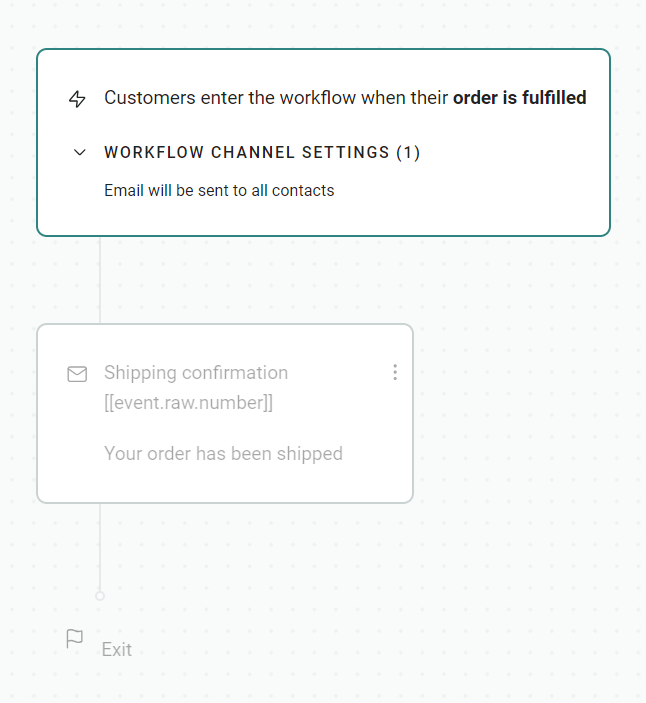
The workflow in Omnisend triggers on order fulfillment, which is usually the moment when you print the shipping label. Your customer then receives the notification. Here’s the flow in Omnisend:
7. Order follow-up email automation template
The moment after purchase is when your customer is most engaged. Your order follow-up template uses that window to ask how things went or suggest what comes next.
Follow-up automations keep your customer relationship alive post-delivery and are the perfect opportunity to offer loyalty incentives and rewards.
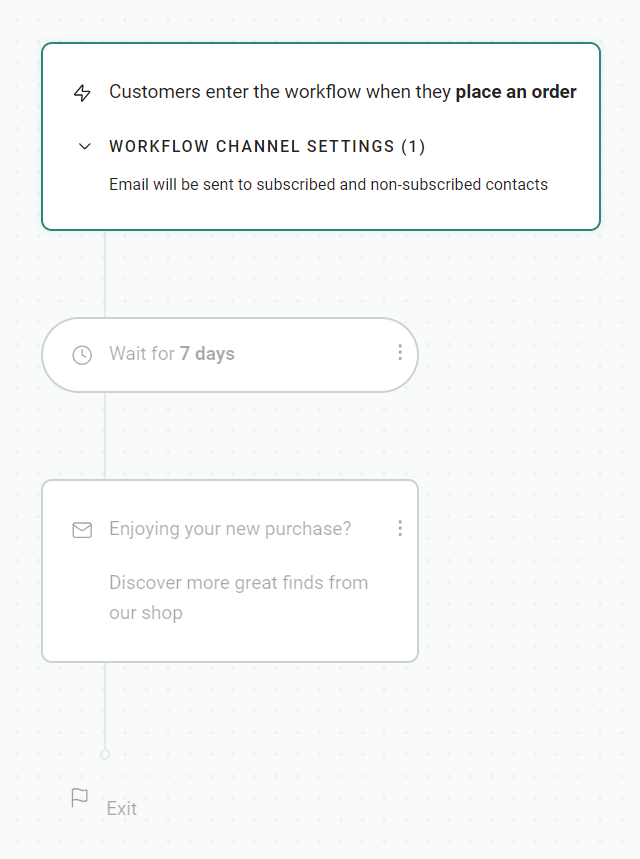
In Omnisend, your customer enters the workflow when they place an order. The flow sends the first email after seven days:
8. Product reviews email automation template
You can extract additional value from customers by getting them to leave a review after they’ve used a product. The product reviews template asks for it at the right moment.
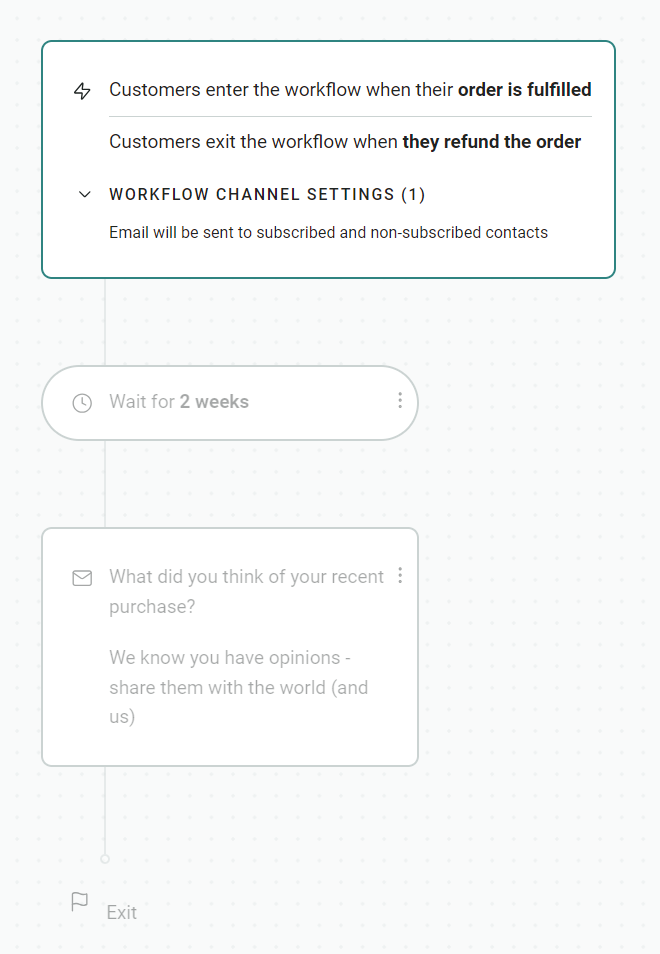
Your workflow will trigger for customers when their order is fulfilled. A delay of more than one week is best practice, with Omnisend’s template using a two-week delay:
Include links to your product pages if they have review submission forms, or add links to your review platform, such as Judge.me.
9. Customer reactivation email automation template
First-time buyers can lapse into dormant and inactive contacts. Your reactivation flow will attempt to get them to reengage.
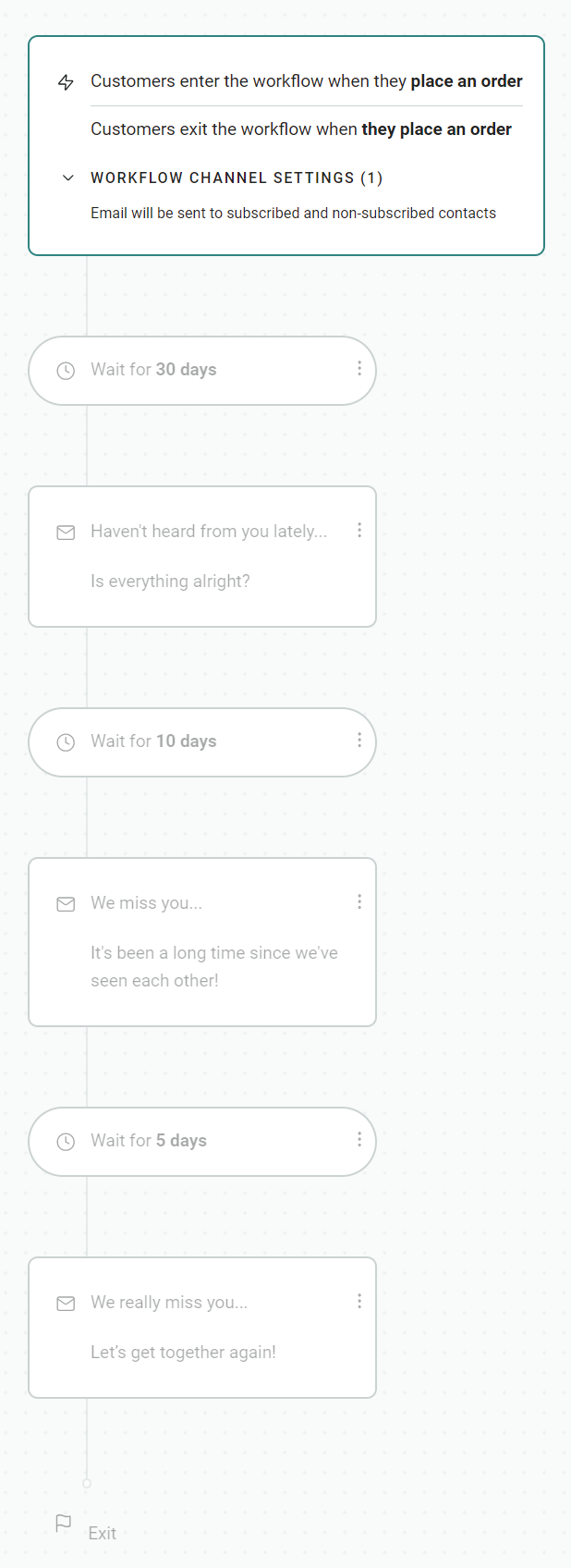
Previous customers already have acquisition costs baked in, so it’s more cost-effective to sell to them again than to new customers. Omnisend’s three-part email automation template sends over 45 days, with the first email sent after 30 days:
10. Cross-sell email automation template
A first purchase tells you what kind of products a customer likes. The cross-sell template uses that to put complementary items in front of them.
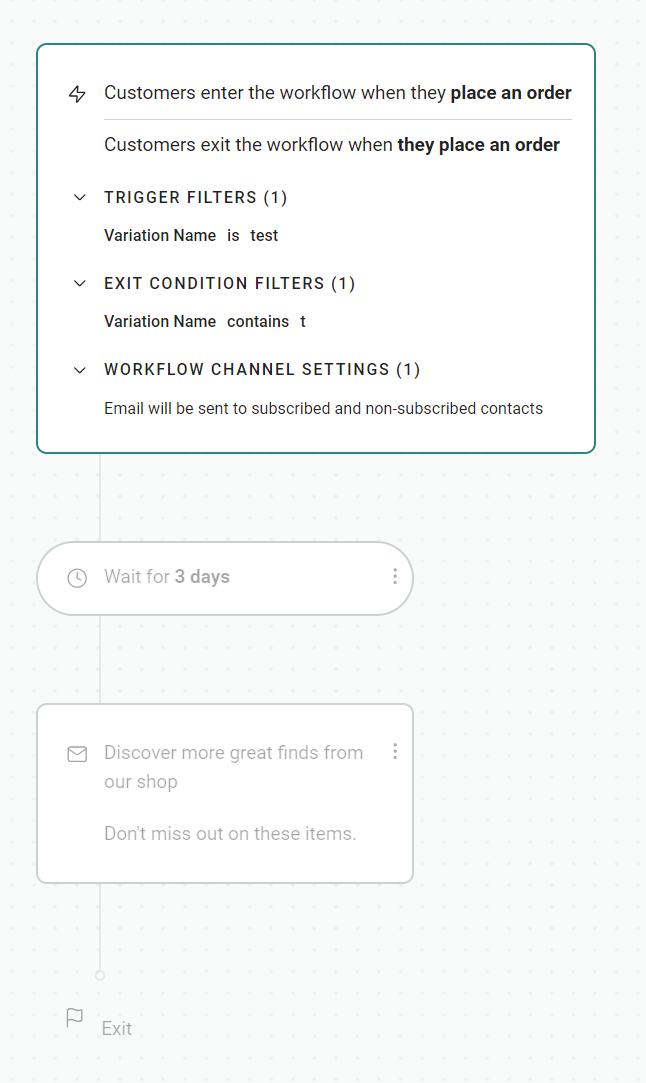
Your customer enters the flow when they place an order. Omnisend lets you optionally filter by product, tag, or collection. Add a Product Recommender block to your email template to pull items automatically, and there’s no additional work needed:
Cross-sells are among the best-performing marketing automation email templates, with a 25.50% click-to-conversion rate in 2025.
11. Replenishment reminder email automation template
Consumables run out on a predictable cycle. Catch your customers at that moment with the replenishment template, and they reorder from you instead of whoever’s most convenient.
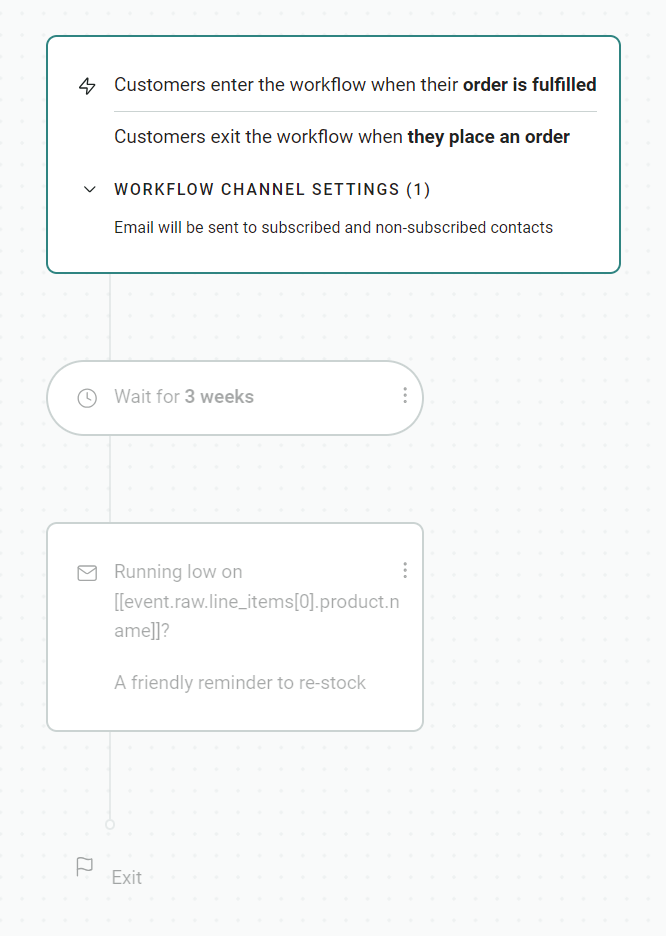
There’s a standard three-week delay set in Omnisend’s pre-built replenishment reminder flow, adjustable to whatever works best for customers. It then sends the email, which can contain a link to checkout, multiple products, or something else:
12. Birthday email automation template
You’ll collect birthday data from quizzes and forms. You can then run birthday email automations with special offers.
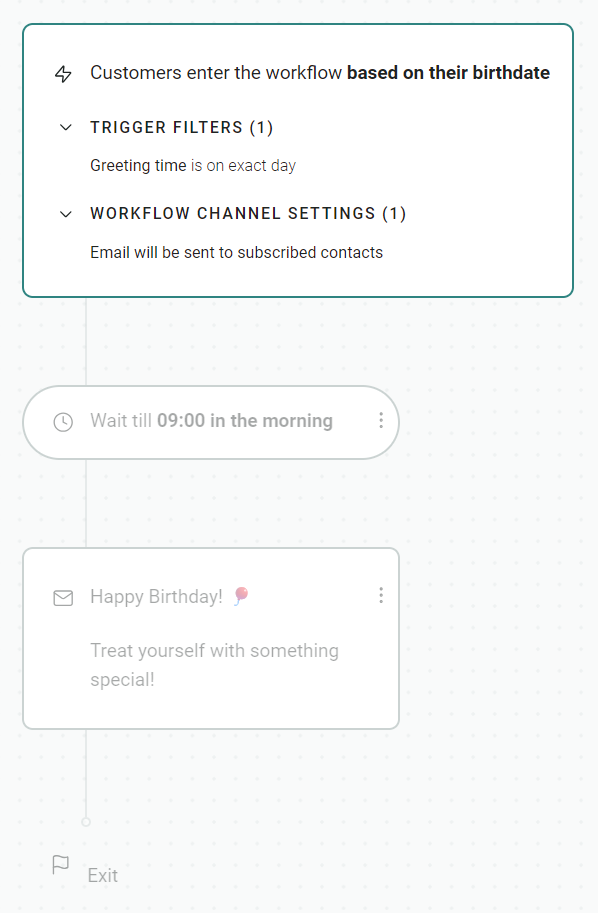
Omnisend’s automation template triggers one day before the birthday at midnight by default, then sends a personalized message with a delay block letting you pick a sensible time of day:
13. Cancellation confirmation email automation template
Cancellations are a friction point in your customer relationship. The cancellation template handles the confirmation and keeps the door open for future purchases.
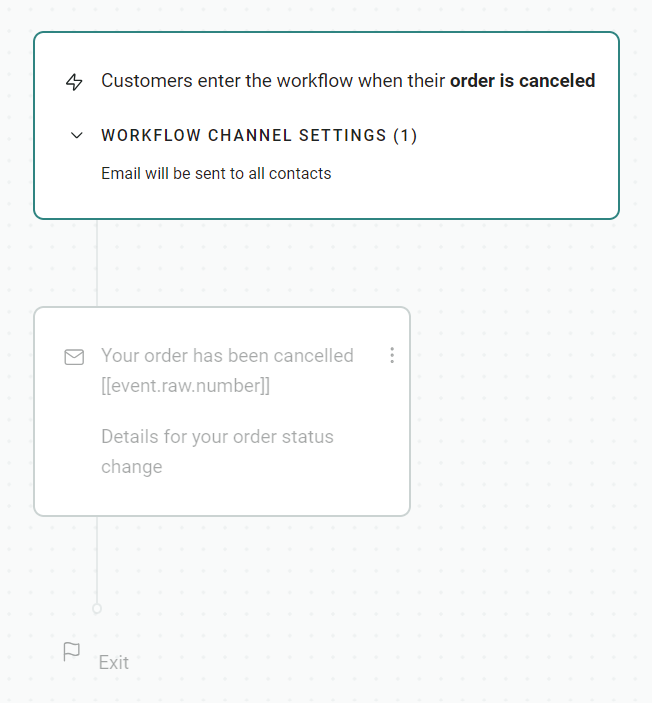
Omnisend’s template for cancellations triggers when an order is canceled or voided. The email goes out instantly, so the customer knows the cancellation has gone through:
Which email automation template should you start with?
Start with coverage of your initial customer journey so that they receive welcome messages, abandoned cart reminders, and order confirmations. Also, create one flow for reactivation and one for birthdays/important dates to cover retention.
That’s five high-impact email automations to start with. Your launch sequence will go like this:
- Welcome email automation. It triggers immediately or with a small delay of under 10 minutes for customers who sign up via any form.
- Abandoned cart email automation. Provides a link back to your customer’s cart.
- Order confirmation email automation. An immediate send with order details. Your store will handle these automatically, but you can edit the template or replace it with a branded one in Omnisend.
- Customer reactivation email automation, also known as lapsed purchase. For customers who haven’t purchased in the last 90 days or so. Improves retention.
- Birthday email automation. This one’s a date-based template, using the customer’s birthday to send a personalized message.
All these automated email templates earn their place for revenue, retention, and ROI, with welcome and abandoned cart messages alone generating 76% of email automation revenue in 2025. Here’s how they all stack up for performance:
| Automation | Open rate | Conversion rate | AOV | $ per email |
|---|---|---|---|---|
| Welcome | 33.79% | 2.00% | $315 | $6.30 |
| Abandoned cart | 35.75% | 1.51% | $168 | $2.54 |
| Order confirmation | 53.99% | 1.10% | $145 | $1.60 |
| Lapsed purchase | 33.00% | 0.52% | $94 | $0.49 |
| Birthday | 40.72% | 0.59% | $744 | $4.37 |
Start using email automation templates in Omnisend
Omnisend provides 28 automated email templates covering all 13 in our article. Each is a pre-built workflow with the correct trigger, trigger filters, workflow channel settings, and delay applied.
You can activate these automation templates, and they’ll reach your customers without you making any additional changes to their settings.
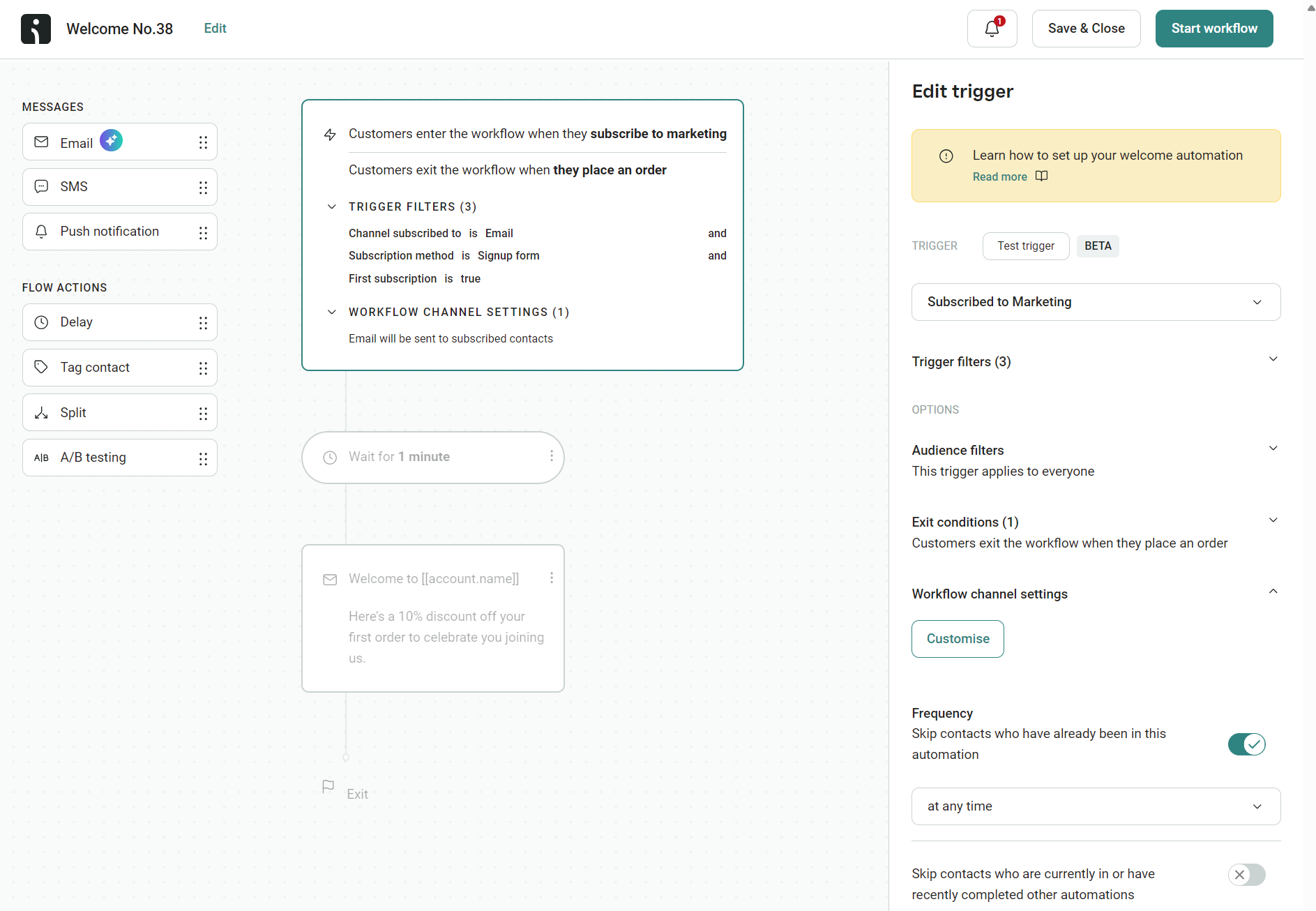
Should you need to make changes, then editing your automation templates is an intuitive affair via the drag-and-drop flow builder. It lets you drag an email, SMS, and push notification into it, as well as delays, contact tags, splits, and ecommerce A/B testing elements:
The learning curve is low for mastering automations, and you can turn any single email into a series with additional messages and channels.
Integrating your site with Omnisend feeds it with data and ensures your email automations trigger based on customer behavior, engagement, and segment activity. It has apps for Shopify, WooCommerce, and others, with 305+ integrations in total.
Quick sign up | No credit card required
Email automation templates FAQs
What is an email automation template?
An email automation template is a pre-built workflow provided by a marketing tool, such as Omnisend. It has configured triggers, delays, and messages, and lets you customize those to suit your cadence and targeting.
Which email automation template should I set up first?
Start with a welcome message and an abandoned cart email. Those contributed 76% of all automation email revenue in 2025. The automation with the highest revenue per email was back-in-stock, followed by welcome and then birthday emails.
Can I customize Omnisend’s pre-built automation templates?
Omnisend’s email automation templates are completely customizable via the drag-and-drop editor and the settings panels for each element in the flow. You can drag as many emails, SMS messages, and web push notifications into it as you like, configure custom delays, and even set up splits and A/B tests within the flow builder.
Do email automation templates work for small ecommerce stores?
Your small store will already use some automation templates for order and shipping confirmations (probably handled by your ecommerce platform). Adding an email marketing tool for other automation templates covers your customer journey from signup to post-purchase, so it’s 100% necessary for retention and long-term revenue.
Email template vs. email workflow template?
An email template is a pre-built HTML template with a design you can edit. An email workflow template is a sequence of elements built in software that you can move around to create a series of messages with triggers and delays.