Omnisend AI

 OFFER



Automated emails generate nearly a third of all ecommerce email revenue and regularly maintain open rates above 50%, according to Omnisend’s 2026 Ecommerce Marketing Report.
While onboarding emails are only one part of your automation strategy, it’s still important if you want to get full benefits out of your email marketing efforts.
We’ll provide a clear definition of an onboarding sequence, real brand examples, a sequence schedule to follow, and step-by-step setup instructions.
What is an onboarding email?
An onboarding email is an automated message that helps a new subscriber or first-time buyer get value from your store and moves them toward a first or repeat purchase. It covers the stretch between someone handing over their email address and actually buying what you sell.
These emails exist to accomplish three distinct goals: educate, engage, and convert.
- Education: Onboarding messages teach customers how to use your product, care for an item, or understand your value proposition better
- Engagement: They encourage interaction with your brand and build strong relationships
- Conversion: They deliver targeted product recommendations and nudge the reader to use their discount code to make a purchase
What’s the difference between a welcome email and an onboarding email?
A welcome email is the single first message a new subscriber receives, while an onboarding email is part of the automated sequence that follows it. Many platforms group both into one welcome automation, but each email has a different job.
The welcome email is the first touchpoint, in terms of email marketing, that the subscriber gets. It delivers the promised discount code, confirms the subscription, introduces the brand, and sets further expectations.
The onboarding sequence takes over from there to convert the subscriber into a buyer if the first welcome email wasn’t enough.
You can learn how to set up that initial message in our guide to the welcome series.
| Feature | Welcome email | Onboarding sequence |
|---|---|---|
| Goal | Deliver the sign-up incentive | Drive a first or repeat purchase |
| Timing | Immediately upon sign-up | Paced over two to four weeks |
| Number of emails | One | Three to five |
| Typical content | Discount code, brand introduction | Product education, social proof, FAQs, purchase nudges |
Types of onboarding emails with examples
There are eight distinct types of onboarding emails you can mix and match to build an automated sequence for your store. Each has a specific function in moving a new subscriber closer to a purchase.
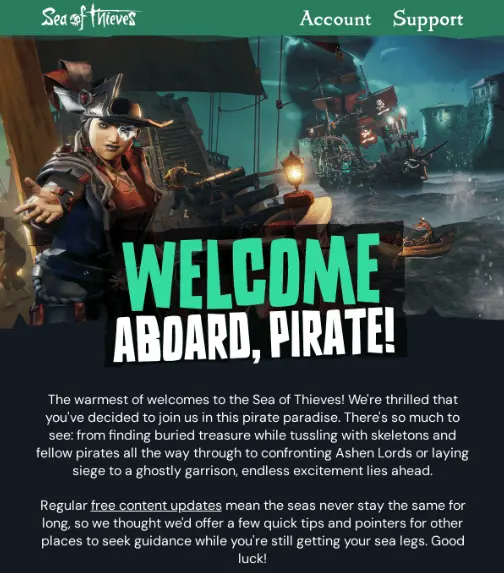
Welcome email: Sea of Thieves tells new players what to expect
The welcome message kicks off your entire onboarding flow by confirming the subscription and delivering the sign-up incentive. You can find detailed breakdowns of these messages in our guide to best welcome emails.
Sea of Thieves uses its welcome email to establish what the user gets out of the relationship. The copy explicitly promises regular free content updates and points new players to resources that help them get started.
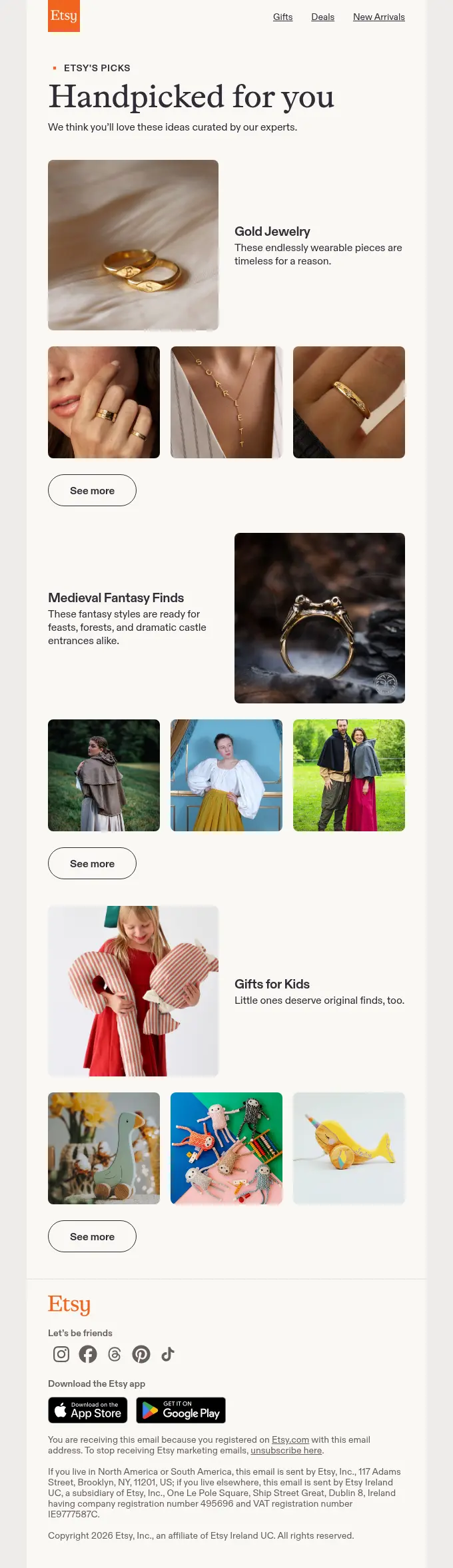
Product introduction email: Etsy curates bestsellers for new buyers
A product introduction email sends your new subscribers straight to your most popular categories so they don’t have to guess where to start shopping.
Instead of linking them to your home page, which they can find themselves just as easily, product recommendations narrow the focus significantly. They highlight certain collections or top-rated items to reduce decision fatigue and get them to your website.
Etsy uses its product introduction email to show curated categories like gold jewelry, medieval fantasy finds, and gifts for kids. It gives the new user a few different but specific entry points, which is more effective than thanking them for the subscription and linking them to your title page.
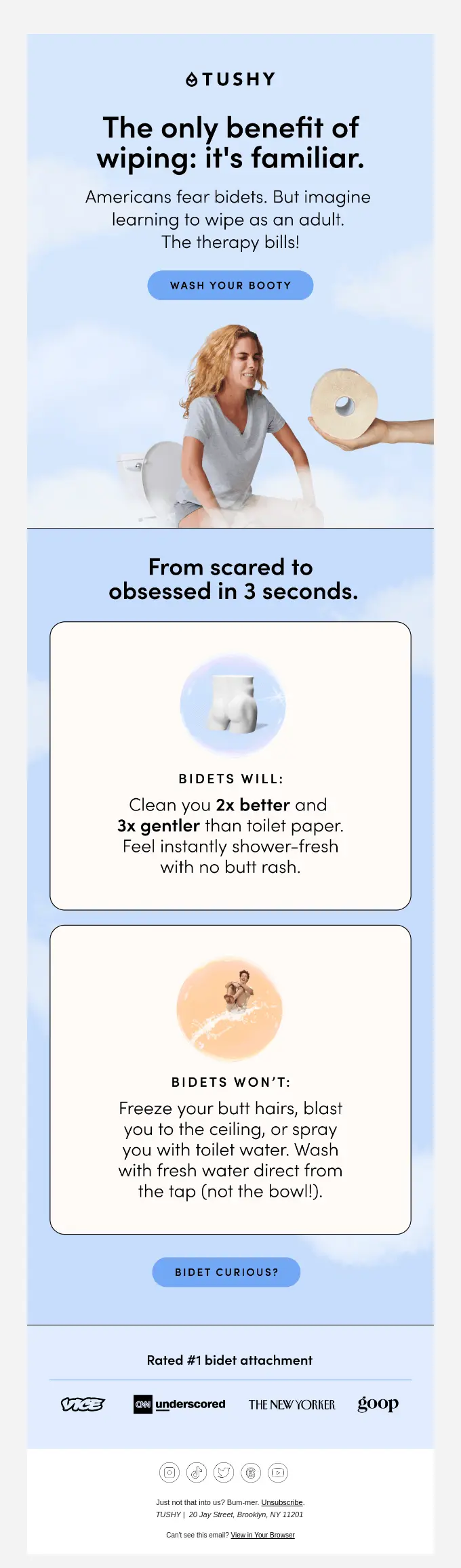
Value proposition email: TUSHY makes the case against toilet paper
A value proposition email tells the subscriber how your product solves their problem better than the next best thing.
This message focuses entirely on outcomes instead of technical specifications, features, materials, and dimensions. Instead, it highlights the benefits the customer will experience while using the item.
TUSHY uses this email type to position its bidet against traditional toilet paper. The copy skips the installation mechanics and focuses completely on life improvements: getting cleaner and feeling fresher.
How-to-use email: Kizik shows how its hands-free shoes work
A how-to-use email shows customers the steps they need to take to use or care for the item they just bought.
If you need to assemble the product, it has specific washing instructions, or there’s a general learning curve to it, this message can be a good measure to prevent user error. It removes friction before the customer has a chance to get frustrated and submit a support ticket.
Kizik sells shoes designed to be put on without hands, which naturally comes with a slight shift in your daily habits. The brand uses this email to demonstrate the step-in mechanism instead of just listing out the materials or size charts.

Social proof email: Thumbtack lets a real pro tell the story
A social proof email builds trust by showing new subscribers how other people use your platform or products successfully.
Instead of making claims from the brand’s perspective, this message uses customer reviews or case studies to validate the purchase decision and build trust. It lowers the perceived risk for a first-time buyer who is still on the fence about it.
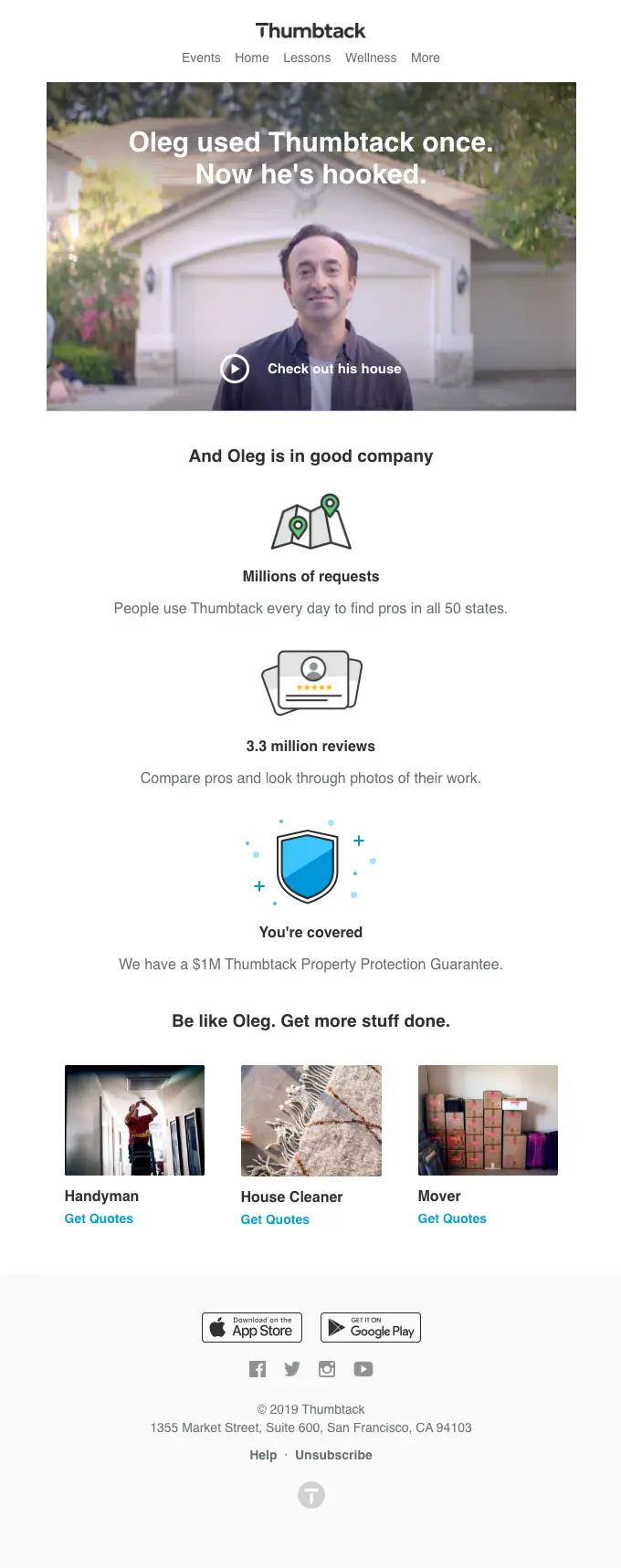
Thumbtack highlights a real professional named Oleg to show the value of the platform. The email integrates a video of his experience, which adds even more trustworthiness and proves the service delivers results.
FAQ email: Peloton answers questions before customers ask
An FAQ email addresses issues that are common in the ecommerce industry, like shipping times and return policies, before the customer even has to search for the answers.
This type of message removes the friction that may delay or stop a new subscriber from completing their first purchase. Instead of adding a link to your help center every now and again, this email delivers the most important answers in a structured format straight to their inbox.
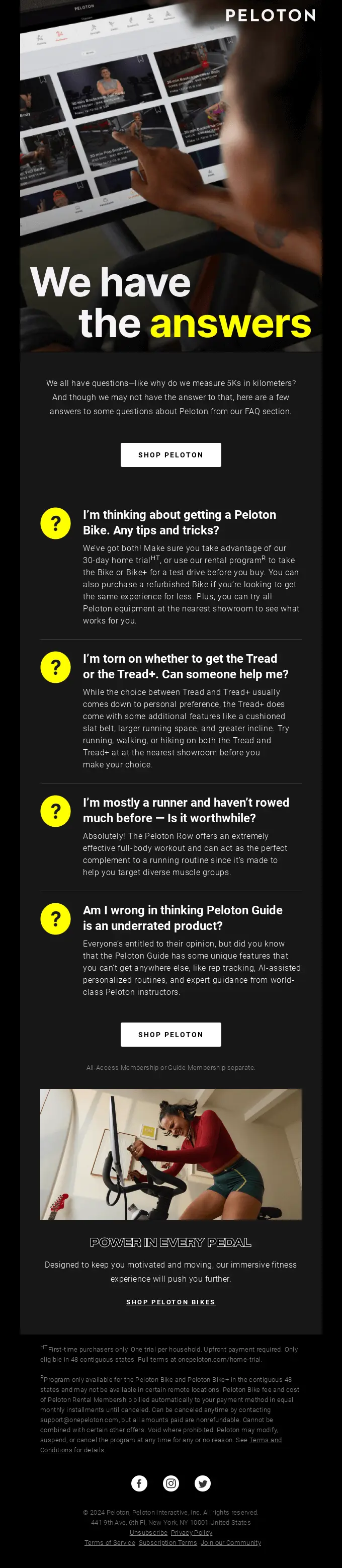
Peloton uses the FAQ email to solve pre-purchase hesitations as early as possible. They highlight the trial period and explain the differences between product models to clear up any lingering confusion.
Preference email: KOA asks new subscribers what they want to see
A preference email asks new subscribers to select their interests or favorite product categories so the brand can tailor the experience better.
The answers provide first-party data that impacts your segmentation and personalization efforts. This setup allows you to personalize the rest of the onboarding sequence and ensure customers only receive targeted product recommendations they truly care about.
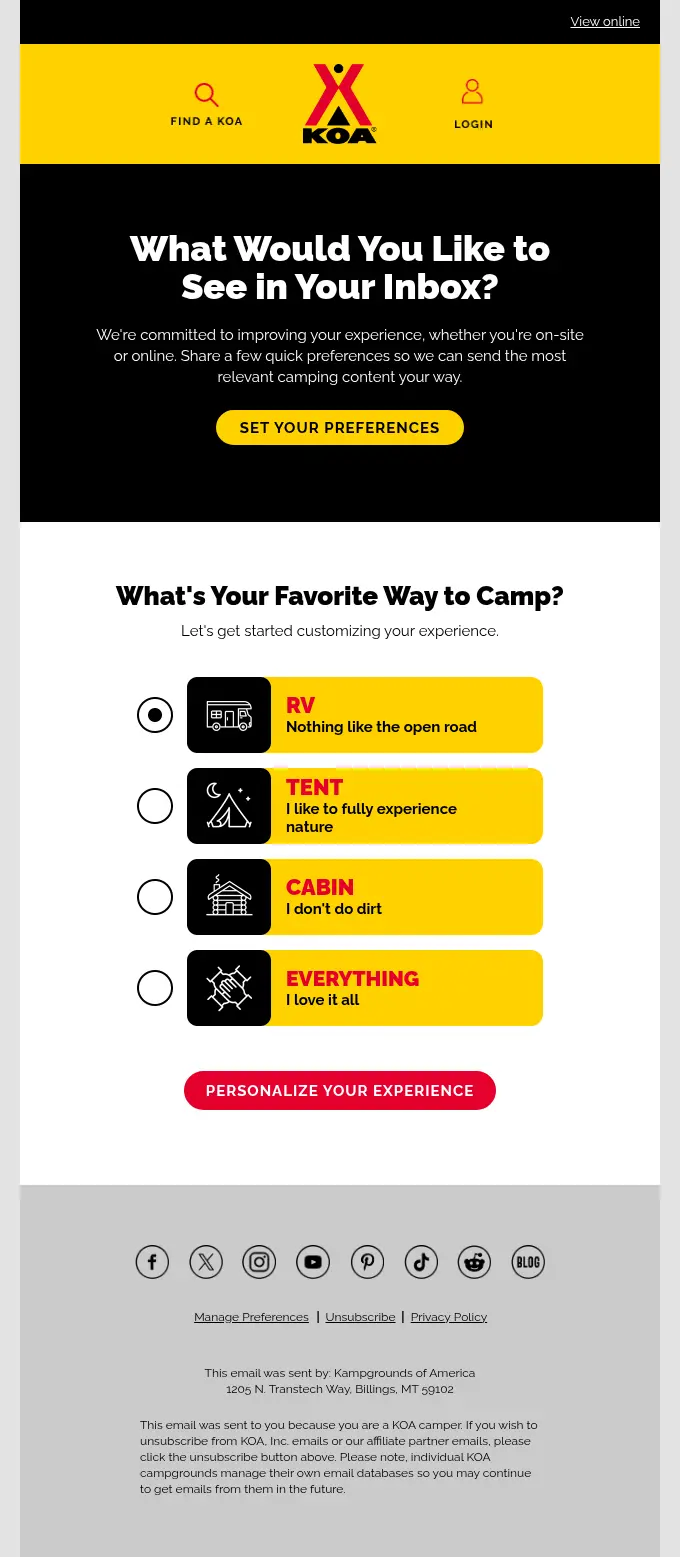
KOA uses this message type to ask subscribers about their favorite way to camp. They let their users sort themselves into RV, tent, cabin, or “everything” segments, which is a solid foundation for future campaigns or automations, especially during the holiday season.
Feedback email: Graza rewards first-time buyers for their opinion
A feedback email triggers some time after a subscriber makes their first purchase to capture their initial impressions of the product and the shopping experience.
This message is the final onboarding step before moving the customer into your regular post-purchase emails. The answers tell you where your strengths or issues lie in checkout, shipping, unboxing, or quality.
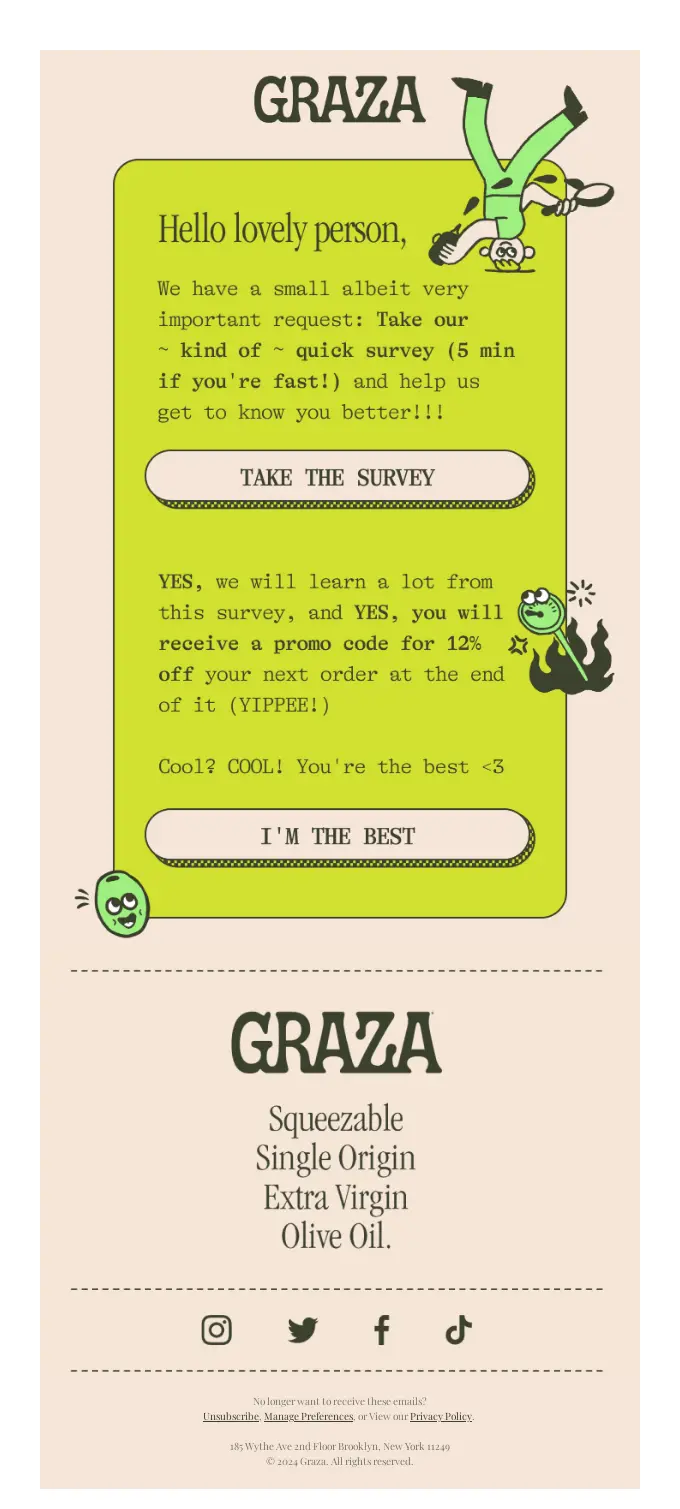
Graza sends a survey request shortly after a customer receives their olive oil. The brand states upfront that the questions take under five minutes to answer and, in exchange, the reader gets a 12% discount on their next order.
What does an onboarding email sequence look like?
An onboarding email sequence is an automated series of messages that guides a new subscriber from their initial sign-up through their first few weeks with your brand, until it ultimately drives a purchase or hands them over to your regular campaigns.
| Email number | Timing or trigger | Goal | Content |
|---|---|---|---|
| Email 1 | Immediately upon sign-up | Deliver the sign-up incentive | Discount code, brand introduction |
| Email 2 | 3 days after sign-up | Introduce the product catalog | Bestselling categories, curated collections |
| Email 3 | 7 days after sign-up | Build trust and provide social proof | Customer reviews, UGC, testimonials, case studies |
| Email 4 | 14 days after sign-up | Remove purchasing friction | Shipping FAQs, return policy details, sizing guides |
| Email 5 | 21 days after sign-up | Nudge the first purchase | Reminder of the unused discount code, targeted product recommendations |
How many emails should an onboarding sequence have?
A standard ecommerce onboarding sequence is often three to five emails.
High-ticket items with a long purchase cycle may need closer to five emails (or even more) to properly address objections and validate the cost. Complex products, like technical accessories or electronics, may also need longer sequences to cover both the technical features and end-benefits in detail.
The exact number a subscriber receives depends on their behavior. It’s best to configure a workflow that automatically removes a buyer from the rest of the onboarding sequence and stops sending purchase nudges the moment they complete their first order.
How to write an onboarding email
To write an onboarding email, you need to think about one single action you want the new subscriber to take. More often than not, it’s buying.
- Use your brand name as the sender name, at least for the first sends: People may be reluctant to open emails from personal employee names they have never seen before, especially with scams on the rise.
- Write subject lines and pre-header texts that tell the reader what’s inside: Pair a straightforward subject line with a clear pre-header instead of trying to be clever and using clickbait tactics to pique someone’s curiosity. You can find proven frameworks in our guide to welcome email subject lines.
- Limit each email to one goal: If the message introduces a product category, do not also ask the reader to read your blog post or follow social media channels.
- Keep the copy short and direct: Shoppers often scan messages to see if there’s something of value for them, so it’s unlikely they will read long paragraphs. State the benefit, provide necessary information, and move on.
- Support your message with clear visuals: Use product photographs to demonstrate the item in use or break it down by specific features or end-benefits to reduce purchasing hesitation.
- Close with one clear CTA: Use a contrasting call-to-action button with clear copy that tells the user what will happen once they click. Use text like “Shop bestsellers” or “Use your discount.”
Onboarding email best practices
The best and most efficient onboarding sequences have five shared practices: segmenting by sign-up source, personalizing by browse history, triggering by behavior, pacing over several weeks, and tracking conversion metrics.
Segment new subscribers by how they signed up
Segment new subscribers by their entry point, be it a website pop-up, an Instagram giveaway, a checkout box, or a barcode inside the shipping package. If you send a discount code workflow to someone who expects information on how to use the item, that will come off as irrelevant and confusing. It may also reduce the chances they’ll shop with you in the future.
Personalize based on what subscribers browse and buy
Base each onboarding email on what the subscriber browsed or bought. If a new user browses your running shoe category but leaves without buying, their next onboarding email should feature the same shoes they viewed alongside top-rated alternatives from that category. If you don’t have these flows configured and send a generic email instead, your marketing-savvy audience may take that as a sign your brand does not care enough to set up proper flows. Non-savvy users will just find it irrelevant.
Trigger emails by behavior, not only by time
Let subscriber actions, not fixed delays, decide which email goes out next. If a subscriber uses their sign-up discount on day two, your automation needs to skip the day-five purchase nudge. Once they make the purchase, your workflow must immediately switch to the post-purchase flow focused on product education (if applicable) and feedback. Pay more attention to user actions, not the calendar.
Pace your sequence over the first few weeks
Space your sequence out to deliver one to two emails per week over the first two to four weeks to avoid overstimulation. If you start sending messages every day to someone who just subscribed, that may cause list fatigue and drive up your unsubscribe rate. Give the reader a few days between emails to keep your brand visible without becoming annoying.
Track the metrics that show onboarding is working
Measure the conversion rate, time to first purchase, revenue per recipient, and unsubscribe rate for each email in the flow. While open and click rates are decent metrics, they only show that your subject lines work, not that your sequence truly is efficient in terms of revenue.
Omnisend data shows that automated messages regularly maintain open rates of 50% and more, and automated emails in general (not onboarding emails alone) generate around 30% of all ecommerce email revenue. To reach and consistently maintain those numbers, you need to track the above-mentioned metrics and improve underperforming sequences.
How to set up automated onboarding emails in Omnisend
To set up onboarding email automation, you need to select a pre-built workflow (or start from scratch if you prefer), define your entry trigger, and spread your messages across the sequence.
Omnisend connects natively with Shopify, WooCommerce, and BigCommerce. It syncs your store data immediately so you can start faster without struggling with custom coding.
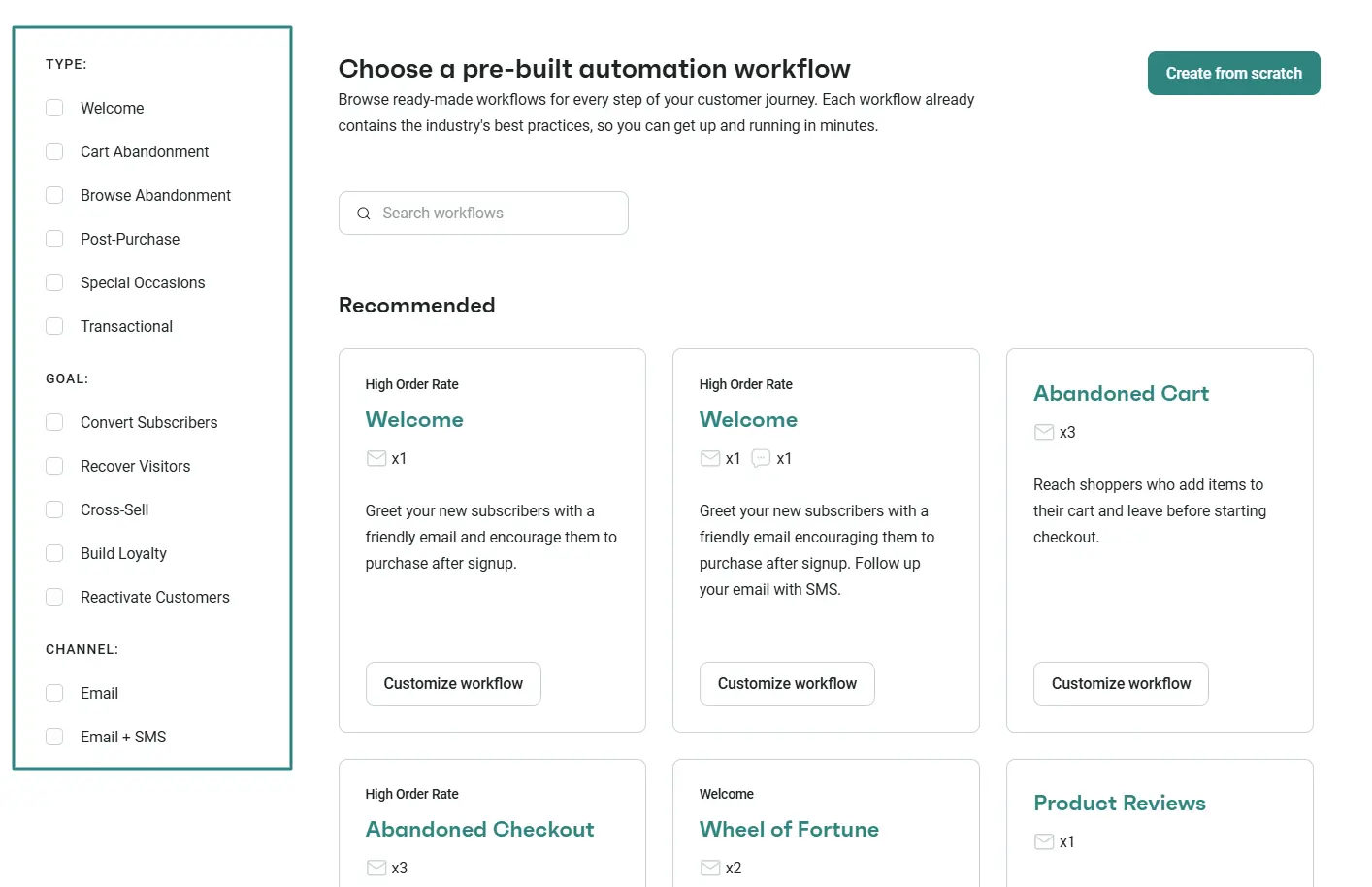
- Choose a pre-built welcome or onboarding workflow: Select a template from the automation library to get a solid foundation rather than starting completely from scratch
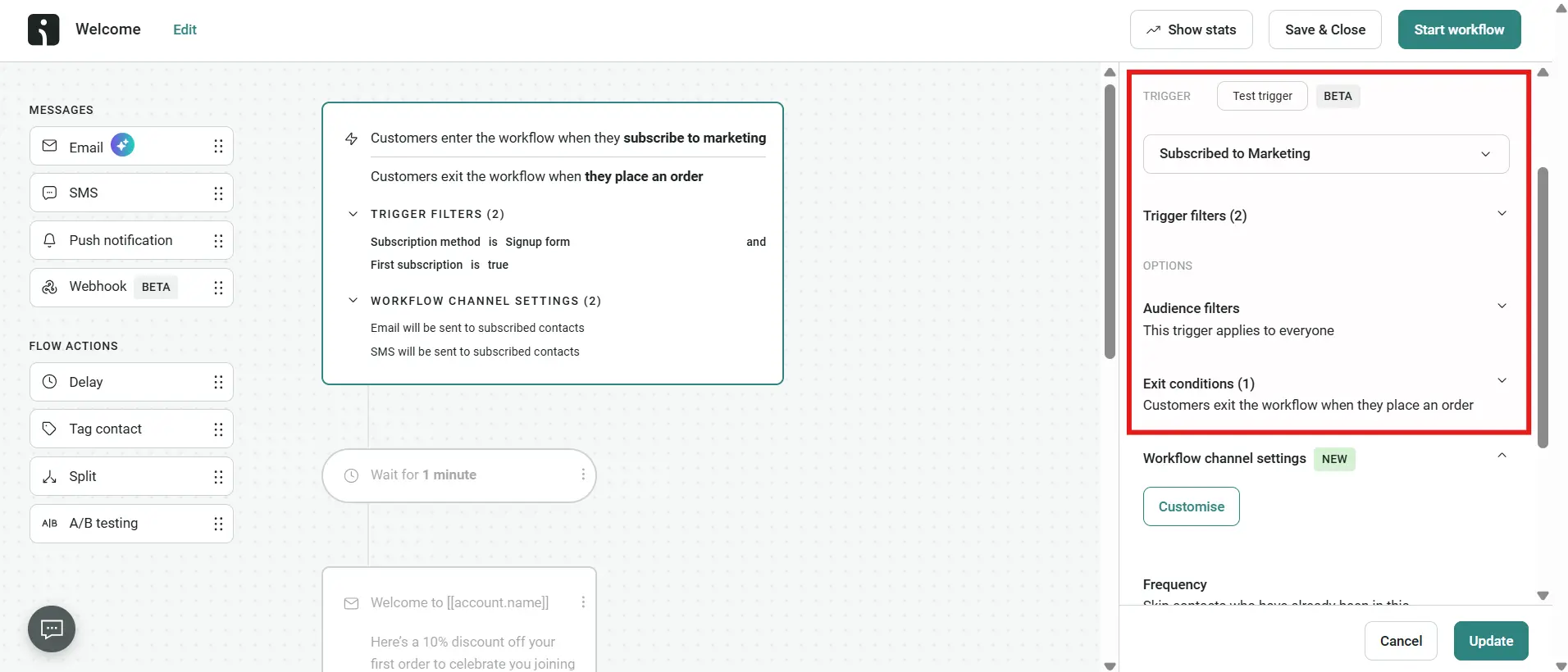
- Set the trigger: Define the customer action that starts the sequence. The standard trigger for this flow is a new form sign-up or a first-time purchase
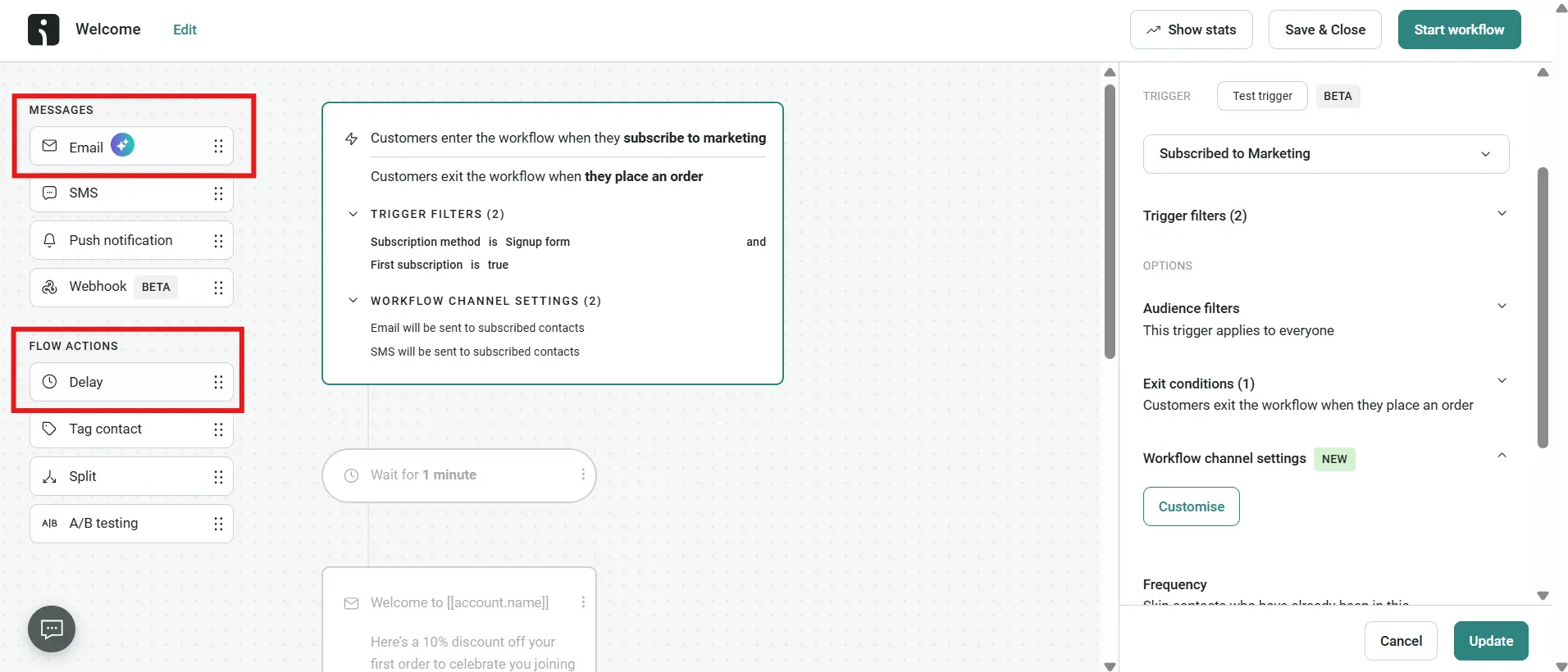
- Add emails and time delays: Drag your email drafts into the sequence and insert specific time delays between each message to pace the sequence over several weeks
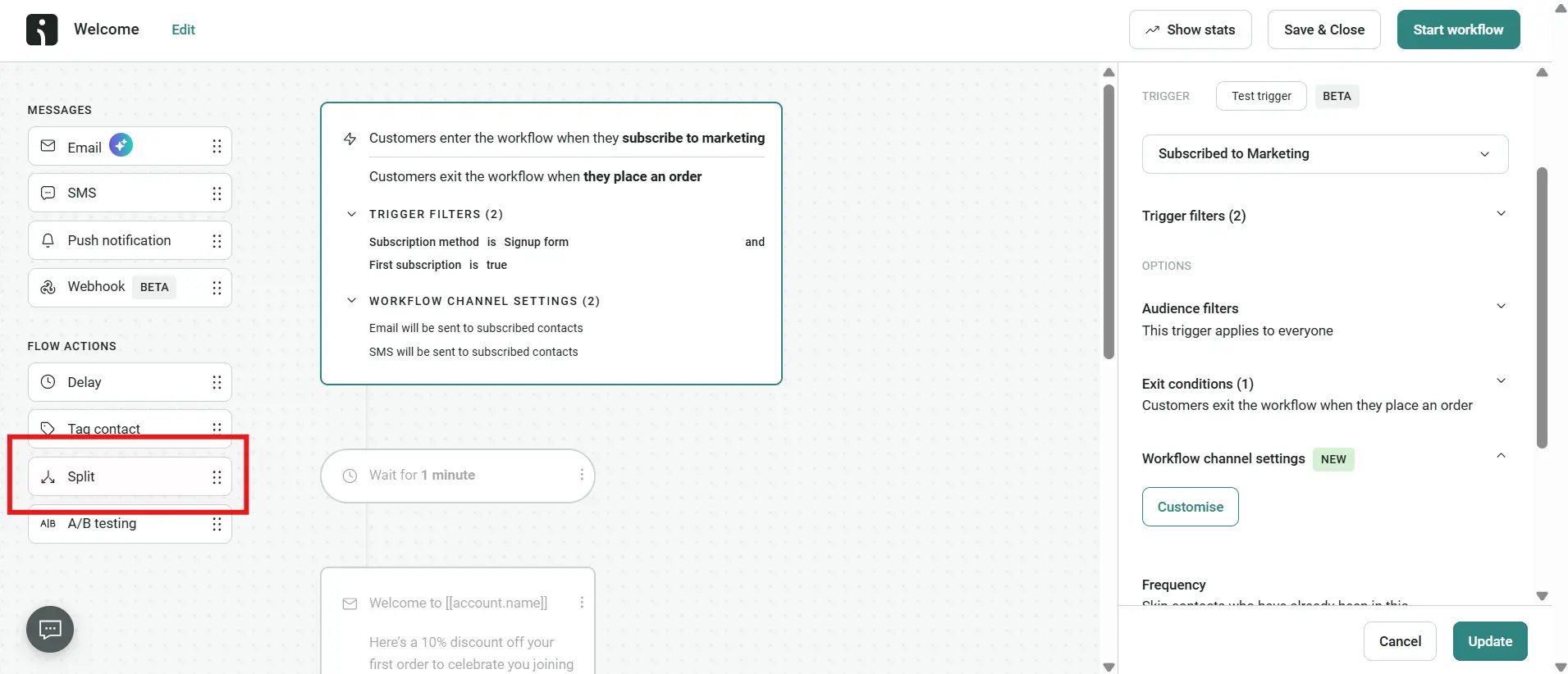
- Add conditional splits: Create logic branches that adapt to user behavior in real time. You can set a rule that checks for a completed order and automatically routes recent buyers away from additional promotional discounts
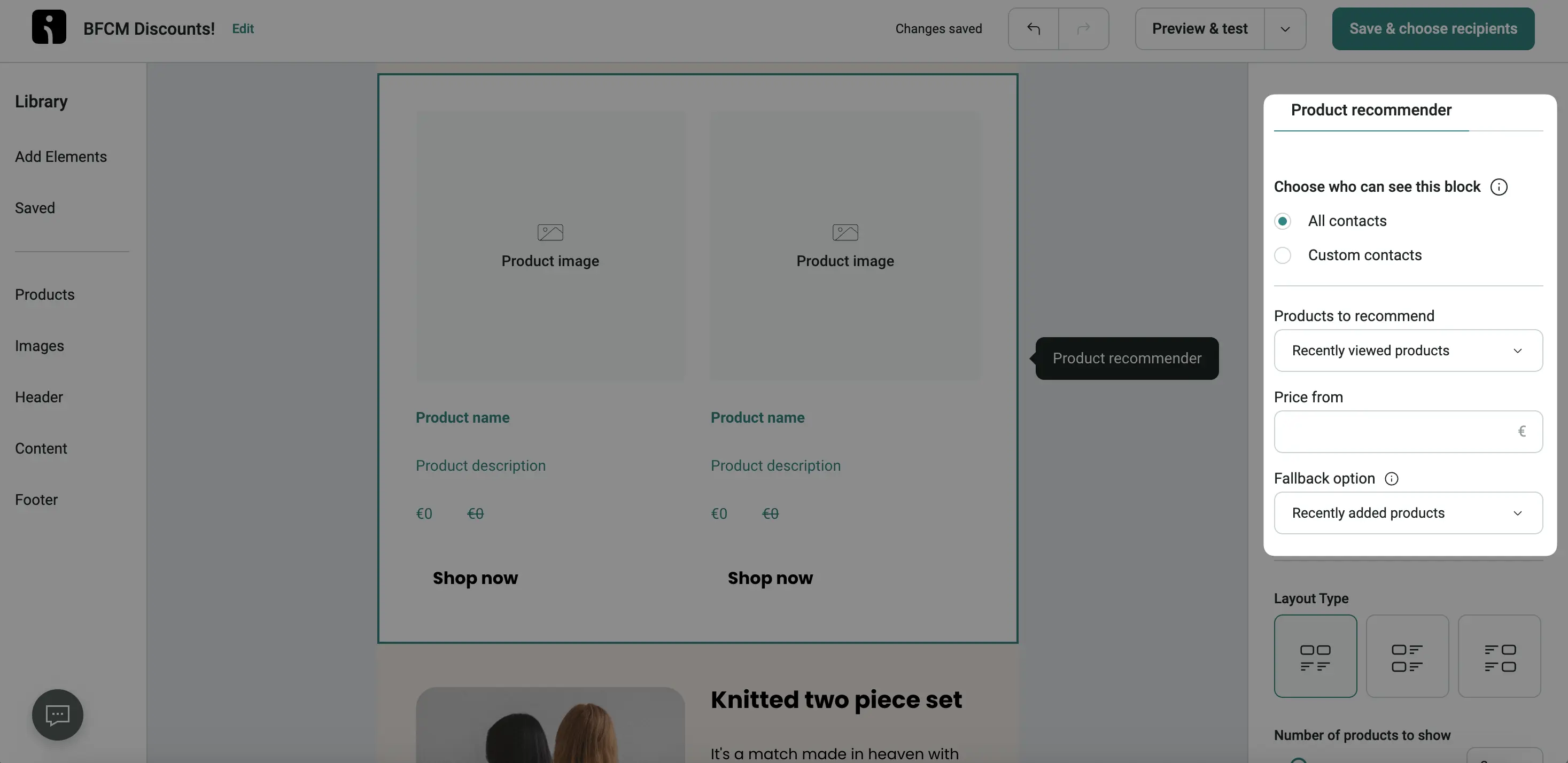
- Personalize the content: Insert dynamic product blocks into your emails, which will automatically fill the message with the items that the subscriber recently browsed or left in their cart
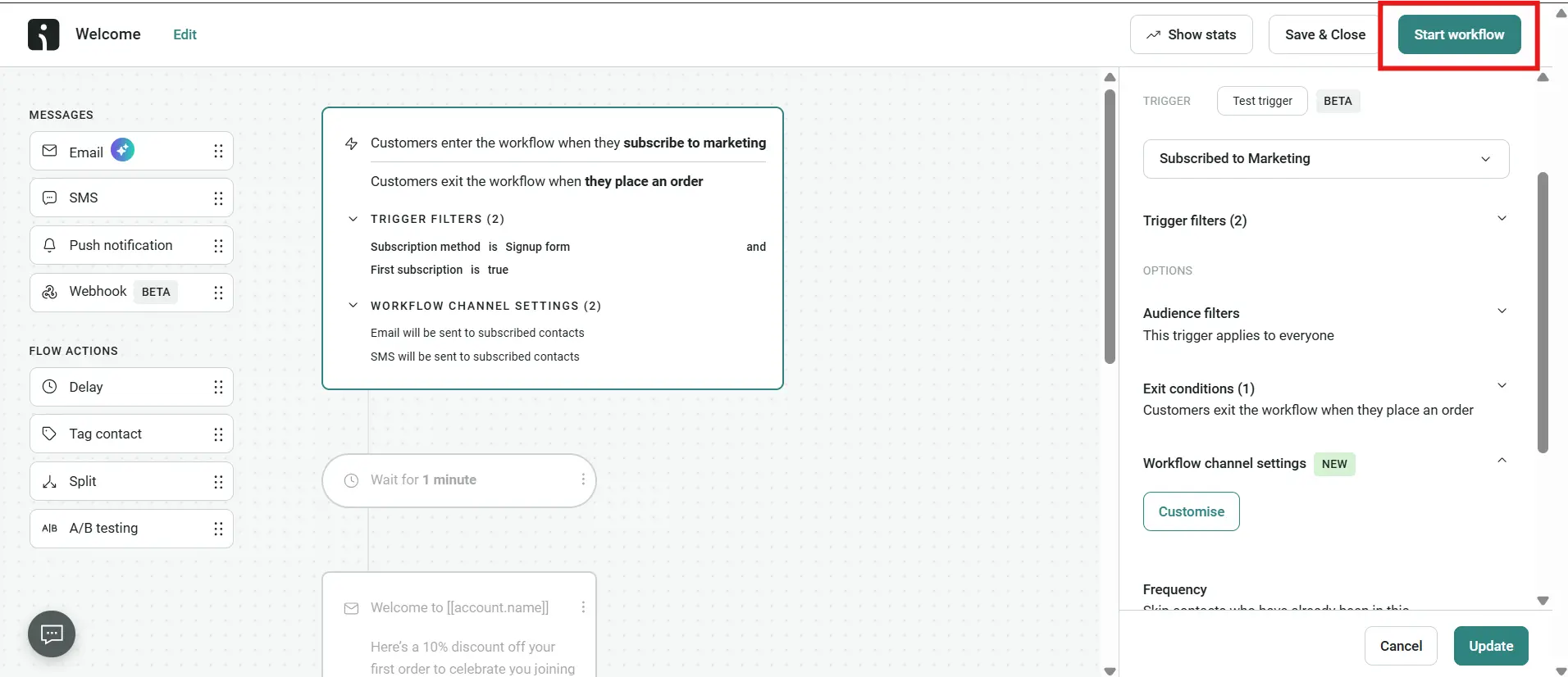
- Activate: Switch the workflow from draft to live. It will immediately start running in the background for every user who meets the trigger and send criteria
Turn new subscribers into repeat customers
An automated onboarding sequence bridges the gap between a new subscriber joining your list and buying your product. Use the five-email blueprint and tailor it to your business, but remember you may need to increase or reduce the number of emails, depending on whether your product demands it.
Quick sign up | No credit card required