Omnisend AI


 OFFER
OFFER








The complete guide to SMS marketing for ecommerce (2026)
With over 130+ pre-built integrations and flexible APIs, you can easily centralize data from across your tech stack
Make the most out of your data and unlock powerful growth marketing possibilities with these other top marketing tools.
Build any custom integration with our open, flexible APIs that are simple to use and implement.
Check out apps that have been stealing all the spotlight.
Email and SMS marketing insights, ecommerce resources, and the latest Omnisend news
Expert-led sessions covering email, SMS, and ecommerce marketing strategies.
Educational video and live training to help you make the most out of Omnisend.
Drive sales on autopilot with ecommerce-focused features
See Features
SMS marketing is rapidly gaining traction in ecommerce, with automated messages generating significantly higher revenue compared to traditional campaigns, making it a must-have channel for Shopify stores.
High-intent SMS messages, such as abandoned cart reminders and order updates, lead to better engagement and conversion rates due to their timely nature and direct reach to customers' mobile devices.
Setting up SMS marketing on Shopify is straightforward, requiring only 15-20 minutes to integrate, while compliance with local regulations and obtaining explicit consent from customers is crucial to avoid hefty fines.
Effective SMS strategies include leveraging transactional messages to build trust, segmenting audiences for personalized communication, and coordinating SMS efforts with email campaigns to maximize engagement and revenue.
SMS is quietly becoming one of the most profitable channels in ecommerce. And not by a little. Omnisend’s report shows that automated SMS earned five times more than campaigns. On top of that, SMS volume grew by 40% in 2025 — up from 31% in 2024. That’s not a small bump. More brands are leaning into text because, when it’s done right, it makes money.
It makes sense. People read texts quickly — especially when they’re waiting for an order or deciding whether to finish checkout. Messages sent at high-intent moments, like abandoned cart reminders or order updates, feel timely. And that’s what lifts open rates and conversions.
In this guide, I’ll tell you why Shopify SMS works, how to set it up, and which strategies get steady revenue via text messages.
Quick sign up | No credit card required
Shopify SMS marketing works because it reaches customers on their phones. In Q2 2025, mobile devices made up 62.54% of global website traffic. This shows that most shoppers browse on mobile.
Per our report, last year, 321 million SMS messages were sent by 150,000 brands. SMS click rates more than doubled year-over-year. So, customers are engaging with texts more than before.
Automated SMS earned $0.74 per send, compared to $0.15 for campaigns. In the UK, SMS campaigns reached a 5.1% click-to-conversion rate, above the global average of 0.97%. Additionally, according to Semrush, over 53% of Shopify visits come from mobile.
You can use Shopify SMS for abandoned cart alerts, order updates, and back-in-stock notifications. These messages increase conversions and improve customer retention.
Expert comment “I’ve been saying it for years — SMS is a must-have channel in the shopping journey. The data proves what we’ve known all along — automated texts reach customers when they’re most ready to buy. While email builds relationships over time, SMS strikes while the iron is hot.”
— Bernard Meyer, Sr Director of Comms and Creative at Omnisend
This section shows how to launch Shopify SMS marketing step by step. You’ll learn the rules, how to pick the right platform, how to set up Shopify, and how to build your subscriber list. Setting up Shopify SMS is simple and takes about 15-20 minutes.
Before setting up Shopify SMS marketing, you need to know the rules.
In the US, the Telephone Consumer Protection Act (TCPA) requires written consent for marketing texts. Sending messages without consent can lead to fines of $500 per violation. The CAN-SPAM Act requires clear sender information and an easy opt-out option.
Having a customer’s phone number doesn’t count as consent, and neither does the customer entering a number for:
Explicit consent means the customer agrees to receive marketing texts, usually by checking an unchecked box or submitting a form. You cannot make consent a requirement for placing an order. Remember that SMS laws vary by country, so your Shopify SMS setup must comply with local regulations.
Choose a Shopify SMS app that drives revenue, not one that just offers basic features. Look for one that grows with your needs, whether you’re migrating from tools like Yopto or starting fresh.
Here’s what to look for when searching for the best SMS app for Shopify:
Watch this video on the top five Shopify SMS apps that can transform your business:
In my experience, Omnisend is a strong choice for Shopify SMS marketing. It integrates with Shopify and combines SMS, email, and push notifications into a single flow. It also includes ready-made flows for cart recovery, birthdays, order updates, and win-back campaigns.
Omnisend’s pricing is also clear. For example, $10 buys about 667 SMS (US/Canada), and unused credits roll over for 60 days. The Pro plan adds SMS credits equal to your monthly fee ($59/month = $59 in SMS credits).
Dukier’s success story
Spanish pet brand Dukier grew revenue 525% in three years using Omnisend. Its automations now bring in 55% of revenue, with an open rate of 48.4%, a conversion rate of 2.8%, <0.01% spam complaints, and 0.36% unsubscribes.
Read the full case study here to get more details.
If you’re wondering how to set up SMS on Shopify, here’s exactly how I did it with Omnisend.
1. Install Omnisend
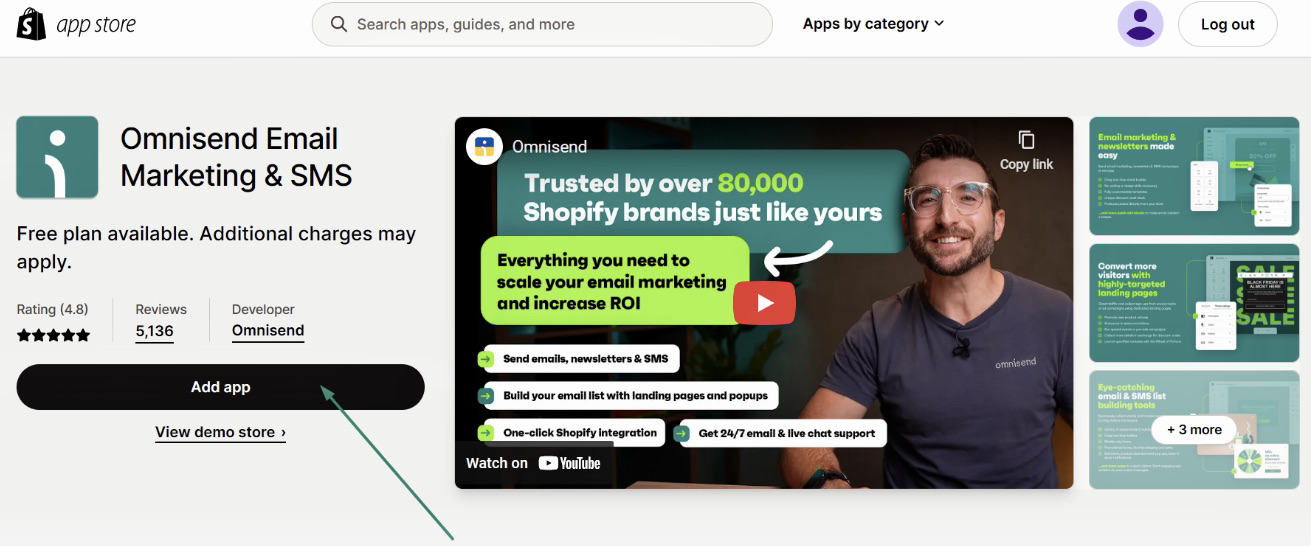
I went to my Shopify admin > Apps > Customize your store. Searched for Omnisend Email Marketing & SMS > Add app:
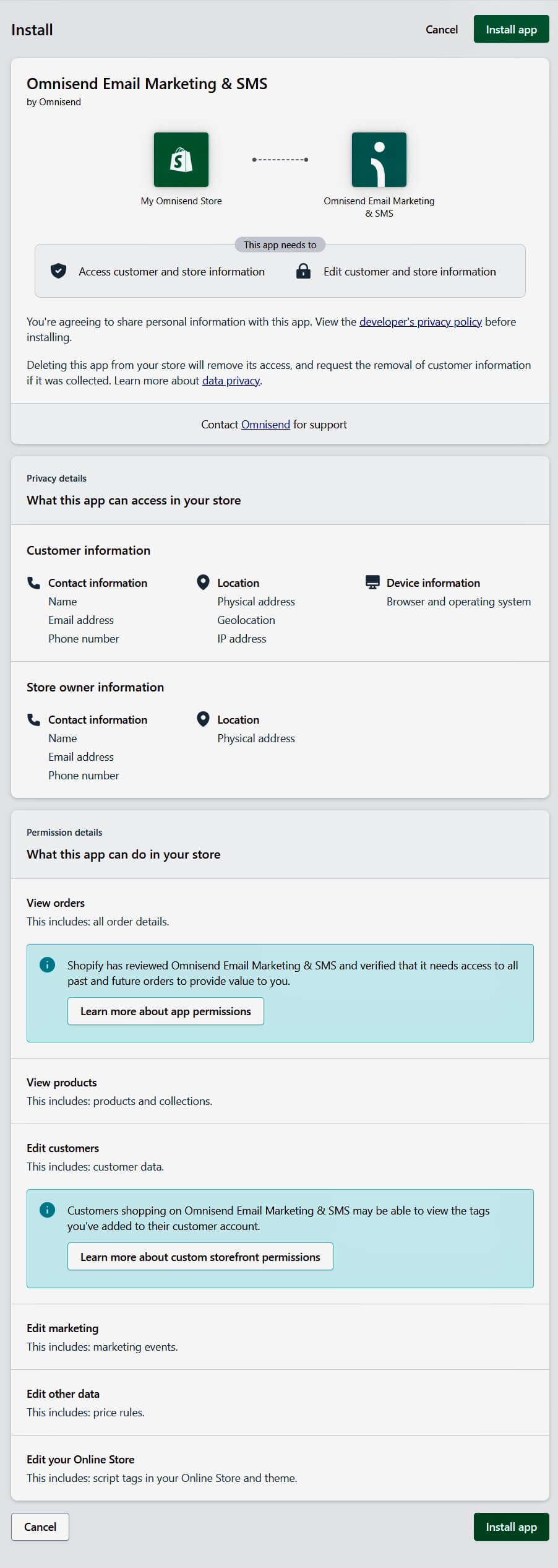
Before installing, review app permissions:
2. Connect Shopify store data
Once installed, Omnisend automatically synced my customers, orders, and products. The initial sync completes within an hour (up to 24 hours for large stores). New actions update in minutes.
3. Enable SMS opt-in at Shopify Checkout
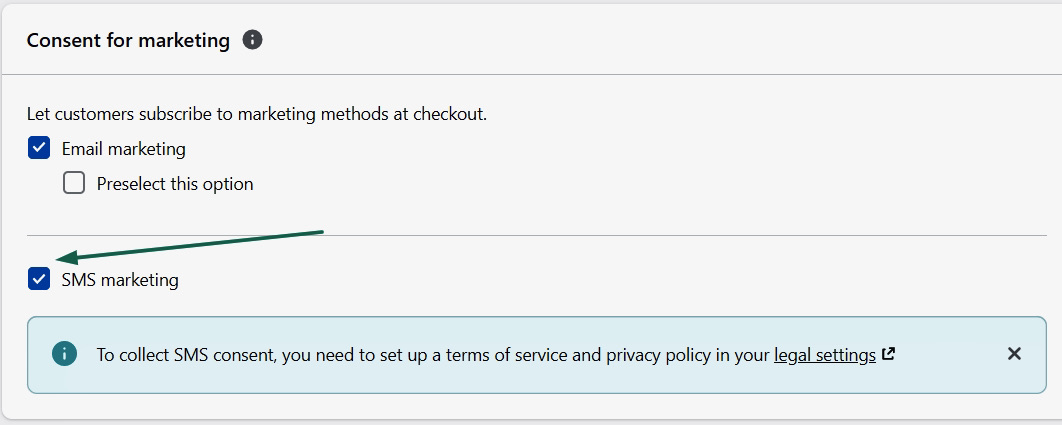
To collect SMS consent, I went to Shopify Settings > Checkout > Customer contact:
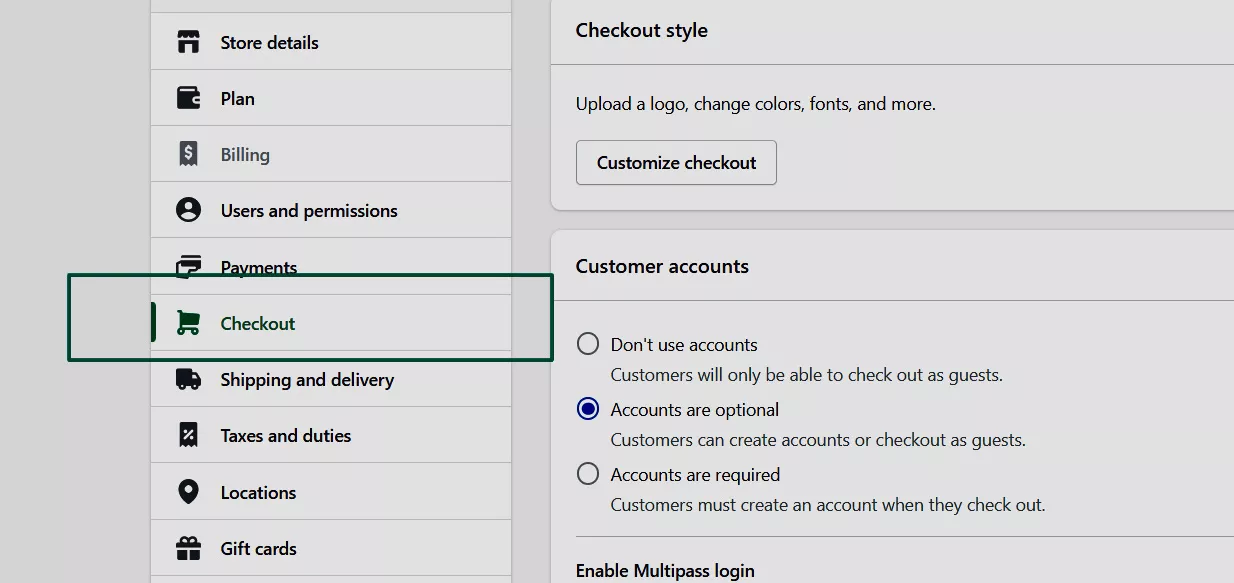
Scrolled down to Marketing consent, and checked the SMS marketing option. Omnisend then records opt-ins automatically:
4. Create SMS opt-in forms and popups
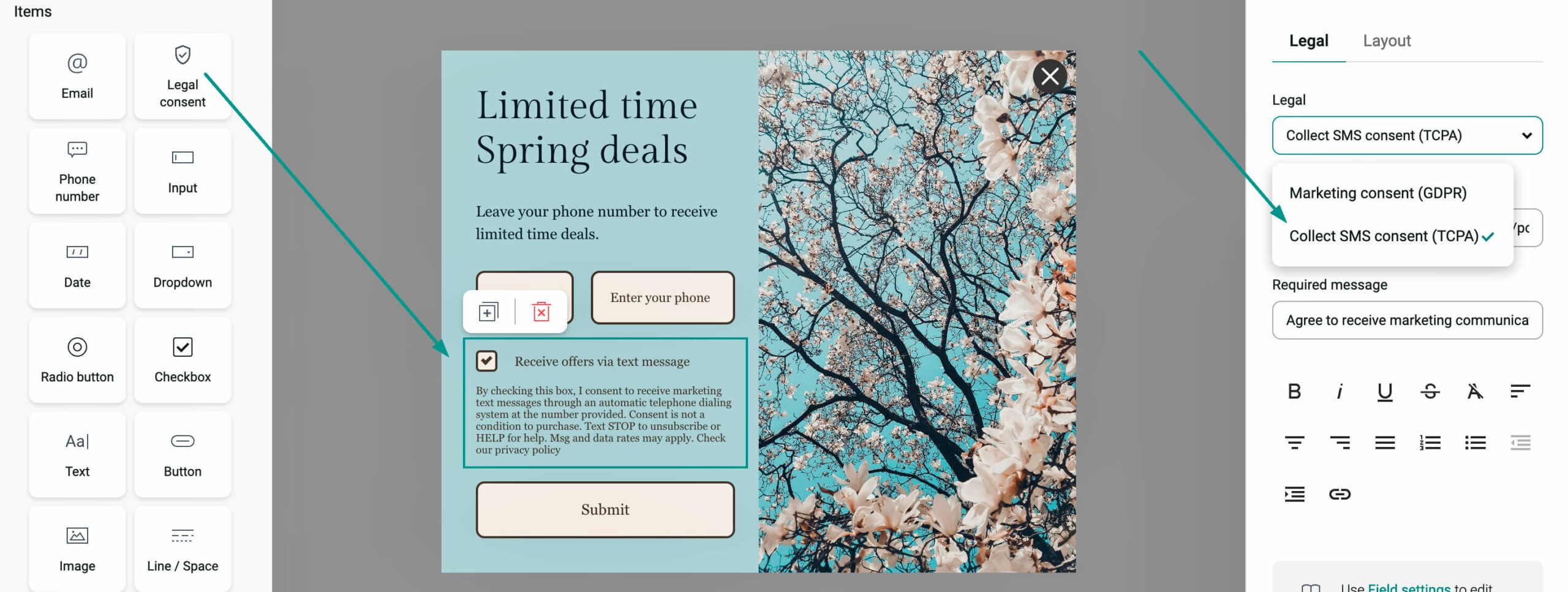
To build my Shopify SMS subscriber through forms and popups, I went to Forms > Create form/edit an existing one. Added a phone number field and enabled SMS opt-in.
Remember to include TCPA legal text, as shown below:
5. Set double opt-in if needed
This isn’t required under GDPR/TCPA unless your country mandates it. Omnisend uses single opt-in, so customers who opt in at checkout or via forms join my Shopify SMS list immediately.
6. Import existing subscribers
I imported my subscribers via CSV in Omnisend under Audience > Imports. I ensured the numbers were in international format, opted in, and then clicked Import. After that, contacts sync automatically.
After setup, my orders, customers, and products are updated in real time. The full Shopify SMS integration took ~20 minutes.
Here’s a guide on how I grew a Shopify SMS marketing list and can help you, too. It includes where to collect subscribers, which incentives work, and what to avoid.
Where to collect subscribers:
Incentives that work:
From my experience, combining checkout opt-ins with timely popups and clear incentives helps get the most Shopify SMS subscribers.
However, list growth is gradual. Quality matters more than size. Never purchase SMS lists because it’s illegal, harms deliverability, and damages trust.
Setting up a Shopify SMS workflow is just the first step. To get the best results, you need to send the right message at the right time.
I’ll cover the core strategy, including message types, automation flows, timing, and segmentation, to help you increase revenue.
When I run SMS marketing campaigns on Shopify, I rely on three core message types: transactional, promotional, and lifecycle messages. Each serves a different purpose in your Shopify SMS strategy.
1. Transactional messages
These are sent after a customer action and aren’t promotional. They have very high open rates of ~98%. Most regions don’t require marketing consent. Examples of transactional messages include:
2. Promotional messages
These are Shopify marketing texts that drive revenue. These require opt-in and frequency control. For example:
3. Lifecycle messages
Automated texts triggered by the customer journey stage. These blend service and promotion, boosting engagement in SMS campaigns. Examples include:
When learning how to send SMS from Shopify, do what most successful stores do. Combine transactional, promotional, and lifecycle messages. This builds trust and keeps customers coming back.
Automation makes Shopify SMS marketing more effective. Platforms like Omnisend run workflows automatically when customers take action. It also provides pre-built templates for every event.
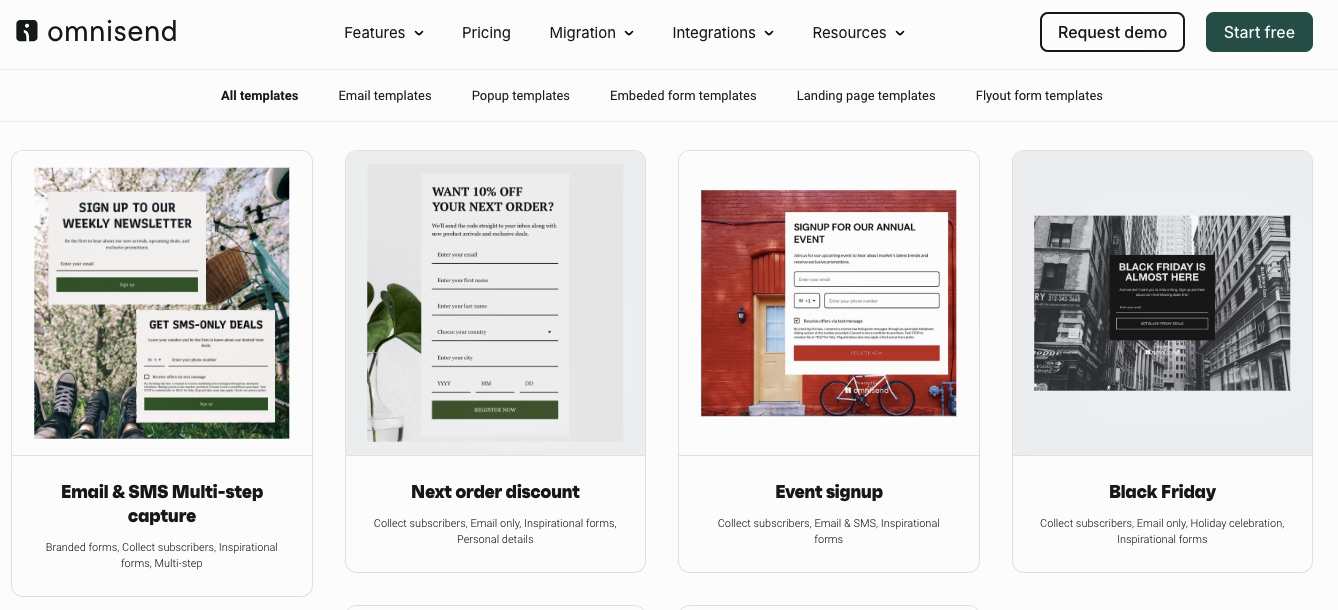
Let’s discuss some common workflows.
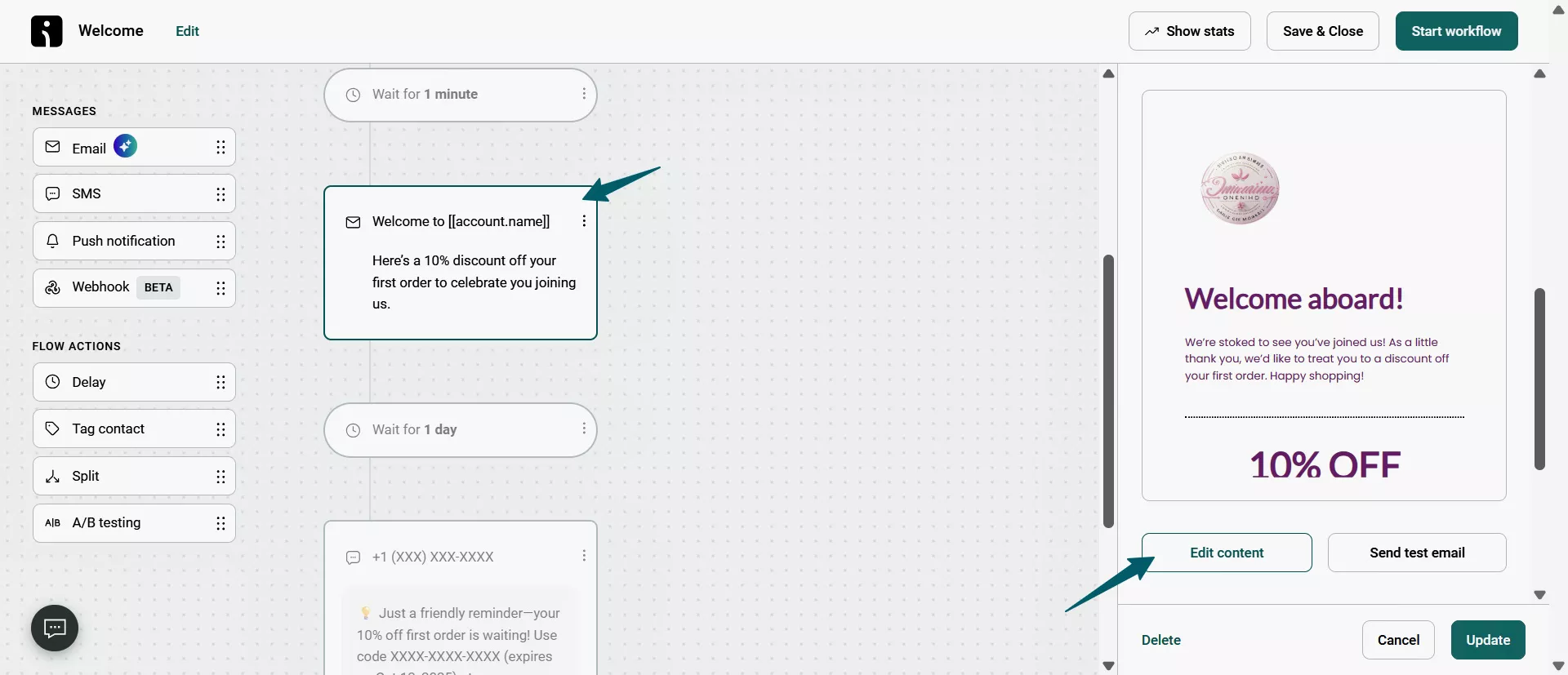
Welcome series
Omnisend’s welcome automation includes pre-made Email + SMS messages ready to customize for your brand:
Abandoned cart recovery
Browse abandonment
For example, an SMS template for browse abandonment could say: “Still considering the {product_name}, {first_name}? Here’s why you shouldn’t miss out: {product_benefits_url} Reply STOP to opt out.”
Post-purchase follow-up
For example, a post-purchase follow-up and feedback request could be: “Your opinion matters! Share thoughts: (Link). It takes 60 seconds.”
Back-in-stock alerts
Customer win-back
If a customer hasn’t opted into SMS or Push, Omnisend skips that step and sends the next message (like email).
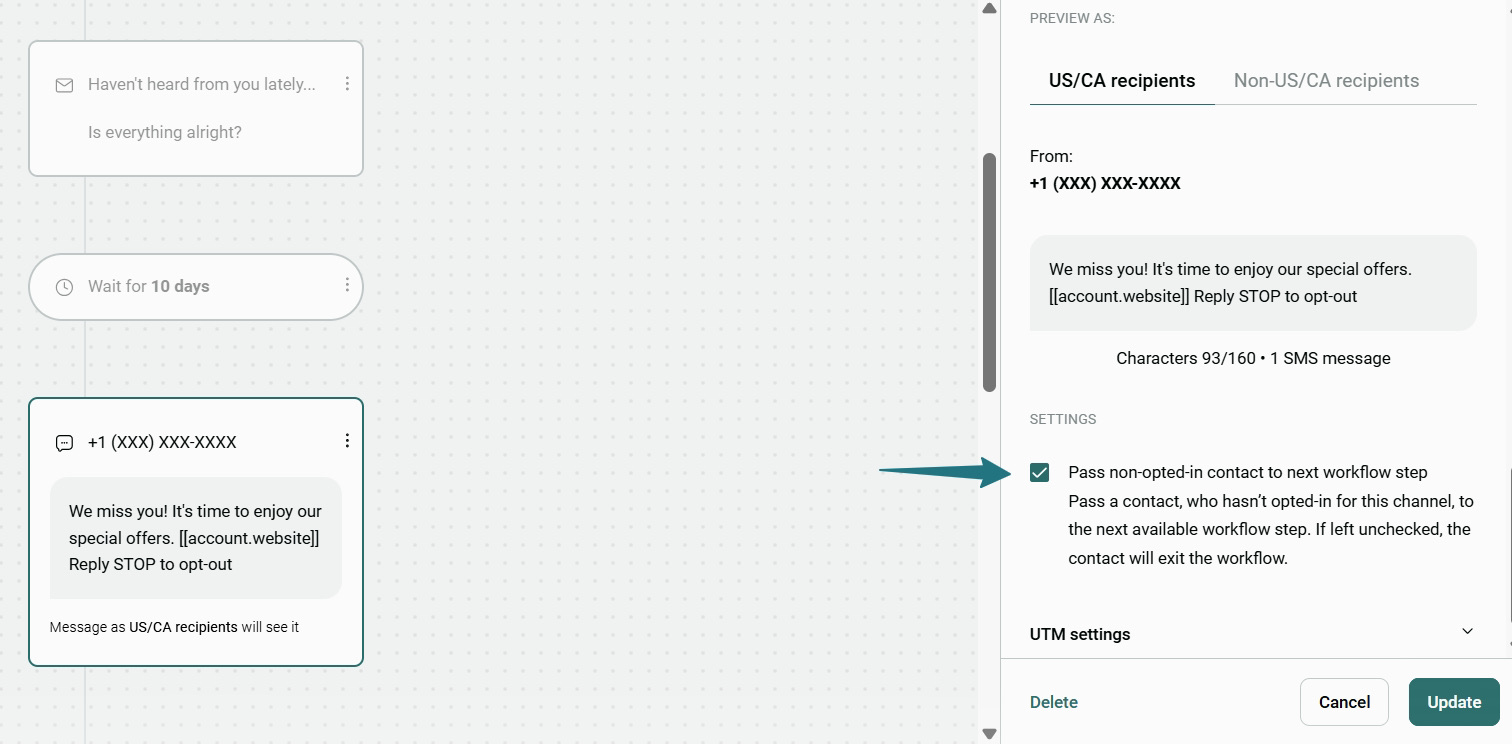
You can (and should) combine these SMS workflows with email to maximize engagement and revenue. In my experience, abandoned cart and welcome series usually drive most revenue from Shopify SMS campaigns.
For Shopify SMS marketing, timing affects how well your messages perform. Send messages during your recipients’ waking hours in their local time zone:
SMS is more intrusive than email because it’s sent directly to a user’s phone and often triggers immediate attention. So, frequency should be lower:
For stores with national/international customers, time zones matter. For example, a message sent at 10 AM EST may reach some customers at 7 AM PST, which is too early to engage.
Tools like Omnisend adjust SMS sends by time zone to avoid early/late messages — one of the biggest reasons for opt-outs.
Remember that message quality and relevance matter more than quantity. This ensures Shopify SMS campaigns remain effective and welcomed.
Sending the same message to every subscriber lowers its impact. Segmenting your Shopify SMS list makes messages more relevant. It also improves conversion rates. Tools like Omnisend track customer data and automatically update segments.
Here are key segmentation strategies for Shopify stores.
Purchase behavior
Engagement level
Cart value/customer lifetime value
Geographic location
New vs. returning customers
Product category interest
Combine segments for precise targeting. For example, high-value customers in California who haven’t purchased in 60 days. Omnisend can update segments automatically based on real-time behavior.
Quick sign up | No credit card required
SMS generates the highest revenue per message of any marketing channel — but only when done correctly. Follow these best practices to build a profitable SMS program that customers want to receive.
These recommendations come from well-maintained Shopify stores using Omnisend for Shopify SMS marketing. Used consistently, they increase engagement, conversions, and reduce unsubscribe rates:
1. Get real permission
A phone number isn’t consent. Build opt‑in forms that explicitly state what subscribers will receive. For US merchants, TCPA compliance is non‑negotiable — violations can cost thousands per message.
Your opt-in language must clearly state that subscribers will receive marketing texts. Here’s what it should look like:
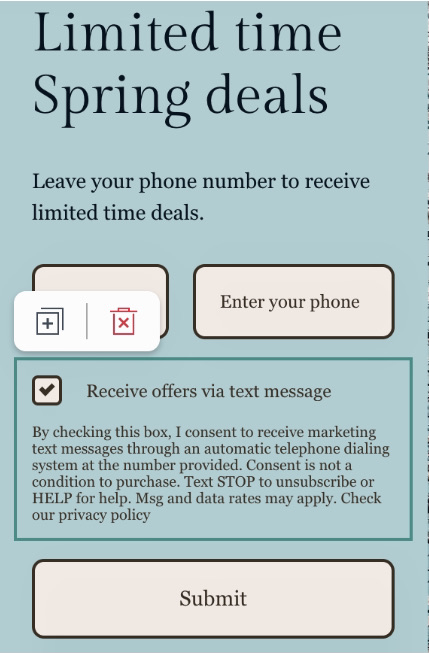
Compliance rules vary by region, so check local laws. The Shopify checkout opt-in is effective because customers are already engaged.
2. Lead with transactional messages
Start with Shopify SMS notifications for shipping and order updates. These messages have near‑perfect open rates and train customers to recognize your number before you send promotional content.
These messages include “Order confirmed,” “Order shipped,” and “Delivered.” Transactional messages build trust before you send promotional messages.
3. Stay under 160 characters
Longer messages get split and cost twice as much. Include your brand name, state the offer, and add a link. That’s it.
160 characters is the SMS limit. Special characters (like emojis) reduce it to 70. You should also use link shorteners. Platforms like Omnisend can automatically shorten links. Keep your message short: brand name, offer, CTA, and link. For example:
![Shopify SMS: Screenshot of a text message editor showing a promotional SMS: Celebrate the season! ✨ 25% OFF sitewide. Sale ends today at midnight! Shop now: [account.website]. Below, it notes 123/134 · 2 SMS messages.](https://www.omnisend.com/blog/wp-content/uploads/2026/03/11-Omnisend-sms-with-emoji-example.jpeg)
4. Segment by time zone
A 10 AM text in New York hits LA at 7 AM. Most SMS platforms handle this automatically — use it.
Sending messages too early or too late can raise opt-out rates. Omnisend detects time zones and automatically adjusts SMS delivery. This is essential for national or international Shopify stores.
5. Mix SMS into existing automations
Add texts to abandoned cart flows after the second email. Send “sale ending” alerts to complement email campaigns. Text VIP customers about restocks before announcing to your whole list. Combining SMS with email automation consistently improves conversions.
For instance:
“The biggest mistake I see is adding SMS too early, before email sequences are proven. Perfect the email flow first. Once you see strong open and click patterns, add SMS for abandoned carts and post-purchase to amplify what’s already working.”
— Andrius Šeršniovas, Conversion Specialist at Omnisend
6. Honor unsubscribes immediately
Include “Reply STOP” in every marketing text. Process opt‑outs instantly — spam complaints can shut down your entire SMS program.
US law (TCPA) requires all SMS messages to include a clear opt-out that is honored right away. Ignoring unsubscribes hurts your sender reputation. Remember, the quality of your Shopify SMS list matters more than its size.
“I tell every merchant: a high-quality SMS list is critical. If you don’t honor opt-outs instantly, engagement drops. Treat unsubscribes as feedback. If people leave after certain messages, improve that part of your strategy.”
— Evaldas Mockus, VP of Marketing, Omnisend
7. Personalize messages with customer data
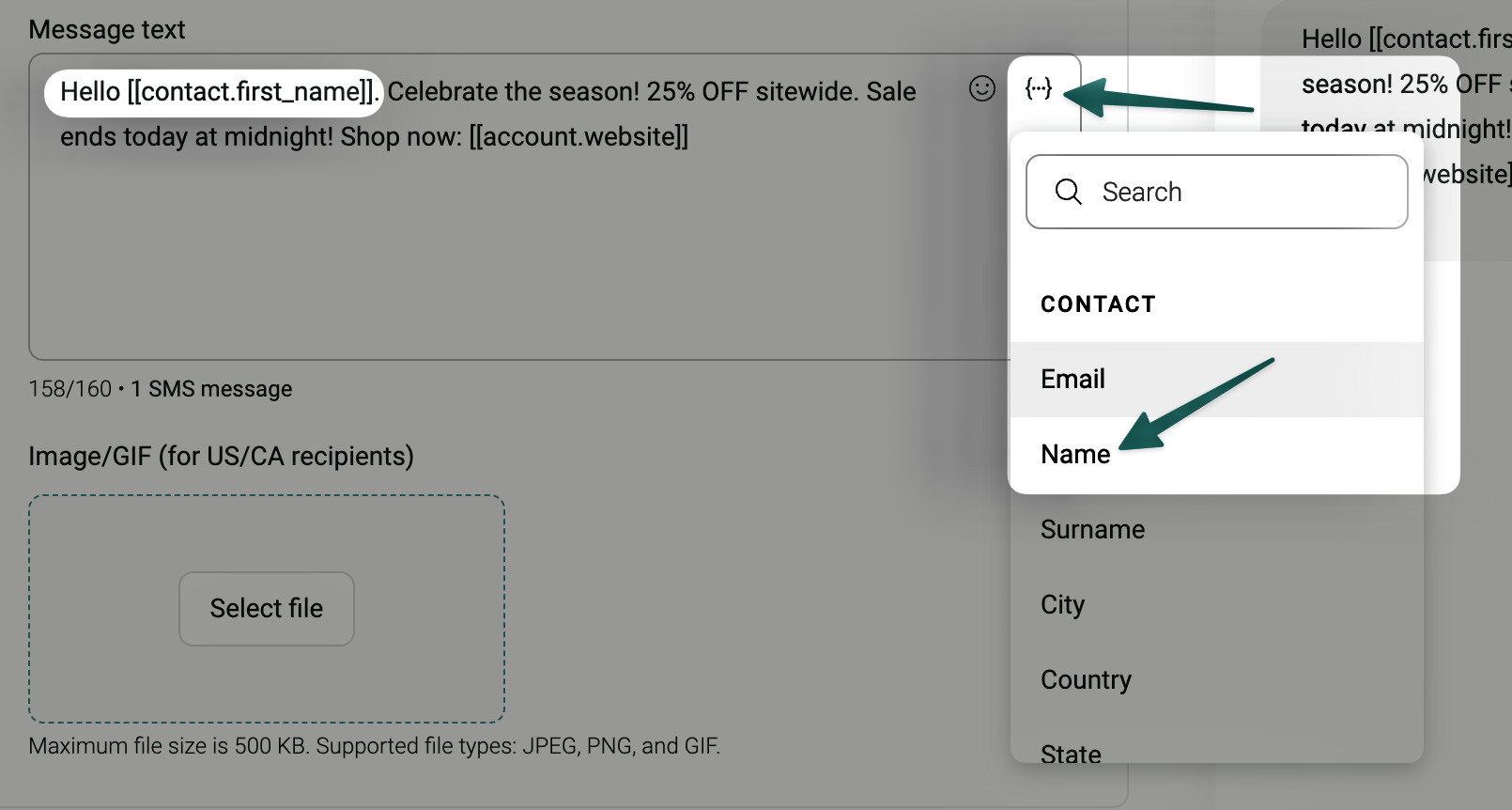
Use customer names, purchase history, and preferences to personalize messages and boost conversions. Omnisend automatically pulls this data from Shopify.
Use merge tags like [[contact.first_name]]. These are placeholders replaced with each customer’s info (first name/purchased product). You can personalize these in Omnisend:
8. Use MMS for product promotions
MMS lets you add product images that stand out in crowded inboxes, especially for new launches or back-in-stock alerts.
However, it costs about three times more than SMS ($0.045 per MMS vs. $0.015 per SMS in the US), so use it only for high-impact messages.
9. Test and optimize send times
Best send times vary by audience. What works for one store may not work for yours. Use Omnisend’s reports to track opens, clicks, and conversions, then A/B test morning vs. afternoon sends.
Remember, behavioral triggers like abandoned cart Shopify SMS should be sent to customers immediately after the event happens.
10. Coordinate SMS with email campaigns
Shopify SMS and email should work together, not compete. First, optimize your Shopify emails setup with product info or offers. Then follow up via SMS to contacts who didn’t engage.
Using both channels helps increase conversions by reaching your audience where they are most active. You can build email + SMS automation workflows in Omnisend’s workflow builder and see an ROI of up to $79 per dollar spent.
SMS marketing delivers the fastest path to revenue for your Shopify store.
I’ve found that text messages work where email can’t — they get opened within minutes, recover abandoned carts before customers move on, and deliver time-sensitive offers when urgency matters most. No algorithm changes or spam folders blocking your message.
You don’t need complex strategies to start. Basic automations, such as welcome texts and cart reminders, generate ROI from day one. As your Shopify SMS list grows, add segmentation and personalization to it.
The directness of SMS makes it beginner-friendly. Your customers will either engage or opt out quickly, giving you clear signals about what works.
Quick sign up | No credit card required
Shopify apps let you text customers for marketing. Just remember to get their permission first and follow US texting laws, or you risk massive fines.
Every SMS app automates your texts. Cart abandonment fires after two hours. Welcome messages go out on signup. Shipping updates are sent when orders move, with zero manual work.
The best Shopify SMS app connects to your store, syncs data in real time, and automates flows such as abandoned cart recovery. Omnisend combines SMS + email, supports personalized segments, and offers 24/7 support — even on the free plan.
Most apps charge a monthly fee + per-text cost. Omnisend’s free plan gives $10 (~667 SMS) to start. Unused credits roll over 60 days. Pro plan adds SMS credits equal to your subscription fee ($59 = $59 in SMS credits).
Not fully. Shopify Messaging offers free Inbox/chat and 10,000 emails/month. SMS starts at $0.05+, with 25 free messages weekly. Advanced features need apps like Omnisend.
You might wonder, does Shopify have SMS marketing? Yes, mainly for transactional updates. For automated flows, abandoned carts, campaigns, and segmentation, you need a Shopify SMS app like Omnisend.

TABLE OF CONTENTS
TABLE OF CONTENTS

What’s next


No fluff, no spam, no corporate filler. Just a friendly letter, twice a month.