Omnisend AI


 OFFER
OFFER










In this guide:
→ Step 1. Get compliant before you send a single text
→ Step 2. Build your SMS subscriber list
→ Step 3. Send your first SMS campaign
→ Step 4. Track your SMS campaign results
→ Step 5. Add SMS to your automation workflows
Introduction
When Divatress built its SMS marketing program on Shopify, it grew to 70,000 subscribers in eight months. Three months of SMS sales covered a full year of Omnisend. That kind of result isn’t luck — it’s a structured system.
Most store owners on Shopify, WooCommerce, and BigCommerce are stuck in one of two places. They’re either nervous about sending noncompliant texts or firing off messages with no real SMS marketing strategy behind them.
All the while, demand is rising. Ecommerce brands sent 40% more SMS messages in 2025 than in the previous year.
We’ll explore here how to start SMS marketing the right way. In five clear steps, you’ll learn to collect numbers legally, send timely campaigns, and trigger automations that recover sales.
Quick sign up | No credit card required
What is an SMS marketing program?
An SMS marketing program is a structured system for collecting consent, sending targeted text messages, and automating customer communication. Unlike one-off promotional blasts, it follows a clear SMS marketing strategy based on customer behavior, timing, and business goals.
If you don’t have a plan, you might send random texts that improve short-term sales but lead to more unsubscribes over time. Implement a good SMS marketing program, and you’ll give each of your messages a clear purpose. This can range from welcoming new subscribers and recovering carts to encouraging repeat purchases and sharing important updates.
SMS marketing for ecommerce helps you create a more consistent customer experience and improves long-term results. Every SMS marketing program has these main parts:
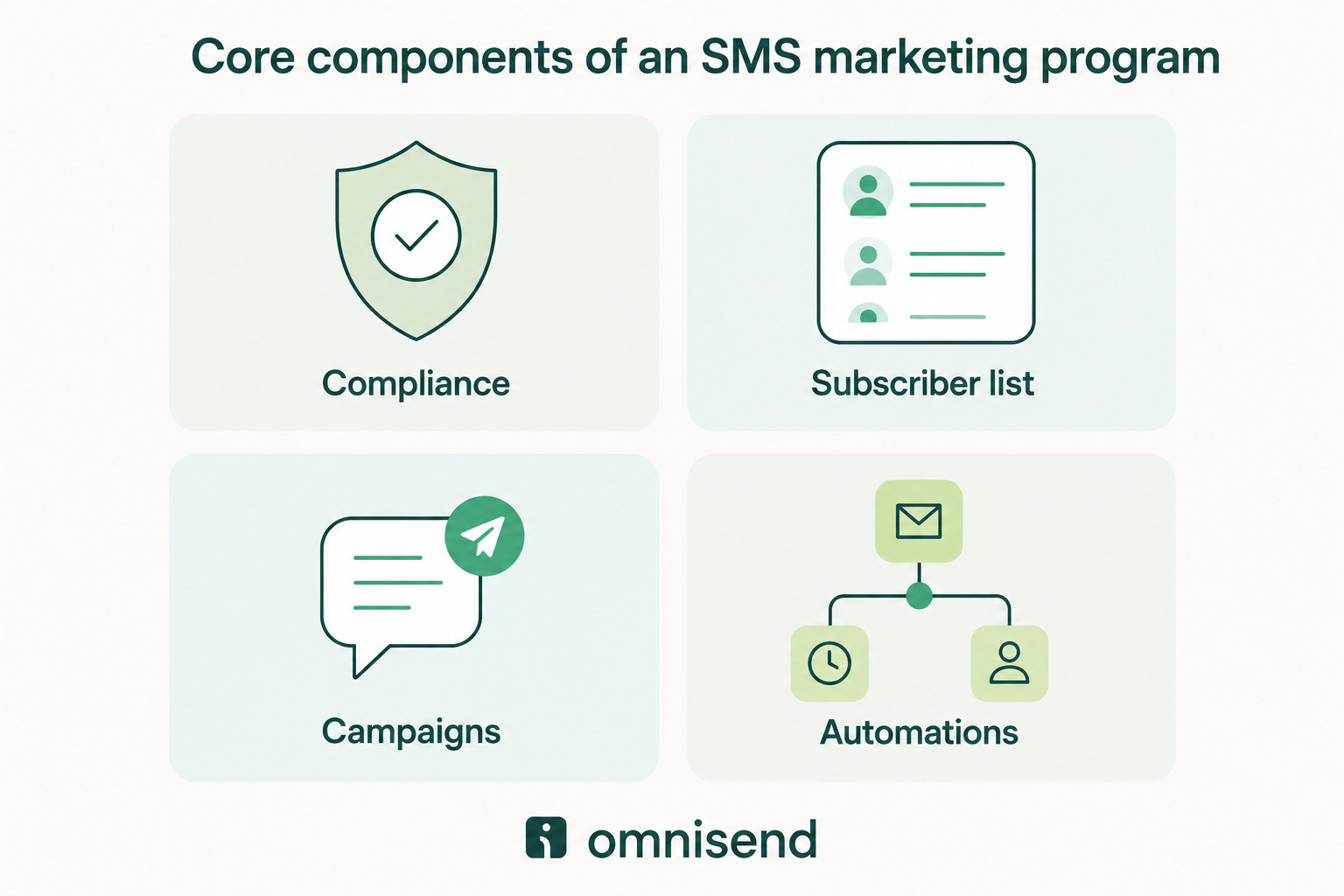
- Compliance: Permission, consent language, and a working opt-out — set up before you send
- Subscriber list: Phone numbers you collect through forms, checkout, and in-store signups
- Campaigns: One-to-many text messages for promotions, launches, and announcements
- Automations: Behavior-triggered texts that run on their own, like welcome flows and cart recovery
SMS marketing is valuable for ecommerce brands because shoppers make decisions fast. With a back-in-stock alert or cart reminder, you can reach them in seconds, while they’re still interested. Omnisend brings all four components together in one platform, so you don’t have to use separate tools.
Step 1. Get compliant before you send a single text
SMS marketing compliance is the legal foundation of your program. It’s more important than list building since sending texts without proper consent can cost $500 to $1,500 per message. When you get compliance right, you can send messages confidently.
Omnisend has several built-in controls. Automatic opt-out handling and compliant consent-language templates are included, so you aren’t configuring legal safeguards by hand.
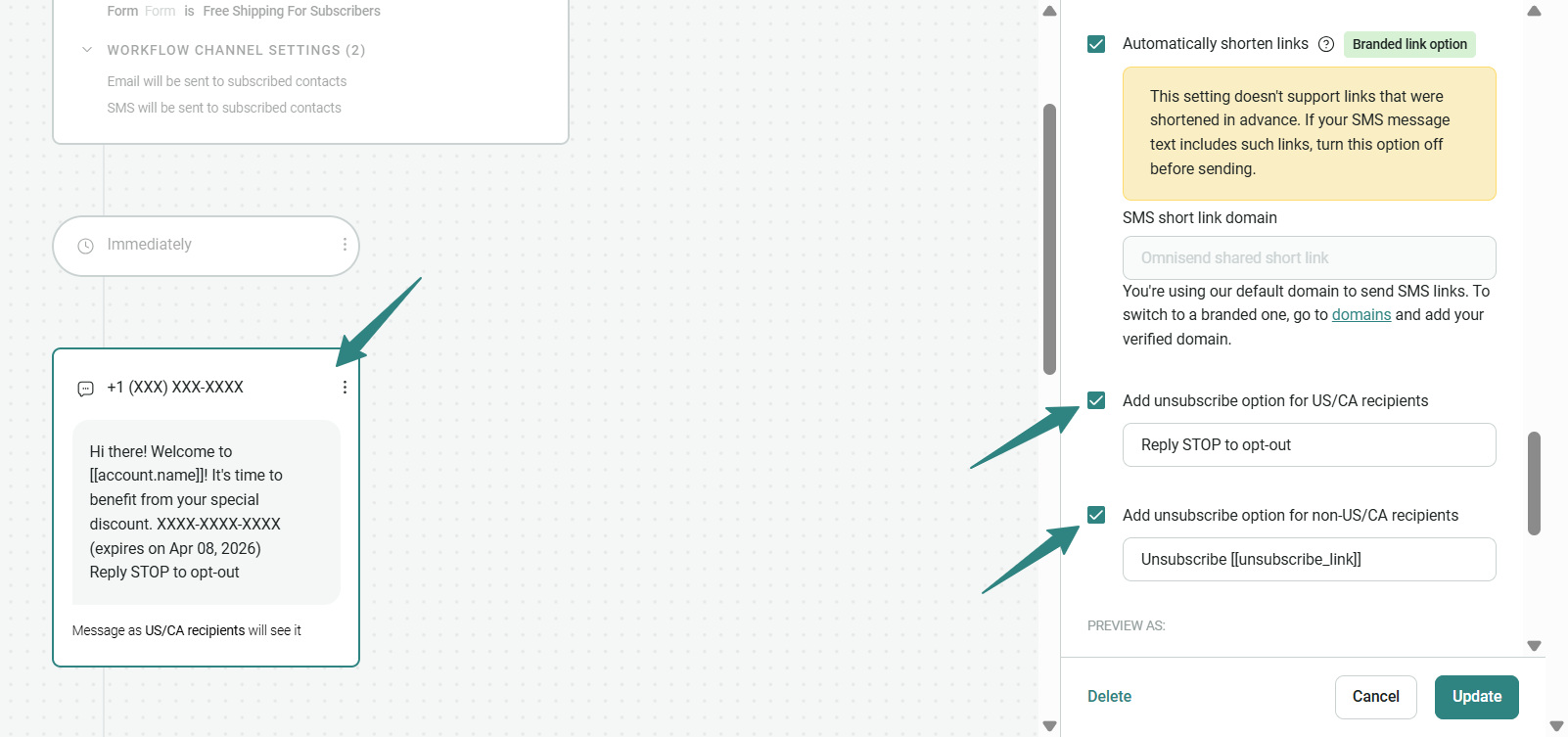
These SMS marketing best practices keep your program safe and your sender reputation healthy. For a detailed checklist, see our SMS compliance checklist for ecommerce brands.
What the TCPA requires from ecommerce brands
In the USA, the Telephone Consumer Protection Act (TCPA) governs text marketing. The TCPA, enforced by the FCC alongside FTC rules, requires express written consent before you send marketing texts.
Essentially, customers must actively agree to receive texts, and you must keep a record. For ecommerce stores, that consent usually comes from a checkout checkbox, a signup form, or a keyword opt-in. These rules apply to USA phone numbers.
Also, you can only text your audience between 8 AM and 9 PM in their local time, and you must honor opt-outs immediately. Protect yourself by always collecting clear consent and never assuming a purchase permits you to text.
How to set up a compliant SMS opt-in on Shopify, WooCommerce, or BigCommerce
A compliant opt-in grows your SMS subscriber list while documenting consent. On Shopify, WooCommerce, or BigCommerce, the fastest path is a signup form or a checkout field that captures both the number and the agreement.
Your consent language must include four elements: brand name, message frequency, opt-out instructions, and a link to your privacy policy. A compliant checkbox label looks like this:
By checking this box, you agree to receive marketing texts from [Brand Name] at the number provided. Reply STOP to unsubscribe. Message and data rates may apply. View our Privacy Policy.
Omnisend’s Shopify, WooCommerce, and BigCommerce integrations include pre-built opt-in forms with this consent language already templated. Here’s how a TCPA legal text block on Omnisend looks.
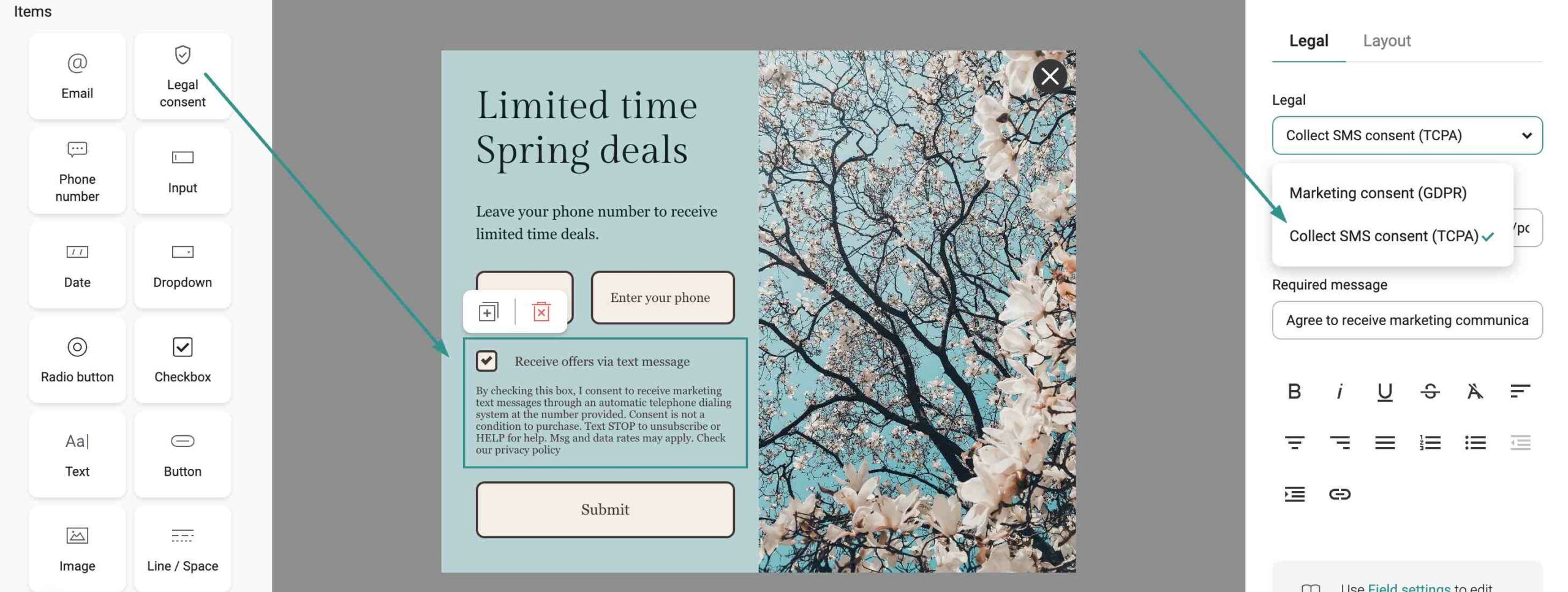
💡For a step-by-step walkthrough, here’s how to collect SMS opt-ins on Shopify.
The STOP keyword and opt-out handling
STOP is the opt-out keyword every subscriber knows. When someone replies STOP, USA rules require you to honor it.
Since April 2025, you must also respect opt-outs sent by any reasonable method, not just the word STOP. That includes words like QUIT, CANCEL, and UNSUBSCRIBE, or an unsubscribe link.
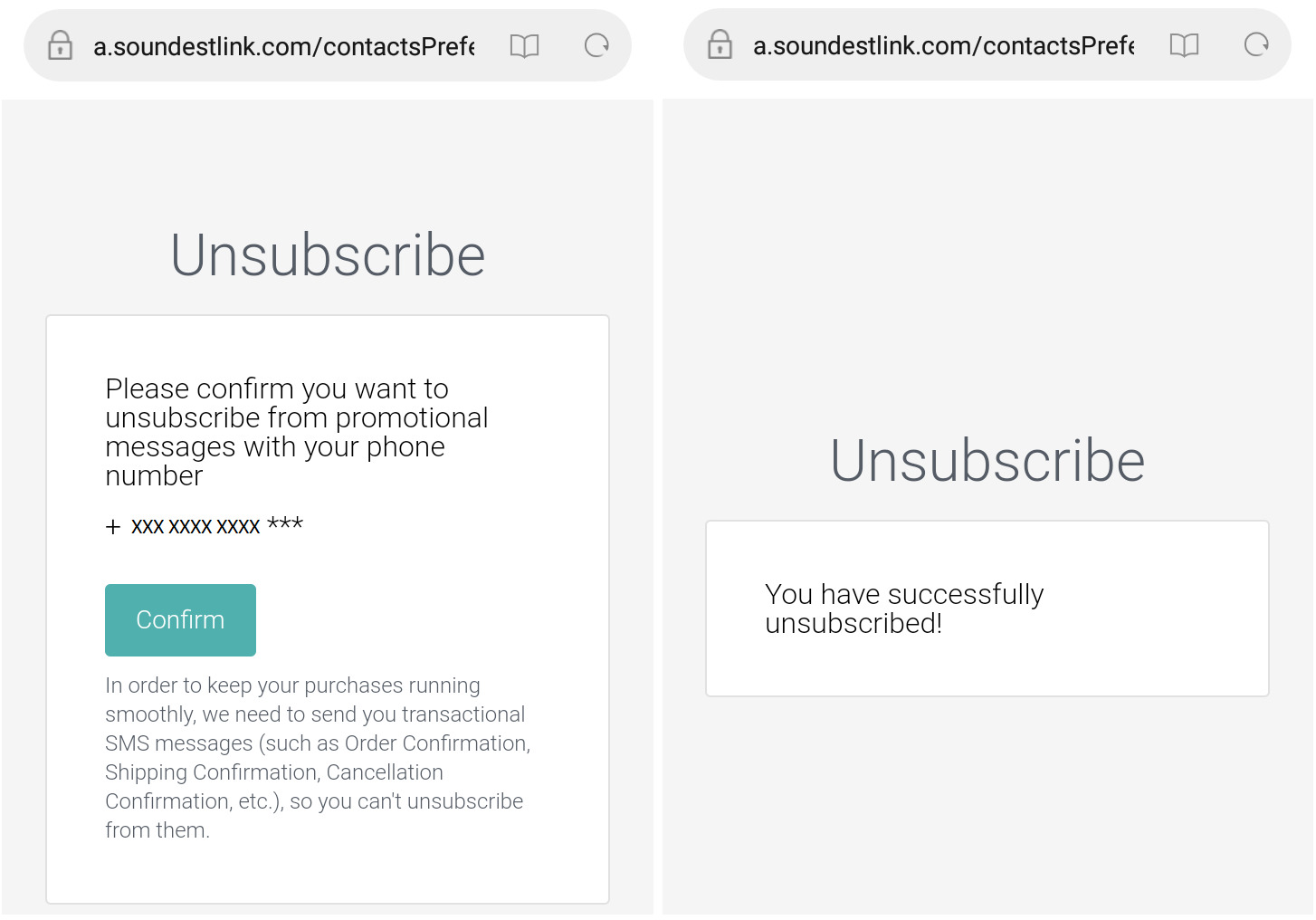
Omnisend processes STOP replies automatically and removes contacts from future sends as soon as they arrive. That keeps you compliant and protects list quality. Here’s how the platform handles it when a subscriber clicks the unsubscribe link.
Step 2. Build your SMS subscriber list
Your SMS subscriber list is the engine of your SMS marketing program. Your goal is to collect phone numbers with consent wherever customers already encounter your brand. A bigger, cleaner list means more revenue from every campaign and automation.
With Omnisend’s form builder, you can add a phone number field and SMS consent checkbox to any signup form in minutes, with no coding. That makes SMS marketing for ecommerce easier to launch and scale across every customer touchpoint.
Add a phone number field to your signup forms
The easiest way to start an SMS subscriber list is to add a phone number field to the signup forms you already run. Shoppers who are signing up for email are your warmest audience, so asking for a number in the same step costs you almost nothing.
B-Wear Sportswear, an activewear brand on BigCommerce, did exactly this with a signup form that captures phone numbers along with email addresses. It was able to create a single form that fed both channels and kept consent on record from the first touch.
Ask existing customers to join your SMS program
Your current customers are the highest-value people to invite, because returning shoppers are far more likely to buy again. Repeat customers convert at roughly 4.5% to 6%, compared with 1% to 2% for new visitors. Reconnecting with an already-engaged audience is one of the fastest ways to build an SMS program that pays off.
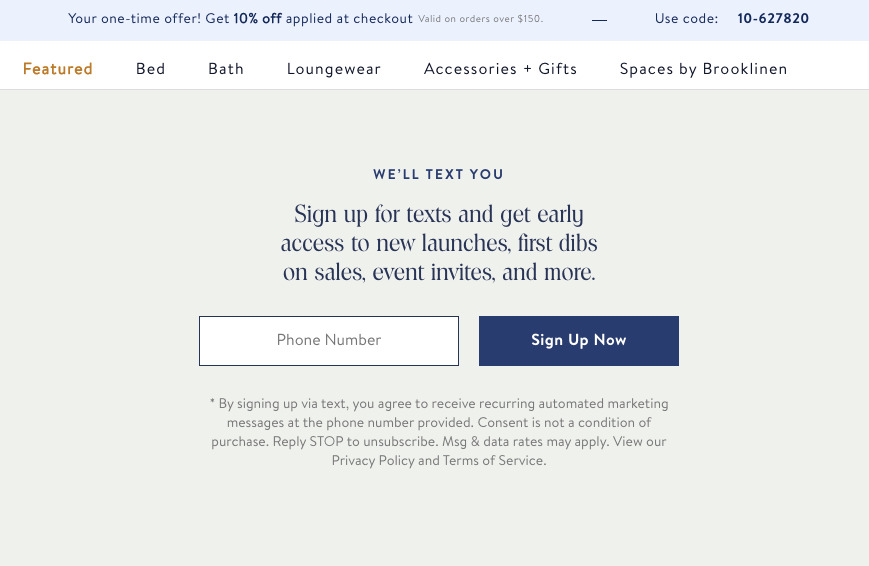
Brooklinen, a DTC bedding brand, did this before a major sale. It used a promotional email to offer early access, then sent shoppers to a dedicated landing page that collected phone numbers in exchange for first dibs.
Collect numbers at your online checkout
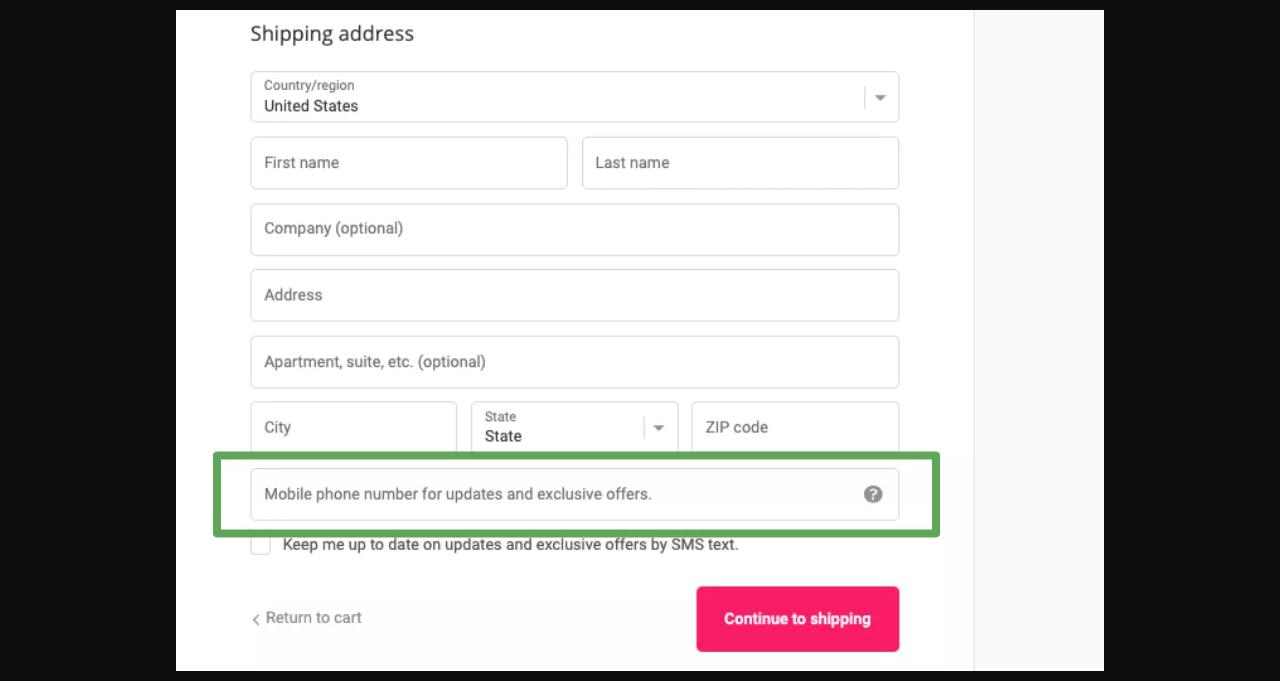
The single best place to grow your SMS subscriber list is your checkout. At this point, shoppers are already entering their details and trusting you with a purchase. With a consent checkbox in the flow, you can turn buyers into subscribers without extra friction.
Omnisend’s Shopify integration includes a native SMS opt-in field for checkout that you can enable in one click. Here’s how Divatress, a Shopify hair-care brand, used the checkout opt-in to capture numbers at the moment of purchase.
Start collecting SMS subscribers in Omnisend. You can set up your first opt-in form in minutes, then start free and watch the list grow.
Grow your SMS subscriber list at your brick-and-mortar shop
If you sell in person, your physical store can be an invaluable source of new contacts for your SMS subscriber list. Foot traffic is permission waiting to happen, as long as joining feels easy and clearly optional.
A few in-store methods work well:
- A sign-up sheet or tablet near checkout
- A QR code at the register that opens an SMS opt-in
- A keyword opt-in (for example, text JOIN to a short code)
- Staff inviting customers to subscribe at the point of sale
Step 3. Send your first SMS campaign
Your first campaign brings your program to life, and the SMS marketing best practices here focus on relevance, clarity, and timing. Knowing how to start SMS marketing campaigns means three decisions: what to send, how to write it, and when.
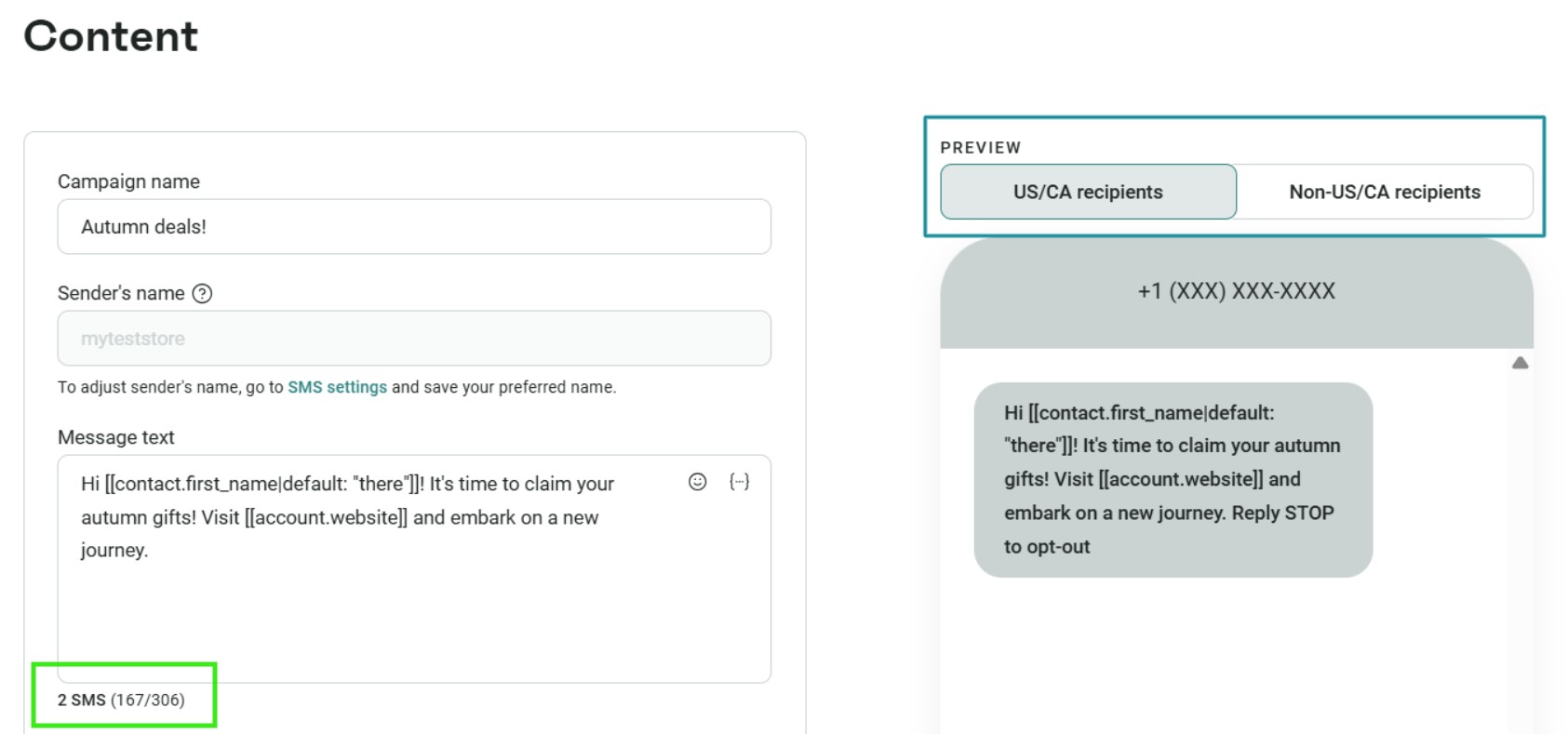
Omnisend’s SMS campaign builder lets you focus on the message rather than the setup. It includes a live character counter, message preview, built-in link shortening, and flexible scheduling tools.

“I started SMS several months ago just to test it out. The ROI on it has just been absolutely insane. So, we’ll continue to do it for our customer base.”
— Allison Caufield, Senior Marketing Manager at FiGPiN, a Shopify collectibles brand
Ready to send your first SMS campaign? Start free with Omnisend and build it today.
Choose your SMS campaign type
Most ecommerce SMS falls into two buckets. Promotional tactics drive action, such as flash sales, discount codes, and product launches. Transactional texts confirm something, like order and shipping updates. Promotional messages directly increase revenue, while transactional ones build trust and reduce support requests.
You’ll also need to choose between SMS and MMS. While SMS is text-only and capped at 160 characters per segment, MMS adds images, GIFs, and video. These grab attention, but cost more per send. For most campaigns, a tight SMS does the job, so you’ll want to save MMS for sends where visuals add clear value.
Write your first text message
A good marketing text is short, clear, and clearly from your brand. Make sure your message includes your brand name at the start, one clear offer, a link, and an opt-out reminder. Its value must be clear, and readers must know who is texting them.
Here’s a simple template for an ecommerce flash sale:
Hi [Name], it’s [Brand]. Get 20% off sitewide today only: [link]. Reply STOP to opt out.
Keep your message under 160 characters so it sends as one segment. Use a link shortener to save space. Omnisend’s SMS builder has a live character counter and built-in shortener, plus you can preview your message before sending.
Pick the right time to send
When you send your campaign, it can make a big difference. Weekday late mornings and early evenings usually work well, but use your own engagement data to choose the best times. For more details, check our guide on the best time to send SMS.
How often should you send? Start with two to four campaigns per month, and adjust based on engagement and unsubscribe rates.
Sending too frequently can increase opt-outs, so let subscriber behavior guide your cadence. You can also learn how to send an SMS campaign to non-openers in Omnisend to re-engage inactive contacts.
Step 4. Track your SMS campaign results
Your SMS marketing strategy is incomplete if you aren’t measuring results. But instead of watching every metric, focus on a few key numbers that show what’s working and what needs improvement.
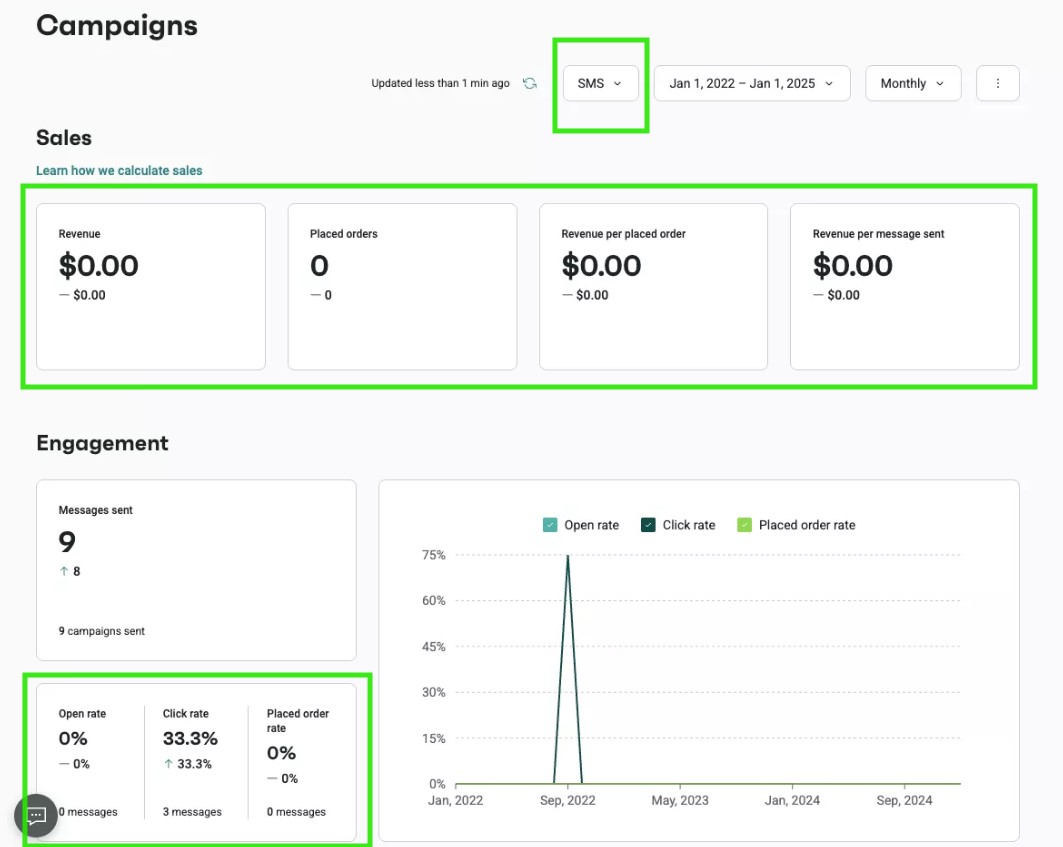
Once campaigns are running, your results help refine future sends and improve performance over time. Omnisend’s SMS analytics dashboard shows these metrics in one place. It also includes revenue attributed to each send so that you can tie SMS activity directly to sales.
“SMS is powerful because you can see a huge traffic jump immediately after you send an SMS campaign.”
— Laura, CEO of Silver Street Jewellers, a Shopify jewelry brand
The 4 SMS metrics every ecommerce brand should track
Four indicators tell you almost everything about an SMS campaign’s health. Here’s what to track after every send:
- Delivery rate shows how many texts actually reached phones. It’s the first warning sign if you have an issue with your list or carrier. Should you see a sudden drop, pause and check the quality of your list.
- Click-through rate measures how many recipients tapped your link. It tells you whether your offer and copy landed. It also gives you the clearest read on how compelling the message was.
- Opt-out rate tracks the number of people who unsubscribed. A rising number means you’re sending too often or to the wrong people. This metric protects your long-term list value.
- Conversion rate measures how many recipients actually made a purchase. It connects the campaign to revenue, which is the program’s entire point.
All four are visible in the Omnisend SMS campaign reports, so you can scan a single dashboard instead of piecing numbers together.
SMS marketing benchmarks for ecommerce (2025)
Benchmarks help measure performance against real ecommerce stores, not broad industry averages. You want to use them as targets while you build your SMS marketing strategy:
- Delivery rate: Aim for 98% or higher. Anything below 90% signals a list or sender reputation problem.
- Click-through rate: Target 12% for campaigns and 20% for automated messages. If lower, revisit your CTA or offer.
- Opt-out rate: Keep it under 3.5%. If it climbs higher, review your send frequency and targeting.
- Conversion rate: Roughly 0.12% for campaigns and 0.77% for automations. On average, 21%–30% of visitors to your store should buy after receiving a text.
These numbers are based on Omnisend’s 2026 ecommerce data from over 150,000 brands. They provide reliable benchmarks for real store performance, not just industry estimates.
Step 5. Add SMS to your automation workflows
SMS marketing for ecommerce becomes more effective when messages are triggered by customer behavior. Unlike manually sent campaigns, automations run automatically at key moments in the customer journey. This makes them an essential part of any SMS marketing strategy.
The numbers back this up. According to the Omnisend 2026 Ecommerce Marketing Report, automated SMS generated about $0.74 per message, compared with $0.15 for standard campaigns.
The biggest advantage of ecommerce is the combined workflow. Omnisend lets you mix email and SMS in a single automation, with welcome, browse abandonment, and cart recovery available as pre-built templates. You launch in minutes, not from scratch.
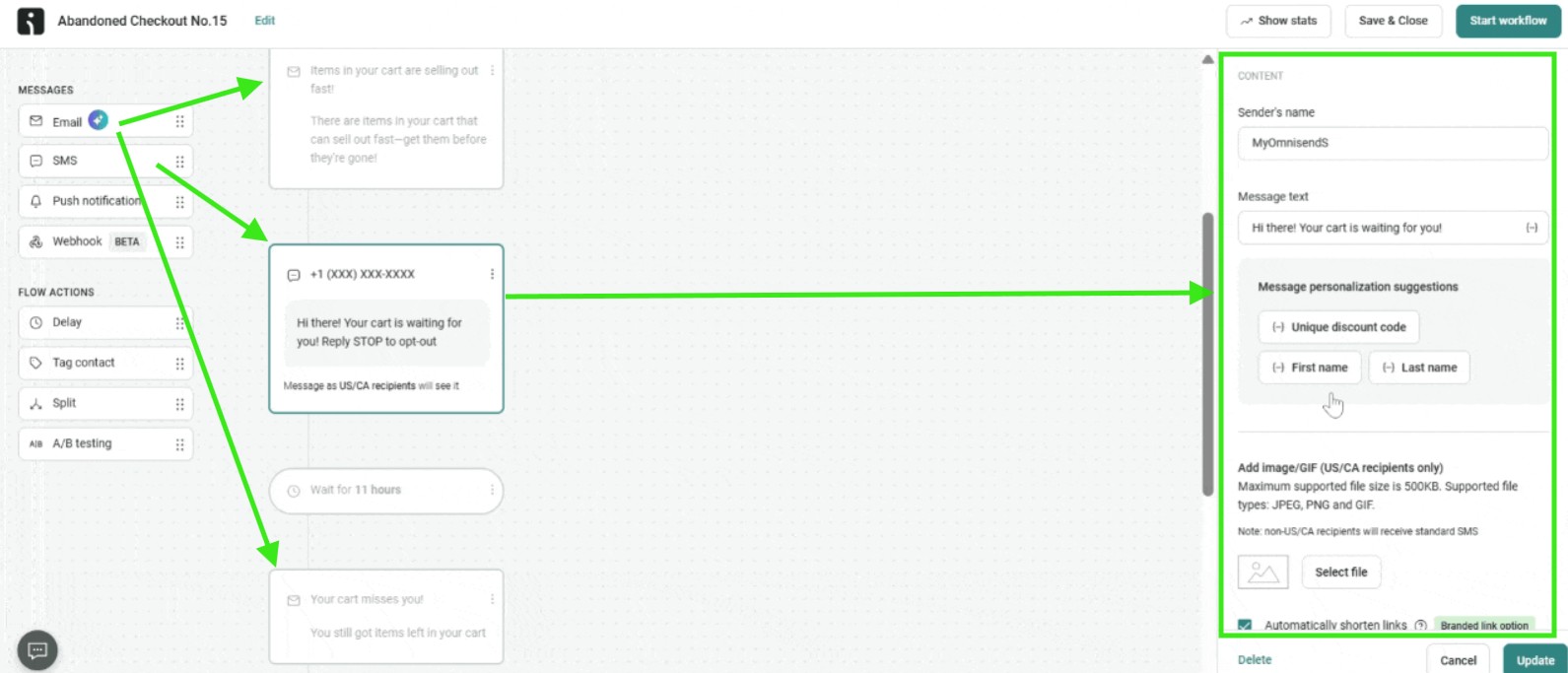
A welcome series
A welcome series is the first automation every brand should enable, because it greets new subscribers when interest is highest. A short sequence of texts can introduce your brand, deliver a signup offer, and set expectations for what is coming.
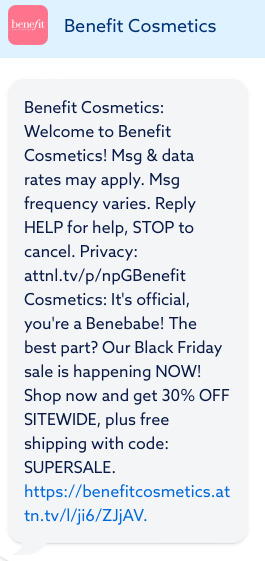
Trigger a welcome series from any of these events:
- Form signup
- Checkout opt-in
- Keyword opt-in
Browse and product abandonment workflows
Browse abandonment texts reach shoppers who looked but didn’t add to their cart, capturing intent you would otherwise lose. A timely nudge reminds them of the product while it’s still on their mind.
For ecommerce brands, these are some of your warmest non-buyers, because they showed clear interest in a specific product. Common triggers for this workflow include:
- Product page view with no add-to-cart
- Category browse with no action
- Product search that ends without a purchase
A cart abandonment series
Cart abandonment flows are among the highest-return automations in ecommerce because they reach shoppers who were just one tap away from buying. A short SMS sequence can recover revenue by reminding shoppers about products they were already interested in buying.
Build the series around triggers like these:
- Cart created but not purchased
- Cart left untouched after a set number of hours
- Cart value above a threshold you choose
💡Build your first SMS automation workflow with Omnisend’s prebuilt flows and let it run.
SMS loyalty program automations
An SMS loyalty program rewards your best customers through the channel they’re likely to see quickly. Text messages work well for time-sensitive rewards, milestone updates, and exclusive offers.
Since loyalty moments are personal and urgent, your well-timed texts can reliably outperform an email sitting unopened in a crowded inbox. Strong loyalty automations to set up include:
- Points-balance alerts when a customer is close to a reward
- VIP tier upgrades that extend new perks
- Exclusive member-only discounts
- Birthday and anniversary offers
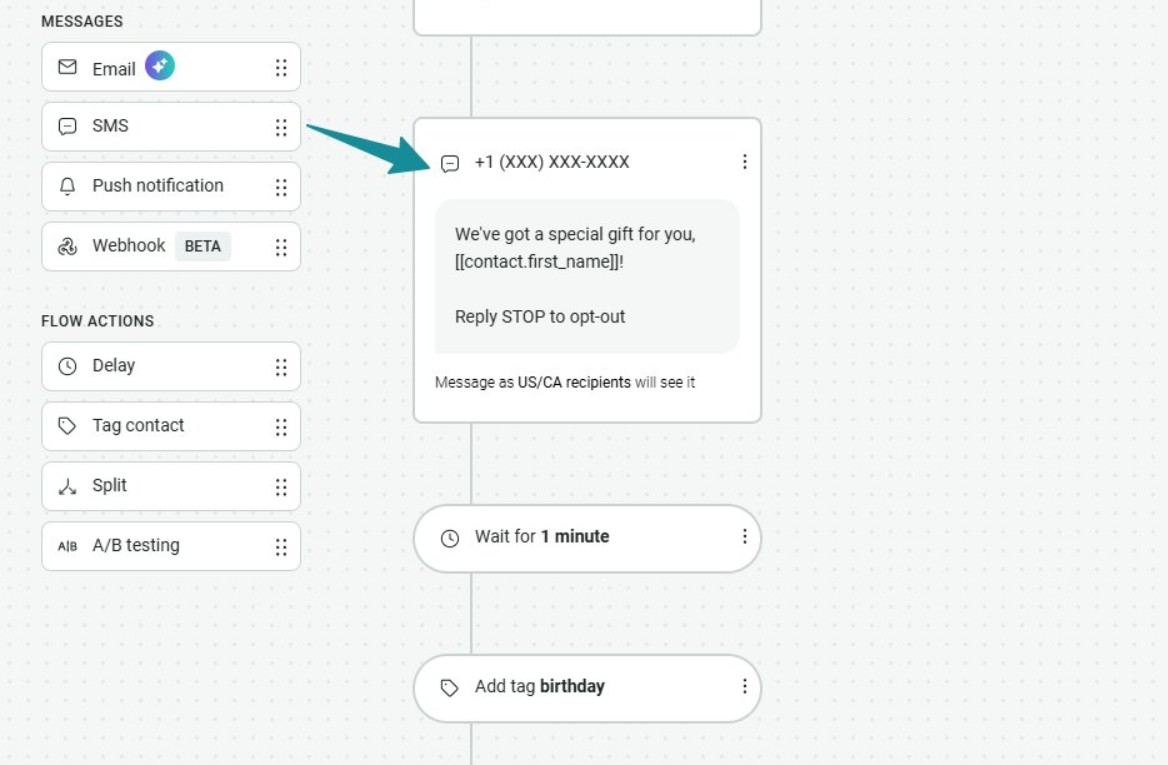
Omnisend integrates with loyalty apps such as Smile.io and LoyaltyLion. Thanks to these integrations, you can trigger SMS automations from points activity, rewards milestones, and tier changes without manual work.
SMS marketing best practices for ecommerce brands
The best SMS marketing best practices for ecommerce all come back to one idea: respect the customer’s attention.
SMS is the most personal channel you have, so every text should feel useful, timely, and easy to act on. Get that right, and your SMS marketing strategy stays profitable as it scales. Follow these six practices on every send:
- Personalize with real data: Use your customer’s first name, their recent order, or a product they browsed so your SMS feels one-to-one. For ecommerce, messages tied to a loyalty tier or a past purchase beat generic blasts every time.
- Keep it under 160 characters: Tight copy reads faster and sends as a single segment, which keeps costs down. Use a link shortener for your product or collection URL so the offer still fits.
- Send at the right time: Match your audience’s habits and stay within the 8 AM to 9 PM window. For most ecommerce brands, late mornings and early evenings convert best.
- Always include your brand name. On mobile, unknown numbers are almost always ignored. Therefore, opt to lead with your store name in the first three words.
- Don’t over-send: Start with two to four texts a month and let your opt-out rate guide the pace. One well-timed sale text will successfully beat three forgettable ones.
- Give every text a clear CTA: Adopt a one-message, one-action, one-link approach. Send shoppers straight to the product or cart, never a generic homepage.
The right platform makes all of this easier. Omnisend’s SMS builder helps you follow these best practices automatically with features such as a character counter, a brand name field, and send-time optimization. This way, good habits are built into your workflow.
Conclusion
Building an SMS marketing program comes down to five steps. Start with compliance, grow your subscriber list, send your first campaign, track your results, and add SMS to your automations.
Follow those steps, and you’ll move from random blasts to a real SMS marketing strategy that drives engagement and revenue.
The payoff will be hard to ignore. Omnisend merchants average $79 in sales for every $1 spent across email, SMS, and push. SMS marketing for ecommerce performs best when it works alongside your other marketing channels.
That’s exactly what Omnisend is built for. It brings every part of your program together in one place, with one of the most generous free plans in the category.
Quick sign up | No credit card required
Frequently asked questions about SMS marketing programs
What is an SMS marketing program?
An SMS marketing program is a structured system for growing and engaging your text subscriber list. It combines compliance, list building, campaigns, and automations to send timely, relevant messages based on customer behavior. Unlike one-off promotional blasts, a program drives consistent engagement, repeat purchases, and measurable revenue over time.
What are the 4 components of an SMS program?
The four components of an SMS marketing program are:
- Compliance, which secures permission
- A subscriber list, which comprises the audience
- Campaigns, which drive one-to-many sends
- Automations, which trigger behavior-based texts
Is SMS marketing legal in the USA?
Yes, SMS marketing is legal in the USA. Several TCPA regulations govern it, including:
- Getting express written consent before sending marketing texts
- Limiting sends to 8 AM through 9 PM in the recipient’s local time
- Adding a clear opt-out like STOP to your SMS messages
How do I build an SMS subscriber list?
You can build your SMS subscriber list by collecting subscriber numbers with consent at four touchpoints. These comprise signup forms, your existing customer base, online checkout, and in-store signups. A phone field plus a consent checkbox turns everyday interactions into compliant subscribers.
How often should I send SMS marketing messages?
Start with two to four SMS campaigns a month for a new program, then adjust based on engagement. Watch your opt-out rate closely since over-sending is the fastest way to lose subscribers. Let data, not a fixed number, set your pace.
What metrics should I track for SMS campaigns?
You should be tracking the delivery rate, click-through rate, opt-out rate, and conversion rate for every SMS campaign. Taken together, these metrics will tell you whether your texts reached phones, earned clicks, retained subscribers, and drove revenue.
What is the difference between SMS and MMS marketing?
With SMS marketing, you can only send texts where each segment is capped at 160 characters. On the other hand, MMS marketing adds images, GIFs, and video. These improve visual impact but cost more per message. Most ecommerce campaigns use SMS, saving MMS for sends where a visual clearly adds value.
What’s the best SMS marketing platform for ecommerce?
The best SMS marketing platform for ecommerce combines SMS and email into a single workflow. It integrates natively with your store and includes built-in compliance tools.
Omnisend does all three for Shopify, WooCommerce, and BigCommerce brands, with automations and analytics built for online stores.