Omnisend AI

 OFFER







The best Thanksgiving emails lead with one job for the week they land in: help with hosting or travel, a holiday shipping deadline, a thank-you, or an early Black Friday offer nearer the day.
Eight of the 10 emails name Thanksgiving in the subject line, and four are built around the meal or hosting. The three sent 10 or more days ahead carry no discount, and all six deals in the list are tied to Black Friday.
Below are 10 Thanksgiving email examples with what to copy from each, plus subject lines and four templates.
Quick sign up | No credit card required
10 Thanksgiving email examples
Each example shows a different tactic for one moment in a store’s Thanksgiving calendar, from a planning email about six weeks out to a heads-up on Thanksgiving Day.
Nine went out for Thanksgiving 2025, while the tenth, UNFNSHED’s, went out in October 2026 and stands in as our early planning example.
| Brand | Industry | Differentiator |
|---|---|---|
| UNFNSHED | Furniture | Guest math for hosts |
| My Pet Carnivore | Raw pet food | Shipping cutoff, no offer |
| Weber | Grills | Reasons, then three grills |
| Cadence | Travel containers | For traveling guests |
| Cosori | Kitchen appliances | Black Friday from Monday |
| Collars & Co. | Men’s polos | Thank you, no offer |
| Anatomie | Travel apparel | Thanks above the sale |
| RetroSupply | Digital design assets | Founder story, holiday P.S. |
| Dorai Home | Dish racks and drying | Selling the after-dinner cleanup |
| Hush | Bedding | Evening-drop heads-up |
1. UNFNSHED: A host’s seating chart
Subject line: Where is everyone going to sit?
Preheader: Every seat we make, from a $39 toddler stool to a $229 rocker. No tools, no hex key.
Email type: Product promotion (no discount)
Trigger: Early planning campaign, six weeks out
Sent: Mid-October 2026, about six weeks before Thanksgiving (dated from the email’s own copy)
Why this email works
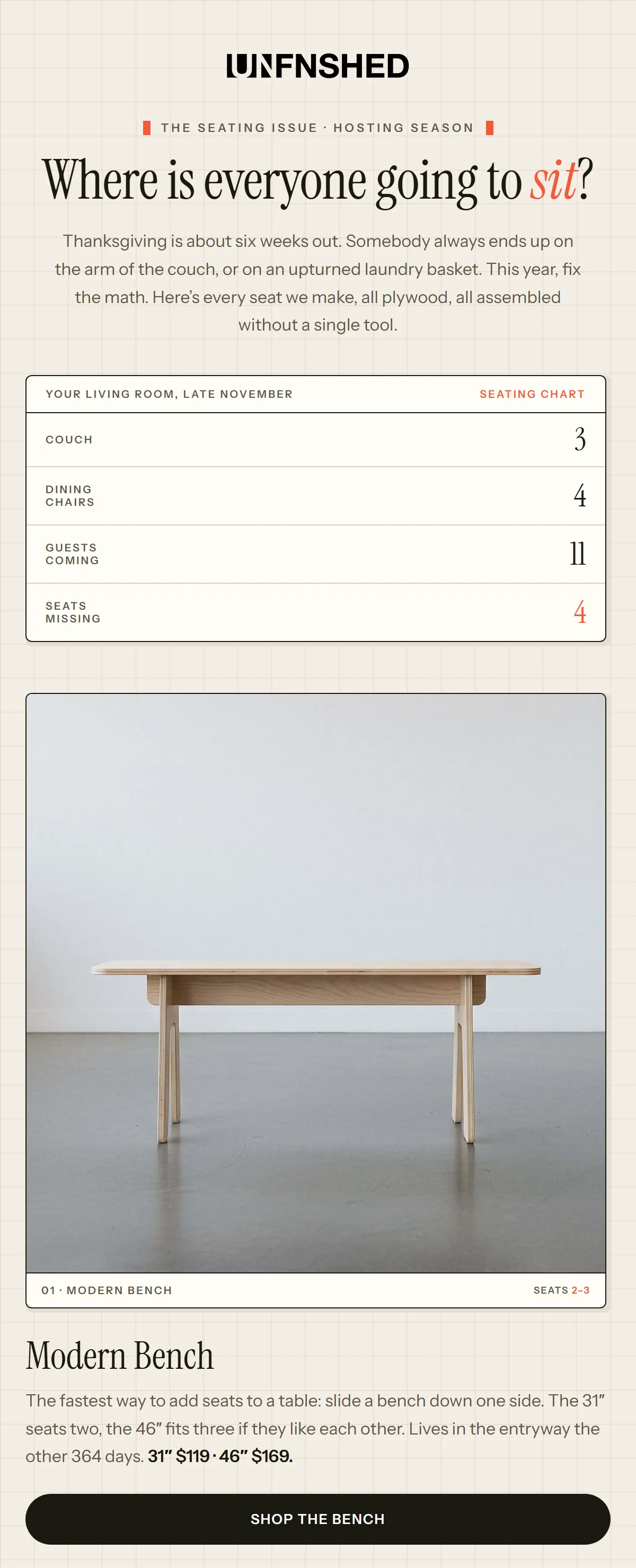
UNFNSHED starts from a host’s problem, too few seats, then does the math, so each product that follows reads as the fix. The subject line asks the host’s own question, “Where is everyone going to sit?” and the headline repeats it.
The intro sets the scene: “Thanksgiving is about six weeks out. Somebody always ends up on the arm of the couch, or on an upturned laundry basket. This year, fix the math.”
A chart headed “Your living room, late November” sets three couch seats and four dining chairs against 11 guests, four seats short. The Modern Bench comes first, at $119 or $169 by size, above a “Shop the bench” button. Nothing is discounted.
What you can learn from it
Start from the problem, do the math for them, then sell each product as the fix and send early enough that an order lands before the meal.
2. My Pet Carnivore: Only the shipping cutoff
Subject line: 🚚 Plan Ahead: Thanksgiving Shipping Deadline Approaching
Preheader: Make Sure Your Pet’s Meals Arrive in Time for Thanksgiving
Email type: Holiday hours update (shipping cutoff and pickup closure)
Trigger: Shipping-deadline campaign on the last order day
Sent: Sunday, November 16, 2025, 11 days before Thanksgiving, on the brand’s last order day
Why this email works
My Pet Carnivore makes the holiday shipping schedule the whole email and sends it on the last order day, so customers get one deadline with nothing else competing for their attention.
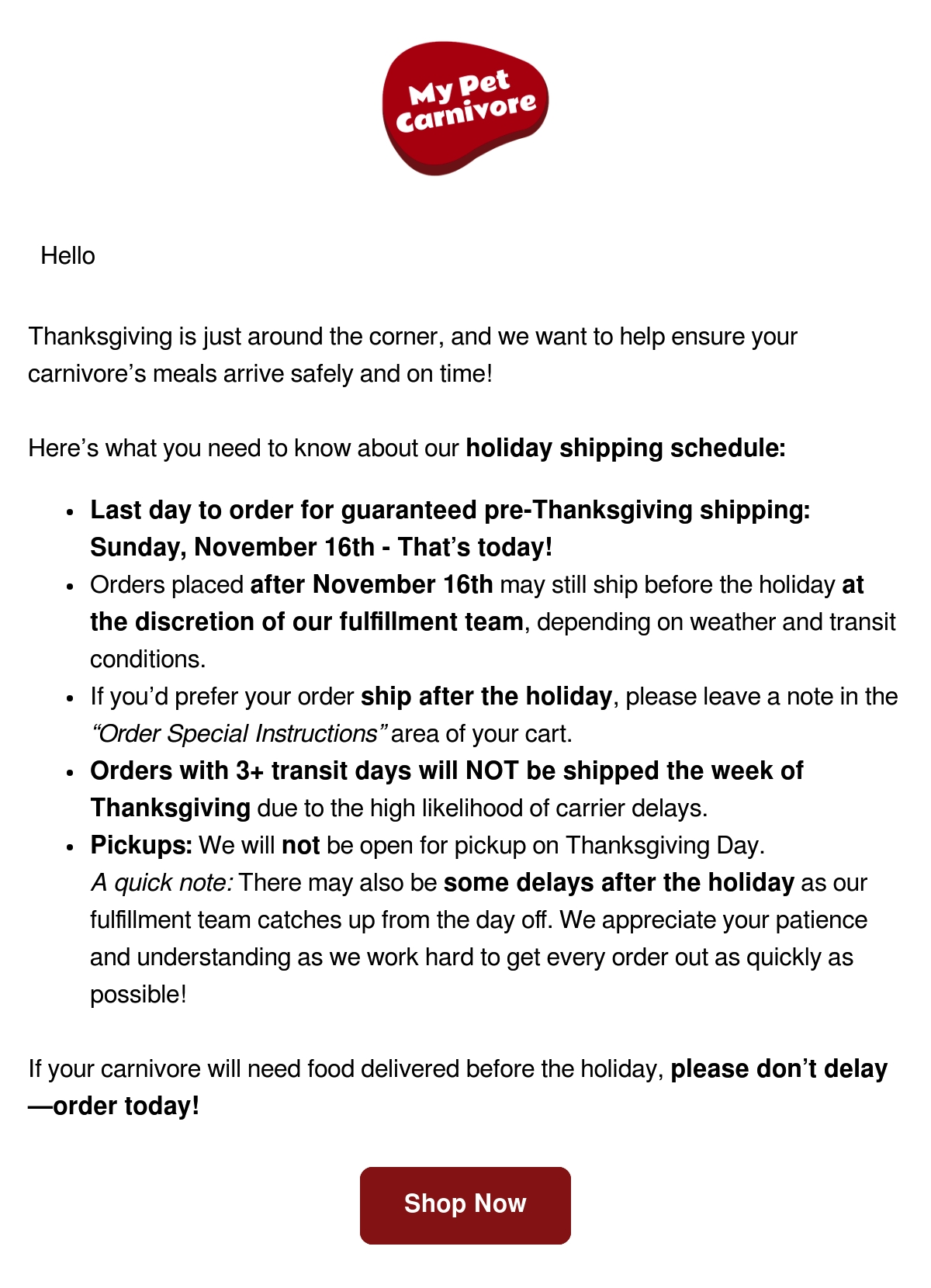
The subject line opens on a delivery truck and “Plan Ahead,” and says the deadline is approaching. The body says it’s today, in the first of five bullets: “Last day to order for guaranteed pre-Thanksgiving shipping: Sunday, November 16th – That’s today!”
The next three bullets are for anyone who misses that date. A later order may ship before the holiday at the team’s discretion or after it on request, and nothing with three or more transit days leaves that week. Pickup is off on Thanksgiving Day. Nothing is discounted, and the plain one-column letter ends on “please don’t delay—order today!” and a “Shop Now” button.
What you can learn from it
Tell customers the cutoff in one plain email on the last order day, when Thanksgiving moves your shipping dates or your hours. The last day to order, and what becomes of orders after it, is the whole message. The discount stays out of it.
3. Weber: Reasons before products
Subject line: 3 Reasons to Grill Your Turkey This Thanksgiving 🍗
Preheader: Your guests will thank you.
Email type: Holiday guide with products (no discount)
Trigger: Holiday guide campaign, 10 days out
Sent: Monday, November 17, 2025, 10 days before Thanksgiving
Why this email works
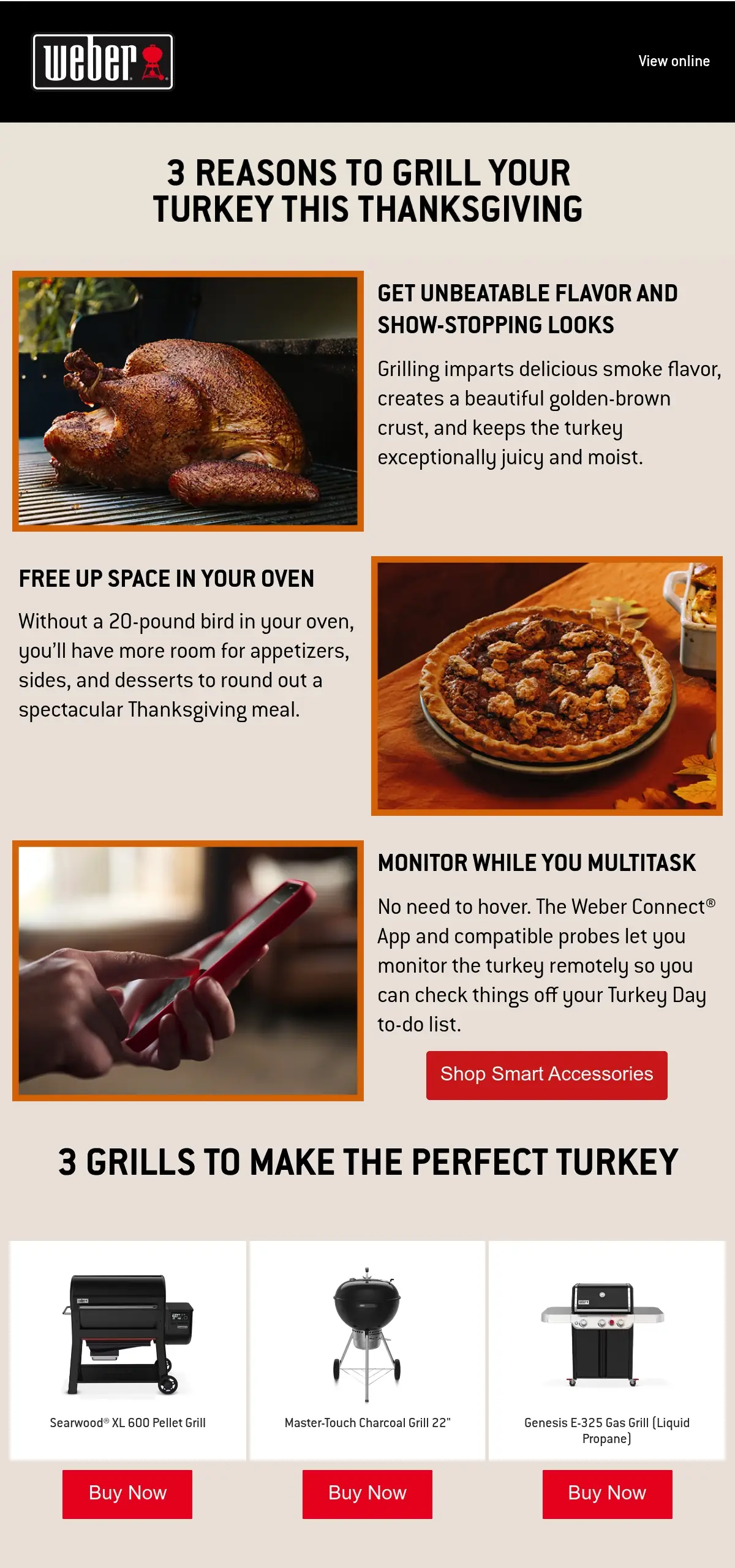
Weber makes the case for grilling the turkey before it sells a single grill. One of its three reasons, a full oven, is a real Thanksgiving problem, so by the time the three grills appear they read as the fix and not as a pitch.
The subject line leads with “3 Reasons” and a drumstick emoji. The preheader says the guests will thank the host.
Three photo-and-text blocks then make the case for the grill, and the second, “FREE UP SPACE IN YOUR OVEN,” starts from the 20-pound bird and the room it takes from the sides. The third, on watching the turkey from an app, carries the only button before the grills, “Shop Smart Accessories.”
Only then come the products, “3 GRILLS TO MAKE THE PERFECT TURKEY,” one per fuel with a “Buy Now” button each. There’s no discount and no price anywhere in the email.
What you can learn from it
Hold the product back until you’ve provided solutions or reasons, each answering something a Thanksgiving host already worries about. The solutions come first, then the grills, one per fuel, so each buyer type has one product.
4. Cadence: Written for traveling guests
Subject line: 4 fool-proof ways to pack for Thanksgiving
Preheader: Still need your travel system? We ship fast.
Email type: Sale (Black Friday) with a shipping cutoff
Trigger: Pre-holiday sale campaign with a shipping cutoff
Sent: Friday, November 21, 2025, six days before Thanksgiving
Why this email works
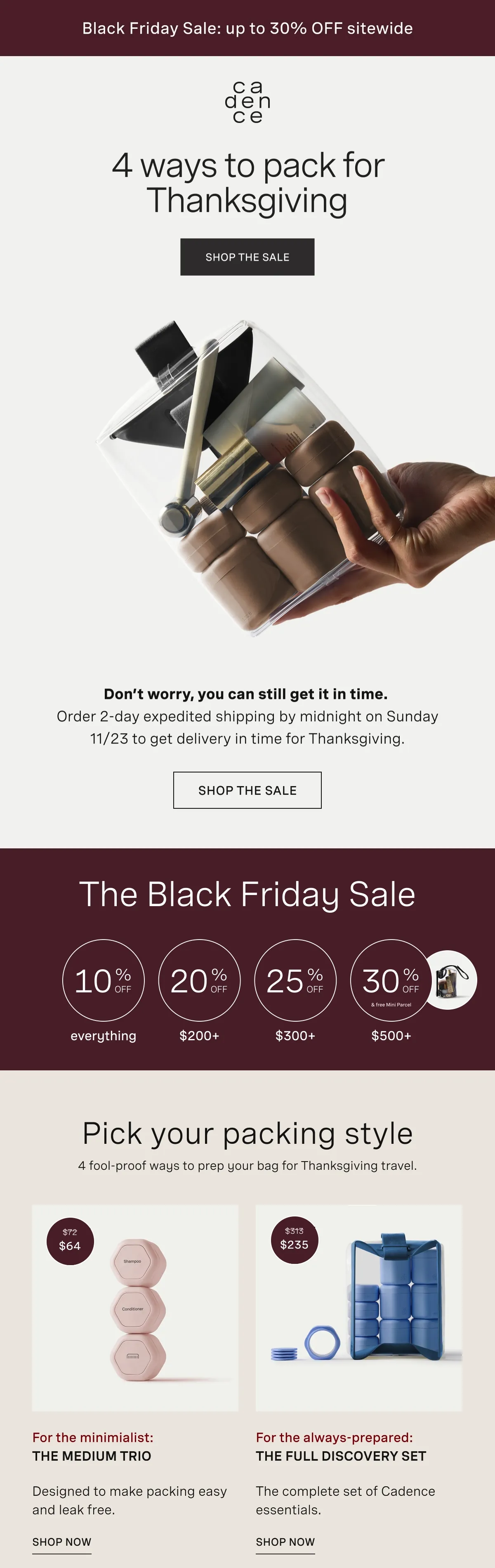
Cadence gives the delivery deadline the spot just below the hero, because the subscriber it has in mind is on the road to someone else’s table and needs the order there before the holiday. In the inbox, the subject line reads as a packing guide, with the sale left out, and the preheader takes care of the shipping worry.
“Don’t worry, you can still get it in time. Order 2-day expedited shipping by midnight on Sunday 11/23 to get delivery in time for Thanksgiving.” That deadline sits directly beneath the hero and its “SHOP THE SALE” button, while the top bar above them carries the Black Friday sale.
No code appears in the email. Instead, the discount is tied to the order total, so 10% off everything becomes 30% off at $500+, and “Pick your packing style” sorts sets by traveler.
What you can learn from it
Speak to the traveler in your list as well, and make the shipping deadline the first thing under the hero, with wording that says the order gets there before Thanksgiving.
5. Cosori: A Thanksgiving Week sale
Subject line: The Thanksgiving Week sale has officially arrived
Preheader: Take advantage of daily deals before they’re gone
Email type: Sale (early Black Friday)
Trigger: Thanksgiving Week sale launch
Sent: Monday, November 24, 2025, the Monday of Thanksgiving week
Why this email works
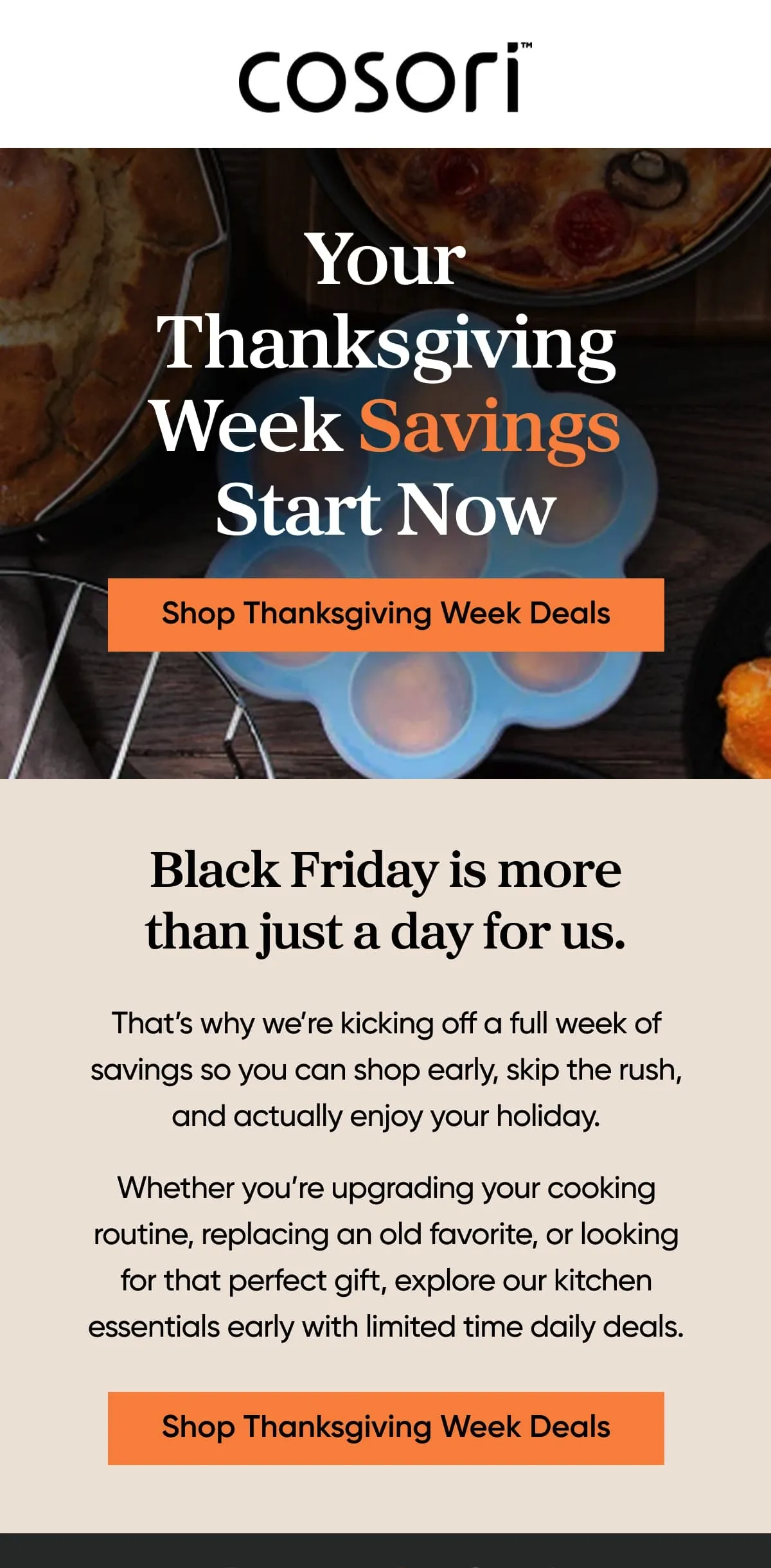
Cosori starts its deals on the Monday of Thanksgiving week, so it reaches shoppers before the Black Friday rush. The holiday is in the subject line and the daily deals in the preheader.
The hero reads “Your Thanksgiving Week Savings Start Now” over a kitchen photo, above a “Shop Thanksgiving Week Deals” button. Below it, two short paragraphs sit under the line “Black Friday is more than just a day for us,” with the same button again.
Cosori explains the early start: “That’s why we’re kicking off a full week of savings so you can shop early, skip the rush, and actually enjoy your holiday.” It’s an early bird Black Friday sale with “limited time daily deals” and no amount or product named.
What you can learn from it
Rename your Black Friday run-up as a Thanksgiving Week sale that starts on Monday, and say in one line why it starts early.
6. Collars & Co.: A founder’s thank-you
Subject line: Happy Thanksgiving from Collars & Co 🦃
Preheader: None
Email type: Thank-you only
Trigger: Thanksgiving Day founder letter
Sent: Thursday, November 27, 2025, Thanksgiving Day
Why this email works
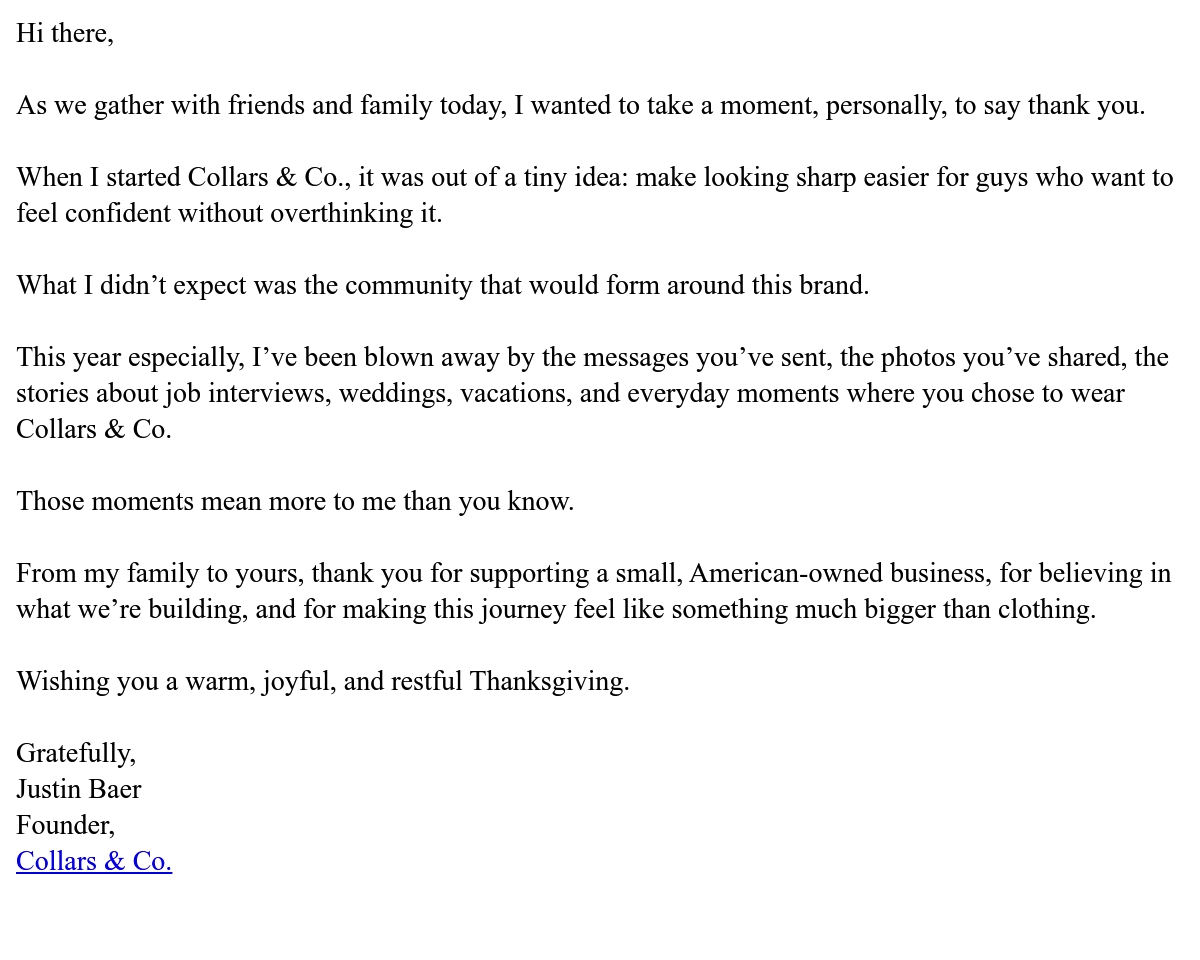
Collars & Co. picks Thanksgiving Day for a founder’s thank-you and leaves out every sales element, so the letter comes across as thanks and nothing more.
There is no product in it either. The subject line also follows suit: nothing but the holiday and the brand name, then a turkey emoji.
Founder Justin Baer thanks customers for “the messages you’ve sent, the photos you’ve shared, the stories about job interviews, weddings, vacations, and everyday moments where you chose to wear Collars & Co.”
Baer ties the thanks back to how the brand began, as “a tiny idea: make looking sharp easier for guys who want to feel confident without overthinking it.”
At about 150 words, the letter closes on “Gratefully, Justin Baer,” and then a photo of his family. The one link in the letter is the brand name under his signature.
What you can learn from it
Send the founder’s thank-you on Thanksgiving Day with nothing to sell in it, and fill it with moments related to your customers. Use it as a reminder and a way to show you care.
7. Anatomie: A greeting card first
Subject line: With Gratitude: Happy Thanksgiving from Anatomie 🦃
Preheader: Thank you for being part of the Anatomie community.
Email type: Thank-you with a Black Friday sale
Trigger: Day-before greeting with a Black Friday sale
Sent: Wednesday, November 26, 2025, the day before Thanksgiving
Why this email works
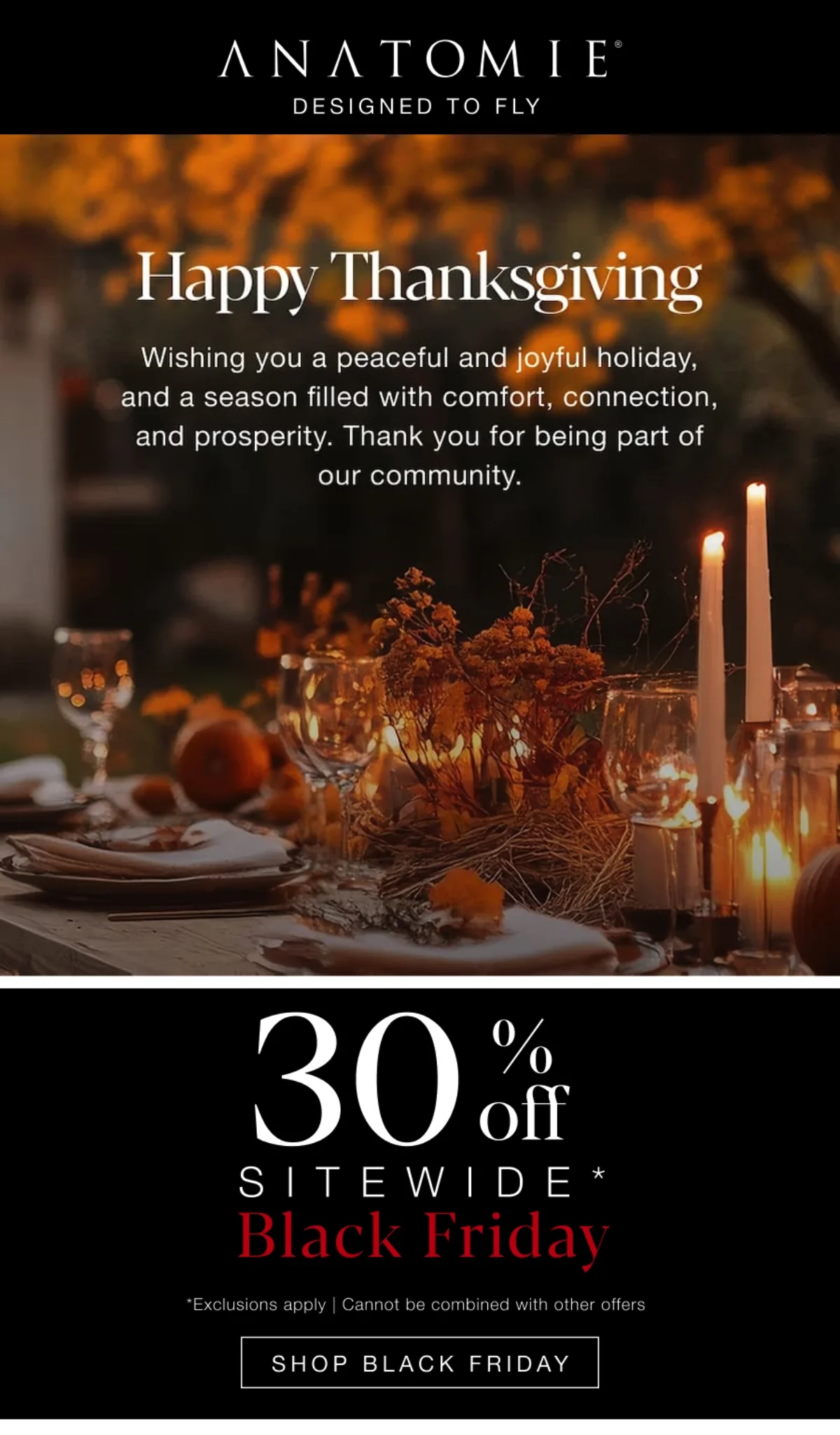
Anatomie splits the email in two, a greeting card first and the Black Friday offer in its own panel below, so the sale doesn’t take over the thank-you. “With Gratitude:” opens the subject line ahead of the holiday and the brand. The preheader thanks the community.
The greeting sits over a photo of a candlelit autumn table, “Happy Thanksgiving,” and a two-sentence wish that ends “Thank you for being part of our community.”
Under the greeting, the sale gets its own black panel. “30% off” and “SITEWIDE*” sit over “Black Friday” in red lettering, followed by the exclusions line and a “SHOP BLACK FRIDAY” button. Anatomie’s next two emails on Email Love dropped the greeting and sold only Black Friday.
What you can learn from it
Treat the greeting as a card, a photo with one line of thanks, and let it stand on its own at the top. Whatever you are selling for Black Friday goes into a panel beneath it, where the reader meets it second.
8. RetroSupply: Why the sale exists
Subject line: For Our Retro Art Family: 50% Off Today
Preheader: Thanks for being part of this, enjoy the savings.
Email type: Sale (early Black Friday) with a holiday hours P.S.
Trigger: Thanksgiving Day sale launch
Sent: Thursday, November 27, 2025, Thanksgiving Day (dated from the email’s own copy)
Why this email works
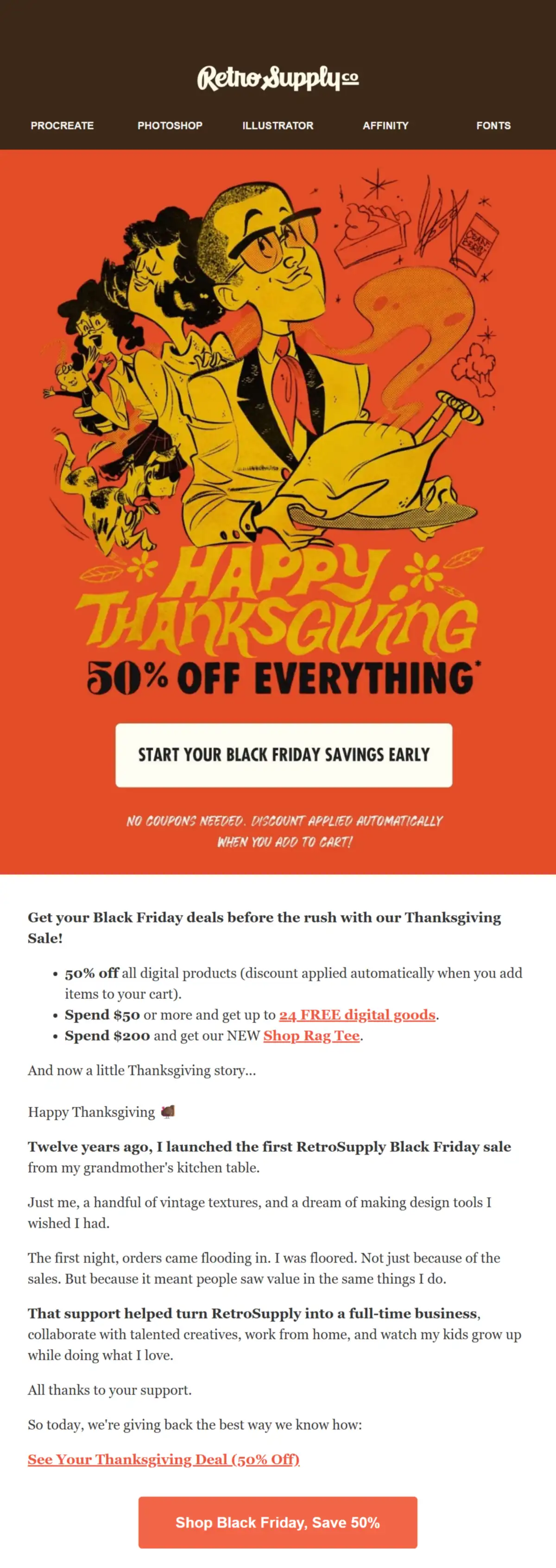
RetroSupply has its founder explain why the 50% sale exists at all, so the discount comes across as a thank-you to the people who helped build the business. The community gets the subject line’s first words, “For Our Retro Art Family,” with the offer and the day after them.
The illustrated hero stacks “HAPPY THANKSGIVING” over “50% OFF EVERYTHING*,” with a “START YOUR BLACK FRIDAY SAVINGS EARLY” button. Three bullets below it give the 50% off, free digital goods from $50, and the new Shop Rag Tee with a $200 order.
The founder also tells a story about their first Black Friday sale and thanks customers for their support. In its entirety, the email reads more like a thank-you letter and less like a push to sell products at a discount.
A P.S. further down notes the team is off for Thanksgiving, with emails answered once everyone is back in the office: a great way to set customer expectations if they need to contact support.
What you can learn from it
Write the reason for the sale as the founder would say it, in the first person. If you’re closed for the holiday, that goes in a P.S. along with the day replies pick up again.
9. Dorai Home: The after-feast cleanup
Subject line: THANKSGIVING SAVINGS: Up to 50% Off
Preheader: If today’s cleanup had you wishing for Dorai, now’s your moment — get ready for the next feast.
Email type: Sale (Black Friday)
Trigger: Thanksgiving Day sale email
Sent: Thursday, November 27, 2025, Thanksgiving Day

Why this email works
Dorai Home sells the moment right after the meal, the cleanup, which is the Thanksgiving problem its dish racks and drying stones solve. The subject line pairs the holiday with “Up to 50% Off,” and the preheader assumes the dishes are already done.
The hero is a set table with “BLACK FRIDAY SALE” over it. One dark panel carries the whole pitch: “You’ve handled the cooking. Let us take care of the cleanup.” The same panel ends on “our biggest sale of the year,” and the “Shop the Sale” button follows.
Of the four product blocks, the host who cooked gets the first one. “For the Feast Makers” sells the Dish Rack as “made for marathon cooking days.” No code is needed, and the terms at the foot give the sale an end date, December 2, 2025.
What you can learn from it
Tie your product to the moment right after the meal, and send the email on Thanksgiving Day, while that moment is fresh.
10. Hush: A heads-up before dinner
Subject line: happy Thanksgiving! here’s a free Luxe Throw
Preheader: None
Email type: Sale teaser (a Black Friday add-on)
Trigger: Teaser for an evening Black Friday add-on
Sent: Thursday, November 27, 2025, Thanksgiving Day, hours before the 8 pm ET drop it announces
Why this email works
Hush times a small ask for the hours before dinner, when a reader can’t step away from the holiday for long, and leaves the extra itself for the evening.
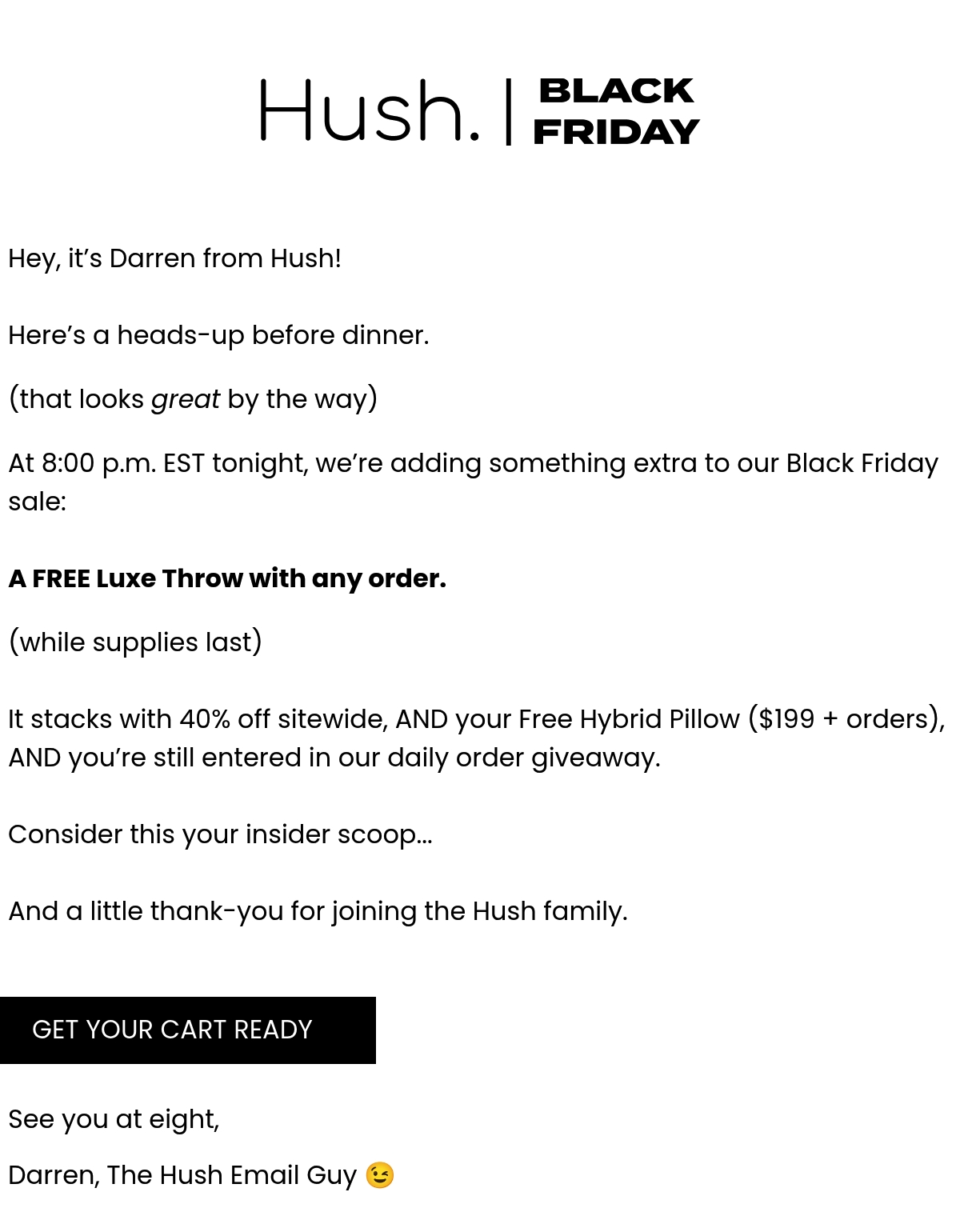
A few personal lines are enough to carry the news. The subject line is typed in lowercase, the way a friend texts, and holds the holiday and the offer in one line.
The body opens as if a long-lost acquaintance had written you an email, “Hey, it’s Darren from Hush!” and “Here’s a heads-up before dinner.” The news follows: “At 8:00 p.m. EST tonight, we’re adding something extra to our Black Friday sale:” and, in bold, “A FREE Luxe Throw with any order.”
Hush stacks the throw with the 40% off sitewide, and Darren calls the tip-off “a little thank-you for joining the Hush family.” The button reads “GET YOUR CART READY.” The note, about 87 words, never says “Thanksgiving.”
What you can learn from it
Preview an evening drop in a short, personal note before dinner on Thanksgiving Day, with a button that only asks readers to get their cart ready.
What makes a great Thanksgiving email
A great Thanksgiving marketing email solves a problem customers face over the holiday, gives the thanks room of its own, matches the offer to the send date, and flags any change to shipping or hours. The 10 examples point to four habits worth copying in your holiday email campaigns.
Start from the host’s problem
Build the email around a problem hosts face at Thanksgiving, then sell the product as the fix. Four of the 10 hang on the meal or hosting: UNFNSHED’s seats and Weber’s oven before the day, Dorai Home’s cleanup and Hush’s “before dinner” note on the day.
In Omnisend’s holiday shopping survey, 49–56% of respondents across the United States, the UK, Canada, and Australia feel significantly more stressed about hosting than last year.
Keep the thank-you apart from the offer
Send the gratitude email as an email marketing campaign of its own, or give the thanks the top of the email and put the offer in a block below it.
Four of the 10 say thank you, and in just two of them the thanks comes before any offer. Collars & Co. has no offer at all, while Anatomie’s is boxed off in a panel under the greeting.
Let the send date set the offer
Early emails are for helping customers plan, and the Black Friday offer belongs in the week before Black Friday itself. Of the three emails sent 10 or more days out, none carries a discount, and the six that do all sell it as Black Friday.
In Omnisend data, the median Thanksgiving campaign last season went out three days before the holiday, on the Monday of Thanksgiving week. The busiest single day was Thanksgiving itself, at about 30% of campaigns, and in Thanksgiving week 2025, 61% of all campaigns Omnisend brands sent were tied to a holiday, the highest share of the year.
Thanksgiving 2026 falls on Thursday, November 26, with Black Friday on Friday, November 27. For the days after that, see our guide to the best time to send Black Friday emails.
Give the holiday schedule its own line
If Thanksgiving changes your shipping or your hours, say so in a line customers can’t miss. Two of the 10 give a shipping deadline: My Pet Carnivore’s last order day and Cadence’s cutoff under the hero.
Two say when they’re off: My Pet Carnivore for pickups on Thanksgiving Day and RetroSupply for email replies in its P.S. Either line is a Thanksgiving holiday message in its own right.
Thanksgiving email subject lines
The best Thanksgiving subject lines name the holiday or the offer and stay under 50 characters, the length Omnisend recommends. Eight of the 10 examples put “Thanksgiving” in the subject line, and seven stay under 50. The lines below are grouped by approach and work as written.
| Approach | Subject line examples |
|---|---|
| Thank-you only | Thank you for a good year, from all of us Before the sales start: thank you No sale, no code. Just a thank-you 🦃 What we’re grateful for this year: you Happy Thanksgiving from our table to yours |
| Offer | Black Friday prices, a few days early Shop before the rush: 25% off starts now Our thanks, in the form of 20% off Hosting this year? 20% off for the big day Tonight at 8 pm, a little extra in the sale |
| Give-back | Your order this week puts a meal on a table Thankful together: we donate for every order Round up your order for a local food bank Give back with us through Giving Tuesday |
| Shipping and holiday hours | Need it by Thursday? Order by Sunday Last day to order for Thanksgiving delivery Closed Thursday: our holiday hours 🍂 Ordering after Sunday? Here’s when it ships |
For more ideas, browse our list of Thanksgiving email subject lines, or try Omnisend’s free subject line generator, which writes subject lines from five or more keywords and a short description of your email.
Thanksgiving email templates you can use
The four Thanksgiving email templates below cover a customer thank-you, a Thanksgiving sale, a holiday shipping update, and a give-back campaign. Once the [brackets] hold your details, each one can go straight into your own editor or into Omnisend’s email templates.
Happy Thanksgiving email to customers
A happy Thanksgiving email to customers is thanks, and only thanks, for the people who bought from you this year. Book it for Wednesday, November 25, 2026, the day before Thanksgiving. For more wording, see our thank you for your business messages.
Thanksgiving sale email
A Thanksgiving sale email opens on the discount. What it covers and when it ends come in that first line, so nobody has to read on for the terms.
It goes to your whole list on Monday, November 23, or Tuesday, November 24, 2026, three or four days ahead of Black Friday on November 27.
Holiday hours and shipping cutoff email
A holiday hours and shipping cutoff email answers one question first, when the last order has to be in, and your store hours and support times follow under it. Thanksgiving falls on Thursday, November 26, 2026, so send this one on the last day customers can still order in time for it.
Whatever date you put in the template has to come from your carriers’ holiday schedules, so look those up first.
Give-back email
With a give-back email, each order placed before a set end date earns a donation, and the customer does nothing extra, since there is no code.
It goes out on November 23, 2026, the Monday of Thanksgiving week, and the donation stays open through GivingTuesday on Tuesday, December 1.
For the charity side of the campaign, see our guide to nonprofit email marketing.
How to create Thanksgiving emails with Omnisend
Create Thanksgiving emails in Omnisend as two scheduled email campaigns: a promotion on Monday or Tuesday of Thanksgiving week to the full list and a no-offer thank-you on the Wednesday before Thanksgiving to this year’s buyers.
Build the buyers segment first under Audience > Segments > Create segment > Create from scratch, with a Placed Order filter and a date range for this year.
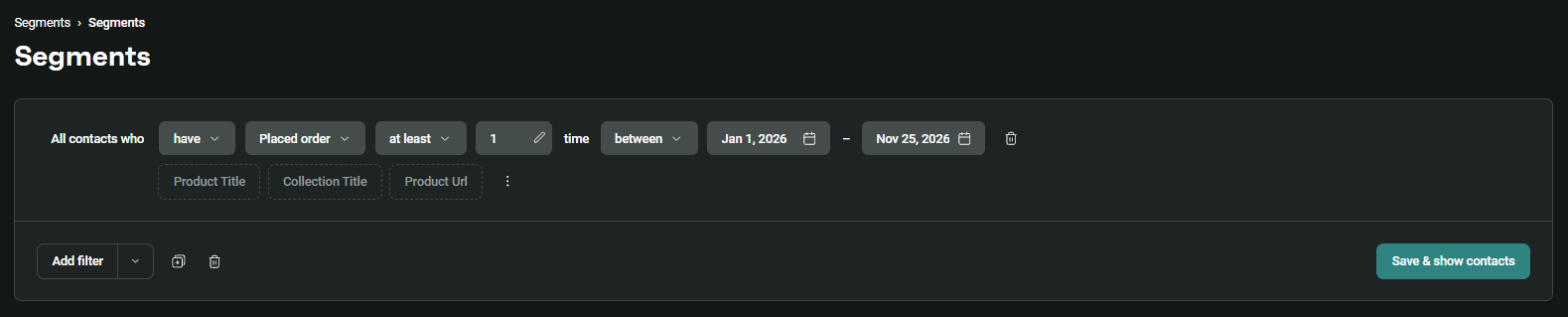
Each email starts under Campaigns > Create Campaign > Email Campaign. In the Campaign Audience step, the promotion goes to All contacts and the thank-you to Specific segments (the buyers segment).
Both emails get scheduled in the Review step, where Schedule for later takes the date and time, and the Schedule Campaign button does the rest. For 2026, the dates are November 23 or 24 for the promotion, then November 25 for the thank-you, and the time zone is the one set under Store Settings > Store information.
Segmentation in Omnisend is dynamic, and a scheduled campaign sent to a segment updates its recipient list one minute before the send starts. So Monday’s buyers land in Wednesday’s thank-you.
Quick sign up | No credit card required
Wrap-up
Pick the emails your store needs this year, from a thank-you to a holiday schedule update, then take one tactic from the 10 examples for each.
Start from the templates, and schedule the promotion for Monday or Tuesday of Thanksgiving week and the thank-you for the Wednesday before the holiday.