Omnisend AI


 OFFER
OFFER










Wix is built for people who want email to sit close to their website, while Mailchimp is built for people who want a deeper email marketing platform with more room to grow.
If you are comparing Wix email marketing vs. Mailchimp, the real question is not which tool has more features. It is rather this: which tool fits the way you work today, and which one will still fit after your list grows?
We’ll compare Wix and Mailchimp based on their pricing, features, integrations, deliverability, and customer service.
Wix email marketing vs. Mailchimp at a glance
Wix wins on pricing and customer support, while Mailchimp wins on features, integrations, and deliverability. Wix is the better fit if you want straightforward email marketing alongside your Wix website, while Mailchimp is the stronger choice if you need advanced automation, segmentation, testing, and a broader ecosystem.
Let’s quickly look at the comparison chart to get a basic sense of how Wix differs from Mailchimp:
| Dimension | Wix email marketing | Mailchimp | Winner |
|---|---|---|---|
| Starting price (Essentials plan) | $12/month (500 emails/month) | $13/month (500 contacts; 5,000 emails/month) | Wix |
| Free plan | 200 emails/month | Up to 250 contacts and 500 sends/month | Mailchimp |
| Features | Good drag-and-drop editing 23 current templates Automations for abandoned carts Form submissions Purchase follow-ups Segments and stats No A/B testing | Deeper editor options 250+ templates A/B testing Dynamic content Send-time optimization Multivariate testing Predictive segmentation Marketing automation flows | Mailchimp |
| Integrations | Best inside the Wix ecosystem, with built-in marketing integrations and tracking tied to your Wix website and site data. | 300+ integrations , plus a much bigger app directory and broader third-party reach | Mailchimp |
| Deliverability | Wix gives you deliverability stats, best practices, and sender reputation guidance, but the product is lighter on deliverability tooling | Mailchimp is more explicit about deliverability, publishes deliverability guidance, and says it helps messages reach inboxes with 99%+ deliverability | Mailchimp |
| Customer support | Wix says 24/7 customer care is available on its plans, with live chat and callback support, plus a large help center | Mailchimp gives free-plan email support for the first 30 days, 24/7 email and chat on paid plans, and phone support on Premium | Wix |
| Customer ratings | 4.2/5 on G2 (1,971 reviews). The score covers the Wix platform as a whole, since email marketing has no separate listing. Ratings as of September 12, 2026 | 4.3/5 on G2 (12,987 reviews) Ratings as of September 12, 2026 | Mailchimp |
Accurate as of September 2026.
Why choose Wix email marketing vs. Mailchimp?
Wix email marketing becomes the first choice for people who already run their business on the Wix website builder and want to keep all apps in one place.
[…] It [Wix] has also streamlined my day-to-day operations by integrating scheduling, contact forms, and email marketing directly into the dashboard.
Deinilys T. on Wix (July 2026)
[Read full review]
That setup makes sense for simple email marketing campaigns, quick promotions, and site-connected automations without having to jump between tools.
People choose Mailchimp when they want a more mature email marketing platform with stronger automation for sophisticated email campaigns, broader integrations, and better control over segmentation and reporting.
[…] Mailchimp felt more intuitive and less overwhelming at the beginning.
Cristina J. on Mailchimp (May 2026)
[Read full review]
It is the classic “grow into it” choice for teams that expect their email marketing platform to carry more of the workload later.
Wix email marketing vs. Mailchimp: Pricing
Wix email marketing wins when it comes to pricing, as it’s cheaper than Mailchimp on Tier 1 ($12/month vs. $13/month) and Tier 3 plans ($59/month vs. $350/month). While the Tier 1 plan differs by only a dollar, the difference grows to $291 by Tier 3, where Wix includes 1,000,000 emails/month compared with Mailchimp’s 150,000.
Plus, Wix email marketing plans charge a flat rate, while Mailchimp’s pricing is contact-based, so it gets more expensive as your subscriber list grows.
If you’re not willing to commit to a paid plan yet, both Wix and Mailchimp have free plans with limited access to the most basic features you’ll need to create your first email campaigns.
| Plan | Price | Email limit |
|---|---|---|
| Wix Free | N/A | 200 emails/month |
| Mailchimp Free | N/A | 500 emails/month |
| Wix Essentials (Tier 1) | $12/month | 500 emails/month |
| Mailchimp Essentials (Tier 1) | $13/month | 5,000 emails/month |
| Wix Core (Tier 2) | $29/month | 5,000 emails/month |
| Mailchimp Standard (Tier 2) | $20/month | 6,000 emails/month |
| Wix Advanced (Tier 3) | $59/month | 1,000,000 emails/month |
| Mailchimp Premium (Tier 3) | $350/month ($297.50/month for the first year) | 150,000 emails/month |
Accurate as of September 2026. Plans are presented without discounts for both products.
Wix email marketing pricing plans
Wix pricing ranges from free to $59/month and is best suited to small businesses and Wix-based businesses because of the low entry cost and straightforward email marketing plans.
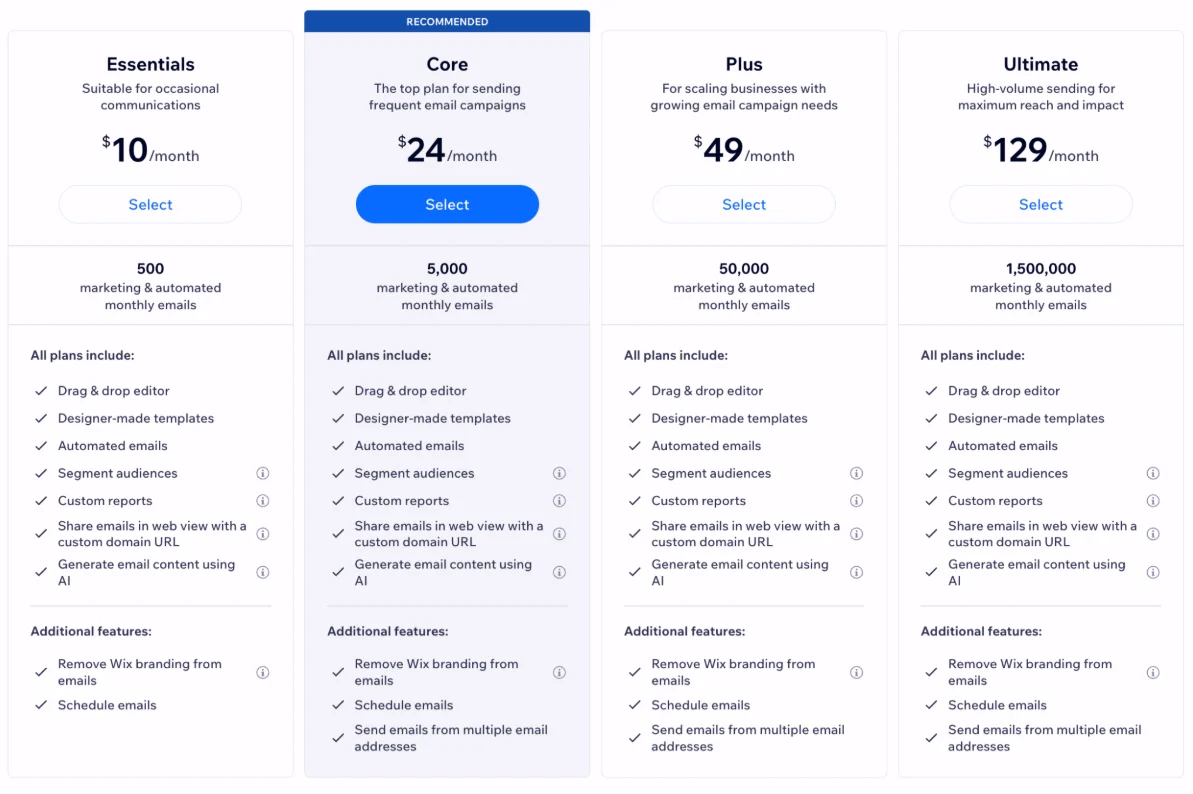
1. Free plan
- 200 emails/month
- Paid plans are now separate from Wix site plans
2. Essentials plan ($12/month)
More features than in a free plan:
- 500 emails/month
- Scheduled email campaigns
- No Wix branding in emails
- Custom campaign URLs
3. Core plan ($29/month)
This plan is recommended by Wix as a good place to start, since it covers all the basics with a little extra:
- 5,000 emails/month
4. Advanced plan ($59/month)
Everything that you have in the core plan, with a little extra:
- Up to 1,000,000 emails/month
You can choose to pay for two years upfront and get an even lower price, or pay monthly for a year at a slightly higher cost.
Wix’s paid plans that use a monthly email balance model also include scheduling, Wix-branding removal, and custom URLs.
That framework works best when your sending needs are tied to the size of your site, not to a deep lifecycle program. You can send unlimited email marketing campaigns within your monthly allowance, but once you hit your limit, new sends stop until the balance resets or you upgrade.
Another great benefit of Wix is that a 14-day money-back guarantee is available on all plans.
Check our Wix email pricing guide for more details.
Mailchimp pricing plans
Mailchimp email marketing platform pricing is based on the number of contacts, so your bill increases as your list grows.
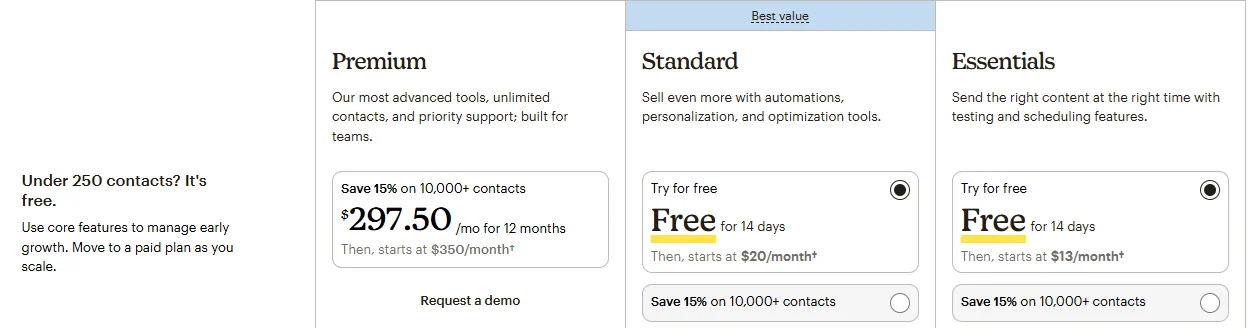
1. Free plan
- Currently covers up to 250 contacts
- Currently offers 500 sends/month
2. Essentials plan (starts at $13/month)
It has everything that you can find in the free plan, plus:
- Email and landing page templates
- Paid SMS add-on
- Customer journey builder
- Custom branding
- A/B testing
- 24/7 email and chat support
3. Standard plan (can be bought for $20/month)
Everything in the Essentials plan plus:
- Customer journey builder and branching points
- Send time optimization
- Behavioral targeting
- Custom templates
- Generative AI
- Dynamic content
- Multivariate testing
4. Premium plan (starts at $350/month or $297.50/month for the first year)
Everything in the Standard plan plus:
- Advanced segmentation
- Comparative reporting
- Unlimited seats and role-based access
- Phone and priority support
A contact-based pricing model is ideal for teams that need greater flexibility, but it may not offer good value if you send only a handful of campaigns each month. Since Mailchimp charges overages when you exceed contact or sending limits, your actual costs can rise beyond the advertised price.
One advantage of Mailchimp’s paid plans is the increasingly comprehensive support they provide. Essentials and Standard come with 24/7 email and chat support, while Premium includes phone and priority support, four onboarding sessions, and additional tools for sophisticated teams.
You can test the Standard and Essentials plans for free for up to two weeks, but the Premium plan has no trial.
Wix email marketing vs. Mailchimp: Features
Wix has developed into a capable email marketing platform with automation and segmentation features. Still, Mailchimp’s email marketing platform features continue to outperform those of Wix in templates, A/B testing, advanced segmentation, and email automation.
If your campaigns are expected to become more complex, Mailchimp is the safer investment.
Before going through each feature in detail and how Wix and Mailchimp compare, let’s take a look to a quick summary:
| Wix | Mailchimp | |
|---|---|---|
| Editor | Drag-and-drop editor with customizable content blocks and no-code design tools | Drag-and-drop email builder with customizable content blocks, templates, and design tools |
| Templates | 23 designer-made email templates for common campaign types | 250+ email templates, plus saved and previously used designs |
| Automation | Automated emails triggered by actions such as form submissions, abandoned carts, purchases, and other site activity | Marketing Automation Flows with multiple triggers, branches, and actions for more complex customer journeys |
| A/B testing | Not available for email campaigns | Available for subject lines, content, From names, and send times; multivariate testing is available on higher-tier plans |
| Segmentation | Segments based on contact details, purchase behavior, and site activity | More advanced segmentation based on audience data, campaign engagement, purchase behavior, site activity, and predictive insights |
| Double opt-in | Available through new Wix Forms; contacts confirm their subscription by email before becoming subscribers | Available for signup forms; contacts confirm their subscription through a verification email |
| Plain-text email option | No dedicated plain-text-only campaign option; Wix emails are created through the visual editor | Dedicated plain-text campaigns are available, and Mailchimp also automatically creates a plain-text version of HTML campaigns |
| Landing pages | Available through the broader Wix website-building platform | Built-in landing page builder for campaigns, lead capture, and promotions |
| Spam/design testing | Preview and test emails by sending them to an inbox; Wix also provides guidance on spam and deliverability | Preview and test emails, check links, and use Inbox Preview to see how emails render across different email clients; Inbox Preview requires a paid plan |
Accurate as of September 2026.
Email editor
Both platforms adopt drag-and-drop editing, but they do not feel the same. Wix’s editor is built to match a website builder workflow, so you can move quickly if you already know how to work inside Wix.
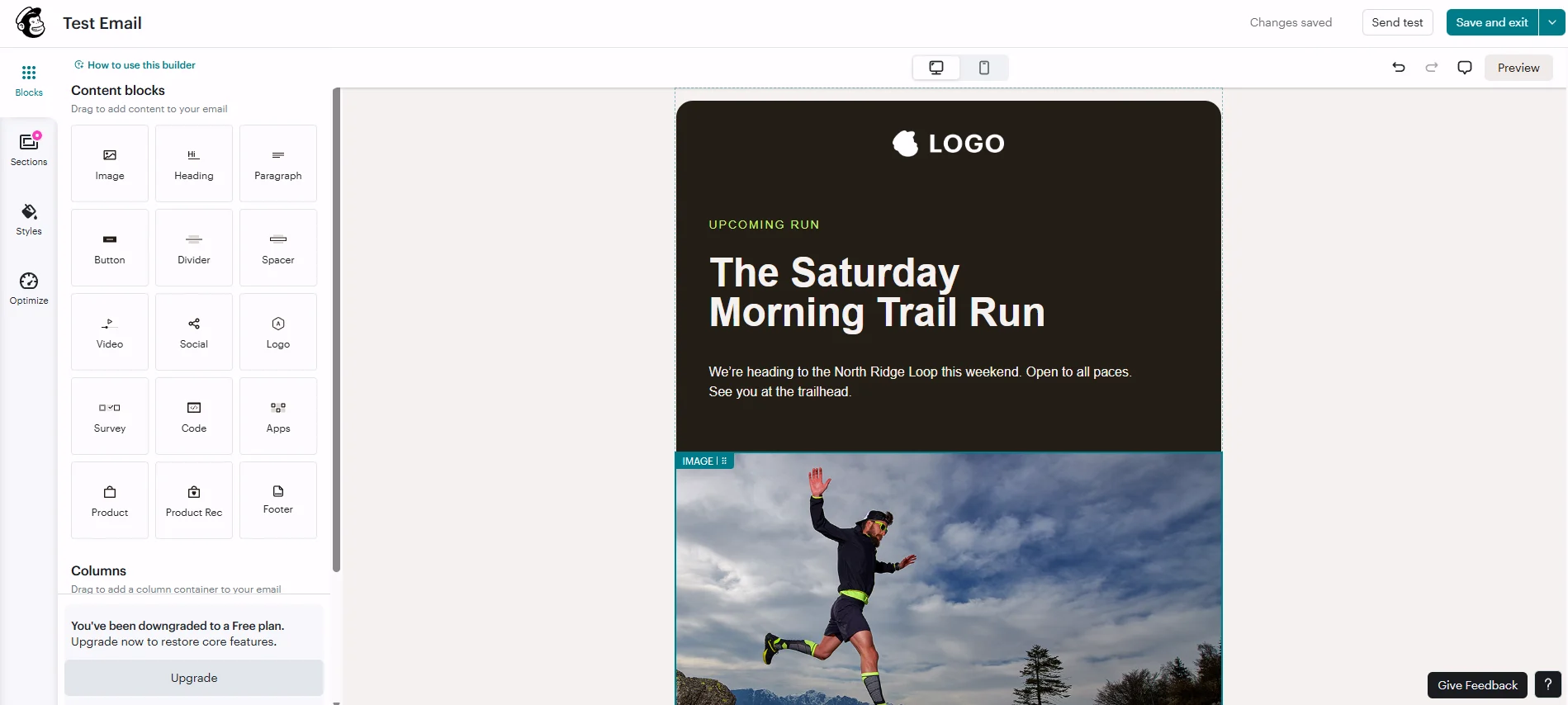
Mailchimp’s editor is more easygoing, especially on paid plans, where custom-coded and pre-built email templates sit alongside more advanced design controls.
This difference matters when you care about both speed and control.
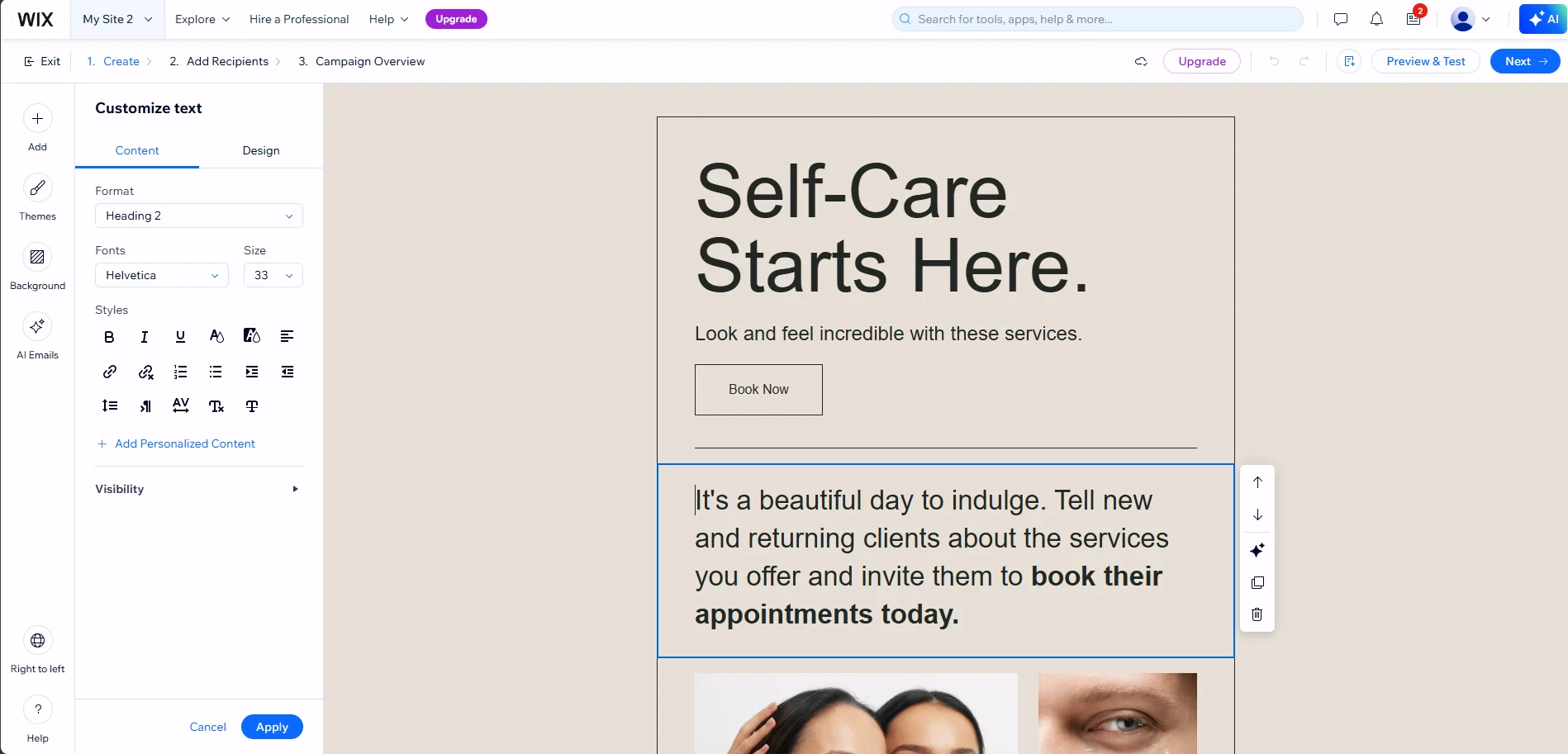
Wix keeps the process close to the site, while Mailchimp leaves you more room to shape the layout, the message, and the follow-up path.
Templates
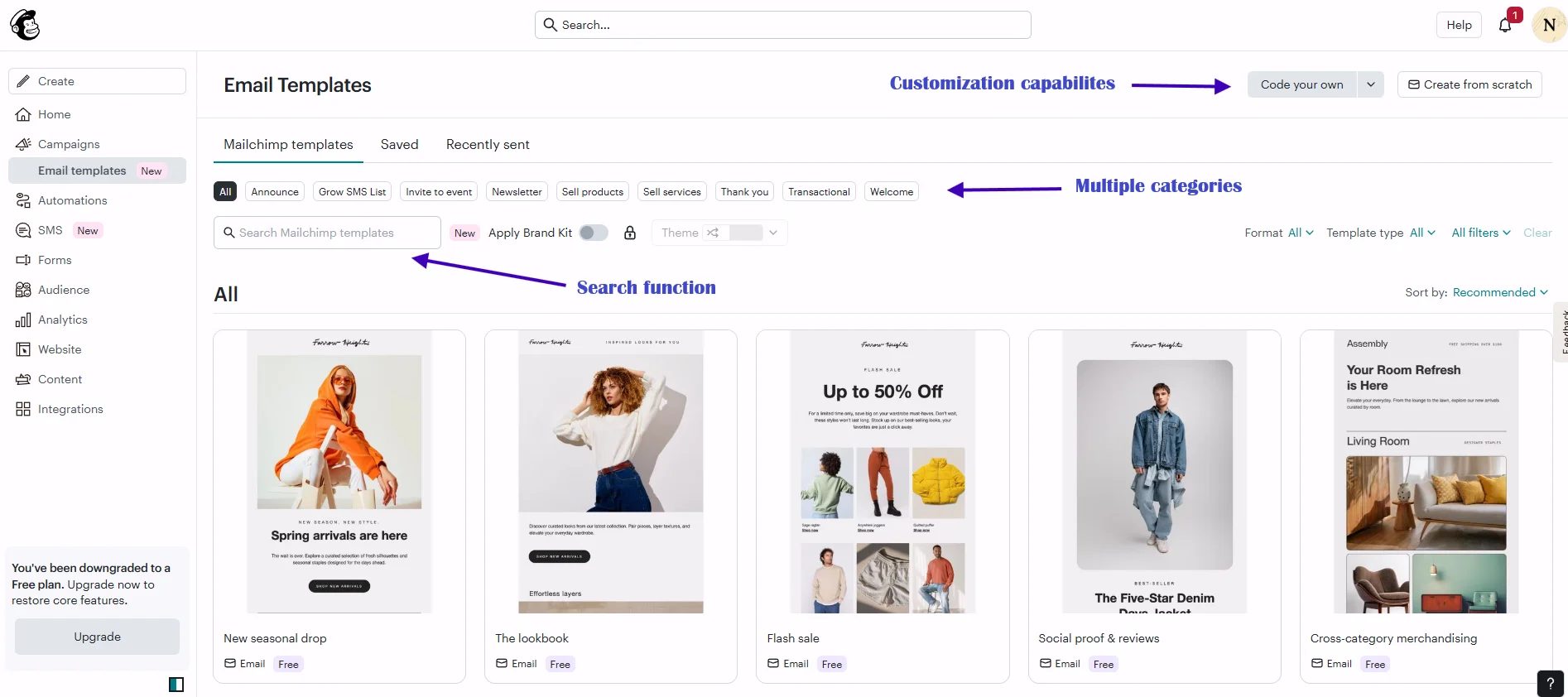
Wix currently offers around two dozen email templates, whereas Mailchimp provides 250+ templates.
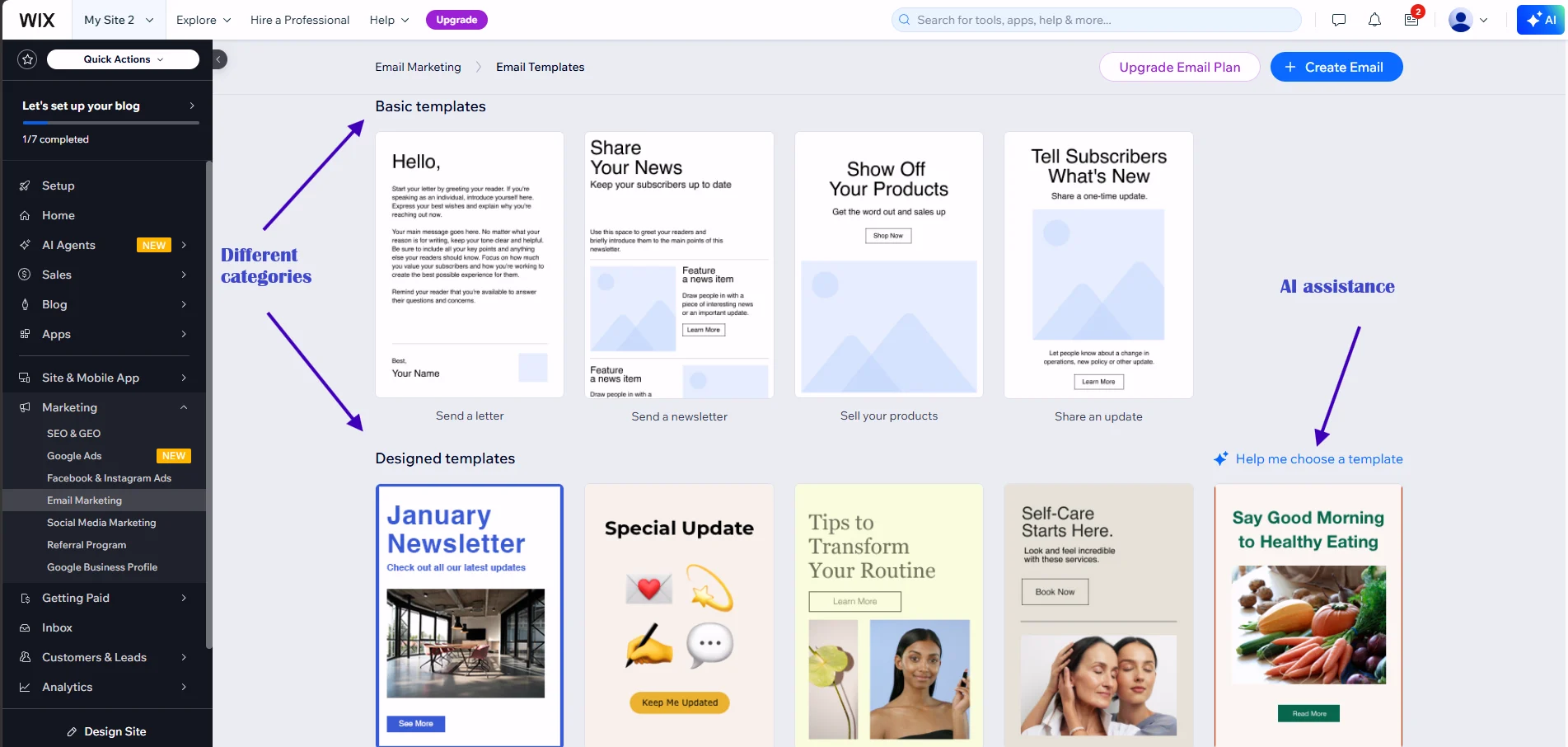
The difference becomes apparent when managing a variety of campaign types, as Mailchimp offers more flexibility without requiring you to build each design from scratch.
Automation
Wix automation has moved well beyond welcome emails.
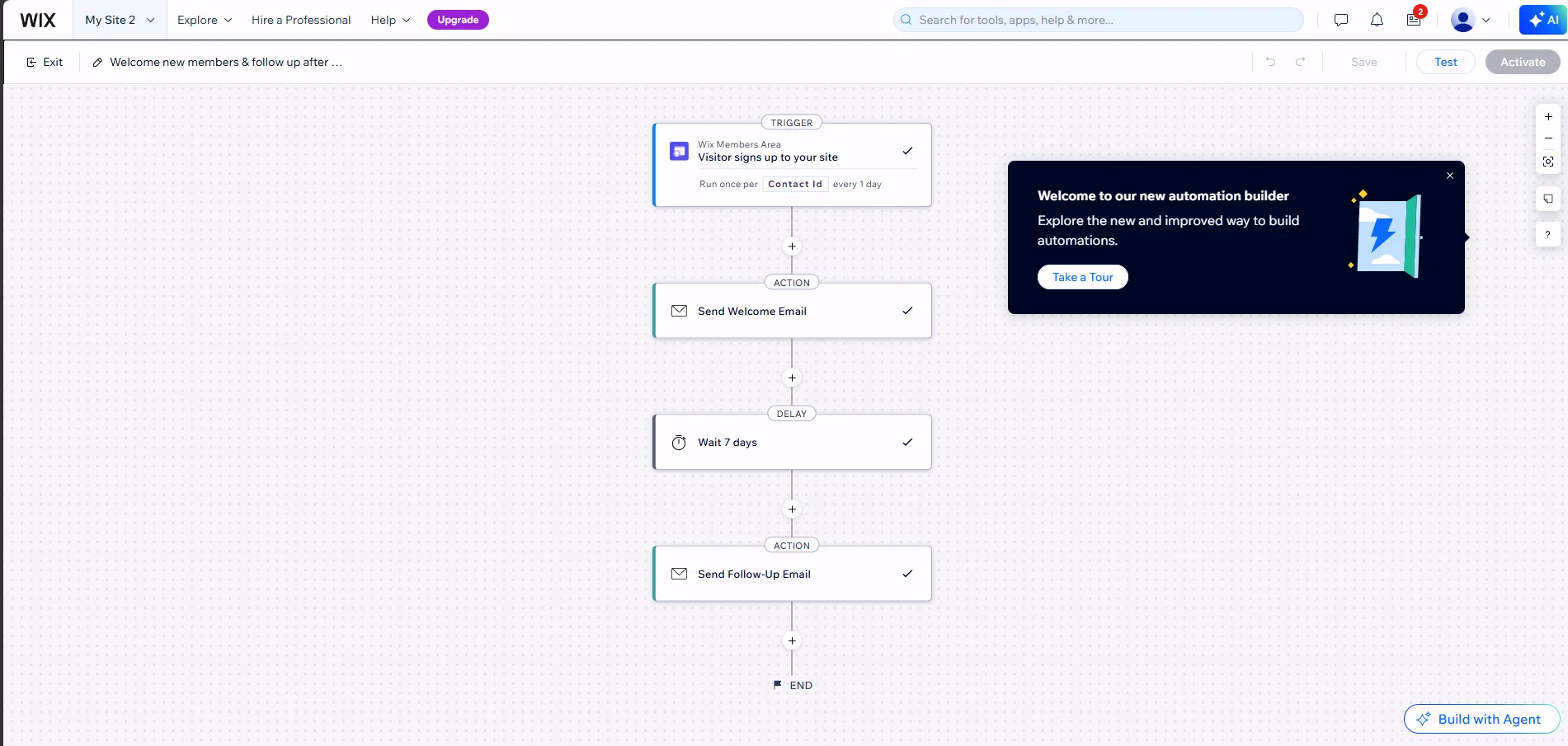
Currently, Wix provides:
- Automated emails for form submissions
- Abandoned carts
- Coupons
- Purchase follow-ups
- Other trigger-based workflows
According to Wix, these automations can include email statistics and custom email types.
Still, Mailchimp has the deeper stack. Its marketing automation flows feature supports:
- Multiple triggers
- Branches
- Unique actions
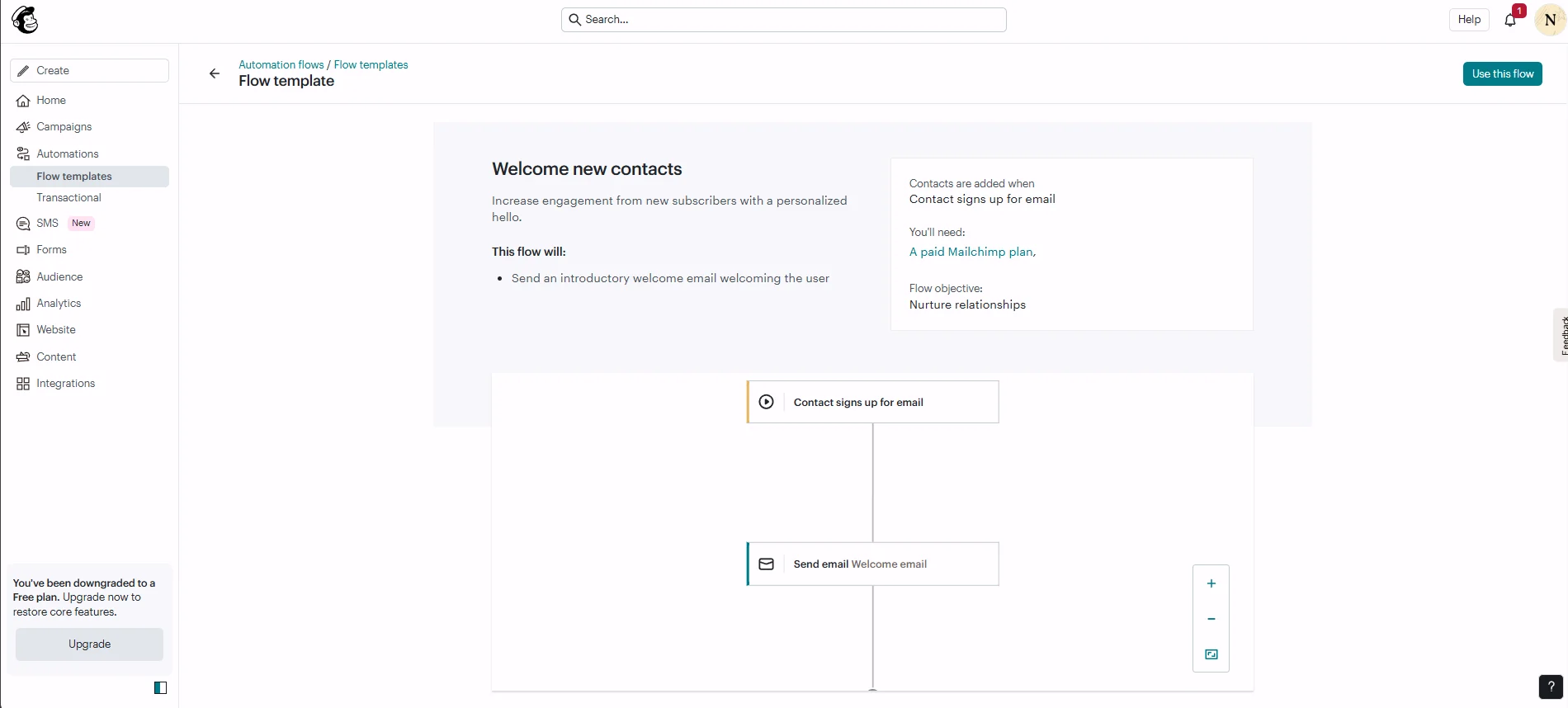
Mailchimp officially notes that it rebranded the old customer journey builder to marketing automation flows in June 2025.
This gives you a more advanced email automation structure for email sequences, lifecycle messaging, and more.
A/B testing
Mailchimp wins here by a wide margin. Mailchimp includes A/B testing on its plans, and its pricing pages also show multivariate testing on higher tiers. Wix, by contrast, only allows one test site per website, so A/B testing is not available for email marketing campaigns.
Mailchimp offers a more effective solution for teams interested in testing subject lines, send times, creative elements, and calls to action instead of simply guessing what improves click-through rates. Wix performs well overall but is less competitive in testing.
| Wix | Mailchimp | |
|---|---|---|
| Segmentation conditions | Contact attributes, labels, form submissions, purchases, abandoned carts, and site activity | Contact data, campaign engagement, purchase behavior, site activity, predictive insights, and advanced segmentation conditions |
| Advanced segmentation | Available for common customer and website behaviors | More granular conditions and advanced segmentation options on higher-tier plans |
| A/B testing | Not available for email campaigns | Available for subject lines, content, send times, and other campaign variables |
| Testing depth | No native email A/B testing | Multivariate testing available on higher-tier plans |
| Best for | Targeting customers based on Wix website activity and basic customer data | Testing campaigns and creating highly targeted audiences |
Accurate as of September 2026.
Segmentation
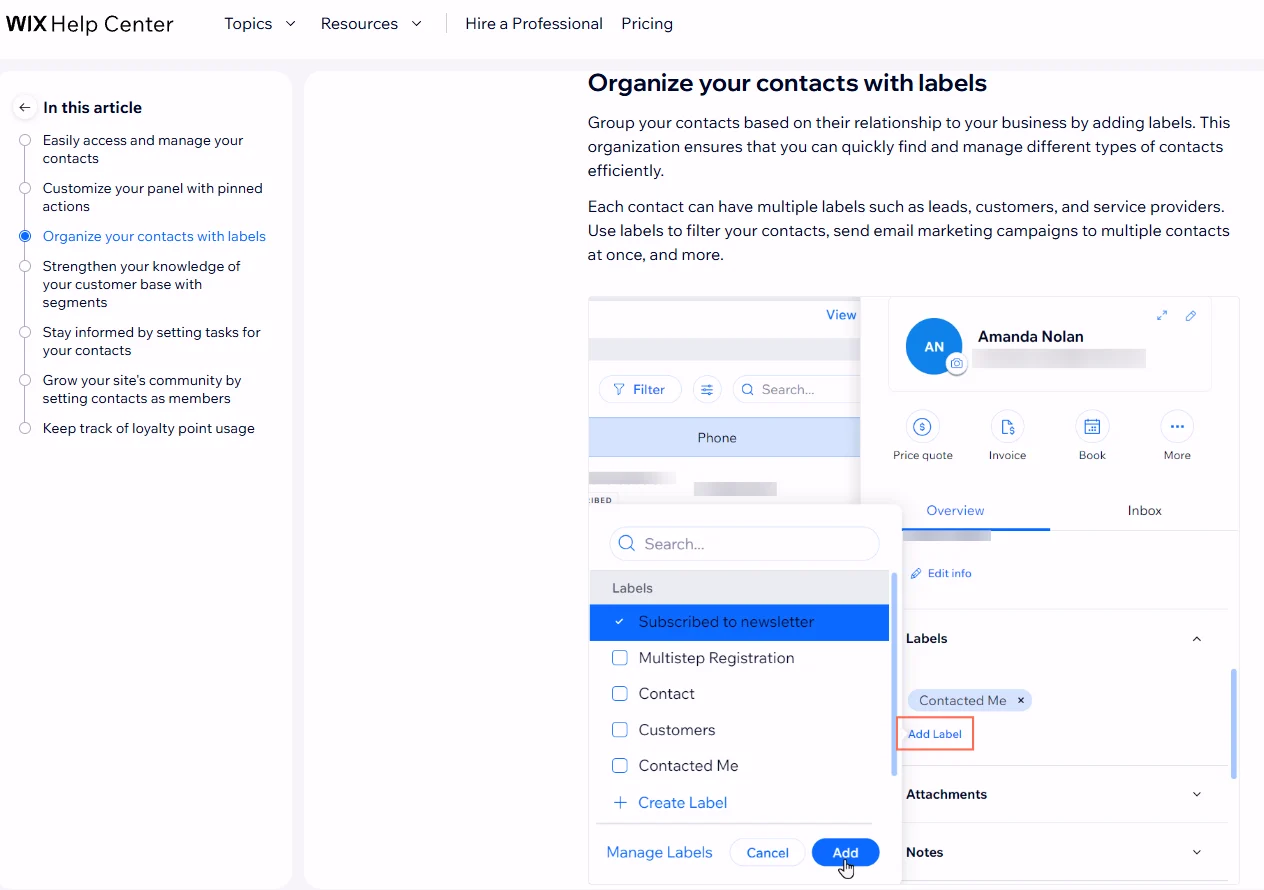
Wix offers enough advanced segmentation to target relevant groups. Wix support says you can build segments from contact attributes and site activity, and the current pages show examples such as abandoned carts in the last 30 days, labels, and custom conditions.
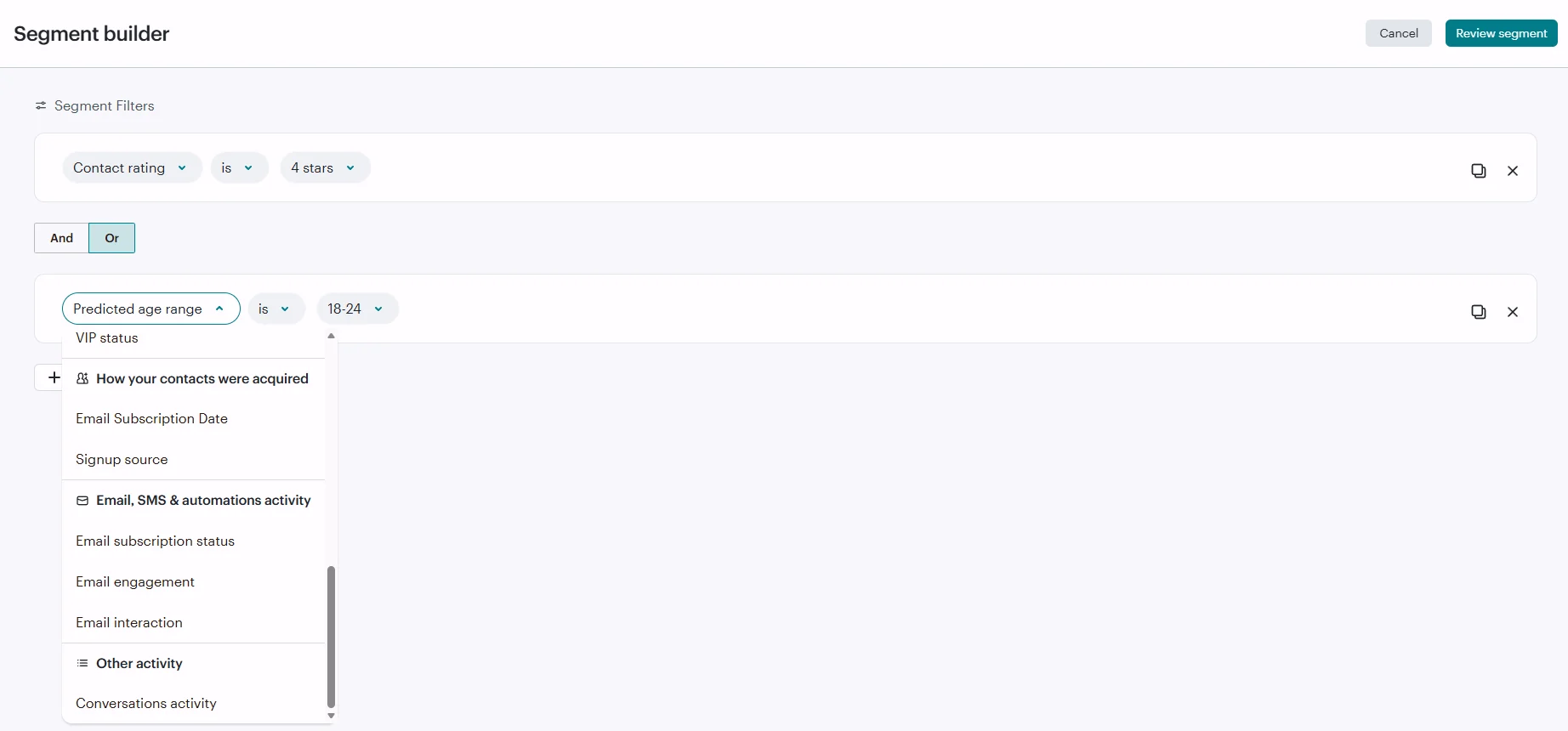
Mailchimp goes further with advanced segmentation options. Its pricing and feature pages show predictive segmentation, advanced customer segmentation tools on higher plans, and built-in audience management that tracks campaign engagement, purchase behavior, app engagement, and site views.
Which platform offers better integrations?
Mailchimp has over 300 third-party app connections, whereas Wix email marketing is restricted primarily to the internal Wix ecosystem.
If your stack needs more room to integrate with various tools and platforms without tying yourself to one builder, Mailchimp is ahead. Wix’s email marketing features are fine when you want fewer moving parts, but Mailchimp is stronger when your email marketing platform needs to connect to more of your business.
Wix email marketing
Wix works best when your email marketing campaigns live inside the Wix website, and the rest of your business already runs on Wix.
Its feature pages highlight:
- Built-in email marketing
- Analytics
- Business tools in a single workspace
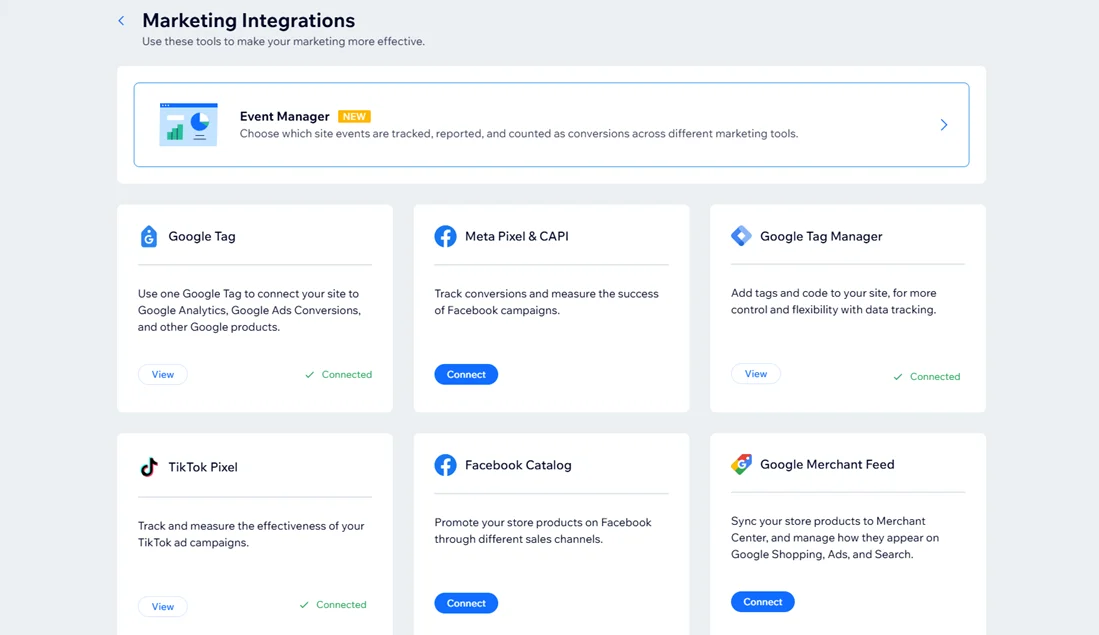
Wix email marketing makes the stack feel clean and connected, providing a range of features, all integrated within Wix, for your business beyond just email marketing.
Mailchimp
Mailchimp has a much bigger ecosystem. Its pricing pages list 300+ integrations, and its app directory covers a much wider set of third-party tools.
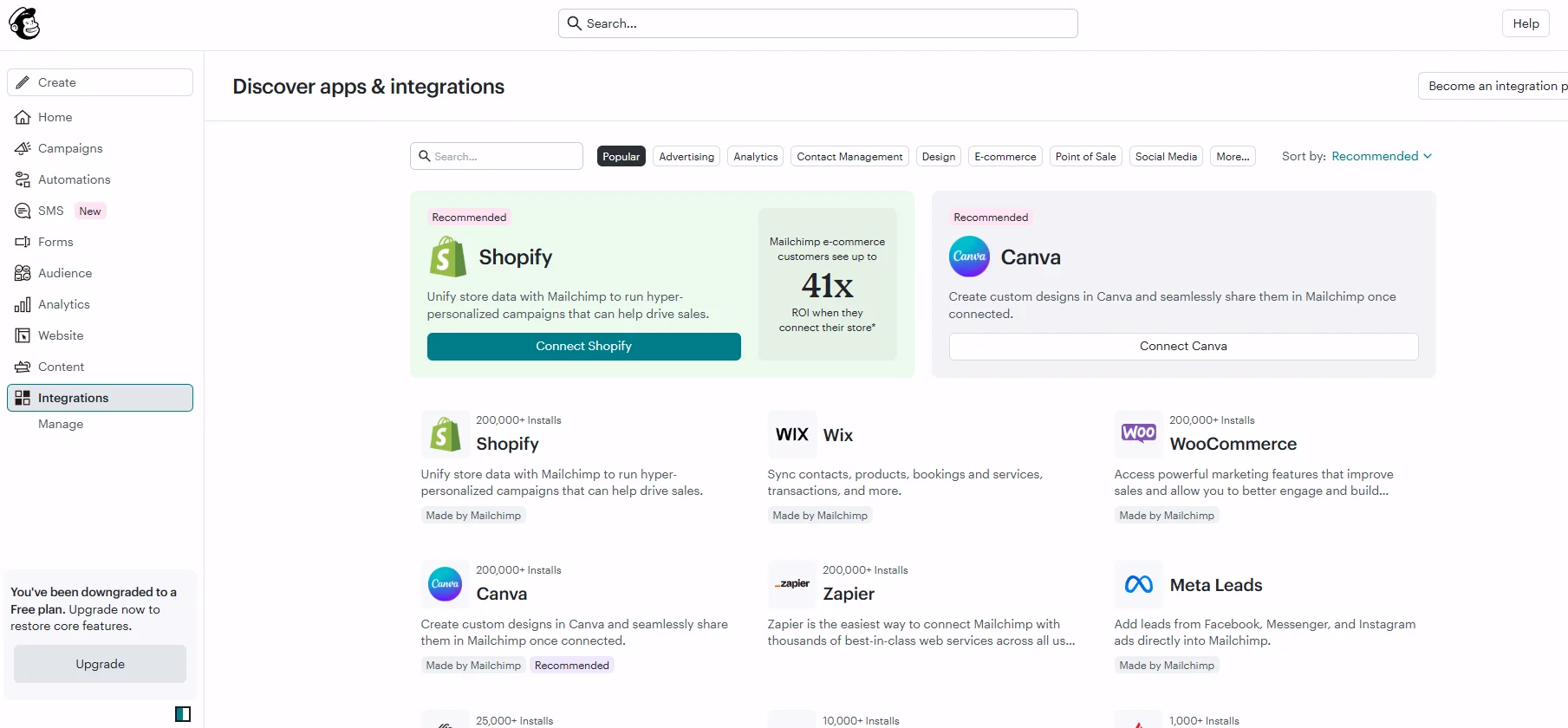
It gives you more options if you use multiple ecommerce or social media platforms, payment or reporting tools beyond a single website builder.
How do Wix and Mailchimp compare on email deliverability?
Wix gives you the basics, but Mailchimp offers more deliverability support, greater visibility, and more ways to shape campaigns around list quality.
That matters when you are sending more than a few simple email campaigns each month.
| Wix | Mailchimp | |
|---|---|---|
| Inbox placement | Deliverability guidance and tools to help campaigns reach inboxes | Dedicated deliverability tools and guidance, including inbox-placement support |
| Reputation tracking | Sender reputation guidance and campaign-level delivery metrics | Stronger reputation monitoring and audience-management tools |
| Deliverability support | Help with sender reputation, authentication, and best practices | Dedicated deliverability resources plus 24/7 support on paid plans |
Accurate as of September 2026.
Wix email marketing
Wix provides essential deliverability reporting and sender guidance, but offers lighter tooling compared to dedicated email platforms. Its help center explains deliverability, sender reputation, and best practices, and the dashboard shows delivery, bounce, spam, open, and click data.
Mailchimp
Mailchimp provides more depth in this regard. It publishes dedicated deliverability resources, explains how sender reputation affects inbox placement, and claims a deliverability rate of 99% or higher.
It further builds deliverability into segmentation and audience management guidance, giving you more levers to improve results over time.
Wix email marketing vs. Mailchimp: Customer support
Although Mailchimp offers superior premium support, Wix extends support availability to more customers without making it an upgrade. From a customer-first standpoint, Wix delivers a stronger overall experience.
Wix email marketing
Wix makes support readily available from the start. Its help center is extensive, the contact page includes chat access, and many support articles provide live assistance options for different account types. The company also states that 24/7 customer care is included in its plans.
That helps if you don’t want support to depend on how much you pay. For a small business owner managing a website, a store, and email marketing campaigns at the same time, that kind of access saves time.
Review ratings: 4.2/5 on G2 (as of September 2026)
WIX as a company/customer service… every time that I have requested to speak to a representative, I have had access to some of the best, most patient, and courteous support people. Truly. Even when my issue isn’t fully resolved, I know that it is only a matter of time before they will get back with me with a direction or an answer.
Verified Wix user working in the NGO sector (February 2026)
[Read full review]
Mailchimp
Mailchimp’s support is stronger once you pay, but it is thinner on the free plan. The free plan includes email support for the first 30 days; Essentials and Standard include 24/7 email and chat support; and Premium adds phone and priority support.
Some users have expressed dissatisfaction with limited support:
The support is really bad with no email or phone number to contact. You have to go through the AI chat and eventually you can log a support ticket. It wastes a lot of time as you cannot send screenshots of what you are seeing.
Verified User in Information Technology and Services (July 2026)
[Read full review]
However, those who have access to a higher support tier were satisfied:
Their customer support is a standout; they offer live support even at 3 AM, and I’ve found them to be competent and capable of resolving my issues, not just talking to a rep and hoping things get done. The initial setup was also a pleasure.
Daniel C. (July 2026)
[Read full review]
It is a good system for teams that know they will upgrade, but it is less forgiving for those who need extensive guidance beforehand. Mailchimp’s onboarding experience also improves on higher plans, but its top support benefits remain exclusive to those tiers.
Review ratings: 4.3/5 on G2 (as of September 2026)
What’s the final verdict on Wix email marketing vs. Mailchimp?
Wix is the better fit if you already live in Wix, want a tighter setup, and care about a lower-friction price ladder. Mailchimp will suit you better if you need a more powerful email marketing platform with deeper testing, stronger integrations, better deliverability tooling, and more advanced automation.
So the overall winner is Mailchimp.
Wix wins on pricing and support, but Mailchimp wins in the areas that usually matter most once email commences driving real revenue: feature depth, integrations, email automation, segmentation, and deliverability.
Are there Mailchimp and Wix marketing alternatives?
If you need capabilities beyond what Wix email marketing and Mailchimp offer, Omnisend is worth considering.
Omnisend starts at $16/month, compared with $13/month for Mailchimp and $12/month for Wix, but it stands out for:
- Omnichannel marketing: combine SMS, email, and web push in a single workflow
- 24/7 customer support: available via live chat or email on all plans
- Powerful AI features: predictive AI for segmentation and product recommendations, MCP integration: ChatGPT or Claude
- 79:1 ROI: Omnisend’s paid-plan merchants averaged a $79 return per $1 spent in 2025
For businesses that want to focus on ecommerce, especially omnichannel marketing, it’s an excellent choice as it easily integrates with Shopify, WooCommerce, BigCommerce, and other platforms.
Check our detailed Omnisend vs. Mailchimp review or use our email pricing calculator to compare rates and features. Alternatively, see a video on how you can combine Omnisend with Wix to build powerful automations.
Quick sign up | No credit card required