Omnisend AI


 OFFER
OFFER









35 engaging welcome email subject lines [+ tester]
With over 130+ pre-built integrations and flexible APIs, you can easily centralize data from across your tech stack
Make the most out of your data and unlock powerful growth marketing possibilities with these other top marketing tools.
Build any custom integration with our open, flexible APIs that are simple to use and implement.
Check out apps that have been stealing all the spotlight.
Email and SMS marketing insights, ecommerce resources, and the latest Omnisend news
Expert-led sessions covering email, SMS, and ecommerce marketing strategies.
Educational video and live training to help you make the most out of Omnisend.
Drive sales on autopilot with ecommerce-focused features
See Features
Email A/B testing is crucial for optimizing ecommerce revenue by providing insights into subscriber behavior and reducing the risk of ineffective campaigns.
Consistently test different email elements—like subject lines, content, and CTAs—one at a time to gather reliable data that informs your marketing strategy.
Utilize tools like Omnisend to streamline the A/B testing process, allowing you to quickly create variations and analyze results for improved ROI.
Always ensure your tests have a statistically significant sample size and reach 95% confidence before making decisions based on the results.
Email A/B testing is one of the most effective ways to grow ecommerce revenue. It reduces the risk of underperforming campaigns by providing insights into real subscriber behavior.
Email marketing A/B testing should be applied at all stages of your email strategy, from new product launches and promotional emails to newsletters.
This helps you identify which subject lines increase open rates, which email content delivers more value and builds trust, and which CTAs drive clicks. Testing each element separately ensures your choices are based on real data rather than just intuition.
This guide covers everything you need to run email A/B testing effectively and improve ROI. You’ll discover what A/B testing is, why it matters, how to plan and run tests, and real-world email A/B testing examples.
Quick sign up | No credit card required
Email marketing A/B testing lets you create two variations of the same email and compare their performance to see which performs better.
For instance, a basic email A/B test setup has two separate versions (A and B), where you change elements like subject lines or design:
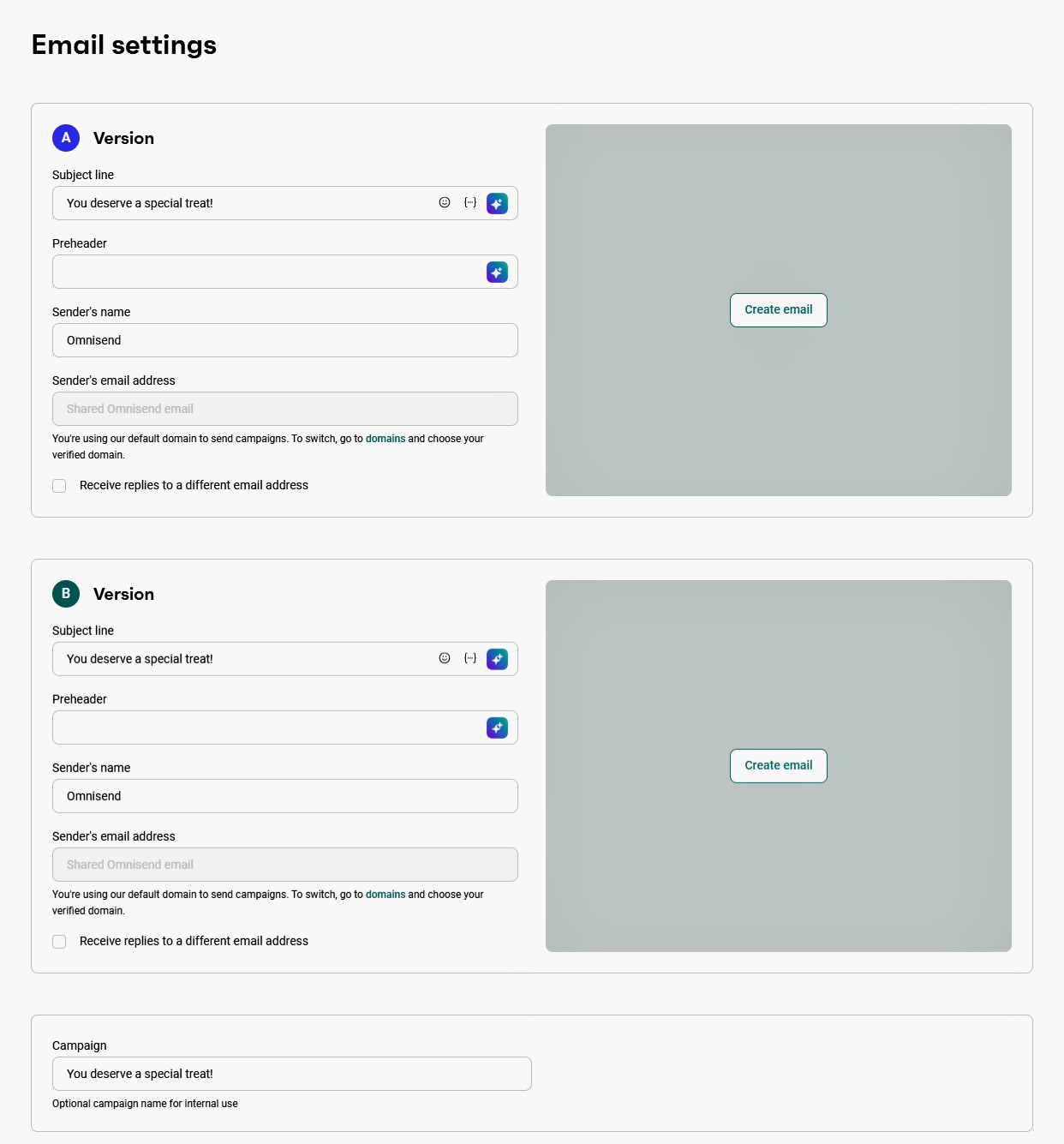
For example, you can create an email with two different subject lines and send a version to each half of your audience. You could also experiment with different CTAs, like “Shop Now” vs. “See Deals,” to see which drives more clicks.
These tests reveal what resonates with your audience and what to improve in future campaigns.
💡Test email parts — subject lines, sender names, images, content, and CTAs — preferably one at a time to avoid skewed results. You can use powerful email marketing tools like Omnisend to run these A/B tests in minutes.
To improve email performance, you need to understand what makes your customers open, click, or ignore your emails. Once you have this information, you can optimize emails based on customer behavior and improve ROI.
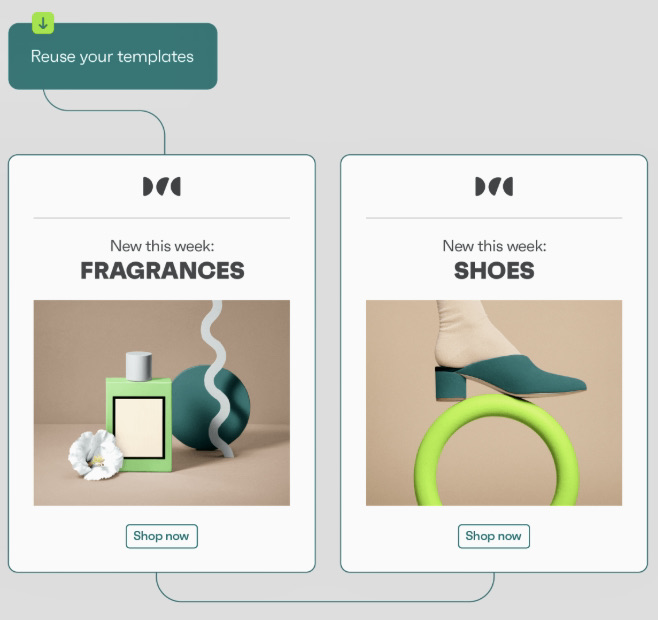
The best way to do this is to constantly A/B-test different elements. See this email A/B testing content variation example showing different email layouts:
A/B testing email campaigns also helps you stay aligned with customer preferences.
The average ecommerce open rate is 32.67%, with a 1.07% click rate. However, MailerLiter ran an A/B test showing that using elements such as personal sender names increased opens by 3.81%. Higher engagement like this can lead to better ROI.
Litmus reports 35% of marketers earn $36 per $1 spent on email marketing, while only 5% earn $50. However, with tools like Omnisend, you can generate $79 for every $1.
Now that you know why A/B testing in email marketing matters, here’s how to plan out your A/B test:
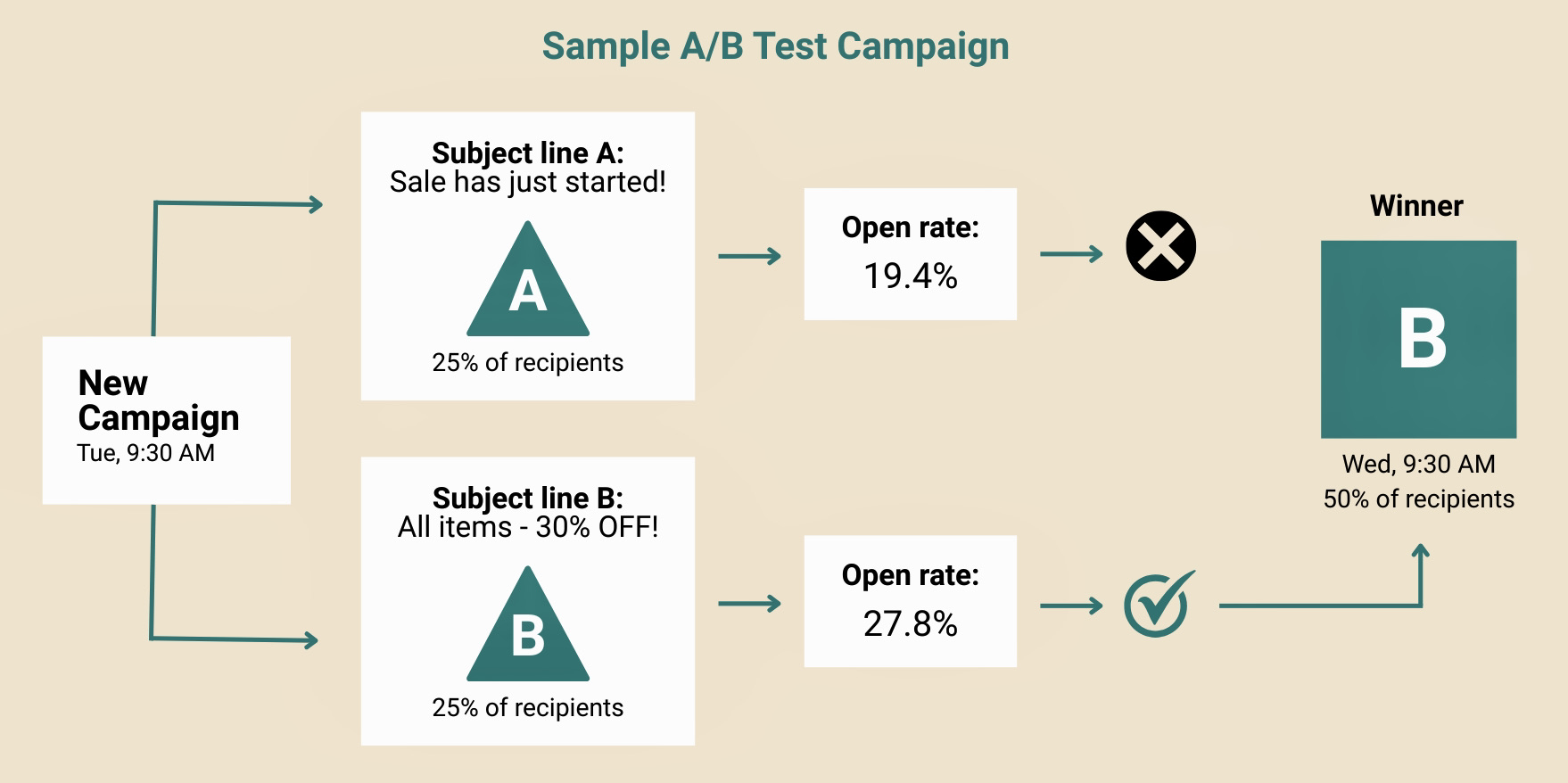
Here’s a subject line A/B test example:
See the table below for when to test each element and Omnisend’s recommended duration and sample size:
| Email element | When to test | Test duration | Sample size |
|---|---|---|---|
| Subject line | Before product launches, or when open rates drop. | ~24 hours | At least 2,000+ |
| Email content/image | To increase clicks and conversions in email campaigns. | ~24 hours | At least 2,000+ |
| Sender name | To improve open rates and build sender trust. | ~24 hours | At least 2,000+ |
| Preheader | To increase open rates and hook readers with text that complements subject lines. | ~24 hours | At least 2,000+ |
| CTA | Test wording, color, or placement to improve clicks or conversions. | ~24 hours | At least 2,000+ |
Subject lines have an immense impact on open rates. When A/B testing email subject lines, focus on elements that impact open rates and engagement:
For example, some of the subject lines that have 83% open rates are:
If you’re unsure which subject lines to test, tools like Omnisend’s quick subject line tester tool can help analyze and improve performance before you send.
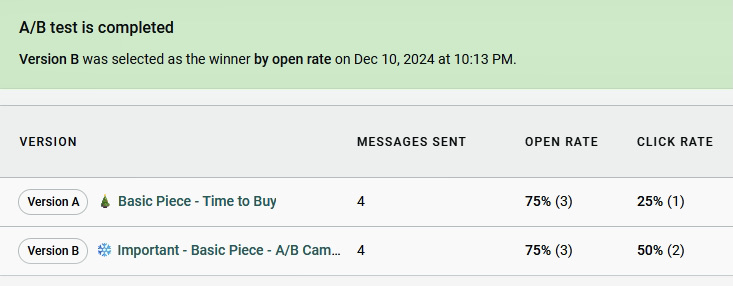
You can also run A/B tests directly inside your email campaigns by creating two variations and sending them to a small test segment before rolling out the winner.
Your email content and design directly influence how subscribers respond.
You need to continually test and optimize email images and content to achieve better results.
Consider these email A/B testing strategies:
 |  |
Test these specific ideas:
You can use Omnisend’s template library or drag-and-drop editor to create your email A/B testing ideas in minutes.
Sender name is one of the most overlooked elements in email A/B testing, yet it has a direct impact on open rates and trust.
With email A/B testing, you can send multiple email variations with different sender names and track which gets the most opens and fewest unsubscribes.
Try testing styles like:
Here’s how sender names appear in inboxes:
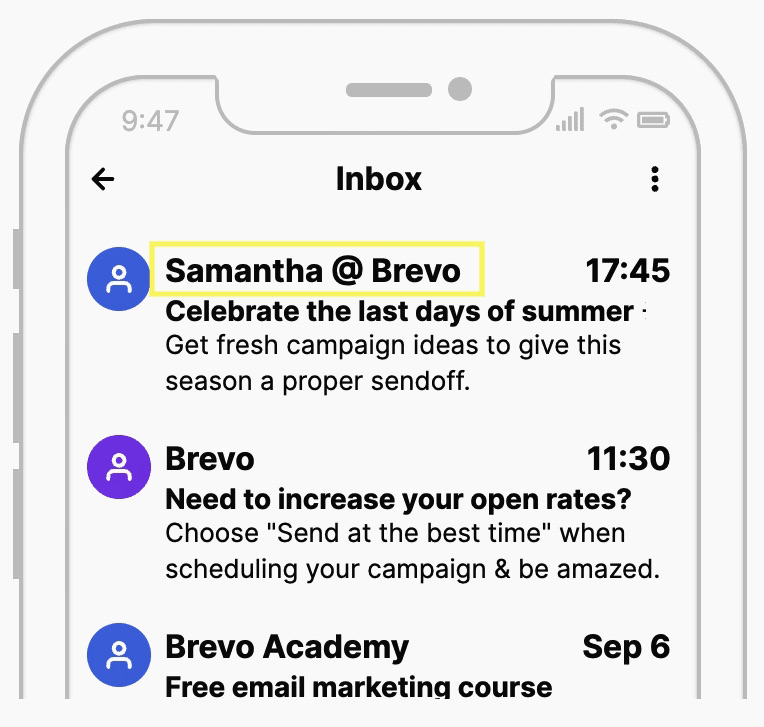
Test in scenarios such as:
With Omnisend, you can segment your audience and A/B test sender names to help improve open rates. Once you have a winning sender name, keep it consistent. Changing them too often can confuse subscribers.
The email preheader appears next to your subject line, usually shaded gray, with placement varying by email provider (such as Google or Apple Mail):
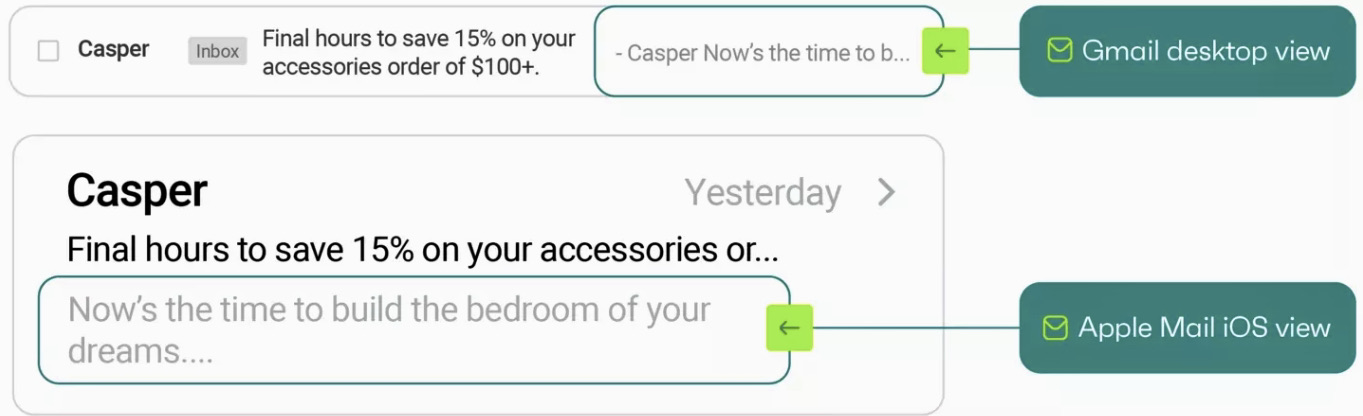
Email preheader A/B testing helps you find the best preheader style for your audience. You can test playful, straightforward, or curiosity-driven variants. Here are some strategies to start with:
For example, you can test:
Omnisend makes preheader testing straightforward. You can add multiple preheader variations directly in the preheader field and test them within the same email marketing campaign.
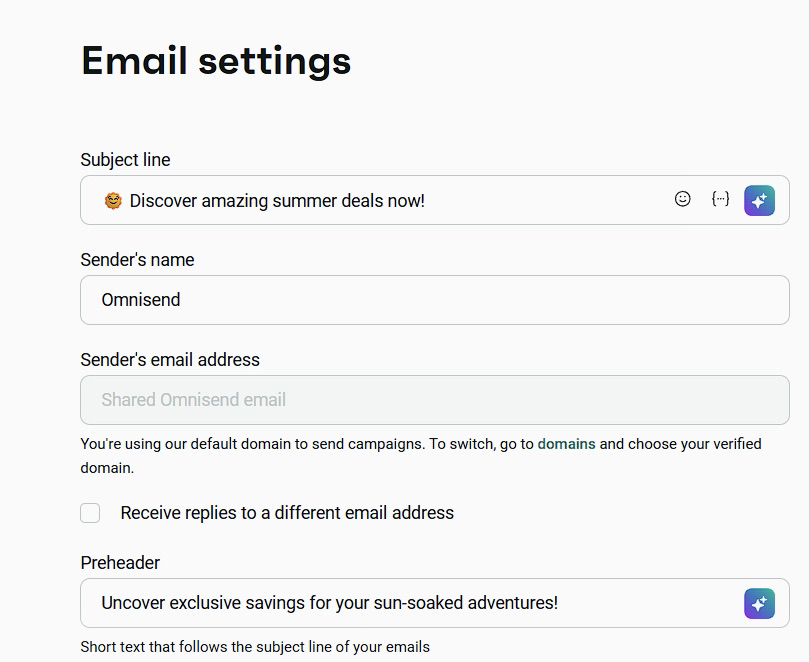
Preheader character limits vary across ESPs and devices. Desktops show around 140 characters, while 30 – 80 characters work best for mobile.
A good CTA is bold and inviting, and conveys a sense of urgency, encouraging the reader to click.
Use email A/B testing to identify what works best by testing different styles, like:
For ecommerce emails, you should test time-sensitive vs. standard CTAs and placement visibility. Omnisend reports that two to three CTAs perform best, while too many reduce engagement. For example, this Lyka email uses double CTAs (before and after the content) to catch attention early and encourage post-offer clicks:
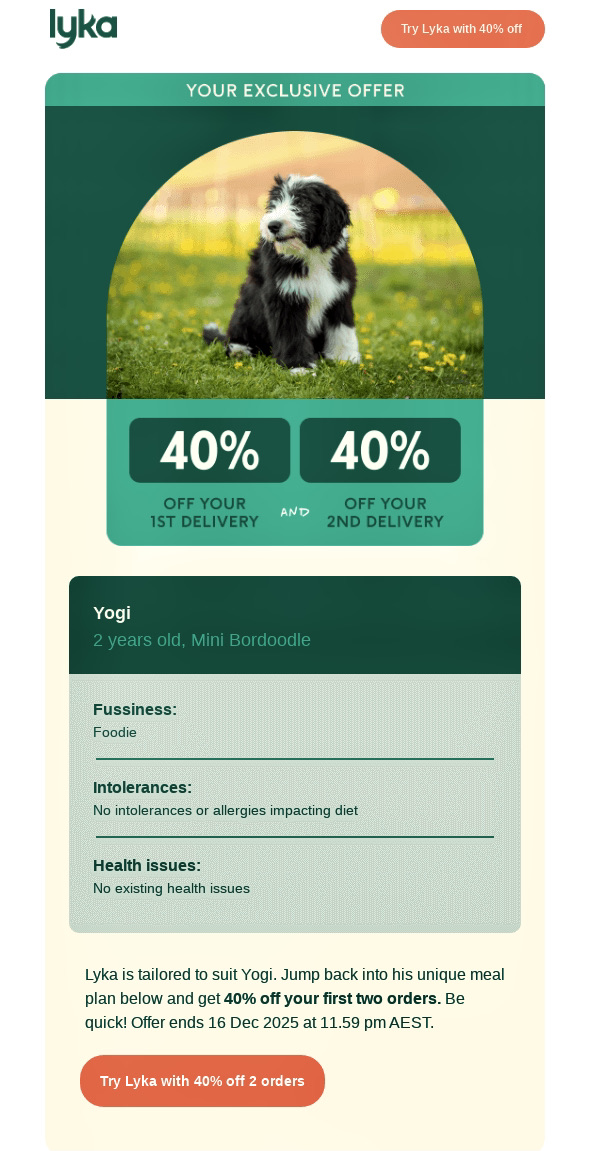
Another email CTA optimization example uses a button for immediate action alongside a subtle text link for readers needing more details before clicking. You can use this when A/B testing email variations:
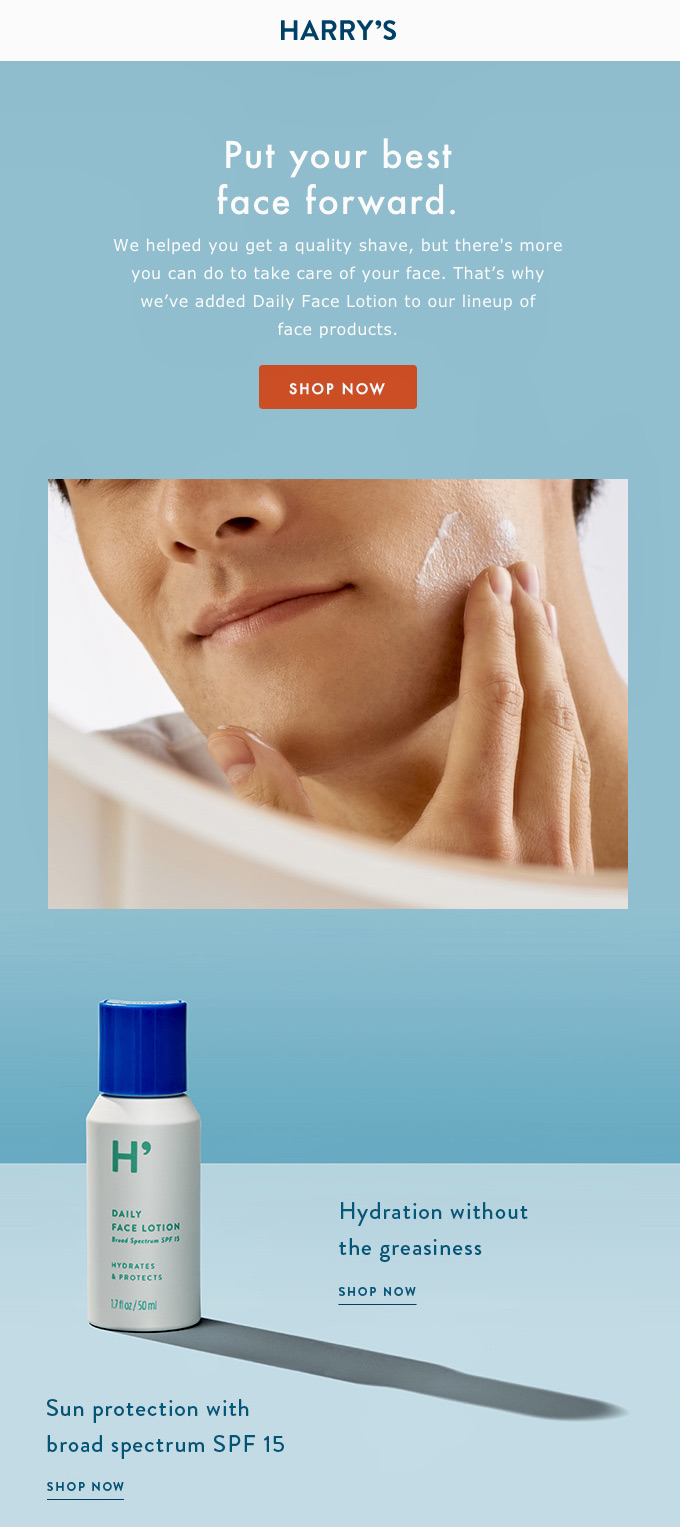
With tools like Omnisend, you can test CTA variations within the same email setup.
Quick sign up | No credit card required
Start with a clear hypothesis — a testable prediction of how one change will affect performance. For example, “if we [make this change], then [this outcome] will occur, because [reasoning].”
Then create your test using a tool like Omnisend. Follow these steps when learning how to A/B test:
Set up a regular email campaign with details like preheaders and content.
Include any targeting information and customer segments for your audience.
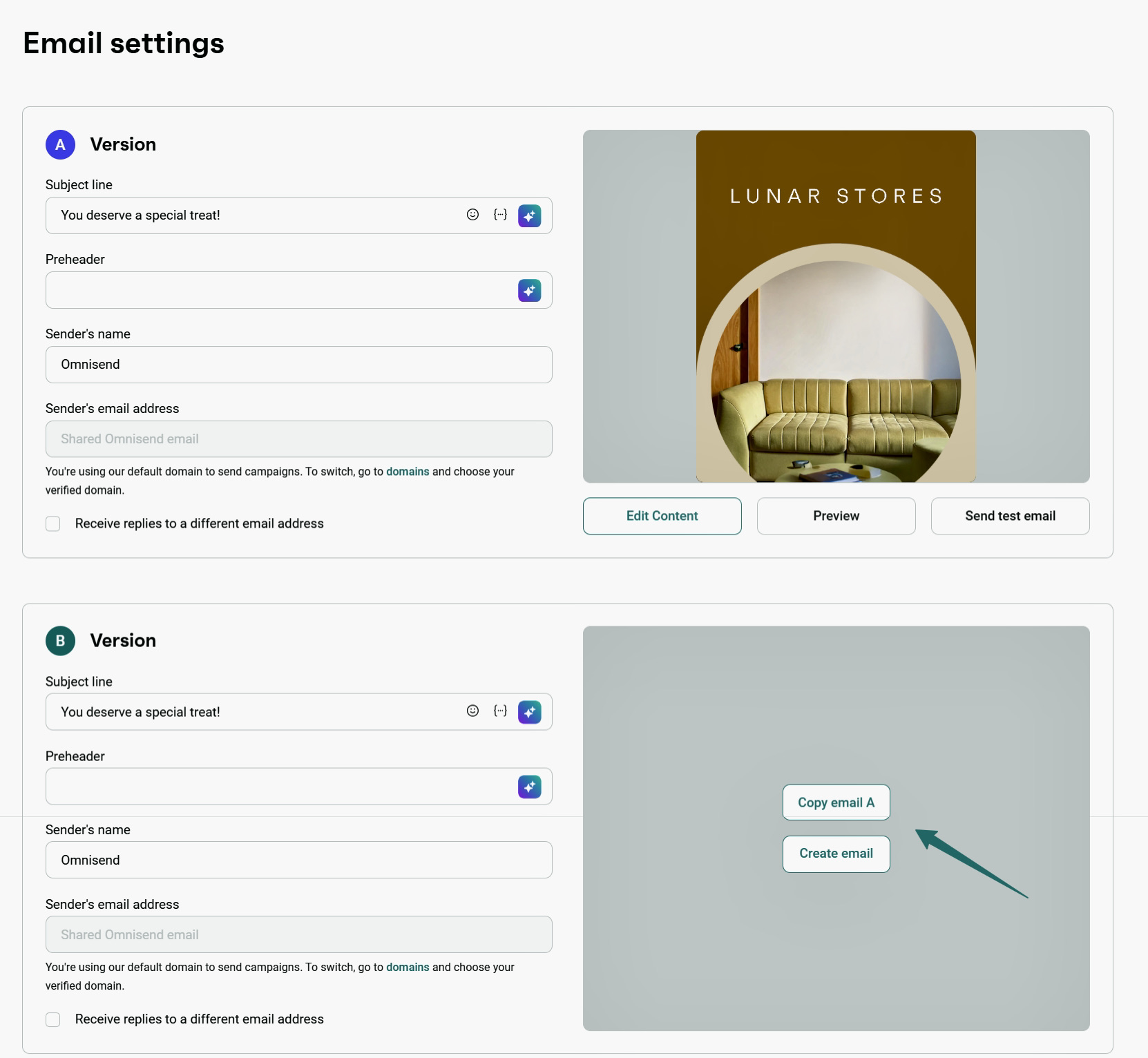
Create version A, then duplicate it and modify one element for version B:
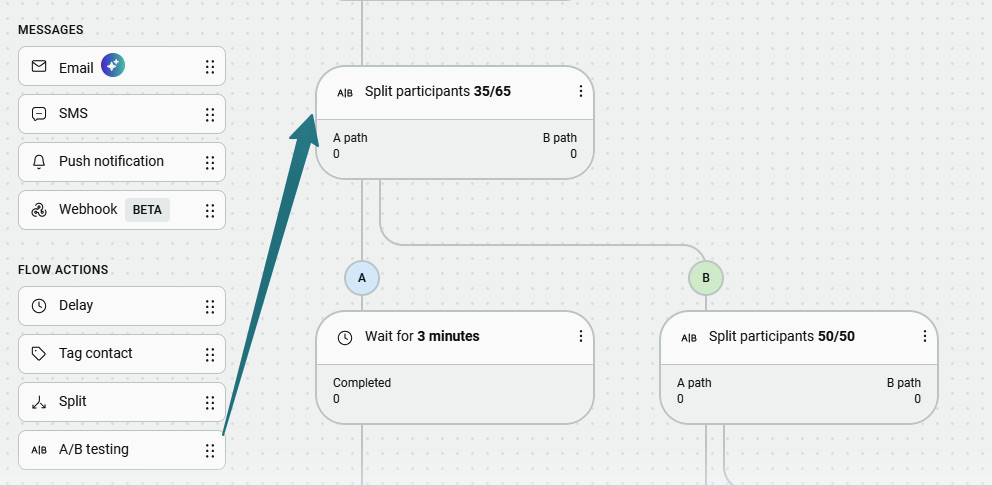
Define how your audience will be split. In Omnisend, you can send version A to one group and version B to another:
In your A/B testing email, test one element at a time to isolate results.
Focus on monitoring your A/B test after sending your emails and allow time for results to develop.
Avoid checking performance too early to avoid false positives. Wait for at least 24 hours or up to five days for users to engage with A/B testing emails.
Test duration also depends on sample size:
While your test runs, track:
To view your results in Omnisend, go to the Campaigns tab and open your email A/B testing campaign:
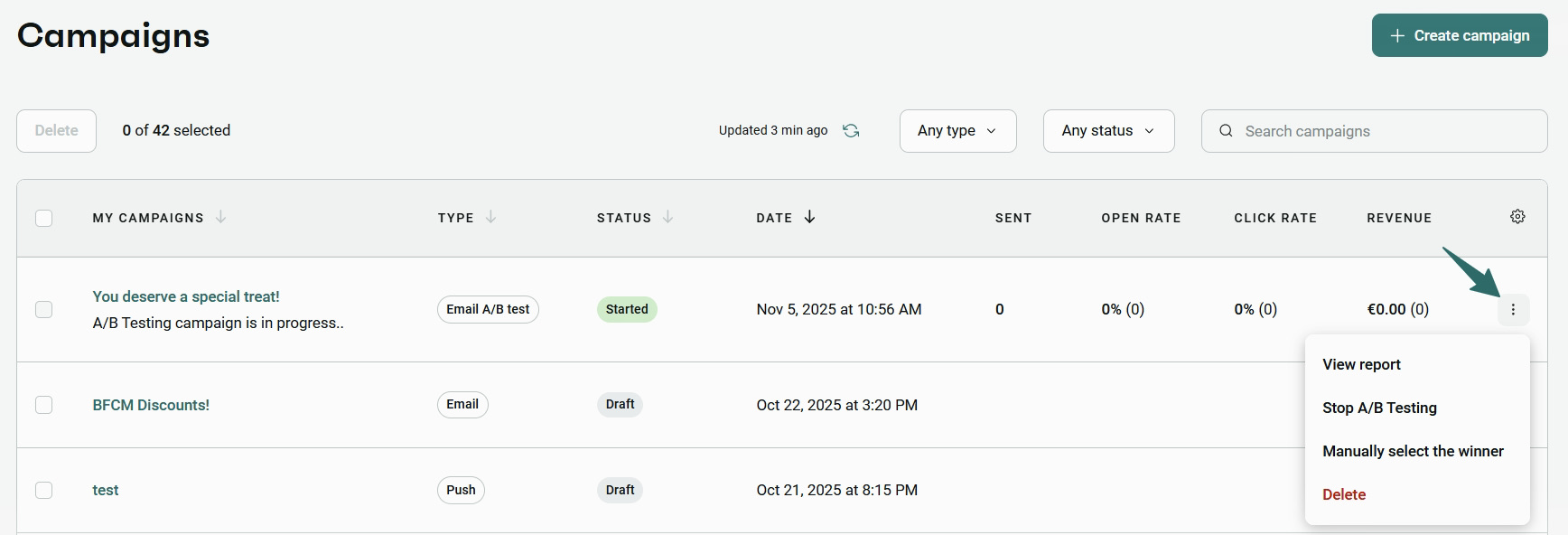
Click on View report, and you get an overview of metrics.
When analyzing A/B test results, compare key metrics side-by-side to measure impact. Focus on metrics relevant to the element tested. For instance, track open rates for subject lines or preheaders, and conversion rate, CTR, or unsubscribe rate for content or design.
Also, check secondary metrics that show indirect impact. View all your email A/B testing results in Omnisend’s dashboard:
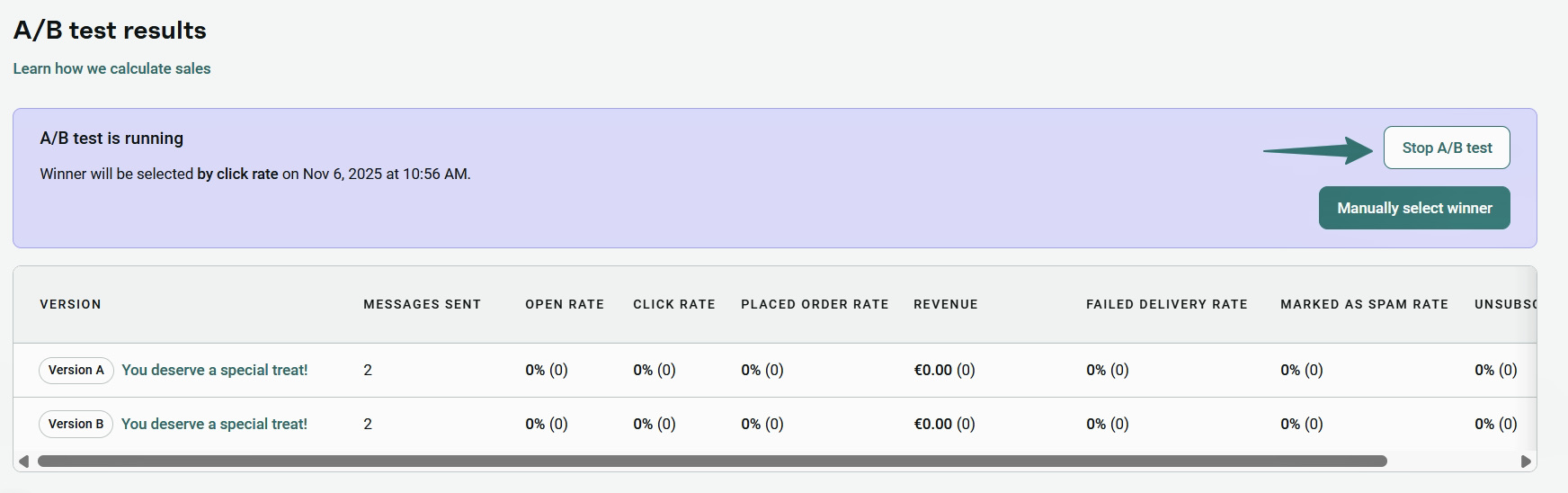
Another key factor is statistical significance, which confirms whether results are reliable or not. Aim for 95% statistical confidence before selecting a winner.
For example, if Variant B has a 21% open rate vs. 20% for Variant A but only 40% confidence, the result isn’t reliable. If statistical confidence reaches 95%+, you can send the winning variant. You can verify this using Omnisend’s A/B testing calculator.
If variants are similar, you can choose the one with stronger secondary metrics. However, if the results are unclear, increase the sample size or retest one element.
Document your findings to improve future email A/B testing and long-term performance.
Follow these A/B email testing best practices to get more reliable results so you can improve your campaigns:
Plan a testing schedule to make A/B testing an ongoing habit. Start with high-impact elements like subject lines. Then expand to preheaders, content, and CTAs. Over time, test different messaging for specific audience segments.
Keep a record of each test’s results and insights so your future campaigns improve continuously.
Test one variable at a time to isolate results.
Testing multiple variables makes it impossible to identify what caused the result, which defeats the purpose of A/B testing.
Use a statistically significant sample size to avoid misleading results. For instance, 2,000 – 10,000+ is recommended for email A/B testing.
Small samples can produce misleading outcomes, while overly large samples risk exposing too many users to a weak variant.
Always keep personal biases and opinions out of all A/B testing email campaigns.
If you’re not too confident about a teammate’s choice of content or design, test it!
Avoid overtesting unnecessarily. Overtesting can increase unsubscribes or spam reports.
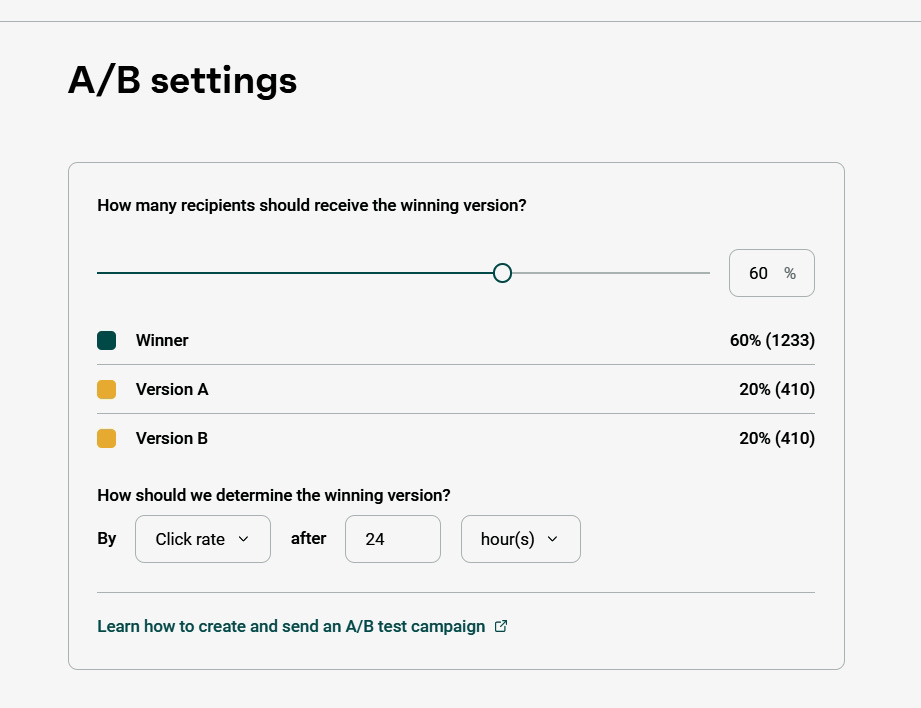
Run tests only for relevant and engaging content. Once you have a winner, you can choose what percentage of your subscribers receive it:
When NOT to run email A/B testing:
Statistical significance shows that the difference between versions (A vs B) is likely real, not random. Most tests use 95% confidence, meaning the same winner appears in 95 out of 100 tests.
The right sample size depends on:
Here’s a breakdown of sample size based on Optimizely’s calculator with a 5% conversion baseline:
| Confidence Level | 5% improvement | 10% improvement | 20% improvement |
|---|---|---|---|
| 90% | 140,000 | 30,000 | 6,600 |
| 95% | 140,000 | 31,000 | 6,900 |
| 99% | 150,000 | 33,000 | 7,200 |
For example, detecting a 10% improvement in open or click rates with 95% confidence requires roughly 31,000 subscribers per variant. Smaller samples may produce unreliable results.
Results are reliable once you reach the required sample size and 95% confidence. If not, run the test longer or include more subscribers. Omnisend shows confidence levels so you know when to select a winner.
These AB testing email marketing examples show how brands use email A/B testing to improve performance across subject lines, content, CTAs, and send times. With platforms like Omnisend, brands can generate up to $79 for every $1 spent on email marketing.
1. Subject lines
Start with a clear hypothesis: “Adding emojis in subject lines will improve open rates.” Then test:
For example, Mailerlite found that subject lines with emojis got higher open rates (38.13%) compared to subject lines without emojis (37.86%):
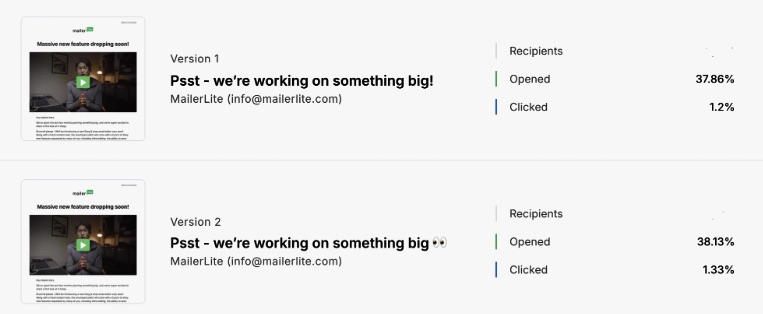
Actionable insight: Test for at least two hours before choosing a winner and pair this with optimized send times (8 AM and 11 AM, according to Mailerlite), to increase your open rates.
Brands like Kate Backdrop have achieved 87% open rates by using automation workflows in Omnisend. One welcome email generated $216,839 in sales, contributing to a 1:300 ROI:

2. CTAs
Test CTA copy and placement to identify what drives more clicks and conversions. Start with a hypothesis like “action-driven CTAs increase engagement compared to generic ones.” Then test:
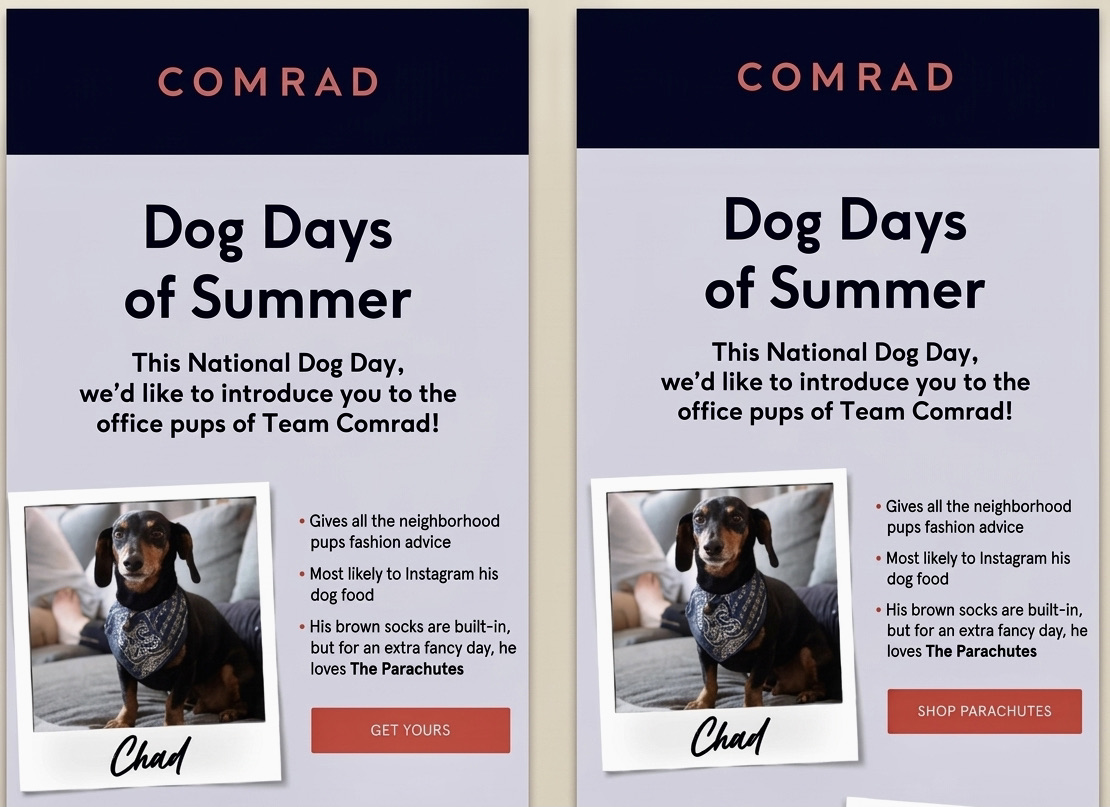
Action-driven CTAs like “Get started now” outperform generic ones, according to Campaign Geeks.
Actionable insight: According to Really Good Emails, bright CTAs grab attention immediately. However, they risk feeling a little pushy, so be careful not to overwhelm readers.
Brands like Dukier attribute over 55% of their revenue to personalized Omnisend automations. In fact, in 2025, they reached over €518,860 in revenue, a 525% increase from 2021:
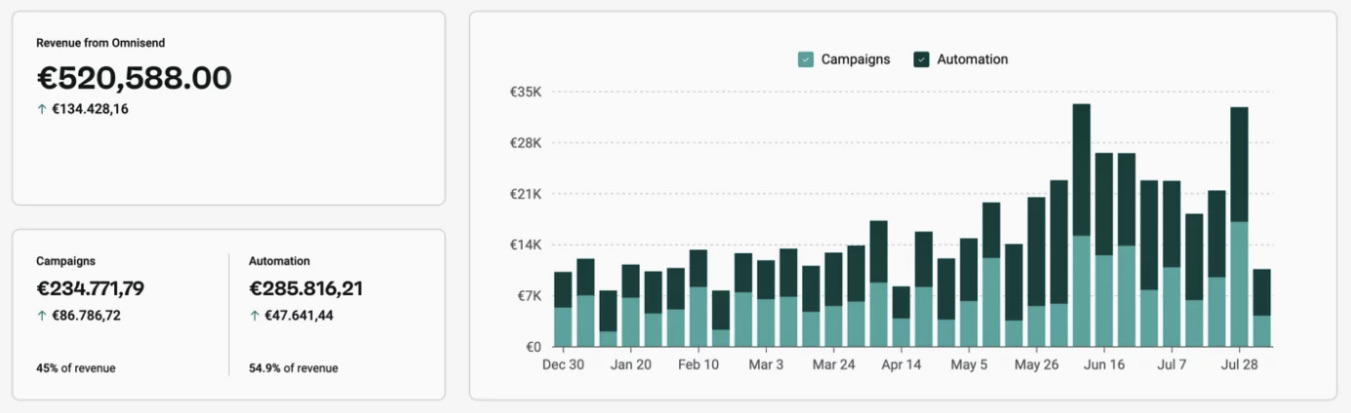
Dukier’s automated emails increased open rates by 48.4%, generated 10,300+ clicks, and drove 6,200+ orders at 2.8% conversion rate.
3. Email content/images
Begin your test with a hypothesis like “product-focused visuals drive higher conversions than lifestyle imagery.” Then test:
Kerrits tested promotional email formats. The design included a model wearing the product, a short description, and a strong CTA without overcrowding. The product-focused version generated nearly $6,000 in sales, outperforming the alternative layout.

Actionable insight: Through continuous A/B testing, Kerrits also discovered that certain offers (like free shipping emails) drove the highest conversions.
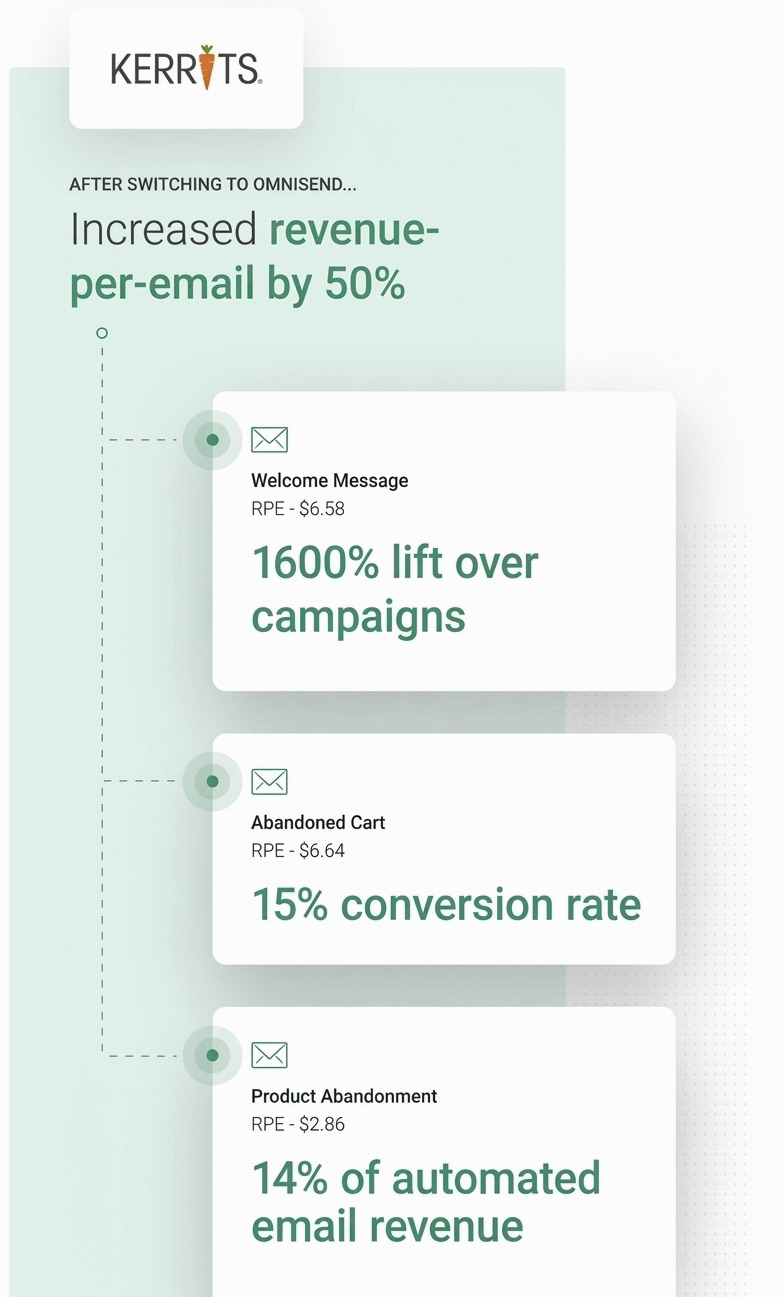
Overall, their email strategy helped achieve a 15% conversion rate and a $6.58 – $6.64 revenue per email with Omnisend. Take a look at the results:
Understanding these A/B testing mistakes helps you follow A/B email testing best practices and get accurate results.
1. Testing multiple variables simultaneously: Changing the subject line, CTA, and layout at once makes it unclear which element drove results.
Fix: Test one variable at a time or use multivariate testing with a large sample size.
2. Stopping tests too early: Ending a test before reaching statistical significance can lead to increased false conclusions from 5% to over 20%.
Fix: Run tests until they reach a 95% confidence level and complete the planned duration.
3. Ignoring statistical significance: Choosing a winner without statistical validation can lead to ineffective decisions.
Fix: Only make decisions when results reach 95% confidence.
4. Not documenting results: Failing to record your test outcomes can lead to repeated mistakes in future campaigns.
Fix: Maintain a testing log of hypotheses, variables tested, and results.
5. Testing with insufficient sample size: Small samples can produce unreliable results where random differences appear meaningful.
Fix: Use a sample size calculator to know the right number of people for email A/B testing.
6. Making changes mid-test: Altering variables such as content, audience, or send time during a test invalidates the results.
Fix: Keep all variables consistent until the test finishes.
Omnisend helps prevent these common A/B testing mistakes by giving minimum sample size recommendations, significance indicators, and suggested test durations.
Choosing the right email marketing platform is critical for effective A/B testing. You need a tool that allows you to easily set up, run, and analyze tests while delivering actionable insights.
Omnisend is an all-in-one ecommerce marketing platform that supports A/B testing alongside powerful features like:
Omnisend’s AI tools, including AI Writer, Subject Line Generator, and AI Segments Builder, help you create and run campaigns in minutes. This speeds up email AB testing and improves execution.
To start running email A/B testing with Omnisend, simply go to Campaigns → New Campaign and click Create A/B test:
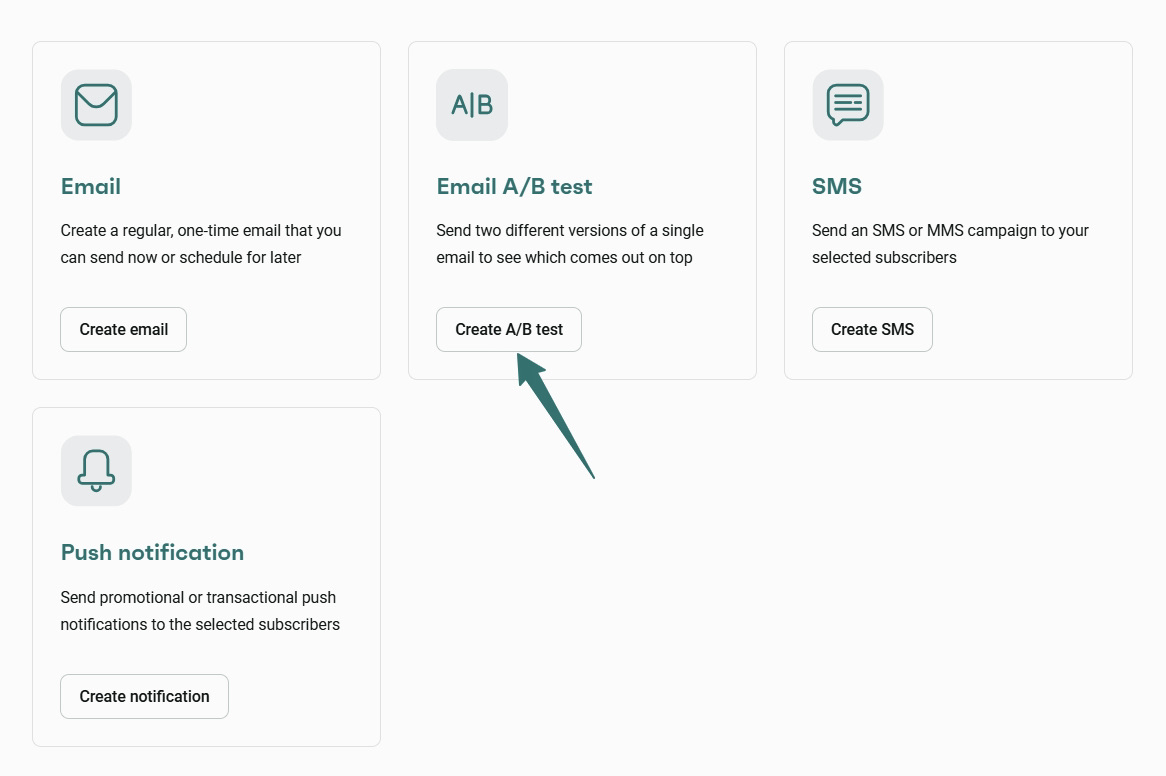
Omnisend lets you:
You can access a Free plan with A/B testing, automation workflows, professional templates, segmentation, and 24/7 support. Paid plans like Standard ($16/month) and Pro ($59/month) expand capacity and reporting. Users report generating a $79 ROI for every $1 spent.
Quick sign up | No credit card required
Email A/B testing helps you understand what drives opens, clicks, conversions, and overall engagement.
If you’re just starting, begin by testing subject lines, sender names, or preheaders, then gradually move to content, images, and CTAs. As you go, track key metrics like open rates, click rates, conversion rates, and unsubscribe or spam rates to measure what’s working.
Tools like Omnisend make email marketing A/B testing easier to run and scale. You can quickly create variations, run tests within automation workflows, track results, and automatically send the winning version.
This helps you improve email A/B testing performance and maximize ROI over time. In fact, Omnisend users see a $79 return on every $1 spent.
Quick sign up | No credit card required
Email A/B testing compares two email versions. Versions A and B are sent to portions of your audience to see which performs better. You can test elements like subject line or CTA to see which versions increase open and click rates.
Run email A/B testing before major campaigns, when performance drops, or when testing new ideas. Always test with enough audience size and time to reach reliable results.
For email A/B testing of subject lines, create two subject line versions (like with emojis or personalization) and send each to a sample group. Measure open rates, then send the winning A/B email testing version to the remaining audience.

TABLE OF CONTENTS
TABLE OF CONTENTS

What’s next


No fluff, no spam, no corporate filler. Just a friendly letter, twice a month.