Omnisend AI
 OFFER



The best flash sale emails name the offer and how long it lasts up front, then follow up with a short last chance email before the deadline. A flash sale email is a limited-time offer email: the discount lasts hours or a few days.
Eight of the 10 examples put the offer in the subject line or preheader, and nine say in the body how long the sale lasts. Seven split one sale into two to five sends.
Here are 10 flash sale email examples with send timing and what to copy, plus subject lines and four templates.
Quick sign up | No credit card required
10 flash sale email examples
Each example was chosen because it went out in 2026 and shows a different tactic for one step of a flash sale, from the teaser before the sale opens to the last call a few hours before the end.
| Brand | Industry | Differentiator |
|---|---|---|
| LEVEL8 | Luggage | A teaser with price protection |
| Silk & Snow | Mattresses and furniture | Early access, one block per category |
| 12th Tribe | Women’s boutique fashion | Three 59-minute drops at a fixed time |
| Wonderbly | Personalized books | 24% off for 24 hours |
| White House Black Market | Women’s fashion | A mystery discount reveal |
| Brooklyn Biltong | Meat snacks | One product, one code |
| Pooch & Mutt | Dog food | A heatwave hook plus a gift |
| Kitsch | Hair care and accessories | A weekend BOGO from the founder |
| Dickies | Workwear | A last call six hours out |
| Velotric | Ebikes | A last-day timer and dollar savings |
1. LEVEL8: A shoppable teaser
Subject line: Autumn Flash Sale Starts Tomorrow — Shop Early Today
Preheader: 20% off sitewide is coming. Shop now with price protection after delivery.
Stage: Teaser
Trigger: Campaign
Sent: Monday, October 5, 2026, 9:30 am ET, the day before a two-day sale (later extended by a day)
Why this email works
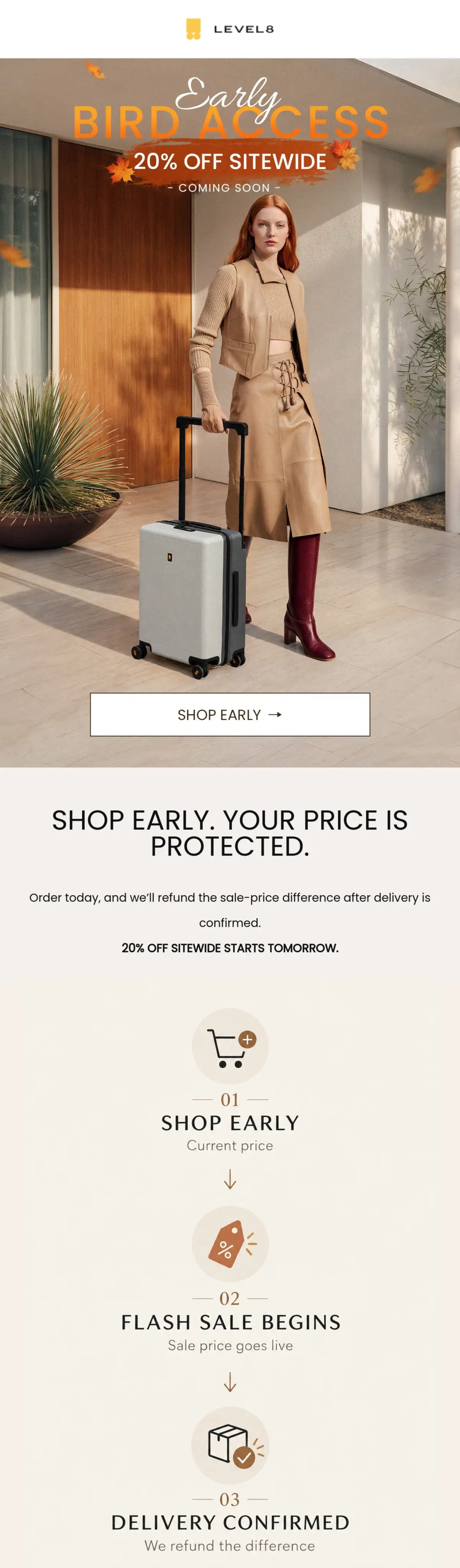
LEVEL8 takes orders from its teaser email the day before the sale, and a price-protection promise is what makes that work. Anyone who buys early still ends up paying the sale price. The subject line puts “Starts Tomorrow” next to “Shop Early Today,” and the preheader covers the protection.
Under the hero, one sentence carries the whole promise: “Order today, and we’ll refund the sale-price difference after delivery is confirmed.” The hero itself echoes the subject line, with “Early BIRD ACCESS” for the stage and a “SHOP EARLY →” button for the action.
Three numbered steps run from “01 SHOP EARLY” to “03 DELIVERY CONFIRMED” and the refund. The teaser gives a start but no end, and there’s no code.
What you can learn from it
Make your teaser shoppable by promising to refund the sale-price difference, so early buyers have no reason to wait.
2. Silk & Snow: Early access by category
Subject line: Early Access: Memorial Day Flash Sale 🇺🇸
Preheader: Up to $300 off mattresses + up to 25% off bed frames.
Stage: VIP early access
Trigger: Campaign
Sent: Saturday, May 9, 2026, 12:04 pm ET, at the start of a one-weekend early-access sale, 16 days before Memorial Day
Why this email works
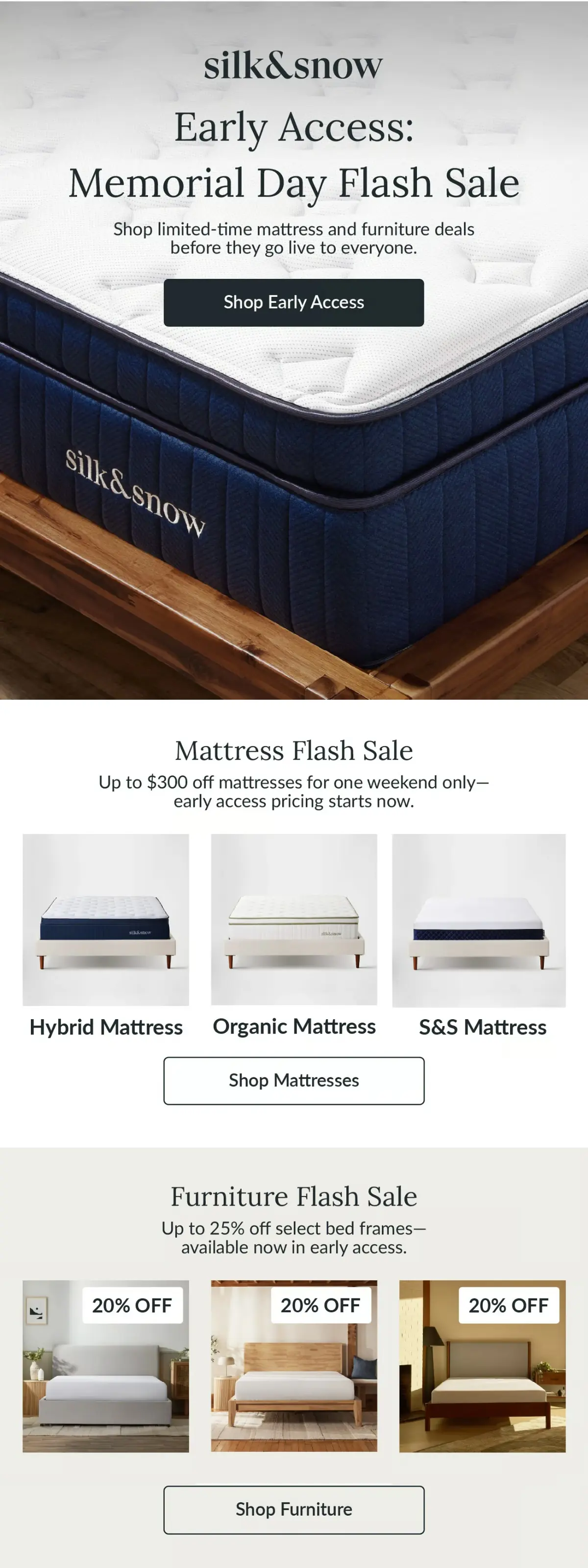
Silk & Snow’s early-access email works because it sells the head start itself and shows subscribers what they get and who has to wait. The hero handles both in one line, with deals “before they go live to everyone.” By the time anyone opens it, the subject line has already said “Early Access:” and the preheader has named both offers.
Under the “Shop Early Access” button, the sale splits into two blocks, one per category. The mattress block promises “Up to $300 off mattresses for one weekend only” above its own “Shop Mattresses” button, and the furniture block does the same for bed frames.
What you can learn from it
Write the pre-sale email around the head start and exclusivity, saying what opens early and for how long, then give each category in a mixed sale its own block with its own offer and button.
Try it with Omnisend: build the early-access list with segmentation, for example from contacts who placed an order in the last 60 days or opened an email in the last 21.
3. 12th Tribe: Three 59-minute drops
Subject line: 59 MIN ONLY: mystery edition 🔮
Preheader: Check back tomorrow at 3 pm PT for a new surprise offer
Stage: VIP early access
Trigger: Campaign
Sent: Wednesday, July 15, 2026, 6:00 pm ET (3 pm PT), as the first of three 59-minute drops opened
Why this email works
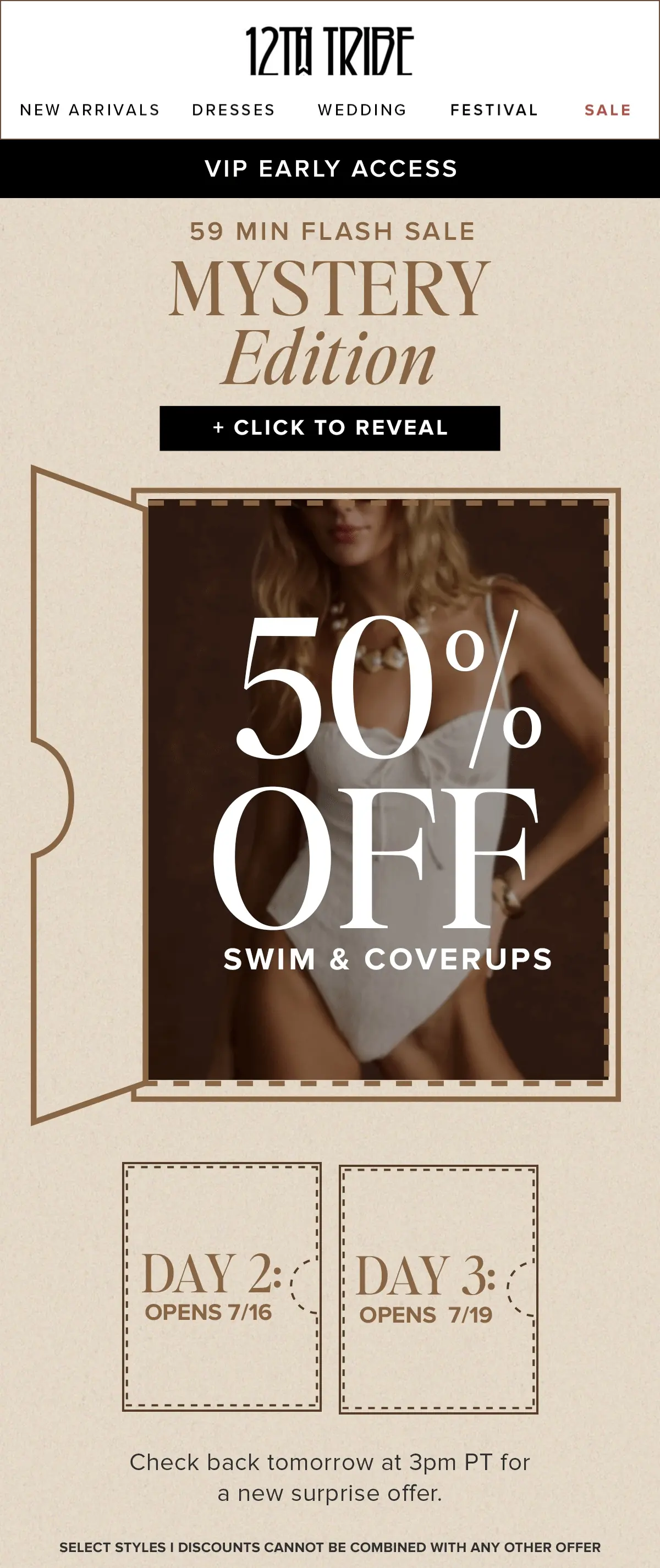
12th Tribe gives subscribers a reason to open the next two emails too, because its flash sale is three 59-minute drops at the same time of day. “59 MIN ONLY” sets the window in capitals in the subject line, and the preheader points at tomorrow’s drop.
Fifty-nine minutes is too short to save the email for later. Readers either shop when it lands or miss the deal, and that’s the point of a flash sale. Anyone who misses one gets another chance at the next drop, on the date printed in the email.
The black “VIP EARLY ACCESS” bar at the top makes that short window feel like a perk for the subscribers who get in first.
What you can learn from it
Run a short flash sale as a series at a fixed time, and show the next drops as closed doors with their dates.
4. Wonderbly: 24% for 24 hours
Subject line: Flash sale ⚡ 24% off for 24 hours
Preheader: Hurry – it won’t last long
Stage: Launch
Trigger: Campaign
Sent: Sunday, May 10, 2026, 11:08 am ET, at the launch of a 24-hour sale
Why this email works
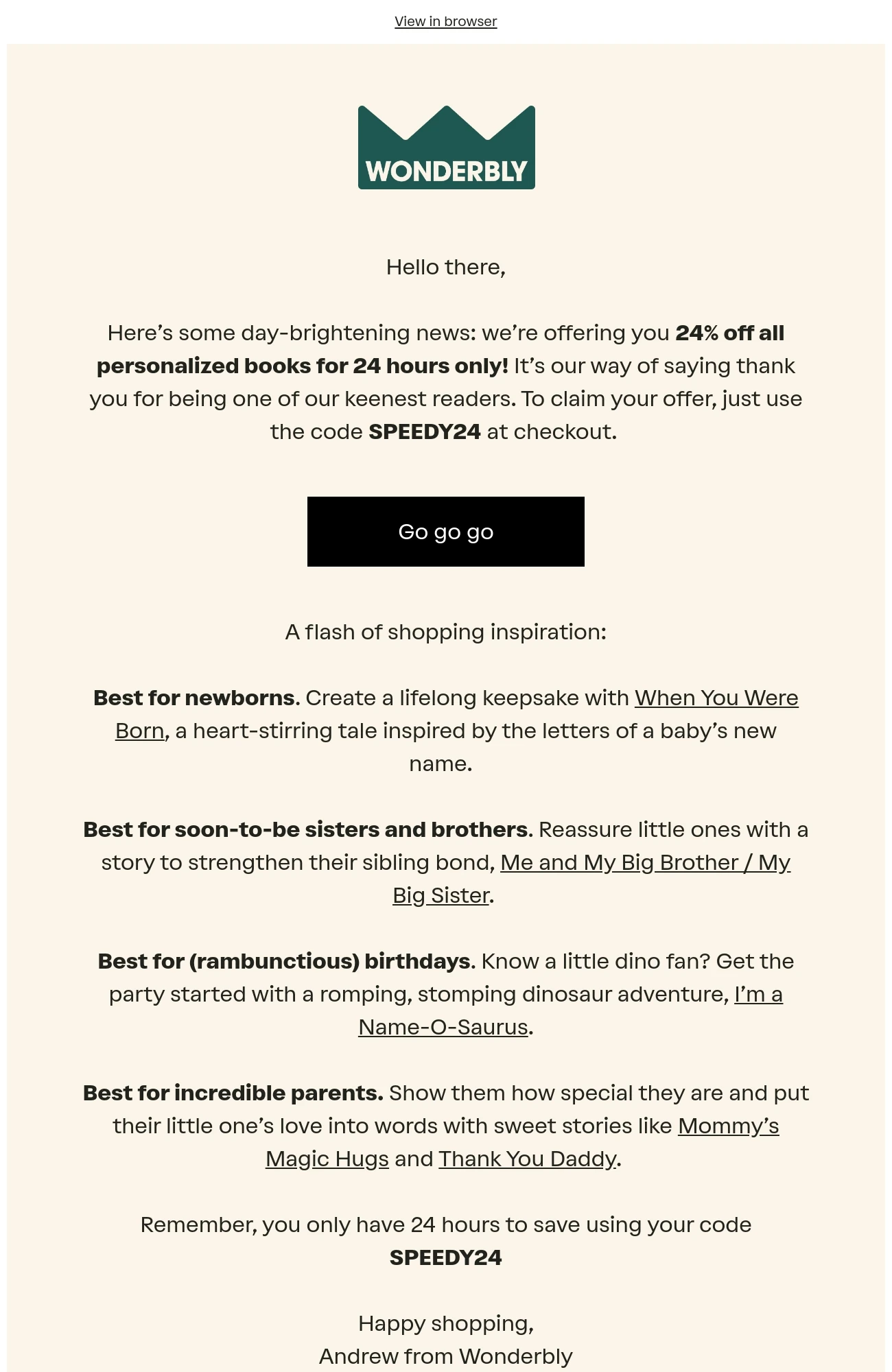
Wonderbly’s offer is memorable because the number 24 does all the work: the sale is 24% off, it lasts 24 hours, and the code SPEEDY24 appears in the first paragraph.
The email is a few paragraphs of text, signed by “Andrew from Wonderbly.”Apart from the logo, the only non-text element is a “Go go go” button; no product gets a picture. Its opening paragraph casts the sale as a thank-you to “one of our keenest readers,” with the code in bold.
Four “Best for…” lines then help people choose a book by reader. It ends on the deadline and the code: “Remember, you only have 24 hours to save using your code SPEEDY24.”
What you can learn from it
Use one number for both the discount and the hours, and end the code with it, so there is a single thing to remember. The body then has nothing to do but steer readers toward a product.
5. White House Black Market: A mystery deal
Subject line: 2 days only! Online Mystery Flash Sale
Preheader: Open to reveal your deal
Stage: Launch
Trigger: Campaign
Sent: Tuesday, September 29, 2026, 6:01 pm ET, the evening of day one of a two-day sale (the day’s second send)
Why this email works
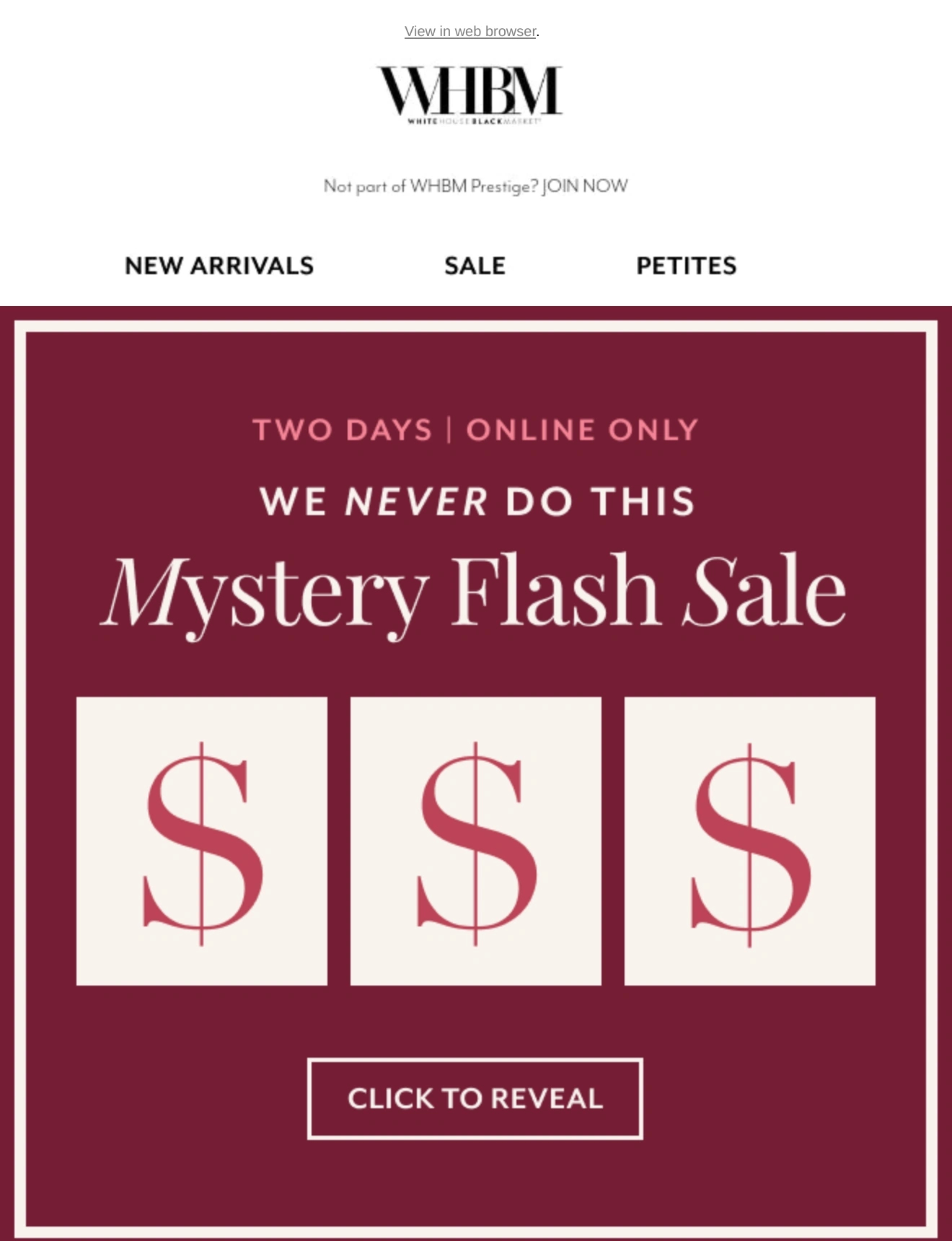
White House Black Market’s email works because the click is the only way to learn the discount, and it says why the sale is unusual: “WE NEVER DO THIS.” The subject line opens on “2 days only!” and the preheader turns the open into the first step.
The panel sets “TWO DAYS | ONLINE ONLY” above that line and “Mystery Flash Sale,” then three tiles marked “$” and a “CLICK TO REVEAL” button. The email never states a percentage.
Over two days, the same mystery panel went out at least four times, each with a new subject line, and on the last day it read “ENDS TODAY.” The first ran “We never do this 🥁 It’s a Mystery Flash Sale,” and one on the final evening ran “Our Mystery Flash Sale ends in hours!”
What you can learn from it
Hide the discount behind a reveal button and say why the sale is rare, then resend the same design with a new subject line each time.
6. Brooklyn Biltong: One product, one code
Subject line: ⚡ Pepper & Coriander Flash Sale Starts NOW 🌶️
Preheader: Use code ORIGINAL25 for 25% off ⏳
Stage: Launch
Trigger: Campaign
Sent: Saturday, May 16, 2026, at the launch of a 48-hour sale
Why this email works
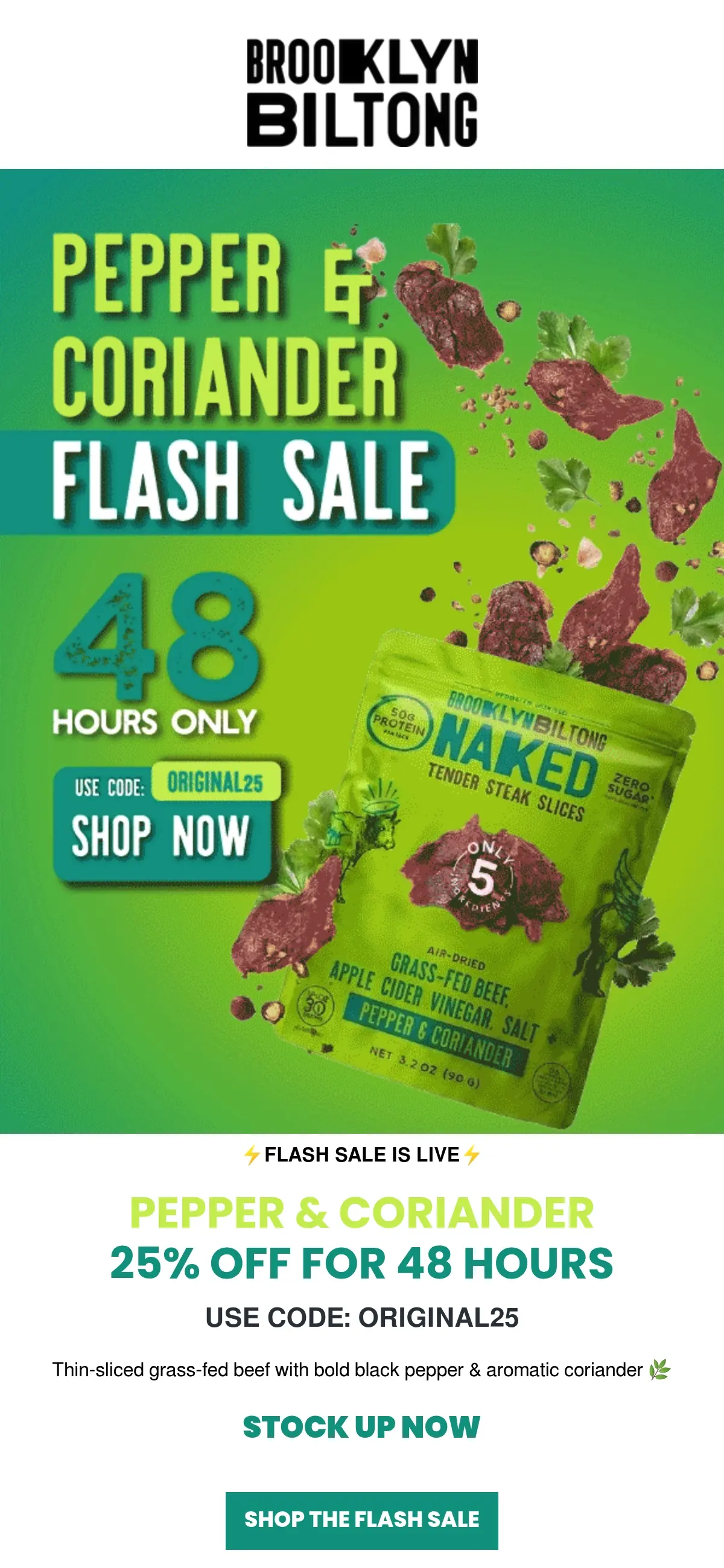
Brooklyn Biltong sells one flavor and nothing else in this email, which leaves readers with no comparison or complicated decision to make. The product comes with its code and the 48-hour limit.
The subject line names the flavor (and the product) before “Starts NOW,” while the preheader carries the code and the discount. So the reader gets most of the information before they even open the email.
The last button, “SHOP THE FLASH SALE,” keeps the same single offer, and no end date is printed.
What you can learn from it
Keep the flash sale to one product, so nothing in the email competes with it. Name it in the subject line, put the discount and the code in the preheader, and let the hero and the copy say the same thing again.
7. Pooch & Mutt: A heatwave hook
Subject line: Flash Sale 🌞 40% Off + FREE Gift!
Preheader: A hot deal to match the weather…
Stage: Launch
Trigger: Campaign
Sent: Saturday, June 20, 2026, at the start of a 48-hour weekend sale
Why this email works
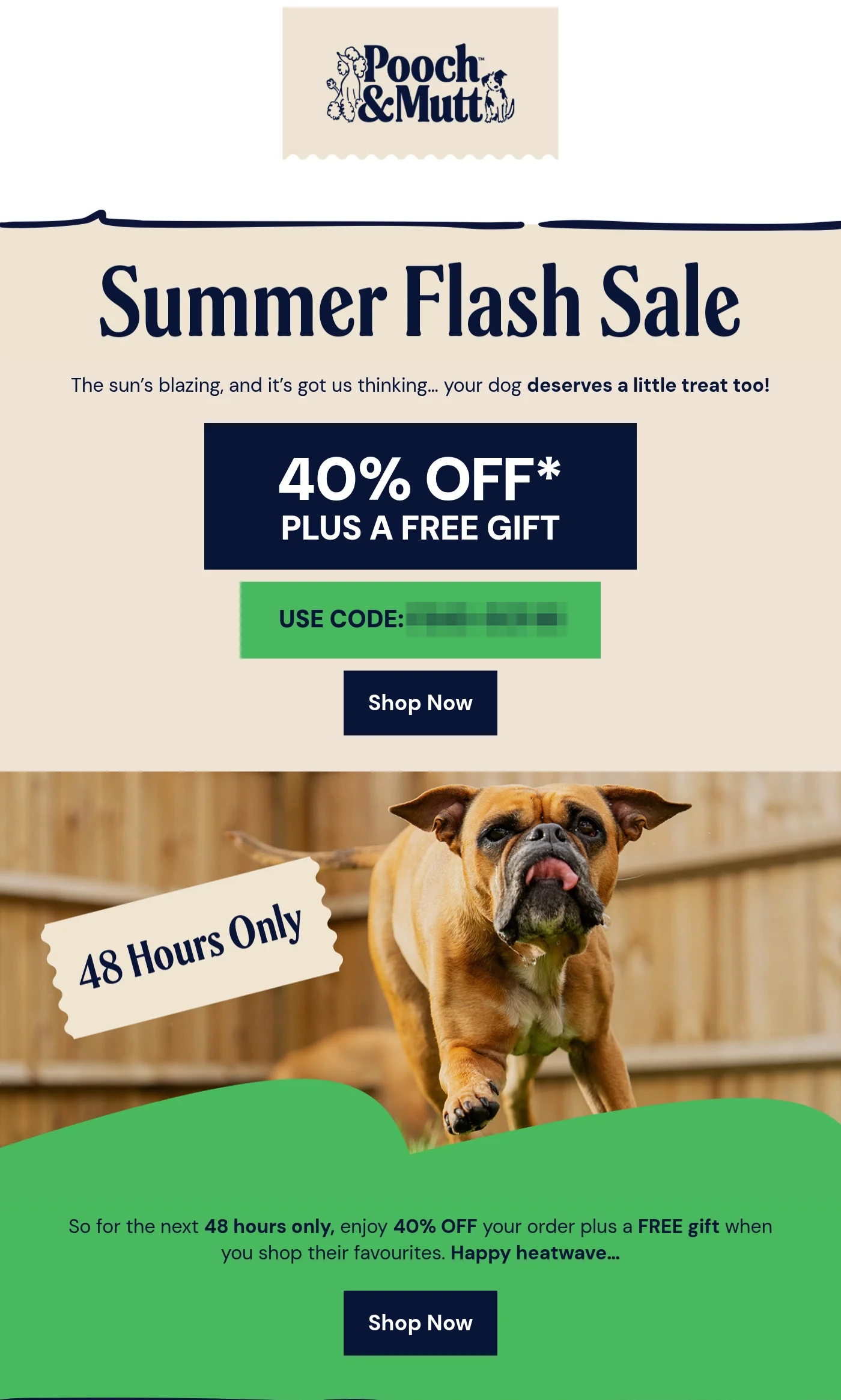
Pooch & Mutt’s 48-hour deadline feels believable because the email gives it a reason, and the reason is the weather. In the inbox, the subject line gives the full offer with a sun emoji, and the preheader promises “A hot deal to match the weather.” The opening line then ties the sale to the heatwave.
The weather stays in the copy right through to the “Happy heatwave…” sign-off, so the sale never drifts into a generic promotion.
What you can learn from it
Open on whatever is happening that week, so the deadline and the flash sale make sense to the reader. Add a free gift on top, and the offer is no longer a plain discount.
8. Kitsch: A founder’s weekend BOGO
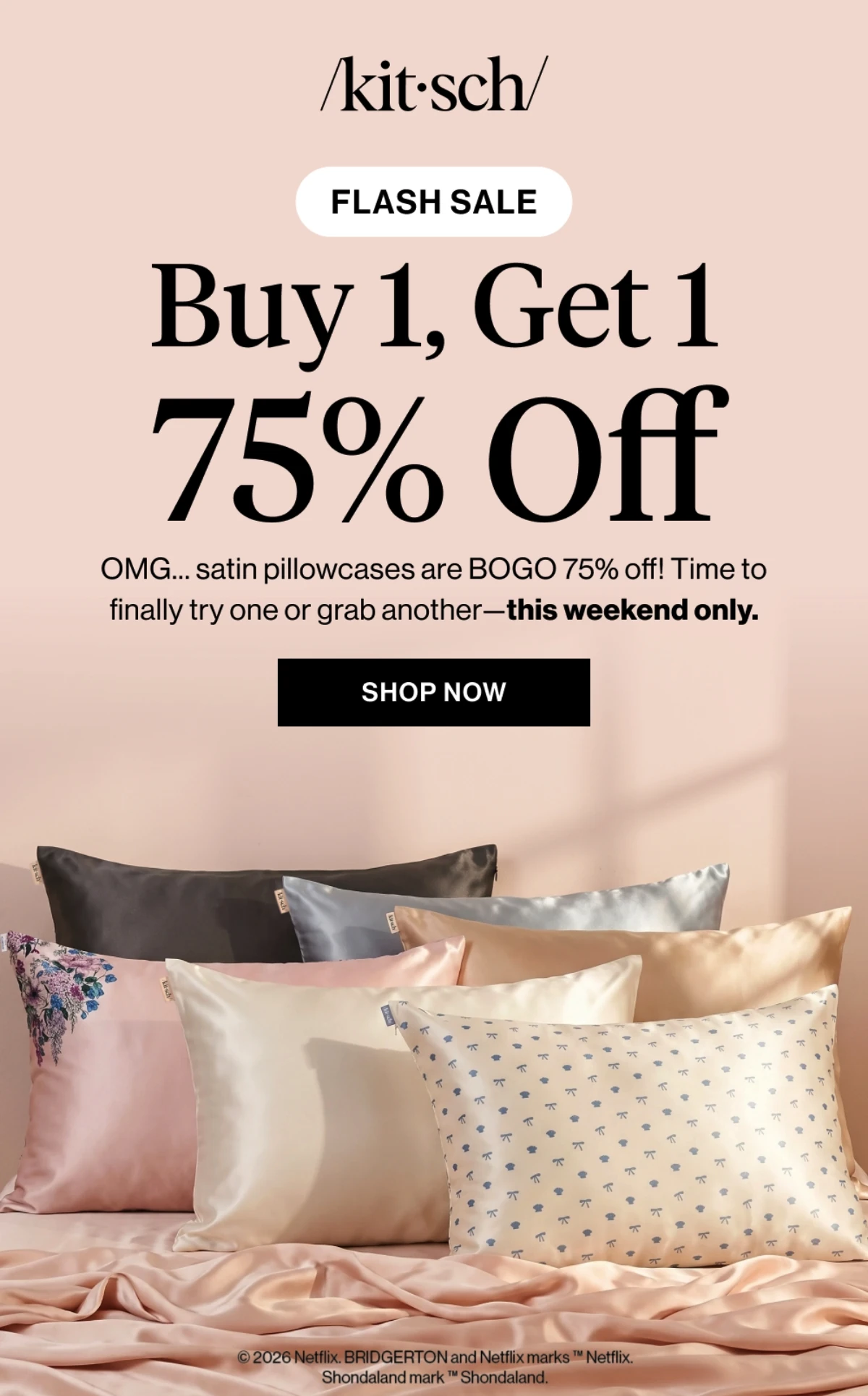
Subject line: weekend flash sale: BOGO 75% Off ✨
Preheader: Buy one, get one 75% off pillowcases.
Stage: Launch
Trigger: Campaign
Sent: Friday, May 1, 2026, 12:06 pm ET, at the start of a weekend sale (Friday to Sunday)
Why this email works
Kitsch goes after a second pillowcase in the cart with a BOGO (buy one, get one) offer, and the line “Time to finally try one or grab another” speaks to both kinds of buyer. The subject line opens in lowercase and names the length (“weekend”) and the offer.
The copy has a personal voice from its first line: “OMG… satin pillowcases are BOGO 75% off!” One button follows the words “this weekend only,” and the body adds no second offer, so the reader has one message to remember and one place to click.
What you can learn from it
Offer a BOGO if a second unit in the cart is the goal. To make the send feel personal, put a recognizable person from the company, such as the founder, in the sender name.
9. Dickies: The six-hour last call
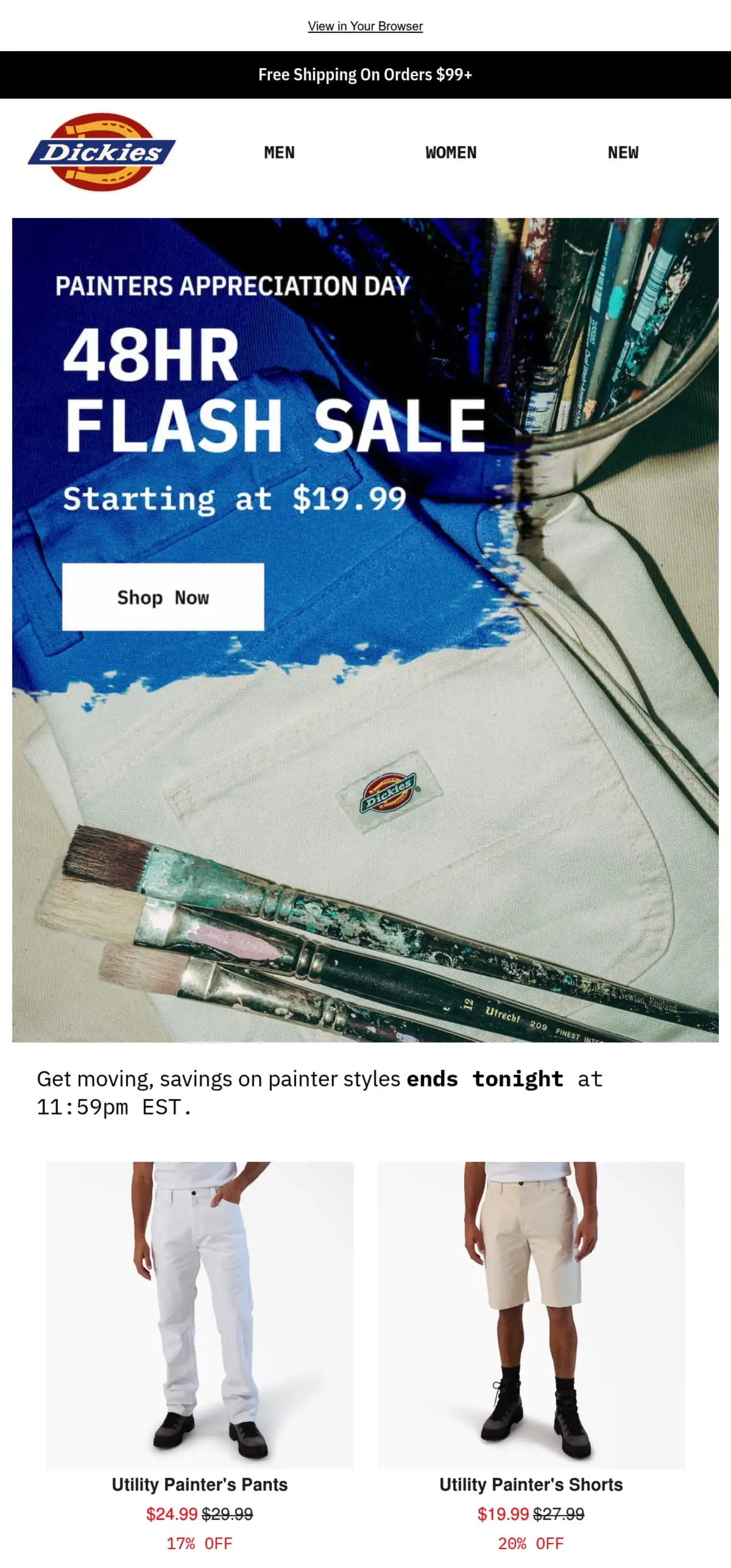
Subject line: Last Chance: 48hr Flash Sale
Preheader: Painter styles starting at $19.99
Stage: Last chance
Trigger: Campaign
Sent: Thursday, April 30, 2026, 6:01 pm ET, about six hours before a 48-hour sale ended
Why this email works
Dickies leaves the launch email almost untouched for its last call on the final evening, so the one thing readers notice is the new line saying the sale “ends tonight at 11:59pm EST.” The stage and the length share the subject line, and the entry price goes in the preheader.
The deadline sits in live text under the image, so it shows even when images are blocked and is quick to update for the next send. The struck-through original price beside each item lets readers see the savings without doing the math.
What you can learn from it
Send the last chance email on the final evening, keep the launch hero, and put the exact cut-off time in live text under it.
10. Velotric: Dollar savings, live timer
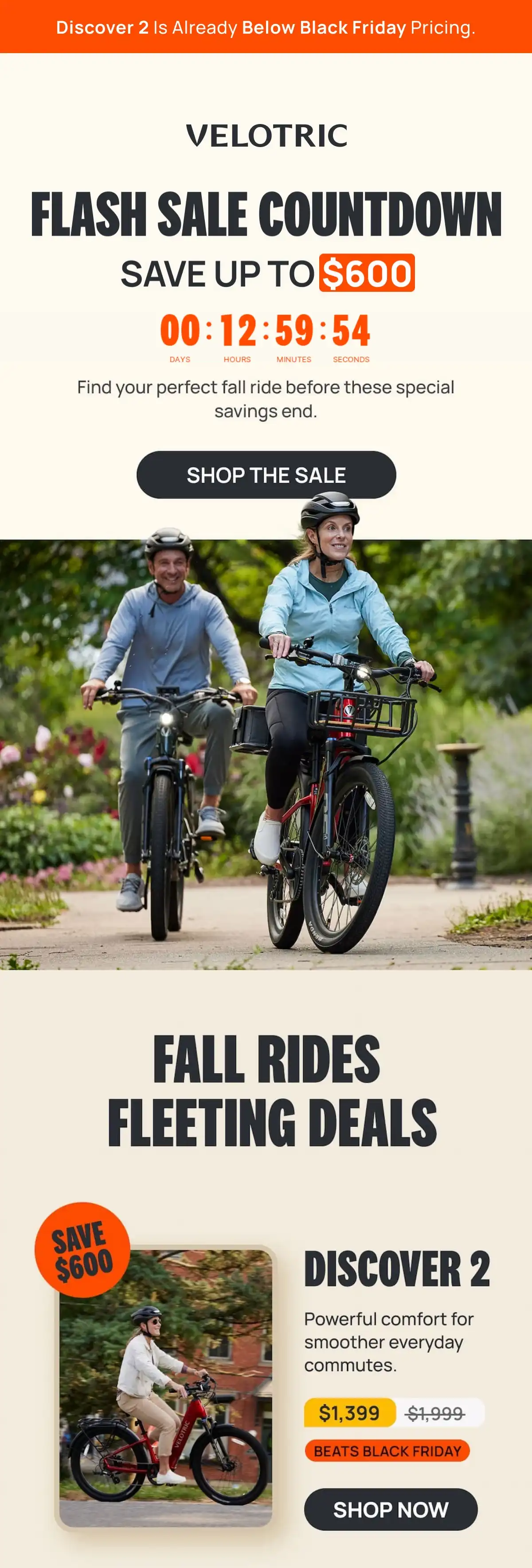
Subject line: ⏰Fall Flash Sale Countdown: Save Up to $600 on Ebikes
Preheader: Final hours to find your fall ride—Discover 2 is priced below its Black Friday price.
Stage: Last chance
Trigger: Campaign
Sent: Sunday, October 18, 2026, 1:34 pm ET, two days after the sale’s launch email
Why this email works
Velotric’s last call puts a dollar saving on each bike. Every ebike in the email costs more than $1,000, so a dollar figure is easier to judge than a percentage. A live timer runs as well, since this is the last day. The subject line opens on an alarm clock emoji and has “Countdown” in it, and the preheader adds a Black Friday price comparison.
The Discover 2 card backs up the headline with one bike’s numbers, $1,399 against a struck-through $1,999, so readers can check the “SAVE UP TO $600” claim for themselves.
What you can learn from it
Show the savings in dollars per product when the ticket is high and compare it with a price people know, then add a live timer on the final day.
Try it with Omnisend: drag the Countdown timer block into your last chance email in the email builder and set the sale’s end date and time. It counts down to the same moment for every recipient and is available on the Standard and Pro plans.
What makes a great flash sale email
A great flash sale email comes down to one clear offer and an end time, with a reminder sent before that time arrives. In other words, it’s a discount email with a clock on it, and four lessons come out of the 10 examples.
Lead with the offer and the sale’s length
Put the offer and the sale’s length in the subject line and the preheader, where the inbox shows them before anyone opens. In these examples, eight of the 10 have the offer there, and five have the sale’s length in the subject line. 12th Tribe and White House Black Market leave the offer out on purpose, because both run mystery sales.
In Omnisend’s BFCM 2026 survey of 4,363 shoppers, the size of the discount motivates 52–57%, against 19–26% for gift bundles and limited-time offers. So lead with the size of the discount.
Give the deadline as a clock time
Give the deadline as a clock time, since a “48 hours” line says only that the sale is short. Nine of the 10 state the length or deadline in the body, but only two give a clock time, Dickies under the hero and Pooch & Mutt in the fine print. None put it in the subject line.
You can use both: good flash sale email design puts clock time in live text under the hero and gives the length of the sale in the subject line or preheader.
Save the countdown timer for the last day
Save a live countdown timer for the last day, when the time left is the news. Only one of the 10 uses a live countdown timer, Velotric, in its last chance email on the final day. 12th Tribe’s “59 MIN” and Pooch & Mutt’s “48 Hours Only” tag are static text.
Add the timer to the last chance email, or to the launch email if the whole sale runs under 24 hours.
End with a last chance email
End the sale sequence with a last chance email four to six hours before the deadline, after a teaser and the launch. Six of the 10 brands sent a last chance or ending-soon email before the sale closed. Dickies sent its last call about six hours before the cut-off.
Treat that send as a fixed part of the email marketing campaign and schedule it with the launch.
Flash sale email subject lines
The best flash sale subject lines name the offer and the deadline in under 50 characters, the length Omnisend recommends. The lines below are grouped by stage, and each one works as written.
| Approach | Subject line examples |
|---|---|
| Teaser | Mark your calendar: the sale opens Thursday Save the date: 24 hours of 20% off Order today, pay tomorrow’s sale price Something’s coming Friday at noon ⚡ |
| Launch | Starts now, ends at midnight: 25% off 48 hours to save 30% on everything Buy one, get one half off until Sunday Your mystery deal is waiting. Open by 9 pm Up to $200 off, today only ⏰ |
| VIP early access | You’re in early: shop before everyone else VIP access: shop the flash sale 3 hours early First pick for our best customers: 20% off Early access ends at noon, then it goes public |
| Last chance | Last chance: 20% off ends at midnight 6 hours left on 30% off sitewide Final hours: your code expires tonight Still deciding? The sale ends in 4 hours Tonight at 11:59 pm, prices go back up |
For more variations, Omnisend’s free subject line generator writes subject lines from five or more keywords and a short description of your email.
Flash sale email templates you can use
The four flash sale email templates that follow give you one per stage, from the teaser to the last call, to paste into your editor or into one of Omnisend’s email templates. Fill in the [brackets] with your own details and dates. As a rule of thumb, every subject line stays under 50 characters and every preheader under 80.
Teaser email template
Two days before the sale opens, subscribers get the teaser email, so they know the date and have time to plan their order.
24-hour sale email template
Send the 24-hour sale email the moment the sale opens, to your full list.
VIP early access email template
The VIP early access email is for your VIP segment, and it goes out a few hours before the launch email reaches everyone.
Last chance email template
Subscribers who haven’t ordered yet get the last chance email, and it lands four to six hours before the sale ends.
How to create flash sale emails with Omnisend
You run a flash sale in Omnisend as scheduled campaigns: three emails and one SMS. The VIP send comes first, then the launch email to the whole list. Four to six hours before the end, a last chance email goes out, and the text follows in the final hours to subscribers who opted in.
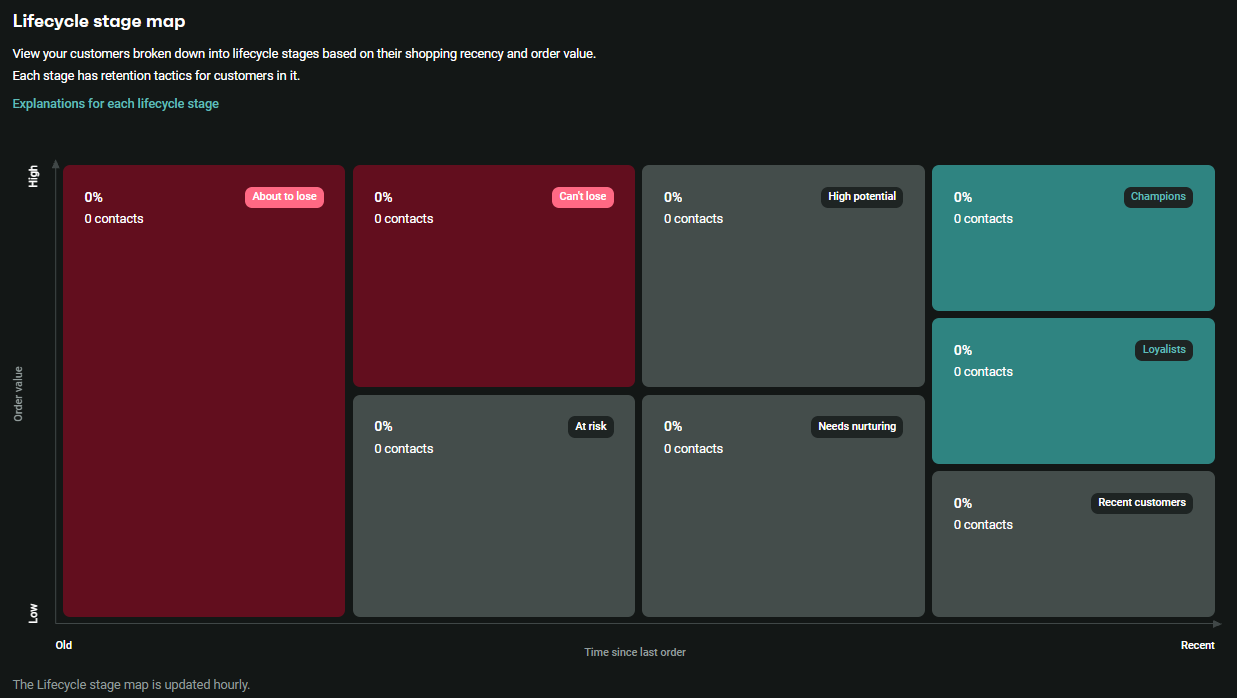
The Champions lifecycle stage is your VIP segment here. Champions are contacts with two or more high-value purchases, one of them recent, and they get the launch a few hours before the rest of the list. To build it, open Audience > Customer breakdown, hover over Champions in the Lifecycle stage map, then click View contacts and Save segment.
Set each email to Schedule for later in the Review step. Sends follow the store time zone in Store settings > Store information. For a short sale, leave Optimize send time for better performance off, because its options deliver within 24 hours of the date you pick.
SMS marketing is available on the Pro plan, through an SMS credits subscription. Build the text under Campaigns > Create campaign > Create SMS.
Default quiet hours hold texts from 8 pm to 8 am in the recipient’s time zone, so a midnight deadline needs the text out before 8 pm.
Quick sign up | No credit card required
Wrap-up
A flash sale email works when it names the offer and how long the sale lasts up front, then follows up with a last chance email before the deadline. Pick one tactic from the 10 examples, start from one of the four templates, and schedule the launch and the last chance email together.