Omnisend AI


 OFFER
OFFER








Omnisend vs. Mailchimp: Which is best for ecommerce in 2026?
With over 130+ pre-built integrations and flexible APIs, you can easily centralize data from across your tech stack
Make the most out of your data and unlock powerful growth marketing possibilities with these other top marketing tools.
Build any custom integration with our open, flexible APIs that are simple to use and implement.
Check out apps that have been stealing all the spotlight.
Email and SMS marketing insights, ecommerce resources, and the latest Omnisend news
Expert-led sessions covering email, SMS, and ecommerce marketing strategies.
Educational video and live training to help you make the most out of Omnisend.
Drive sales on autopilot with ecommerce-focused features
See Features
Choose Omnisend for advanced ecommerce automation that integrates email, SMS, and web push notifications to enhance customer journeys and track revenue effectively.
MailerLite excels in providing generous email send limits and website-building capabilities, making it ideal for newsletter creators and service providers with simpler marketing needs.
Omnisend offers superior segmentation features, including pre-built segments and an AI segment builder, allowing for highly targeted campaigns that cater to specific customer behaviors.
With 24/7 support available across all plans, Omnisend stands out for customer assistance, while MailerLite limits live chat support to its Advanced plan.
Your answer to which is best between Omnisend vs. MailerLite comes down to whether you need advanced email and SMS automation, or you want email with website-building capabilities.
MailerLite has generous send limits for large lists and spreads your marketing footprint across email, websites, blogs, and landing pages, at the expense of ecommerce features that generate revenue across your customer journey.
Omnisend is for ecommerce and covers your email, SMS, and web push notifications in multichannel automations. Building unique customer experiences and tracking the revenue you generate from them comes naturally.
We have plenty more features, pricing information, and use cases to unpack. This article is the complete guide you need to pick the most suitable tool.
Quick sign up | No credit card required
The table below provides an overview of their main features to help you decide which platform suits your marketing needs. All information is accurate as of March 2026:
| Feature | Omnisend | MailerLite |
|---|---|---|
| Best for | Ecommerce businesses | Businesses of all sizes |
| Free plan | ✅ | ✅ |
| Pricing | Starts from $16/month | Starts from $10/month |
| Email marketing features | Drag-and-drop builder, automation workflows, A/B testing | Drag-and-drop editor, basic automation |
| Email list building features | Popups, forms, landing pages, teasers, Wheel of Fortune | Embedded forms, popups, landing pages |
| Marketing channels | Email, SMS, push notifications, Google and Facebook retargeting | Email (with integration for SMS and push notifications) |
| Ecommerce features | Discount codes linked to your store, cart recovery, multichannel flows, product recommendations, sales, and performance reports, customer lifecycle stages | Product recommendations, automation, abandoned cart emails, sell paid newsletters, recurring subscriptions, and digital products |
| Segmentation | Advanced segmentation based on subscriber behavior and purchase history | Basic segmentation based on demographics and email activity |
| Support | 24/7 email and chat support on all plans, priority support for Pro plan customers | 24/7 email and chat support only for paid plan users |
| G2 rating | 4.6/5 (1,169 reviews) | 4.6/5 (1,094 reviews) |
| Shopify App Store rating | 4.7/5 (2,924 reviews) | 2.6/5 (30 reviews) |
Omnisend makes sense for ecommerce stores, with native apps for Shopify, WooCommerce, Wix, and other popular platforms. It syncs your customer and sales data, letting you build segments and flows that target customers at high-intent and impactful moments.
It suits:
Omnisend’s value over MailerLite comes in a few different forms:
If you have uncomplicated customer experience requirements across newsletters and automations, then MailerLite makes sense, suiting:
Here’s why MailerLite suits these use cases:
So, how do MailerLite’s pricing and Omnisend’s pricing compare as of March 2026?
Both MailerLite and Omnisend offer a free tier and paid plans, with pricing varying depending on the number of recipients you have.
The generosity of the free plans is heavily in Omnisend’s favor, as MailerLite’s free plan does not provide access to the following:
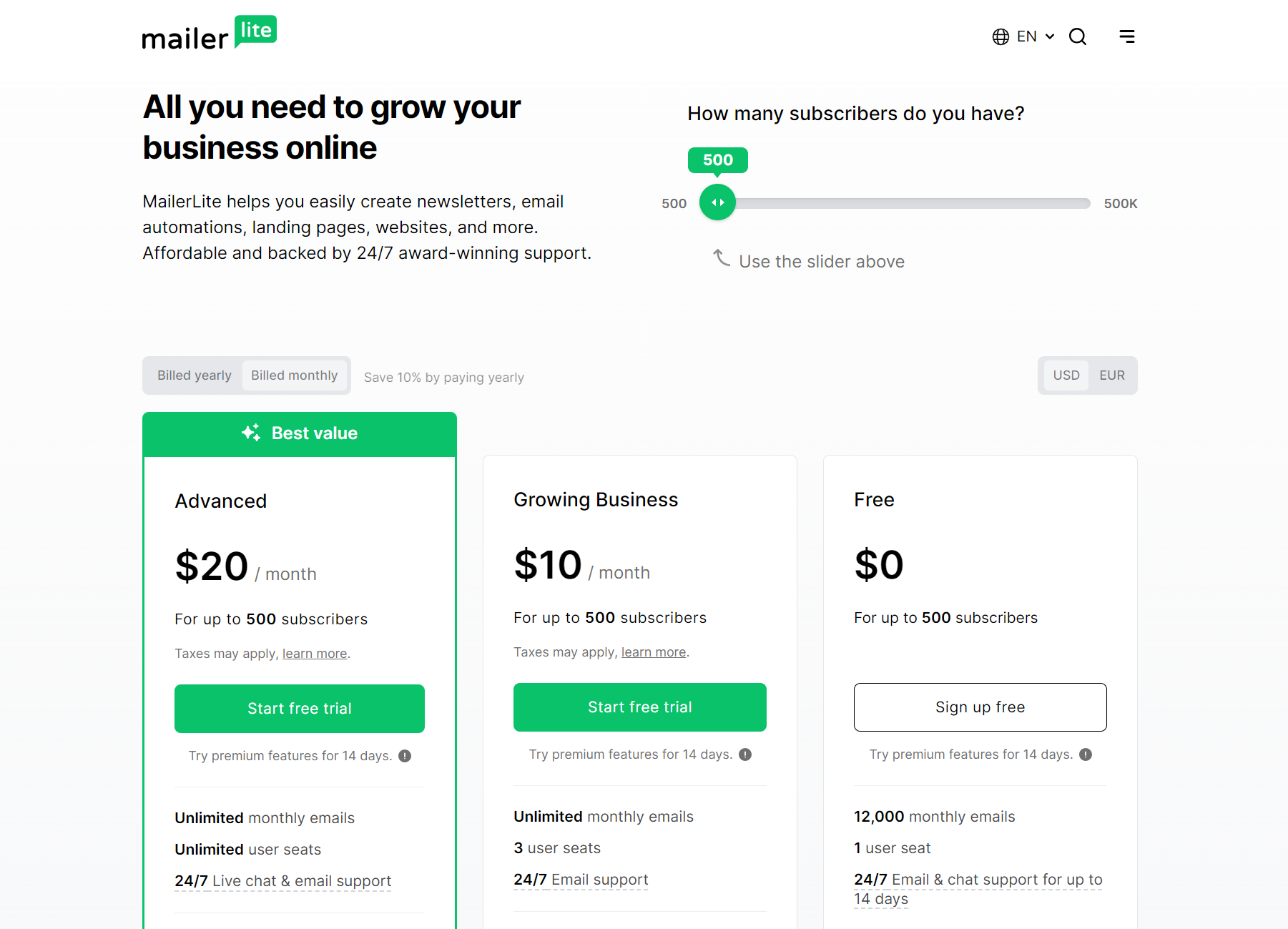
In comparison, Omnisend’s free plan does include all of the standard features that are available on its paid plans, such as:
Additionally, Omnisend’s free plan includes 500 web push notifications/month, which you can use to target customers while they browse your store.
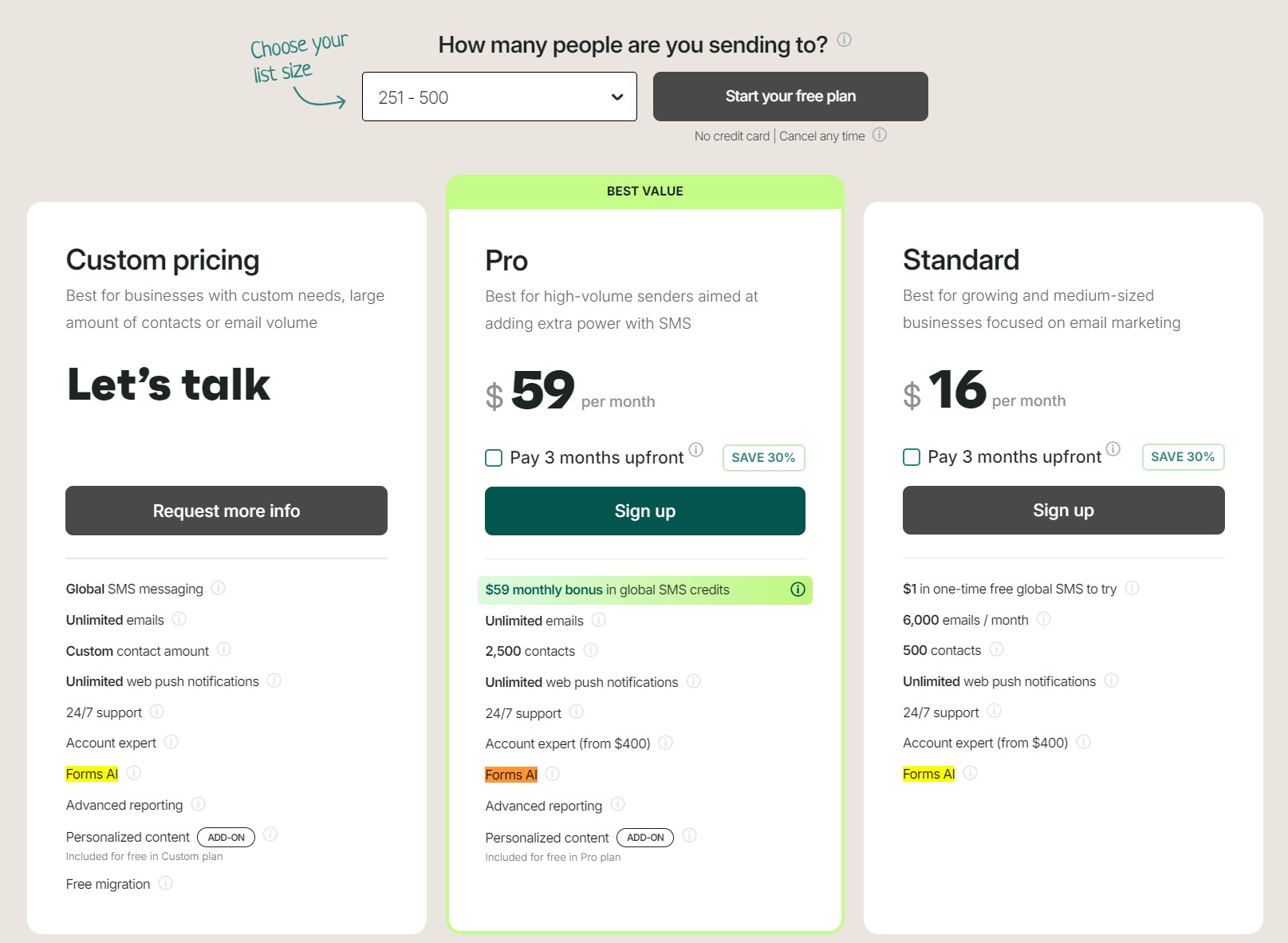
Both MailerLite and Omnisend’s pricing depends on the number of subscribers. Omnisend’s Standard plan costs $44/month for 2,500 subscribers, compared to MailerLite’s $25/month.
However, Omnisend offers more features for the price. It includes SMS, web push notifications, retargeting, and gamification, plus it edges ahead on customer support, with 24/7 email and live chat on all plans, including in its Free Forever plan.
Only MailerLite’s Advanced plan provides 24/7 email and live chat support; its Standard plan offers email support only, and the free plan only offers email and live chat support for 14 days.
Omnisend’s Pro plan also offers a dedicated Account Expert when you spend >$400, whereas MailerLite restricts success managers to enterprise customers with a custom-priced plan.
There’s another crucial difference in pricing you need to know about if you need your email tool for transactional email and SMS, too, and that is that MailerLite requires an additional Transactional plan starting from free for 500 emails to $110/month for 50,000 emails:
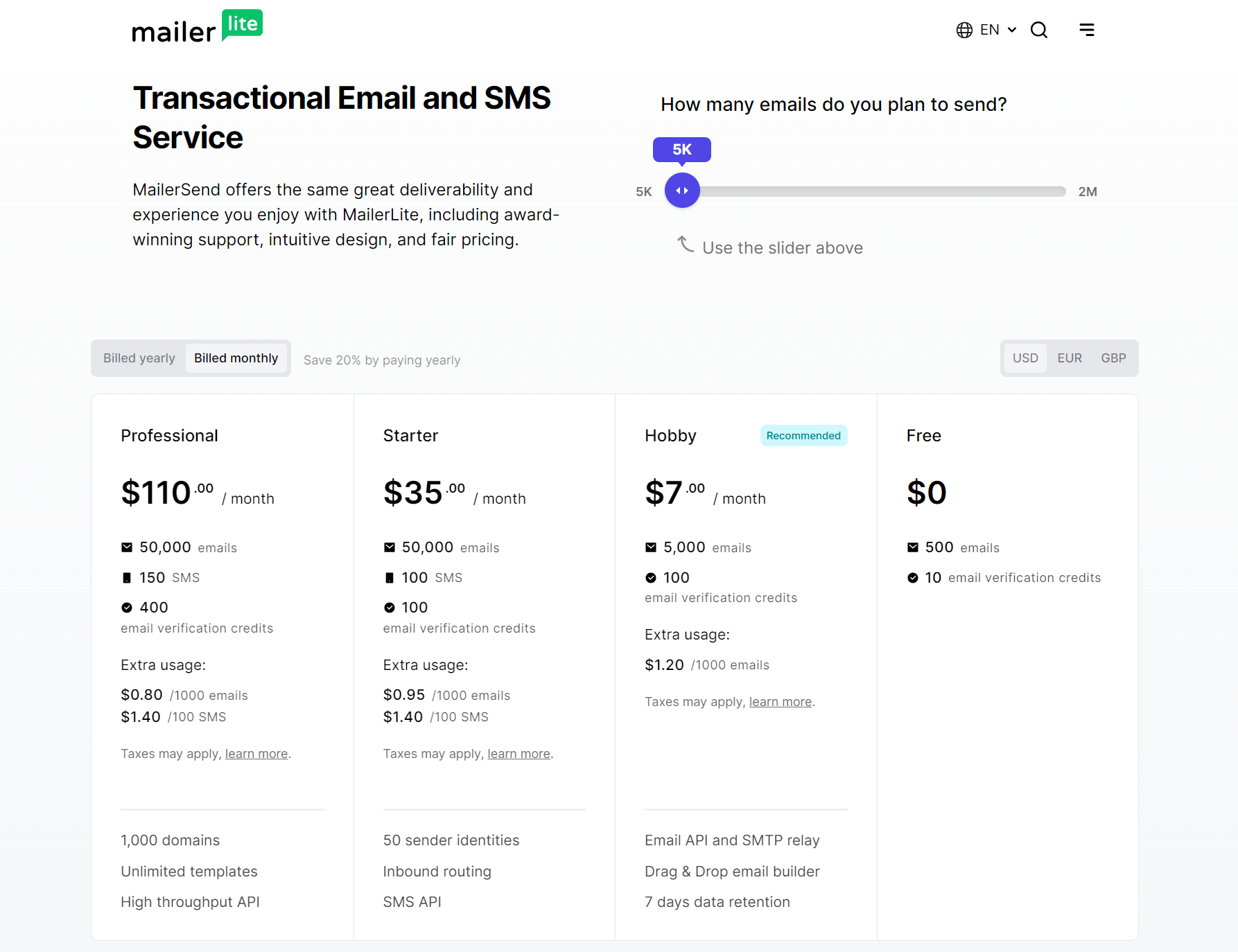
Omnisend lets you send transactional email and SMS in all plans with no extra add-ons, and its Pro plan includes bonus SMS credits equal to the price of your monthly plan.
Verdict: Draw. MailerLite has a lower entry price and is more affordable at scale. Omnisend is more expensive but offers better value with more advanced features and no standard feature restrictions, even in its Free Forever plan.
For more information, use our email pricing calculator below to compare costs and features with MailerLite quickly. Simply input your desired number of contacts, select MailerLite from the list, and compare Omnisend with it.
Quick email provider pricing comparison
Quickly and easily compare the top email marketing providers so you can find the best platform for your ecommerce store needs.
You can compare Omnisend and 2 more providers at once.
You can compare Omnisend and 2 more providers at once.
Select at least one provider.
Try out the full version of this calculator
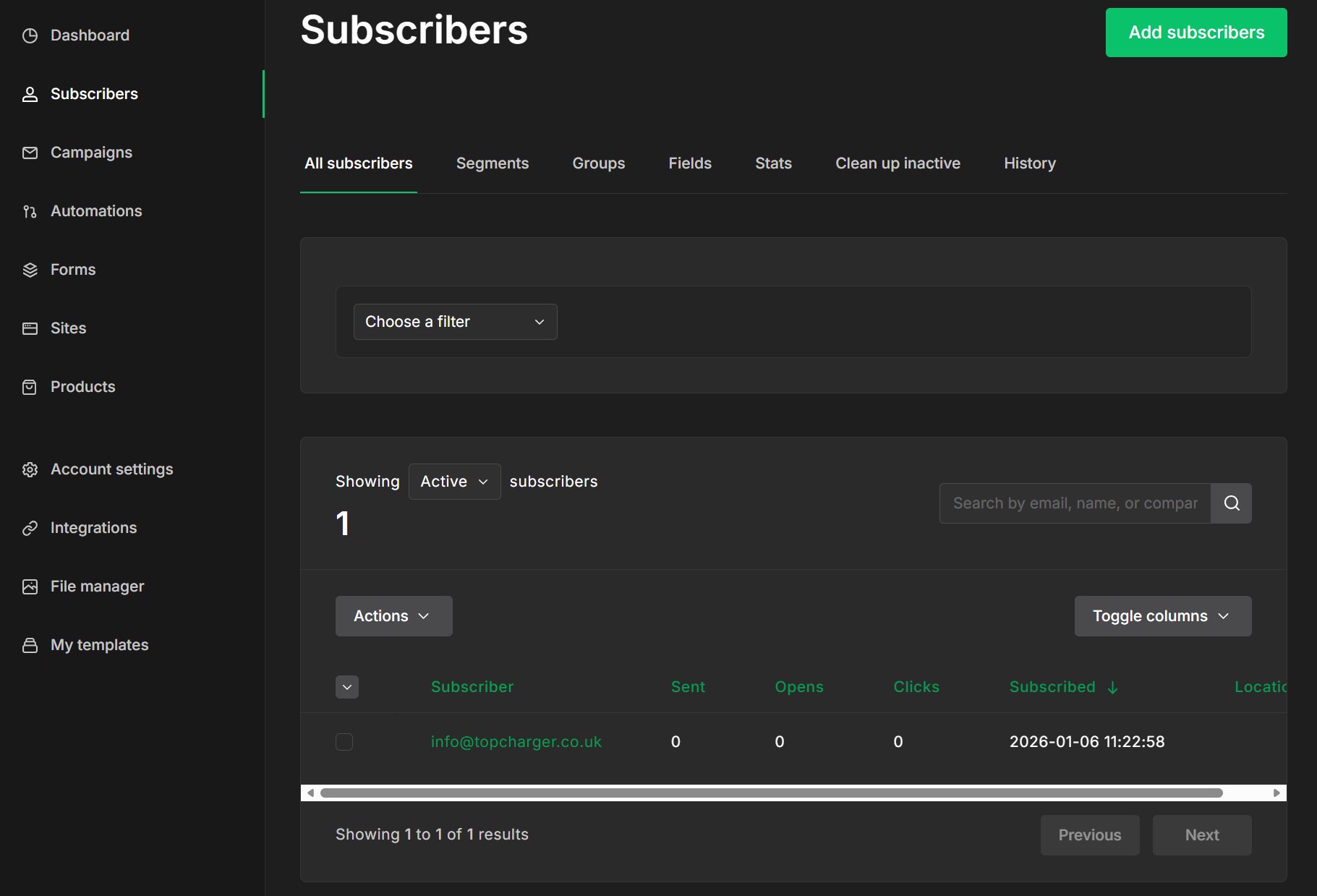
Both Omnisend and MailerLite have intuitive interfaces. MailerLite’s dashboard provides an itinerary of tasks to complete after signing up, with a left-hand sidebar linking to settings pages for Subscribers, Campaigns, Automations, and more:
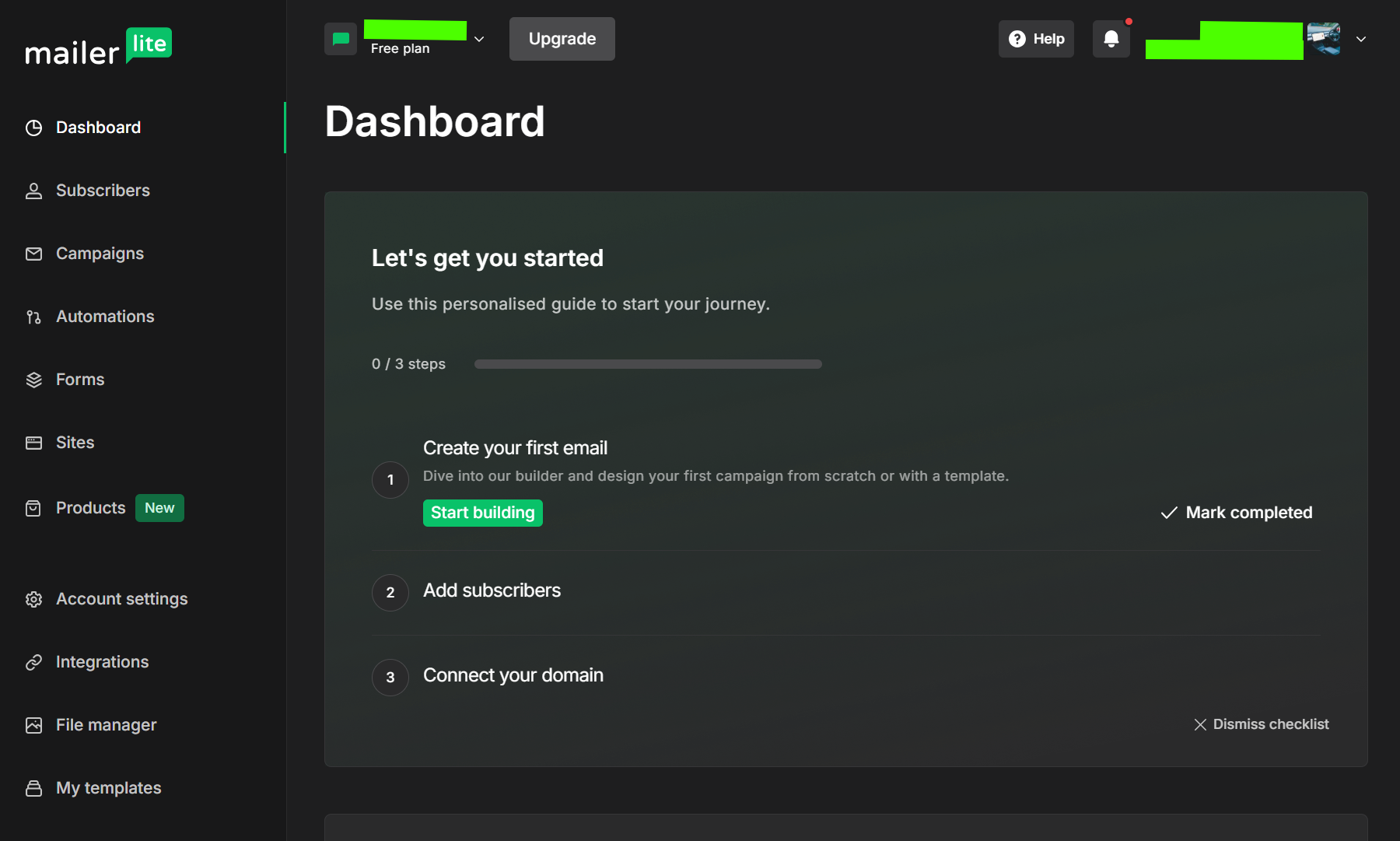
A brief scroll down the MailerLite dashboard reveals a performance overview, split across campaigns, automations, forms, and sites.
Regarding the sidebar, there are no menu dropdowns; instead, clicks take you directly to the respective feature pages. The image below shows the Campaigns page as a new customer. As you can see, it provides guidance on the following steps:
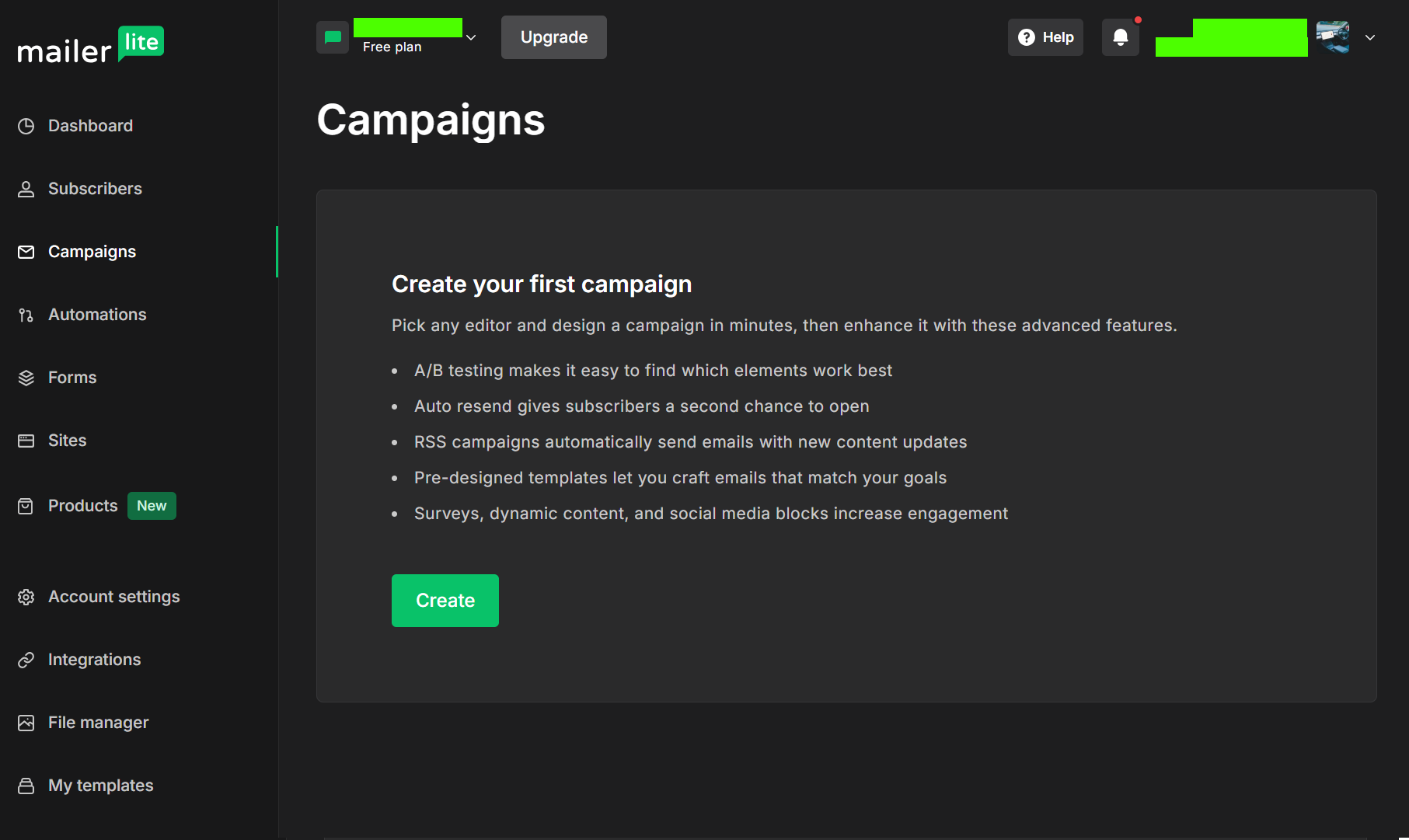
The sites, automations, and forms dashboards also provide guidance. Clicking Create leads to new pages with additional walkthrough steps.
If you appreciate dark backgrounds, then you will love MailerLite’s look. Everything has polish, and it loads wickedly fast. Very Lite indeed.
Moving on to Omnisend, this is a step up in professionalism. The dashboard greets you by name and provides an immediate sales performance snapshot:
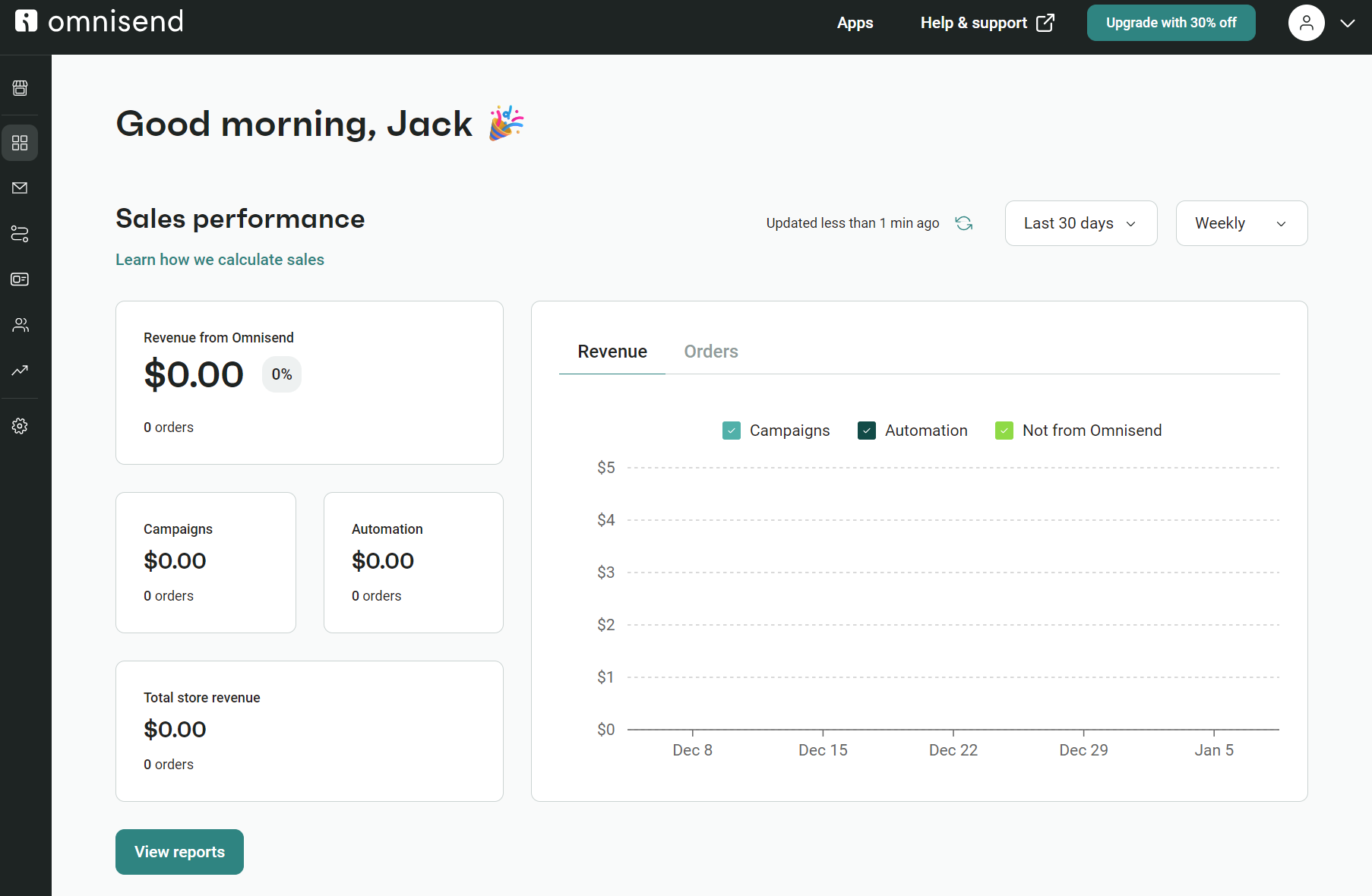
The sidebar features dropdown menus where appropriate, reducing the number of clicks required to find relevant settings compared to MailerLite.
Additionally, Omnisend has a light background with a dark sidebar and top menu, which is more legible than MailerLite’s completely dark configuration.
Creating your first segments, automations, and campaigns is equally intuitive via Omnisend and MailerLite. There isn’t much to choose from in terms of speed or ease of use. However, Mailerlite’s automation builder is not as good. Here’s an image of it:
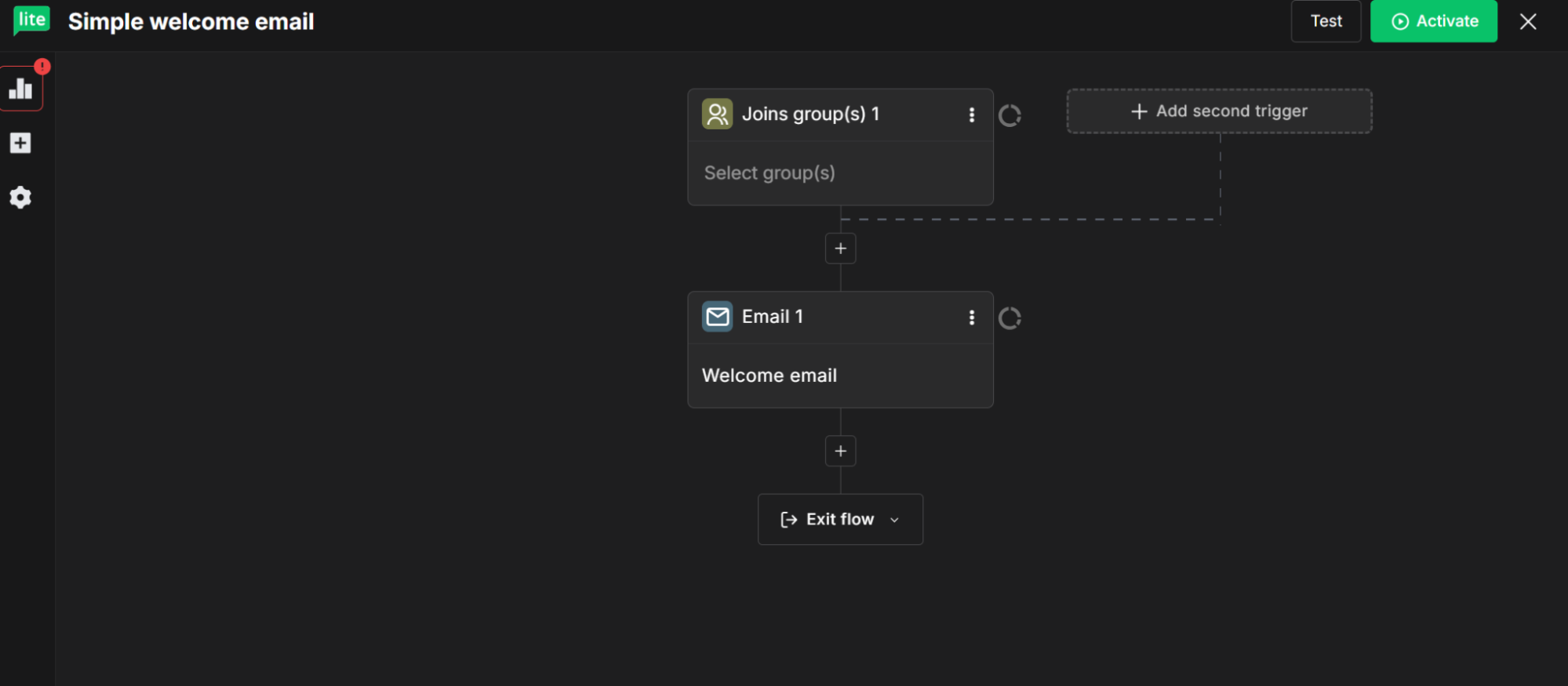
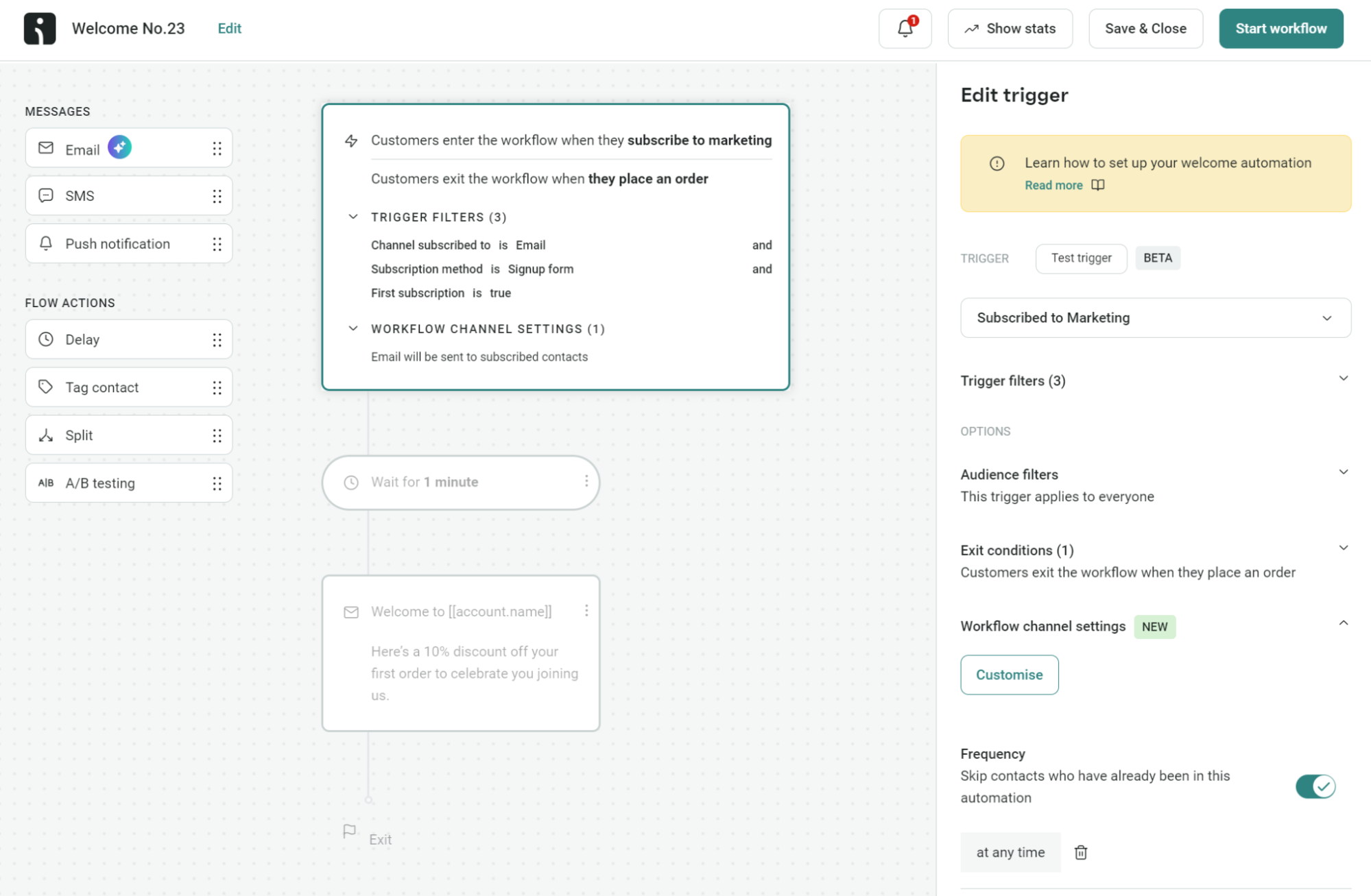
Those side icons have no context and require a click to open a sub-menu. In Omnisend, all flow settings are available via the sidebar immediately:
Winner: Draw. You won’t have any problems learning either platform because both are intuitive to navigate and use.
Omnisend’s email marketing suite is best for ecommerce campaigns and automations, while MailerLite’s is best for newsletters and creators.
For email templates, MailerLite offers 100+ on paid plans, whereas Omnisend has 250+ available across all plans, including Free Forever. They’re suitable for a variety of email campaigns, including welcome emails, newsletters, and promotional offers.
You can customize these templates with your branding and messaging. Omnisend has AI brand assets, which auto-applies your logo and colors to templates. You can manually edit any element using the drag-and-drop builder:
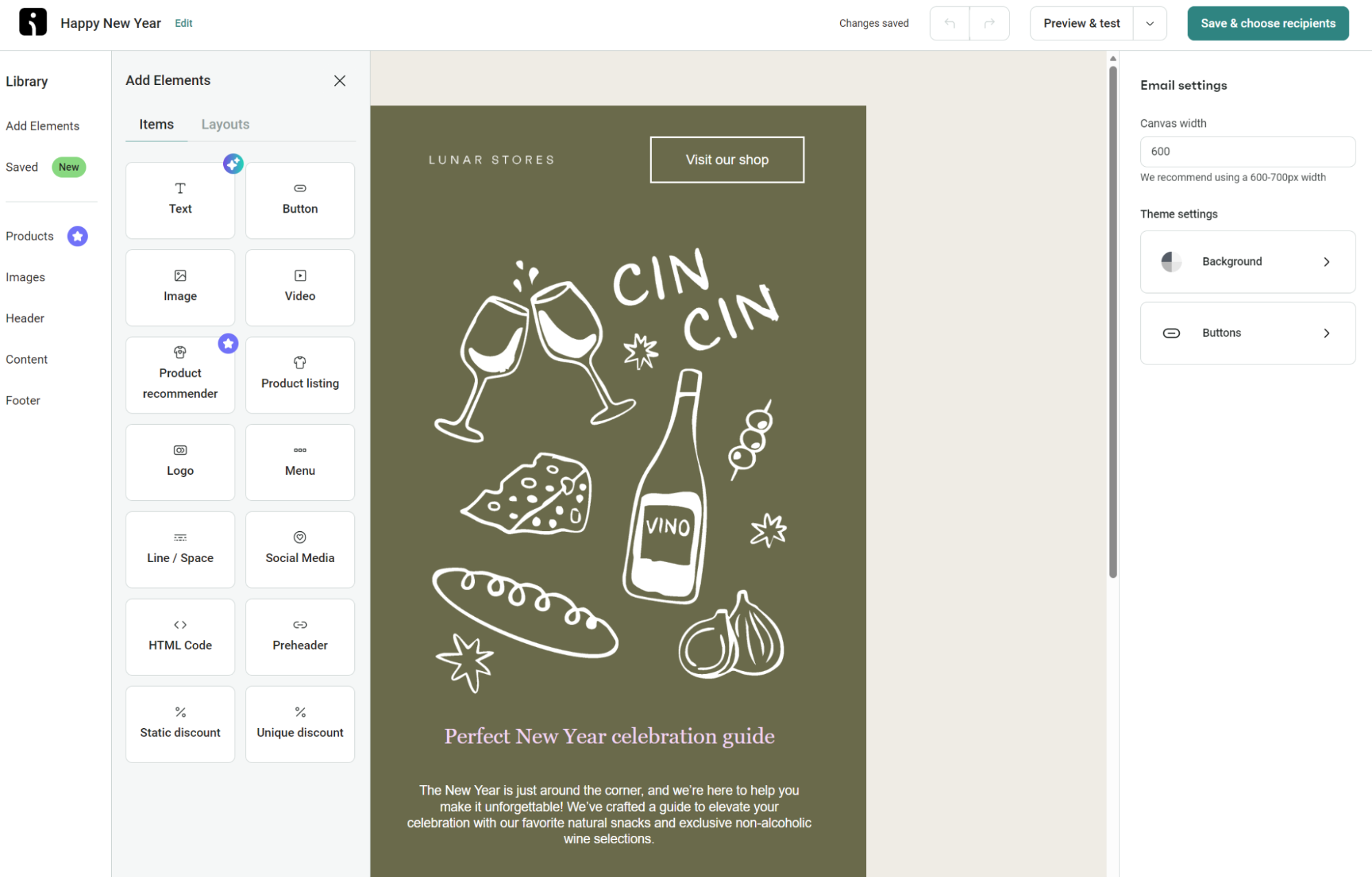
When it comes to building emails from scratch, both tools make it easy with pre-built elements and layouts. Omnisend lets you use the custom HTML item, which you can drag into your email to create unique content and layouts. MailerLite restricts custom HTML to its Advanced plan.
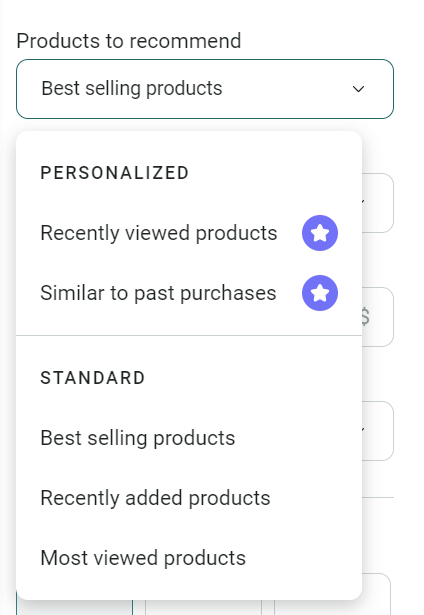
The Product recommender item is another highlight. It lets you auto-recommend products, such as recently viewed, similar to past purchases, and best-sellers. If you’re on the Pro plan, you can show products based on your customers’ recently viewed products and previous purchases:
Creating unique subject lines and content for your emails is simple in Omnisend using the built-in AI writing assistant, a feature in all plans. MailerLite restricts its AI writing assistant to the Advanced plan, so there’s more workload with MailerLite’s cheapest offerings.
Head to Campaigns and click + Create campaign in Omnisend, and you can select Email A/B test to test two email campaigns. Additionally, you can create A/B tests in the flow builder for your automated emails and SMS regardless of your plan.
Meanwhile, MailerLite’s Advanced plan includes custom HTML for creating complex email designs and the aforementioned AI writing assistant.
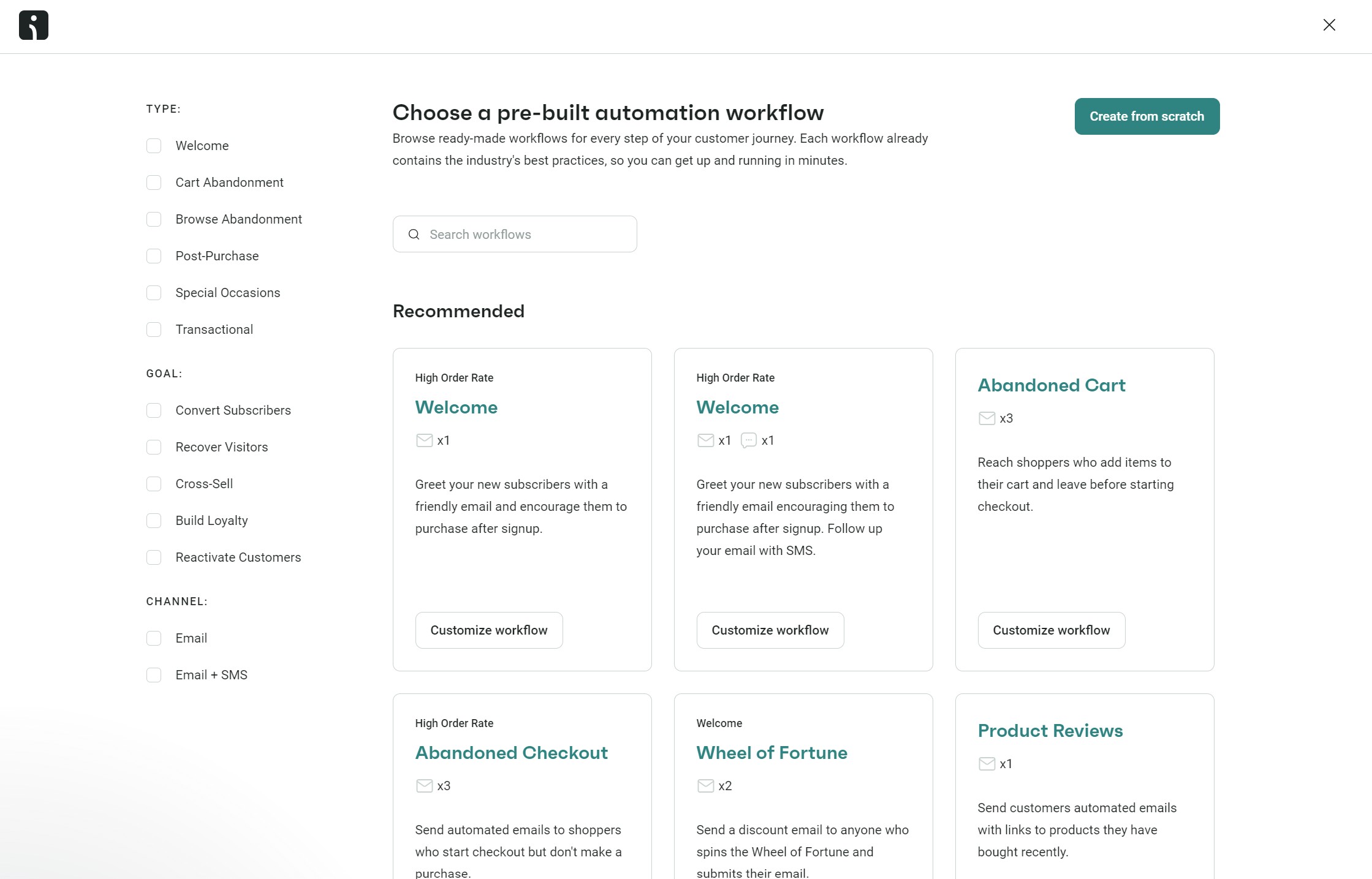
In terms of automation, Omnisend’s options are highly focused on ecommerce and let you combine email and SMS into flows. It offers pre-built workflows for everyday ecommerce tasks, such as cart recovery and order confirmation.
Because these options are highly customizable, you can create complex workflows tailored to your customer journey and build unique experiences.
MailerLite’s automation options are more general in focus. You can set up automated workflows triggered by various actions, such as abandoning a cart, subscribing to a list, making a purchase, or clicking a link, and pick from multiple pre-built flows:
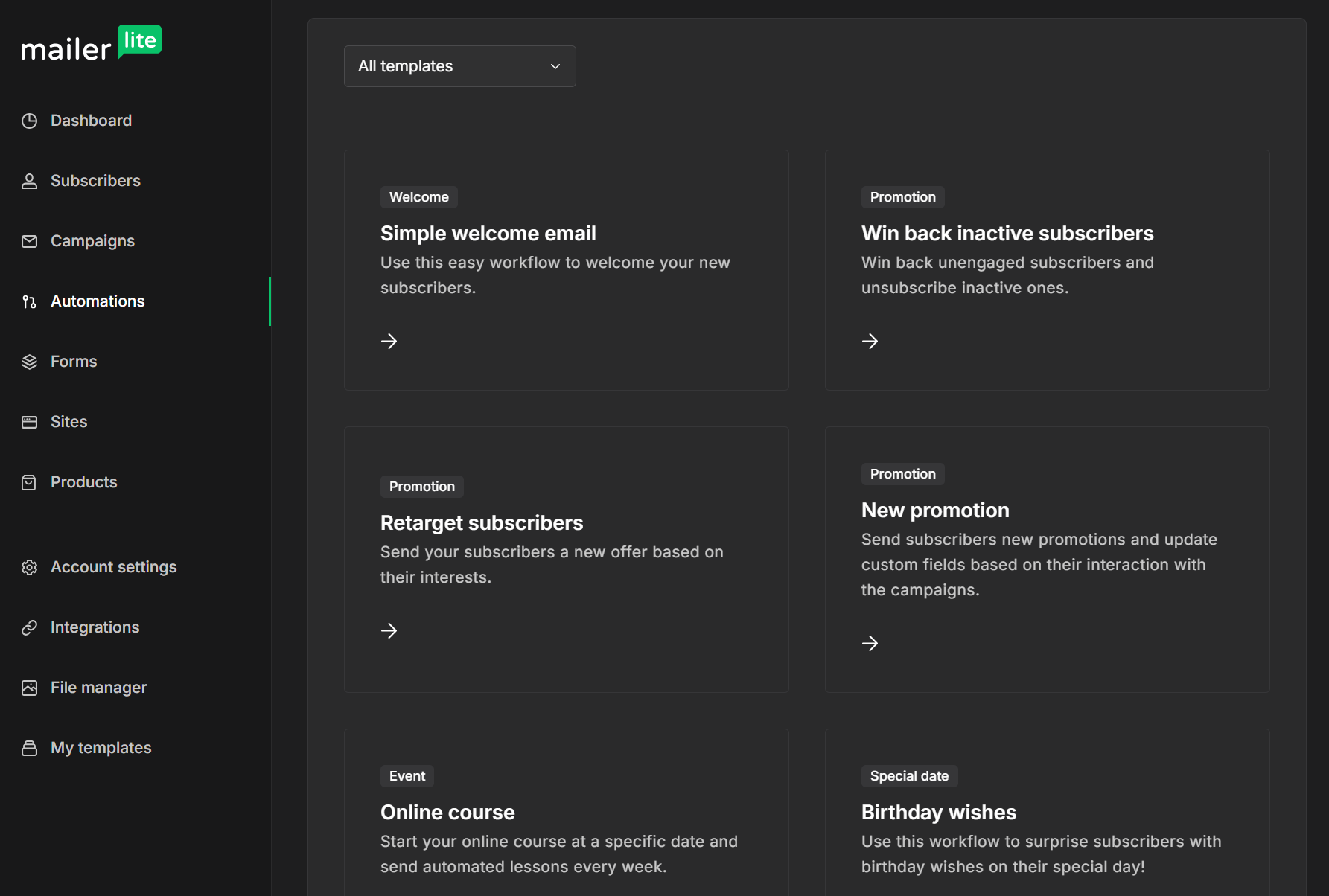
You can A/B test two versions of your emails in MailerLite, although that feature doesn’t extend into forms and popups unless you’re on a paid plan.
Verdict: Omnisend wins. It has more pre-built flows, more advanced automation features, and helps you cover your entire customer journey.
The names of the platforms provide insight into what they offer: Omnisend offers omnichannel features, whereas MailerLite is focused on email.
Omnisend lets you create standalone email, web push notification, and SMS marketing campaigns, in addition to multichannel flows containing all those channels. All plans support Facebook Custom Audiences and Google Customer Match for retargeting, too.
MailerLite covers email marketing only, with its SMS capabilities reserved for transactional text messages, available with a Transactional plan at extra cost. Facebook Custom Audience support requires the Advanced plan.
Verdict: Omnisend wins. It handles email, SMS, and web push notification campaigns, and lets you combine email with SMS and push notifications in automations.
Segmentation features set Omnisend apart from MailerLite for ecommerce with pre-built segments for common buying scenarios and an AI segment builder. You can assign segments to flows and campaigns for appropriate targeting.
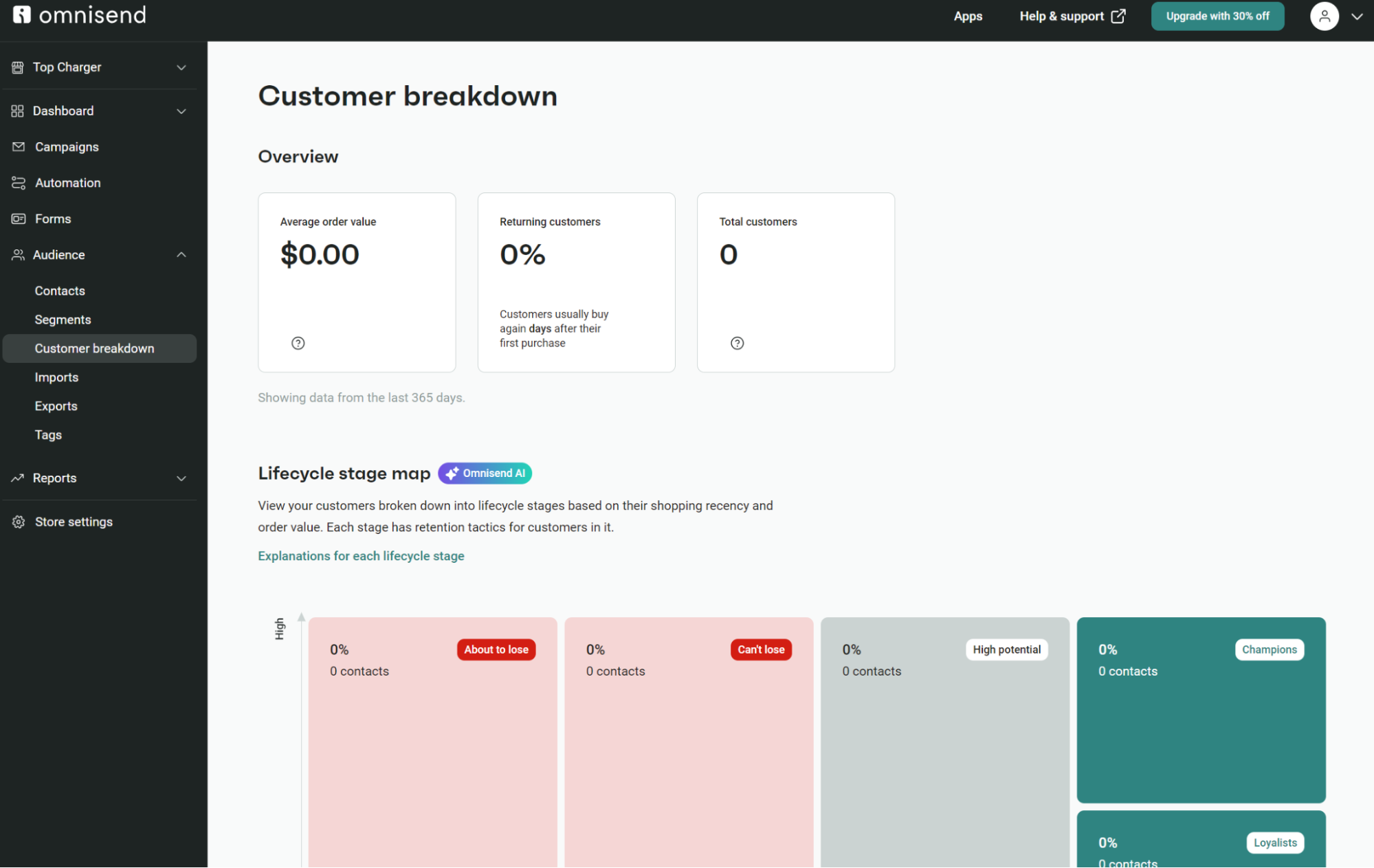
Omnisend provides a customer breakdown, too, showing average order value, the percentage of returning customers, total customers, and more:
Omnisend and MailerLite both integrate with other platforms (including Shopify and WooCommerce) in addition to third-party apps, including Zapier, to create automations.
They’re also both capable of adding products from your store into your campaigns, including individual products and products from categories.
With your email marketing platform linked to your ecommerce store, you can import your products, complete with images, descriptions, and prices. This makes building emails a breeze, especially when you need to quickly create a campaign — such as for the upcoming holidays.
Omnisend, on the other hand, offers up its unique Product Picker, which makes it very easy for merchants to add their products (and all related info) to their campaign newsletters:
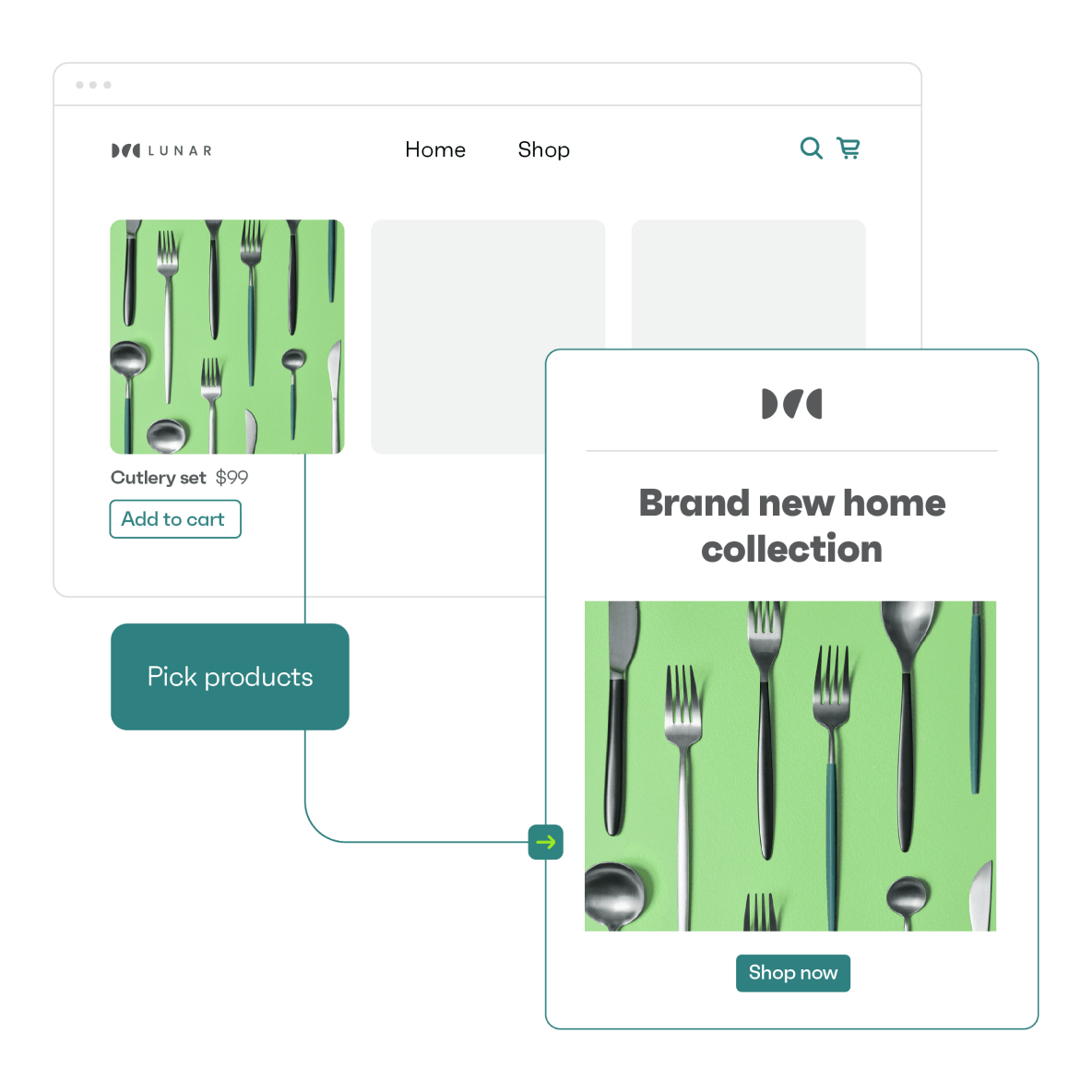
This feature also enables you to send tailored emails to specific segments of your audience, such as products related to purchase or browsing history, to particular individuals, increasing the likelihood of new sales.
One of the primary features required of an e-commerce-focused email marketing platform is the ability to send cart abandonment emails. MailerLite includes that feature when your account syncs with WooCommerce, Shopify, or another compatible platform.
Omnisend also offers automated cart abandonment emails, but whereas MailerLite will only send them to subscribers, Omnisend delivers to subscribed and non-subscribed contacts.
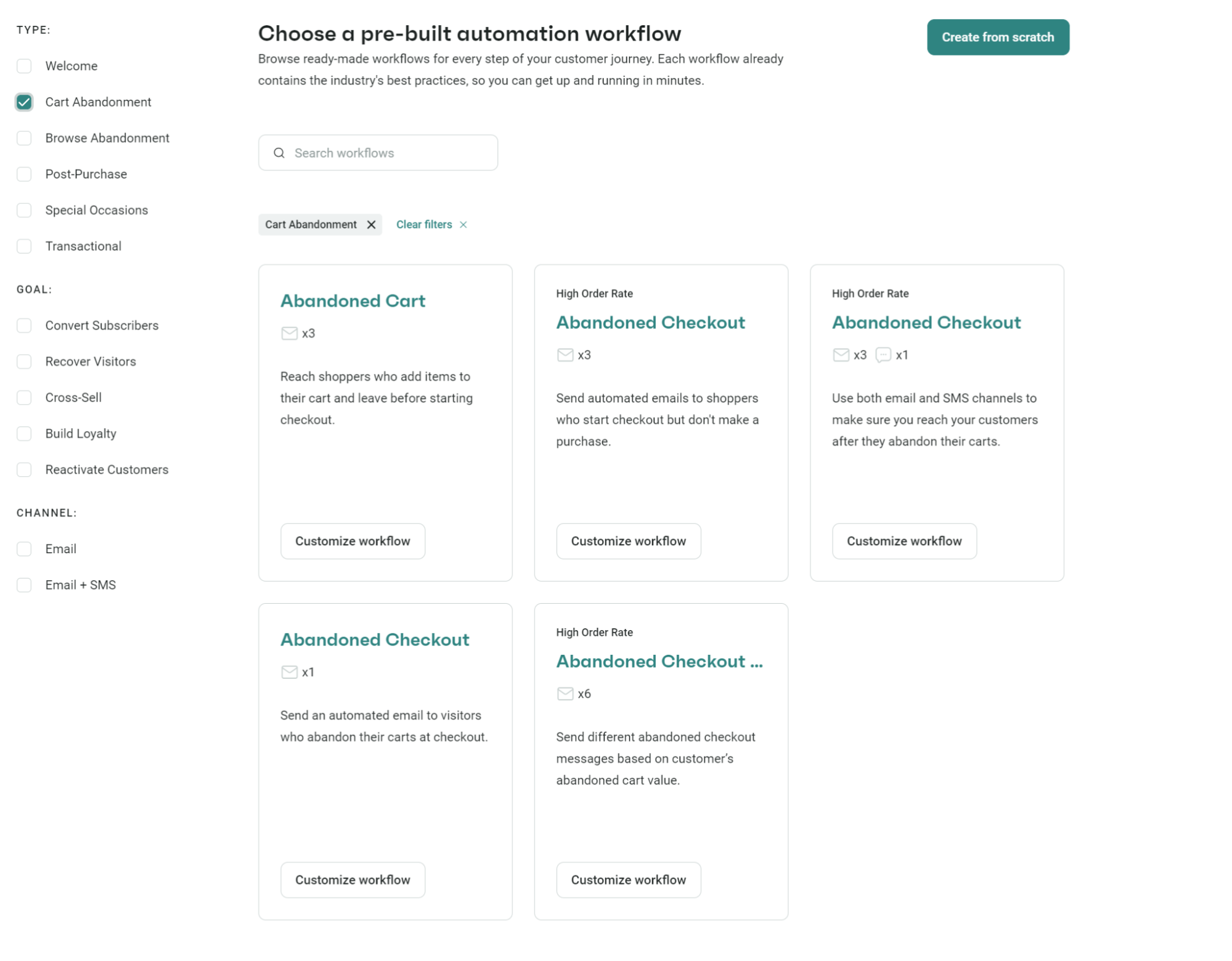
Both platforms have premade flow templates, but Omnisend offers a more comprehensive selection of abandonment workflows:
Check out the detailed Mailerlite alternatives article to make the right choice
Verdict: Omnisend wins. Its segmentation features enable you to drill down into your audience’s behaviors, preferences, and purchase history for targeted campaigns and flows.
Having great campaigns is one thing, but they’re not going to drive any sales if you don’t have anybody to send them to. That’s why the best email marketing platforms also have tools to help you build your email list.
Neither Omnisend nor MailerLite is a slouch in this department, with both offering a variety of popups, landing pages, and forms.
The popups can be deployed in multiple ways to take up minimal screen space or the entire page, and appear when the visitor scrolls to a certain point on the page or as they’re about to leave the site.
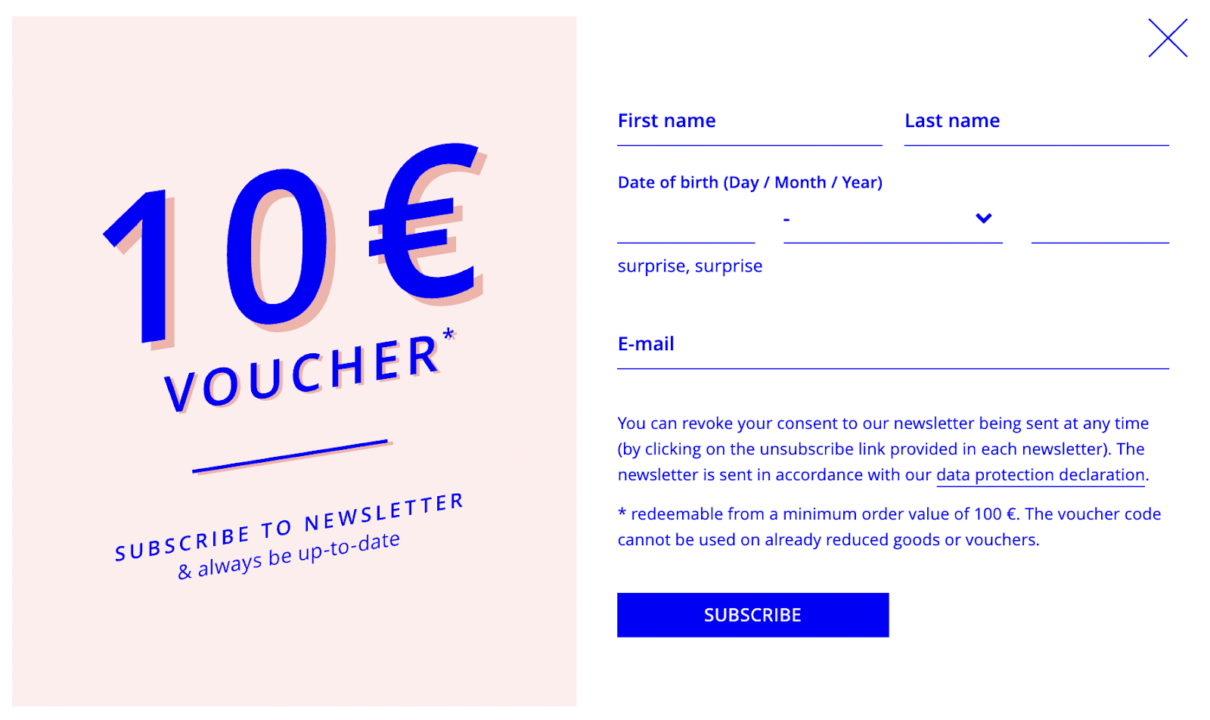
Both offer advanced customization options for popups, including adding your own logos and images, choosing from an extensive color palette, adding GDPR-compliant permission boxes, and segmenting subscribers based on which popup they subscribe through.
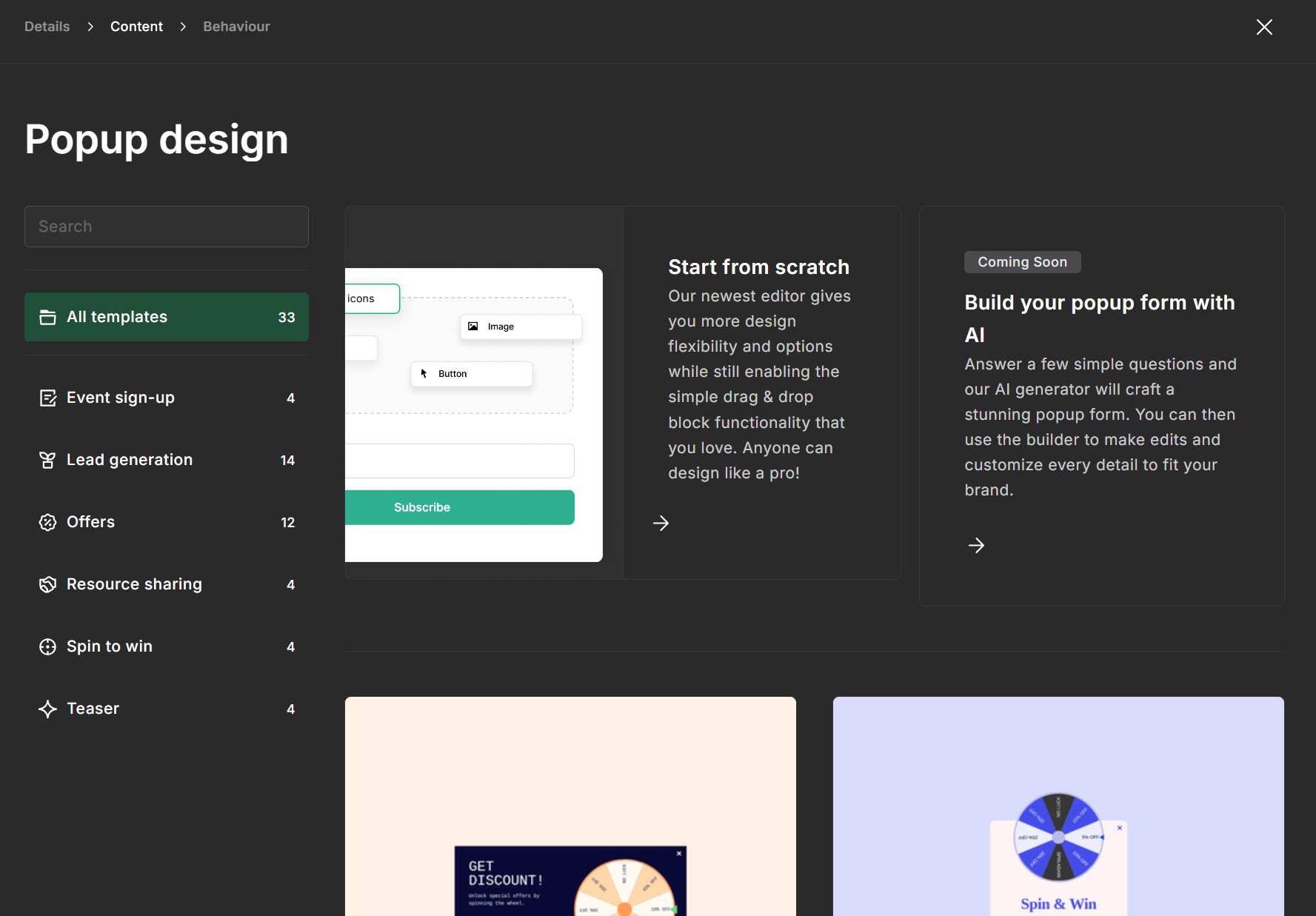
That’s where the audience-building features end for MailerLite and where Omnisend really comes into its own. In addition to the above, Omnisend has a Wheel of Fortune.
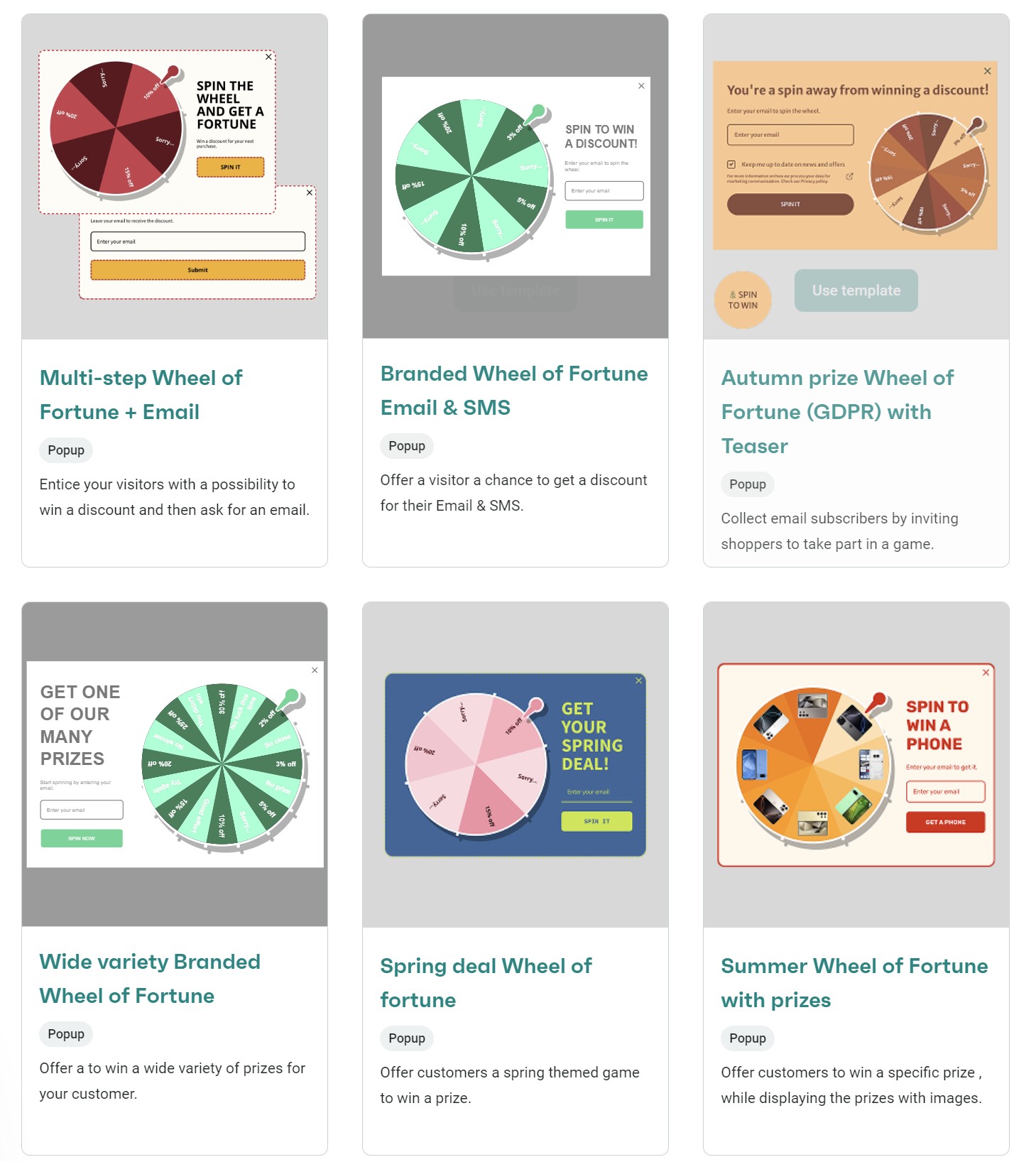
Instead of asking visitors to give you their email address in a text box, Wheel of Fortune adds an element of fun and rewards visitors with prizes that you choose – it could be free shipping, a discount, or anything else you want to offer.
The Wheel of Fortune form can also appear only when you want it to, whether that’s on product pages or when visitors are about to leave the site.
This helps give Omnisend the edge when it comes to tools for growing your list, but it has another show-stopping feature up its sleeve: letting visitors sign up with just their phone number. You can ask for both an email address and a phone number, or one or the other.
The advantage is that you can send marketing campaigns to subscribers who have only provided their phone numbers. In contrast, other email marketing platforms, such as MailerLite, require an email address.
Verdict: Omnisend wins. It has more form templates and supports, popups, embeds, and flyouts. Plus, its gamification features help you capture more subscribers.
Customers who sign up, browse, purchase, open, click, and otherwise engage with your messages can enter segments for appropriate targeting later. MailerLite and Omnisend let you create unlimited segments in all plans.
Omnisend provides a head start to your groupings with 32 pre-built segments, while also allowing the creation of custom segments from scratch. MailerLite also provides pre-built segments and lets you build them from scratch.
The image below shows Omnisend’s pre-built segment library:
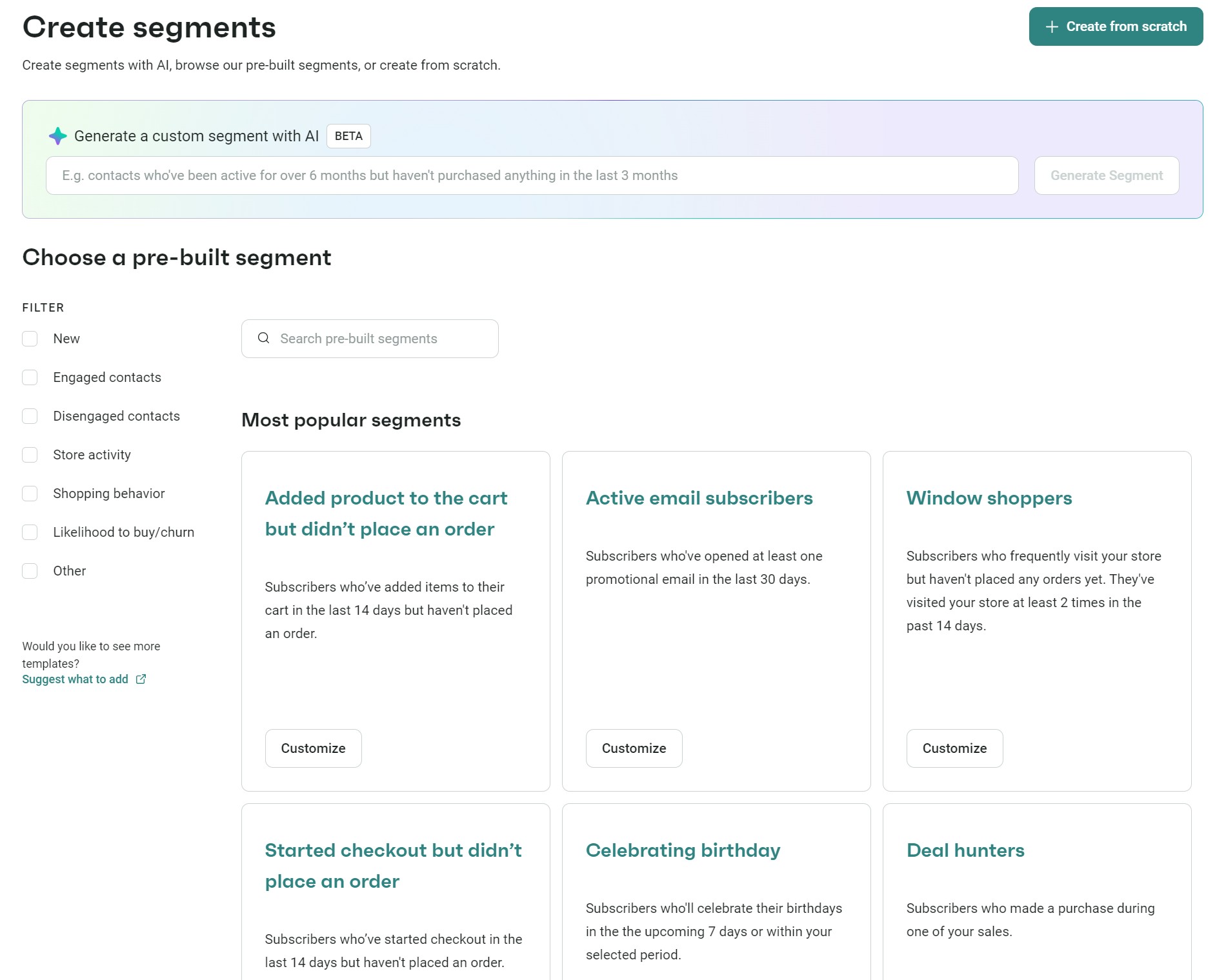
Both platforms enable segmentation based on fundamental criteria, such as interests, demographics, and subscriber actions, including email opens and clicks.
However, Omnisend offers more options for segmentation, including segments based on shopping behavior and browsing activity. The following pre-built segments will be particularly beneficial for your ecommerce store:
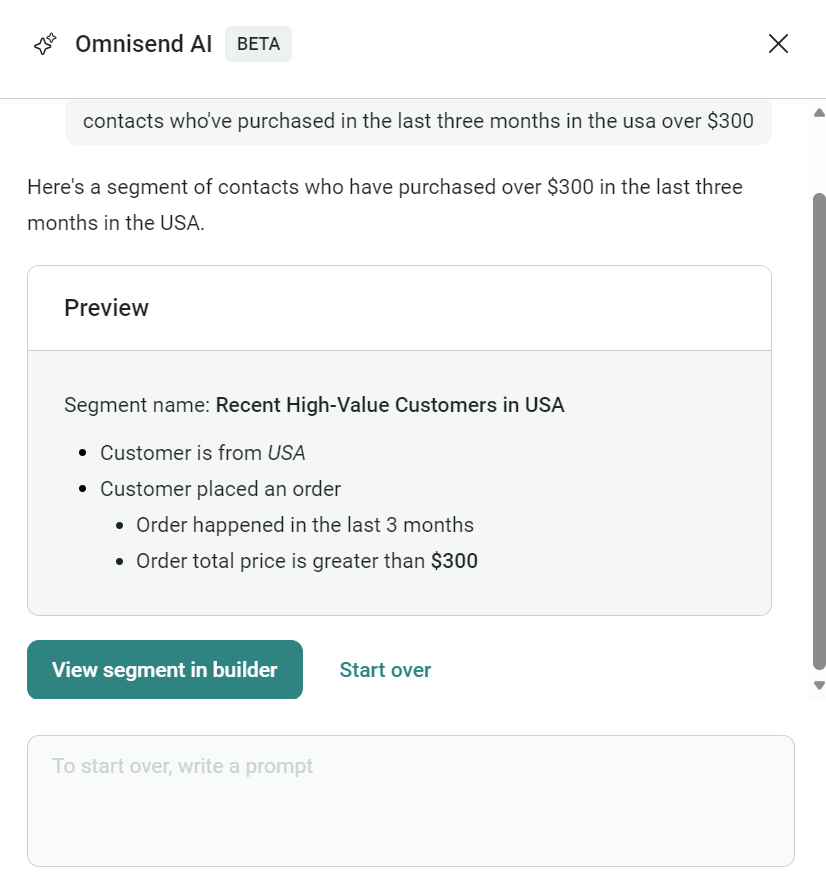
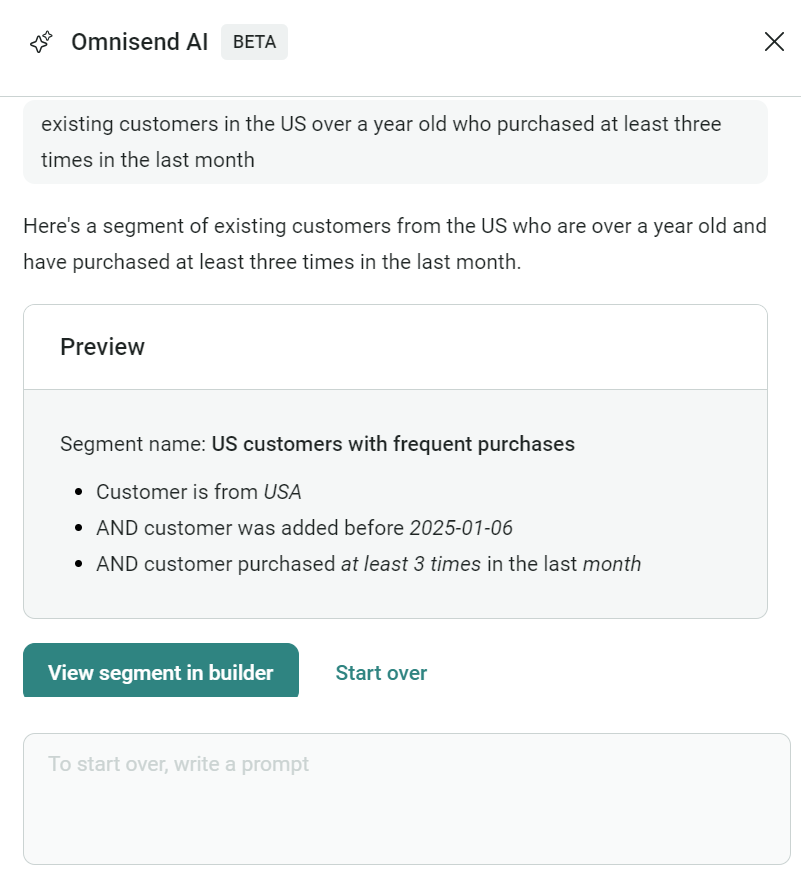
Should you need more segments to cover your customer journey, then you can use the AI segment builder in any Omnisend plan to build unique groups.
The image below shows a prompt for a segment containing existing customers in the US over a year old who purchased at least three times in the last month:
Omnisend also has a customer lifecycle-based approach, dynamically assigning each customer to a stage, and providing an easy-to-understand lifecycle stage map that helps you prioritize and personalize retention strategies.
When it comes to customization, Omnisend allows the addition of custom data to customer profiles, enabling the delivery of highly personalized messages.
On the other hand, MailerLite’s segmentation is more straightforward and doesn’t provide the same level of ecommerce integration as Omnisend.
Verdict: Omnisend wins. It has more pre-built segments, and its AI segment builder helps you narrow down and refine your customers for every email, SMS, and push notification. Additionally, its customer breakdown enables you to understand the value of all your customers.
The reason you put time and effort into building campaigns is for your audience to find them appealing, open them, and visit your store. For that to happen, they first need to see the emails.
It’s important to remember that multiple factors, including the reputation of your sending domain and the content of your email, influence deliverability.
Nonetheless, an email marketing platform’s deliverability score is a crucial consideration when choosing with whom to sign up.
MailerLite doesn’t disclose its deliverability rates, so its users must monitor their campaigns and track metrics such as the hard and soft bounce rates, unsubscribes, and the number of emails being marked as spam.
Conversely, Omnisend provides a comprehensive breakdown of your campaign’s deliverability statistics, including blocked messages and inactive email addresses.
Omnisend also features a helpful program called Safe Send Volume, which helps you ‘warm up’ your contact lists. When migrating to a new email service provider or starting an account from scratch, you have no service reputation.
As a result of this, you’re more likely to land in the spam folder. By warming up your list, you establish a positive reputation and prove to Internet Service Providers (ISPs) that you can be trusted, which improves your deliverability.
As a bonus, Omnisend recommends segments to send emails to, which will inform you which are the most engaged parts of your audience. This should lead to better-performing campaigns in the future.
Related reads:
Omnisend vs. Mailchimp
Omnisend vs. Attentive
Verdict: Omnisend wins. Its built-in deliverability and list-cleaning tools help you reach customers more consistently than MailerLite. However, keep in mind that many external factors influence deliverability, so your results may vary.
Omnisend offers 24/7 customer support via live chat and email, available across all plans. In contrast, MailerLite offers live chat only in its Advanced plan and provides email support across all its paid plans, with the free plan receiving 14 days of email support.
Simply put, if you’re likely to require professional assistance for building segments, campaigns, and automations, and MailerLite’s most expensive plan isn’t a fit for you, then Omnisend is best.
The table below compares support options by plan level:
| Plan level | Omnisend | MailerLite |
|---|---|---|
| Free | 24/7 live chat and email | 14 days of live chat and email |
| Standard/Growing Business | 24/7 live chat and email | Email support |
| Pro/Advanced | 24/7 live chat and email | 24/7 live chat and email |
| Custom pricing/Enterprise | 24/7 live chat and email, account expert | 24/7 live chat and email, success manager |
Moving on from support availability, the overall ratings for both tools are excellent, as indicated by G2. Let’s compare their reviews for customer support:
Verdict: Omnisend wins. It offers more support options in its free plan and has more positive customer support mentions on the review platform G2.
Choose Omnisend if:
Choose MailerLite if:
Both have free plans you can try without adding any payment information, but only Omnisend’s free plan has no standard feature restrictions.
Quick sign up | No credit card required
This article was researched and written by our experts following a precise process.
See the process
TABLE OF CONTENTS
TABLE OF CONTENTS

What’s next


No fluff, no spam, no corporate filler. Just a friendly letter, twice a month.