Omnisend AI


 OFFER
OFFER









Shopify emails ending up in spam can affect your brand reputation and even disrupt daily operations. Whether it’s transactional order confirmations and shipping updates or your marketing campaigns, getting them labeled as Shopify spam emails is costly.
Mixing these types of emails, or more technical issues such as missing SPF/DKIM authentication or poor-quality email addresses, takes time and effort to resolve. Most fixes require updates in multiple places.
Your domain provider makes DNS changes. Sender addresses change in Shopify settings. Email apps need their own authentication setup. Yet, getting everything aligned gives an almost immediate payoff as your emails start reaching customers’ inboxes again.
Follow along to diagnose and fix your email deliverability problems for transactional and marketing emails in Shopify and third-party apps like Omnisend.
Quick sign up | No credit card required
Quick fixes for Shopify spam emails
The table below contains quick fixes for the most common reasons behind Shopify emails going to spam:
| Problem | Quick fix |
|---|---|
| Missing authentication | Add SPF, DKIM, and DMARC (p=reject) authentication |
| Using a free email address | Switch to @yourstore.com instead of free emails like @gmail.com |
| High bounce rate (>2%) | Remove inactive subscribers to keep bounce rate under 2% |
| Poor engagement (<20% opens) | Segment lists by replies and conversions, as opens alone are not reliable |
| Spam trigger words | Replace "FREE!!!" with factual phrases like "Shipping included." |
| Mixed email types | Use orders@ for transactional, marketing@ for promotional |
| New domain | Warm up gradually over four to eight weeks |
| Image-heavy emails | Keep text above 60% of content |
| URL shorteners | Use full yourstore.com links |
| Irregular sending | Maintain a consistent schedule, volumes, and avoid long communication pauses |
Why are my Shopify emails going to spam?
The most common cause of Shopify emails going to spam is when email providers detect issues with authentication, sender reputation, or message content.
Technical authentication failures
Your domain needs SPF, DKIM, and DMARC records to verify ownership and avoid being flagged as spam:
- Sender Policy Framework (SPF) tells email providers which servers can send on your behalf.
- Domain Keys Identified (DKIM) adds encrypted signatures for your messages.
- Domain-based Message Authentication, Reporting, and Conformance (DMARC) instructs email services how to handle authentication failures.
Without all three properly configured, your emails fail basic legitimacy checks.
Shopify’s default sending setup creates additional problems. You share Shopify’s infrastructure with millions of stores. Because others use the same IP addresses, your reputation suffers when they send spam.
The authentication records not only prove who you are but also serve as the only signals distinguishing your business from every other merchant sharing the same IP. Your authentication must be flawless to avoid junk mail affecting your deliverability.
Omnisend uses dedicated IPs, which solves the shared IP reputation problem. What still needs to be done manually is the migration itself. Old DNS records and broken email signatures can cause authentication failures.
Providers see dramatic changes — new sending IPs, different volumes, altered templates — and assume account compromise. They quarantine everything while investigating.
Shopify DMARC settings errors include:
- Publishing records to the root domain, _dmarc subdomain should be used instead
- Policy syntax with missing semicolons
- Using SPF mechanisms exceeding the 10-lookup limit
- DKIM selectors not matching Shopify’s signing infrastructure
Watch this video to find out more about DMARC:
Sender reputation and engagement failures
Using @gmail.com or @outlook.com for business emails signals that you’re a low-quality sender. Email providers know established businesses invest in custom domains. Free addresses correlate strongly with fraud and Shopify spam emails.
Permanent reputation damage can also arise from the historical sending behavior. A low-quality email list purchased in 2020 still affects today’s deliverability. The previous year’s black friday campaign can continue to lower your score if it generated spam complaints, and so on.
Sometimes, even more important are signals of low compliance with data protection regulations (mostly GDPR and CAN-SPAM). Compliant rates decline on your emails due to issues such as non-functional unsubscribe links, missing physical addresses, or a lack of explicit consent forms.
You might have all that’s required – a professional email, a credible and consistent sending history, data compliance, and more, but your Shopify emails still go to spam. Look into engagement metrics in such cases:
- Open rates under 20% are a sign recipients didn’t want your email in the first place
- Click rates below 1% mean the content didn’t land — wrong audience, wrong message, or both
- Emails deleted immediately tell you something’s off before anyone even reads a word
- When spam complaints reach 0.1%, the filters of the email services trigger
It’s also important not to mix email types, as this significantly reduces deliverability as measured by intent metrics. According to Omnisend’s 2026 data, automated emails deliver 24% higher open rates, 6× stronger click engagement, and 19× higher conversion rates than campaign messages.
It’s best to have separate addresses for transactional and marketing emails. Sending both from one means email service providers will average your reputation, most likely downward, causing issues like order confirmations ending up in spam with your sales emails.
Content and structural triggers
Modern spam filters are advanced enough to go beyond keyword detection. Subject lines pairing “FREE SHIPPING!!!” or “LIMITED TIME OFFER” with excessive punctuation will get caught almost every time. Other problems are less obvious but equally important to know about.
- Image-heavy emails provide little for filters to analyze. If pictures take 80% of your message, they can’t determine legitimacy and, unfortunately, assume you’re hiding text to evade detection.
- URL shorteners instantly flag your emails. Legitimate businesses show complete destination URLs.
- Scammers often use services like bit.ly to hide behind links. Using them marks you as malicious by association.
Behavioral patterns matter as much as content. Sudden volume increases, irregular sending schedules after consistent patterns, or switching between vastly different message types all reduce deliverability.
Additional reading:
Email deliverability: A complete guide for ecommerce [2026]
Transactional vs. marketing emails: Why they go to spam differently
Before you start fixing your Shopify store’s spam emails, identify which messages are landing in the spam folder. The root causes of the spam label vary by email type.
Transactional emails are mostly flagged due to authentication failures. Marketing emails suffering from content problems and weakening engagement are commonly flagged as spam.
| Transactional | Marketing | |
|---|---|---|
| Primary spam cause | Authentication failures / shared IP reputation | Low engagement, list hygiene, spam trigger words |
| Primary fix | SPF, DKIM, DMARC setup, and dedicated IP | List cleaning, engagement segmentation, and content audit |
If your Shopify order confirmations, shipping updates, or password resets are not reaching customers, look into Missing SPF, DKIM, or DMARC records and shared IP causing problems. If it’s your promotions or newsletters, issues like disengaged subscribers and poor list hygiene are the most common culprits.
Tools like Omnisend automatically handle transactional and marketing emails through separate sending streams. Each stream’s reputation is best protected separately.
See the step-by-step guide below to separate these email streams manually during troubleshooting.
How to stop Shopify spam emails: A step-by-step guide
Shopify emails that go to spam can be traced to several culprits. Authentication failures, a damaged sender reputation, or content that alarms filters – whatever’s behind it, you need fast fixes.
Authenticate your domain with SPF, DKIM, and DMARC
We touched on DMARC and other authentication types above, but let’s be clear — they are 100% necessary to avoid spam filters because they allow email providers to verify your domain ownership. No ownership, no delivery.
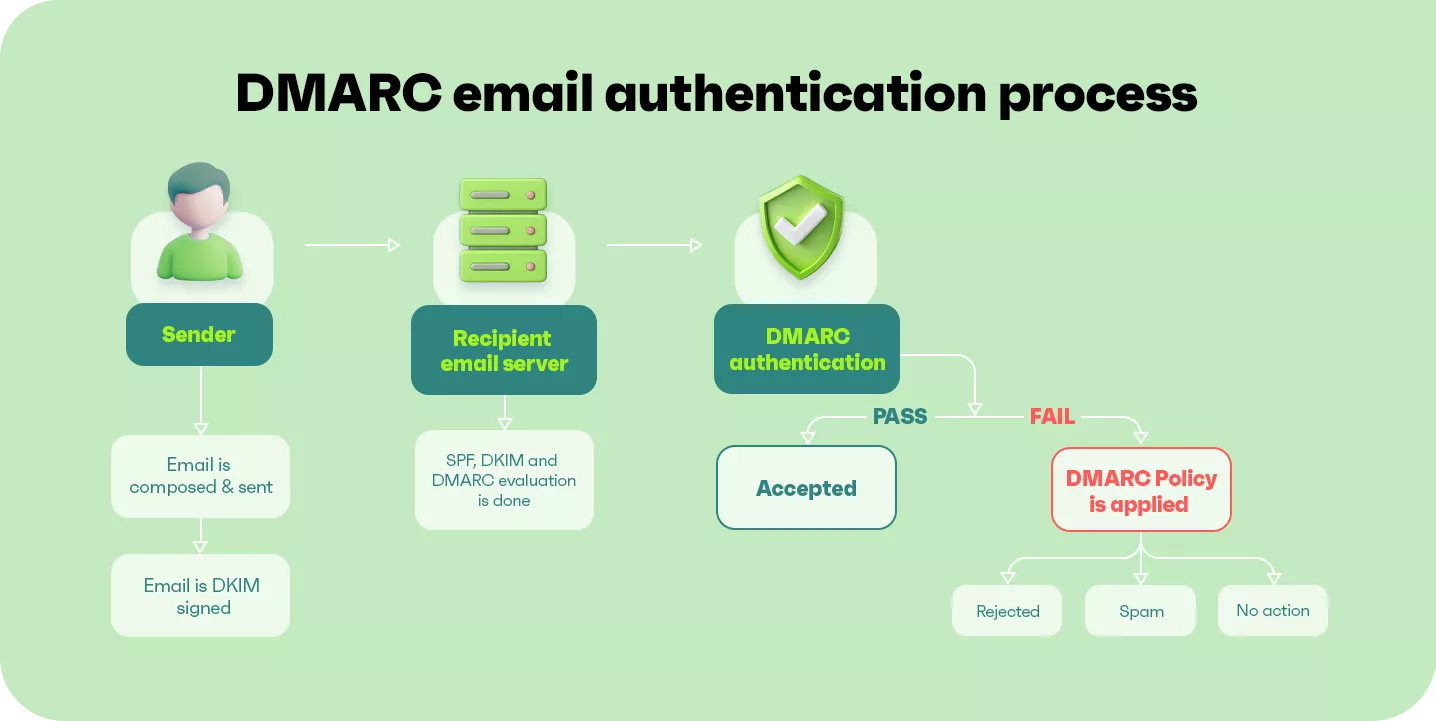
You need an active paid Shopify plan to add authentication records. Development stores and Pause & Build plans cannot authenticate domains.
Setting up SPF and DKIM via Shopify
- Navigate to Settings > Notifications in your Shopify admin to open this settings section:
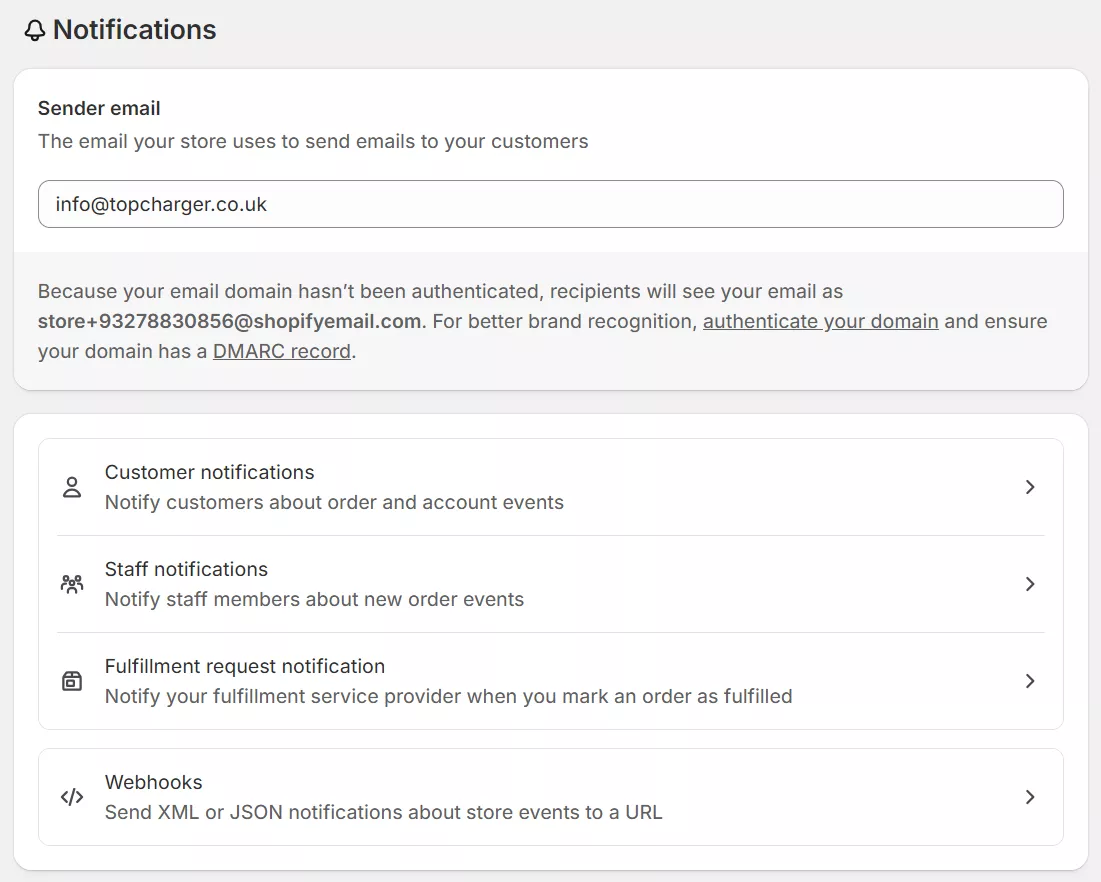
- Click the Authenticate your domain link next to your sender email — doing so will open up this dialogue box with your records:
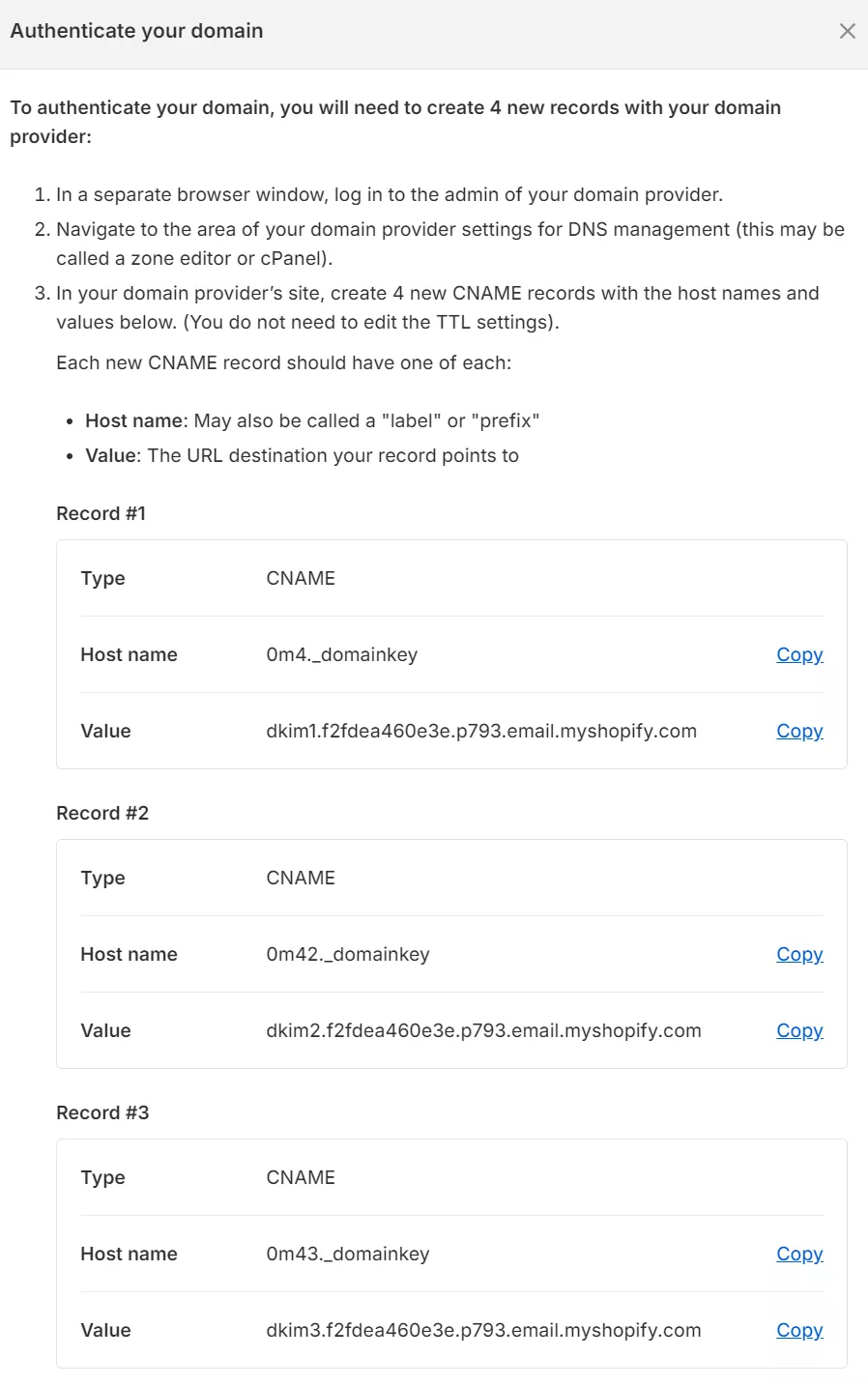
- Copy the CNAME records Shopify displays
- Log in to your domain provider (GoDaddy, Namecheap, etc.)
- Add the CNAME records exactly as shown — one character wrong breaks authentication
- Wait 48 hours for DNS propagation
- Shopify will verify and show the authentication status
Adding a DMARC record
Since February 2024, Gmail and Yahoo require DMARC. Without it, they rewrite your sender address to [email protected].
Here’s how to add the record:
- Create a TXT record in your domain’s DNS settings
- Set the record name to _dmarc
- Set the value to v=DMARC1; p=none;
- Save and publish the changes
This p=none policy monitors authentication without blocking emails, giving you time to fix any issues before enforcing stricter rules.
If you’re using Omnisend for email marketing in your Shopify store, watch this video to learn how to set up all authentication settings for optimal delivery and how to make emails not go to junk:
Additional reading:
Shopify Email setup: Complete guide to sending like a pro (2026)
Use a custom-branded email domain
Free email addresses increase the risk of Shopify emails being marked as spam. [email protected] signals to providers that you’re either unprofessional or fraudulent.
Navigate to Settings > Notifications in Shopify and change your sender email to [email protected] or [email protected].
If you don’t have a hosting, use Shopify’s forwarding feature to create professional addresses that route to your personal inbox. Google Workspace offers full functionality but costs extra and might not be worth it just to stop your store from filling up with spam.
Warm your email-sending reputation
Sending thousands of emails from a new domain triggers spam filters because you lack an existing sender reputation. You need gradual increases in volume to acquire it.
| Week | Volume | Goal |
|---|---|---|
| 1 | 50 | Engage most active subscribers |
| 2 | 150 | Scale carefully, monitor spam complaints |
| 3–8 | Increase by 25% each week | Gradually build your sender reputation |
Keep increasing your sends until you reach the needed capacity. It should take four to eight weeks in total. Focus on engagement during warm-up: ask questions, request feedback, encourage replies. Each positive interaction builds trust.
The IP address you use to send emails carries its own reputation. The actions of others might negatively impact your success if others use the shared IP pool to send spam. It’s often better to use a dedicated IP address, but staying consistent with your volumes is then even more important.
Omnisend provides an automatic domain warm-up that gradually increases the percentage of emails sent from your authenticated domain. We also use dedicated IP addresses to send your emails, which solves most of the problems associated with shared IPs.
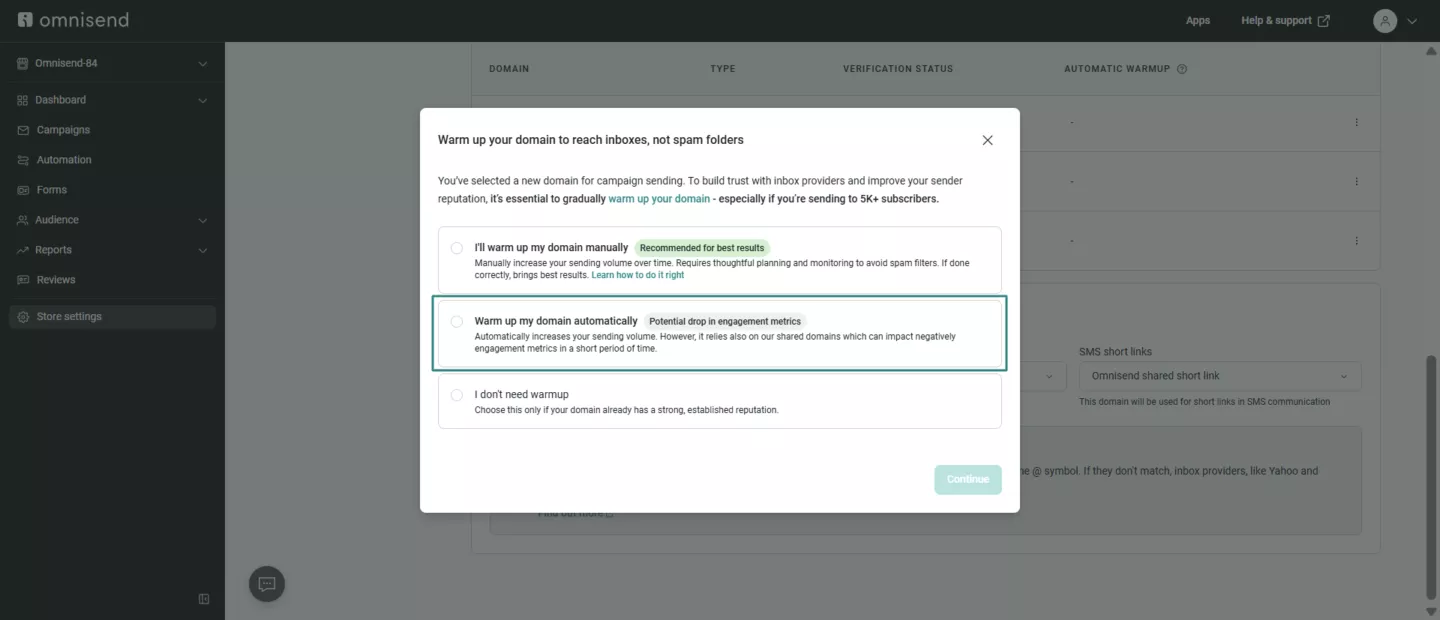
This video provides additional tips to warm your domain:
Avoid spam trigger words and messy formatting
These phrases trigger some email provider spam filters:
- “FREE SHIPPING!!!”
- “LIMITED TIME ONLY”
- “ACT NOW!!!”
The best workaround is to replace them with descriptive language, such as:
- “Shipping included on $50+ orders”
- “Sale ends Tuesday at midnight”
- “New arrivals available”
Balance images with text, as filters can’t read pictures and may flag some image-heavy messages as Shopify spam emails. Try to keep text above 60% of total content.
Never use URL shorteners. Scammers hide behind bit.ly links. Show complete URLs, such as yourstore.com/products. Test every link — broken destinations hurt deliverability as much as suspicious ones.
Clean your email list regularly
Invalid addresses cause bounces that damage your sender’s reputation. A portion will be incorrect submissions by people, and some will be from bots.
You can solve both problems with double opt-in, where subscribers must click a confirmation link to join your list. Bots can’t complete this process.
It’s best practice to remove inactive subscribers quarterly. Export them first for possible re-engagement later. Six months without opening an email means they’re properly disengaged.
It might happen due to non-functional unsubscribe links or missing physical addresses. In such cases, it might also raise legal issues related to compliance with regulations like GDPR or CAN-SPAM.
Watch for bot patterns — random characters in addresses and bulk signups from weird domains are giveaways. Consider adding CAPTCHA or a honeypot to forms to reduce bot submissions. For broader data hygiene, DSPM tools help businesses track where sensitive customer data, including email lists, is stored and who can access it.
Separate marketing and transactional emails
Order confirmations and marketing emails are two different communications. Send both from one address, and the lower open rates from marketing messages can drag down your transactional reputation.
Split your emails by function:
- [email protected] for transactional communication like receipts and shipping
- [email protected] for marketing messages such as promotions and newsletters
When addresses stay separate, each maintains its own reputation. Omnisend automatically sends transactional and marketing emails via a separate infrastructure, keeping your order confirmations secure even when promotional campaigns perform poorly.
Email type separation protects all your previous efforts, but all the steps here build on each other, so a comprehensive implementation is important for a consistent inbox placement. In practice, you also need to master a few strategies to ensure your email deliverability remains high.
Is your email in spam or just the Promotions tab?
Some Shopify merchants are experiencing issues with the Promotions tab, thinking it’s Shopify emails going to spam. If your emails are reaching this tab, then customers’ email service, such as Gmail, is working as intended.
Reaching the Promotions tab is a delivery success. Gmail received your email, accepted it, and sorted it. Subscribers can still see and respond to your email, except it’s not in the Primary inbox, but in Promotions.
Your emails most likely signal promotional content with discount codes, “Shop Now” CTAs, unsubscribe headers, and commercial sender names. There are ways to improve your Primary inbox placement.
- Use a personal sender name. A sendoff like “Marty from Omnisend” outperforms “Omnisend Store.”
- Personalize subject lines. Include the subscriber’s name or reference past behavior.
- Reduce promotional language. Use fewer all-caps words, exclamation points, and discount-first openers.
- Add plain-text elements. Heavy HTML use signals bulk emails, while plain-text sections humanize it for the Primary inbox.
Such tactics are best when your subscriber engagement and open rates are dropping. However, the Shopify spam email issue occurs when your messages are filtered into the Junk folder, where they won’t be read.
If you suspect that’s the case, check Google Postmaster Tools first to distinguish between spam filtering and promotion placement. A spike in spam rate there signals a deliverability problem that might require more technical changes.
Marketing automation tools like Omnisend can make these distinctions for you automatically in the deliverability monitoring dashboard.
Tools to test your Shopify email deliverability
A good rule of thumb is to test email deliverability before your mailing list scales and monitor whether your Shopify emails are going to spam. There are various tools for testing different aspects of email deliverability.
- Mail-Tester.com is used to send a test email for a generated address and get an instant score out of 10. Mail-Tester flags authentication gaps, spam trigger words, and formatting issues before a campaign goes live.
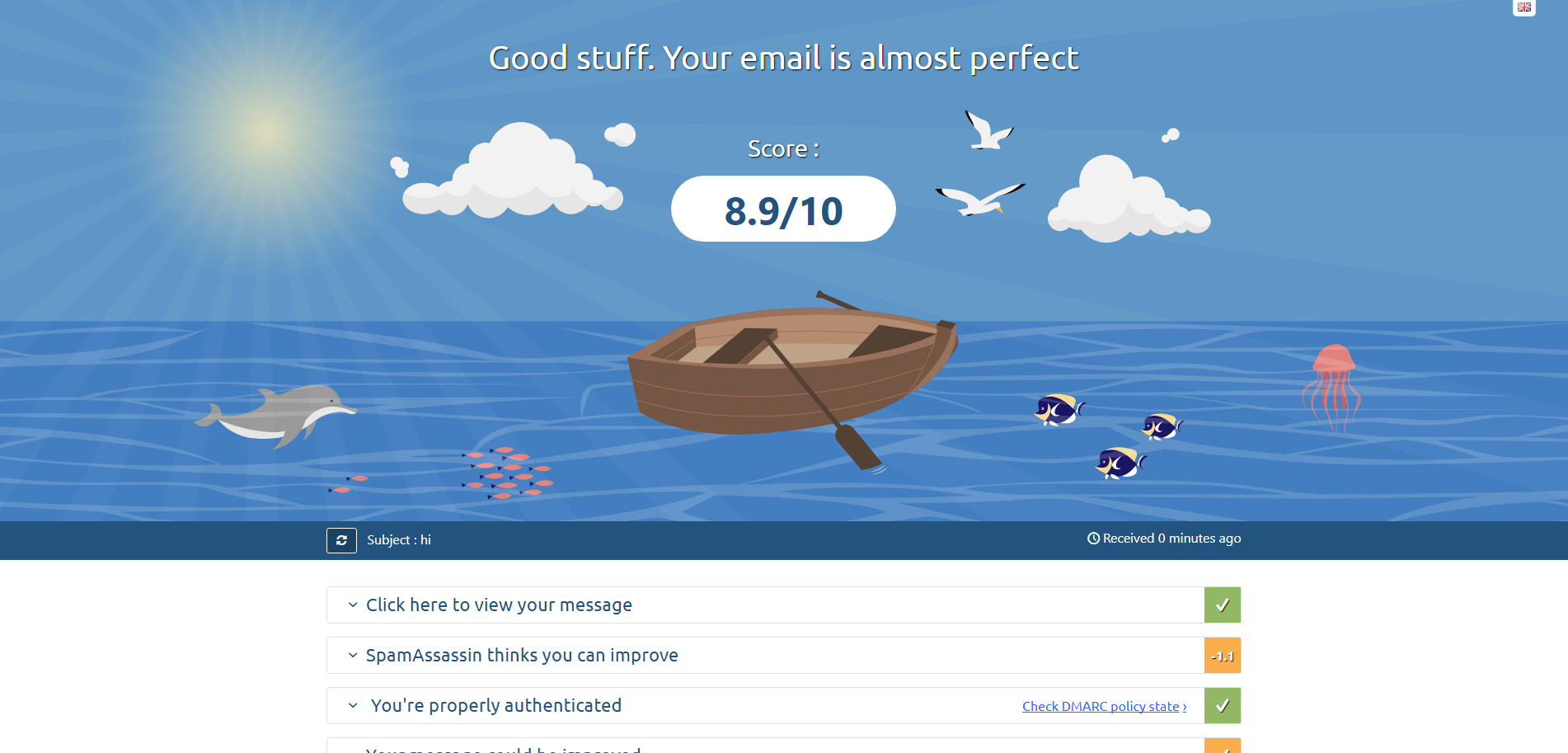
- Google Postmaster Tools can verify your sending domain and monitor its reputation and spam complaint rate inside Gmail’s infrastructure. It’s the only tool that shows you what Gmail actually sees.
- GlockApps helps send a test campaign and see exactly which folder it will land in: Primary, Promotions, or Spam. The tool works with Gmail, Outlook, Yahoo, and other major clients.
- MXToolbox enables you to look up your DNS records, check whether your sending domain or IP appears on any blacklists, and analyze raw email headers. MXToolbox is used to pinpoint authentication failures.
Using multiple tools manually can be time-consuming and expensive, especially when you’re still learning how to stop Shopify spam emails. Omnisend has a built-in deliverability dashboard that covers all the same functions in one place without any third-party tools.
Best practices to keep your Shopify emails out of spam
Long-term inbox placement depends on building trust with email providers via predictable behavior and engagement metrics.
Follow these best practices to avoid Shopify spam email issues:
Establish consistent sending patterns
Email providers can flag emails with irregular sending patterns as spam. Weekly newsletters every Tuesday at 10 AM become your expected pattern. Switch to daily blasts without warning, and spam filters may activate.
Volume changes matter too. Scaling from small lists to large ones needs gradual progression. Email providers flag dramatic increases as potential security breaches.
Send newsletters on fixed days, process transactional emails immediately, and space promotional campaigns evenly, with similar monthly volumes. These patterns will help to establish you as a legitimate sender.
Additional reading:
The best time to send an email (2026 research)
Write subject lines that work
Your subject line faces two judges — spam filters and human readers. Order and shipping confirmations with details pass both tests. Messages loaded with sales language and excessive punctuation fail both.
Match your subject line to email content, use sentence case words instead of caps, skip overused sales words, stay under 50 characters, and include personal details when possible.
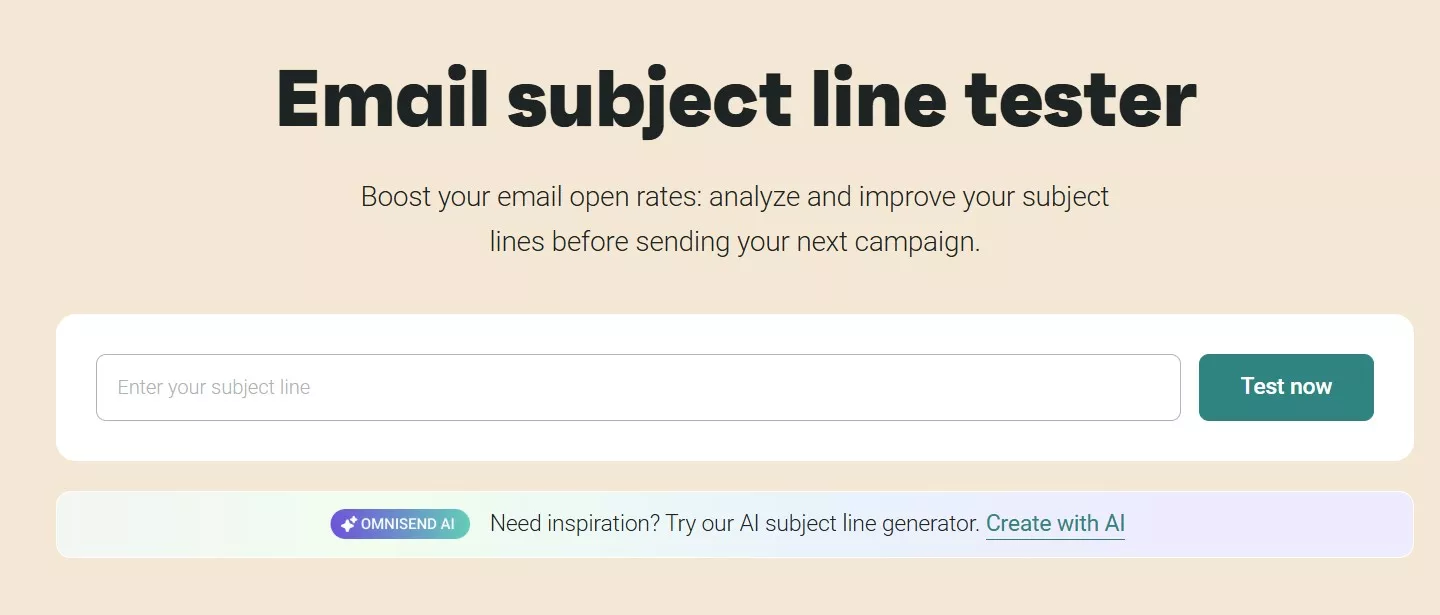
Personalized subject lines outperform generic sales announcements because they demonstrate relevance. You can also use Omnisend’s subject line tester to refine your efforts — it scores your subject lines, and you can use AI to improve them:
Target content for better engagement
Omnisend’s data show that automated emails achieve a 33% click-to-purchase rates versus 5.5% for broadcasts. The difference comes from the possibility of reaching the right person at the right moment.
Electronics buyers need different messaging than fashion customers. First-time purchasers require education, while repeat buyers want loyalty rewards. Relevance drives engagement, and engagement keeps you out of spam. A few tactics can help ensure relevance.
- Layer demographic data with behavioral insights for sharper targeting.
- Segment by relevant metrics, such as purchase recency, engagement levels, browsing behavior, order patterns, time zones, and others.
- Match your content to relevant segments for better engagement.
Use professional templates
Email templates that are professional and suited to the purpose of your message won’t encourage customers to add you to their spam pile.
Omnisend’s template library and drag-and-drop email builder include deliverability-optimized templates without requiring a designer. You can add your content blocks, product images, and recommendations without having to start from scratch.
Check out the template example below for an anniversary email in Omnisend:
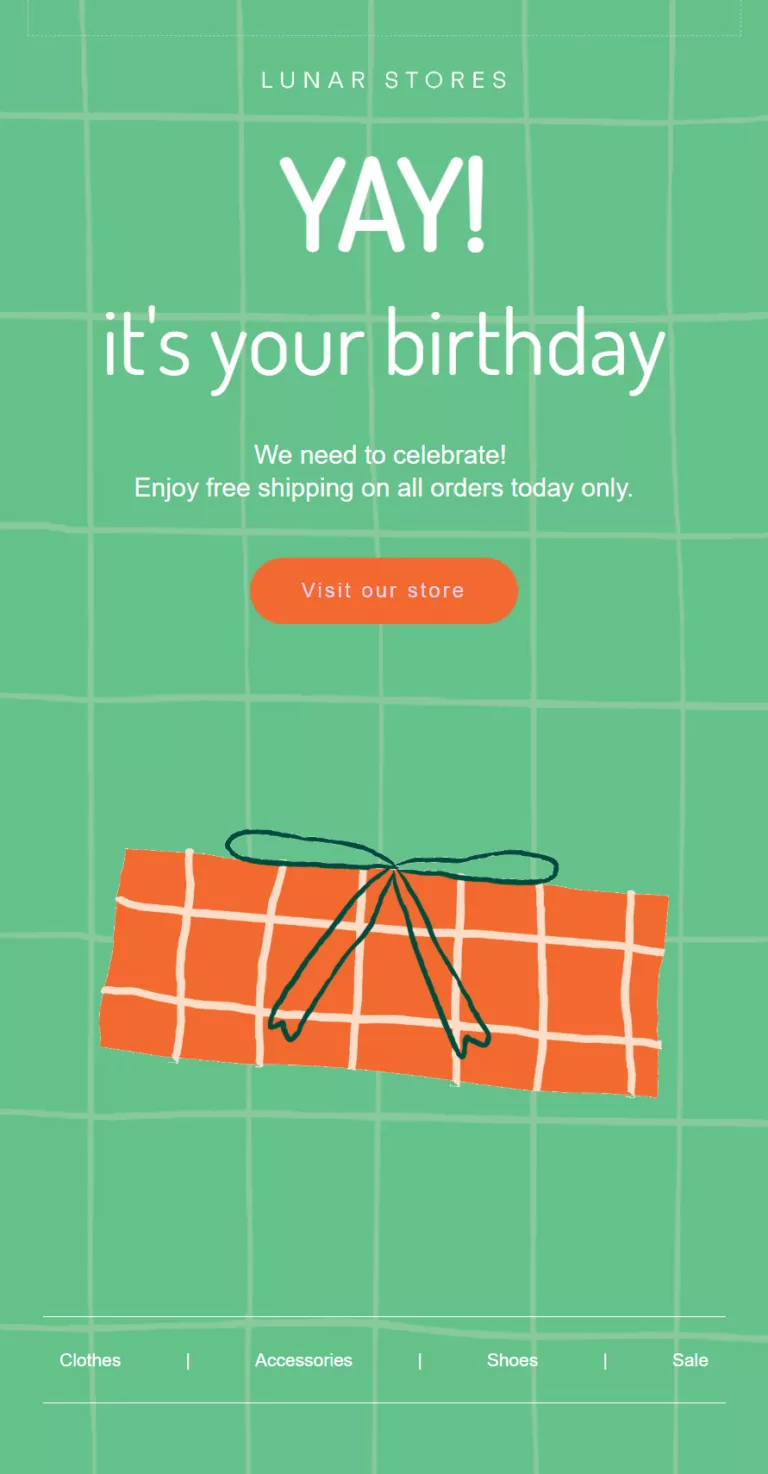
Notice how colorful and interesting that template is? That’s because it’s a marketing email. Your transactional emails, such as order confirmations, should be simpler so you can prioritize crucial information. Here’s an example:
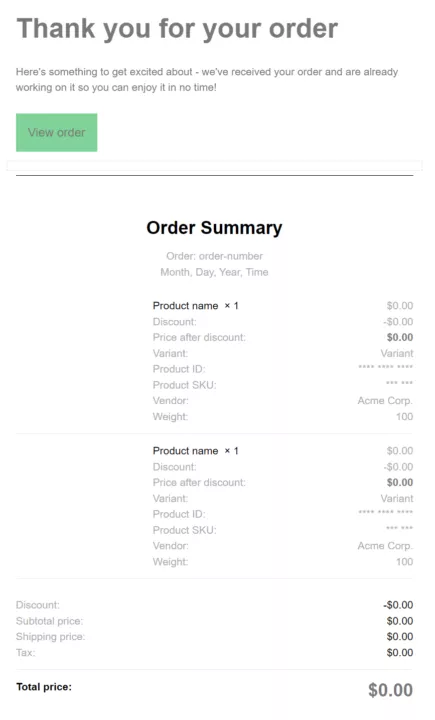
As basic as it is, the Shopify order confirmation email above is highly effective with a low likelihood of being considered spam.
Track metrics that matter
Omnisend provides deliverability reports for email and SMS channels, with each dashboard showing campaign and automation performance. The image below shows how to navigate to the Deliverability section:
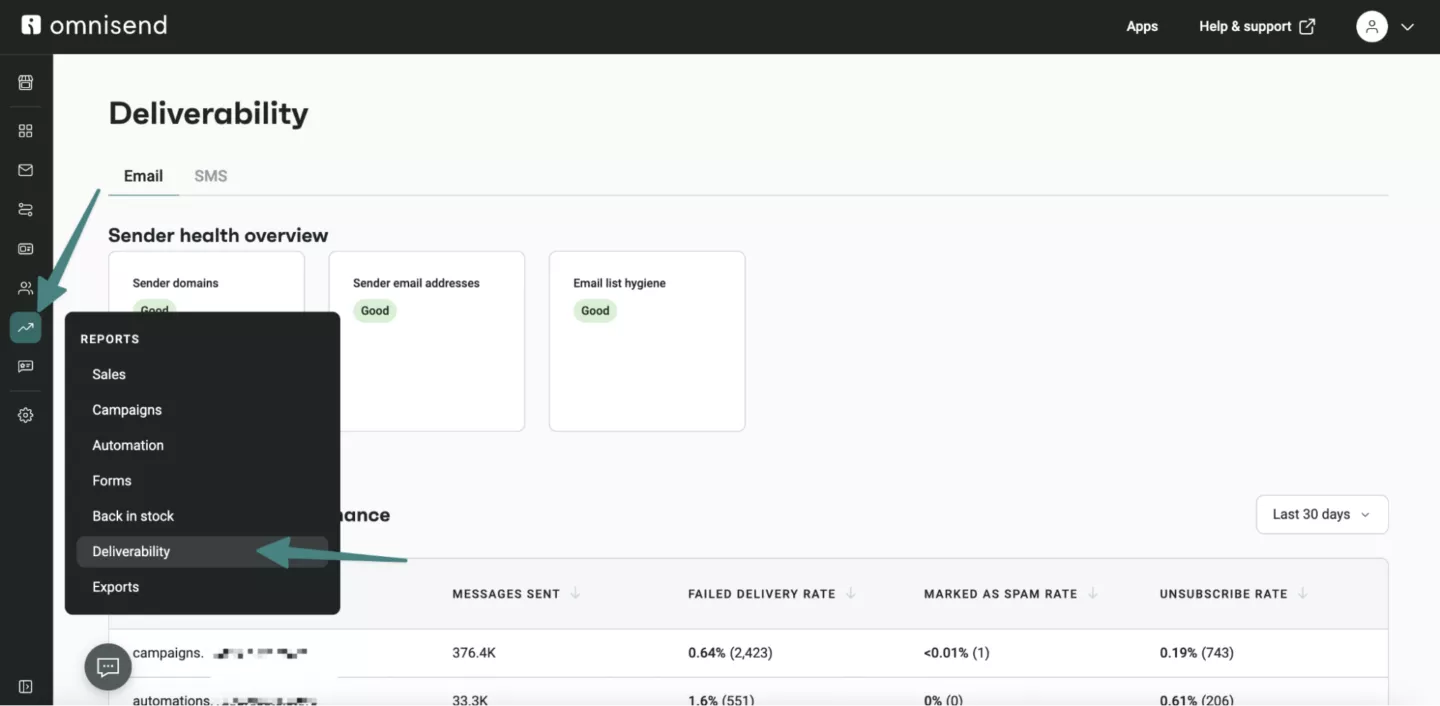
It’s also best practice to watch out for these metrics:
- Bounces above 2% — Low-quality contacts are in your list
- Spam complaints over 0.1% — Content problems or sending to unengaged subscribers
- Open rates below 20% — Emails landing in spam folders, not inboxes
- Click rates under 1.22% — Content isn’t relevant to your audience (varies by industry)
- Unsubscribe rates above 0.2% — Often leads to spam complaints
Most of these metrics vary significantly by industry and by specific business. However, if metrics are moving in the wrong direction, it indicates systemic problems that need immediate attention before your sender reputation gets worse.
Test before sending
Run campaigns with tools like mail-tester.com before sending. Check overall spam scores, authentication status, blacklist presence, content analysis, and rendering issues.
Test across providers using seed addresses since Gmail, Yahoo, and Outlook filter differently. What reaches one provider’s inbox might hit another’s spam folder. Testing prevents surprises and identifies fixes before campaigns launch.
Encourage customers to whitelist you
Ask customers to add your email address to their contacts. Different email providers call it by different names — safe sender list, approved contacts, or address book — but the result is the same. Your emails skip spam filters entirely.
Give your customers a reason to do it with discounts or other promotions. The more customers whitelist your email, the better your reputation becomes with their email provider.
It’s a feedback loop that benefits everyone — you reach inboxes, they get deals, and email providers see genuine interest in your messages.
Comply with CAN-SPAM and GDPR requirements
Compliance isn’t something you do out of necessity. Being compliant directly protects your sender’s reputation. There are three requirements for every Shopify:
- Physical mailing address in every marketing email
- One-click unsubscribe that processes within 10 days (a hard requirement for Gmail and Yahoo bulk senders)
- Explicit opt-in consent before adding anyone to your marketing list
Skipping these requirements doesn’t just expose you to fines. Non-compliant emails create spam complaints, and complaints impact your deliverability.
Troubleshooting checklist to stop your Shopify emails from going to spam
Run through this checklist to fix your Shopify spam email issues. Each item addresses a common failure point that triggers spam filters or damages your sender’s reputation.
Domain and authentication setup
- Verify that the SPF record includes Shopify’s sending servers
- Configure DKIM signing for your domain in Shopify settings
- Publish DMARC record with proper Shopify DMARC settings
- Switch from a free email address, such as @gmail.com, to a custom one, like [email protected]
- Check DNS propagation completed (can take 48 hours)
Sender reputation management
- Remove subscribers who haven’t engaged in over six months
- Separate transactional emails from marketing campaigns
- Send marketing from [email protected], orders from [email protected]
- Start with engaged segments when warming up new domains
- Monitor bounce rates — keep under 2%
Content optimization
- Replace FREE, GUARANTEED, ACT NOW in subject lines
- Keep text at 60% of email content or higher
- Write subject lines in normal case, not caps
- Replace URL shorteners with full destination links
- Include a clear unsubscribe link in the header or footer
Pre-send verification
- Send test emails across Gmail, Yahoo, and Outlook
- Send a test email to see whether it lands in the Primary or Promotions tab
- Run mail-tester.com or other deliverability testing tools and aim for perfect scores
- Verify all links work and point to legitimate pages
- Confirm that the from address matches the authenticated domain
- Ensure the subject line accurately describes the content
Ongoing maintenance
- Clean lists quarterly
- Track engagement metrics weekly
- Update authentication when changing email providers
- Segment based on purchase recency, preferences, and email engagement
- Investigate sudden deliverability drops in your email marketing app
Omnisend’s deliverability dashboard can automate many of the monitoring, testing, and reporting tasks you’ll need for troubleshooting.
How to use Omnisend to maximize your Shopify email deliverability
Omnisend is one of the highest-rated Shopify email marketing apps for helping keep your Shopify emails out of spam. It addresses the deliverability gaps in basic email tools and other Shopify Email alternatives, which is essential for avoiding Shopify spam email issues.
Built-in authentication and monitoring
You’ll get a step-by-step authentication setup with guides for major DNS providers. Unlike Shopify Messaging’s hands-off approach, the deliverability dashboard continuously monitors your SPF, DKIM, and DMARC status. It reveals concrete problems so you’ll know where to focus.
- Domain reputation
- List health scores
- Engagement metrics
- Problems by provider (for example, Gmail blocks 30% while Yahoo delivers 95%)
Segmentation that protects the sender’s reputation
Behavioral segmentation identifies your engaged subscribers. Reaching them first maintains the engagement levels that keep you out of spam folders.
- Those who opened within 90 days
- Recent clickers
- Active buyers
Sending to these groups first maintains the engagement levels that keep you out of spam folders. Other segments of VIP customers, dormant subscribers, and location-based groups come pre-configured. The system shows which segments need re-engagement or removal, preventing the gradual decline in engagement that damages deliverability.
Infrastructure built for inbox placement
Your sending reputation stays isolated from other merchants using a separate infrastructure. We use dedicated IPs for each email domain, so you’ll avoid bad neighbor effects caused by shared IPs.
Most experts, including those at EmailTooltester, highlight dedicated IPs as one of the best tactics for ensuring positive email deliverability. Volume limits increase gradually as email providers learn to trust your domain, preventing the sudden spikes that trigger filtering.
Templates undergo spam filter testing before release. Image ratios, link placement, and HTML structure all meet deliverability standards. The builder blocks common errors, such as image-only emails or broken formatting, that fail in Gmail or Outlook.
Support when problems occur
If you encounter deliverability issues, support teams help across all plan levels, from free to Pro. Shopify Messaging’s general support rarely addresses these technical deliverability challenges.
With Omnisend, you receive automated warm-up guidance for new domains and access to dedicated IPs for high-volume sending. These features come as standard rather than costly add-ons, making professional-grade deliverability accessible regardless of store size.
Quick sign up | No credit card required
How to take control of your Shopify email deliverability
Shopify emails going to spam isn’t inevitable. See our troubleshooting checklist above to fix authentication issues, improve your sender practices, and maintain list quality to reach customers’ inboxes consistently.
Start with DNS records — SPF, DKIM, and DMARC prove you own your domain. Switch from free email addresses to custom domains. These technical fixes take hours, not weeks.
Use testing tools to check your domain health and DNS records, and to see whether your emails land in the promotions or primary tab — separate transactional and marketing emails to avoid one impacting the other.
Next, build a reputation gradually. Warm up new domains by starting small and increasing volume weekly. Send to engaged subscribers first.
Remove inactive subscribers quarterly. Separate transactional from marketing emails. Write subject lines that inform rather than hype.
Test every campaign before sending and monitor your metrics. If your bounce rates climb above 2% or spam complaints exceed 0.1%, you have immediate problems that require attention.
Shopify’s built-in email handles basic newsletters but lacks infrastructure for serious email marketing. Omnisend separates transactional and marketing streams, provides automated warm-up, and offers deliverability experts who understand complex authentication issues.
Take action today to avoid the Shopify spam emails issue. Authenticate your domain. Clean your list. Fix your content. Your emails will move from spam folders to inboxes, improving customer communication and driving sales.
Quick sign up | No credit card required
FAQs
How do I stop my Shopify emails from going to spam?
To stop Shopify emails from going to spam, authenticate your domain with SPF, DKIM, and DMARC records, use a custom sending domain, maintain a spam complaint rate below 0.1%, and regularly clean your list of unengaged subscribers.
Why are my Shopify emails automatically going to spam?
Shopify emails may end up in spam due to various authentication, content, or reputational triggers. Most often, it’s because of missing SPF, DKIM, or DMARC authentication records, low sender domain reputation, high spam complaint rates, or sending to unengaged lists.
Why am I getting Shopify spam emails?
If you’re receiving unsolicited emails claiming to be from Shopify, you’re likely seeing phishing or spoofing attempts. Scammers might impersonate Shopify to steal credentials or payment details. Legitimate Shopify emails come from official domains and never ask for sensitive information.
What is the difference between spam and the Promotions tab?
The promotions tab is not spam. Gmail and other email providers sort emails by type. If your emails contain promotional content, they will be sorted accordingly. Shopify spam email issues arise from sender reputation, authentication, or content issues.
Do Shopify order emails go to spam?
Most likely, Shopify order confirmation emails end up in spam if your domain lacks proper authentication or you’re using Shopify’s default shared sending domain. Authenticating a custom sending domain resolves most instances of Shopify order emails being sent to spam.
How long does it take to fix Shopify email deliverability?
Authentication fixes and DNS propagation are resolved within 24–48 hours after implementing fixes. Rebuilding a damaged sender reputation takes 4–8 weeks of consistent, low-complaint sending. The more severe your deliverability problem, the longer the recovery will be.