Omnisend AI


 OFFER
OFFER









Email list cleaning tips to save money & boost engagement
With over 130+ pre-built integrations and flexible APIs, you can easily centralize data from across your tech stack
Make the most out of your data and unlock powerful growth marketing possibilities with these other top marketing tools.
Build any custom integration with our open, flexible APIs that are simple to use and implement.
Check out apps that have been stealing all the spotlight.
Email and SMS marketing insights, ecommerce resources, and the latest Omnisend news
Expert-led sessions covering email, SMS, and ecommerce marketing strategies.
Educational video and live training to help you make the most out of Omnisend.
Drive sales on autopilot with ecommerce-focused features
See Features
Start building your email list by selecting a reliable email marketing platform, creating an account, and designing a compelling signup form with a valuable lead magnet to attract subscribers.
Utilize various channels like popups, social media, and checkout opt-ins to drive traffic to your signup form, ensuring you engage new subscribers with an automated welcome sequence.
Focus on quality over quantity by maintaining a healthy email list through regular cleaning, segmentation, and compliance with opt-in laws to enhance engagement and deliverability.
Experiment with different lead magnets and signup strategies, such as giveaways and quizzes, to find what resonates best with your audience and boosts conversions.
To start building an email list for your ecommerce store, there are only a few main steps you need to take: choose an email marketing platform, create an account, connect your store, decide on a lead magnet (could be a 10% discount, a free ebook, etc.), and create a signup form on the ESP you’ve chosen. Just don’t forget to build a welcome automation so the new subscribers automatically get what they bargained for.
You can then drive traffic to it via popups, social media, checkout opt-ins, or any other channels you use. Once they sign up via the form, the welcome sequence fires off and sends them the first email with the lead magnet, as well as any other emails you set up in the workflow.
Quick sign up | No credit card required
An email list (used interchangeably with mailing list and subscriber list) is a collection of email addresses from people who explicitly signed up to receive email communication from your business. It’s a dynamic and ever-changing list built over time that’s stored in your email marketing provider’s database, and usually auto-updates with each subscribe or unsubscribe.
To get there faster, some businesses look for shortcuts, namely mailing lists for sale. Unfortunately, the only thing you’ll ultimately get from these shortcuts is tanked deliverability scores, as your contact list won’t engage with you, and non-permission-based contacts violate anti-spam laws.
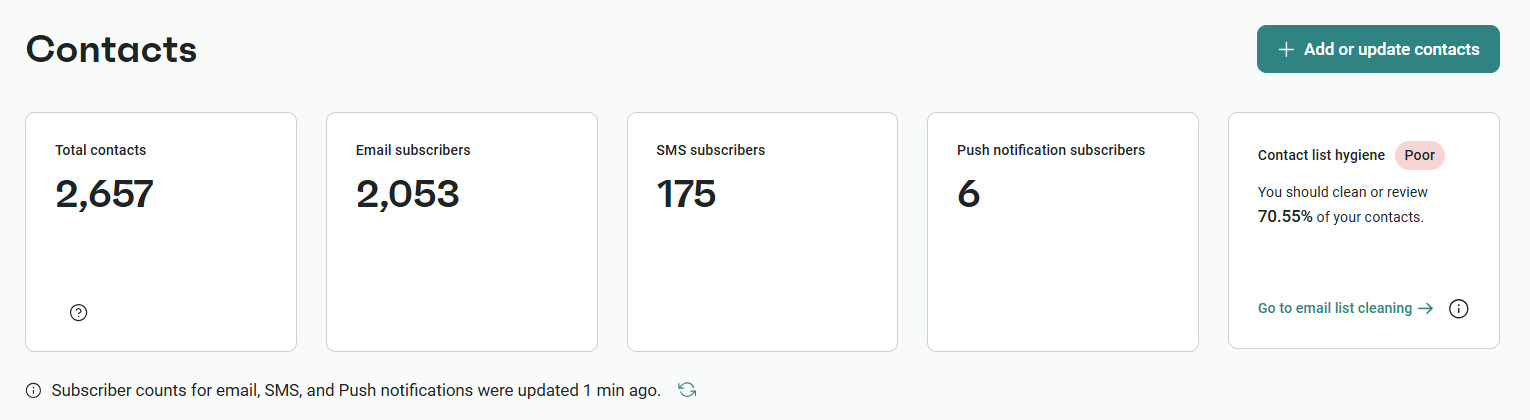
You may think it’s the same as having followers on social media, but in terms of sales and performance, email is one of the best-converting channels in marketing. Based on Omnisend’s data, you can reach up to $79 ROI per dollar spent, and it’s a channel that you truly own. No algorithm changes or shadow bans can change that, unless you consciously sabotage your email efforts by leveraging shady practices that hurt deliverability.
For example, one of our clients, Dukier, has experienced 525% revenue growth since signing up for our platform. To achieve that, they created personalized automations at scale for sustained engagement, as well as scheduled planned campaigns for specific promotions. It shows that smart segmentation and strategic personalization can dramatically increase your retention and revenue.
Building an email list can feel overwhelming at first, but it becomes simple when you follow a clear path and set up the required features.
A strong email list starts with the right email service provider (ESP). You need a platform that stores contacts, sends targeted campaigns, automates messages, and ensures compliance.
To make the best choice, you need to check if the platform has these five most important features:
The first three are absolutely essential and non-negotiable. Without them, you will fail. The fourth one depends on your ecommerce platform, but most email marketing platforms connect to major ecommerce solutions. The fifth one is mostly about planning ahead. The initial price may seem great, but you need to check how the pricing scales to avoid unpleasant surprises in the future.
You’ll most likely want to test a few different platforms before you commit financially, so here’s a brief overview of how some of the top tools compare in terms of free plans:
| Mailing list service | Free subscriber limit | Free email send limit | Key list-building features (on free plan) | Pricing (starts at) | Best for |
|---|---|---|---|---|---|
| Omnisend | 250 | 500/month | Signup forms, advanced automation, segmentation, SMS popups | $16/month | Ecommerce stores |
| Mailchimp | 250 | 500/month | Basic forms and templates, limited automation | $20/month | Creators needing simple tools |
| MailerLite | 500 | 12,000/month | Signup forms, landing pages, basic automation | $10/month | Bloggers, content creators |
| Klaviyo | 250 | 500/month | Forms, segmentation, basic analytics | $20/month | Direct-to-consumer brands |
| Brevo (formerly Sendinblue) | Unlimited | 300/day (~9k/month) | Forms and email templates, SMS, marketing automation | $9/month | SMEs |
Omnisend provides ecommerce-native features for a flexible price. You can set up your signup form in minutes, either yourself or by using templates and customizing them, launch a welcome automation so the new subscribers are engaged immediately, and even add SMS to your workflows if you want to.
Here’s what the form-building interface looks like on Omnisend:
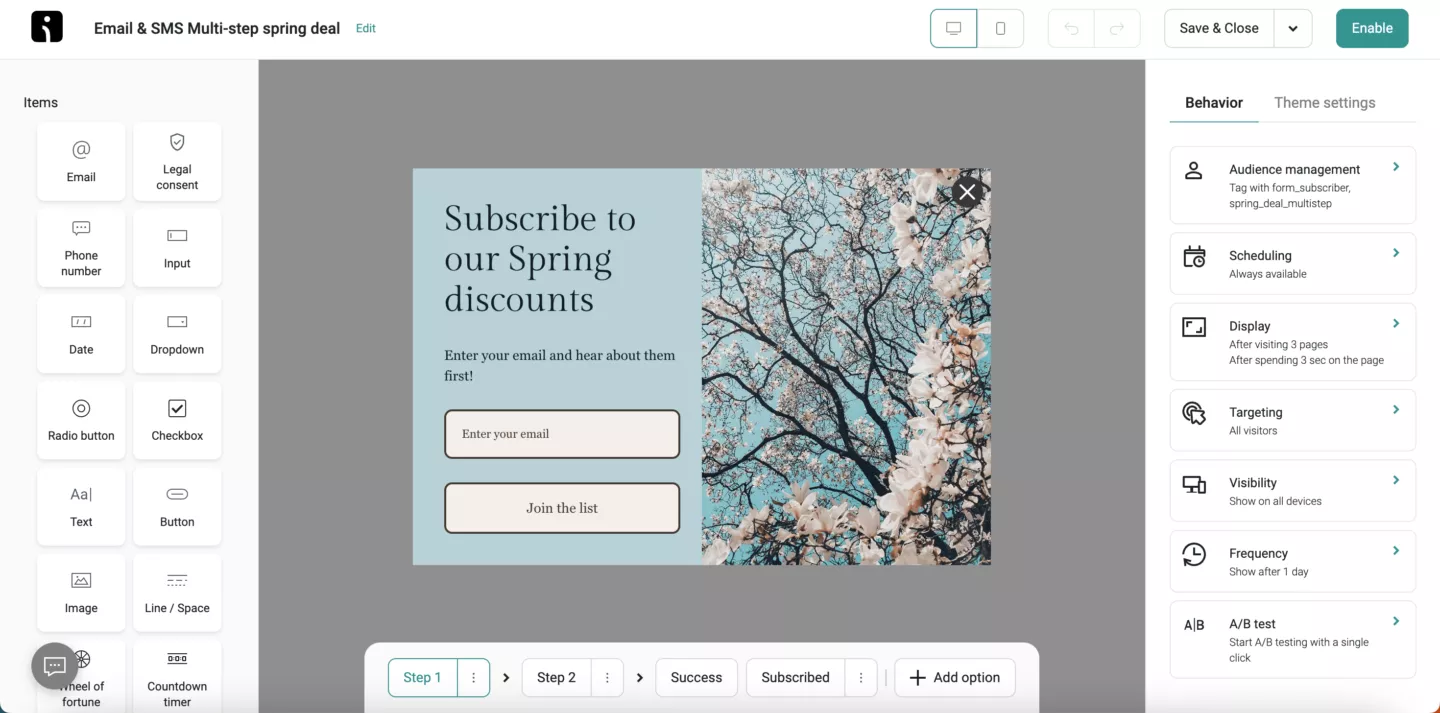
While alternatives are widely available, Omnisend is one of the very few platforms (if not the only one) that gives access to nearly all of its features on the free plan. This way, you can test everything before deciding to pay for it. If you’re new to ecommerce, you’ll be able to use Omnisend’s free plan indefinitely until your store grows past 250 subscribers.
It makes Omnisend arguably one of the best free mailing list services out there, especially on a smaller scale.
“After exploring the platform and working with Omnisend’s customer support team, I quickly realized this could be a game-changer for our clients. That initial client account became one of our top-performing lifecycle marketing success stories, generating over $1.5M in annual revenue and growing its audience by 100,000 email subscribers and 40,000 SMS subscribers.”
— Jesse Kay, Founder and CEO, Vyber Media
Your signup form is the gateway to your email list. It needs to be visible, simple, and compelling enough to convert visitors into subscribers.
Most people see it for only a few seconds, so every detail matters. Here are some key best practices to keep in mind:
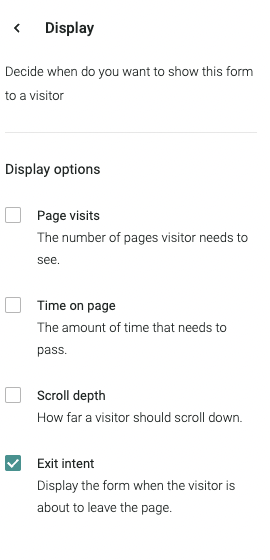
It’s also important to play with popup timing triggers to see which one works best with your visitors. You can set up your signup form to appear immediately, after 5 seconds of on-site activity, 15-30 seconds, or any other amount of time.
Alternatively, you can choose behavior-based triggers like scroll depth (based on how far down the user has scrolled on your webpage) or exit intent (based on the mouse cursor moving to the “Back” button or “X” button).
Let’s summarize the most popular signup form types and their respective uses.
/
| Form type | What it is | Best for | Pro tip | Average conversion rate |
|---|---|---|---|---|
| Embedded form | Static form built into the page layout (header, footer, sidebar) of high-traffic pages or blog posts | Always-on collection. Steady, passive list growth | Keep fields minimal to avoid friction, and use alongside popups for visitors who dismiss overlays | 7.39% |
| Timed/scroll-based popup | Appears after the visitor spends a set time on the site or scrolls | Engaging interested visitors who’ve browsed content | Delay 15-30 seconds (or 25% depth) to avoid annoying visitors | 5.37% |
| Exit-intent popup | Appears when a visitor is about to leave | Saving abandoning visitors | Offer a small incentive to prevent bounce | 3.94% |
| Slide-in/flyout | Slides in from the side or corner of the screen | Less intrusive than full popups. Good for mid-scroll engagement | Great for mobile, where full popups feel overwhelming | 4.2% |
| Announcement/sticky bar | Narrow bar/banner pinned to the top/bottom of the page | Non-intrusive, site-wide visibility without interruption | Use contrasting colors to highlight your most valuable lead magnet | 2.3% |
| Landing page form | Dedicated standalone signup page | Paid ad campaigns/promotions. Focused conversion goals | Keep the page distraction-free for maximum conversions | 4.72% |
| Gamified form | Interactive forms with a fun reward element | Driving engagement. Creating excitement around signup | Use sparingly so it feels special, not gimmicky | 29.99% |
| Checkout/cart opt-in | Checkbox/field in the checkout page | Converting buyers into subscribers at the point of purchase | Make opt-in default unchecked to follow compliance rules | - |
| Teaser widget | Small tab expanding into a complete form when clicked | Providing an opt-in option without interrupting browsing | Use a clear CTA like “Get 10% Off” to get more clicks | - |
Double opt-in is the method that requires you to subscribe via the signup form first, and then confirm your registration in the email letter you receive. This way, businesses can be 100% sure it was an intentional and genuine signup.
There’s also an easier way, single opt-in, which requires you to only subscribe via the signup form, and the first email you receive is most likely the welcome sequence message.
Technically speaking, the double opt-in method is better for your deliverability as it blocks spam bots and accidental or random subscriptions. Single opt-in, on the other hand, removes half the work for users, which causes less friction.
In short, double opt-in is the safest way to legally prove that consent was legitimately given.
A lead magnet is something you offer in exchange for the visitor’s email address to get them to subscribe. There are a few different types you can choose from, but the bottom line is this: you must have a lead magnet if you want to build your email list efficiently.
Here are three ecommerce-specific categories that work best for most stores:
| Category | Example | Best For |
|---|---|---|
| Discounts or perks | A percentage off the first order, free shipping, loyalty points, early access to new products | Ecommerce stores |
| Content upgrades | Exclusive ebooks, templates, cheat sheets, free email courses, webinar access | Lifestyle products |
| Exclusive access | Member-only content, VIP sales, private community invitations, early product launches | High-ticket ecommerce |
In short, your lead magnet should be in line with your audience’s interests and expectations.
Once you choose your first iteration of a lead magnet, you can start playing with A/B testing to check which configuration yields the best results. For example, CA design discovered a successful list-building strategy that runs on giveaways in collaboration with influencers. Since then, their list has grown by 10-15% in a short amount of time.
Talking about other industries, a fitness brand might offer a workout guide, while a blog or affiliate site could offer a curated resource list. The more specific your offer, the more qualified and engaged your subscribers will be.
For example, someone who downloads a “Complete Guide to Indoor Plant Care” is more likely to engage with emails about your plant shop than a generic discount seeker.
Remember, whatever you offer, it must be in exchange for explicit permission to email. Make that value exchange clear to comply with laws like GDPR and CAN-SPAM.
Depending on your industry, audience, and niche, there are different options you can choose from, but here are some ideas for inspiration:
The list goes on, and the sky is the limit, so if you’re unsure about what’s best for you, test different types of lead magnets to see what sticks.
Once you’re done with the signup form and the lead magnet, it’s time to go live and start driving traffic to your form. Leverage the channels you already use to gain traction:
Remember, quality always beats quantity. Since your goal is permission-based growth, you should never buy email lists to inflate your numbers. These contacts haven’t explicitly subscribed to your communications, so they will either unsubscribe on a massive scale or be disengaged during the entire time, which hurts your deliverability and sender’s reputation.
Keep your growth legitimate, and you’ll be able to build your own audience who wants to hear from you and buy from you. That said, the growth doesn’t have to be slow. You can build your audience relatively quickly, and in the next section, we’ll explain how.
The following strategies have been shown to consistently drive email list growth across various industries and business sizes.
When implemented thoughtfully, popup forms can be one of the most effective ways to grow your email list.
Exit-intent popups appear as a visitor shows signs of leaving, while timed popups appear after a set number of seconds, and on-scroll popups trigger when a user reaches a certain point in the scroll. These behavior settings provide multiple opportunities to capture a visitor’s attention before they leave.
Data shows well-designed popups with compelling offers can achieve conversion rates exceeding 3%, with top performers reaching over 9%.
Make your popups worth it by adding some tangible value and not just generic, no-incentive options.
Omnisend users often see strong growth with gamified popups like Wheel of Fortune opt-ins, making subscribing feel like a win:

You can also experiment with popup surveys: Ask a quick question first, then reveal a tailored offer and email field. It increases engagement, collects segmentation data, and makes the request feel more personalized.
Exit-intent and timed popups hold an average of 3.94% conversion rate.
High-quality content consistently drives email list growth. Blog posts, guides, tutorials, and comparison articles attract visitors through search and provide natural spots for embedded signup forms, inline CTAs, or contextual opt-ins.
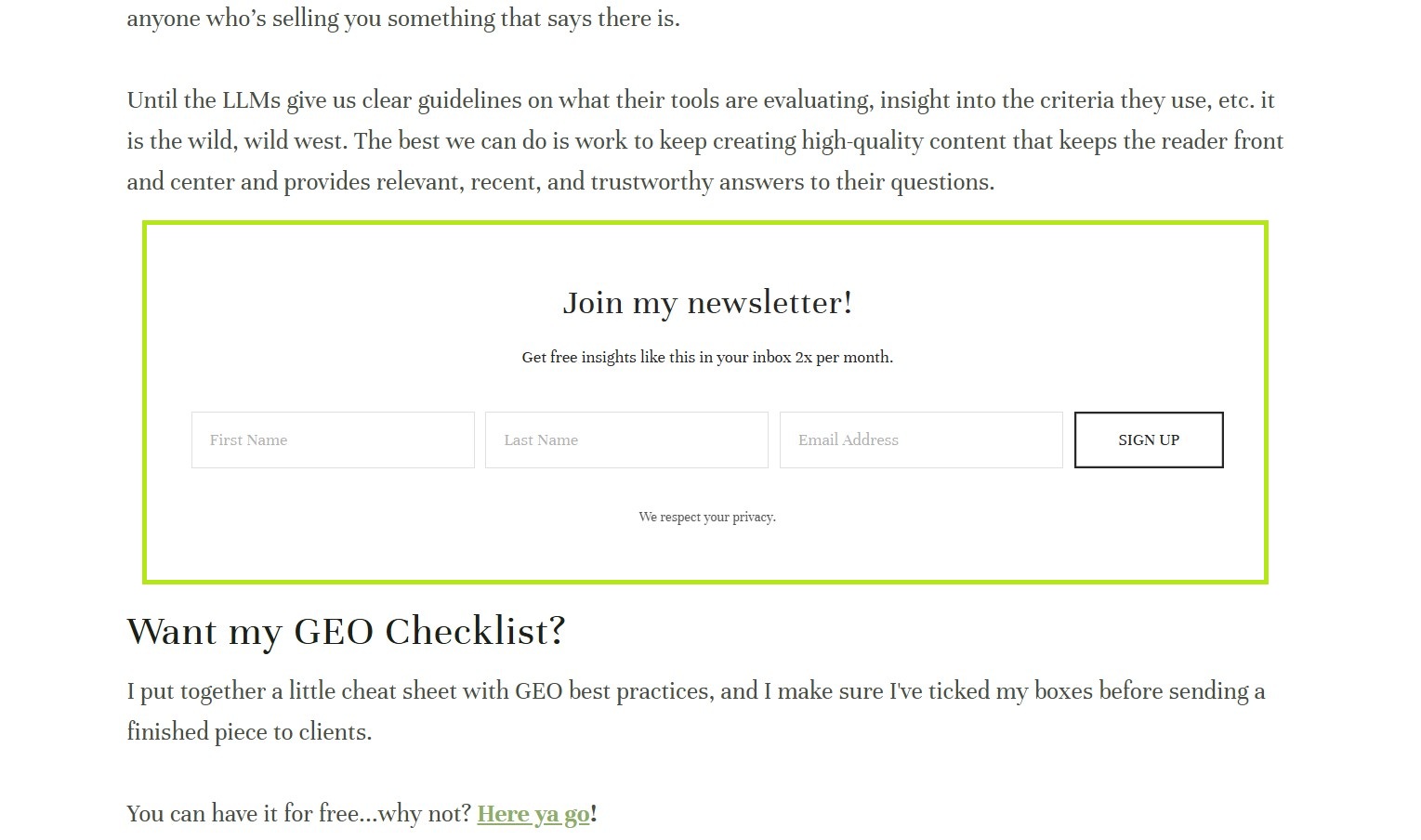
Webinars, live workshops, and virtual events also act as effective lead magnets because people subscribe when content solves real problems or teaches valuable skills.
Your content should solve real problems or fulfill genuine desires. When people trust your expertise, they’ll want more, and subscribing becomes the natural next step.
Embedded signup forms hold an average of 7.39% conversion rate, but keep in mind the number might change significantly based on placement and relevance.
Embedded forms integrate seamlessly within your site, capturing subscribers without interrupting the browsing experience.
Unlike popups, they’re passive but always visible, quietly converting visitors who might ignore intrusive prompts. Strategic placement is key:
You can also embed forms on high-traffic pages, such as your homepage or blog articles. For advanced list building, Omnisend offers multi-step signup forms.
These break the process into stages, asking for an email first and then additional details later. This approach gathers richer subscriber data without overwhelming users upfront, thereby improving conversion while maintaining a smooth experience.
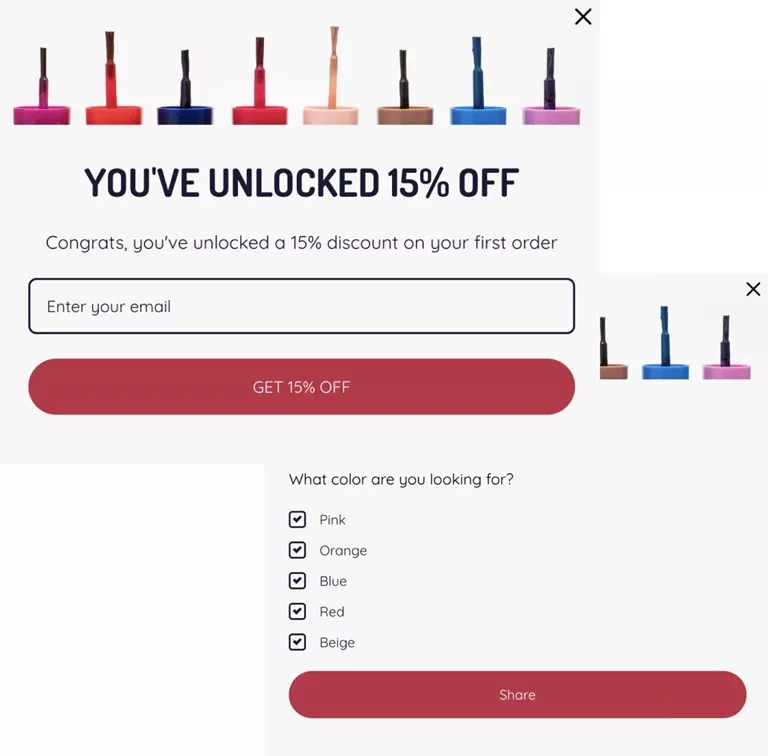
After a customer makes a purchase, their trust is at its peak, making this an ideal moment to invite them to join your list. It doesn’t mean, however, that you can just throw a request and demand that they subscribe. You still need to provide value, think about placement, consider consent, and integration. Here’s what you can do:
One of the easiest ways to convert them is through a dedicated landing page signup form. Omnisend’s landing pages are simple, shareable, and perfect for:
Run social-only giveaways or contests requiring an email to enter. Select prizes that are relevant to your ideal audience to attract high-quality subscribers, not freebie seekers. Also, encourage referrals by rewarding subscribers who invite friends.
You can also tease a valuable insight from your latest newsletter in a post and invite followers to join your list for the whole story. This frames email as the place for deeper, premium content.
SMS has incredibly high open rates, which makes it a strong channel for cross-promoting your email list.
Start by collecting SMS subscribers through website prompts, checkout opt-ins, or in-store signups. Then, send targeted text campaigns inviting them to join your email list for complementary benefits.
SMS delivers immediate, time-sensitive alerts, including flash sales, restocks, and limited-time offers. Email provides in-depth content, detailed product stories, and significant announcements.
When subscribers see unique value in both channels, they’re more likely to opt in.
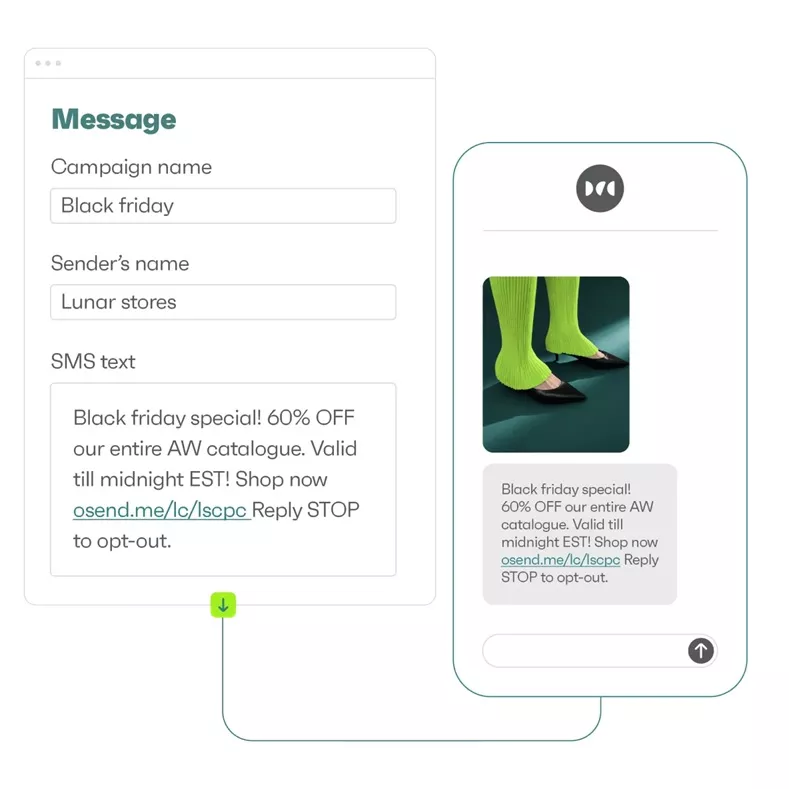
Here’s an Omnisend sample SMS layout promoting a Black Friday sale:
A product recommendation quiz to get the email guides the visitor through a series of questions, which, when answered, asks for an email in exchange for the result. Here’s a simple way of implementing it:
If that sounds like too much of a hassle for you, sticking with simple interactive forms may be enough. You can create gamified popups like the Wheel of Fortune and add several different prizes. To claim the reward, the visitor must enter their email address.
Gamified forms, like the ones you can use with Omnisend, often result in higher conversion rates (could reach nearly 30%) as they tap into the psychological desire to win.
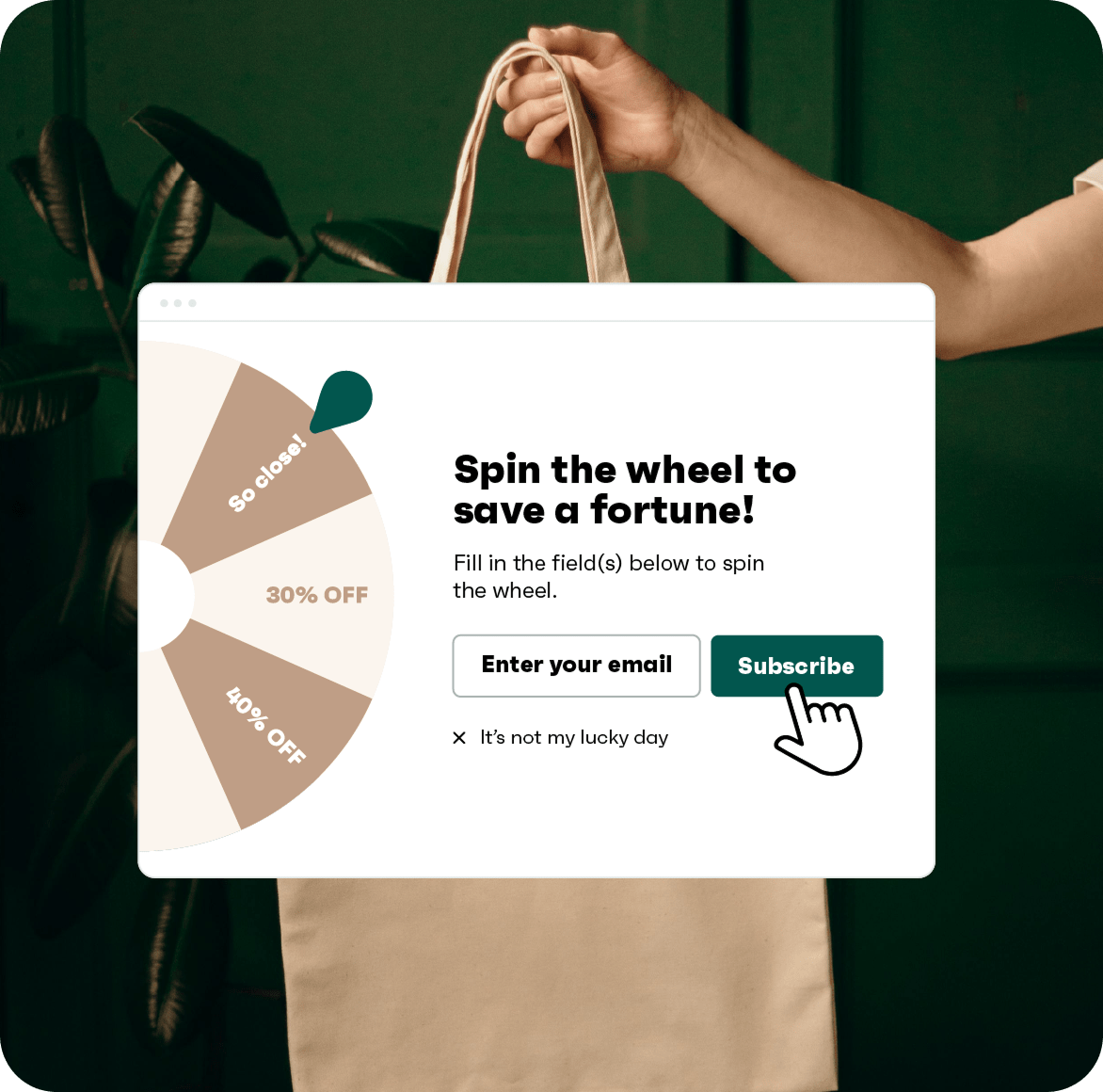
However, the same can also be said about the desire to win the best prizes, which can result in some visitors using multiple emails to try their luck. While not directly harmful, it could potentially fill up your contact list with useless contacts.
Giveaways and contests incentivize signups by offering a chance to win a high-value item in exchange for an email address. Here’s how to utilize that:
An illustrative example is our client CA Design, a furniture store, which has seen a significant growth in new subscribers after implementing giveaways in collaboration with influencers. In three campaigns, they managed to get 200, 800, and 2,000 new entrants.

Brand partnerships involve teaming up with a non-competing company that shares your target audience, allowing you to promote together and share leads. To do that:
It’s a relatively easy way of gaining access to a huge portion of potentially untapped audiences, which can yield thousands of highly qualified leads in a matter of days.
If you’re unsure about what counts as non-competing companies with shared audiences, you can think about coffee shops and mug manufacturers, fitness gyms and sportswear stores, and so on.
Paid social campaigns accelerate list growth by driving targeted traffic directly to a dedicated signup page. Here’s how it works:
While you pay for the initial reach, the contacts you eventually earn are genuine and with consent. Landing pages have an average conversion rate of 4.72%, but you can boost these numbers by perfecting the copy, the lead magnet, and eliminating any unnecessary clutter.
Lookalike audiences use the data from your existing email list to find similar, highly qualified prospects on paid social platforms. To do that successfully:
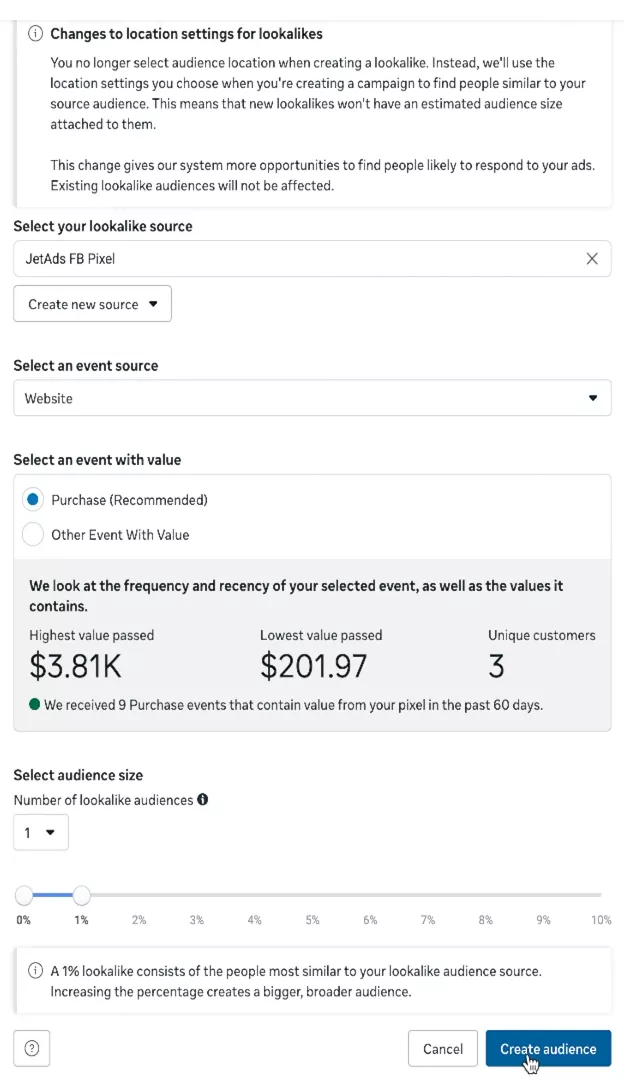
A study shows that 1% lookalikes delivered a 26% lower CPA, so routing your ad spend toward people that are statistically similar to your best customers can save you some money. Omnisend offers strong segmentation capabilities that let you quickly create a list of your high-LTV contacts and export them.
Offline, you can capture emails in physical stores or events using tablets, QR codes, or digital forms at checkout. Here’s a brief implementation guide:
This poster by Forgotten Felines & Fidos demonstrates how it can be done:

Many marketers fixate on how to grow their email list fast, but size alone doesn’t determine success. A truly valuable email list combines quality, engagement, and relevance, not just quantity.
Maintaining a healthy list requires ongoing attention to these key areas:
Let’s explore each.
The first emails your subscribers receive set the tone for your entire relationship. Effective welcome sequences deliver promised incentives, explain what to expect, and start building trust.
Omnisend’s ecommerce research shows that welcome emails achieve an open rate of about 33.79% and a CTR of over 52%, the highest of any other automated email flows:
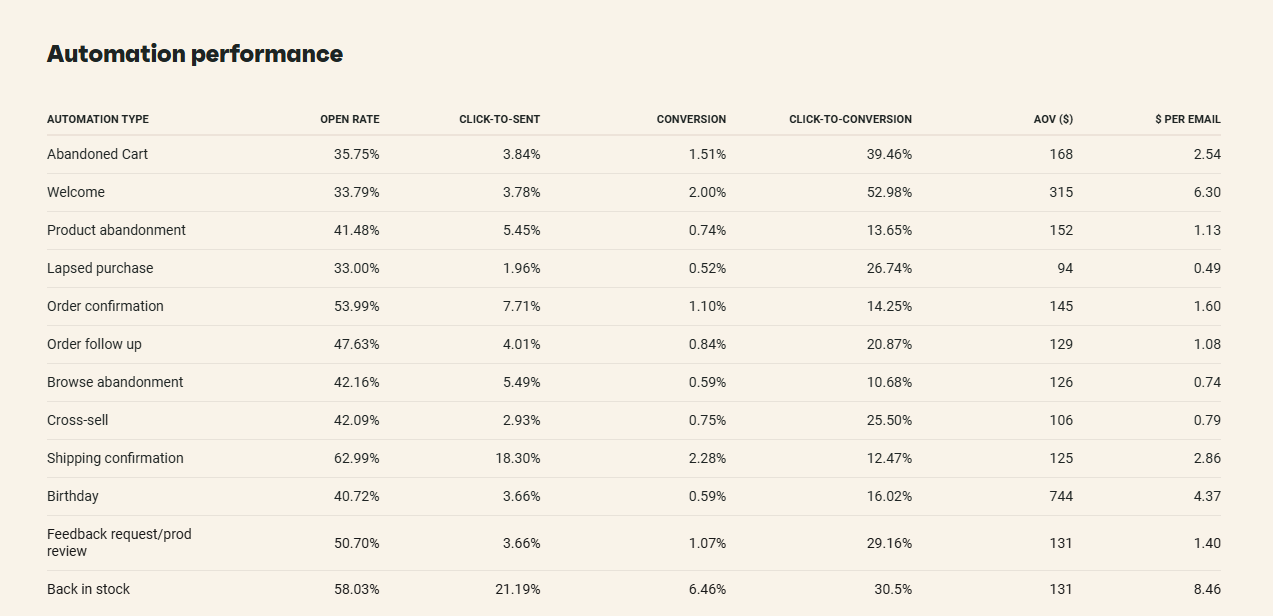
These metrics show that welcome emails are a great way to make a strong first impression and begin segmenting subscribers based on their interests.
 | “Automating our welcome series has been key to sharing our brand story effectively. We’ve been able to showcase diverse perspectives — from our founder to our farmers, allowing us to connect with subscribers on a deeper level and highlight what makes us unique. This personalized approach, enabled by email automation, strengthens customer relationships, even with our small team.” James Le Compte, CEO at To’ak Chocolate To’ak’s welcome series has a 47% open rate and 18% conversion rate. Read the full case study here. |
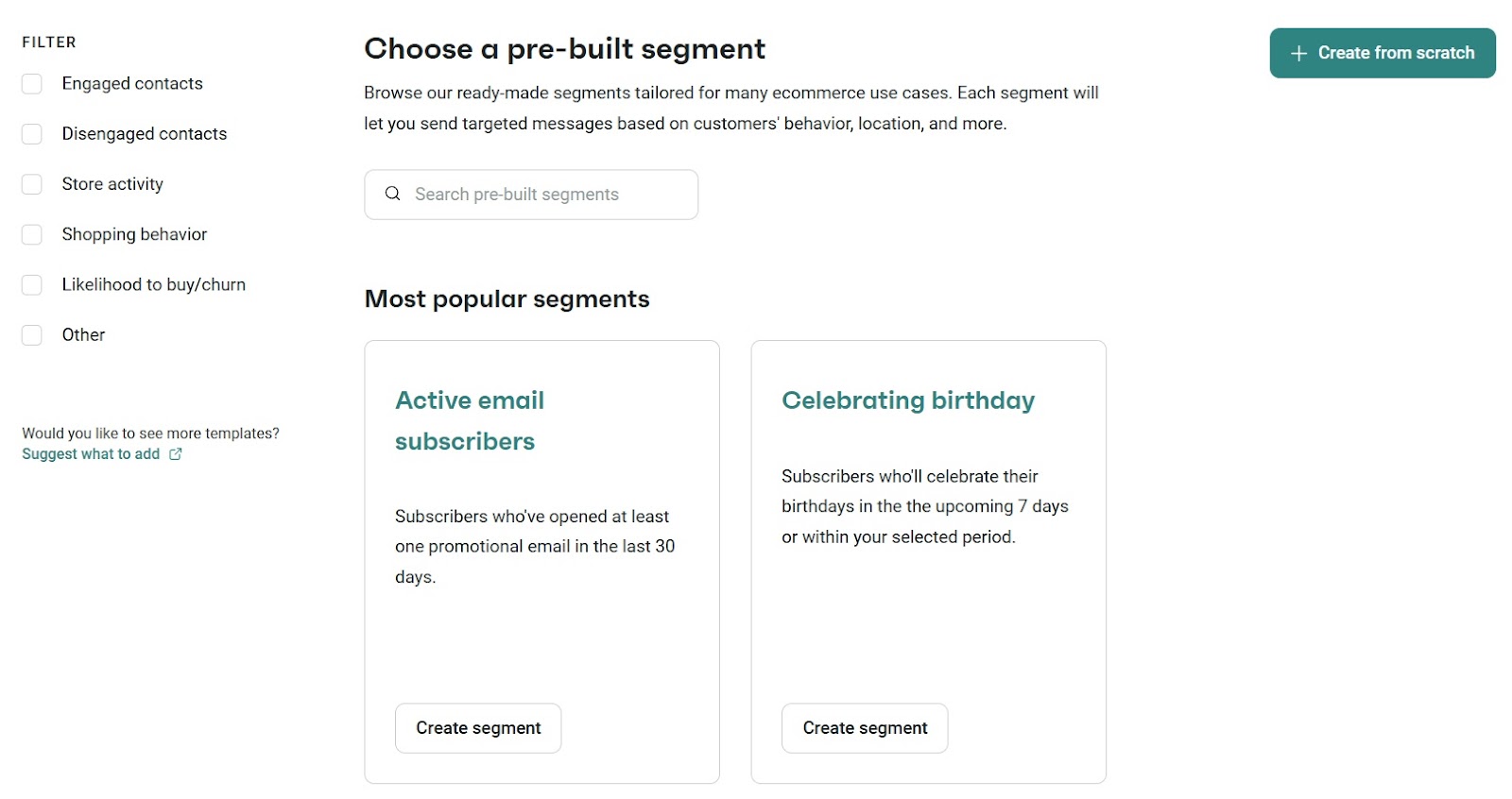
Segmentation divides your list into groups of similar subscribers so you can send more relevant content.
Basic segmentation might separate active versus inactive subscribers, while advanced strategies might incorporate purchase history, browsing behavior, and demographic information.

Email marketing research consistently shows that targeted, relevant messaging outperforms generic broadcasts.
Omnisend’s email automation tools make it possible to create these segments automatically based on subscriber behavior. Here’s a look at a dashboard sample of Omnisend’s pre-built segments.
Removing unengaged subscribers may feel counterproductive, but it’s essential for list health. Subscribers who haven’t opened your emails in six to 12 months drag down your performance metrics and increase your costs.
More importantly, email service providers use engagement rates to decide whether your emails land in inboxes or spam folders, so inactive subscribers can drag down performance for your engaged audience.
A healthy email list is dynamic and requires ongoing attention. The effort you invest in maintaining list health pays dividends through improved deliverability, engagement, and, ultimately, conversions.
Looking at this dashboard, you can see how effectively Omnisend cleans your email list:
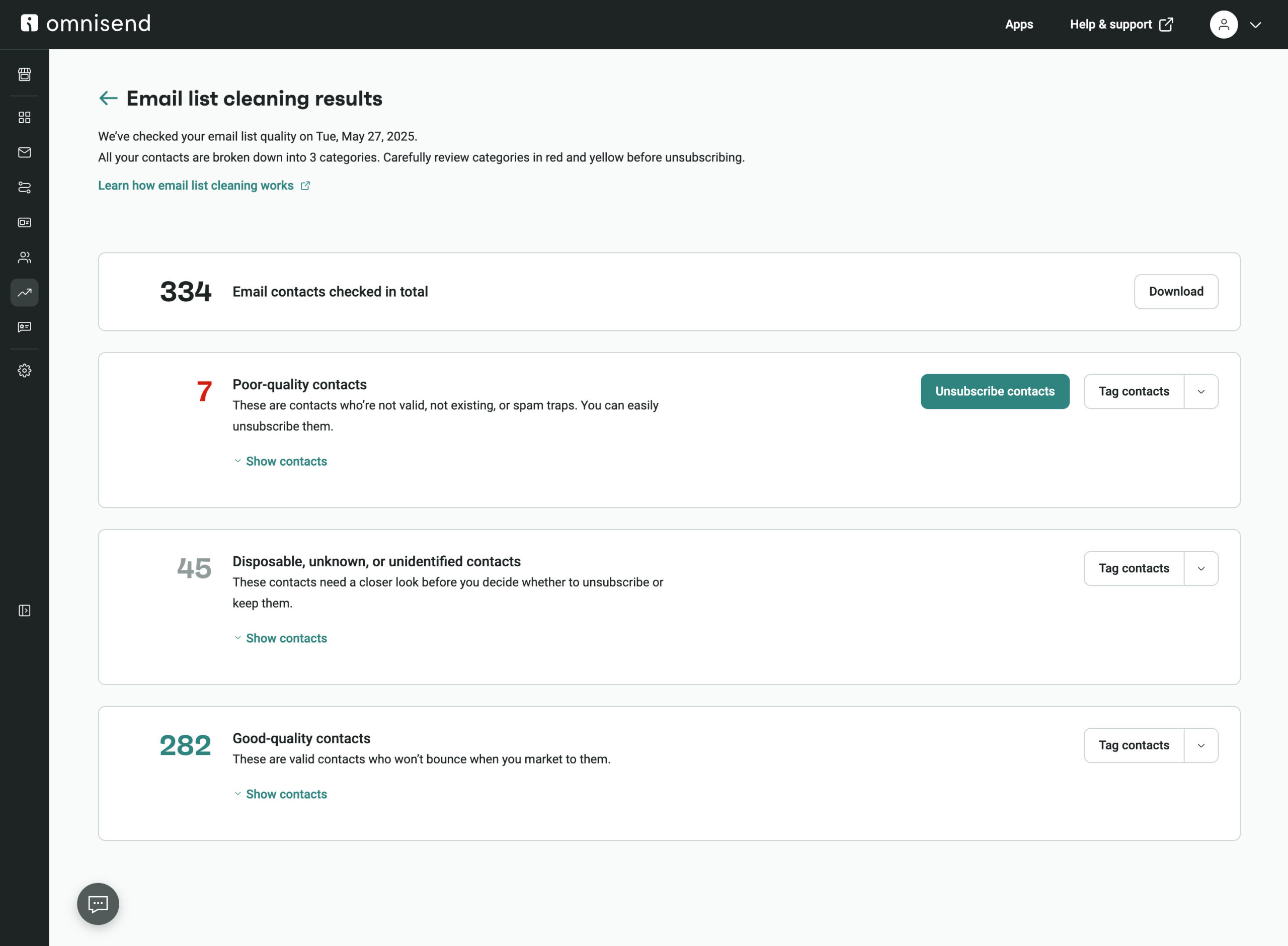
Here’s a video tutorial on how to quickly clean your email list:
A healthy email list is 100% opt-in and fully compliant with laws like CAN-SPAM and GDPR. Every subscriber should’ve explicitly opted in.
Purchased or scraped contacts, such as those from a buy email list database, will only damage your deliverability, engagement, and sender reputation.
Beyond compliance, closely monitor unsubscribe and spam complaint rates. Spikes signal you’re emailing uninterested recipients, which erodes trust.
Using reputable email service providers or ethical list-building methods ensures your growth remains sustainable and legally safe.
In short, a compliant, consent-driven list protects your business. It also helps establish long-term subscriber satisfaction and an effective email list for marketing success.
Even experienced marketers make mistakes that limit the potential of their email list. Here’s how to avoid the most common email list mistakes — and what to do instead:
Many signup forms look fine on desktop but break on mobile. Since most people check email on their phones, about 70% of them, if we go by the stats, mobile-unfriendly forms instantly reduce conversions. Test each form across devices, ensure buttons are tappable, and use responsive designs.
Extra fields lower signup rates. Start with just an email address and gather more info later. Omnisend’s prebuilt templates make it easy to launch high-converting, minimal forms without extra work.
If visitors can’t easily spot your opt-in, they won’t subscribe. Use multiple placements, including headers, footers, blog posts, and product pages. You can also highlight forms with contrasting colors and compelling CTA.
Without verification, spam bots, typos, and low-quality addresses may creep in. Double opt-in protects deliverability, ensures GDPR compliance, and attracts genuinely engaged subscribers.
Subscribers who don’t know what to expect are more likely to unsubscribe or mark emails as spam. Clearly state what you’ll send and how often on the form, thank-you page, and in your welcome email.
Purchased lists can hurt deliverability, include outdated or spam-trap emails, and rarely lead to genuine engagement. Organic list-building is always the more sustainable, brand-safe approach.
Failing to clean your list results in higher bounce rates and lower sender reputation. Regularly remove inactive or invalid contacts to maintain strong performance.
Without tracking the source, you miss out on valuable attribution data to see which channels work best. To fix that, append UTM tags to your links so you can start tracking where your highest-converting visitors come from.
The start is where their purchase intent and attention are at peak, so waiting a week before you send the main newsletter is a huge missed window of opportunity. Set up an automated welcome sequence to both convert and nurture the subscriber further.
As we just mentioned, the beginning is one of the best opportunities you will have to convert the subscriber to a customer. It’s only natural to capitalize on this attention immediately to build trust and drive sales. Omnisend data shows that welcome emails have an average open rate of 33.79% and a conversion rate of nearly 53%.
Instead of sending a newsletter, set up an automated welcome sequence to nurture these new contacts. You can use Omnisend’s pre-built welcome workflow, customize the copy to reflect your brand, and you’re good to go.
Here’s a proven three-part welcome series structure you can use:
This is what a welcome sequence looks like in Omnisend’s automation builder:
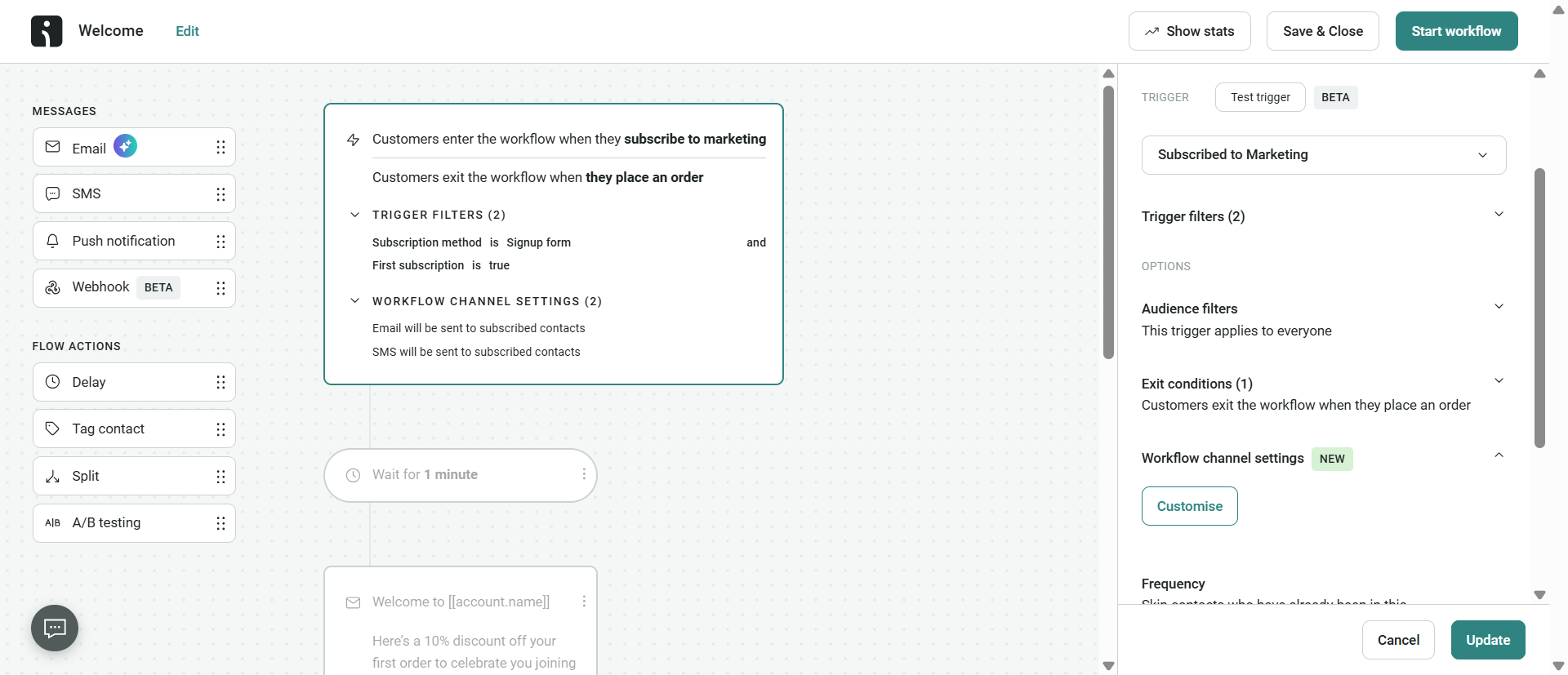
Once you have this basic structure in place, you can then fine-tune the messaging as you go. Leveraging A/B tests, you can learn which copy, design, timing, and structure works best. Make sure you follow best welcome email practices, and you should be on your way to better conversions and more revenue.
Choose a reliable email marketing platform that allows you to create signup forms, make sure the popup you create is mobile-friendly, and offer a valuable lead magnet like a discount. Once you’ve got that down, start driving traffic to the signup form via blog, social media, thank-you page, and other channels.
It depends. Stores with high traffic and strong lead magnets can capture hundreds of new subscribers every week, while smaller stores may struggle at first, especially with organic website traffic. As your business scales, the pace often also scales.
Combining high-value lead magnets (a >15% discount or a giveaway entry, for example) with high-impact placements (like exit-intent) is a good start. At the end of the day, you’ll need to play around to find out what works best for your audience.
There’s no single number for this, as value lies not only in the quantity of your contacts. A 1,000 contact list where 400 subscribers continuously engage with your emails is better than a 10,000 list where 1,000 people are active. While the 1,000 will likely result in more revenue, it also shows you’re doing something wrong by not utilizing your audience to its maximum potential, and your deliverability rates could also suffer.
It may be legal in some regions, but that’s not the point. Even if you buy it, you legally cannot send any marketing emails to these people because they haven’t given you permission to do so. You’ll be violating privacy laws like GDPR and CAN-SPAM.
High-value and relevant lead magnets should do it. For ecommerce stores, it’s often a discount, free shipping, or other perks. Otherwise, you can use giveaway entries, ebooks, templates, or anything else that’s relevant to your industry.
It’s a way of getting consent that not only requires the visitor to subscribe to your newsletter, but also verifies the subscription in their inbox. It’s recommended to use it to stay as safe as possible regarding your sender reputation, deliverability, and legal compliance.
It’s possible to create standalone landing pages via your email marketing platform. It’s often a simple landing page with an embedded signup form that you can share on your social media, and people can subscribe to your newsletter this way.

TABLE OF CONTENTS
TABLE OF CONTENTS

What’s next


No fluff, no spam, no corporate filler. Just a friendly letter, twice a month.