Omnisend AI

 OFFER



Spam complaint rate is the percentage of delivered emails that recipients mark as spam. The acceptable rate varies by platform. Gmail advises keeping it below 0.1% and never reaching 0.3%, and Yahoo recommends keeping it below 0.3%. Email automation providers can have separate requirements. For example, Omnisend issues a warning when your spam levels go above 0.08%.
Three fixable habits drive complaints: poor audience targeting, emails to disengaged subscribers, and misleading content or subject lines.
This guide shows you how to fix them. You’ll learn:
- What a healthy spam complaint rate looks like
- Why even small increases can affect deliverability
- The common causes of high spam complaint rates
- Practical ways to reduce complaints without hurting revenue
How to calculate spam complaint rate
Spam complaint rate is calculated by dividing the number of complaints by the total number of delivered emails, then multiplying the result by 100.
Spam complaint rate formula
(number of complaints / total number of delivered emails) * 100 = spam complaint rate (%)
For example, 10,000 of your emails were delivered, and 20 recipients reported them as spam. After doing the math, your complaint rate would be 0.2%.
(20 / 10,000) * 100 = 0.2%
Keep in mind that a complaint is only counted when a recipient marks your email as spam or junk in their inbox. However, not every complaint will appear in your marketing platform report.
Mailbox providers report spam complaints through a feedback loop system (FBL). In essence, an email provider like Gmail receives a spam complaint from a recipient and lets the sender know. But Gmail doesn’t send individual complaint numbers; it provides aggregated spam-rate data through Google Postmaster Tools.
In most cases, the number itself matters less than why people complained. A 0.2% complaint rate caused by one bad campaign requires a different fix than a 0.2% rate caused by over-emailing.
What is a good spam complaint rate?
A good spam complaint rate is at or below 0.08% in Omnisend’s reports and below 0.1% in Google Postmaster Tools.
Here’s how to interpret both metrics:
| Spam complaint rate | Recommended threshold | Explanation |
|---|---|---|
| Gmail spam rate (Google Postmaster Tools) | Best below 0.1%, and should never reach 0.3% | Measures the percentage of emails delivered to Gmail inboxes that recipients report as spam. |
| Email service provider (ESP) spam complaint rate (Omnisend) | 0.08% or lower | Measures complaints reported through mailbox provider FBLs, excluding Gmail. |
ESPs set stricter limits than mailbox providers because they run shared infrastructure and must act earlier. Every ESP has a different number, but ≤0.08% is a safe target.
Do spam complaint rate thresholds vary by mailbox provider?
Spam complaint thresholds vary by provider, with each using its own reputation systems, engagement signals, and filtering algorithms to evaluate sender behavior.
Even though most align closely around similar low-risk thresholds, what is considered an acceptable spam complaint rate varies, as you can see here:
| Provider | Where you see your rate | Sends individual complaint reports? | Threshold | Bulk sender rules effective |
|---|---|---|---|---|
| Gmail | Google Postmaster Tools | No | Below 0.1%, never 0.3% | February 2024 |
| Yahoo | Yahoo Sender Hub Insights; Complaint Feedback Loop (CFL) | Yes, through CFL service | Recommends less than 0.3% | February 2024 |
| Microsoft | Smart Network Data Services (SNDS) | Yes through Junk Mail Reporting Program (JMRP) | Recommends less than 0.3% | May 2025 |
- Google (Gmail): Recommends keeping spam rates below 0.1% and preventing them from rising to 0.3% (three complaints per 1,000 emails)
- Yahoo: Ideally, keep the spam rate below 0.3% to avoid your emails being blocked or redirected to junk folders
- Microsoft (Outlook): Uses SNDS to show senders information on complaint rates and reputation data. Additionally, you can learn about individual complaints via the JMRP. While Microsoft doesn’t provide a specific spam complaint threshold, they say 0.3% is a good bar to “shoot for.” Their bulk-sending requirements include Sender Policy Framework (SPF), DomainKeys Identified Mail (DKIM), and Domain-based Message Authentication, Reporting, and Conformance (DMARC) for more than 5,000 emails a day.
Even if the exact threshold varies from provider to provider, one thing is clear: mailbox providers reward senders whose recipients are consistently looking forward to their emails. This is the safest way to protect long-term email deliverability and sender reputation.
Why is maintaining a healthy spam complaint rate important?
The spam complaint rate affects your deliverability, sender reputation, and overall marketing performance. It rises due to a combination of poor timing, email frequency, and low relevance.
Even a small increase in complaints can reduce inbox placement, meaning fewer subscribers see your campaigns and you have fewer opportunities to convert.
For marketers, a drop in inbox placement can also mean revenue at risk.
To estimate the potential risk, use this formula:
Revenue at Risk = (List Size x Inbox Placement Drop %) x Conversion Rate x Average Order Value
Note: This formula is for illustration only and provides a rough estimate.
For example, you have a 500,000 subscriber list, a 5% drop in placement, a 2% conversion rate, and a $75 average order value. This means the potential revenue at risk is $37,500 per campaign.
One promotional email is rarely a problem.
Sending a VIP promotion, a weekend sale campaign, and two abandoned cart reminders to the same subscriber within 24 hours can quickly create fatigue.
Relevance matters just as much as volume. For example, a customer who recently bought something from you is receptive to transactional messages such as shipping updates or post-purchase confirmations since they directly relate to their experience.
However, that same customer might react differently to promotional emails sent immediately after checkout. In that context, marketing messages can feel intrusive and will likely be ignored or, worse, marked as spam.
Mailbox providers (correctly) interpret this as a sign that your messages are unwanted, and if this becomes a regular occurrence, it reduces your inbox placement.
Here’s how sender reputation affects your business:
| Area affected | Low spam rate | High spam rate |
|---|---|---|
| Inbox placement | Emails land in the primary inbox | Emails directed to spam/junk |
| Sender reputation | Builds long-term trust with mailbox providers | Reputation is damaged and harder to recover |
| Mailbox provider actions | Likely no penalties (complaint rate is only one signal that mailbox providers assess) | Triggers spam filtering, throttling, temporary blocking |
| Revenue & conversions | Promotions reach subscribers, increasing conversion rates and revenue | Offers don’t reach inboxes, which negatively affects conversions and revenue |
| Engagement quality | Higher opens, clicks, purchases | Lower engagement, more disengaged subscribers |
Common causes of high spam complaint rates
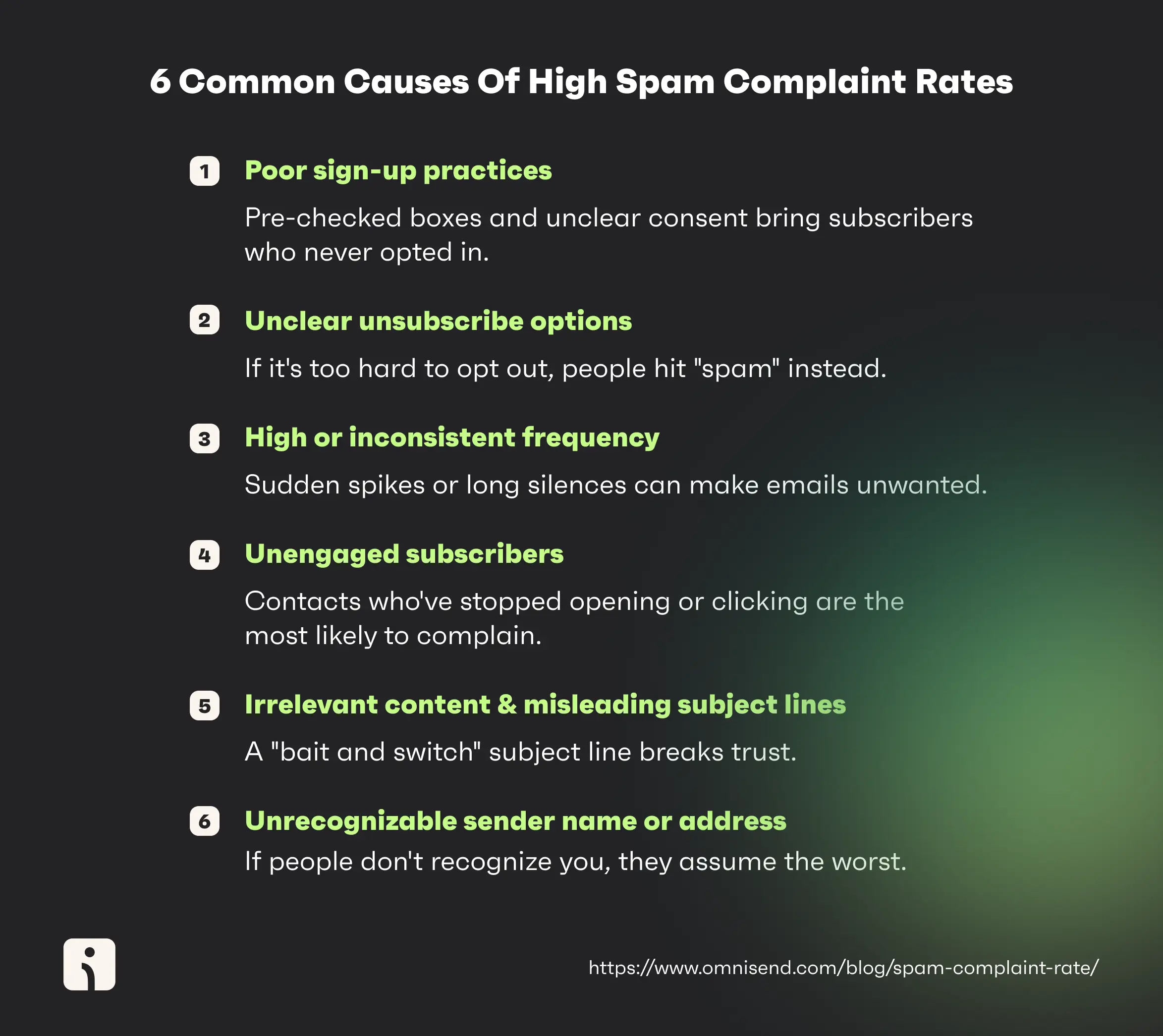
Spam complaints typically result from poor sign-up practices, unclear unsubscribe options, excessive or low email frequency, unengaged subscribers, misleading or irrelevant content, and unrecognizable sender names or addresses.
Here’s where to look for these issues first:
- If complaints spike after a single campaign, check for subject-line or content mismatch, misleading offers, or low-quality list sources
- If complaints rise gradually over time, review email frequency, inactive subscriber segments, and workflow overlap
- If automations generate complaints, customers might be receiving too many emails simultaneously, so check your suppression rules and workflow timing
1. Poor sign-up practices
Pre-checked consent boxes, misleading offers, or forced opt-ins can drive high spam complaints by adding subscribers who never clearly consented to receive marketing emails.
Low-quality acquisition tactics and poor sign-up practices like these attract disengaged contacts with little interest in the brand from the start. As a result, they’re more likely to view future emails as unwanted, irrelevant, and untrustworthy.
Reduce this risk by prioritizing explicit consent at sign-up. This means using clear opt-in language, avoiding pre-selected checkboxes, and setting accurate expectations about email frequency and content.
2. Unclear unsubscribe options
A hidden or difficult-to-find unsubscribe link can increase complaints by forcing recipients to use the spam button instead of completing a legitimate opt-out.
When unsubscribing takes multiple steps, redirects people through confusing pages, or offers no clear confirmation, people choose the fastest way to stop future emails: reporting them as spam.
To prevent this, senders should make unsubscribing as clear as possible by placing a visible unsubscribe link in every email, keeping the process to one or two clicks, and confirming the opt-out immediately. This way, people know their request has been processed.
3. High or inconsistent email frequency
Sudden increases in email frequency can lead to more spam complaints, even among engaged subscribers who previously welcomed a brand’s messages. This buildup happens as subscribers receive too many emails over days or weeks.
Problems arise when brands abruptly increase email volume without adjusting segmentation, frequency caps, or suppression rules.
For example, a subscriber who used to receive one weekly campaign suddenly gets daily holiday promotions and SMS follow-ups in the same week.
In Omnisend, you can control how often contacts can re-enter the same flows and prevent sending too many similar messages too quickly.
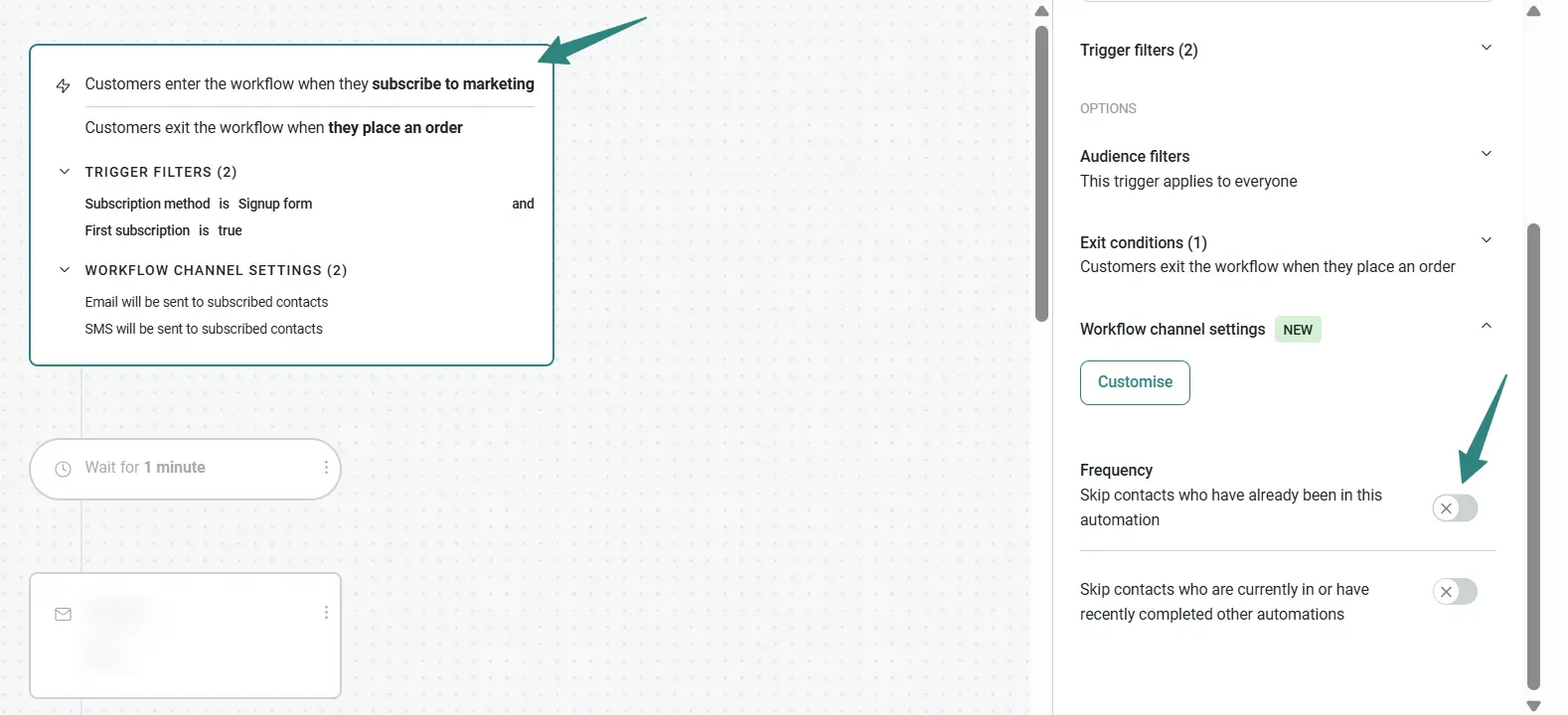
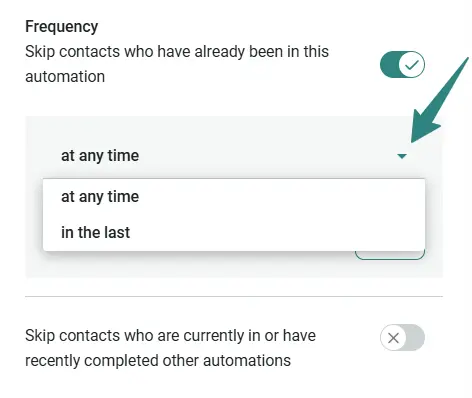
Once you enable Frequency, you can choose how often a contact can trigger the workflow:
- Anytime in the past: Contacts enter once, ever
- In the last X hours, days, or weeks: Contacts re-enter only after the specified time passes
Another common mistake is sending aggressive promotional campaigns immediately after a purchase. It’s a good idea to temporarily suppress generic sales blasts for 14 days and move to flows that feel more relevant to the customer stage.
A prolonged gap in communication can also increase spam complaints. If subscribers haven’t heard from you in a while, they may forget they signed up in the first place. When they suddenly receive emails from you again, those messages will feel unsolicited.
To manage this effectively, brands should use lifecycle-based segmentation, apply suppression rules after key actions such as purchases, and maintain a sending cadence that avoids both sudden spikes and long gaps in their communication.
4. Sending to unengaged subscribers
Repeatedly emailing unengaged subscribers raises the risk of complaints and gradually reduces overall list quality.
People who consistently show little or no engagement won’t respond positively to continued messaging and will report emails as spam. Without appropriate suppression rules or re-engagement strategies, you can hurt sender reputation by inflating your list with contacts that provide little marketing value.
In practice, “engaged contacts” refers to subscribers who have opened, clicked, or purchased within a specified time frame (for instance, the last 30–90 days). “Unengaged contacts” are those who stopped interacting within that same window.
So if a subscriber hasn’t clicked an email in 60–90 days, move them into a reactivation workflow instead of sending promotional emails. If they still remain inactive after repeated win-back attempts, suppress them completely from receiving future marketing emails.
Engagement declined overall in Q4 2025, but the average order value nearly doubled, showing that high-intent shoppers were ready to purchase if properly engaged. This pattern was especially strong in certain markets, with the UK leading at a 16.54% click-to-conversion rate, followed by Australia (12.25%) and South Africa (11.99%). In these markets, emails functioned less as a browsing channel and more as a direct path to purchase.
For marketers, this means optimizing for purchase intent, not just engagement volume. Fewer clicks can still produce stronger results when messaging reaches shoppers at the right time with relevant offers.
Use click-to-conversion rate and average order value alongside other traditional metrics to see whether your emails are attracting high-intent buyers.
5. Irrelevant content and misleading subject lines
Subject line mismatches and clickbait increase spam complaints by creating false expectations that the email content fails to meet.
If subscribers open an email expecting a meaningful offer or discount and instead find something irrelevant or significantly less valuable (like 5% off products they’ve never shown interest in), they’ll feel misled and report the message as spam.
“Bait and switch” subject lines that exaggerate the email’s content leave recipients feeling deceived and frustrated. In time, this disconnect between promise and delivery reduces engagement and damages the email sender’s reputation.
Here’s what to avoid and why:
| Deceptive practice | Example | Why it increases complaints | Compliant ecommerce alternative |
|---|---|---|---|
| Fake “Re:” (when there was no previous conversation) | Re: Your order is waiting | Creates the impression of an existing interaction and can make the message feel deceptive | Your order qualifies for free shipping |
| Fake “Fwd:” (when nothing was forwarded) | Fwd: Exclusive offer inside | Mimics a personal or forwarded message to encourage opens | Your 20% off offer ends Sunday |
| All Caps | HUGE SALE!!! BUY NOW!! | Can appear aggressive, promotional, or misleading and undermines trust | Save 25% on summer essentials |
| Misleading urgency (when the offer runs for another week) | Last chance to claim our offer! | Creates false urgency and can frustrate subscribers who discover the claim isn’t accurate | 25% off ends Sunday |
| Baseless exclusivity (when sent to the entire list) | Your VIP offer is here | Suggests personalized access that the recipient has not received | Early access: Shop our new collection |
| Clickbait (with no meaningful incentive) | You won’t believe what we’re giving away… | Sets expectations the email content doesn’t fulfill, increasing frustration and complaints | Enter to win a $500 shopping spree |
| Vague promotional claims (minor or irrelevant discount) | The deal you’ve been waiting for | Fails to communicate the actual value and can feel intentionally misleading | Get 5% off orders over $50 |
| False personalization (when recommendation is not personalized) | We picked this just for you | Makes personalization claims that do not match the recipient experience | Trending picks from our bestsellers |
Subject lines should accurately reflect the content of the email and be aligned with the recipient’s interests and behavior. Don’t rely on exaggerated claims to drive opens. Ensure that what people see in their inboxes is exactly what they get when they open it. Accurate subject lines build trust over time and reduce complaints driven by perceived deception.
6. Unrecognizable sender name or address
An unfamiliar or frequently changing sender name looks suspicious, and users are more likely to mark it as spam. According to a report by Hoxhunt, AI-generated phishing increased by 14x, making subscribers more cautious about opening dubious emails.
Tip: Use a consistent and clearly identifiable sender identity across all communications. This includes keeping the “From” name consistent, using a recognizable domain name, and avoiding frequent changes to sender addresses, one of the common reasons emails go to spam.
Tips for reducing a high spam complaint rate
The best strategies to reduce a high complaint rate include: gaining quality subscribers, protecting sender reputation, maintaining good email list hygiene, and improving relevance.
Acquire better subscribers
Use double opt-in sign-up forms
To ensure customers want to receive your communications, have them complete a double opt-in form. They sign up through a form, then confirm their subscription by clicking the button in the confirmation email.
You can use Omnisend’s sign-up forms to keep your subscriber list clean. Omnisend’s customizable forms include built-in double opt-in features to help you collect high-quality subscribers.
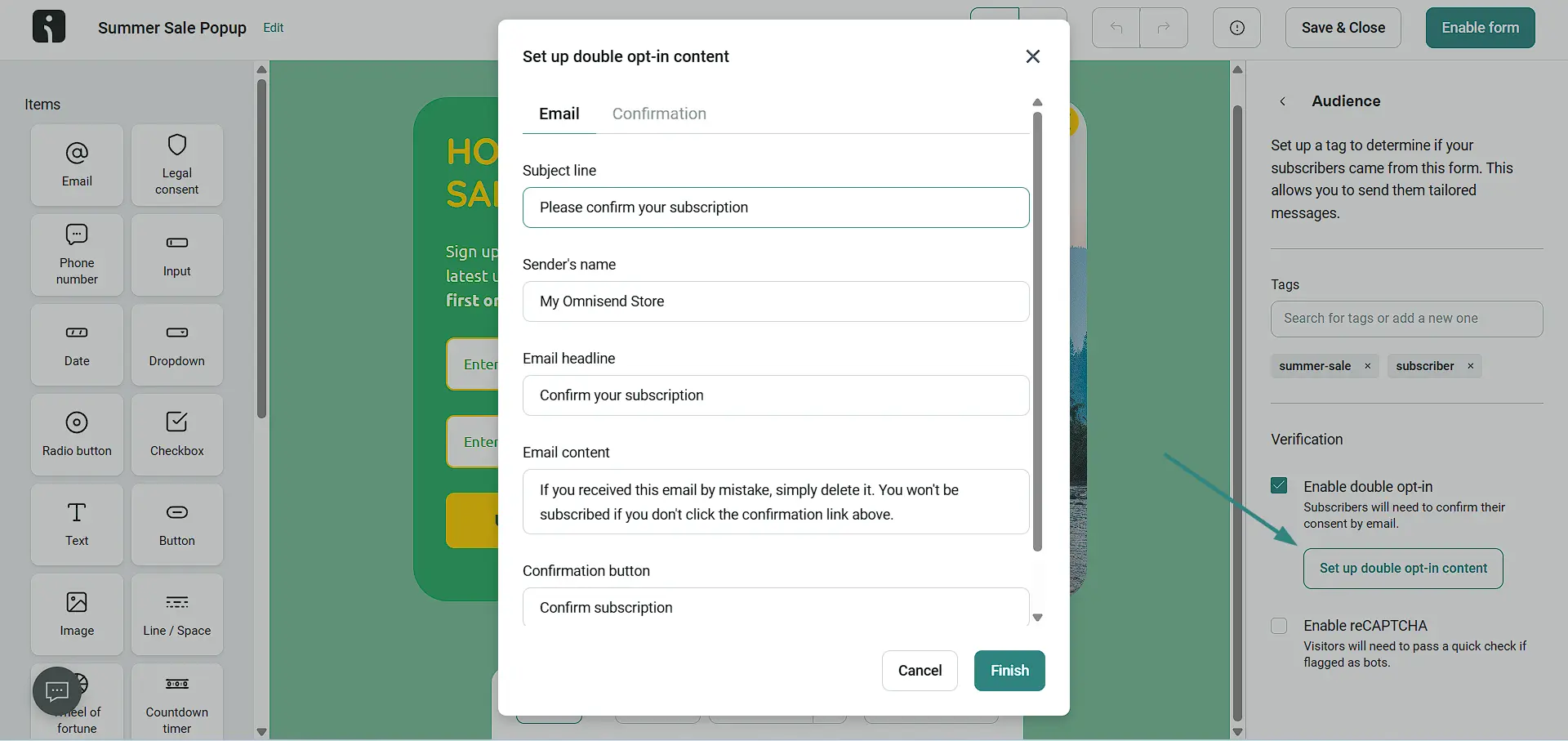
Double opt-in fits immediately after the initial sign-up: subscribers must confirm their email address before being added to the active marketing list.
This extra verification step helps prevent fake or mistyped email addresses, or low-intent people, from entering the list, reducing the rate of spam complaints from contacts who never intended to receive your emails. This double layer of confirmation also keeps bot sign-ups and fake addresses off your list.
Protect your sender reputation
Warm up your sending domain gradually
If you want to earn the trust of inbox providers like Gmail, Outlook, or Yahoo, you need to warm up your domain by gradually increasing the number of emails you send to different recipients per day, starting with your most engaged subscribers.
When a new or inactive domain suddenly sends a large volume of emails, mailbox providers view it as suspicious. A gradual warm-up process helps you avoid spam folders and improves your deliverability over time.
Omnisend’s manual domain warm-up lets you safely scale your email activity by segmenting subscribers into smaller batches and gradually increasing volume in controlled steps, rather than sending to your full list at once.
Your schedule might look like this:
- Conservative: Start with 500 emails on Day 1, increase the daily volume by approx. 35%
- Medium: Start with 1,000 emails on Day 1, increase the daily volume by approx. 50%
- Aggressive: Start with 5,000 emails on Day 1, increase the daily volume by approx. 65%
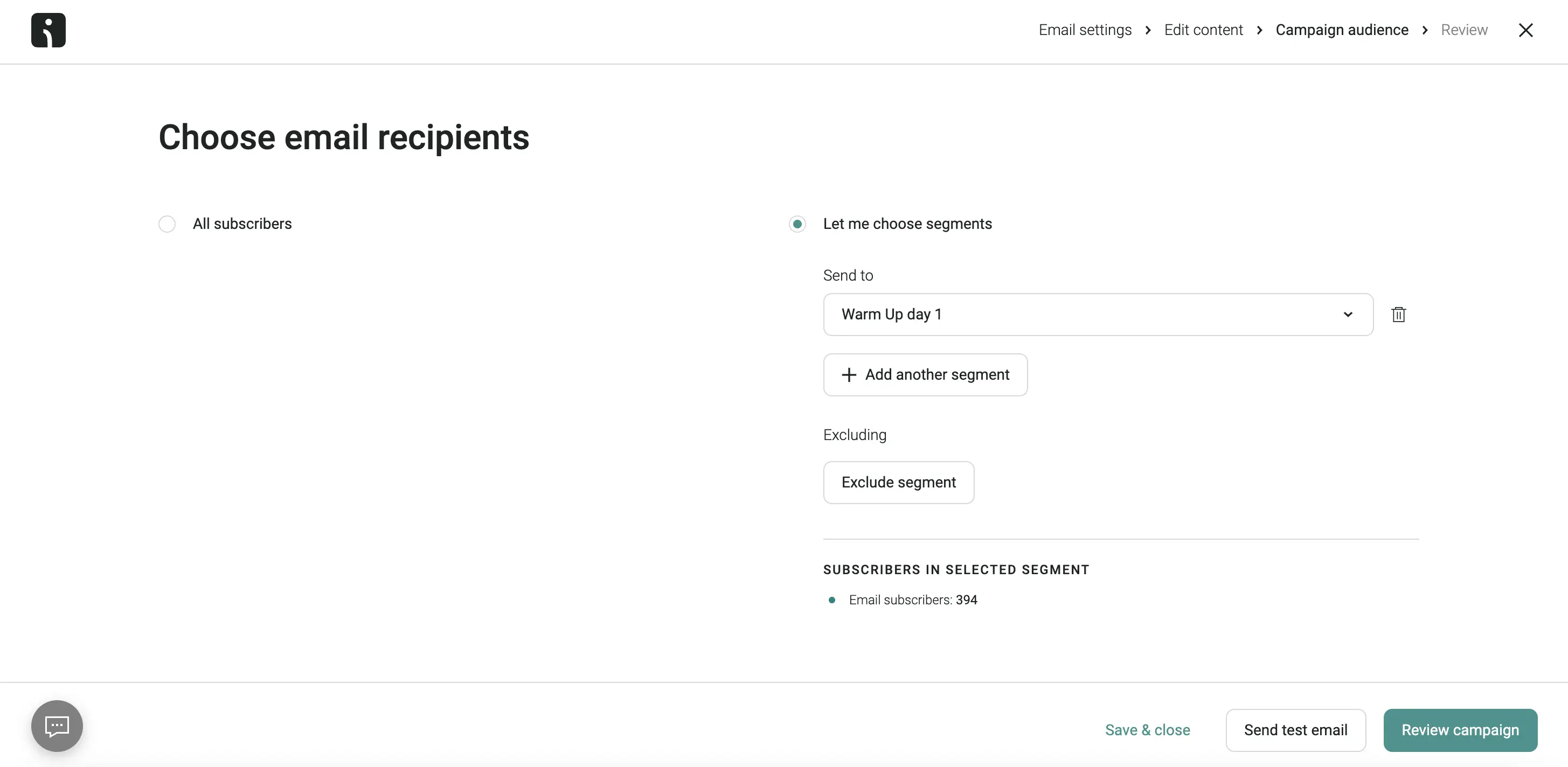
Send warm-up emails to highly engaged subscribers first, as this’ll strengthen your domain reputation faster. This controlled approach improves inbox placement, supports long-term deliverability, and lowers the risk of complaint spikes.
Make unsubscribing transparent and visible
Subscribers who can quickly unsubscribe from emails they no longer want will be less tempted to use the spam button. To improve the unsubscribe experience, it’s important to:
- Make the unsubscribe link clearly visible by placing it in the email footer in a readable font size
- Use a one-click unsubscribe option without requiring a login or extra steps. Gmail and Yahoo have required this from bulk senders since 2024.
- Offer preference options before full opt-out, such as reduced frequency or choosing different content types
In Omnisend, you can customize your unsubscribe page messaging and adjust where the unsubscribe link appears.
By making unsubscribe options accessible (and transparent), you can reduce spam complaints and encourage cleaner list management practices.
Set up a custom email domain
Set up a custom email domain to make your brand more recognizable and trusted by mailbox providers.
Omnisend’s custom email domain helps you configure your own branded domain so you can:
- Authenticate your emails: Gmail, Yahoo, and Microsoft require bulk senders to authenticate their domain.
- Increase brand awareness: Reinforce your brand identity and make your emails more recognizable
- Improve email performance: Keep your root domain for business email, and send campaigns and automations from two separate subdomains (e.g., campaigns.yourbrand.com and automations.yourbrand.com)
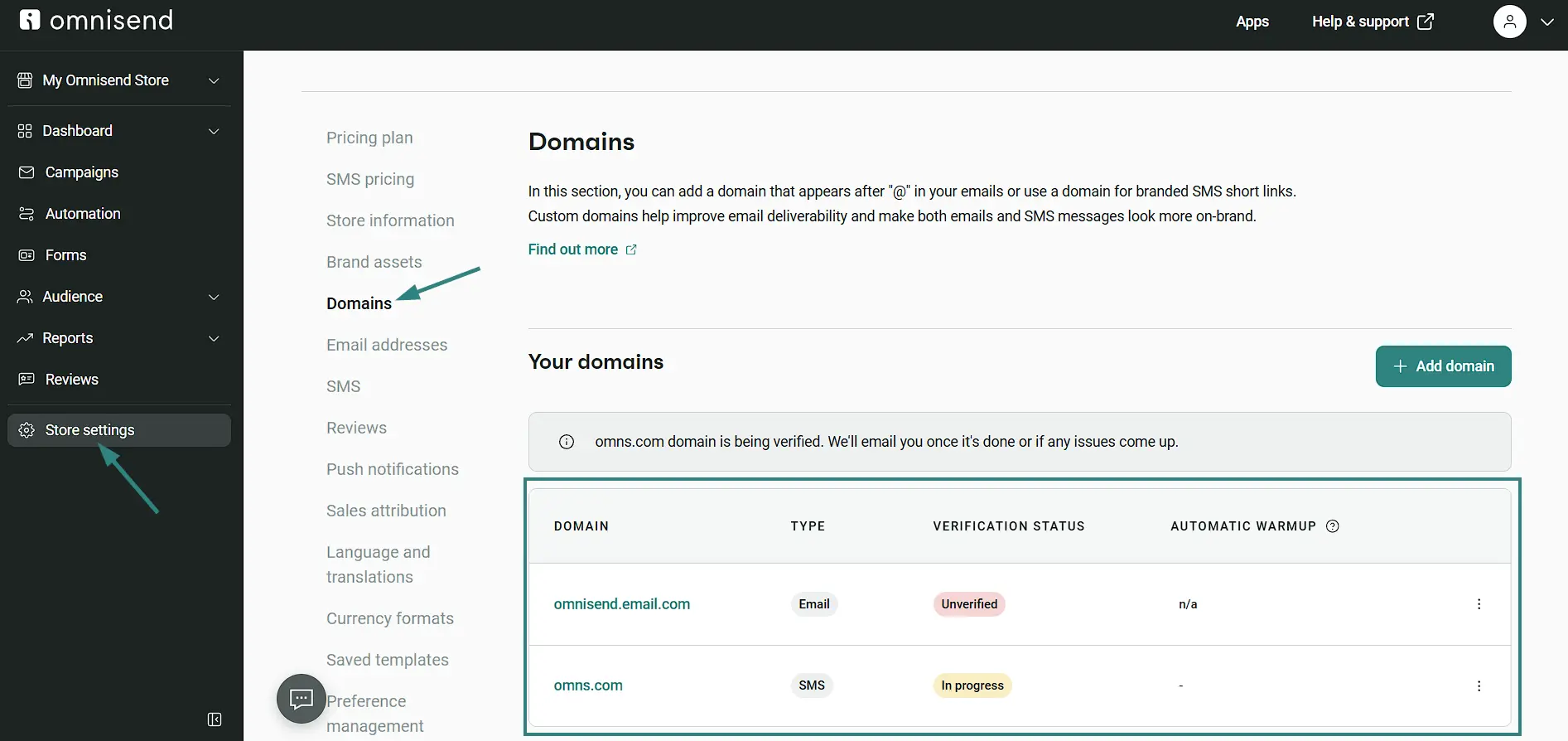
Omnisend supports SPF, DKIM, and DMARC, which mailbox providers use to verify that you’re a legitimate sender. Bulk senders need all three, with DMARC set to at least p=none.
Stop mailing the wrong people
Regularly clean and segment your email list
Removing invalid or inactive contacts ensures your emails reach people who want to hear from you, lowering spam complaints and improving deliverability.
Omnisend’s list cleaning tools can help remove “bad” contacts and keep your email list healthy. The tools regularly remove invalid, disposable, role-based, and mistyped addresses to reduce bounce rates and give you a clearer picture of email effectiveness.
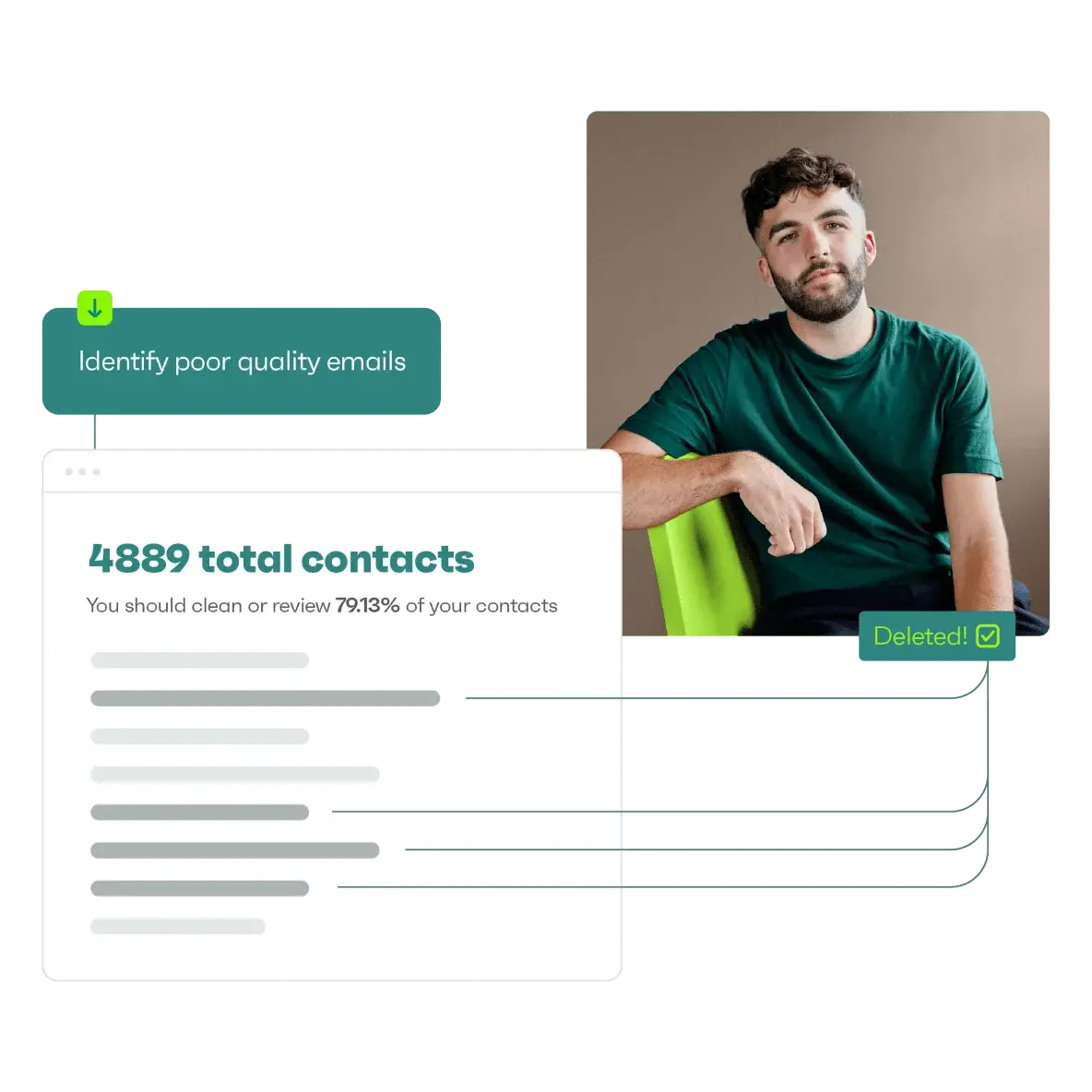
You can also enforce email sunset policies to maintain a clean contact list by removing inactive subscribers (those with zero opens or clicks for 90–180+ days).
Ecommerce brands should apply lifecycle-based suppression rules to prevent specific customers from receiving irrelevant or overlapping messages.
For example, automatically suppress customers from promotional blasts for 14 days after a purchase to avoid sending sales messages immediately after they’ve completed an order. The necessary transactional/post-purchase messages should still continue getting through during this period.
With Omnisend’s AI-powered audience segmentation features, describe who you want to reach, or the goal you’re targeting, and Omnisend’s AI will identify customer groups based on behavior, engagement, or purchase patterns.
“The best approach, in my opinion, will be to either mix engaged with unengaged contacts in each campaign while you try to always keep the ratio in favor of the engaged audience.”
The idea behind mixing segments is to protect sender reputation while still giving inactive people the chance to re-engage.
Desi adds that another way to keep lists clean is to balance active and inactive contacts by using specific segments and frequency thresholds, such as the most-active or least-active audience.
Re-engage inactive subscribers
Win-back campaigns make sense when subscribers who were previously engaged have recently lapsed (no activity in 60–90 days) or when there is enough past engagement to justify reactivation attempts.
While it’s hard to say goodbye to someone, not every subscriber deserves a win-back campaign.
So, when shouldn’t you re-engage? When subscribers have shown no engagement for 90–180+ days, especially if they were never active in the first place or if overall spam complaint rates are already elevated.
In these cases, it’s better to suppress inactive contacts who haven’t opened, clicked, or purchased within a defined period than to try to win them back.
Omnisend can help through its AI-assisted customer lifecycle segmentation, which takes the guesswork out of reactivation.
Omnisend’s AI creates dynamic segments called lifecycle stages based on days since the customer’s last order, total orders in the last 365 days, and average order value compared to your store’s average.
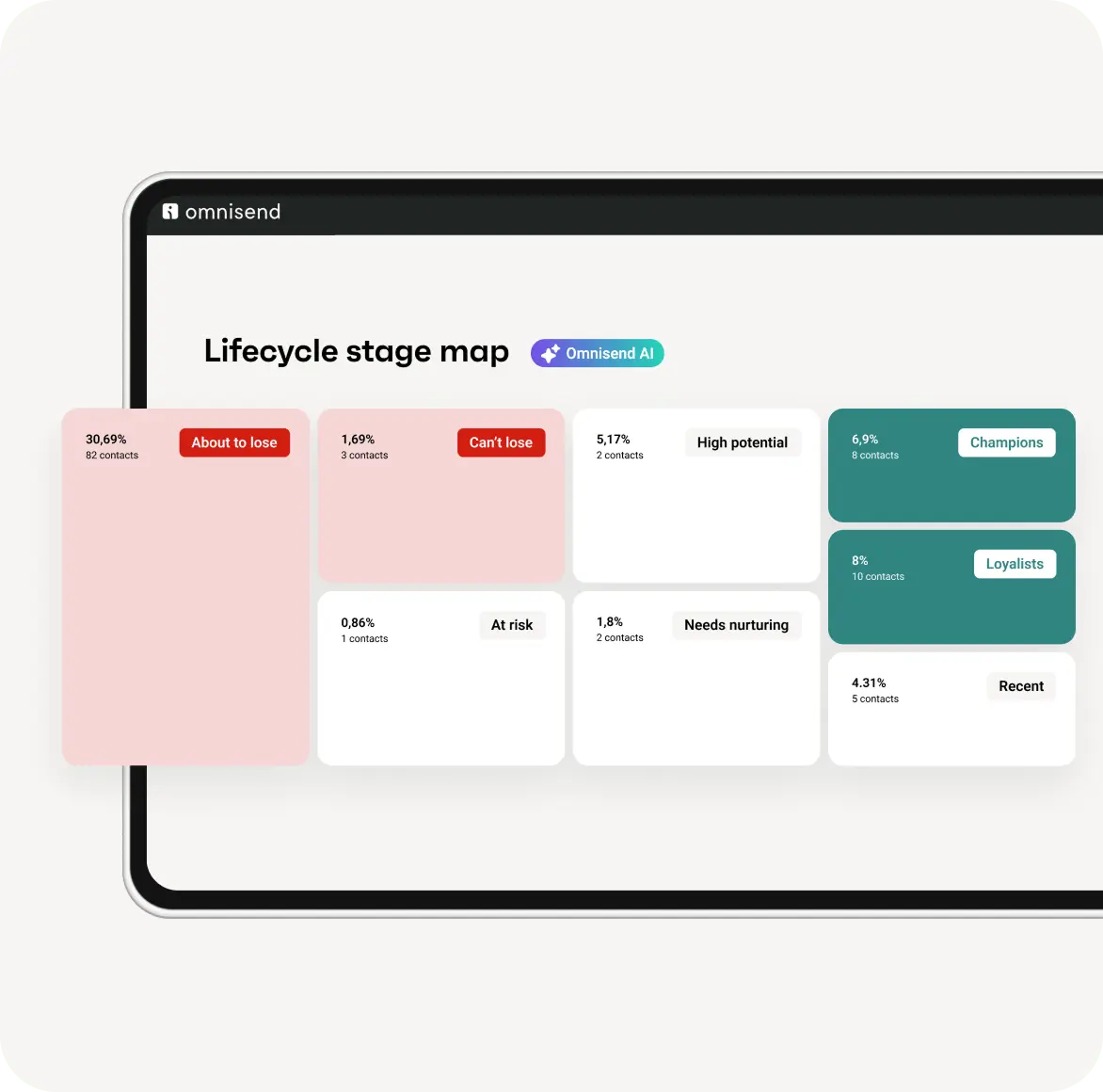
Plus, Omnisend’s reactivation automation workflows let you send targeted win-back campaigns with personalized offers, reminders, or other incentives meant to re-engage dormant contacts.
Once the workflow is configured, messages can automatically go out at the right time to customers who haven’t bought from you in a long time.
Our research found that automations generated 30% of total email-driven revenue.
Triggered by real behavior, automations reached shoppers when their interest was high: nearly one in three clicks on an automated email resulted in a purchase, making these clicks some of the strongest buying signals across channels.
Increase your relevance
Personalize email content
When recipients receive emails that match their interests, purchase behavior, or browsing activity, they’re more likely to engage positively instead of ignoring your message.
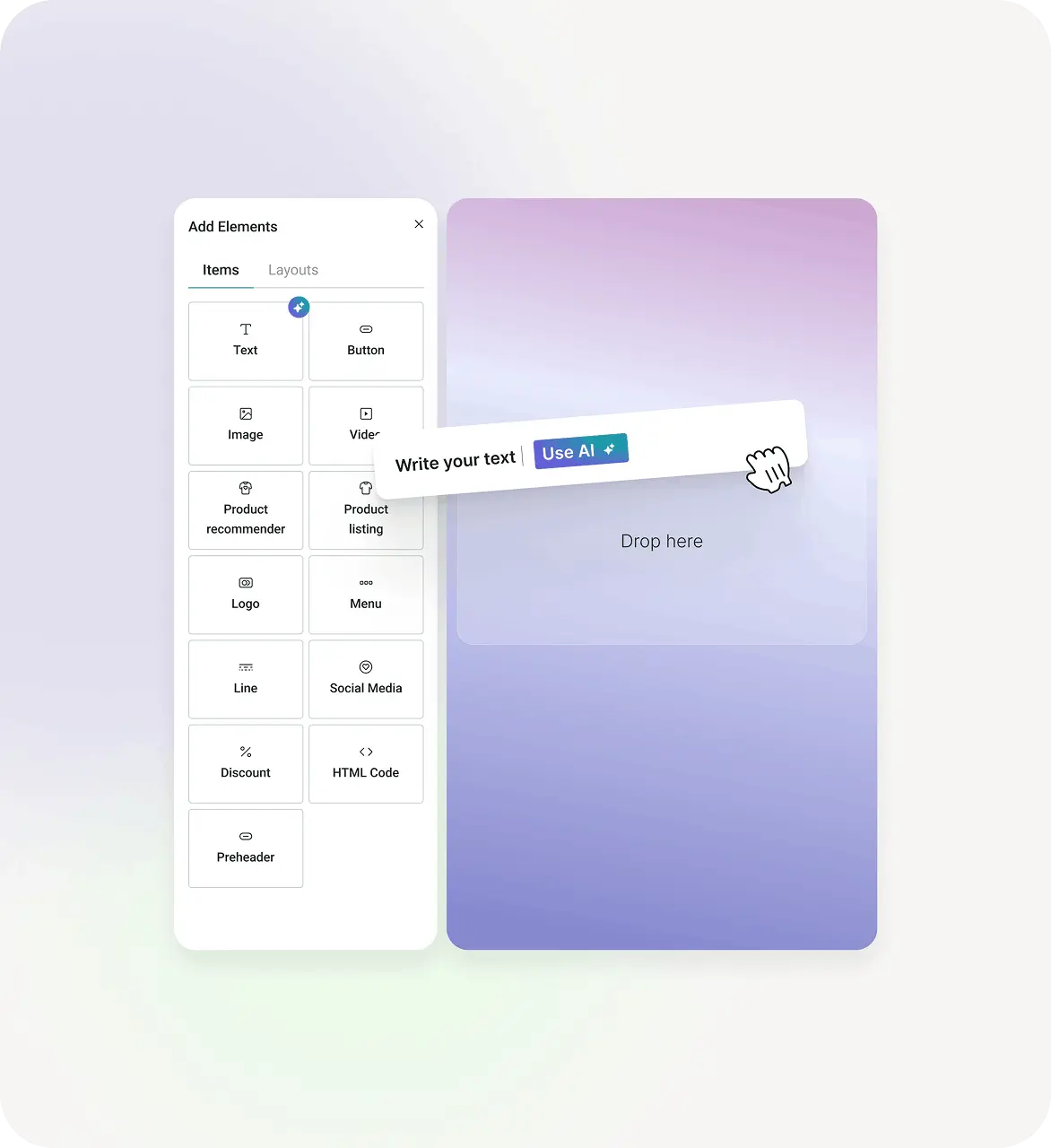
Omnisend’s AI can help you:
- Generate attention-grabbing subject lines, as well as fine-tune your own creations
- Write personalized emails based on best email marketing practices
- Recommend products after analyzing your audience’s browsing and purchasing habits
- Adjust content for each subscriber separately (e.g., birthday messages produced an average order value of $744.37, more than 4x the average)
How do you monitor your spam complaint rate?
To monitor your spam complaint rate, set up mailbox provider tools like Google Postmaster Tools, check which complaints reach your ESP through feedback loops (FBLs), and review deliverability reports regularly.
Set up mailbox provider monitoring tools
The best way to monitor your spam complaint rate is to use mailbox provider monitoring tools that give you direct visibility into how email platforms see your sending reputation.
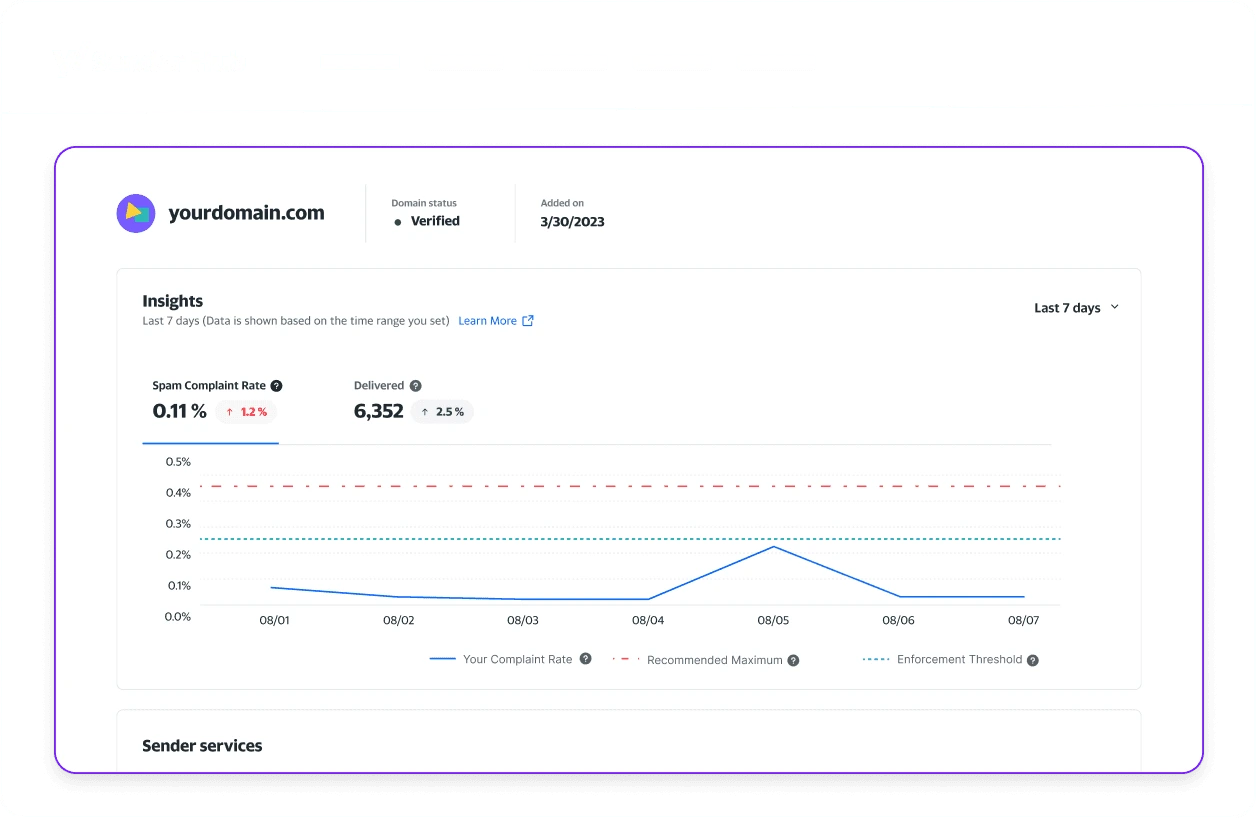
How to monitor spam rates in Gmail?
To monitor Gmail spam rates, you must add and verify your domain in Google Postmaster Tools, as it’s the only place to check it. The Postmaster Tool also shows domain reputation and authentication errors for Gmail traffic. You should also have DKIM-authenticated traffic and daily volume to see data. The data is typically updated within 24 hours, although it can take longer.
The equivalent for Yahoo Mail is Yahoo Sender Hub, which provides insights into sender reputation and feedback.
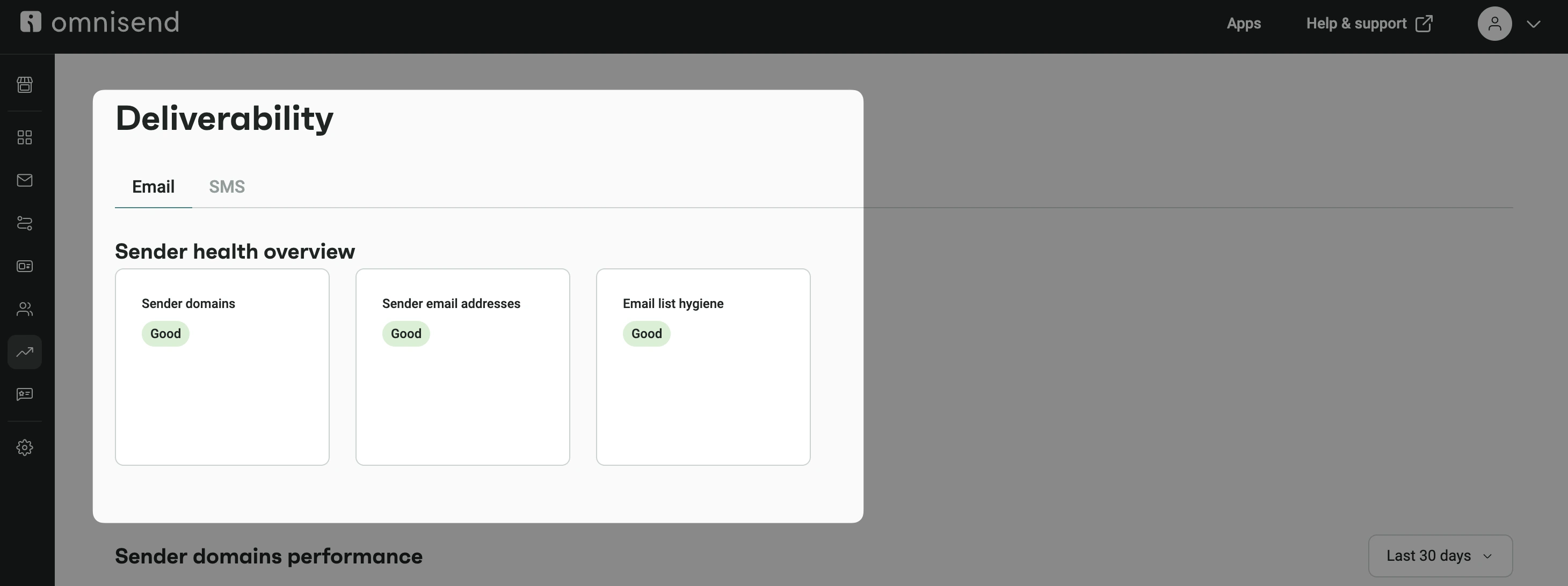
Omnisend helps you monitor your sender domain, sender email address, and list hygiene. Each metric receives a status label: Good, Fair, Poor, or No Status. It’s based on your current deliverability performance, so it’s easier to identify areas that may require attention. Omnisend excludes Gmail from the spam complaint rate, and the threshold is ≤0.08%.
Understand how feedback loops (FBLs) report complaints
FBLs are programs offered by major mailbox providers that notify you (the sender) when someone reports your emails as spam. This lets you remove subscribers from receiving future emails, reducing repeated spam complaints and improving list hygiene.
If you send through an ESP, you don’t need to register for FBLs yourself. For example, Omnisend processes FBLs for you and automatically unsubscribes the complainer.
Monitor deliverability performance regularly
Don’t treat deliverability as a set-and-forget metric. Bounce rates, spam complaints, and engagement trends all provide important signals about how mailbox providers and recipients are responding to your emails.
Tools like Omnisend’s reporting features give you a view of these metrics and help you spot early warning signs of sender reputation issues, like rising complaint rates, before they become a real headache.
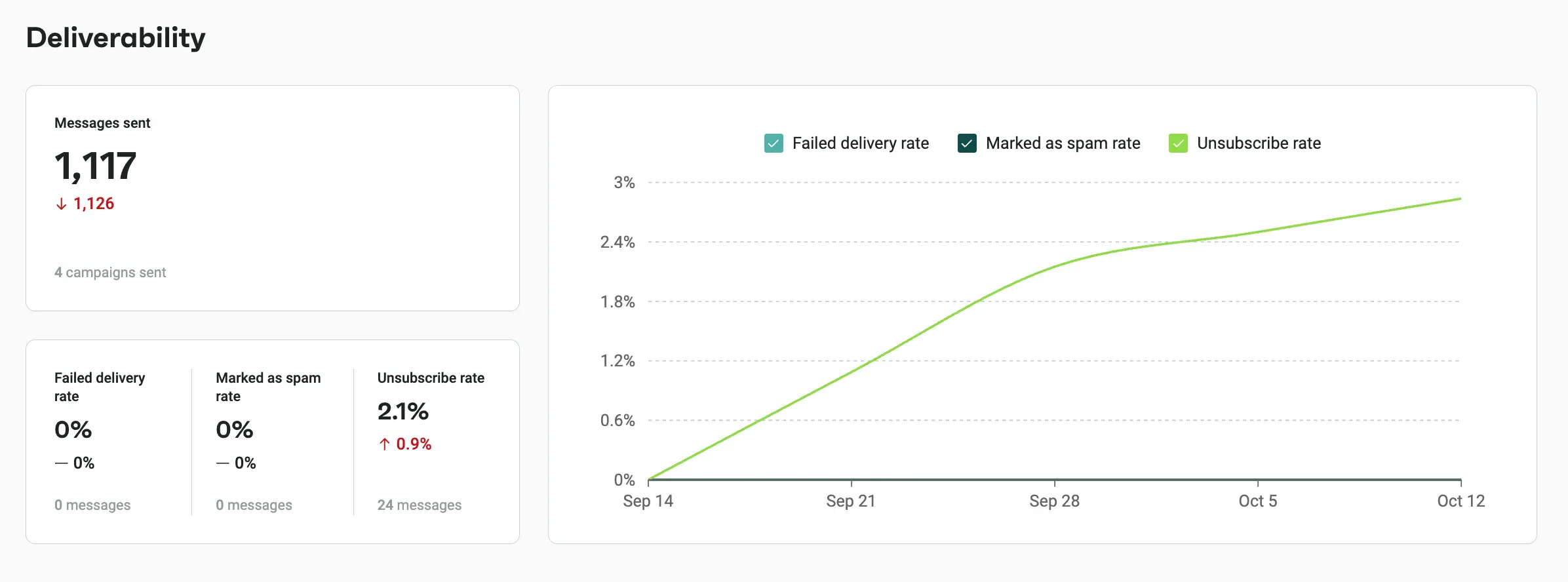
With timely insights into how subscribers interact with emails, you can adjust sending strategies and make more informed decisions about future campaigns.
Final thoughts on managing your spam complaint rate
Brands rarely lose inbox placement because of one bad campaign. They lose it because they send unwanted emails to the wrong audience.
So managing spam rate is more than simply sending fewer emails. It’s about sending more relevant messages to those who still want to hear from you. If you do it right, you protect your sender reputation, maintain strong inbox placement, and build long-term subscriber trust.
Ready to build a healthier email list?
If you want to improve deliverability, try Omnisend’s free plan, which includes important ecommerce features, such as AI-powered segmentation, workflow automation, and real-time email marketing reports, and helps reduce the risk of spam filtering.
Frequently asked questions (FAQs)
Do spam complaint rates affect sender reputation immediately?
Some mailbox providers, like Gmail or Outlook, monitor these spikes closely because they often signal unwanted or irrelevant emails. They also evaluate complaint trends to understand your overall sending behavior.
Keep frequency and messaging consistent, since low complaint rates equal improved long-term deliverability.
Are spam complaints more harmful than unsubscribes?
Unsubscribes are a normal part of marketing and happen naturally, but spam complaints can damage your sender reputation and reduce inbox placement rates.
Can purchased email lists increase spam complaint rates?
Mailbox providers view this as a sign of poor sending practices, which can damage your sender reputation.
Should transactional and marketing emails use separate subdomains?
How often should you review your spam complaint rate?
Complaint spikes typically follow after:
— List imports
— Increased sending frequency
— Changes in content strategy
Monitoring trends helps you spot deliverability problems before they affect inbox placement or sender reputation. Staying proactive means strong engagement and greater subscriber trust.