Omnisend AI
 OFFER






AI SMS marketing uses artificial intelligence to write text messages, choose recipient audiences, select featured products, and predict send times, though available features vary by platform.
In this guide, you will find five ecommerce use cases, a four-step process for getting started, recommendations for measuring ROI, and a review of six AI-powered SMS marketing platforms.
To show how these tactics work in practice, we will follow an illustrative example store throughout the guide: Bloom & Glow (bloomandglow.com), a fictional online skincare brand.
Quick sign up | No credit card required
What is AI SMS marketing?
AI SMS marketing means using artificial intelligence to write texts, choose who gets them, pick which products to feature, or decide when to send them.
Standard SMS marketing automation follows rules you set on your store, such as sending a cart reminder an hour after the cart is abandoned. AI SMS marketing, on the other hand, writes the copy, predicts the best send time for each subscriber, or picks the featured product using customer data. A first-name placeholder or a cart trigger on its own, for example, is standard automation, not AI.
AI can also manage conversational SMS by replying to customers’ texts. When choosing a platform, check that its AI recognizes opt-outs written in plain words, such as “please stop texting me,” and passes unclear replies to a human agent.
| SMS task | Standard automation | AI contribution, where supported | Type of AI contribution |
|---|---|---|---|
| Cart reminder | Send a saved message after a configured delay | Generate copy variations or predict suitable timing | Generate, predict |
| Audience selection | Include customers who meet fixed purchase criteria | Translate an audience request into segment rules, or predict purchase likelihood | Generate, predict |
| Campaign variants | Send one message to everyone, or run a manual A/B test | Pick the approved variant each subscriber is most likely to respond to | Select |
| Personalization | Insert a first name or cart link | Rank relevant products using customer and catalog data | Select |
| Campaign scheduling | Send at the marketer’s chosen time | Predict when each subscriber is likely to engage | Predict |
| Customer replies | Send a fixed reply to keywords such as STOP or HELP | Interpret free-text replies and draft or send an answer | Generate |
5 ways to use AI in SMS marketing
Five ways to use AI in SMS marketing include writing promotional texts, choosing audiences, recommending products, timing sends, and coordinating with email campaigns. AI improves SMS marketing results by helping you prepare texts faster and send more relevant messages at better times.
You should, however, treat these outcomes as results to test against your baseline metrics instead of guaranteed improvements. AI relies on the data it receives, so its effectiveness depends on your store’s existing customer history and instructions.
1. Generate and refine promotional SMS copy
To generate and refine your SMS copy, use AI to draft multiple versions of the same promotional SMS message. While writing the prompt, add the information you want reflected in the output so the AI doesn’t hallucinate. If the output is too long, ask the AI to shorten the message without removing key information.
Generating copy variations manually takes a considerable amount of time. Using AI, you can produce several variations in a fraction of the time. AI tools often miscount characters, so once you pick a version, add it to your SMS platform to verify the length and avoid unexpected billing charges.
- Task: Promote a discount to an existing subscriber list
- AI contribution: Draft several variations of the promotion and shorten the chosen text to fit a single message
- Check: The offer, discount code, deadline, link, brand tone, and final length
- Measure: The time saved in the drafting process, along with clicks and purchases when the versions are tested
Use this prompt to generate an initial promotional SMS:
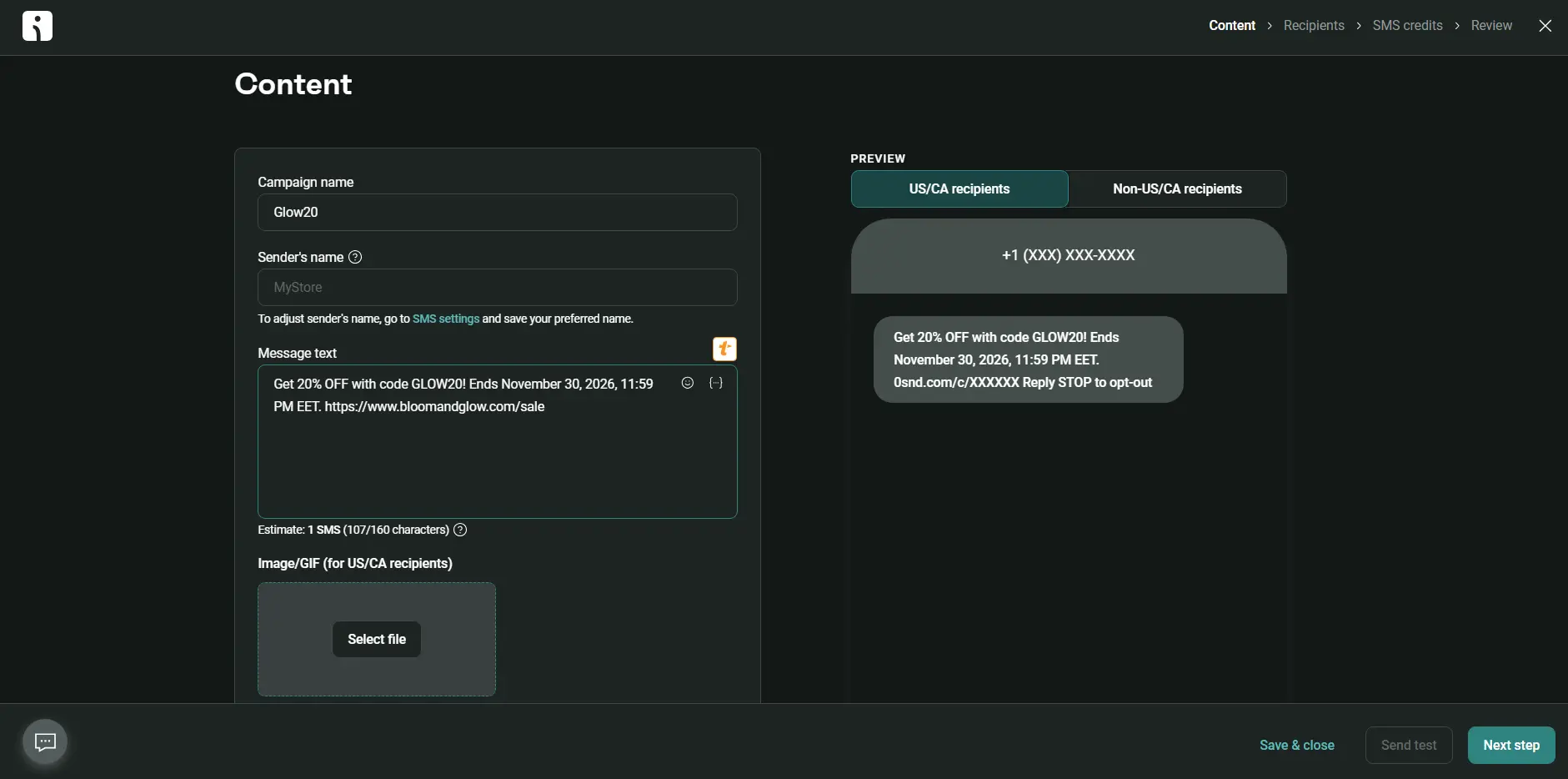
Illustrative example (Bloom & Glow): To promote a weekend sale to repeat skincare buyers, Bloom & Glow fills in the prompt with code GLOW15 for 15% off, ending Sunday at 11:59 PM EST, a friendly and straightforward tone, and the link. After running the shortening prompt, it gets a single-segment draft:
Bloom & Glow: Take 15% off skincare with code GLOW15 through Sun at 11:59 PM EST. Shop now: bloomandglow.com/sale Reply STOP to opt out.
You can test these prompts using the free AI marketing assistant, which provides general advice and doesn’t see your store’s account data.
2. Identify relevant SMS audiences
To identify relevant SMS audiences, AI turns plain-language requests into segment rules (for example, Omnisend Agent’s Agent for Segments feature) or uses predictive features to anticipate which subscribers are likely to purchase (for example, Klaviyo’s “Expected date of next order”).
Rule-based segments and predictive segments use different mechanisms. Selecting “customers who bought from a category in the last 90 days” applies a strict rule based on historical data, which the Agent for Segments does. Klaviyo, on the other hand, can find “customers likely to order again soon,” which needs behavioral prediction capabilities.
Illustrative example (Bloom & Glow): Bloom & Glow types “SMS subscribers who bought a facial serum in the last 90 days and have not ordered in the last 30 days” to build a targeted list for a replenishment offer.
Not every AI segment builder includes predictive capabilities, so you need to verify your needs against your chosen platform’s feature set.
- Task: Choose the most relevant subscribers to receive a text message campaign
- AI contribution: Translate a plain-language prompt into segment rules, or predict future purchase likelihood based on past behavior
- Check: The generated rules make sense, the customer data is recent, and required SMS consent and exclusions apply correctly
- Measure: Purchases and revenue per recipient, alongside unsubscribe rates
3. Recommend products relevant to each shopper
To recommend relevant products to each person, AI analyzes their purchase history and product data to find complementary items based on what they have already bought. Text messages come with strict character limits, so the product recommendations typically appear on the landing page the text links to rather than in the message itself.
Omnisend Agent Pro offers dynamic product recommendations, but these currently work in emails only. SMS-specific platforms handle this within SMS messages; for example, Postscript’s Shopper feature recommends products in back-and-forth text conversations with the customer.
Illustrative example (Bloom & Glow): A subscriber who recently purchased Bloom & Glow’s Vitamin C Serum receives an SMS linking to a page on their website that suggests a matching daily SPF or hydrating moisturizer.
- Task: Show each subscriber an item they are highly likely to buy based on their purchase history
- AI contribution: Pick relevant products for each shopper using previous purchase records and available product data
- Check: The recommended product fits the context, remains in stock, and includes a working link
- Measure: Clicks, resulting purchases, and revenue per recipient
4. Choose suitable SMS send times
To choose suitable SMS send times, AI analyzes past engagement to predict when each subscriber is most likely to engage with or click a message, down to the hour. Attentive does it through the Send Time AI feature, which adjusts delivery time based on each subscriber’s behavior while respecting quiet hours in their local time.
Omnisend Agent Pro also has a similar feature that anticipates best sending times, but it currently only works on email campaigns. Keep in mind, however, that you need to configure these predictive systems carefully so the SMS messages don’t violate local compliance rules or deliver messages at inappropriate hours.
Illustrative example (Bloom & Glow): Instead of blasting its weekend GLOW15 promotion to every subscriber at 10:00 AM, Bloom & Glow uses send-time optimization to deliver the text at 8:00 AM to a shopper who typically browses before work and at 7:00 PM to a shopper who clicks in the evening, while staying within each recipient’s local quiet hours.
- Task: Deliver the text message when the subscriber is most active based on historical data
- AI contribution: Predict the optimal delivery hour for each person based on their individual engagement data
- Check: The system respects legal quiet hours and local time zones, handles subscribers with little history appropriately, and remains disabled for urgent offers
- Measure: Clicks, purchases, and unsubscribes compared with your fixed send times
5. Coordinate email and SMS follow-ups
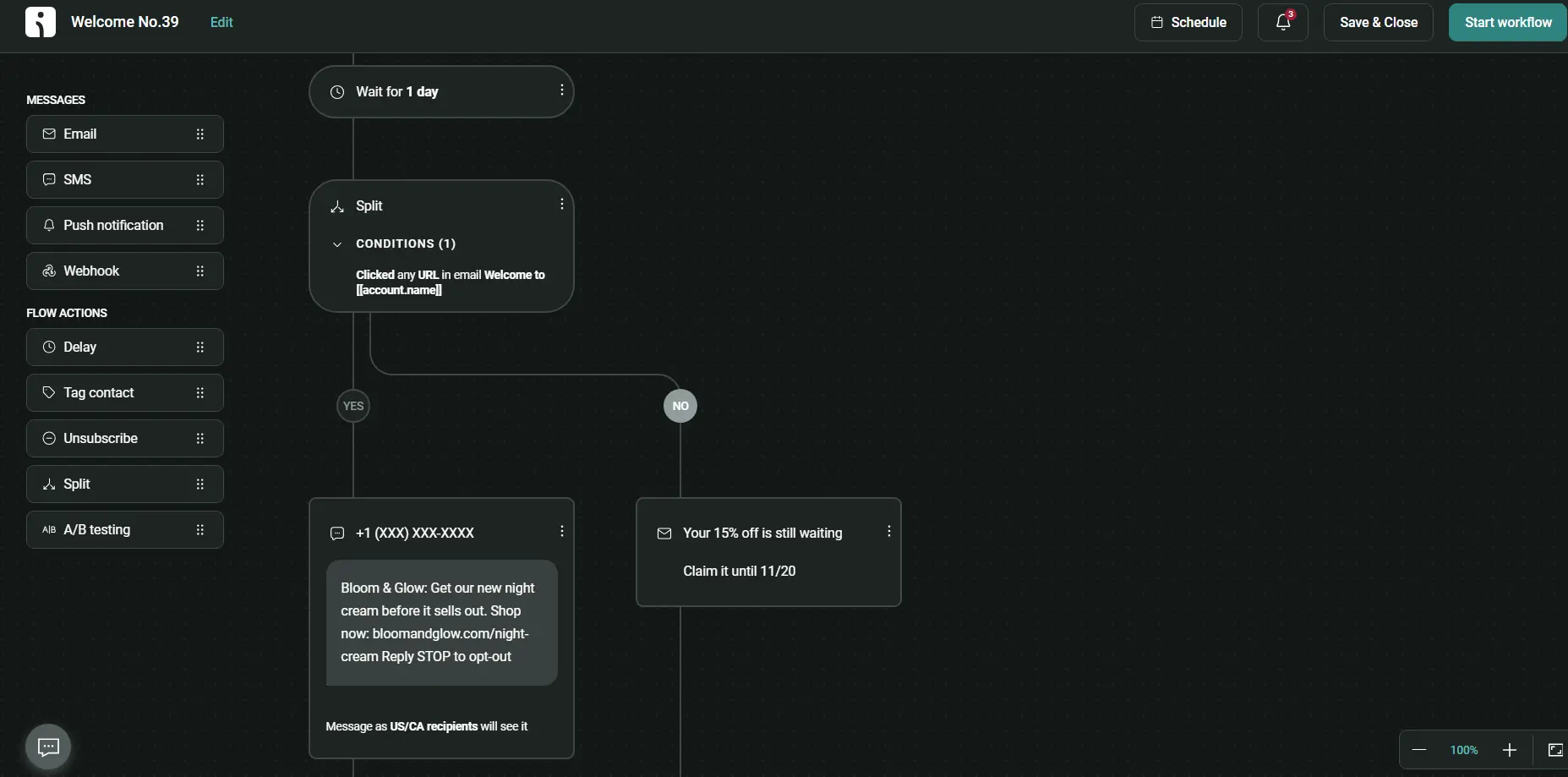
To coordinate email and SMS messages, create a strategy in which email campaigns are the foundation that provides detailed product information with images, and SMS only delivers short reminders to people who have shown interest (e.g., by clicking the email).
Using AI in email marketing alongside SMS allows you to create a consistent messaging strategy that uses both channels’ strengths to your advantage. Use email as your main channel for bulk and frequent communications, and rely on SMS when you need to send quick nudges to engaged customers.
You do need to maintain workflow rules by hand, however, to decide who receives the messages and when the sequence stops. For example, set up an exit rule that removes the customer from a workflow once they make a purchase.
Illustrative example (Bloom & Glow): When Bloom & Glow launches a new night cream, it sends an email featuring ingredient breakdowns, product photography, and customer reviews. If an SMS-opted-in subscriber clicks through to the landing page but does not check out within 24 hours, the workflow sends a brief SMS reminder.
- Task: Follow up with subscribers who engaged with an email campaign but did not purchase
- AI contribution: Adapt the email copy for a shorter SMS format and apply audience or timing optimizations
- Check: SMS consent, the exclusion of people who already bought, and the frequency of messages the subscriber receives
- Measure: Purchases generated from the combined automation, sending costs, and unsubscribe rates
| Stage | Message purpose | Possible AI contribution | Required workflow rule |
|---|---|---|---|
| Initial email | Introduce the collection with product details and imagery | Draft copy from approved product information | Send to eligible email subscribers |
| SMS follow-up after a configured delay (illustrative timing) | Give customers who clicked the email or viewed the collection, but haven’t bought, a short reminder | Adapt the approved message for SMS; use supported audience or timing features | Require SMS consent; exclude purchasers; respect quiet hours and sending limits |
| Purchase or campaign end | End promotional follow-ups | No AI contribution needed | Stop the sequence after purchase or when the promotion ends |
Example SMS:
[store name]: Our new collection is live. See the latest arrivals here: [link] Reply STOP to opt out
How do you start using AI for SMS marketing?
To start using AI for SMS marketing, pick one task, prepare inputs, create a draft, and compare the results against your baseline metrics. Begin with a single process to isolate the AI’s impact on your performance.
- Pick one task and note current results: Select a task, such as writing promotional texts, before you introduce AI tools. Bloom & Glow starts with writing promotional texts for its weekend sale and logs its current baseline from recent manual campaigns: how long it takes to draft variations (for example, 30-45 minutes), along with click-through rates, total purchases, sending costs, and unsubscribe rates.
- Prepare the inputs: Gather the facts the AI needs so it stays accurate: product details, offers, brand tone guidelines, the landing page link, and the opt-out text. Bloom & Glow prepares its prompt: GLOW15 for 15% off skincare, ending Sunday at 11:59 PM EST, a friendly and concise tone, the link, and “Reply STOP to opt out”. It verifies that its target list has active SMS consent and keeps customer names, phone numbers, and order records out of the AI prompt.
- Create and review the draft: Paste the prepared brief into the prompt from use case #1 above to generate variations, then run the shortening prompt on the strongest option. Before scheduling, Bloom & Glow pastes the chosen text into its SMS editor to verify GLOW15, the deadline and time zone, the live link, the opt-out text, audience filters, quiet hours, sending limits, and the segment count. Length matters because longer texts split into several segments that each cost money, and emojis reduce how many characters fit into a single segment, so Bloom & Glow confirms the final message stays under 160 characters without emojis.
- Test and compare: Compare the AI-generated version against a manually written version using similar audiences, changing only one element at a time. Bloom & Glow splits its opted-in weekend sale audience into two comparable groups, sending the AI-assisted copy to one half and a manual draft with the exact same GLOW15 offer, link, and send time to the other. Then, it compares drafting time, clicks, purchases, sending costs, and unsubscribes. If the performance difference after one send is small, Bloom & Glow repeats the test over a few campaigns to collect more data before deciding whether the AI workflow performs better.
How do you measure AI SMS marketing ROI?
To measure AI SMS marketing ROI, compare your campaign profit with total costs, including message fees, platform or AI add-on costs, and the time spent. Then, measure these numbers against your results before using AI.
Clicks don’t always mean purchases, so use revenue metrics to measure impact. Omnisend’s SMS marketing benchmarks show that while SMS campaigns achieve a 12.39% average click-through rate, the conversion rate is 0.12%. There’s a significant gap between engagement and revenue.
However, the Omnisend 2026 Ecommerce Marketing Report shows that automated SMS messages earned an average of $0.74 per send (compared to $0.15 for manual campaigns).
Omnisend Agent Chat, available on Standard and Pro plans, answers plain-language questions about your campaign and workflow results and summarizes individual campaign performance. Use these insights to assess your SMS marketing ROI.
Which AI SMS marketing tools should you consider?
Best AI SMS marketing platforms include Omnisend (for coordinated email and SMS), Klaviyo (for predictive SMS targeting), Attentive (for SMS-first AI optimization), Vibes (for mobile marketing teams), Insider One (for cross-channel journeys), and Postscript (for Shopify SMS programs).
For full reviews of these and other tools, see our complete SMS marketing software roundup.
| Platform | Best for | Documented AI for SMS | Requirement or limitation |
|---|---|---|---|
| Omnisend | Coordinated email and SMS | Omnisend Agent for Segments builds audiences from plain-language prompts; Agent Chat analyzes campaign and workflow performance (Standard and Pro plans); A separate free AI marketing assistant drafts SMS copy outside the app; Omnisend Model Context Protocol (MCP) connects ChatGPT or Claude to account data | No SMS copywriter inside the app; Agent Pro’s send-time optimization and product recommendations cover email only |
| Klaviyo | Predictive SMS targeting | SMS assistant; A best variant chosen per subscriber; Expected next order date and churn risk | Most AI features need a paid plan; SMS assistant and A/B testing on the free plan; Personalized-variation testing strategy requires an account with 400,000+ total profiles |
| Attentive | SMS-first AI optimization | Send Time AI, Audiences AI and Identity AI Concierge replies | AI Pro and Concierge cost extra |
| Vibes | Mobile marketing teams | Recommendations for send time, segments and copy (Nexus engine) | Built for enterprise mobile programs |
| Insider One | Cross-channel journeys | SMS AI Text Generator; Predictive audiences | Enterprise platform; Available channels depend on the Insider One products you buy; Pricing on request |
| Postscript | Shopify SMS programs | Infinity Testing writes and tests message variants; Shopper answers subscriber texts and recommends products | Shopify stores only; AI products priced separately |
1. Omnisend: best for coordinated email and SMS
Omnisend is best for ecommerce teams that want to run and manage email and SMS together in the same interface. For example, you can use Omnisend Agent’s Agent for Segments feature to build an audience for a new product launch from a plain-language prompt (such as “create an audience segment of active customers from the last six months”).
Once you have the audience segment and message draft ready, send the initial email. Then, set up an automation using the Clicked on a message trigger, filtered to that campaign. Add a delay before sending an SMS to subscribers who clicked the email link but did not purchase, with Placed an order as the exit condition.
This workflow allows you to only nudge the people who showed the most interest with an SMS without burning your budget.
2. Klaviyo: best for predictive SMS targeting
Klaviyo is best for data-driven marketers who need predictive analytics to trigger their automated campaigns. For example, you can use Klaviyo’s “Expected date of next order” feature to send an automated text message when a subscriber is statistically most likely to make another purchase.
Klaviyo’s predictive analytics work with both email and SMS flows, so you can send the initial reminder via email and follow up via SMS if the customer ignores it.
3. Attentive: best for SMS-first AI optimization
Attentive is great for ecommerce brands that need SMS-first AI optimization with granular delivery options. For example, you can use Send Time AI to deliver promotional texts at the time that the subscriber typically opens their messages.
Attentive also offers its own email product, so you can coordinate text and email campaigns on one platform.
Its core AI features primarily focus on maximizing mobile text engagement and responding to customer replies via its Concierge tool.
4. Vibes: best for mobile marketing teams
Vibes is best for enterprise mobile marketing teams who manage complex mobile programs at scale. For example, you can use the platform’s Nexus engine to optimize send times and segment audiences across both SMS and mobile wallets.
Vibes connects with external email platforms via an application programming interface (API) rather than offering native email marketing, so you need to sync your data to ensure email and SMS campaigns don’t overlap or overwhelm subscribers.
5. Insider One: best for cross-channel journeys
Insider One is often used by enterprise brands that manage complex customer journeys across web, app, email, and SMS. For example, you can use the platform’s predictive audiences to trigger an SMS message only to subscribers who demonstrate a high likelihood to churn.
You can coordinate these text messages with email campaigns and suppress SMS delivery for customers who already received a retention email earlier in the week.
6. Postscript: best for Shopify SMS programs
Postscript is best for Shopify stores focused on maximizing their SMS engagement and conversational ecommerce. For example, you can use the Shopper feature to handle conversational replies, answer product questions, and recommend items within the text thread.
Postscript has also expanded its feature set to include email, which currently has a waitlist. Once access is available, you no longer need to connect a dedicated email marketing platform to coordinate SMS and email workflows together.
Make AI SMS marketing useful before expanding it
To make AI SMS marketing useful, start with one task, keep checking the output, and expand once the results are measured. Don’t scale until you’ve tested it.
You can use Omnisend Agent to build audience segments through Agent for Segments and generate email subject lines and preheaders through Agent for Subject lines. For SMS copy, use Omnisend’s separate free AI marketing assistant, then add the approved text to your coordinated email and SMS workflows.
Quick sign up | No credit card required