Omnisend AI


 OFFER
OFFER









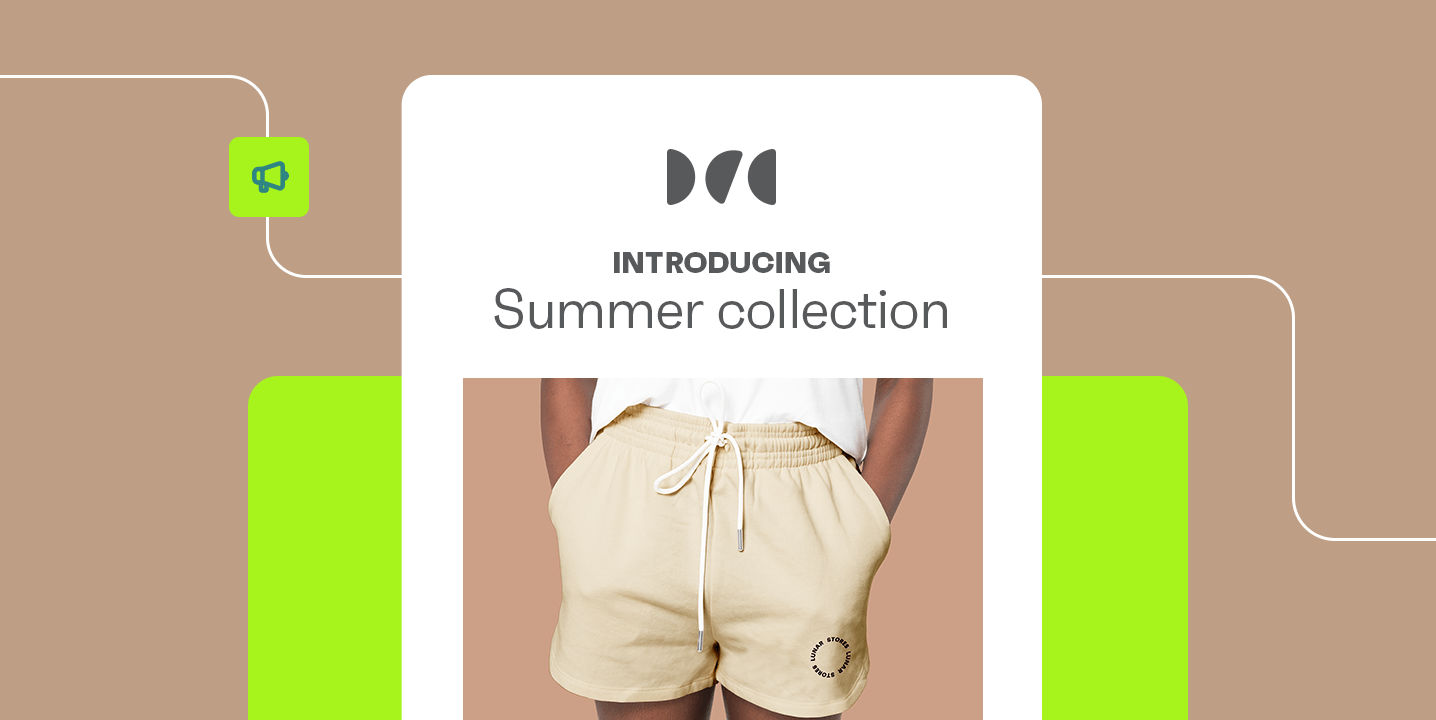

An announcement email template helps ecommerce brands launch products, promote updates, and drive sales efficiently. It gives you a repeatable structure, so you don’t have to start from scratch every time.
Omnisend ecommerce research shows that email has an average open rate of 30.7%. More importantly, Omnisend customers get $79 back for every $1 spent on email. This makes announcement emails more than awareness tools. They directly contribute to revenue growth.
The format works across pretty much any send: new collections, brand collabs, store updates, flash sales. And when the structure is already there, you spend less time on the email and more time on the actual offer.
Here’s what this post covers: the main types of announcement emails, 12 real examples, ready-to-use templates, and best practices to help every send perform.
What are announcement emails?
An announcement email is a targeted message that informs subscribers about something new or significant. This could include a new product release, a pre-order opportunity, a limited-edition drop, a brand partnership, or a special event.
Using email for announcement campaigns gives your ecommerce brand a direct line to its most engaged audience. This kind of email drives traffic to product pages, creates urgency, builds anticipation, and rewards subscribers with early access.
Here are the most common types of announcement emails that ecommerce brands send.
Types of ecommerce announcement emails
Here are seven ecommerce announcement emails you can send to subscribers:
- Introducing a new product/collection: You can send a product launch email to showcase a product before it goes live. Best for building anticipation and driving traffic.
- A limited-edition product: It creates a sense of urgency for people to buy products. Best for creating FOMO around exclusive drops with limited inventory.
- Special collaboration: It announces a partnership with a known brand and taps into its customer base. Best for adding credibility to your brand.
- Opening a physical store: An announcement email invites subscribers to visit your physical store. Best for segmenting subscribers based on location.
- Pre-order announcement: You can offer your subscribers an exclusive opportunity to place orders before the official product launch. It’s effective for gauging demand and rewarding customer loyalty.
- Special event: This email invites subscribers to attend a physical or virtual product launch, webinar, or store popup. Best for short email sequences, such as a save-the-date or a reminder.
- Improvements on your online store: This informs customers of improvements in services such as shipping, checkout, and delivery options. This builds trust and shows responsiveness to feedback.
Omnisend’s pre-built automation workflows are built to handle announcement email sequences, from product teasers to limited-edition drops. Explore Omnisend’s announcement email templates and start driving results. Start free.
| Types | Best for |
|---|---|
| Product launch | Best for creating hype before going live |
| Limited edition release | Best for urgency and FOMO-driven sales |
| Brand collaboration | Best for audience growth and credibility |
| Physical store opening | Best for location-based segments |
| Pre-order | Best for gauging product demand |
| Special event | Best for webinars and in-person events |
| Store improvement | Best for building trust and showcasing growth |
How to write an effective announcement email
Even the best offer may not perform well if the email itself doesn’t attract the subscriber’s attention. These four fundamentals separate announcement emails that convert from ones that get ignored.
Write a subject line that earns the open
Your subject line is the first thing subscribers see. Personalized and action-oriented subject lines can increase open rates by up to 50%. This makes subject lines the highest-leverage element of any announcement email template.
Here are six subject lines that work for announcement emails:
| Your first look at [Product Name] | Exclusivity |
|---|---|
| Limited drop: only 500 available | Scarcity |
| [Name], something new just landed | Personalization |
| Pre-order opens tomorrow: Be ready | Urgency |
| We partnered with [Brand]: Here's why | Curiosity |
| Early access ends at midnight | Deadline |
Keep subject lines under 40 characters, so they display fully on mobile devices. You can also A/B test different subject lines to discover what resonates best with your audience over time.
Omnisend’s built-in A/B testing lets you test subject lines and sender names across a live split of your audience before rolling out the winner.
Keep the message focused and scannable
Once subscribers open your email, they scan before they read. Use short paragraphs of two to three sentences, bullet points for key details, and generous white space to guide the eye.
Additionally, an announcement email should answer three questions:
- What’s new?
- Why should the reader care?
- What should they do next?
If any of those answers are missing, subscribers may lose interest in the email. You should also ensure your email designs are mobile-responsive, as 81% of emails are opened on mobile devices.
Use a clear and compelling call to action
Your announcement email template needs one primary CTA, placed above the fold and repeated at the bottom. Use action-oriented language, such as “Pre-order now,” “Shop the collection,” and “Get early access.”
Remove competing links and visual noise around email CTAs to increase clicks. Omnisend’s drag-and-drop email builder makes it easy to design CTA buttons that stand out visually without coding.
Segment your audience for maximum relevance
Not every announcement email is relevant to all your subscribers. That’s why you need targeted email marketing to match the message to the audience.
This helps you segment subscribers by purchase history, location, engagement level, or VIP status, making each announcement feel personally relevant. Sending exclusive early access to your VIP segment, for example, drives conversion and reinforces loyalty.
Omnisend’s behavioral segmentation analyzes data such as purchase history to build dynamic segments automatically. This way, your limited-edition announcement email reaches your most engaged shoppers first.
3 announcement email templates you can use today
A quick way to send better announcements is to start with a proven announcement email template and customize it for your brand. These three templates are ideal for ecommerce. You can use them as-is or adapt the placeholders to fit your brand voice.
New product launch announcement email template
Use this announcement email template when sending product launch emails to drive traffic to the product page.
Subject: Introducing [Product Name] — Now available
Preview text: The [Benefit] you’ve been waiting for is finally here
Hi [First Name]
We’re excited to introduce [Product Name], designed to help you [Benefit].
With thoughtful features and a focus on real-world use, [Product Name] delivers reliable performance at [Price]. Quantities are limited.
Ready to see the difference for yourself?
CTAs:
Primary CTA: Shop [Product Name] now
Secondary CTA: View [Collection Name]
Limited-edition or flash sale announcement email template
This announcement email template comes in handy when inventory is genuinely limited or the sale window is short.
Subject: 48 hours only: Don’t miss this limited drop
Preview text: Only [X] left. Once it’s gone, it’s gone.
Hi [First name]
Our limited-edition [Product Name] is here, but only for a short time.
This offer ends in [Deadline]. Once it sells out, we won’t be restocking. So if you’ve had your eye on something like this, now’s the moment.
Primary CTA: Shop now / Claim yours
P.S. Know someone who’d love this? Share [Collection URL] with them before it’s gone.
Brand milestone or collaboration announcement email template
You can share a significant company moment, such as a partnership, rebranding, or anniversary, using the announcement email template below.
Subject: Big news: We’ve teamed up with [Partner]
Preview text: Celebrating together with an exclusive offer for you
Hi [First Name]
We’re thrilled to announce [Partnership]. This means [Benefit], something we’ve been working toward for [Timeframe].
As a valued subscriber, you get [Perk]. We’re just getting started, and we’re glad you’re part of the journey.
Primary CTA: Explore what’s new
You can build and customize all of these templates inside Omnisend using the drag-and-drop email builder, no coding required. Pre-built automation workflows let you schedule your full announcement email campaign sequence in minutes.
Explore Omnisend’s template gallery to find designs for ecommerce brands. Start free.
12 best announcement email examples for ecommerce
Now let’s look at 12 standout announcement email examples from real ecommerce brands. You’ll see what makes each one effective.
1. Apple pre-order email campaign
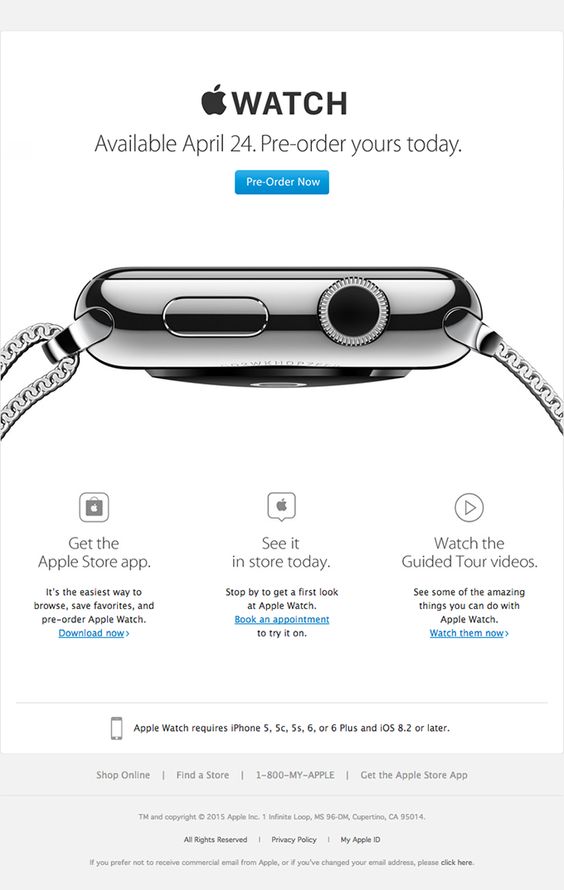
Apple product launch email uses multiple CTAs (app download, in-store visit, and product videos). This allows the brand to capture demand across different customer journeys in a single email.
This new product announcement email leads with a pre-order email CTA for subscribers who are ready to buy. Also, its teaser image sparks curiosity, prompting subscribers to click on any of the links to learn more about the product.
Key takeaway: You can use this announcement email template to serve different stages of buying intent for a new product. It also provides opportunities for upsells and cross-sells.
2. Harry’s new product email teaser
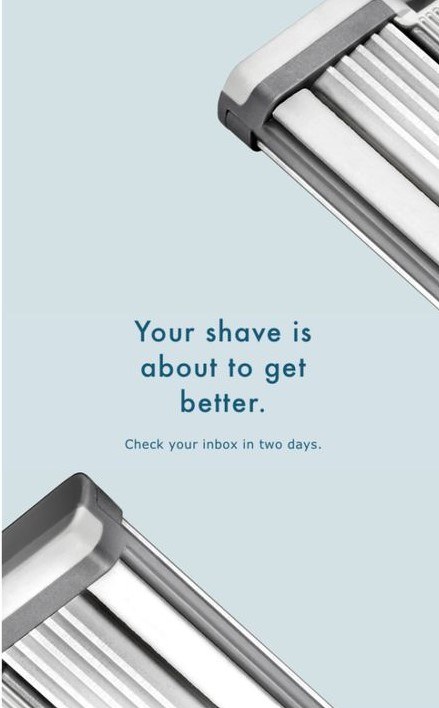
This announcement email features a teaser for an undisclosed upcoming product. It withholds information, making subscribers eager to know what’s coming up in two days.
The message is intentionally vague, as there’s nothing to reveal yet. This creates curiosity and encourages subscribers to stay engaged for the next update.
Key takeaway: You can use this email announcement template as the opening message in an email marketing automation sequence where each email builds on the last until the full reveal. With Omnisend’s automation workflows, you can schedule a teaser email as the first step in a multi-email product launch sequence.
3. Love Cocoa “We are now on Amazon” email
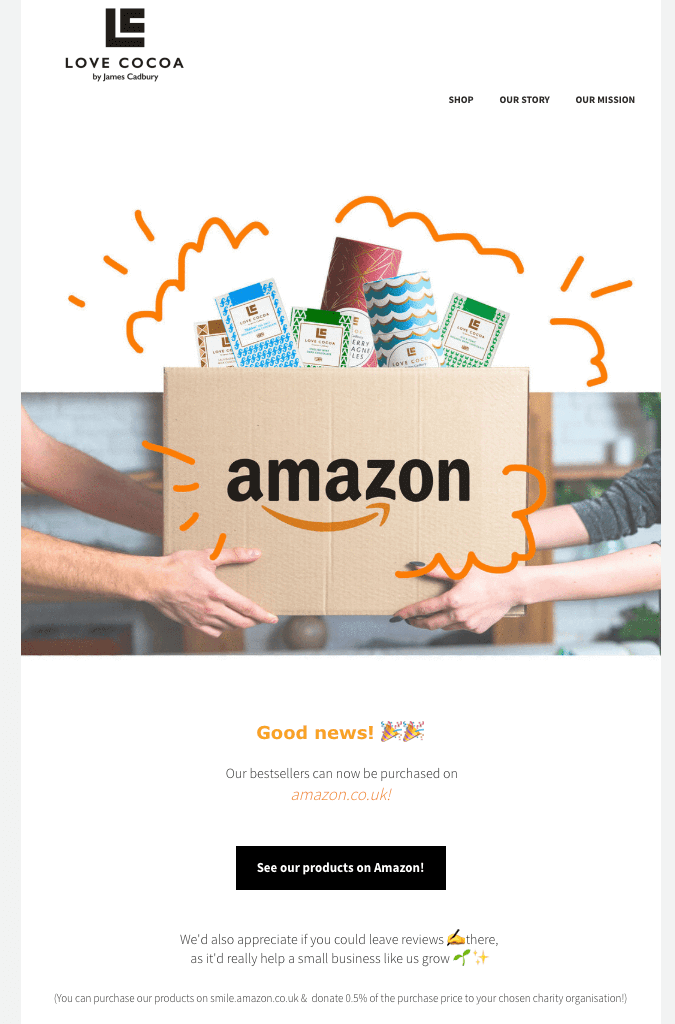
This email announcement keeps everything working together, from the use of emojis to the brand colors and layout. The email evokes excitement, which is a total fit considering the good news it intends to share.
The announcement is brief, and the generous white space pushes the eye straight to the CTA button.
Key takeaway: Since the offer is location-specific, this announcement email template is effective for targeted email marketing messages. You can segment subscribers based on location to maintain relevance and encourage opens, clicks, and conversions.
4. VanMoof EU outlet limited sale
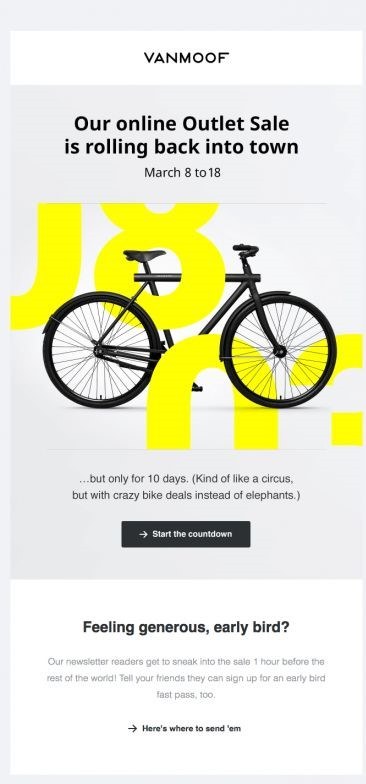
VanMoof’s flash sale email promotes discounted products over a ten-day window. It also rewards early subscribers with access to deals one hour before the general public.
What makes this announcement email template effective is the combination of a countdown timer CTA and a referral CTA. One drives urgency, the other extends reach by inviting friends into the exclusive offer.
Key takeaway: Pairing a time-sensitive incentive with a referral link lets you increase sales and grow your email list while running a campaign using announcement emails. Omnisend’s countdown timer block makes adding urgency to limited-time announcement emails straightforward, without needing any custom code.
5. Moment new product launch email
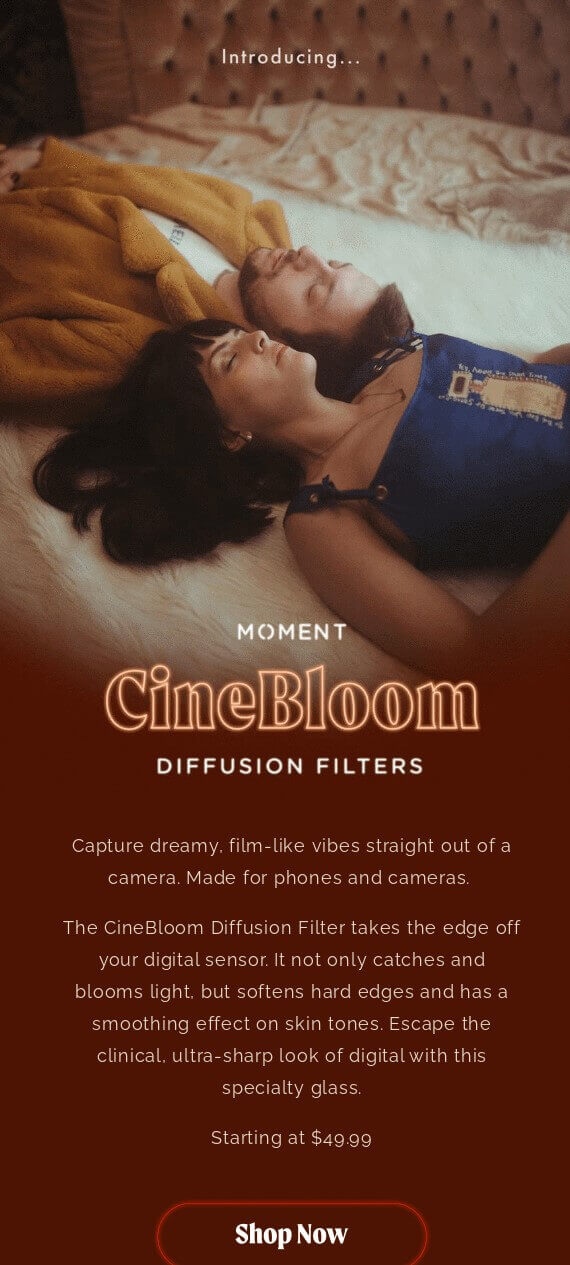
This email marketing example announces a new photography product, notifying subscribers that it’s available for purchase. Since the email is about photography, the hero image works perfectly.
This email combines detailed product information, transparent pricing, and a direct CTA, giving subscribers the information they need to make a purchase.
Key takeaway: Telling subscribers everything they need to know, such as price and benefits, convinces them to consider buying from your brand.
6. Hers and J.Lo. collaboration email
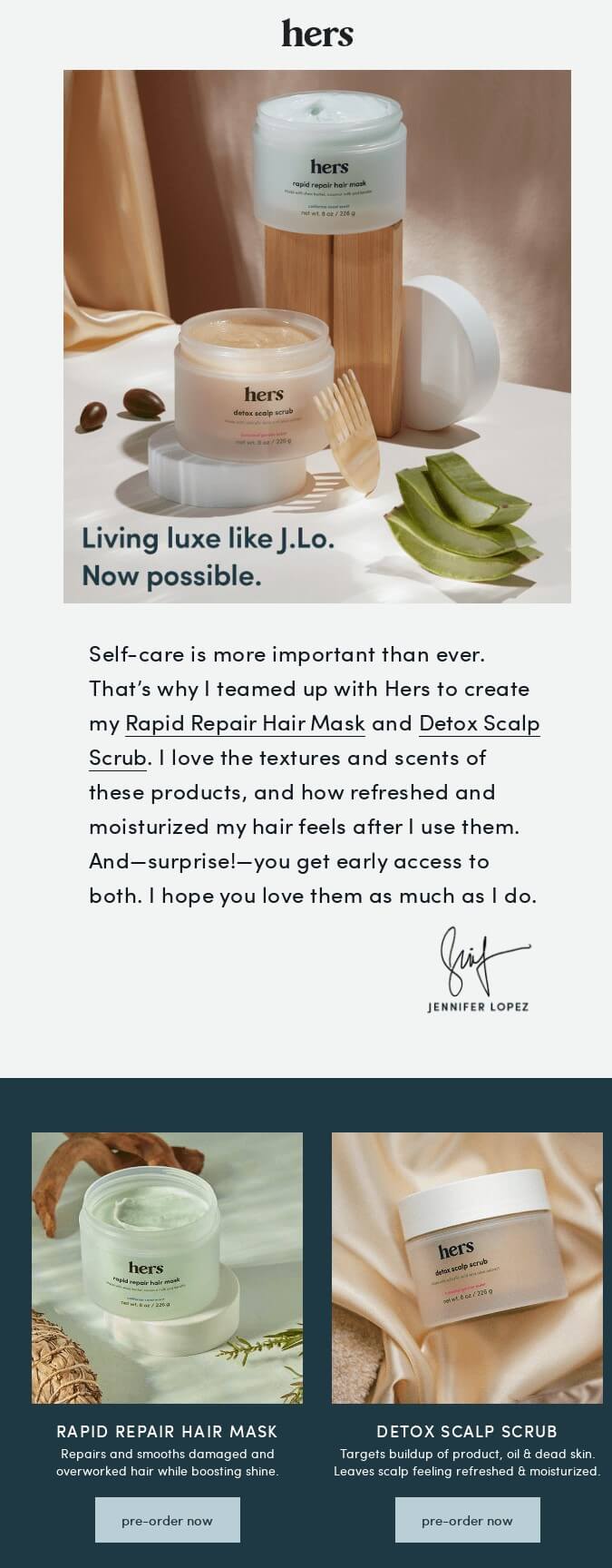
This email announces a new hair care line collaboration with a popular brand. Subscribers get exclusive early access to products before they’re officially available for purchase.
This announcement email uses social proof, a signed statement from a renowned celebrity, to highlight the benefits of the upcoming product. Such endorsements can influence sales.
Key takeaway: With this ecommerce marketing email campaign, you can promote your business and achieve your brand awareness goals. You can include an early access offer to provide conversion opportunities for your brand.
7. Apple’s tax-free shopping announcement
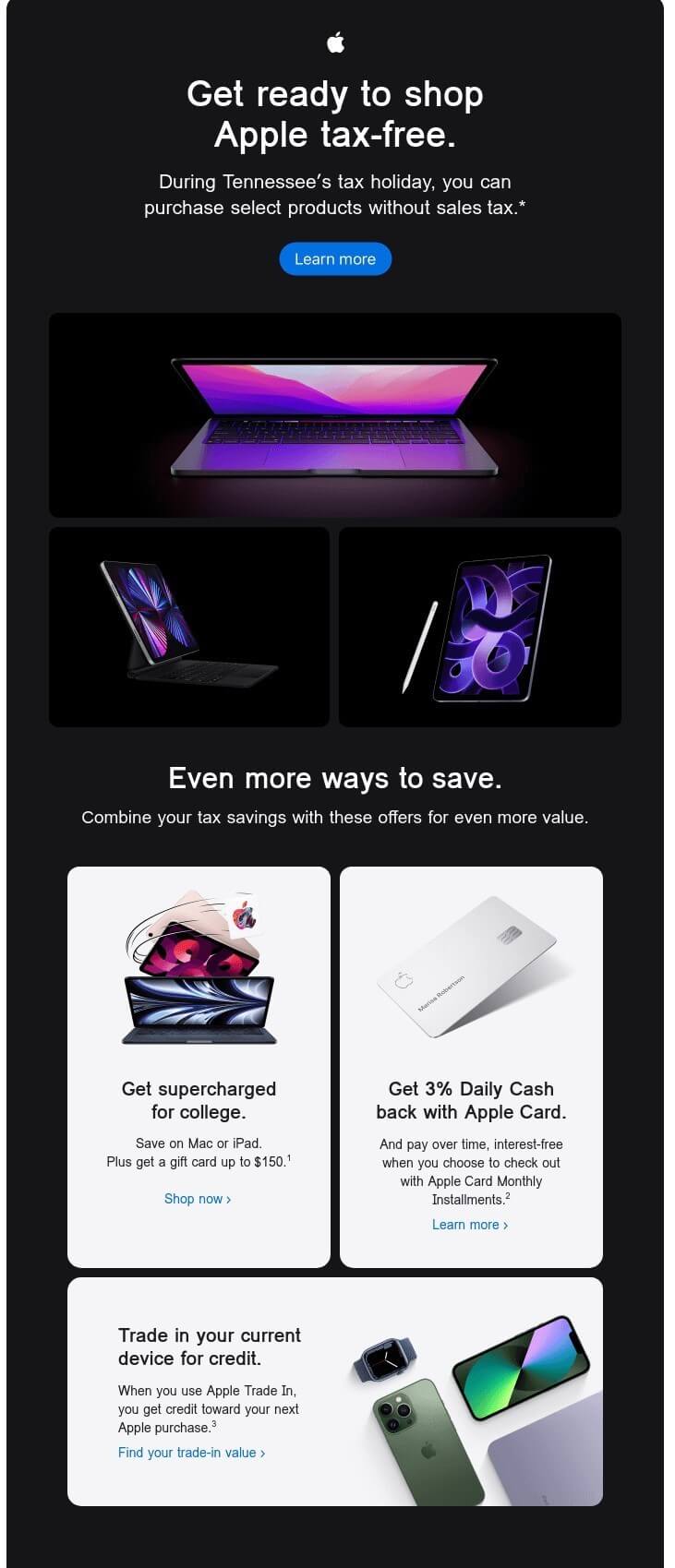
This announcement email targets subscribers in Tennessee with information about a tax holiday on selected products.
This strategy of piggybacking on an external event makes it effective. It motivates shoppers to take advantage of the lower rates.
Key takeaway: When an upcoming special event already gives your audience a reason to buy, an announcement email template that adds to that offer can double the incentive.
8. Magic Spoon limited edition flavors
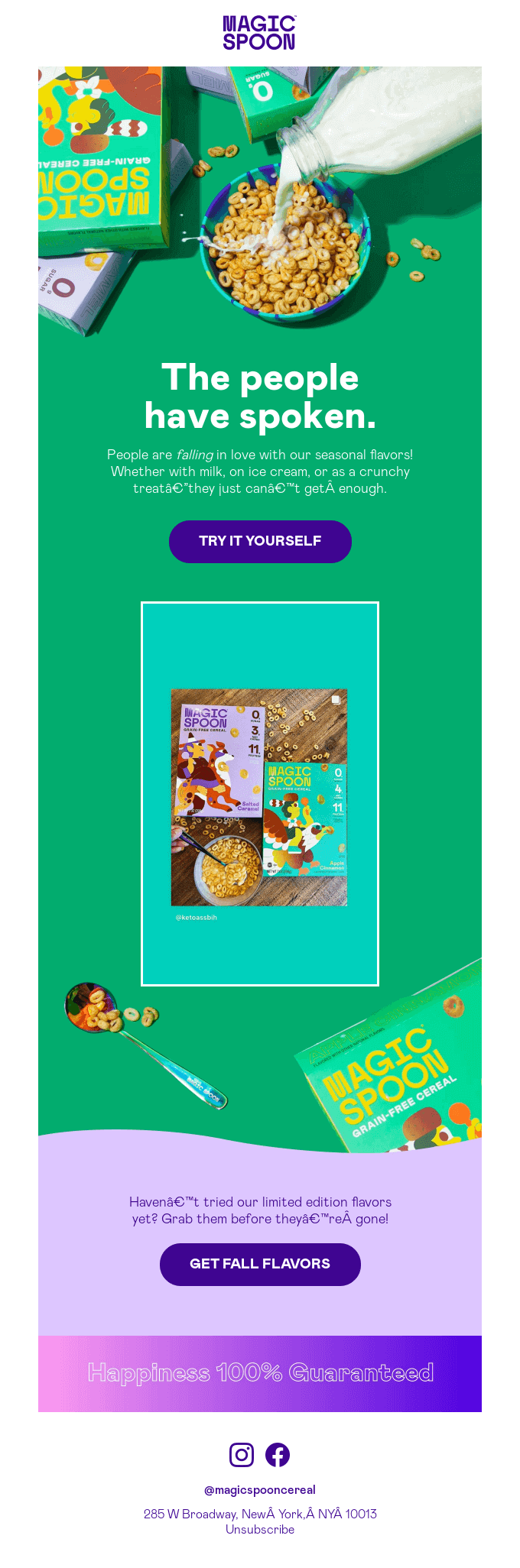
Here, Magic Spoon reintroduces its seasonal, limited-edition flavors. It leads with wordplay that matches its consistent playful personality. For instance, the pun on “falling in love” with its “fall” flavors is hilarious and catchy.
Another thing this announcement email does well is the combination of a brief copy and two clear CTAs. This makes it easier for subscribers to go directly to the products page at the beginning or end of the design.
Key takeaway: For seasonal drops, let your brand voice do the heavy lifting. You don’t always have to rely on price reductions to drive conversions.
Quick sign up | No credit card required
9. Scratch’s “We’re a B Corp” announcement email
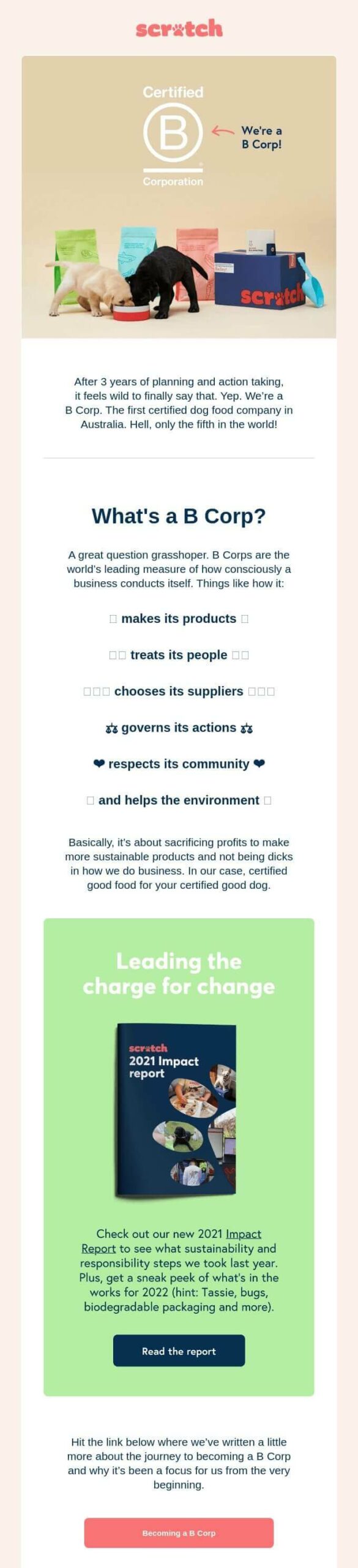
In this announcement, Scratch shares its achievement of becoming a certified B Corp. Such email design templates are ideal if your company has hit a major milestone.
What makes this email effective is its transparency. By inviting subscribers to read the full report, the brand demonstrates openness and accountability. This assures potential customers that they’re transacting with a transparent, credible, and trustworthy company.
Key takeaway: Not every announcement email needs to sell a product. Sharing your company’s milestones with a focus on brand values and credibility can improve customer relationships.
10. Nike’s Ultraboost 19 announcement email
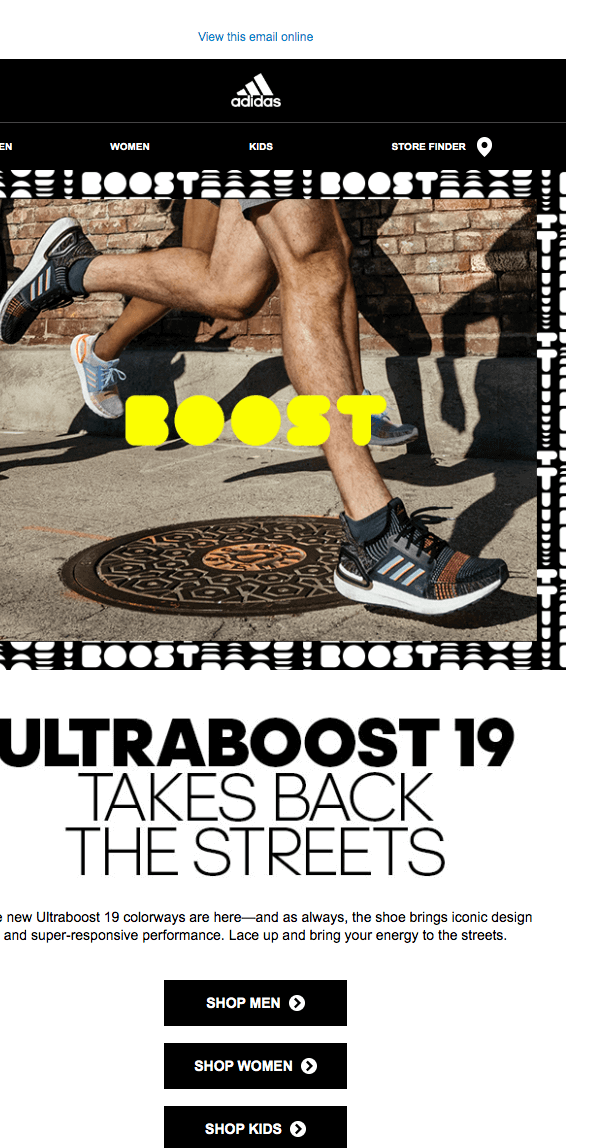
Nike’s Ultraboost 19 announcement leads with a striking image of an athlete using the product, paired with the tagline “takes back the streets.” This creates energy and immediately captures attention.
The CTA buttons are segmented by age and gender, making it easy for customers to go directly to their preferred category pages. This reduces friction between the email and buying the product.
Key takeaway: When your product spans multiple customer segments, using a segmented CTA moves subscribers closer to conversion from the first click.
11. Peloton’s new product launch announcement email
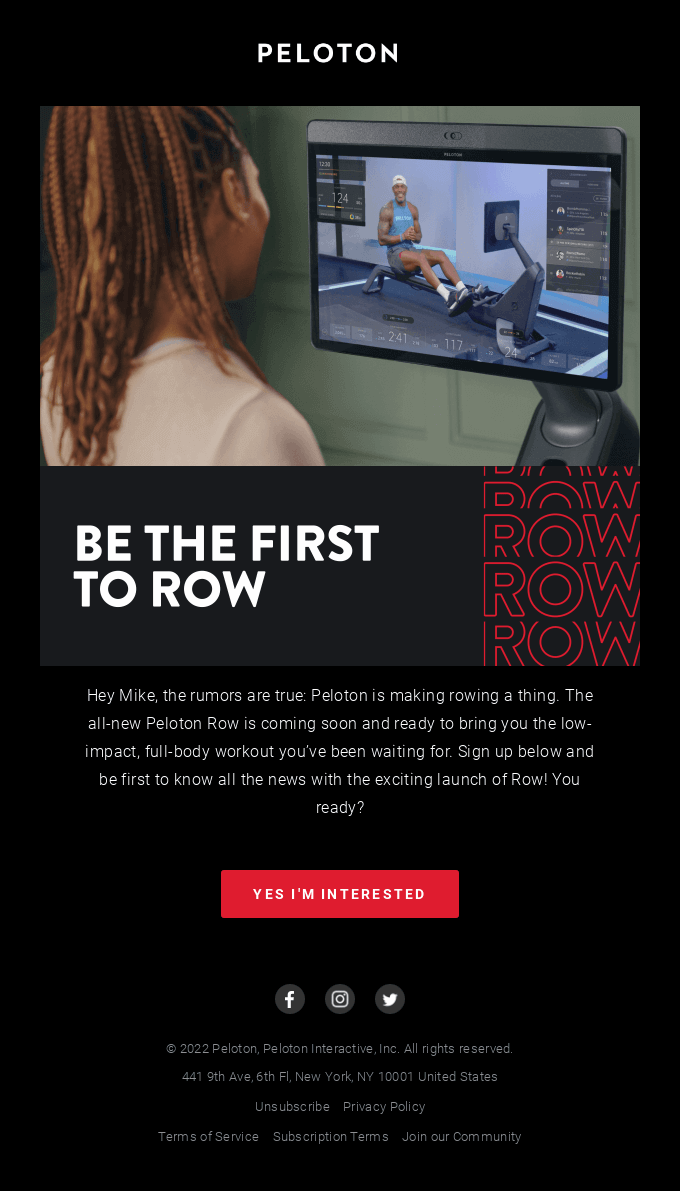
This product launch email invites subscribers to sign up for exclusive updates ahead of a new product reveal. It stands out for its conversational tone and use of email personalization to maximize impact. For instance, here, the email addresses the reader by name.
According to a study, 90% of consumers are more likely to buy from a brand that uses personalized communication. In fact, 81% ignore irrelevant marketing messages.
Key takeaway: Your email should show that you know your subscribers on a personal level. It makes them feel like you’ve invested in building a relationship with them. As a result, they’ll consider buying from you, recommend your brand to others, and return to buy more products.
Omnisend’s personalization features go beyond first-name merge tags. You can dynamically customize product recommendations, content blocks, and CTAs based on each subscriber’s browsing and purchase history.
12. Farfetch’s new season coat edit
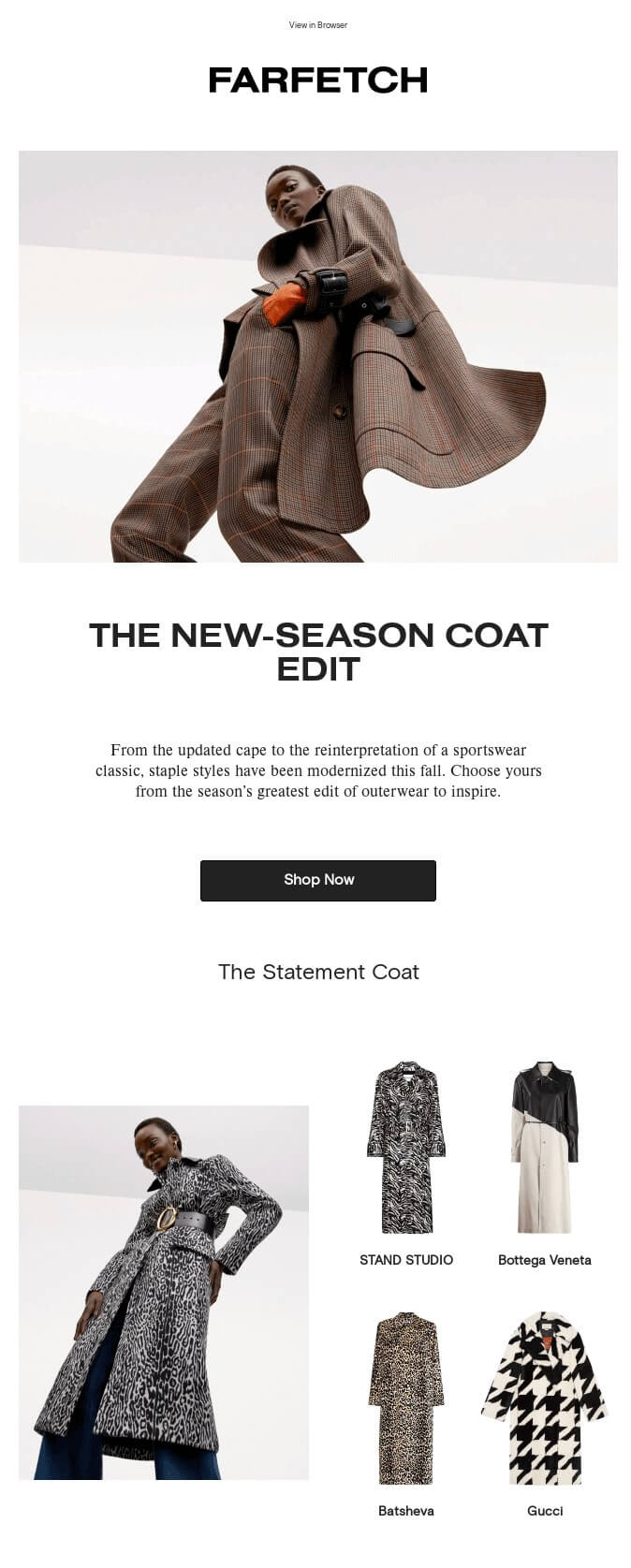
This email introduces Farfetch’s new creative coat designs for fall. For fashion ecommerce, redefining vintage designs and making them uniquely modern sets brands apart.
Showcasing product variety attracts subscribers’ attention, as they get a hint of the range available on the product page. It also gives them a reason to click through and explore.
Key takeaway: Using a sneak peek email rather than a single hero shot gives subscribers more entry points to explore the collection. You can also use this type of announcement email to inform subscribers about product updates and reinventions.
Start creating announcement emails that convert
The best ecommerce announcement email template includes three key elements. First, it reaches the right audience segment with a relevant message. Second, it uses a compelling subject line and a single CTA that drives clicks. Third, it’s built into automated sequences that save time and maximize reach.
Omnisend gives you the tools to execute all three effectively, from drag-and-drop templates and behavioral segmentation to A/B testing and real-time reporting. The platform is built specifically for ecommerce with native integrations for Shopify, WooCommerce, BigCommerce, and Wix out of the box.
You can browse the template gallery to find designs built for every announcement type. Afterward, head straight to email campaigns to see how Omnisend’s automation workflows bring it all together. Omnisend merchants earn $79 for every $1 spent on email and SMS.
Quick sign up | No credit card required
FAQs
An announcement email should include a compelling subject line, an explanation of what’s new, a reason the reader should care, and a single call to action.
This means it should open with the product or offer, communicate the benefits, and encourage subscribers to take the next step. This could be pre-order, shop now, or learn more.
Keep the layout scannable with short paragraphs and a mobile-friendly email design.
When writing an announcement email, start with a subject line that shows value or urgency. The email body should open with the announcement itself, not a preamble.
Additionally, the email should answer three questions in order: what’s new, why it matters to the reader, and what they should do next.
Use one primary CTA and segment your emails so the announcement reaches the subscribers most likely to act on it.
You should send announcement emails when it’s most relevant, such as 24 to 48 hours before a launch, sale, or event goes live. You can also use an email sequence:
— A teaser to build anticipation
— A launch-day email to drive action
— A follow-up for subscribers who didn’t open or click the first send
The best announcement email subject lines are specific, short, and action-oriented. They’re best kept under 40 characters for mobile readability.
High-performing subject lines include the following:
— Scarcity cues (“Only 100 available”)
— Personalization (“[Name], something new just landed”)
— Exclusivity (“Your early access starts now”)
— Urgency (“Ends tonight. Don’t miss it”)
Ensure to A/B test subject lines regularly to learn what resonates with your audience.
Most announcement campaigns perform well as a three-email sequence: a teaser, a launch email, and a follow-up reminder. A single email might be enough for minor updates, but for product launches, limited-edition drops, or major brand milestones, a sequence is necessary.
Platforms like Omnisend let you build announcement email sequences. They automatically send the right follow-up based on whether a subscriber opened or clicked the first email.