Omnisend AI


 OFFER
OFFER










Using emojis in email subject lines can make a message stand out in a crowded inbox. But they only work when they fit your audience, the context, and the moment.
Used well, a single emoji adds a visual cue, saves space, and reinforces your message. Used carelessly, it can confuse readers or weaken the message. That’s why you need to test them properly before you fully commit.
Inbox competition continues to grow every year, and the subject line is often the deciding factor in whether someone opens an email. For ecommerce brands that depend on email to drive revenue, making a strong first impression is critical.
The reality in 2026 is that not every audience responds to emojis the same way. The smartest approach is to use them deliberately and test what works.
This guide covers the benefits, best practices, real examples, and common mistakes to avoid.
Quick sign up | No credit card required
Why are marketers using emojis in email subject lines?
Marketers use emojis in email subject lines because they do something plain text cannot. They add color and a visual cue that helps an email subject line stand out.
A small symbol can convey tone and meaning at a glance. That is why a well-placed emoji in an email subject line often feels more human than words alone.
The main benefits of email subject emojis are practical:
- They improve visibility: A splash of color breaks the monotony of black-and-white text
- They save space: An emoji can communicate the meaning of a couple of words in a single character
- They support brand personality: Used consistently, email subject line emojis make a brand feel friendly
- They make promotions more noticeable: a symbol can quickly signal a sale, a discount, or a deadline.
- They reinforce the message: The right emoji echoes the point and helps it land faster
One caveat matters as much as the benefits. Results vary by audience, and not every campaign benefits from using emojis in subject lines. That’s why you should conduct tests to see where emojis work best.
Also, don’t overuse emojis, as they might make your emails look spammy.
Related reading:
100 best email subject lines for sales in 2026
Best practices for using emojis in email subject lines
The following best practices are intended to help guide your testing process. Instead of treating them as a checklist, test each tactic independently, evaluate the results, and keep the ones that perform best for your subscribers.
To show how each principle works, we’ve included a quick example alongside every recommendation.
Keep emojis relevant
The goal of using emojis in subject lines is to reinforce the message, not overshadow it.
Before adding an emoji, consider whether it fits the campaign, reflects your brand, and supports the subject line’s intent.
When an emoji is relevant, it helps the readers grasp the message quickly. When it isn’t, it can distract the readers and make the email look less professional.
The same logic applies to seasonal sends and time-limited offers, where the right emoji can add urgency.
- ✅ Black Friday Starts Now 🚨: The siren reinforces the urgency of a major sale
- ❌ Black Friday Starts Now 🐶🌴🍕: These have nothing to do with the offer
A relevant emoji reads instantly, while an unrelated one slows the reader down.
Add no more than three emojis
More emojis do not mean more opens. One subject line emoji is often enough to make your point.
Two can work for a seasonal campaign, but beyond three, you risk emoji overload.
Piling them on makes a subject line harder to read and can make the email go to the spam folder.
Keep your emojis for subject lines simple, and let the words carry the detail.
- ✅ Last chance to save 30% ⏰: One emoji underlines the deadline
- ❌ ⏰🔥🚨😱 Last chance to save 30%: Five competing symbols bury the offer
Test emoji performance with A/B testing
Because audiences react differently, testing is the only reliable way to find the best emojis for email subject lines for your list.
Begin by running an A/B test between a subject line that includes an emoji and one that doesn’t. Then test different emoji positions within the subject line.
- A: New arrivals just dropped 👀
- B: New arrivals just dropped
Send each version to a sample of your audience, give it time to gather opens, and let the data decide.
Omnisend supports subject line split testing and can automatically send the winning variation. Its subject line tester can provide an additional quality check before launch.
Preview emojis across devices and email clients
Most email clients support emojis, but there may still be variations in how they appear across inboxes.
An emoji that appears one way on a mobile device may look different on a desktop email client. In older email apps, it may not render properly or may be missing entirely.
The table below shows what to expect across the main email clients:
| Email client | Emoji support | What to keep in mind |
|---|---|---|
| Gmail (web and mobile) | Renders most emojis reliably | Uses Google's emoji set, so the look differs from Apple's |
| Apple Mail (iOS and macOS) | Full-color support | Shows Apple's designs, the style many subscribers expect |
| Outlook (older desktop) | Inconsistent — can show black-and-white or a box | Older Windows builds lack full color emoji support |
| Yahoo Mail | Renders emojis well | Usually close to the sender's intended look |
| Android mail apps | Render correctly on modern devices | Appearance follows the device's own emoji set |
Before you send, preview your subject line in the major email clients so readers see what you intended. You can also preview and test how a campaign will look in Omnisend before it goes out.
When to avoid adding emojis in email subject lines
Emojis aren’t appropriate for every email. In situations where clarity, credibility, or the right tone matters most, a straightforward subject line may be the better choice.
Use the three situations below as a quick way to evaluate whether an emoji makes sense for your campaign.
Emojis don’t fit every audience
An emoji that works well for one audience may not resonate with another.
Before using emojis in subject lines, consider your audience’s expectations, industry norms, and brand voice.
While emojis are pretty common in B2C email communications, B2B companies may prefer a more professional tone. Companies in industries like Finance and Healthcare may also avoid using emojis.
The right approach also depends on your brand personality. An ecommerce store with a fun brand image can easily use emojis, but they won’t work for a serious law firm.
- ✅ Join our marketing webinar 🎤: Fits a marketing audience and a promotional tone
- ❌ Important legal notice ⚖️: Many teams would skip emojis for legal or compliance messages
Serious or sensitive announcements
Not every email benefits from a playful emoji in the subject line.
Emails about account issues, security notifications, policy changes, or service disruptions often need a clear and professional tone.
In these emails, it’s more important to communicate clearly and maintain trust.
A straightforward subject line helps recipients understand the message at once and take the right action.
- ✅ Important account security update: It’s clear, professional, and easy to trust
- ❌ Important account security update 🚨🎉🔥: The celebratory emojis send a mixed signal
Billing notifications and service outage updates follow the same principle: clear, straightforward language is more effective than decorative elements.
When emojis reduce clarity
Emojis should make a subject line easier to read, not harder.
Using too many, choosing irrelevant ones, or replacing key information with a symbol leaves readers guessing.
Someone scanning their inbox should understand your email at a glance. If they have to stop and decode the emojis, the subject line is not doing its job.
- ✅ Summer sale ☀️ Up to 50% off — the emoji supports the offer without hiding it
- ❌ ☀️🔥🎉😎 Up to 50% off — the symbols add little and blur the message
- ✅ Free shipping on orders over $50 📦 — clear, with the emoji as a finishing touch
- ❌ 📦 on orders over $50 — the emoji replaces the key detail and forces a guess
Related reading:
99 best holiday email subject lines for 2026
How to add emojis to email subject lines
There are several ways you can add emojis to your email subject line:
- On Windows, bring up the emoji panel using the Windows key + period (.) or the Windows key + semicolon key
- On Mac, you can launch the emoji selector by using the keyboard combination Ctrl + Cmd + space
- Use a website like Emojipedia to copy and paste an emoji you like, simply
Don’t forget to preview your email to see how your subject line looks on different devices.
You likely use an email marketing platform to streamline email campaign creation.
If you’re wondering how to use these tools to put emojis in email subject lines, the good news is it’s more straightforward than you might expect.
For example, in Omnisend, you can do it within the email editor with just a couple of clicks, and the same goes for automation workflows.
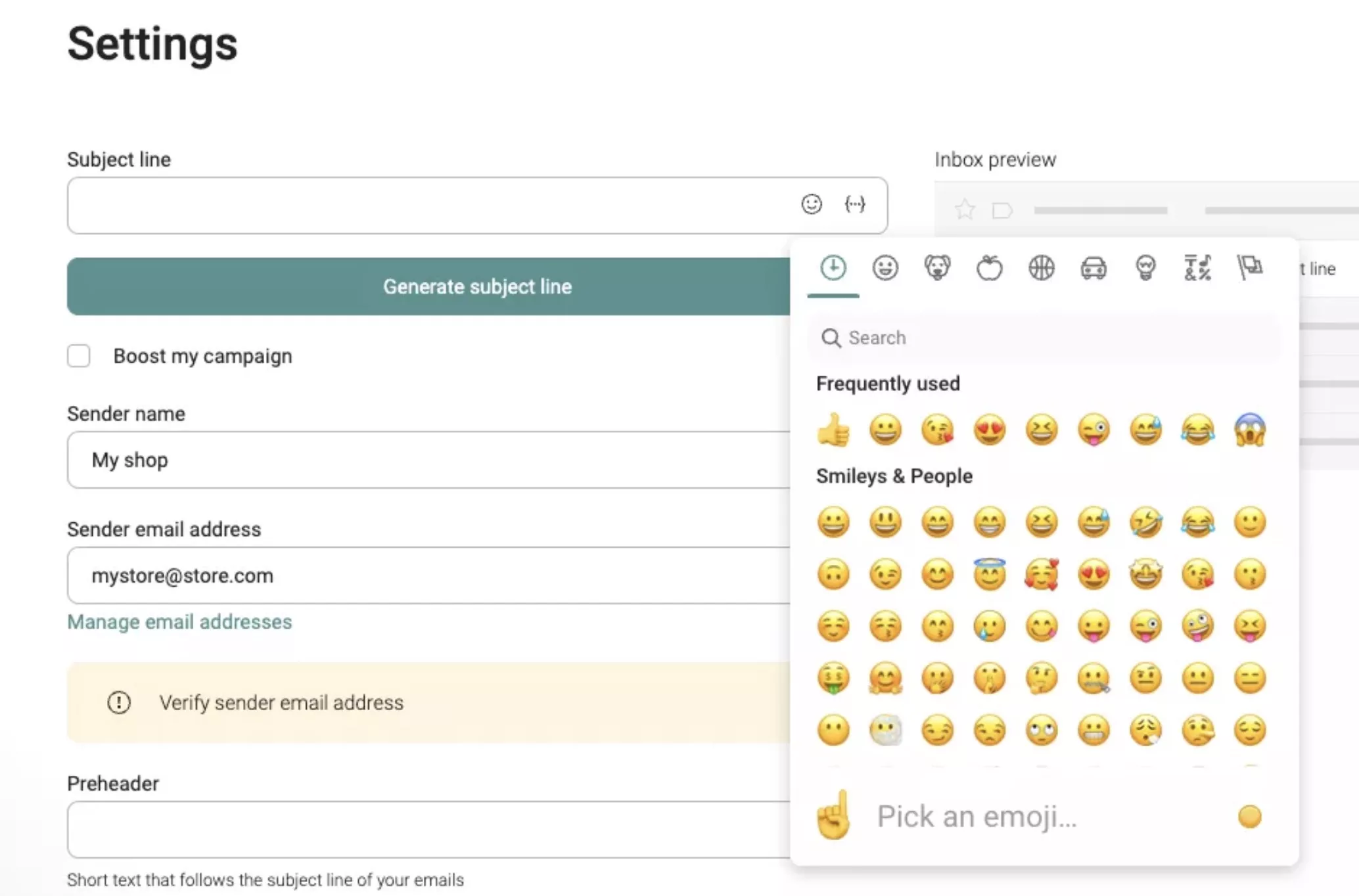
Not just the subject line — you can also add emojis to emails to make them more creative and conversational. They’re certainly more engaging than plain text.
Quick sign up | No credit card required
Popular emojis for email subject lines
Below are some of the best emojis for email subject lines used by businesses in ecommerce and other industries. You can copy and paste the emojis onto your subject line editor or follow the Emojipedia links to copy them there.
As often happens, you’ll probably find your favorite emoji for email subject lines in one of the top examples below:
| Emoji | Emoji name (+ Emojipedia link) | Popular use cases in subject lines |
|---|---|---|
| 🎁 | Wrapped gift | Used in emails containing bonuses, free perks, gifts, and more |
| 🚨 | Police car light | Used in emails that announce sales, time-limited offers, and more |
| ❤️ | Red heart | Used to express gratitude, love, happiness, and similar emotions. |
| 😮 | Face with open mouth | Used to emphasize the great value of an offer. |
| 🎉 | Party popper | Used in emails that celebrate a special occasion or surprise offers for customers. |
| 👉 | Backhand index pointing right | Used to focus the reader's attention on the subject line or a specific part of it. |
| 😍 | Smiling face with heart-eyes | Used to express enthusiastic feelings of love, infatuation, and adoration. |
| ⏲️ | Timer clock | Used for time-limited offers and voucher expiration reminders. |
| 🔥 | Fire | Used when sharing "hot" offers and news. |
| ✅ | Check mark button | Used to convey a positive outcome, a completed task, or to deliver verified information. |
Find software that can help you craft emails that work. Check out some of the best email marketing tools that support emojis.
Related reading:
45+ email marketing examples to inspire your next campaign
Conclusion
Emojis can make your subject lines more noticeable, but they aren’t a shortcut to better results.
When an emoji is relevant, it can reinforce the message and help it stand out. When it’s unrelated, it can distract readers and weaken the subject line. The difference lies in choosing the right emoji and using it effectively.
Rather than adding emojis automatically, use them strategically. Keep them relevant, avoid overuse, test them before making them part of your strategy, and preview them across devices and inboxes.
Since every audience is different, what performs well for one email list may not work as well for another.
Test, learn, and keep refining. Handled with care, emojis are a small but reliable way to make your emails feel more human.
Quick sign up | No credit card required
FAQ
Can you put emojis in an email subject line?
Yes. Most platforms, including Omnisend, let you add emojis from the email editor. You can also paste them from your device’s emoji picker or Emojipedia. Preview the result before sending.
Do emojis in subject lines trigger spam?
Emojis don’t automatically trigger spam filters. Spam filters evaluate sender reputation, email content, and list quality much more heavily than they evaluate emojis. However, don’t use too many emojis, as that can make your email look spammy.
How to do a 😂 in an email?
On Windows, press the Windows key plus period (.). On Mac, press Control, Command plus Space. You can also copy free emojis for email subject lines from Emojipedia and paste them in.
Do emojis show up in email subject lines?
Yes, emojis render well in most modern inboxes. Gmail, Apple Mail, and Yahoo Mail all support emojis, though the look may vary. Some older versions of Outlook may not display them correctly, so it’s important to preview your subject lines before sending.