Omnisend AI


 OFFER
OFFER











Ecommerce brands should choose Klaviyo for granular segmentation, flows, and a B2C customer relationship management, but pick Omnisend for multichannel automations, 24/7 human support, and faster setup at up to 35% less.
We’ve tested both tools to help you pick the best email marketing solution based on your budget, sending volume, and appetite for advanced features.
Quick comparison of Klaviyo vs. Omnisend at a glance
Here’s a side-by-side comparison of Omnisend vs. Klaviyo features:
| Omnisend | Klaviyo | |
|---|---|---|
| Ease of use | ★★★★★ | ★★★★ |
| Editor quality | ★★★★★ | ★★★★★ |
| Message types | ✔ Marketing emails ✔ Transactional emails ✔ SMS ✔ Web push ✖ Mobile push | ✔ Marketing emails ✔ Transactional emails ✔ SMS ✖ Web push ✔ Mobile push |
| Multichannel support | ✔ | ✔ |
| Deliverability infrastructure | ★★★★★ | ★★★★★ |
| Reports and analytics | ★★★★ | ★★★★★ |
| A/B testing | ✔ | ✔ |
| AI features | ✔ Email and subject line editor ✔ Form builder ✔ Segment builder ✔ Reports analysis ✔ RFM and churn prediction | ✔ Email and subject line editor ✔ Form builder ✔ Segment builder ✔ Reports analysis ✔ RFM and churn prediction |
| Integrations | ★★★★ | ★★★★★ |
| Customer support | ★★★★★ | ★★★ |
| Migration assistance | ★★★★★ | ★★ |
Quick sign up | No credit card required
Omnisend vs. Klaviyo: Video comparison
The video below compares Omnisend and Klaviyo in under 10 minutes, spanning their use cases, core features, workflows, support, and more.
Authorship disclaimer: This article is written by an Omnisend team member. Since we’re comparing our own platform to Klaviyo, we made sure to highlight Klaviyo’s wins honestly and verified all features and figures in line with our review process.
Read on to find out more about Omnisend and Klaviyo in our email marketing platform comparison below.
What do users say about each platform?
Looking at pure numbers, Omnisend has higher customer ratings across the Shopify App Store, WordPress, Trustpilot, G2, and Capterra. The Shopify App Store is a particularly important comparison because both tools provide a deep native Shopify integration:
| Platform | Omnisend | Klaviyo |
|---|---|---|
| Shopify App Store | 4.8/5 (2,925 reviews) ⭐ | 4.7/5 (2,904 reviews) |
| WordPress | 4.9/5 (168 reviews) ⭐ | 2.8/5 (24 reviews) |
| Trustpilot | 4.4/5 (502 reviews) ⭐ | 1.8/5 (362 reviews) |
| G2 | 4.6/5 (1,243 reviews) ⭐ | 4.5/5 (1,357 reviews) |
| Capterra | 4.7/5 (836 reviews) ⭐ | 4.6/5 (531 reviews) |
What do individual users say about Klaviyo vs. Omnisend?
The consensus among users is that Klaviyo is better for larger lists and bigger budgets, but Omnisend can match Klaviyo’s capabilities for stores of any size at a lower price.
Reddit users speak favorably of both Omnisend and Klaviyo, with discussions tending to converge on the same split: which is best depends on your stage. For example, choosing between them for a direct-to-consumer (DTC) Shopify store came up in one r/Emailmarketing thread. The consensus leaned toward starting lean. A poster with two years on Omnisend said what’s doable in Klaviyo is possible in Omnisend.
In a separate r/ecommerce thread, one user called Klaviyo the right call at 30,000 contacts. A merchant with 15,000 contacts backed Omnisend, saying that the flows and targeted campaigns hadn’t hit any walls. Another reply in the same thread made the case for Omnisend, reporting that the switch kept costs under $250 a month, including some SMS.
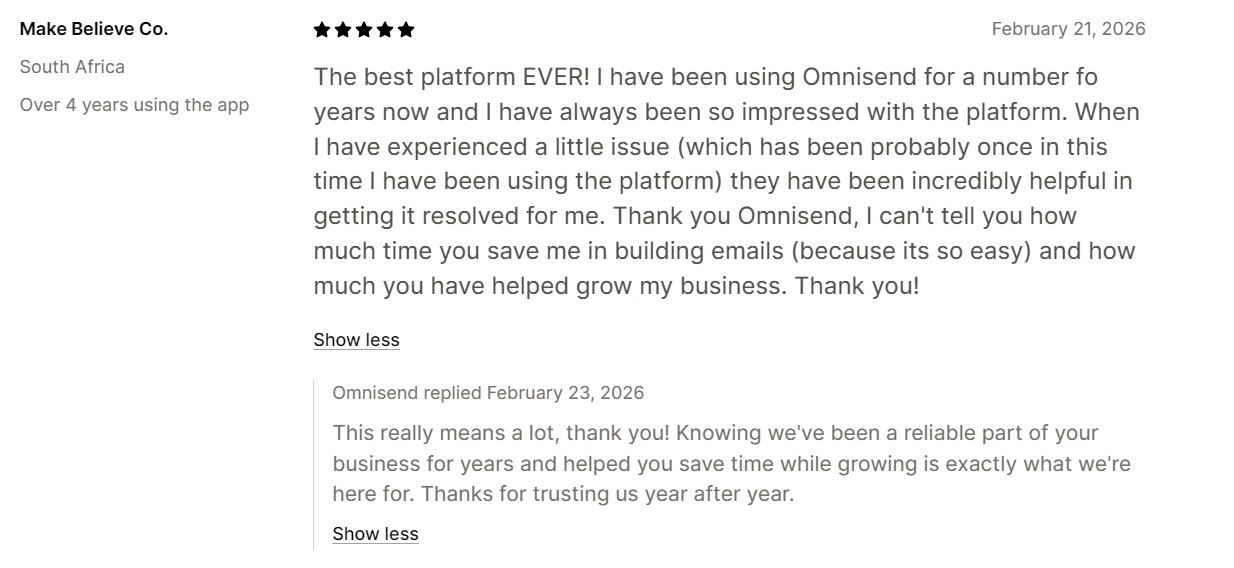
Overall, Omnisend has higher ratings and more positive customer reviews. Here’s what a user has to say about Omnisend:
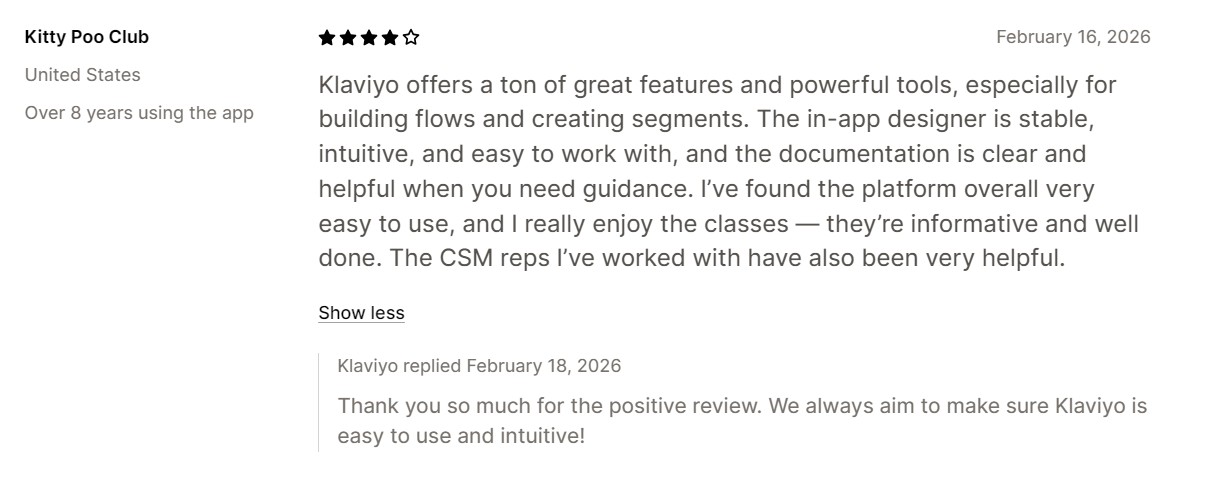
On the other hand, users on Shopify praise Klaviyo’s email campaign and automation features:
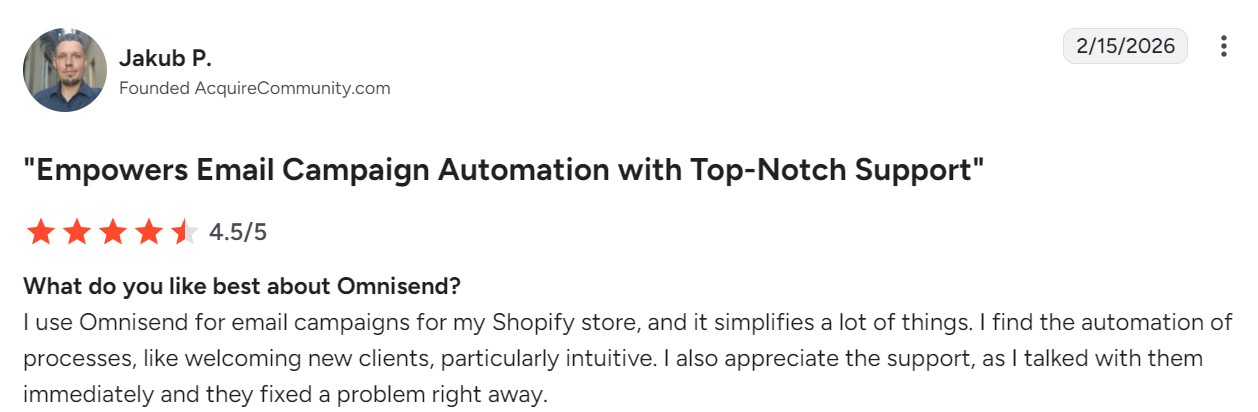
Similarly, on G2, users have praised Omnisend for its comprehensive customer support. Here’s what a user had to say:
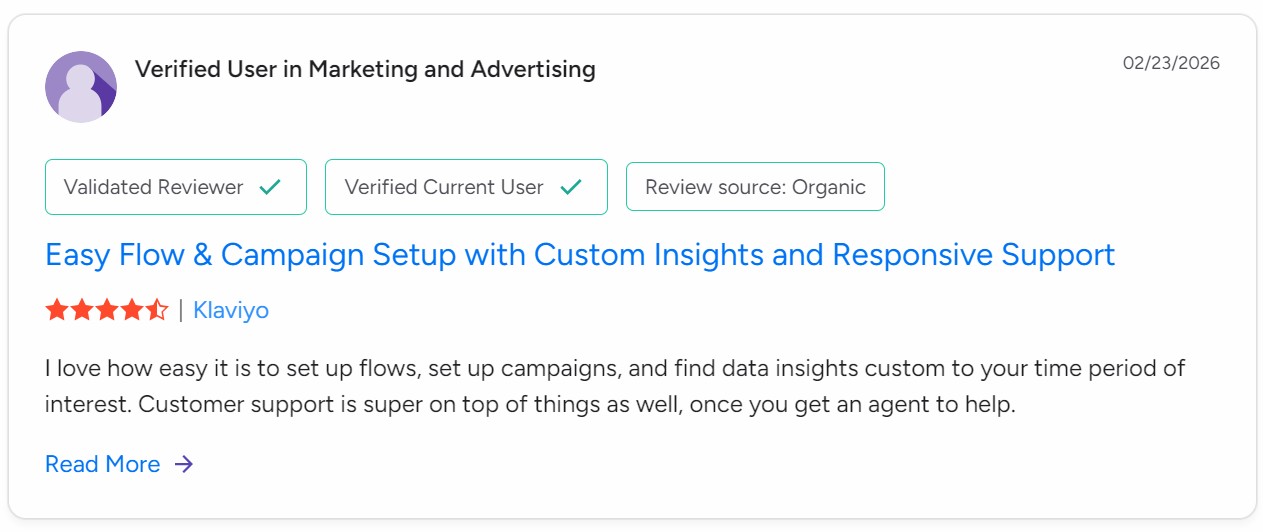
Klaviyo has also received good reviews for its data insights and customer support:
Omnisend vs. Klaviyo pricing: Which plan fits your business?
Choose Omnisend if you want to save up to 35% on email marketing with built-in AI tools and web push included at every tier; choose Klaviyo if you need SMS credit bundled into your free plan.
You can compare their prices per your total number of contacts using our pricing comparison calculator.
Klaviyo bills on active profiles, which includes anyone you can email, including non-opted-in checkout contacts unless suppressed. Omnisend bills on billable contacts, which also includes non-subscribers; only unsubscribed contacts are excluded.
Small business: Free plan comparison
Omnisend and Klaviyo offer free plans for up to 250 contacts. Here’s how they stack up:
| Omnisend Free Forever | Klaviyo Free | |
|---|---|---|
| Contacts | 250 | 250 |
| What counts | Subscribed and non-subscribed; unsubscribed excluded | Subscribers and engagement-added profiles; suppressed excluded |
| Email sends | 500/month | 500/month |
| Web push | 500/month | Not offered |
| SMS | Not included | $5/month of mobile message credit |
| AI features | Segment builder, subject line and email assistant | Not included on free |
| Support | 24/7 live chat and email | Email support, first 60 days only |
The contact and send limits are identical. However, Omnisend provides 24/7 support for the lifetime of your plan, AI capabilities, and web push notifications for multichannel flows.
Growing businesses: Standard and Pro plan comparison
Omnisend has two plans for your growing business (Standard and Pro). Standard includes all core email marketing features without SMS. Pro adds SMS capabilities, unlimited email sends, advanced reporting, dynamic content, and the AI product recommender.
Klaviyo’s Email tier covers standard email and SMS features in one plan. Here’s how their plans compare from 500 to 15,000 contacts:
| Contacts | Omnisend Standard | Omnisend Pro | Klaviyo Email |
|---|---|---|---|
| 500 | $16 (6,000 sends) | — | $20 (5,000 sends) |
| 1,000 | $20 (12,000 sends) | — | $30 (10,000 sends) |
| 2,500 | $44 (30,000 sends) | $59 (unlimited) | $60 (25,000 sends) |
| 5,000 | $81 (60,000 sends) | $90 (unlimited) | $100 (50,000 sends) |
| 10,000 | $132 (120,000 sends) | $150 (unlimited) | $150 (100,000 sends) |
| 15,000 | $207 (180,000 sends) | $348 (unlimited) | $350 (150,000 sends) |
Large businesses: Enterprise pricing comparison
Over 20,000 contacts, you’ll spend at least $265 with Omnisend and $375 with Klaviyo. Klaviyo works out to be more expensive across common tiers. See the table below:
| Contacts | Omnisend Standard | Omnisend Pro | Klaviyo Email |
|---|---|---|---|
| 20,000 | $265 (240,000 sends) | $375 (unlimited) | $375 (200,000 sends) |
| 40,000 | $375 (480,000 sends) | $599 (unlimited) | $600 (400,000 sends) |
| 50,000 | $413 (600,000 sends) | $715 (unlimited) | $720 (500,000 sends) |
| 75,000 | $650 (900,000 sends) | $1,044 (unlimited) | $1,070 (750,000 sends) |
| 100,000 | $900 (1,200,000 sends) | $1,344 (unlimited) | $1,380 (1,000,000 sends) |
Additional reading
Cheaper than Klaviyo: 6 High ROI marketing tools in 2026
Klaviyo vs. Omnisend for Shopify: Which is better?
Omnisend is better for Shopify when you’re focused on revenue and retention and want less setup burden; Klaviyo suits complex customer journeys and has a CRM. Both have highly-rated Shopify apps. Omnisend’s app has the higher 4.8/5 rating versus 4.7/5.
When is Klaviyo the better choice?
Klaviyo is better for building complex flows, segments, and advanced reporting capabilities. These draw on detailed contact profiles. It costs more than Omnisend, but it earns its price when data is important to your business.
When is Omnisend the better choice?
Omnisend suits lifecycle marketing and coverage of multichannel ecommerce flows without paying for depth you won’t use. It has less setup burden, with multi-store support for managing multiple stores in one account.
Shopify use cases at a glance
| Scenario/need | Best fit | Why |
|---|---|---|
| New or growing Shopify store | Omnisend | Quick setup, intuitive UI, the free plan provides 24/7 support |
| Large list, complex segmentation | Klaviyo | Advanced behavioral data and predictive analytics |
| Heavy A/B testing and metrics | Klaviyo | Deeper experimentation and performance tracking |
| Budget-conscious, want omnichannel | Omnisend | Email, SMS, and web push in one platform, accessible plan entry points |
| Global SMS | Omnisend | Supports SMS globally, covering 190+ countries |
| Two-way SMS | Klaviyo | Supports two-way conversations over SMS and RCS |
| Multiple stores or brands | Omnisend | Multi-store support with one-click store switching, add up to 500 stores per account |
| CRM features | Klaviyo | Collates all customer data into its B2C CRM |
Shopify success story
Byte Digital used Omnisend’s seamless Shopify integration, along with automation and segmentation, to generate $1.72M in total store revenue. Omnisend-powered emails contributed $600K of this revenue. This case study shows how pairing Shopify with an ecommerce-focused email marketing platform can become a major revenue driver.
Read the case study
Additional reading
Klaviyo review: Features, pricing, and honest verdict
Is Klaviyo or Omnisend easier to use?
Omnisend is easier to use. It has fewer menu items to navigate, and the segments, automation, and audience dashboards get you building and analyzing faster. The table below shows our findings following side-by-side tests:
| Omnisend | Klaviyo | |
|---|---|---|
| Dashboard learning curve | Low (1/5) | Mid-low (2/5) |
| Learning curve for advanced features | Mid-low (2/5) | Mid-high (4/5) |
| Sign-up options | Shopify, Google account, or email | Google account or manual email |
| Time to connect | ~5 minutes | ~5 minutes |
| Sidebar entries | Eight (four collapsible: Store, Dashboard, Audience, Reports) | 15 (six collapsible: Website, Social, Service, Audience, Content, Analytics) |
| Single-click items in sidebar | Campaigns, Automation, Forms, Store settings | Home, Composer, Flows, Campaigns, Marketing Analytics, WhatsApp setup guide, Growth strategies, Integrations |
Which platform is easier to set up?
Omnisend’s setup has fewer steps. Its registration page lets you sign up with Shopify, Google, or email, whereas Klaviyo offers only Google or manual sign-up.
The Shopify option diverts you to the Omnisend Shopify app page, where you can click install and complete your setup using your my-shopify domain.
When you sign up to Klaviyo, it scans your domain and detects your ecommerce platform and provides a link to continue the connection quickly.
With either platform, you can create an account first or install the app first and then create an account, so the order you do it in doesn’t matter. Both send you an email with a confirmation link to click.
The time to connect to Shopify, or another ecommerce platform such as WooCommerce, is around five minutes for both Klaviyo and Omnisend.
Which platform has a more intuitive dashboard and navigation?
Once you’re in Omnisend and Klaviyo, there are big differences in their navigation.
Klaviyo’s left-hand sidebar has 15 entries, including six collapsible ones for Website, Social, Service, Audience, Content, and Analytics. The Flow and Campaigns items are single-click:
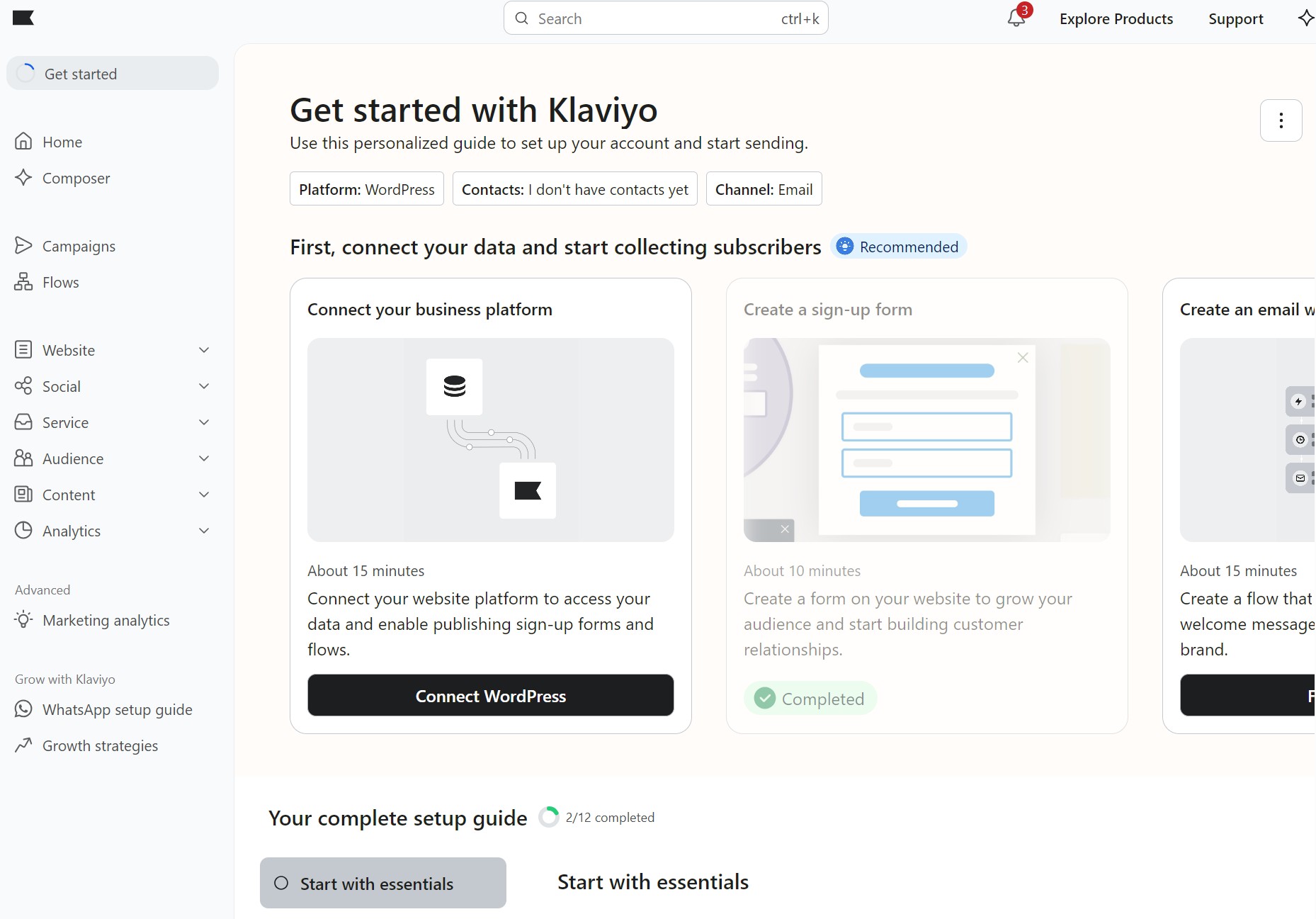
What’s impressive here is the level of detail Klaviyo goes into, explaining everything with descriptions and steps. If you’re a complete beginner to ecommerce email marketing, their resources are there to help you.
Omnisend’s menu has fewer items to navigate, with eight entries including four collapsible items for Store, Dashboard, Audience, and Reports. The single-click items are Campaigns, Automation, Forms, and Store settings:
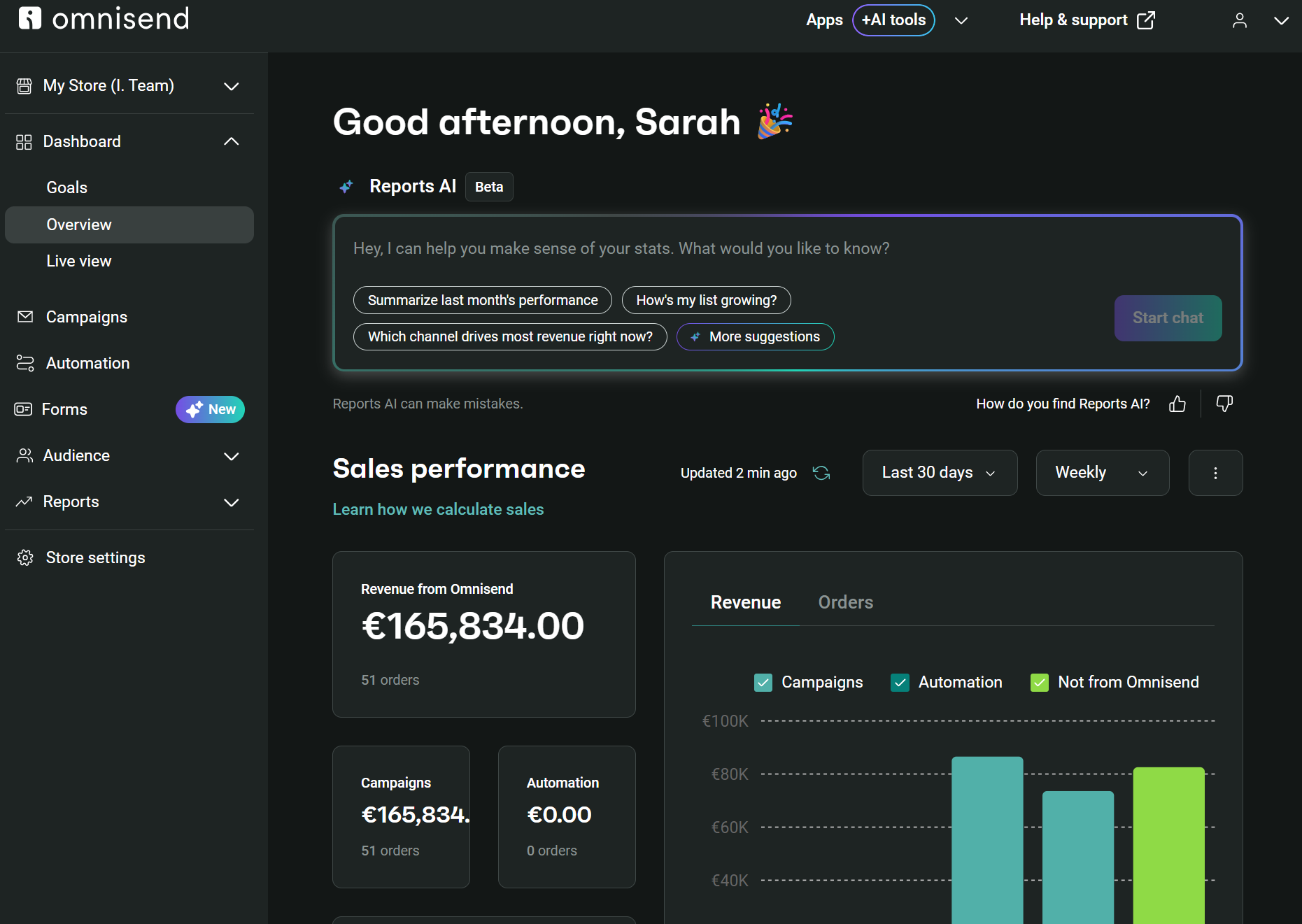
In short, Klaviyo requires more navigating to get things done, but makes up for it with detailed instructions. Omnisend takes less effort and is quicker to master, with a step-by-step guide that shows your progress from connecting your store to setting a brand style.
Which platform makes it easier to create email campaigns?
Omnisend makes it easier to create email campaigns. It has more pre-built templates, and the email builder has more menu items for Elements, Products, Images, Header, Content, and Footer, which helps you locate what you need.
| Omnisend | Klaviyo | |
|---|---|---|
| Templates | 250+ | 160+ |
| Design elements | Fewer | More (drop shadow, table, split) |
| Editor AI | All plans, free included | Paid plans |
| A/B testing | Subject lines, senders, content; auto-sends winner | Content or send time; multichannel on paid |
| Product blocks | Drag-and-drop, add products manually or let AI do it for you | Drag-and-drop, with product feeds set up manually |
Email templates and design
Omnisend offers 250+ email templates to Klaviyo’s 160+. Omnisend has the edge with significantly more seasonal and themed templates for campaigns.
Campaign builder
Creating your first email requires navigating to Campaigns and clicking Create campaign in both tools. After that, there are only five or six additional steps to reviewing your email.
Both Klaviyo and Omnisend have drag-and-drop email builders. These provide blocks (or elements) that require no coding to build the best email design.
Omnisend’s drag-and-drop editor has two sidebars on the left and right, with the right-hand one loading settings for any element you drag in:
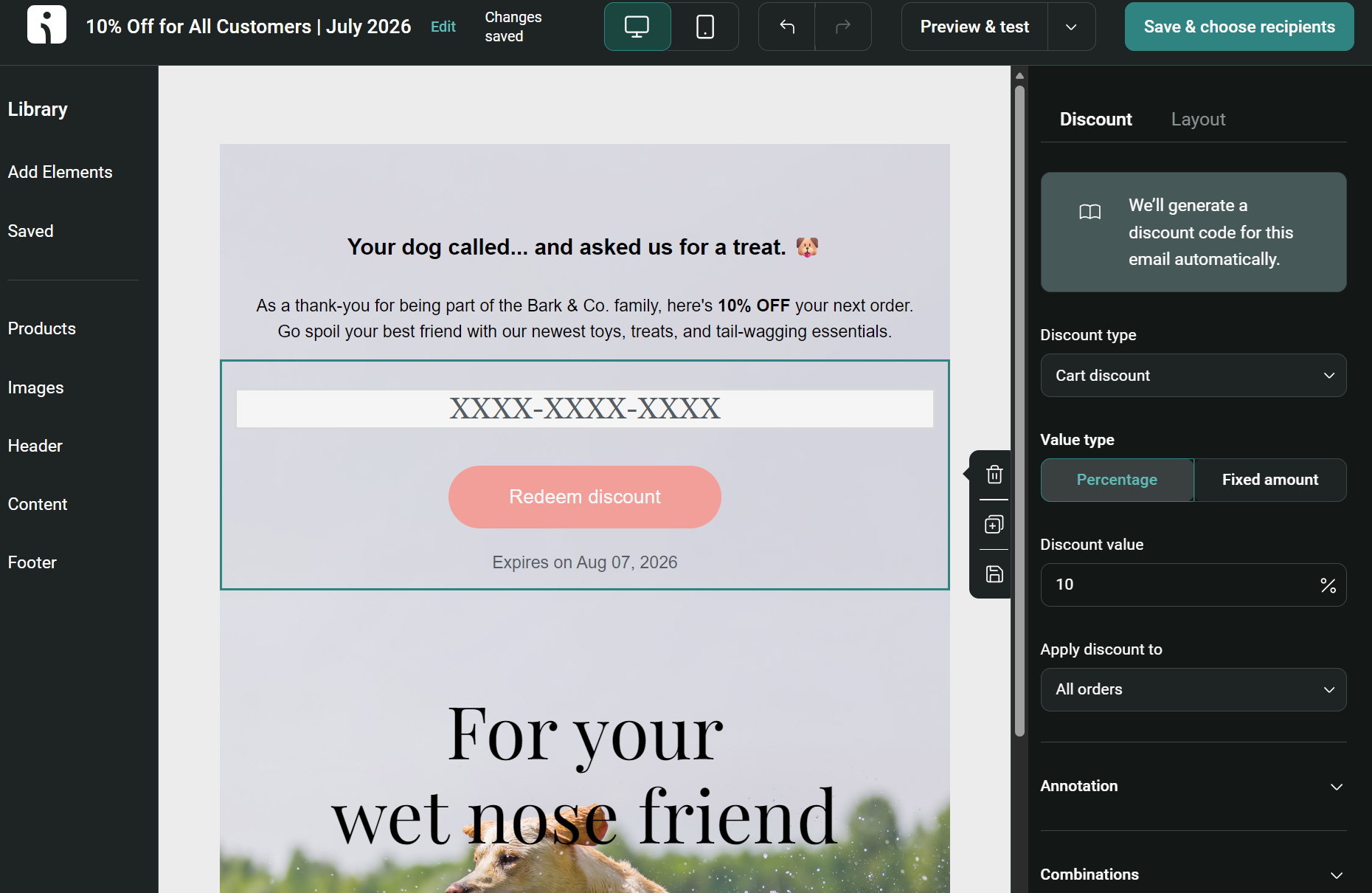
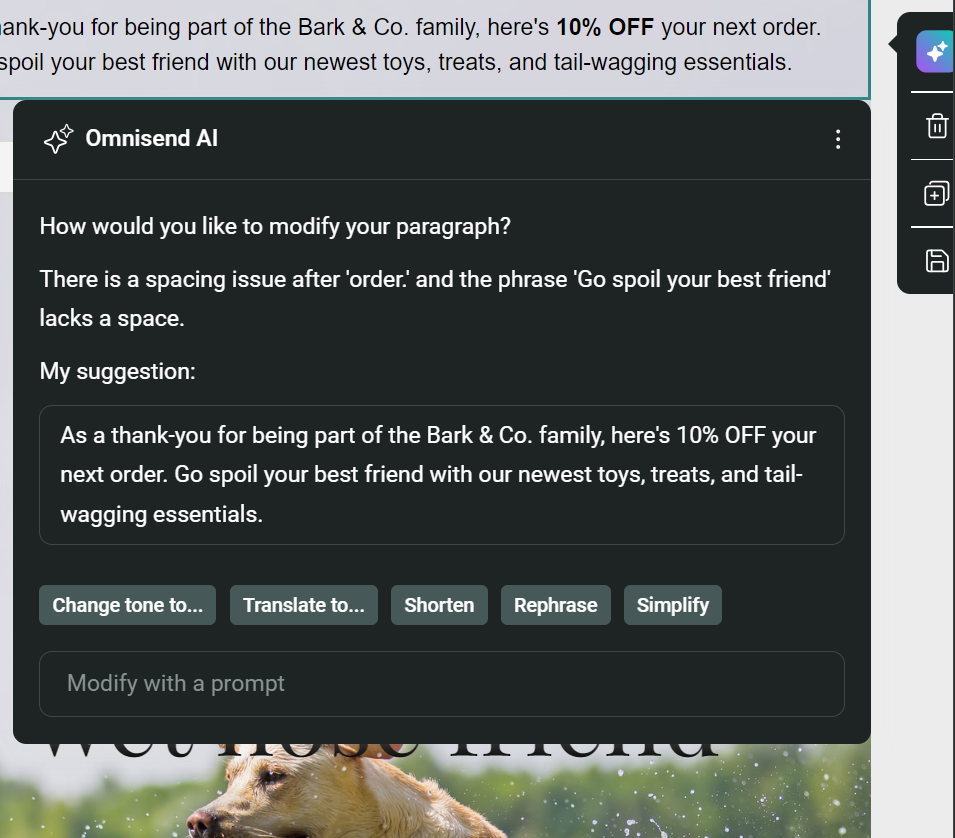
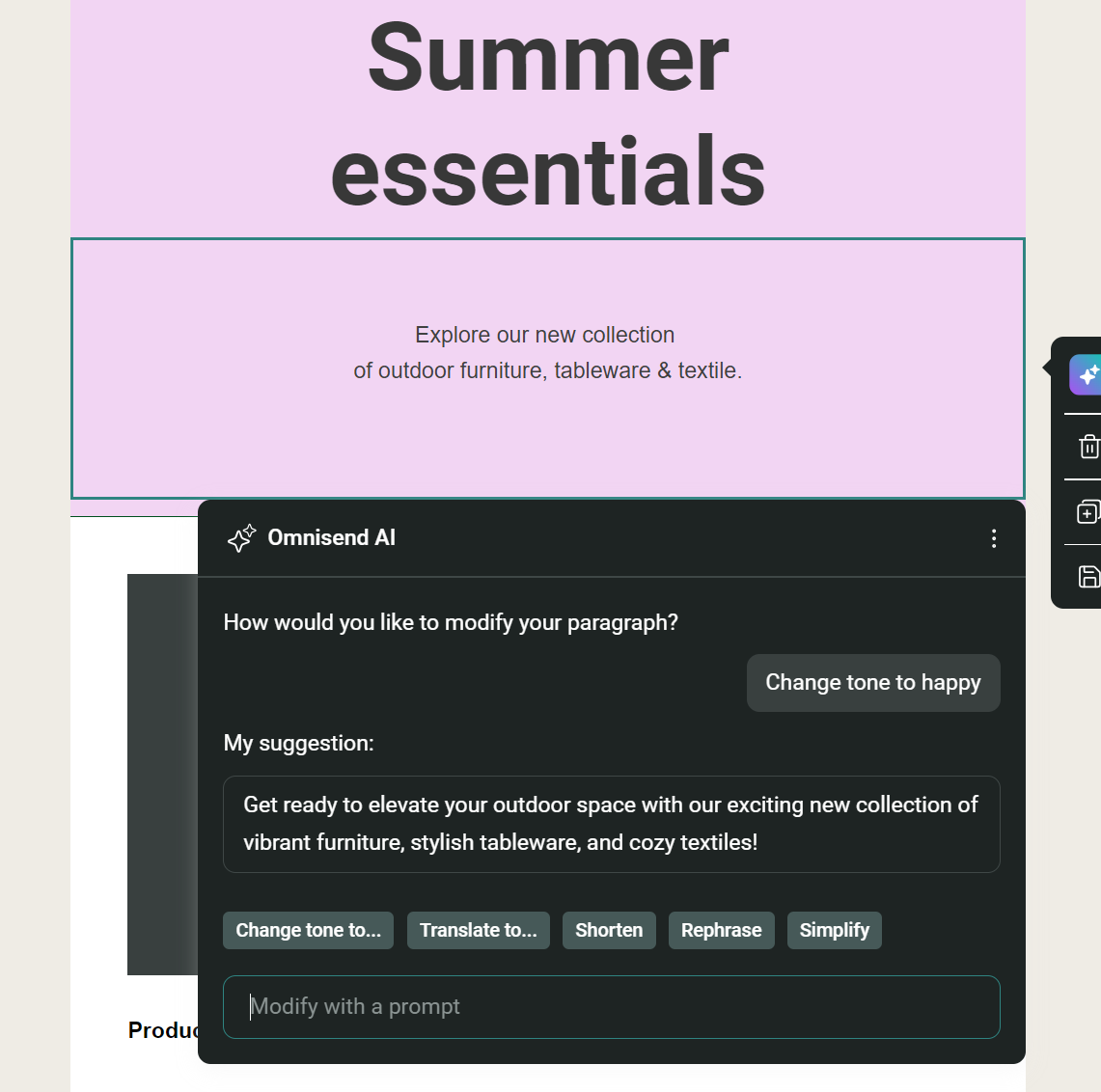
Because Omnisend provides generative AI features across all plans, even if you’re a free customer, you can use its AI to modify text within your template builder. For example, the text block provides this prompt when using the AI feature:
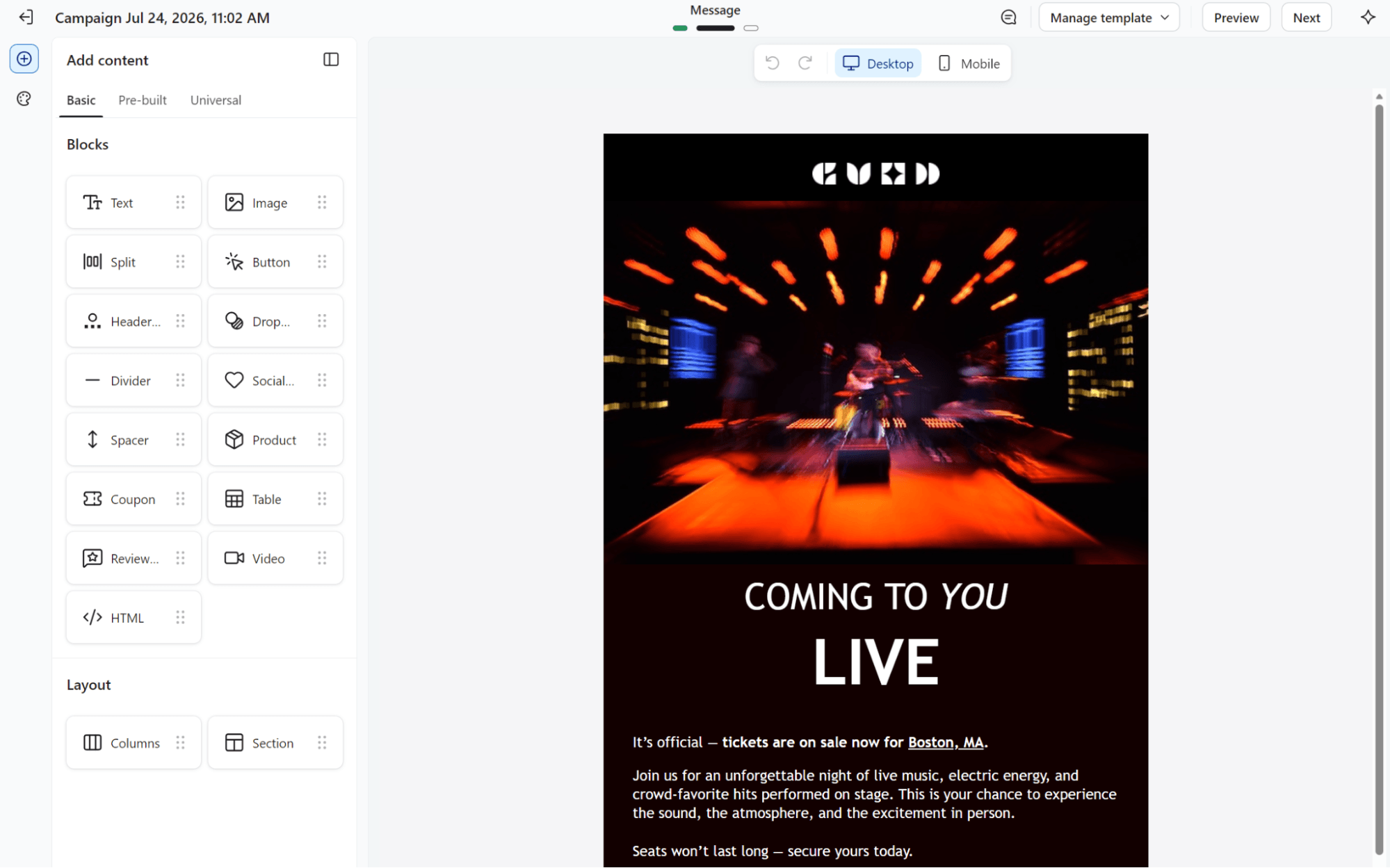
Klaviyo’s drag-and-drop editor is equally pleasant. It loads with basic blocks available in the sidebar and tabs for pre-built and universal (reusable) blocks.
One thing that’s great about Klaviyo’s email editor is that it has more design elements than Omnisend. For example, there are blocks for a drop shadow, table, and split, allowing you to create more dynamic emails without prior design experience.
A/B testing
Omnisend’s A/B testing lets you test subject lines, sender names, email addresses, and content before sending them to your entire list.
The Settings page provides a split-view for subject lines, preheaders, sender name, and sender email address with a preview:
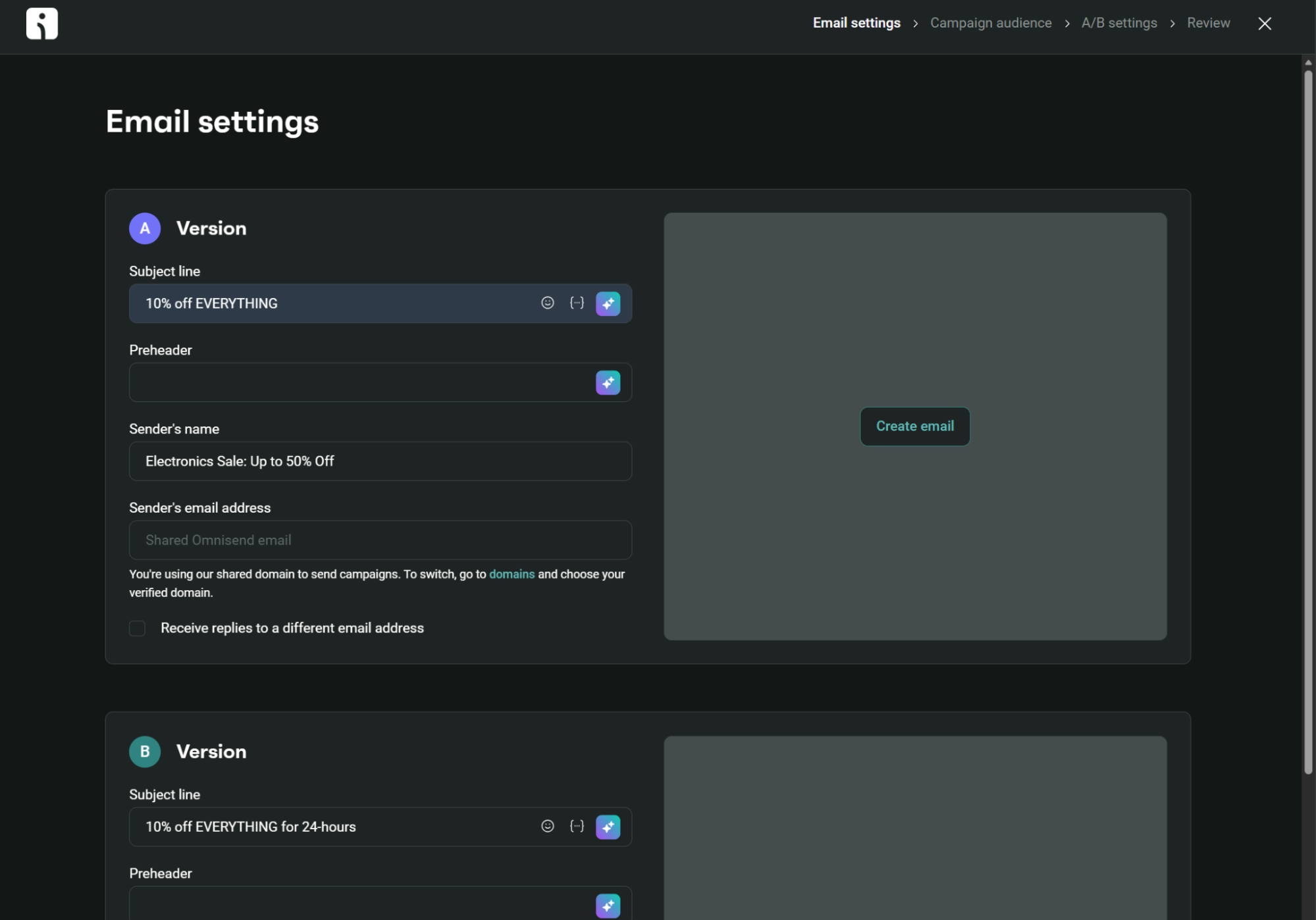
Once you’ve completed that page, you can create your templates and choose the percentage of contacts that receive version A versus B, and Omnisend then tracks opens or clicks for up to 24 hours. The winner automatically goes to everyone else.
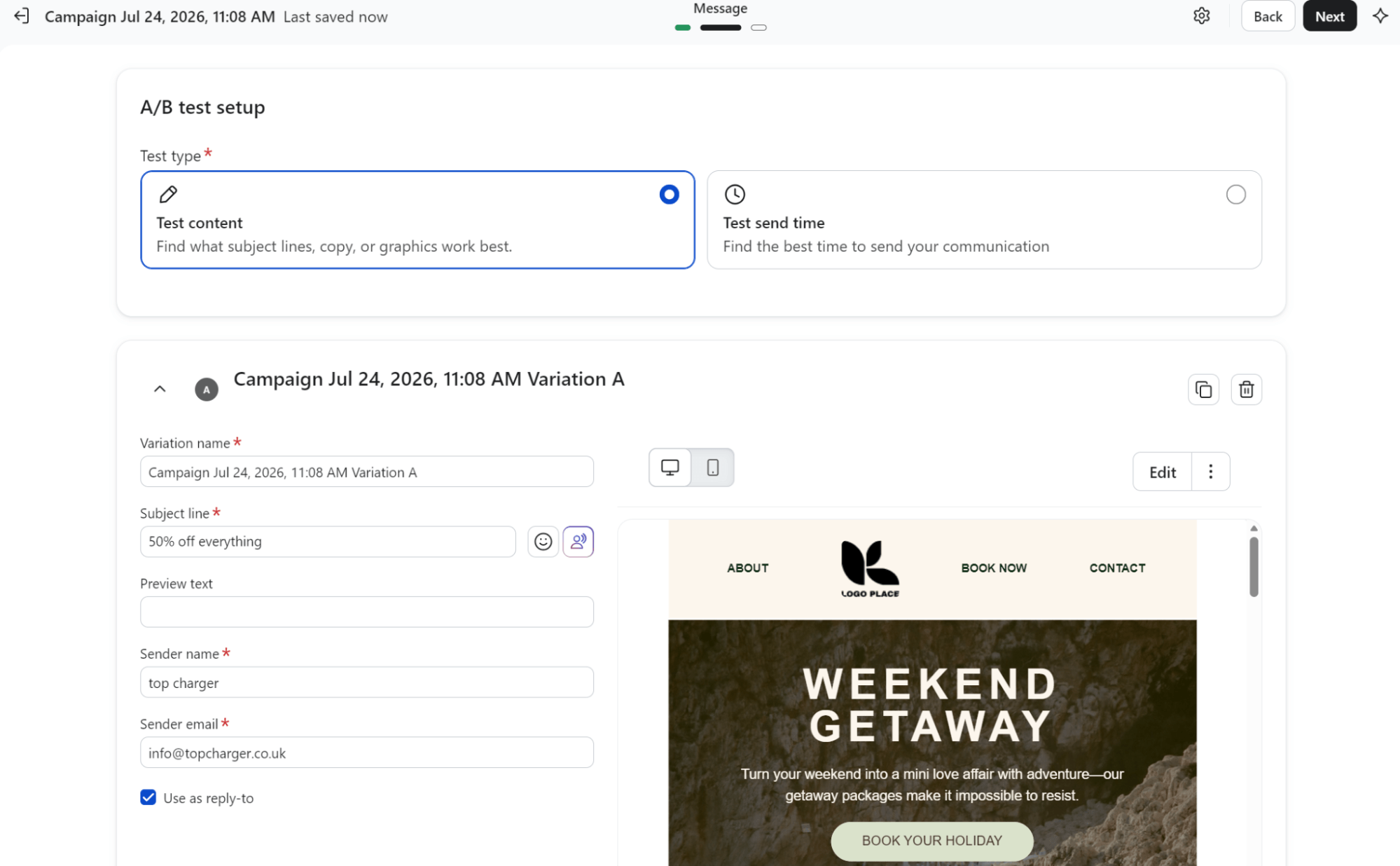
Klaviyo’s A/B testing covers the same ground as Omnisend. You split your audience, test different versions, and the winner is shared with everyone else.
Free accounts include A/B testing, but multichannel A/B testing is restricted to paid plans. In both, you have the option to test content or send time:
Ecommerce features
Adding product listings to your email requires dragging a product block into your template in either Omnisend or Klaviyo.
With Omnisend, you can add dynamic or static product elements. Static ones let you manually select which products to show. Dynamic elements use store and customer data to recommend products using AI, such as best-selling products:
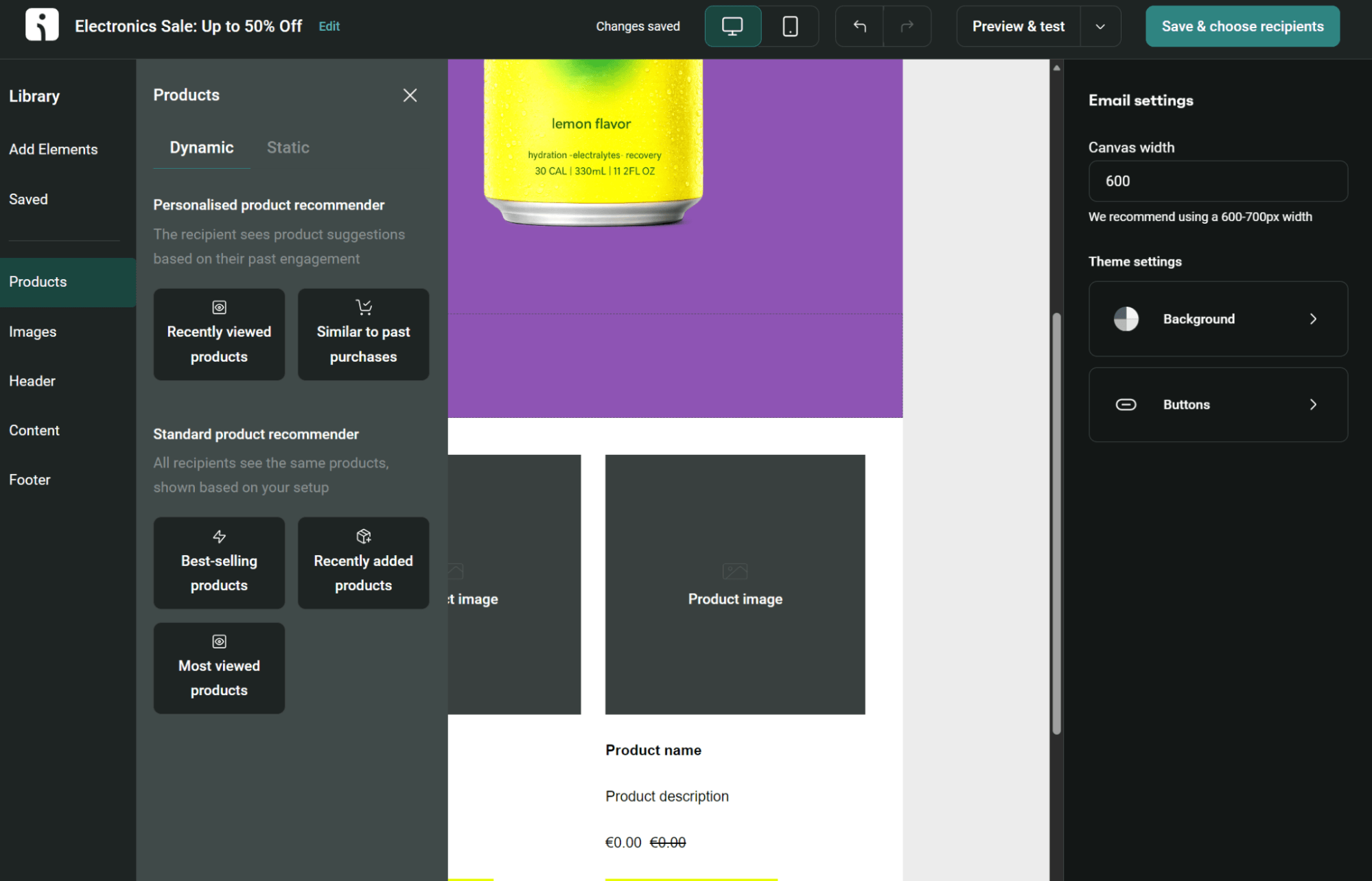
The best-selling, recently added, and most-viewed product blocks are available in all plans.
Klaviyo’s product blocks include dynamic feeds that update automatically (bestsellers, recently viewed, personalized picks) or manually selected products:
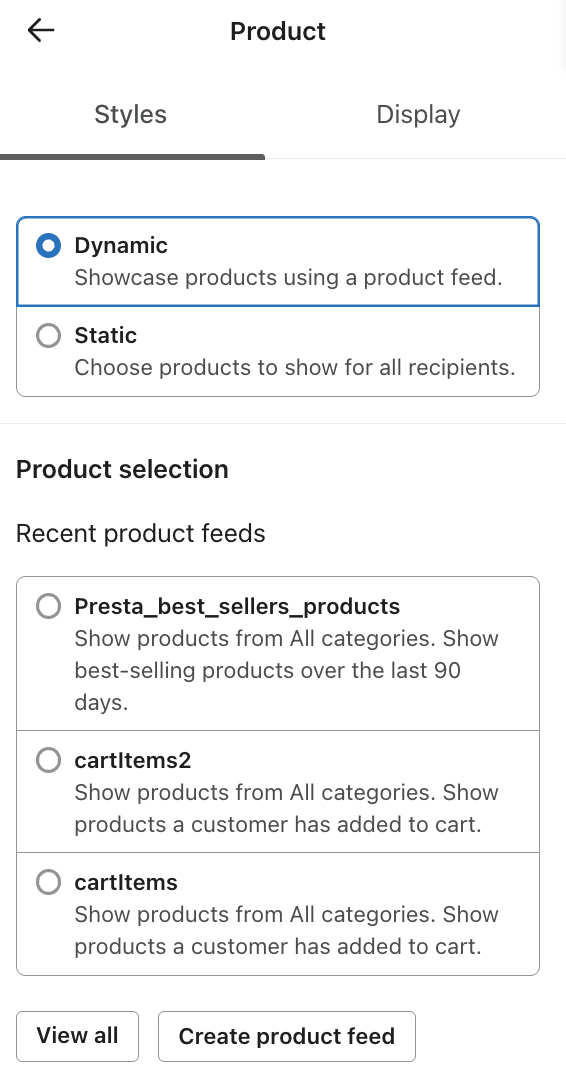
Each feed can filter products and personalize what each recipient sees based on their browsing or purchase history:
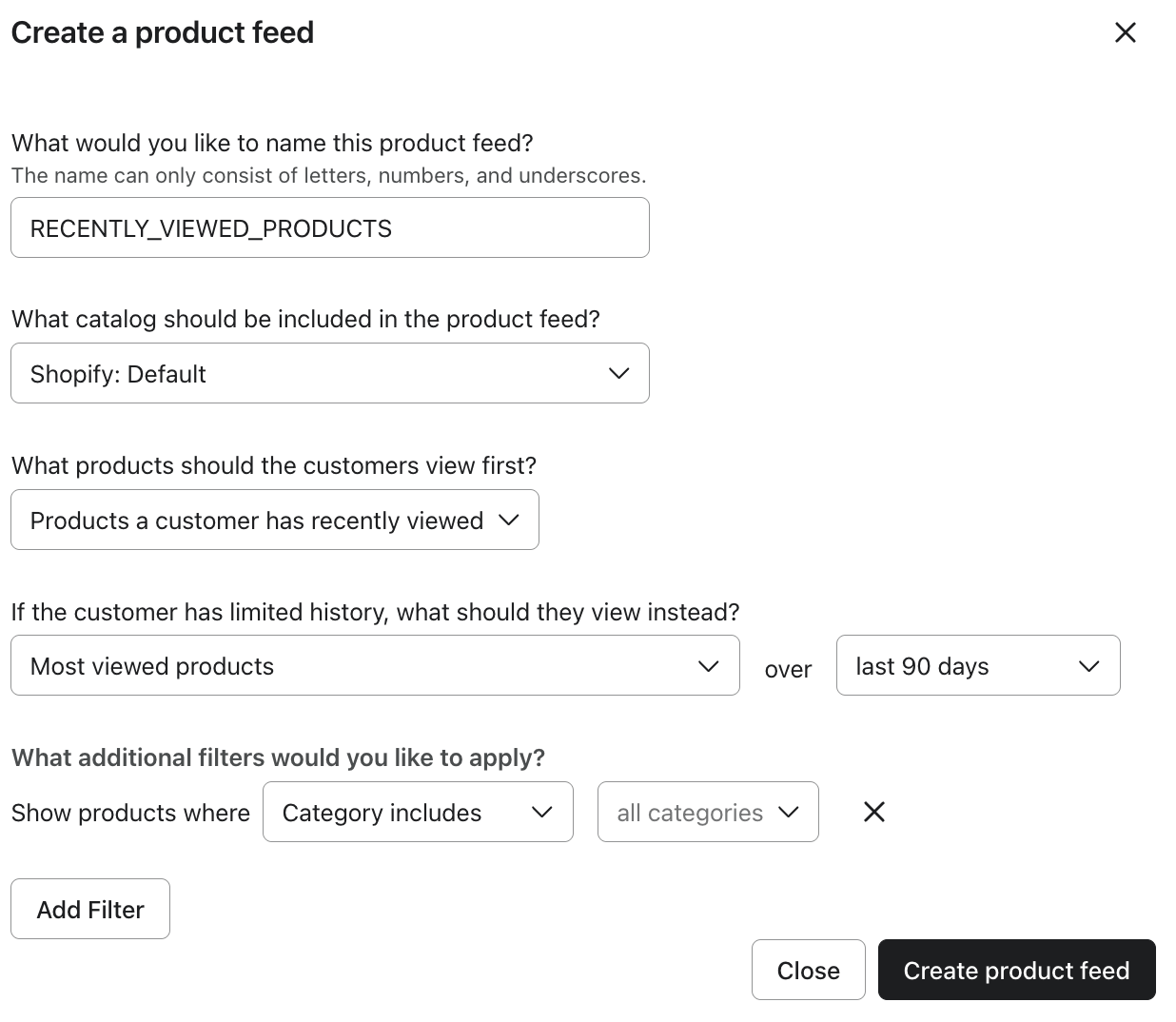
The setup requires more clicks than with Omnisend, as you need to configure feeds separately from emails. However, you gain more control over what customers see.
Which platform offers better sign-up forms and list-building tools?
Neither platform beats the other for list-building tools. Omnisend has 80+ form templates compared to Klaviyo’s 70+, and both support embedded, flyout, and pop-up formats with drag-and-drop editors.
Here’s a closer look at how they handle email list building and management, and which one might be a better fit for you.
| Feature | Omnisend | Klaviyo |
|---|---|---|
| List import options | CSV, Excel, and direct integration with other platforms | Offers CSV import and API integration |
| Sign-up forms | Embedded, flyout, pop-up | Embedded, full page, pop-up, flyout, banner |
| Audience growth tools | Integrated SMS, email, and web push notification tools with automation flows for follow-ups | Form teasers, email, and SMS capture, and social media targeting ads |
| Data management | Simplified tagging and segmentation | Data segmentation and extensive custom fields |
| List cleaning | Automated unsubscribes and duplicate removal; list-cleaning tool with one-time payment | Auto-generated unengaged segments; bulk suppression |
For sign-up forms and audience growth, Omnisend and Klaviyo offer several practical tools, such as embedded forms and pop-ups. Both also support landing pages. A recent Omnisend update lets you host form landing pages on your branded domain.
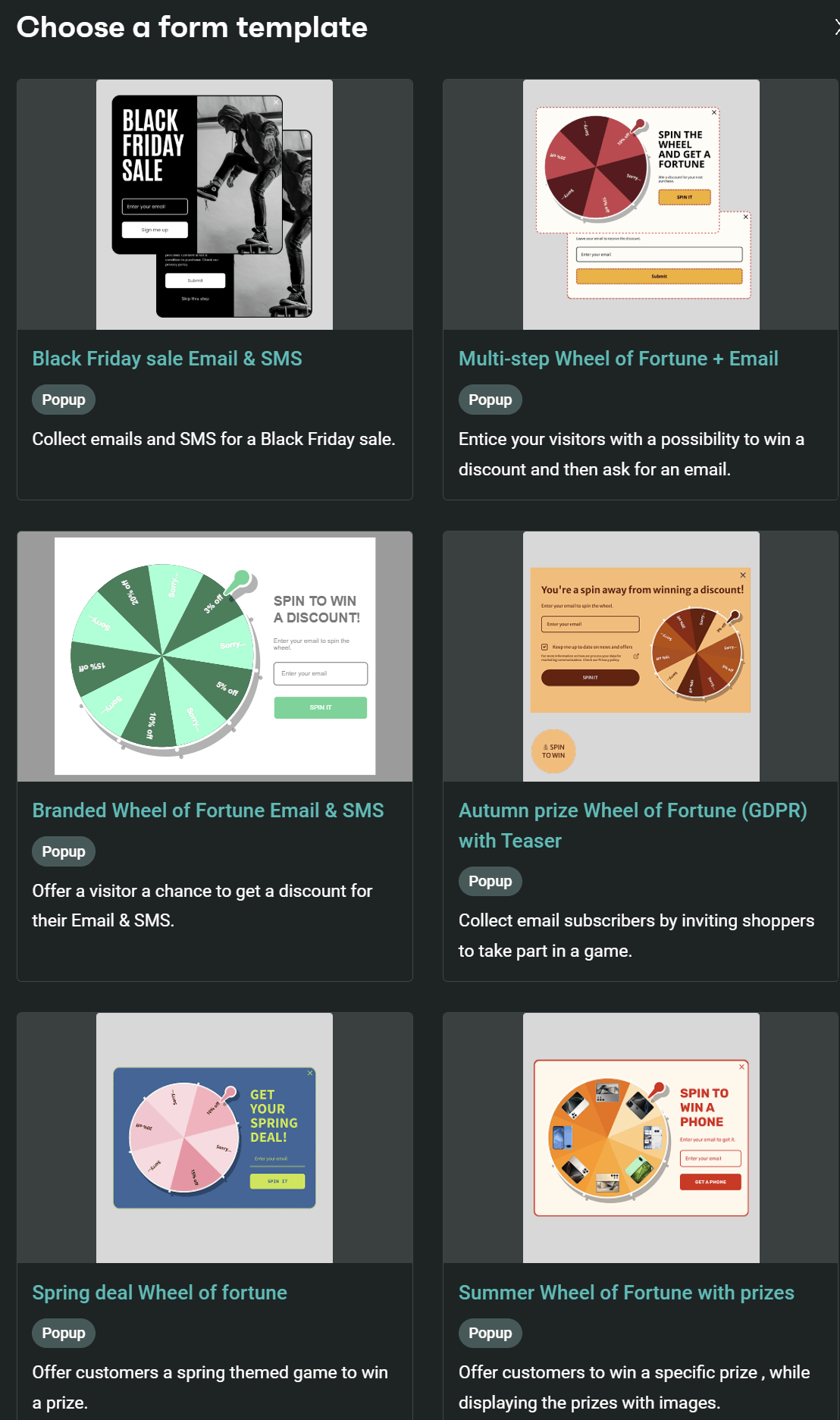
The gamified wheel of fortune (or spin-to-win) form is a feature of both tools. Klaviyo offers four templates, whereas Omnisend offers over eight such templates:
Standard and Pro plan customers can use AI to edit forms in Omnisend, or open the form builder and customize every element. The builder includes countdown timers, that wheel of fortune element, dropdown options, and more:
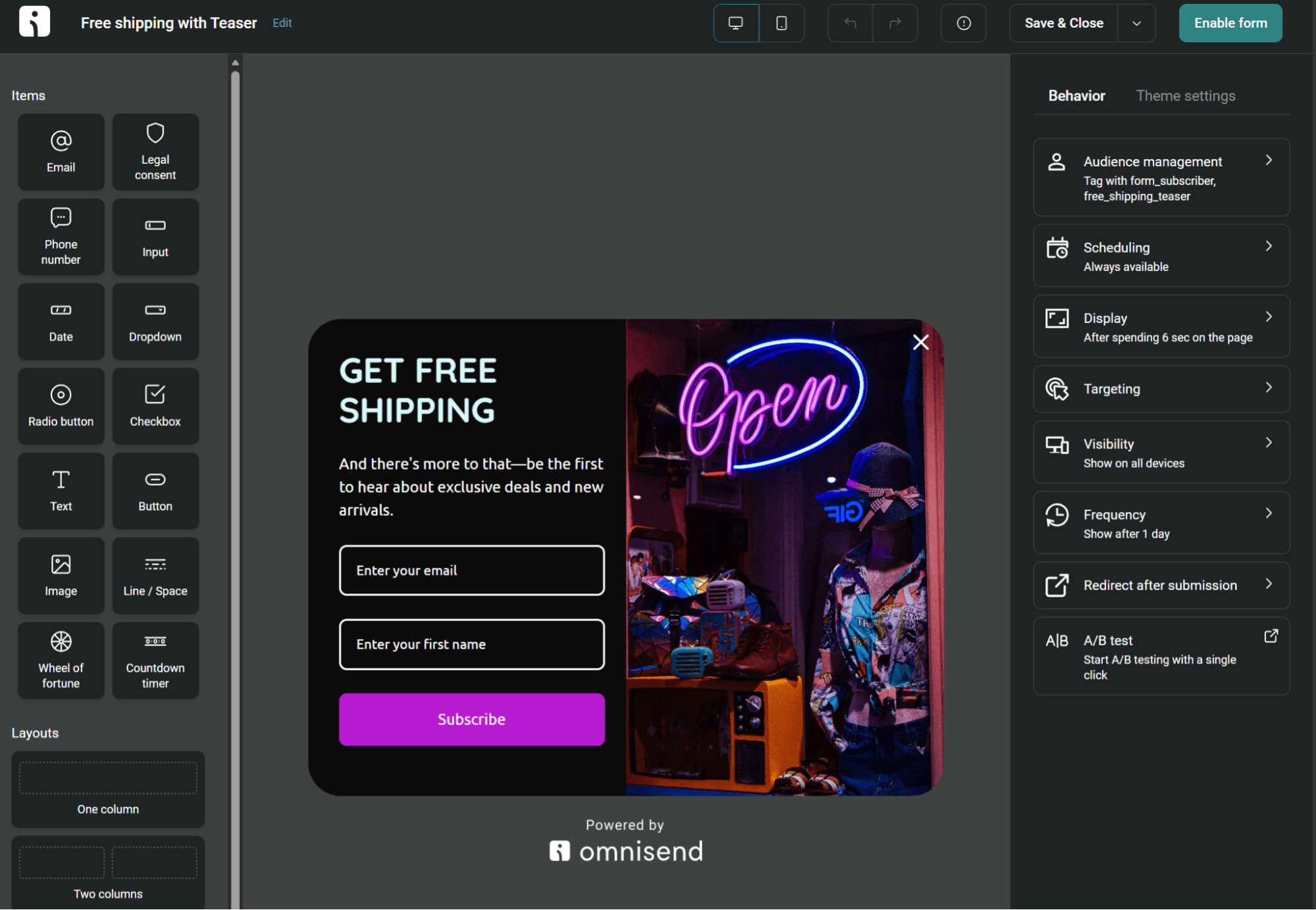
Klaviyo’s form builder has a different layout. The form logic sits at the top rather than at the bottom, and the menu items are closed by default. It also shows the desktop and mobile versions in the editor:
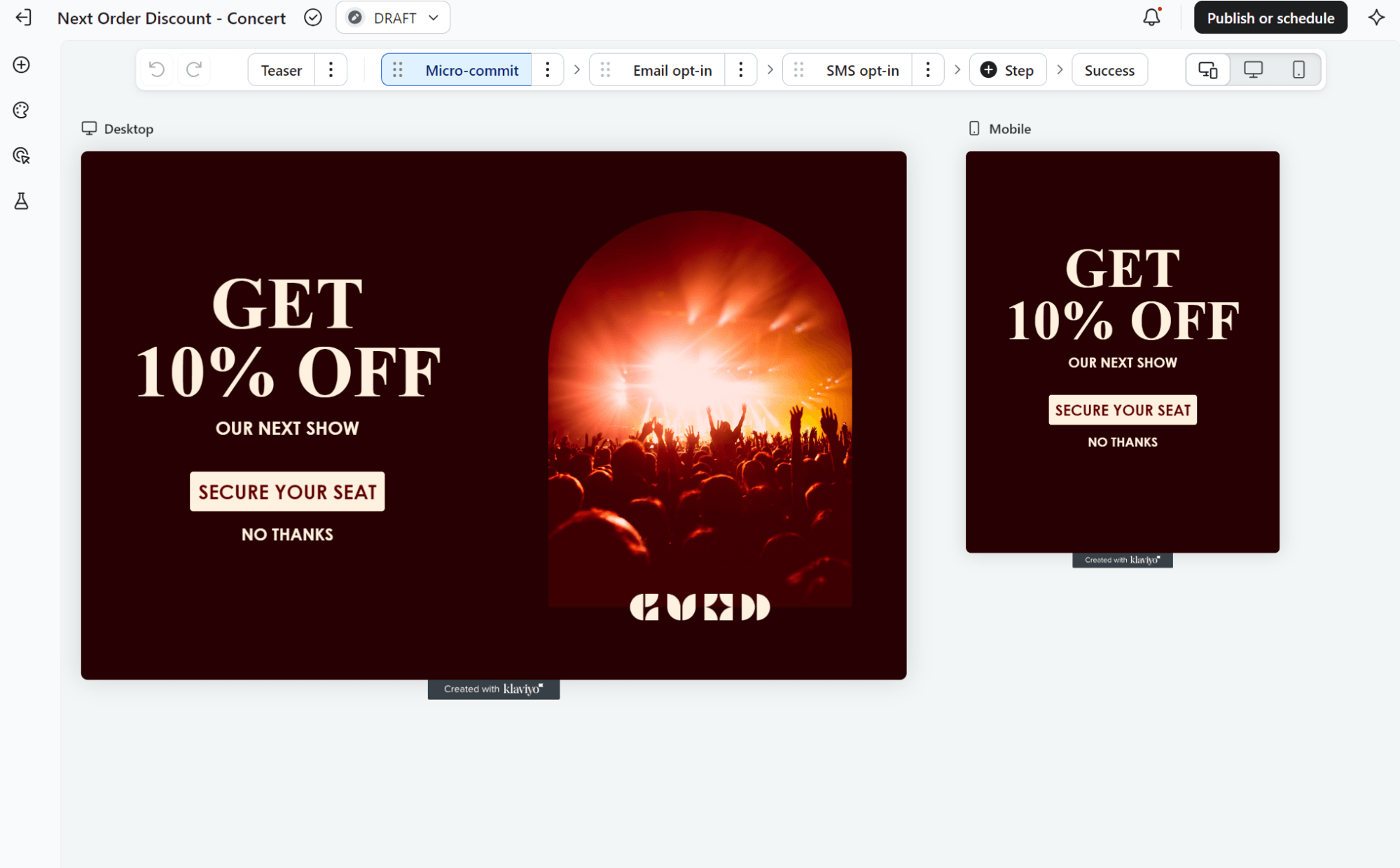
Which platform offers better email automation, Omnisend or Klaviyo?
Klaviyo’s automations are more granular than Omnisend’s thanks to its advanced triggers for targeting different customer groups. However, Omnisend’s flows are faster to set up and cover most ecommerce scenarios without additional editing.
Pre-built automation templates
Omnisend has 30+ pre-built flows covering the customer journey, including for your welcome series, abandoned cart and checkout flows, browse abandonment, cross-sells, follow-ups, and birthdays.
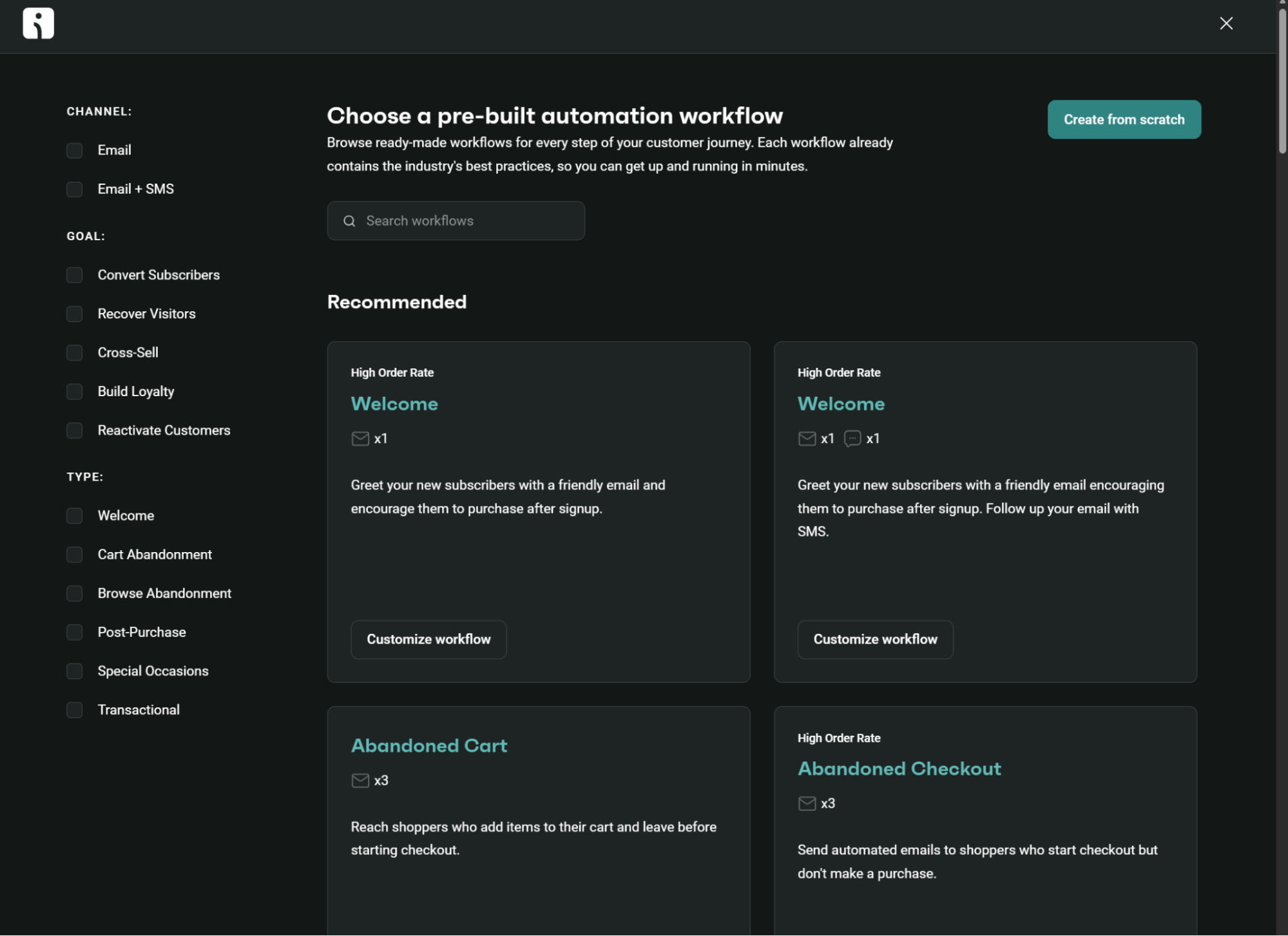
Each pre-built flow includes recommended timing, trigger filters, and message templates. The library categorizes them by goal (converting subscribers, recovering visitors, building loyalty) and by channel mix (email-only or email plus SMS).
Klaviyo provides multiple pre-built flow templates, including price drop alerts, back-in-stock notifications, and predicted next order flows:
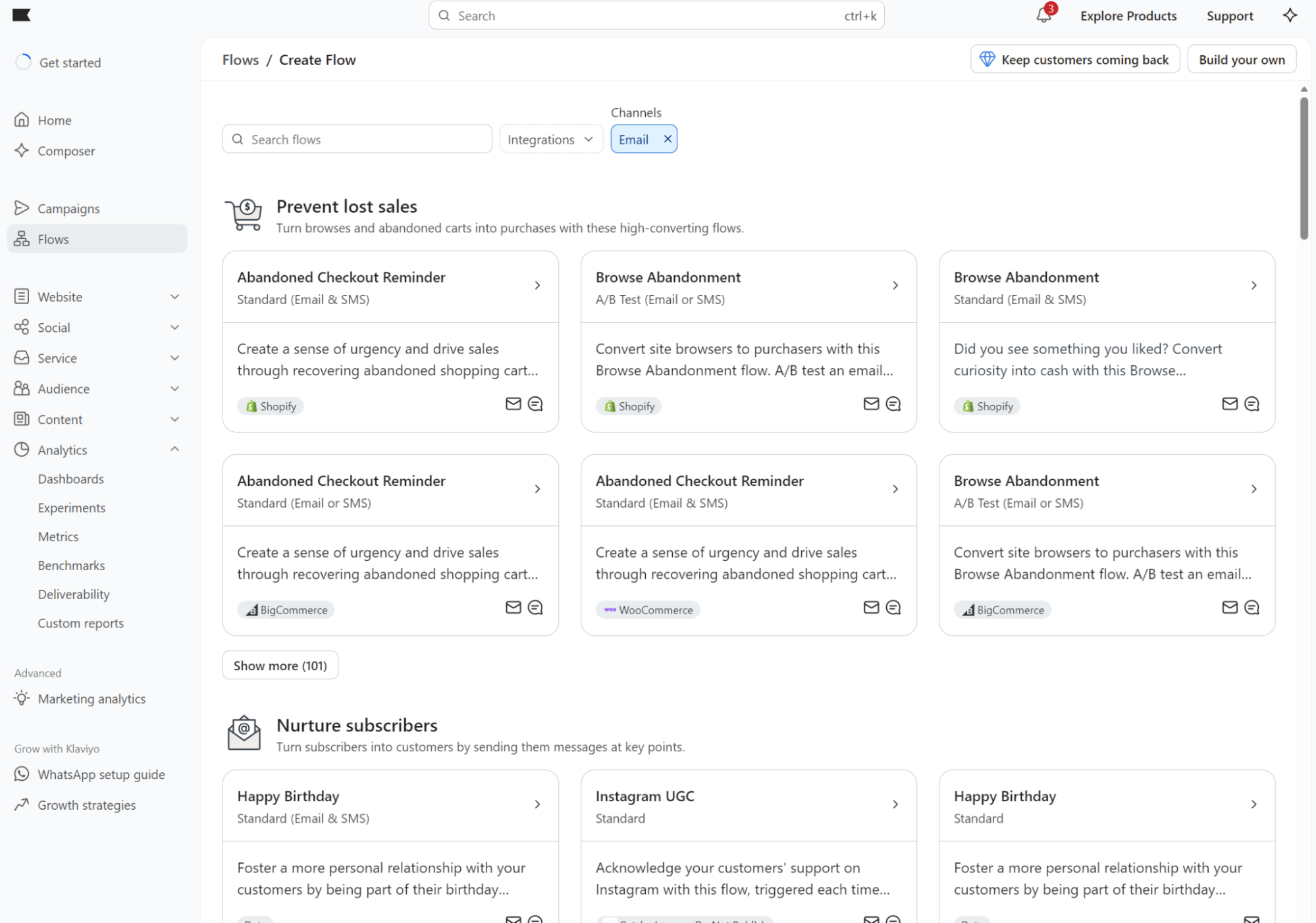
Each template automatically pulls dynamic data from your integration. You can filter by ecommerce platform to view only compatible flows. You can also filter by channel to see which templates use email, SMS, or both.
Customization and advanced workflows
Omnisend’s automation builder lets you stack conditions on top of each other. You can trigger flows based on customer segments entering or leaving, custom events from third-party apps like AfterShip or Gorgias, and standard ecommerce actions:
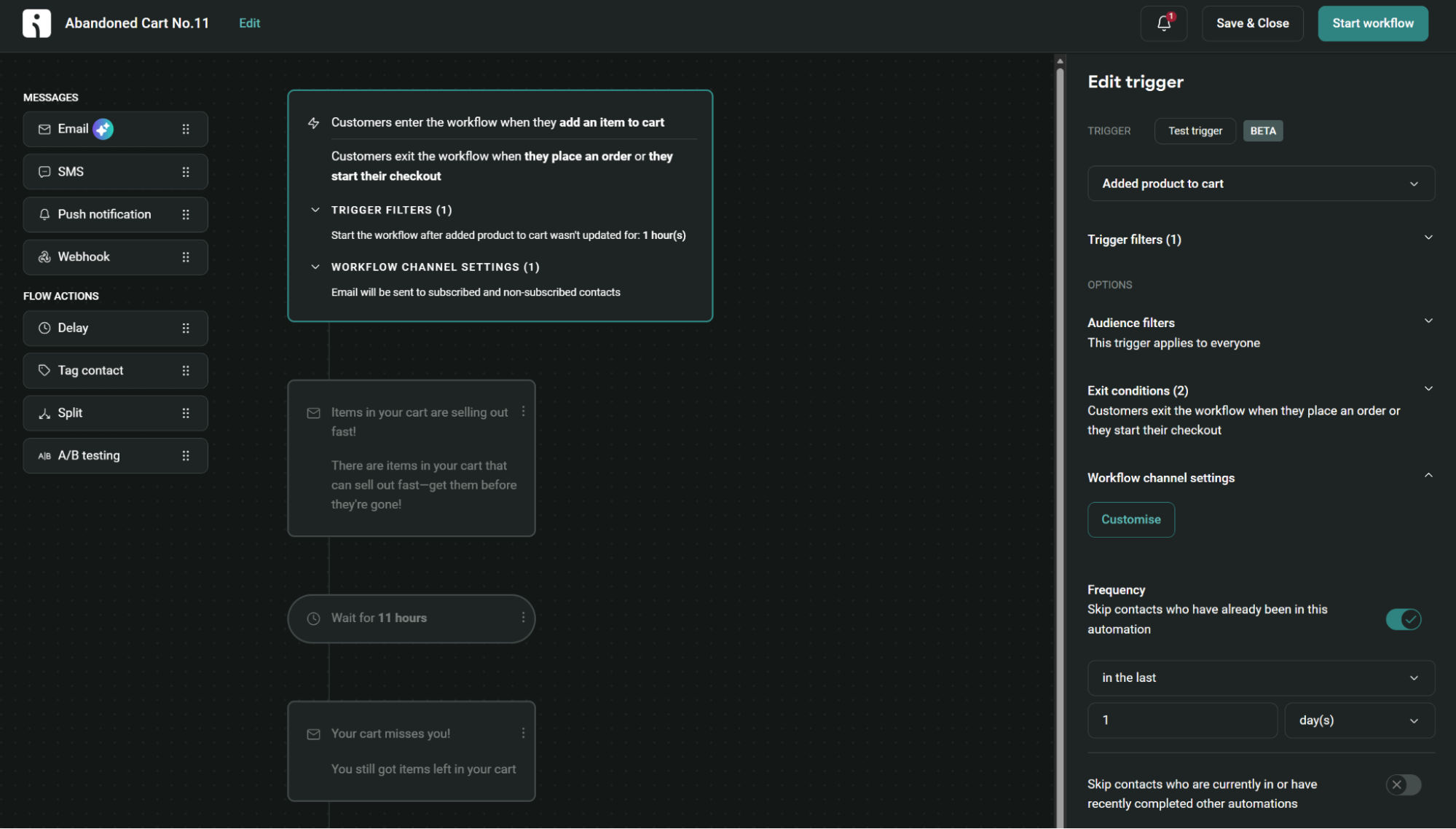
Each workflow accepts up to five trigger filters and four exit conditions. Split your flows based on order value, customer location, or past purchase behavior.
Add up to 10 conditional splits per workflow. A/B testing also works within automations, allowing you to test delays, channels, and content variations within the same flow.
Klaviyo’s flow builder uses six trigger types (list, segment, metric, date property, price drop, and low inventory). The last two are specialized triggers for alerting customers when products they’ve viewed drop in price or run low on stock.
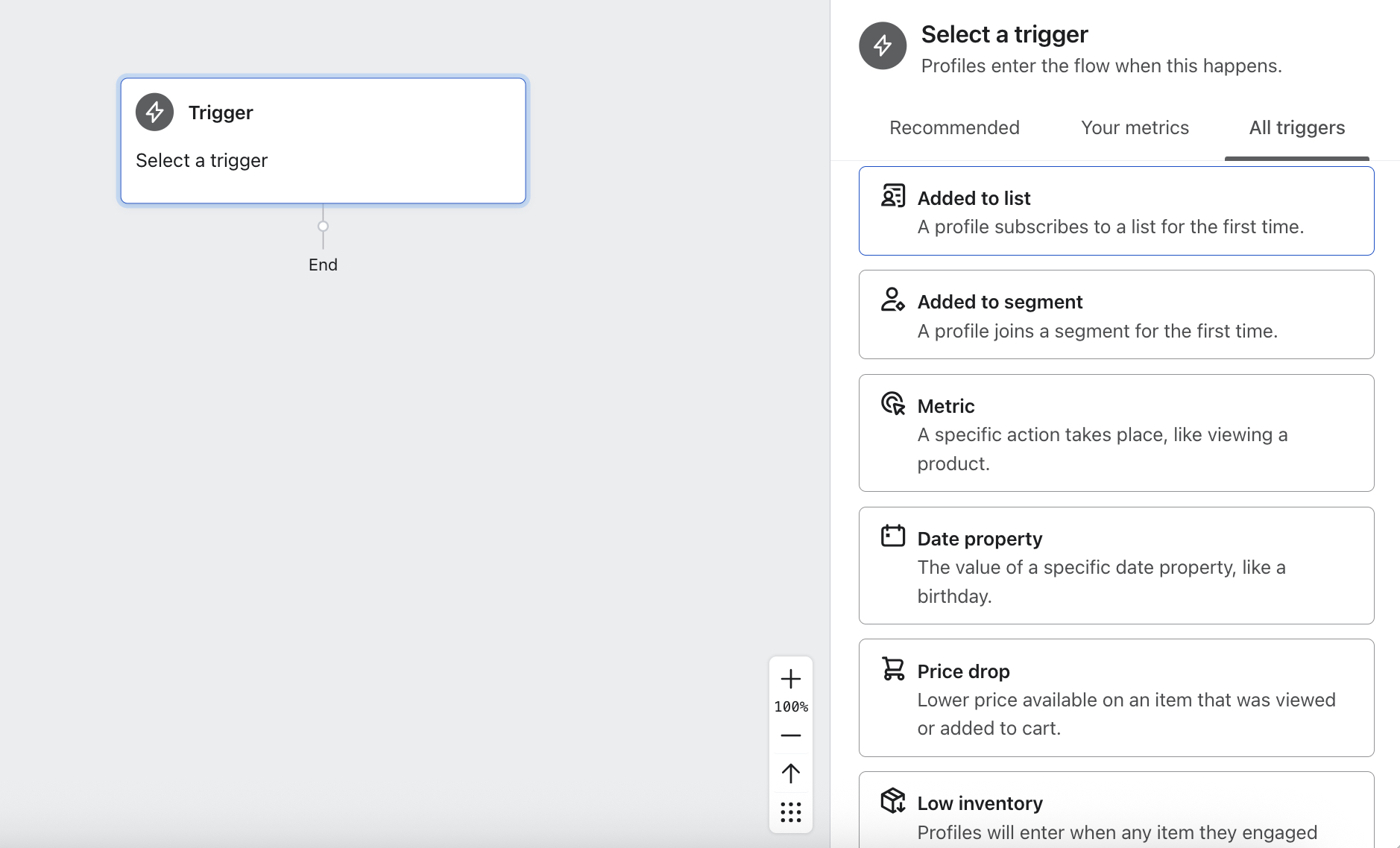
The key difference lies in how filters operate. Klaviyo uses two filter types:
- Trigger filters that evaluate the incoming event data (only available for metric and price drop flows)
- Profile filters that check customer attributes
Klaviyo checks profile filters before sending every message. So, if someone places an order mid-flow, Klaviyo skips them from the remaining abandoned cart messages.
When someone fails a profile filter, Klaviyo keeps them in the flow but skips them from each action until they either qualify again or exit.
Multichannel automation
Klaviyo lets you combine email, SMS, and WhatsApp in flows, while Omnisend combines email, SMS, and web push notifications.
Omnisend has pre-built flows for email + SMS, and its flow builder provides a crystal-clear view of all elements you can edit:
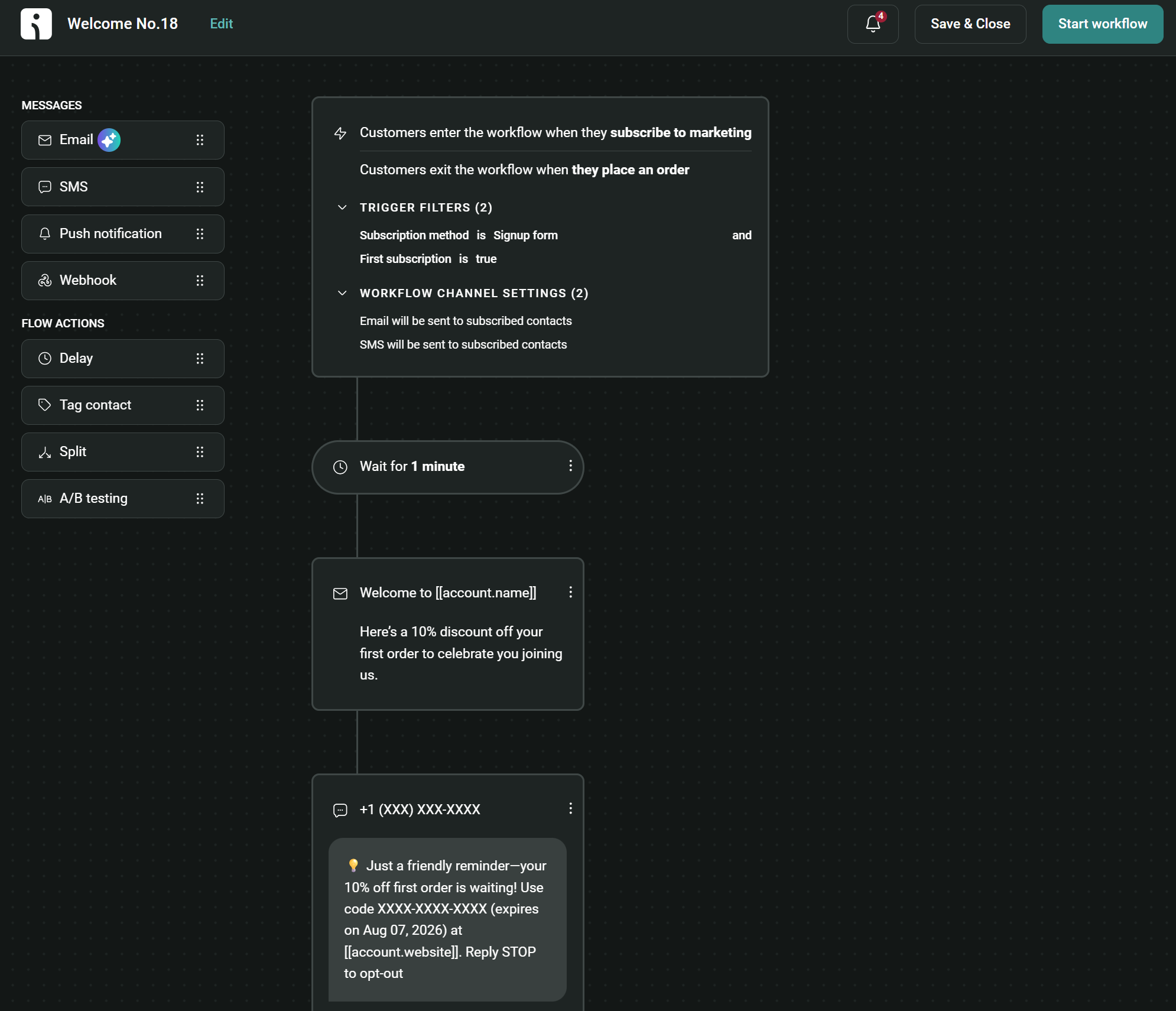
Because email, SMS, and push notifications are built into automations with their own triggers and delays, you can take an omnichannel approach, where each channel kicks in when you want it to, to reach customers.
Klaviyo also lets you add SMS messages alongside emails in the same workflow:
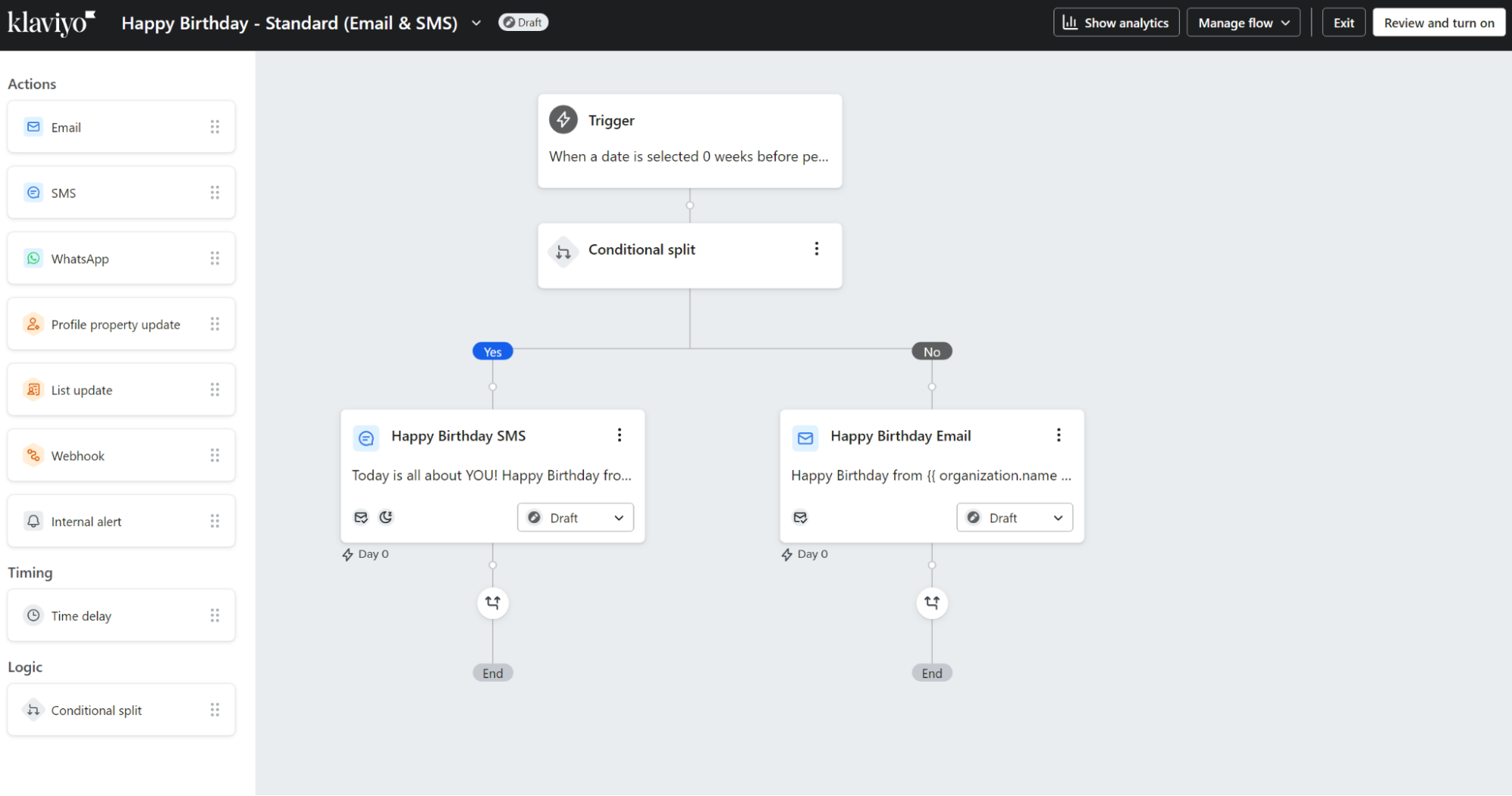
As with Omnisend, each SMS action includes compliance settings that vary by region. For instance, organizational prefixes for U.S. and Canadian recipients, as well as non-U.S. and non-Canadian recipients.
Klaviyo’s Smart Sending feature prevents customers from being overwhelmed with too many texts within 24 hours. MMS messages with images count as three sends for billing purposes. The same applies to Omnisend.
In terms of its multichannel capabilities, Klaviyo allows you to use email, SMS, and WhatsApp in your flows. Omnisend doesn’t support WhatsApp natively, but it does support web push notifications in flows, which Klaviyo doesn’t.
How do Omnisend and Klaviyo compare for SMS marketing?
Omnisend offers global SMS with more coverage than Klaviyo, and its SMS pricing is lower in terms of per-credit and entry-level bundles. Both let you create standalone SMS campaigns and add text messages to your email flows.
SMS pricing
Omnisend supports SMS for new customers in the Pro plan only. Klaviyo supports SMS marketing in all plans. Both require purchasing SMS credits in predefined quantity bundles.
Klaviyo provides $5 in bonus SMS credits/month in all plans, including its free one, equivalent to approximately 200 U.S. sends.
Additional credits start at $15/month, at a rate of $0.011 per U.S. credit. Its prices drop as low as $0.008/credit depending on volume.
Omnisend’s SMS pricing is better value. Bundles start at $10/month, at a rate of $0.009/SMS for U.S. sends. That’s equivalent to 1,111 SMS.
Volume discounts reduce the per-credit price. You’ll only pay $0.0085/credit when you spend $50 to $999.99/month. Volume rates then drop as low as $0.007/SMS, available when you spend over $10,000/month.
Both tools vary credit consumption based on recipient location. For instance, a U.S. customer will use one credit per message, but a Canadian customer might use three.
SMS features
Omnisend provides toll-free numbers for SMS marketing and automatically formats phone numbers with country codes based on checkout data.
You can brand your SMS links with your own domain (though Omnisend recommends using a subdomain separate from your email domain). MMS with images works for recipients in the U.S. and Canada.
Omnisend’s SMS campaign has a real-time text message preview and media manager for MMS:
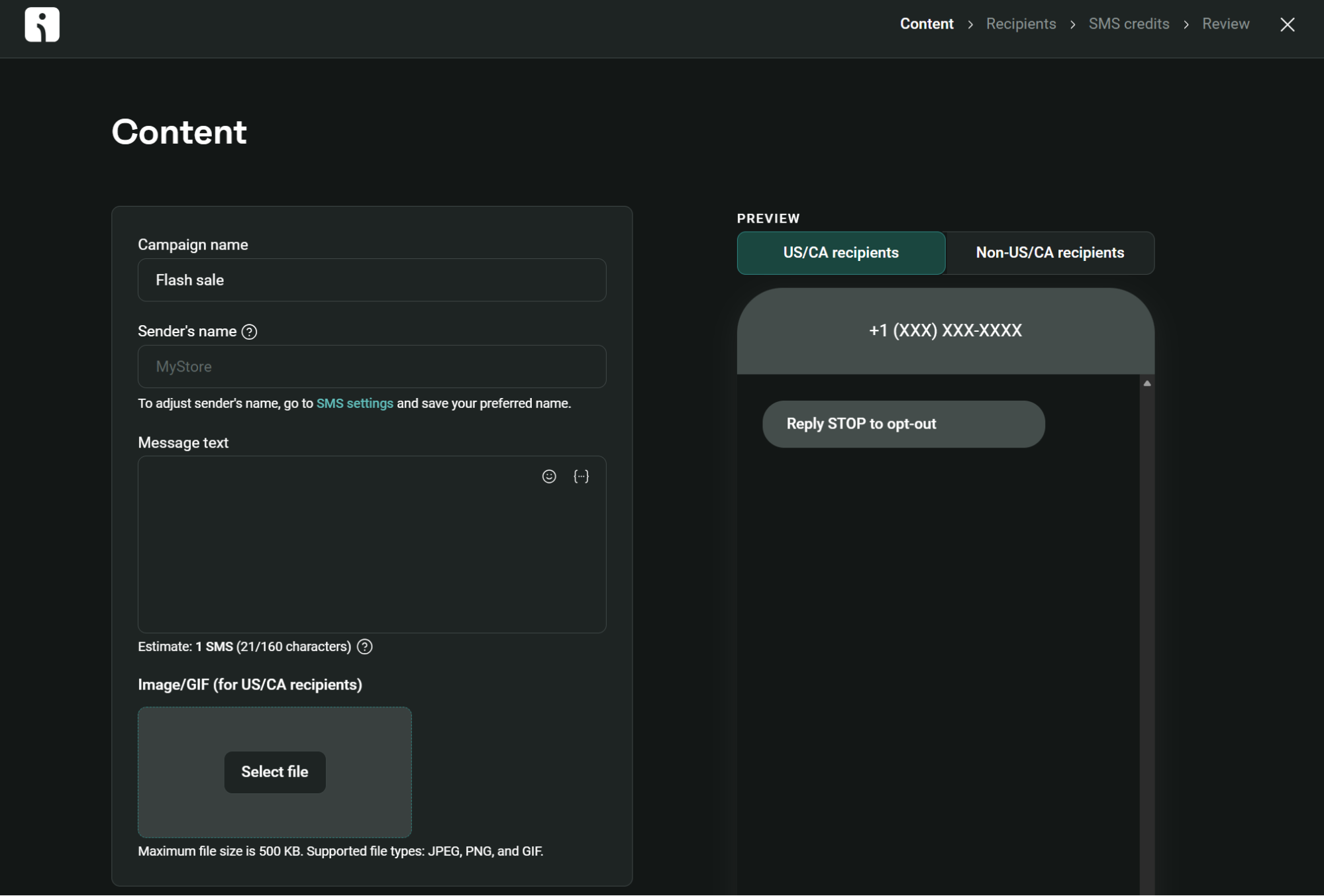
Klaviyo’s SMS campaign builder is visually similar to Omnisend’s builder, so there’s no functionality lost in adding content and previewing your message.
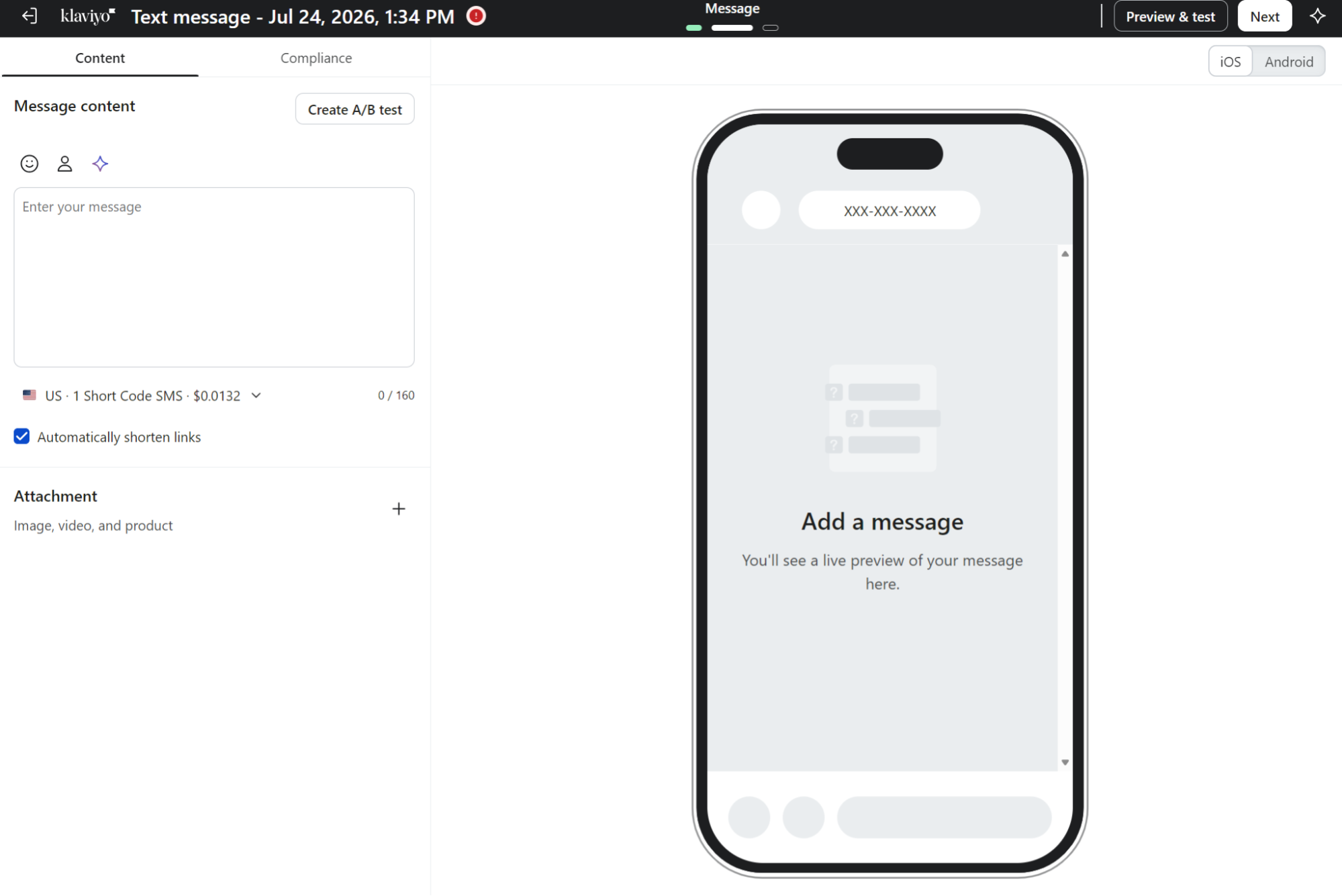
Klaviyo’s infrastructure varies by region. In North America, one toll-free number serves both the U.S. and Canada. For Europe and Australia, you get branded sender IDs, which are alphanumeric names instead of phone numbers that appear as the sender.
The catch is that branded sender IDs can’t receive replies, so two-way messaging only works where Klaviyo uses phone numbers (more on two-way messaging below). Want short codes or vanity numbers? Those cost extra on paid plans.
Klaviyo’s two-way messaging lets recipients text back to your business number, enabling SMS conversations, opt-in and opt-out keywords, and conversational flows.
It works with toll-free numbers, long codes, and short codes, but not with branded sender IDs since branded sender IDs cannot receive incoming messages.
Two-way messaging is available in the U.S. and Canada and in countries with long codes or short codes. Klaviyo processes standard keywords such as STOP, HELP, and START automatically, without charging credits for these responses.
Omnisend does not natively support two-way messaging, but you can integrate Gorgias to communicate only with U.S. customers.
When customers reply to SMS campaigns (except STOP/HELP keywords), Omnisend creates tickets in Gorgias. Your support agents can respond once per ticket through Gorgias, and replies route back through Omnisend to customers.
SMS automation
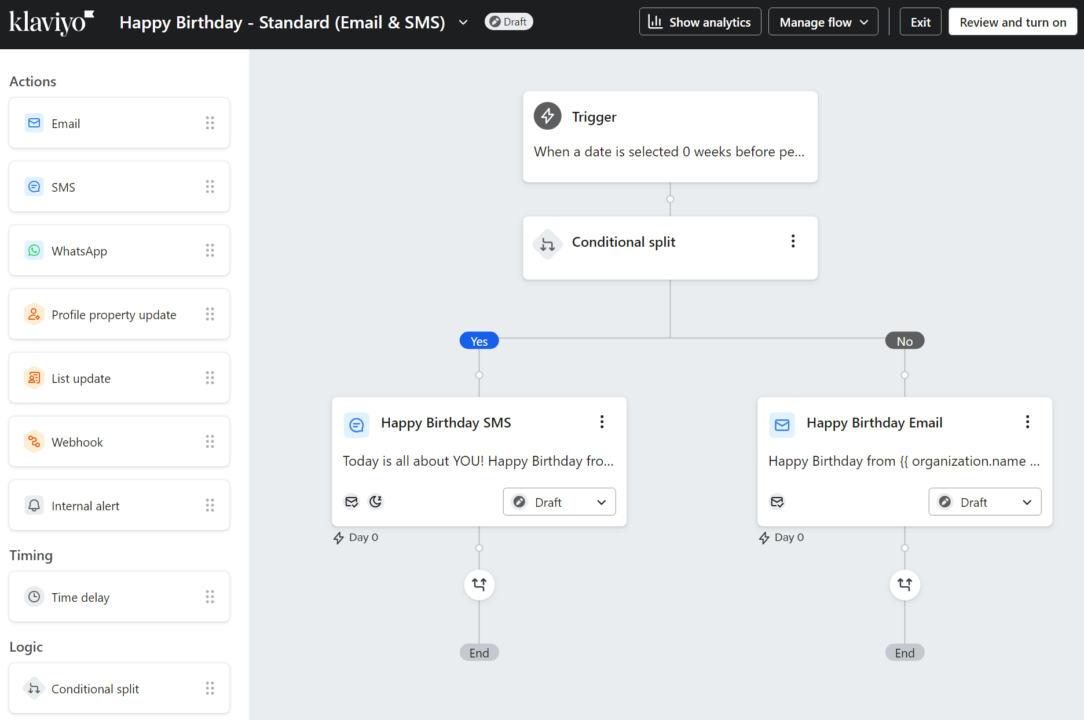
Omnisend treats SMS in automations like any other channel. You can add SMS blocks anywhere in your workflow, mix them with email messages, and automatically pass non-opted contacts to the next channel.
It formats phone numbers with country codes based on checkout data and sends them using toll-free numbers. If someone lacks SMS consent or you run out of credits, Omnisend sends them an email instead of failing the whole automation.
There are also separate templates for abandoned carts (products added but not checked out) and abandoned checkouts (checkout started but not completed). Each workflow has different triggers and exit conditions:
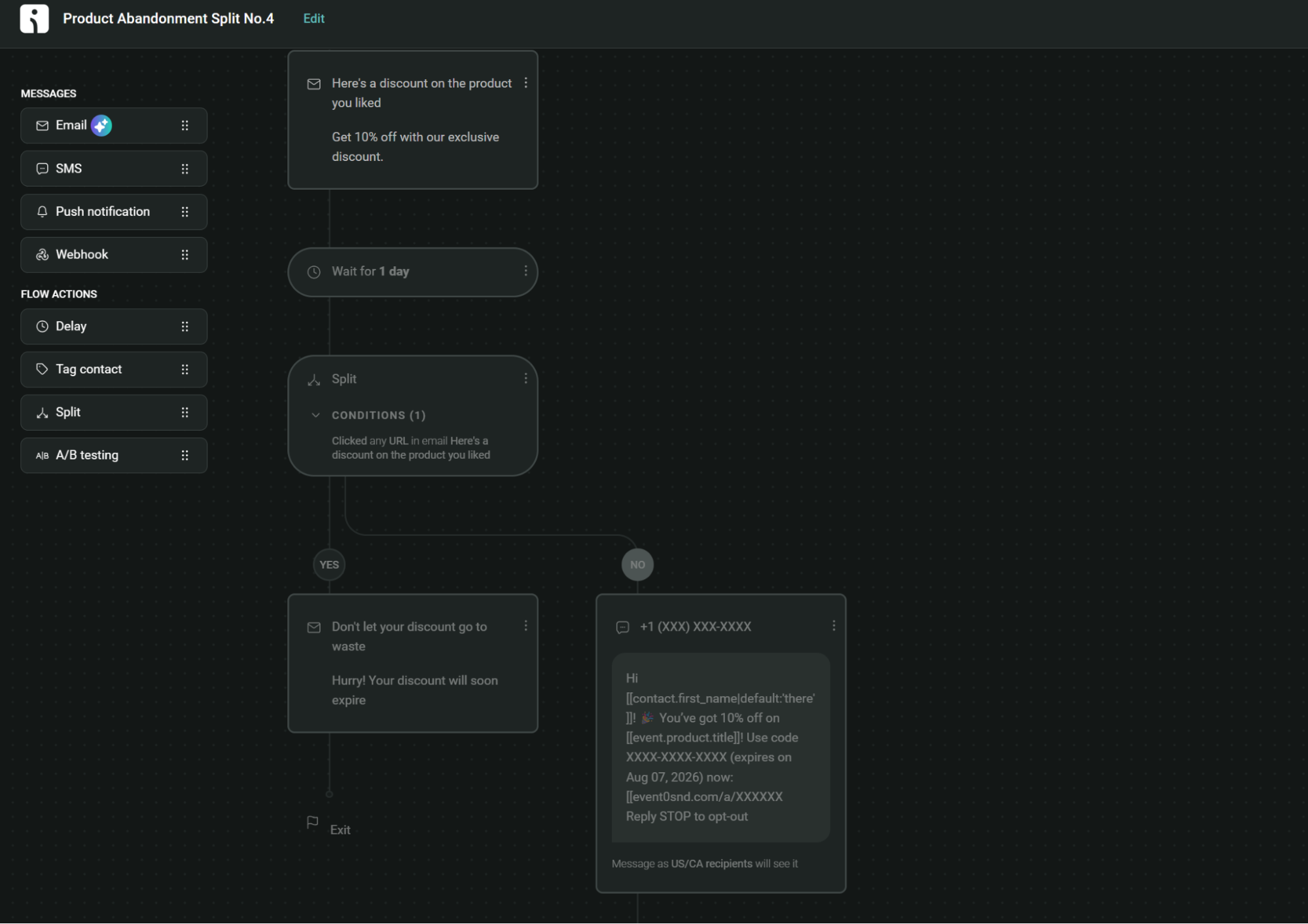
Klaviyo requires conditional splits to add SMS to abandoned cart flows, where you manually build logic to check SMS consent and route recipients accordingly. Those conditional splits add additional work that Omnisend doesn’t need:
However, Klaviyo does support conversational SMS automations, allowing your customers to text keywords and participate in interactive surveys, quizzes, or buying guides. It recognizes numbered choices and typos using fuzzy matching.
Which platform has better segmentation and analytics?
Klaviyo has greater depth in segmentation and reporting. Predictive metrics like next order date, CLV, and churn risk, plus RFM scoring, work as report data and segment conditions, showing who’s likely to buy again and customer value so that you can target them directly.
Customer segmentation
Omnisend and Klaviyo take different approaches to segmentation and targeting.
| Feature | Omnisend | Klaviyo |
|---|---|---|
| Segmentation flexibility | Allows segmentation based on purchase history and customer behavior | Highly flexible segments with advanced customization options |
| Ease of segmentation | Quick setup of basic segments | Slightly more complex |
| Real-time updates | Basic real-time updates, allowing for timely responses based on certain activities | Pinpointed real-time tracking with quick data synchronization |
| Behavioral targeting | Targets based on email clicks, purchases, and site visits | Advanced behavioral targeting, including browsing behavior, purchase history, and more |
| Custom rules | Based on basic activity and campaign history | Highly customizable rules based on various user behaviors and data points |
Omnisend lets you build segments using AND/OR filters for profile data, purchase behavior, browsing activity, campaign engagement, and subscription status.
Your segments then update in real time as contact data changes, and can feed into your campaigns, automation workflows, and forms for personalization.
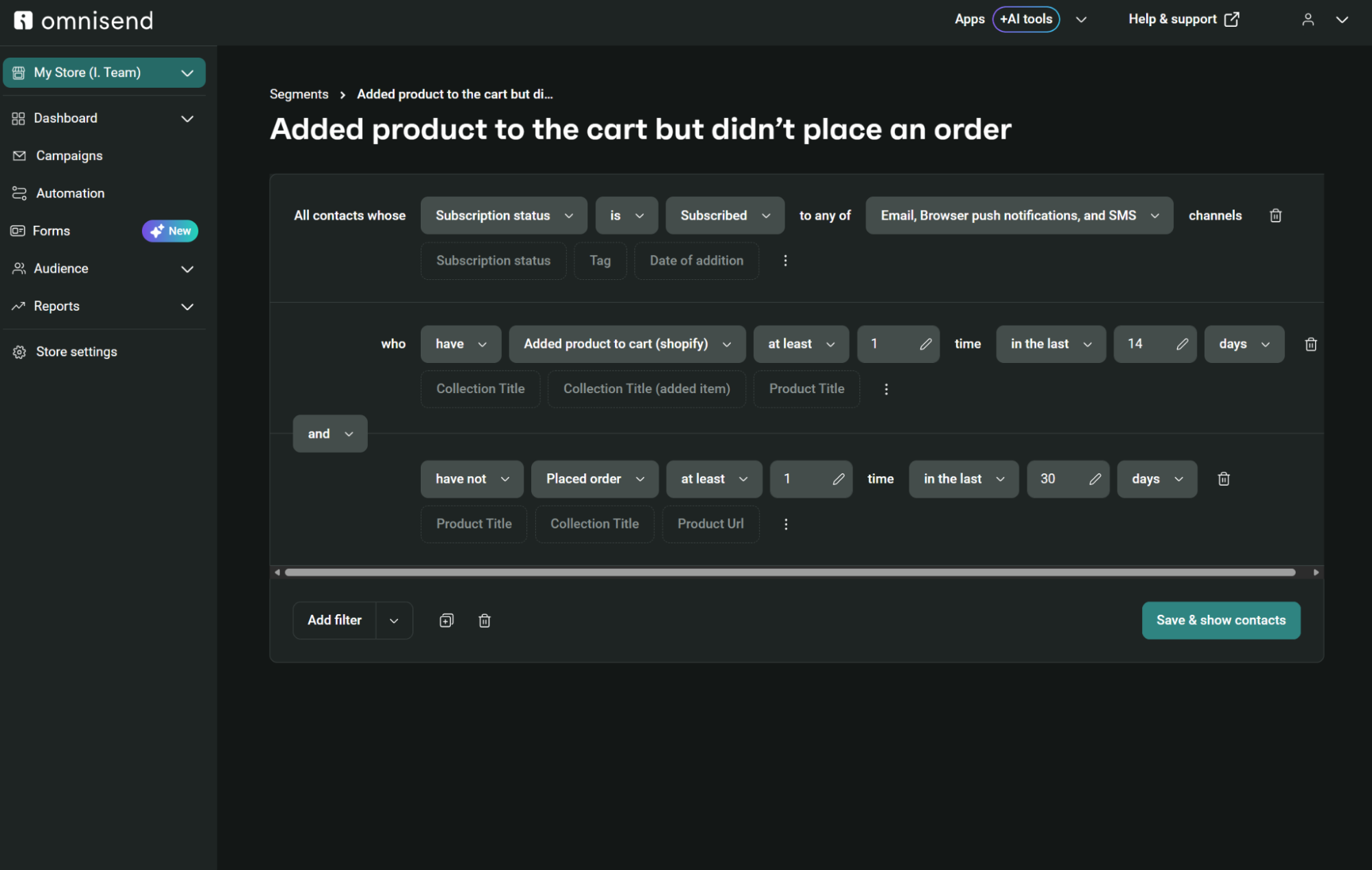
30+ pre-built segments, including active email subscribers, window shoppers, deal hunters, and inactive contacts, get you started fast.
Omnisend provides customer lifetime value (CLV) data (both historical and predicted) at the individual contact level. You can’t currently segment by CLV in Omnisend, but you can segment by lifecycle stage.
Klaviyo lets you segment by predicted CLV, export CLV data in bulk via CSV, and use CLV as a condition in segments, forms, and flows. You can also build projected revenue estimates by summing predicted CLV across a segment.
Other segmentation features in Klaviyo that Omnisend doesn’t offer include proximity-based location filtering and segment snapshots that freeze a segment into a list:
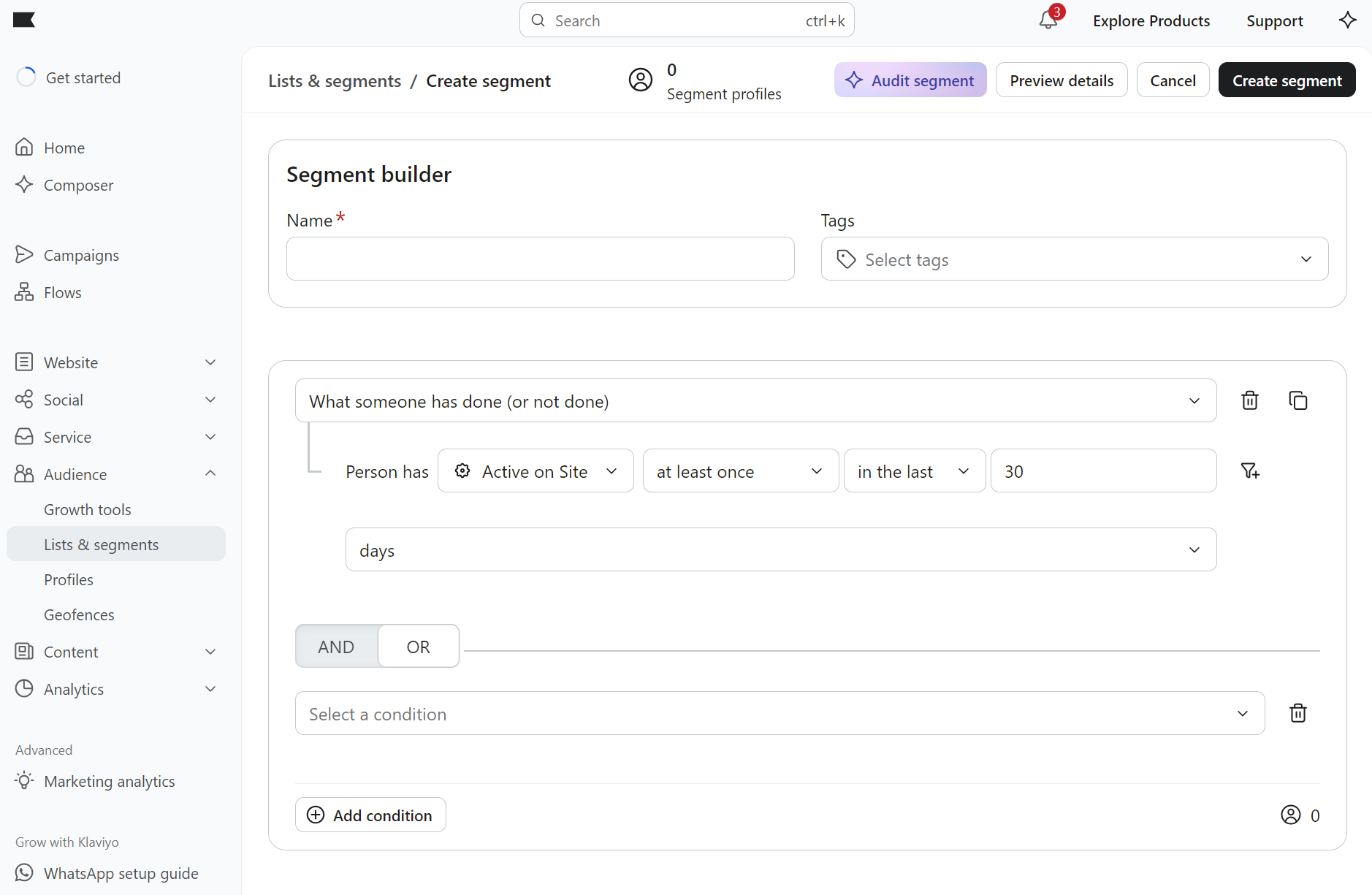
Even though Klaviyo’s segmentation is logical, it requires a bit more familiarity with customer data. It’s great only if you want to get granular with customization.
Revenue tracking and attribution
Klaviyo has a model-comparison tool that previews how changes to attribution windows would affect reporting before you commit. It also lets you build custom reports with five configurable starting points.
Omnisend provides fixed report tabs covering sales, products, campaigns, automation, and customer breakdown (lifecycles), with no custom report construction:
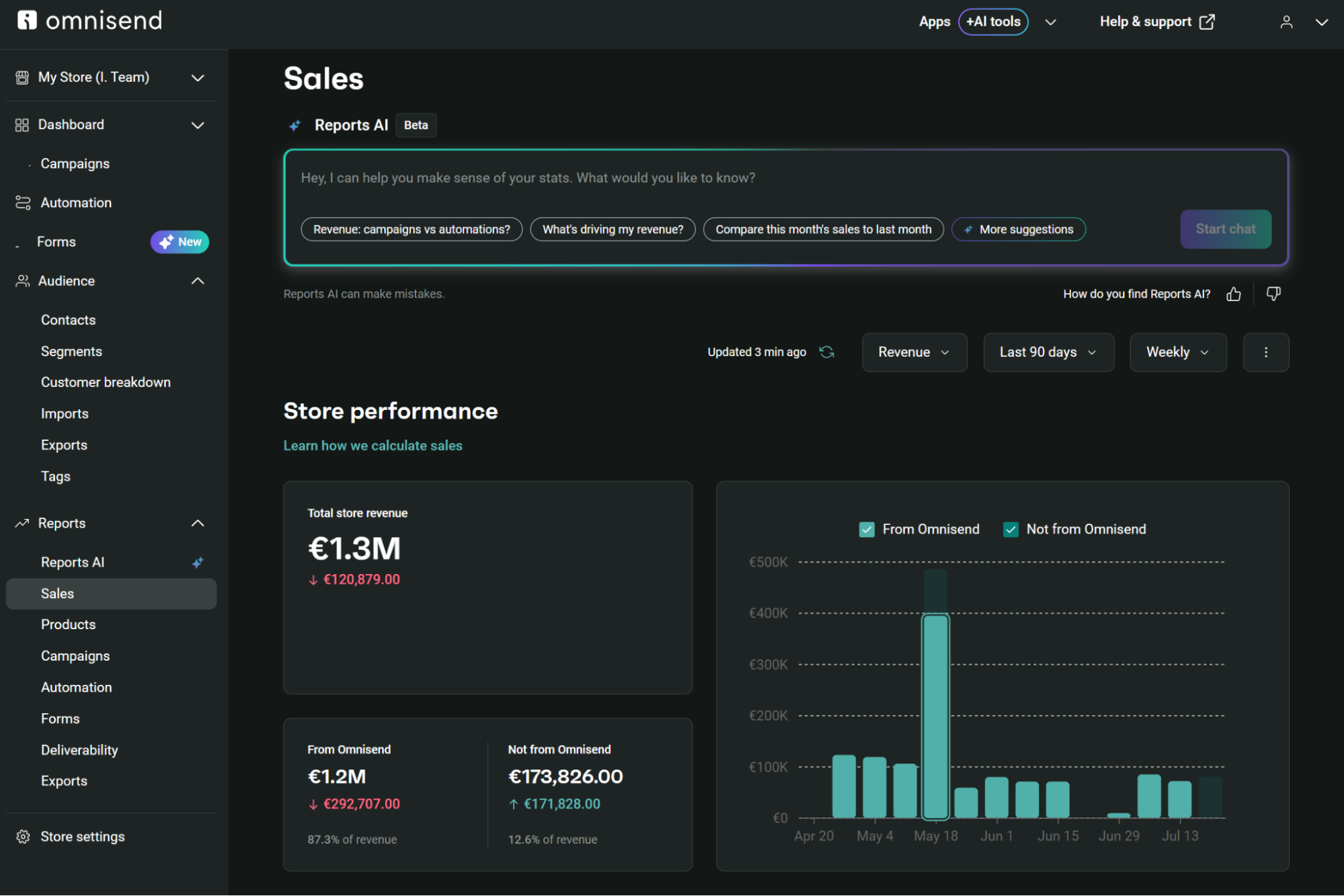
Revenue is on a last-touch basis for both tools, with Omnisend applying a default seven-day window for email and 24 hours for SMS and push, separating marketing-attributed revenue from total store sales. Klaviyo’s default window is five days for email and texts.
Klaviyo and Omnisend attribute revenue across both campaigns and flows, although Klaviyo’s omnichannel attribution reaches non-Klaviyo platforms and requires an Advanced Marketing Analytics subscription.
Predictive analytics
The Customer Breakdown feature in Omnisend uses RFM analysis to sort your list by lifecycle stage, with churn prediction identifying individuals likely to unsubscribe:
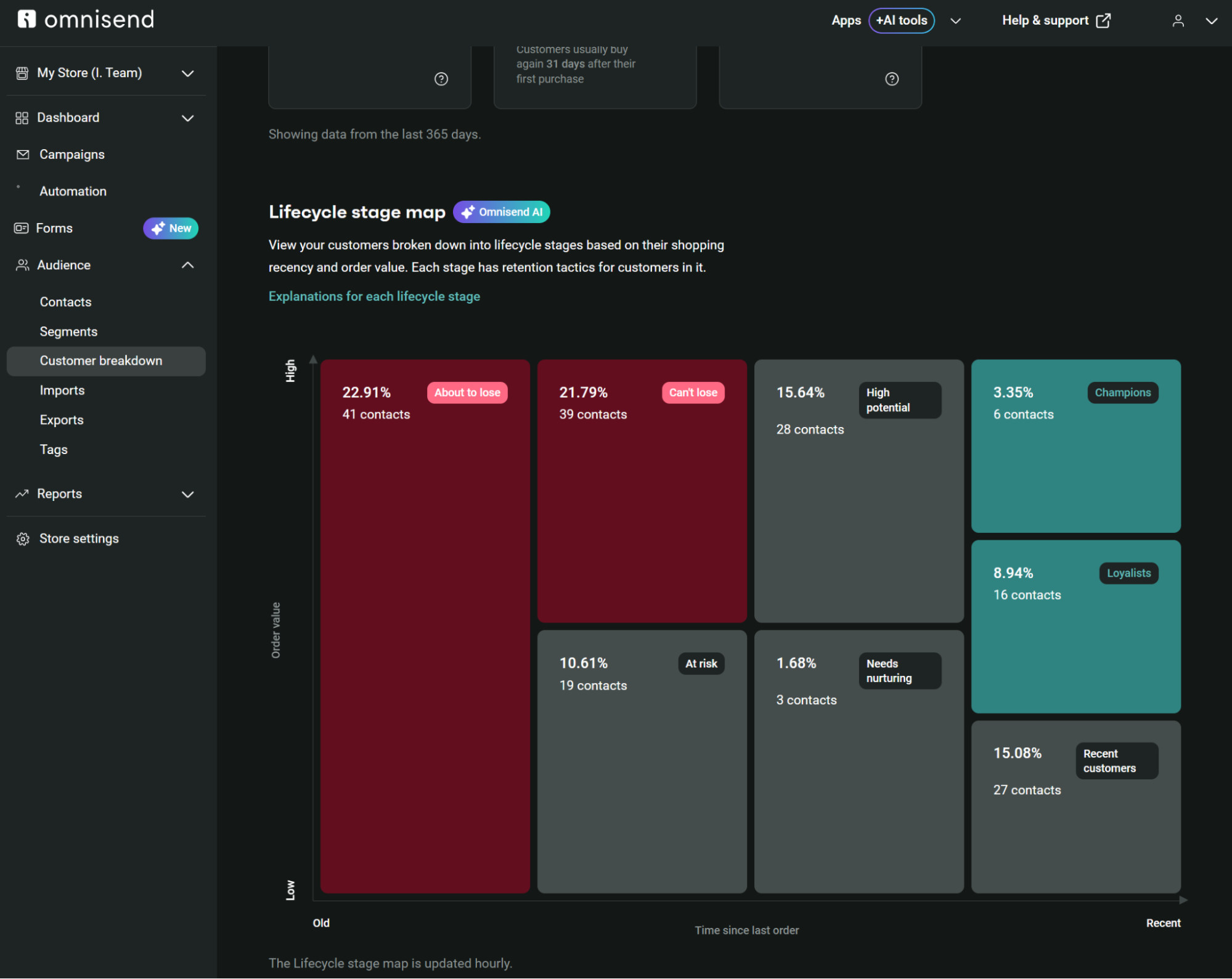
You get retention tactics tailored to each customer segment, and your campaign metrics show performance, but don’t predict individual behavior patterns.
Individual-level forecasting sets Klaviyo apart with CLV and churn predictions for subscribers, with their profiles containing historic and predicted CLV, performance indicators, and the predicted date of their next order.
Which platform has better email deliverability?
Omnisend and Klaviyo provide solid technical groundwork (deliverability reports, DMARC setup guidance, domain monitoring) for strong deliverability. Once you have everything configured, their sender infrastructures support high delivery rates.
Deliverability tools
Omnisend’s deliverability reports track sender health, domain performance, and email list hygiene in one interface:
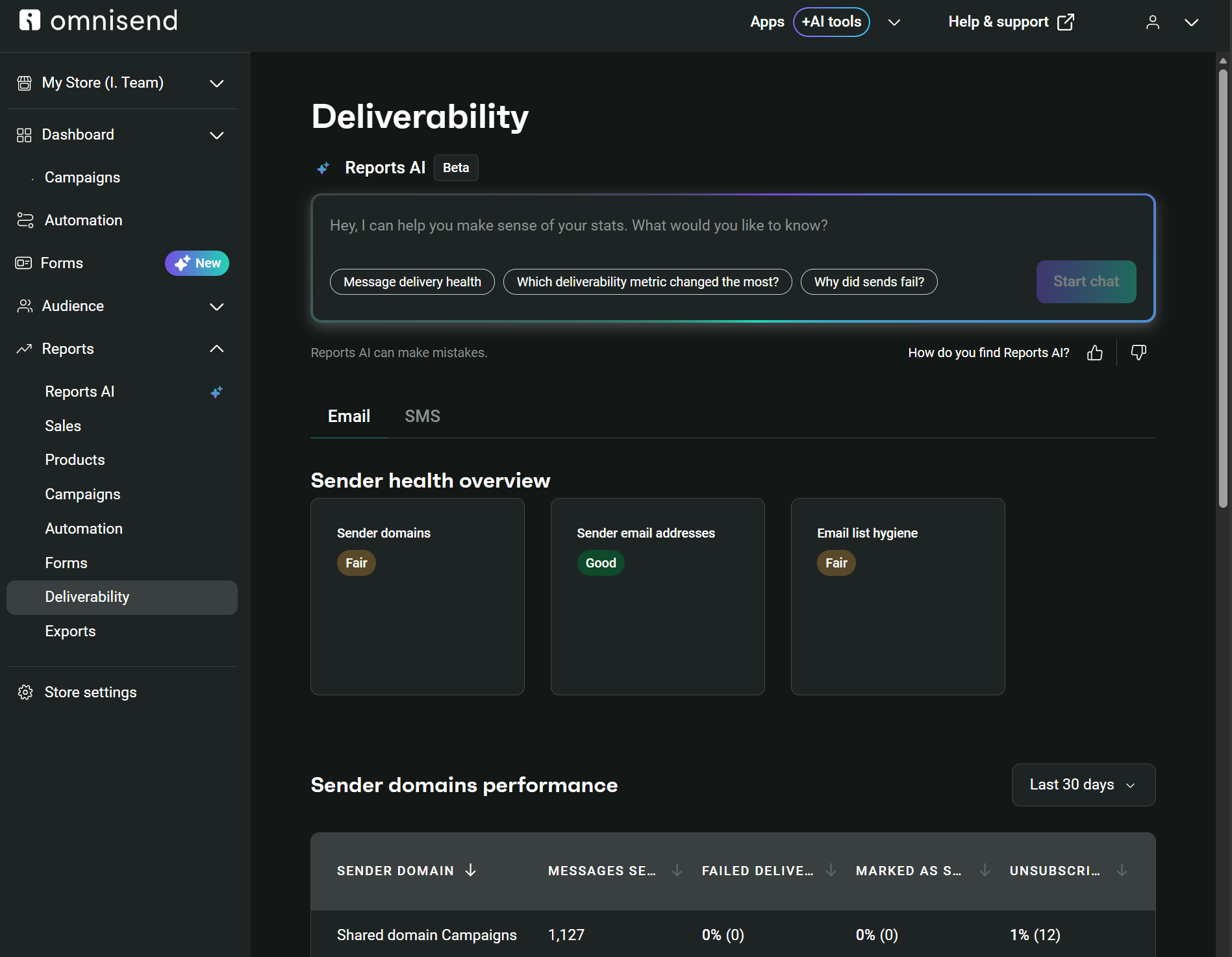
Reports show failed delivery, spam, and unsubscribe rates by domain. It monitors sender email addresses and flags issues with personal email usage. You get performance breakdowns for your top 100 email domains.
Klaviyo’s Deliverability Hub offers similar centralized monitoring, along with an action center for recommendations. Reports break down performance by inbox providers (Gmail, Yahoo, Outlook) to identify problem areas:
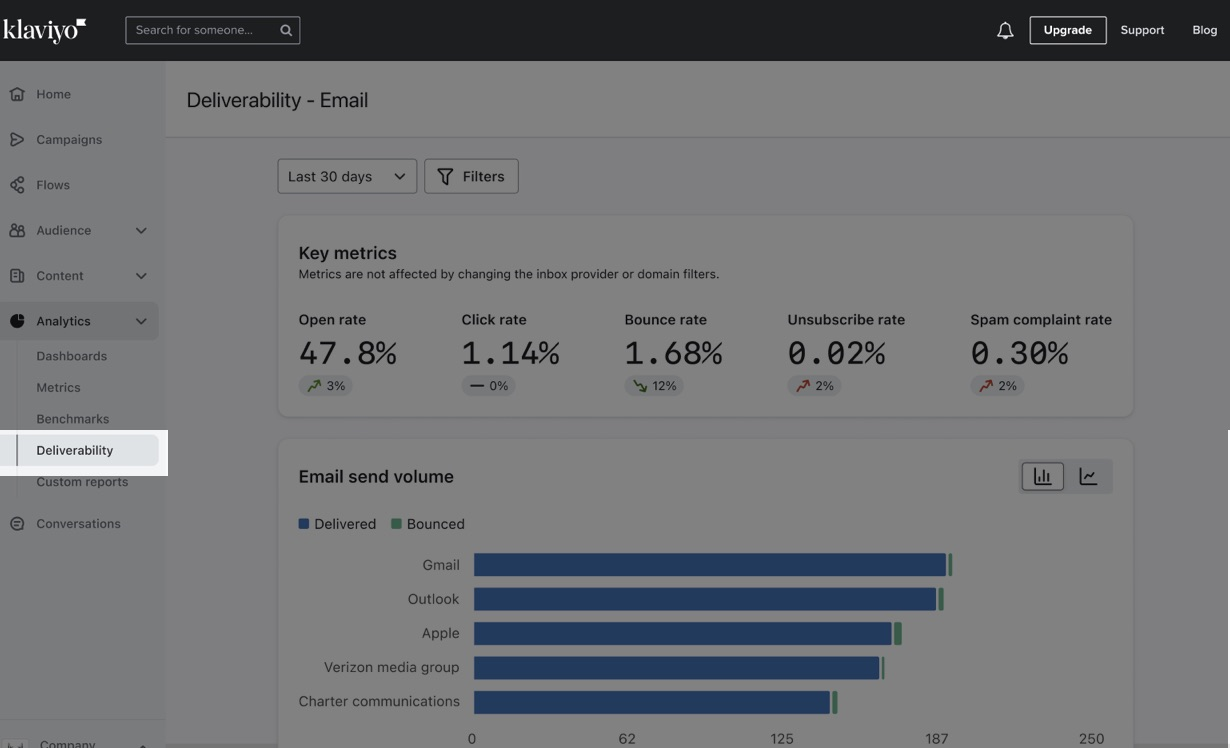
Omnisend recommends sending to engaged segments using timeframe-based criteria (7, 14, or 30 days since the last action). The 80/20 rule focuses on revenue-generating subscribers, which can improve your engagement metrics.
Reputation management features include:
- List cleaning at $0.20 per 100 contacts for poor-quality addresses
- Warmup plans for new accounts and domain switches
- SPF/DKIM/DMARC record setup assistance
- Domain blacklist checking and monitoring
- Segmentation strategies based on opens, clicks, and purchases
- Content guidelines to avoid spam triggers
- Dedicated IP options for high-volume senders
Klaviyo automates reputation management with built-in features:
- Sunset flows that phase out unengaged subscribers automatically
- Deliverability Hub with overall health scores and action recommendations
- Branded sending domain setup (required for bulk senders)
- DMARC setup guidance for your sending domain
- Gmail and Yahoo requirements implementation
- One-click unsubscribe headers in all emails
- Performance breakdowns by inbox provider (Gmail, Yahoo, Outlook)
Authentication and sender reputation
You need a custom domain email address for sending campaigns with Omnisend. Gmail, Yahoo, and other free email providers aren’t supported and are likely to be rejected or land in spam.
Domain signature (SPF/DKIM) is free and strongly recommended for deliverability. At least one authentication method (SPF, DKIM, or DMARC) must pass validation to verify your domain.
Sending runs on shared IPs by default, which require no warmup. Dedicated IPs are available for high-volume senders (300,000+ emails per week), and those require a 15–30-day warmup.
Stricter authentication requirements apply in Klaviyo, especially when sending 5,000 or more emails per day to Gmail accounts (all traffic counts). You must set up a branded sending domain to remove the “via klaviyomail.com” disclaimer and improve deliverability.
Gmail and Yahoo compliance require setting up a DMARC policy for your sending domain in DNS. Your from-address domain must align with your branded sending domain for DMARC compliance.
Which platform has better AI features?
Klaviyo’s AI is more advanced with dedicated agents, but Omnisend gives you core AI tools even on its free plan.
Klaviyo’s AI features are provided by K:AI, an intelligence layer in the CRM with two built-in agents: a Marketing Agent that plans and drafts campaigns, and a Customer Agent for 24/7 support.
AI features include Personalized Send Time, content generation, and brand voice copywriting via Composer, which is metered by credits.
It also has predictive analytics for customer lifetime value and churn risk, and deliverability tools like campaign monitoring, volume warnings, and guided warming.
Both platforms have MCP functionality. These connect your customer data to AI tools, letting you query performance, manage segments, and build campaigns.
Omnisend’s email marketing AI features include an AI segment builder, subject line and preheader generators, an AI Writer to improve content, Direct Copywriting to generate new email text, and Reports AI (currently in Beta) for performance summaries:
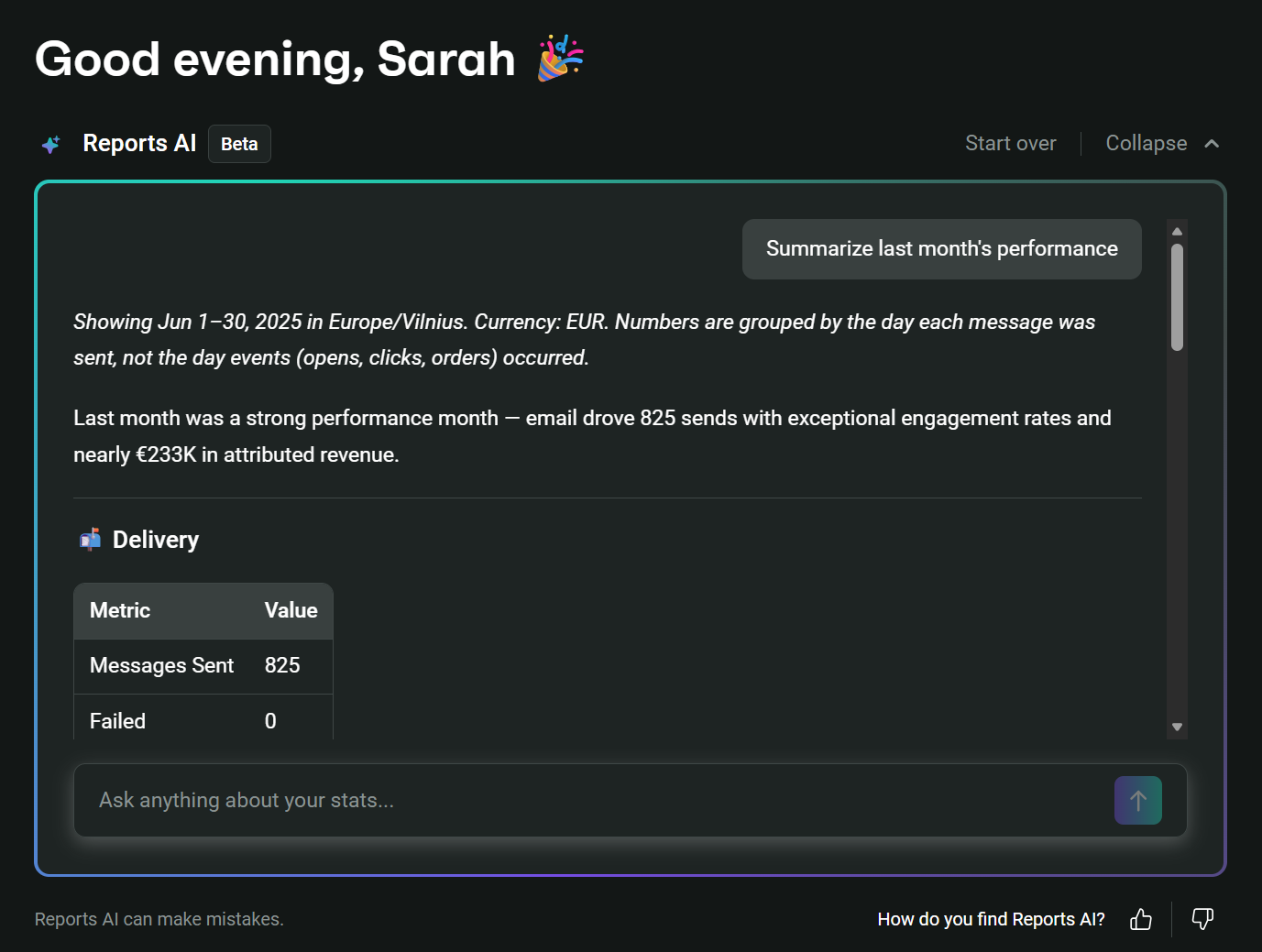
Additional AI features include the Dynamic Product Recommender for personalized products, Campaign Booster for automatic resends, Brand Assets AI for consistent styling, and Customer Breakdown using RFM analysis.
AI content creation and personalization
AI generates subject lines, preheaders, and email body content in Omnisend. Brand Assets AI automatically applies your logo, fonts, and colors to templates.
Your brand voice remains consistent with AI Writer’s review of grammar and tone. Direct Copywriting learns from your past campaigns to match your style, and Campaign Booster takes another shot at non-openers 48 hours later with fresh subject lines.
Here’s the AI content feature in action in the email editor:
And now, here’s Omnisend’s AI subject line generator in action:
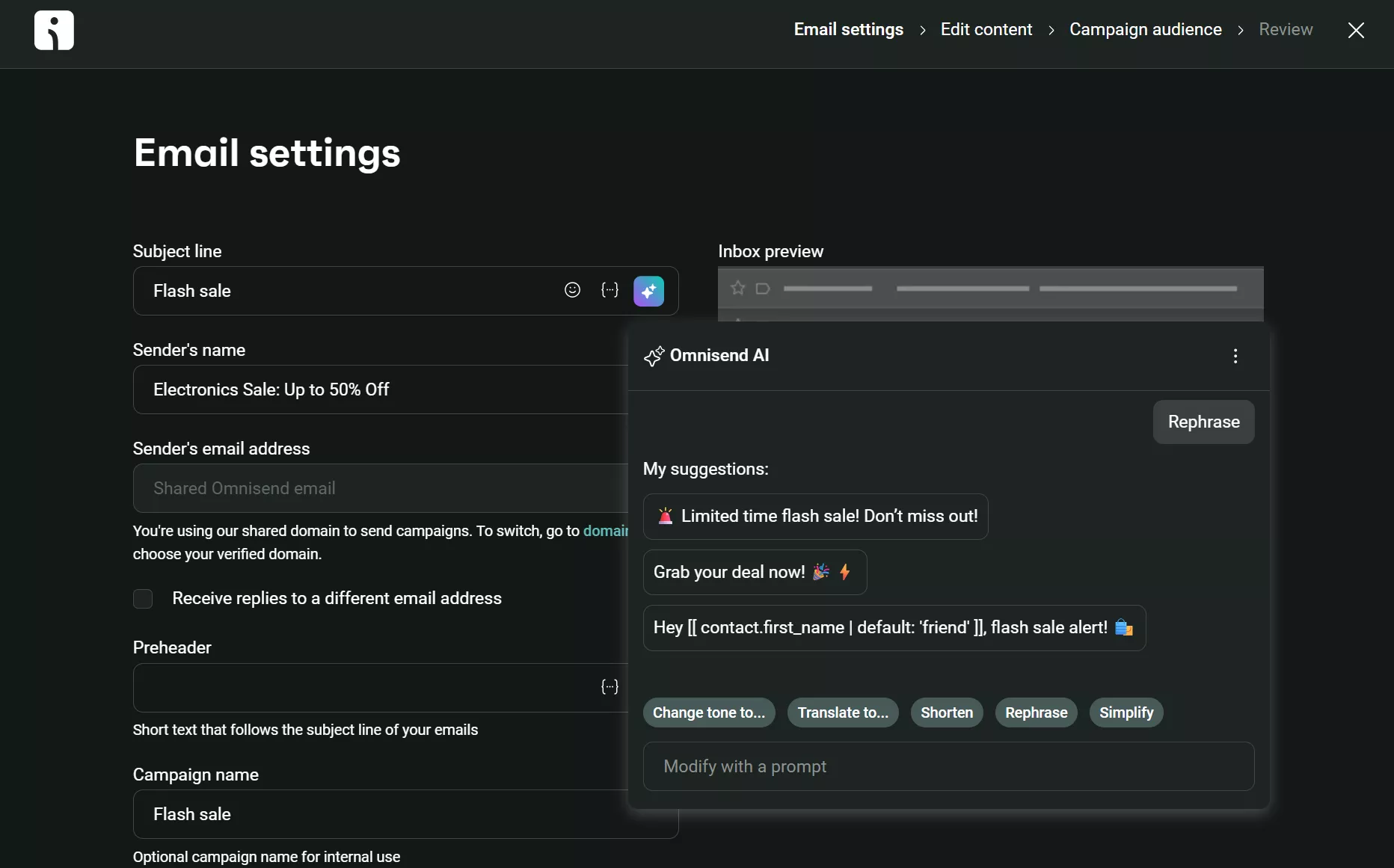
Overall, AI feels like a natural part of your Omnisend workflow.
Omnisend includes most generative AI features on its free plan, though Forms AI requires a paid plan. Klaviyo restricts AI to paid plans, with free users getting limited access.
You can generate subject lines and email copy from natural language prompts in Klaviyo, which it then adapts to your brand voice based on examples you provide:
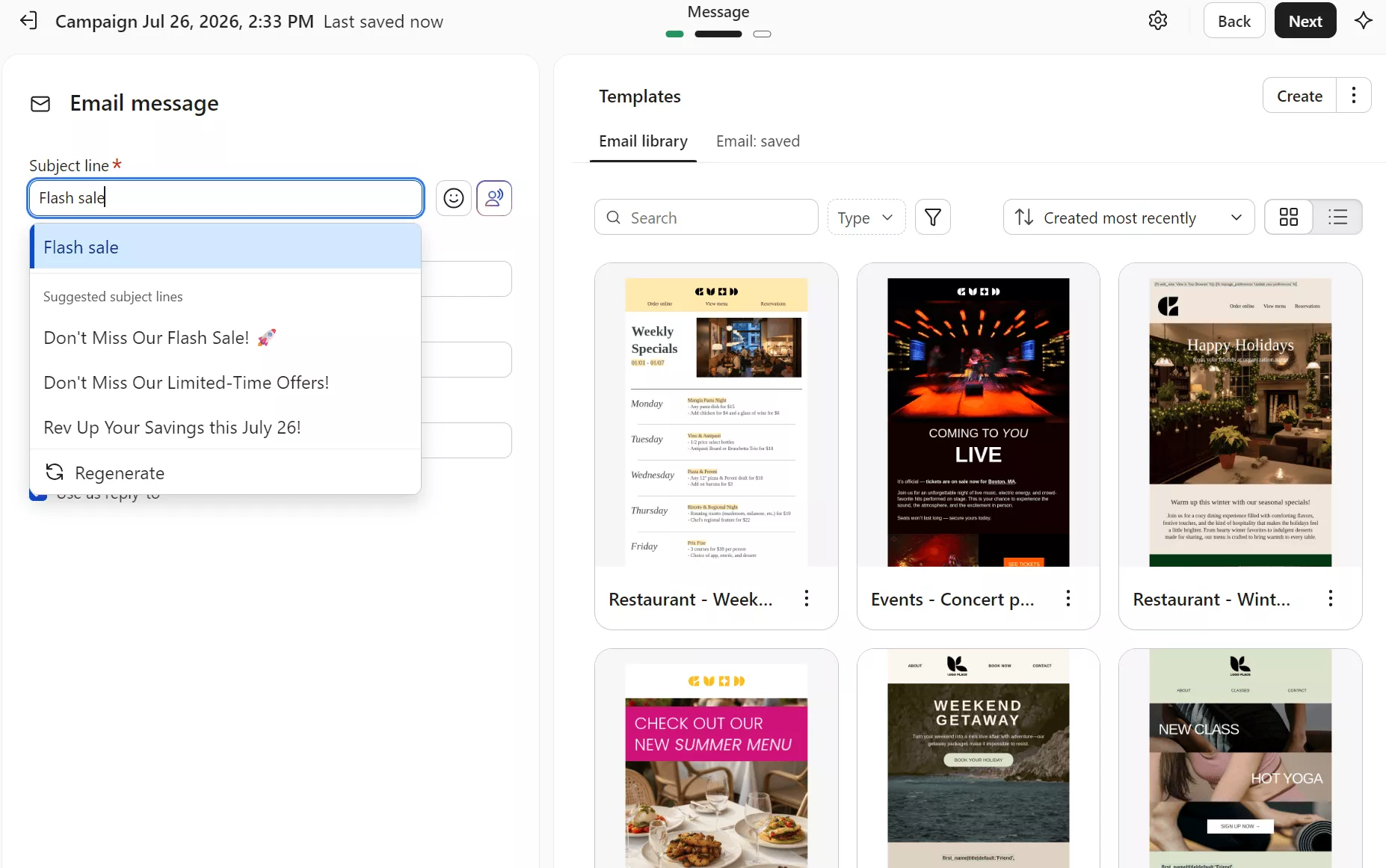
The quality of Klaviyo’s generative AI outputs is similar to Omnisend’s. You won’t struggle to come up with a subject line or new content in your emails using either tool.
Omnisend’s Dynamic Product Recommender shows items based on what customers recently browsed or purchased. You can also select from multiple product recommender blocks in the email editor to suit your campaign:
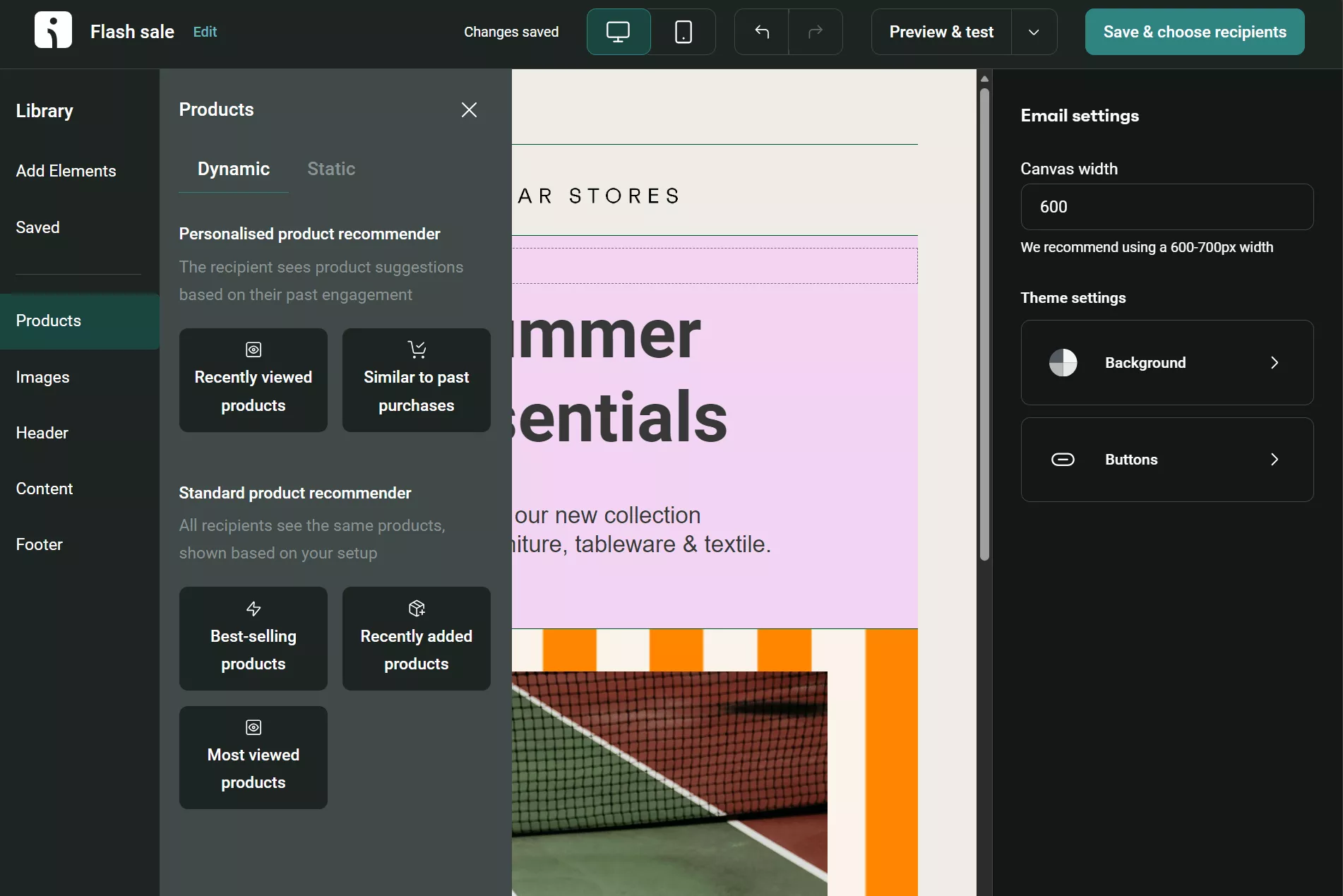
Separately, the AI Segment Builder lets you type descriptions like “big spenders who haven’t bought lately” and instantly creates the audience. The chat interface also asks follow-up questions when necessary to help refine the segment:
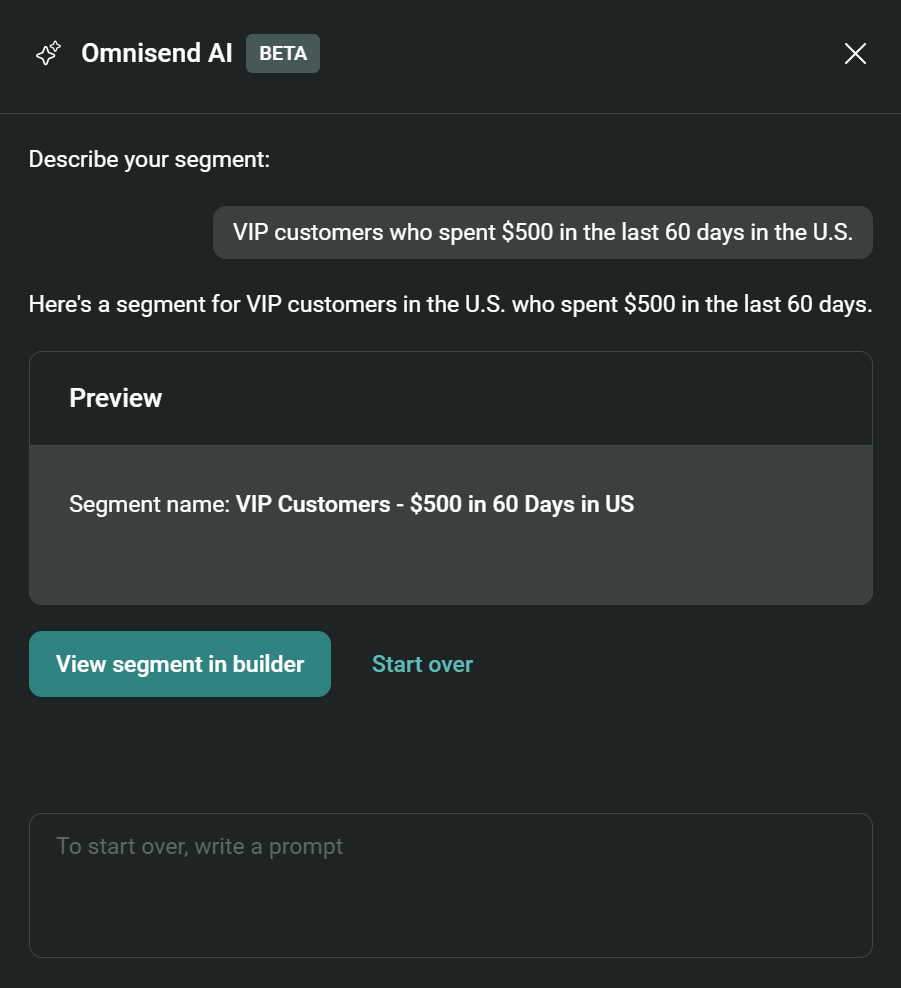
Klaviyo’s AI builds detailed customer profiles from every interaction, including browsing patterns, cart activity, purchase history, and engagement data.
Product recommendations adapt as customers chat with the AI assistant, and in emails, product feeds personalize recommendations based on customer behavior.
Segments AI builds audience groups, and RFM groupings help you target high-value or lapsing customers. Customer data is shared across email and SMS for consistent personalization.
Which integrates better with your ecommerce stack?
Klaviyo integrates with 350+ apps; Omnisend integrates with 305+. Both cover popular ecommerce platforms like Shopify, WooCommerce, and BigCommerce, and tools such as Judge.me, Loox, Gorgias, and Facebook Lead Ads, and Zapier.
Ecommerce platform integrations
Omnisend’s primary ecommerce integration is Shopify. Its native Shopify app also serves Shopify Plus.
The connection syncs your customers, products, and orders automatically, feeding Omnisend data for your flows, segments, and revenue attribution.
Additional core integrations include WooCommerce and BigCommerce. The depth is similar to that of Shopify. Omnisend is also a BigCommerce Elite Partner; Elite apps are integrations that are highly trusted and recommended.
ShopLazza, Ecwid, Surecart, Big Cartel, and multiple more ecommerce platforms also have native apps: Here’s a screenshot of its App Market:
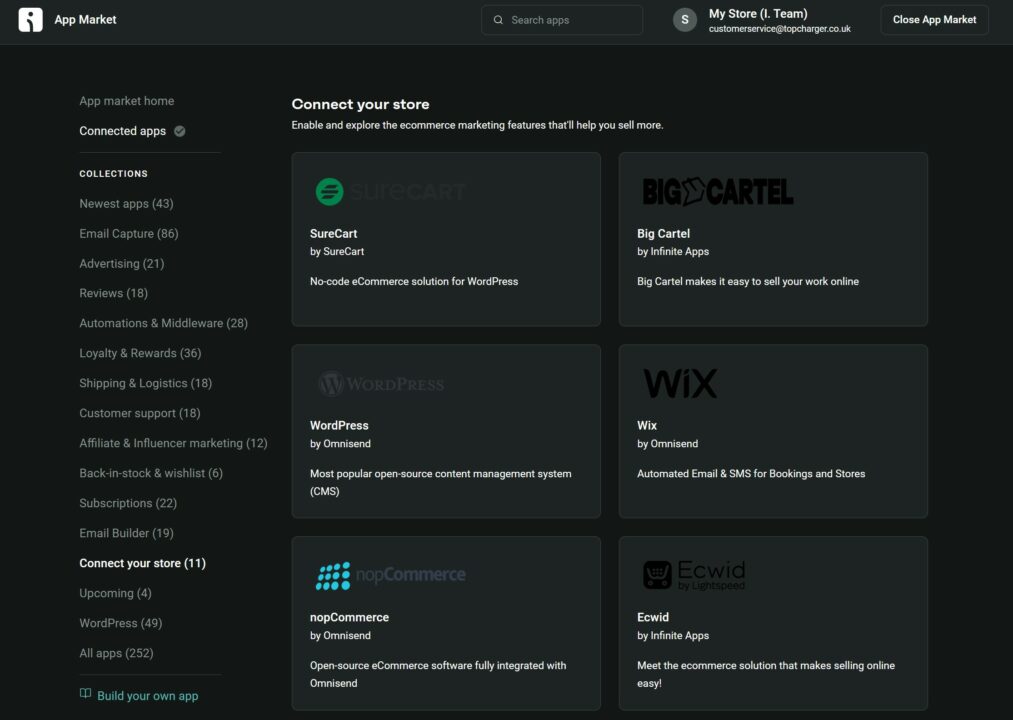
Klaviyo’s core ecommerce integration is also Shopify, with additional depth.
It syncs carrier-dependent shipment updates, partial fulfillments, collection views and site searches, and writes custom properties back into Shopify as customer metafields. Omnisend’s return path covers subscription status, contact details, and tags.
The image below shows its App Marketplace:
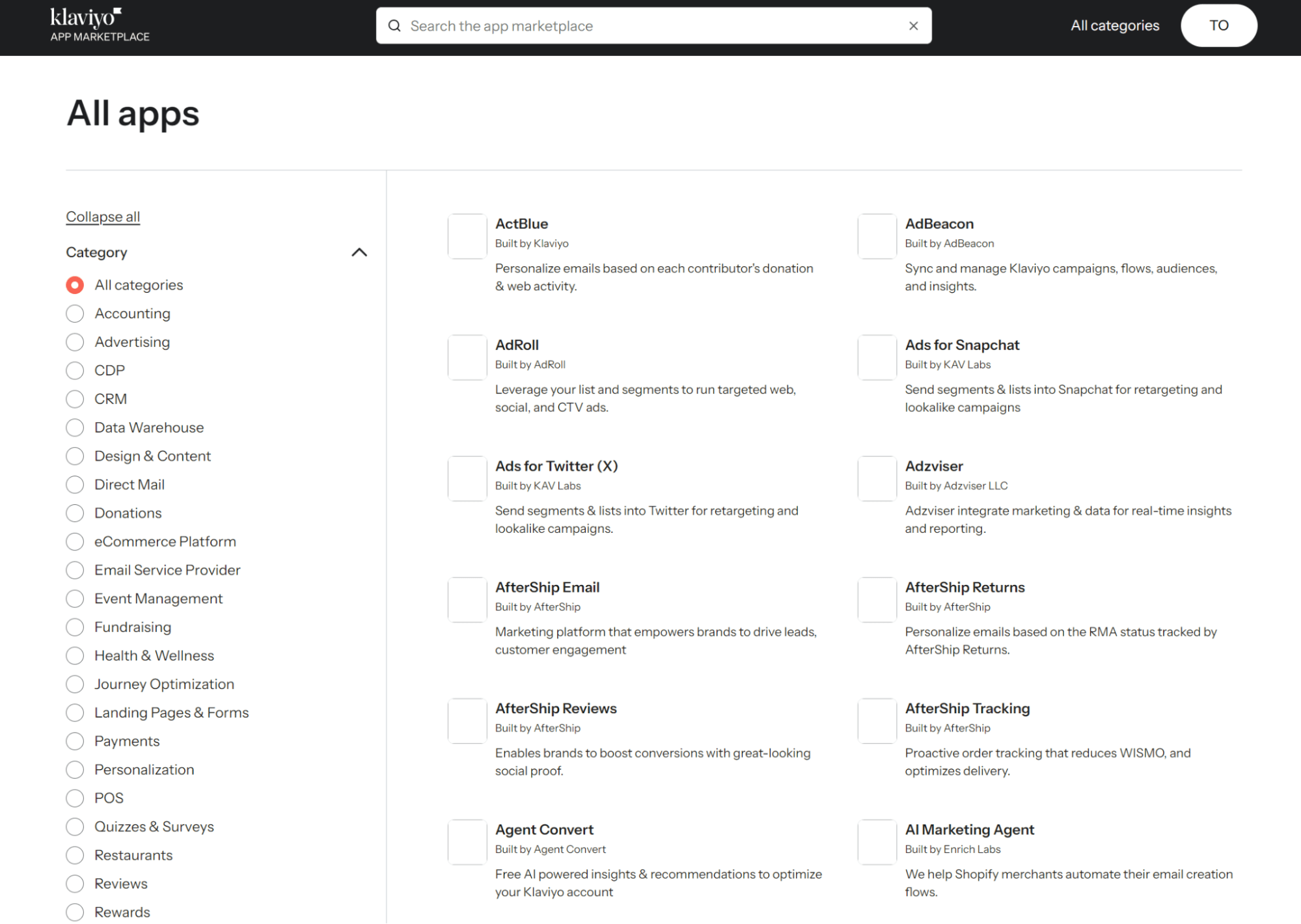
Like Omnisend, Klaviyo has native apps for BigCommerce and WooCommerce. It also connects to Salesforce Commerce Cloud and Adobe Commerce.
Marketing tool ecosystem
Omnisend has hundreds of native apps, covering many of the most popular Shopify and WooCommerce tools across advertising, reviews, loyalty programs, and influencer marketing.
You can sync Facebook Custom Audiences directly from your segments, push campaigns to social media, or connect affiliate tracking from Goaffpro.
Popular integrations include Postscript for SMS collection, PageFly for landing pages, and GrowthHero for influencer campaigns. Quizell creates interactive quizzes that convert visitors into customers and feed data into your campaigns.
Klaviyo offers CRM functionality that Omnisend lacks, particularly with Salesforce integration that syncs leads hourly and enriches your profiles with sales pipeline data.
Your advertising reach extends to Pinterest, TikTok, and X audiences beyond the Google and Facebook connections both platforms share, with Pinpoint capturing leads from Instagram and TikTok DM conversations and feeding them into your Klaviyo lists.
API and custom integrations
Omnisend and Klaviyo provide REST and JavaScript APIs.
REST passes contacts, orders, and products between servers; JavaScript tracks on-site behavior, such as cart abandonment.
You might need such functionality for OpenCart, Adobe Commerce (formerly Magento), and other ecommerce builds that need the API to connect.
Both require coding skills to build these connections. High-quality API documentation is available, but it assumes technical familiarity with webhooks and JSON payloads.
Can you manage multiple stores in one account?
Omnisend lets you create a single-owner account and manage multiple stores connected to it, while Klaviyo doesn’t
The single-owner account approach is ideal if you’re a marketer or business owner with more than one store. You can connect up to 500 stores in one Omnisend account, with one-click store switching, centralized billing, and shared content assets.
Customizable user access is another plus point for your single-owner account. Set managers, analysts, campaign coordinators, content creators, and so on.
Klaviyo does not support multiple stores in one account like Omnisend. One account is for one store/brand, so if you have multiple stores, you need multiple Klaviyo accounts.
One user can have access to multiple accounts. You can then switch between them. However, Klaviyo explicitly states it isn’t optimized for more than one ecommerce store per account.
Which offers better customer support?
Omnisend gains an advantage in customer support because it offers unrestricted email and live chat accessibility.
Support channels and availability
There are two support types you can access with Klaviyo and Omnisend: human support, where you chat to an expert, and self-serve support, where you read and watch tutorials.
When you log in to either Klaviyo or Omnisend, a support link is available at the top of your dashboard that opens their help centers with resources, live chat, and email support options.
If you choose a free Klaviyo plan, you receive email support for 60 days. All paid email marketing plans include email and live chat support.
You can expect to receive an email response from Klaviyo within four hours for urgent issues during the first 60 days of your free plan or on a paid plan. For low-urgency inquiries, you may have to wait up to 48 hours.
Klaviyo also sells custom-priced premium support:
Standard
- Email response times are four hours for urgent issues and 12 hours for high-priority issues.
- Live chat is available 24/5 with no weekend coverage
Professional
- Two-hour and eight-hour email response times for urgent and high-priority email support
- Live chat is accessible 24/5 and on weekends at local business hours
Enterprise
- One-hour response time for urgent issues and four hours for high-priority emails
- 24/7 support weekdays and weekends
In comparison, Omnisend’s 24/7 support is a feature of all plans. If you’re a Pro customer, you get a dedicated Account Expert on plans of $400/month or more.
Because live chat is always available in Omnisend, you can get set up and optimize your email marketing any time, every day of the week.
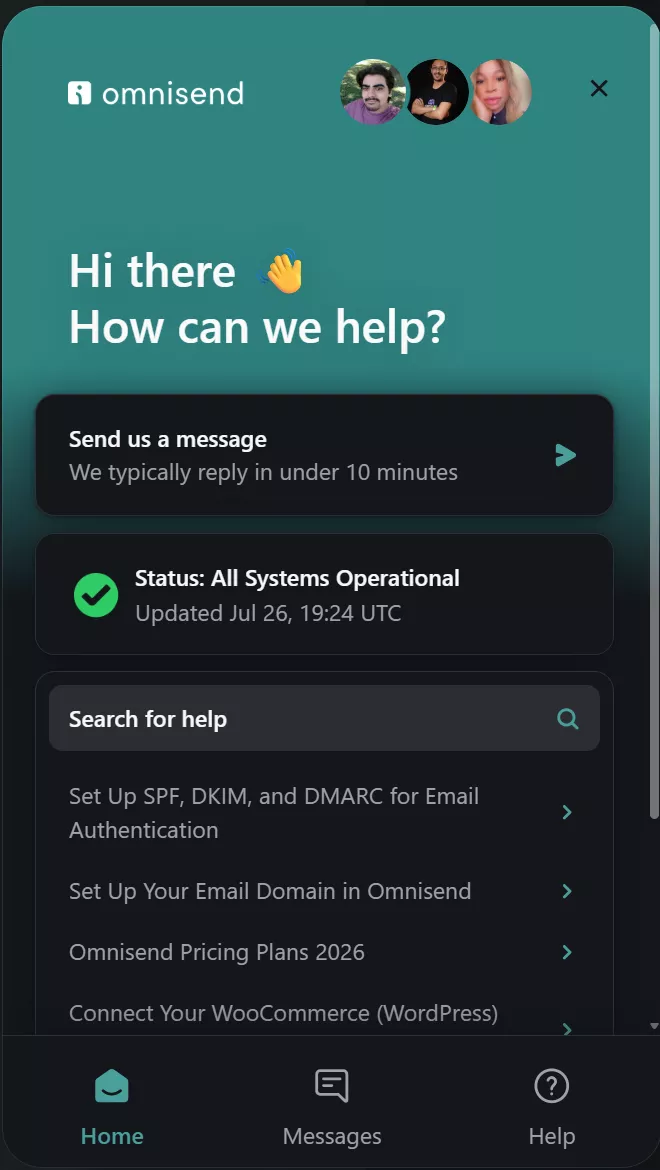
Another helpful feature for support in Omnisend is its floating chat widget, which answers questions and can quickly connect you to a human if you ask it to:
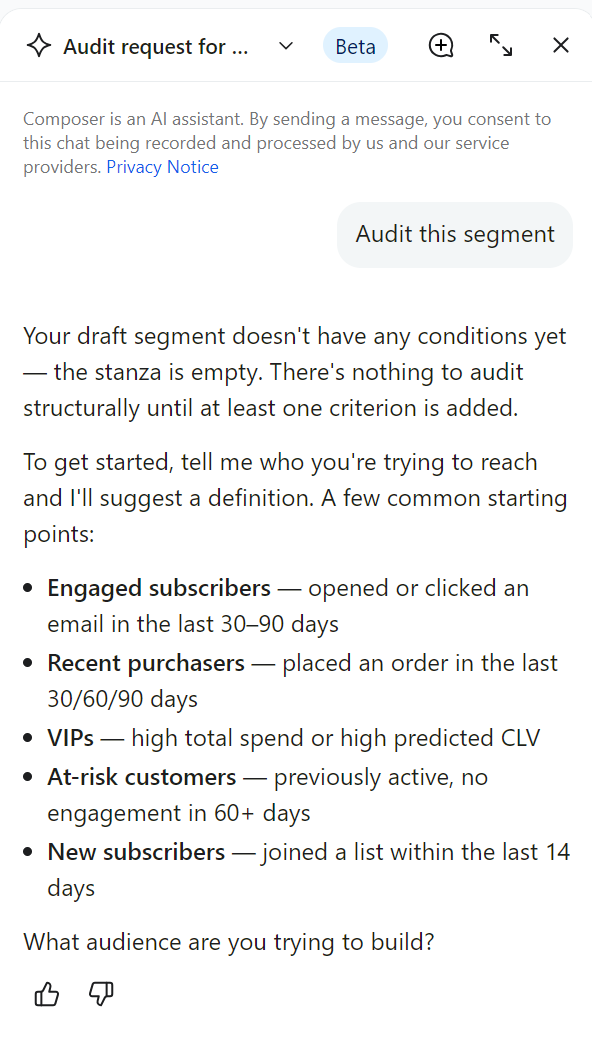
Klaviyo provides a floating chat widget via Composer. You can ask questions and get answers within seconds. On a paid plan, it can hand you over to customer support:
Documentation and learning resources
Omnisend’s Help Center includes a search bar and 600+ articles split into core learning categories, including onboarding, pricing and billing, integrations, audience management, deliverability, channels, automations, campaigns, segmenting your contacts, reports, and more:
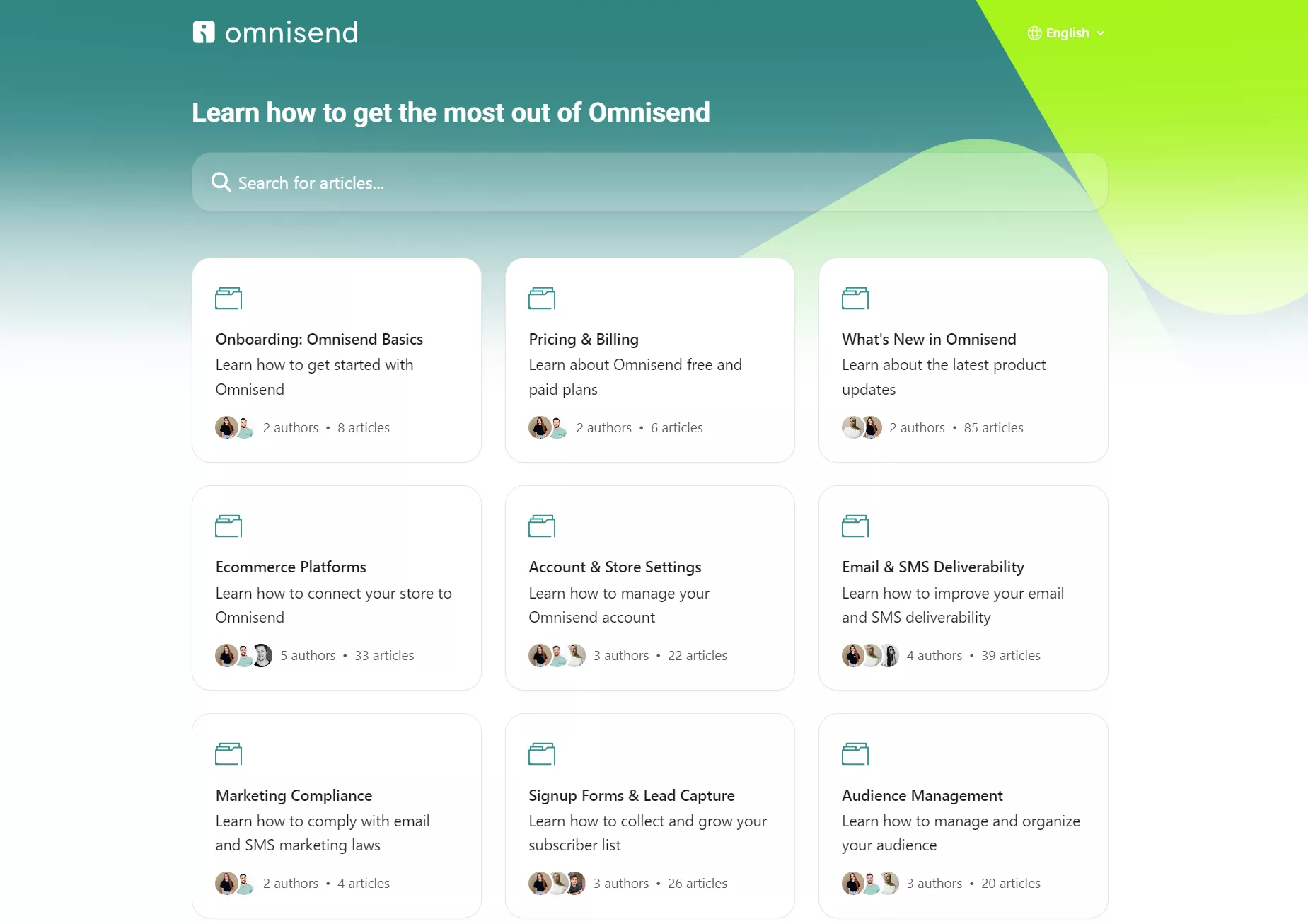
Clicking any of those categories provides a list view of articles. The image below shows the contents for the onboarding category:
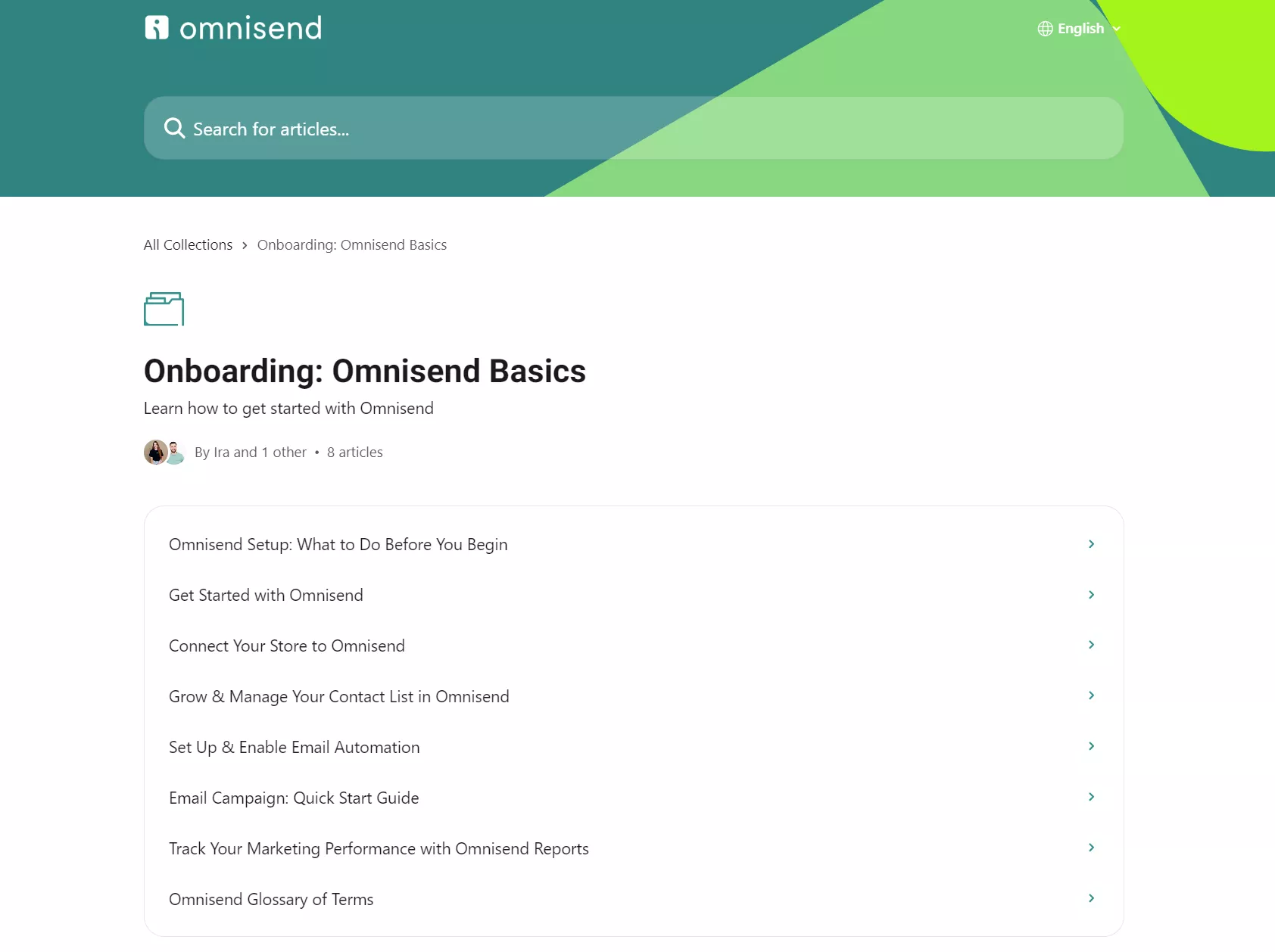
In addition to its Help Center, you can access Omnisend Academy for free, which includes YouTube videos covering many of the same topics.
Klaviyo also provides a Help Center with a search bar, but unlike Omnisend, it includes both Help Center and Academy articles in one view:
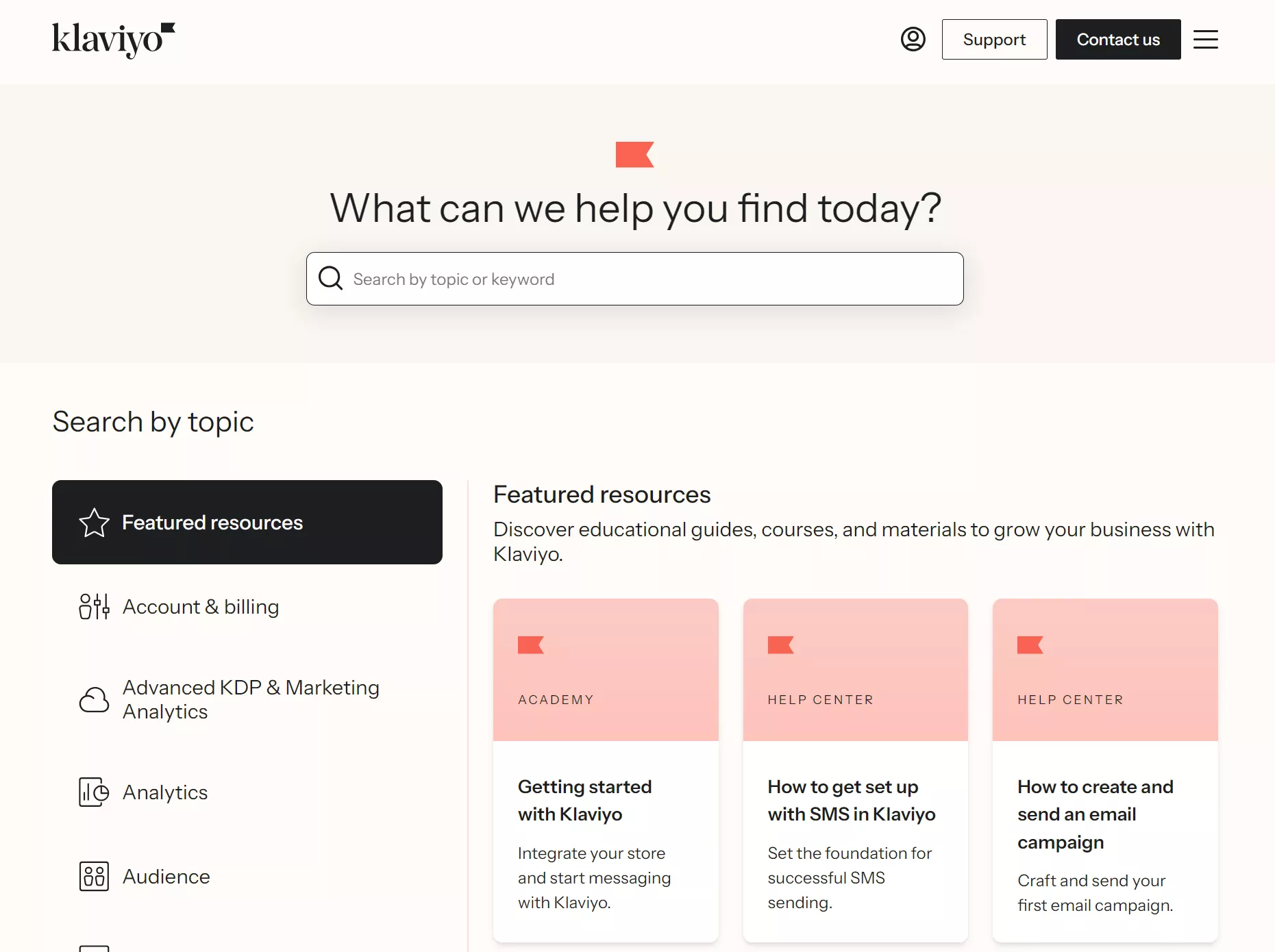
The navigation differs from Omnisend’s, with a sidebar for topics rather than a grid, although selecting a category opens up a grid view of subtopics:
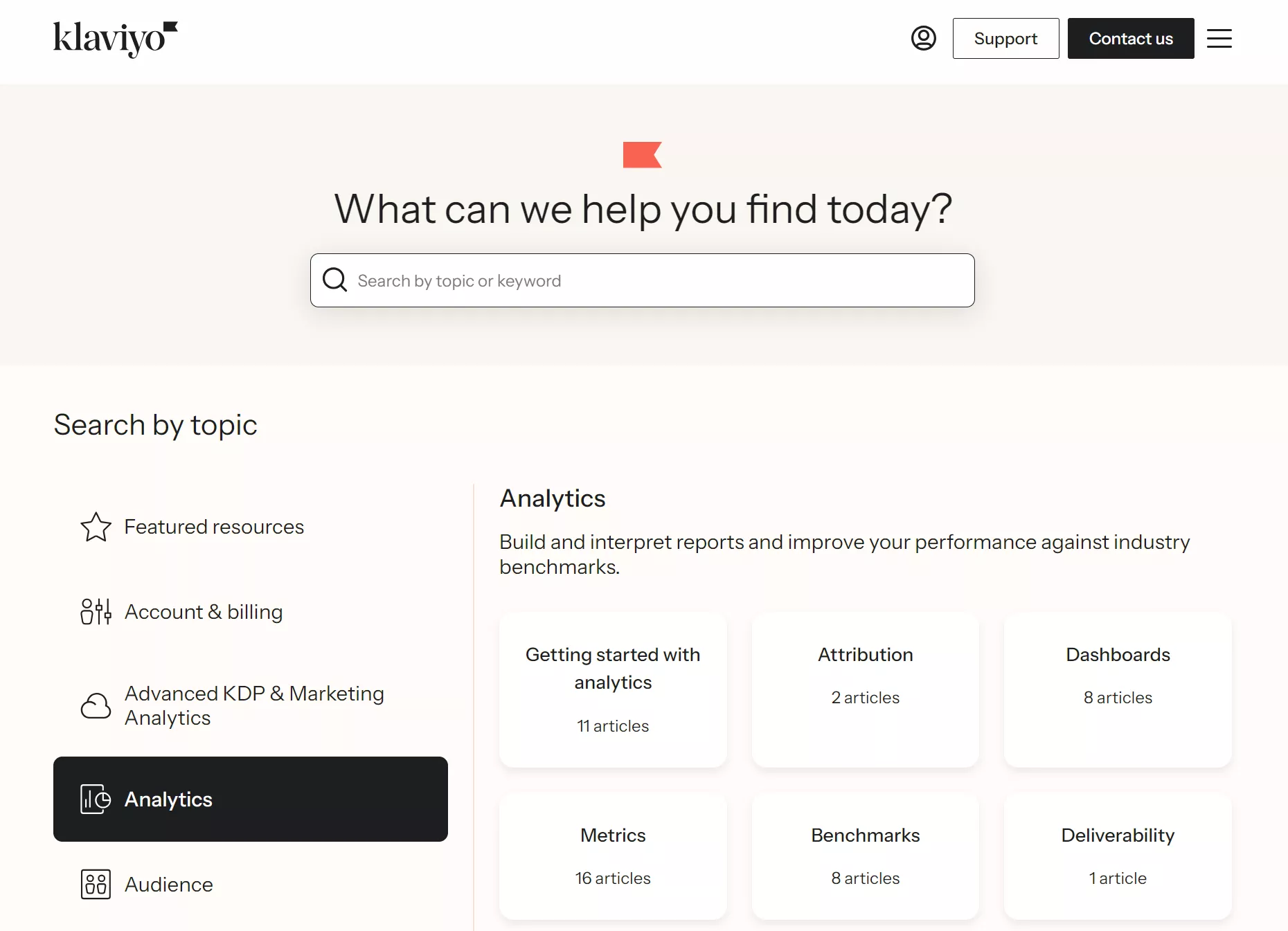
There are more steps to finding topics in Klaviyo than in Omnisend, although the quality of resources is on par in both. Klaviyo has fewer video resources, so if you’re a visual learner, you’ll prefer Omnisend’s approach.
How easy is it to switch from Klaviyo to Omnisend?
Very easy, because Omnisend’s dedicated migration team handles switching from Klaviyo in five business days, rebuilding by hand, regardless of your plan.
What data can you move?
Your contacts’ information, including email addresses, phone numbers, names, addresses, subscription statuses, and consent records, is transferred over via Omnisend’s Klaviyo Data Import Tool.
Custom properties transfer with a “klaviyo_” prefix added. Omnisend’s import tool also brings segment criteria, opt-in dates, and the last active date.
Automation flows stay behind because Klaviyo uses a proprietary flow builder. You’ll build new ones in Omnisend using its template library for common ecommerce scenarios, such as a welcome series.
Migration process
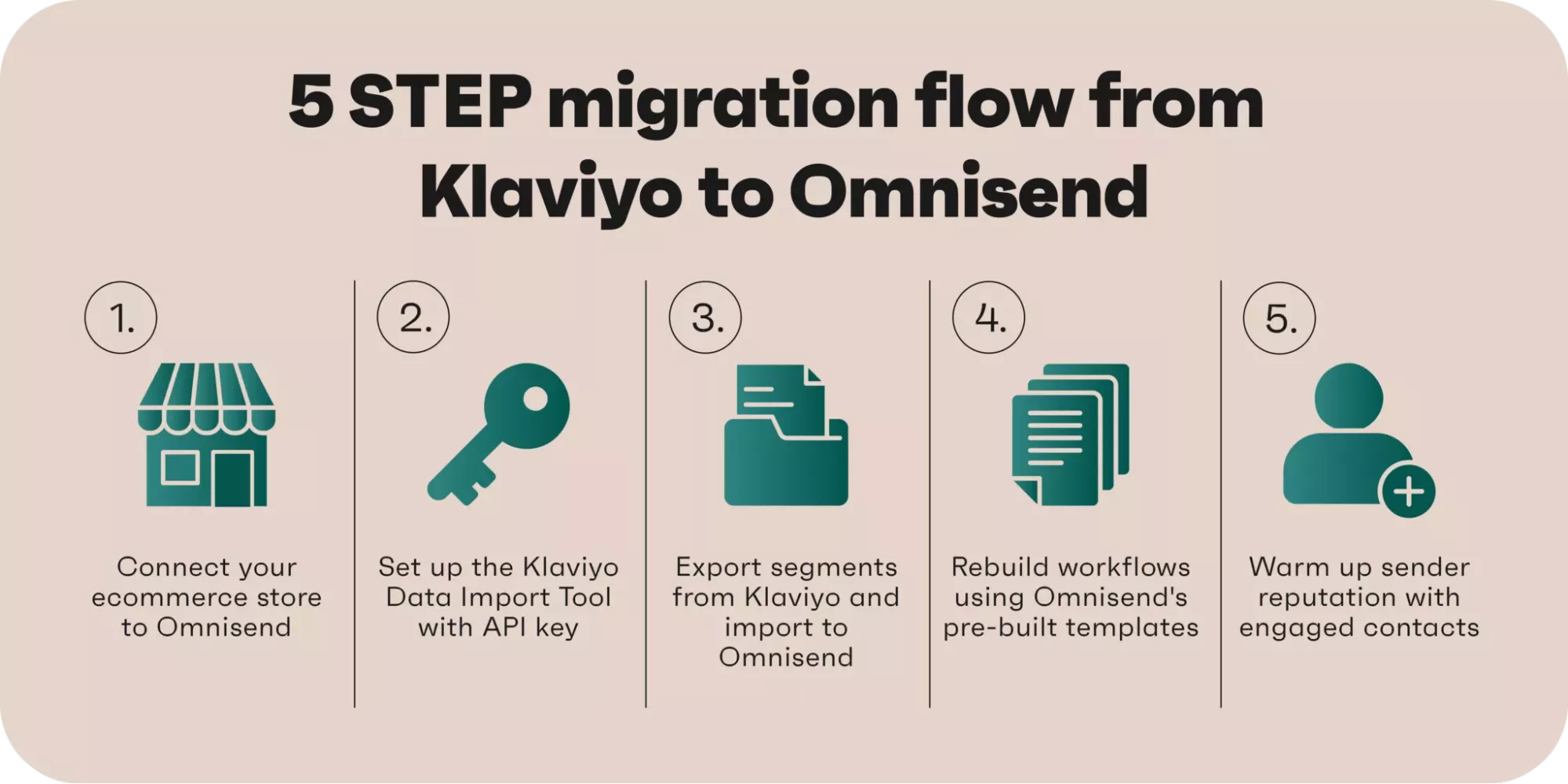
Switch to Omnisend with this workflow:
1. Connect your store to Omnisend
Your customer data, products, and orders sync automatically once connected. Don’t close your Klaviyo account yet.
2. Set up the Klaviyo Data Import Tool
Log in to Klaviyo and get an API key, drop it into Omnisend’s import tool, and your contacts will start transferring in batches of 500 every five seconds.
3. Export and import segments
Export key segments from Klaviyo, such as engaged contacts, VIP customers, and SMS subscribers. Import them manually into Omnisend.
4. Rebuild your workflows
Use Omnisend’s pre-built templates and flow builder to recreate your customer experiences. Test each workflow with the Trigger Preview Tool before going live.
5. Warm up your sender reputation
Start by emailing your most engaged contacts first to build your reputation with Omnisend and improve deliverability before sending to your complete list.
The illustration below provides a visual workflow you can use to switch:
Contact import speed is set to 500 contacts every five seconds via Omnisend’s Klaviyo Data Import Tool. Therefore, if you’re on a free plan with 250 contacts, syncing takes seconds, and at 1,000 contacts, you’re looking at approximately 10 seconds.
You can continue sending emails from Klaviyo during the migration, as contact syncing doesn’t require shutting down your existing account.
It’s best practice to run both tools simultaneously while recreating and testing workflows and warming up your list to verify everything works.
Once deliverability looks solid, gradually shift your full email operations from Klaviyo to Omnisend. Don’t close your Klaviyo account until you’ve confirmed everything runs smoothly.
Migration support
Omnisend’s free migration rebuilds your full Klaviyo setup manually:
- Every flow, including conditional logic and timing
- All contact lists and segments
- Email templates
- Sign-up forms
- SMS sender verification, where applicable
The standard timeline is five business days, and you can review everything before going live.

Migration success story
Rachel Riley switched from Klaviyo to Omnisend and saw a 77% year-over-year increase in BFCM revenue. Omnisend generated 48% of total store revenue during BFCM, with automations accounting for 46% of that.
Read the case study
Omnisend vs. Klaviyo: Which should you choose?
Both platforms will help you send emails and grow your sales. The question is whether you value speed and simplicity or deeper control and customization.
Here are our final thoughts, based on everything we’ve discussed:
Choose Omnisend if
You’re an ecommerce store of any size wanting to build an omnichannel marketing strategy across email, SMS, and web push notifications, and don’t want to dedicate hours learning how to work a complicated dashboard.
Omnisend’s 305+ app integrations, pre-built flows and segments, AI features, 24/7 support, and Academy provide you with the tools to master all channels.
Choose Klaviyo if
You want more control over segmentation and detailed reporting on what’s generating your revenue across channels.
Klaviyo’s advanced filters let you drill deep into customer behavior for granular flows and segments. It offers 350+ integrations, and there’s a built-in CRM that syncs with Salesforce.
Still not sure which platform to choose? Try this
Sign up for a free account with both tools and explore their dashboards. At this stage, you don’t need to upload your contact lists, but you should connect your store so that you have complete access to their flow and segment builders.
Want to compare other tools before deciding? Check out our guide to Klaviyo alternatives to see how other platforms stack up.
Quick sign up | No credit card required
How do we review?
We reviewed each tool’s ease of use, depth, pricing, support quality, and ecommerce fit. We signed up for a free Klaviyo account and connected a test Shopify store to assess ease of integration and the free tier’s features. The $20/month email plan was then purchased to access all standard email features.
Our hands-on testing included a review of the dashboard, template libraries, documentation, and testing of the flow, email, segmentation, and form builders. The reporting dashboard was reviewed without attribution data because it connects to a test-only Shopify store.
Support quality was assessed based on Klaviyo’s estimates. The virtual assistant was tested in the backend with questions about feature use, and we emailed Klaviyo support to see how long it takes to respond.
Outside hands-on testing, we reviewed 300+ Klaviyo reviews from G2, Capterra, and Trustpilot to see what people are saying.
This article was researched and written by our experts following a precise process.
See the process