
 Omnisend AI


 OFFER
OFFER









Personalized text messages: Examples and best practices
With over 130+ pre-built integrations and flexible APIs, you can easily centralize data from across your tech stack
Make the most out of your data and unlock powerful growth marketing possibilities with these other top marketing tools.
Build any custom integration with our open, flexible APIs that are simple to use and implement.
Check out apps that have been stealing all the spotlight.
Email and SMS marketing insights, ecommerce resources, and the latest Omnisend news
Expert-led sessions covering email, SMS, and ecommerce marketing strategies.
Educational video and live training to help you make the most out of Omnisend.
Drive sales on autopilot with ecommerce-focused features
See Features
Email personalization is essential for engagement, as tailored messages significantly outperform generic ones in open and conversion rates.
Utilizing automation and customer data allows brands to send personalized emails that resonate with individual subscriber preferences and behaviors.
Effective strategies for email personalization include segmenting your audience, using dynamic content, and creating automated sequences to enhance customer experience.
Incorporating urgency and a human touch in your emails can drive immediate action and foster stronger connections with your audience.
Email personalization is a standard that subscribers expect from brands. If you send generic messages, people are more likely to ignore them. They engage with emails that address their specific needs at the right time.
Supporting this, an Omnisend report shows that personalized automated email campaigns outperform manual messages by a wide margin. They deliver 52% better open rates, 332% higher click rates, and an impressive 2,361% increase in conversions.
With automation, you can send personalized emails that align with a customer’s behavior and preferences at the right time.
In this guide, you’ll learn what email personalization means and how to implement it properly. We’ll also explore inspiring real-life examples and tools that can help you save time.
Quick sign up | No credit card required
Email personalization means shaping your emails around each recipient’s preferences, choices, and purchase history. Instead of sending generic messages to everyone on your list, you use what you know about your subscribers to send tailor-made emails that address their needs at the moment.
For effective email personalization, you need a reliable tool to gather relevant customer data. The tool analyzes each subscriber’s information and adjusts the content automatically to match a buyer’s unique journey.
You can create personalized email marketing campaigns based on:
Personalization works because it cuts through the inbox noise. It feels more thoughtful and intentional. When your message sounds like it was written for a single targeted customer, it builds trust and engagement.
Email personalization helps ensure that your messages are relevant and helpful. For instance, an email that recommends products based on what your subscriber recently viewed is valid and gives them a reason to click.
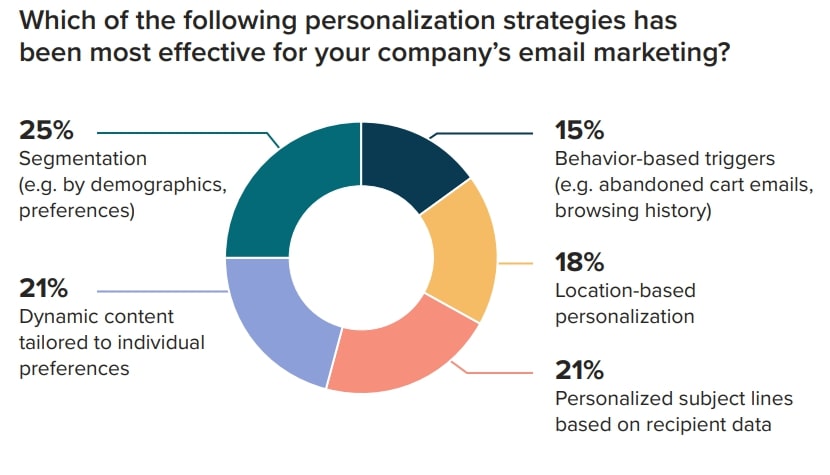
According to a 2025 Litmus study, 21% of marketers who used personalized subject lines reported seeing improved performance. Other professionals reported success with segmentation, dynamic content, behavior, and location-based personalization, as shown below:
A MoEngage report also shows that advanced email personalization increased open rates by 50.3%. This is 8.25% higher than the 42.05% recorded for standard messages.
In addition to increased open rates, personalized emails also lead to higher:
That’s not all. Sending highly relevant emails also improves customer experience, which is essential for sustained business growth.
Here are some email personalization tips on how to create email campaigns that drive results:
Signup forms are an effective tool for collecting data about your subscribers to enable email personalization.
Signup forms allow you to collect a wide range of data, including:
These are just possibilities—only use ones that would be useful to you, rather than all of them. If there are too many questions on the form, the visitor is likely to abandon it instead.
You can get more email personalization data by integrating your marketing tool with your CRM or ecommerce platform.
You’ll get valuable data on your existing customers, including their preferences, average spending, purchase history, and more.
You can also use email surveys to gather data. Make the surveys straightforward by requiring a simple ‘yes’ or ‘no’ answer to get the information you need from the customer.
Additionally, tools like Google Analytics can help you gather this information by enabling you to analyze your site visitors’ behavior.
Email segmentation uses customer data to segment your email list into meaningful groups. Instead of a single general email list, you can create separate lists for different customers.
Omnisend allows you to use 500 data points in your email segmentation.
Depending on the data you have, there are endless options to segment your contacts and personalize emails. Try segmenting your list based on:
“In my experience, segmentation consistently proves to be the core foundation of email personalization. The more precisely you segment your audience, the easier it becomes to deliver relevant messages that drive better opens, clicks, and conversions.”
— Andrius Šeršniovas, Conversion Specialist at Omnisend
An effective email personalization strategy aims to send the correct information at the right time.
To achieve this, create automated email sequences for all stages of the buyer journey. Then use email personalization to address each recipient’s unique needs.
The goal is to enhance their experience from the moment they sign up through becoming loyal brand advocates.
Targeted email workflows can include:
Pro tip: You can use automated subscriber tags to send personalized emails even as subscribers’ interests change consistently.
Use dynamic content to simplify email personalization.
Instead of creating multiple campaigns, dynamic content uses custom variables to tailor a single email to each recipient’s profile.
With Omnisend, this goes even further — you can automatically show products customers recently viewed, recommend items from past purchases, or swap out entire content blocks depending on who’s receiving the email.
The result: each subscriber sees an email that feels personally written for them, making your campaigns more relevant (and more likely to convert) without any extra work on your end.
Make email personalization more effective by gauging recipients’ responses to your emails.
You can run A/B tests on variables such as subject lines, content, and CTAs to see what works.
Test one variable at a time. It’ll make it easier to understand what’s working and what isn’t.
By analyzing how your contacts respond to your personalized emails, you can make the right changes to get better results.
You don’t have to do all the heavy lifting, as artificial intelligence (AI) and machine learning (ML) can do hyper-personalized email automation for you.
Some features are already built into the email marketing platforms without requiring third-party tools—for example, Omnisend can automatically create segments based on contact behavior.
AI and ML algorithms can analyze your customer data, such as purchase history, demographics, location, and website behavior, to automate and optimize the personalization process.
You can use these insights to:
Using an AI-powered email marketing platform helps you create a more effective email marketing strategy.
“From what I’ve learnt, AI email personalization removes much of the manual work that slows marketing teams down. When platforms like Omnisend handle segmentation, timing, and optimization automatically, marketers can focus on strategy while still delivering highly personalized messages.”
— Paulius Milisauskas, VP of Customer Operations at Omnisend
The fear of missing out (FOMO) makes adding a sense of urgency to your personalized emails one of the best ways to convert more prospects into customers.
Here are a few tactics you can try:
Creating a sense of urgency will prompt recipients to act sooner rather than later.
Make your emails two-way to humanize your brand and let prospects know they can talk to real people behind the company.
It’ll humanize your company and make your email marketing personalization strategy more effective.
Instead of using your business name or logo in your personalized emails, make your “from” address a real person’s name with a real person’s image instead of a logo or avatar.
Take it a step further and make it someone that the reader would expect to hear from, such as a salesperson or customer service representative they’ve been in contact with.
The language in your email should also have a human touch.
Use a conversational tone that makes the reader feel like an actual human is contacting them. Here are a few tips to make your emails more conversational:
Besides personalizing your emails, choosing the best time to send your emails is also important. Ideally, you want to send them when the reader is most likely to open them.
Omnisend’s research shows that the best time to send an email is 8 pm, 2 pm, or 5 pm.
Those are the times when most marketers report getting the best engagement.
It’s a good starting point, but not a hard and fast rule for the best send time.
You need to understand your target customers and what works for them, so test different send times and study your email engagement metrics to find the best schedule for your audience.
“I’ve seen engagement improve significantly when marketers start using data to guide send times. Omnisend’s benchmarks give you a great starting point. You can then continuously test and refine timing based on your audience’s habits.”
— Rytis Lauris, Co-founder, CEO, Omnisend
Here are 10 brands that show the USA how to personalize email marketing the right way.
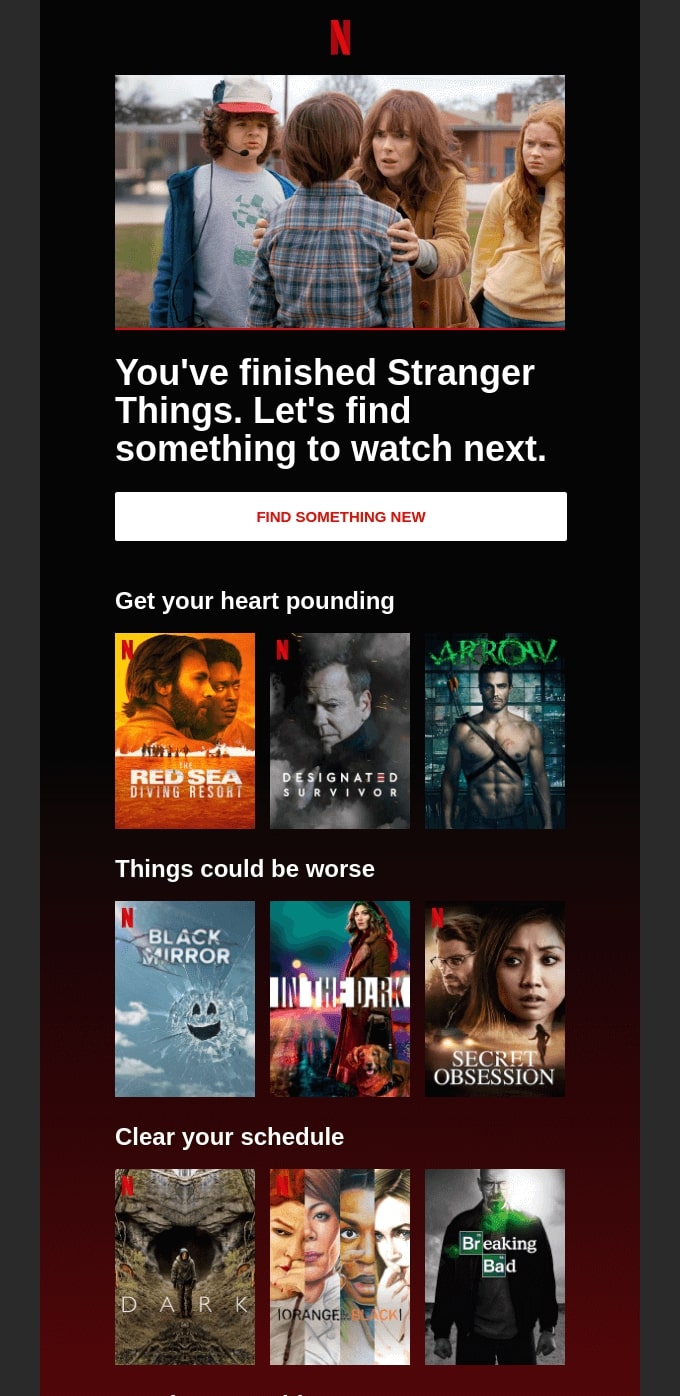
This email from Netflix is an excellent example of email personalization because it reacts to the viewer’s behavior.
The headline directly references the user’s viewing history and suggests what to watch next. It uses curated sections to offer recommendations that match similar genres and moods, making them feel relevant.
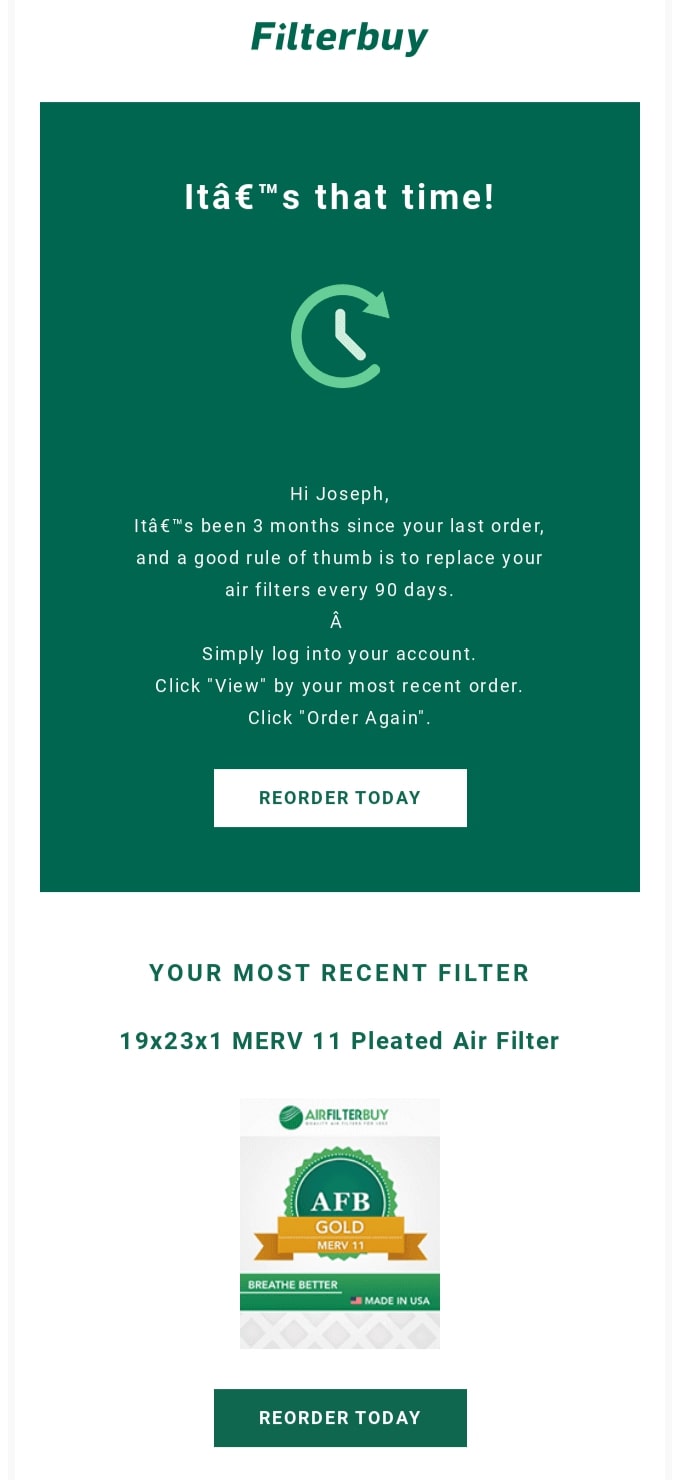
Besides addressing the recipient by name, FilterBuy uses purchase history data to send a well-timed and relevant personalized email. It’s an excellent example of predictive email personalization because it anticipates a customer’s recurring need.
By including specific product details and a direct “Reorder Today” CTA, the email makes it easy for the reader to remember details and take action.
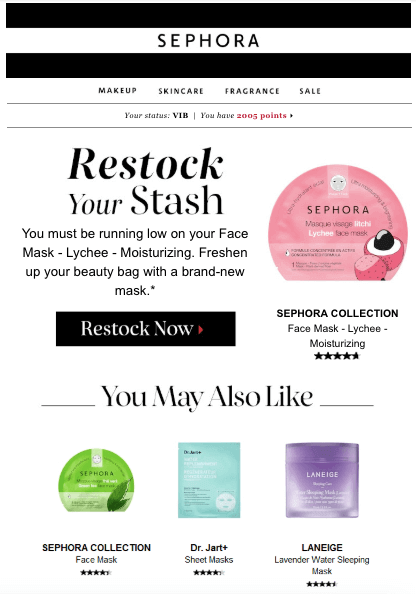
Sephora’s email personalization is very sophisticated in this example. The email uses the subscriber’s purchase history to remind them to restock their makeup before it runs out.
At the same time, recommended products are based on what the subscriber may be interested in.
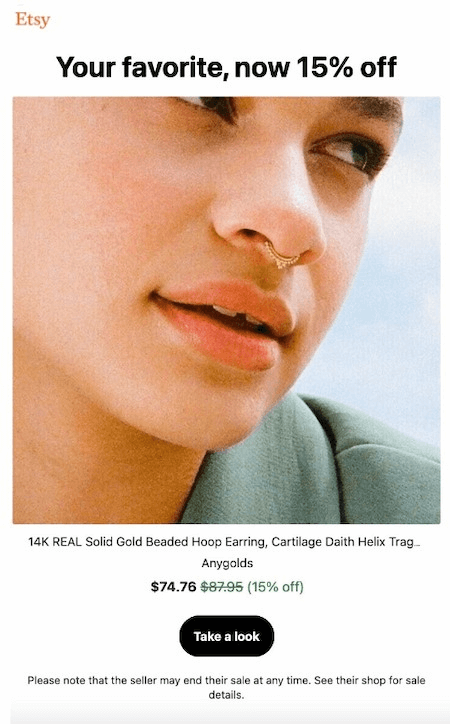
In this example, Etsy has sent an email on behalf of one of its sellers, informing the recipient of an offer on a product they previously viewed.
They include a direct link to the seller’s page, with a warning that the offer could end at any time, which creates a sense of urgency.
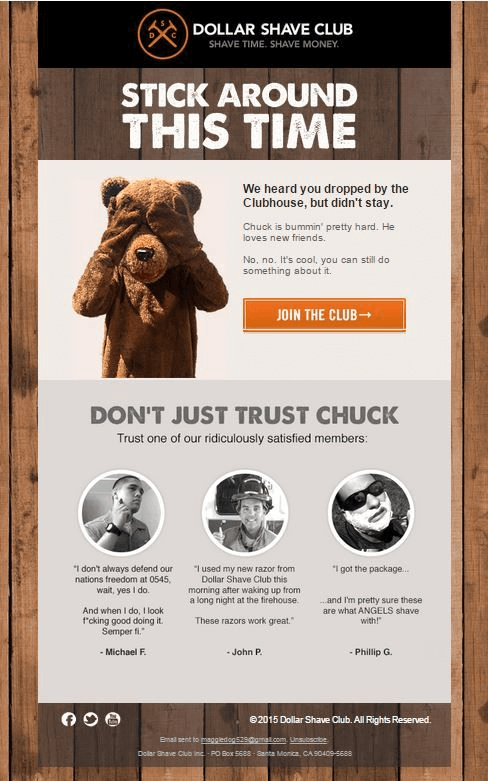
Dollar Shave Club has added social proof to this site-abandonment email to build the trust of a lead. Take note of how human the email sounds.
Adding social proof to cart and browse abandonment emails is a great way to encourage top-of-the-funnel prospects to do business with you.
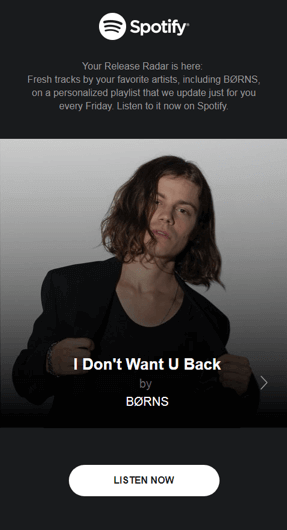
What would delight a music lover more than receiving a tailor-made playlist of their favorite songs? That’s what Spotify has done with this email.
The brand includes an image of the subscriber’s favorite artist to capture their interest and a direct link to the playlist.
The recommendation email is simple, yet highly personalized.
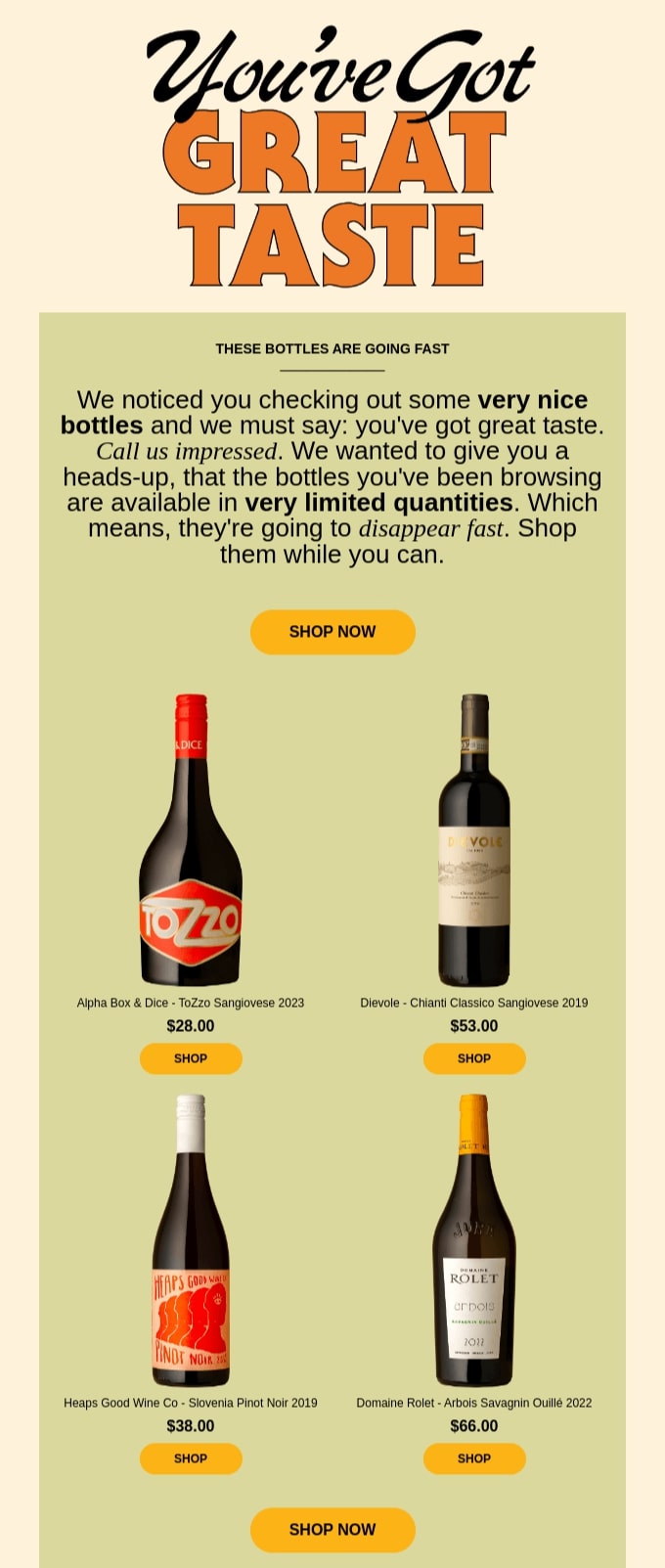
Sometimes Always cleverly uses friendly, personalized messaging and browsing behavior to recommend curated products.
The email praises the reader’s great taste, references the bottles they viewed, and uses scarcity to drive immediate action. The warm tone, relevant recommendations, and clear CTAs make the email feel personal, timely, and motivating, rather than promotional.
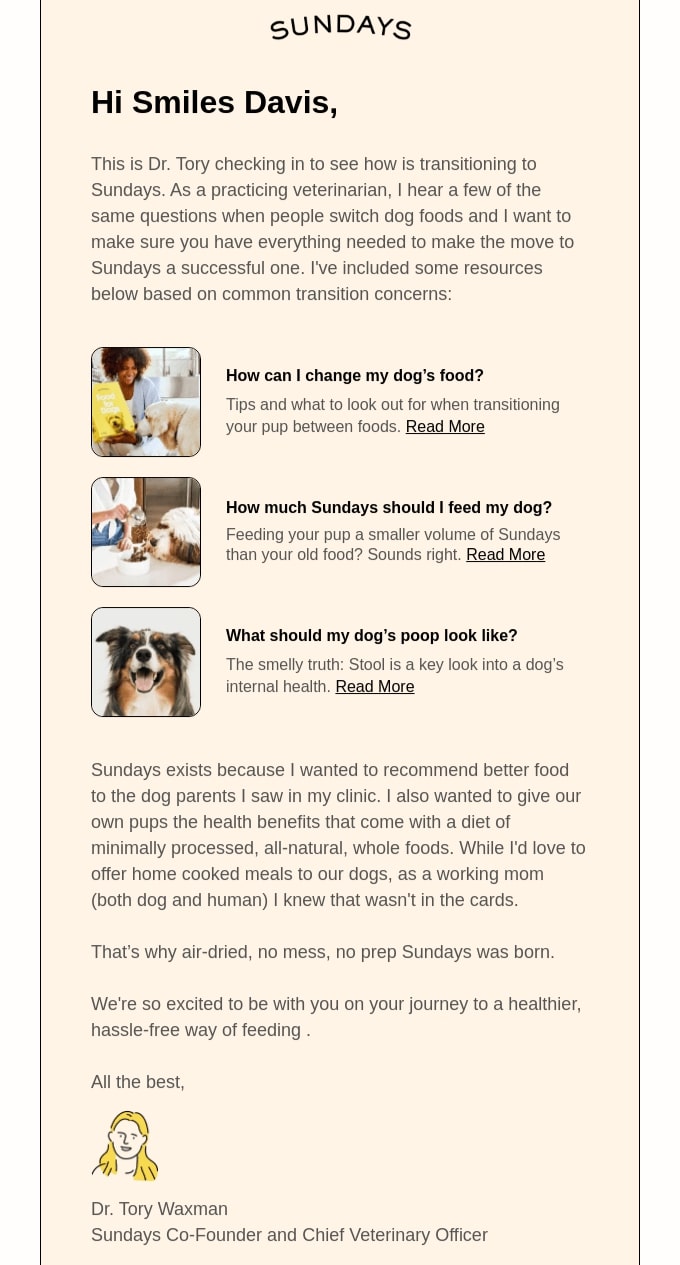
This personalized email campaign from Sundays feels thoughtful and human. It greets the customer by name, references their dog’s transition to Sundays, and delivers helpful content instead of a hard sell.
The message comes from a real veterinarian, which is a great way to build authority and win the reader’s trust.
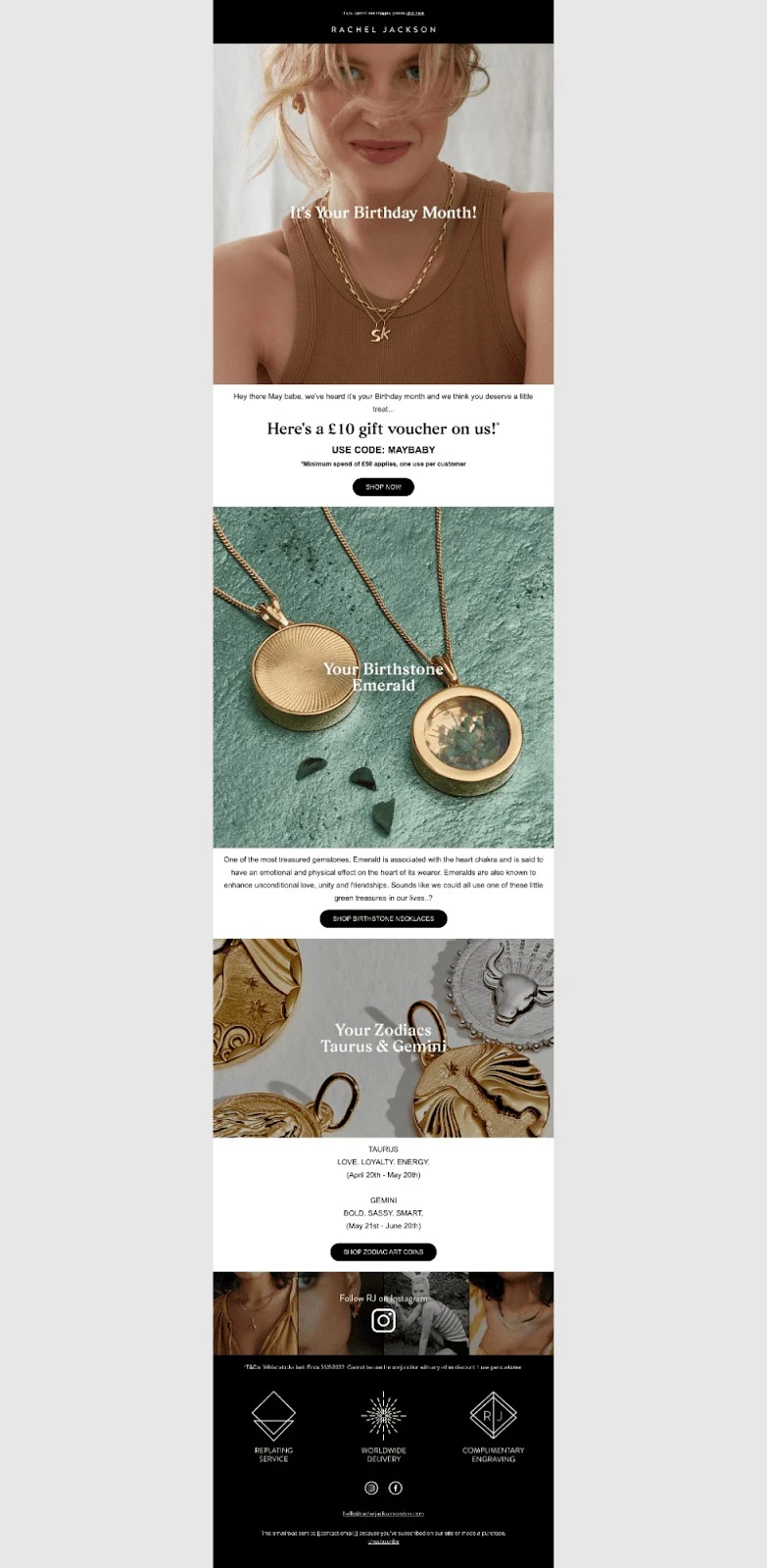
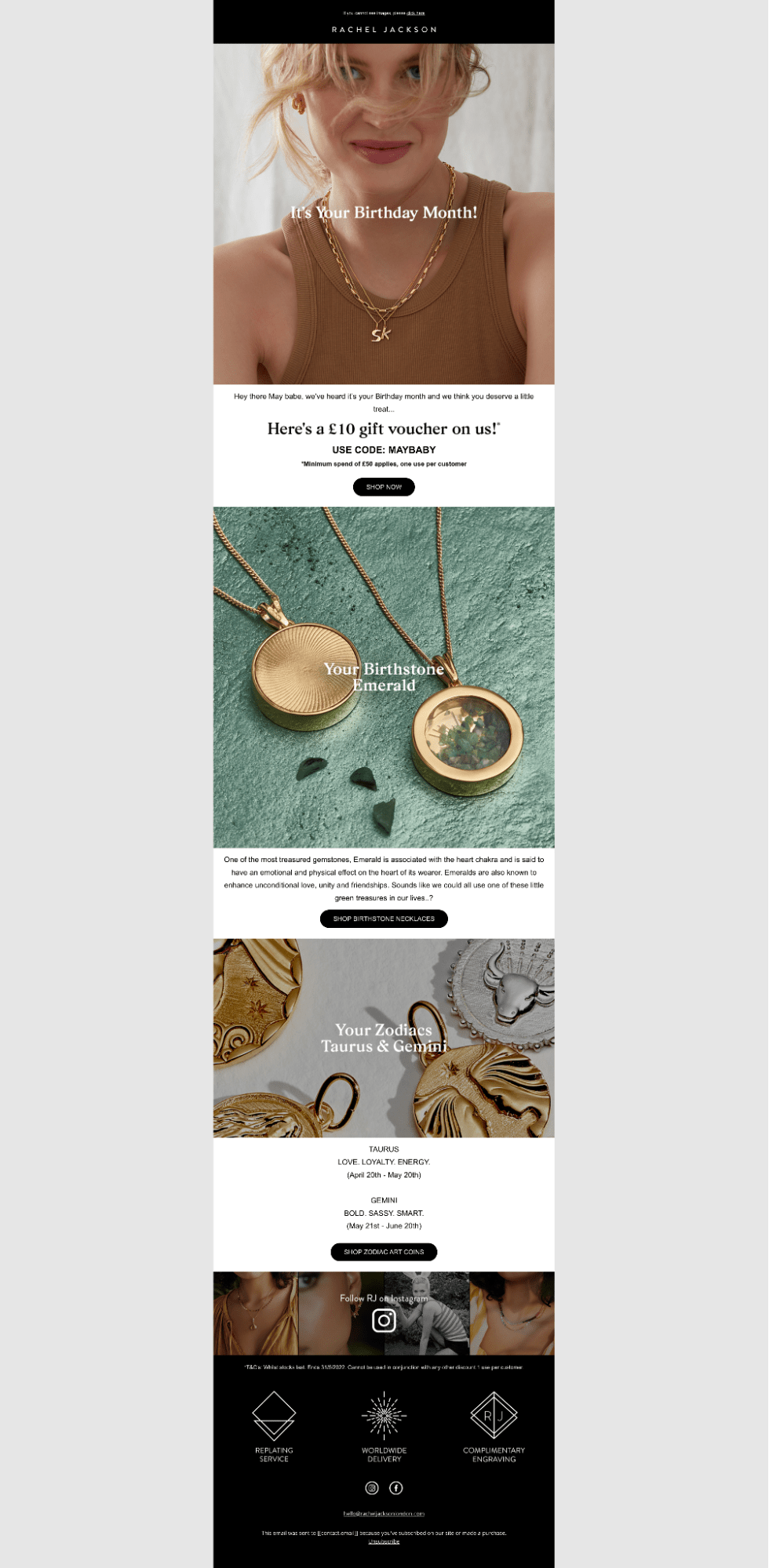
This email from Rachael Jackson focuses on recipients’ birthdays.
In addition to a birthday gift in the form of a voucher, the email has product recommendations of zodiac jewelry designs and birthstones that correspond with a recipient’s birth month.
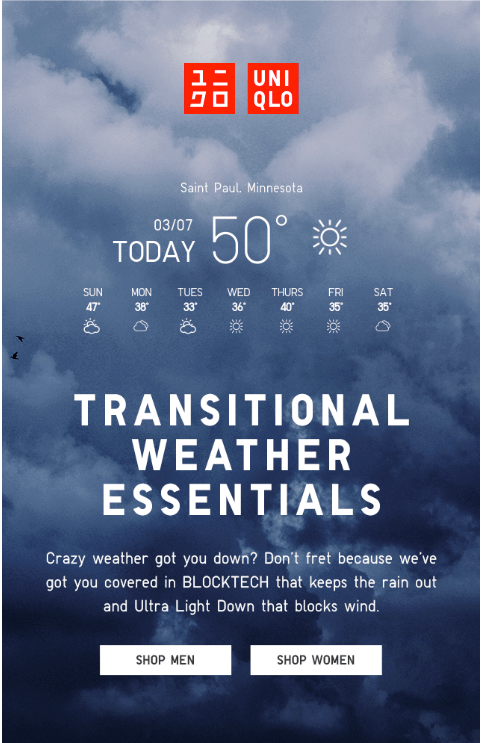
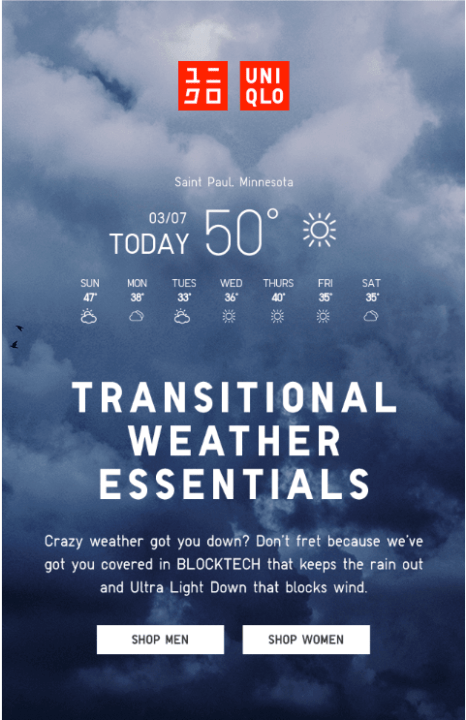
We mentioned that email personalization based on the recipient’s location is an excellent idea.
In this email, UNIQLO shares a seven-day weather forecast of the recipient’s location, then makes product recommendations based on this information.
It’s a great example of being hyper-relevant to the recipient’s current needs.
You can personalize more than just the name in an email. Below are the most impactful elements you can tailor to create relevant, less generic messages.
The subject line is often the key factor in helping subscribers decide whether to open an email, as it’s the first thing they see. Personalized subject lines stand out in crowded inboxes, helping increase open and engagement rates.
You can personalize your subject line using the following subscriber information:
To save time and generate ideas, you can use the Omnisend Subject Line Generator. It helps you create engaging, personalized subject lines that align with your campaign goal and audience.
Beyond the subject line, personalizing your email content itself makes the message feel more thoughtful and relevant to the reader. This increases trust and makes them more likely to click and take action.
You can use the subscriber’s name, demographic details, or preferences to shape the message. This includes referencing past purchases, location, or important dates like birthdays. For instance, offering a special gift on their birthday can make the recipient feel like a VIP.
Here’s what to personalize:
Email personalization can be based on a wide range of factors, including:
For instance, if you sell clothes, your product recommendations should be relevant to the season in the recipient’s location. Similarly, a reference to a recent event in the recipient’s location could effectively capture their interest.
When people see items that fit their situation, they engage more, browse longer, and make purchases.
Personalize emails by making product recommendations based on the recipient’s interactions with your website.
You can look at:
By considering customer behavior in your cross-sell and upsell campaigns, you can create more relevant campaigns that increase engagement and conversions. These personalized recommendations will also improve customer lifetime value.
Another way to personalize your messages, while following email personalization best practices, is to offer customized discounts. Don’t offer just any discount. They should align with the recipient’s interests, needs, and their position in the buyer’s journey.
For example, the offers that appeal to a new buyer will not be as effective when presented to a repeat customer.
If a new customer delays their first purchase, it could mean they’re considering your competitors. In this case, you can personalize offers based on the pages they’ve visited and send abandoned cart reminders.
Once they’ve made their first purchase, your subsequent offers should ensure you stay top of mind. This means offering discounted upsells and cross-sells based on their purchase history.
There are no fixed rules for personalizing your emails. However, you need an email marketing tool that allows you to personalize email elements however you want.
Here’s an example of how Omnisend lets you personalize emails based on the average spend of a recipient:
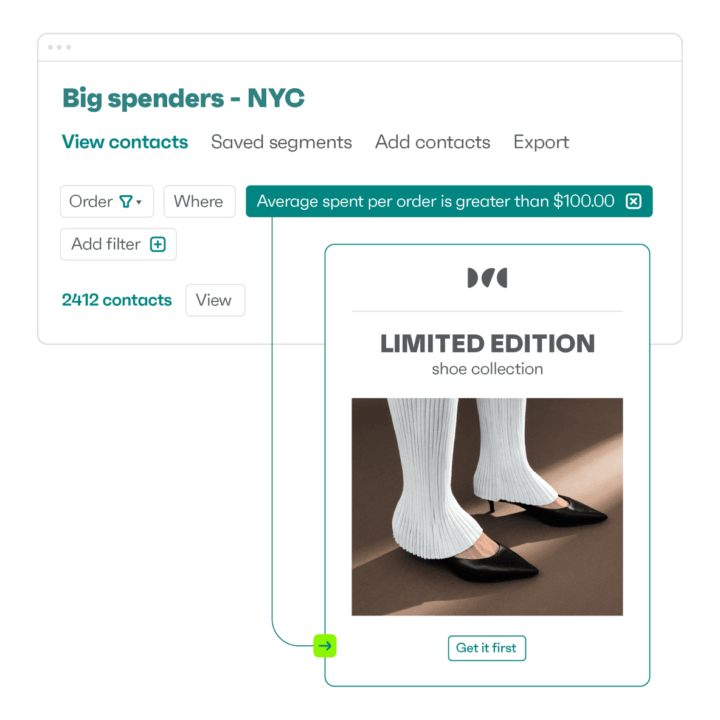
You can create beautiful and customized email campaigns using Omnisend. Here’s how:
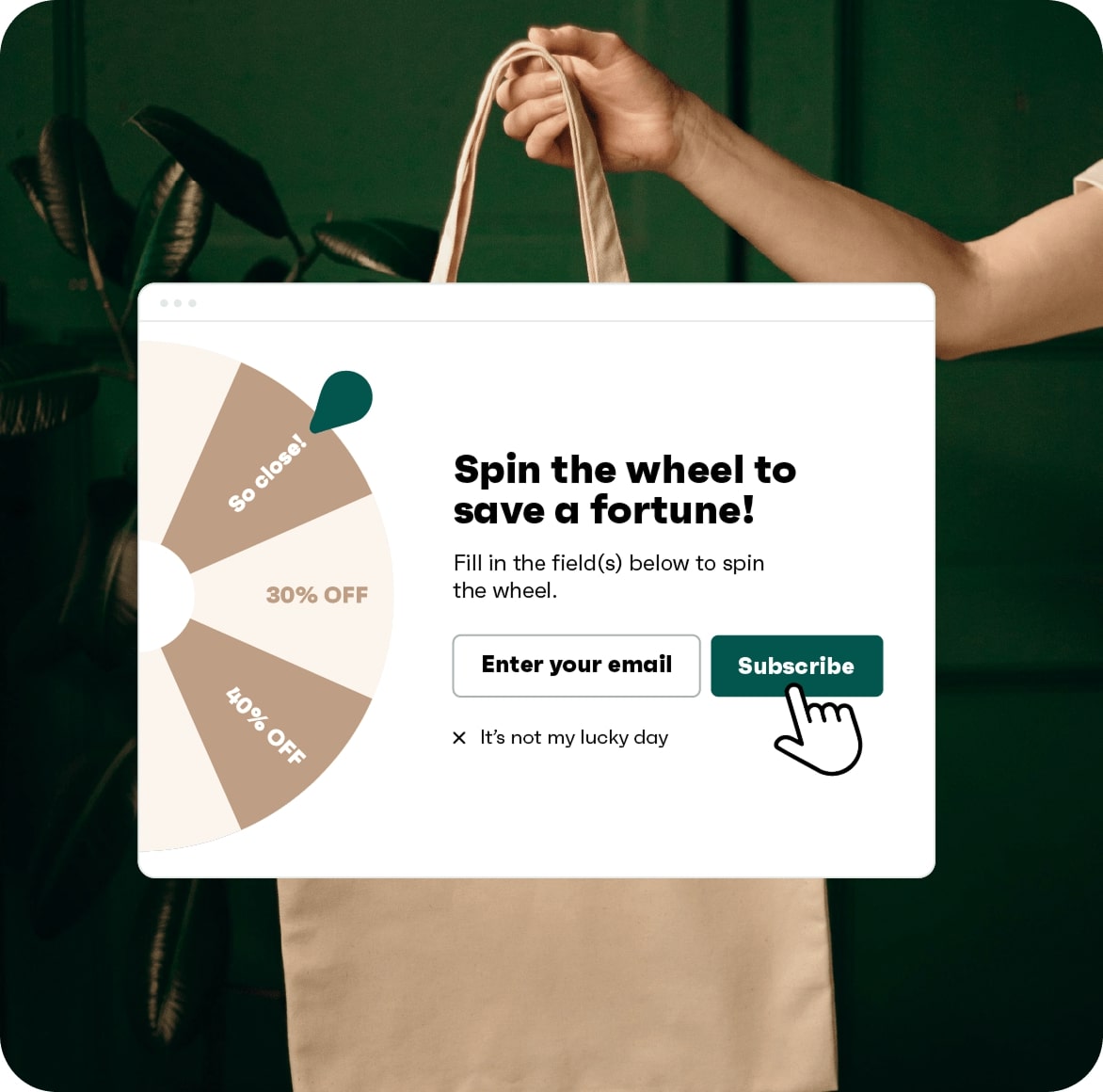
Here’s an example of a spin-to-win Wheel of Fortune signup form from Omnisend:
Email personalization turns everyday campaigns into valuable and intentional conversations. When your messages feel relevant and human, you get higher engagement, more conversions, and stronger customer relationships over time.
For the best results, you need to use the correct email personalization techniques and apply them at scale. Reliable ecommerce email personalization tools can do the heavy lifting for you. Omnisend helps you collect customer data, segment your list, automate personalized workflows, and track performance, all in one place.
Getting started is easy. Just head to the registration page, sign up, and send your first personalized email to drive higher revenue and business growth.
Quick sign up | No credit card required

TABLE OF CONTENTS
TABLE OF CONTENTS

What’s next



No fluff, no spam, no corporate filler. Just a friendly letter, twice a month.