Omnisend AI

 OFFER



The best gift guide emails do the choosing for the shopper, with a short list sorted by recipient or by budget. A gift guide email is a curated set of gift picks grouped by price, recipient, or interest.
Eight of the 12 are sorted by a type of person, such as personality, relationship, or the type of pet they own. Four put a named person behind the picks, and nine name the guide in the subject line.
Below are 12 gift guide email examples from October 2025 to October 2026, with what to copy and subject lines to reuse.
Quick sign up | No credit card required
12 gift guide email examples
Each example was chosen because it went out between October 2025 and October 2026, for the holidays or another gifting occasion, and shows a different way to pick or sort the gifts.
| Brand | Industry | Differentiator |
|---|---|---|
| 1. MATE the Label | Organic cotton clothing | Gift tiles by personality |
| 2. Dr. Martens | Footwear | A craft story with an under-$150 exit |
| 3. Jamie Oliver Cookery School | Cooking classes | A flowchart from cook to class |
| 4. Jo Loves | Fragrance and candles | A gift quiz, prices, and a delivery cutoff |
| 5. Greater Goods Roasting | Coffee | Digital gift cards matched to coffee lovers |
| 6. Kenny Flowers | Resortwear | One Valentine’s guide, six relationships |
| 7. Subset | Innerwear and loungewear | Nine priced picks from the co-founder |
| 8. Tushbaby | Baby gear | Sections ordered by the baby’s stage |
| 9. M.M.LaFleur | Women’s workwear | Picks from working moms |
| 10. Local Revival | Body care | Clichés ruled out, a scent per dad |
| 11. Fi | Pet tech | Gifts by type of pet, with an occasion code |
| 12. Mark & Graham | Personalized gifts | A price ceiling as the headline |
1. MATE the Label: Shop by personality
Subject line: THE CLEAN HOLIDAY GIFT GUIDE 🎁
Preheader: Something for everyone on your list
Guide type: By recipient (six personalities)
Trigger: Campaign
Sent: Tuesday, October 21, 2025, 38 days before Black Friday
Why this email works
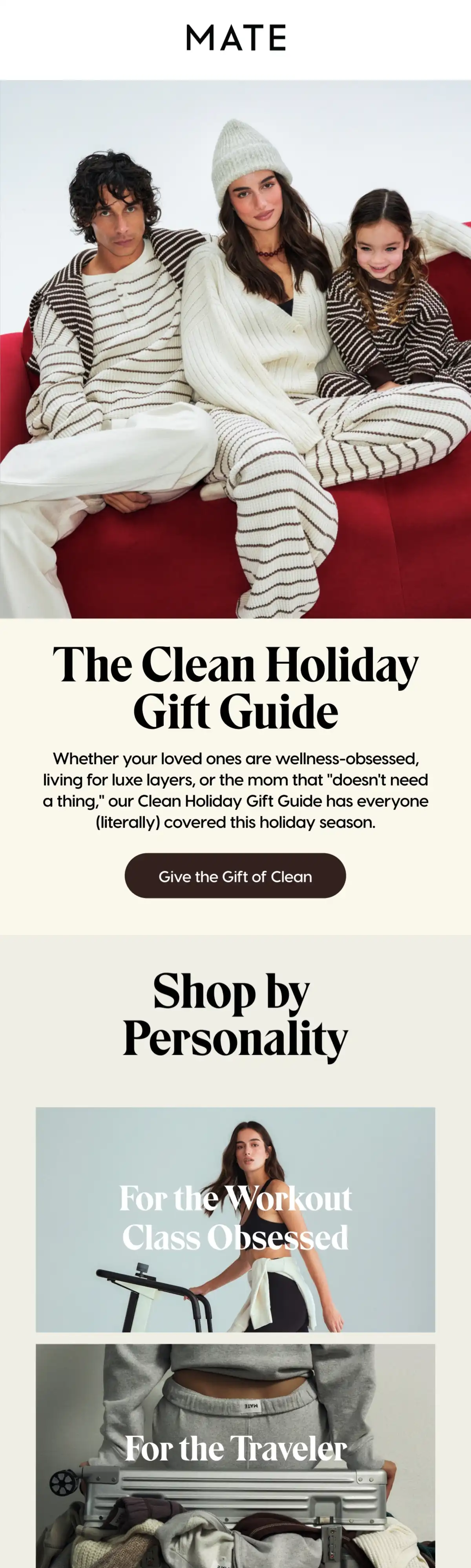
MATE the Label gets shoppers to click on the person they’re buying for, because its guide is sorted by personality, not by product. The guide’s name goes in the subject line, while the preheader promises something for everyone.
A gift buyer meets their own problem in the intro — the mom who “doesn’t need a thing,” before any product appears — and reads on for her sake. Each tile below shows a photo and a label with no price, so the shopper commits to a person first and meets the price only on the landing page.
What you can learn from it
Swap product categories for personality tiles, and send the guide in October, before the Black Friday rush.
2. Dr. Martens: A price-ceiling exit
Subject line: Give handcrafted this holiday
Preheader: Browse our gift guide for Made in England styles
Guide type: Theme collection (Made in England), with a by-price link
Trigger: Campaign
Sent: Tuesday, November 4, 2025, 24 days before Black Friday
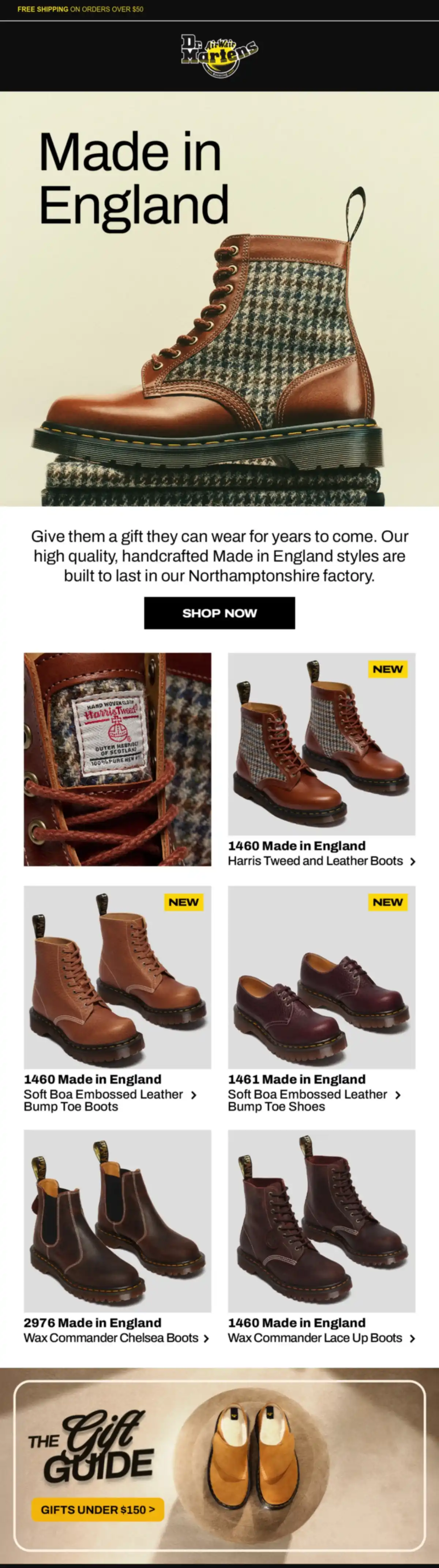
Why this email works
Dr. Martens opens on the “handcrafted” story and still keeps the shopper with less to spend, because the email closes on a “GIFTS UNDER $150” button. The story makes the case for a gift that lasts, and the button gives budget buyers an exit. The subject line pitches the gift, and the preheader names the guide.
Copy about a gift “they can wear for years to come,” built “in our Northamptonshire factory,” sets a price in the reader’s head before any number appears, and the grid shows none. Three “NEW” badges on the five styles give a subscriber who already owns a pair a reason to keep scrolling.
What you can learn from it
Close on a price-ceiling link once the premium product and its story have had their turn, so budget buyers still have somewhere to click.
3. Jamie Oliver Cookery School: A gift flowchart
Subject line: The ultimate festive gift guide has arrived 🎁
Preheader: Find the perfect cookery class
Guide type: By recipient (type of cook), as a flowchart
Trigger: Campaign
Sent: Friday, November 14, 2025, two weeks before Black Friday
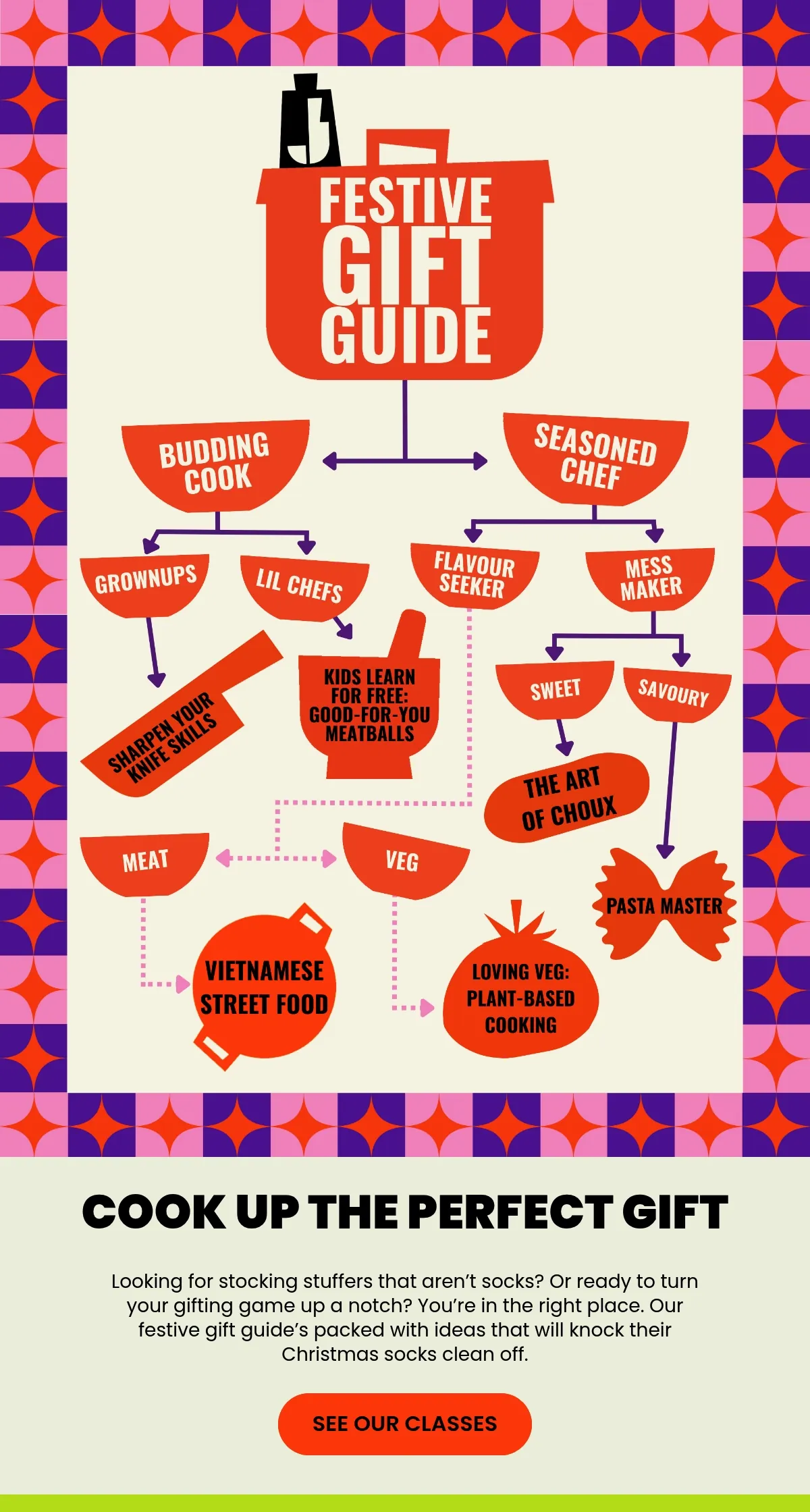
Why this email works
Jamie Oliver Cookery School presents its whole guide as a flowchart, and after two or three questions about the cook, the shopper lands on one class. Both the guide and the season are in the subject line, and the preheader promises a class.
Six classes is a menu, and a menu makes a gift buyer guess. The chart replaces it with either-or calls on the cook, “BUDDING COOK” or “SEASONED CHEF” first, each one a thing the buyer knows about the person. The socks line under the chart then pits a classier option against the usual gift.
What you can learn from it
Build the guide as a flowchart of two or three questions about the recipient, plus a voucher for shoppers who can’t decide.
4. Jo Loves: A gift finder quiz
Subject line: Jo’s Gift Finder
Preheader: Find the scent that tells their story – or yours.
Guide type: By recipient, through a gift quiz
Trigger: Campaign
Sent: Friday, December 12, 2025, five days before its December 17 standard-delivery cutoff
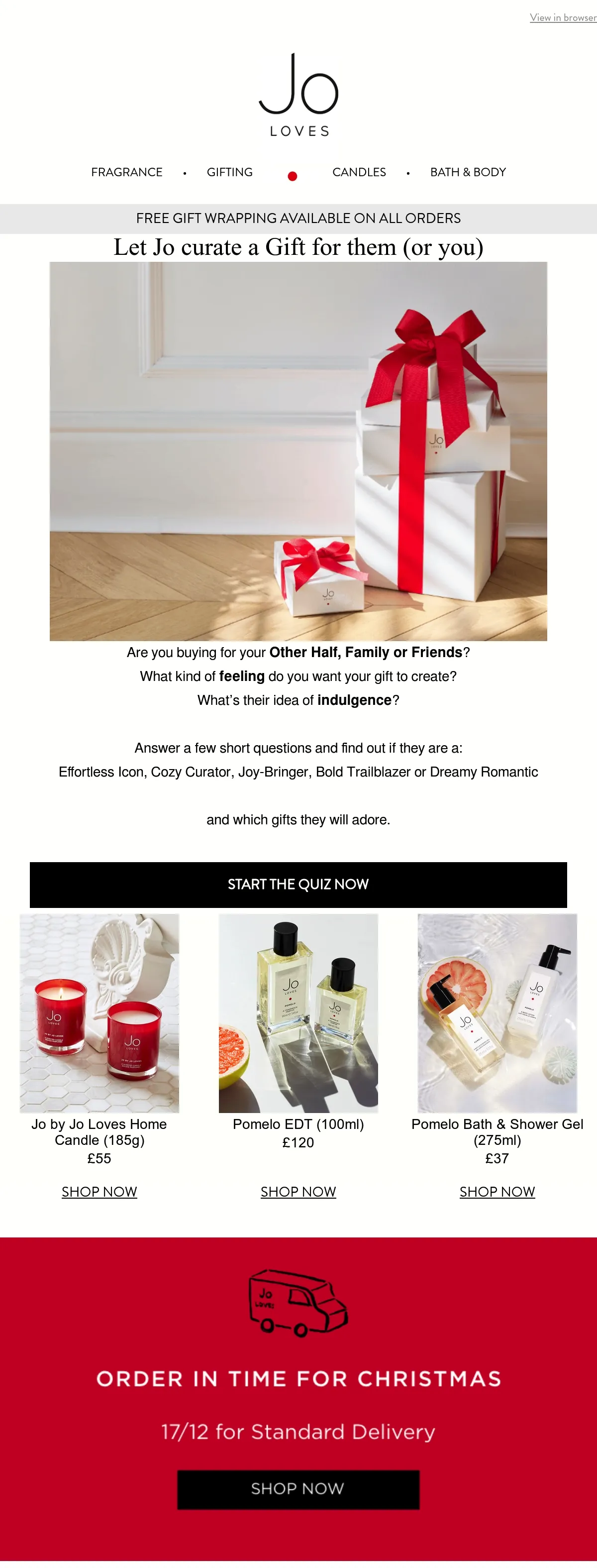
Why this email works
Jo Loves hands the hard choice to a short quiz, then keeps three priced picks and the delivery cutoff below it for shoppers who skip the quiz. Both the subject line, “Jo’s Gift Finder,” and the headline, “Let Jo curate a Gift for them (or you),” put the founder in charge.
The quiz opens on the one question any gift buyer can answer, “Are you buying for your Other Half, Family or Friends?” and the email previews it, so nobody clicks blind.
A result like “Cozy Curator” gives the buyer a person to picture, and the red block gives the shopper who meant to wait a date. A quiz narrows the shopper’s choice, so the buyer doesn’t have to guess a scent.
What you can learn from it
Leave the choosing to a quick quiz with named gift personalities, and keep a few priced picks and your delivery cutoff underneath for anyone who scrolls past.
5. Greater Goods Roasting: Last-minute digital gift cards
Subject line: Last-minute gift ideas for coffee lovers
Preheader: Thoughtful, personal, and ready when you need them.
Guide type: By recipient (kind of coffee lover), as last-minute digital gift cards
Trigger: Campaign
Sent: Tuesday, December 23, 2025, two days before Christmas
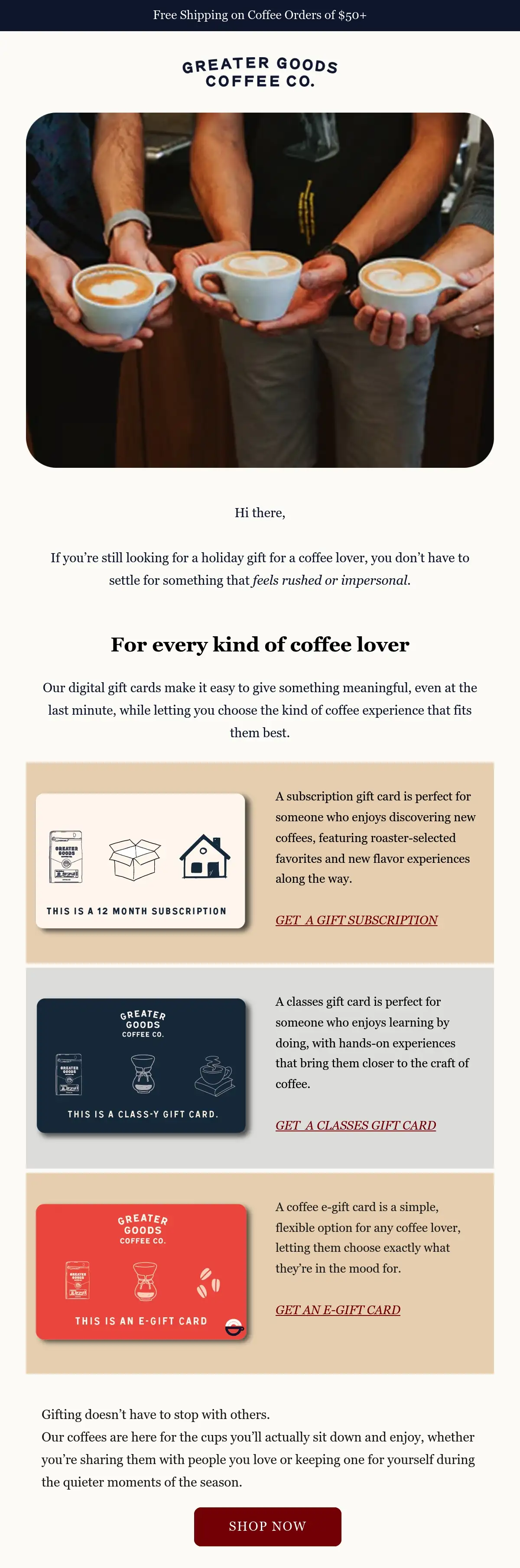
Why this email works
Two days before Christmas, Greater Goods Roasting sells three digital gift cards that need no shipping and matches each to a kind of coffee lover, so a late gift still feels personal. The subject line names the timing and the recipient.
A shopper two days out has no time to work out which coffee gift suits whom, and each card in this gift card email settles it in one line, “someone who enjoys discovering new coffees.” The link under each card sends the buyer off with the choice made, and the last paragraph sells the reader a bag.
What you can learn from it
Switch the guide to digital gift cards once it’s too late to ship, and match each card to a kind of recipient.
6. Kenny Flowers: Split by relationship
Subject line: Your island Valentine’s Day gift guide 💘🌴
Preheader: Every kiss begins with KF
Guide type: By recipient (relationship and moment)
Trigger: Campaign
Sent: Tuesday, February 3, 2026, 11 days before Valentine’s Day
Why this email works
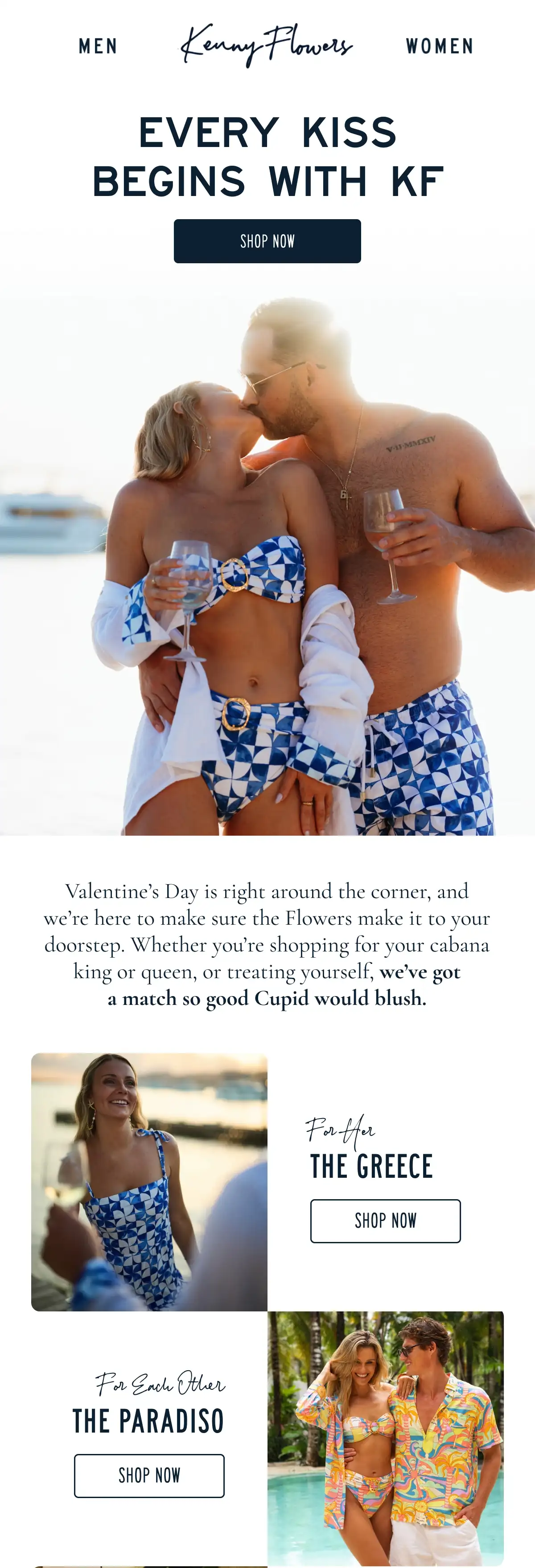
Kenny Flowers catches shoppers who aren’t buying for a partner, as well as those who are, by splitting one Valentine’s guide by relationship and moment. In the subject line, the day sits beside the brand’s island angle.
The intro’s “or treating yourself” puts the self-buyer inside a couples’ holiday guide, and “make it to your doorstep” answers the delivery worry without printing a date. “For Each Other” then gives the couple buying together a tile of its own, with one matching print for both.
What you can learn from it
Lay out one gifting day as a tile per relationship and a tile per moment, each naming one product.
7. Subset: A co-founder’s priced picks
Subject line: The Galentine’s Gift Guide, by Cayla
Preheader: Thoughtful favorites our founder is gifting this season.
Guide type: Theme collection (the co-founder’s picks)
Trigger: Campaign
Sent: Tuesday, February 10, 2026, three days before Galentine’s Day
Why this email works
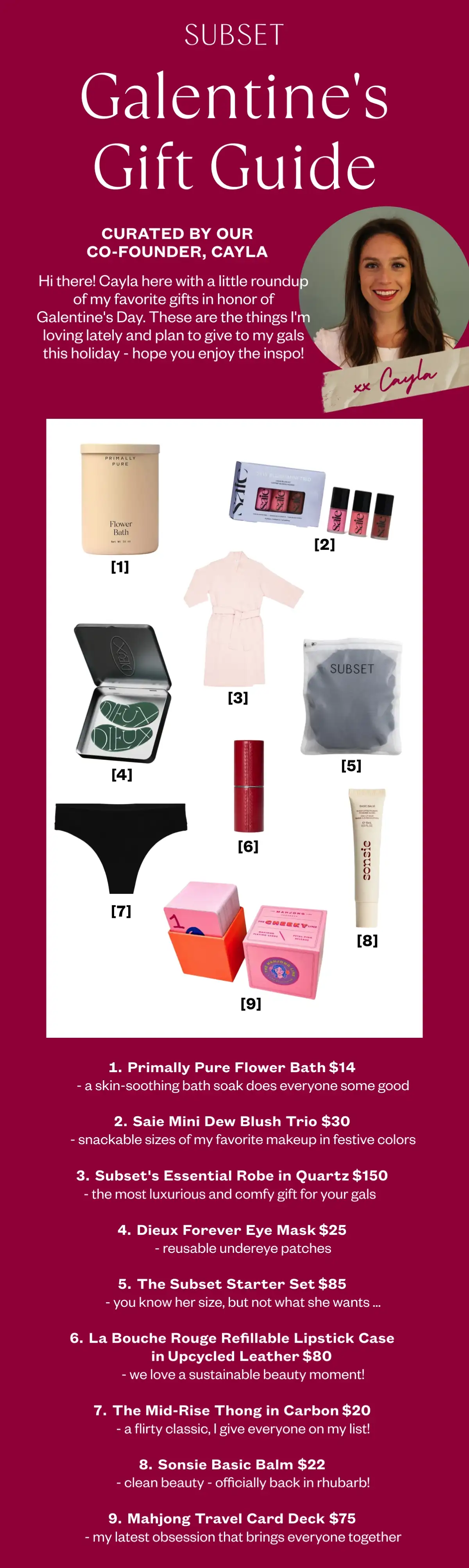
Subset’s co-founder picks all the suggestions herself, gives every one a price, and a one-line reason, which is why the guide reads like a friend’s recommendations. Her name is in the subject line, “by Cayla,” and her portrait sits under the title.
A founder who names six products she doesn’t sell has told the reader something about the three she does. The Starter Set line, “you know her size, but not what she wants,” speaks to the friend who is out of ideas, and a $14 bath soak at the top says the guide isn’t only for a $150 budget.
What you can learn from it
Have a founder pick a short numbered list that mixes partner brands with your own, then price every item with a one-line reason.
8. Tushbaby: By the baby’s stage
Subject line: The Baby Shower Gift Guide 💕
Preheader: From newborn essentials to registry favorites—gifts they’ll love long after the shower.
Guide type: Theme collection (by the baby’s stage), for a baby shower
Trigger: Campaign
Sent: Friday, April 24, 2026, with no gifting day attached
Why this email works
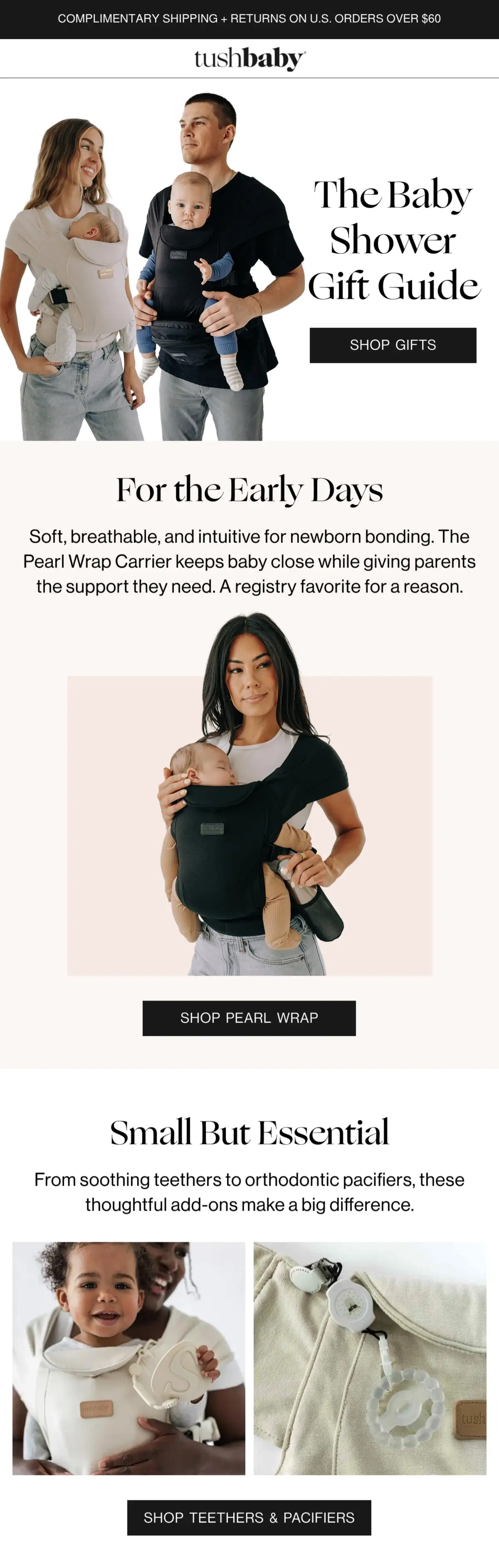
Tushbaby orders its guide by the baby’s stage, so a guest who doesn’t know the registry can still pick something useful. It’s a life-event guide: the subject line names the shower, and the preheader promises gifts that last past it.
“A registry favorite for a reason” lends the guest other parents’ judgment, and a buyer who has never held a carrier needs that before paying for one. “Small But Essential” gives the guest with less to spend a section of their own, and the returns line up top covers the gift the parents already own.
What you can learn from it
Order a life-event guide by the recipient’s stage, from the first weeks to the years after.
9. M.M.LaFleur: Working moms’ picks
Subject line: My personal Mother’s Day gift guide.
Preheader: How I’m celebrating the women in my life.
Guide type: By recipient (types of mom), picked by working moms
Trigger: Campaign
Sent: Saturday, May 2, 2026, eight days before Mother’s Day
Why this email works
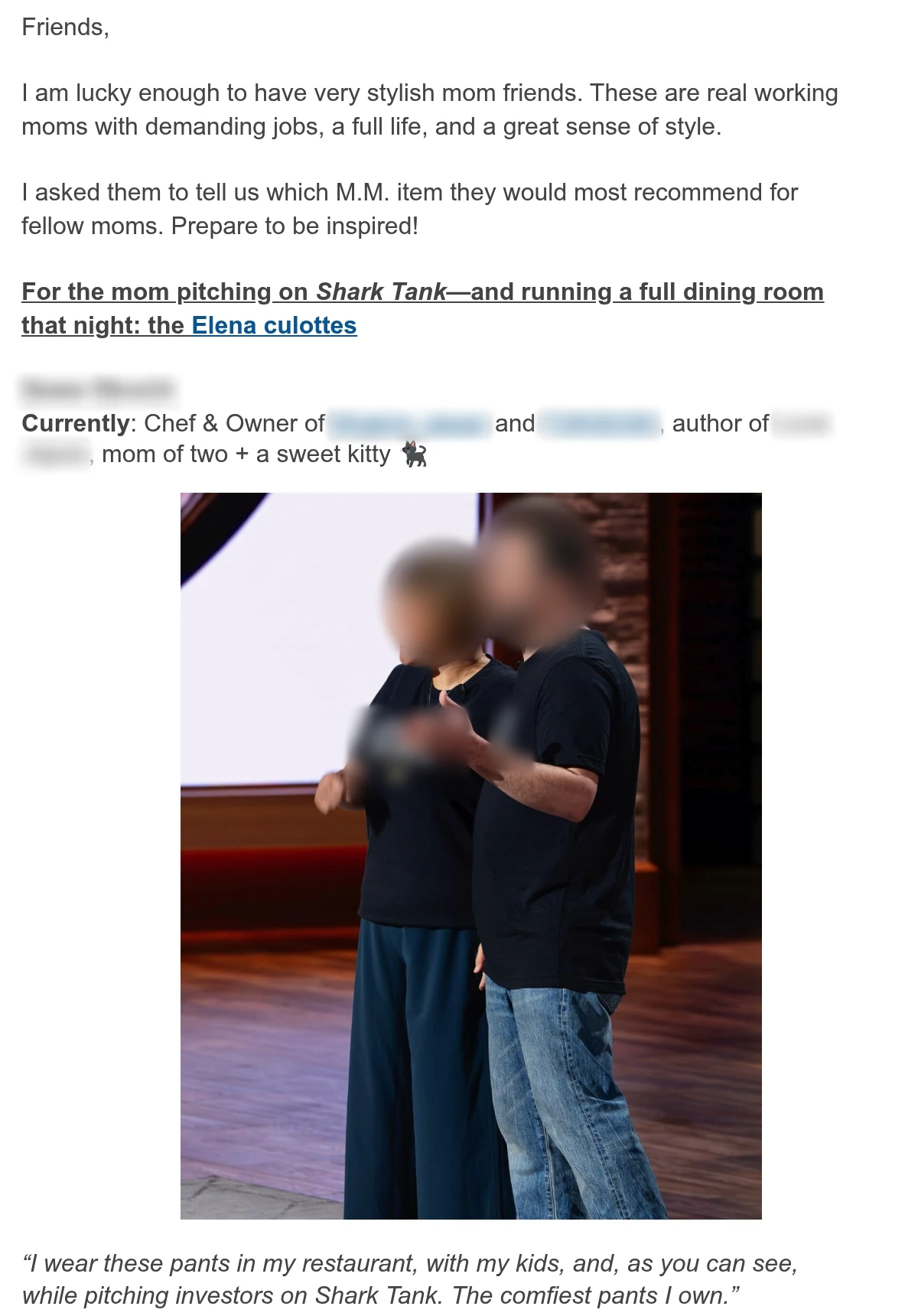
M.M.LaFleur lets the founder’s mom friends do the curating, so every pick is vouched for by a working mom, with her job and her own reason for it. The subject line and preheader are in founder Sarah LaFleur’s first person, as is the opening letter.
Each mom was asked what she’d recommend to other moms, so the reader is who the picks were made for. The first quote earns its pick by taking one pair of pants from a restaurant shift to a Shark Tank pitch, and the plain letter layout, no banner and no price, keeps the email reading as a note.
What you can learn from it
Ask a few customers which item they’d give, and present each pick with her job and her own words.
10. Local Revival: An anti-cliché guide
Subject line: The only Father’s Day gift guide worth reading
Preheader: No grill accessories. No novelty mugs.
Guide type: By recipient (five dad personas)
Trigger: Campaign
Sent: Saturday, June 6, 2026, 15 days before Father’s Day
Why this email works
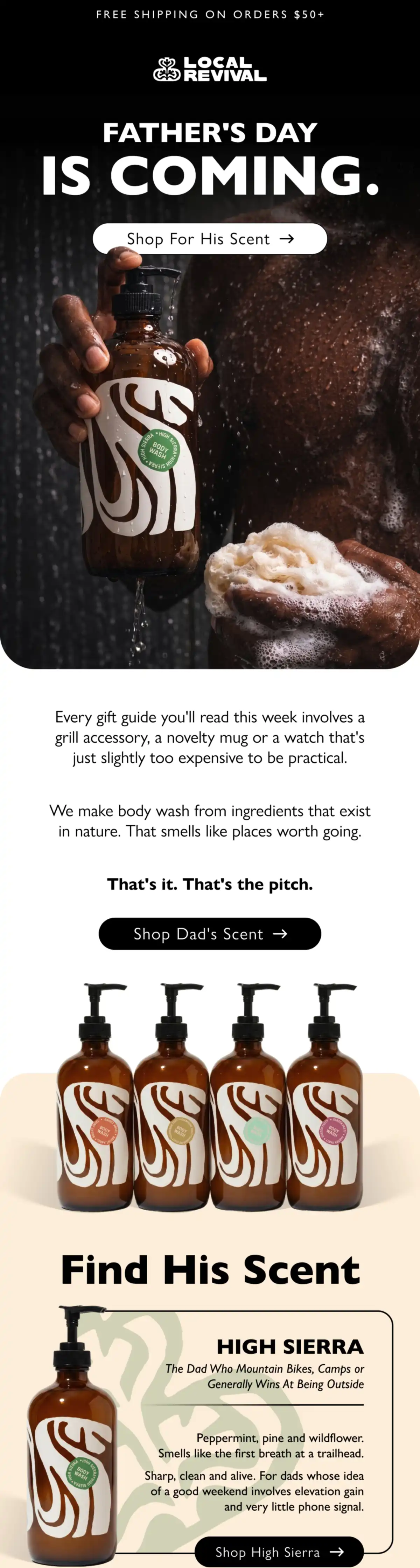
Local Revival names the gifts it says every other guide suggests and rules them out, so its body wash reads as the gift that isn’t a cliché. The subject line is “The only Father’s Day gift guide worth reading,” and the preheader names two clichés it skips.
Ending on “That’s it. That’s the pitch.” owns how little the pitch is, and after a paragraph mocking other guides, two short lines read as honest. The first persona, “The Dad Who Mountain Bikes, Camps or Generally Wins At Being Outside,” is specific enough for a shopper to see one dad they know.
What you can learn from it
Name the clichés you’re replacing and give each product a persona of the recipient, then add a bundle for shoppers who can’t pick.
11. Fi: Sorted by pet
Subject line: The dog & cat dad gift guide 🎁
Preheader: Father’s Day gift ideas, plus up to $70 off.
Guide type: By recipient (type of pet dad), with a discount
Trigger: Campaign
Sent: Thursday, June 11, 2026, 10 days before Father’s Day
Why this email works
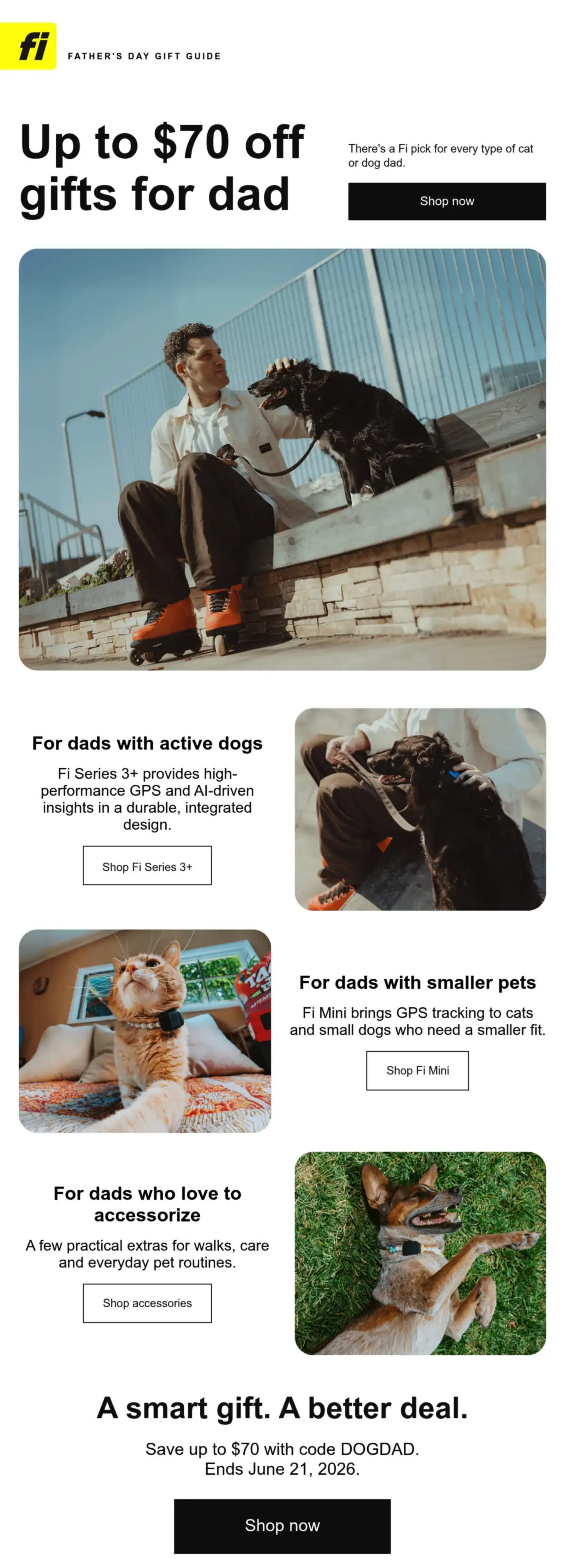
Fi has two GPS trackers and a few accessories to sell, yet there’s a block for every shopper, because the dad’s pet sorts the guide. Even the discount code is named for the occasion.
The subject line covers both the dog dad and the cat dad, and the offer runs from the preheader into the headline. Every block opens with the type of pet dad, so the shopper finds their recipient first.
“There’s a Fi pick for every type of cat or dog dad” tells the shopper with a cat dad up front that a GPS-collar brand has something for them. Each block leads with the dad’s situation, and only then the device, so someone who knows the dog but not GPS can still pick.
What you can learn from it
Sort the gift by what the recipient cares about, and name the code after the occasion, ending it on the day itself.
Try it with Omnisend: Use segmentation to find past buyers with the Ordered product filter, then send them a version of the guide that leads with the section that fits what they bought, such as accessories for a product they already own.
12. Mark & Graham: An under-$100 headline
Subject line: Your Under-$100 Gift Guide
Preheader: Personalized favorites for her, him, hosts & everyone on your list ›
Guide type: By price (under $100)
Trigger: Campaign
Sent: Tuesday, October 27, 2026, 31 days before Black Friday
Why this email works
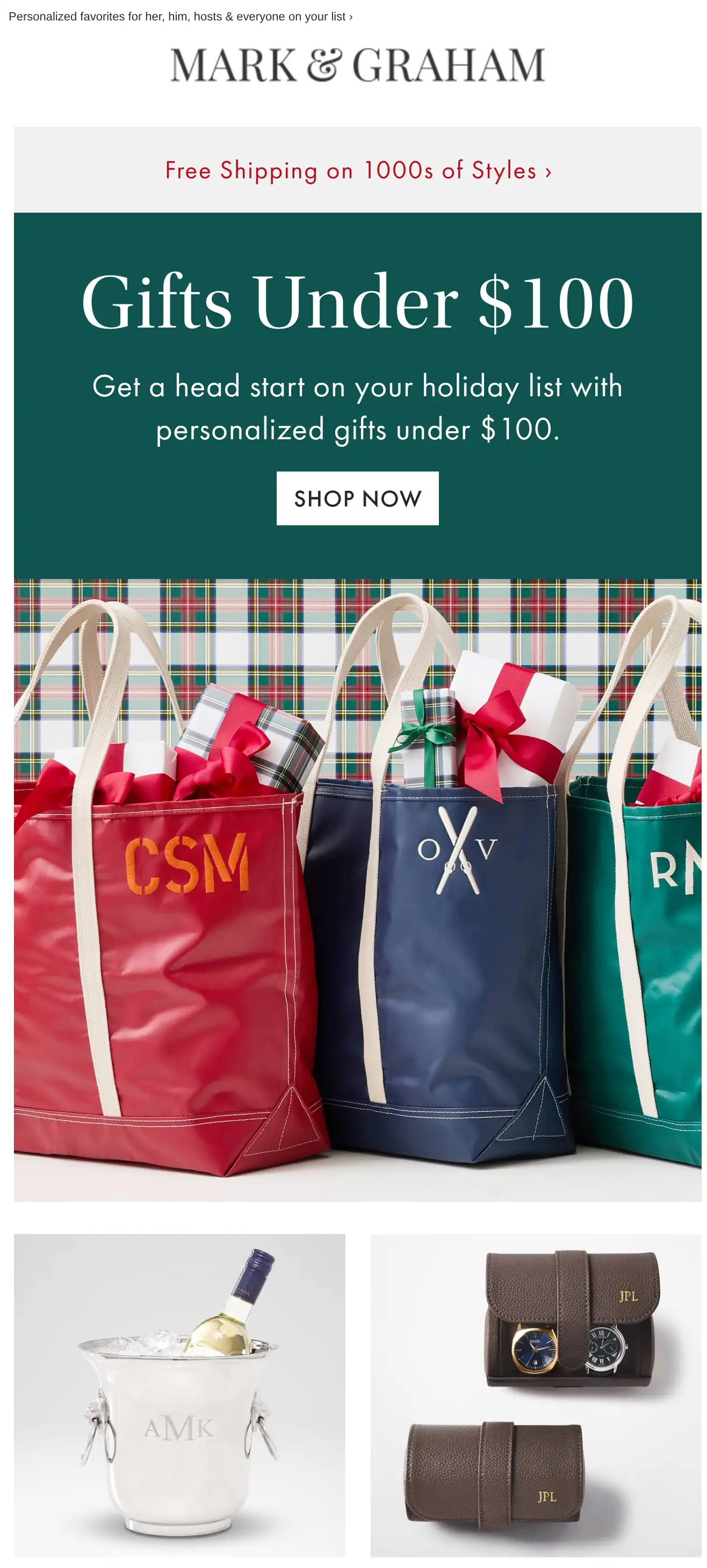
Mark & Graham puts the price ceiling in the headline, so shoppers know the budget before they click. The subject line repeats it, and the copy under the headline reads “Get a head start on your holiday list with personalized gifts under $100.”
An October send needs a reason, and the hero gives one in two words, “head start,” before the price ceiling.
Sample initials on the tote bags and the ice bucket show that “personalized gifts under $100” includes the monogram, which buyers want settled before clicking.
What you can learn from it
Put the price ceiling in the subject line and the headline, and show each product the way the recipient will get it.
What makes a great gift guide email
A great gift guide email narrows the shopper’s choice to a short list, arranged the way people shop for gifts, by who the gift is for or by what it costs. The 12 examples point to four habits worth copying into your next email marketing campaign.
Sort the gifts by who they’re for
Organize the picks around who the gift is for, the question a gift buyer starts with. Eight of the 12 sort by a type of person, from MATE the Label’s six personalities to Fi’s three kinds of pet dad. Jamie Oliver Cookery School and Jo Loves hand the sorting to the shopper, with a flowchart and a quiz.
Stores that track past purchases can send each section to the buyers it fits, the logic behind Black Friday customer segmentation.
Tell shoppers what the gifts cost
Give a price on each item or a ceiling for the whole guide, so the budget isn’t a guess. Four of the 12 do: Jo Loves and Subset price every item, while Dr. Martens and Mark & Graham set a ceiling, “GIFTS UNDER $150” and “Gifts Under $100.” The other eight show no prices.
Time the guide to the day
Send a holiday guide from late October and an occasion guide one to two weeks before the day, so the gift arrives in time, and say when to order. The holiday gift guide examples here went out from 38 days before Black Friday (MATE the Label) to two days before Christmas (Greater Goods Roasting), and the occasion guides three to 15 days ahead.
Only one of the 12, Jo Loves, prints an order-by date, “17/12 for Standard Delivery.” Add a line like it to your holiday email campaigns and holiday newsletter.
Put a person behind the picks
Let a founder or a customer choose the gifts, so the list reads like advice from a person. Four of the 12 name a person who curates or signs the guide.
Subset’s co-founder Cayla and M.M.LaFleur’s founder Sarah LaFleur put their names on their guides. Local Revival signs off as James, and Jo Loves opens with “Let Jo curate.”
Gift guide email subject lines
The best gift guide email subject lines say who or what the guide is for, and nine of the 12 examples name it outright with the words “gift guide.” The lines below are grouped by approach.
Each stays under 50 characters, as Omnisend recommends. Swap in your own deadline, price, or product where a line names one.
| Approach | Subject line examples |
|---|---|
| By budget | Gifts under $50 they’ll actually use Stocking stuffers under $25 🎁 Your gift list, sorted by budget From $15 to $150: a gift for every budget |
| By recipient | Gifts for the one who has everything Shopping for Dad? Start here Gifts for hosts, teachers, and neighbors Gifts for the cook in your life New parent on your list? We’ve got you |
| Last-minute and shipping deadline | Order by Thursday for delivery by Christmas Last day to order for holiday delivery 2 days left to ship gifts in time ⏰ Too late to ship? Send a gift card today A gift that lands in their inbox tonight |
| Curiosity | The gift they didn’t know they wanted Answer 3 questions, find their gift 7 gifts our team keeps giving Not sure what to get them? Open this |
For more variations, Omnisend’s free subject line generator writes subject lines from five or more keywords and a short description of your email.
How to create gift guide emails with Omnisend
To create a gift guide email in Omnisend, build one email campaign with a Product listing block for each gift section, send it in early November before Black Friday, then send a second campaign to the people who clicked but didn’t buy.
Build it under Campaigns > Create campaign > Create email. Add a Product listing item to each section, then click Pick products from store to pull in each product’s details and price. One block holds up to 12 products. Give each recipient or price tier its own block.
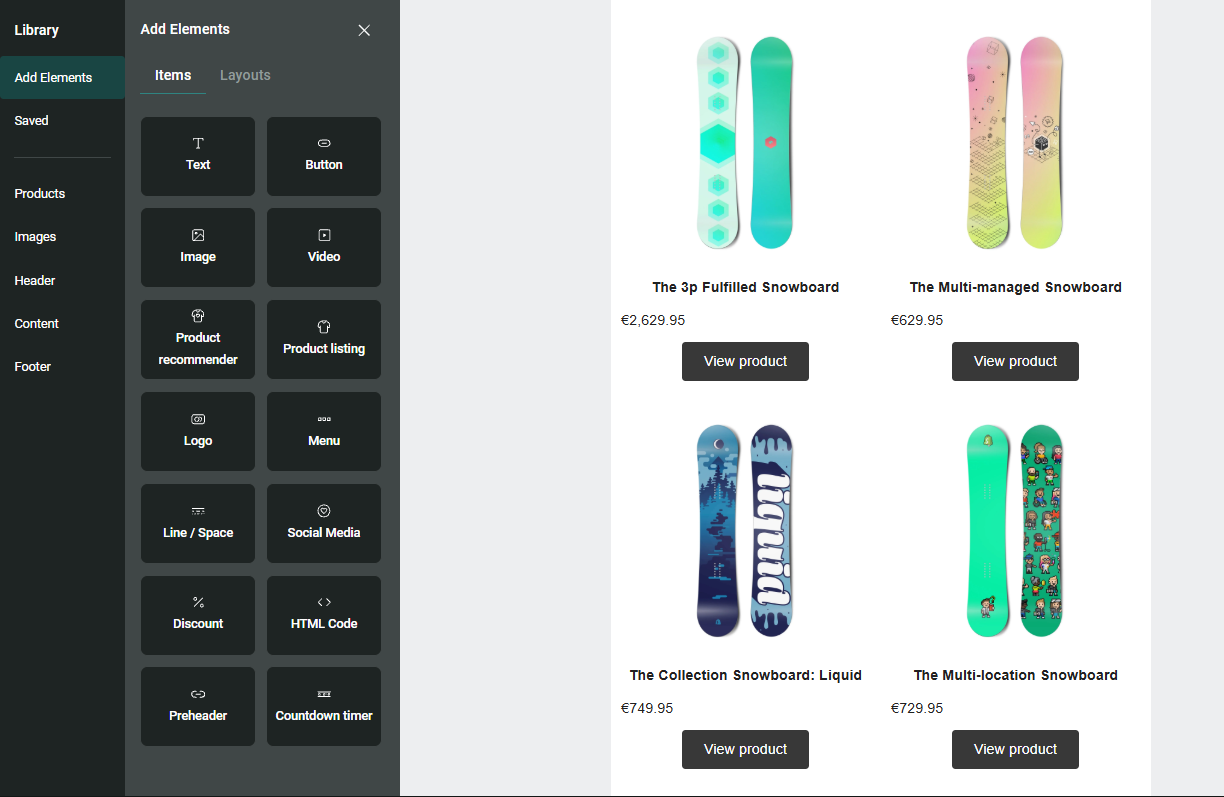
Prices are pulled from your store when you add the product, not when the email is sent. For gift guide email campaigns scheduled weeks ahead, re-add anything whose price changes.
Past buyers get a version of the guide that leads with their section. Build their segment with the Ordered product filter under Audience > Segments > Create segment > Create from scratch, and exclude it from the main send.
For the follow-up, segment contacts who clicked the guide (Clicked message, by message title) and haven’t placed an order since the send date, and send them the second campaign.
Quick sign up | No credit card required
Wrap-up
Start from the example closest to how your customers shop, whether by person or by budget, and use it as your gift guide email template. Each section gets a Product listing block, and the main guide goes out between late October and early November, ahead of Black Friday.