Omnisend AI

 OFFER



The best Giving Tuesday emails for 2026 show readers exactly what their purchase or donation does. For example, Rumpl donates one blanket per order, Blueland gives $5 per order, and Patagonia doubled every checkout gift with a partner match. Eight of the 10 Giving Tuesday email examples below tie donations to purchases.
For each example, you’ll see its subject line, what makes it work, and what to copy for your 2026 emails, followed by 16 subject lines and five templates you can reuse.
Quick sign up | No credit card required
10 Giving Tuesday email examples
Each example was chosen because it ties a purchase or donation to a specific cause. They run in send-day order: launch-day emails (1–7), last calls (8–9), and a recap (10). The templates below also cover the save-the-date and progress update, which these examples don’t show.
Nine of these emails are from Giving Tuesday 2025 (December 2, 2025), and the Sonos email is from 2024. All 10 use tactics you can reuse for Giving Tuesday 2026.
| Brand | Industry | Differentiator | |
|---|---|---|---|
| 1 | Blueland | Home cleaning | $5 per order |
| 2 | Rumpl | Outdoor blankets | One order, one blanket |
| 3 | Sonos | Electronics | Discount on the right products |
| 4 | Patagonia | Apparel | Matched checkout donations |
| 5 | Wild One | Pet accessories | Partners, not products |
| 6 | Martie | Grocery | A drive that outlasts the day |
| 7 | Dallas Zoo | Nonprofit | Impact in numbers |
| 8 | True Botanicals | Skincare | A personal last call |
| 9 | Loog Guitars | Music and kids | Thanks before the final push |
| 10 | BLK & Bold | Coffee | A year-round giving recap |
1. Blueland: $5 per order
Subject line: Fill your cart, not our oceans
Trigger: Launch-day Giving Tuesday campaign
Why this email works
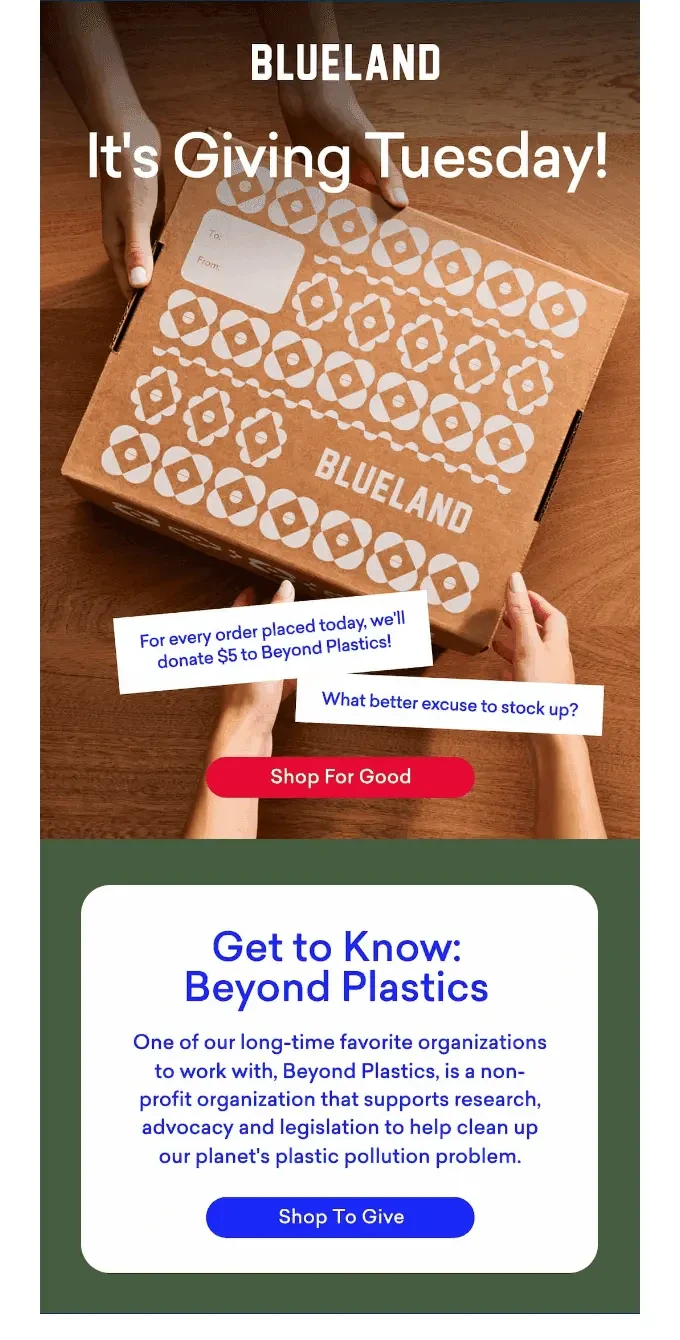
Blueland’s subject line connects shopping with the problem of plastic pollution in six words.
In the email body, Blueland expands on the offer, stating that the brand will raise funds by donating $5 per order to the Beyond Plastics organization. The straightforward “What better excuse to stock up?” line speaks directly to the reader, tying together the cause and Blueland as a better alternative to plastic.
What you can learn from it
Include a fixed online donation amount per order in your hero image, and give your nonprofit partner its own section to inform subscribers who will benefit.
2. Rumpl: One order, one blanket
Subject line: GIVING TUESDAY | 1 Order = 1 Blanket Donated + 25% OFF!
Trigger: Launch-day Giving Tuesday campaign
Why this email works
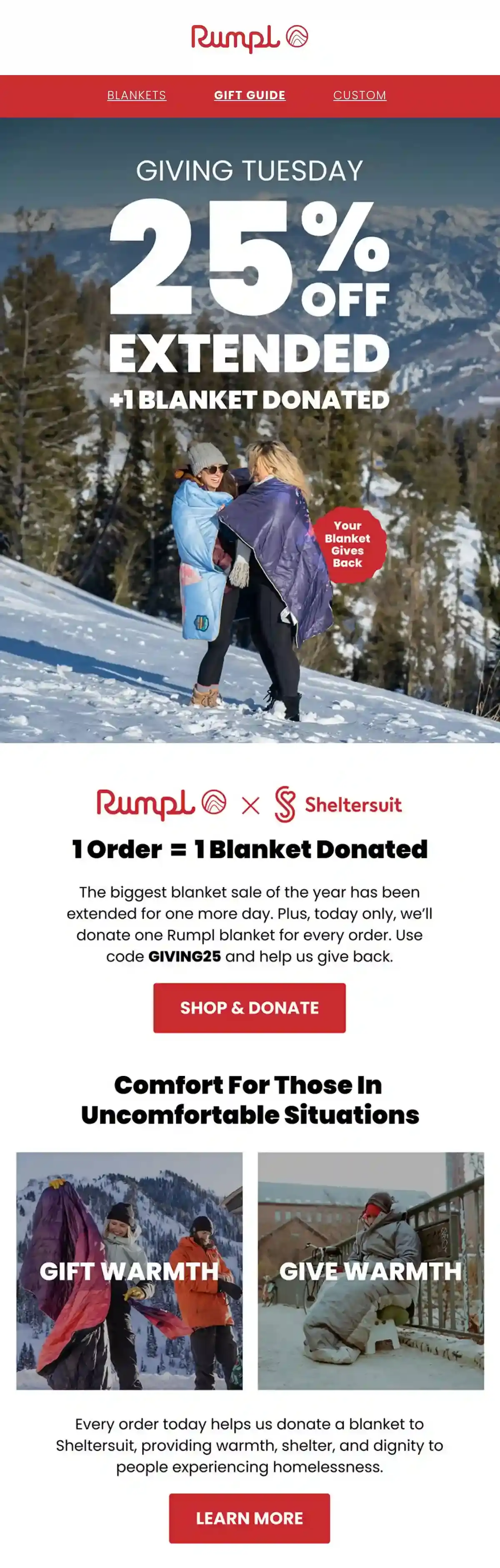
Rumpl puts both parts of its Giving Tuesday offer in the subject line: “25% off” and “1 Order = 1 Blanket Donated.” Subscribers understand the promotion before opening the email. The subject line also makes the charitable action straightforward, as customers simply place an order rather than making a separate donation.
The co-branded Rumpl x Sheltersuit section explains where the donated blankets go and connects the offer to “people experiencing homelessness.” Because Rumpl sells blankets, the product itself makes the impact easy to picture. The shopping-focused offer gives the reader a clear next step, and the partner information explains why their purchase matters.
What you can learn from it
Consider donating your product when possible. Giving one-for-one of the same item shows customers what their order will provide.
3. Sonos: Discount on the right products
Subject line: This Giving Tuesday
Trigger: Launch-day Giving Tuesday campaign
Why this email works
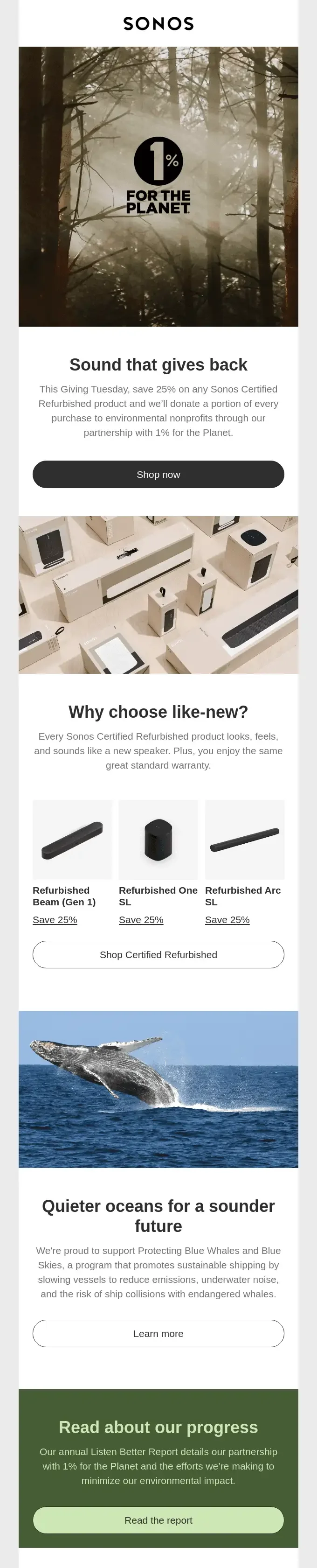
Sonos keeps its subject line to three words and puts the whole offer in one sentence below its 1% for the Planet hero image: 25% off any Certified Refurbished product, with a portion of every purchase going to environmental nonprofits. Because the discount covers only refurbished speakers, the offer itself supports the cause.
Further down, a block on the Protecting Blue Whales and Blue Skies program and a “Read the report” button for the annual Listen Better Report give readers who want proof a next step that isn’t a purchase.
What you can learn from it
Use Giving Tuesday discounts on refurbished, refill, or recycled products so the offer and the donation both support your cause.
4. Patagonia: Matched checkout donations
Subject line: Help us protect public lands
Trigger: Launch-day Giving Tuesday campaign
Why this email works
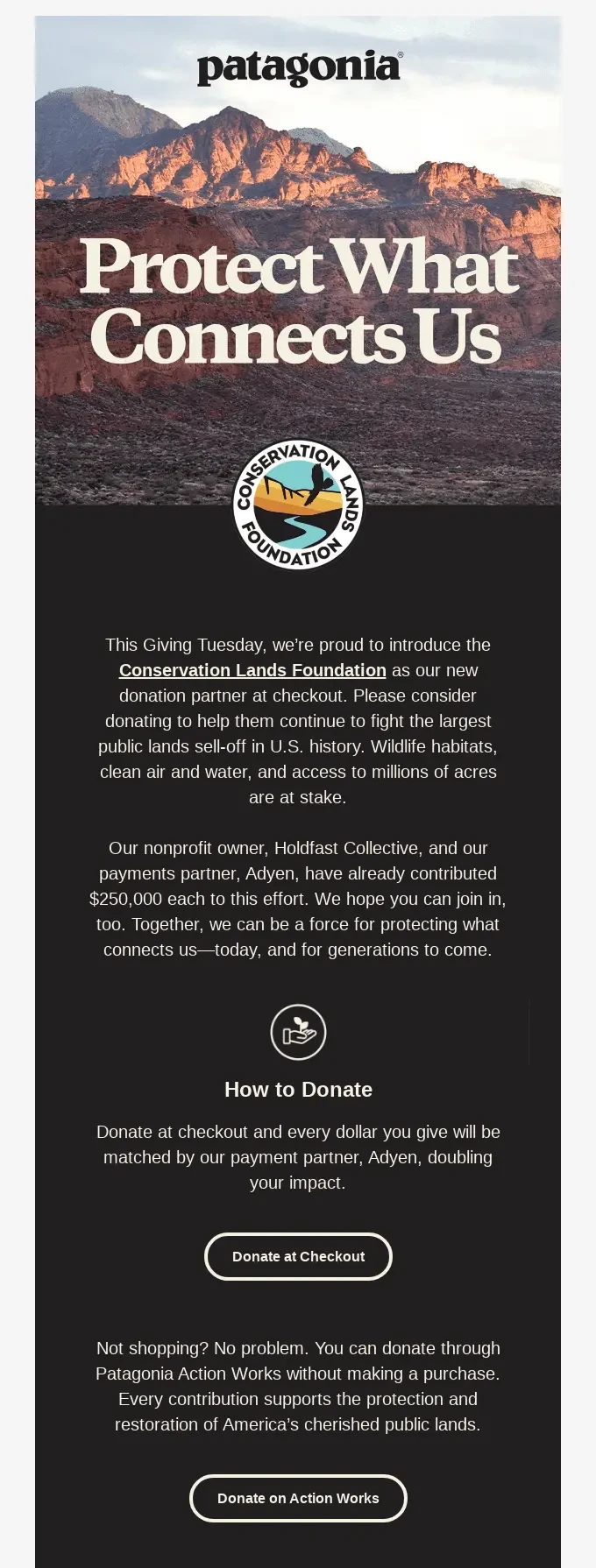
Patagonia’s subject line leads with the cause instead of a discount. The email body introduces the Conservation Lands Foundation, Patagonia’s new donation partner, and explains the importance of protecting public lands.
The donation process is also clear: donate at checkout, or if you want to donate without making a purchase, you can do so directly. Patagonia’s nonprofit owner, Holdfast Collective, and its payments partner, Adyen, have each already given $250,000, while Adyen matches every dollar donated at checkout.
What you can learn from it
Include a way for subscribers who aren’t shopping that day to still have the option to donate.
5. Wild One: Partners, not products
Subject line: It’s Giving Tuesday
Trigger: Launch-day Giving Tuesday campaign
Why this email works
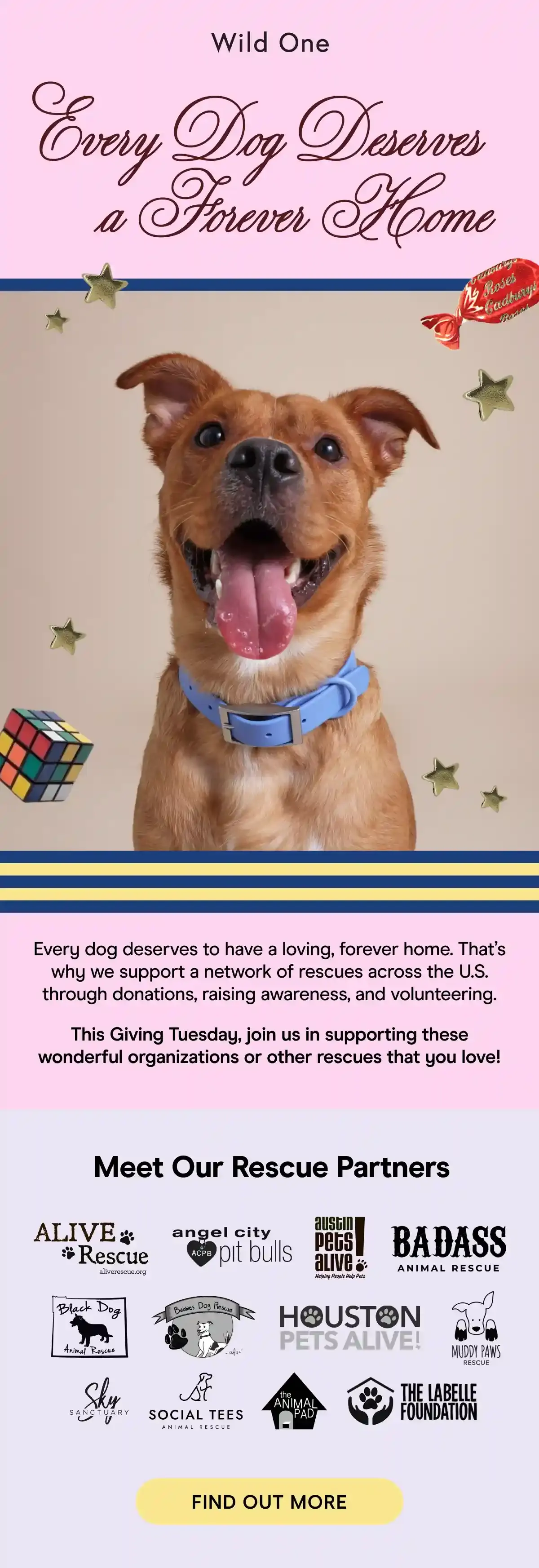
The subject line from Wild One names Giving Tuesday and leaves the main idea of the email for the “Every Dog Deserves a Forever Home” heading. The heading sits on a pink band right above a photo of a smiling dog.
In the email copy, Wild One describes how it supports a network of U.S. rescues through donations, awareness, and volunteer work. To support this section, Wild One adds the 12 rescue logos the brand works with, allowing subscribers to learn more about each one.
What you can learn from it
Show subscribers the organizations you already support and invite them to give to one. You don’t need a discount for that.
6. Martie: A drive that outlasts the day
Subject line: Toy Drive Starts Now! Happy Giving Tuesday!
Trigger: Launch of a month-long toy drive, sent on Giving Tuesday
Why this email works
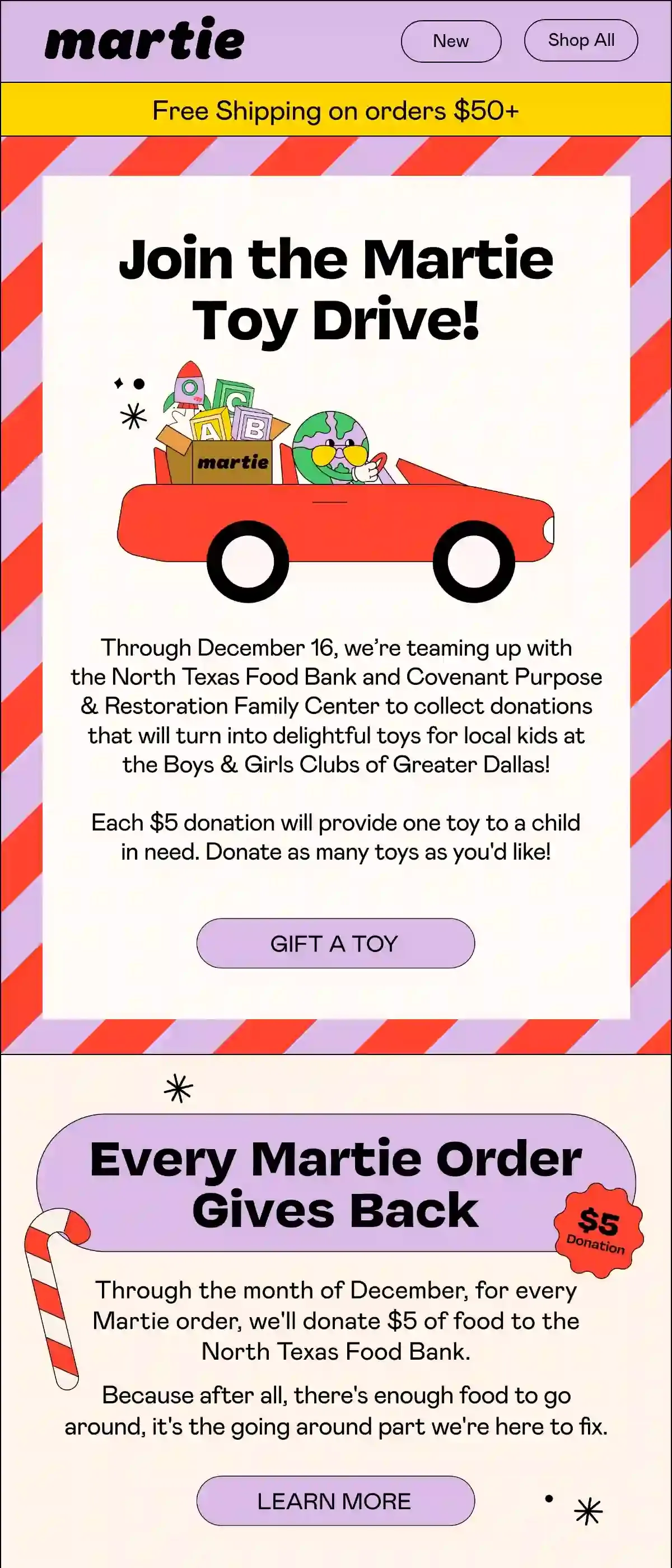
Martie’s subject line introduces the start of the Toy Drive, which indicates a multi-day project rather than a one-day sale. Throughout the email, Martie explains that the grocery brand is working with the North Texas Food Bank and a local family center to turn all donations into kids’ toys.
In the second block under “Every Martie Order Gives Back,” Martie pledges $5 worth of food for every order placed in December.
What you can learn from it
Think of Giving Tuesday as a start to a longer campaign. An email campaign that extends into December gives subscribers more chances to take part.
7. Dallas Zoo: Impact in numbers
Subject line: Support Wildlife This Giving Tuesday 🐅🧡
Trigger: Launch-day Giving Tuesday appeal
Why this email works
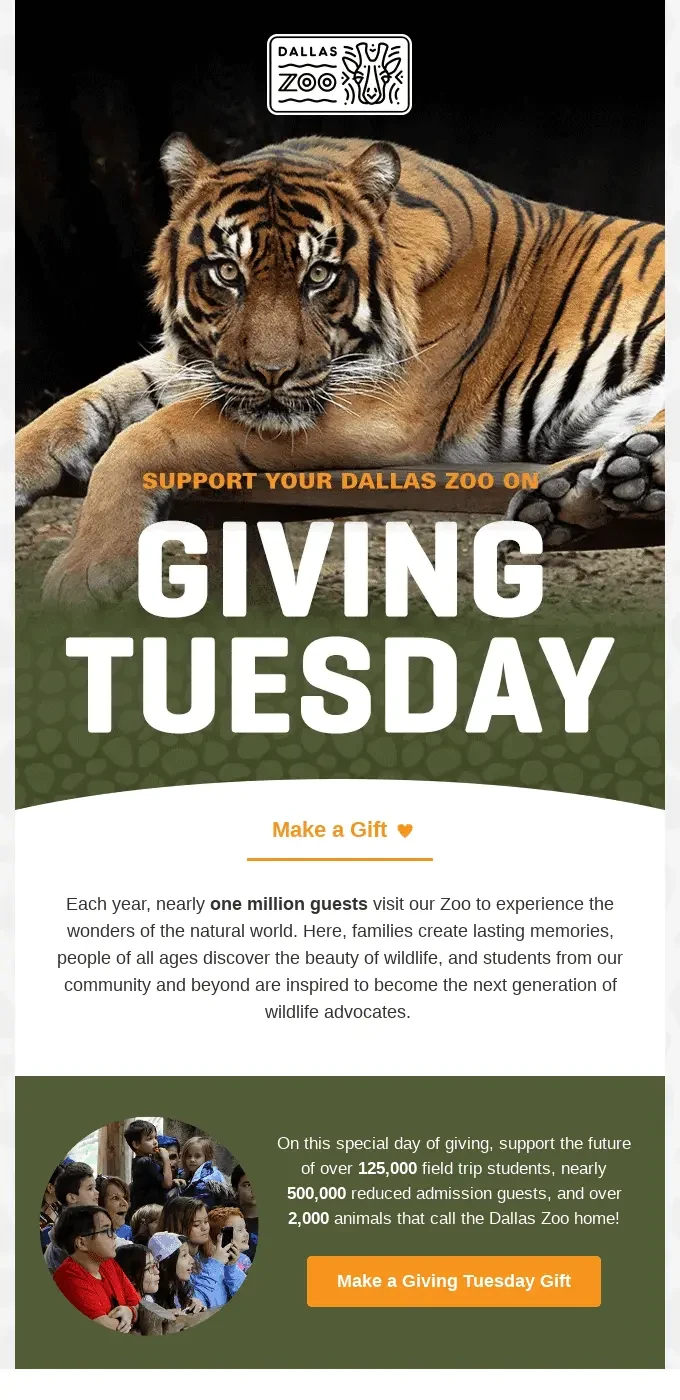
Dallas Zoo opens its email with a visual of a tiger with a large “Giving Tuesday” headline at the bottom of the image. The subject line names the cause and the occasion, asking readers to support wildlife.
The copy includes three figures for what readers’ gifts support: over 125,000 field trip students, nearly 500,000 reduced-admission guests, and over 2,000 animals. Both gift links, “Make a Gift” under the hero and the “Make a Giving Tuesday Gift” button, lead to the same action, so the email stays focused on a single CTA.
What you can learn from it
Give subscribers two or three numbers they can visualize. For a store, that means how much each order funds, such as meals or trees.
8. True Botanicals: A personal last call
Subject line: Ending Soon: Our Giving Tuesday Promise
Trigger: Last-call resend
Why this email works
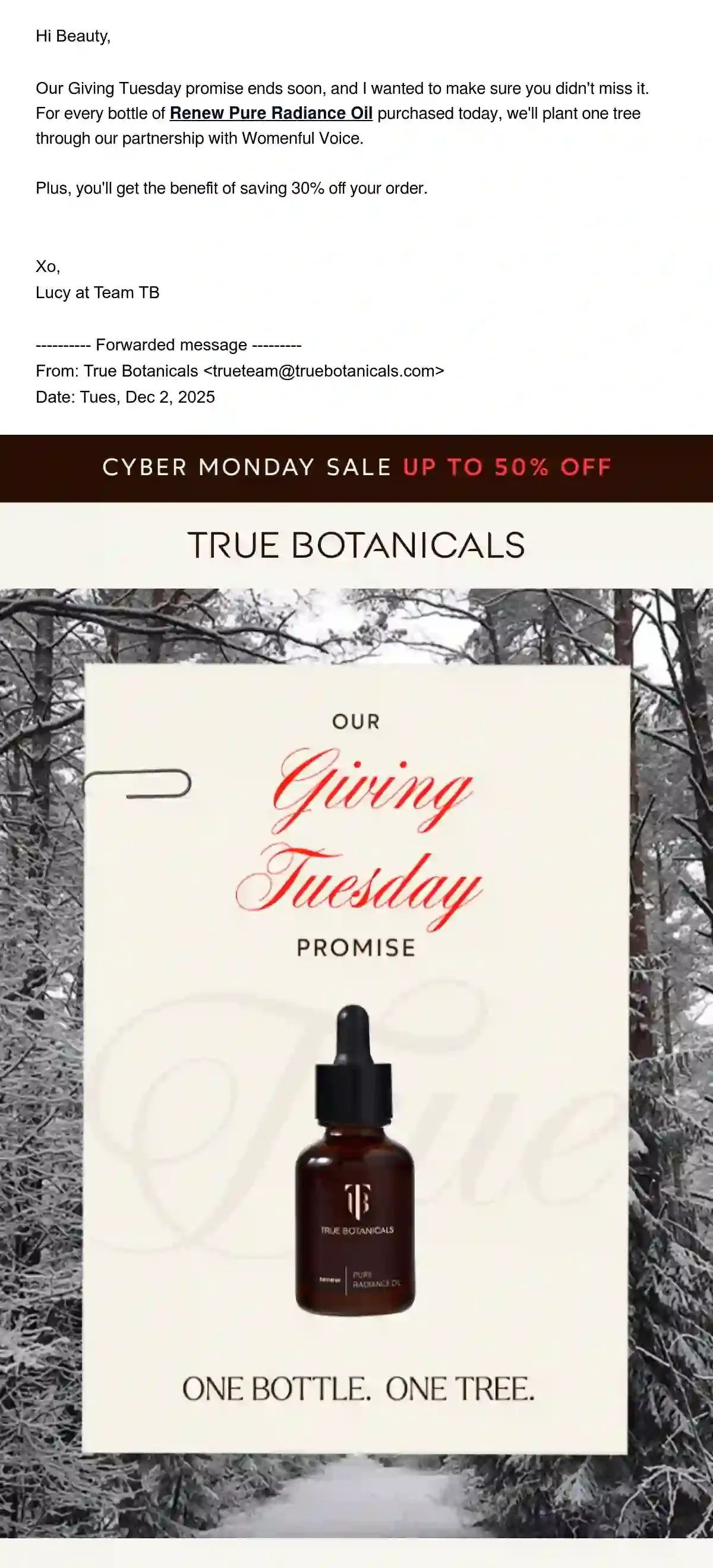
True Botanicals leads with an urgency-focused subject line that signals to readers that time is running out and mentions the brand’s commitment to Giving Tuesday. The email begins with a plain-text note signed by one of True Botanicals’ team members, and the brand promises to plant one tree for every bottle of Renew Pure Radiance Oil sold during Giving Tuesday.
The note also gives subscribers 30% off their order. The forwarded email below explains the tree partner, Womenful Voice, a nonprofit that supports women and girls in Haiti through education and sustainable farming.
What you can learn from it
Rather than writing a second ad, resend the launch email with a short personalized note at the top.
9. Loog Guitars: Thanks before the final push
Subject line: Giving Tuesday ends soon!
Trigger: Last-call campaign
Why this email works
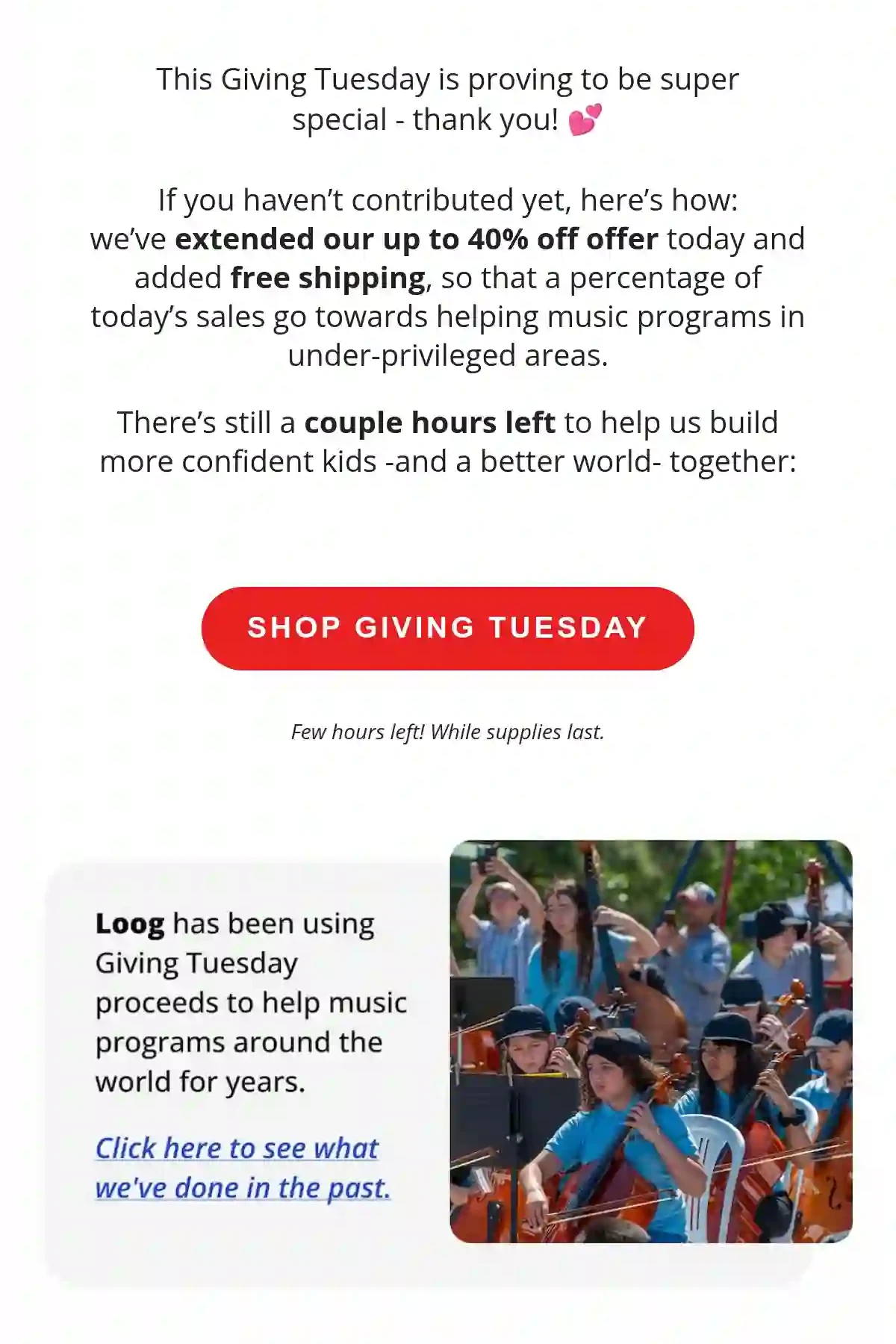
Loog Guitars centers its subject line on a plain deadline, with the preview text listing an offer of up to 40% off and free shipping. However, the email copy begins with a calmer tone, thanking subscribers for their part and inviting those who haven’t joined yet.
The brand goes on to mention that it’s extending its “up to 40% off” offer and adding free shipping, with a percentage of Giving Tuesday’s sales going to music programs in underserved areas. A block further down links to what Loog’s past Giving Tuesday proceeds have funded.
What you can learn from it
Open your final push with thanks and a link to past results, so subscribers who haven’t acted yet see that others have and where past donations went.
10. BLK & Bold: A year-round giving recap
Subject line: Your Sip. Their Future. Happy Giving Tuesday!☕🤝
Trigger: Giving Tuesday recap of a standing pledge
Why this email works
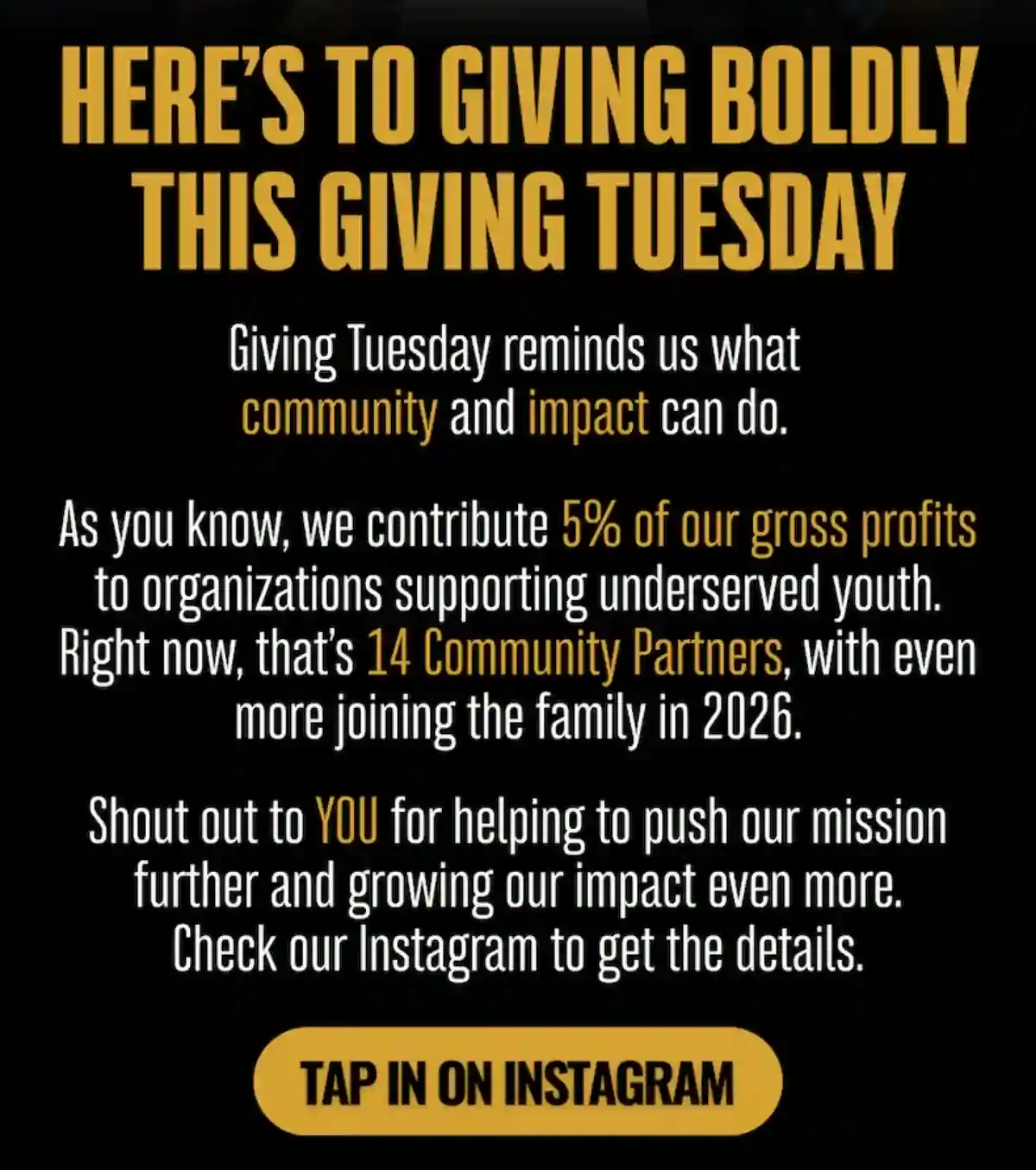
BLK & Bold restates its standing pledge to give 5% of its gross profits to organizations supporting underserved youth, which the email puts at 14 community partners. This is communicated in the subject line that lets readers understand what their actions mean: “Your Sip. Their Future.”
The email copy then credits subscribers for helping BLK & Bold grow its reach and impact. The main CTA, “Tap in on Instagram,” sends readers to the brand’s posts for the details.
What you can learn from it
Use Giving Tuesday to report on your giving program. Include partner counts and a thank-you in the day’s email or follow-up the next day.
What makes a great Giving Tuesday email
A great Giving Tuesday email identifies a cause, explains how contributions work, and gives subscribers a clear action to take. Looking at the 10 Giving Tuesday email examples, eight of them tie donations to purchases or checkouts.
Giving Tuesday is also still uncommon among Omnisend brands: 99 brands sent 141 Giving Tuesday campaigns between October 2025 and October 2026, against 3,475 brands and 7,437 campaigns for Cyber Monday, the day before.
Put a number on the giving
Four of the 10 emails state a fixed amount or a one-for-one gift per order. Blueland dedicates $5 per order, Rumpl donates one blanket per order, True Botanicals plants one tree per bottle, and Martie gives $5 worth of food per order.
Name the cause and introduce it
Seven of the 10 emails name a partner organization and give it its own block. Blueland talks about Beyond Plastics, Rumpl introduces its partner Sheltersuit, and True Botanicals expands on what Womenful Voice does. Naming the partner adds credibility and is a basic part of ethical email marketing.
Match your incentives to the right segments
Give buyers and non-buyers each a way to take part, so neither group feels left out or pressured. Patagonia covers both segments in a single email, letting buyers proceed with a checkout donation, while non-buyers can choose the donate-only option.
Plan the send times around the day
Plan your Giving Tuesday emails around December 1, 2026, the day after Cyber Monday. True Botanicals and Loog Guitars sent a last call on Giving Tuesday, while Martie announced an initiative planned to run until mid-December.
Most brands send on the day itself. Across 135 Giving Tuesday campaigns in Omnisend data, 65% went out on Giving Tuesday, 25% before it, and only 11% two or more weeks ahead, so a save-the-date email puts you ahead of most senders.
Inboxes are crowded that week: 49% of all campaigns Omnisend brands sent in the week of Giving Tuesday 2025 were tied to a holiday, against a median of 13% across the other weeks from January to October 2026.
Here’s a five-email Giving Tuesday schedule to adapt:
| Send | When |
|---|---|
| Save the date | November 10–17, 2026 (two to three weeks before) |
| Launch | December 1, 8 am |
| Progress update | December 1, 4 pm |
| Last call | December 1, 8 pm |
| Thank-you | December 2 |
Use this flow as a starting point, then adjust it like any other email marketing campaign to suit your business, region, and segments. Our guide on the best time to send an email shows how to find your peak hours.
Giving Tuesday email subject lines
The best Giving Tuesday subject lines include clear information on what the result will be for every subscriber purchase or action. Holiday email subject lines follow a similar formula of having a cause, a significant number (appropriate for the occasion/holiday season), or a deadline.
Here’s a quick rundown of different Giving Tuesday email subject line ideas:
| Curiosity | Urgency | Benefit-led | Personal |
|---|---|---|---|
| What $25 can do today | Extended 24 hours: every order still gives back | Shop today, fund cleaner oceans | [First name], will you join us today? |
| Where today’s orders are going | Gifts matched until midnight | 20% off for you, 10% for charity | You helped us give 5,000 meals |
| Your cart has a second job today | Hours left to double your impact | Every order plants a tree today | Thank you for showing up today |
| The one purchase that does more today | One week until Giving Tuesday | Your purchase, doubled for good | [First name], here’s what your order funded |
Use Omnisend’s free subject line generator to create variations for A/B testing.
Giving Tuesday email templates you can use
A Giving Tuesday sequence can run in five steps: save the date, launch with a matching gift, progress update, last call, and a thank-you. With Omnisend, you can build and schedule all of these emails and customize them to fit your brand. Or, copy these templates into Omnisend’s email templates and replace the bracketed placeholders.
Save the date
When to use: Two to three weeks before Giving Tuesday, to inform subscribers
Subject line: Mark December 1: We’re giving back
Launch day: Giving Tuesday sale email with a matching gift
When to use: The morning of Giving Tuesday, to start the campaign
Subject line: It’s Giving Tuesday: Your gift, doubled
Progress update
When to use: Mid-afternoon on Giving Tuesday, to maintain momentum
Subject line: We’re halfway to [goal]
Last call
When to use: The evening of Giving Tuesday, for subscribers who haven’t acted yet, or again if you extend the offer
Subject line: 4 hours left to double your gift
Giving Tuesday thank-you email
When to use: The day after Giving Tuesday, sent as a campaign to everyone who participated. You can set up trigger-based email automations after every order to avoid sending post-purchase emails manually.
Subject line: Thank you [exclamation mark/emoji] Here’s what you gave
Customize these templates using Omnisend’s drag-and-drop email layout builder, or browse through our thank you email templates for more ideas.
How to create Giving Tuesday emails with Omnisend
Use Omnisend Agent to build segments and the drag-and-drop email builder to create your Giving Tuesday sequence as a scheduled campaign, then use the segments to send the emails to the right people.
- Open Campaigns, select +Create campaign, and choose Email.
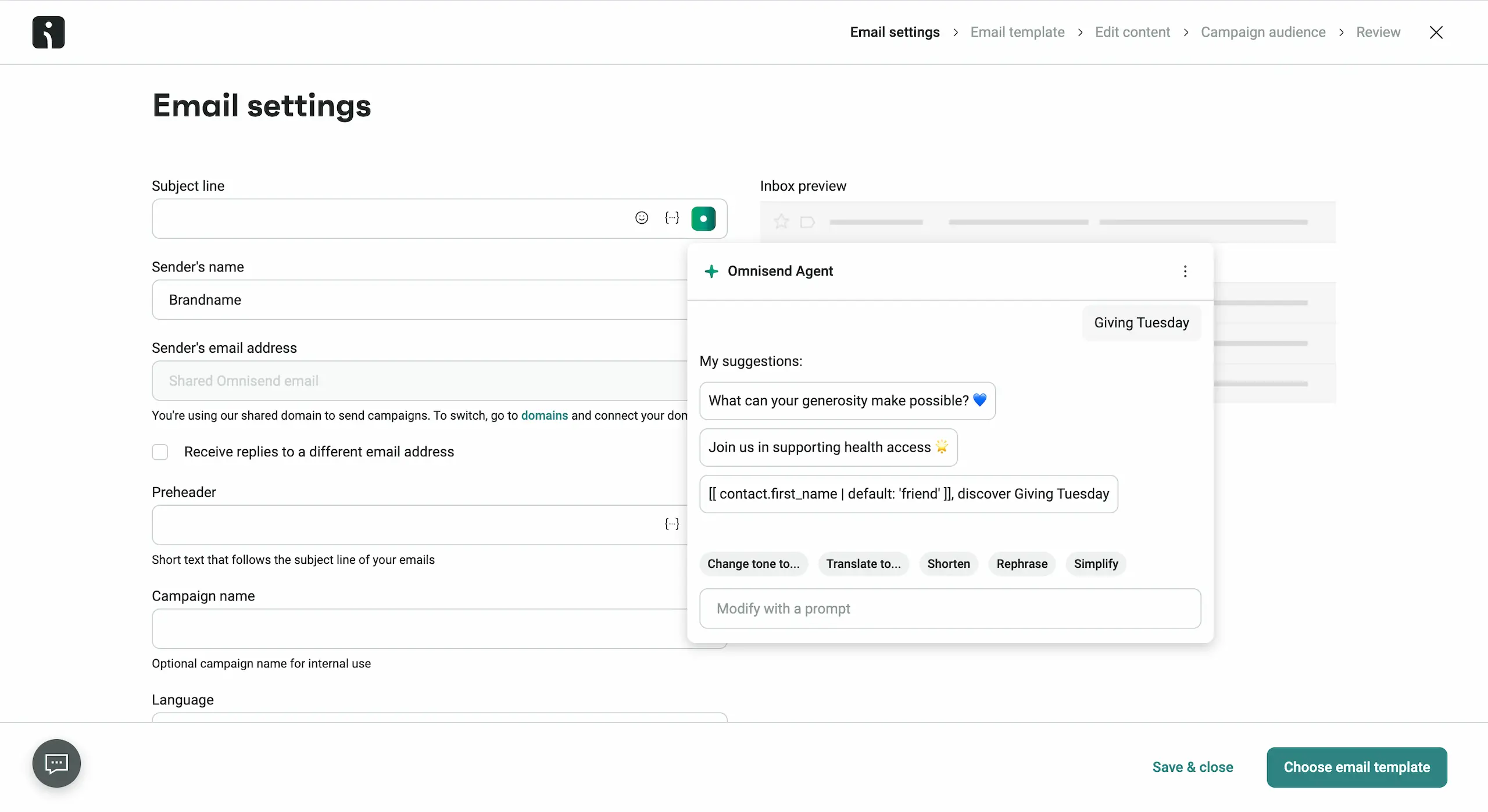
- Enter your Giving Tuesday details, or ask Omnisend Agent to suggest subject lines and preheaders.
- Choose a template or create your own design in Omnisend’s Email Builder. If you want to repurpose the same layout for the entire Giving Tuesday campaign, save it as a template and change only the copy.
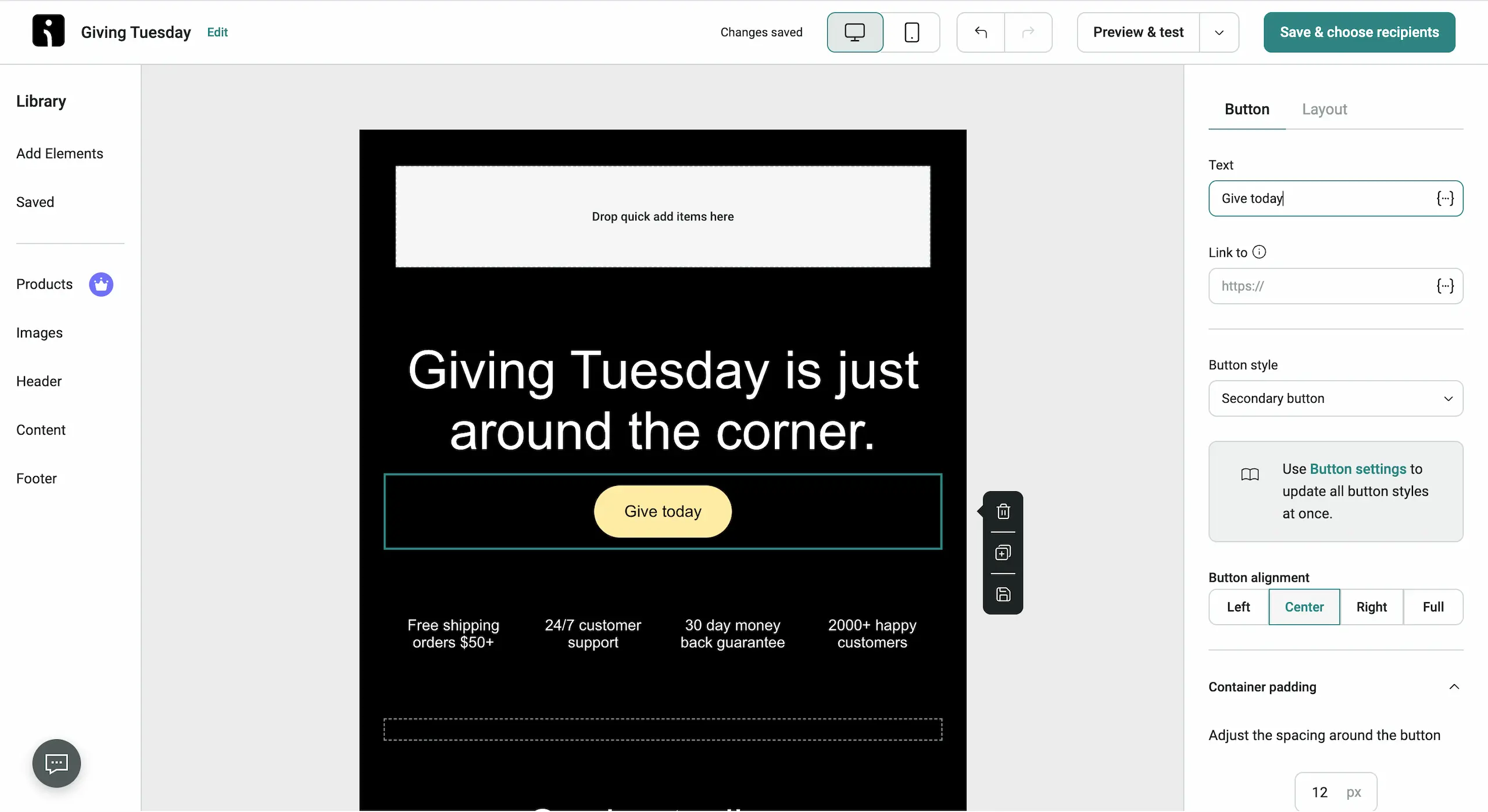
- Next, choose the customer segment you want to reach.
- On the Review step, schedule the email for the morning of Giving Tuesday and turn on Campaign Booster to resend it with a new subject line to contacts who didn’t open it. Set the booster to a few hours later, since the default is 48 hours.
Wrap-up
Pick the example whose cause fits your brand, write your five Giving Tuesday emails, and schedule them before the Cyber Monday rush. Use Omnisend’s holiday newsletter ideas to build your Giving Tuesday and other holiday emails.
Quick sign up | No credit card required
Giving Tuesday email FAQs
When is Giving Tuesday 2026?
Giving Tuesday keeps growing. Americans gave $4 billion on Giving Tuesday in 2025, 13% more than in 2024, and over 38 million people took part.