Omnisend AI


 OFFER
OFFER









10 inspiring Shopify success stories unveiled
With over 130+ pre-built integrations and flexible APIs, you can easily centralize data from across your tech stack
Make the most out of your data and unlock powerful growth marketing possibilities with these other top marketing tools.
Build any custom integration with our open, flexible APIs that are simple to use and implement.
Check out apps that have been stealing all the spotlight.
Email and SMS marketing insights, ecommerce resources, and the latest Omnisend news
Expert-led sessions covering email, SMS, and ecommerce marketing strategies.
Educational video and live training to help you make the most out of Omnisend.
Drive sales on autopilot with ecommerce-focused features
See Features
A streamlined checkout process significantly reduces cart abandonment, with 18% of shoppers leaving due to a lengthy experience, so prioritize speed and simplicity.
Offering multiple express payment options and showcasing unique selling points can enhance customer trust and increase average order value during checkout.
Implementing AI-powered personalization can boost conversion rates by up to 35% by tailoring the checkout experience to individual shopper preferences.
Utilizing features like guest checkout, urgency cues, and social proof can enhance customer confidence and encourage quicker purchasing decisions.
Your Shopify checkout page is where the ecommerce magic finally happens — customers complete their purchases and generate revenue for your business. It’s the final step before the post-purchase stage, and it must be built with your customer in mind to keep abandonment rates low.
The best Shopify checkouts move customers to completion quickly and provide all expected payment options, such as Google Pay and Klarna. There, you also address final barriers to conversion (such as delivery estimates) and upsell to increase average order value.
Following 2026 trends, such as AI and personalization, there are plenty of ways to create a custom Shopify checkout flow. In fact, Shopify has been making significant changes to its checkout functionality. Join us below to learn all about them, plus expert tips, best practices, and apps for increasing sales in 2026.
Quick sign up | No credit card required
A Shopify checkout page is a secure, hosted page where customers complete their online purchase. It guides shoppers to enter their shipping and billing details, select delivery options, choose payment methods, and confirm the order.
The page automatically calculates taxes, shipping charges, and discounts. This allows shoppers to understand what they’re paying for. Shopify optimizes its checkout process, ensuring it’s fast, secure, and mobile responsive. It also supports PCI compliance and fraud protection.
Additionally, Shopify checkout allows limited customization and branding consistency. But you can connect apps like Omnisend for upsells, analytics, and conversion optimization. This reduces cart abandonment and increases completed orders.
Optimizing your Shopify checkout page can make a bigger difference than you might expect:
“Optimizing your checkout isn’t something that’s just ‘nice-to-have.’ I’ve seen brands spend thousands on ads only to lose the sale at the last click. You want to remove any friction you can, because the checkout stage is where conversions either happen or die. So it’s worth obsessing over.”
— Evaldas Mockus, VP of Growth at Omnisend
The steps below will help you improve your checkout experience and increase sales, revenue, and AOV without additional marketing spend.
Click the links to jump to any that interest you:
Multi-page checkout gives your shoppers plenty of opportunities to back out. In contrast, a one-page Shopify checkout process makes buying easier and faster. Consider these pros and cons before switching to a one-page Shopify checkout.
| Pros | Cons |
|---|---|
| 10-30% increase in conversions due to fewer steps and less friction | Requires Shopify Plus (starting at $2,300/month), forcing small merchants to use third-party apps |
| Faster load times and smoother mobile experience | Third-party apps risk incompatibility during Shopify updates |
| Reduces cart abandonment, as most people shop from mobile devices | Harder to know exactly where customers drop off |
| Customers get less confused when everything’s visible upfront | Field validation issues can overwhelm users if poorly implemented |
| Visible progress bar feels more achievable than “Step 1 of 3” across multiple pages | Some payment providers don’t support one-page setups, potentially limiting your options |
It’s important to note that Shopify’s one-page checkout is a built-in feature if you’re on the Plus plan.
Of the many excellent one-page Shopify checkout examples available, here’s one from Gymshark:
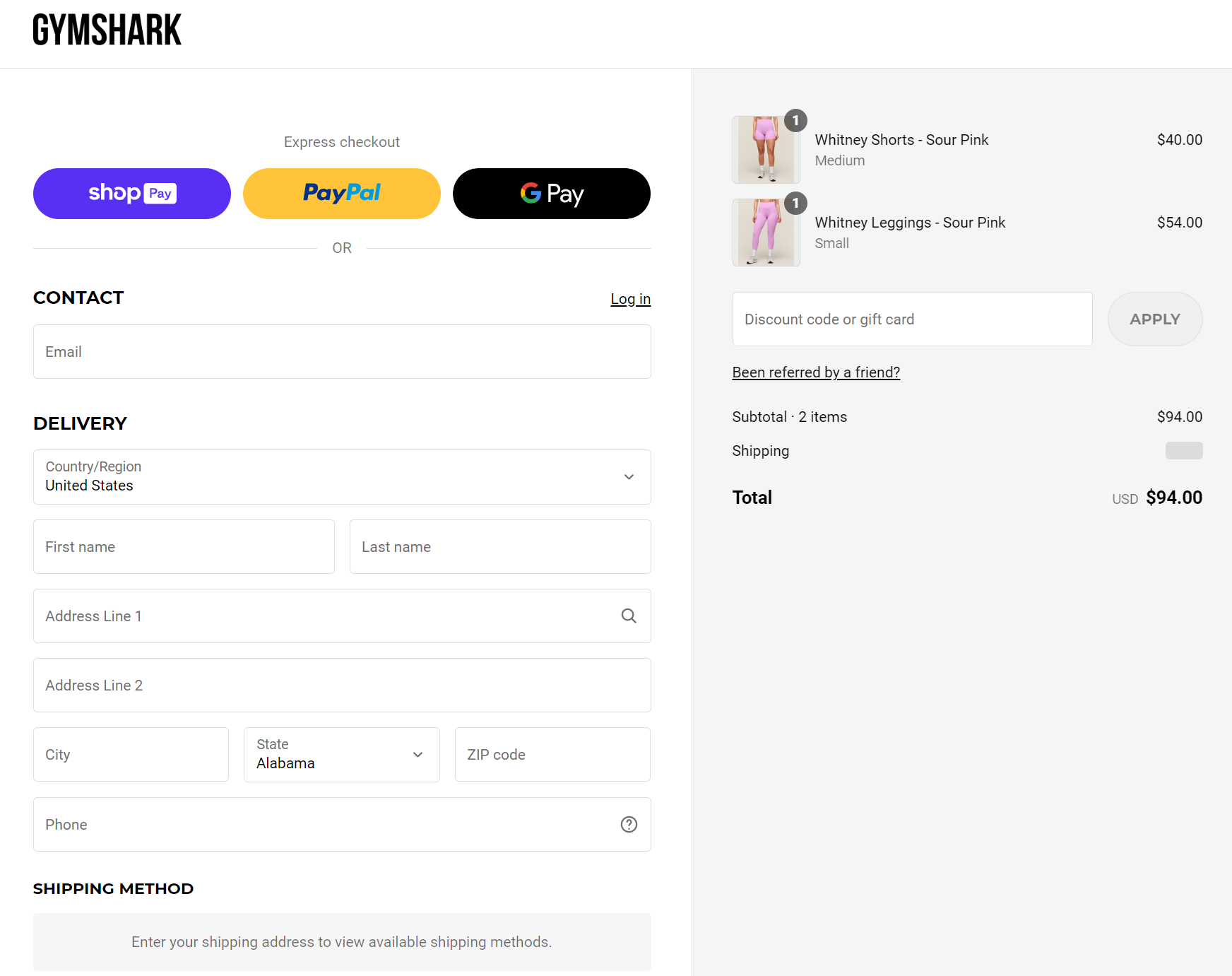
It has Express Checkout options with Google Pay, PayPal, and Shop Pay, and invites customers to save their information for a faster checkout experience later on.
You can introduce a similarly effective one-page checkout with these Shopify apps:
A progress bar shows customers how many steps are left in the checkout process. This simple feature reduces the risk of abandoned carts when multiple stages are involved.
Make sure to keep it simple: three steps maximum with labels. Here’s a prime example from an unusual gift company, Firebox, showing the steps involved in the checkout process:
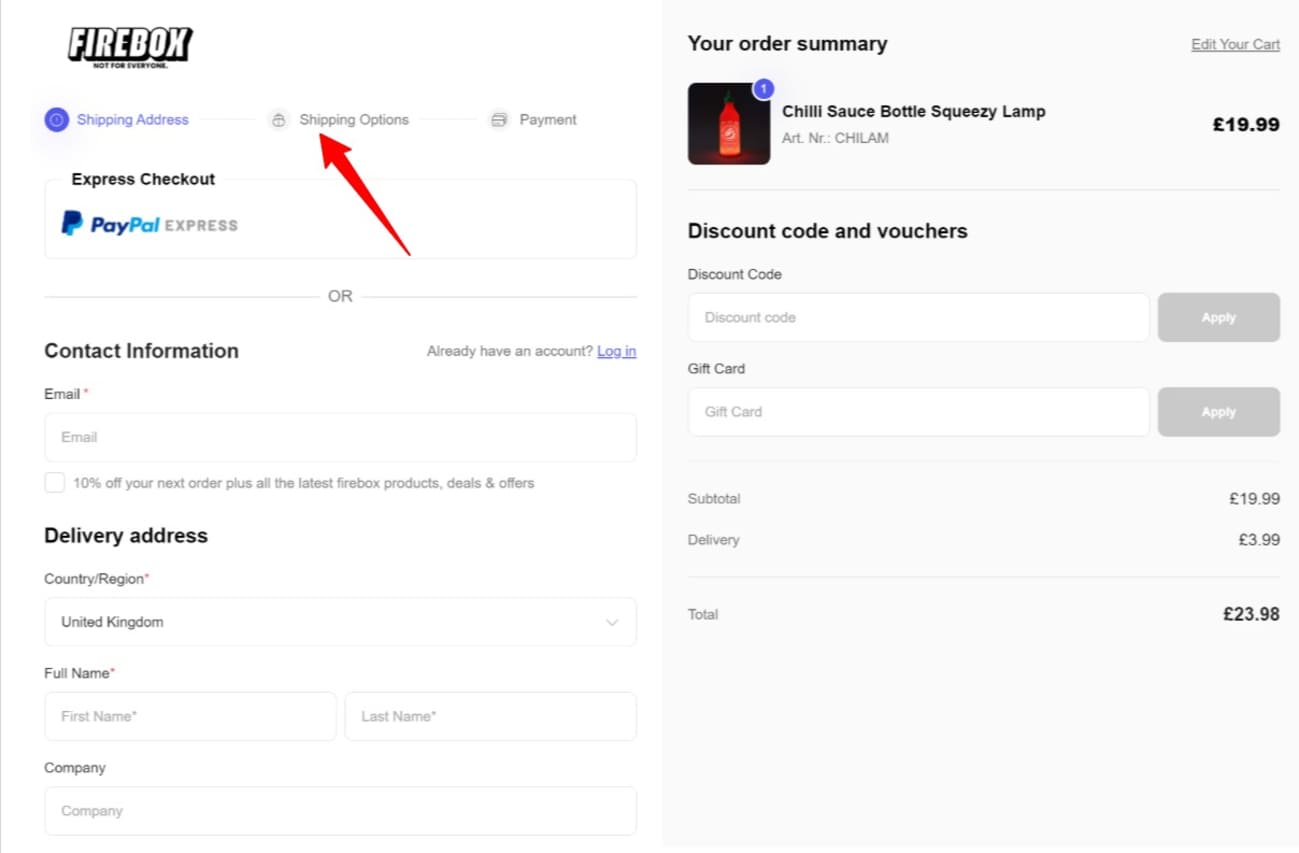
You can add progress bars through apps, such as Checkout Plus, Checkit, or Yaco Progress Bar.
“Progress bars help customers navigate multi-step checkouts by showing current position and remaining steps. When customers can see they’re on step two or three, they’re willing to push through. This simple checkout feature reduces uncertainty and cart abandonment.”
— Evaldas Mockus, VP of Growth at Omnisend
The availability of express checkout options makes conversion much more likely. Shopify supports the following accelerated options: Shop Pay, Apple Pay, Google Pay, Amazon Pay, and PayPal Express.
While your competitors’ Shopify checkout pages might look like this:

Shoppers will be more likely to purchase from your store if your Shopify checkout options look more like this:

More payment options lead to more opportunities to make sales. It also signals that you consider your shoppers’ preferences and care enough to improve the customer experience.
To help you set this up, check out Shopify’s official guide for setting up payment methods.
You may have a strong competitive advantage, but that might not be immediately apparent to your shoppers. It could be:
No matter what it is, state it plainly for your customers to appreciate, as these impact buying decisions considerably.
The Kate Backdrop Shopify checkout example below features a dedicated section in the bottom right-hand corner. It emphasizes durable materials and high-quality construction. This strengthens buyer confidence without distracting from checkout.
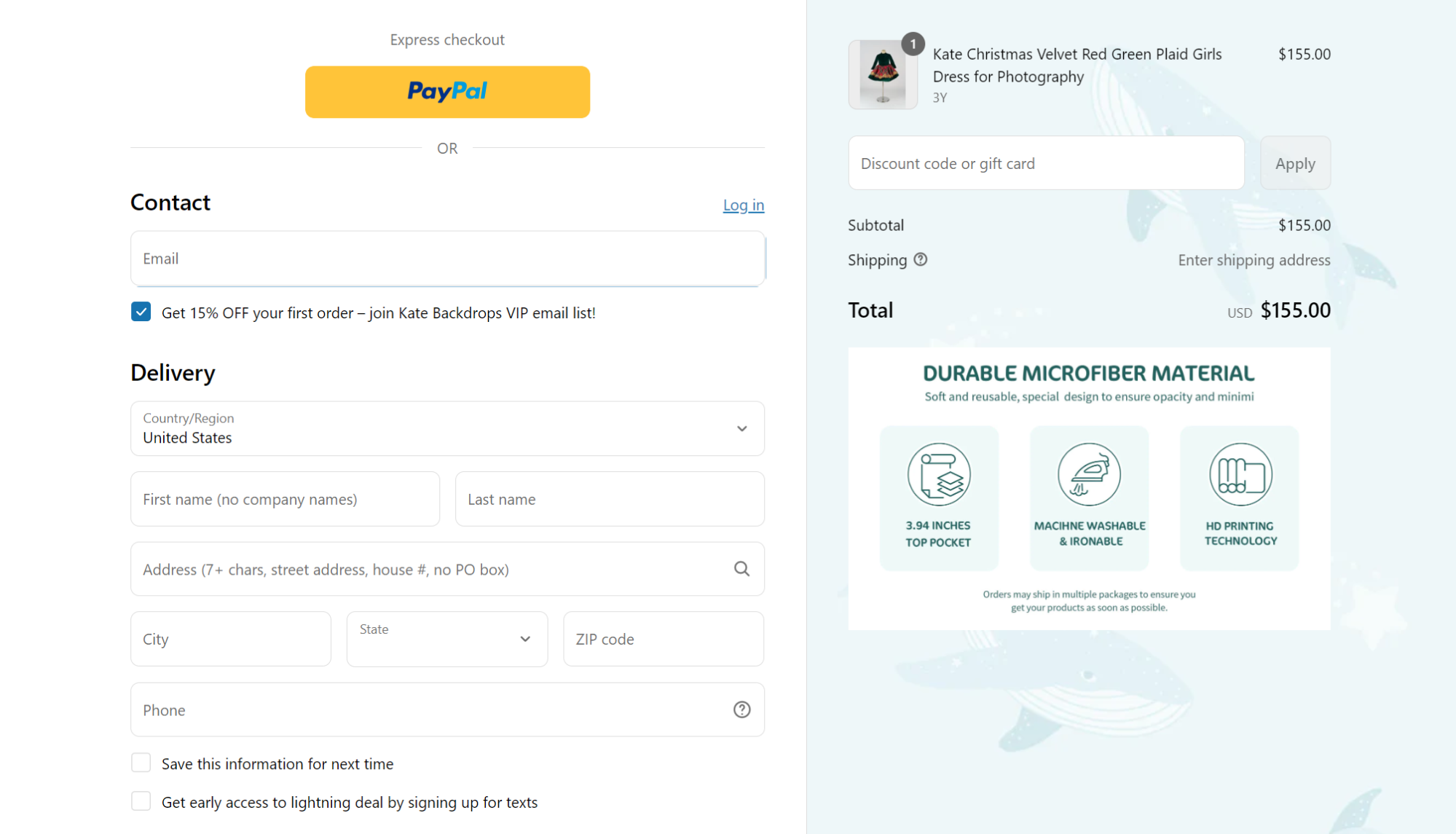
Kate Backdrop achieved a remarkable 1:300 ROI by switching to Omnisend’s omnichannel marketing platform. It used email automation, SMS campaigns, and push notifications to increase sales.
Read the full case study here.
Enabling your shoppers to earn a free shipping perk by hitting a certain threshold incentivizes them to spend more.
One of the best ways to implement this tactic effectively is to use a free shipping progress bar. It should tell shoppers just how little they need to add to their cart to save on courier costs.
Here’s an excellent example of a shipping threshold progress bar from Fashion Nova — it appears on the cart page (MY BAG) to encourage larger spending before checkout:

There are several other Shopify apps that make this easy to implement:
AI checkout personalization uses machine learning to adapt the checkout experience in real-time. It leverages customers’ information, such as buying behavior, cart value, browsing history, and purchase intent.
Instead of showing the same checkout page to everyone, AI personalizes payment methods, shipping options, upsells, and incentives to match each shopper’s preferences. AI-powered personalization can boost conversion rates by up to 35% and reduce checkout abandonment by almost 25%.
The benefits cut across the customer journey:
A great example is Jenny Bird, which uses Nosto to display personalized limited-time offers immediately after payment. It turns the post-purchase moment into an additional revenue opportunity:
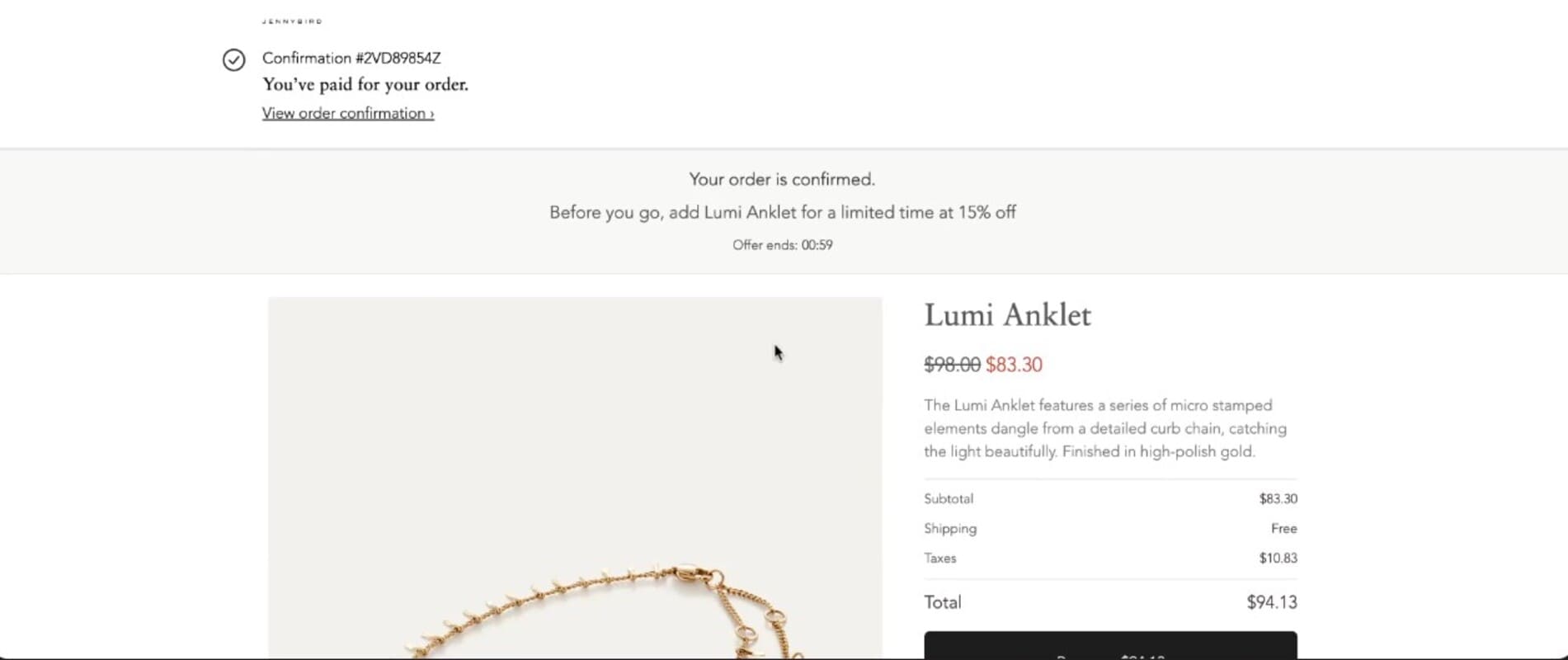
You can achieve similar results on your Shopify checkout page using the following apps:
In agentic commerce, the customer tells the AI what they need. It researches options and completes the purchase for the customer directly within AI chats.
Shopify’s Winter 2026 Agentic Storefronts feature lets merchants syndicate products to AI platforms and manage how their brand appears in AI shopping results. With 71% of US consumers already using AI tools and 37% using them frequently, this is quickly becoming a mainstream buying behavior.
Here’s what this means for merchants:
You can prepare for agentic checkout using these actionable tips:
1. Optimize your product data for AI
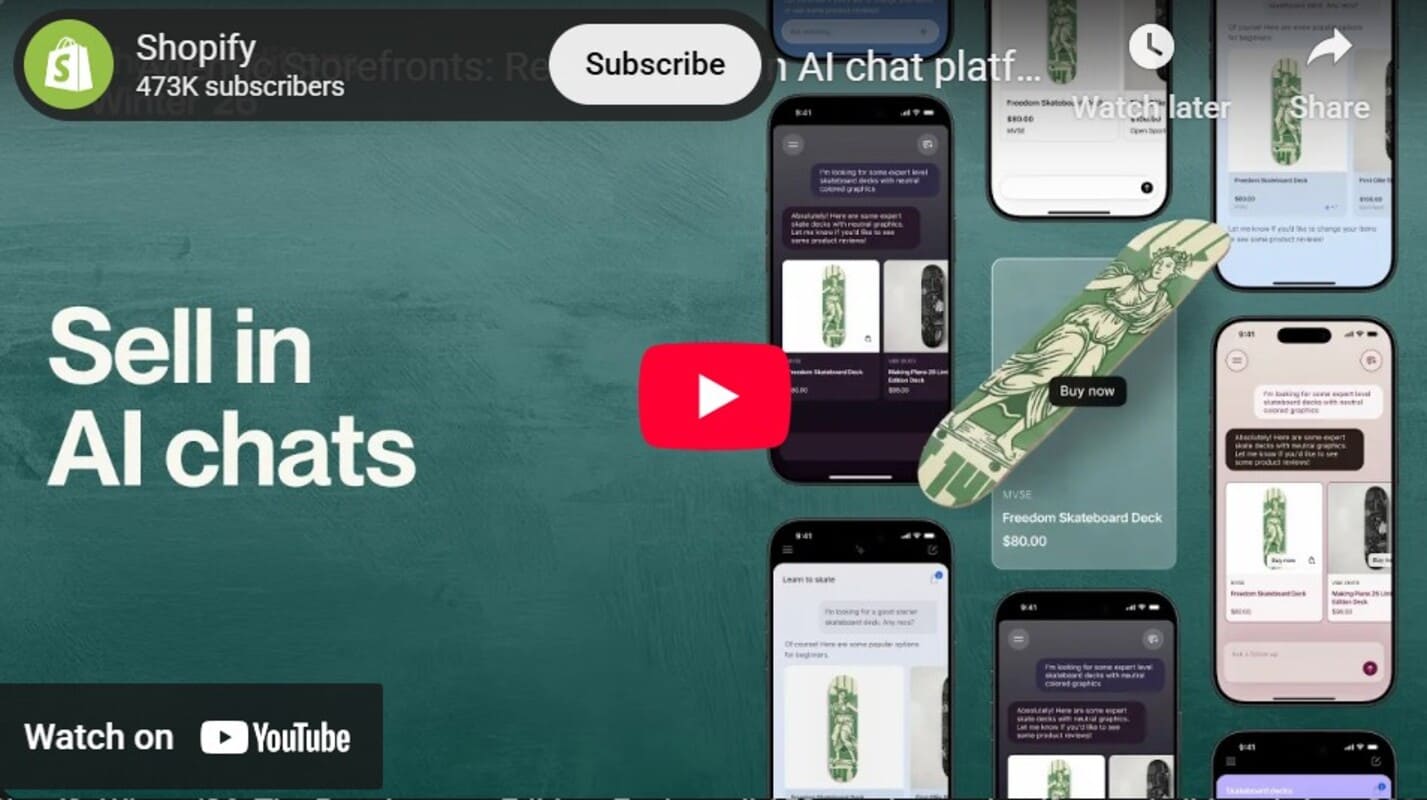
Shopify has a detailed video for setting up your product data:
2. Enable Shopify Agentic Storefront (if available on your plan)
3. Create AI-friendly content
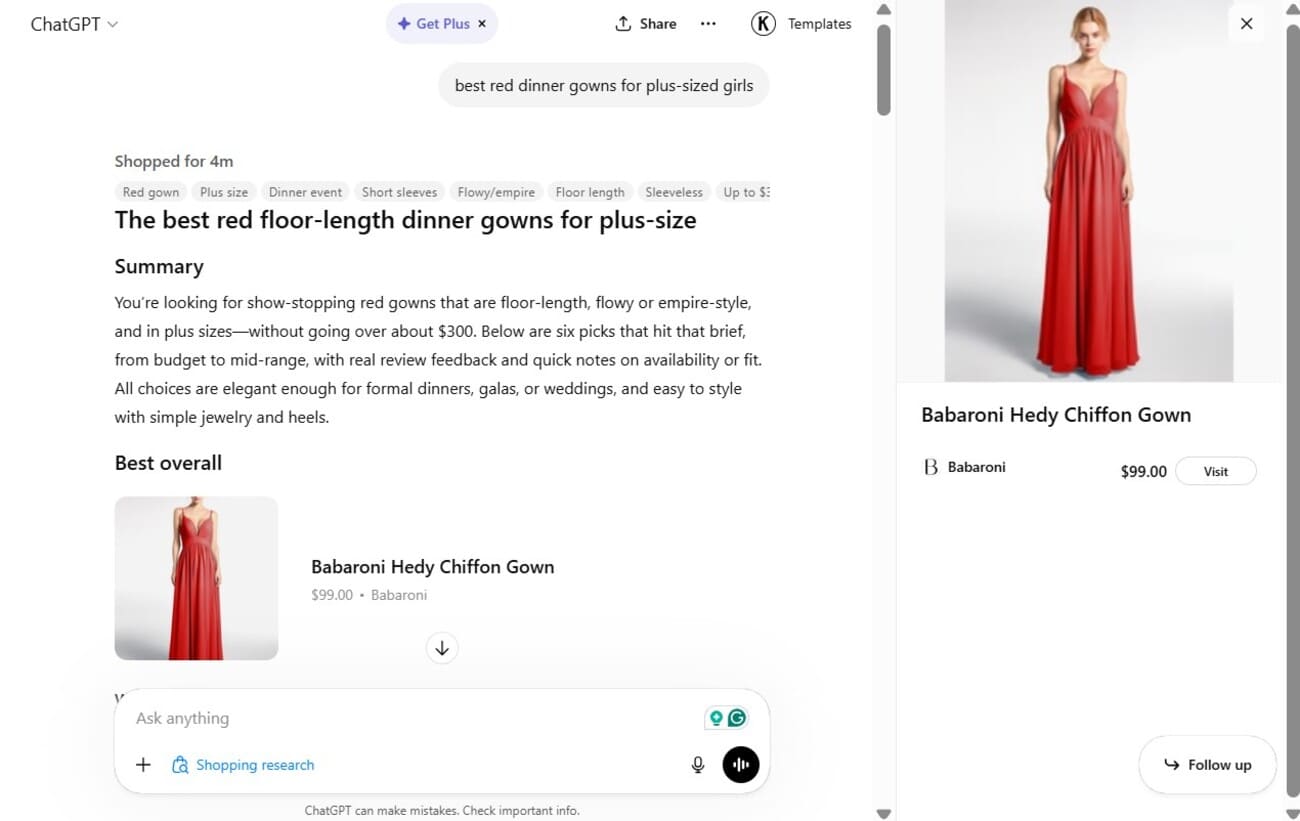
Below is an example of how a product appears in ChatGPT:
AI platforms currently supporting checkout include ChatGPT, Perplexity, Google Gemini, and Claude (via integrations).
A/B testing requires using apps like Omnisend to compare two versions of your checkout.
Shopify has announced a Winter 2026 Edition rollout with built-in A/B testing for checkout pages.
It will let you split traffic between two themes. This approach enhances Shopify checkout optimization and increases conversion rates.
Some elements worth testing include:
Rollout is currently in early access, but you can sign up to be notified when it goes live.
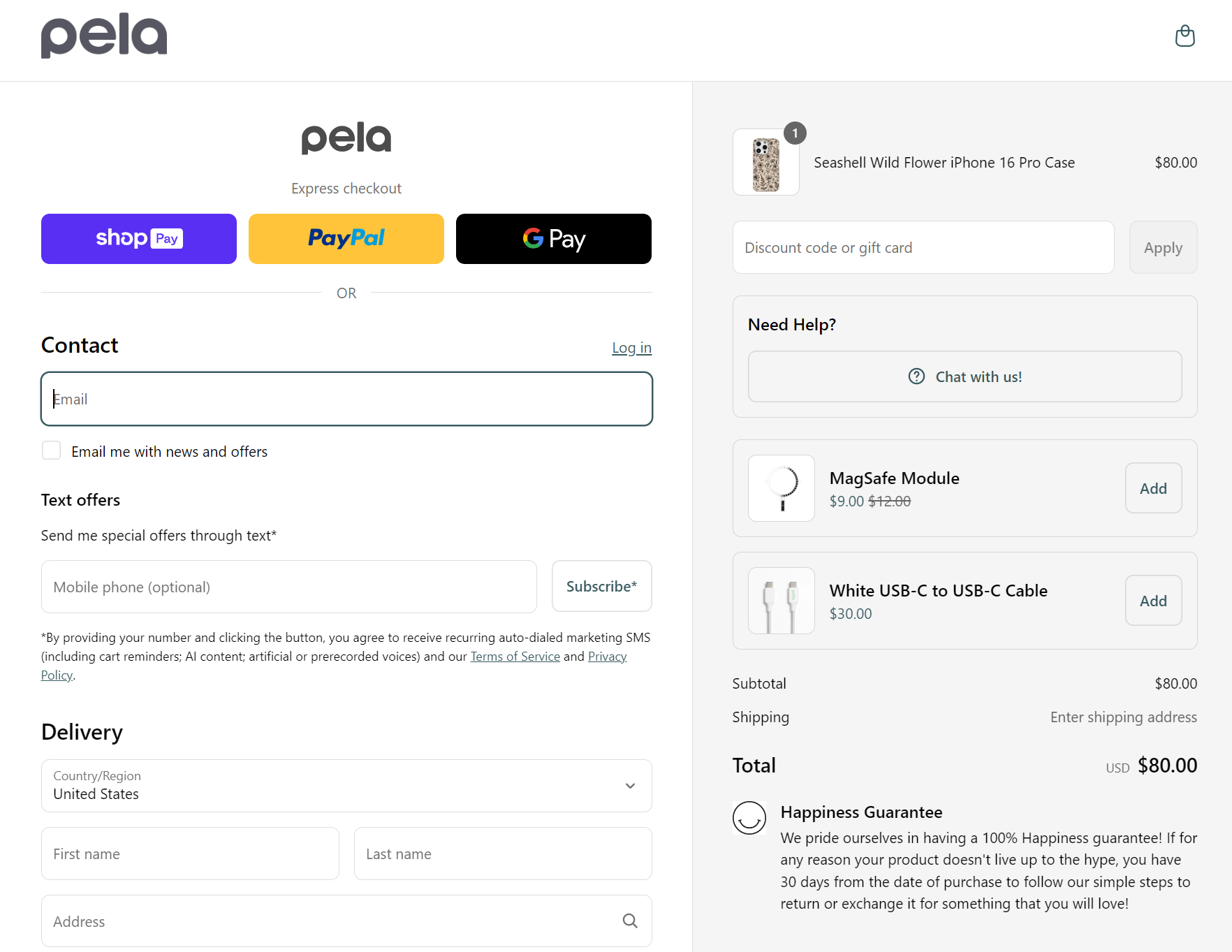
Upselling or cross-selling Shopify-suggested products at checkout can increase your customers’ average order value significantly. To implement this feature, use the Shopify checkout tool. It’ll let you customize and edit the functionality and appearance of your checkout page.
Add one to two products relevant to what’s already in the cart or your customer’s previous purchases. However, don’t go overboard in your recommendations.
Here’s a good example from device protection brand Pela:
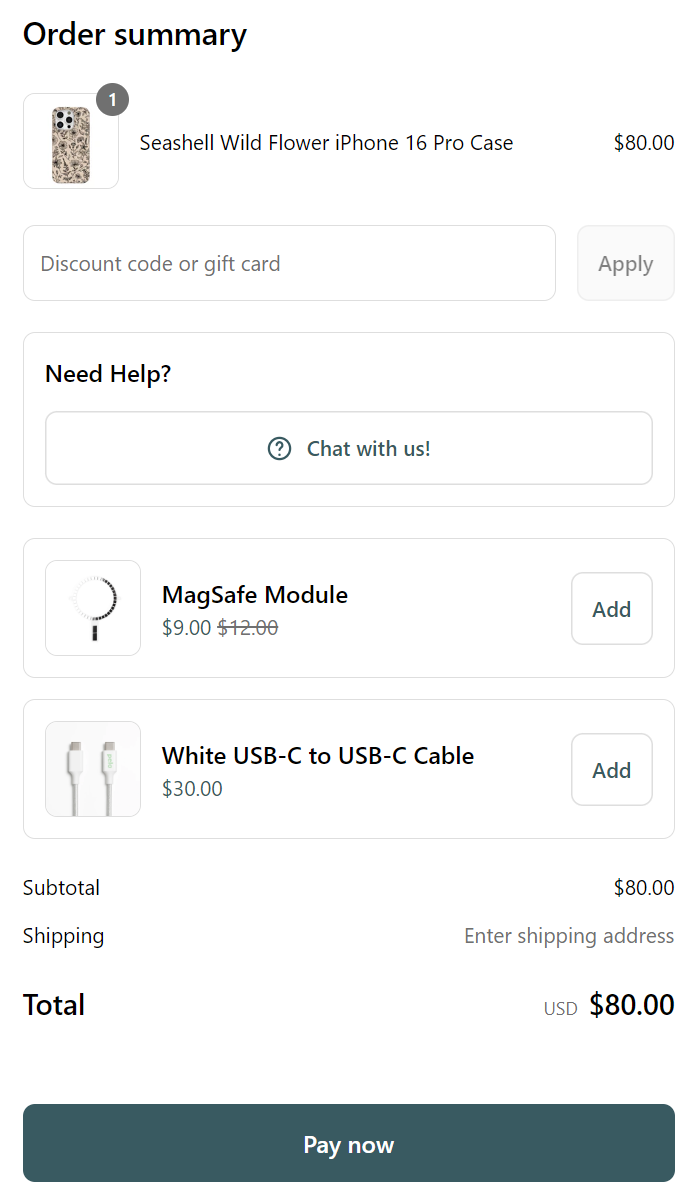
Also, on mobile, they appear just above the Pay now button to increase conversions:
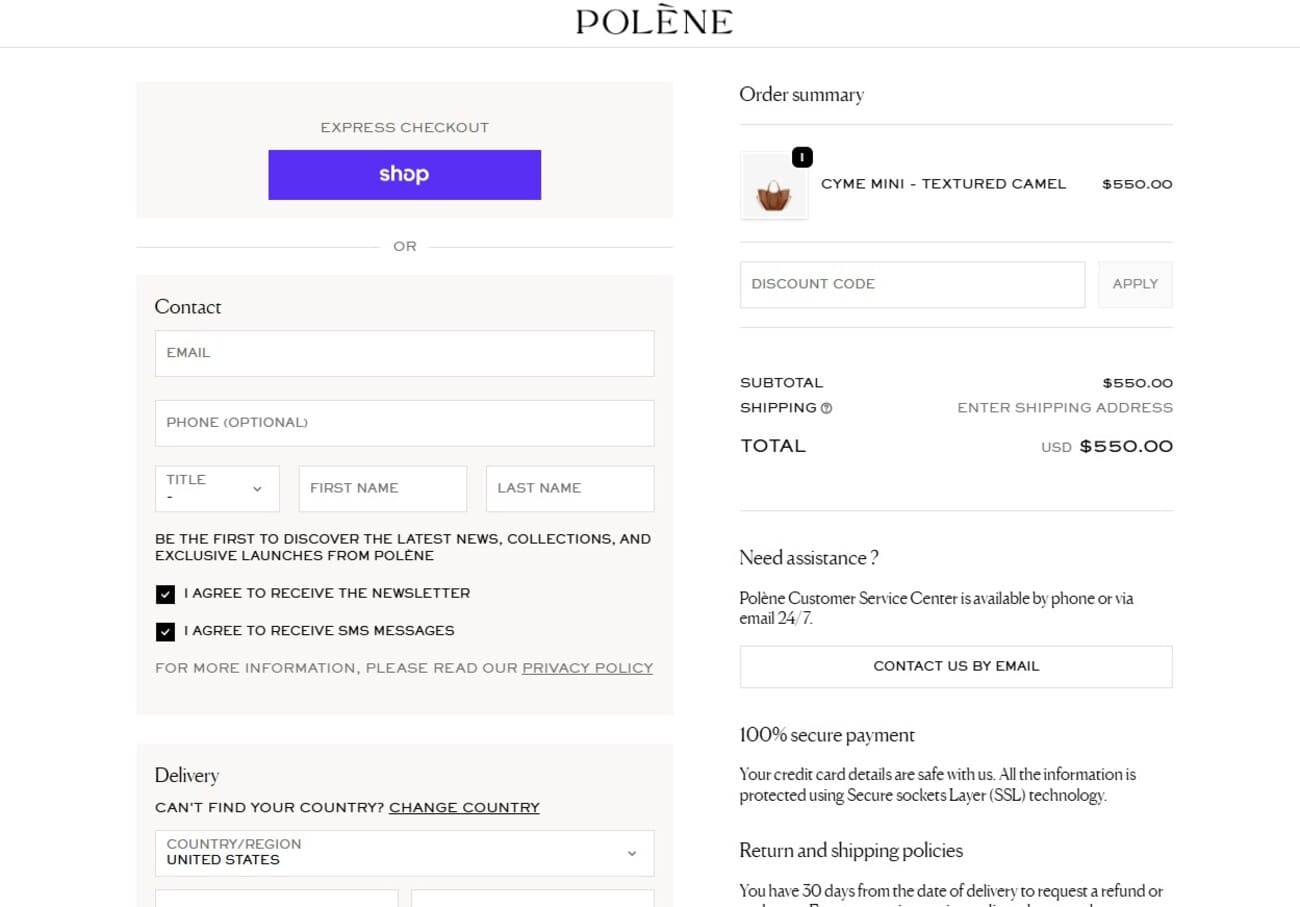
The transactional nature of checkout pages makes them typically bland, but they don’t have to be. A unique Shopify checkout design is branded, emotionally consistent, and memorable enough that customers feel good about buying from you again.
You can extend your brand voice into CTA buttons, error messages, order confirmation, and typography.
See how Polène customizes its Shopify checkout experience using a unique font:
You can also create a custom confirmation page experience using a celebratory animation, a short founder thank-you, or a next-step story. Pair that with trust signals like custom security badges rather than stock icons.
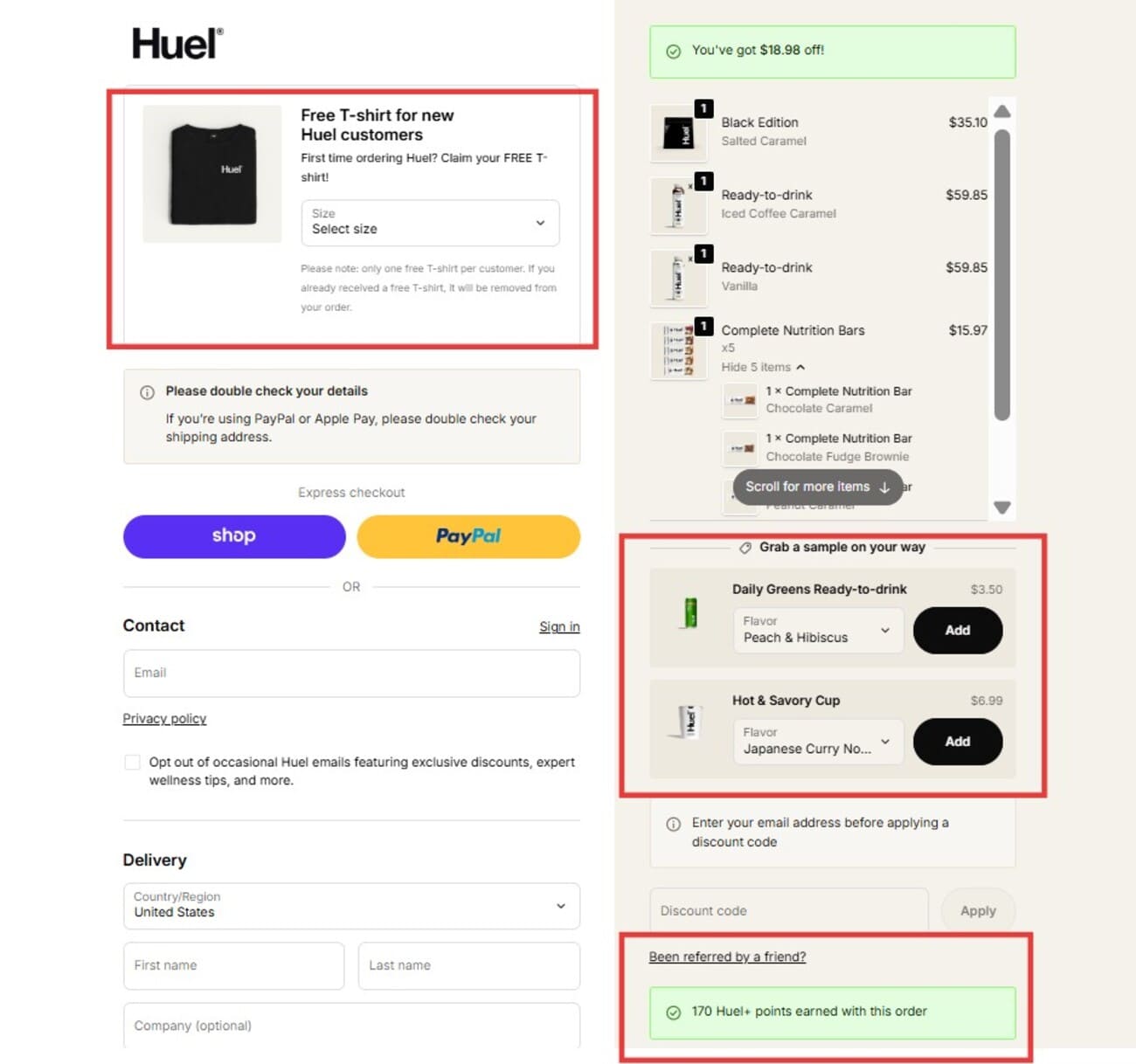
This Shopify checkout page example from Huel shows how you can make yours interesting. It allows customers to choose a free gift, adds related products, and reminds them about loyalty points:
You can also create a custom confirmation page experience using a celebratory animation, a short founder thank-you, or a next-step story. Pair that with trust signals like custom security badges rather than stock icons.
This Shopify checkout page example from Huel shows how you can make yours interesting. It allows customers to choose a free gift, adds related products, and reminds them about loyalty points:
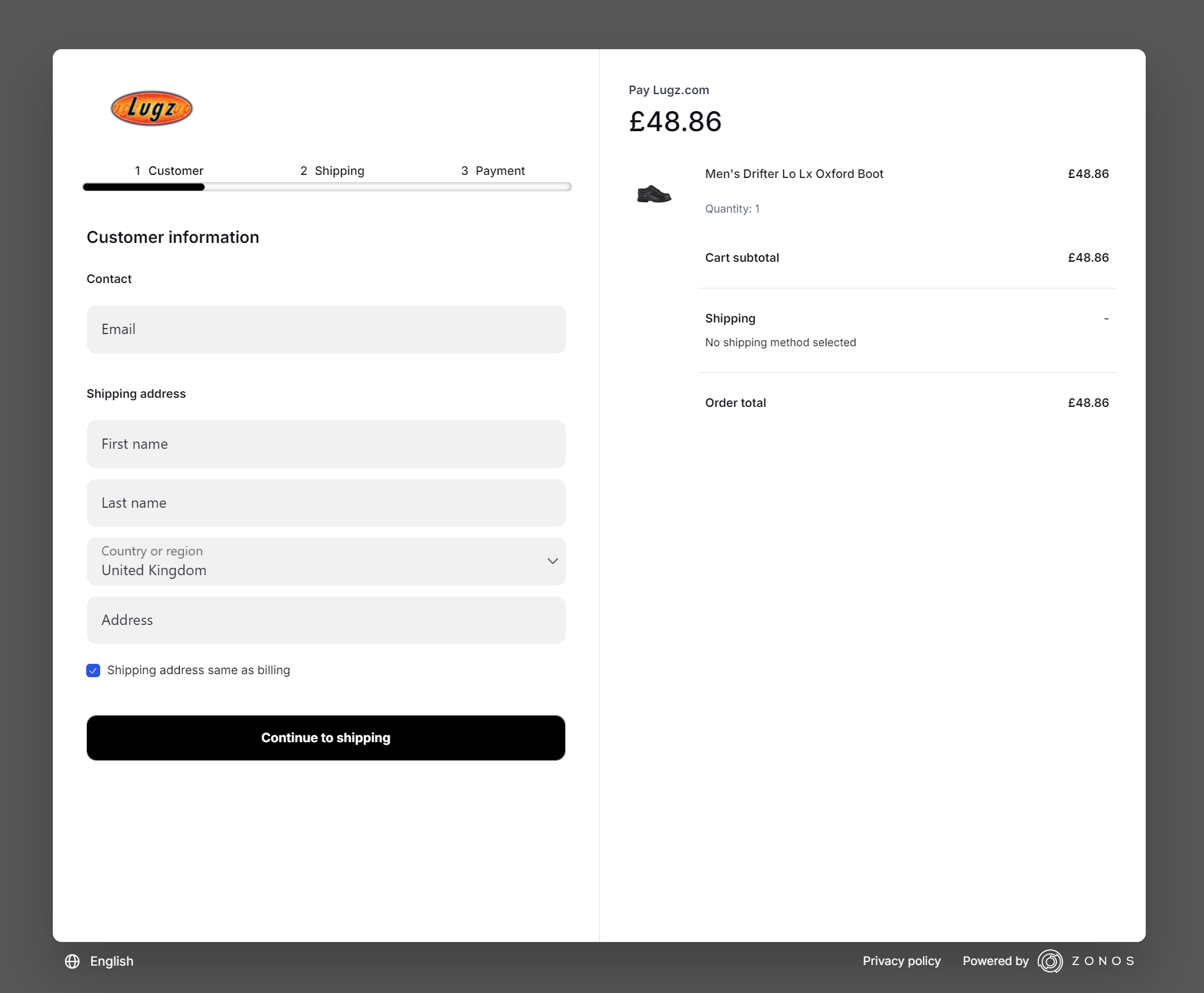
Also, guide customers’ eyes toward the checkout task using a visual-focused technique. For example, shoe retailer Lugz has a multi-step checkout that’s set into a greyed-out web page, guiding customers through all the steps:
If you like Lugz’s Shopify store, check out the 40 best Shopify stores for your inspiration.
Live chat is a must-have on your Shopify checkout page because it’s the fastest way to get support for customers. If a potential customer has any questions, they should be able to contact you first before abandoning the checkout.
Chatbots are also useful for this purpose, and they’re more cost-effective than live chats. For your chatbot to be effective, however, it should cover the most common questions your shoppers might have while checking out. Typically, this includes information on shipping times, refund policies, and so on.
For instance, Urban Outfitters’ chatbot has instant answers to common questions:
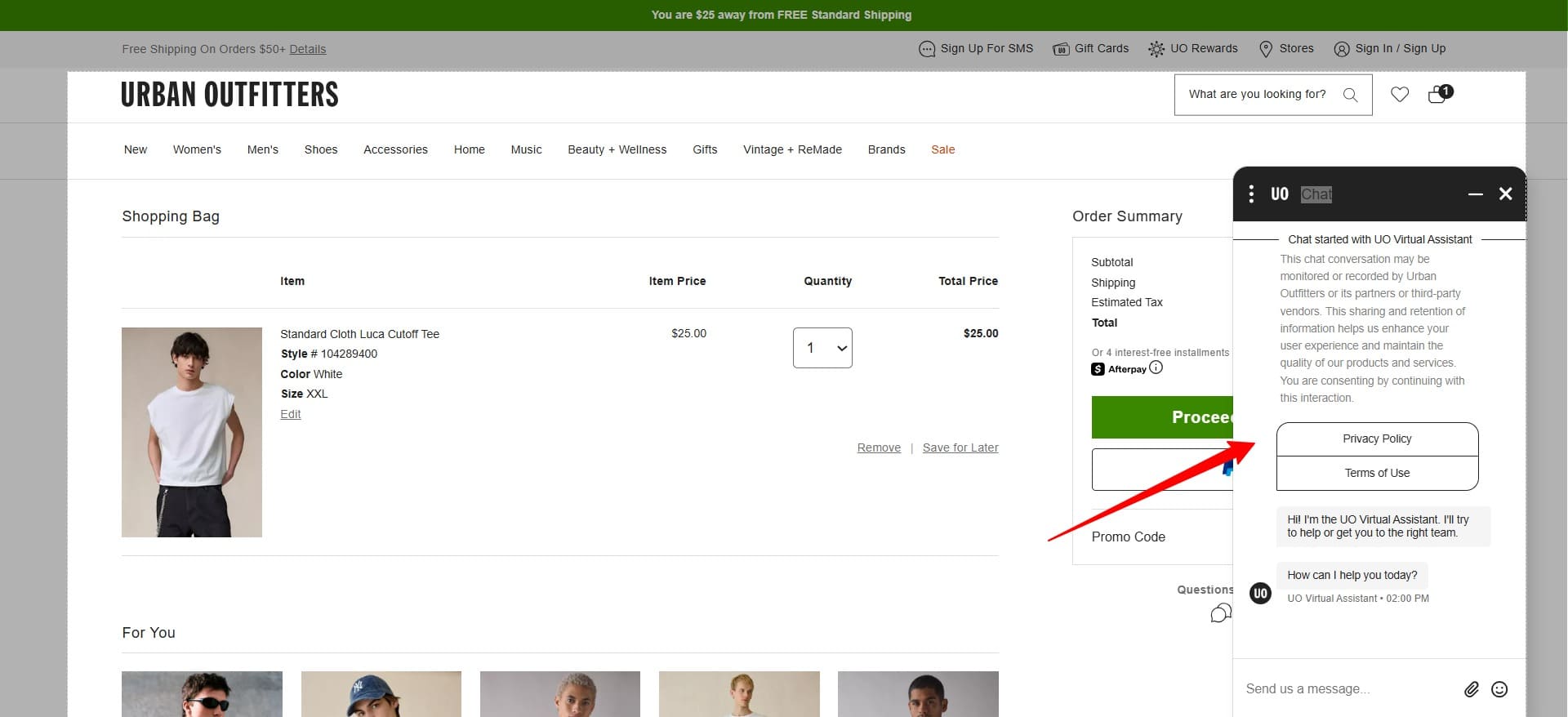
You can implement a live chat feature or a chatbot using Tidio and Intercom.
Faster sites encourage people to stay longer and buy more because slow loading times create friction and frustration that drive customers away.
A fast checkout is crucial since any delay during the final purchase step increases the risk of cart abandonment when customers are already committed to buying.
For example, here’s how Beardbrand approaches it:
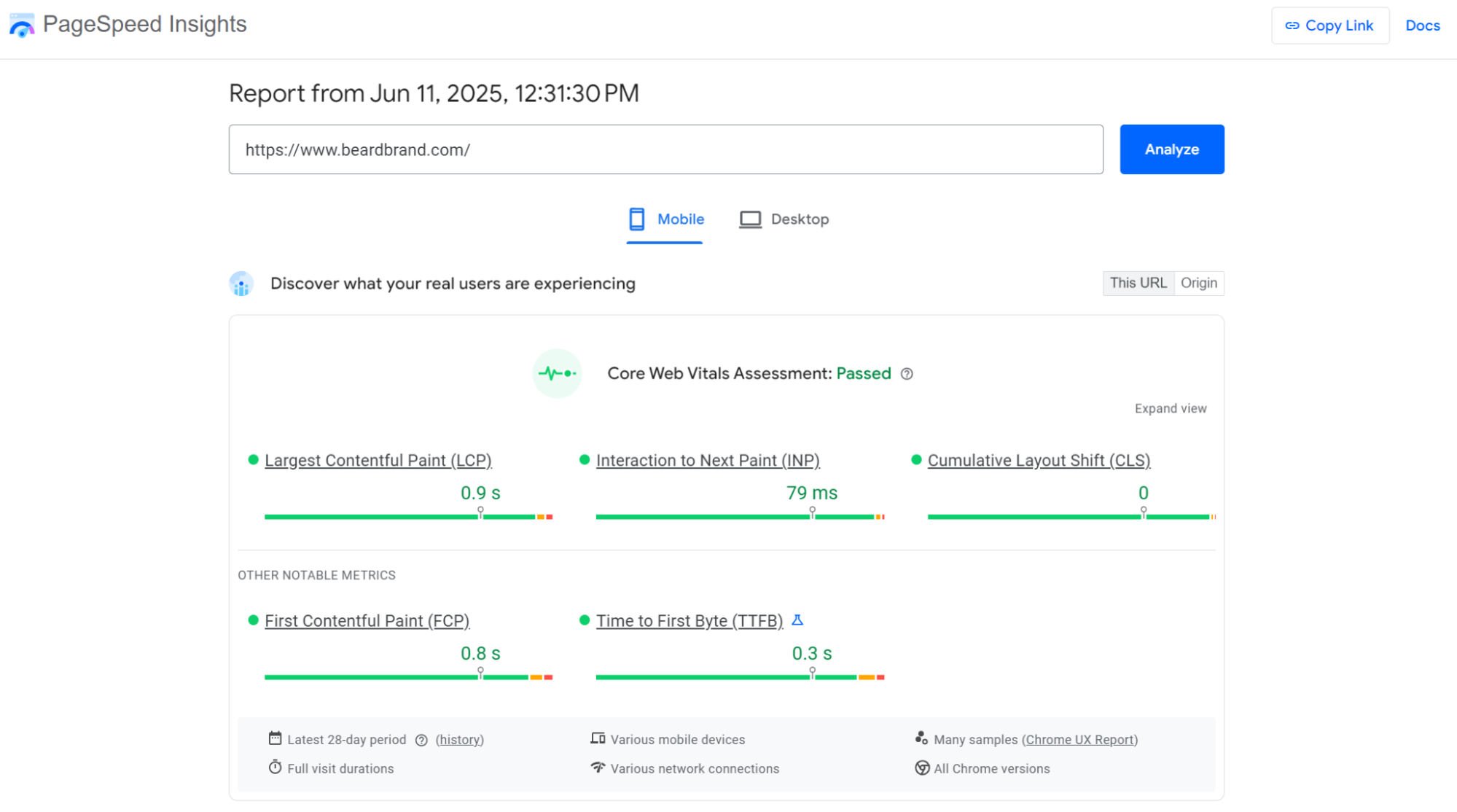
After you’ve read the reports, use this information to resolve vulnerabilities. Methods to optimize the Shopify checkout page speed include:
“Slow sites reduce sales because loading delays create immediate friction that breaks the shopping momentum. Your customers expect instant responses and will abandon purchases rather than wait, especially during checkout when patience is lowest and alternative options are just a click away.”
— Evaldas Mockus, VP of growth at Omnisend
Shoppers tend to be more receptive at checkout because they’re already committed to buying. This makes it the ideal moment to introduce an SMS opt-in field.
Capturing a phone number here opens a direct line for post-purchase follow-up, abandoned cart recovery, and loyalty campaigns.
L’ange Hair is an example to take note of. Check out how its SMS subscription field seamlessly integrates into the checkout process:
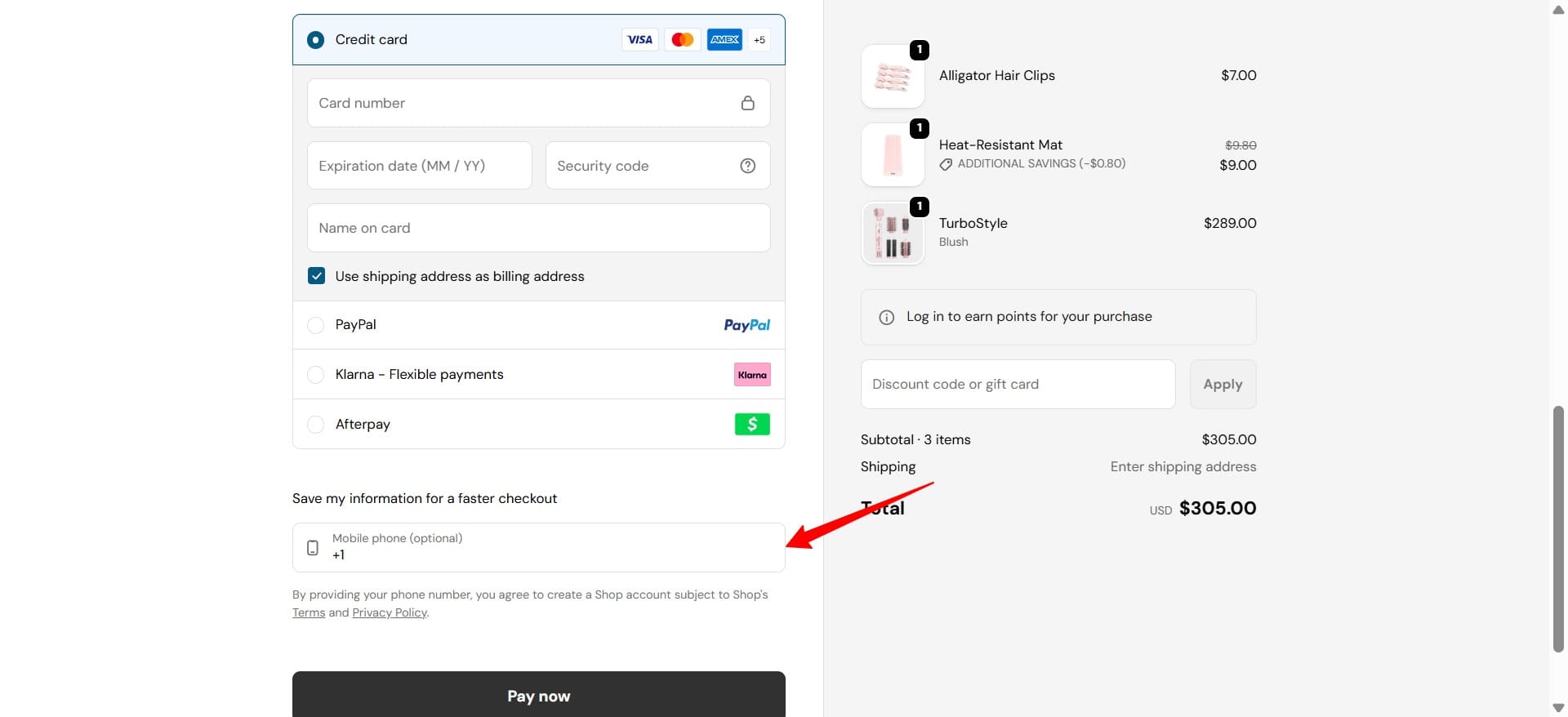
Some Shopify checkout best practices for using SMS include:
Watch this video to discover how SMS can turn subscribers into loyal customers:
Creating a sense of urgency doesn’t have to just be about voucher expiries and limited-time offers, although both are effective strategies. Instead, think outside the box and tap into your shoppers’ deep-seated FOMO (fear of missing out).
Effective tools to provoke a sense of urgency on the Shopify checkout page include:
Take a look at how Hismile uses this tactic — its cart expiry timer appears as a red alert above payment options to encourage the customer to buy immediately:
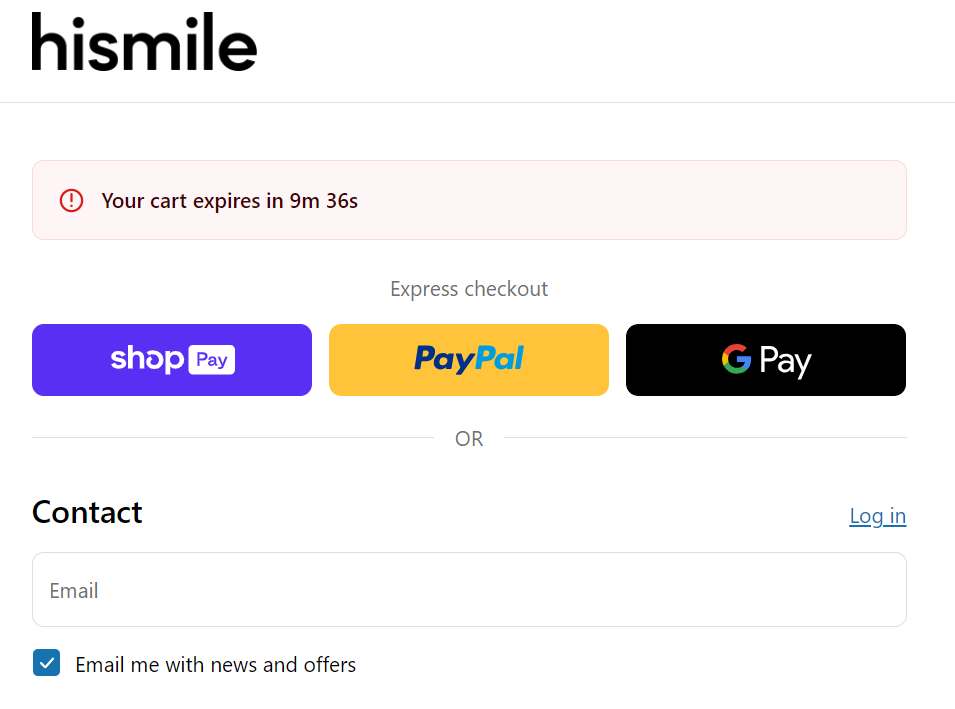
To add a countdown timer to your Shopify checkout page, you can use apps like:
A Shopify checkout page is a great place to establish trust. To build credibility and reduce abandoned orders at checkout, consider adding social proof, such as:
Here’s an example from health food retailer Press London — its checkout page showcases Trustpilot reviews beneath the pricing section:
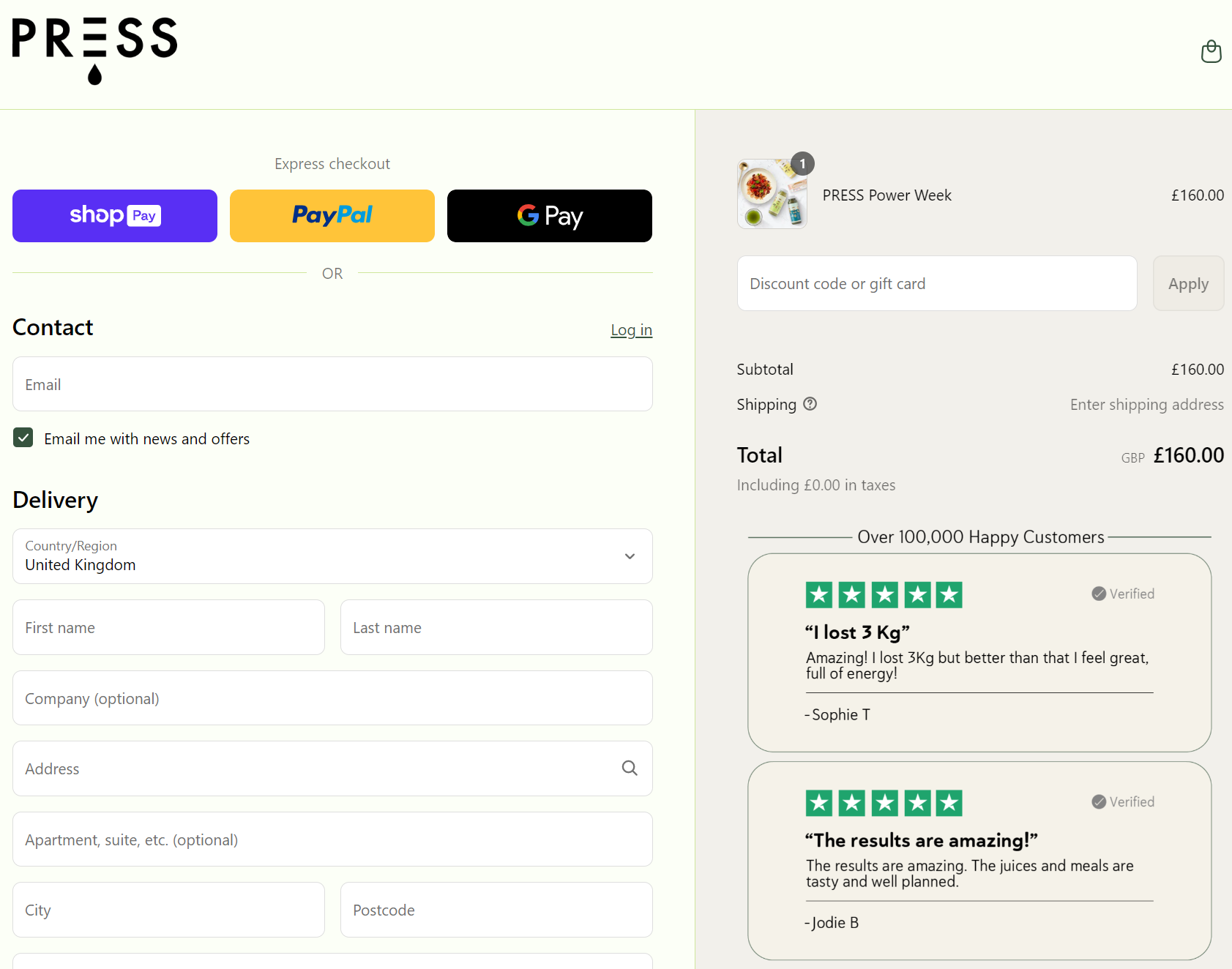
To showcase social media ratings and other social proof on your Shopify checkout page, use trusted apps like Fera and SalesPop.
Shoppers love convenience, which is why you should offer multiple ecommerce shipping methods. While most prefer store-to-door delivery, some might choose to pick up their product from a nearby location, such as a UPS Access Point.
In fact, the buy online, pickup in-store model has become a popular means to shop, especially for customers who want products as soon as possible.
Here’s an example from temporary tattoo retailer Tattly:
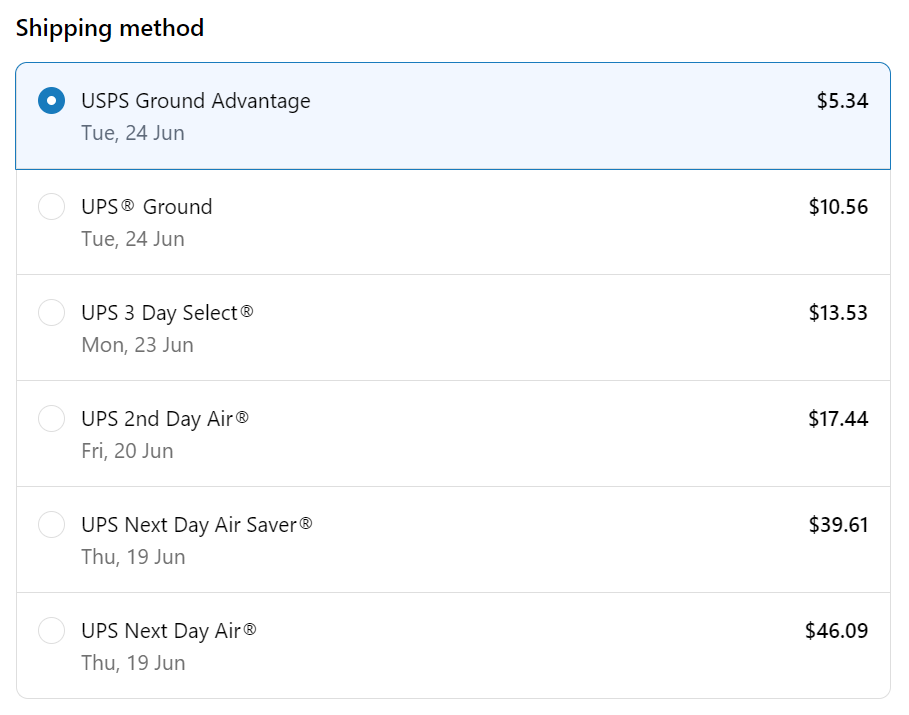
Tattly offers between two and eight shipping options, depending on the delivery address, and it automatically updates the cart total with each selection.
Offering gift wrapping and personalized gift notes at checkout turns luxury shopping into a complete gift experience. When you offer these services, you capture spontaneous gifting and encourage customers to spend more for convenience.
Badesofa lets its customers add gift notes at checkout, with pre-written options to make leaving a note super-convenient:
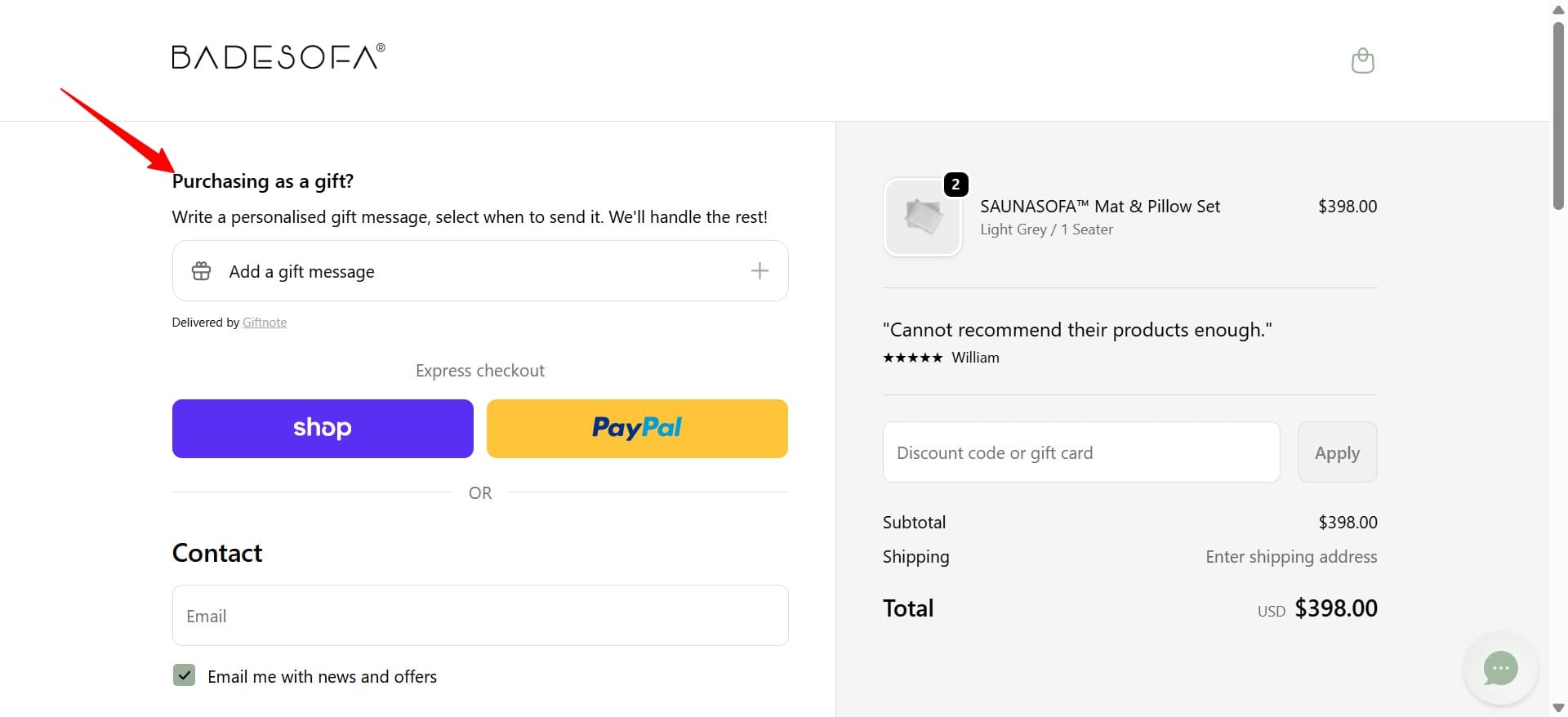
You can add gift options to your Shopify checkout with apps like Wrapped: Gift Wrap & Messages and GLab: Gift Wrap & Gift Message.
Post-purchase upsells appear immediately after payment completes, on the Thank You or Order Status page. Unlike traditional upsells that interrupt the buying flow, these offers require a single click. That’s because the system has already captured the payment details.
Shopify’s August 2026 Thank You page upgrade introduces checkout extensibility features, making it easier to add smart upsell blocks without custom code. Post-purchase upsells work well because:
The Shopify Thank You page upgrade includes the following:
If you haven’t upgraded yet, the deadline is August 2026.
A few best practices when implementing post-purchase upsells on Thank You pages are:
Jenny Bird’s Thank You page is a great example of a post-purchase upsell:
Guest checkout is a popular option for privacy-conscious consumers because it’s quick and anonymous. It allows customers to buy without sharing extensive personal information or creating passwords. According to Baymard’s research cited earlier, adding a guest checkout can prevent 19% abandonment from forced account creation.
Benefits of guest checkouts for shoppers include:
Another tactic you can use to convert data-conscious customers is adding signup options using Google, Facebook, or Apple credentials.
Chubbies is an example of a brand that does guest checkout and sign-in options well. It provides options to check out as a guest, sign in, and sign up with social media:
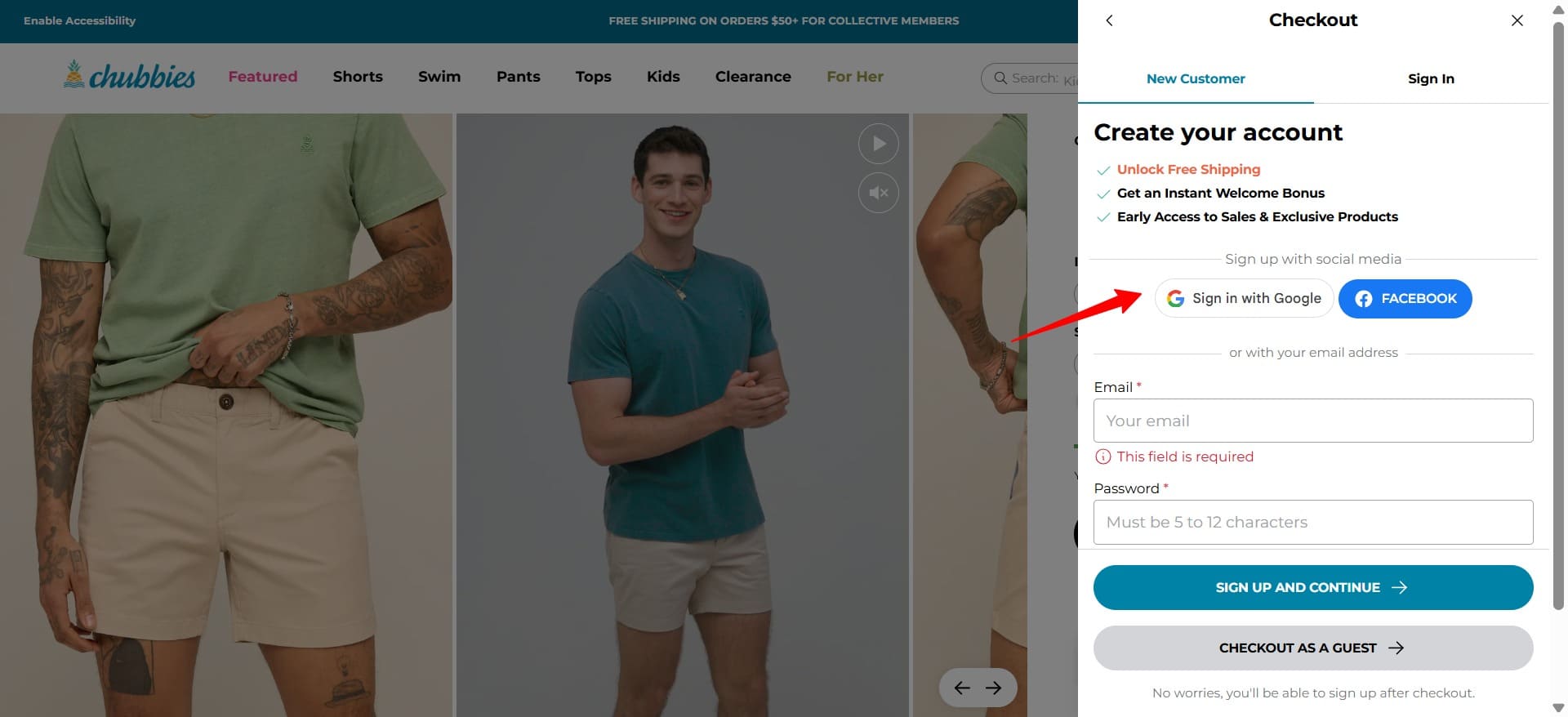
“Social login options like Google, Facebook, and Apple provide the convenience of guest checkout while capturing valuable customer data. It makes sense to offer these alongside traditional guest checkout to maximize conversion rates and collect contact information for future marketing campaigns.”
— Evaldas Mockus, Shopify Marketing Expert at Omnisend
Grouping complementary products into bundles and upselling larger item quantities helps you sell more products and increase AOV.
Reasons to incorporate it into your Shopify checkout page include:
Natural skincare retailer Gentle Therapy uses bundles and multi-quantity product listings to encourage larger orders:
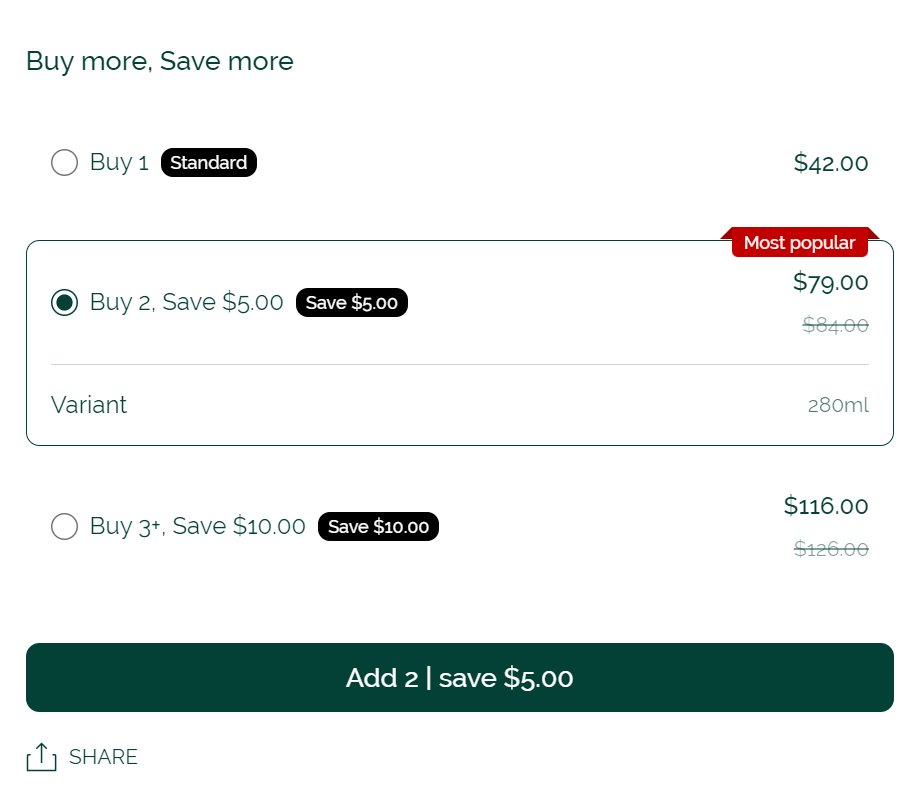
You can add bundles to your Shopify store with these apps:
Address verification validates shipping addresses in real-time. It catches typos, incomplete entries, and invalid locations before an order ships.
This prevents failed deliveries and reduces returns while speeding up checkout through autocomplete suggestions.
Here are four main types of address verification:
Take a look at how My Medic provides autocomplete address suggestions:
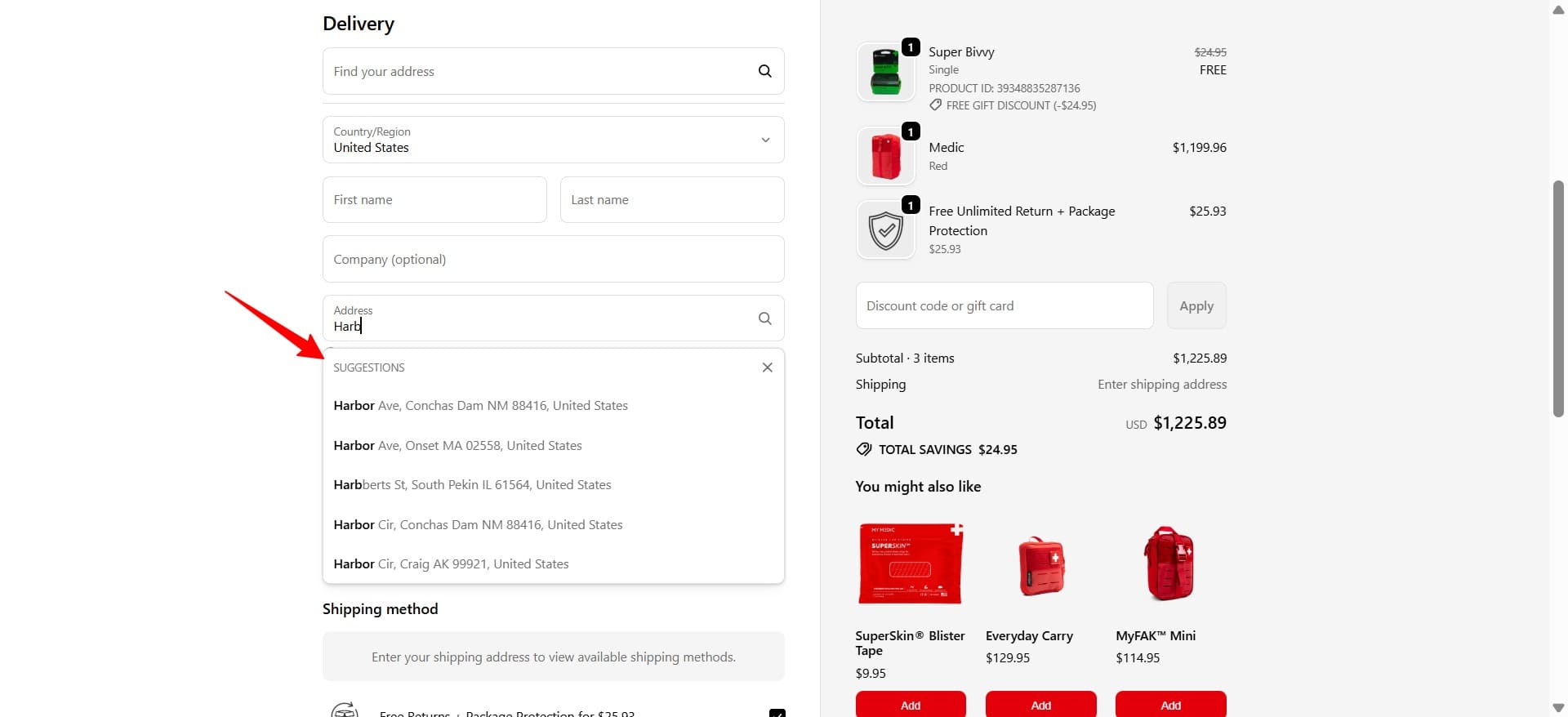
You can implement this using:
What do all the best Shopify checkout page examples have in common? Above all else, they put the customer first and make the process as straightforward as possible.
That means eliminating time-consuming steps, showing progress, and only interrupting the buying journey when absolutely necessary, like when someone intends to leave the website.
Want to see best practices in action? Check out the three eye-catching Shopify and Shopify Plus checkout examples below:
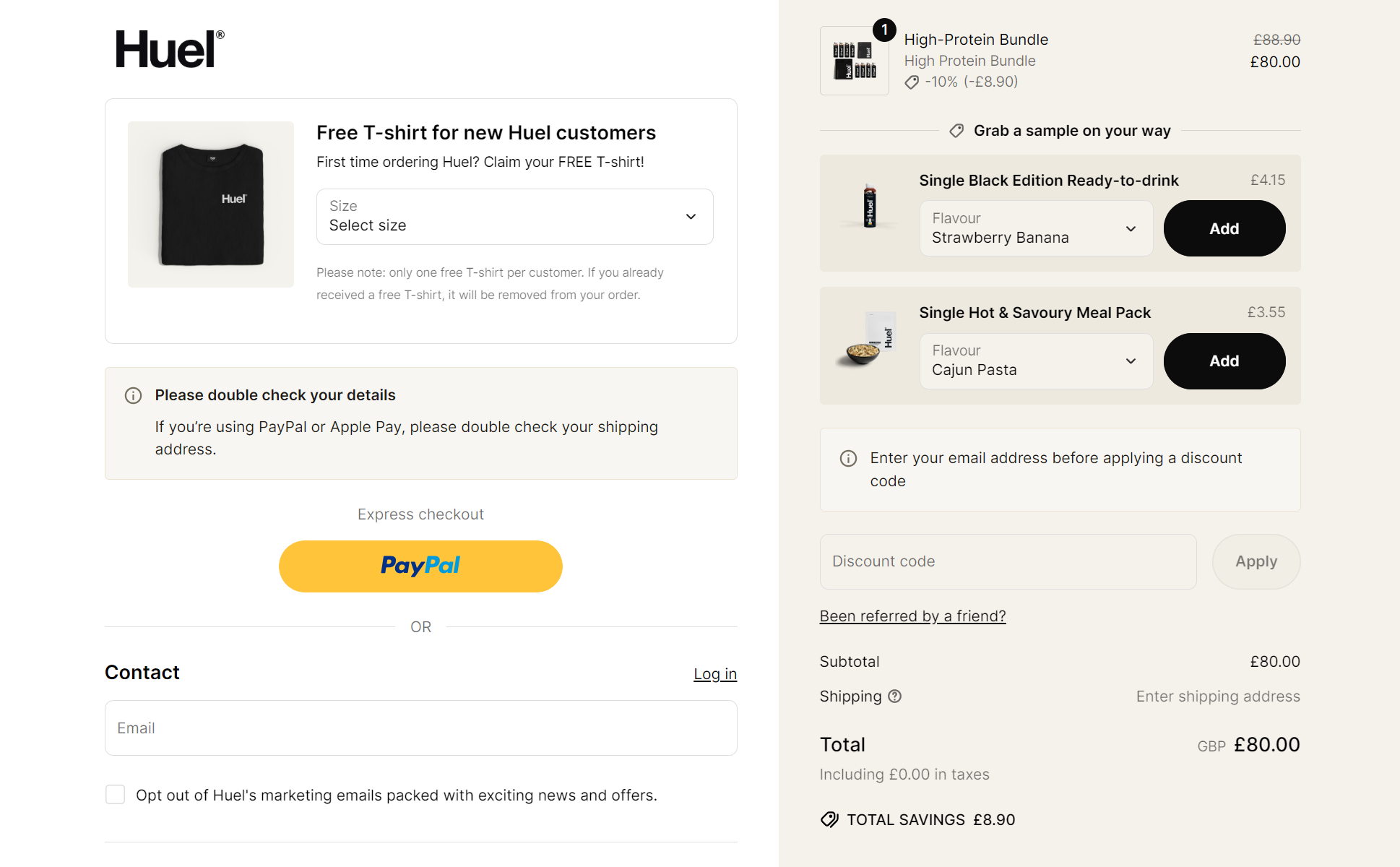
Huel masters the Shopify checkout flow by including all key information on one page — but it doesn’t end there. On the top left, notice how the meal replacement company sweetens the deal and increases brand loyalty by offering a free T-shirt for new customers. Similarly, on the right-hand side, it upsells samples to increase AOV.
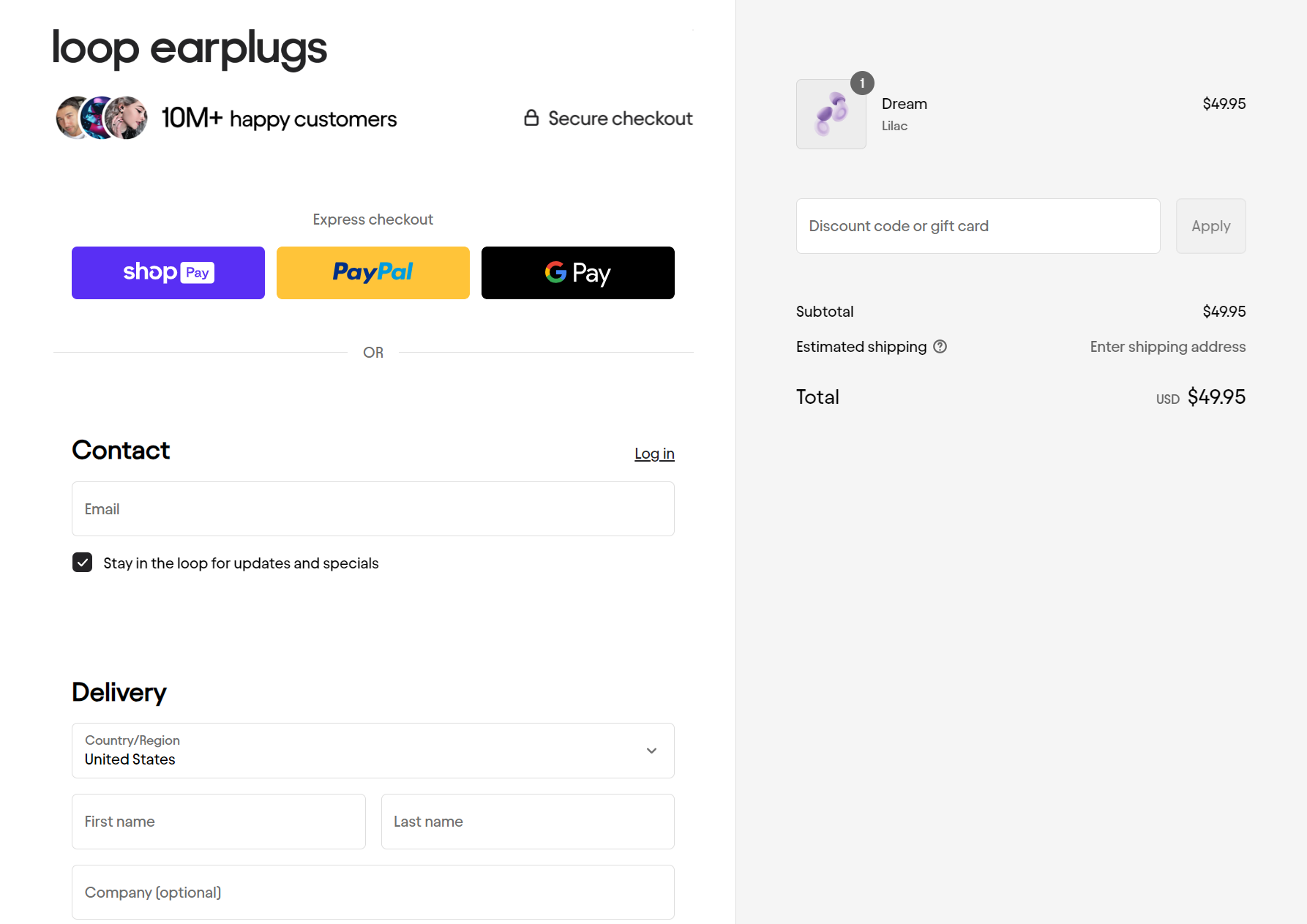
Loop understands that most of its customers are new to the brand and have doubts about the product. Its checkout page puts social proof right at the top — mentioning 10M+ happy customers — to reinforce it as a reputable, high-quality solution.
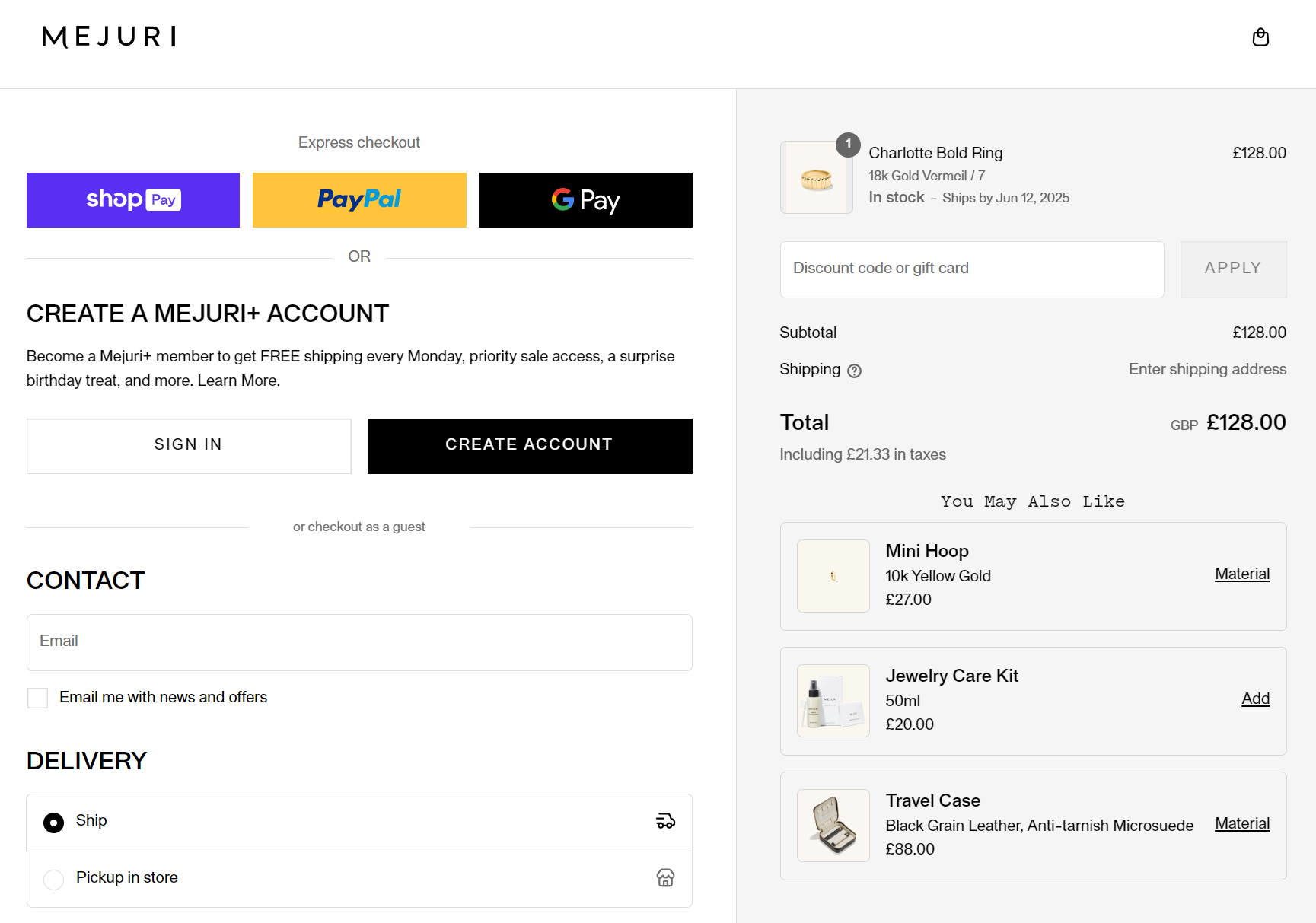
Jewelry retailer Mejuri uses its checkout page to encourage customers to create a MEJURI+ account for free shipping every Monday and exclusive offers. It also cross-sells products below the checkout total to increase the average order value.
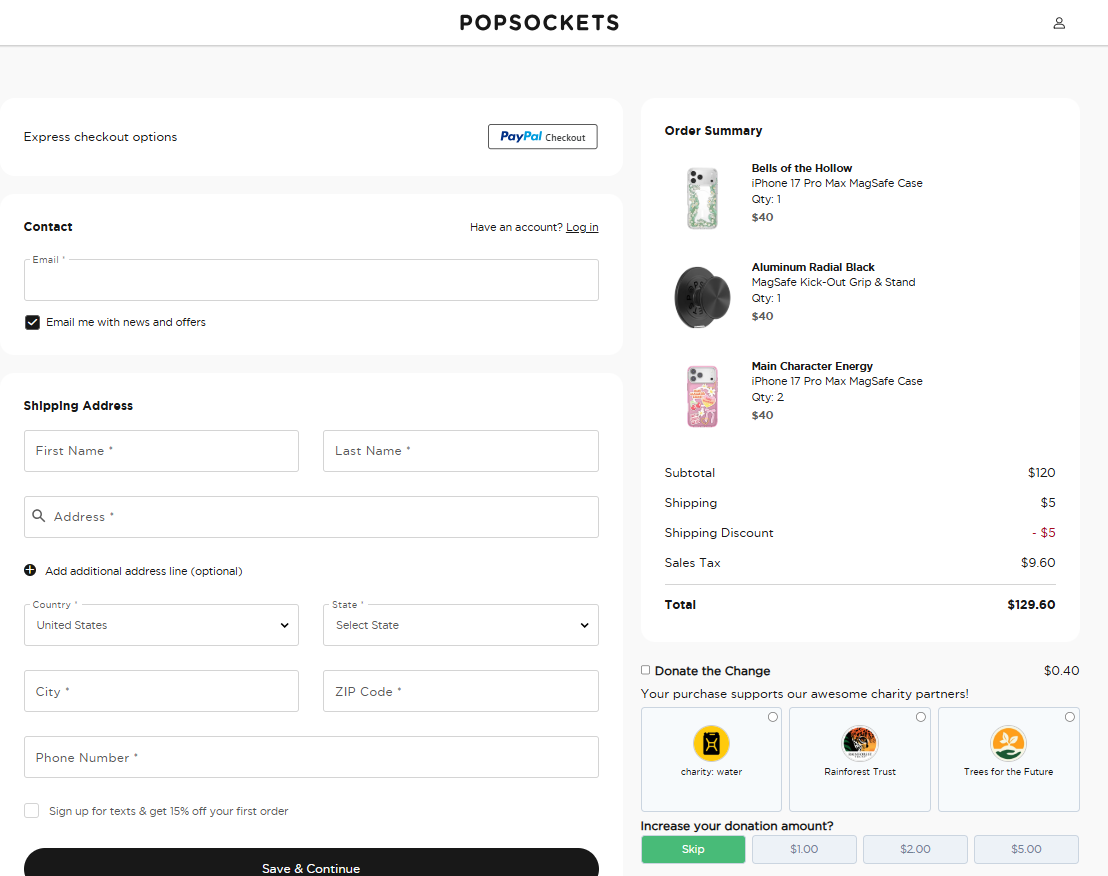
Popsockets is another example to take note of. Its checkout page features a unique design that includes a donation option, an express checkout option, and even the option to skip the donation:
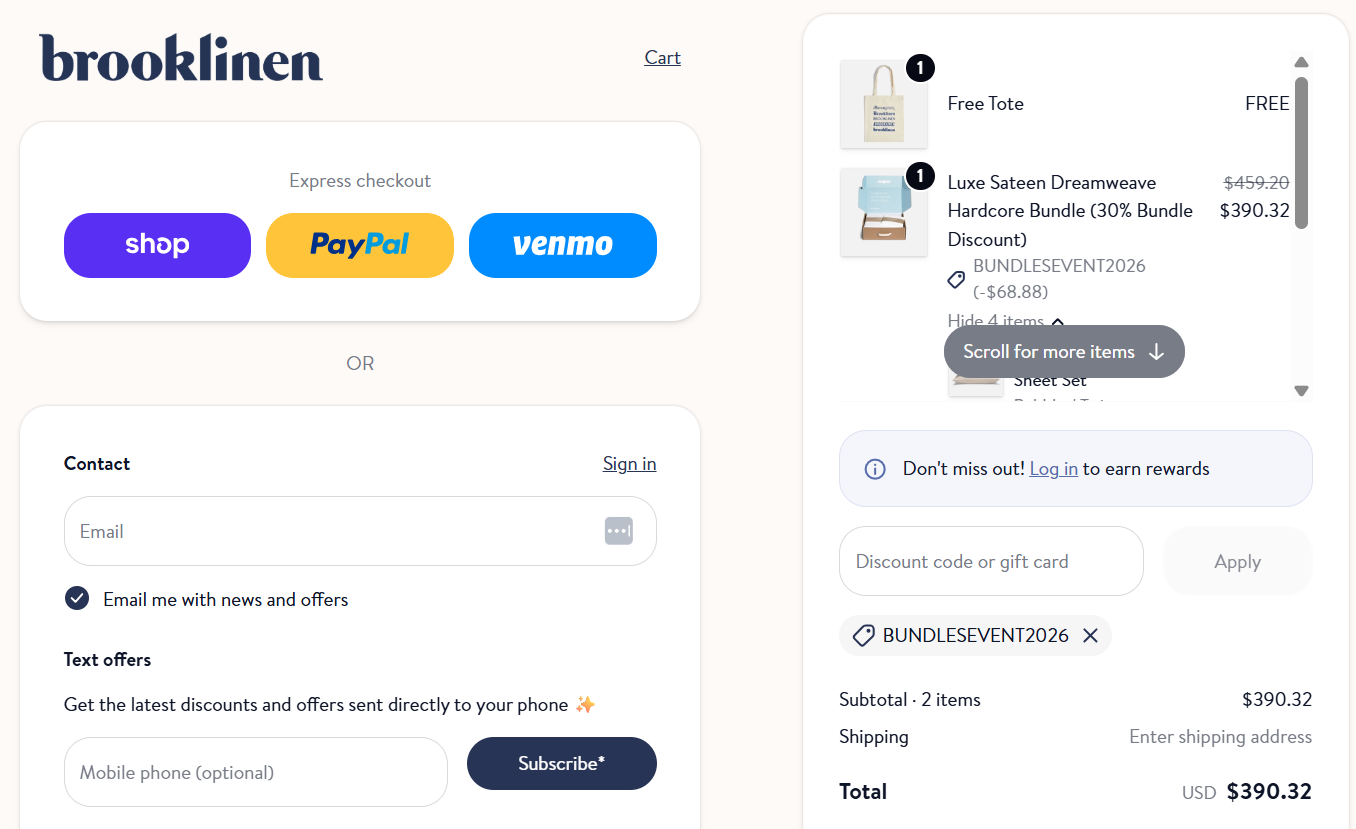
This example from Brooklinen features a personalized design with light colors that match the website’s branding:
A high-converting Shopify checkout page should be mobile responsive. It should also use simple steps, progress indicators, trust signals, and minimal form fields.
By offering guest checkouts, transparent shipping fees, and multiple payment options. Clear return policies and a simple checkout flow also help build trust and reduce drop-offs.
Both can work. Multi-step checkouts reduce cognitive load and guide users, while single-page checkouts speed up completion. Test both formats to see what converts best for your audience.
Use responsive layouts, large tap targets, and autofill-friendly form fields. Ensures the page loads fast to improve mobile conversion rates.
Yes, you can show upsells and cross-sells during checkout, but keep them subtle. Non-intrusive suggestions can increase order value without interrupting the checkout flow.
Use platforms like Omnisend to run A/B tests on form layouts, CTA text, progress bars, and payment options. It can also help you track abandonment rates.

TABLE OF CONTENTS
TABLE OF CONTENTS

What’s next


No fluff, no spam, no corporate filler. Just a friendly letter, twice a month.