Omnisend AI
 OFFER


Email automation best practices include behavior-based triggers, audience segmentation, personalized content, event-based delay and exit logic, and performance measurement to deliver relevant messages throughout the customer journey.
Having these in your email automation has a significant impact. Automations accounted for just 2% of email sends but drove 30% of revenue, earning 16x more per send than scheduled campaigns, according to Omnisend’s 2026 Ecommerce Marketing Report.
In this article, we’ll share five specific actions that improve the ROI of your email automations.
Quick reference: Core email automation best practices at a glance
Best email automation practices start with behavioral and lifecycle segmentation, timely triggers, relevant personalization, and clear suppression rules. Regular testing and performance tracking help improve results. The table below summarizes these best practices, how to implement them, and their expected impact.
| Best practice | Implementation mechanics | Expected ROI impact |
|---|---|---|
| Define the goal and exit event | Give each workflow a goal (first purchase or repeat order) and include an exit condition for when the goal is completed | Ties the send to a revenue outcome |
| Segment by behavior and lifecycle | Use purchase, browsing, engagement, and lifecycle data to group contacts dynamically | Improves message relevance and reduces irrelevant sends |
| Trigger workflows from intent | Launch flows based on actions such as sign-ups, product views, cart activity, or periods of inactivity | Engages customers when their intent or need for a message is most relevant |
| Set suppression and exit rules | Remove contacts when they complete the target action and prevent contacts from entering conflicting or overlapping workflows | Reduces over-messaging, duplicate promotions, and unnecessary discounts |
| Personalize content dynamically | Use behavioral and purchase data to populate relevant products, offers, recommendations, and content | Increases the relevance of each message and can support higher engagement and conversions |
| Test and measure workflow performance | Test delays, offers, and content structure, and measure revenue metrics such as revenue per recipient (RPR) | Identifies which workflow elements contribute to incremental revenue and where optimization is needed |
Action step 1: Segment audiences and personalize content dynamically
Segment audiences by behavioral and lifecycle signals, then use the same signals to personalize the products and offers in each automated email. In practice, this means having VIP or repeat customers receive workflows built around retention and loyalty rather than product education. A shopper who has purchased twice in 30 days, for instance, provides a much stronger signal for retention than their age or location alone.
The same principle applies to cart abandoners. Instead of sending the same generic email to everyone, use cart data to show the exact products people left behind and a direct path to checkout. These emails have a 37.12% open rate, making them one of the higher-performing marketing automation types. Use an exit rule to stop the workflow once the purchase is completed.
Personalization works best when tied directly to behavioral signals. For example, a post-purchase workflow recognizes that someone already made a purchase and proposes similar items instead. Replenishment emails use realistic usage patterns to predict when a consumer might require a replacement. Similarly, back-in-stock workflows target shoppers who previously showed interest in an unavailable item; these emails have a 6.46% conversion rate, the highest among automation types.
Personalization also entails writing “human-first” copy. Use the customer’s name and mention the action they took. For example, add the left-behind product in the subject line and preheader. Additionally, include a sender name (e.g., founder or customer assistant name) and a monitored reply-to address so the email feels more personal.
Omnisend, for instance, allows marketers to generate audience segments by applying filters based on contact profiles, engagement history, or shopping behavior.
Marketers can also build segments from the ground up, choose from the pre-built segment presets, or combine multiple filters with AND/OR logic to target very specific customer groups. Saved segments automatically update for those who meet or no longer meet the criteria.
Marketer takeaway: Back-in-stock automation works because it’s triggered by inventory availability. But product and inventory data need to be in sync so the workflow fires while the shopper’s initial intent is still relevant.
Action step 2: Build and launch the five core ecommerce workflows
The five core ecommerce workflows are welcome series, abandoned cart and checkout, browse abandonment, post-purchase, and winback. Each workflow should have a defined goal, like a first purchase, and an exit that removes customers once they achieve it. To track the goal, check revenue per recipient (RPR), which is calculated by dividing the revenue attributed to a workflow by the number of unique recipients.
1. How to build a welcome series?
Build a welcome series as three emails triggered by sign-up: deliver the incentive, highlight product benefits, then address remaining purchase concerns.
Here’s a blueprint for the workflow:
| Workflow step | Recommended delay | Primary role |
|---|---|---|
| Welcome email | Immediately | Deliver the sign-up incentive, confirm the subscription, and introduce the brand |
| Email 2 | 1–2 days later | Highlight products, benefits, or content based on the subscriber’s interests |
| Email 3 | 2–3 days later | Address a remaining purchase concern, reinforce value |
| SMS (optional) | Between emails 1 and 2, if opted in | Provide a complementary reminder, offer, or product prompt through another channel |
The content should reflect why the subscriber signed up. For example, if the sign-up form promised a discount, make sure the initial email fulfills that promise. Later messages can use preference data to suggest relevant items or answer common questions. And to prevent subscribers from receiving acquisition-focused welcome messages after converting, set the workflow to exit when the subscriber makes a purchase.
Following email design best practices, such as using a clear visual hierarchy, mobile-friendly layouts, and prominent CTAs, also help subscribers act on those messages.
Omnisend provides pre-built welcome flows you can adapt to your ecommerce store’s sign-up process. These flows include suggested triggers, delays, and message templates.
2. How to build abandoned cart and checkout flows?
Trigger the abandonment flow when a shopper abandons their cart or checkout, show them the products they left behind, and stop the flow once they buy.
Abandoned cart and abandoned checkout mostly differ in their triggers. When people add items to their carts but don’t finish the transaction, it’s called cart abandonment. Abandoned checkout is when contacts begin checkout but don’t complete the purchase. Enable both to cover the different stages of purchase intent.
Here’s what an abandoned cart email sequence looks like:
| Workflow step | Suggested delay | Purpose |
|---|---|---|
| Email 1 | ~1 hour after abandonment | Remind the shopper about the products they left behind while the purchase intent is still high |
| Email 2 | 12–24 hours later | Reinforce product value, answer potential objections, or provide additional product information |
| SMS (optional) | ~12 hours after email 2 | If Email 2 is unopened, send a short text with the cart link and an incentive to contacts subscribed to SMS |
| Email 3 | 48–72 hours later | Create urgency with “low in stock” or add benefits like free shipping |
Don’t automatically include a discount. Start by showing the exact products that were left behind and their benefits. If the consumer hasn’t converted yet, the later email introduces urgency, social proof, or an incentive.
Once the shopper completes the order, remove them from the sequence and transfer them to the proper post-purchase workflows. In addition, include suppression rules to prevent shoppers from receiving multiple overlapping abandonment messages if they trigger more than one automation.
Omnisend offers pre-built abandoned cart and checkout workflows, including email + SMS presets that add a text reminder to the sequence. Customize them with different messages, delays, conditions, and channels.
For example, here’s how to set up an abandoned cart workflow in Omnisend:
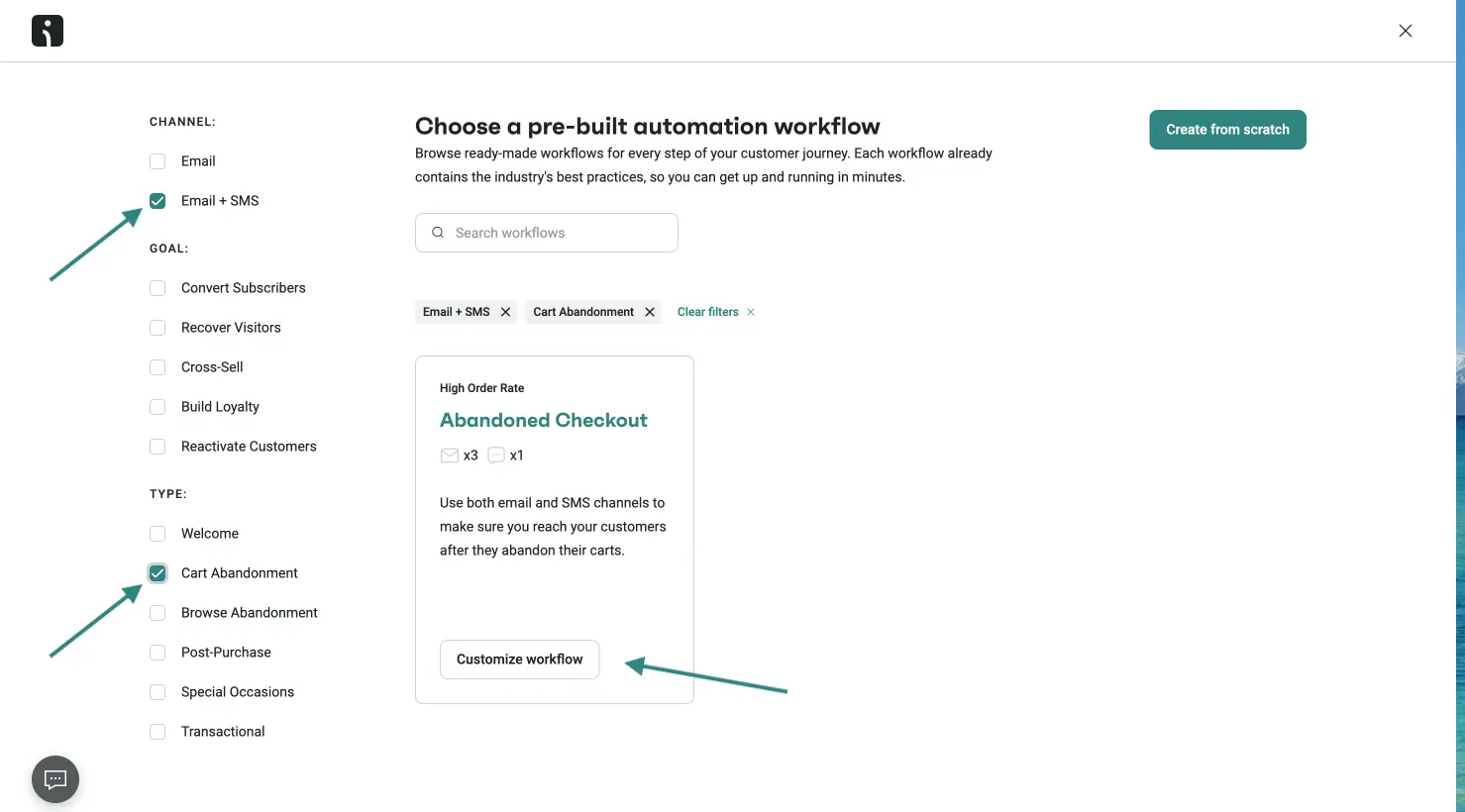
- Go to Automation → Create workflow, where you’ll see a list of pre-built workflows
- Check the Cart Abandonment and Email + SMS boxes → Pick Abandoned Cart preset → Click on Customize workflow.
- The Email + SMS flow is pre-set for Abandoned Checkout, but you can change it to Abandoned Cart by updating the entry and exit:
- Customers enter the workflow when they add an item to cart
- Customers exit the workflow when they place an order, or they start their checkout.
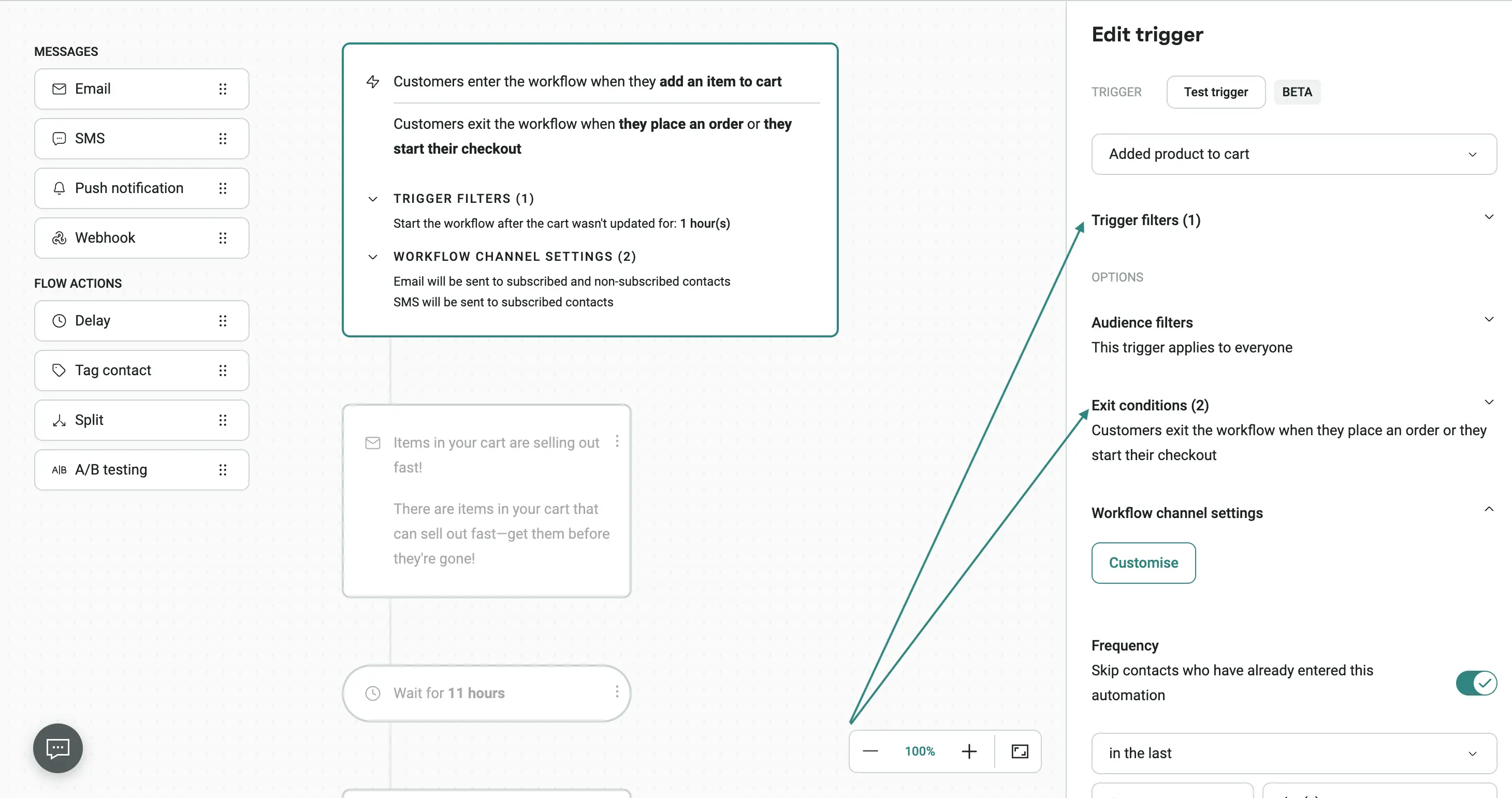
- Review each email, the SMS, the delays between them, and the exit conditions, then enable the workflow so it starts sending to shoppers who abandon a cart.
3. How to build browse abandonment automations?
Build browse abandonment automations by sending timely, personalized reminders to shoppers who view products without adding them to their cart, while limiting message frequency to avoid overwhelming them.
Browse abandonment automations sit earlier in the purchase-intent funnel than cart or checkout, since they react to viewing behavior. That being said, the logic is similar to abandoned cart. The only difference is that you may offer more aggressive discounts as shopping intent is lower.
| Workflow step | Suggested delay | Purpose |
|---|---|---|
| Email 1 | 1–4 hours after browsing | Remind the shopper about the product or category they viewed while the interest is still recent |
| Email 2 | 24 hours later | Reinforce product benefits, reviews, or related products if they haven’t returned |
| Email 3 | 48–72 hours later, if appropriate | Provide a discount so the user has more motivation to buy |
Keep the content closely tied to what the shopper is browsing. If someone keeps looking at a specific product, the message should show that product along with a few relevant details, rather than acting like a generic promotional email. Recommendations support category-level browsing and help buyers find products in the category they’re exploring.
Omnisend offers several abandonment automation workflows that capture the different stages of a contact’s shopping journey, including browse abandonment. Because the same shopper can trigger multiple workflows as their intent progresses, use Exit Conditions and Skip Contacts settings to prevent overlapping messages.
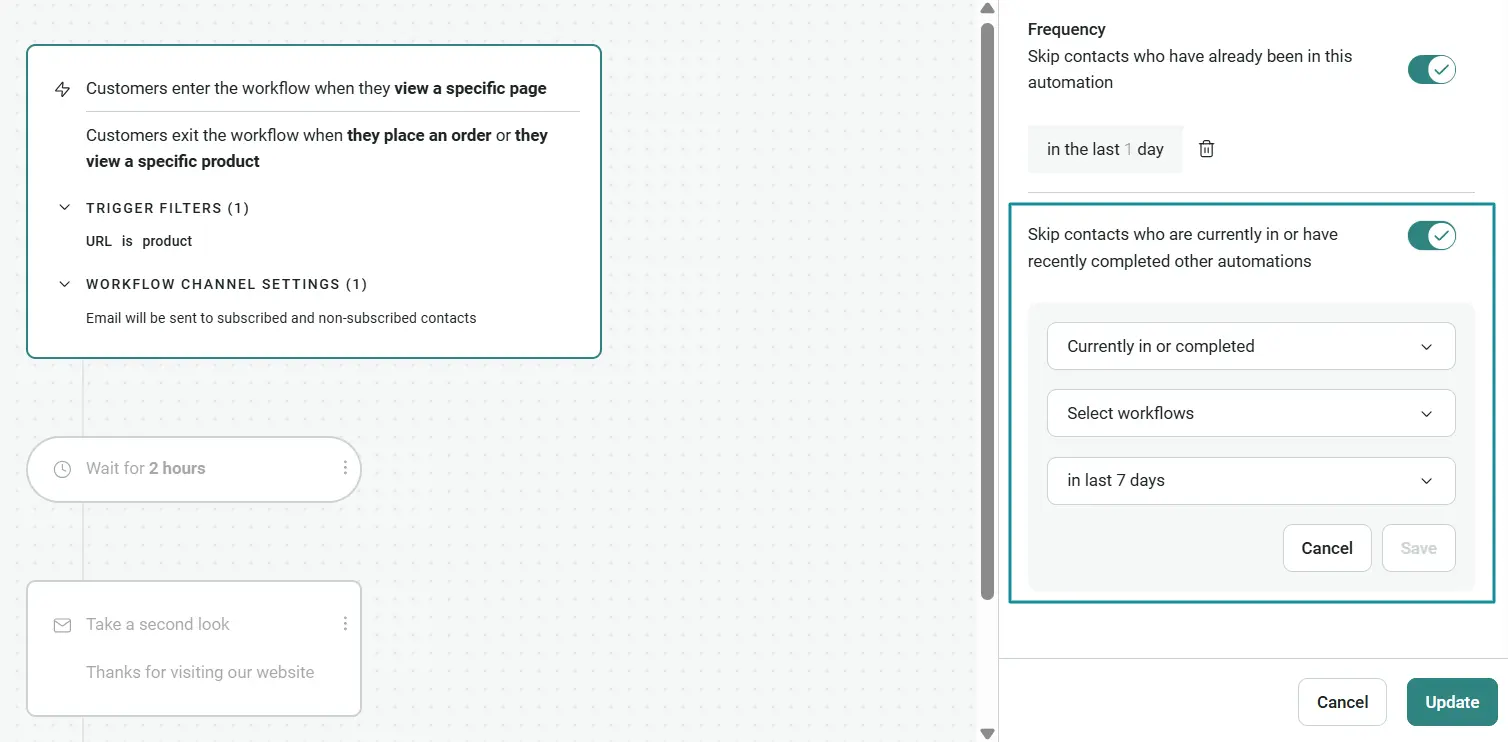
4. How to build post-purchase sequences?
Post-purchase sequences should start as soon as a purchase is made, then use product, purchase, and customer data to determine when education, reviews, cross-sells, and replenishment reminders are most effective.
Unlike welcome or abandonment automations, a post-purchase automation includes a variety of email types that are triggered by different situations.
Some of them are transactional and others promotional:
| Automation | Suggested timing | Purpose |
|---|---|---|
| Order confirmation | Immediately after purchase | Transactional: confirm the order and provide essential purchase details |
| Shipping and delivery updates | Based on order events | Transactional: keep customers informed about their order status |
| Product education | After delivery, based on product | Promotional: help customers get more value from the product with setup, usage, or care guidance |
| Review request | After sufficient product use | Promotional: give customers enough time to experience the product before asking for feedback |
| Cross-sell or loyalty message | After sufficient product use | Promotional: recommend products, loyalty rewards, or relevant offers based on the purchase |
| Replenishment reminder | Based on expected consumption cycle | Promotional: remind customers to reorder shortly before they’re likely to run out |
| Birthday message | On or a few days before the customer’s birthday | Promotional: send a personal offer tied to a date the customer shared |
Feedback request emails get a 50.70% open rate, which is the second-highest after shipping confirmation emails (62.99%), making them a reliable way to collect reviews. Birthday messages convert less often (0.59%), but their average order value is $744, according to Omnisend’s 2026 Ecommerce Marketing Report.
Time non-transactional messages to the product’s actual use and reorder cycle, not a universal number of days. If a product typically lasts 30 days, a reminder around this reorder window gives people the time to purchase before they need a replacement. If the customer reorders, they exit the replenishment workflow to prevent unnecessary reminders.
Purchase history makes these reminders more precise over time by showing when people typically reorder. Omnisend offers a dedicated replenishment automation that triggers reminders based on expected consumption and reordering windows. Use it to encourage repeat purchases, increase customer lifetime value, and reduce churn.
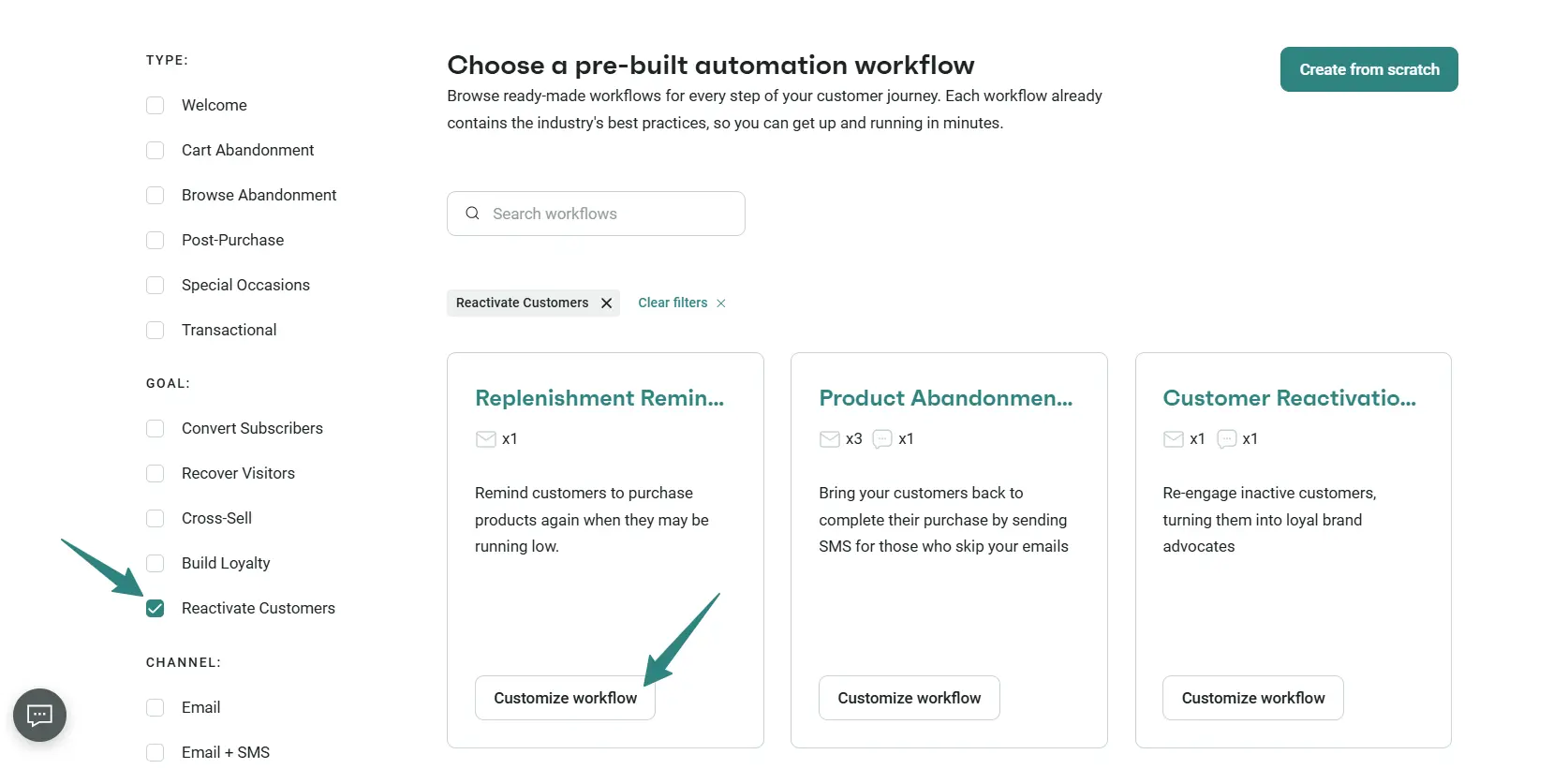
5. How to build winback workflows?
Winback workflows should trigger after a period of customer inactivity (30–90 days) and introduce incentives to stay. You can also use a final winback email to give churned customers one last chance to re-engage before removing them from your active list.
Omnisend recommends modifying inactive periods to match the store’s usual buying pattern.
Here’s what the flow looks like:
| Workflow step | Suggested timing | Purpose |
|---|---|---|
| Winback email 1 | When the customer exceeds the expected repurchase window | Remind them of the brand and highlight relevant products or benefits |
| Winback email 2 | A few days later | Add personalized recommendations, social proof, or a stronger reason to return |
| Incentive email | Several days later, if appropriate | Introduce a limited-time offer or other incentive to encourage a purchase |
| Suppression | After repeated non-engagement | Remove persistently inactive contacts from promotional sends |
Don’t immediately lead with a discount. If the customer doesn’t respond, the sequence can gradually ramp up with a more compelling message or reward. Also, the content should be relevant to the consumer’s interests, for example, products that relate to their previous purchases or an offer that is relevant to their history.
In Omnisend, marketers can build the winback segment using the following filter:
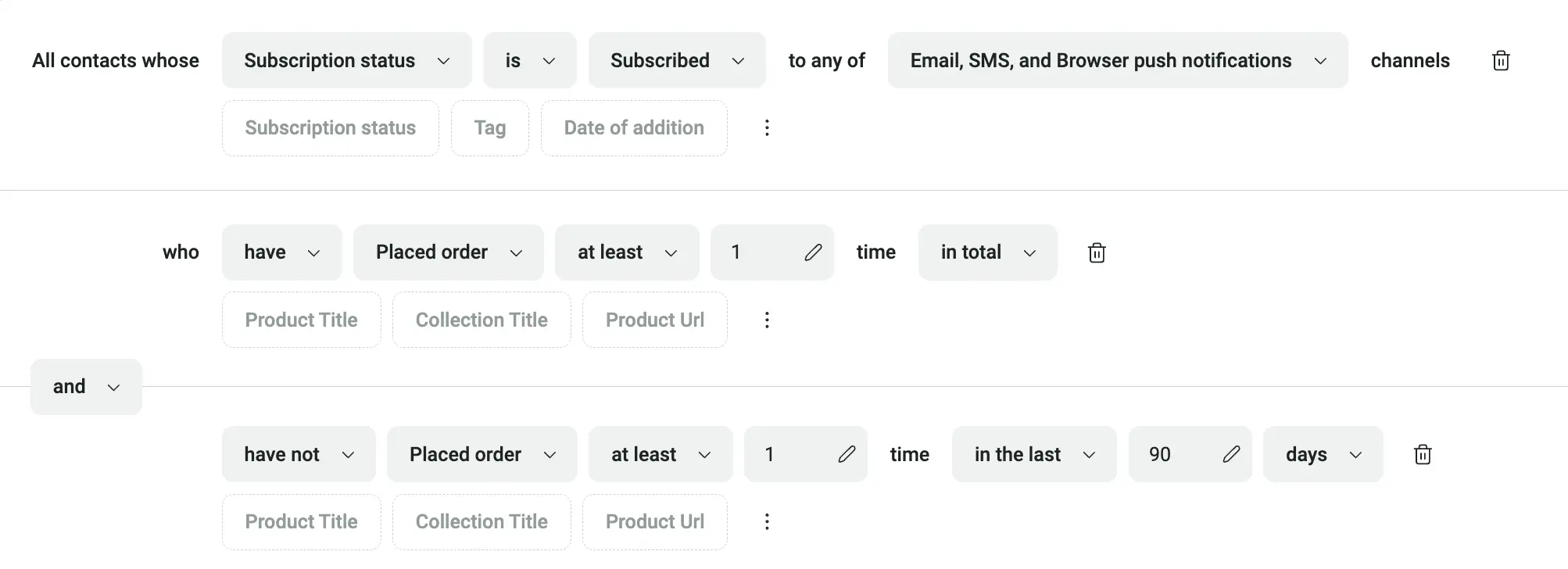
If the customer purchases or re-engages, exit the winback workflow and move them into the appropriate active customer journey. If they continue to disregard messages after several attempts, it’s best to suppress them from future promotional campaigns. Continuing to email contacts who show no engagement wastes sends and negatively affects overall email deliverability.
Action step 3: Configure cadence, delay logic, and structural A/B testing
Set delays based on customer intent, use exit conditions and suppression rules to prevent excessive messages, and run A/B tests to improve conversions.
Set the timing between emails based on intent
Spacing between emails should reflect how quickly the purchase intent decays. Product-view workflows, for instance, require shorter delays because interest fades fast, while post-purchase sequences need longer gaps aligned to the customer’s actual journey. Timing should give the recipient enough time to act before the next message arrives.
Control cadence with exit conditions and suppression rules
Exit conditions and suppression rules work together to prevent automation fatigue. Otherwise, promotional campaigns and lifecycle workflows overlap, and marketers end up sending several messages to the same subscriber in a short period. Frequency restrictions, audience exclusions, and workflow conditions limit these conflicts and provide an overall cohesive customer experience.
Exit conditions remove subscribers from a sequence once they complete its goal, such as a purchase. Once a subscriber completes the workflow’s main objective, such as making a purchase, they should leave the sequence automatically. This stops duplicated messages and enables the customer to continue into a more relevant path, such as post-purchase.
Test to find out what works for your customers
When it comes to testing, cover both the technical setup and customer experience (CX). Before launch, check that triggers activate after the intended actions, links and calls to action lead to the correct destinations, and segmentation and suppression rules create the right audience segments. Email previews (desktop and mobile) help detect layout or rendering problems before a workflow goes live.
Once the workflow is running, focus on testing email elements and timing.
| Element to test | What to test |
|---|---|
| Offers and incentives | Discount amount, free shipping vs. free gift, or other incentives |
| Workflow timing and delays | Different sending times and intervals between emails |
| CTA placement and messaging | Different CTA copy, positioning, and design |
| Product recommendations | Personalized vs. best-selling products |
| Email structure and content | Email length, layout, and content blocks |
Action step 4: Use AI for predictive segmentation and workflow optimization
Improve email automation with AI by analyzing customer value and lifecycle (CLV) stages, generating and personalizing email content, and identifying opportunities to optimize existing workflows.
Use predictive customer intelligence to understand customer value
Predictive customer intelligence helps marketers understand which customers are likely to purchase again and how much they might spend. For example, Omnisend provides historical and predicted CLV, which determines how much a customer has spent and is expected to spend in the future.
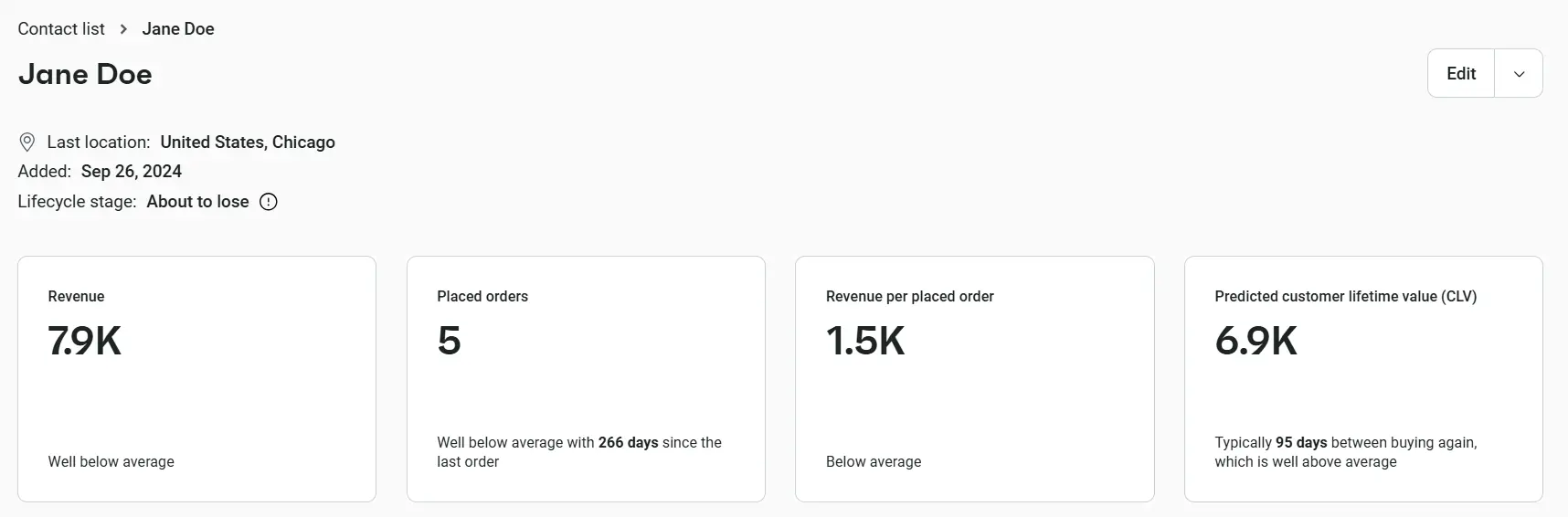
Currently, Omnisend does not provide segmentation of contacts based on CLV statistics, but marketers can use lifecycle stages (Champions, Loyalists, High Potential) and other criteria to create audiences for targeted campaigns and automations.
Personalize emails with AI and product recommendations
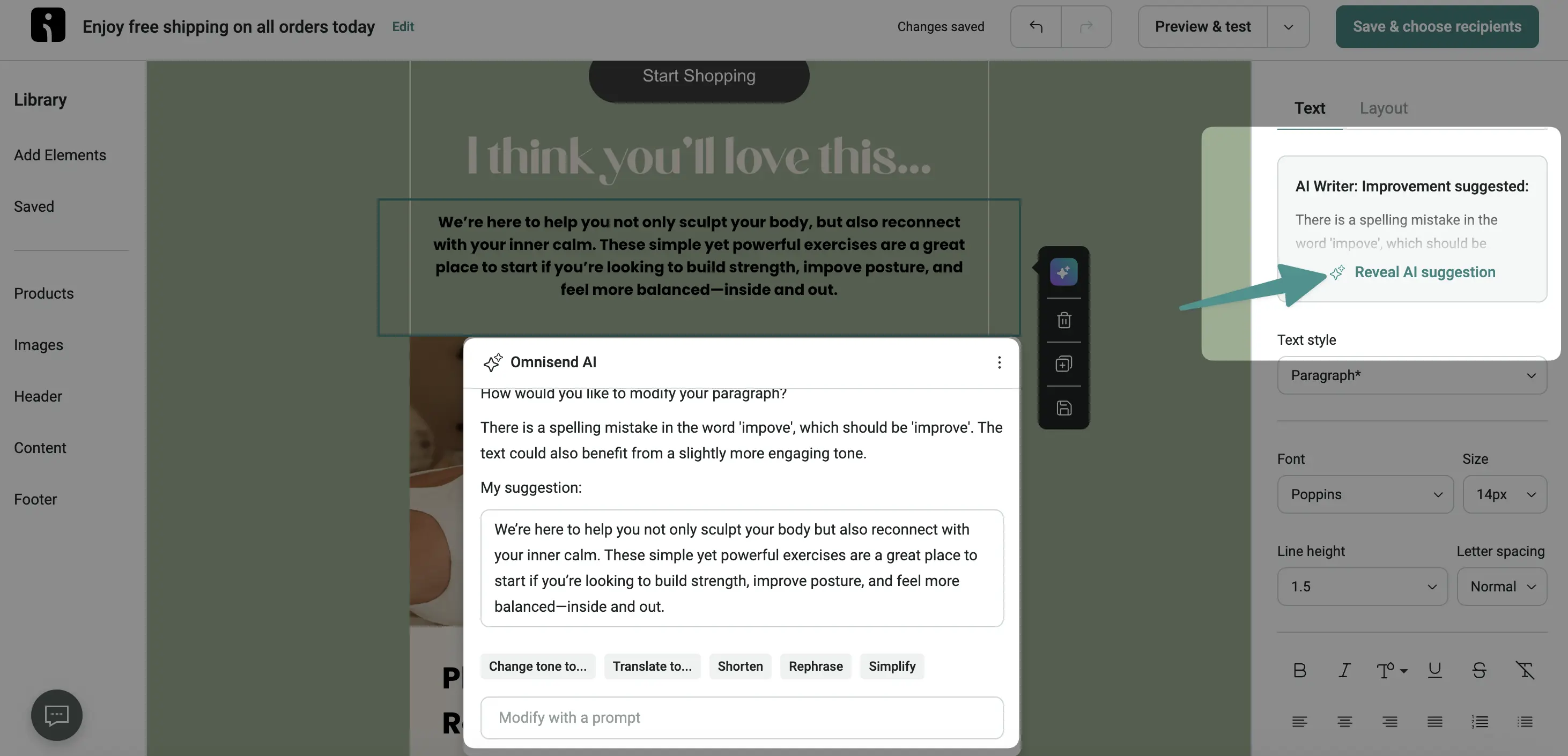
Generative AI speeds up automated emails by creating subject lines and preheaders, writing email copy, and polishing content. Omnisend’s AI tools, for instance, help marketers generate text and get suggestions to improve existing copy, ensuring they keep a consistent brand voice.
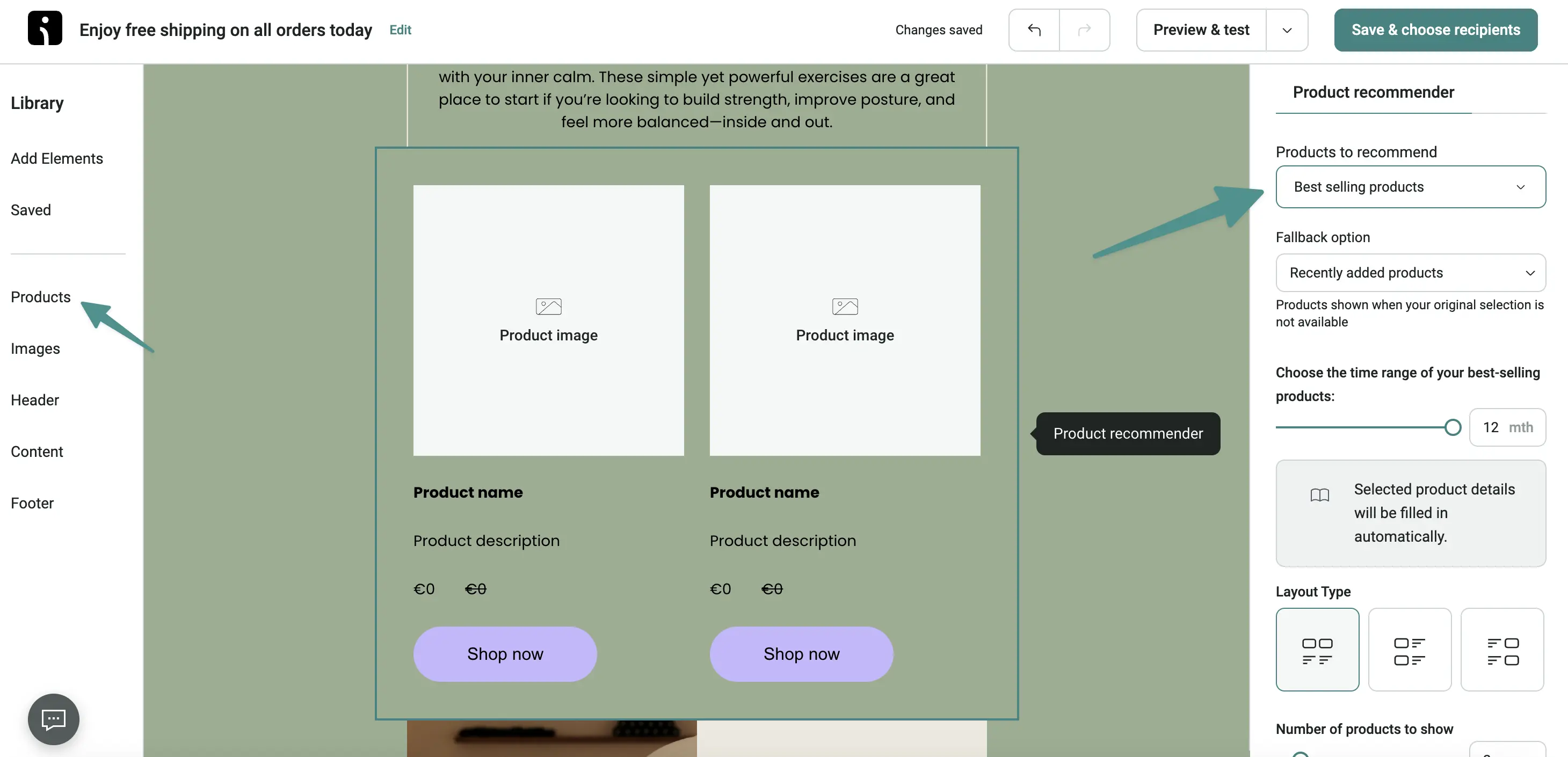
Product recommendations add another layer of behavioral personalization. Omnisend’s Dynamic Product Recommender populates email content with products based on criteria such as recent product views or similarity to previous purchases.
Be careful to treat the output as a starting point, not the truth. As with any AI-generated content, verify product details, claims, tone, and relevance before sending.
Optimize workflow decisions with AI recommendations
Marketers use AI recommendations to identify potential adjustments to workflow logic and then evaluate those changes against actual performance. After Omnisend’s latest update, its AI functionality extends beyond content generation and into workflow optimization. AI Recommendations now audit automated workflows and offer changes to scheduling, exit criteria, follow-ups, and A/B testing decisions. Depending on the recommendation, marketers can preview it and apply it, test it, or dismiss it entirely.
Action step 5: Track revenue per recipient and troubleshoot drop-offs
Track RPR as the primary KPI, then use conversion, engagement, and deliverability metrics to find where a workflow loses revenue.
RPR vs. total revenue
The main financial comparison statistic is revenue per recipient (RPR), which calculates revenue gained per recipient. Unlike total revenue, RPR accounts for differences in audience size, making it easier to compare automation performance.
For example, let’s say you have abandoned cart and abandoned checkout automations, both of which generated $2,000 in revenue, making them seem equally successful. If we account for the number of recipients, the outlook is different:
| Automation | Revenue | Recipients | RPR |
|---|---|---|---|
| Abandoned cart | $2,000 | 1000 | $2.00 |
| Abandoned checkout | $2,000 | 700 | $2.86 |
The abandoned checkout workflow is more efficient at generating revenue per recipient.
How to fix common workflow drop-offs?
Engagement and deliverability metrics can be used to find issues that affect revenue.
| Metric | What it measures | Why it matters |
|---|---|---|
| Conversion rate | Percentage of recipients who complete the intended action, such as making a purchase, signing up, or reactivating | Helps evaluate whether the workflow is influencing customer behavior |
| Unsubscribe rate and spam complaints | Percentage of recipients who unsubscribe or report emails as spam | Signals over-messaging, poor segmentation, or irrelevant content, which hurt future campaign performance. |
| Open rate | Percentage of delivered emails recorded as opened | Indicates if subject lines are converting but should be treated with care due to Apple Mail Privacy Protection. |
Marketer takeaway: Judge workflows by clicks, conversions, and RPR. Open rates for ecommerce businesses climbed from 26.6% in 2024 to 30.7% in 2025. However, since 2021, Apple Mail Privacy Protection has been able to preload email tracking pixels, which can make some emails appear opened before a subscriber reads them. As a result, open rates can overstate actual engagement and should be evaluated alongside metrics.
How to identify problems based on metrics?
To locate automation performance issues, you might need to look at several metrics. Here’s a quick rundown:
| Drop-off symptom | Likely diagnostic cause | Workflow adjustment |
|---|---|---|
| Strong clicks, weak purchases | Offer, pricing, or landing-page mismatch | Test the offer, checkout flow, product page, or pricing clarity |
| Sharp unsubscribe increase at email 2 | Delay is too short, or the message is not relevant | Extend the delay and review suppression rules for contacts recently exposed to promotional messages. |
| High cart revenue but weak margin | Incentive introduced too early or discount too costly | Delay or reduce the discount and test product relevance, CTA clarity, or non-price urgency |
| Strong opens, weak downstream engagement | Subject line generates interest, but content or offer does not | Test message structure, content relevance, product recommendations, and CTA placement |
Why email automation best practices drive revenue
Email automation best practices drive revenue because behavior-triggered emails reach shoppers at high-intent moments: automations were 2% of email sends in 2025 but drove 30% of email revenue (Omnisend’s 2026 Ecommerce marketing report).
Brands can compare their own workflows against email marketing benchmarks, and against SMS marketing benchmarks for workflows with SMS steps.
Customer results show how that translates into individual automation flows:
| Brand | Automation flow | Quantifiable outcomes |
|---|---|---|
| Verpakgigant | Abandoned cart | €25K from 147 recovered orders; 46.4% open rate |
| Bowy Made | Pre-purchase automations | Over 70% of total revenue comes from automation; product, browse, and cart abandonment flows generate five figures in additional revenue in one month |
| Snatcher Online | Cart recovery | $120K+ generated from cart recovery automation; automation workflows increased revenue by 74% compared with regular campaign sales |
Critical email automation pitfalls to avoid
The most critical email automation pitfalls to avoid include overlapping workflows, incorrect triggers, outdated offers, and poorly maintained customer data. Even well-designed workflows can underperform because of these issues, so prioritize those that directly affect revenue, margins, customer experience, or deliverability.
| Failure mode | Severity level | Commercial risk impact | Corrective action |
|---|---|---|---|
| Broken trigger/exit logic | High | Customers receive irrelevant messages, or flows continue after the intended action | Test triggers, exit conditions, and conversion paths before launch and after major changes |
| Overlapping workflows | High | Customers receive conflicting or excessive messages at the same time, increasing the risk of unsubscribes | Use exit conditions, suppression rules, skip logic, and frequency controls to prevent conflicting workflows from reaching the same person |
| Premature discounting | High | Discounts reduce margins when introduced before other recovery tactics have been tested | Delay incentives and test product information, urgency, social proof, or other non-discount messaging first |
| Stale offers/products | Medium | Expired promotions, unavailable products, or outdated recommendations reduce trust and create a poor CX | Schedule recurring workflow reviews to update offers, product data, links, and messaging |
| Weak personalization/segmentation | Medium | Generic or poorly targeted messages reduce relevance, engagement, and revenue efficiency | Audit audience criteria, customer data, personalization rules, and segment logic regularly |
| Bloated or unclean list | Medium | Hard bounces and contacts inactive for months lower sender reputation, so more emails land in spam, including those to engaged customers | Remove hard bounces right away, set a sunset policy that suppresses contacts with no opens or clicks in 90–180 days, and clean the list on a regular schedule |
The highest-priority checks are trigger and exit logic, workflow overlap, and discount timing because these directly affect revenue, margins, and CX. Once those controls are working reliably, regular QA of offers, products, and segmentation prevents performance from degrading over time.