
 Omnisend AI


 OFFER
OFFER









10 best email marketing courses (free & paid)
With over 130+ pre-built integrations and flexible APIs, you can easily centralize data from across your tech stack
Make the most out of your data and unlock powerful growth marketing possibilities with these other top marketing tools.
Build any custom integration with our open, flexible APIs that are simple to use and implement.
Check out apps that have been stealing all the spotlight.
Email and SMS marketing insights, ecommerce resources, and the latest Omnisend news
Expert-led sessions covering email, SMS, and ecommerce marketing strategies.
Educational video and live training to help you make the most out of Omnisend.
Drive sales on autopilot with ecommerce-focused features
See FeaturesEmail marketing for ecommerce boasts an impressive ROI of $79 for every $1 spent, making it a crucial revenue driver for brands.
Automation is key in ecommerce email marketing, allowing brands to send timely, behavior-based messages that significantly boost conversion rates.
Effective segmentation and personalized content are essential; simply having a large email list won't guarantee high revenue without targeted messaging.
Implementing structured automation flows, such as welcome series and cart recovery, can transform one-time buyers into loyal customers, enhancing lifetime value.
Email marketing for ecommerce remains one of the most profitable growth channels for many brands. With Omnisend delivering returns of up to $79 per $1 spent, this ROI makes it a key revenue channel.
Owning your audience through email marketing for ecommerce provides total control over your customer data. You manage the timing, frequency, recipient list, and content of every email without third-party interference.
Also, simply having a long email list does not mean you will make a lot of money. To get the best results in email marketing for ecommerce, you need to send relevant content at the right time.
The most successful brands leverage behavioral triggers and timing to target their audiences effectively. This is why automation is important in your ecommerce email marketing strategy.
Ecommerce email marketing automation links all of these elements together. It helps turn one-time buyers into repeat customers, increasing lifetime value and driving consistent revenue.
In this post, you’ll find nine high-performing automation flows with real-world ecommerce email marketing examples from active stores. In addition, you’ll get platform recommendations, clear performance benchmarks, and a seven-step framework.
These will help you improve conversions, increase repeat purchases, and strengthen customer retention for your store.
Let’s get right into it!
Quick sign up | No credit card required
Ecommerce email marketing is the practice of using customer shopping behavior to trigger targeted, automated messages that drive revenue for online stores.
Ecommerce email marketing is the practice of using customer-specific actions like browsing patterns, cart activity, and purchase history to trigger automated messages to increase sales.
The primary focus of email marketing for ecommerce is to respond to customer behavior to drive growth, increase conversions, and revenue.
Core ecommerce email automation flows include:
To execute these, you need ecommerce email marketing tools that integrate deeply with your storefront. Platforms like Omnisend integrate with Shopify, BigCommerce, WooCommerce, and Wix to monitor every click, view, and purchase in real time. This gives you the data needed to trigger high-converting, behavior-based emails.
For example, if a customer repeatedly browses winter boots, your system detects purchase intent. It then automatically sends a timely message to encourage conversion.
Email marketing for ecommerce remains your most profitable owned channel for driving revenue. Brands using Omnisend earn $79 for every dollar spent on email marketing, making it the most profitable owned channel for driving revenue.
This performance delivers high returns because ecommerce email marketing automation targets customers based on real behavior rather than assumptions.
Automated ecommerce email campaigns deliver much higher conversion rates than one-off sends. This is because they reach customers at peak purchase intent.
The Omnisend 2026 Ecommerce Marketing Report shows that click-to-conversion jumped 53% year-over-year. In the UK, this metric reached a leading 16.54%, proving that email remains a high-intent channel for modern shoppers.
One in three users who click an automated email completes a purchase, compared to just one in 18 for standard campaigns. This illustrates why a structured ecommerce email marketing strategy outperforms one-off sends.
Ecommerce brands use multiple channels to drive traffic, but email consistently delivers stronger returns and more predictable performance:
Automation works because it acts on real-time data. When brands respond to actual customer behavior, results follow, making email marketing a revenue engine rather than just a marketing channel.
Salomon Japan reaches 130,000 customers through localized email campaigns, achieving a 45% open rate and generating ¥1.9M per campaign. Segmentation by sport category and loyalty tier drives consistent engagement and revenue growth.
Read the case study here.
Effective email marketing for ecommerce drives higher customer lifetime value by delivering the right message at every stage of the journey. The table below shows how different email types support specific business goals:
| Customer lifecycle stage | Email type | Goal |
|---|---|---|
| Acquisition | Welcome series | Drive first purchase |
| Activation | Post-purchase emails | Encourage repeat orders |
| Retention | Loyalty rewards | Increase lifetime value |
| Re-engagement | Winback campaigns | Reactivate inactive users |
When your email program reflects this structure, every message triggers a specific profitable action.
The table below is a summary of the nine automation flows, their triggers, goals, and benchmarks:
| Flow name | Primary trigger | Key goal | Benchmark |
|---|---|---|---|
| Welcome series | New subscriber | Convert first-time visitors | 30-minute conversion window for peak ROI with 90% effort on first touchpoint. |
| Abandoned cart | Items left in cart | Recover lost sales | One in three clicks converts to a purchase |
| Post-purchase | Completed order | Encourage repeat purchase | 24% higher open rates than standard emails |
| Winback | Inactive customers for 60-90 days | Reactivate lapsed buyers | Automated winback emails drive 19× higher conversion than manual sends |
| Browse abandonment | Product page viewed | Capture intent before exit | Nearly one in three clicks in an automated series results in a purchase. 83% higher than standard sends |
| Back-in-stock | Product restocked | Capture missed demand | 6.46% conversion rate, the highest among automations |
| Loyalty and rewards | Milestone reached | Increase lifetime value | 4x higher order value than standard promotional emails |
| Review request | Product delivered | Collect feedback and social proof | 3x higher conversion rate than manual feedback requests |
| Cross-sell / upsell | Completed order | Increase average order value | Product recommendation clicks convert 12% better than generic campaigns |
First impressions matter, and welcome emails see the highest engagement rates of any automation, making them your best opportunity to convert new subscribers.
“Maximize conversions by focusing 90% of your effort on the first email touchpoint. Our data show that the majority of conversions occur within the first 30 minutes of sign-up.
— Alex Cabrera, We Click Group
This welcome email example from Local Revival offers a 15% discount as part of its welcome series. They encourage new customers to shop immediately with a code:
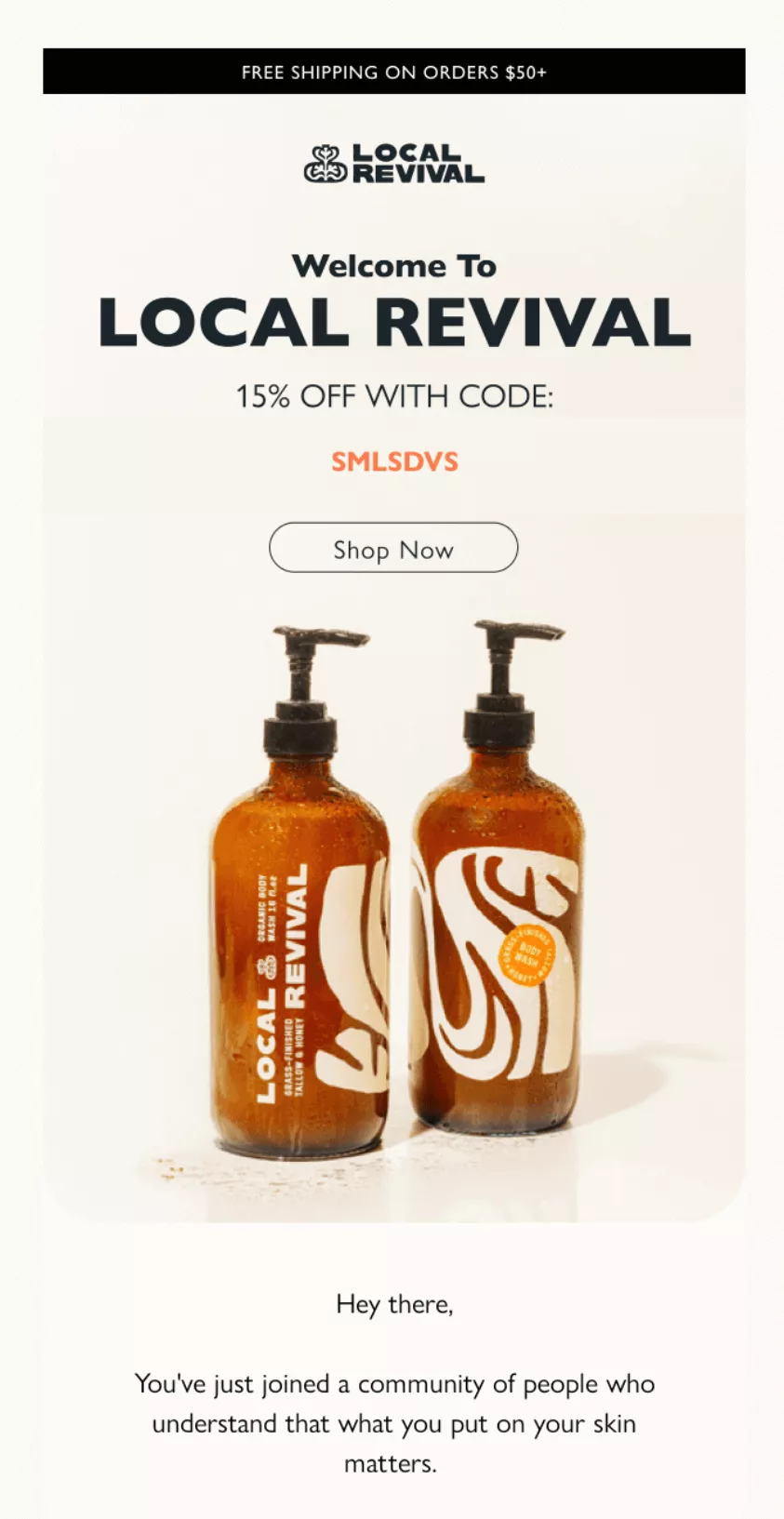
Subject line: “Welcome to Local Revival.”
This subject line is clear and direct, and it sets the right expectation immediately.
Further down, the email highlights a key benefit of using natural skincare ingredients. Adding this benefit, along with a clear discount code, gives subscribers a strong incentive to click and purchase.
Those abandoned carts sitting in your database? They’re filled with customers who got distracted, found unexpected shipping costs, or needed their spouse’s approval.
You can re-target these customers with shopping-cart-abandonment emails that combine personalized product recommendations with incentives.
“Show the cart contents with big, clear images. Make returning straightforward — one click, no passwords needed.”
— Evaldas Mockus, VP of Growth at Omnisend
This abandoned cart email from Kizik uses high-quality images and conversational headings to reduce friction and encourage a purchase:
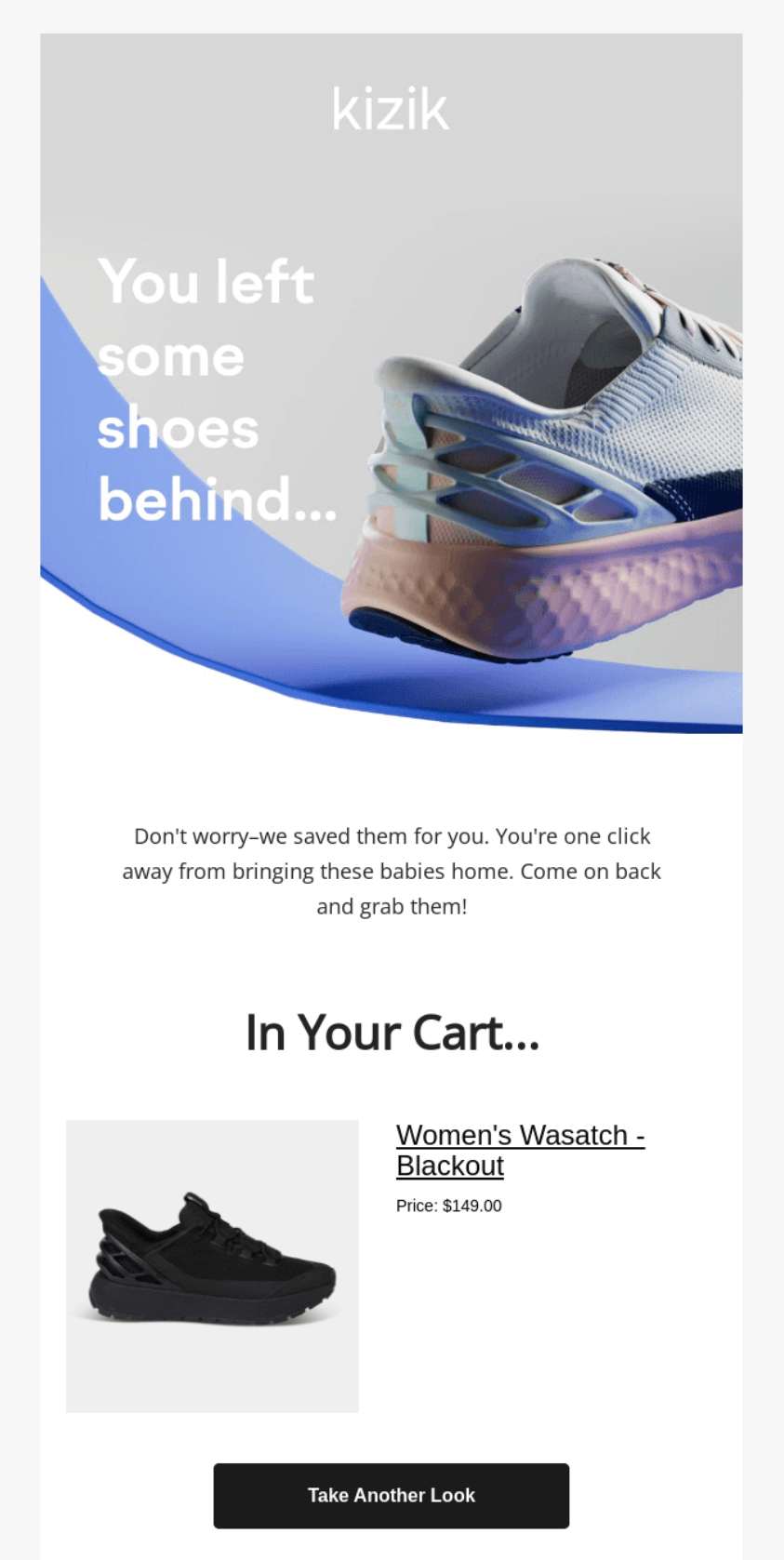
Subject line: “Your Kiziks Are Lonely 😢”
This email uses a playful, emotion-driven message, “You left some shoes behind…”
It feels more personal than a generic reminder and reconnects the shopper to their browsing moment. The product image and “In Your Cart” section make it easy to pick up where they left off.
Promotional flows help move inventory by using targeted, time-sensitive offers for specific segments. Use these campaigns to reward loyal customers with exclusivity and leverage seasonal excitement.
“Stack your promotions strategically. Lead with bestsellers that rarely discount, save deepest cuts for slow-moving inventory.”
— Evaldas Mockus, VP of Growth at Omnisend
Health-Ade uses promotional emails around major events, like this Fourth of July sale:
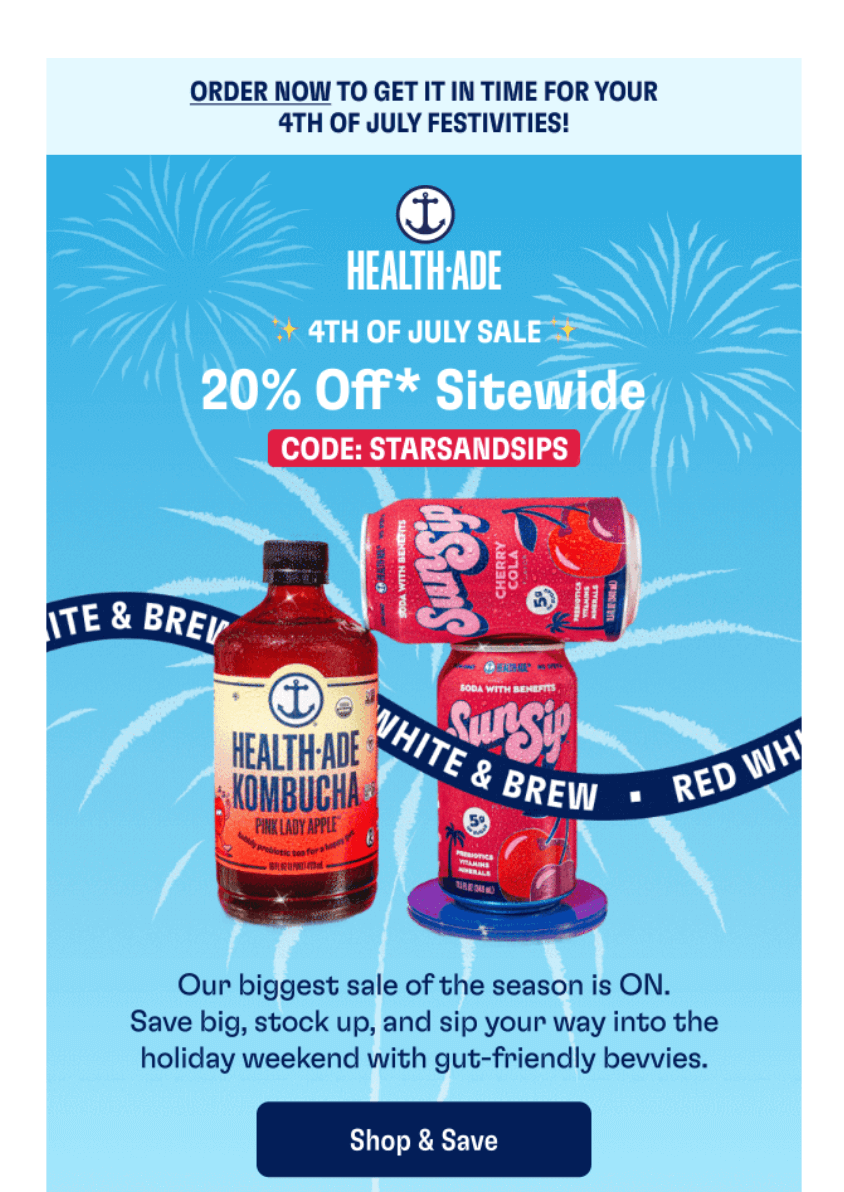
Subject line: “4th of July Sale: 20% Off Sitewide 🔥”
Health-Ade uses the descriptive subject line to highlight the offer and set clear expectations upfront. The email’s use of high-quality product images and a “Shop & Save” CTA encourages clicks.
This series marks the beginning of customer relationships. Using order confirmation email automation helps drive conversions and foster engagement
“Turn your transactional emails into marketing opportunities. Add three related products below order details — it’s prime real estate.”
— Evaldas Mockus, VP of Growth at Omnisend
Digital audiobook retailer Libro.fm uses its thank you messages series to show appreciation for new members and highlight audiobook credit offers:
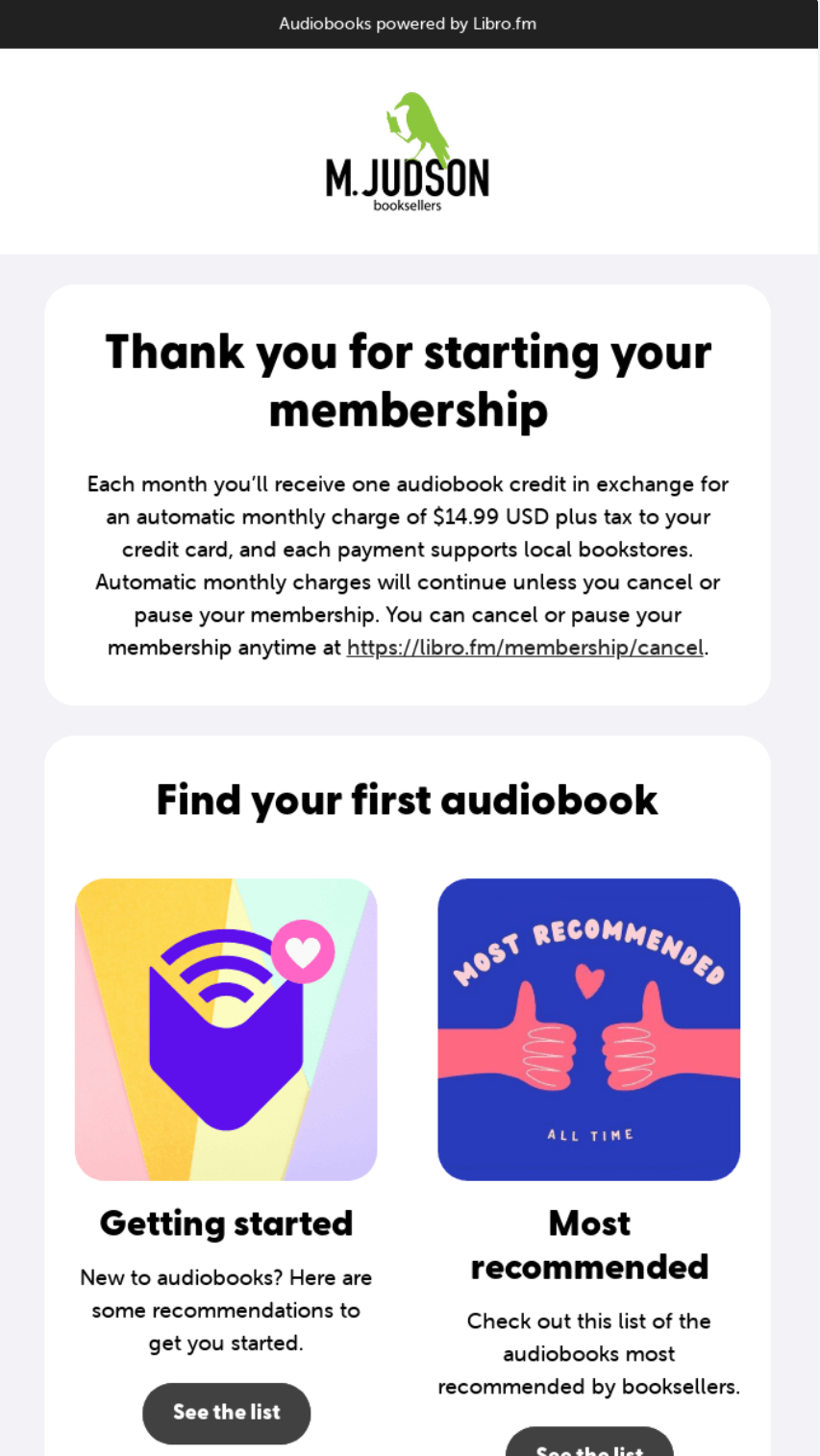
Subject line: “Thank you for starting your Libro.fm membership!”
This thank-you email starts with appreciation, then guides new members to explore their first audiobook, making the next step clear and easy.
The period right after delivery is a great chance to reconnect with your customers. This is when you can recommend products that go well with what they’ve just bought, using thoughtful post-purchase emails. Done right, these messages can turn a one-time order into an ongoing relationship—bringing customers back and increasing their long-term value.
Send these emails about 7–14 days after delivery, giving customers enough time to try out their purchase first.
“Cross-sell works best when it reflects what the customer just bought, not what you want to sell next. Relevance always drives higher conversions.”
— Evaldas Mockus, VP of Growth at Omnisend
Boundary Supply uses post-purchase messaging to drive cross-sell revenue, recommending bestsellers days after delivery to increase average order value:
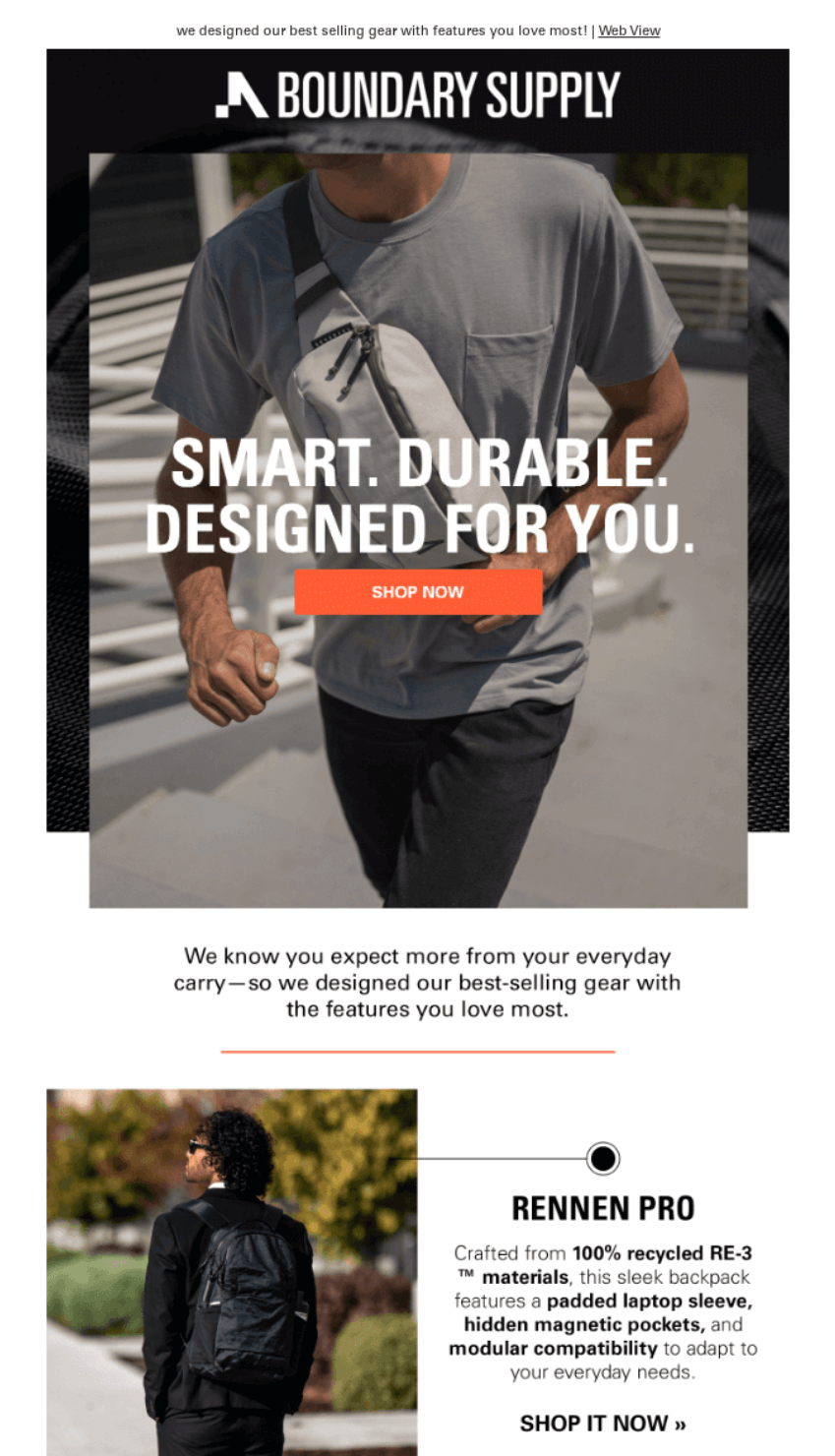
Subject line: “🏆 Top Features on Top Sellers”
In this email, Boundary Supply uses relevant product recommendations to complement the customer’s original purchase and includes a bold CTA to drive repeat sales.
The product recommendation series allows you to leverage behavioral data to keep your brand relevant throughout the customer lifecycle.
“Mix bestsellers with personalized recommendations. Customers trust popularity while appreciating personal touches — give them both.”
— Evaldas Mockus, VP of Growth at Omnisend
Meal replacement retailer Huel uses a unique quiz-based approach in its product recommendation emails to pair customers with their perfect match:
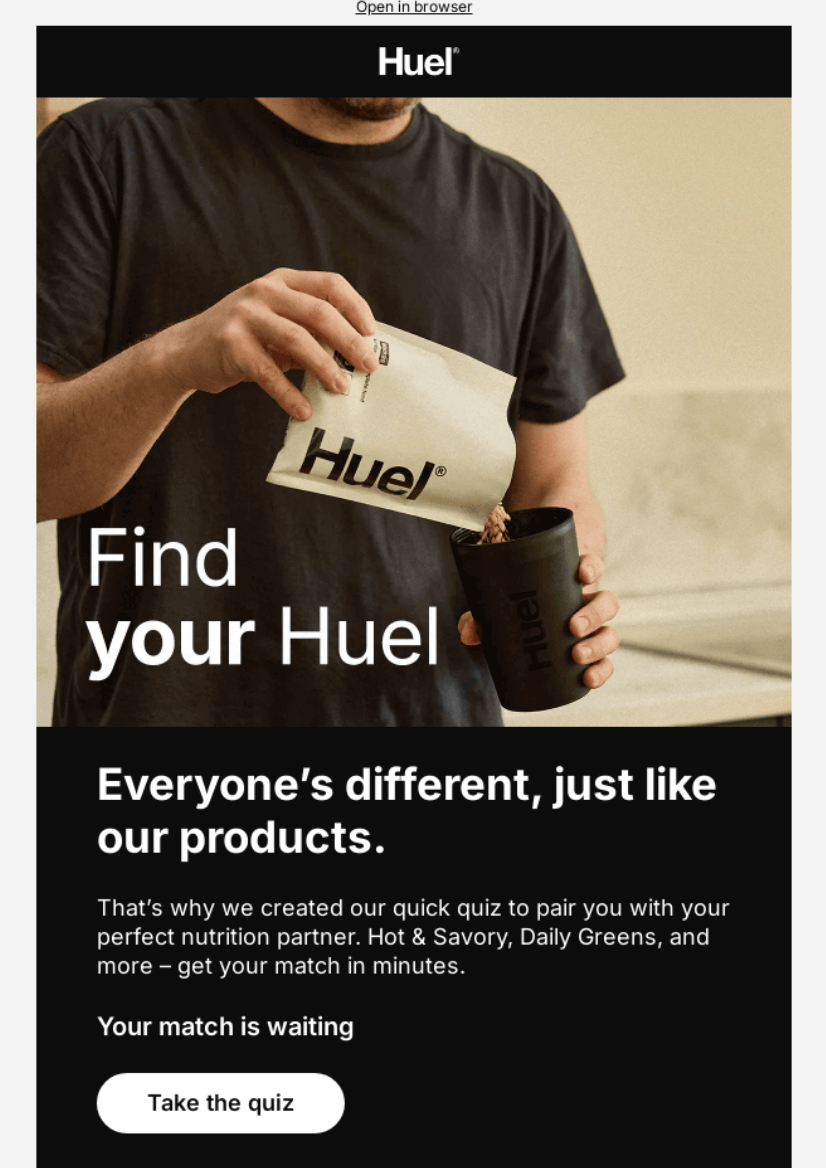
Subject line: “Hueligan, Your Match Is Waiting 🎯”
This email uses a quiz-based approach to provide personalized nutrition matches. The clean design and prominent “Take the quiz” CTA simplify the discovery process, making it easy for customers to find products that fit their unique needs.
You can also use a product recommender to help your suggestions stay personalized to your customer’s unique needs.
Past customers represent your lowest-hanging fruit — they’ve already overcome trust barriers and know your quality. Sending a winback email helps you leverage their buying history to re-engage them before they churn for good.
“Test dramatic subject lines for dormant segments. ‘Breaking up with you’ outperforms polite messages for long-inactive customers.”
— Evaldas Mockus, VP of Growth at Omnisend
The Belgian Boys food brand uses a playful, personality-driven approach in this winback email to reconnect with dormant customers:
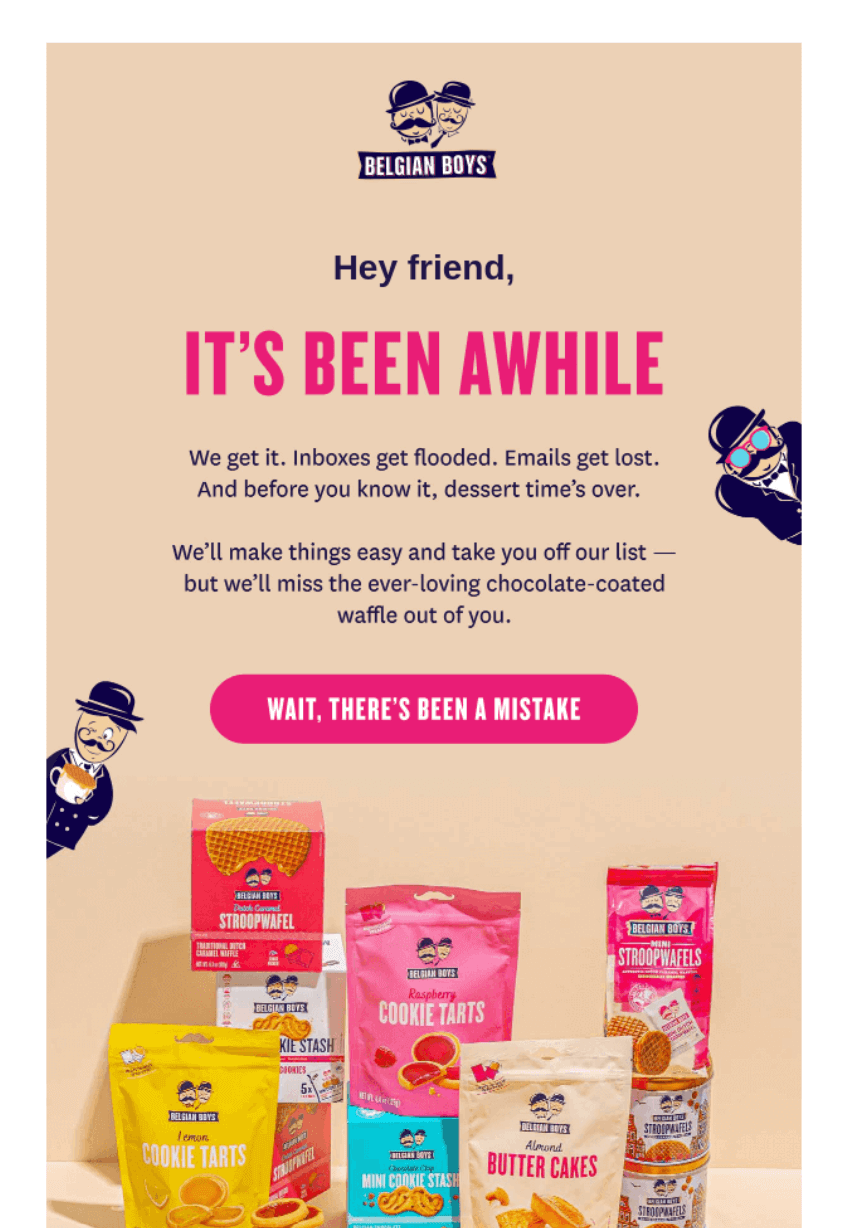
Subject line: “We miss you 😭”
This subject line works effectively by creating an emotional connection that helps get your messages in front of eyeballs.
The prominent “Wait, there’s been a mistake” CTA makes re-engagement effortless, while the brand’s unique voice helps re-establish the relationship.
Stock alerts convert high-intent browsers by notifying customers when their desired items become available again. Perfect your back-in-stock email strategy to capture eager buyers who have already shown a clear interest in your products.
You can find additional tips by watching this video:
“Trigger alerts the moment inventory updates. Speed matters — popular items sell out again within hours.”
— Evaldas Mockus, VP of Growth at Omnisend
Better Booch captures immediate attention by placing the restock news front and center in this back-in-stock email:
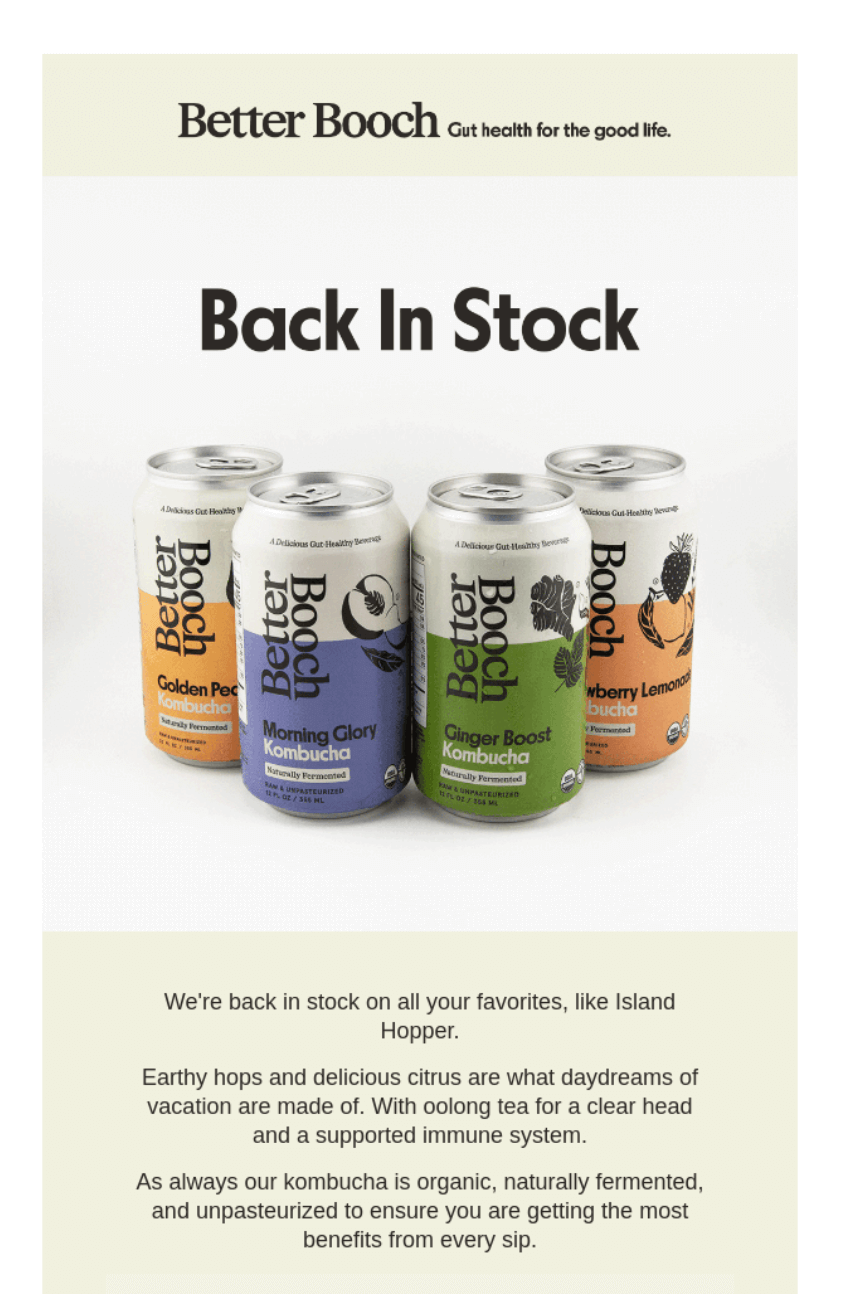
Subject line: “Back in Stock On All Your Favorites”
This email opens with a large “Back In Stock” header and then features images of popular products for instant recognition.
This clean, visual-first layout reminds customers of what they’ve been missing. Additionally, the descriptive copy highlights the benefits of their favorites to drive quick conversions.
Forget complex point systems — customers stick with brands that make them feel like VIPs, not walking wallets. Build a successful loyalty program that keeps customers coming back.
“Make status visible everywhere — emails, accounts, even packaging. Recognition motivates more than points alone.”
— Evaldas Mockus, VP of Growth at Omnisend
Wellness retailer Organics Ocean builds strong loyalty by rewarding its VIP members with 25% off their first four months of subscriptions, giving them a great reason to stay and keep coming back:
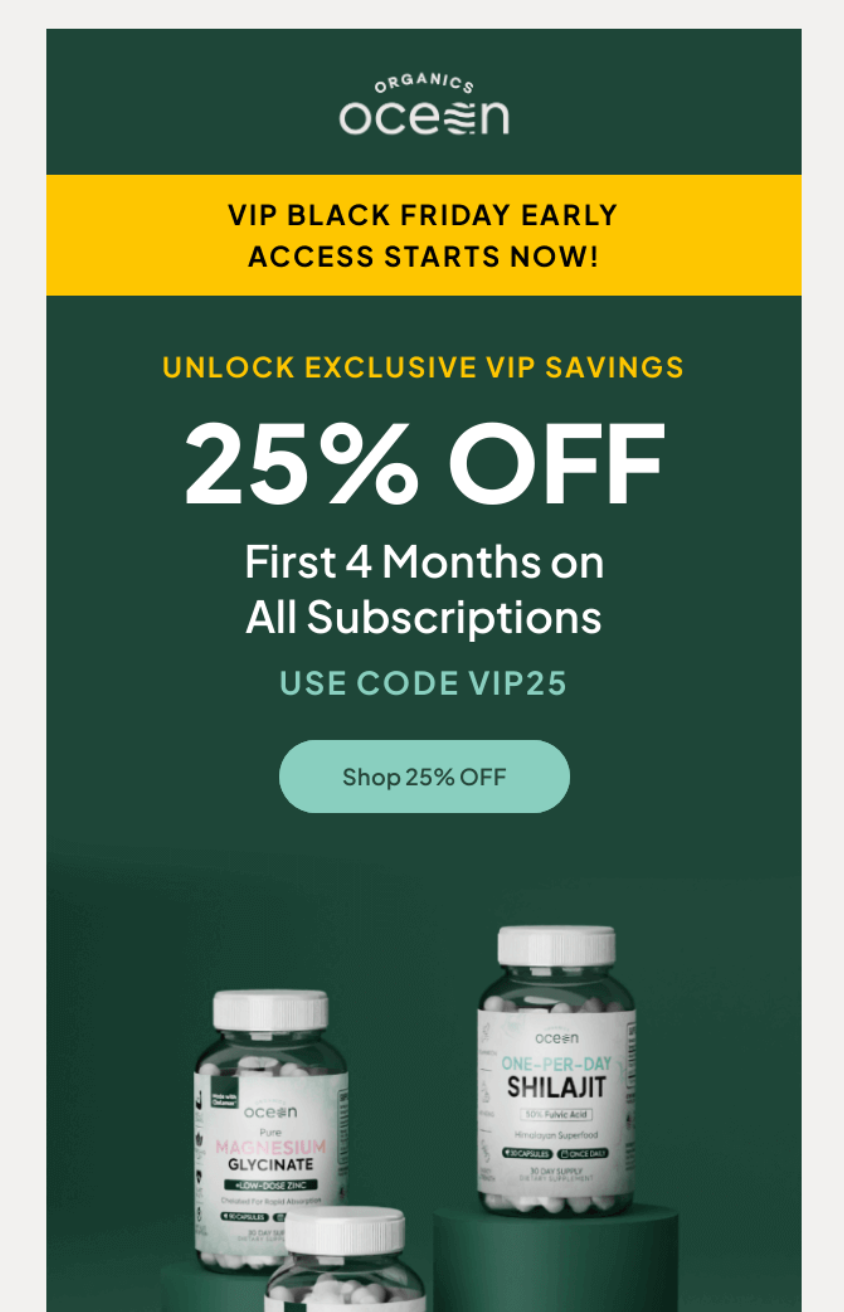
Subject line: 🎩VIPs First! Black Friday Starts NOW!
This loyalty program email rewards status with early access, making members feel valued while securing a discount before the general public.
You could offer similarly significant discounts to encourage new VIP signups and increase average order values per customer.
Forget vanity metrics like opens — revenue drives your business forward. Insights from marketing statistics for ecommerce success highlight how data-driven campaigns consistently outperform generic sends.
These four metrics tell you if your emails are actually doing their job:
Random experiments waste time. Follow these four steps for tests that improve performance:
Omnisend’s A/B testing lets you compare subject lines, sender names, and content simultaneously. Simply split your audience into test groups, and the platform automatically sends the winning version to your remaining contacts.
Email marketing tips evolve as technology and regulations shift. Follow these ecommerce email marketing best practices to stay ahead in 2026:
To use email marketing effectively for ecommerce, set revenue-focused goals, build your list organically, and segment by behavior and purchase history. Furthermore, automate the customer journey from welcome to winback.
This strategic approach ensures that every one of your messages provides value while driving measurable growth.
Follow this step-by-step framework to build a complete ecommerce email marketing strategy:
Email marketing succeeds when it impacts your bank account. Instead of tracking “fuzzy” metrics, focus on specific financial outcomes from these metrics:
Match email types to business outcomes. Welcome series turns subscribers into buyers. Cart recovery saves abandoned revenue. Winback campaigns revive dead relationships. Check results weekly, pivot tactics monthly based on what’s working.
Effective personalization requires two types of data:
Gather zero-party data at high-intent moments, such as through post-purchase surveys or style quizzes. Every response allows you to refine your strategy and personalize your messaging more effectively.
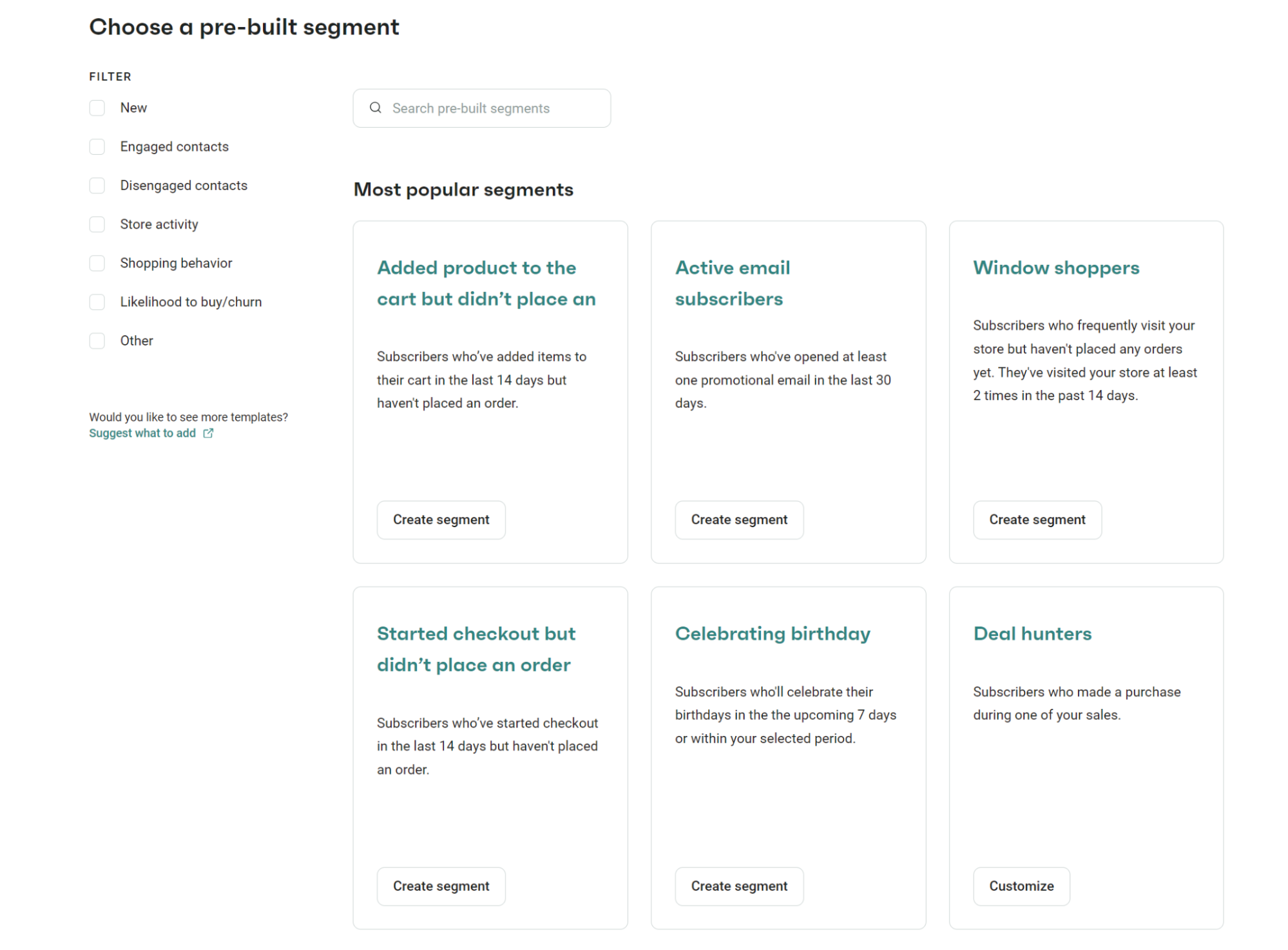
Platforms like Omnisend simplify this by integrating with your Shopify, BigCommerce, and WooCommerce stores to automatically build segments. The screenshot below shows a list of pre-built segments to choose from on Omnisend:
Ecommerce email marketing software needs three capabilities that matter:
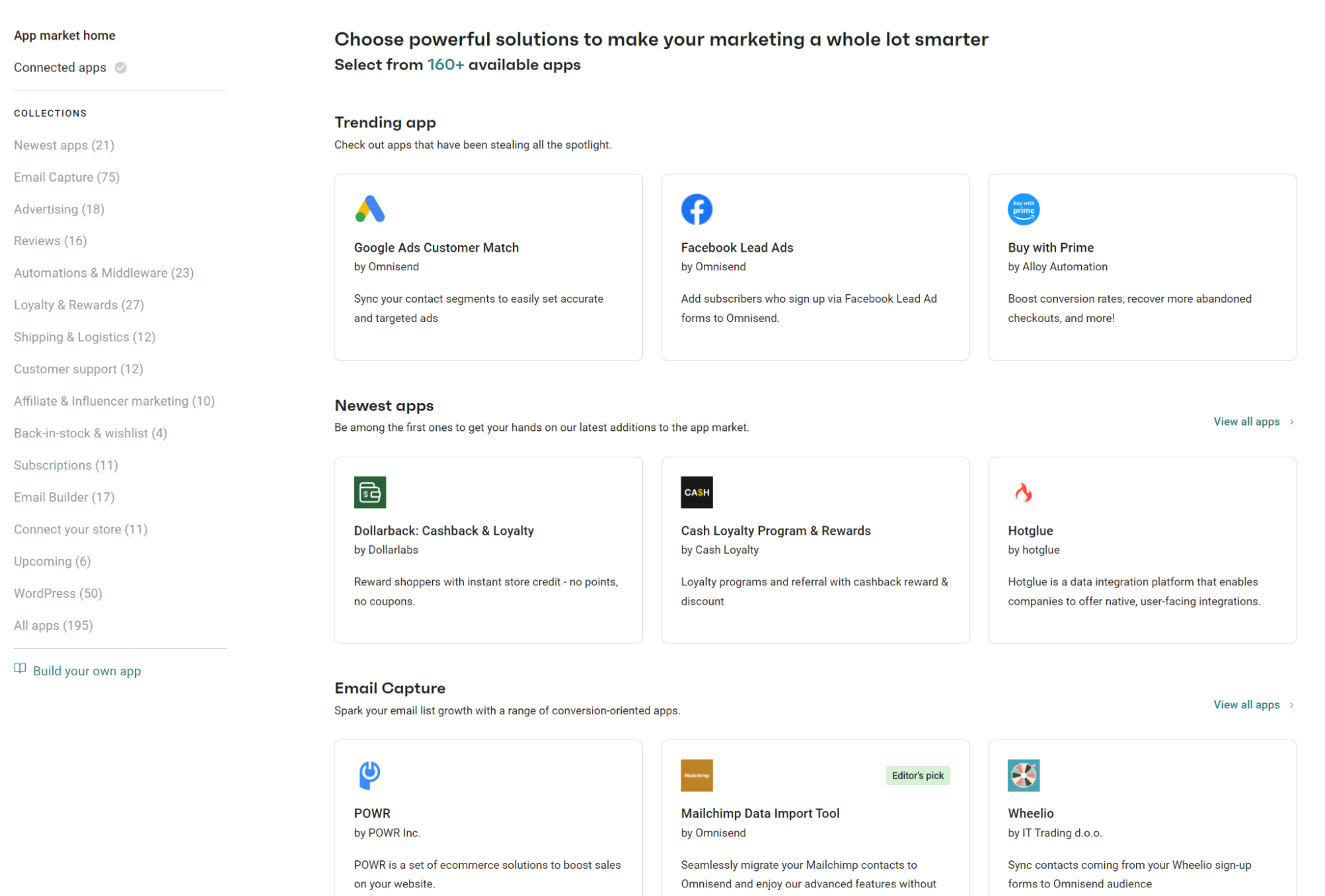
Always verify that your platform integrates with your existing tech stack. For example, Omnisend offers over 160 integrations to connect your ecommerce tools:
Growing an email list requires strategy, not spam. Use the following tips to build your list from scratch and attract high-quality subscribers:
You can check out newsletter signup examples to see which design you’d like to replicate.
Remember that buying lists destroys deliverability. Purchased contacts mark you as spam, tank your sender reputation, and waste money on people who never wanted your emails.
Demographics barely scratch the surface. Email segmentation targets behavior, value, and timing to deliver messages people want.
For example:
Mapping your customer journey ensures every message meets your customer at the exact moment they are most likely to convert.
Focus on these when mapping your customer journey
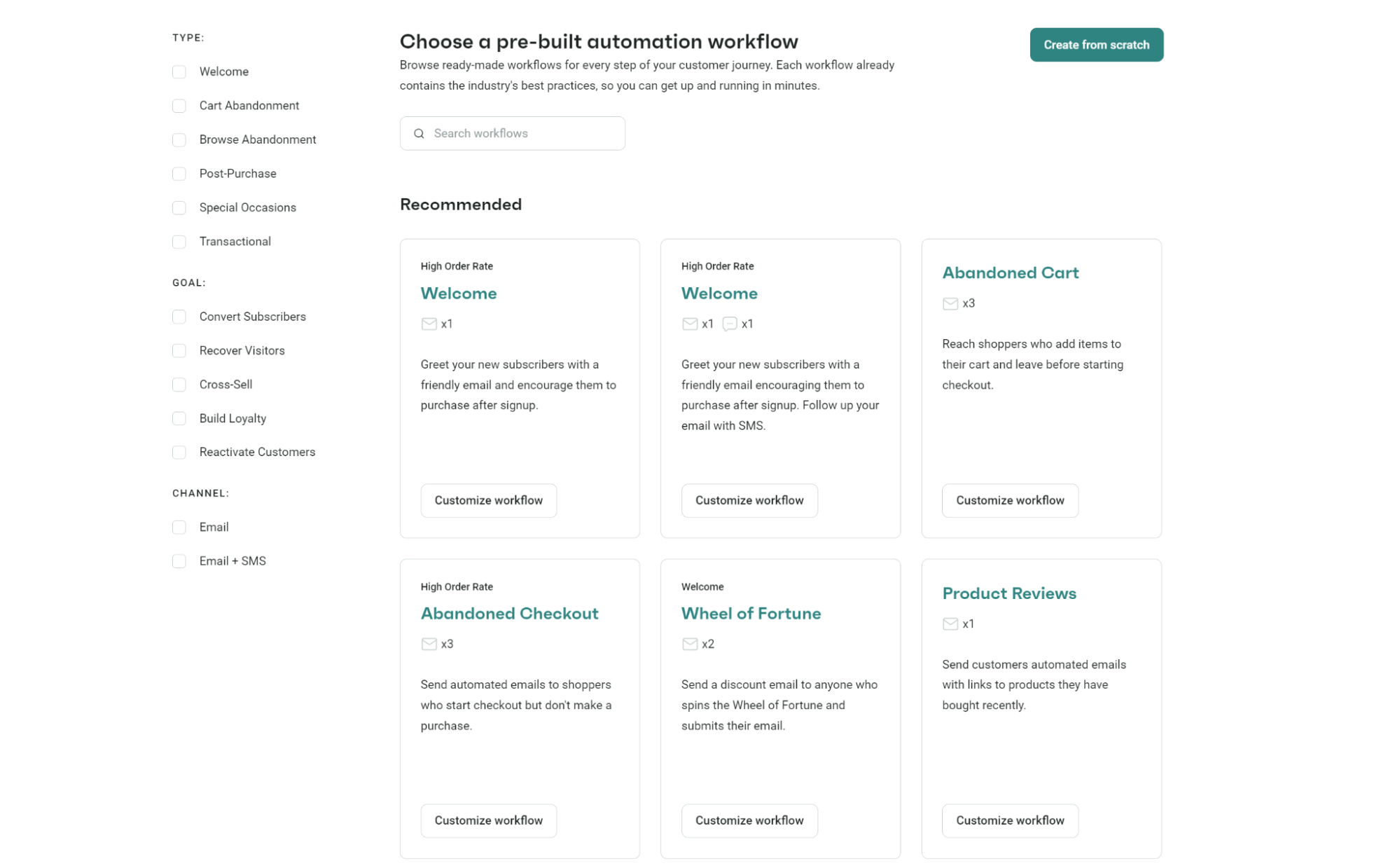
Omnisend data shows automated emails generate 37% of revenue from just 2% of total sends. The math speaks for itself. Platforms like Omnisend provide pre-built email automation workflows to help you launch these essential touchpoints quickly.
The screenshot below shows the pre-built automation workflows available on Omnisend, including flows for product reviews, cross-sells, and many more:
With over 60% of emails opened on mobile, you should design your emails for small screens first. Use single-column layouts, a minimum font size of 14px, and “thumb-sized” buttons.
Also, be consistent in colors and voice across all sends to reinforce trust and brand recognition. Establish a consistent email cadence. Test whether your audience prefers two emails a week or daily updates, and watch for rising unsubscribes.
Finally, plan your holiday and launch schedules months, but leave room to respond to trending moments or breaking news.
These seven steps create your foundation. Success comes from testing, measurement, and refinement based on how your unique audience responds.
Email marketing is least effective when you treat every subscriber the same, overwhelm their inboxes, or ignore technical requirements that keep you out of spam folders.
Avoid these common mistakes for effective email marketing:
Choosing the best-fit ecommerce email marketing platform impacts your revenue, customer relationships, and marketing efficiency. This comparison table highlights the top six platforms based on features, pricing, and user feedback:
| Platform | Best suited for | Free plan | Starting price | User ratings |
|---|---|---|---|---|
| Omnisend | Ecommerce stores of all sizes | ✅ | $16/month for 500 contacts | G2: 4.6, Capterra: 4.7 |
| Moosend | New ecommerce stores | ❌ | $9/month for 500 contacts | G2: 4.7, Capterra: 4.6 |
| Drip | Stores needing extensive automations | ❌ | $39/month for 2,500 contacts | G2: 4.4, Capterra: 4.4 |
| MailerLite | Small businesses and bloggers | ✅ | $10/month for 500 contacts | G2: 4.6, Capterra: 4.7 |
| ActiveCampaign | Businesses wanting a built-in CRM | ❌ | $15/month for a 10x contact send limit | G2: 4.4, Capterra: 4.6 |
| Klaviyo | Advanced data segmentation | ✅ | $20/month for 250 profiles | G2: 4.6, Capterra: 4.6 |
Platform breakdown
You’ve seen what works — automation, segmentation, and data-driven testing. Omnisend brings all of these into one platform so you can execute your ecommerce email marketing strategy faster and more effectively.
Omnisend helps you grow your list through high-converting forms and keep your audience organized with real-time segmentation.
You can build automated workflows for key moments, such as welcome emails, cart recovery, and post-purchase follow-ups, without technical complexity.
Creating campaigns becomes easier with ready-made templates and built-in AI support, while detailed analytics show exactly which emails drive revenue. You can also test different elements and quickly scale what works.
With the right system in place, every email becomes part of a structured journey that drives engagement, conversions, and repeat purchases.
Quick sign up | No credit card required
The best platform depends on your specific needs, but tools like Omnisend stand out for ecommerce. Omnisend offers built-in segmentation, automation workflows, and templates designed for online stores.
Other options like Drip focus on advanced automation, while Moosend is simpler for beginners. Choose a platform that integrates with your store and supports automation, segmentation, and real-time data syncing.
The best ecommerce email marketing strategy combines automation with consistent campaigns to drive both first-time and repeat purchases.
Here’s what that looks like:
— Build your list organically by offering value that attracts subscribers
— Segment your audience based on browsing and purchase behavior
— Automate key journeys like welcome, cart recovery, and post-purchase emails
— Personalize your emails using customer data for relevance
— Test and optimize campaigns regularly to improve performance
To see the highest ROI, focus on these important flows:
— Welcome series
— Cart abandonment
— Post-purchase emails
— Browse abandonment
— Winback campaigns
— Back-in-stock emails
Implementing these flows will help your brand recover lost sales at every stage of the buyer’s journey.
Marketing automation in ecommerce uses customer behavior to automatically trigger emails. This approach makes sure customers receive the right message at the right time.
Automation in marketing helps your marketing run 24/7 without constant manual oversight.
A safe starting point for most brands is two emails per week. This allows you to stay top-of-mind. Focus on value-driven content like product updates, customer stories, tips, or exclusive offers.
Additionally, always monitor your unsubscribe rates. A high unsubscribe rate is a sign to reduce your frequency, while low engagement may signal you need more frequency or better content.
Costs vary based on your list size and required features. Many platforms offer free plans for under 500 to 1,000 contacts. Growing stores typically spend $15–$60 per month, while enterprise-level brands with over 100,000 subscribers may budget thousands of dollars per month.
Given that email marketing consistently delivers a high ROI, it remains one of the most cost-effective channels for ecommerce growth.

TABLE OF CONTENTS
TABLE OF CONTENTS

What’s next



No fluff, no spam, no corporate filler. Just a friendly letter, twice a month.